Battery life on the Google Pixel 7 series isn’t the best, but it’s also not the worst. For most people, it’s going to get you through the day without any issues. But if you need a bit more juice, here are some tips you can use to get more out of your battery life.
Adaptive battery
The first tip here is going to be Adaptive Battery. It’s a feature on Pixels that allows the phone to learn how you use it, and greatly extend battery life. This is done by limiting apps when you don’t use your phone, and also limiting the speed of the processor. We’ve gone over how this feature works here.
But it’s good to keep in mind that the Adaptive Battery doesn’t do much for the first week or two. Your phone needs to learn how you use it, which takes about two weeks. After that, you’ll find that the adaptive battery has started to kick in. And in some cases, it can really extend the battery life of your Pixel 7.
Screen resolution (Pixel 7 Pro only)
Next up is the screen resolution. This is only available on the Pixel 7 Pro, since the Pixel 7 is already FHD+ anyways.
Out of the box, Google has the Pixel 7 Pro set to FHD+ resolution, so this tip really only applies if you’ve changed that option to QHD+. But you can change it back to FHD+ which will conserve some juice on your battery. That’s because it isn’t lighting up as many pixels. Which is really good for battery.
Smooth Display
While we’re on the topic of the display, both the Pixel 7 and Pixel 7 Pro have higher refresh rates now. So the Pixel 7 is set at 90Hz and the Pixel 7 Pro at 120Hz. What Smooth Display does is, it will ramp up and down from 60Hz to 120Hz on the Pixel 7 Pro and 60Hz to 90Hz on the Pixel 7. It unfortunately doesn’t go all the way down to 1Hz like some other phones, but it is what it is.
So a way to save battery on the Pixel 7 series would be to turn off Smooth Display. This means that you’ll be at 60Hz all the time on the Pixel 7 series. That’s not really a bad thing, as it is still super smooth.
In my testing, on both the Pixel 7 and Pixel 7 Pro, I was able to get about 1-2 hours of screen on time, over the 5-6 hours I was getting with it on. So if you really need to squeak out a bit more juice, this is a good way to do it.
Dark Theme
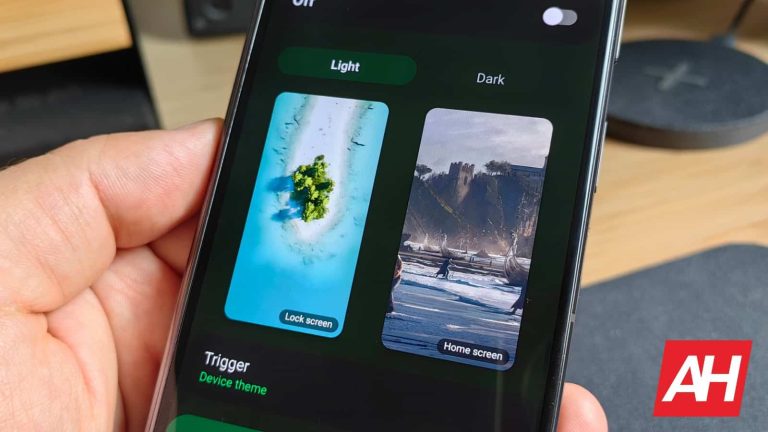
This tip is kind of common sense at this point, and a lot of people use the Dark Theme already. But basically, if you turn on dark theme, you should get more battery life as well. Why? It’s simple. The Pixel 7 and Pixel 7 Pro both use an OLED display. Which means that each individual pixel is lit up. Brighter colors use more juice, versus dark colors, especially black. In fact, some studies from Google have shown that white pixels use over 50% more battery than a black or even dark gray pixel on an OLED display.
I wouldn’t recommend using the dark mode all the time. As it makes it tough to see outside, particularly in direct sunlight. But instead, use the schedule feature. So for myself, I have it set to light mode during the day from sunrise to sunset, and then at sunset it turns to dark mode. This is a good schedule because usually after sunset it is darker, even if you are at home. There’s less light coming in from the windows and such. But you can also do your own schedule here too.
Enable Extreme Battery Saver Mode
This tip is really only meant for those times where you won’t be near a charger for a while but your phone is running low. That’s because Extreme Battery Saver will turn off basically everything on your phone. And while Google says it can last 72 hours in that mode, that does make your smartphone a lot less “smart”. So it’s recommended to only use in a pinch.
Restart your Pixel
Finally, it’s a good idea to restart your Pixel 7 every once in a while. Think of it as a good reset for your phone, and that often times can fix a lot of things. Including battery draining apps.
Some phones have a setting that you can use, which will automatically restart your phone at a certain time. Pixel doesn’t offer that, so it’s a good idea to still restart your phone about once a week.
Wrap Up
As always, battery life is going to depend on what you do with your phone. Are you on WiFi all day? Do you watch a lot of videos? Do you send a lot of texts? Etc. While I am getting pretty good battery life out of my Pixel 7, that might not be the case for everyone else. So these tips will help you squeak out a little more juice from your phone and make sure it can last you the whole day.
The most important tip here is definitely Adaptive Battery. It is on by default, but some people tend to turn it off, don’t do that. It can only help your battery life, and not hurt it. In fact, in some cases, it can really help battery life.
There are already some major players on the AI field, but that doesn’t mean that there’s no room for others. Elon Musk, who’s been talking about entering the AI field for a while, just announced that his new AI startup is launching soon. It’s called xAI, and with it, Elon Musk is looking to take AI to the next level.
What is xAI, and how does Elon Musk plan to change AI?
As stated, there are several large companies pushing AI forward. We have Google, OpenAI, Anthropic, and other smaller companies. Apple is also set to debut its AI sometime down the road. A while back, we got news that Elon Musk was also planning on entering the AI blood match even before he renamed Twitter to X.
Now, he’s building out an “X” ecosystem of products, and xAI is one of them. Musk acquired thousands of high-powered Nvidia GPUs to build the LLM behind the company. We’re not sure what GPUs he purchased, but we can bet that they’re pretty expensive.
After acquiring the hardware, he needed to acquire some brain power. According to the report, Musk snapped up people from companies like Google, DeepMind, Microsoft Research, OpenAI, Tesla, and Twitter. These are people with a deep understanding of AI and have been working on some of the powerful AI that’s on the market today. Some projects these folks worked on include GPT-3.5, GPT-4, and DeepMind’s AlphaCode.
Goal
The goal of xAI is to basically understand the universe. xAI co-founder Greg Yang says that the company will dive into the “mathematics of deep learning” and “develop the ‘theory of everything’ for large neural networks”. That’s far from helping you write your mid-term exam, so xAI’s and OpenAI’s goals are very different. It looks like xAI won’t prioritize being a user-facing product.
That’s a pretty high-reaching goal, but looking at what Musk said during an interview on Fox back in April, it seems that this initiative is still fueled by his personal ambitions. This is when he unveiled the name “TruthGPT”, and he noted that the problem with AI companies was they were focusing too much on systems that are “politically correct”. At the end of the day, that’s a personal opinion, and it’s not wise to start major wide-reaching initiatives based on one’s personal opinion.
That’s one of the reasons why X (Twitter) has been in such a whirlwind since Elon took over. He can’t make it too personal. Also, as time goes on, there will be laws and regulations regarding AI. We’re not sure if they will be aligned with his personal views.
Launch date
Right now, details about this company and its AI are scarce, but we know that the company will officially launch its AI on Saturday, November 4th. When it launches, we’ll have more information about this company and what it will do.
Microsoft’s new AI-powered Secure Future Initiative aims to assist governments, businesses, and consumers in combatting cybersecurity threats.
Microsoft has announced its first-ever Secure Future Initiative to improve cybersecurity protection. This initiative will help government agencies, unsuspected users and organizations tackle cybercriminals and state-sponsored hackers with advanced response measures. The Secure Future Initiative consists of three pillars:
Microsoft is planning to improve AI-based cyber defences in three key areas. These include threat intelligence, in which the company intends to use AI to detect/analyze cyber threats. Secondly, it will use AI to encourage analytical productivity by helping cybersecurity analysts to become more responsive.
Thirdly, the company will utilize AI for endpoint protection by offering real-time protection against cyberattacks on endpoint services, including phones, laptops, and servers. Moreover, the company is committed to securing AI in its services based on Responsible AI principles and building more powerful AI-based protection for governments, countries, consumers, and organizations.
Advances in fundamental software engineering:
Through this initiative, Microsoft aims to improve its software security. In this regard, the company is developing new security technologies and incorporating security mechanisms into every phase of software development. This also entails three areas of improvement.
Firstly, the company intends to develop a dynamic Security Development Lifecycle (dSDL) to integrate cybersecurity protection uninterruptedly to counter emerging threat patterns. It will encourage using AI-powered secure code analysis and GitHub Copilot to audit/test source code against advanced threats and offer secure default settings for MFA (multi-factor authentication) out-of-the-box.
Secondly, the company aims to strengthen identity protection against sophisticated attacks by introducing/applying the most advanced features and adopting a unified and consistent process that will verify and manage the identities and access rights of users, devices, and services across all platforms/products.
Another addition will be making these capabilities freely available to non-Microsoft application developers. Microsoft also intends to migrate to a fully automated consumer/enterprise key management system to ensure that keys remain inaccessible even when underlying processes are compromised. Furthermore, the company will cut cloud vulnerability mitigation time by 50%.
Advocacy for stronger application of international norms to protect civilians from cyber threats:
According to Microsoft’s blog post, the company wants to promote international cooperation on cybersecurity. This initiative also entails advocacy for stricter norms to provide enhanced protection to innocent users against cyber threats.
To ensure this, Microsoft is calling for a new international norm that would make it illegal for governments to plant malware or create/exploit cybersecurity vulnerabilities in critical infrastructure providers’ networks. This new norm would recognize cloud services as critical infrastructure protecting against attacks under international law.
“We need governments to do more together to foster greater accountability for nation-states that cross these red lines,” the company noted.
A few days back, Samsung‘s S Pen for the Galaxy S24 Ultra was certified in Brazil with the model number EJ-PS928. As usual, it matches with the phone’s model number, SM-S928. The listing didn’t reveal anything else, not even the Bluetooth version. We now have that information thanks to a Bluetooth certification. It appears Samsung will give us the same S Pen as the Galaxy S23 Ultra.
Bluetooth SIG certifies the S Pen for the Galaxy S24 Ultra
The Bluetooth SIG (Special Interest Group), the organization responsible for the development of Bluetooth standards and the licensing of Bluetooth technologies and trademarks to device manufacturers, has certified that the S Pen will ship with the Galaxy S24 Ultra. It’s the same model number we saw before. Additionally, we have confirmation that the S Pen will support Bluetooth 5.1.
By the looks of it, Samsung is giving us the same S Pen it shipped with the Galaxy S23 Ultra earlier this year. The previous-gen accessory also supported Bluetooth 5.1. The company hasn’t upgraded it to a newer version. The core specification of Bluetooth 5.4 was released earlier this year, while Bluetooth 5.3 has been around for a few years now.
Samsung could still improve the S Pen experience by lowering the latency. However, the stylus pen already boasts an incredibly low latency of just 2.8 milliseconds. Coupled with the pen’s 0.7mm fine tip and 4096 pressure levels, it offers a real pen-like experience when used on the Ultra flagship’s smooth display. Writing on the screen feels as smooth as writing on paper.
The S Pen is capable of doing a lot more than just writing and drawing, though. You can use it to quickly translate text between several languages, as a remote shutter button for your Galaxy camera, for controlling music, and more. It remains to be seen if Samsung has added new features and tricks to improve the S Pen experience with the Galaxy S24 Ultra.
The Galaxy S24 series is nearing its launch
Rumors have it that Samsung will unveil the Galaxy S24 series in mid-January. More precisely, leaks have pointed to a January 17 launch of the new flagships, about two weeks earlier than the Galaxy S23 series. If that’s accurate, the devices are two and a half months away now. We should come across plenty of leaks about the phones, including the Galaxy S24 and Galaxy S24+, in the build-up to their launch.
Folks at SamMobile can confirm to you why you shouldn’t put your Samsung Galaxy Buds FE in a washing machine. You might be wondering why on earth someone would put their gadget into a washing machine. Well, mistakes happen, and when these mistakes such as this happen, some users fall back to the water-resistant design of their devices.
Most of the time, this feature helps save lots of gadgets from damage from water or other liquids. But, when a device lacks a water-resistant design, saving it from water-induced damage is almost impossible. The Samsung Galaxy Buds FE aren’t fully water-resistant and will break if placed in water.
This pair of earbuds from Samsung launched a few weeks ago along with the Galaxy S23 FE. Just like the S23 FE, the new Galaxy Buds FE are affordable options for buyers to step into the Samsung ecosystem. Considering that this pair of earbuds is an affordable option, they come with some limitations in comparison with their more expensive options.
Despite its impressive audio performance and design, the Samsung Galaxy Buds FE is not fully water-resistant
A few weeks ago, Samsung released four new products into the Galaxy ecosystem. There’s a smartphone, two tablets, and a pair of wireless earbuds. All these products are part of the Samsung FE (Fan Edition) line-up that netizens didn’t get last year.
The remarkable thing about the devices in this line-up is that they are more affordable than the flagships they are based on. For this reason, they lose certain features that the flagships. For instance, the Galaxy S23 FE comes with a Snapdragon 8 Gen 1 processor and not the 8 Gen 2 option on the regular S-series flagship device.
Similarly, the new Samsung Galaxy Buds FE lose out on certain features available on the regular Galaxy Buds2. One such feature is full water resistance, and for some reason, Samsung didn’t state this on its official website. The new Galaxy Buds FE comes with IPX2-level water and splash resistance.
This level of protection only protects the buds themselves and not the case that holds them. Just like the folks at SamMobile noted, the case for their Buds FE that went into the washing machine isn’t working. However, the buds themselves seem to be working fine without any serious water damage.
So if you are looking to purchase the new FE series earbuds, then you’ll need to be careful. Don’t toss the earbuds along with their case into a washing machine or any other water source. If you keep your new earbuds away from water, you might not need to change them anytime soon.
Kubernetes is a popular open-source platform for managing containerized workloads and services. It’s a system that simplifies a wide array of deployment, scaling, and operations tasks, but it’s not without its risks. Just as any other software or platform, Kubernetes is exposed to security vulnerabilities.
Kubernetes vulnerabilities are security flaws or weaknesses within the Kubernetes system itself, its configuration, or in applications running on it. They could stem from a range of issues such as misconfigurations, insecure communication, lack of updates, inadequate isolation, and more. When such vulnerabilities are exploited, they can lead to unauthorized access, data breaches, service disruptions, and other security incidents.
Understanding Kubernetes vulnerabilities requires a deep dive into the architecture and functionalities of Kubernetes. It involves understanding its different components like the API server, etcd, kubelet, kube-proxy, the kubectl command line, and more, as well as the security measures surrounding these components. It’s through this understanding that you’ll be able to identify where vulnerabilities might exist and how they can be exploited.
Importance of Identifying and Handling Kubernetes Vulnerabilities
Ensuring Data Integrity and Confidentiality
By identifying and handling Kubernetes vulnerabilities, you’re safeguarding your data from potential threats. When a vulnerability is exploited, it can lead to unauthorized access to your data. This breach can result in data loss, alteration, or theft, which can have devastating effects on your organization.
In ensuring data integrity and confidentiality, you need to focus on several areas. These include the encryption of data at rest and in transit, proper access controls, and timely security updates. Kubernetes has several built-in security features that assist in these areas, but they are only effective if used correctly. For example, Kubernetes Secrets is a feature that helps you manage sensitive data, but if not used properly, it could become a vulnerability itself.
Maintaining High Availability
Kubernetes is designed to ensure high availability of applications. It achieves this through features like self-healing, automated rollouts and rollbacks, and horizontal scaling. However, vulnerabilities can disrupt these features, leading to service disruptions and downtime. By identifying and handling Kubernetes vulnerabilities, you’re ensuring that these disruptions are minimized.
High availability in Kubernetes is not just about keeping applications running. It also involves ensuring that the Kubernetes control plane is highly available. This means that the master nodes, which control the entire Kubernetes cluster, need to be protected from vulnerabilities that might lead to their failure.
Regulatory Compliance
Many organizations need to comply with various regulatory standards. These could be industry-specific regulations like HIPAA for healthcare or GDPR for data protection, or they could be general cybersecurity regulations. These regulations typically require organizations to have certain security measures in place, which includes identifying and handling vulnerabilities.
In the context of Kubernetes, regulatory compliance can involve several aspects. These include logging and monitoring to detect and respond to security incidents, implementing strong access controls, ensuring data encryption, and more. By identifying Kubernetes vulnerabilities and addressing them, you’re not just improving your security posture but also ensuring that you’re compliant with these regulations.
Misconfigured RBAC Settings
Role-Based Access Control (RBAC) is a critical feature in Kubernetes that allows you to regulate who has access to what resources. The primary issue arises when the RBAC settings are misconfigured, leading to unauthorized access to sensitive data.
To avoid this, you need to review and manage your RBAC settings diligently. Limit the access privileges only to those who need them and ensure you routinely audit these settings. It might seem like a tedious task but using a tool like Kubernetes RBAC Lookup can simplify the process. This tool provides a comprehensive overview of what permissions each user has and can quickly identify any misconfigurations.
Here’s a YAML manifest that creates a role with limited permissions:
One of the significant Kubernetes vulnerabilities is the exposure of its dashboard and API endpoints. If these endpoints are openly accessible, they can become an easy target for cybercriminals.
To address this issue, you should first disable public access to the Kubernetes dashboard. Then, secure your API server by enabling authentication and authorization. Use network policies to restrict inbound and outbound traffic to your API endpoints.
Here’s an example of a network policy that only allows traffic from a specific namespace:
Container images and registries form the backbone of any Kubernetes deployment. However, they can be a source of vulnerabilities if not properly secured.
To mitigate this, always use images from trusted sources and keep them updated. Regularly scan your images for vulnerabilities using tools like Clair or Docker Bench. Also, ensure your registries are secure by implementing authentication and only granting necessary permissions.
Here’s a YAML manifest that pulls an image from a private Docker registry:
Many Kubernetes deployments retain the default privileges and permissions, which can pose serious security risks. These defaults often grant more permissions than necessary, leading to potential misuse.
To remediate this, you should modify the default settings to restrict unnecessary privileges. Use the principle of least privilege (PoLP), assigning only the minimum permissions necessary for a user or process to function.
Here’s an example of a Pod Security Policy that restricts default privileges:
Note: PodSecurityPolicy has been deprecated since 1.21 (Kubernetes version) and it is advisable to use Pod Admission Control.
Unpatched Nodes and Components
Unpatched nodes and components represent a significant vulnerability in Kubernetes. They can be exploited to gain unauthorized access or disrupt operations.
You should regularly update and patch your nodes and other components to the latest stable versions. Use tools such as Kubernetes Operations (kops) or Kubernetes Engine (GKE) to automate the process.
Here’s a command to upgrade all nodes in a cluster:
kubectl get nodes | grep -v VERSION | awk '{print $1}' | xargs -I {} kubectl drain {} --force --ignore-daemonsets
In conclusion, while Kubernetes offers a multitude of benefits, it’s crucial to be aware of its vulnerabilities. By staying vigilant, regularly reviewing your configurations and permissions, and keeping your components updated, you can safeguard your Kubernetes deployments from potential threats.
On the 27 October, the Apache Software Foundation (ASF) announced a very serious vulnerability in Apache ActiveMQ that can be used to achieve remote code execution (RCE). The Cybersecurity and Infrastructure Security Agency has now added this vulnerability to its Known Exploited Vulnerabilities Catalog, based on evidence of active exploitation. This means that Federal Civilian Executive Branch (FCEB) agencies need to remediate this vulnerability by November 11, 2023 in order to protect their devices against active threats.
The catalog is a list of vulnerabilities criminals are actively using, so everyone else should act swiftly to patch or mitigate the problem. In this case the criminals are, or at least include, the HelloKitty ransomware group, also known as FiveHands ransomware. The group was first seen in November 2020 and typically uses the double extortion method of both stealing and encrypting data.
The ASF describes the vulnerability as follows:
The vulnerability may allow a remote attacker with network access to a broker to run arbitrary shell commands by manipulating serialized class types in the OpenWire protocol to cause the broker to instantiate any class on the classpath.
Apache ActiveMQ® is “middleware”, a popular open source, multi-protocol, Java-based message broker. Message brokers like this are often found in enterprise systems where they are used to create reliable communication between different applications and system components. OpenWire is a protocol designed to work with message-oriented middleware. It is the native wire format of ActiveMQ.
The Common Vulnerabilities and Exposures (CVE) database lists publicly disclosed computer security flaws. The CVE in Apache ActiveMQ is listed as:
CVE-2023-46604 (CVSS3 score 10 out of 10): because OpenWire commands are unmarshalled, by manipulating serialized class types in the OpenWire protocol an attacker could cause the broker to instantiate any class on the classpath. The classpath is a parameter in the Java Virtual Machine or the Java compiler that specifies the location of user-defined classes and packages. This caused a deserialization of untrusted data vulnerability. To fix the issue it was necessary to improve the Openwire marshaller validation test.
To successfully exploit this vulnerability, three things are required:
Network access
A manipulated OpenWire “command” (used to instantiate an arbitrary class on the classpath with a String parameter)
A class on the classpath which can execute arbitrary code simply by instantiating it with a String parameter.
A security update to patch the vulnerability was available on October 25, 2023, but as of October 30, there were still 3,329 internet-exposed servers using a version vulnerable to exploitation. Users are recommended to upgrade Apache ActiveMQ to version 5.15.16, 5.16.7, 5.17.6, or 5.18.3, which fixes this issue. Users of both “Classic” and “Artemis” are recommended to upgrade.
A lot of Indicators of Compromise (IOCs) can be found in this FBI report.
Prevent intrusions. Stop threats early before they can even infiltrate or infect your endpoints. Use endpoint security software that can prevent exploits and malware used to deliver ransomware.
Detect intrusions. Make it harder for intruders to operate inside your organization by segmenting networks and assigning access rights prudently. Use EDR or MDR to detect unusual activity before an attack occurs.
Stop malicious encryption. Deploy Endpoint Detection and Response software like Malwarebytes EDR that uses multiple different detection techniques to identify ransomware, and ransomware rollback to restore damaged system files.
Create offsite, offline backups. Keep backups offsite and offline, beyond the reach of attackers. Test them regularly to make sure you can restore essential business functions swiftly.
Don’t get attacked twice. Once you’ve isolated the outbreak and stopped the first attack, you must remove every trace of the attackers, their malware, their tools, and their methods of entry, to avoid being attacked again.
Malwarebytes Managed Detection and Response (MDR) simply and effectively closes your security resources gap, reduces your risk of unknown threats, and increases your security efficiency exponentially. Malwarebytes MDR staffs highly experienced Tier 2 and Tier 3 analysts who are hands-on with customer endpoints, ensuring critical threats are quickly identified and a thorough response is rapidly deployed.
Want to learn more about MDR? Get a free trial below.
HBO Max, one of the top streaming services over the past couple of years has fused with Discovery+ and changed its name to simply “Max”. However, the older service still exists, and people are still enjoying it, though not for much longer. According to a new announcement, HBO Max is losing some major features like 4K video streaming.
This should be expected; you can’t expect older services to retain their features forever. HBO allowed HBO Max to stay active over these months for people who didn’t want to switch up just yet. The company announced that the service will maintain the full feature set over a six-month period. Well, that period is almost up, and the company is soon to make some changes.
HBO Max is losing 4K video and other features
If you’re on the second highest-paid tier of HBO Max, which costs $15.99/month, you have the ability to watch crisp 4K video on your plan. However, in December, your top resolution will only be 1080p, which is a major downgrade. That’s a 75% dip in resolution, so you’ll definitely notice it.
If you want to keep your 4K streaming, then you will need to upgrade to the $19.99/month Ultimate package. However, if you’re on this plan, you’re not immune to changes and cuts. You will no longer have access to multiple concurrent streams. This means that you’ll only be able to stream content on one screen at a time.
If you’re on either of these plans, you’ll see these features hit the road come December 5th. We’re not sure how long HBO Max will remain functional after that, but you can bet that the company is going to further push people to switch over to Max.
It might be the right move, as Legacy HBO Max will continue to be picked dry until it’s eventually shut down. However, Max will continue to be supported for years to come.
The holiday season is ahead of us, and many of you will be looking for gifts for your loved ones. As we do every year, we’re here to help. We’re publishing a range of articles with gift suggestions in various categories. In this particular article, you’ll find some of the best gifts under $50, which is the lowest price point we’re assembling. A gift doesn’t have to cost a lot in order to be great, of course, which is why we did our best to pull out some interesting ones for you here. We’ll focus on 5 products below, but you’ll also spot some honorable mentions towards the end of the article. All of the products listed here are available on Amazon, by the way.
Best budget keyboard: Logitech K380
Classy typing on a budget
Pretty much everyone needs a good keyboard, and such a product does not need to cost a lot. The Logitech K380 is a very good example of a good keyboard that won’t break the bank. It has been on the market for quite some time, and it has great reviews for a good reason. It doesn’t cost a ton of money, and yet it offers good build quality, and features that will be enough for most people.
First and foremost, this is a Bluetooth keyboard. It does not come with a Wi-Fi dongle some of Logitech’s more expensive offerings include. Bluetooth 3.0 is included, which is not the latest offering, not at all, but it’s more than enough here. The main attraction of this keyboard, for many people, will be its easy-switch option. The Logitech K380 can be paired with three devices at the same time, basically. You can easily switch between them via the easy-switch buttons on the keyboard (top-left corner). That way you can use it with your computer, smartphone, and tablet at the same time, or whichever other devices you wish.
This keyboard is also rather compact. It does not have a numpad on the right side. Many people these days prefer smaller keyboards, as you can place them in your backpack without a problem, and carry them around with you. This is a great example of such a product. The back side of the keyboard is also raised for a more comfortable typing position. You’ll also notice that the Logitech K380 features round buttons, which is kind of unusual. It’s easy to get used to, however, and the keys seem to have a decent amount of travel. This is not a mechanical keyboard, though, so keep that in mind.
It is compatible with a wide range of devices, including Windows, Mac, Chrome OS, Android, iPhone, Apple TV… and various other gadgets. It is made out of plastic, but that’s not necessarily a bad thing, as it helps it remain rather light. You’ll also get great battery life here, up to 2 years of battery life with two AAA batteries. This keyboard costs $22.99, on Amazon.
Best magnetic cables: VOLTA 2.0 USB Charging Cable
Skip the step of plugging in your devices, use magnets instead
Cables that come included with the vast majority of smartphones are rather bad. Companies tend to use cheap plastic to make them, and for many people that ends up being a problem down the road. That’s why I always recommend braided cable to people. Well, the product we’ll now talk about includes a braided cable, but that’s only a part of the picture. The product in question is called ‘VOLTA 2.0’, and it’s the second edition of the company’s ‘VOLTA’ cables.
This particular cable is 6.4ft (195cm) long, though there’s also a version that is 3.2ft (98cm) long. Is it just your regular braided cable? No, not at all. The VOLTA 2.0 cable comes with a magnetic tip. That may sound confusing to some of you, so let me explain. It basically consists out of two parts. The tip is separated from the cable head, and is meant to be plugged into one device at all times. You plug it in, and forget it’s there. Then whenever you need to charge your device, the cable head magnetizes to that tip, which is already in your phone. Therefore you basically get magnetic charging, close to what you’d get with MagSafe, but usually faster.
Speaking of speed, this cable supports fast charging. It supports a Quick Charge 3.0 standard, and USB 2.0 data transfer speeds. In other words, it can transfer data at 480 megabits per second. In this pack, you do get one cable, but you do get three different tips. USB Type-C, micro USB, and a Lightning adapter are included. So, you can technically plug them into three different devices, if you have them lying around the house. The VOLTA 2.0 cable comes in a black color only. This pack will set you back $20.95, should you choose to buy it.
Best magnetic cable management: Anker Cable Management
Magnets can bring order to messy cables
If you’re anything like me, messy workspace really annoys you. Cables are usually a rather major part of the problem, as we have plenty of devices to keep charged and powered up nowadays. There are, of course, ways we can minimize the problem. When it comes to cables, specifically, cable ties are a piece of the puzzle. That’s just one example. You can also invest in a cable management system, such as the one Anker offers. That’s what we’ll talk about here, Anker’s magnetic cable management system.
Magnets have managed to become quite popular in the tech community over the years. They are useful for a number of things, and keeping cable in their place is one of them. Anker’s cable management system consists of a magnetic cable holder, and 5 cord keepers, in which you place your cables. The cable holder itself can stick to basically any table, regardless of whether it’s made out of wood, marble, metal, or glass. Once you need a cable, you simply grab it from the cable holder, and when you’re done, it magnetizes back to its spot.
That way you not only have all your cables in one place, but it’s always in the same spot. You can simply point the cord towards the end of your desk or something, and that’s it. Just leave enough leeway to be able to pull it when you need it. This is great for charging smartphones, keyboards, mice, and various other accessories at your work desk. If that’s not your thing, this can also be mounted on nightstands, or wherever else you want, basically. What we’ve linked below is a two-pack of the Anker Cable Management system. You’ll get two of these cable holders with 5 clips included in each of them, so you have space for 10 cables in total. All that will $19.99. Needless to say, this can be a great gift for someone who has trouble with cable management.
This tiny accessory is a great gift for any techie
KableCARD is an accessory I personally own, and it’s one of my favorite accessories. Why? Well, it’s very minimal and compact, and offers a lot of utility despite that. If I can get a great product in a small package, I’m all for it. This accessory is great for everyone who keeps losing their SIM cards, SIM ejector tools, and even cables and dongles. Why? Well, because it keeps all that in one place, basically… and all that in a card-shaped box that is immensely thin, and can fit in any pocket.
KableCARD is a case made out of plastic, that is as thick as a couple of credit cards put together. It has a clasp on one end, and when you open it, you’ll notice a bunch of accessories inside. You’ll find a Type-C to Type-C cable on the inside. That cable goes around the case, and it’s not particularly long, but it’ll do the trick in a pinch. There are also two additional connectors included here, which transform a Type-C plug into a micro USB one, and a Lightning port too. On top of that, a SIM ejector tool is included, as is a dongle with a male USB-A port, into which you can plug in that Type-C cable.
That is not all, though. You will notice two slots for nano SIM cards here, and on the side, there’s also a slot for a microSD card. Is that all? Nope. There is also an LED light included in the middle of the case. As if all that wasn’t enough, you can also use this case as a stand. On the outside of the case, there’s a small lip that you can pry open, and place the stand on the table, to turn it into a smartphone stand. As you can see, such a small accessory offers a ton of usability. This entire package costs $36, and can be a great gift for someone.
Best wallet-stand hybrid: MOFT MagSafe Wallet Stand
MOFT’s wallet stand is a stand, a wallet & a grip factor
Apple’s MagSafe tech has managed to appeal to a lot of people over the years. It’s a really neat way of adding accessories to the back of the phone, or automatically aligning it with a wireless charging pad or something of the sort. The Qi2 charging tech will basically bring the same thing to Android devices soon, and you can even find some Android cases that enable MagSafe already. If not, Spigen’s magnetic ring can be added to basically any device to enable MagSafe. Do note that the device needs to support wireless charging in order for wireless charging to work. If you’re looking to add it just to magnetize wallets or something else on your phone, wireless charging is not a requirement, of course.
All that being said, we’re here to talk about a wallet of sorts, well, a wallet and stand all in one. The product in question is called the MOFT MagSafe Wallet Stand, and it requires MagSafe magnets in order to be useful. This case magnetizes to the back of the device, and has some storage built in. This case can hold three cards in it, or you can use it to store cash or something else really thin. That’s not all, though, as the case opens up to create a kickstand of sorts. That kickstand can also be used as a hand grip of sorts. If you Once it’s opened, even if it slides out of your hand, chances are it’ll remain hanging on your fingers, and thus you won’t drop the phone.
The built-in kickstand can prop up the phone in both portrait and landscape mode, whichever you need. The MOFT MagSafe Wallet Stand is made out of vegan leather, so it’s nice to hold as well, and not as slippery. This case will set you back $34.99 should you choose to buy it. It comes in a ton of different colors, 16 in total.
Here are a couple of more products in this price bracket that you may like…
Spigen ArcField wireless charging stand
Many of you, and/or your loved ones, probably own iPhones, and at the same time AirPods. Well, if that’s the case, the Spigen ArcField is a great accessory to pass on as a gift. This thing is made for iPhones, and it can charge both an iPhone and AirPods at the same time. The iPhone magnetizes to the upper portion of the stand, in either portrait or landscape mode. The AirPods, on the other hand, you can place on the stand below. This does require a charging brick, though, which is not included, so keep that in mind. The Spigen ArcField is priced at $49.99.
The UGREEN RG 65W is one of the cutest chargers we’ve seen. This charger looks like a cute little robot, and it actually provides plenty of power. This is a 65W GaN charger, and it has three charging ports included on it (at the top). Just to be perfectly clear, this is not a power bank, you’ll need to plug it into an outlet. Think of it as a proper charger for your devices, as its feet basically get removed to uncover charging pins for an AC outlet. Yes, you can charge three devices at once using this charger, though the maximum output is 65W. This charger will set you back $49.99.
The Roku Express is a very popular streaming device. It’s extremely affordable, which is a major part of its appeal. This streaming box costs only $29. On top of that, it is compatible with Alexa, Google Assistant, and Siri. This thing can stream HD content with ease. It will get you access to free, live, and premium TV channels, and a nice little remote is included in the package as well. Once you install the Roku mobile app, you’ll get even more features to use, such as listening to your TV via wired or wireless headphones. Needless to say, it’s a neat gift at only $29.
XREAL, formerly known as NREAL, launched a new pair of AR glasses recently. The name of the product is the XREAL Air 2, and I’ve been using these glasses for a while now, long enough to share my opinions in a review. I’ve used AR glasses in the past, but only briefly. This is my first full dive into the AR world, and it has been interesting, to say the least. The overall experience has been quite positive. For transparency’s sake, I’ve been using the device for about two weeks before forming an opinion. Also, before we get into it, do note that these glasses do not come with a battery, they’re powered by the device they’re plugged into, via a wire. That being said, let’s get down to it.
Table of contents
XREAL Air 2 Review: Hardware / Design
XREAL basically made these AR glasses to look as close to regular sunglasses as they could, considering the amount of tech it needs to be packed on the inside. They look a bit large, and slightly odd, but nowhere near what we had in the past. They do resemble the XREAL Air model, but are 10% lighter, thanks to a re-engineered build with magnesium alloy and plastic. Needless to say, weight is quite important here, as these need to sit comfortably on your face. XREAL also says that it “optimized weight distribution for balanced nose and temple pressure”. Did they? Well, I can tell you what I’ve experienced, that’s basically it. I haven’t used the first-gen model, so I can’t know for sure.
There are three different nose attachments included in the box
In any case, these AR glasses come with three different nose attachments in the box, which is good to see. You can change it if it doesn’t suit you. I used the default one, but widened it a bit with my hands. That’s easily possible to do. Thanks to the fact these AR glasses are quite lightweight, at 72 grams, and the fact that the cushions on the nose attachments are very soft, I really didn’t have any issue using them. During my usage, I watched two movies back-to-back, so they were on my face non-stop for like 4+ hours, and I felt no discomfort. The same goes for my full 8-hour work day, which I’ll talk about later on. As I said, this is very important.
These glasses, in general, feel comfortable to use, and they also feel well-built. They don’t feel cheap at all, despite the fact plastic was used. I also appreciate the carrying case the company included along with the glasses themselves. Unlike the case for the first-gen model, this one is magnetic, which is a nice touch. The magnets are strong enough, and the glasses fit well on the inside, along with the cable. It’s a hardshell case, and it’s easy to open. It provides a ton of protection for the glasses, so I felt comfortable putting it in my backpack on a daily basis. Do note that a plastic attachment for the front side of the glasses is also in the box, but we’ll talk more about that in the display section. Another thing that is included in the box is an attachment for people with prescription glasses.
The speakers are surprisingly good
There is a speaker on each of the two arms/legs of these glasses. That speaker is down-facing, and as long as you’re not in a noisy environment, the sound is quite pleasant. XREAL made some improvements in that regard, and we’ll talk about that later on. The connector for the cable sits at the back of the left arm, and it’s a Type-C connector. You’ll essentially need a Type-C to Type-C cable (both male plugs), and one is included in the box. It’s long enough, so no worries there. It’s also braided, it doesn’t tangle easily. All in all, I’m very pleased with the build quality of the XREAL Air 2.
XREAL Air 2 Review: Display(s)
The XREAL Air 2 has two displays, actually, one for each of your eyes. When you do look at them, they trick your brain into thinking it’s only one. This is not new, we’ve seen this a ton of times in the past, but these glasses do have a really nice pair of displays. They also do a good job of portraying videos. Let’s get through the specs first, though. XREAL used two 0.55 Micro-OLED panels from Sony. Thanks to these, you can get a wall-size display in front of your eyes, up to 330 inches. These displays also provide a refresh rate of up to 120Hz for smoother gameplay. If you plan on using these glasses with a Steam Deck or Rog Ally, you’ll notice the difference.
The displays are 25% brighter this time around
These displays also offer up to 500 nits of brightness, and are 25% brighter than the ones on the XREAL Air. 500 nits may not seem like a lot compared to smartphones, but it is plenty for AR glasses. More on that soon. These displays provide a fullHD resolution, and have a 46-degree FoV. They are tuned to 60Hz by default, but you can get them to work at 72Hz with Nebula (app) for Android, 90Hz with Nebula for Mac/Windows, and at 120Hz with Air Casting.
We just talked about a ton of technical stuff. The question is, however, are these displays any good? The answer is, yes… they’re great, actually. They were plenty sharp, and also more than bright enough. Granted, I did use these glasses for watching movies and TV shows most of the time, with the dimmer placed on top of the glasses. By “dimmer” I mean the plastic attachment that goes over the front glass. If you apply this, you can still barely see through the glasses, but only barely. This is made for when you’re sitting down, and relaxing with some movies, TV shows, or games. That dimmer attaches easily on the front, and it really does provide a much more immersive experience.
Make sure you take full use of the resolution here
I do have one thing to note, though, regarding the content. You’ll need an appropriate content quality in order to be fully immersed. I watched fullHD content on these glasses most of the time, but I did download lower-res content to see how it’ll look. I’ve noticed lower sharpness with HD content, and a lot more with 480p content. That’s something I notice on my TV too, but not to this degree, however. Considering that this is a headset, you will spot lower resolution more easily. Luckily, getting fullHD (and above) content these days is fairly easy, so that’s not something to worry about. It is worth noting, though.
These AR glasses offer 4 display modes. I spent most of my time in the Body Anchor mode, but in addition to it, there are also Air Casting, Smooth Follow, and Sideview. Three out of four of these display modes do require the XREAL Beam accessory. The one that does not is the Air Casting mode, that’s the default one. It activates when you connect these glasses via a Type-C port, like with your smartphone, for example. In the ‘Body Anchor’ mode you can basically fixate an image in the air, so that it feels like you’re actually watching a TV, kind of.
Smooth Follow minimizes display movements, and you should probably use this one if you’re in a vehicle of some sort (as a passenger, of course). The last mode is called ‘Sideview’, and it basically minimizes the display and moves it to the side. Think of it as a picture-in-picture mode. They all have their uses, but as I said, I used the ‘Body Anchor’ mode the most.
XREAL Air 2 Review: Performance, use cases & XREAL Beam
The XREAL Air 2 smart glasses are actually quite versatile. I was expecting to use these glasses to watch multimedia only, but that didn’t end up being the case. Don’t get me wrong, I did watch plenty of multimedia content using them, but that’s not all I used them for. Now, you can simply plug in these headphones to a device that supports Display Port, and you’re good to go. Do note that some smartphones still don’t support it, so… be careful, and check before you get a pair.
Once you plug the glasses into a device that supports them, you can immediately start using them, as the display contents will be mirrored onto the glasses. You don’t really need to install anything, nor worry about that. If you do want to do more with these glasses, however, you’ll need to do more than that. First and foremost, do note that official software is available for Mac, Android, and Windows. The one for Windows is still in beta mode, but I did install it after some digging, to try it out. We’ll talk more about that in the software section, though.
I used them instead of my work monitor for a full day, and…
Other than using these glasses for multimedia, which worked great, I also decided to do a full 8-hour work day using them. This review has also been written while I was using the glasses, well, partially. In order to take full advantage of the glasses, you’ll need something called ‘XREAL Beam’. That is an accessory that is sold separately, and is needed if you want to use various different modes these glasses have to offer, such as Body Anchor, that fixates the display onto a virtual surface.
This is definitely needed for some actual work to get done. That accessory also allows you to increase the size of the image displayed in front of you, and also pull it further towards your eyes, or push it further away. In other words, if you plan on using these glasses for anything other than multimedia consumption, you’ll need to get the XREAL Beam.
The XREAL Beam attachment has one major flaw, unfortunately
Now, the XREAL Beam does work fine, and is a good device, but it has one major flaw. If you connect it to your PC, for example, to do some work, via a wired, you won’t be able to charge it at the same time. It gives around 3.5 hours of use on a single charge, so you’ll have to charge it three times during an 8-hour shift. That’s not ideal, is it? Some of you may wonder if this thing has a wireless mode, well, yes, it does. That’s not a solution, though. Why? Well, because the device is unusable when you connect it wirelessly.
I tried that, and tried to fix it, but it didn’t work. The mouse pointer is extremely laggy, so it’s useless. After I wasn’t able to fix the problem, I went to read the manual, and XREAL says that wireless casting can be quite laggy, and that it’s recommended to use wired casting. So… you basically won’t be able to charge the XREAL Beam at the same time as using it, and that’s a major problem if you’re planning to use these glasses for productivity. I don’t know what’s the situation with Macs, if they worked better wirelessly, but with PCs it’s a lost cause, at least at the moment.
Other than that problem, the glasses worked great, to be quite honest. I didn’t have a single other issue while using them, both with Android and my Windows PC.
XREAL Air 2 Review: Software
In order to enable the full power of the XREAL Air 2, you’ll need to install software on each platform you’re using these glasses on. There’s a dedicated client for Macs and Windows (beta), and also Android. For Android the app is called ‘Nebula’, and it’s worth noting that the app is not available in all markets. I had to sideload it to my device in order to test everything properly. It seems like it’s enabled only in markets the glasses are being sold in, so… be careful if you don’t want to sideload.
The Nebula app works fine, but there’s so much potential here
Now, the app for Android enables you to enter a sort of AR mode. You can use three different large displays for whatever you want. On one you can place YouTube, on the other do some writing, and so on. The thing is, this mode does not pull all data from the Android phone it’s connected to, so you can’t really use it to the full extent from the get-go. It would be great if that were the case, but it’s not. This is more meant to be a showcase of sorts. There are also some apps included, provided by XREAL, that showcase what these glasses can do. When you’re in this mode, you’ll use your smartphone as a touchpad and a virtual pointer, basically.
The Windows app is still in beta
On Windows, the app doesn’t do much, though it’s in beta. It will basically make sure that you can use the extend display option properly, and that’s basically it. I didn’t use the Mac version, so I can’t really say much about that. Once again, in order to use these glasses for productivity purposes, for work and such, you’ll need the XREAL Beam, as it enables some crucial functionality. Check the previous chapter for more information on that.
XREAL Air 2 Review: Should you buy it?
Should you buy the XREAL Air 2 smart glasses? Well, the answer to that question is not all that simple, even if you have some cash to spare. These glasses are really well built, and they have great displays. The software is not bad either, and I really enjoyed using them for multimedia purposes. If only the XREAL Beam had a third port on it, I’d praise them for their productivity purposes too.
As things stand, however, if you’re planning on using them for work, to replace your monitor, that’s probably not a good idea. The sheer fact you cannot charge the XREAL Beam at the same time as using it in wired mode, it’s a problem. The battery doesn’t last long enough, and wireless casting is unreliable, which kind of ruined my experience with these glasses. It’s possible XREAL will fix this somehow, though. Other than that, rather major issue, the glasses have been outstanding.
You should buy the XREAL Air 2 if you:
…don’t have a large TV at home …are frequently traveling, and love to watch movies & TV shows …want to try out using AR glasses instead of a monitor for work purposes …want to enjoy playing Nintendo Switch or PS5 on the big screen without using a TV …feel the need to try out one of the best AR glasses out there …would like to see what the future tech may look like
You shouldn’t buy the XREAL Air 2 if you:
…want to use XREAL Beam features for extended periods of time