Galaxy S24 Ultra & Galaxy S23 Ultra compared side-by-side

0
[ad_1]

Samsung is making several notable design changes to its Ultra flagship next year. The Galaxy S24 Ultra will be shorter and wider than its predecessor. It also switches to a flat display, while the Galaxy S23 Ultra has a curved screen. The display bezels have shrunk, with the company making the bezels symmetric. The punch hole for the selfie camera has gotten smaller too. A tipster has now visualized these changes in a side-by-side comparison of the two phones.

Galaxy S24 Ultra design changes pictured

According to leaks, the Galaxy S24 Ultra will have a dimension of 162.3 x 79 x 8.6mm. The Galaxy S23 Ultra measures 163.4 x 78.1 x 8.9mm. Based on this data, the 2024 model will be slightly shorter, wider, and thinner. It may not look like a big difference on paper but the changes are apparent when you keep the two models next to each other. The concept image below, shared by Ice Universe, visualizes this change (S23 Ultra on the left, S24 Ultra on the right).

Samsung Galaxy S24 Ultra S23 Ultra design comparison
Image Credit: Ice Universe

In the picture, you might have noticed that the Galaxy S24 Ultra’s frame and bezels are wider. However, that isn’t the case. It appears so because the screen is no longer curved. Samsung has made the bezels symmetric by shrinking the chin, which is thicker in the Galaxy S23 Ultra. The cutout for the selfie camera has dropped down a little and gotten smaller in size. Despite all of these design changes, the screen size remains at 6.8 inches on the Galaxy S24 Ultra.

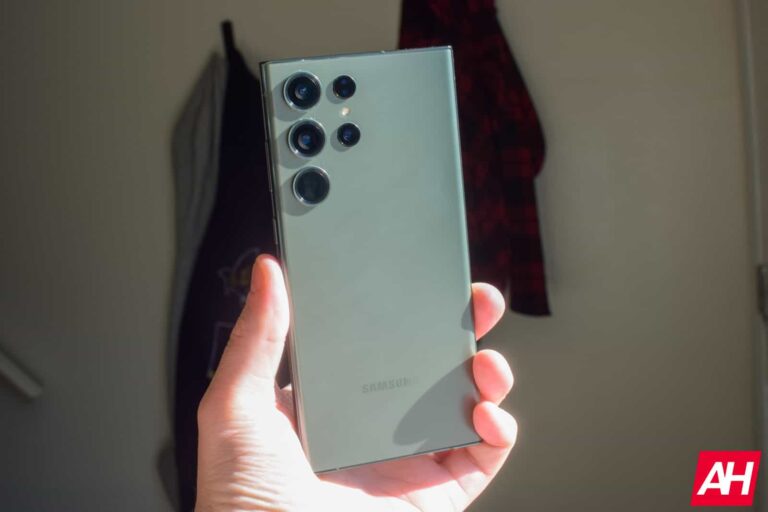
There aren’t any major changes on the back, though. With a shorter and wider build, the rear cameras have moved a little. However, the layout remains unchanged. We have three big camera rings aligned vertically in one column, with the laser autofocus sensor, LED flash, and a fourth camera in an adjacent volume. The power and volume buttons have come down a little too. This should make for an easier one-handed reach.

Samsung is removing the 10x optical zoom camera

The Galaxy S24 Ultra’s rear camera setup may look unchanged on the outside, but rumors have it that the phone will lack a 10x optical zoom camera. Samsung is replacing it with a 5x lens, which is reportedly a 50MP sensor. The rest of the camera setup remains the same. The main shooter is still a 200MP unit, though it may be an improved sensor. The Galaxy S24 series is expected to arrive in January 2024, so we should see more leaks in the coming weeks.


[ad_2]
Source link

Scarlett Johansson’s AI voice clone ad leads to a court case

0
[ad_1]

After finding out that AI cloned her voice for an ad, Scarlett Johansson takes the developer responsible to court, according to a report. Not only did the developer use her voice for the ad but also her likeness and the actress isn’t having any of it. The ad made it seem as though Scarlett Johansson was an ambassador of the developer’s app, while she had nothing to do with it.

The developer the actress is dragging to court is Convert Software, and the app in question is the Lisa AI app. With this app, the developer says that users can create AI-generated images and videos of themselves. To show off the app’s abilities, Convert Software used the AI-generated voice of popular actress Scarlett Johansson.

Convert Software not only made use of an AI-generated voice of the actress, but a real video where she spoke. This action is quite misleading for the audience that will view the app and doesn’t consider the actress’ desires. Here are the details on this AI impersonation case that is not new to the internet.

Convert Software is now facing a court case for using Scarlett Johansson’s AI voice clone for a misleading ad

An ad for Convert Software’s Lisa AI: 90s Yearbook & Avatar app is the cause of a court case. The plaintiff in this case is Scarlett Johansson, and she is suing because the app makes use of her likeness for its ad. The actress’s voice was used within the ad, where she told viewers some uses of the app.

Starting the 22-second ad was one of Scarlett Johansson’s behind-the-scenes footage for Black Widow. In this scene, the actress says, “What’s up guys? It’s Scarlett and I want you to come with me.” After this scene, the ad moves on to show off the Lisa AI app and its uses.

An AI-generated voice of Scarlett Johansson joins the ad, explaining the app’s usage. The voice says that the Lisa app is “not limited to avatars only” It then explains other app uses. Viewers will feel that the voice is that of Scarlett Johansson, and she is endorsing the usage of the app.

Kevin Yorn, the actress’ attorney, says that “images produced by Lisa AI. It has nothing to do with” the actress. So the ad is not only impersonating Scarlett Johansson but also misleading viewers. Convert Software is clearly in the wrong here and might face serious consequences for their actions in court.

This is not the first time that AI-generated vocals or videos of celebrities have hit the internet. As technology advances, these AI-generated vocals and videos become even more convincing and misleading. There’s no argument that this action by Convert Software is a misuse of AI technology, and regulations need to be put in place to curb this.


[ad_2]
Source link

Gboard on Android will soon add a new built-in OCR scan text tool so you won’t have to use Lens

0
[ad_1]
Google is testing a new feature in the latest beta of Gboard for Android that lets you scan text using optical character recognition (OCR). Previously, you had to use Google Lens in the Camera app or the search bar on Pixel devices to quickly get to this feature.
As reported by the Google News channel on Telegram and 9to5Google, the “Scan text” feature is currently only available in the latest beta version of Gboard (13.06.04) and is not yet available by default to all beta users. However, based on initial usage for those that managed to enable the feature, the OCR quality and accuracy appear to be the same as other Google products.

To use the feature, you’ll first need to grant Gboard the camera permission. Then, open the Gboard keyboard and tap the new “Scan text” tile. Take a photo of the text you want to scan, and Gboard will highlight the recognized text. You can then select and insert the text into the input field.


The “Scan text” feature is located alongside the Translate and Proofread features in the Gboard toolbar. After you tap the “Scan text” tile, you’ll see a viewfinder square that takes up the bottom half of your screen, where you can then tap the capture button to take a photo of the text you want to scan.


Once Gboard has processed the photo, it will highlight the recognized text. You can tap to select an entire line of text, or you can adjust the selection area. Once you’re happy with the selection, tap the “Insert” button to insert the text into the input field.


The “Scan text” tool remains on the screen after you insert something, so you can quickly make another selection. This is faster than opening Google Lens, especially if you move the “Scan text” tile to the shortcuts row. I can definitely see this feature being extremely helpful for multitasking as well.


[ad_2]
Source link

Galaxy S24 launch appears set for January 17 in San Francisco

0
[ad_1]

Samsung may have finalized the date for its next Galaxy Unpacked event, the event where it will unveil the Galaxy S24 series. The Korean media reports that the company plans to take wraps off its 2024 flagships on January 17. The launch event will take place in San Francisco, US.

Galaxy S24 launch date tipped for mid-January

Rumors about a January launch of the Galaxy S24 series have been around for a few months now. Industry insiders say Samsung is planning to move the date forward by about two weeks as compared to the Galaxy S23 series, which debuted on February 1 this year. Since the company usually holds its major Galaxy Unpacked events on a Wednesday, January 17 was a likely date for the Galaxy S24’s launch.

However, all this while, we didn’t have a solid backing for this speculation. The Korean publication Biz SBS has now heard from industry sources that the said date has been finalized for the event. Samsung is going back to the US for the Galaxy S24 launch after holding the last major Galaxy Unpacked in its home country South Korea. The event in July brought us the Galaxy Z Fold 5 and Galaxy Z Flip 5.

The new report doesn’t give us the release date for the Galaxy S24, Galaxy S24+, and Galaxy S24 Ultra. However, based on Samsung’s history, the flagship trio should hit the market globally on February 2, 2024. The company opens general sales of its latest flagships the third Friday after the launch. Pre-orders begin immediately after the Unpacked, though.

According to the report, an early launch of the Galaxy S24 series is triggered by a sluggish performance from Samsung’s semiconductor division, which has been its cash cow for years. The chip unit posted its first losses in 14 years in 2023. The Korean firm even launched its 2023 foldables earlier than usual. It’s now doing the same for its S-series flagships next year.

The Galaxy S23 FE arrives in South Korea next month

Samsung launched the Galaxy S23 FE in India in early October. The device gradually reached other markets over the month. It arrived in the US last week. The company is now reportedly gearing up to release the new Fan Edition handset in South Korea in early December. More precisely, sales will begin on December 1. Samsung has priced the Galaxy S23 FE at KRW 800,000 in its homeland, roughly the same price ($600) as the US when converted.


[ad_2]
Source link

5 differences between VPS and shared hosting

0
[ad_1]

VPS hosting and shared hosting are two hosting options that have their own set of characteristics that differ one from another. When you make a decision about your hosting choice, you need to be aware of this information. For this reason, let’s delve deeper into the 5 key differences between VPS and shared hosting:

1. Cost

Cost plays a pivotal role, with shared hosting plans emerging as a preferred choice for budget-conscious customers. The rationale behind is this:

Firstly, the structural distinction between the two plans contributes to the price difference. Since shared hosting customers share resources on a single physical server, hosting companies require fewer resources to accommodate these clients. Consequently, they can offer shared hosting at more affordable rates.

VPS plans also rely on a single physical server hosting multiple customers; however, the virtual machines used for this purpose demand more substantial resources. Consequently, the requirement for powerful hardware escalates, driving up the overall cost of VPS hosting plans.

Moreover, VPS plans necessitate more extensive technical support and staffing, which naturally increases its cost. Another factor that plays an important role are the features offered by each hosting type. Generally, VPS plans tend to be more feature-rich than shared hosting packages.

2. Performance

Hosting companies predominantly target VPS plans at professional customers such as designers, developers, system administrators, and medium to large-scale businesses. These customers have requirements extending beyond mere online presence as they demand speed and performance for their web applications.

As a result, VPS hosting utilizes high-performance server hardware components to ensure optimal site performance and maximum uptime. VPS packages use a lot of CPUs for handling intensive computational tasks, solid-state storage drives for faster read and write speeds, and increased disk space for accommodating larger web applications. Additionally, VPS plans grant access to greater bandwidth, enabling websites to manage heavier network traffic.

On the other hand, shared hosting packages cater more to customers who prioritize ease of use over performance. They are typically hosted on lower-spec server hardware, which aligns with the needs of websites under these plans.

3. Server Resource Allocation

Shared hosting plans feature resource limitations that can slow down website performance when surpassed. These limitations are enforced to ensure the availability of the hosting service. In essence, since shared hosting customers share the same physical server, there must be a way to prevent any single website from using all available resources.

In contrast, VPS hosting allocates significantly more resources to each customer. With VPS plans, you enjoy comprehensive control over a virtual server and its resources. For instance, the standard VPS plan offers a virtual machine equipped with 2 CPU cores, 120 GB SSD, and 2 GB of RAM.

4. Security

Security levels and scope differ between VPS and shared hosting plans. Shared hosting plans typically include fundamental security features like free SSL certificates, malware scans, and daily automated backups for website protection. Customizing security features beyond these essentials can be limited, as most hosting services restrict extensive modifications.

VPS hosting, on the other hand, encompasses all the security features of shared hosting plans and goes further. Opting for a VPS plan grants you the freedom to install your own security applications directly on the virtual server’s operating system and monitor network ports for suspicious activity in your hosting environment.

5. Flexibility

VPS hosting is renowned for the flexibility it offers users. Most VPS plans incorporate control panel software like cPanel, facilitating resource management for your virtual server. This control panel allows you to create user accounts, partition server storage, set bandwidth limits, and provides root access for system-level modifications.

Furthermore, you can easily scale your virtual server’s resource allocation based on bandwidth, CPU usage, and website size requirements. Whether you need to manage multiple websites with varying resource needs, host secure financial web applications adhering to regulatory compliance, or run a software testing server, VPS plans provide the resources and flexibility to accommodate such demands.

Shared hosting plans generally lack this level of flexibility and scalability. Resource allocations tend to be fixed, and customers have limited access to advanced tools for altering their hosting configuration or accessing the server hosting their website.

It’s worth noting that while VPS hosting offers enhanced customization, it demands a higher level of technical expertise and experience. Without proper knowledge, things can go south.

In contrast, shared hosting, although less customizable, is pre-configured, eliminating the need for fine-tuning settings and installing software packages.

Conclusion

Now that you know the main differences between VPS and shared hosting, you can make a decision on which option is better for you!


[ad_2]
Source link

Sorry, HBO Max legacy subscribers, MAX is taking away 4K streaming starting next month

0
[ad_1]

In May this year, HBO Max rebranded as MAX in the US, and there are plans for this transformation to become global in 2024. However, longtime subscribers to HBO Max are in for an unpleasant surprise.

In May, Warner Bros. Discovery made a promise to HBO Max existing subscribers on the ad-free plan that they could retain certain perks, like 4K streaming, for at least six months without additional charges. Well, the company is set to keep its promise as we approach that six-month mark.

As reported by The Verge, MAX is reaching out to affected customers, notifying them that while their monthly price of $15.99 will stay the same, they’ll lose a couple of perks on or after December 5th.

Specifically, 4K and HDR streaming will be removed for legacy customers, limiting them to HD quality, similar to new signups for MAX’s ad-free tier. To retain 4K playback, they will need to upgrade to the “ultimate” plan, priced at $19.99 per month.

Legacy ad-free subscribers also enjoyed an extra concurrent stream (totaling three) compared to the standard two for new signups on the $15.99 plan. Unfortunately, this perk will also become history starting with the December billing cycle.

For its 51-year history, HBO has gone through numerous changes. Initially only available to subscribers in a small area of New York City, HBO quickly became the first American network to deliver its programming by satellite, which allowed it to reach a national audience.

In the 1990s, HBO made a significant mark on the television landscape with its groundbreaking dramatic series. In 2020, HBO entered the streaming wars with HBO Max. In May of this year, Warner Bros. Discovery launched a rebranded version of HBO Max called Max, offering the same content with additional features such as a new user interface and support for more devices.


[ad_2]
Source link

New CVSS v4.0 Released – What’s New!

0
[ad_1]

CVSS (Common Vulnerability Scoring System) is vital for supplier-consumer interaction, offering a numerical score to assess security vulnerabilities’ technical severity that helps in guiding the following entities:-

  • Businesses
  • Service providers
  • Public

CVSS scores interpret the following qualitative ratings for prioritizing vulnerability management and enhancing defense strategies against cyber threats, enabling real-time threat assessment for consumers’ protection:-

Document
FREE Webinar

Ensure your Cyber Resiliance with the recent wave of cyber-attacks targeting the financial services sector. Almost 60% respondents not confident to recover fully from a cyber attack.

At the 35th Annual FIRST Conference in June 2023, the CVSS version 4.0 was unveiled by FIRST. However, after two months of public input and refinement, CVSS version 4.0 was officially released by FIRST.

CVSS 4.0 – What’s New?

This new version, CVSS 4.0, aims to offer the most precise vulnerability assessment, as it provides:-

  • Finer detail
  • Clarity
  • Simplification in threat metrics

These are the key elements that make it more effective for assessing security needs and controls. CVSS 4.0 adds new metrics for assessing vulnerabilities, including:-

  • Automatable
  • Recovery
  • Value Density
  • Response Effort
  • Urgency

Moreover, it’s also expanded for the OT/ICS/IoT, with Safety metrics included. CVSS 4.0 is a game-changer for global cybersecurity and incident response teams, offering a vital tool in the face of rising threats.

Diverse rating systems were used for severity before 2005 since, at that time, various non-standard severity systems existed. 

In February 2005, CVSS version 1 was initially introduced, driven by FIRST to standardize vulnerability measurement, which became an important industry tool.

CVSS evolved from version 1 in 2005 to version 3.1 in 2019. Version 4.0 is a notable advance, emphasizing threat intelligence and environmental metrics for more accurate scoring.

Here below, we have mentioned the new nomenclature that has been adopted in version 4.0:-

  • CVSS-B: CVSS Base Score
  • CVSS-BT: CVSS Base + Threat Score
  • CVSS-BE: CVSS Base + Environmental Score
  • CVSS-BTE: CVSS Base + Threat + Environmental Score

The rapid rise in cybersecurity challenges shows the importance of global coordination which is crucial. However, introducing standards like CVSS 4.0 plays a vital role in enhancing internet safety for all.

Protect yourself from vulnerabilities using Patch Manager Plus to patch over 850 third-party applications quickly. Try a free trial to ensure 100% security.


[ad_2]
Source link

Android 7.0 just lost Chrome support

0
[ad_1]

Most of us remember the excitement and hype for Android 7.0 Nougat back in 2016. It was the shiny new version of Android, but now it’s old news. Google just announced that the newest version of Chrome does not support Android 7. That’s a bummer if your phone is still stuck in the nougat.

In case you don’t know, the newest version of Chrome just launched for desktops and phones, and it brings some neat new features. It’s version 120, so be sure to update your app if you want new features.

Open the app and look at the upper-right corner of the screen, and you should see a little upward arrow. This will let you update the app to the latest version. Also, check the changelog to know what’s different.

Chrome is no longer supported on Android 7

Android 7 came out the year that Google launched the first-ever Pixel phone. To give you a snapshot of other phones that launched that year, LG released the eccentric yet charming LG V20 while Samsung launched the Galaxy Note 7. The thought of a phone with 6GB of RAM was astounding, and the notch didn’t even exist. Back then, Chrome version 55 hit the stable channel.

Now, a year after Android 6.0 Marshmallow lost support, Google announced Android 7 just lost support. Version 119 was the last supported version, so if you’re on an older phone, then you won’t be able to enjoy the new features that just launched today.

That’s unfortunate; however, if you’re still rocking a phone with Android 7, you should definitely think about getting a new phone. There have been a metric ton of software innovations in Android that happened since Android 7. Not only that but Android 7 has long lost its support for security updates. This means that your phone is at risk of being infiltrated through three-year-old vulnerabilities.

There are a ton of affordable phones that you can get your hands on with more updated software. You can check out our list of the Best Budget Android Phones on the market.


[ad_2]
Source link

UI and UX drive success in mobile apps

0
[ad_1]

Everyone has a great idea for an app. However, the difference between a great idea and actually building the thing is a huge leap. Not only do you have to flesh out the idea and how the software will work, but you also how to make it appealing to users – which is where UI and UX come into play.

The logic behind apps

Apps are developed for a reason: to do a job, offer the user useful functions, and make life more easy. The job or function of an app is codified in the logic behind it. This is where traditional mobile developers step in, creating the databases used for the app, secure data transfer over the internet, calculations and integrations to provide the given service.

However it’s not enough to have a useful app if the style and flow are unappealing to the user.

Why UI and UX are important

The style and flow of apps are called User Interface (UI) and User Experience (UX), and there are specific designers and programmers that implement both of these elements. The style, or user interface, when done correctly, should be pleasing to the user’s eye and not frustrating or confusing. Similarly, the flow, or user experience, should be smooth, intuitive, and pleasing.

Mindful implementation of both UX and UI is evident from the moment a user downloads the relevant app. And it could be any sort of app: be it work-related apps like emails or chats, to casino apps like the sleek one offered by Vulkan Vegas Casino. With crisp, full HD quality graphics and an overall top-notch interface, players can certainly make the most of an ‘on-the-go’ gambling experience.

Cohesive themes

Theming your app is a huge consideration during the design process. Each screen within the app should look cohesive with the rest of the screens. This means you need to use theming that includes a standard set of colours, standard sizing and typeface for fonts, standardized buttons, etc. Having this full theming set ready to go before you start designing your app is critical so that designers and developers don’t run into trouble down the track. Customizable app theme packs are available for purchase in various online stores. This means all you need to do is place the elements and create the content itself.

Button placement

Button placement and CTAs within apps are critical for users to be able to navigate your app without frustration. While phones typically have standard home and back buttons, you should consider other elements such as a hamburger menu for essential app functions, tiered menu buttons, strong next, continue, and purchase buttons, as well as radio buttons and checkboxes where necessary.

Screen flows

The transitions between one app screen to the next must be fluid so that they don’t disrupt the user experience. This means making choices like having a similar screen as the next screen or choosing to transition to a new screen that is similar to a transition in other popular apps. Users want easy, fluid, and intuitive transitions within apps so that the experience remains positive instead of confusing.

Color choice

The range of colors used for your app should make sense for the theme of the app itself, the industry, and even your own business’s colors if applicable. The colors shouldn’t just be chosen because you think they’re appealing as that is opinion based. Rather, you can take a look at color theory and color psychology, then choose an appropriate palette based on your findings.

Imagery

Ever wondered why there aren’t a lot of pictures or videos in apps? That’s because there is hardly any screen real estate to show them. Unless your app requires images and video, for instance in selling products, or in gaming apps, then it is better to avoid these for the most part. You can choose to use these elements sparingly, for instance, if you need to provide a tutorial that is better in video form.

Conclusion

There’s a lot more to app design than just a great idea. While the logic and backend processes are what drive an app, it’s the UI and UX that captivate users and keep them using the app, whether it’s a business or consumer app. The last thing that you want is an ugly, annoying front for your great functionality.

While hiring mobile developers is necessary to build out functionality, it also pays to get a UI and UX designer and developer on board for your project. Without these roles, you are leaving the UI and UX up to non-experts in the field who are unlikely to make the best decisions for your project and users.


[ad_2]
Source link

Accenture Acquires Leading Cybersecurity Firm Innotec Security

0
[ad_1]

Accenture, the global technology services and consulting giant, has announced the acquisition of Innotec Security, a leading cybersecurity-as-a-service provider based in Spain. 

The deal, which was made public on November 2, 2023, is a strategic move by Accenture to enhance its cybersecurity capabilities, increase its market presence in Spain, and reinforce its position in the managed security services (MSS) landscape.

Growing Presence in Spain

Innotec Security, established in 2002 and headquartered in Madrid, is one of the top cybersecurity service providers in Spain. 

It has a team of 500 cybersecurity professionals and a diverse portfolio of services, including threat simulation, detection, response, incident management, and security consulting.

Document
FREE Webinar

Ensure your Cyber Resiliance with the recent wave of cyber-attacks targeting the financial services sector. Almost 60% respondents not confident to recover fully from a cyber attack.

It serves clients across various sectors, such as financial services, energy, logistics, healthcare, transportation, and the public sector.

By acquiring Innotec Security, previously owned by Entelgy Group, Accenture not only adds to its workforce but also enhances its capabilities in cybersecurity-as-a-service, cyber resilience, and cyber risk management. 

The deal boosts Accenture Security’s workforce to 20,500 professionals globally, making the company a prominent player in Spain’s managed security services market.

Meeting Growing Demand

The acquisition comes at a time when the demand for managed security services is increasing, especially in Europe. 

According to Accenture’s Cyber-Resilient CEO report, 70% of CEOs in large Spanish organizations are worried about their ability to mitigate the impact of cyberattacks. 

However, 63% of CEOs admit that their organizations do not incorporate cybersecurity into their business strategies, services, or products from the outset.

By integrating Innotec Security’s expertise into its portfolio, Accenture can meet the growing demand for managed security services and provide clients with essential cybersecurity skills and support. 

The acquisition aligns with Accenture’s focus on enhancing its cyber defense capabilities and demonstrates the company’s commitment to delivering high-quality cybersecurity services to its clients.

Strategic Moves and Market Leadership

Accenture’s acquisition of Innotec Security is the latest in a series of strategic moves aimed at strengthening its cybersecurity arm. 

In recent years, Accenture Security has made 19 acquisitions, establishing itself as a global leader in managed security services. 

Notably, Accenture was ranked No. 1 in managed security services market share by revenue in the Gartner Market Share: Managed Security Services, Worldwide, 2022 report in April 2023.

Agustín Muñoz-Grandes, the leader of Accenture Security in Spain and Portugal, expressed excitement about the acquisition, highlighting its importance in expanding Accenture’s presence in Spain and enriching its managed security services offerings.

Innotec Security’s CEO, Félix Muñoz, echoed the sentiment, emphasizing the compatibility of Accenture’s industry-focused approach to cyber defense with Innotec Security’s commitment to delivering exceptional cybersecurity services.

Looking Ahead

As the cybersecurity landscape continues to evolve, strategic acquisitions like Innotec Security play a crucial role in strengthening companies’ defenses against cyber threats. 

Accenture’s move underscores the importance of staying ahead in the ever-changing world of cybersecurity, ensuring organizations are well-equipped to defend against the sophisticated tactics employed by cyber adversaries.

Protect yourself from vulnerabilities using Patch Manager Plus to patch over 850 third-party applications quickly. Try a free trial to ensure 100% security.


[ad_2]
Source link