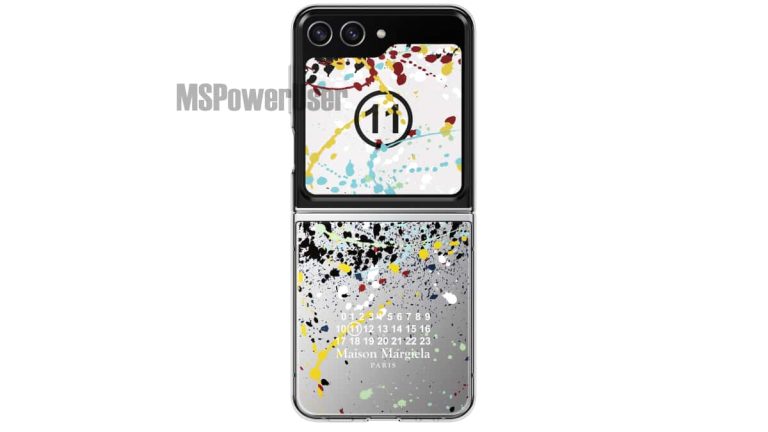
Samsung is no stranger to collaborations with other brands on creating unique versions of smartphones, and it seems the company’s latest collaboration product will be a limited-edition Maison Margiela version of the Galaxy Z Flip 5.
Maison Margiela is a French high fashion brand and has actually partnered with Samsung once before. In fact the pair created a limited-edition version of the Galaxy Z Flip 4 last year. Samsung has also done this at least twice with Tom Ford on other products. In short, it’s typical for Samsung to partner up with luxury brands for this sort of thing. While there are no details on price for this variation of the Galaxy Z Flip 5, there are some images of the phone that have leaked showing the Maison Margiela branding.
These give a good look at the phone in all its expected glory provided Samsung does actually end up releasing this phone. Worth noting of course is that it isn’t expected to be cheap. The Galaxy Z Flip 5 is already sort of an expensive device. Though much less so compared to the first couple versions a few years ago. This is also going to be a luxury version of the phone so the price will likely reflect that.
The Maison Margiela Galaxy Z Flip 5 will come with a leather case
As you can see in the images the phone will come with a unique design that was created in partnership with Samsung. It still looks like a Galaxy Z Flip 5 of course. But the back has a special style that evokes the style of Maison Margiela. It will also apparently come with at least one accessory – a leather case. The images, shared by MSPowerUser, only show a few sides of the phone. But that’s enough to know if it’s something you’d want over a regular Galaxy Z Flip 5.
If you’re into these fashion versions of Samsung’s devices, look for this one to pop up somewhere down the road.
In the last couple of months, Microsoft has been hard at work trying to integrate AI into its products and services. Now, working with Siemens, Microsoft has launched a new industrial AI copilot aimed at optimizing operations within the sector.
Dubbed Siemens Industrial Copilot, the primary goal of this AI is to streamline operations by writing, refining, and debugging complex automation code. Furthermore, through the integration of Siemens’ digital platform, Siemens Xcelerator, with Microsoft’s Azure OpenAI Service, the AI copilot can significantly reduce simulation times from weeks to mere minutes, thus saving significant time and resources.
In addition to aiding in coding tasks, the AI can provide maintenance staff with detailed repair instructions and grant engineers quick access to simulation tools. However, it is important to note that both Siemens and Microsoft have committed to not using any customer data to train their AI models.
“Making human-machine collaboration more widely available allows engineers to accelerate code development, increase innovation, and tackle skilled labor shortages,” said Roland Busch, CEO of Siemens AG.
Use cases of the AI copilot
Although the AI might look like a different version of ChatGPT, Microsoft argues that it has the potential to revolutionize various industries, including manufacturing and healthcare. Furthermore, companies such as Schaeffler AG are already using the copilot to help in the code-writing process for their robotic systems.
”With this joint pilot, we’re stepping into a new age of productivity. This Siemens Industrial Copilot will help our team work more efficiently, reduce repetitive tasks, and unleash creativity. We’re excited to partner with Siemens and Microsoft on this project,” said Klaus Rosenfeld, CEO of Schaeffler AG.
In addition to the copilot, both Siemens and Microsoft are collaborating on an integration between Siemens Teamcenter and Microsoft Teams, which will use AI to ease communication across various departments. However, it is important to note that Siemens plans to reveal further details about the copilot and the Teams integration at the upcoming SPS Expo in Nuremberg, Germany.
The launch of Warcraft Rumble is officially here as the game went live during the BlizzCon 2023 keynote. Players around the world finally have a chance to get their hands on this free-to-play Warcraft experience for mobile devices in all its Azerothian glory.
The game has been in an early access beta for many months but it was limited to just a few regions. And as the months have gone by Blizzard has made numerous improvements. In addition to adding new content like heroic campaigns and more. Among the many things newcomers to the game will get to check out for the first time, there’s a new launch cinematic Blizzard released alongside the game. You can check that out below. And if this is your first introduction to Warcraft Rumble, you definitely should.
For those unfamiliar with the game it’s a Clash Royale-style tower offense game. Obviously set in the Warcraft universe with many of your favorite heroes and villains. You can play as different factions and command your legion of minis as iconic characters like Jaina Proudmoore. The game features guilds, PvP, and whole bunch of other stuff that’s present in World of Warcraft. It will eventually have raids too.
The launch of Warcraft Rumble is off to a strong start
The game has been available in an early access beta in a few regions for the better part of a year. But as of launch the game is still off to what seems like a very strong start. At over 1 million downloads on Google Play it has a 4.7 star rating and that’s, pretty darn good this early on. It helps that the game is actually very good and it might surprise you how fun it really is.
As a free game, it’s worth checking out for any Warcraft fan. You can also check out more about the game in our big explainer guide.
Apple’s fiscal fourth-quarter earnings report paints a rosy picture of the company’s sales, showing demand for the iPhone 15 series is unexpectedly high and sets an all-time record for the quarter.
While many industry experts criticized the iPhone 15 series due to minor changes and offering no significant improvement over its predecessor, the sales figures tell a different story. As per the report, Apple generated $43.81 billion from selling iPhones in the fourth quarter of 2023. This is a 2.8% increase in revenue compared to the same quarter last year, in which Apple could make $42.36 billion.
Of course, Apple’s total revenue from iPhone sales in the 2023 fiscal year has dropped by 2.4% and reached $200.58 billion. In 2022, the tech firm took in $205.49 billion in iPhone revenue. Apple further added it expects overall revenue to be flat year-over-year during the fiscal first quarter of 2024. The timeframe also includes the holiday shopping season.
Apple’s quarterly revenue from iPhone sales sets an all-time record
While the iPhone is the greatest source of revenue for Apple, services also made up a large portion of revenues in the fiscal fourth quarter. As the second-largest segment, Services took in $22.31 billion during the quarter and $85.20 billion in the 2023 fiscal year.
In 2022, Apple made $78.13 billion from the Services vices segment. The recent numbers show a 9% increase in Services revenue for the company. Apple’s revenue from the services segment shows significant growth from 2016 onwards. In 2016, the tech firm made only $24.3 billion from Services.
The sales of the Apple iPad are disappointing. From $7.17 billion in the fourth quarter of 2022 to $6.44 billion in the fourth quarter of this year, sales of the iPad tablet series fell by 10.2%. The iPad’s fiscal 2023 annual gross was $28.30 billion, a 3.4% decrease from the $29.29 billion in fiscal 2022.
The Apple Watch and AirPods, two of Apple’s best-selling items, are also facing a decline in sales. During the fiscal fourth quarter of this year, the Wearables, Home, and Accessories business brought in $9.32 billion in revenue, a 3.4% decrease from the $9.65 billion the division brought in during the same quarter the previous year. This segment’s full-year revenue of $39.85 billion represented a 3.4% decrease from the $41.24 billion reported for the fiscal year 2022.
While Apple sales in Europe, Greater China, Japan, and the Rest of Asia Pacific are declining, the company’s sales in North and South America are rising. Apple sales in this region grew from $39.81 billion last year to $40.12 billion in 2023.
Apple’s overall revenue for this quarter was set at $89.50 billion, which is down from $90.15 billion during the same quarter last year.
Google is working on Gboard to bring support for text scanning directly inside the app. We have already seen Samsung’s version of it on the Samsung Keyboard and Google seems to have taken some inspiration from it.
The new feature aims to enhance user convenience and streamline text scanning. The Gboard text scanning feature allows users to capture text through the device’s camera and directly input it into their text messages or documents, all within the Gboard interface. This might enhance your workflow, especially if you have dealings with texts in the physical world.
How does the this work?
In the testing phase, Google’s OCR feature is hidden within the latest beta version of Gboard (13.6). Users can access it via a “Scan Text” tool within the Gboard’s toolbar, reports 9to5Google. Upon activation, the device’s camera opens in the lower half of the screen, inside Gboard (image below). Users are prompted to grant camera usage permission, after which they can capture an image containing text.
Once the image is captured, the OCR functionality highlights all the text within it. Users can then select the specific text they wish to copy. As they enter the selected text, the camera viewfinder remains open, allowing for continuous text input. This feature significantly streamlines the process of scanning and incorporating text from physical sources into digital formats.
A Boon for Gboard Users
This forthcoming feature has the potential to be a significant asset for Gboard users who frequently need to scan and incorporate text from physical documents, magazines, and other printed materials. While you can scan text using Google Lens, it necessitates switching between apps, making the workflow less seamless.
While the feature is currently undergoing internal testing, Gboard users can look forward to the convenience and efficiency that this OCR text scanning functionality promises. It offers an alternative to those who may not favor Samsung Keyboard but seek this efficient method. As the testing phase progresses, users can anticipate its integration into the stable version of Gboard in the near future.
KandyKorn is a stealthy backdoor designed to extract data, file uploading/downloading, directory listing, process termination, secure deletion, and command execution.
A new macOS malware dubbed KandyKorn is currently targeting devices of unsuspected cryptocurrency users and blockchain engineers. The malware, KandyKorn, has been linked to the North Korean hacking group Lazarus and was discovered by cybersecurity researchers at Elastic Security Labs.
Lazarus, a North Korean state-backed hacking group, targets cryptocurrency exchanges, investors, and critical Western infrastructure for stealing data and crypto funds. The group is attributed to significantly boosting the North Korean economy by stealing hundreds of millions of dollars in recent years.
According to researchers, KandyKorn malware operators target blockchain engineers of a cryptocurrency exchange platform. Researchers noted that KandyKorn is a stealthy backdoor designed to extract data, file uploading/downloading, directory listing, process termination, secure deletion, and command execution.
According to Elastic Security Labs’ research, KandyKorn is a sophisticated malware capable of hijacking macOS devices and deploying additional malware. It is distributed via phishing emails that seem to be sent by legitimate sources like cryptocurrency exchanges or blockchain development companies.
In a blog post, authored by Colson Wilhoit, Rizardo Ungureanu, Seth Goodwin, and Andrew Pease, researchers wrote that users are tricked into downloading a malicious ZIP archive titled ‘Cross-platform Bridges.zip.’
This file imitates an arbitrage bot created for automated profit generation, but actually, it imports thirteen malicious modules. For your information, an arbitrage bot is a software tool that can generate profits from cryptocurrency rate differences across different platforms.
Once the malware is installed on the device, it starts stealing a wide range of data, from cryptocurrency wallet addresses and private keys to transaction history. That’s not all! it can also use the compromised devices to launch attacks against new targets or mine cryptocurrency.
“We observed the threat actor adopting a technique we have not previously seen them use to achieve persistence on macOS, known as execution flow hijacking.”
Elastic Security Labs
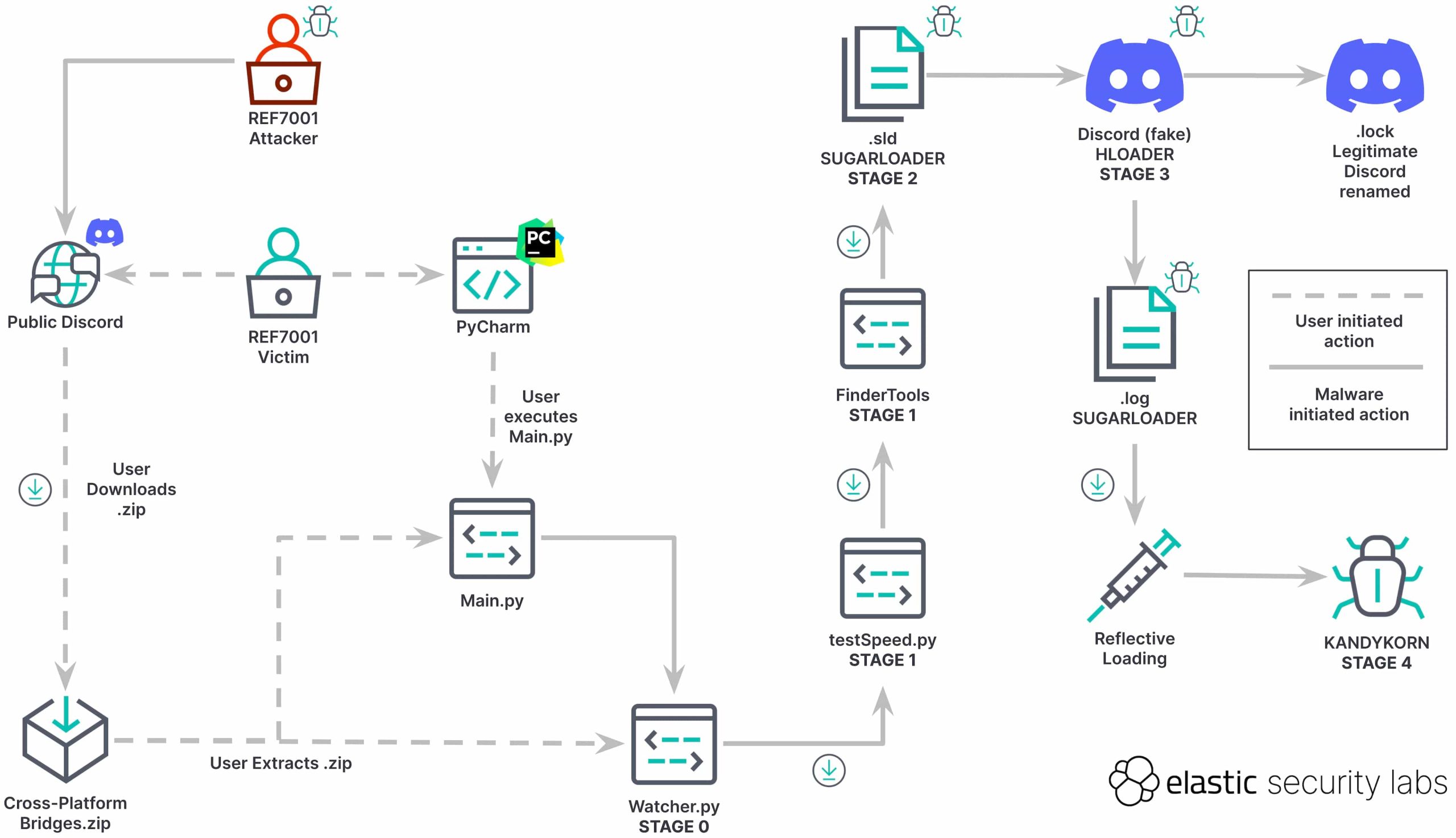
The execution flow, as noted by Elastic Security Labs, is as follows:
Stage 0 (Initial Compromise) – Watcher.py
Stage 1 (Dropper) – testSpeed.py and FinderTools
Stage 2 (Payload) – .sld and .log – SUGARLOADER
Stage 3 (Loader)- Discord (fake) – HLOADER
Stage 4 (Payload) – KANDYKORN
Execution flow (Credit: Elastic Security Labs)
What makes KandyKorn a bigger threat than many other malware is that it is difficult to detect as it uses multiple techniques to evade detection by security processes and antiviruses.
The reason KandyKorn operators are explicitly targeting the cryptocurrency community and engineers is that they have access to valuable assets like crypto wallets. Therefore, they automatically become attractive targets.
macOS device users must stay alert of this threat and adopt protective measures such as verifying the email source before opening/downloading any attachment, avoiding checking emails from unknown senders, keeping software and applications up to date, including security applications, antiviruses, and operating system, and using strong passwords with 2FA enabled if possible.
It’s the beginning of the month, which means that it’s time for some Android software updates. According to a new report, Google released the Android 14 beta QPR 1 2.2, and this version brings a ton of bug fixes to Pixel devices. They affect the new Pixel 8 phones along with older Pixel devices.
Just know that this is referring to the beta version of the software, so if you’re on the stable release, you won’t see it. The update for you will come out eventually.
Google released the new Android 14 Beta QPR 1 2.2 update
This update might look like a small tweak to the software, but it brings a ton of fixes to the software. Depending on the phone you’re using, it could be between 40MB and 103MB. The biggest update landed on the Pixel 8 Pro. This phone has the most fixes because it’s been behind the other phones when it comes to its updates.
The full changelog shows the long laundry list of fixes that this update brings, and some of the bugs are pretty serious, so you’ll want to update your phone as soon as you can. If you want to check out the changelog, it’s right below.
If you don’t know how to update your phone, don’t worry. Maybe, you just pick up a new Pixel 8 and you’re still getting used to it. If that’s the case, check out our Pixel 8 Review. It’s an in-depth analysis of what makes this phone the smartest on the market.
To update your phone, go to your settings and tap on the System button. On that page, tap on the Software update button. This will take you to the update center. You’ll most likely see a circle at the top of the screen spin for a second followed by your phone telling you that your phone is up to date.
However, you don’t always want to listen to that. At the bottom of the screen, you’ll see a Search for update button. Tap on that button, and you’ll see the circle spin again. Chances are that it will say that you have a new update. Tap on the Update button, and your phone will start updating.
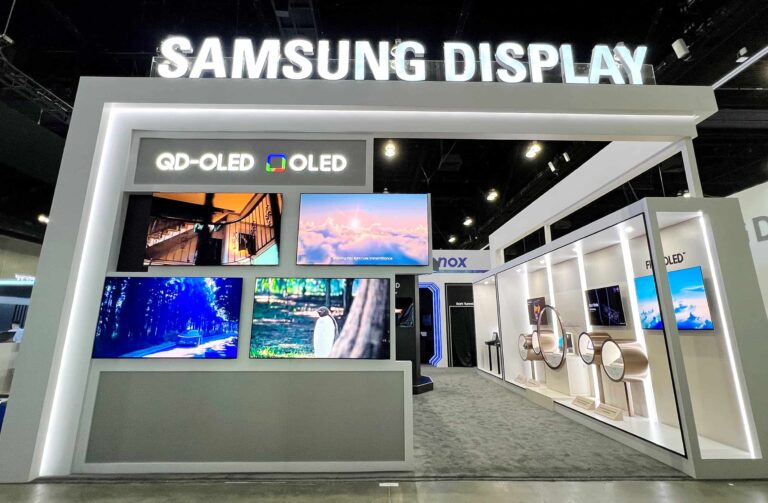
The legal dispute between display manufacturers Samsung Display and BOE is escalating fast. Following lawsuits from the latter, the Korean firm has now filed a complaint against its rival. In its complaint filed with the United States International Trade Commission (ITC), Samsung has accused BOE of violating trade secrets.
Samsung drags BOE to the court over trade dispute
Samsung and BOE have had a lot of differences in recent years. The two display manufacturers had a dispute over royalties, prompting the Korean firm’s smartphone division to remove the latter from its supply chain. However, things took an ugly turn in January this year when Samsung Display alleged its rival of cloning its technology. It didn’t attack BOE directly but tried stopping wholesalers in the US from commercializing the cloned OLED panels.
The Korean firm said the displays were illegally manufactured in the US using its patents without permission. This prompted an investigation into BOE by the ITC. The Chinese firm retaliated by filing a barrage of lawsuits against Samsung in China. Not only did it target Samsung’s display division, but other business units as well, including the semiconductor and investment divisions. This happened in May.
A couple of months later, the Korean media reported that Samsung was preparing to hit back at BOE. We now have confirmation that it has filed a complaint against its Chinese display rival over the matter. This time, it’s targeting BOE directly without involving wholesalers. This is reportedly the first time Samsung has complained about the Chinese firm with the ITC. It has also named seven BOE affiliates in its legal filing.
The complaint, filed on October 31, accuses BOE of violating a US Tariff Act covering the “importation and sales of organic light-emitting diode display modules and components in the US,” The Korea Herald reports (via). It also covers “unfair methods of competition,” including infringement of intellectual property, obtaining confidential information from employees, and fake employment.
The ITC’s trial begins in January 2024
According to the report, the ITC will begin its investigation based on Samsung’s complaint in December. The trial in the case is expected to begin on January 22, 2024. The International Trade Commission may not announce its verdict on the matter until June next year. The Commission previously backed Samsung’s claims that BOE infringed on its display patents. Time will tell whether a formal investigation finds the Chinese display maker guilty.
Battery life on the Google Pixel 7 series isn’t the best, but it’s also not the worst. For most people, it’s going to get you through the day without any issues. But if you need a bit more juice, here are some tips you can use to get more out of your battery life.
Adaptive battery
The first tip here is going to be Adaptive Battery. It’s a feature on Pixels that allows the phone to learn how you use it, and greatly extend battery life. This is done by limiting apps when you don’t use your phone, and also limiting the speed of the processor. We’ve gone over how this feature works here.
But it’s good to keep in mind that the Adaptive Battery doesn’t do much for the first week or two. Your phone needs to learn how you use it, which takes about two weeks. After that, you’ll find that the adaptive battery has started to kick in. And in some cases, it can really extend the battery life of your Pixel 7.
Screen resolution (Pixel 7 Pro only)
Next up is the screen resolution. This is only available on the Pixel 7 Pro, since the Pixel 7 is already FHD+ anyways.
Out of the box, Google has the Pixel 7 Pro set to FHD+ resolution, so this tip really only applies if you’ve changed that option to QHD+. But you can change it back to FHD+ which will conserve some juice on your battery. That’s because it isn’t lighting up as many pixels. Which is really good for battery.
Smooth Display
While we’re on the topic of the display, both the Pixel 7 and Pixel 7 Pro have higher refresh rates now. So the Pixel 7 is set at 90Hz and the Pixel 7 Pro at 120Hz. What Smooth Display does is, it will ramp up and down from 60Hz to 120Hz on the Pixel 7 Pro and 60Hz to 90Hz on the Pixel 7. It unfortunately doesn’t go all the way down to 1Hz like some other phones, but it is what it is.
So a way to save battery on the Pixel 7 series would be to turn off Smooth Display. This means that you’ll be at 60Hz all the time on the Pixel 7 series. That’s not really a bad thing, as it is still super smooth.
In my testing, on both the Pixel 7 and Pixel 7 Pro, I was able to get about 1-2 hours of screen on time, over the 5-6 hours I was getting with it on. So if you really need to squeak out a bit more juice, this is a good way to do it.
Dark Theme
This tip is kind of common sense at this point, and a lot of people use the Dark Theme already. But basically, if you turn on dark theme, you should get more battery life as well. Why? It’s simple. The Pixel 7 and Pixel 7 Pro both use an OLED display. Which means that each individual pixel is lit up. Brighter colors use more juice, versus dark colors, especially black. In fact, some studies from Google have shown that white pixels use over 50% more battery than a black or even dark gray pixel on an OLED display.
I wouldn’t recommend using the dark mode all the time. As it makes it tough to see outside, particularly in direct sunlight. But instead, use the schedule feature. So for myself, I have it set to light mode during the day from sunrise to sunset, and then at sunset it turns to dark mode. This is a good schedule because usually after sunset it is darker, even if you are at home. There’s less light coming in from the windows and such. But you can also do your own schedule here too.
Enable Extreme Battery Saver Mode
This tip is really only meant for those times where you won’t be near a charger for a while but your phone is running low. That’s because Extreme Battery Saver will turn off basically everything on your phone. And while Google says it can last 72 hours in that mode, that does make your smartphone a lot less “smart”. So it’s recommended to only use in a pinch.
Restart your Pixel
Finally, it’s a good idea to restart your Pixel 7 every once in a while. Think of it as a good reset for your phone, and that often times can fix a lot of things. Including battery draining apps.
Some phones have a setting that you can use, which will automatically restart your phone at a certain time. Pixel doesn’t offer that, so it’s a good idea to still restart your phone about once a week.
Wrap Up
As always, battery life is going to depend on what you do with your phone. Are you on WiFi all day? Do you watch a lot of videos? Do you send a lot of texts? Etc. While I am getting pretty good battery life out of my Pixel 7, that might not be the case for everyone else. So these tips will help you squeak out a little more juice from your phone and make sure it can last you the whole day.
The most important tip here is definitely Adaptive Battery. It is on by default, but some people tend to turn it off, don’t do that. It can only help your battery life, and not hurt it. In fact, in some cases, it can really help battery life.
There are already some major players on the AI field, but that doesn’t mean that there’s no room for others. Elon Musk, who’s been talking about entering the AI field for a while, just announced that his new AI startup is launching soon. It’s called xAI, and with it, Elon Musk is looking to take AI to the next level.
What is xAI, and how does Elon Musk plan to change AI?
As stated, there are several large companies pushing AI forward. We have Google, OpenAI, Anthropic, and other smaller companies. Apple is also set to debut its AI sometime down the road. A while back, we got news that Elon Musk was also planning on entering the AI blood match even before he renamed Twitter to X.
Now, he’s building out an “X” ecosystem of products, and xAI is one of them. Musk acquired thousands of high-powered Nvidia GPUs to build the LLM behind the company. We’re not sure what GPUs he purchased, but we can bet that they’re pretty expensive.
After acquiring the hardware, he needed to acquire some brain power. According to the report, Musk snapped up people from companies like Google, DeepMind, Microsoft Research, OpenAI, Tesla, and Twitter. These are people with a deep understanding of AI and have been working on some of the powerful AI that’s on the market today. Some projects these folks worked on include GPT-3.5, GPT-4, and DeepMind’s AlphaCode.
Goal
The goal of xAI is to basically understand the universe. xAI co-founder Greg Yang says that the company will dive into the “mathematics of deep learning” and “develop the ‘theory of everything’ for large neural networks”. That’s far from helping you write your mid-term exam, so xAI’s and OpenAI’s goals are very different. It looks like xAI won’t prioritize being a user-facing product.
That’s a pretty high-reaching goal, but looking at what Musk said during an interview on Fox back in April, it seems that this initiative is still fueled by his personal ambitions. This is when he unveiled the name “TruthGPT”, and he noted that the problem with AI companies was they were focusing too much on systems that are “politically correct”. At the end of the day, that’s a personal opinion, and it’s not wise to start major wide-reaching initiatives based on one’s personal opinion.
That’s one of the reasons why X (Twitter) has been in such a whirlwind since Elon took over. He can’t make it too personal. Also, as time goes on, there will be laws and regulations regarding AI. We’re not sure if they will be aligned with his personal views.
Launch date
Right now, details about this company and its AI are scarce, but we know that the company will officially launch its AI on Saturday, November 4th. When it launches, we’ll have more information about this company and what it will do.