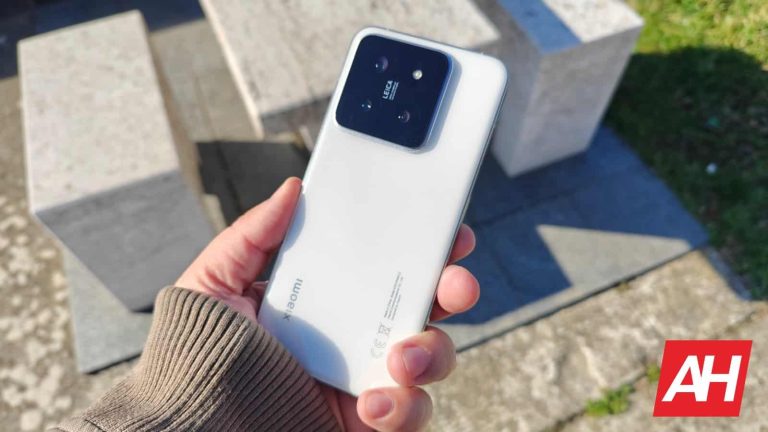
Let’s take a closer look at the Xiaomi 15 first. The device is tipped to include a 6.36-inch 1.5K display with a refresh rate of up to 120Hz. It will have an LTPO OLED display and a 1,400-nit brightness in ‘High Brightness Mode’. Its peak brightness will go higher than that, probably.
That device will offer up to 16GB of LPDDR5X RAM and up to 1TB of UFS 4.0 flash storage. Its battery will be somewhere between 4,800mAh and 4,900mAh in terms of capacity. That’s a nice boost over a 4,610mAh battery inside the Xiaomi 14.
The Xiaomi 15 will offer 100W wired & 50W wireless charging
This leak also revealed that the Xiaomi 15 will support 100W wired and 50W wireless charging. That part is not surprising at all, but it’s nice to see that Xiaomi will offer such fast charging again.
There will be three cameras on the back of the device. A 50-megapixel main camera will use the OmniVision OV50H sensor (1/1.31-inch sensor). Both its ultrawide and telephoto cameras will use the Samsung ISOCELL JN1 sensor (1/2.76-inch sensor). The telephoto camera will offer 3x optical zoom.
On the front, you’ll be able to use a 32-megapixel camera. The Xiaomi 15 will also be IP68 certified for water and dust resistance. Leica will be a part of the package too, of course.
The Xiaomi 15 Pro is coming with a 6.73-inch display, and 80W wireless charging support
The Xiaomi 15 Pro, on the other hand, will feature a 6.73-inch 2K display with up to 120Hz refresh rate. It will include an LTPO AMOLED display too. It will also offer a 1,400-nir brightness in ‘High Brightness Mode’, but its peak brightness will go considerably higher.
A 5,400mAh battery will be included, while 120W wired charging will be supported. This smartphone will also offer fast wireless charging, but up to 80W, even faster than the Xiaomi 15.
A 50-megapixel main camera (OmniVision OV50N sensor, 1/1.3-inch sensor, f/1.4 aperture lens) will be backed by a 50-megapixel ultrawide camera (Samsung JN1 sensor). The third camera on the back will be an unnamed 50-megapixel unit (3x optical zoom, periscope telephoto camera, 1/1.95-inch sensor).
This phone will also be IP68 certified for water and dust resistance. This phone will also arrive with up to 16GB of LPDDR5X RAM and up to 1TB of UFS 4.0 flash storage.
Both devices will offer up to 16GB of LPDDR5X RAM
Now, in terms of prices. The Xiaomi 15’s 12GB RAM model with 256GB of storage will cost CNY4,599 ($632). Its 16GB RAM variant with 1TB of storage will be priced at CNY5,499 ($756). The Xiaomi 15 Pro with 12GB of RAM will start at CNY5,299-CNY5,499 ($728-$756). The 16GB RAM model with 1TB of storage will cost CNY6,299-CNY6,499 ($866-$894).
The digital advertising landscape is evolving rapidly, offering brands innovative ways to reach their target audiences. Two of the most impactful channels in recent years are OTT vs CTV. This article delves into the nuances of OTT and CTV, helping advertisers understand which platform may be more beneficial for their brand.
Understanding OTT and CTV
> What is OTT?
Over-The-Top (OTT) refers to streaming media services delivered directly to viewers via the internet, bypassing traditional cable or satellite television. OTT content can be accessed on various devices such as smartphones, tablets, laptops, and smart TVs. Popular OTT platforms include Netflix, Hulu, and Amazon Prime Video. OTT allows consumers to access a vast array of content, including TV shows, movies, and original programming, without the need for a cable subscription.
> What is CTV?
Connected TV (CTV) refers to a television that connects to the internet and allows users to stream content online. This category includes smart TVs, as well as devices like Roku, Apple TV, and Amazon Fire Stick. CTV combines the experience of traditional TV with the flexibility and interactivity of digital media. Unlike OTT, which can be consumed on various devices, CTV content is viewed on a TV screen, providing a more traditional viewing experience enhanced by the digital interactivity.
OTT vs. CTV: Key Differences
> Device Flexibility
– OTT: Accessible on multiple devices, offering greater flexibility for viewers to watch content anytime, anywhere. This means users can switch seamlessly between their smartphone, tablet, or laptop, making OTT a versatile choice for consuming media on the go or at home.
– CTV: Primarily viewed on a television screen, providing a more traditional, lean-back viewing experience. This setup is particularly appealing to households that enjoy watching content together in a communal setting.
> Audience Reach
– OTT: Offers a broad reach across different demographics and device types. Ideal for targeting users who prefer consuming content on mobile devices. The wide variety of content available on OTT platforms attracts a diverse audience, from young adults to older viewers who are increasingly adopting streaming services.
– CTV: Targets viewers in a household setting, making it effective for campaigns aiming to engage with families or individuals in a home environment. CTV viewers often watch longer-form content, providing advertisers with the opportunity to deliver their message in a more engaging and immersive way.
> Advertising Formats
– OTT Advertising: Includes pre-roll, mid-roll, and post-roll ads, similar to traditional digital video advertising. Offers capabilities like ad personalization and programmatic buying. Advertisers can also leverage interactive ad formats that encourage viewer engagement, such as clickable overlays or in-stream surveys.
– CTV Advertising: Often includes dynamic ad insertion, which allows advertisers to deliver personalized ads in real-time. This format is particularly effective for performance marketing and demand generation campaigns. CTV ads are typically unskippable, ensuring higher ad completion rates and greater brand recall.
Advantages of OTT for Brands
> Extensive Reach
OTT platforms boast extensive reach due to their accessibility on various devices. This allows advertisers to connect with a diverse audience, from tech-savvy millennials to older generations who are increasingly adopting streaming services. The ability to reach viewers on their preferred devices makes OTT a powerful tool for expanding brand visibility and engagement.
> Targeting Capabilities
OTT advertising leverages data to deliver highly targeted ads. Advertisers can segment audiences based on demographics, interests, and viewing behaviors, ensuring their message reaches the most relevant viewers. This precise targeting helps optimize ad spend and improve the effectiveness of marketing campaigns.
> Flexibility and Measurement
OTT provides flexible ad placement options and robust measurement capabilities. Brands can track ad performance in real-time, adjusting their strategies based on detailed analytics to optimize campaign effectiveness. This level of insight allows advertisers to understand which content and creatives resonate best with their audience, enabling continuous improvement.
> Cost-Effectiveness
OTT can be a cost-effective option for brands with varying budget sizes. The flexibility in pricing models allows advertisers to scale their campaigns according to their budget, making it accessible for both large enterprises and smaller businesses. Additionally, the high targeting precision reduces wasted ad spend by reaching only the most relevant audiences.
Advantages of CTV for Brands
> High Engagement
CTV offers a high-engagement environment, as viewers are typically more focused when watching content on a larger screen. This enhances the impact of TV advertising and increases the likelihood of viewer retention and response. The immersive nature of CTV viewing makes it an ideal platform for delivering high-quality, visually engaging ads that capture attention.
> Premium Content
CTV often delivers premium content from major networks and popular streaming services, providing a high-quality advertising context. This association with premium content can enhance brand perception and credibility. Advertisers can benefit from the trusted and engaging environments that CTV platforms offer, leading to better brand associations.
> Advanced Targeting
CTV allows for sophisticated targeting options similar to OTT, including demographic, geographic, and behavioral targeting. Additionally, CTV supports programmatic advertising, enabling brands to automate and optimize their ad buying process. The ability to deliver personalized ads based on viewer data enhances the relevance and effectiveness of CTV campaigns.
> Enhanced Metrics
CTV offers detailed metrics and insights into ad performance, including view-through rates, completion rates, and engagement metrics. These analytics help advertisers understand how their ads are performing and make data-driven decisions to improve campaign outcomes. The ability to measure the impact of CTV ads in real-time provides a significant advantage for performance marketing strategies.
Considerations for Choosing Between OTT and CTV
> Campaign Goals
– Brand Awareness: If the primary goal is to increase brand awareness, CTV’s premium content and high engagement rates make it an excellent choice. The immersive viewing experience and association with high-quality content can help create a strong brand presence.
– Direct Response: For campaigns focused on direct response or performance marketing, OTT’s precise targeting and measurement capabilities can drive more immediate results. The ability to reach users on their preferred devices and deliver personalized messages can lead to higher conversion rates.
> Budget
– OTT: Often offers more flexible pricing models, making it accessible for brands with varying budget sizes. The ability to scale campaigns according to budget and optimize ad spend through precise targeting makes OTT a cost-effective option for many advertisers.
– CTV: Generally requires a higher investment due to the premium nature of the content and the viewing environment. However, the higher engagement rates and brand-safe environments can justify the additional cost for campaigns focused on building brand equity.
> Audience Preferences
Understanding your target audience’s media consumption habits is crucial. Younger audiences may prefer the flexibility of OTT, while older demographics might lean towards the traditional viewing experience of CTV. Analyzing audience behavior and preferences can help advertisers choose the platform that best aligns with their campaign objectives.
> Creative Considerations
– OTT: Allows for interactive ad formats that can engage viewers in unique ways. Advertisers can experiment with different creative approaches to see what resonates best with their audience.
– CTV: Requires high-quality, visually appealing ads that can capture attention on a larger screen. The focus should be on creating impactful and memorable ads that align with the premium content being viewed.
Integrating OTT and CTV in Your Advertising Strategy
> Complementary Use
Brands don’t have to choose between OTT and CTV exclusively. Integrating both can provide comprehensive coverage and maximize reach. For instance, an advertiser can use OTT for targeted, personalized ads and CTV for brand-building campaigns in a premium context. This complementary approach ensures that brands can leverage the strengths of both platforms to achieve their marketing goals.
> Consistent Messaging
Ensure that your messaging remains consistent across OTT and CTV platforms. This helps in reinforcing brand identity and maintaining a cohesive narrative, regardless of the viewing device or platform. Consistent messaging also enhances brand recall and ensures that audiences receive a unified brand experience.
> Unified Analytics
Utilize unified analytics to measure the effectiveness of both OTT and CTV campaigns. This holistic approach allows brands to understand cross-platform performance, optimize their strategies, and achieve better overall results. By consolidating data from both platforms, advertisers can gain a comprehensive view of their audience and campaign performance.
> Tailored Strategies
Develop tailored strategies for each platform based on their unique strengths. For example, use OTT for highly targeted campaigns that drive immediate actions, while leveraging CTV for long-term brand building and engagement. By aligning your strategy with the specific advantages of each platform, you can maximize the impact of your advertising efforts.
> Testing and Optimization
Continuously test and optimize your campaigns on both OTT and CTV platforms. Experiment with different ad formats, creatives, and targeting options to determine what works best for your brand. Use data-driven insights to refine your strategies and improve campaign performance over time.
Conclusion
Choosing between OTT and CTV depends on your brand’s specific goals, budget, and target audience preferences. Both platforms offer unique advantages that can significantly enhance your advertising efforts. By understanding the strengths of each and strategically integrating them into your marketing mix, you can create powerful campaigns that drive both brand awareness and direct response.
In the evolving landscape of digital advertising, leveraging the right mix of OTT and CTV can provide a competitive edge and help your brand connect with audiences in meaningful ways. By carefully considering your campaign objectives, audience behavior, and budget, you can make informed decisions that maximize the impact of your advertising strategy.
The videos of silly cats and prancing adolescents come with a price, because nothing is free. The more TikTok, Instagram, Facebook, and YouTube videos we’re watching, the more data traffic we generate. The mobile networks carry this traffic. They’re not happy about it. It’s about money. It always is, right?The latest Reuters report underlines how global traffic grew 25% in the 12 months to the first quarter of 2024. Video accounted for 73% of all mobile traffic by the end of 2023. These are some serious numbers.
That’s why telecom operators (like Vodafone) have been complaining about the cost of it all – at the end of the day, they have to shoulder the cost of upgrading networks, while the Big Tech companies that benefit get a free ride.
Not to sound like a 1920s Soviet propaganda poster (you know: sturdy peasants, hammers, and sickles), but with every TikTok video you’re watching, you’re making it harder for telecom operators to profit. On the other hand, if that’s your goal: cool, you’re doing great. It’s just that in the meantime we’re getting costlier and costlier plans. And not all of us watch TikTok…
So, back to the report: Meta (owner of Facebook, Instagram) has collaborated with Vodafone to increase capacity on 11 European mobile networks by optimizing the delivery of short-form video “without noticeably compromising the viewing experience”.
However, it remains to be seen whether this claim holds true and video isn’t degrading.
The surge in demand for video content on platforms like Instagram, TikTok, and YouTube continues to drive substantial growth in mobile data usage.
Efforts within the EU to compel major tech firms to invest in 5G infrastructure stalled last year and are unlikely to be revived before year-end, if at all.
Vodafone views partnering with Meta as a practical approach to address debates on equitable resource allocation.
Meta’s willingness to optimize the delivery of video for its applications leads the way for a more efficient use of existing network resources. Vodafone and Meta have implemented these optimizations across Vodafone’s European markets and intend to continue collaborating to foster additional efficiencies.
–Alberto Ripepi, Vodafone’s chief network officer
During a trial in April, Vodafone reported a significant reduction in Meta’s data traffic on its UK network, freeing up capacity in high-traffic areas such as shopping centers and transport hubs.
Spain’s Telefonica said last week it was also working with Meta on optimizing video traffic delivery on its networks. Let’s see how this one ends!
Hackers often weaponize LNK files because they can carry malware into systems undetected by anyone. LNK files are shortcuts that, when opened, launch a malicious payload (like scripts or executables).
LNK files are widely used in Windows environments and can easily pass themselves off as genuine files, making it hard for users to suspect their evil motives.
Cybersecurity researchers at GDataSoftware recently discovered that Turla hackers had been actively weaponizing the LNK files to deploy fileless malware.
Turla Hackers Weaponizing LNK-Files
Turla hackers have targeted Philippine companies and organizations, and to do so, they utilize a hacked media website to distribute malicious code.
The chain begins with a harmful shortcut, which pretends to be an official advisory from the Philippine Statistics Authority.
When applied, it sets off a PowerShell script that uses msbuild.exe from Microsoft to launch a fileless backdoor around application whitelisting.
This malware is set to run every 30 minutes via scheduled tasks. To ensure it is not detected and hard to reverse engineer, its payload is an MSIL binary protected by SmartAssembly.
TURLA infection flow (Source – GDataSoftware)
Interestingly, this incident brings together Siem Reap in Cambodia like Angkor Wat’s annual troop of tourists – social engineering, fileless malware, and legitimate system tools all being utilized in one attack.
This sophisticated backdoor has used several evasion techniques to prevent its detection. It disables ETW, patches its copies in memory, and avoids AMSI.
Malicious software establishes contact with its C2 server using an infected personal website. It first checks out a routine through a URL and then gets orders from another URL.
This multi-step communication enables the attacker to remain in control without being detected by the defenses, which shows how advanced this threat is.
Analysis of this malware shows that it has some features in common with Turla APT techniques, such as using infected websites as servers, bypassing AMSI by patching memory, executing files using PowerShell without them being on disk and executing scripts controlled by a server.
Besides this, new techniques are also used in this variant that had not previously been associated with Turla, implying possible changes in tactics within the group or that a new actor using similar methods has emerged.
Such a mix of known and unfamiliar tricks points to advanced persistent threats frequently changing their strategies. It implies that getting to know who is behind an attack remains challenging for cybersecurity researchers.
Preventions
Here below we have mentioned all the preventions:-
Set PowerShell to execute only signed scripts.
Assess and consider removing PowerShell if not needed.
Disable/restrict the WinRM Service to prevent remote PowerShell use.
Remove MSBuild.exe if not required.
Block msbuild.exe with application control if unnecessary.
"Is Your System Under Attack? Try Cynet XDR: Automated Detection & Response for Endpoints, Networks, & Users!"- Free Demo
A critical vulnerability has been discovered in the Ghostscript rendering platform, identified as CVE-2024-29510.
This flaw, a format string vulnerability, affects versions up to 10.03.0 and allows attackers to bypass the -dSAFER sandbox, leading to remote code execution (RCE).
This vulnerability has significant implications for web applications and services that utilize Ghostscript for document conversion and preview functionalities.
Ghostscript, a Postscript interpreter and document conversion toolkit, has evolved from a UNIX tool for printers to a widely used component in automated systems, as reported by Codeanlabs.
Many web applications, including chat programs and cloud storage services, rely on Ghostscript for handling and converting user-supplied files.
Despite efforts to enhance security through sandboxing, vulnerabilities like CVE-2024-29510 highlight the ongoing risks.
The vulnerability exploits Ghostscript’s handling of format strings, allowing an attacker to manipulate memory and execute arbitrary code.
The -dSAFER sandbox, designed to restrict dangerous operations, can be bypassed through this flaw.
The vulnerability is particularly concerning because it can be triggered by uploading a specially crafted EPS file or embedding the exploit in a LibreOffice document.
Exploit Code Example
Below is a simplified version of the exploit code that demonstrates how an attacker can execute arbitrary commands:
% Subtract a bit from the address to make sure we write a null over the field

/PtrTarget -3 PtrPathControlActive ptr_add_offset def

% And overwrite it!

IdxStackControllable PtrTarget write_to

% And now path_control_active == 0, so we can use %pipe% as if -dSAFER was never set :)

(%pipe%gnome-calculator) (r) file
This code effectively disables the -dSAFER sandbox, allowing the execution of the gnome-calculator command.
The command can be replaced with any other command to suit the attacker’s needs.
Impact
The impact of CVE-2024-29510 is far-reaching.
Web applications and services that use Ghostscript for document processing are at risk.
Attackers can exploit this vulnerability to execute arbitrary code on the server, potentially leading to data breaches, system compromise, and further attacks.
To mitigate this vulnerability, it is crucial to update Ghostscript to version 10.03.1 or later.
Check for patch versions that address this issue if the latest version is unavailable for your distribution.
Additionally, consider using the provided test kit to verify if your Ghostscript installation is affected:
A critical security vulnerability has been discovered in HCL Domino, a popular enterprise server software, that could potentially expose sensitive configuration information to remote unauthenticated attackers.
This vulnerability, CVE-2024-23562, has raised concerns among cybersecurity experts and enterprises relying on HCL Domino for their operations.
CVE-2024-23562 vulnerability allows a remote, unauthenticated attacker to exploit the system and access sensitive configuration information.
This information could then be used to launch further attacks against the affected system, potentially compromising the security and integrity of the enterprise’s data.
The vulnerability impacts multiple releases of HCL Domino, specifically versions 11, 12, and 14.
It is also suspected that earlier releases may be affected, although this has not been conclusively confirmed.
As of now, a fix for this vulnerability is not available.
HCL has acknowledged the issue and is tracking it under SPR# EPORD2AKDF.
In the meantime, users are advised to implement the recommended workarounds and mitigations to protect their systems.
Workarounds and Mitigations
To mitigate the risk posed by this vulnerability, it is recommended that anonymous access to the Domino server be denied over internet protocols.
The following steps can be taken to achieve this:
Access Internet Site Document Settings: Navigate to the location of Internet site document settings.
Deny Anonymous Access: Set the “Anonymous” fields under “TCP Authentication” and “TLS Authentication” to “No”.
These instructions apply to HCL Domino releases 9 and above.
For further guidance on securing your HCL Domino server, the following resources are available:
Server Access for Notes® Users, Internet Users, and Domino® Servers
Protecting Files on a Server from Web Client Access
Validation and Authentication for Internet and Intranet Clients
Creating Public Access Pages, Forms, Subforms, Outlines, Views, Agents, and Style Sheets
The discovery of CVE-2024-23562 highlights the importance of continuous vigilance and proactive security measures in enterprise environments.
Organizations using HCL Domino are urged to implement the recommended mitigations promptly and stay updated on any further developments from HCL regarding a permanent fix.
"Is Your System Under Attack? Try Cynet XDR: Automated Detection & Response for Endpoints, Networks, & Users!"- Free Demo
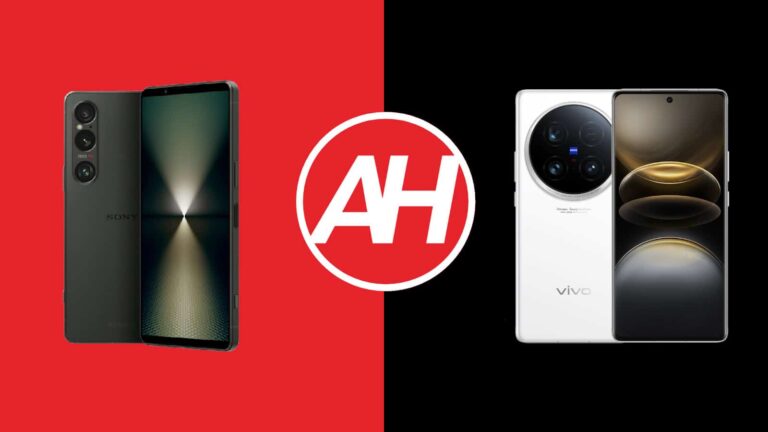
Both Sony and Vivo announced very compelling flagship smartphones this year. In fact, both of them were announced in May. In this article, we’ll compare them, the Sony Xperia 1 VI vs Vivo X100 Ultra. Granted, these two phones are quite different, even though there are a couple of similarities between them. Before we get to it, do note that the Vivo X100 Ultra only comes in a Chinese variant. It did not launch globally, unlike the Xperia 1 VI. It does work perfectly fine in global markets, just make sure your carrier has proper support for it.
With that being said, we’ll first list the specifications of these two phones. Following that, we’ll compare them across a number of other categories, including design, display, performance, battery life, cameras, and audio performance. We have a lot of ground to cover, so… let’s get down to it.
Sony decided to widen its flagship this time around. Now it actually looks like a regular smartphone. Sony’s phones were very narrow before, and this change probably suits the vast majority of you. That phone still has a slightly narrower display aspect ratio than the Vivo X100 Ultra, but the difference is minimal. Both smartphones are made out of metal (aluminum) and glass.
The Sony Xperia 1 VI is shorter, narrower, and thinner than the Vivo X100 Ultra. Granted, it does have a smaller display than Vivo’s flagship, so that definitely plays a role here. It is also considerably lighter in comparison, by 37 grams. The Xperia 1 VI has slightly thicker top and bottom bezels as it does not include a display camera hole. The Vivo X100 Ultra has a centered display camera hole at the top. The Xperia 1 VI includes a flat display, while the Vivo X100 Ultra has a curved one.
Unlike the Vivo X100 Ultra, Sony’s flagship has a flat frame all around the phone. Both phones feature rounded corners, however. The back side of the Xperia 1 VI is flat, while the same cannot be said for the Vivo X100 Ultra. Even their camera islands are vastly different. Sony’s flagship has vertically aligned cameras in the top-left corner. The Vivo X100 Ultra includes a large camera oreo in the top portion of its backplate, and it’s centered.
Both of these smartphones are IP68 certified for water and dust resistance. Both of them feel like premium products in the hand, though considerably different. They are both also quite slippery. The Xperia 1 VI is easier to use with one hand, though both phones are quite large.
Sony Xperia 1 VI vs Vivo X100 Ultra: Display
The Sony Xperia 1 VI features a 6.5-inch fullHD+ (2340 x 1080) LTPO OLED display. That panel is flat, and it can project up to 1 billion colors. It also offers a refresh rate of up to 120Hz, while HDR content is supported here. The screen-to-body ratio here is around 86%, while the display aspect ratio on the Xperia 1 VI is 19.5:9. The Gorilla Glass Victus 2 from Corning is in charge of protecting this display.
On the flip side, the Vivo X100 Ultra features a 6.78-inch QHD+ (3200 x 1440) LTPO AMOLED display. This display is curved, and its refresh rate goes up to 120Hz. It can project up to 1 billion colors, and Dolby Vision is supported, as is HDR. The maximum brightness here is 3,000 nits. The screen-to-body ratio of the Vivo X100 Ultra is at around 89%, while the display aspect ratio is 20:9. We don’t know what display protection is Vivo using.
Both of these displays are excellent. They’re vivid, have great viewing angles, and those deep, inky blacks. They’re also more than sharp enough, even though the Vivo X100 Ultra is considerably sharper in comparison. The Vivo X100 Ultra has another notable difference, a display that does get brighter. The Xperia 1 VI’s display is not dim by any means, but the Vivo X100 Ultra does get notably brighter in direct sunlight.
Sony Xperia 1 VI vs Vivo X100 Ultra: Performance
Both of these phones are fueled by the same processor. Qualcomm’s Snapdragon 8 Gen 3 chip fuels these two phones. That is Qualcomm’s most powerful processor at the moment. The Xperia 1 VI offers 12GB of LPDDR5X RAM, while the Vivo X100 Ultra comes with up to 16GB of LPDDR5X RAM. Both smartphones utilize UFS 4.0 flash storage. So, they’re basically on the same playing field in terms of performance-related specs.
And yes… both of them offer great performance. They’re very fluid in basically all scenarios. You can easily multitask with both smartphones and even if you push them really hard they won’t budge. We’re talking about regular, everyday performance here. They’re great for multimedia consumption, emailing, messaging, browsing, and everything else you can think, of, both phones work great.
Now, many of you are probably wondering about gaming too. Well, it’s worth noting that the Xperia 1 VI does tend to throttle both CPU and GPU during gaming, only if you’re running truly demanding titles, though. We’re presuming that it’s doing that to keep the phone from overheating. Even though that’s happening, you likely won’t notice any impact on your gameplay because of this. Both phones run very demanding games without a problem.
Sony Xperia 1 VI vs Vivo X100 Ultra: Battery
Sony’s flagship features a 5,000mAh battery. The Vivo X100 Ultra, on the flip side, has a 5,500mAh unit. Vivo’s handset includes a silicon carbon battery, which is why such a large unit fits inside this body. Now, despite the fact the Vivo X100 Ultra has a larger battery, the Xperia 1 VI offers a better battery life. It’s a real road warrior when it comes to battery life, and the difference is notable.
The Vivo X100 Ultra can get up to 7 hours of screen-on-time, while the Xperia 1 VI goes above and beyond that. Getting over 8 hours of screen-on-time is not out of the question. Do note that gaming will impact those numbers on both sides, as will other truly graphically-demanding tasks. Your mileage will vary either way, so just keep that in mind. Both smartphones do offer great battery life, but the Xperia 1 VI is a step ahead, one step at least.
When the charging is concerned, the situation is flipped. The Vivo X100 Ultra supports 80W wired, 30W wireless, and reverse wired charging. The Sony Xperia 1 VI supports 30W wired, 15W wireless, and reverse wireless charging. Vivo’s handset not only charges much faster both via a wire and wirelessly, but it includes a charger in the box. The Xperia 1 VI doesn’t even include a charging cable.
Sony Xperia 1 VI vs Vivo X100 Ultra: Cameras
Both of these phones include three cameras on the back. Those camera setups are considerably different, though. The Xperia 1 VI has a 48-megapixel main camera, a 12-megapixel ultrawide unit (123-degre FoV), and a 12-megapixel periscope telephoto unit (3.5x-7.1x continuous optical zoom, macro). The Vivo X100 Ultra, on the flip side, includes a 50-megapixel main camera (1-inch type sensor, gimbal OIS), a 50-megapixel ultrawide camera (116-degree FoV), and a 200-megapixel periscope telephoto camera (3.7x optical zoom, macro).
It is also worth noting that both smartphones collaborated with ZEISS, and have the company’s T* coating on their lenses. Sony’s handset tends to keep things closer to real life when it comes to images. The Vivo X100 Ultra tends to prefer warmer colors, and the images from that phone look a bit more processed. Both smartphones do a great job during the day, as they provide tons of detail and well-balanced shots. The same goes for low light too, though the VIvo X100 Ultra has a tendency to brighten up the scenes a bit more than the Xperia 1 VI. Sony’s handset is not afraid of keeping things a bit darker in low light, closer to real life.
The Vivo X100 Ultra does a better job when it comes to portrait photography, while we also prefer its macro photography prowess… even though the Xperia 1 VI does a really good job on both of those fronts. Their ultrawide cameras are their weakest links, but they’re still very good. Do noet that the Xperia 1 VI’s ultrawide camera has a notably wider field-of-view (FoV), though. You can’t really go wrong with either of these phones when it comes to camera performance.
Audio
There are stereo speakers included on both of these smartphones. The ones on the Sony Xperia 1 VI are louder, though, notably louder. The Vivo X100 Ultra’s speakers are not dim, though, not at all. The sound is good on both sides, though.
What neither of these phones offers is an audio jack. You can always hook up your headphones to their Type-C ports, though. Both smartphones also offer Bluetooth 5.4 support, so wireless audio connectivity is here if you need it.
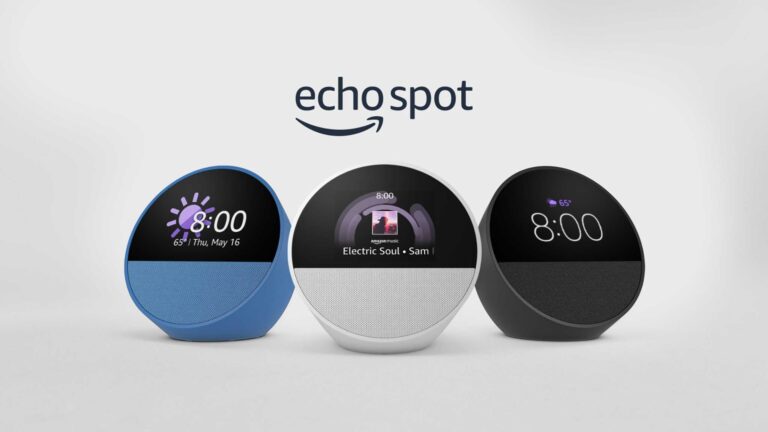
Amazon has just introduced its latest smart speaker/alarm clock called the Echo Spot. The new Amazon Echo Spot has arrived just a few days ahead of the upcoming Amazon Prime Day 2024 sale. Just like its 2017 counterpart, the new Echo Spot is designed to be your nightstand tech buddy. The Alexa-connected smart speaker has a small touchscreen and supports all the voice controls of the previous Echo devices.
The new Amazon Echo Spot speaker offers better visuals and improved audio
According to the official press release, the Amazon Echo Spot 2024 speaker offers “even better visuals and improved audio quality.” Similar to the Echo Dot or other Echo products, the latest Echo Spot variant lets you control IoT devices spread across your smart home. The new offering flaunts a 1.73-inch front-firing direction speaker. It delivers “clear vocals and deep bass,” as per Amazon.
While the previous variant of the Echo Spot was launched with a full circular screen, the new version’s display is split in half. Amazon has removed a camera from the latest offering. For more privacy, the new speaker has a hardware button to turn the microphone off. Furthermore, there are physical volume control buttons onboard the new model.
The new Echo Spot lets you see time, weather, and song titles at a glance on its small screen. You can personalize your display with a clock face or multiple fun colors. The speaker allows you to customize the display to fit the aesthetic of your room. You can choose from as many as six different colorways – Orange, Violet, Magenta, Lime, Teal, and Blue. Besides, the device also allows you to mix and match colors with several clock faces.
Amazon is offering the latest Echo Spot with more than 40 percent discount for Prime users
The Echo Spot 2024 speaker is priced at $79.99. It is significantly less than the $149.99 2017 version at the launch. However, during the Prime Day 2024 sale on July 16 and July 17, Prime members can get it with a discount of more than 40 percent. It will be available for just $44.99 for these users. The new smart speaker from the brand will be available in Black, Glacier White, and Ocean Blue hues.
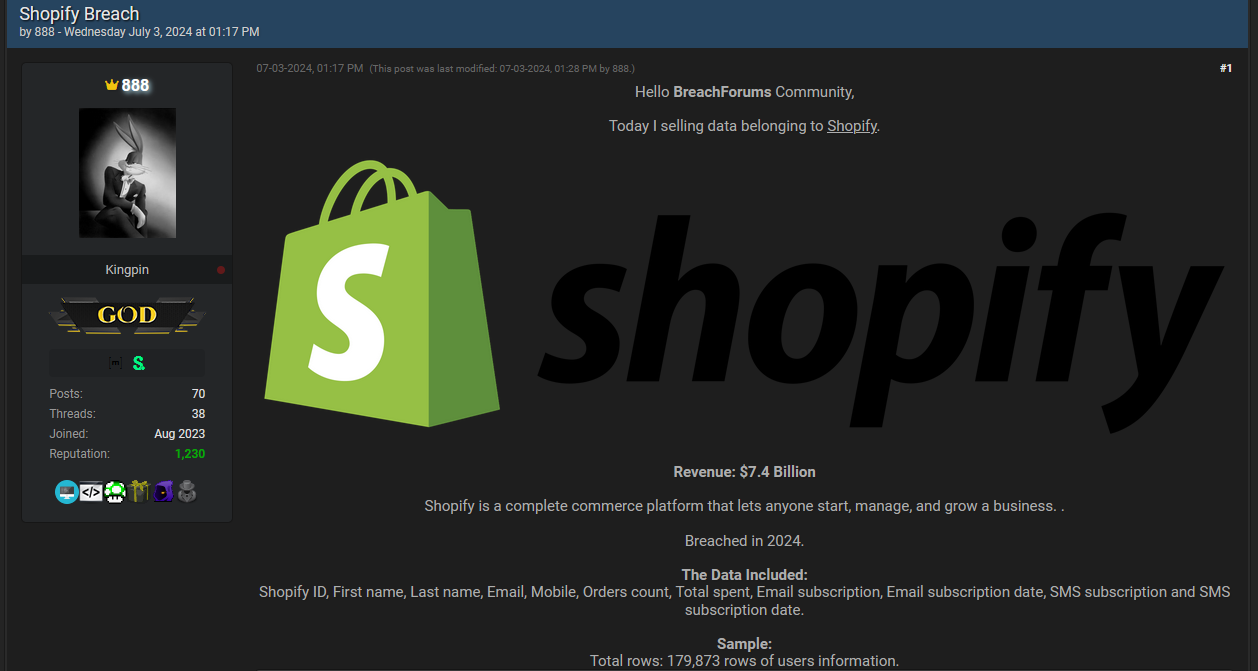
Shopify has denied a breach of its systems after a cybercriminal posted alleged Shopify customer details online.
Shopify told BleepingComputer and other publications that the incident happened at a third party:
“Shopify systems have not experienced a security incident. The data loss reported was caused by a third-party app. The app developer intends to notify affected customers.”
The cybercriminal posting under the handle “888” claims the breach took place in 2024 and contains 179,873 rows of users’ information.
Post by 888 offering Shopify data for sale
The data offered for sale includes:
Shopify ID
First name
Last name
Email address
Mobile phone number
It also includes some Shopify specific data like number of orders, total spent, email subscription status, email subscription date, SMS subscription status, and SMS subscription date.
Where the data comes from is a good question.
In March, Cybernews reported about a publicly accessible MongoDB database that belonged to a US-based company, Saara, who develop Shopify plugins. The leaked database stored 25GB of data which stemmed from plugins covering over 1,800 Shopify stores.
In June, we reported about a breach affecting Evolve Bank & Trust that also affected several of its partners. Shopify is a partner of Evolve.
No doubt this isn’t the end of the story. We will keep you updated.
Protecting yourself after a data breach
There are some actions you can take if you are, or suspect you may have been, the victim of a data breach.
Check the vendor’s advice. Every breach is different, so check with the vendor to find out what’s happened, and follow any specific advice they offer.
Change your password. You can make a stolen password useless to thieves by changing it. Choose a strong password that you don’t use for anything else. Better yet, let a password manager choose one for you.
Enable two-factor authentication (2FA). If you can, use a FIDO2-compliant hardware key, laptop or phone as your second factor. Some forms of two-factor authentication (2FA) can be phished just as easily as a password. 2FA that relies on a FIDO2 device can’t be phished.
Watch out for fake vendors. The thieves may contact you posing as the vendor. Check the vendor website to see if they are contacting victims, and verify the identity of anyone who contacts you using a different communication channel.
Take your time. Phishing attacks often impersonate people or brands you know, and use themes that require urgent attention, such as missed deliveries, account suspensions, and security alerts.
Consider not storing your card details. It’s definitely more convenient to get sites to remember your card details for you, but we highly recommend not storing that information on websites.
Set up identity monitoring.Identity monitoring alerts you if your personal information is found being traded illegally online, and helps you recover after.
Malwarebytes has a free tool for you to check how much of your personal data has been exposed online. Submit your email address (it’s best to give the one you most frequently use) to our free Digital Footprint scan and we’ll give you a report and recommendations.
As we approach Unpacked later this week, where Samsung is set to announce the Galaxy Z Flip 6 and Galaxy Z Fold 6, one has to wonder if Samsung can take the crown back from OnePlus/OPPO in the foldable market.
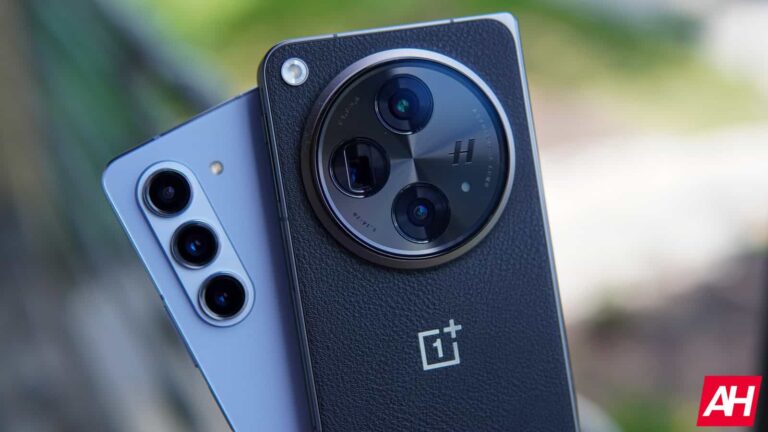
Last year, OnePlus announced its first foldable with an asterisk, the Open. We put an asterisk there because it is essentially the OPPO Find N3 in everything but the logo. This is not OPPO’s first foldable, but it’s a third-generation foldable. And it completely surpassed Samsung in one fell swoop. Not only did OnePlus and OPPO put out better hardware than Samsung, but it also put out better software.
I recently went back to the OnePlus Open, to use it again ahead of the Galaxy Z Fold 6 launch, and to see how it compares to the current best foldable on the market. And I fell in love with the Open all over again. The rumors for the Galaxy Z Fold 6 aren’t that great. The rumormill is pointing to a phone that is mostly the same as the previous model, but a tad wider and a new processor.
OnePlus’ Open Canvas feature is the best foldable feature we’ve seen so far
With the OnePlus Open last year, OnePlus debuted Open Canvas which is a feature that was also brought to the OnePlus Pad, and it’s genius. To put it in the simplest terms, Open Canvas allows the user to have more screen real estate than is actually available. You’re able to push apps off of the screen, and swipe over to them whenever you want. You can run up to six apps on the screen at the same time, which is impressive. Though, admittedly, it’s not something I do that often.
It’s not all software though, another decision OnePlus and OPPO made that helped Open Canvas perform so well is, the front display. OnePlus and OPPO opted for a 18:9 front display, which is the aspect ratio for most smartphones these days. But that also means when you open the phone, you’re getting a square display (almost) but it also means that having apps side-by-side, they will be 18:9 aspect, instead of super skinny apps like they are on Samsung’s Galaxy Z Fold models.
One of my biggest complaints with foldables is the aspect ratios of the displays. Samsung, for example, uses a very skinny front display that feels more like a TV remote versus a smartphone. That makes the inner display almost exactly a square, and when you have two apps in multi-window, you’re looking at two very skinny apps. It’s just not a good user experience, and that had really turned me off from using foldables, because both screens kind of suck for using apps normally.
OnePlus put its best cameras ever, in the Open
Another area where foldables typically fall short is in the camera department. This is likely because companies are looking to keep phones lighter and thinner, but need larger batteries inside foldables to power those larger displays. OnePlus said screw it, let’s put in the best cameras we’ve ever had.
With the Open, OnePlus included a 48-megapixel primary camera with a f/1.7 aperture, a 64-megapixel 3x telephoto and a 48-megapixel ultrawide. On paper, that sounds outstanding, in practice, it is. I was amazed at how well the Open took photos last year while I was reviewing it, and now picking it up again about 8 months later with countless new updates, it’s still impressive. As I noted in my review last year, OnePlus might have the best cameras on any phone with the Open, nevermind a foldable. Though that has changed now, especially with the Vivo X Fold3 Pro being available.
OnePlus did include a pretty massive camera bump on the Open to accommodate these cameras, but it’s worth it. That camera bump also makes it easier to hold onto the OnePlus Open, in my experience.
Samsung can’t seem to get rid of the crease
We’re writing this ahead of Unpacked, and we haven’t seen the Galaxy Z Fold 6 in person yet, other than in leaks. But it seems like Samsung is still pretty far behind the competition on getting rid of the crease. Companies like Motorola, OnePlus and OPPO have all done a really good job of getting rid of the crease. I mean, it’s almost non-exsistent on the new Razr+ that was announced last month, as well as the OnePlus Open. But with Samsung, you will most likely still see that crease, and it’s definitely an eyesore.
Can Samsung take back the throne?
While I did spend about 750 words trashing Samsung and its foldables, it has come a long way since the first Galaxy Fold back in 2019. But there’s still a long way to go. Not just for Samsung but for every company making foldables. Samsung was first to the market, and that means that its competition was able to learn from its mistakes more than Samsung itself.
So what can Samsung do with the Galaxy Z Fold 6 to take back the throne? Well, for one, upgrade the cameras. The Galaxy Z Fold 5 cameras are not great at all, to be quite honest, especially for a $1700 phone. They will get the job done, but the Galaxy S24 Ultra is far better. The software is getting there, Samsung does have plenty of great software tweaks to take advantage of that display. However, the biggest thing Samsung needs to address is the aspect ratio.
Last year, at Unpacked in Korea, I spoke with Samsung and talked about how the Pixel Fold (the OnePlus Open wasn’t out yet) was better than the Galaxy Z Fold 4 (at the time), because of the wider front display. Meaning I didn’t need to open the phone as much. Samsung thought that was pointless. This makes me think Samsung wants you to open the phone all the time versus using the front display a lot and opening it for multitasking. If Samsung adopts the wider aspect ratio of the Pixel Fold or the regular smartphone aspect ratio of the OnePlus Open, I think a lot of my complaints about Samsung’s foldables will be solved.
It sort of feels like, after last year, that Samsung is just phoning it in these days for foldables. A big reason for that is the competition or lack thereof. In the US, it’s really only competing with the Pixel Fold and OnePlus Open, and only one of those is sold at carriers. On the flip side, it is competing with Motorola, and that’s about it. What Samsung really needs is more competition in the US (its biggest market), which will push them to innovate and make bigger upgrades to its foldables.




.webp)