Android 14 QPR1 Beta 2.1 fixes fingerprint & network issues

0
[ad_1]

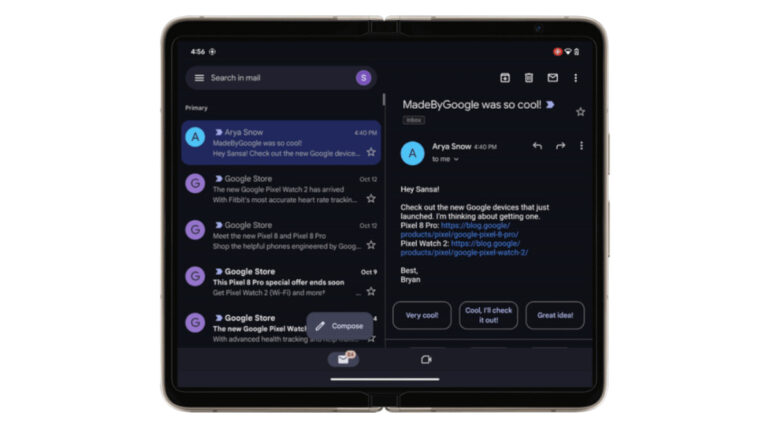
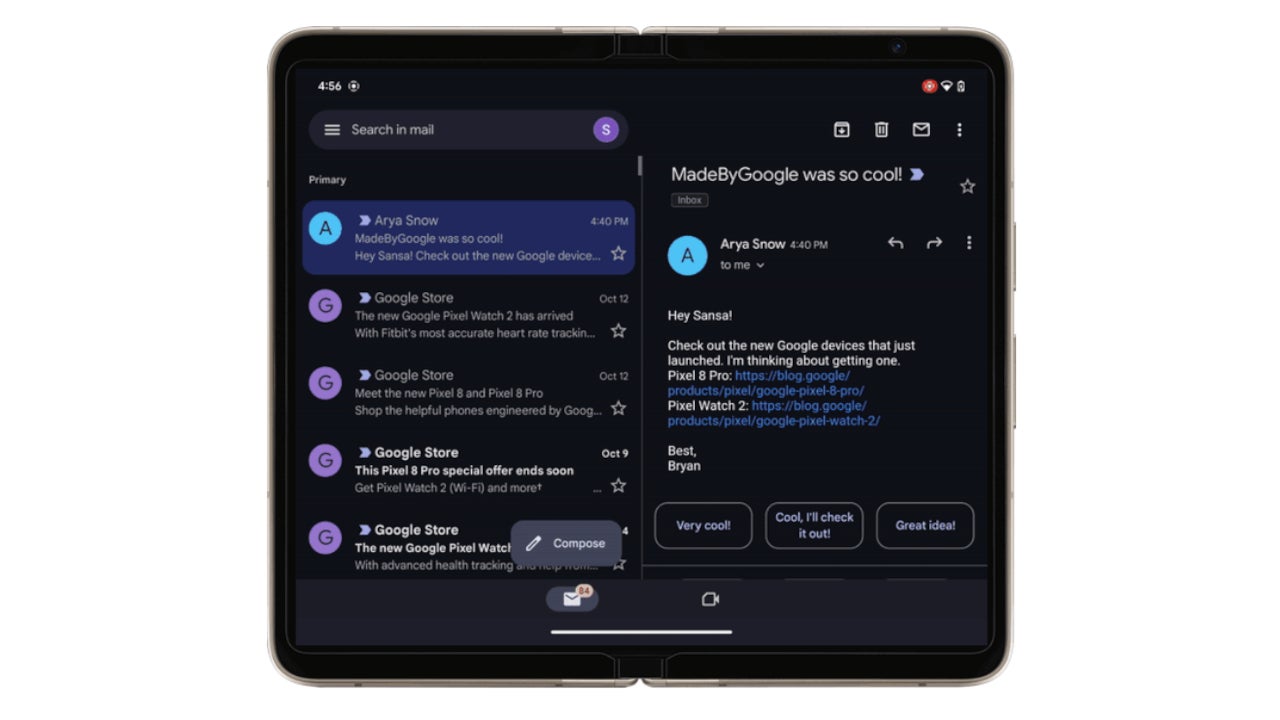
Android 14 QPR1, or Quarterly Platform Release 1, has just hit another milestone with the release of Beta 2.1. If your Pixel is enrolled in the beta program, you’ll soon get the new update with some bug fixes. Like previous releases, the update is available for every Pixel model launched since 2021 — from the Pixel 5a through to the Pixel 8 series, including the Pixel Fold and Pixel Tablet.

Pixel devices get Android 14 QPR1 Beta 2.1 with bug fixes

QPRs are quarterly feature updates for Pixel devices. Through these releases, Google pushes new features that don’t require a major Android OS upgrade. It’s a relatively new concept but has been very effective in keeping up the excitement among users. Pixels get a feature update every three months throughout the year before making the jump to a new Android version. The cycle continues till their end of life.

Google runs beta programs for these quarterly releases to let users test the update and help it fix bugs before the stable rollout. The company rolled out the first Android 14 QPR1 beta update for Pixel devices a couple of weeks before the Android 14 hit the stable release. It followed up with Beta 2 a day after the Android 14 release. It’s now pushing Beta 2.1 to address some of the known issues with the previous build.

According to Google’s official release notes, the latest update fixes a bug that occasionally prevented the under-display fingerprint scanner from working when always-on display (AOD) was enabled. It also resolves the cellular connectivity issue that beta users faced after swapping SIM cards. Google has patched some minor bugs as well, improving the system’s stability and reliability.

The company states that other known issues in Android 14 QPR1 Beta 2 exist in Beta 2.1. These include the battery level in the status bar sometimes appearing 0% temporarily. There are also reports about broken animations, notifications overlapping the date and weather on the lock screen, Bluetooth turning off automatically, and more. Google will fix these issues with subsequent beta updates.

The stable update should arrive in December

If history is any indication, Android 14 QPR1 should hit a stable release in December. We may see a few more beta builds until then. If you have joined the beta program, watch out for new updates in the coming weeks. The latest release comes with the firmware build number U1B2.230922.010 for all eligible Pixel models. Since November is still over a week away, the devices remain on the October security patch.


[ad_2]
Source link

Samsung aims to double foldable sales to 20 million units in 2024

0
[ad_1]

Samsung is reportedly aiming to double its foldable sales next year. According to the Korean media, the company has set a target of selling 20 million foldable smartphones globally in 2024. Its foldable shipments are expected to just cross 10 million units this year.

Samsung failed to achieve its foldable sales target for 2023

The Korean tech giant has been making foldable smartphones since 2019. The market had no competition in the first few years but that changed in 2023. As many as ten companies launched foldables this year. A growing competition, coupled with a global economic slowdown, affected the sales of Galaxy foldables.

While the annual sales of Samsung’s Z-series phones surpassed the now-discontinued Note series this year, the firm failed to achieve its foldable sales target. It originally aimed to ship more than 15 million units of the Z Fold and Z Flip series phones combined, with the fifth-gen models selling around 10 million units.

However, according to The Elec, Samsung may only manage to ship a total of 10 million foldable smartphones this year. The Galaxy Z Fold 5 and Galaxy Z Flip 5 will account for seven million of those, with older models making up the rest. Two months after the launch of the new models, the company’s foldable inventory is said to be higher than expected. It shows poor sales amid an economic slowdown.

If this information turns out to be accurate, Samsung is failing its foldable sales target for 2023 by a huge margin. It’s only selling about two-thirds (66 percent) of its initial estimates. On the bright side, The Korean firm expects to bounce back as early as next year. Despite the arrival of new players in the foldable market, the company is aiming to double the sales of its Z-series devices in 2024.

Samsung needs to improve its foldables to fend off the competition

The new report doesn’t break down the estimated share of the sixth-gen models and the older ones. However, it says that the Korean behemoth plans to sell a total of 20 million foldables next year. It may be expecting the Galaxy Z Fold 6 and Galaxy Z Flip 6 to account for at least 60 percent of the total sales.

However, to achieve that, Samsung needs to improve the new foldables. Other firms have lowered the price point and made the devices thinner. The Korean company must match these innovations to maintain its lead in the market. Time will tell whether it manages to hit its foldable sales target for 2024.


[ad_2]
Source link

Galaxy Z Fold 6 to get a thinner build, no camera upgrade

0
[ad_1]

Samsung may have planned some upgrades for the Galaxy Z Fold 6 but a new camera doesn’t seem to be on the cards. Noted tipster Ice Universe claims that the 2024 book-type foldable will feature the same 50MP sensor found on the Galaxy Z Fold 5 and Fold 4. The same was previously claimed by another tipster Revegnus, so it’s quite likely.

Galaxy Z Fold 6 won’t bring a camera upgrade

Samsung has used a 50MP main camera on its Fold series devices since last year, upgrading from a 12MP unit found on the 2021 model, i.e. the Galaxy Z Fold 3. It’s the same camera that the company also uses on its S series flagships. The Galaxy S22, Galaxy S22+, Galaxy S23, and Galaxy S23+ feature the ISOCELL GN3 50MP sensor. The Galaxy S22 Ultra has a 108MP camera while the Galaxy S23 Ultra has a 200MP unit.

Rumors say next year’s Galaxy S24, Galaxy S24+, and Galaxy S24 Ultra will keep things unchanged, at least in terms of the main camera sensor. Samsung could improve the image quality with hardware and software optimizations, but that’s a different story. It appears that will be the case with the Galaxy Z Fold 6 as well. The 2024 foldable will get the same primary shooter that we have seen on Galaxy phones since early 2022.

The story is slightly different for the Flip lineup. The clamshell foldables have featured a 12MP primary camera since the first-gen model in 2020, though the Galaxy Z Flip 5 and Flip 4 have a newer sensor. However, Samsung may not use it next year. The Galaxy Z Flip 6 is rumored to upgrade to a 50MP camera as well. It’s unclear whether we are talking about the same 50MP sensor as the Fold model or something different.

Samsung to make its 2024 Fold thinner

A new camera may not be on the cards, but the Galaxy Z Fold 6 could still be a meaningful upgrade over the Fold 5. Rumors are that Samsung will change the dimensions of the phone to make it wider. This will effectively make the cover display more like a regular smartphone screen. In its current form factor, the cover screen is a bit too tall.

Additionally, Samsung is also looking to make the Galaxy Z Fold 6 thinner than the Fold 5. This appears to be a change forced by competition. In April this year, Huawei launched the Mate X3 with a thickness of 11.8mm. It followed up with an even thinner Mate X5 in September, measuring just 11.1mm in thickness when unfolded. Xiaomi’s Mix Fold 3 arrived in August measuring 10.9mm in thickness.

The Galaxy Z Fold 5, on the other hand, is substantially thicker (13.4mm) than these foldables. What’s more interesting is that despite being thin, the Xiaomi and Huawei phones pack bigger batteries (4,400mAh vs. 4,800mAh). Unsurprisingly, they received a lot of praise from reviewers and the media. Samsung senses a potential threat to its foldable dominance here and is gearing up to respond appropriately.

According to the Korean media, Samsung is reverse engineering the new foldables from its Chinese rivals to see what they did differently to pull this off. The company now plans to put those findings to use and make its next-gen foldables thinner. It will be interesting to see how thinner the Galaxy Z Fold 6 will be than the Fold 5. We will keep you posted with the latest information about the device.


[ad_2]
Source link

The Pixel 8 is getting a unified At a Glance setting

0
[ad_1]

Google is now rolling out a unified At a Glance settings page and introducing a new feature. This feature first got teased in Android 12, but for some reason never made it to the public for usage. Now Google is bringing this feature known as At a Store to the Pixel 8 series.

For the unification process, Google is bringing all At a Glance settings under one section for better accessibility. This update now removes the expansion button that was previously at the bottom of the At a Glance settings page. With this button, users could access more features under this setting page via the Assistant settings in the Google app.

Pixel users can now wave goodbye to this button, as all the At a Glance features can now be found under one settings page. To access this page, users need to open the Pixel Launcher via the settings app and select the At a Glance option. Among all the features that are now available for usage here is a new feature that Google has been working on for a while.

The new At a Store feature is now joining other Google At a Glance options for usage

Right now, there are 21 toggle options on the new At a Glance setting. Previously, users had access to 20 toggle options, ten of which were directly accessible via the At a Glance settings page. The remaining options were available by using the ‘See more features’ button at the bottom of the page.

Google is adding the ‘At a Store’ feature to the list of ‘At a Glance’ features users have access to. This new feature will make shopping a bit easier for Pixel users who get access to the new feature. It’ll work with certain stores that Google supports and help to simplify the entire shopping experience of Pixel users who step into these stores.

With this feature, users will be able to access their shopping lists at a glance once they walk into certain stores. This At a Glance feature will also pull up the user’s Google Pay rewards card for easy shopping. These details will pop up on their smartphone or smartwatch screens for easy access at a glance.

Google teased this feature with Android 12 a few years ago, but it didn’t launch. Now with a new update to the Pixel Launcher, users are getting the ‘At a store’ feature. As well as a unified At a Glance settings design. The new design makes access to all At a Glance features accessible, and the new feature improves the user’s shopping experience.

Users of the Pixel 8 series are already getting this feature via a Google Play Store update. Most users are yet to get this update. But some are already getting the redesign as well as the new feature. The update should arrive for all in the coming weeks.


[ad_2]
Source link

The Android QR code reader is about to get more useful

0
[ad_1]

Android comes with a handy dandy QR code reader installed. It’s always at the ready when you need to scan a code. Being a QR code reader, you shouldn’t really expect any added functionality from it. However, Google is looking to surpass expectations and add a new feature. According to a new report, the Android QR code reader will let you scan passes and health cards to add to Google Wallet.

This is a neat feature, and it shows that Google wants to upgrade how you add cards to your Google Wallet. Just recently, we got the news that Wallet allowed people to scan barcodes to add cards. For example, if you have a gym membership card, you can scan its barcode to add it to your wallet. It’s a way of adding cards to your wallet that aren’t on the pre-populated list of cards.

The Android QR code reader will let you scan passes

The latest beta version of the Google Play services (version 23.42) is now out, and it brings an update to the Android QR code reader. You will be able to add different passes to your Wallet along with smart health cards. In the beta, when you scan the QR code, it will detect if it’s the code for a smart health card or other card.

Once it detects that it’s a specific kind of card, you’ll see a little Google Wallet panel pop up from the bottom with an add to Wallet button. When you tap on that button, you’ll see the Google Wallet app open with a picture of the card you’re adding. On the bottom of the screen, you’ll see the Add button. Once you tap on that button, it will be added to your wallet.

Right now, in order to use this feature, you’ll need to be running Android 13, have the latest beta version of the Google Play Services installed, and activate the appropriate flags. If you don’t want to mess around with the flags, then you’ll just want to wait for it to hit the stable channel.


[ad_2]
Source link

OnePlus Open vs Samsung Galaxy Z Fold 5

0
[ad_1]

The OnePlus Open is the company’s very first smartphone, and it actually launched quite recently. In this article, we’ll compare the OnePlus Open vs Samsung Galaxy Z Fold 5. These are basically both flagship-grade foldable smartphones, but they are quite different. The Galaxy Z Fold 5 arrived a couple of months ago, but it’s running the same SoC, in a different shell, though.

Both of these smartphones are book-style foldables, but despite that fact, a lot of detail differentiates them. Ranging from the in-hand feel, build materials, aspect ratios, and so on. We’ll kick things off by listing their specifications, and will then move to compare them across a number of other categories. We’ll compare their designs, displays, performance, battery life, cameras, and audio performance.

Specs

OnePlus Open & Samsung Galaxy Z Fold 5, respectively

Screen size (main):
7.82-inch LTPO 3 AMOLED display (120Hz, Dolby Vision, 2,800 nits)
7.6-inch Foldable Dynamic AMOLED 2X display (120Hz, HDR10+, 1,750 nits)
Screen Size (cover):
6.31-inch OLED (120Hz, 2,800 nits)
6.2-inch Dynamic AMOLED 2X (120Hz, 1,750 nits)
Display resolution (main):
2268 x 2440
1812 x 2176
Display resolution (cover):
2484 x 1116
2316 x 904
SoC:
Qualcomm Snapdragon 8 Gen 2
Qualcomm Snapdragon 8 Gen 2 for Galaxy
RAM:
16GB (LPDDR5X)
12GB (LPDDR5X)
Storage:
512GB (UFS 4.0)
256GB/512GB/1TB (UFS 4.0)
Rear cameras:
48MP (wide, f/1.7 aperture, multi-directional PDAF, OIS), 48MP (ultrawide, 114-degree FoV), 64MP (periscope telephoto, 3x optical zoom, 6x “in-sensor” zoom, macro)
50MP (wide, f/1.8 aperture, Dual Pixel PDAF OIS), 12MP (ultrawide, 123-degree FoV), 10MP (telephoto, 3x optical zoom)
Front cameras:
20MP (main display, f/2.2 aperture), 32MP (cover display, f/2.4 aperture)
4MP (under display, main display, f/1.8 aperture), 10MP (cover display, f/2.2 aperture)
Battery:
4,805mAh
4,400mAh
Charging:
67W wired (charger included)
25W wired, 15W wireless, 4.5W reverse wireless (no charger)
Dimensions (unfolded):
153.4 x 143.1 x 5.8mm
154.9 x 129.9 x 6.1mm
Dimensions (folded):
153.4 x 73.3 x 11.7mm
154.9 x 67.1 x 13.4mm
Weight:
239/245 grams
253 grams
Connectivity:
5G, LTE, NFC, Wi-Fi, USB Type-C, Bluetooth 5.3
Security:
Side-facing fingerprint scanner
OS:
Android 13 with ColorOS
Android 13 with One UI
Price:
$1,699
$1,799+
Buy:
Best Buy
Samsung

OnePlus Open vs Samsung Galaxy Z Fold 5: Design

Both of these phones are book-style foldables, though as mentioned earlier, there are quite a few differences here. In fact, many people would agree the OnePlus Open has an advantage from a design standpoint. Its outer display has a 20:9 aspect ratio, the Galaxy Z Fold 5’s is much narrower (23.1:9 ratio). That makes the phone quite narrow. The OnePlus Open also has larger displays in general, both of them, and a less visible crease.

The OnePlus Open is made out of metal and glass/vegan leather, depending on what variant you end up getting. The Galaxy Z Fold 5 combines metal with glass. Both phones have a display camera hole on the outer display, while the OnePlus Open has one on the inner one too. The Galaxy Z Fold 5 keeps the camera under its main panel. Both devices have fairly thin bezels around their displays.

They’re also quite different when you look at their back sides. The OnePlus Open includes a large camera oreo on the back, hosting three cameras. The Galaxy Z Fold 5 has three cameras too, but in a vertical orientation, and they take up less space. The OnePlus Open will wobble less on the table, when folded, in case you were wondering. Both phones look very nice overall, it’s all a matter of personal preference. The OnePlus Open’s model with a vegan leather backplate (the black one) is considerably less slippery, though.

Both smartphones offer protection against rain. The OnePlus Open has an IPX4 rating, while the Galaxy Z Fold 5 offers an IPX8 rating, which is better. OnePlus’ foldable is slightly shorter, considerably wider, and also thinner in both folded and unfolded orientations. It’s actually considerably thinner when folded, and also lighter. The OnePlus Open weighs 239 or 245 grams, depending on the variant, while the Galaxy Z Fold 5 weighs 253 grams.

OnePlus Open vs Samsung Galaxy Z Fold 5: Display

The main display on the OnePlus Open measures 7.82 inches. That panel offers a resolution of 2268 x 2440 pixels, and it’s a foldable LTPO 3 AMOLED display. It can project up to 1 billion colors, has Dolby Vision support, and goes from 1-120Hz in terms of refresh rate. This panel can also get immensely bright at up to 2,800 nits, and it has UTG (Ultra Thin Glass) on top. The second display on the phone measures 6.31 inches, and it has a resolution of 2484 x 1116. That is also an LTPO 3 OLED display, and has the same brightness as the main panel. Its refresh rate goes from 10 to 120Hz. A Ceramic Guard protection is included on top of it.

Samsung Galaxy Z Fold 5 AM AH 05
Samsung Galaxy Z Fold 5

The main display on the Galaxy Z Fold 5 measures 7.6 inches. It has a resolution of 2176 x 1812, and it’s a Dynamic AMOLED 2X panel with up to a 120Hz refresh rate. HDR10+ content is supported here. This panel has a max brightness of 1,750 nits. The cover display on the phone measures 6.2 inches, and it has a resolution of 2316 x 904. This is also a Dynamic AMOLED 2X panel with a 120Hz refresh rate. It is protected by the Gorilla Glass Victus 2 by Corning.

All displays across these phones are really good. They are vivid, sharp, and have good viewing angles, and deep blacks. The thing is, the OnePlus Open has several advantages. Both of its displays get considerably brighter than the ones on the Galaxy Z Fold 5. On top of that, its outer display has a normal smartphone aspect ratio, and it’s much easier to type on. The third advantage comes in the form of the crease, it’s much less noticeable on the OnePlus Open’s main panel. Some people may prefer the extremely narrow cover display on the Galaxy Z Fold 5, sure, but chances are most will not, mainly due to typing.

OnePlus Open vs Samsung Galaxy Z Fold 5: Performance

Both of these smartphones are fueled by the Snapdragon 8 Gen 2 SoC. The Galaxy Z Fold 5 does come with a version that is clocked a bit higher, but they’re basically the same. Both phones also offer LPDDR5X RAM, but OnePlus’ handset has more to offer in that regard. It offers 16GB of RAM, while the Galaxy Z Fold 5 offers 12GB. The OnePlus Open also offers 512GB of UFS 4.0 flash storage as a standard. The Galaxy Z Fold 5 starts at 256GB, but it goes all the way up to 1TB, and it also offers UFS 4.0 flash storage.

In case you’re worried about performance, don’t be, as both smartphones offer outstanding performance. They’re extremely smooth, even when it comes to heavier multitasking. Both of them can skip a heartbeat or two when you’re really pushing them, but any phone can. The point is, they perform great, even if you’re gaming. Yes, they both can handle the most demanding games on the Play Store, with ease.

Both of them have a number of software tricks to take advantage of their huge displays. Split screen is available on both, you’ll also find a very useful dock at the bottom on both phones, though that dock is used a bit differently. The OnePlus Open even has a new, innovative way of multitasking, where it keeps three apps on your screen, but one of them takes the majority of the display, per default. They automatically adapt when you want all three to be in focus (fully opened on the screen), and you do have control regarding that. It’s surprisingly easy to multitask this way, and more companies should take advantage of the idea.

OnePlus Open vs Samsung Galaxy Z Fold 5: Battery

There is a 4,805mAh battery included in the OnePlus Open, while a 4,400mAh battery sits inside the Galaxy Z Fold 5. It is worth saying that the Fold 5 has slightly smaller displays. In regards to battery life, the OnePlus Open fairs better, at least it did for us. The difference is quite considerable too. The Galaxy Z Fold 5 was barely able to get to 7 hours of screen-on time, it usually flew below that point. The OnePlus Open, on the other hand, can get past the 9-hour mark, we even managed to push it past the 10-hour mark, barely.

Now, do note that if you push any of these two phones heavily, the battery life will be noticeably lower. You can do that with every phone. We did not exactly baby either phone, but these numbers have been recorded on days without gaming, just to keep things fair. We did multitasking plenty, taking pictures, browsing the internet, consuming multimedia, and so on. Basically anything a regular user would do. Your mileage may vary, though, of course, due to different usage, and so on.

What about charging? Well, each of the two phones has its advantage in this regard. The OnePlus Open supports 67W wired charging, and no wireless charging, but it has a charger in the box. The Galaxy Z Fold 5 is limited to 25W wired charging and it doesn’t have a charger in the box. It does, however, support 15W wireless, and 4.5W reverse wireless charging.

OnePlus Open vs Samsung Galaxy Z Fold 5: Cameras

The OnePlus Open has a 48-megapixel main camera OIS, multi-directional PDAF, f/1.7 aperture, 1.12um double-stacked sensor), a 48-megapixel ultrawide camera (f/2.2 aperture, PDAF, 114-degree FoV, macro), and a 64-megapixel telephoto unit (f/2.6 aperture, 3x optical zoom, 6x “in-sensor” zoom, OIS, PDAF). The Galaxy Z Fold 5, on the other hand, includes a 50-megapixel main camera (OIS, Dual Pixel PDAF, f/1.8 aperture), a 12-megapixel ultrawide camera (f/2.2 aperture, 123-degree FoV, 1.12um pixel size), and a 10-megapixel telephoto camera (f/2.4 aperture, PDAF, OIS, 3x optical zoom).

OnePlus Open AM AH 21
OnePlus Open

The images these two phones take are considerably different, though both do a good job. The OnePlus Open clearly has a better camera setup on the back, and it does reflect on the final product too. The phone provides really nice-looking and sharp photos, with excellent colors, thanks to Hasselblad. The images can be a bit too dark at times, but for the most part, they’re excellent. That actually goes for the ultrawide camera too, which shoots not only great ultrawide photos, but good macro shots as well. We found that the telephoto camera on the phone is also more useful than the one on the Galaxy Z Fold 5, though out of the three cameras, you’ll see the least difference in that regard.

The Galaxy Z Fold 5 loves to add plenty of saturation to its shots, which makes them look off in comparison with what the OnePlus Open offers. That’s especially obvious when you shoot people, as the color of their skin tends to be wrong quite often, especially if the sun is included in the equation. Other than that, the photos do end up looking quite good, though most of the time the OnePlus Open will provide a better photo. That goes for low light images too, the Galaxy Z Fold 5 tends to go a bit overboard when it comes to brightening up scenes, the photos from the OnePlus Open do look a bit more natural. The colors in low light are also excellent. Video recording is good on both, but not the best out there.

Audio

The OnePlus Open includes three speakers, while the Galaxy Z Fold 5 includes two. Both sets of speakers provide good audio quality, but the ones on the Galaxy Z Fold 5 are louder, despite the fact the phone has one less speaker.

Neither phone includes an audio jack. If you would like to connect your wired headphones, you’ll need to use a dongle. Alternatively, you can use wireless headphones, as both phones offer Bluetooth 5.3 support.


[ad_2]
Source link

Google Messages will make sending pictures much faster

0
[ad_1]

Google Messages just went through a notable redesign not too long ago. It introduced a new home screen with some menu items moved around. However, it seems that the company is not done making changes. According to a new report, Google Messages will have a camera icon on the home screen.

The Google messages camera icon will make sending pictures easier

When using Google Messages, you’re likely to send a picture from time to time. If you need to snap a shot to send to your recipient, you have a few options. You can either go to the conversation, tap on the Add button, and access the camera. You could also go to the camera app, take the shot, go to the conversation, and select the image.

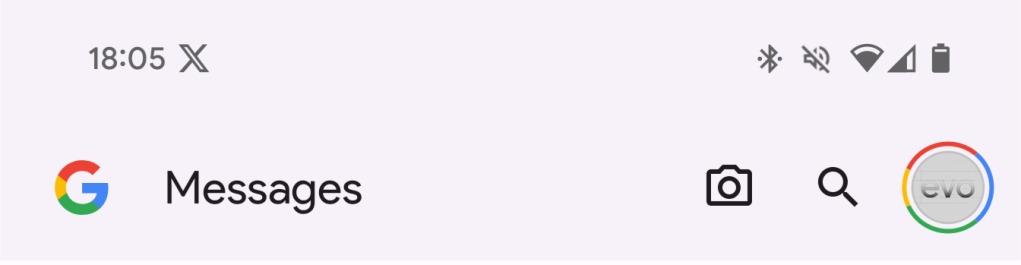
Neither of those ways is particularly painful, but Google is looking to streamline the experience a bit. The company is going to update the Google Messages app to include a new camera icon next to the search button. Tapping on that button will bring you to the camera app. Once you take the picture you want, you’ll see the Select recipients UI pop up. This will let you send the picture right away.

Google Messages camera

This will make sending pictures to your friends just a bit quicker and easier. One thing to note is that this feature has not rolled out yet. We’re not 100% sure when Google is going to release it to the public. For the time being, when you take the picture, you’ll get the current Add recipient screen.

That’s notable because Google is working on revamping that UI. Rather than being a little box that shows a few of your recent recipients, it will open in a full-screen mode that will show more recipients to add. You’ll also be able to expand the list to show even more.

We don’t know when Google is going to come out with any of these changes, so you’ll just need to hang tight.


[ad_2]
Source link

There a built-in browser in Wear OS 4 that doesn’t surf the web

0
[ad_1]

Wear OS 4 ushers in some quite useful changes for Android users but one of those things is not a built-in browser that you can use to surf the web. Firstly, for many that’s probably ok. Because browsing the web on a smartwatch screen is most certainly not the most ideal way to experience all the web has to offer.

Secondly, there are actually some other browser apps you can grab from the Play Store on the watch. If you feel like putting yourself through that for some reason. Interestingly, Wear OS 4 on the Pixel Watch and the Pixel Watch 2 does come with a built-in browser. What’s strange about this is that the browser doesn’t let you surf the web. It seems that it might be dedicated to sending links that you can click from other apps over to your phone. So it does technically work in a roundabout way. But you can’t simply launch the browser and then navigate to a website of your choosing.

The built-in browser in Wear OS 4 isn’t showing up for everyone

It’s not clear why but as 9To5Google points out, the browser doesn’t show up for all users. We were able to find it on our Pixel Watch 2 so it is definitely there though. Located in settings, you can find it under the default apps screen from the apps and notifications menu. Right towards the top you’ll see “default browser” and “Wear OS” will be set as the default. Of course, if you install another browser on the watch, you should be able to change this.

Maybe Google will end up changing this in some way down the line. But for now it’s something that’s kind of just there. And interesting find to say the least. Though it’d be more interesting if it was an actual application you could launch.


[ad_2]
Source link

OnePlus & BOE will unveil new, immensely bright display soon

0
[ad_1]

OnePlus and BOE are partnering up to announce a new, immensely bright display. That panel will be announced on October 24, and it seems like OPPO is a part of the picture as well.

OnePlus, OPPO & BOE are partnering up to announce a new display

If you check out the image provided below, you’ll see the official confirmation of the event. The names of all three companies can be seen in the provided image. As a reminder, OnePlus and OPPO are sister companies.

Neither company revealed more details than that, but a tipster did. Digital Chat Station, one of the best-known Chinese tipsters, says that this will be a QHD+ panel. In addition to that, he said that it will offer up to 3,000 nits of brightness.

If that ends up being true, the record the OnePlus Open set won’t last for long. The OnePlus Open has two displays, both of which offer up to 2,800 nits of brightness. Both of those panels are current record-holders, followed by the OPPO Find X6 Pro’s panel.

This panel will be able to hit 3,000 nits of brightness at its peak

In any case, Digital Chat Station also said that the companies will bring screens with over 3,000 nits peak brightness to 1.5K screens. They will use 2,160 PWM dimming + single pulse DC. Needless to say, those are great news.

Why are OnePlus and OPPO a part of the picture here? Well, chances are that the OnePlus 12 will feature that display, and quite possibly the OPPO Find X7 Pro as well.

We’ll get all the necessary details next week. Now, the OnePlus 12 is expected to launch either at the end of December or in early January. It’s possible it will launch in China first, as was the case last year.

The OnePlus 12 will likely debut that panel

The phone will be fueled by the Snapdragon 8 Gen 3 SoC, and include truly powerful specs across the board. It already surfaced in CAD-based renders, with a similar design to the OnePlus 11.

The OPPO Find X7 Pro likely won’t arrive until the end of Q1 next year, so the OnePlus 12 will probably be the first to utilize this new display.

OnePlus OPPO BOE display event


[ad_2]
Source link

Galaxy S23 FE teardown shows its impressive cooling system

0
[ad_1]

Samsung recently launched the Galaxy S23 FE with a nearly two-year-old Exynos chip in some markets. It’s the Exynos 2200 that powered the Galaxy S22 lineup, which has had its fair share of performance, battery life, and overheating issues. Unsurprisingly, people had similar concerns with the new FE phone. However, to everyone’s surprise, it excelled in all areas. A teardown video has just revealed what is going on behind the scenes.

The Galaxy S23 FE features a massive cooling system

YouTube channel PBKReviews recently published a teardown video for the new Fan Edition (FE) Samsung phone. As usual, the video begins with removing the SIM tray, which is at the top of the device. We then proceed to peel off the glass back panel. This is done by first applying heat to loosen the adhesive underneath and using a pry tool to carefully cut through the glue to detach the panel from the phone’s body.

Below it, Samsung has held the internals of the Galaxy S23 FE in place with 20 screws. Once those are removed, we can disconnect the wireless charging coil that comes off with the NFC antenna. This is when we get our first glimpse at the phone’s cooling system. The company has applied a fairly large graphite film on the underside of the charging coil to help transfer heat.

Diving deeper, we can see another piece of graphite pad on top of the processor. Under this pad, Samsung has applied some thermal paste directly over the RAM to keep the whole setup cool when performing taxing tasks. This isn’t all, though. Upon removing the 4,500mAh battery, which comes with pull tabs for easy removal, we see a relatively big copper vapor chamber.

This vapor chamber extends from underneath the battery to below the main board of the Galaxy S23 FE. All of this works together to keep the system temperature in check. Effectively, Samsung doesn’t need to throttle the phone’s performance to keep it cool, allowing it to perform better. Optimal system temperature also helps preserve the battery life, giving you longer playtime.

The new FE phone is relatively easy to repair

PBKReviews is known for awarding phones a repairability score after disassembling them. The YouTuber calculates the score based on the ease of getting inside the phone, availability of replacement parts, and the internal assembly (how easy it is to remove the screen, battery, charging port, etc.). The Galaxy S23 FE achieved a repairability score of 8.5 out of 10, which is relatively high. You can watch the full teardown video below.


[ad_2]
Source link