Hackers Using Secure USB Drives to Attack Government Entities

0
[ad_1]

An ongoing attack on government agencies in the APAC region has been claimed to have compromised a secure USB device with hardware encryption.

The nation’s government agencies utilize these safe USB devices to transfer and save data between computer systems.

The attacks had a very small number of victims and were highly targeted. The attacks are believed to have been conducted by a highly experienced and resourceful threat actor interested in conducting espionage operations in secure and private government networks.

Document
FREE Demo

Implementing AI-Powered Email security solutions “Trustifi” can secure your business from today’s most dangerous email threats, such as Email Tracking, Blocking, Modifying, Phishing, Account Take Over, Business Email Compromise, Malware & Ransomware

Cyber Espionage via Secure USBs

According to the Kaspersky APT trends report for Q3 2023, this long-running campaign comprises several malicious modules that may execute commands, gather data from infected workstations, and transfer it to further machines using the same or different secure USB drives. 

On the infected computers, the attacks can also carry out additional harmful files.

The attack uses sophisticated tools and methods, such as virtualization-based software obfuscation for malware components, self-replication through connected secure USB drives to spread to other air-gapped systems, and code injection into a legitimate access management program on the USB drive that serves as a loader for the malware on a new machine.

BlindEagle, a financially motivated threat group, has targeted both people and governmental organizations in South America. Although espionage is the threat actor’s main objective, it has demonstrated interest in obtaining financial data.

BlindEagle is characterized by its capacity to cycle through different open-source remote access Trojans (RATs), including AsyncRAT, Lime-RAT, and BitRAT, and utilize them as the ultimate payload to accomplish its goals.

The gang sends spear-phishing emails with Microsoft Office documents attached to its victims. This starts a multi-level infection strategy that results in installing a new Trojan that is primarily made to steal data from the victim’s computer and take over by executing arbitrary commands.

APT campaigns are still widely spread geographically. Attackers have targeted Europe, South America, the Middle East, and other regions of Asia this quarter.

Government, military, defense, gaming, software, entertainment, utilities, banking, and manufacturing are just a few of the industries being attacked.

Cyber espionage continues to be a top priority of APT campaigns, and geopolitics continues to be a major factor in APT development.

“It is therefore very important to build a deep understanding of the TTPs of this threat actor and to watch out for future attacks,” reads the report.

Protect yourself from vulnerabilities using Patch Manager Plus to patch over 850 third-party applications quickly. Take advantage of the free trial to ensure 100% security.


[ad_2]
Source link

Qubitstrike Malware Hits Jupyter Notebooks for Cryptojacking and Cloud Data

0
[ad_1]

KEY FINDINGS

Cryptojackers are targeting Jupyter Notebooks to deploy Qubitstrike malware, reports Cado Security.

Exposed Jupyter Notebooks are exploited in this campaign, mainly those deployed in cloud environments.

The objective is to steal cloud service providers’ credentials and access cloud services.

Qubitstrike is an evolving malware campaign looking for vulnerabilities in Jupyter Notebooks configurations and supporting SSH propagation.

Attacks can install additional malware, steal sensitive data, and interrupt research activities.

Jupyter Notebooks are widely used tools by data scientists and researchers. According to new research from Cado Security Labs, threat actors are targeting vulnerable Jupyter Notebooks configurations to obtain unauthorized access to target systems and deploy Qubitstrike malware.

The primary objective of this campaign is to steal cloud services provider (CSP) credentials and install cryptominers. This indicates threat actors are trying to disrupt scientific research. Cado researchers noted that attackers use stolen CSP credentials to expand their scope of exploitation.

It is a multi-stage attack in which malware developers infiltrate the targeted system by sending phishing emails to unsuspecting users or using social engineering tactics. After successful infiltration, the malware establishes a connection with a remote C2 server to control the compromised system remotely. Once this is done, the attackers exploit the notebooks’ ability to execute arbitrary code for executing a malicious mi.sh shell script, disguised as a legitimate data analysis tool.

This script retrieves/executes an XMRig miner and ensures it is executed every time the system is rebooted. It also terminates any existing mining operations in the system, adds the adversary’s SSH key to the system to create a persistent backdoor, and installs a rootkit to hide malicious processes.

Now, attackers can perform a wide range of nefarious activities, including installing additional malware/backdoors on the system, stealing intellectual property or sensitive data such as cloud service provider credentials, and interrupting/sabotaging research. Attackers can deliver the shell script to related hosts through SSH as well. The data is exfiltrated via Telegram Bot API.  

Qubitstrike campaign payloads are hosted on the Git hosting platform’s alternative service, codeberg.org, and Discord is used for command and control communications. Cado Security researchers claim that this is the first time they discovered this platform being used in an active malware campaign.                                            

It’s possible that Codeberg’s up-and-coming status makes it attractive as a hosting service for malware developers,” Cado Security’s report read.

Qubitstrike Malware Hits Jupyter Notebooks for Cryptojacking and Cloud Data
Qubitstrike output displayed in Discord (Cado Security)

Qubitstrike malware’s advanced C2 infrastructure using Discord’s bot functionality for issuing commands on compromised nodes or tracking the campaign’s progress highlights the need to focus on this emerging threat targeting scientific computing environments and employ robust cybersecurity measures in these domains.

For your information, Jupyter Notebooks are web-based interactive computing platforms designed for remote or on-premise servers but generally, these are used in cloud environments. It hosts individual code snippets and lets users execute the code in an isolated environment. Google and Amazon Web Services (AWS) offer Jupyter Notebooks as managed services.

  1. SSH Remains Most Targeted Service in Cado’s Cloud Threat Report
  2. Supply Chain Attack Targeting Telegram, AWS and Alibaba Cloud Users
  3. Cloud Service Provider Cloudzy Accused of Aiding Ransomware and APTs

[ad_2]
Source link

Google wants you to scan apps before you sideload them

0
[ad_1]

Android allows you to sideload apps that aren’t from the Google Play Store, and it’s one of the best features of the operating system. However, sideloading comes with its dangers. You run the risk of downloading some sort of malware. However, according to a new report, Google will actually give you the ability to scan apps before sideloading them.

Sideloading an app is when you download and install an app from somewhere other than the Play Store. It lets you download and relive apps that have been taken down from the Play Store. Sideloading also lets you play older versions of your favorite apps in case you don’t like the result of a new update.

Google will let you scan apps before sideloading them

While Google’s operating system lets you sideload apps, we can tell that the company isn’t too happy with it. Google has measures in place to discourage you from sideloading apps onto your phone. You’re not allowed to sideload apps without digging into the settings and enabling it. Also, when installing apps, the software reminds you that the file could potentially harm your system. This is misleading, as it could make people think that every APK file they download is malware.

However, people are able to sideload apps. Well, if you’re worried that the app you’re downloading could be malware, Google has a new method to keep you safe. One main reason to download apps from the Play Store is because Google Play Protect scans the apps to ensure that they’re safe. You don’t get that when sideloading apps.

However, Google has a new app scanning technique that will scan the apps on a code level to determine if they’re a threat. If you are trying to sideload an app that hasn’t been scanned before, you’ll get a prompt that will ask you to scan the app before installing. The only other option is to cancel the download. So, there isn’t an option to bypass the scanning.

After Google scans the app, Google will let you know if the app is safe to install. So, it will do a detailed scan of the app before you can install it. This is great, as it lets you know if the app is dangerous before it can do damage.


[ad_2]
Source link

NVIDIA might be working on SUPER versions of its 40-series GPUs

0
[ad_1]

There was a time when NVIDIA would make “Super” versions of its GPUs and a new rumor suggests the company might be doing so for its 40-series cards. The “super” refresh would beef up the existing GPU models with enhanced performance and efficiency specs not too unlike what you get with the current Ti models.

NVIDIA hasn’t confirmed these details yet but if the rumor is accurate, then Super versions are currently being worked on. That being said, NVIDIA is reportedly only looking into these for three cards. Specifically the RTX 4080 and the RTX 4070, as well as the RTX 4070 Ti.

What’s interesting is that this would be NVIDIA’s first time making a Super version of a Ti card. It’ll also be interesting to see how an RTX 4070 Ti Super would stack up to the regular Ti model. If the cards are real, it would be expected to see the Super cards come with more Cuda cores. As well as more RAM. For now though there’s no detail mentioned about these specs. The rumor comes from a leaker on X known as Hongxing2020 (via VideoCardz). Which is said to have a fairly reliable track record for leaks.

NVIDIA 40-series Super GPU release dates are TBD

These kinds of releases are mid-series refreshes for NVIDIA. So it seems unlikely these are bound for a launch that’s just around the corner. But the 40-series cards are coming up on the middle of their release. So it might not be too far off before they hit the market. Provided they actually exist.

Hongxing2020 says the release dates are to be determined for now. Which means there’s no reliable information on NVIDIA’s plans for release timing. Nor is there any other information regarding the cards beyond them being in development. This includes cost, regional availability, and what partners might be making Super versions of these cards.

All of that said, you might want to hold off on upgrading. Because if NVIDIA is making these GPUs, these should be the better option for games. Depending on cost.


[ad_2]
Source link

FBI Warns of Extortionists Stealing Plastic Surgery Data for Ransom

0
[ad_1]

The FBI also warns that cybercriminals are using this stolen data to extort victims, threatening to release it to the public or to the victims’ employers or families.

Cybercriminals are using phishing emails and text messages to gain access to plastic surgery offices’ networks and steal sensitive data, such as patient records, photos and financial information, the FBI warns.

Once they have this data, they threaten to release it to the public or to the victims’ employers or families unless they receive a ransom payment in cryptocurrency.

The FBI says that cybercriminals are using a three-phase approach to carry out this scam:

1: Data Harvesting

Cybercriminals use phishing emails and text messages to trick plastic surgery offices into clicking on malicious links or opening attachments. Once a victim clicks on a malicious link or opens an attachment, malware is installed on their computer. This malware allows cybercriminals to steal sensitive data, such as patient records and financial information.

2: Data Enhancement

Cybercriminals use open-source information, such as social media profiles, to “enhance” the stolen data. This means that they gather additional information about the victims, such as their employment history, photos, family members, and friends. Cybercriminals then use this enhanced data to make their extortion threats more credible.

3: Extortion

Cybercriminals contact plastic surgeons and their patients via social media, email, text messages, or messaging apps to demand ransom payments. They threaten to release the victims’ sensitive data to the public or to their employers or families unless they pay a ransom in cryptocurrency.

Claude Mandy, Chief Evangelist, Data Security at Symmetry Systems, a San Francisco, Calif.-based leader in data security posture management argued the data security practises and capabilities of plastic surgery clinics stating that most regular doctor’s offices face the challenge of needing to share this information to safeguard lives, but lack the security capabilities to ensure data protection and monitor for unauthorized access or suspicious activity.

Cybercriminals are focused on monetizing access to data through either impacts to the availability of lifesaving data, or increasingly the threat of releasing sensitive and sometimes embarrassing data to the public, said Claude. Nation states may use similar tactics to coerce users to perform activities in their interests. Medical records, especially some forms of plastic surgery, have become obvious targets as a result.

FBI’s Recommendations

The FBI recommends that plastic surgery offices and patients take the following steps to protect themselves from this scam:

  • Be suspicious of unsolicited emails and text messages, especially those that ask for personal information or financial data.
  • Do not click on links in emails or text messages from unknown senders.
  • Use strong passwords and enable multi-factor authentication on all accounts.
  • Keep software up to date on all devices.
  • Back up data regularly.

Here are some additional tips to protect yourself from this scam:

  • Be careful about what information you share online, especially on social media.
  • Be careful about who you give your contact information to.
  • Be aware of the signs of phishing emails and text messages.
  • If you receive an email or text message that seems suspicious, do not click on any links or open any attachments.
  • If you are unsure about whether an email or text message is legitimate, contact the sender directly.

If you are a plastic surgery office or patient and you believe you may have been the victim of this scam, you should report it to the FBI’s Internet Crime Complaint Center (IC3) at www.ic3.gov.

  1. FBI and NCSC Warn of Foreign Cyberattacks on US Space Sector
  2. FBI and CISA Issue Joint Advisory on Snatch Ransomware Threat

[ad_2]
Source link

What is the Find My Device app?

0
[ad_1]

We all lose our devices from time to time, and it could be a struggle trying to find them. Sure, we usually find our device under a pile of clothes or in our old pants pocket, but we’re not always so lucky. Sometimes, we lose our devices in places not so close to home. This is where the Find My Device app comes in.

The Find My Device app is an application that people use to track down their lost phone or other device. This app is extremely useful, but it’s heavily overlooked. The thing is that there always come times when an app like this comes in handy. Maybe you lose your phone at a bar or your earbuds at a friend’s house. So, here’s a guide on what this app is and how to use it.

We’ll go over just how useful this app is and how you can use it to its fullest extent. The Find My Device app goes beyond tracking your phone, and this is something that people don’t typically understand. So, let’s dive in.

What is the Find My Device App

As the name of the app suggests, this is a tool that you can use to pinpoint where your devices are. In the case that you can’t find a certain device, all you have to do is boot up the app and select it. The app will give you a detailed map of where that device is so you’ll be able to find where it is.

The Find My Device app encompasses different types of devices that you use. You’ll be able to find devices like your phone, tablet, and earbuds. So, if you have an extra phone or other device that you use, the Find My Device app is perfect to track it down.

How to access the app

There are two ways to access the functionality. The easiest way is through the Android app. You can download it from the Google Play Store. The other method is through the browser. Just open your browser and type “Find my phone” into the search bar. The top result should be a Google link saying “Find my phone”.  When you tap on the link, you’ll enter a page that has the same functionality as the app.

So, if you don’t want to bother with downloading and installing Find My Device, then you can use this method. However, it’s definitely recommended that you use the app.

Using Find My Device

Before you start, there are some things to remember. For starters, you will only be able to see a device in the app if you’ve logged in to your Google account on that device. So, if you have a secondary device with a different email address, then you’re out of luck.

Find my device 3

Also, in order to have the best effect, the device will need to be connected to the internet. This is how Google is able to track it down. If your device is not connected to the internet, then the app won’t be able to help you. If you’re tracking down something like headphones (devices that can’t connect to the internet), then the app will show you the last location that it detected them. This is the last location that it detected you using them.

Map view

With that being said, let’s dive into the app. When you open Find My Device, you’ll see the list of devices that you’re currently logged in to. Some of the names might be confusing, as the app will sometimes use model numbers rather than actual names. However, that doesn’t happen too often, and it shouldn’t be an issue if you don’t have too many devices.

When you tap on the device that you want to track down, you’ll see the screen change to a map view. This map view will show you the location of the phone or tablet you’re looking for. The map can be pretty accurate, showing you the approximate location down to several meters. If you lose it in your house, then you’ll be able to see what side of the house it’s in. You could even see which room it’s in.

Info panel

Under the map view, you’ll see a panel that you can expand by pulling up on the tab. This panel will show you information about the phone you’re looking for. This includes the name, when it was last seen (the last time you interacted with it), its battery level, and what Wi-Fi connection it’s connected to.

Find my device 2

Playing a sound

Under that information, you’ll see some options. if you just can’t find your device even with the map pulled up, then you can tap on the Play sound button. This will play that device’s default ringtone so that you can hear it. This is probably the best way to pinpoint the device if you’re having trouble finding it.

Securing the device

Under that, there’s the Secure device option. You’ll use this option if you fear that someone found your device and took it. What the secure option will do is lock the phone using your pin or pattern and sign you out of your Google account. This way, if the person manages to get into your device, they won’t have access to your sensitive information.

Oftentimes, people have a ton of important data on their Google accounts. They could have important documents on Docs, important emails on Gmail, important notes on Keep Notes, etc. So, the person who took the phone or tablet won’t have access to that information. You can also do this as a precaution.

Directions

Under that option, you’ll see a Get directions button with a little square icon next to it. That square icon means that you’re going to navigate outside of the app to another app. What the option does is paste the coordinates of the location into Google Maps and give you directions to that location. After that, you’ll be able to navigate to that location just as you would any other destination.

Settings

On the top right of the panel, you’ll see a little gear icon. When you tap on it, you’ll see a new page. At the top of the page, you’ll see the device you’re looking for. Under that, you’ll see the option to rename the device. Be sure to pick a name that will be easy to remember.

Find my device 1

Lastly, if it’s clear that someone stole your device and there’s no way to track them down, you’ll have a last-ditch effort to secure your phone; factory reset it. This will wipe all of the data from your phone and return it to exactly how it was when it left the factory. You’ll see that option at the bottom of the settings page.

This should be the final line of defense when you’re dealing with a lost device. It’s required that you try what you can to find the device. However, if it’s not possible to do so, then you might have to do that. It’s not preferred, but it can be the best way to keep your information out of the hands of other people.


[ad_2]
Source link

Users get details of coming changes to the Fitbit app redesign

0
[ad_1]

After the roll-out of the Fitbit app redesign via an update, some users expressed their dislike for it. These users took to the feedback section of the Play Store to express their dislike for this redesign. Google got to see the responses from various users and thought of a way to take their suggestions to mind, hence applying necessary changes.

To do this, the team at Google have given a detailed rundown of all the changes they are bringing to the app and why they are necessary. With this, the team aims to change user’s minds and possibly make them come to terms with the redesign. Altogether, Google aims to bring five design changes and features to the Fitbit app.

These changes will help liven up things on the app and fix the redesign flaws that users kicked against. In the coming weeks, these changes will come with an update to the user’s app via the Google Play Store.

Everything Google is planning to roll out with the coming update to improve the Fitbit app redesign

Following users’ response to the new Fitbit app redesign, Google is now working on some fixes. Part of these fixes will bring new features to the app and also improve design quality. In a recent community blog post to the Fitbit website, the team was able to outline all the changes that’ll come to the app in the coming weeks.

The first change in the app’s design will be the addition of the user’s Fitbit watch or tracker’s battery percentage to the Today tab. This change is coming based on users’ requests, and it’ll be a helpful feature for most users. Users will also be able to see their battery percentage under the Devices “Connected to Fitbit” tab.

Next in line is the ability to see step streaks directly from the app’s interface, not only on the watch or tracker. This feature was available on only the iOS app before Google took it down, and now they are bringing it back. Well, iOS users won’t be the only ones to enjoy this feature, as it’ll also be making its way to the Fitbit Android app.

As for users who set daily goals for workouts or other activities, Fitbit plans to make completing these goals more entertaining. For this reason, the design team is adding a celebration to the Fitbit app for the completion of daily goals. Fitbit will also reduce spacing and optimize the layout on the Today interface, hence making it easier to read.

Lastly, users of the Fitbit app should expect new focus metrics, helping users customize the app to suit their tastes. There might also be a dark mode layout option coming to the app in the coming months. These changes will come in an update that’ll roll out to users over the coming weeks.


[ad_2]
Source link

Elon Musk’s X (Twitter) to Charge $1 for Basic Features

0
[ad_1]

To start, X will charge $1.43 NZD from new users in New Zealand and ₱42.51 PHP per year from new users in the Philippines.

Elon Musk’s X (formerly Twitter), has announced that the platform will start charging new users $1 per year for basic account features as part of his “Not-A-Bot” initiative.

The fee will initially apply to new users in New Zealand and the Philippines, and X plans to expand it to all new users globally. The fee will apply to basic features such as tweeting, replying to tweets, liking and bookmarking tweets, and creating lists. Existing users will not be affected by the fee.

“New users will be able to perform certain actions on the web version of the platform: post content, Like posts, Reply, Repost and Quote other accounts’ posts, and Bookmark posts.”

“New users who opt out of subscribing will only be able to take “read only” actions, such as: Read posts, Watch videos, and Follow accounts.”

X

The company said the fee is necessary to reduce the number of bots and spammers on the platform. He has also said that he wants to make X more sustainable and that charging users a small fee will help to cover the costs of running the platform.

There has been some mixed reaction to the news. Some users have expressed support for the fee, saying that it is a small price to pay to keep the platform free of bots and spammers. Others have expressed concern that the fee will make X less accessible to users in developing countries.

It remains to be seen how the fee will impact X’s user base and overall growth. However, Musk is serious about making X more profitable.

Why New Zealand and the Philippines?

In 2022, 47.4% of all internet traffic came from bots, while at 52.6%, human traffic decreased to its lowest level in eight years. According to the 2023 State Of The Web from Gloucester, United Kingdom-based domain and hosting experts Fasthosts, “.bot is predicted to be a TLD (top-level domain) to watch out for as registrations to the word bot are set to see a huge increase.”

The press release from Fasthosts titled “X’s War on Bots” shared with Hackread.com, implies that Elon Musk’s decision to charge users is a component of his “Not-A-Bot” initiative. This initiative has revealed that the majority of bot accounts on the social media platform are registered in specific locations, namely New Zealand and the Philippines.

Analysis

Musk’s decision to charge users for basic features is a controversial one. It is unclear how the fee will impact X’s user base and overall growth. Yet, the fee could help to reduce the number of bots and spammers on the platform. It could also generate additional revenue for X, which could be used to invest in new features and improve the platform’s overall user experience.

However, the fee could also make X less accessible to users in some countries. It could also discourage some users from signing up for an account or using the platform regularly. Overall, it remains to be seen how Musk’s decision to charge users for basic features will impact X in the long term.

  1. Elon Musk deletes Tesla & Space X Facebook pages
  2. YouTube Takes on Ad Blockers with Warning Pop-Ups
  3. Why torrenting on Elon Musk’s Starlink is not a good idea?

[ad_2]
Source link

Google Pixel 8 Pro vs Samsung Galaxy S23 Ultra

0
[ad_1]

It’s time to compare two Android heavyweights, the Google Pixel 8 Pro vs Samsung Galaxy S23 Ultra. These are the two most powerful smartphones the two companies have to offer. They’re both quite large, and immensely powerful, but also quite different at the same time. They not only look different, but also feel different in the hand. Their internals are also not exactly similar, so this comparison should be fairly interesting.

We’ll first list their specifications, and will then move to compare them across a number of different categories. We’ll compare their designs, displays, performance, battery life, cameras, and audio performance. If you’re trying to decide whether to get one, or whether trading in one for the other is worth it… well, I hope this article will be of use.

Specs

Google Pixel 8 Pro vs Samsung Galaxy S23 Ultra, respectively

Screen size:
6.7-inch Super Actua AMOLED display (120Hz LTPO, HDR10+, 2,400 nits)
6.8-inch Dynamic AMOLED 2X display (curved, 120Hz, HDR10+, 1,750 nits)
Display resolution:
2992 x 1344
3088 x 1440
SoC:
Google Tensor G3
Qualcomm Snapdragon 8 Gen 2 for Galaxy
RAM:
12GB (LPDDR5X)
8GB/12GB (LPDDR5X)
Storage:
128GB/256GB/512GB/1TB (UFS 3.1)
256GB/512GB/1TB (UFS 4.0)
Rear cameras:
50MP (f/1.68 aperture, 82-degree FoV, 1.2um pixel size), 48MP (ultrawide, f/1.95 aperture, 125.5-degree FoV, 0.8um pixel size), 48MP (telephoto, f/2.8 aperture, 0.7um pixel size, 5x optical zoom)
200MP (f/1.7, multi-directional PDAF, OIS), 12MP (ultrawide, f/2.2 aperture, 120-degree FoV), 10MP (telephoto, 70mm, f/2.4 aperture, 3x optical zoom), 10MP (periscope, 230mm, 10x optical zoom)
Front cameras:
10.5MP (f/2.2 aperture, 1.22um pixel size)
12MP (f/2.2 aperture)
Battery:
5,050mAh
5,000mAh
Charging:
27W wired, 18W wireless wireless, 5W reverse wired (charger not included)
45W wired, 15W wireless, 4.5W reverse wireless (charger not included)
Dimensions (unfolded):
162.6 x 76.5 x 8.8mm
163.4 x 78.1 x 8.9mm
Weight:
213 grams
234 grams
Connectivity:
5G, LTE, NFC, Wi-Fi, USB Type-C, Bluetooth 5.3
Security:
In-display fingerprint scanner (optical) & Face Unlock
In-display fingerprint scanner (ultrasonic)
OS:
Android 14
Android 13 with One UI
Price:
$999+
$1,199+
Buy:
Best Buy
Samsung

Google Pixel 8 Pro vs Samsung Galaxy S23 Ultra: Design

Both smartphones are made out of metal and glass, but they do feel different in the hand. You’ll find aluminum as a build material for the frame on both devices. Gorilla Glass Victus 2 sits on the back of both phones. The Google Pixel 8 Pro does have considerably rounder edges, while the Galaxy S23 Ultra’s are quite sharp. The Pixel 8 Pro includes a flat display, with seemingly uniform bezels, and a centered display camera hole.

The Galaxy S23 Ultra, on the other hand, has a slightly curved display, with thin bezels around it. That phone also includes a centered display camera hole up top. The Pixel 8 Pro has slightly curved sides, all around. The Galaxy S23 Ultra, on the other hand, is flat at the top and bottom, while its left and right sides are curved quite considerably. The two phones also look entirely different from the back.

The Pixel 8 Pro features a camera visor on the back. That visor connects to the left and right sides of the phone, and is covered by metal. It makes the phone not wobble on the table while you use it. The Galaxy S23 Ultra has four cameras on the back, and each of those cameras is its own camera island. Each of them protrudes directly from the phone’s backside. And yes, this handset does wobble on the table.

Both smartphones do offer an IP68 certification for water and dust resistance. Both are quite large, and not easy to use with one hand. On top of that, they’re quite slippery too.

Google Pixel 8 Pro vs Samsung Galaxy S23 Ultra: Display

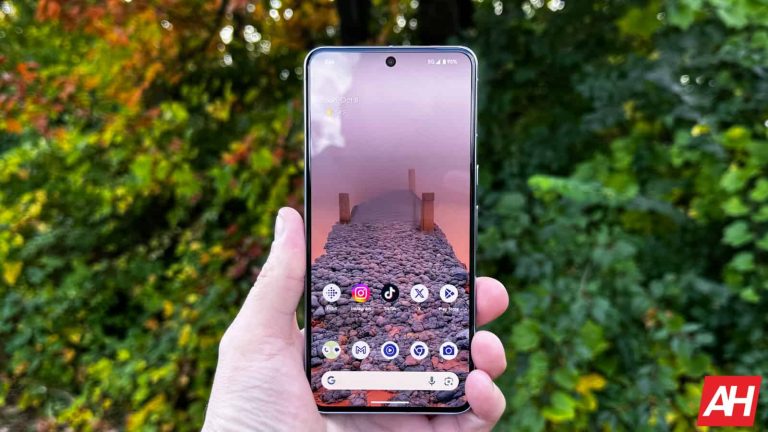
The Pixel 8 Pro features a 6.7-inch 2992 x 1344 LTPO OLED display. This time around, the display is flat, and it’s an LTPO panel. It supports a 120Hz refresh rate, but it can tune that down to 1Hz. HDR10+ content is also supported here, while this panel can get truly bright at 2,400 nits of peak brightness. The display aspect ratio is 20:9, and the panel is protected by the Gorilla Glass Victus 2.

Google Pixel 8 Pro Review AM AH 09
Google Pixel 8 Pro

The Galaxy S23 Ultra, on the flip side, features a 6.8-inch QHD+ (3088 x 1440) Dynamic AMOLED 2X display. That panel is slightly curved, and it does support a 120Hz refresh rate. This is also an LTPO panel, and the refresh rate goes down to 1Hz when needed. HDR10+ content is supported, while the display goes up to 1,750 nits of brightness at its peak. The display aspect ratio is 19.3:9, and the Gorilla Glass Victus 2 protects the panel.

Both of these displays are outstanding. They’re not only immensely bright, but are also quite vivid, and offer great viewing angles. The blacks are also deep, and the touch response is very good on both sides. The Pixel 8 Pro does have the edge in terms of brightness, which is something you’ll notice in direct sunlight. The Galaxy S23 Ultra’s panel is also very bright, though, not many people will have objections to it. You can go either way here, and you’ll be very happy with the display performance.

Google Pixel 8 Pro vs Samsung Galaxy S23 Ultra: Performance

The Google Tensor G2 SoC fuels the Google Pixel 8 Pro. In addition to that, Google also included 12GB of LPDDR5X RAM here, and UFS 3.1 flash storage. The Snapdragon 8 Gen 2 for Galaxy fuels the Galaxy S23 Ultra. Samsung also included 12GB of LPDDR5X RAM here, and UFS 4.0 flash storage. Both of these phones are quite capable when it comes to performance-related hardware, but the Galaxy S23 Ultra does have the upper hand.

The Snapdragon 8 Gen 2 is not only more powerful than the Tensor G3, but it’s also more power efficient. The Tensor G3 does enable Google to offer various AI tricks in the software, though, which is something many of you will appreciate. The sheer power is on the Galaxy S23 Ultra’s side, and the UFS 4.0 flash storage also helps things.

In day-to-day usage, both smartphones are outstanding. Both of them offer great, smooth performance, regardless of what you’re doing. They can multitask like nobody’s business, and are also great for multimedia consumption, browsing, and so on. Many of you are probably wondering about games, though. Well, both can run basically any game on the market, but the Galaxy S23 Ultra will perform a bit better when it comes to the most demanding games, especially if you’re planning on enjoying longer gaming sessions. That chip runs cooler than the Tensor G3 in such situations.

Google Pixel 8 Pro vs Samsung Galaxy S23 Ultra: Battery

A 5,050mAh battery sits inside the Pixel 8 Pro, while the Galaxy S23 Ultra includes a 5,000mAh unit. The Pixel 8 Pro does have a slightly larger battery pack, and a slightly smaller display, but it does not offer better battery life. The Snapdragon 8 Gen 2 is a more power efficient chip, so that probably has something to do with it. Is the difference that noticeable? Well, it was for us, that’s for sure.

The Pixel 8 Pro reached around 7 hours of screen-on-time. It jumped between 6 and 7.5, to be quite honest, but most of the time it was almost dead by the time it reached 7 hours of screen-on-time. The Galaxy S23 Ultra can comfortably go over the 8-hour mark, though. When needed, we were able to cross the 8.5-hour or 9-hour screen-on-time mark, without a problem. Samsung’s flagship does offer noticeably better battery life, but the Pixel 8 Pro is far from bad in that regard. In fact, its battery life is considered to be quite good, and it will be more than enough for almost anyone.

Google’s flagship supports 30W wired, 23W wireless, and 5W reverse wireless charging. The Galaxy S23 Ultra, on the flip side, supports 45W wired, 15W wireless, and 4.5W reverse wireless charging. Neither phone charges particularly fast (compared to many competitors), to be quite honest, and neither includes a charger in the box.

Google Pixel 8 Pro vs Samsung Galaxy S23 Ultra: Cameras

There are three cameras on the back of the Pixel 8 Pro, and four on the back of the Galaxy S23 Ultra. The Pixel 8 Pro includes a 50-megapixel main camera (f/1.7 aperture, 1.2um pixel size, OIS, multi-directional PDAF, Laser AF), a 48-megapixel telephoto unit (f/2.8 aperture, OIS, 5x optical zoom), and a 48-megapixel ultrawide camera (f/2.0 aperture, 126-degree FoV, dual Pixel PDAF).

Samsung Galaxy S23 Ultra Review AM AH 14
Samsung Galaxy S23 Ultra

The Galaxy S24 Ultra, on the other hand, has a 200-megapixel main camera (f/1.7 aperture, OIS, multi-directional PDAF, Laser AF), and a 12-megapixel ultrawide camera (f/2.2 aperture, 120-degree FoV, 1.4um pixel size, dual pixel PDAF) on the back. A 10-megapixel telephoto camera (f/2.4 aperture, OIS, 3x optical zoom) is also included, as is a 10-megapixel periscope telephoto unit (OIS, f/4.9 aperture, 10x optical zoom).

Now, the images these two phones provide are considerably different in comparison. Both smartphones are fantastic for photography, and videography, but quite different. The images Google’s phone provides offer a cooler tone, and less sharpening than what Samsung offers. Samsung does not go overboard with the sharpening, though. Samsung’s flagship also has considerably more saturated images. Google does a better job when it comes to skin tones, while Samsung’s photos will usually be ready for social media straight out of the camera.

In low light, they both do a great job. Both smartphones tend to brighten up the scene quite a bit, but you do get plenty of details as a result. The Galaxy S24 Ultra does have a slight advantage in terms of video recording, though, mainly due to its low light performance. Do note that at the point of this comparison, Google still didn’t release its Video Boost feature which should improve this aspect of the phone’s performance.

Audio

Both smartphones do include stereo speakers. Those speakers are really good on both ends, and Google really did boost the Pixel 8 Pro speakers compared to its predecessor. The sound is somewhat rich from both phones, and they’re both plenty loud too.

What you will not find on either phone is an audio jack. You can use their Type-C USB ports to connect your wired headphones, though. If wireless audio is your preference, you’ll be glad to know that both phones offer Bluetooth 5.3.


[ad_2]
Source link

Meta now lets users control Instagram web-tracking activities

0
[ad_1]

If you use Instagram, you should know that the platform performs web-tracking activities on you. These activities involve collecting your data from various third-party apps and websites that you visit. But Meta is now giving Instagram users the ability to control and even stop these tracking activities.

Users will be able to control this action from the Activities Off-Meta Technologies page. This page can be found in the Account Center on Instagram and Facebook for the mobile app or web platform. By giving users control of this web tracking activity, Meta is letting them determine how their data stored on various websites is used.

From the Activities Off-Meta Technologies page, users can disconnect specific or clear previous tracking activities stored on the platform. This will either stop Meta from tracking your web activities or clear whatever stored information it has on you. You might be already wondering why Meta is tracking your web activities and what it uses this data for.

Here’s why Meta collects user data with Instagram web-tracking on mobile and web platforms

If you are wondering why Meta tracks your web activities, it’s because it needs the data to serve your ads. As you already know, ads serve as a major source of revenue generation for companies like Google and Meta. However, the company understands that most users want their web activities to be kept private, hence the need to give users control over how Meta handles the collected data.

For those who aren’t comfortable with the collection of web tracking data on Meta’s Instagram, they can disable the tracking. These users can also review what websites share web data with Meta and what kind of data they share. With this information, users can then disable the sharing of specific web activities.

Users can also clear all data that these websites send to Meta, hence erasing them from existence. All of this can be done directly from the Activities Off-Meta Technologies page. To access this page, users need to go to the settings page and then click on Account Center.

Meta is also announcing the ability to download personal information from Facebook and Instagram together. Users can also transfer their photos and videos from Instagram to any other services. These new features are also accessible from the Account Center on the settings page.

However, it is not clear which service users will be able to transfer their photos and videos to. Meta is yet to give clear information on this and users will need to know to be able to use this new feature. These are all impressive features that are coming to Instagram users to help them improve their privacy.


[ad_2]
Source link