Android users can earn Google Play Points by purchasing paid apps, movies, books, or in-app items, and by trying featured free games and apps. Back in May, Google announced that it would be offering new perks and rewards for those trading in their Play Points. This includes exclusive early access to new games, and VIP experiences “at the hottest events in gaming and entertainment.”
Starting today, Google has teamed up with Niantic and 100 Thieves to give Play Points members at home or in New York City the chance to score exclusive perks and rewards for Pokemon Go. These rewards kicked off on Friday as Pokemon Go Fest started throughout New York City. From now until the end of Pokémon GO Fest 2024: Global on July 14, you can:
Redeem your points for exclusive Partner Research: Use your points for exclusive Partner Research that includes an encounter with the Fire Child Pokémon, Charcadet, and the chance to earn XP, Stardust, and an Incubator. Available for members in the United States, United Kingdom, Germany, Japan, Brazil and South Korea.
Watch 100 Thieves livestreams: Tune in as Valkyrae, Fuslie, and more take viewers through Pokémon GO Fest 2024: New York City. Diamond, Platinum, and Gold members: Be on the lookout for surprise merch drops during the streams.
Redeem your points for Pokémon GO Fest Merchandise: Use your points for hats, tote bags and pins from the official Pokémon GO Fest collection, while supplies last.
Claim a points boost: From July 5-7, claim a points boost to get 5X points on anything you buy in Pokémon GO.
To redeem your points for Partner Research or Pokémon GO Fest merchandise and claim your points booster, visit the Use tab and Earn tab of Play Points home. If you have a ticket to Pokemon Go Fest in New York City, visit the Google Play Space on Randall’s Island to collect a reward. If you’re a Gold+ member, you get a Wildcard which Google calls your “VIP pass to exclusive merchandise from the Pokémon x 100 Thieves collection, meet-and-greets with 100 Thieves Creators, and more.”
Save $5 on tickets for Pokemon Go Fest|Image credit-Google
Gold+ members in New York City can go to Chelsea to visit the Google Store on Saturday (July 6th) and Sunday (July 7th) from 11 am-2 pm both days to grab apparel from the Pokémon x 100 Thieves collection. Make sure to get there early because it is first come, first served while supplies last. Speaking of Pokemon Go Fest, you can save $5 and pay just $9.99 for tickets. Redeem the discount using Play Pass. Each ticket includes access to two different events: the Park Experience in Randall’s Island Park and the City Experience taking place across all five boroughs.
Cambridge is one of the top companies on the audio scene, but it primarily focuses on larger devices. However, the British brand has recently made its foray into wearable audio devices. Cambridge just launched the Melomania P100, the company’s first-ever over-the-ear headphones.
We recently reviewed the incredible Cambridge Melomania M100. This is a pair of TWS earbuds that cost only $219. These are truly audiophile-grade earbuds that have an amazing sound. There’s so much to love about these earbuds, so feel free to check out our Melomania M100 review. These might be your next favorite earbuds.
Cambridge unveils the new Melomania P100
It’s always interesting when a company takes its first steps into a new form factor. We always look forward to what it plans to bring to the market. There’s a lot of competition in the headphone market with companies like Sony and Apple leading the pack. So, Cambridge has a lot on its plate.
The newly announced Melomania P100 come with a set of high-quality 40mm drivers to deliver the sound. The company says that these are premium three-layer composite drivers with a set of neodymium magnets.
These headphones also come with Class AB amplification, so you know that you’ll have a punchy and powerful sound. This is the same kind of amplification used with the company’s CX Series hi-fi amplifiers.
Lossless audio
These are Bluetooth headphones, which means that you won’t be getting audio quality as good as a pair of wired headphones. This is because the audio codec needs to compress the audio signal to be sent over the limited Bluetooth bandwidth.
However, the Melomania P100 will use Qualcomm’s high-quality aptX Lossless codec. This codec can send a highly detailed audio signal from the device to the headphones. It can send a signal at 16-bit/44.1kHz. This is CD-quality audio, and there’s no lossy compression. This means that those 40mm drivers will be pushing a highly detailed sound into your ears.
With sound so amazing, you’re going to want to listen to these headphones for extended periods of time. As such, you want to make sure that they have great battery life. The Melomania P100 comes with some stellar battery life.
Cambridge states that you can expect up to 60 hours of battery life on a single charge. That’s with the ANC turned on. With it off, you’re looking at up to 100 hours! Obviously, your mileage will vary, and you might not see numbers quite so high in your usage. In any case, you’re still going to have great battery life.
As for charging, you will get a full two hours of listening time on a short five-minute charge. That gets boosted to four hours with ANC turned off. So, you can plug them in while you hop in the shower and have more than a day’s worth of battery life.
Customizable audio
Just like with the M100, the Melomania P100 use the Melomania app. Among other things, this app allows you to customize your audio experience. If you’re a person who likes to tinker with your sound, you can use the included EQ.
This is a 7-band EQ that allows you to adjust the audio with epic precision. Once you’ve adjusted the EQ to your liking, you can save it as an EQ preset. Speaking of presets, there are six other EQ presets that you can choose from right out of the box.
Game mode
Also in the app, there’s a Game Mode. This mode will lower the latency of the audio. Basically, there’s less time between the moment something happens on your screen and the moment you hear it. It’s perfect for when you’re playing games. Cambridge says that this lowers the latency to just 80ms.
Price
You’ll be able to get all of this for a very reasonable price. While most other headphones of this caliber would cost between $300 and $500, you can pick up the Cambridge Melomania P100 for $279 (€279 in Europe. £229 in the UK). You can put in your order at the Official Cambridge website or at Amazon.
Like oil and water, there are things that just don’t mix. AI and privacy are two of them. There are several AI tools and features that just scream privacy nightmare. Well, that was true for a popular application that just hit the market. The ChatGPTmacOS app stored conversations in plain text.
If this sounds familiar, Microsoft was just put through the wood chipper over something similar. Its impressive and rather creepy Recall feature was found storing information on users’ computers in an easy-to-read text document. This means that, if someone gains access to that user’s computer, then they could extract that document and basically get a debriefing of EVERYTHING they’ve been doing. Microsoft walked the feature back and has since put it on indefinite hiatus.
The ChatGPT macOS app was storing conversations in plain text
Consumer-facing AI is slowly moving away from data centers and onto devices. You can’t argue with the convenience of having powerful AI on your phone or computer without needing to connect to the internet. This is why there’s been such a big push for on-device AI.
However, the companies pushing these technologies aren’t being upfront and honest about what they have to do to keep the data on-device. Microsoft’s move was reckless, and it seems that OpenAI didn’t learn from its benefactor’s mistake. Pedro José Pereira Vieito made a post on Threads showing the ChatGPT macOS app storing conversations in plain text on the computer.
Pereira designed an app that could access these conversations and surface them. Jay Peters from The Verge was able to demonstrate this and confirm that it’s true. After The Verge contacted OpenAI, the company was able to make some changes and block it.
So, problem solved… right?
Okay, OpenAI fixed the problem and saved the day. Great, but the thing is that the fundamental problem hasn’t been fixed. Both Microsoft and OpenAI have been caught being completely reckless with their users’ data, and we don’t find out about it until 3rd-party entities look into their systems and report them. So, these companies were completely happy with letting these security issues exist on our devices.
All we can say is that we’re lucky that the people finding these vulnerabilities are good samaritans and not hackers. Again, Pereira designed an app that was able to extract that data. What’s stopping someone from developing an app that could extract that data and surreptitiously send it right to them? This sort of thing happens.
The main issue is that major corporations continue to launch products with blatant security issues and don’t act until they are discovered. Aren’t these the companies that brag about top-of-the-line security in keynotes? We trust them implicitly because it’s Microsoft or because it’s Google or because it’s Apple. These are multi-trillion-dollar companies, so they, ostensibly, know a thing or two about keeping our data safe. However, they continue to prove that they don’t.
Average users shouldn’t be finding these security flaws; they shouldn’t be finding logs of conversations stored in plain text. Until major corporations stop being so reckless with our data with these flashy and fancy AI tools, the problem will never truly be fixed.
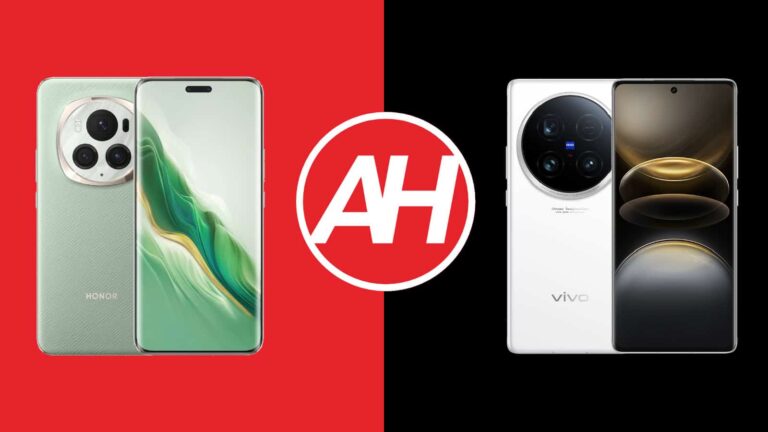
This time around we’re comparing two camera-centric smartphones, two outstanding camera smartphones. We’ll be comparing the HONOR Magic6 Pro vs Vivo X100 Ultra. Both of these phones launched this year, and even though they are fueled by the same SoC, these two phones are very different. Those differences start with their design and stretch to various other areas.
As per usual, we will first list the specifications of both of these devices. Following that, we will compare them across a number of categories. We’ll compare their designs, displays, performance, battery life, cameras, and audio performance. Before we begin, do note that only the HONOR Magic6 Pro is available in a global variant. With that being said, there’s a lot to talk about here, so let’s get down to it.
The HONOR Magic6 Pro is made out of aluminum and either glass or vegan leather. It comes in both of those backplate options. The Vivo X100 Ultra, on the other hand, utilizes aluminum for its frame, and glass on its back. Glass models of these two phones weigh exactly the same, 229 grams. The vegan leather model of the Magic6 Pro is a bit lighter at 225 grams. The Vivo X100 Ultra is slightly taller, and while they’re essentially the same in terms of width, the difference is 0.2mm. The same goes for thickness, as the difference is 0.3mm.
Both smartphones feature curved displays on the front, with very thin bezels around them. The Magic6 Pro has a pill-shaped cutout on the front, which is centered at the top. The Vivo X100 Ultra includes a centered display camera hole at the top. Both smartphones include physical buttons on the right-hand side. Their backplates are curved towards the sides, proportionally to their front panels.
You will notice that both devices have camera islands on the back, which are centered in the upper portion. They’re essentially both round, but the HONOR Magic6 Pro also has some design elements around that circle which cover up the fact it’s round. The camera oreo on the Vivo X100 Ultra is larger, noticeably. Both of them do protrude on the back, and both host three cameras.
It is also worth saying that both of these smartphones are IP68 certified. In other words, they’re both water and dust resistant. Glass models are equally slippery, but the vegan leather Magic6 Pro does add quite a bit of grip to the mix.
HONOR Magic6 Pro vs Vivo X100 Ultra: Display
The HONOR Magic6 Pro features a 6.8-inch 2800 x 1280 LTPO OLED display. That panel is curved, and it has a refresh rate of up to 120Hz. It can project up to 1 billion colors, and Dolby Vision is supported. HDR is supported here too, while the display’s brightness i 5,000 nits, in theory. The display aspect ratio is 19.5:9, while the screen-to-body ratio is at around 91%. NanoCrystal Shield protects this display.
The Vivo X100 Ultra, on the flip side, has a 6.78-inch QHD+ (3200 x 1440) LTPO AMOLED display. That panel is also curved, and its refresh rate also goes up to 120Hz. This display can project up to 1 billion colors, and it supports Dolby Vision and HDR content. The peak brightness here is at 3,000 nits. The display aspect ratio is 20:9, while the screen-to-body ratio is at around 89%.
You really can’t go wrong regardless of which of these two displays you end up choosing. They’re both big, bright, and vivid. They’re also more than sharp enough and have great viewing angles and touch response. Both panels also offer high-frequency PWM dimming to protect your eyes. Yes, both of them will get bright enough when you need them to. The display protection could be better on the Magic6 Pro, as we don’t know what Vivo used.
HONOR Magic6 Pro vs Vivo X100 Ultra: Performance
Qualcomm’s Snapdragon 8 Gen 3 SoC fuels both of these smartphones. That is Qualcomm’s most powerful processor at the moment. The Magic6 Pro comes with up to 16GB of LPDDR5X RAM, but its global variant includes 12GB of RAM. That is paired with UFS 4.0 flash storage. The Vivo X100 Ultra comes in a Chinese variant only, it’s not available in global markets. It is available with up to 16GB of LPDDR5X RAM, and UFS 4.0 flash storage.
Both smartphones are well-equipped in this regard. Do they offer great performance too? Well, yes, in basically every way. Regular, everyday tasks are no problem for either phone. Both of them stay extremely fluid at all times. You can easily open app, multitask, watch videos, take photos, process images, process videos, browse, email, and so on, without either phone taking a dent in its performance capabilities. Heavy multitasking is not a problem either. You will really have a problem slowing down either of these two phones.
The same can be said for gaming too, actually. Both smartphones are not only powerful enough but well-optimized for gaming. Both do include some gaming software too, even though they’re not gaming phones. The most demanding titles out there, such as Genshin Impact, run perfectly fine on both phones. Yes, they both get quite warm after a while, but that doesn’t impact the performance in any way.
HONOR Magic6 Pro vs Vivo X100 Ultra: Battery
The HONOR Magic6 Pro includes a 5,600mAh battery, while the Vivo X100 Ultra has a 5,500mAh unit. Both companies used silicon carbon batteries, which is great, as it allowed them to offer higher battery capacities than most of the competition. And yes, both smartphones do deliver when it comes to battery life. In fact, their battery life is very comparable when it comes to actual usage.
These are some of the best battery life smartphones this year, out of all the flagship smartphones that were launched. We were able to cross the 8-hour screen-on-time mark on both devices, on days when we were not gaming, and were connected to Wi-Fi most of the time. We did not baby either phone in regards to performance. Even if you end up pushing them a bit harder, getting over 7 hours of screen-on-time is doable. Of course, your mileage may vary, as there are a lot of factors included here.
When it comes to charging, both smartphones support 80W wired charging. Both of them also include chargers in the box, by the way. 66W wireless charging is supported on the HONOR Magic6 Pro, while the Vivo X100 Ultra supports 30W wireless charging. HONOR’s flagship does offer 5W reverse wireless and reverse wired support, while the Vivo X100 Ultra is limited to reverse wired charging only. HONOR’s handset is technically more versatile in terms of charging, and it does support faster wireless charging.
HONOR Magic6 Pro vs Vivo X100 Ultra: Cameras
Both of these phones include three cameras on their backs. The HONOR Magic6 Pro has a 50-megapixel main camera (variable aperture), a 50-megapixel ultrawide unit (122-degree FoV), and a 180-megapixel periscope telephoto camera (2.5x optical zoom, macro). The Vivo X100 Ultra has a 50-megapixel main camera (1-inch type sensor), a 50-megapixel ultrawide camera (116-degree FoV), and a 200-megapixel periscope telephoto camera (3.7x optical zoom, macro).
Now, the end results from these two cameras are generally different, but there are some similarities too. They both tend to prefer warmer color tones… in general. That is a bit more obvious on the HONOR Magic6 Pro, though. Both smartphones do a fantastic job during the day. The images end up looking sharp, detailed, vivid, and well-balanced altogether. HDR performance is also great from both. Their periscope telephoto cameras do a great job across the board and are even great for macro photography. It’s a toss-up between the two. Ultrawide cameras on both smartphones are the least impressive ones, but they still do a very good job. The one on the Magic6 Pro does offer a wider FoV, though.
When the light goes away, both smartphones manage to retain plenty of details. They both tend to light up the scene quite a bit and do a great job when it comes to balancing out the images. Both devices also do a great job with light flares, though the Vivo X100 Ultra is a bit better when it comes to that. You really can’t miss when it comes to which phone to pick for its camera prowess. They’re both outstanding.
Audio
Both of these phones have a stereo speaker setup. The speakers on the HONOR Magic6 Pro are a bit louder, but both sets of speakers do deliver quality sound, that’s for sure. The loudness difference is also not that big.
Neither of the two devices comes equipped with an audio jack, however. You can use their Type-C ports to connect your wired headphones, however. The Magic6 Pro supports Bluetooth 5.3 connectivity, while the Vivo X100 Ultra includes Bluetooth 5.4 support.
Samsung rides on the AI boom as Q2 2024 profit sees magical growth
Samsung had a forgettable financial performance in 2023. Its annual profit declined 85% due to a drop in chip demand and prices. The company’s semiconductor division suffered its first losses in 14 years. But the AI boom has helped Samsung turn the tide. It’s the world’s largest maker of memory chips and is benefitting from a high demand for these chips as companies set out to establish AI data centers.
In the first quarter of 2024, Samsung’s profit increased 933% YoY. It took home KRW 6.61 trillion, up from KRW 0.64 trillion in Q1 2023. The Q2 performance was even better. In its earnings estimate, the company projected a consolidated sales revenue of KRW 74 trillion and an operating profit of KRW 10.4 trillion. The Korean conglomerate managed a profit of only KRW 0.67 trillion in Q2 2023.
Samsung hasn’t published the full Q2 2024 earnings and profit report yet. It will come later this month, detailing the financial performance of each business division and the outlook for the rest of the year. However, industry estimates suggest nearly 60% of its second-quarter profit comes from the semiconductor division. The unit has always been Samsung’s cash cow until last year’s massive price decline.
It will be interesting to see how Samsung’s smartphone division faired this past quarter. Despite selling more phones than anyone else, the unit doesn’t contribute a lot to the company’s profit. Competition is high in the Android space, leaving little room to increase the profit margin. That said, the Galaxy S24 series has been in high demand, so Samsung may have benefitted from it.
Samsung still has scope for growth in the AI chip market
The AI boom has just begun, and Samsung is already reaping the fruits. It still has scope for growth in the AI chip market. Its compatriot SK Hynix is a leader in the high bandwidth memory (HBM) segment, an area where Samsung can improve. It has sought approval for its advanced HBM solutions from Nvidia, the world’s biggest AI chip brand. Samsung’s outlook for the AI chip market for the second half of 2024 should be an interesting read. We will let you know when it shares its full Q2 2024 earnings report.
The cybercriminals who claimed responsibility for the Ticketmaster data breach say they’ve stolen 440,000 tickets for Taylor Swift’s Eras Tour.
As proof, an entity using the handle Sp1d3rHunters, a merger of Sp1d3r and ShinyHunters who are both aliases associated with the breach, leaked 170k barcodes for free for Taylor Swift’s ERAS Tour.
In a post on the infamous stolen data site BreachForums, Sp1d3rHunters is offering many thousands of tickets for upcoming Taylor Swift concerts in three cities in the US: Miami, New Orleans, and Indianapolis.
Post by Sp1d3rHunters
The post includes a link to a free tutorial on how to make your own printable barcode tickets.
It also includes a threat to Ticketmaster:
“Pay us $2million USD or we leak all 680M of your users information and 30million more event barcodes including:
more Taylor Swift events, P!nk, Sting, Sporting events F1 Formula Racing, MLB, NFL and thousands more events.”
This is the second release of data from the breach, after the cybercriminals–then posting under the name Sp1d3r–gave away one million records including full details (name, address, email, and phone) of Ticketmaster customers.
For Ticketmaster, the release of free Taylor Swift tickets could turn out to be a costly affair. It’s not just the value of the tickets that’s at stake. The company will also need to reissue the tickets to their rightful owners, as well as no doubt deal with more than the expected number of visitors to those concerts, leading to the need to employ extra security staff. All that and we’ve not yet touched on the reputational damage, which already is substantial but is likely to grow even more.
Even though it may be tempting, we would advise against trying to use these “free tickets.” Given the timeframe until the events, Ticketmaster should have enough time and opportunity to invalidate the stolen tickets, and you are likely to receive exactly what you paid for: nothing.
Swifties should also be wary of phishing attempts that will undoubtedly try to capitalize on the news that “free tickets” are available.
Check your exposure
While matters are still unclear how much information was involved, it’s likely you’ve had other personal information exposed online in previous data breaches. You can check what personal information of yours has been exposed with our Digital Footprint portal. Just enter your email address (it’s best to submit the one you most frequently use) to our free Digital Footprint scan and we’ll give you a report.
We don’t just report on threats – we help safeguard your entire digital identity
Cybersecurity risks should never spread beyond a headline. Protect your—and your family’s—personal information by using identity protection.
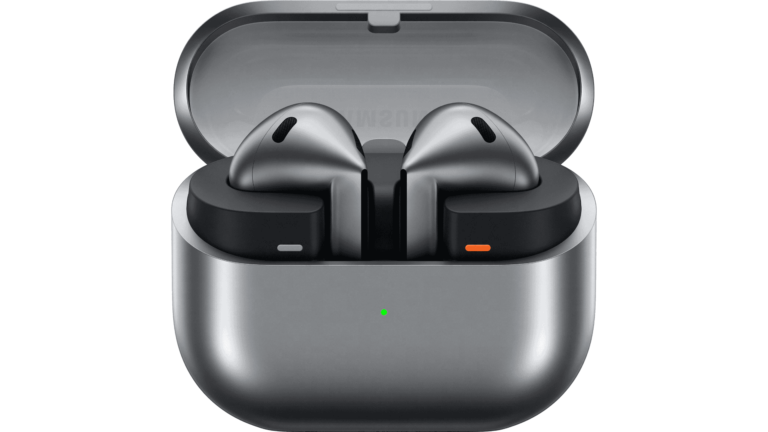
The tech world is abuzz with news about the upcoming Galaxy products that Samsung is going to announce during its next Unpacked event. Among the devices, we know that the Korean giant’s going to announce a pair of new (and familiar) earbuds. Well, according to a new report, the Galaxy Buds 3 Pro might bring a lossless audio codec.
There’s some controversy surrounding Samsung’s upcoming earbuds. The base Galaxy Buds 3 aren’t a major issue, but the pro versions might stir the pot a bit. They look shockingly (and annoyingly) similar to Apple’s AirPods. This is pretty upsetting, as Samsung used to be the company that always stood against Apple. Now, it’s taking far too many notes from its book.
In any case, we’ll see these earbuds along with Samsung’s other exciting devices during the next Unpacked event. It’s going down on July 10th.
The Galaxy Buds 3 Pro could use a lossless audio codec
Samsung’s flagship earbuds typically have some of the best audio for consumer-grade Bluetooth earbuds. They’re not going to dethrone earbuds from audiophile companies like the Campfire Audio Fathom.
However, it’s not only about the hardware. One thing that dictates how good a pair of earbuds will sound is the codec. This is the bit of technology that compresses the audio signal to send from your device to your earbuds. Some codecs are better than others, and they allow for more data to be sent. As such, codecs like these allow for more detailed audio.
According to a new report, the Galaxy Buds 3 Pro will use a near-lossless audio codec. The report points to a max audio quality of 24-bit/96kHz. The previous Galaxy Buds used a codec with 24-bit/48kHz. So, this new codec will double the sample rate of the old one. That’s great to hear because you’ll be able to hear the audio with much more detail.
It doesn’t matter how high-quality the music file is if your earbuds’ codec is squeezing all of the data out of the audio signal. It’s like watching a 4K video on a 1080p display.
We don’t know what codec the company’s going to use. Qualcomm has its aptX Lossless codec, but we don’t believe that this is what Samsung is using. The company might be using a proprietary codec this time around. In any case, it’s great to see an improvement in the audio quality department.
HONOR will launch the Magic V3 this month as its latest foldable premium flagship. The device will seek to repeat the success of the Magic V2, one of the most impressive devices in its segment. Now, a new leak of the HONOR Magic V3 includes multiple real-life images of the device in all its colors.
The images leaked on Weibo show the HONOR Magic V3 in blue, red, and white colors. The Magic V2 surprised in its day for its extreme thinness for a foldable smartphone. Especially considering it was full of flagship specs everywhere. Well, rumors suggest that the company wants to surpass this milestone. Multiple reports claim that the HONOR Magic V3 will be even thinner than its predecessor.
HONOR Magic V3 may be the thinnest foldable in the world
For reference, the Magic V2 had dimensions of 156,7 x 74,1 x 9,99 mm in the “folded” state. When unfolded, the device boasted a thinness of only 4,7 mm. If the Magic V3 really beats these figures, then it will probably be the thinnest foldable smartphone in the world. That said, it is possible that the Xiaomi Mix Fold 4 will surpass this milestone in the near future.
The HONOR Magic V3 is expected to be announced at an event on July 12 in China. The device will share the spotlight with other important products. The company will also reveal the Magic Vs3, the Magic Pad 2, and the MagicBook Art 14.
Some leaked key specs
Regarding its specs, the Magic V3 is said to be powered by Qualcomm’s Snapdragon 8 Gen 3 chip. It will integrate a battery with more than 5,000 mAh and support for 66W fast charging (wired). Its predecessor did not support wireless charging, and the same could happen with the new model.
As for photography, it is said that the device will maintain the same sensors as the Magic V2. However, it will now support 3.5x optical zoom instead of just 2.5x. Improvements in image quality on the software side are also expected. The Magic V3 will have 16 GB of RAM, although it is not known if it will be available in variants with more or less memory. However, multiple storage options are expected.
Lastly, the HONOR Magic V3 will also be available on the global market, but not instantly. Audiences outside of China will probably have to wait at least a month after the original release.
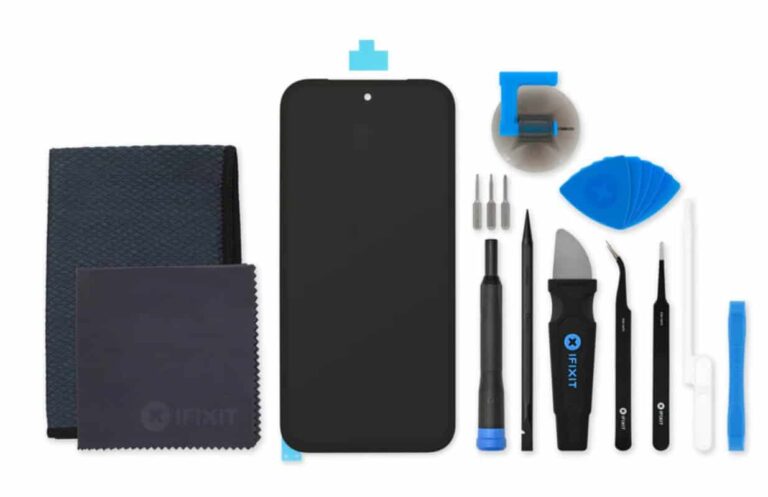
Google appears to be doing better than Samsung when it comes to offering DIY repair parts through iFixit for Pixel devices. The company has continued its collaboration with the alternative repair solution provider for this year’s budget Pixel phone. The Pixel 8a iFixit parts for DIY (Do it yourself) repairs are now available to buy. You can now fix your damaged Pixel 8a (review) all by yourself at your home using the original spare parts from iFixit.
The Pixel 8a iFixit parts are available starting from $3.99
The repair site iFixit has started selling genuine Pixel 8a spare parts in less than two months after the phone’s launch. In comparison, the iFixit repair parts for the Pixel 8 flagship duo went on sale nearly three months after their unveiling. The partnership between the companies provides access to genuine parts for the entire Pixel 8 series.
The iFixit store is selling the Pixel 8a DIY repair parts starting from $3.99. The phone’s genuine adhesive for the screen, display enclosure, back cover, battery, logic board cover, front camera cable, and LED flash unit are being offered for $3.99. The price of the display cable bracket, front camera copper foil, rear camera tape, thermal pads, and camera housing is the same.
The replacement screen is the most expensive part at $102.99
The Pixel 8a’s genuine screen replacement is the most expensive part at $102.99. You can also get the complete kit with the replacement screen and repair tools for $109.99. The phone’s battery replacement costs $32.99, while the rear cover will set you back by $39.99.
Furthermore, iFixit is also selling replacement parts for both the front and rear cameras for the Pixel 8a. The phone’s ultra-wide rear lens costs $29.99, while the wide-angle camera is being offered for $59.99. If you want to replace the selfie camera, then you can get the spare lens by paying $29.99.
After purchasing a replacement part, you can follow the official iFixit Google Pixel 8a repair guides to fix your device. The detailed guides for most of the Pixel 8a DIY repairs are available on iFixit’s website.
You probably know by now that iOS 18 will be adding new features to apps like Safari, Notes, Mail, Photos, Siri, Messages, Maps, and more. Changes are also in store for the Home Screen, Lock Screen, and Control Center. The next iteration of iOS is also making a change to one app that no one ever thinks about using and this is the Contacts app. When was the last time that you consciously made the decision to open the Contacts app on your phone?
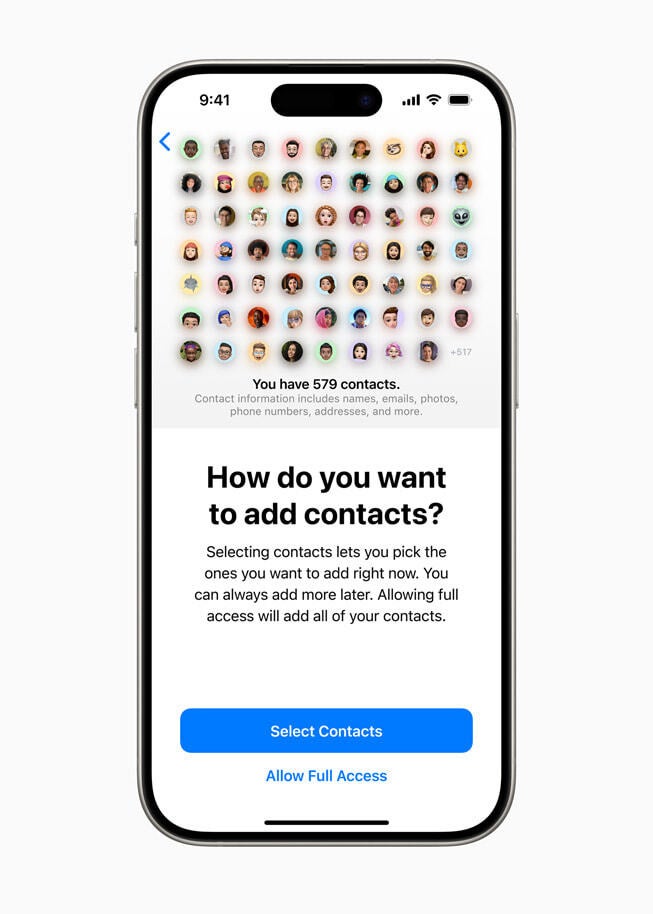
With iOS 18 installed, the Contacts app will be more secure. For example, every time you install a new app and it requests access to your contacts list, Apple will allow you to decide which connections the new app can view. This prevents your contacts from potentially having their data stolen. Some of the information that might be in your Contacts app includes birth dates, anniversary dates, email addresses, and more. This information, if stolen, could be used by attackers to guess passwords and passcodes or to open fraudulent accounts.
iOS 18 will make the Contacts app more secure|Image credit-Apple
But with iOS 18, Apple will allow users to limit the connections available to third-party apps. Apple iPhone users will be able to choose to give third-party apps “full access” to their contacts (which means all of their contacts) or to select specific contacts that the iPhone users will allow third-party apps to access. Apple notes, “iOS 18 puts users in control by letting them choose to share only specific contacts with an app. In addition, developers now have a way to seamlessly connect third-party accessories with iPhone without letting an app see all the other devices on a user’s network, keeping a user’s devices private and making pairing seamless.”
iOS 18 developer beta 2 is currently available and the public beta is expected to launch sometime this month. The decision to install the beta on your iPhone is up to you. If you do plan to install the beta, keep in mind that it is unstable. Some apps may not work like they should, and battery life will drop. Make sure you back up your data before installing the beta. Of course, there is no pressure on iPhone owners to install the beta. They can wait until September which is when we expect the stable version of iOS 18 to be disseminated.