Last week, Google rolled out a Gmail app on Wear OS that was compatible with both the Pixel Watch 2 and existing smartwatches running Wear OS 3/3.5/4. Now, Google is following through and rolling out the Google Calendar app for Wear OS as well, which includes Google Tasks integration.
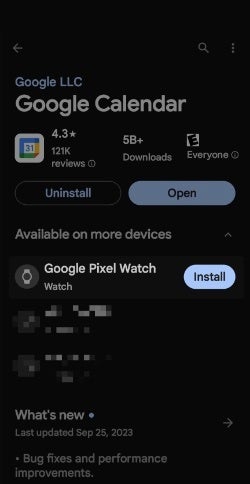
The app, which appears simply as “Calendar” (version 4.3) is available to install via the Play Store on your phone or directly on your smartwatch. The app does not replace the existing “Agenda” app on your watch, which can be confusing, so just think of the Agenda app as simply the read-only limited version of the watch’s Calendar app.
Google Calendar app install from watch or smartphone
Google Calendar, but for your watch
The Google Calendar app for Wear OS offers a similar experience to the “Schedule” view on phones with the ability to select an event and view all of its details — including the specific calendar it is saved to in cases where multiple calendars are synced. Additionally, you can respond to event invites, which should come in really handy when you get added to that last minute meeting.
Additional features include the ability to delete an event or to open it on your phone where you can interact more with it. Just like on your phone, special events such as birthdays and national holidays will also get that nifty background image that matches the occasion.
At the bottom of the app, users can see how far the calendar is synced. There is also a “Next event” Calendar tile and complication, and existing date complications will now ask users whether they want to open Google Calendar or the Agenda app.
Google Tasks Integration
Perhaps more important, is the fact that the app offers Google Tasks integration. This means that your tasks will also appear mixed in with your events, color coded with the same colors you have chosen within your Google Calendar. You can open these tasks directly on your watch and mark them as complete, choose to open them on your phone, or simply delete them altogether.
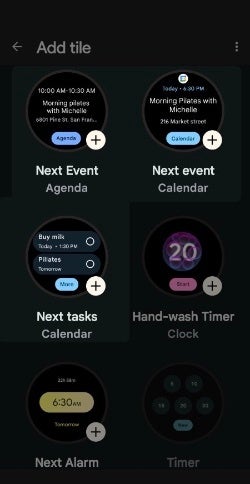
Google Calendar also adds two new Wear OS Tiles for “Next event” and “Next tasks.” The “Next tasks” Tile shows two upcoming entries, and tapping on “More” in the bottom simply opens the full app.
While the Google Calendar app for Wear OS is a welcome addition, it is important to note that it does not allow users to create events or tasks from their smartwatch. This is a limitation that hopefully Google will address in the future, but for now this is definitely a huge step in the right direction.
Here are simple yet vital steps to identify online trading scams and safeguard your investments from cyber criminals.
In today’s digitized era, online trading offers a lot of lucrative opportunities. But as the horizon broadens, so does the risk. Scammers lurk, waiting to capitalize on unsuspecting traders. The good news is that you can safeguard your investments by spotting and sidestepping these pitfalls. Let’s explore how.
Beware of Too Good to Be True Promises
High returns with no risks? That’s a fantasy. An authentic trading platform will never guarantee success, as the market is unpredictable. You can, of course, improve your chances of success through education and research, like reading books by James Cordier. But steer clear of any platforms that promise successful trades.
Pressure to Act Fast – A Red Flag
Scammers often create a sense of urgency. If you’re being rushed to make a decision, it’s a warning sign. Similarly, any unsolicited offers, such as random messages about ‘exclusive’ investment opportunities that you’re urged to take advantage of now should be approached with caution. A real brokerage won’t typically cold call or spam.
Do Your Due Diligence
Before diving in, spend some time investigating. Is the website professionally designed and secure? Check for legitimate contact information and clear terms of service. Plus, validate the trading platform’s licensing. A reputable trading platform will always be regulated, and you should be able to verify their registration with relevant authorities.
Finally, look at reviews and testimonials. What are other users saying? While it’s true that no company is immune to negative feedback, a series of similar complaints can be revealing.
Protect Your Information
Start by securing your devices. Firewalls, antivirus software, and updated systems aren’t just good ideas – they’re essentials. Always trade from a secure connection. Plus, regularly update your passwords and avoid using easily guessable ones. Two-factor authentication is even better.
Be Skeptical of Shortcuts
While there are valid automated systems out there, many promising ‘quick riches’ are fraudulent. Be sure to conduct thorough research before you make any commitments. Plus, anyone boasting about having ‘insider’ details is likely misleading you. Acting on such information is also illegal.
Stay Educated
The world of online trading is constantly evolving. By staying updated, you are less likely to fall for outdated scams. Spend time on trading blogs, websites, and reading books. Learn from the experts in webinars and workshops whenever possible. They will offer valuable insights, and you can ask questions directly.
Take Action if Duped
If you have fallen victim to an online trading scam, it’s crucial to report it. This can prevent others from being victimized and may help you recover your losses. It’s important to maintain documentation and records of all your communications and transactions. This can be key if legal action is necessary.
In the digital age, traders are offered plentiful incredible opportunities – but they bring challenges with them. By staying vigilant, conducting thorough research, and regularly updating your knowledge, you can navigate the online trading world with confidence. Always remember that in trading, if something seems too good to be true, then it probably is. Stay safe and trade wisely.
In September 2023, FortiGuard Labs’ vigilant team uncovered a significant development in the IZ1H9 Mirai-based DDoS campaign.
This campaign, known for its aggressive tactics, had strengthened its arsenal with a formidable array of thirteen exploits, potentially endangering Linux-based systems across various organizations.
The IZ1H9 campaign threatens a wide range of users across any organization that utilizes Linux-based systems.
Its potential impact is critical, as remote attackers can gain full control of vulnerable systems, effectively turning them into bots under the attacker’s command.
DocumentFREE Demo
Implementing AI-Powered Email security solutions “Trustifi” can secure your business from today’s most dangerous email threats, such as Email Tracking, Blocking, Modifying, Phishing, Account Take Over, Business Email Compromise, Malware & Ransomware
Exploitation Surge
During the team’s observation, it became evident that the IZ1H9 campaign reached its zenith of exploitation on September 6, 2023.
Trigger counts surged into the thousands, and even tens of thousands, showcasing the campaign’s alarming ability to infiltrate susceptible devices.
This rapid propagation was achieved by utilizing freshly released exploit code, covering numerous Common Vulnerabilities and Exposures (CVEs).
Exploit Payloads
The campaign’s array of exploit payloads is diverse, targeting various vulnerabilities.
Additionally, CVE-2019-19356 targets Netis WF2419, exploiting a Remote Code Execution (RCE) vulnerability through the tracert diagnostic tool due to insufficient user input sanitization.
Exploits discovered in 2021 also play a pivotal role in this campaign, affecting products such as Sunhillo SureLine, Geutebruck IP cameras, and Yealink Device Management.
Further vulnerabilities in Zyxel devices, TP-Link Archer, Korenix JetWave, and TOTOLINK routers are leveraged to expand the campaign’s reach.
Shell Script Downloader
The injected payload aims to download a shell script named “l.sh” from a specific URL.
Once executed, this script conceals its actions by deleting logs and subsequently downloading and executing various bot clients tailored for different Linux architectures.
It concludes by obstructing network connections on multiple ports by modifying the device’s iptables rules.
Malware Analysis – IZ1H9
IZ1H9, classified as a Mirai variant, specializes in infecting Linux-based networked devices, particularly IoT devices.
It transforms them into remote-controlled bots, ready for large-scale network attacks. The XOR key used for configuration decoding is revealed as 0xBAADF00D.
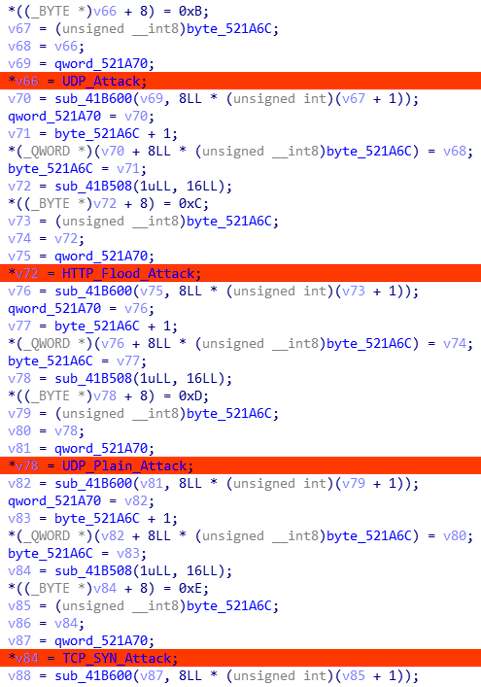
Victims initiate communication with a C2 server, and upon receiving commands, compromised devices parse the packet to determine the DDoS attack method, target host, and packet count before launching an attack.
C2 communication
This campaign underscores the persistent risk posed by vulnerable IoT devices and Linux servers to remote code execution attacks.
Despite the availability of patches, the number of exploit triggers remains alarmingly high, exposing systems to potential threats.
The IZ1H9 Campaign’s rapid adaptation to new vulnerabilities is a cause for concern. Once attackers gain control of a vulnerable device, they can integrate it into their botnet, amplifying their capacity for attacks, including DDoS and brute-force attacks.
DDoS attacking methods
Organizations are urged to promptly apply patches and change default login credentials for devices to mitigate this threat effectively.
Protect yourself from vulnerabilities using Patch Manager Plus to patch over 850 third-party applications quickly. Take advantage of the free trial to ensure 100% security.
Amidst the escalating conflict between Palestine and Israel, both pro-Palestinian and pro-Israeli hacktivists are targeting critical Industrial Control Systems (ICS) that are vulnerable.
Several cybersecurity firms have reported that pro-Israeli and pro-Palestinian hacktivists are eyeing industrial control systems (ICS) amidst the growing tension between the two countries. ICSs could be a target of interest because hundreds of these systems are still vulnerable to exploitation.
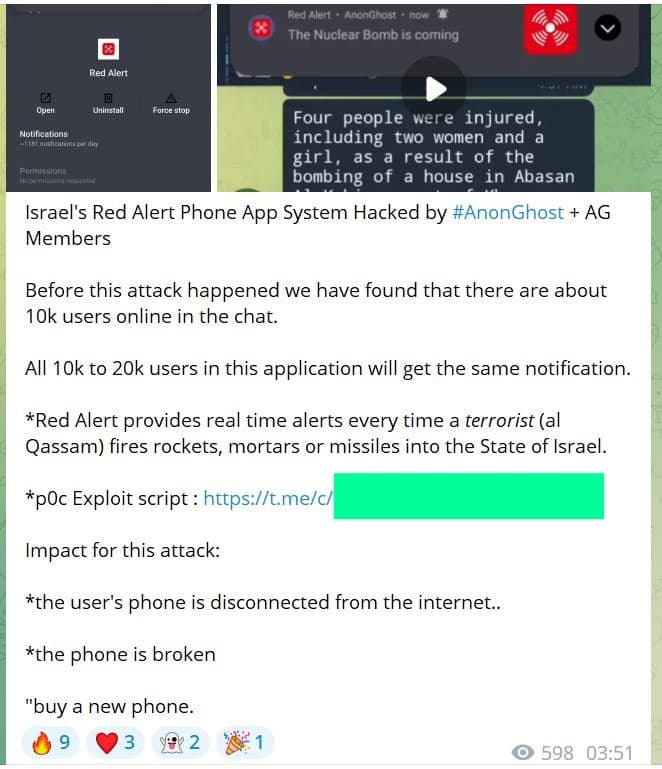
Waqas Ahmed, the founder and editor of Hackread.com, noted that hacktivists typically resort to DDoS attacks or small-scale data leaks, especially during unfortunate escalations in the conflict between Palestine and Israel. However, in this case, they have escalated their activities to a higher level. An example of this escalation is AnonGhost, who hacked the Israeli rocket alert app Red Alert to send thousands of fake nuclear bomb alerts to Israeli smartphones.
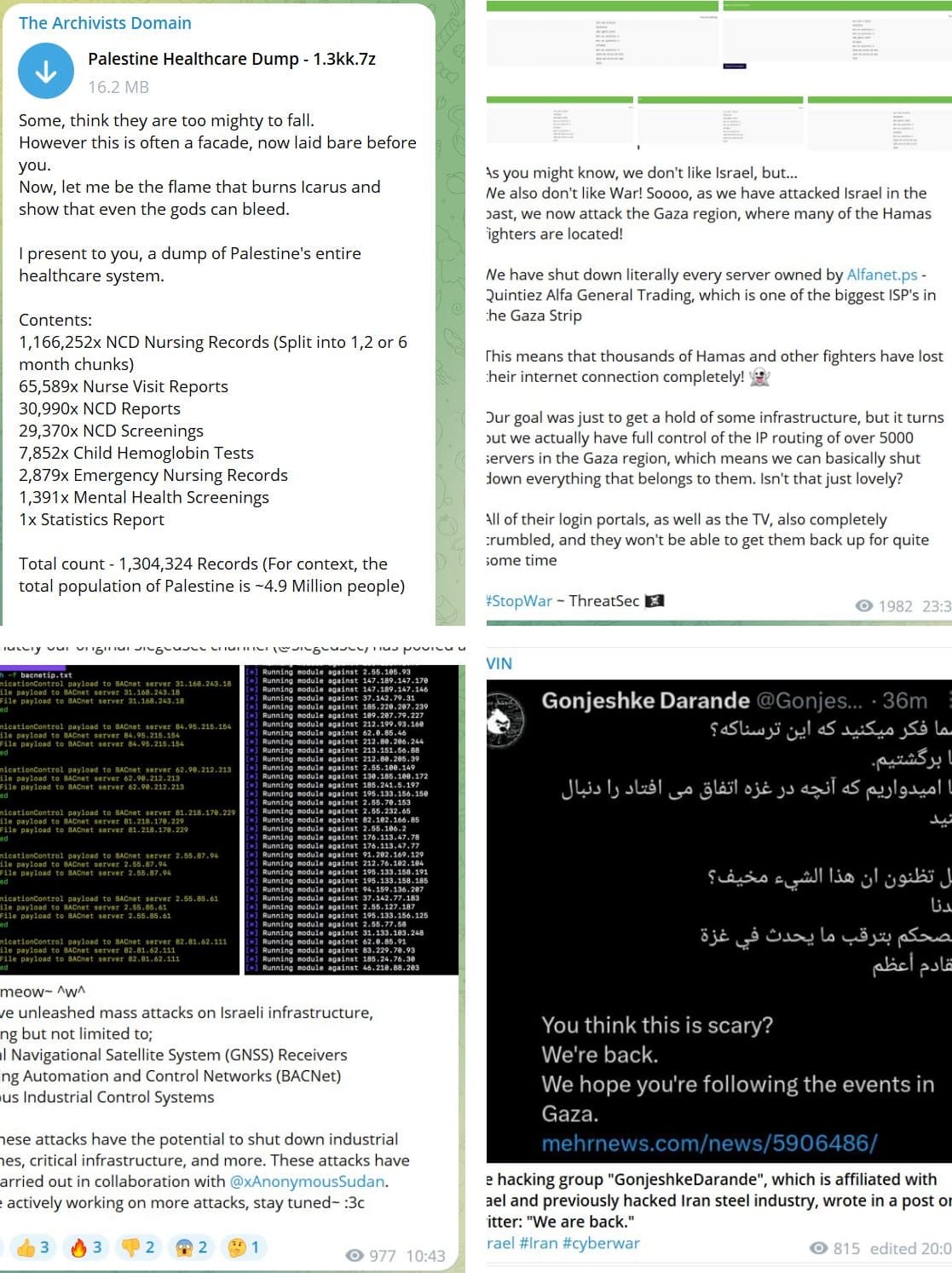
AnonGhost posting their claims on Telegram (Screenshot: Telegram – Hackread.com)
Many hacktivists are looking to disrupt critical infrastructure and claim headlines because a cyberattack on critical infrastructure can cause severe economic, safety, operational, and reputational damage. Many ICSs, which are computerized systems installed to monitor/manage mechanical processes in different industries, remain exposed to such threats.
In a report, CyberNews revealed that several Israeli organizations have exposed the SCADA communications protocol called Modbus. Around 400 exposed systems were identified along with 150 open Message Queuing Telemetry Transport (MQTT) ports. These ports manage communications between SCADA and MES (manufacturing execution system).
What’s worth noting is that this is not just in Israel, many Palestinian firms also have exposed MODBUS and MQTT, and in addition to that, have exposed Siemens automation and Symantec systems. Therefore, it isn’t surprising that threat actors are aiming to target them.
According to Microsoft, a Gaza-based threat actor Storm-1133, has started targeting Israeli private-sector, telecom, and defense organizations. This group is affiliated with Hamas, which controls the Gaza Strip. This means the fight has already started in the cyber realm.
Microsoft’s annual Digital Defense Report reveals that Storm-1133 uses different social engineering techniques and fake LinkedIn profiles to lure employees to Israeli organizations. They send phishing emails, deliver malware, conduct espionage, and even infiltrate third-party organizations having public ties to achieve their objectives. After the group gains access to its target organization, it deploys backdoors. It avoids detection by regularly updating its C2 infrastructure.
There are reports that the Israeli government and media outlets have also become targets of hacktivists. A multitude of attacks, mostly DDoS, are observed targeting Israeli organizations/entities. However, not all threat actors have claimed allegiance with any of the two parties involved. Such as ThreatSec intends to target both sides simultaneously.
“As you might know, we don’t like Israel, but… We also don’t like War! Soooo, as we have attacked Israel in the past, we now attack the Gaza region, where many of the Hamas fighters are located!” the group wrote on Telegram and claimed to own every server of Alfanet.ps, including Gaza strip’s biggest ISP Quintiez Alfa.
For your information, ThreatSec is one of the five families of the world’s most well-organized groups. The others include GhostSec, Stormous, SiegedSec, and Blackforums. Many other groups are actively targeting Israeli and Palestinian organizations.
In the ongoing conflicts, The Archivists Domain and ThreatSec have targeted Palestinian infrastructure, with The Siegedsec supporting the Palestinian side. Additionally, the Gonjeshke Darande group has been targeting Iran. (Screenshots: Hackread.com)
On Sunday, the website gov.il became inaccessible worldwide, and the Russian Killnet group took responsibility for the attack on Telegram. Killnet later stated that they won’t target ordinary Israeli citizens as they are after the regime that “sold itself to NATO.”
“The atrocities that Hamas or Israel commit against civilians are terrible! We exclude the possibility of attacking the critical infrastructure of both sides!” the gang noted on Telegram.
Microsoft’s researchers noted that nation-state threat actors are more interested in long-term espionage campaigns. Israel, the US, Ukraine, and South Korea are some of the most regularly targeted nations in the MENA and Asia-Pacific regions.
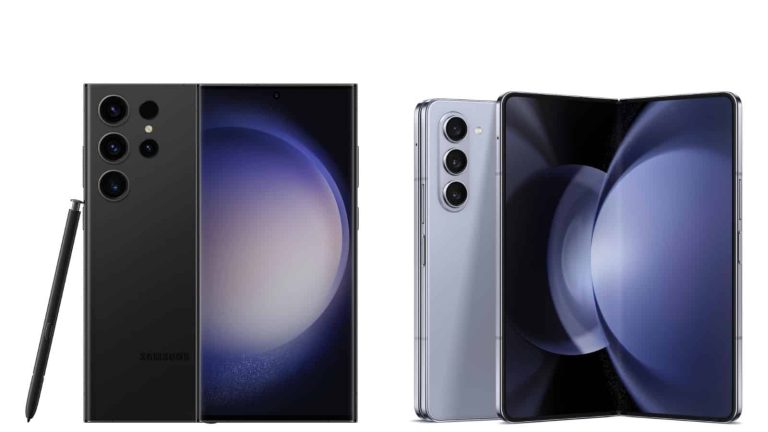
Amazon has kicked off its sales event, and the deals are coming in nonstop. Samsung is also included in the equation, as both the Galaxy S23 Ultra and Galaxy Z Fold 5 got major discounts. They are now up to $400 off!
Let’s kick things off with the Galaxy S23 Ultra. You can choose between 256GB and 512GB storage options on Amazon, both are now discounted. The 256GB model is discounted by 21%, and now costs $949.99. The 512GB model is 25% more affordable, and now costs $1,029.99. You can also choose between four color options.
The Galaxy Z Fold 5, on the other hand, also comes in 256GB and 512GB storage options. The 256GB model now costs 1,399.99 (22% off), which means it’s $400 more affordable. The 512GB model is also $400 more affordable, and now costs $1,519.99 (down from $1,919). This phone is available in three colors, and you can check them all out via the link below.
A few days ago, Nothing took to its X page to share information on its new collaboration with CASTiFY. This collaboration brings forth the birth of four iPhone 14 and 15 cases with Nothing design styling. With this, iPhone users can get a feel of Nothing’s product while not stepping out of their comfort zone.
The cases this collaboration brings to users are not only for the iPhone 14 and 15 Pro series. Users of other iPhone entries will benefit from these new cases, so there’s no need for them to consider upgrading. Already, CASTiFY has rolled out their case line-up for the iPhone 15 series, but these Nothing cases are an entry to behold.
When it comes to design, two of these new cases mimic the Android-powered Nothing Phone 2 Glyph interface. As for the other two cases, they don’t get the Glyph interface design layout, but they get a massive Nothing logo along their rear. When purchasing either case design, buyers can pick their iPhone model and various CASTiFY accessories to help step up their experience.
The new Nothing and CASTiFY cases might add a bit of flare to your boring iPhone
Nothing and CASTiFY offer these new cases for the iPhone X series and above. The two cases available for purchase are both lightweight and offer users a good amount of protection. All iPhones from the 12 series support wireless charging, and these cases come with MagSafe compatibility to enable users to add magnetic accessories to their cases.
Out of all four cases, two are mirror cases while two are clear cases, but all are MagSafe compatible. With these cases, Carl Pie hopes to put Nothing products in the hands of more users. He is wrapping iPhones with the Nothing brand logo thanks to a case that is now available for purchase to iPhone users around the world.
Possibly this might bring potential buyers Nothing’s way, hence growing their business and boosting sales. Well, these four cases aren’t the only product that the Nothing and CASTiFY collaboration is making available for purchase. The last product this collaboration brings to users is the Nothing Mini Pouch that ships with an Ear (2).
So those purchasing these new cases for their iPhones might want a mini pouch for the AirPods as well. But Nothing pairs this mini pouch with its new Ear (2) earbuds, so buyers can get to experience the Nothing audio experience. The mini pouch retails for $169, which might seem outrageous, but is justified by the fact that buyers get a $149 pair of earbuds.
All cases retail at $70 for the iPhone 14 and 15 Pro models, other model cases are more affordable. Samsung and Google users can also purchase these cases for their smartphones as well. If you have an iPhone, will you consider getting one of the Nothing and CASTiFY cases?
There’s nothing more convenient than a digital wallet storing everything you need to carry around with you – this way you can get about with just your phone and nothing else.
The option to have your mobile driver’s license in your digital wallet has been present for Apple users (in some states) since 2022, and now, Samsung‘s joining in on the fun, announcing mobile driver’s licenses and state IDs are coming to Samsung Wallet, reports Android Authority.
Samsung Wallet will be getting mobile driver’s licenses and state ID support
Mobile driver’s licenses are coming to Samsung Wallet, starting with residents of Iowa and Arizona, who will be the first users to get access to the feature. This means you’ll be able to have a digital version of your driver’s license or state ID in the Samsung Wallet app. The South Korean company has partnered with IDEMIA to make sure the driver’s licenses are secure, accurate, and, of course, private. The feature will be available later this year, although a precise release date has not been announced at this moment. Several other states will also be getting it, but again, it’s unclear exactly when.
Samsung is also working with the Transportation Security Administration (TSA) on a test program that focuses on accepting mobile driver’s licenses at 25 federalized airports as well.
Of course, what you’re allowed to do with a mobile driver’s license depends on the state you’re in. The tech is still somewhat in its infancy, but we have high hopes for the convenience it will bring to many people in the future. When we know more, we’ll make sure to tell you, so stay tuned!
Motorola is discounting a number of phones for Amazon’s Prime Big Deal Days, which includes the new Motorola Razr+. Until 11:59PM PT on October 11, you can pick up the Motorola Razr+ for only $799. That is a pretty impressive price for this phone, and definitely worth picking up at that price.
The Razr+ is one of the better flip-style foldables to launch in 2023. It does have a 6.7-inch FHD+ 165Hz display, powered by the Snapdragon 8+ Gen 1, 8GB of RAM and 256GB of storage on-board. It does also have a 3.6-inch front display, that you can run full apps on. Making it so you don’t have to open your phone as often.
As we found in our review, the battery life on the Razr+ is also pretty good. Getting around 8+ hours of screen on time pretty consistently. So here you have a phone that will get you through a full day, and not take up a lot of space in your pocket. That’s a win/win.
You can pick up the Motorola Razr+ from Amazon by hitting the link below. Remember this is only on sale through October 11, 2023.
In the dynamic world of mobile app development, bridging the Android and iOS platforms is a key strategy for wider reach. App developers leverage cross-platform tools to streamline this process. This article explores how developers optimize their work to create apps for both platforms while maintaining a non-promotional tone.
Exploring Cross-Platform Development
Cross-platform development involves the creation of applications that function seamlessly on both Android and iOS platforms, utilizing a unified codebase. This method not only streamlines development timelines but also guarantees a uniform level of performance across different platforms.
Key Aspects of Cross-Platform Development
Single Codebase
Frameworks like React Native and Flutter allow developers to write code once for both Android and iOS.
Native-Like Performance
Cross-platform tools aim for near-native performance by optimizing code and leveraging platform-specific features.
UI Consistency
Developers prioritize consistent UI design across platforms, adhering to platform guidelines.
Access to Native Features
Cross-platform tools provide access to device features and APIs.
Optimizing for Both Platforms
– Platform-Adaptive Design: Developers tailor UI and UX to match Android and iOS conventions. – Testing and Debugging: Thorough testing on both platforms identifies and resolves issues. – Performance Optimization: Fine-tuning code and leveraging platform-specific optimizations ensures optimal user experiences. – Platform-Specific Features: Developers utilize platform-specific features when needed.
Benefits of Cross-Platform Development
– Cost-Efficiency: Developing a single codebase reduces costs compared to separate native apps. – Faster Time-to-Market: Cross-platform development accelerates app delivery. – Code Reusability: Developers save time and effort by reusing code.
An App developer skillfully employs cross-platform tools to optimize apps for Android and iOS, offering cost-efficiency, speed, and code reusability while ensuring a consistent user experience.
The Android 14 QPR1 beta program allows Pixel users to test what will be the next Pixel Feature Drop due out in December. One of the features that has appeared in Android 14 QPR1 Beta 2 recently released by Google is the integration of the weather with the Clock app and with Clock widgets. Weather data such as the day’s high and low temperatures along with the current temperature and current conditions will be shown in the Clock tab and when using Clock widgets.
The weather will be displayed for the cities that you have the Clock app set to. First, though, you must have Android 14 QPR1 beta 2 installed. If you do, go to the Clock app’s settings and toggle on “local weather on clock.” But here’s the thing folks; because Google is using a server-side update or requires a future update to the Clock app, not everyone with the QPR1 Beta 2 update has the “local weather on clock” option on their Clock app’s setting page. For example, my Pixel 6 Pro running Android 14 QPR1 Beta 2 does not have the toggle yet.
To check the settings page on your Pixel’s Clock app, open the Clock app and tap the three-dot menu icon in the upper right of the screen. Tap on Settings and look for the “local weather on clock” toggle. To reiterate, if you don’t have it on your Pixel and your phone is running Android 14 QPR1 Beta 2, you’ll have to wait for Google to take some sort of action first.
Note that the weather information is actually provided by a separate app called “Weather” (package name https://t.co/c9YYBv8QW2) and not from the Google Clock app itself. This lets the Google Clock app show weather information without requesting the location permission. pic.twitter.com/uCYn6sS9P1
A tweet from Android expert Mishaal Rahman shows what the results of weather integration with the Clock app will look like. Rahman also points out in a subsequent tweet that “the weather information is actually provided by a separate app called “Weather” (package name http://com.google.android.apps.weather) and not from the Google Clock app itself. This lets the Google Clock app show weather information without requesting the location permission.”
The feature is separate from the new Google Weather page that is currently being disseminated to Android users.
If you want to join the Android 14 QPR1 beta program, go to www.google.com/android/beta or tap on this link. Press the button that says view your eligible devices and you’ll see a box containing an image of your phone with an option to Opt in to the beta program. Tap it, follow the directions, and you’ll receive an OTA update by going to Settings > System > System update.
Just remember that once you join the QPR1 beta program, you won’t be able to rollback to Android 14 without having to perform a factory reset. Once the December Feature Drop is released, you will be able to leave the beta and return to receiving stable Android 14 updates for a limited time.