Threads had an impressive drop in number of users soon after Meta officially introduced the social app. Although that’s somewhat normal, not many have returned after the big exodus, on the contrary, more people stop using the app because it lacks some basic features that the competition has had for a long time.Despite that, Threads continues to be improved with new features almost on a weekly basis, so if you’re one of the people who are still using the app, know that you’ll be getting something new every several days now.
Even though some of these features might seem unimportant at first glance, most of them are features that a social app can’t function well without or don’t offer a complete experience.
The most recent new feature introduced by Threads is the ability to switch between multiple profiles. The new feature is now available on mobile, the app confirmed on its official Threads account.
To switch between multiple Threads profiles, you just need to press the profile tab to have the menu showing the list of your profiles pop up. Once you see your other logged-in Instagram account, you’ll be able to choose one of them to switch to.
Of course, you can also tap “Add profile” to log in on Threads or add another profile to the app. Just like every other social app, Threads will retain your credentials of your accounts so that you can switch between them on the fly.
Group-IB uncovers cryptojacking campaign on popular thesaurus site.
Attackers used a drive-by-download technique to spread malware.
The campaign distributed a Monero cryptocurrency miner.
Unsophisticated tactics highlight risks even on trusted websites.
Recommendations emphasize the importance of regular updates and robust security measures.
Cybersecurity researchers at Group-IB unearthed a covert cryptojacking campaign concealed within a popular online thesaurus boasting over five million monthly visitors. This campaign employed a cunning tactic, embedding a script that surreptitiously installed malware on visitors’ computers to mine cryptocurrency, opening the door for more malicious activities.
Group-IB’s experts crack the story behind this cybercriminal operation through their use of Managed Extended Detection and Response (MXDR), a solution designed for round-the-clock threat monitoring, proactive threat hunting, and real-time attack mitigation.
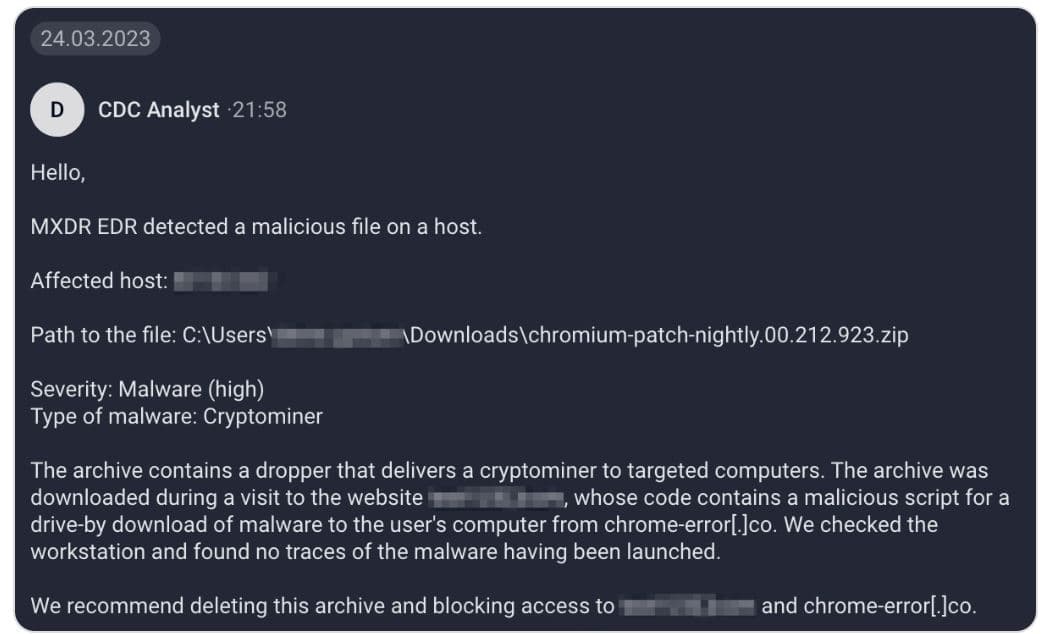
During their monitoring, Group-IB’s security specialists detected numerous malicious archives flagged by the MXDR system. This triggered an alarm as they observed an unusually high number of malware samples emerging within the infrastructure of several client companies.
These archives, peculiarly named in the pattern of “chromium-patch-nightly.00.{3}.{3}.zip,” each with a unique identifier, indicated that the MXDR customers had received these malicious archives from a common source, suggesting an unconventional approach taken by the attackers.
Upon analyzing these malicious archives; Group-IB found that they contained an executable file functioning as a dropper, responsible for installing the XMRig Coinminer—a cryptocurrency mining tool specifically designed for Monero. Monero’s inherent anonymity, which conceals transaction details, allows threat actors to remain covert.
To trace the source of these infected archives, Group-IB turned to data from the Endpoint Detection and Response (EDR) module. After analyzing the events related to the discovery of the malicious objects on host machines, it was apparent that the archives had been downloaded to the “Downloads” folder, typically used by default during user internet sessions. The security experts examined browser history, revealing that these malicious samples were downloaded from an online thesaurus.
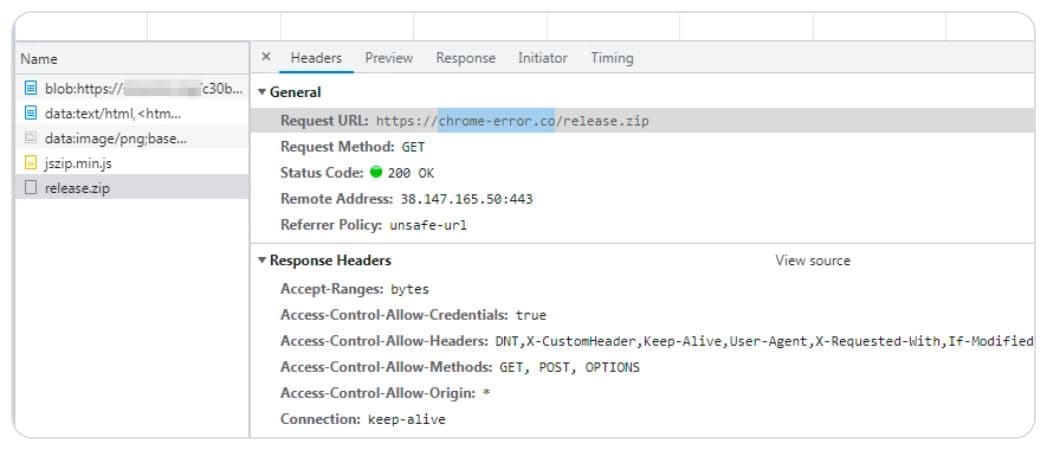
Group-IB’s analysts reconstructed the infection chain, revealing that when visitors accessed the thesaurus website, a decoy page triggered the automatic download of a malicious archive. Notably, the script responsible for this action was not injected into the section of the website dedicated to antonyms. The archive itself was downloaded from another website, chrome-errorco.
Further investigation revealed that the dropper, despite being downloaded to users’ machines, had not been executed, preventing any immediate threats.
Screenshot: Group-IB
According to Group-IB’s report, to safeguard their clients from potential security incidents, Group-IB promptly notified them about the threat. Additionally, the experts shared contextual insights about the incident and recommended preventive measures, including the deletion of the malicious archive.
In the event of confirmed malicious files, Group-IB MXDR’s Endpoint Detection and Response (EDR) agent is capable of automatically blocking and locally quarantining such files.
Despite the ability of Group-IB MXDR to block known malicious files, the system sends periodic requests to the main console, sharing hashes of files marked as malicious by the behavioral analysis subsystem. This feature ensures that if one customer detects a malicious file, the hash is subsequently added to other customers’ blocklists.
Group-IB’s Group-IB MXDR alerts its clients
The analyzed script responsible for the attack conducted the following actions:
Sent a signal to a specified page and downloaded a new script, executing it Displayed a fake Chrome error page instructing users to install a downloaded update Ultimately, this revelation underscores the critical need for vigilance even on trusted and highly frequented websites.
The cybercriminals behind this campaign employed well-known tactics, such as drive-by downloads and social engineering via deceptive error pages, emphasizing the importance of robust cybersecurity measures.
Group-IB’s analysis further revealed that the threat actors’ relatively unsophisticated approach should not be underestimated. Once the loader infiltrates a target company’s infrastructure, it can serve as a potent vector for future, more damaging attacks beyond cryptocurrency mining, such as ransomware or wipers, which can result in severe disruptions and significant damage.
For secure defences against such threats, Group-IB recommends:
Keeping operating systems and software up to date
Downloading software and updates from official sources or restricting user rights to update independently
Monitoring workstation resource utilization for signs of cryptomining activity
Employing Endpoint Detection and Response solutions to block malicious file downloads and halt attacks at their earliest stages
Utilizing modern Malware Detonation Platforms for safe and thorough analysis of suspicious files
Network Penetration Testing checklist determines vulnerabilities in the network posture by discovering Open ports, troubleshooting live systems, and services, and grabbing system banners.
The pen-testing helps the administrator to close unused ports, additional services, Hide or customize banners, troubleshoot services, and to calibrate firewall rules.
You should test in all ways to guarantee there is no security loophole.
Network penetration testing, also known as ethical hacking or white-hat hacking, is a systematic process of evaluating the security of a computer network infrastructure.
The goal of a network penetration test is to identify vulnerabilities and weaknesses in the network’s defenses that malicious actors could potentially exploit.
Let’s see how we conduct step-by-step Network penetration testing by using some famous network scanners.
1. Host Discovery
Footprinting is the first and most important phase where one gathers information about their target system.
DNS footprinting helps to enumerate DNS records like (A, MX, NS, SRV, PTR, SOA, and CNAME) resolving to the target domain.
A – A record is used to point the domain name such as gbhackers.com to the IP address of its hosting server.
MX – Records responsible for Email exchange.
NS – NS records are to identify DNS servers responsible for the domain.
SRV – Records to distinguish the service hosted on specific servers.
PTR – Reverse DNS lookup, with the help of IP you can get domains associated with it.
SOA – Start of record, it is nothing but the information in the DNS system about DNS Zone and other DNS records.
CNAME – Cname record maps a domain name to another domain name.
We can detect live hosts, and accessible hosts in the target network by using network scanning tools such as Advanced IP scanner, NMAP, HPING3, and NESSUS.
Perform port scanning using tools such as Nmap, Hping3, Netscan tools, and Network monitor. These tools help us to probe a server or host on the target network for open ports.
Open ports are the gateway for attackers to enter and install malicious backdoor applications.
Perform banner Grabbing/OS fingerprinting such as Telnet, IDServe, and NMAP determines the operating system of the target host and the operating system.
Once you know the version and operating system of the target, you need to find the vulnerabilities and exploit them. Try to gain control over the system.
Scan the network using Vulnerabilities using GIFLanguard, Nessus, Ratina CS, SAINT.
These tools help us find vulnerabilities in the target and operating systems. With these steps, you can find loopholes in the target network system.
GFILanguard
It acts as a security consultant and offers patch management vulnerability assessment, and network auditing services.
Nessus
Nessus is a vulnerability scanner tool that searches for bugs in software and finds a specific way to violate the security of a software product.
Data gathering.
Host identification.
Port scan.
Plug-in selection.
Reporting of data.
5. Draw Network Diagrams
Draw a network diagram about the organization that helps you understand the logical connection path to the target host in the network.
The network diagram can be drawn by LANmanager, LANstate, Friendly pinger, and Network View.
6. Prepare Proxies
Proxies act as an intermediary between two networking devices. A proxy can protect the local network from outside access.
With proxy servers, we can anonymize web browsing and filter unwanted content, such as ads and many others.
Proxies such as Proxifier, SSL Proxy, Proxy Finder..etc, to hide from being caught.
6. Document all Findings
The last and very important step is to document all the findings from penetration testing.
This document will help you find potential vulnerabilities in your network. Once you determine the Vulnerabilities, you can plan counteractions accordingly.
You can download the rules and scope Worksheet here: Rules and Scope sheet
Thus, penetration testing helps assess your network before it gets into real trouble that may cause severe loss in terms of value and finance.
These are the Most important checklist you should concentrate with Network penetration Testing .
You can follow us on Linkedin, Twitter, and Facebook for daily Cybersecurity updates also you can take the Best Cybersecurity courses online to keep yourself self-updated.
The cybersecurity researchers at Kaspersky have unveiled alarming statistics about the expanding cybercrime economy on the dark web.
Key Findings:
DDoS Demand Soars: Kaspersky’s analysts discovered over 700 dark web ads for DDoS attack services in H1 2023, highlighting the escalating demand among hackers.
Cost of DDoS Services: Rates for DDoS attack services on the dark web ranged from $20 per day to $10,000 per month, with an average cost of $63.50 per day or $1,350 per month.
IoT Malware Evolution: Fierce competition among cybercriminals has driven the development of IoT malware, with features designed to thwart rival malware, including firewall rules and process terminations.
Brute-Force Attacks Prevalent: Brute-forcing weak passwords remains the primary method for compromising IoT devices, with 97.91% of attacks focusing on Telnet, compared to 2.09% on SSH.
Global Attack Landscape: While China, India, and the United States were the primary targets of IoT attacks, China, Pakistan, and Russia emerged as the most active attackers, highlighting the global reach of cyber threats.
The Internet of Things (IoT) landscape is under siege, with a growing underground economy centered around IoT-related services, particularly for Distributed Denial of Service (DDoS) attacks, according to a recent report by cybersecurity firm Kaspersky.
The study delves into the evolving threats targeting the IoT sector, shedding light on the modus operandi of cybercriminals and the alarming prevalence of malware types.
IoT devices are poised to surpass a staggering 29 billion by 2030, making them an attractive target for cybercriminals. Kaspersky’s research presents crucial insights into dark web activities, prevalent malware strains, and the tactics employed by hackers.
While DDoS protection and mitigation services are utilizing all available resources to secure their clients’ infrastructure; DDoS attacks orchestrated through IoT botnets are experiencing a surge in demand within the cybercriminal community. Kaspersky’s Digital Footprint Intelligence service analysts unearthed over 700 ads for DDoS attack services on various dark web forums in the first half of 2023.
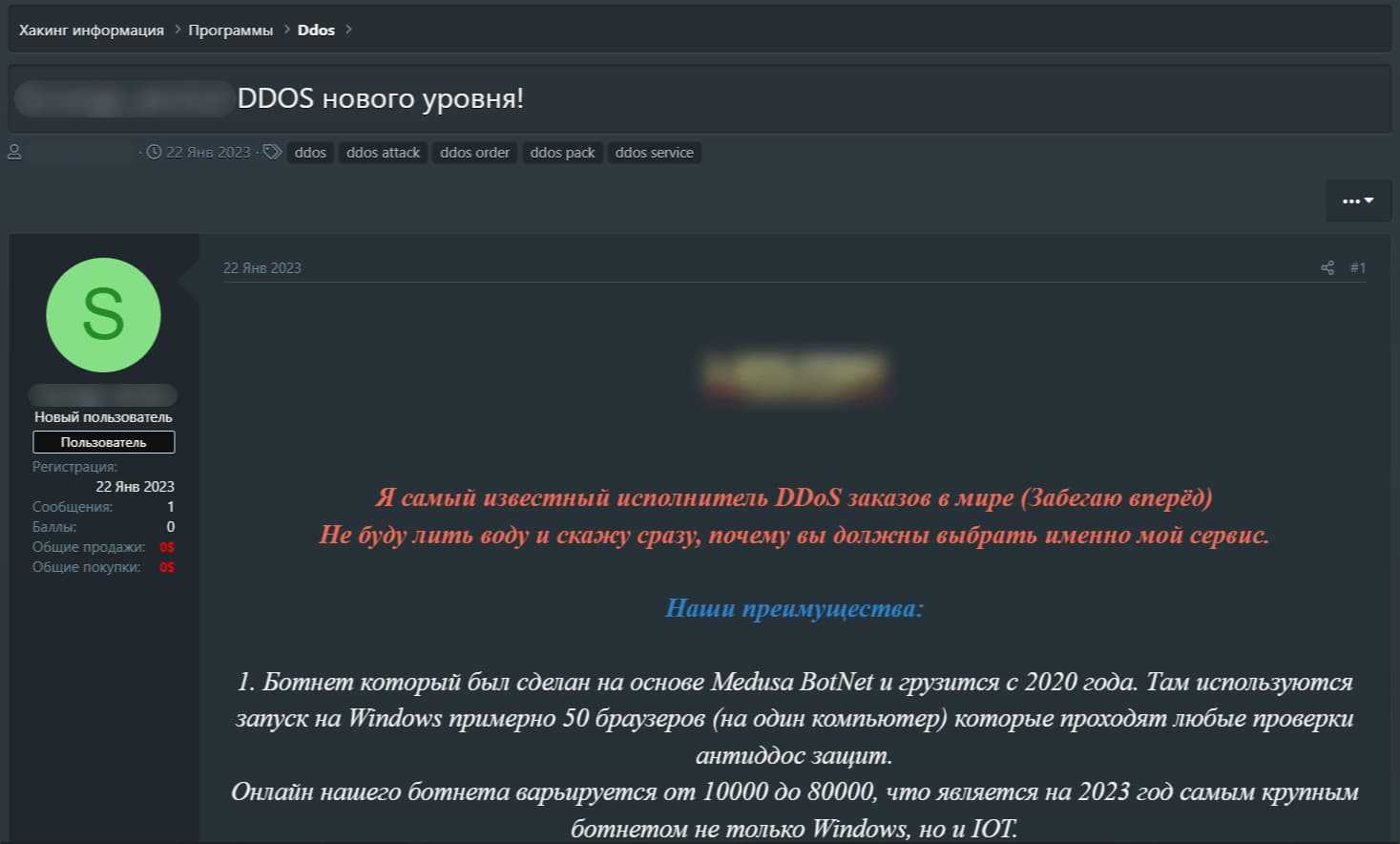
One of the many ads identified by Kaspersky researchers – Translation: I’m the world’s best-known DDoS attacker for hire (getting ahead of myself here). Not going to waffle — I’ll just tell you why it is my service you should choose. Our advantages: 1. Botnet based on Medusa, working since 2020. Starts with ~50 browser instances per Windows PC which evades any anti-DDoS defense. 10,000–80,000 online devices: the largest Windows or IoT botnet in 2023.
The cost of these services varies depending on factors such as DDoS protection, CAPTCHA, and JavaScript verification on the victim’s side, ranging from $20 per day to $10,000 per month. On average, these illicit services were offered at a rate of $63.50 per day or $1,350 per month.
Furthermore, the dark web marketplace isn’t just limited to DDoS services. It offers zero-day exploits for vulnerabilities in IoT devices, bundled with infrastructure and supporting utilities.
IoT malware, which comes in various families, has a history rooted in the 2016 Mirai malware. Fierce competition among cybercriminals has prompted the development of features designed to outwit rival malware. These strategies include the implementation of firewall rules, disabling remote device management, and terminating processes linked to competing malware.
The primary method employed by cybercriminals to compromise IoT devices remains brute-forcing weak passwords, followed closely by exploiting vulnerabilities in network services. Brute-force attacks primarily target Telnet, a widely used unencrypted protocol. Hackers crack passwords to gain unauthorized access, allowing them to execute arbitrary commands and deploy malware. While SSH, a more secure protocol, is also susceptible, it poses a greater resource challenge for attackers.
In the first half of 2023, Kaspersky’s honeypots recorded that a staggering 97.91% of password brute-force attempts focused on Telnet, with a mere 2.09% directed at SSH. The majority of these attacks were concentrated in China, India, and the United States, while China, Pakistan, and Russia emerged as the most active attackers.
Exploiting vulnerabilities in IoT web interfaces is another avenue for attacks on IoT devices. Cybercriminals execute malicious commands through these vulnerabilities, leading to severe consequences such as the proliferation of malware like Mirai.
Yaroslav Shmelev, a security expert at Kaspersky, issued a stern warning: “Kaspersky urges vendors to prioritize cybersecurity in both consumer and industrial IoT devices. We believe that they must make changing default passwords on IoT devices mandatory and consistently release patches to fix vulnerabilities.”
“In a nutshell, the IoT world is filled with cyber dangers, including DDoS attacks, ransomware, and security issues in both smart home and industrial devices. Kaspersky’s report stresses the need for a responsible approach to IoT security, obliging vendors to enhance product security from the get-go and proactively protect users,” Yaroslav added.
To provide further insights, the Kaspersky report details several types of IoT malware, including DDoS botnets, ransomware, miners, DNS changers, and proxy bots. Each of these malicious programs serves distinct purposes, adding to the complexity of IoT security challenges.
In conclusion, Kaspersky’s research paints a harsh picture of the IoT threat landscape for 2023. As the number of IoT devices continues to skyrocket, cybersecurity becomes paramount. Cybercriminals are relentless in their pursuit, and only a concerted effort by both manufacturers and consumers can safeguard the future of the IoT.
By conducting regular security audits, monitoring network traffic, and following best practices, stakeholders can take meaningful steps to secure this rapidly evolving ecosystem.
Google is set to announce the Pixel 8 in a little over a week, on October 4. But that’s not stopping the leaks from coming fast and furious. The latest leak comes from 91Mobiles, which has detailed just about every new feature coming to the Pixel 8 series this year. And this is thanks to a leaked video that was uncovered.
The first new featured is “Video Boost”. This is using AI to create a “smoother view” as well as bringing Night Sight’s effects to video. Google will also bring along “Audio Eraser” which is a lot like the Magic Eraser feature, but not for Audio. There’s a nice example in the video of removing city noise from the background of a video of a cello player.
Magic Editor is also coming, which Google teased at I/O earlier this year. This is a feature that will help you move a subject or change things like the sky. It really sounds a lot like the generative AI fill that Photoshop has added recently.
Google’s AI chops are showing off with Pixel 8
What’s even more impressive, perhaps, is the ability to change people’s faces in a shot, using AI. So not only can you remove people, but you can change how they look. Which is pretty wild, and it’ll be interesting to see how Google announces this at its Made by Google October 4 event.
Google has always relied pretty heavily on AI in its camera, and there’s plenty of new features here that use AI. Showing that Google is really far ahead of the competition when it comes to AI.
Now as far as the cameras on the Pixel 8 series, we’re expecting a 50-megapixel main sensor on both, still. The same as the last two years. While the Pixel 8 Pro will sport a 48-megapixel ultrawide and a 48-megapixel telephoto camera that can zoom at 5x. These are some pretty nice upgrades, particularly on the ultrawide. Which was only a 12-megapixel sensor on the Pixel 7 Pro last year.
Three apps that have chiefly been designed to target government officials but are probably as likely to have been downloaded by an unsuspecting user are gathering a terrifying amount of data.
Bleeping Computer reports that SentinelLabs has identified a cybercriminal group known as Transparent Tribe (APT36) which has been instrumental in promoting three fake YouTube apps.
Two of the apps are called YouTube and the third one is named Piya Sharma after a famous anchor of the same name. The apps try to trick users into thinking that they are downloading the YouTube app but they look more like internet browsers and are lacking in some features found in the original app. It’s believed that the Piya Sharma app is used in romance-based scams.
ake Youtube app displays the YouTube website
The apps are not present on the Google Play Store. Instead, Transparent Tribe (APT36) presumably uses social media platforms and fake landing pages to distribute the apps. They ask for an alarming number of permissions during the installation process, some of which such as microphone access are relevant to video apps. Other permissions, such as the ability to send and view SMS, should be enough to sound alarm bells, but a person who is not tech-savvy may not think much of them.
At their core, these apps are the CapraRAT malware. They can not only steal deeply private information such as call logs, text messages, and GPS data but can also record audio and video and initiate phone calls. The apps can also take screenshots and interfere with system settings.
In addition to info theft, the apps can also allow their operators to run identity theft campaigns and carry out phishing attacks.
SentinelLabs asserts that APT36 might be working for the Pakistani government and the apps’ primary targets are members of the Indian army and government as well as Indian human rights activists. Those involved in diplomacy work in Kashmir are also a target.
To avoid being a target of fake apps like these, it’s best to only download apps from trusted sources such as the Google Play Store.
In the Dubai Mall, a fight broke out, as many were attempting to purchase the new iPhone 15 on Friday. This year, many lined up all around the world to be one of the first to buy the new iPhone 15. And in the Dubai Mall, things got a bit heated.
According to The National, security guards had actually began erecting barriers as the crowd packed in the day before. Security also had to tell them over loudspeakers to stop surging forward. Then ended up corralling them into several zones.
As the iPhone 15 launch drew closer, many people began rushing to get in line. There’s many on social media showing customers rushing up escalators to get ahead of each other. And then tempers began to flare. Reports claim that these rushing customers began shoving each other, making some fall to the ground. And that eventually ended up in a full-on fight. As you can see from a post on X.
Crowds formed worldwide to purchase the iPhone 15 on launch day
If there was any doubt about whether or not the iPhone 15 was going to be popular, well those doubts are gone. On Friday, crowds around the world lined up to purchase the iPhone 15. Just a quick search on X (formerly Twitter), will show you that there were crowds in New York City, Chicago, and any other big city.
In fact, as someone that had to go to the Apple Store to pick up their pre-order, I saw the crowd first hand. Many were lined up to buy, or had a reservation to buy the new iPhone. Why they didn’t pre-order is a bit odd. But you can see from my post on X about that.
The iPhone is always going to sell well, since it is pretty tough to jump ship to Android, since you’re usually so invested in the ecosystem. And it looks like many had their upgrades come due this year, so they are upgrading to the 15.
While Xiaomi’s phones have always offered great value for money, the company has also faced various controversies. Now, according to reports from multiple Finnish outlets, three major telecom operators in Finland—Telia, DNA, and Elisa—have decided to ban the sales of Xiaomi smartphones and associated brands, including Redmi and POCO.
This move comes after Xiaomi’s continued presence in Russia, which some view as indirect support for Russia’s military actions in Ukraine. Furthermore, Xiaomi’s active support of Russian companies in launching new products instead of distancing itself from the Russian market has raised some serious questions.
“At Telia, we constantly review our equipment selection and make changes to it if necessary. For the time being, we have given up cooperation with Xiaomi, so new device models will no longer be available. The remaining products in stock are sold through the online store and stores,” said Markku Saranpää, director of Telia’s device business.
However, it is important to note that Finland’s decision is independent of any EU sanctions on Xiaomi. Additionally, Finnish retailers such as Gigantti and Verkkokauppa plan to continue selling Xiaomi smartphones and devices.
Xiaomi’s response
While Xiaomi has not directly commented on the situation, the company has previously defended its position by arguing that it has a responsibility towards its Russian customers and employees, emphasizing its commitment to providing services in the region. However, the EU has repeatedly criticized Xiaomi’s stance, asserting that its continued operations in Russia indirectly provide financial support to the Russian government.
Moreover, Finland isn’t the only country to take such action. In March, Poland and Lithuania banned the sale of Xiaomi products in their respective countries.
Potential consequences
Although Finland may have a smaller population compared to other countries, it still holds significance as Xiaomi maintains a 10% market share in the country. Furthermore, the decision by Finland could attract the attention of the EU, potentially leading to far-reaching consequences, as a ban on Xiaomi in the EU could prove detrimental.
BLU Products has announced yet another smartphone in the US. This US-based company introduced the BLU BOLD N3 handset, after over a year since delivering the BOLD N2 to the market.
The BLU BOLD N3 is a new, affordable smartphone from BLU Products
The BLU BOLD N3 actually looks really nice. It has a curved display, thin bezels, and a display camera hole. It has a circular camera island on the back, with an interesting design. Its back and front sides are proportionally curved, by the way.
Having said that, this is an affordable phone. Despite that, however, it has rather interesting specifications. The MediaTek Dimensity 7050 SoC fuels this phone, while it also comes with 8GB of RAM.
You’ll find 256GB of internal storage inside of this smartphone. On the front sits a 6.8-inch FullHD+ 3D AMOLED display with a 120Hz refresh rate. There is also a fingerprint scanner below it, an optical one.
Three cameras sit on the back of this phone. A 50-megapixel main camera is backed by an 8-megapixel ultrawide angle camera, and a 2-megapixel macro shooter. On the front, a 16-megapixel unit is located.
The phone supports 5G connectivity & 66W charging
There is also a 4,700mAh battery included in the package, along with 66W wired charging. The phone does come with two SIM card slots (2x nano SIM), and it does support 5G connectivity.
Android 13 comes pre–installed on this phone, while the device is compatible with T-Mobile, Metro PCS, and various other carriers in the US. Do note that it’s not compatible with CDMA networks, though, of course.
The device usually costs $299.99, but it’s now priced at $249.99 on Amazon. The purchase link is included below the article, in case you’re interested in picking one up.
YouTube is a great platform to view and upload your videos, but the company doesn’t really have a way to make your videos. Sure, there’s a rudimentary video editor that you can use when making Shorts, but just for adding effects. Well, according to Gear Rice, YouTube is testing out a video editor.
This is a market that YouTube should look into. ByteDance, the company that owns TikTok, has its own video editor as well. The editor is called CapCut, and it’s a very robust editor. So, it’s about time that YouTube followed suit.
YouTube is testing a new video editor
The app is called YouTube Create, and it’s available in beta form for a limited number of markets. At AH, we were able to download the app on our Infinix Note 30 Pro, so those in the US market should be able to get it.
Since this is a beta test, you should expect some instability while using it. The company is testing it out on its users. Don’t be afraid to give the company some feedback on areas where it can improve on the app. You should leave an honest opinion on the Google Play Store or Apple App Store.
Using the app
Being a mobile video editor, YouTube Create is a simple and straightforward app to use. When you open the app, you’ll need to sign into your Google account. After that, you’ll get started on your new video by pressing the + button. When you do that, you’ll see a grid of the photos and videos in your gallery. you can tap on either the Videos or Photos filters on the top of the UI to refine your search.
You’ll choose as many videos or photos as you want and load them into the editor. Once you do that, you’ll see a simple video editor interface that almost looks like the Shorts editor. At the top of the screen, you’ll see the Home button, undo button, and the three-dot menu. Opening the three-dot menu will let you export it, change the aspect ratio, get help, and send feedback.
Under that, you have your video timeline with the clips you have loaded in. Tap and hold to rearrange the clips. Tap on the “+” button on the right to add a new clip from your gallery. In between each clip, you’ll see a button that looks like a sideways hourglass. Tapping on that will let you add transition effects between the clips.
These tools will let you add all sorts of content like additional clips, effects, filters, and more. So far, it looks like a pretty strong video editing experience that you’ll love if you’re looking for a simple video editor.