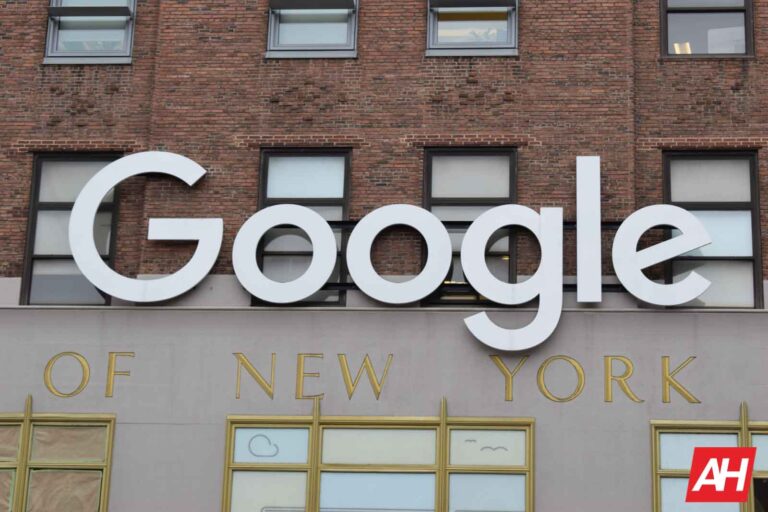
Google is coming up on its fourth day in court with the DOJ over antitrust allegations in the department’s recently filed lawsuit, and it claims that the department’s lead lawyer, Jonathan Kanter, is biased against the company.
But the judge who’s overseeing the case, U.S. District Judge Leonie M. Brinkema, isn’t biting. Brinkema essentially rejected Google’s claim. Calling it a “red herring defense” and saying Google needs to focus on whether or not its ads platforms is anti-competitive. Google’s most recent method for defense follows along with its beliefs that the case is without merit. In the past Google said the lawsuit was deeply flawed.
And it seems Google claiming DOJ lawyer Jonathan Kanter is biased is part of that argument. In its Thursday hearing, it was revealed that Google allegedly tried to hide evidence of its antitrust violations. Evidence presented by Kenneth Dintzer alleged Google also trained employees to avoid the use of certain words and phrases that make them sound like monopolists. In attempts to obscure any proof that Google was operating an illegal monopoly. It was also alleged that Google had commonly told employees to use its internal chat tool with history off.
Google failed to provide documents to the DOJ
Google having its claims rejected that the DOJ is biased isn’t the only new development from the most recent hearing. Brinkema also notes that Google seems to have failed to provide “millions of documents” to the court regarding this case. According to Brinkema, Google needs to get the case more focused.
As Google was “well past the deadline” in handing the documents over. Remarks from Brinkema lead to potentially further challenges for Google as the case continues. The case is expected to last around 10 or so weeks. But it’s entirely possible that it could end up being shorter or longer. Regardless of the length of the case Google is most certainly facing some difficulties.
A Europol report discusses developments in cyberattacks, new methodologies, and threats as observed by Europol’s operational analysts.
The European Union Agency for Law Enforcement Cooperation (Europol), has published a report that examines developments in cyberattacks, discussing new methodologies and threats observed by Europol’s operational analysts. The report also discusses the criminal organizations behind cyberattacks and the influence of geopolitical events.
The report follows the Internet Organized Crime Assessment (IOCTA), Europol’s assessment of the cybercrime landscape and how it has changed over the last 24 months.
When it comes to the most deployed tactics, the report holds no big surprises.
Cybercriminals usually gain initial access through compromised user credentials or by exploiting vulnerabilities in the targeted infrastructure.
Ransomware is named as the most prominent threat with a broad reach and a significant financial impact on industry. This in contrast to an FBI report that stated more money is lost to investment fraud than ransomware and business email compromise (BEC) combined. But if we look at news coverage then ransomware is certainly the most prominent one. And we have seen that the number of ransomware attacks and the height of the ransomware demands have gone up.
Affiliate programs remain the most observed form of organization for ransomware groups. The most common service providers for ransomware groups include initial access brokers (IABs), crypter developers, droppers-as-a-service, money laundering, and bullet-proof hosting services.
These groups work closely with other malware-as-a-service groups to compromise high-revenue targets and post huge ransom demands, running into millions of Euros. IAB’s will typically sell the access they have gained to other criminals, who could be inside or outside of the same criminal organization. Compromised organizations can be exposed to several simultaneous or consecutive cyber-attacks because the IABs usually do not offer exclusivity of their assets to the buyers.
Another trend flagged in the Europol report is that most ransomware groups are still using the multi-layered extortion method, with indications that the theft of sensitive information might become the core threat. The information theft is also seen to be feeding an ecosystem of criminals dealing in and making use of personal and financial information.
The Russian conflict with Ukraine led to a significant boost in Distributed Denial of Service (DDoS) attacks against EU targets. The most noticeable DDoS attacks were politically motivated and coordinated by pro-Russian hacker groups. Together with Russia’s internal politics it has uprooted cybercriminals pushing them to move to other jurisdictions.
Confirming several observations made by researchers, Europol points out that criminals have shifted their preference of using malicious macros in favor of container files after Microsoft blocked macros delivered over the Internet in its applications. Criminals are using SEO techniques and search-engine advertising tools to lure potential victims to web pages masquerading as download sites for popular software programs, which actually deliver malware to the victim’s system.
Other notable facts:
Mobile malware campaigns are less prolific after the takedown of Flubot.
Cyberattacks are becoming more targeted and continue causing disruptions in all sectors.
Crypters have become a key component in malware development operations.
Microsoft Exchange Server vulnerabilities are another common intrusion tactic.
Ransomware groups sometimes rent separate servers for victim data exfiltration, but are increasingly moving toward using legitimate cloud storage providers.
Prevent intrusions. Stop threats early before they can even infiltrate or infect your endpoints. Use endpoint security software that can prevent exploits and malware used to deliver ransomware.
Detect intrusions. Make it harder for intruders to operate inside your organization by segmenting networks and assigning access rights prudently. Use EDR or MDR to detect unusual activity before an attack occurs.
Stop malicious encryption. Deploy Endpoint Detection and Response software like Malwarebytes EDR that uses multiple different detection techniques to identify ransomware, and ransomware rollback to restore damaged system files.
Create offsite, offline backups. Keep backups offsite and offline, beyond the reach of attackers. Test them regularly to make sure you can restore essential business functions swiftly.
Don’t get attacked twice. Once you’ve isolated the outbreak and stopped the first attack, you must remove every trace of the attackers, their malware, their tools, and their methods of entry, to avoid being attacked again.
Malwarebytes EDR and MDR removes all remnants of ransomware and prevents you from getting reinfected. Want to learn more about how we can help protect your business? Get a free trial below.
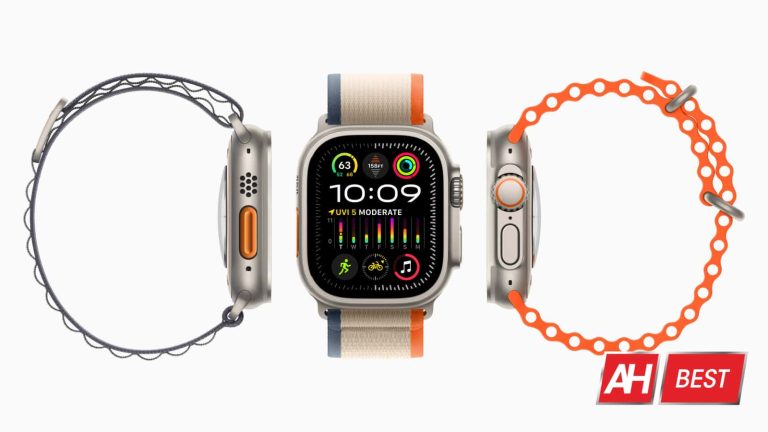
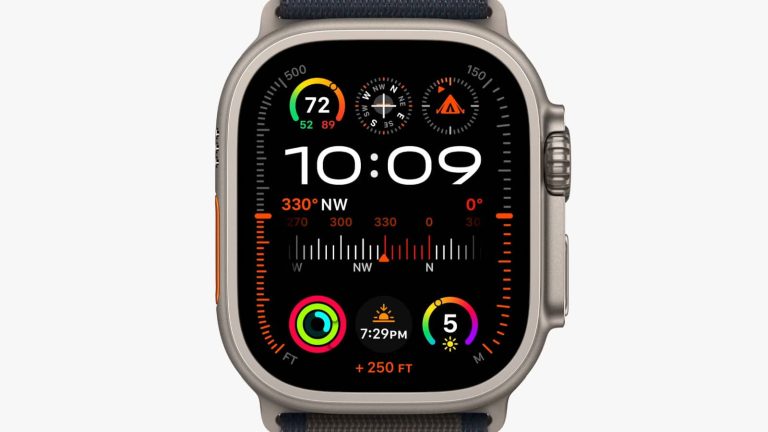
The Apple Watch Ultra 2 is official after Apple announced it on September 12, and we’ve rounded up a collection of the best bands you can find for the watch. Because, while the band that comes with the watch is nice, there are also lots of other nice options available. Or if you’re like us, you might simply like to have multiple band options so you can swap between them from time to time.
For us it tends to be sporty bands for exercise and either leather or metal bands for work days and/or nights out with friends and family. It can also be good to have softer textile bands for use during sleep or casual wear as they are often times the most comfortable. Although this will depend on your preferences and how certain materials feel against your skin. Either way, we’ve put together the best bands for the Apple Watch Ultra 2 below to help you narrow down your choices.
This was primarily designed for use with the Apple Watch Ultra, so it’ll work great for the Apple Watch Ultra 2, naturally.
It comes in six different colors making it one of the better options on here for personalization. Those colors include Indigo, Starlight, Orange, Green, Blue, and Olive. This is designed to be a more rugged textile material so it should be a perfect fit if you go hiking a lot. But it also looks quite stylish so even if you just appreciate the design, it’s a nice option for everyday wear as it’s comfortable too.
Nomad makes tons of great leather accessories, including bands that will fit the Apple Watch Ultra 2. This leather band is made from genuine Horween leather and comes in two colors. Rustic Brown, and Black. Rustic Brown will come with silver hardware and the Black band will come with black hardware.
Horween leather is American made. This will end up with a really nice looking patina over time too. And that’s one of the reasons why we love this band a lot. You can also get this band in a non-Horween leather option for $60, and it comes in a third color called English Tan. Which might be more to your liking.
Another really good option for a band is the Trail Loop band that Apple makes. This was designed with the Watch Ultra in mind. And because the Watch Ultra 2 uses the same size case, this one will fit. Both watches are also meant for more active situations. Like hiking or other outdoor excursions. And the Trail Loop band is perfect because it’s soft and should be super comfortable for long treks.
It also has this really convenient pull tab to adjust the tightness. Overall the design is just easy to work with. It comes in six different colors as well. Making this a great option for those who like choices. Those colors include Black/Gray, Blue/Black, Blue/Gray, Green/Gray, Orange/Beige, and Yellow/Beige.
Similar to the Titanium band from Nomad, this Aluminum model has the same classy look and feel with that great magnetic clasp system for easy on and off wear. And because it’s aluminum and not titanium, it’s $100 cheaper so instead of $300, you pay $200.
That’s still expensive for a watch band of course. But, if you like Nomad’s stuff this is a nice alternative to the titanium band since it’s less expensive and has the same features and design. This model comes in silver and space gray. It’s much lighter band than you’d expect for being made of metal and it’s incredibly slim too. And we love the matte finish on it to match the Apple Watch case.
The Ocean band from Apple is the band you want to go with if you want something that more like a sport band. It’s made from an elastomer material with these little ridges that Apple says will help to give it a slight stretch for a perfect fit. And because it’s made of elastomer it should feel nice and supple against the wrist. While also staying pretty resistant to sweat and such. And that’s a good thing since you’ll be wearing this type of band while being active.
It comes in a few different colors including Blue, Midnight, Orange, White, and Yellow. It also features the titanium buckle to match the color and material of the watch case itself.
This is one of Apple’s new bands coming to the market alongside the launch of the Watch Ultra 2 and one of the best bands you can get for it. FineWoven is a completely new textile that Apple created as it’s now going to stop producing leather products. So this will serve as a sort of replacement to leather bands from the company.
It comes in three different colors and is supposed to feel like soft suede (a type of leather). Aside from the comfort and nice feel, it also looks great and the magnetic clasp will make it super easy to put on and take off. If you’re looking for an official Apple band, this is our personal favorite. Especially since it fits both watch sizes and has a few color options. You can pre-order the band now and it’ll officially release on September 22, which is when it should ship by.
While the FineWoven band from Apple is very nice, and one of the best bands for the Watch Ultra 2, we know there are some that will still prefer a genuine leather band for their Apple Watch. And we don’t blame you. We love leather accessories too and one of the best options for the Apple Watch Ultra 2 comes from Bullstrap.
The fine-grain Italian leather will be soft and supple for quality comfort and it looks quite good. On top of that, since this is genuine leather it will end up with a nice patina over time. Subtly changing the look of the leather as it ages. This particular band from Bullstrap comes in multiple colors including Sienna (our favorite), Black, Classic, Dune, Matte Black, Ocean, and Terra. If you want a nice leather band for the Watch Ultra 2, consider this one.
The Apple Watch Ultra 2 is already expensive enough. So why spend a little bit less on your band of choice? While a lot of the options on here have been fairly expensive for bands, they’re also worth it. But we’ve also found this Milanese magnetic loop band that would work great with the Apple Watch Ultra 2 as it works with the original Ultra model, and we love it. It comes in a few different colors including Starlight, Black, Midnight, Silver, Rose Gold, and Rainbow.
At just over $11, this is a steal for a pretty good band. And the magnetic clasp will make it easy to take off and put on if you swap your bands out.
Keeping with theme of an inexpensive band to round out this list, we’re recommending the Light Fit Ultra band from Spigen. This band is made from durable nylon material and comes with stainless steel connectors. Spigen made this band to be both comfortable and durable so it can stand up to your excursions.
And there’s a tiny bit of elasticity to it as well. Although it’s not a wild stretch like you might expect. You can pick up the band in four colors too. Including Navy, Black, Khaki, and Orange.
The Apple Watch Ultra 2 went up for pre-orders earlier this week, and it’s already facing delivery delays for some buyers. This is according to MacRumors who spotted times being pushed out multiple weeks for the watch. Suggesting that plenty of people have already placed pre-orders.
This isn’t too uncommon for popular devices. Google’s Pixel phones have had limited edition colors in the past with similar situations. These always ended up being either out of stock or shipping was kicked out well into the future because of limited stock. With the Apple Watch 2 Ultra, delivery and shipping delays are going as far as 7 weeks out. Meaning if you placed your pre-order now, you wouldn’t end up getting the watch until almost November.
That being said, you may want to get you order in as soon as you possibly can. Before delays cause delivery to be pushed out even further.
Apple Watch Ultra 2 shipping delays are for certain configurations
There is a little silver lining with the way the delays are working. Not all configuration options of the watch are having shipping pushed out. It’s only for certain combos between the watch and specific bands and band sizes.
So, you could end up with a band choice that allows for the shipping to happen right on launch day. Which is September 22. As reported by MacRumors, combos that appear to have longer shipping times are the Alpine Loop band in Blue with a medium/large size, and the Trail Loop band in Orange and Beige in both small/medium and medium/large sizes.
The Alpine Loop band is seeing about a two to three week delay on shipping, and the Trail Loop band is being delayed for about six to seven weeks. At the time of writing there may now also be delays on other band options too. So it’s worth keeping in mind that your chosen bands, if you’re pre-ordering the watch, may cause a delay in getting the watch as the two items will ship together. If you’re not sure where to pre-order, you can pick up the watch from Best Buy. It’s also available from Apple directly and from Amazon.
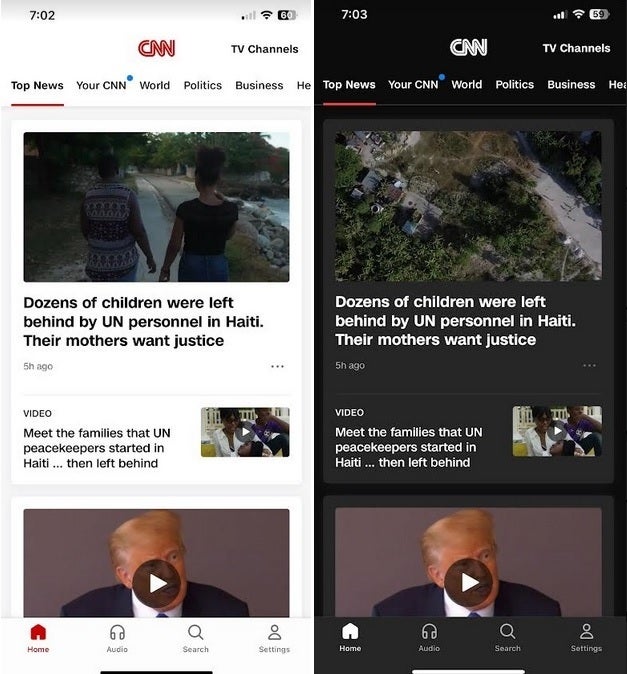
CNN announced today that the cable news channel’s iOS and Android apps now support Dark Mode. This means that instead of seeing the app with black text on a white background, the app will appear with white text on a black background. At night, or in dark places, users will be able to view CNN without feeling blinded by the blaring white background or distracting others who are in the same room or location and are affected by seeing the bright white background of the app.
CNN adds that “Dark Mode reduces blue light that can negatively impact sleep cycles, patterns and eyes and extends the battery life of devices — overall making the user experience of the CNN mobile app more enjoyable for the millions of users who are actively engaging with the app on a daily basis.”
The CNN app on both my iPhone 11 Pro Max running iOS 17 RC and my Pixel 6 Pro running Android 14 Beta 5.3 support Dark Mode. When you open the CNN app on your phone and tap the Settings tab at the bottom right of the screen, a notice on the CNN settings page says, “You are currently viewing CNN in light mode. To switch to dark mode, adjust the display setting on your device.”
This is CNN in Light Mode and Dark Mode for iOS and Android
So to see CNN in Dark Mode, you’ll have to set your entire phone to Dark Mode. On iOS, go to Settings > Display & Brightness and select “Dark.” On Android, go to Settings > Display and toggle on Dark theme. Once this is completed, go to the CNN app and enjoy the news in Dark Mode.
Since CNN released the update today, if you find that Dark Mode (on iOS) or Dark mode (on Android) isn’t working for you, you might need to update the app. On iOS open the App Store, tap the profile pix in the upper right of the display, scroll down the Update queue for CNN, and if you see it, tap on Update.
On Android, open the Play Store app, tap the profile pix in the upper right corner of the screen, tap on Manage apps & device, under Updates available press on See details. Look for CNN in the list of apps needing to be updated, and if you see it, tap on the Update button. I did have to follow this process to update the CNN app on my Pixel 6 Pro.
After it’s all done, anytime you want to see CNN in Dark Mode, you’ll just have to change the settings of your system, whether it is iOS or Android that you are running, from Light to Dark. To install the CNN app on your phone, tap on this link for iOS or tap on this link for Android.
Samsung has released the September security patch for a few more Galaxy devices. The latest security update is now rolling out to the Galaxy S20 FE, Galaxy A72, and Galaxy A52. It’s also available widely for the Galaxy S23 series and Galaxy A52 5G. This month’s security release patches over 60 vulnerabilities across Galaxy devices.
Starting with the Galaxy S20 FE, we can confirm that the September SMR (Security Maintenance Release) is rolling out to both 4G and 5G versions of the phone. The update is available widely in Europe, with users getting firmware build numbers G780GXXS7EWH8 and G781BXXS8HWH8, respectively. Samsung should soon expand the release to other markets, including the US (where only the 5G version was sold).
The September update for the Galaxy A72 isn’t available as widely, though. First reported by SamMobile, the rollout hasn’t expanded beyond Kazakhstan, Russia, and Ukraine at the time of this writing. This 2021 mid-range phone is getting the new SMR with firmware version A725FXXU6DWH2. While the Galaxy S20 FE is only getting the latest security fixes, the Galaxy A72 is picking up some system stability and reliability improvements as well.
The Galaxy A52 is another Samsung phone that recently started receiving the September SMR. The updated build number for the phone is A525FXXU6DWH2 in Europe and A525MUBS6DWH3 in Latin America. The device is getting system optimizations with this update, at least in Europe. A wider rollout covering units in Asia, Africa, and other markets should follow soon.
This phone follows its 5G version to Samsung’s September update party. The latter picked up this update earlier this week. It was a limited rollout in Canada. However, the Korean firm has since expanded the rollout to Latin America as well. Users are getting the update with the build number A526BXXS5EWI1. The US versions of the Galaxy A52 5G have yet to receive the latest security patch from the Korean firm.
The Galaxy S23 series is also widely getting the September update
The Galaxy S23 series was one of the first to receive this month’s security update from Samsung. However, the company initially released the new security patch in the US and Canada. Following a wide rollout in these countries, the Korean firm is now pushing the September SMR to its latest flagships in Europe. The new build number in the region is S91*BXXS3AWHR. Users in other regions can expect to receive this update in the coming days.
TikTok has gradually been expanding its foothold in the United States with the introduction of new features. Now, as part of these efforts, the company has announced its new e-commerce platform in the United States called TikTok Shop, which not only enables users to discover but also directly purchase products featured in live videos, tags within content on their personalized “For You” page, on brand profiles, or through a dedicated “Shop” tab.
Although TikTok first began testing the new feature in the US back in November with a select group of users, the new shopping experience represents significant development as it empowers creators to tag products in their videos and establish partnerships with brands that offer commission-based marketing opportunities, ultimately increasing revenue.
For creators interested in selling their own products, the company is introducing a new “Fulfilled by TikTok” program, which takes care of storage, packaging, and shipping. Additionally, to capitalize on the hype, the platform is actively promoting hashtags like #TikTokMadeMeBuyIt.
“With TikTok Shop, we’re giving people a place to experience the joy of discovering and purchasing new products without leaving the app,” says TikTok.
Challenges surrounding the shopping experience
Although TikTok says their new shopping experience has already garnered the support of over 200,000 sellers and over 100,000 creators, there are a few issues that could affect the experience. Firstly, many users have reported that the shop button primarily displays inexpensive or counterfeit products from China. Secondly, in light of concerns about TikTok’s alleged data privacy practices, there are worries about the company collecting more data from users, including financial information, shopping habits, and addresses.
“US users’ payment information is managed by USDS, and we work with third-party payment platforms to facilitate transactions on TikTok Shop,” says TikTok.
Furthermore, TikTok is not alone in the e-commerce market and will face stiff competition from giants like Amazon and Shein. Nevertheless, the platform’s unique proposition of allowing users to directly purchase products they come across in their feed could pose a significant threat to traditional retailers.
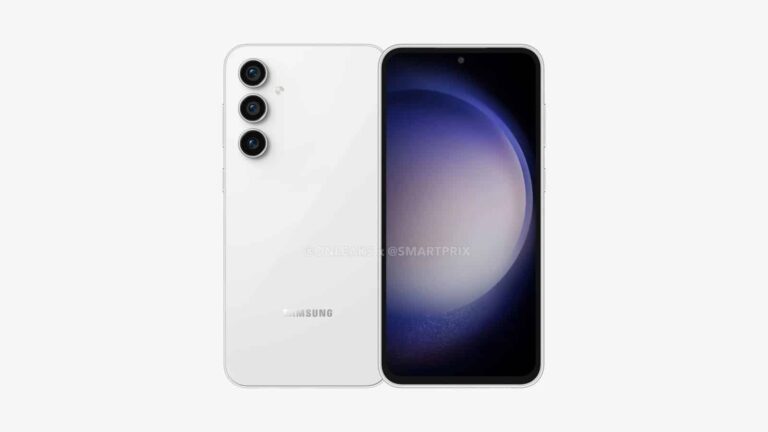
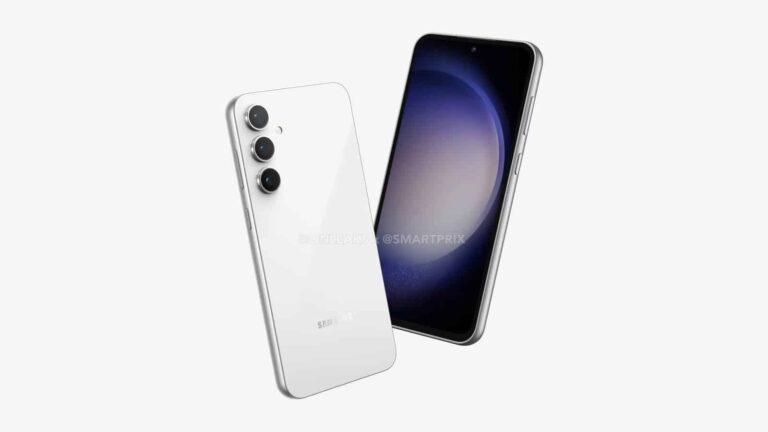
Yet another leak for the Samsung Galaxy S23 FE appears to have popped up and this time it shows what seems to be at least some of the phone’s official colors.
Leaked images that appear to be official promotional renders from Samsung obtained by MSPowerUser show the upcoming phone in four different colorways. While the phone has leaked in renders before, these seem to be the official renders from Samsung that will be used in marketing campaigns. Also worth noting is that past leaks don’t seem to show more than two colors. The black and white models. These are likely going to be called Graphite Black and Pearl White according to MSPowerUser.
These most recently leaked renders show all four colors right next to each other. And they confirm some that the phone’s come with three rear camera sensors.
Galaxy S23 FE leak shows all four colors
In the leaked render you can see the black, alongside the other three colors. These are said to be Pearl White, Purple Lavender, and Olive. So basically black, green, white, and purple.
These are pretty similar color schemes to the original Galaxy S23. Although there is one less color option and the names are different. But the colors themselves are within the same color type. It is possible there’s a fifth color too, as there are five phones in the image. Which you can see below. That being said, the fifth phone is shown from the front so you can only see the display and just barely the edges of the frame. Making it pretty impossible to see the color of the back.
With all of these recent leaks for the Galaxy S23 FE, and with an official promotional render allegedly leaking, it seems the phone is just about ready to launch. All of these colors should be available anywhere Samsung sells the phone. Although, sometimes it does keep colors exclusive to certain regions. Another possibility is that if this phone comes in more than one storage size option, some colors may be limited to one of those.
According to Google CEO Sundar Pichai, the partnership between Google and the chip maker Nvidia will continue for at least another ten years from now.
Google and Nvidia are two tech giants that play a crucial role in developing future technologies. The meeting point between both companies is now AI. Google is adding AI to almost all its services, and Nvidia produces high-tech AI hardware for various companies. A strategic partnership between Google and Nvidia could significantly impact the AI segment.
In an interview with Wired, Sundar Pichai alluded to the partnership between Google and Nvidia for Android and other initiatives that lasted for over a decade. Pichai added that Nvidia has a “strong track record” with AI innovation. Google CEO also said AI is “one of the most profound technologies we will ever work on.”
Google and Nvidia will team up to shape the future of AI
Pichai added that semiconductor is a dynamic, competitive industry that requires deep, long-term R&D and investments. “I feel comfortable about our relationship with Nvidia and that we are going to be working closely with them ten years from now.” He noted.
In August, Google Cloud customers could gain access to the technology powered by Nvidia’s H100 GPUs. Nvidia chips are now used in training large language models such as ChatGPT and Google Bard.
Major tech companies, government agencies, and startups are all using GPUs made by Nvidia. Nvidia’s influence in the AI market has expanded to some extent that the DeepMind CEO is suggesting the US government use its chips for AI rule enforcement.
Google and Microsoft are now fighting to become the leaders of AI. Microsoft could access the OpenAI tech by investing over $10 billion in the company. In response, Google merged Brain and DeepMind teams to concentrate all its resources to challenge Microsoft.
Of course, both OpenAI ChatGPT and Google Bard rely on Nvidia chips for training. So, any rivalry between Google and Microsoft increases Nvidia’s stock value. The chip maker has recently announced its quarterly revenue has doubled from a year earlier and they also expect a 170% growth from the year-ago period.
Samsung has just dropped another hint at a nearing launch of the Galaxy S23 FE. The company recently added the unreleased Fan Edition (FE) phone to a list of Galaxy devices compatible with Samsung Pay. It was probably an accidental or premature addition, but the Korean firm hasn’t de-listed the device from its website, at least not as of this writing. This should mean an imminent unveiling of the long-rumored FE-series phone.
First spotted by SamMobile, the Galaxy S23 FE is mentioned under the Galaxy S family of devices that support the Samsung Pay platform in Spain. The upcoming phone appears at the top of this list, above the regular Galaxy S23 flagships. The website also contains several other lists (Galaxy Z, Galaxy Note, Galaxy A, and Smartwatches), most of which list the devices in order of their launch dates, with the latest model at the top.
This addition doesn’t reveal any other information about the upcoming phone. However, this is another official confirmation of the existence of the Galaxy S23 FE. Samsung has already published support pages for the device on some regional websites. The company’s vice president of mobile for South Africa previously admitted that it needs to launch a new FE phone to fill the gap between its Galaxy A series and the flagship Galaxy S series.
Unfortunately, we still don’t have a confirmed launch date. There are rumors that Samsung will unveil the phone in late September or early October, but no date. Indian e-commerce platform Flipkart has already published a product page for the device. It says the Galaxy S23 FE will arrive before the Indian festive season, which is in mid-October. So our long wait for the Galaxy S21 FE successor might finally end in a few weeks.
Certifications have already confirmed Galaxy S23 FE specs
The Galaxy S23 FE has already picked up regulatory approvals in many countries. Those certification listings and leaks have revealed its design and specs in great detail. The phone will feature a 6.3-inch Dynamic AMOLED 2X display with an FHD+ resolution (2340×1080 pixels) and a 120Hz refresh rate. Samsung has included an optical under-display fingerprint scanner here.
Powered by the Snapdragon 8 Gen 1/Exynos 2200 SoC, the device should come with up to 8GB of RAM and 256GB of storage. It will feature a 50MP primary rear camera paired with an 8MP telephoto camera with 3X optical zoom, a 12MP ultrawide lens, and a 10MP selfie camera. The new FE phone packs and 4,500mAh battery with 25W fast charging and boasts an IP68 rating for dust and water resistance. Stay tuned for its official launch.