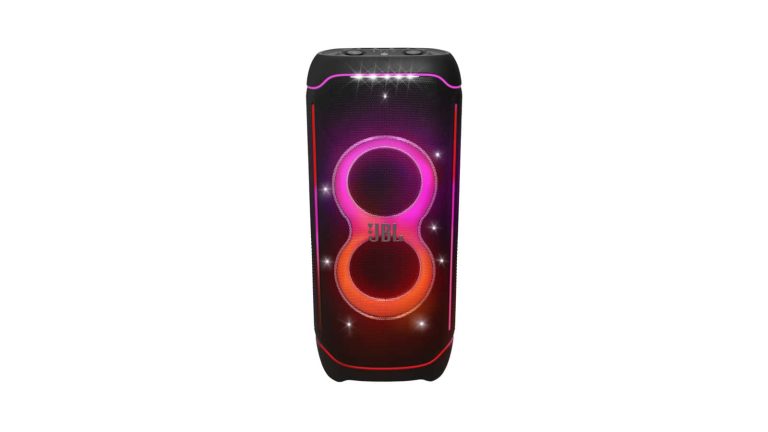
JBL has just announced its “loudest ever” JBL PartyBox speaker. It’s the JBL PartyBox Ultimate.
This new speaker from JBL is actually really impressive, and for $1,699 it probably should be. But it has WiFi included, as well as Dolby Atmos. That’s not usually something you see on speakers this big. JBL claims that the PartyBox Ultimate is “guaranteed to level up any party, anywhere”.
Inside the PartyBox Ultimate, JBL has included two high-sensitivity mid-range drivers, and dual tweeters. Giving you some really incredible sound, that also gets very loud without distorting the sound quality. You can place it in huge areas, JBL claims that it can rock the space of two basketball courts, and that’s thanks to a pair of 9-inch subwoofers that provide thunderous bass, that you’ll fee in any room.
On top of that, there’s Dolby Atmos included that will really make you feel the sound.
WiFi 6 and Bluetooth 5.3 are supported
JBL has included WiFi 6 and Bluetooth 5.3 LE Audio for connectivity here. So you can get great sounding music straight from your smartphone. You can also pair two PartyBox Ultimate speakers together for an even wider soundstage.
The PartyBox Ultimate also comes with the Signature JBL PartyBox light that can automatically sync to the music. Allowing you to take the party up to 11.
Want to take it to the beach or the pool? Well you can. JBL has a IPX4 rating making it splashproof, but it cannot be submerged in water. JBL Has included a handle, making it easy to move around.
As far as when you can buy this one, JBL says that it will go on sale in North America starting in October and it will cost $1,699.95. You can expect it to be available from all of the usual retailers that sell JBL products like Amazon, Best Buy, and others.
Like many car manufacturers, General Motors is no stranger to generative AI. Earlier this year, the automaker started developing an AI driving assistant with ChatGPT. Now, it looks like GM has found another use for generative AI to support its OnStar service.
The automaker announced on Tuesday, coinciding with Google’s Cloud Next conference, that it is now using Google Cloud’s conversational AI chatbot, called Dialogflow, to service simple OnStar calls (via TechCrunch). According to the company, this frees up the service’s employees to address more complex requests.
“Generative AI has the potential to revolutionize the buying, ownership, and interaction experience inside the vehicle and beyond, enabling more opportunities to deliver new features and services,” said Mike Abbott, GM’s VP of Software and Services. “The work with Google Cloud is another example of our efforts to transform how customers engage with our products and services.”
GM first debuted its OnStar Interactive Virtual Assistant — essentially, the automaker’s in-car concierge service — in 2022. GM’s service is powered by algorithms that use Google Cloud’s conversational AI technologies. This means that, with the AI software, OnStar members can receive answers to common inquiries, as well as routing and navigation assistance.
GM is now using Google’s conversational chatbot to handle OnStar requests.
Now, the auto manufacturer extended its collaboration with Google Cloud with the deployment of the tech company’s Dialogflow. This allows OnStar’s virtual assistant to handle more than 1 million customer inquiries a month. The technology is now available in the US and Canada in most model year 2015 and new vehicles with OnStar.
Previously, GM’s use of AI was limited to simple requests like turn-by-turn navigation. But OnStar’s virtual assistant is trained to recognize certain words that might indicate an emergency. It will then route the call to a trained specialist.
GM’s relationship with Google started several years before the virtual assistant’s 2022 debut. The two companies initially joined forces in 2019 when GM named its first vehicles with Google built-in, with more GM vehicles to follow. This allowed users to easily access Google Assistant, Google Maps and Google Maps directly from the cars’ visual displays.
The shift to AI means that OnStar specialists are “able to spend more time with customers with requests that require a human touch.” The company further notes that it’s already planning for future uses of AI in its vehicles.
Aiper has unveiled a pretty cool product at IFA in Berlin this week. And that’s the company’s first smart solar powered cordless robot pool surface skimmer. It’s called the Surfer S1. The Surfer S1 actually won’t launch until Q1 of 2024, so it won’t be out anytime soon, but it should be out in time for next Summer.
Surfer S1 is basically a smart water surface cleaning robot, which is powered by the Sun. That’s thanks to a solar panel that is on the top of the robot. So as long as it’s sunny, it should be able to get the job done. Though, Aiper does say that it should get you about 10 hours of efficient surface cleaning.
Don’t forget that this is a “smart” pool skimmer too, which means there’s an app. It works on both Android and iOS, and gives you control of the pool skimmer in the palm of your hand. You can also monitor the robot’s performance, set a schedule for cleaning, check on the battery levels and a whole lot more. It’s a lot like a robot vacuum, but for your pool.
How does the Surfer S1 work?
It uses anti-beaching columns that can prevent it from getting stuck, along with two ultrasonic wave sensors that can detect and avoid hitting the pool walls. There are also motorized paddle-wheels that allow the robot to move around, and skim the pool. It can glide across pool surfaces and it works on all shapes and sizes of pools. So you can toss that skimmer and get the Surfer S1 instead.
Aiper says that the Surfer S1 is going to be available in the first quarter of 2024, and the price is actually pretty good. It’s going to be available for just $599. And available in black and white. Currently, Aiper robots are available from their website, Amazon, Walmart, Home Depot and Lowes. So expect the Surfer S1 to be available in the same retailers.
Stop me if you’ve heard this before, Philips Hue is going to support Matter. Yeah, this was announced last year, but after a few delays, it looks like it is finally going to start rolling out next month.
It’ll come to the Philips Hue Bridge in the form of a software update, in September. There’s no word just yet on when in September, but just September.
This software update is going to be huge. For one, it’s going to allow customers to use their existing Hue systems with Matter devices and apps. So that every existing Philips Hue product, from as far back as 2012, will work on Matter. Now that, is a huge deal.
So what is Matter? Well to put it in simple terms, it’s a protocol that will allow smart home products to work cross platform. So your smart speaker can use Siri, Google Assistant or Alexa. And you don’t need to buy a smart light that works with your specific assistant, as they will work with all three. It’s been pioneered by Apple, Amazon and Google actually, along with a number of other smart home companies.
Philips Hue had quite a few announcements for IFA this year
On top of this announcement about Matter, Philips Hue also debuted a handful of new security products. It debuted its first Secure Camera, which is also available with a floodlight. The name is quite on the nose, since it does support end-to-end encryption or E2EE. This is not new for smart home cameras, but it is good to see.
Hue also announced new contact sensors for doors and windows in your home. Which will alert you when they are opened. Of course, the contact sensors and the new Secure Cameras will all work with your Philips Hue lights. The cameras also have built-in sirens to help scare off intruders.
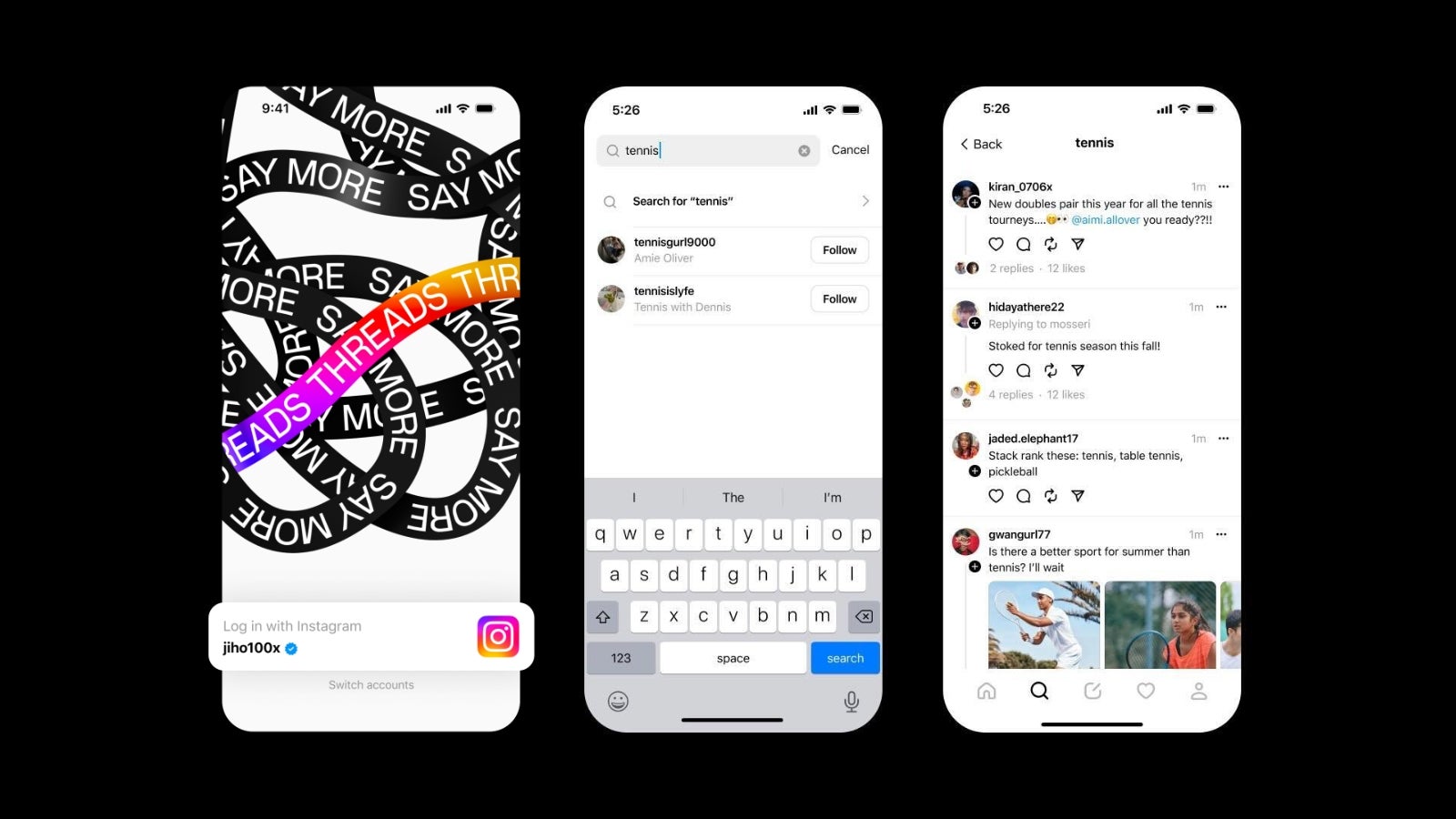
Threads by Instagram continues its consistent roll out of features in order to become a true competitor to X/Twitter since its launch last month. One of the most glaring omissions since the app became available to download is the lack of a search feature, however, this will be changing soon.
It was confirmed today by Mark Zuckerberg via a post on Threads that a keyword search feature will be coming to the app soon. This was quickly followed with a post by Instagram Head, Adam Mosseri, who confirmed this and added that a test is underway in Australia and New Zealand.
Testing of the keyword search feature starts today and will be rolling out to other English-speaking regions soon. There was no specific timeframe provided for the rollout in stable but Mosseri did add that they are also working on adding more languages and requested feedback from those who are already testing the feature. This is pretty significant considering that, as it stands, the only thing you can search for in the app are other accounts.
The announcement comes just days after Threads rolled out its highly requested, but not fully featured, web app. It remains unclear how the addition of a web version of the app has helped the platform gain or retain users, but my guess is that the result has been positive considering the public feedback I’ve seen throughout the app in response to the feature rollout.
Threads struggled with user retention, after having a stellar launch, with its number of active daily users seeing a steep decline. Most blamed the lack of feature parity with the app Threads is trying to compete with — X, formerly known as Twitter, for the apps sudden downfall.
However, it appears that Zuck, Mosseri, and the Threads team are not sitting on their laurels and are instead working diligently to bring most of these features to the platform as soon as humanly possible. With the mostly highly requested features already implemented or on the way (Web client, Following feed, Keyword search), the team can now move on to working on the implementation of Direct messages, hashtags, and other features that the competition already offers.
Cisco released a fix for the medium impact vulnerability found on CommPilot Application Software, allowing cross-site scripting against the user interface.
The Cisco BroadWorks CommPilot Application allows authenticated users to upload configuration files on the platform.
The lack of file validation and broken access control on the vulnerable upload servlet allows any authenticated user to upload a file, which could be abused to run arbitrary code on the server.
Cisco’s BroadWorks Application Delivery Platform, BroadWorks Application Server (AS), and BroadWorks Xtended Services Platform (XSP) are affected by this vulnerability.
Vulnerability in detail:
The latest update for the Cisco BroadWorks CommPilot Application Software Cross-Site Scripting Vulnerability was published on August 30 by Cisco.
The web-based management interface does not properly validate user-supplied input, which lets an attacker exploit this vulnerability by persuading a user to click a crafted link.
A successful exploit could allow the attacker to execute arbitrary script code in the context of the affected interface or access sensitive, browser-based information.
They have released software updates that address this vulnerability, but no workarounds address it.
The Cisco Product Security Incident Response Team (PSIRT) validates only the affected and fixed-release information that is documented in this advisory.
Before upgrading devices, Cisco recommends its customers ensure that the memory and current hardware and software configurations will continue to be supported properly by the new release.
Fixed Release:
Cisco BroadWorks Application Delivery Platform with CommPilot-25, CommPilot-24, and CommPilot-23 Release
First Fixed Release
Release Independent (RI)
RI 2023.06
Cisco BroadWorks Application Server Software Release
Philips Hue has really made a splash at IFA 2023 in Berlin this week. In addition to announcing the new Secure Cameras, as well as the Matter update coming to the Hue Bridge next month, the company also announced a few new lights.
On tap this time around, is the Philips Hue MR16 smart bulb. This smart bulb can turn your conventional spotlights into smart lights anywhere in your home. It works on the same 12V low voltage as standard MR16 bulbs. Which makes them compatible with most transformers. The MR16 is going to be available in September and will cost $99 for a two pack of white and color ambiance bulbs.
Next up is the Philips Hue Perifo Track Lighting. This allows you to become your home’s personal lighting designer. This is a new line of lights from philips Hue that will include individual rails and lights that fit together to make a fully customizable track. You are able to choose the layout, length of the track and the light fixtures to get full control over the way you light your home. The Perifo Track Lighting will be available in September, with a starting price of $19.99 up to $299.
Philips Hue is also announcing the Centris, which is a unique and innovative combination ceiling spotlight that has colorful light. It has 350-degree adjustable spotlights available, and can be angled to highlight different parts of your room. Centris will also be available in September and start at $309 for a 2-spot pack and $489 for a 4-spot pack.
New generation of Philips Hue Festavia string lights is finally here
The Festavia string lights from Philips Hue has finally gotten updated this year. And it can be used both indoors and outdoors. This will help you create a pretty cozy indoor atmosphere on holidays and special occasions, as well as backyard barbecues and get-togethers. Philips Hue says that the new string lights come in three varieties. This includes 100 LEDs along an 8-meter cord, 250 LEDs along a 20-meter cord and 500 LEDs along a 40-meter cord.
Philips Hue says that the Festavia string lights will be available in September and will start at $119 for the 100 LEDs model. The 250 LEDs will be $219 and the 500 LEDs will cost $359.
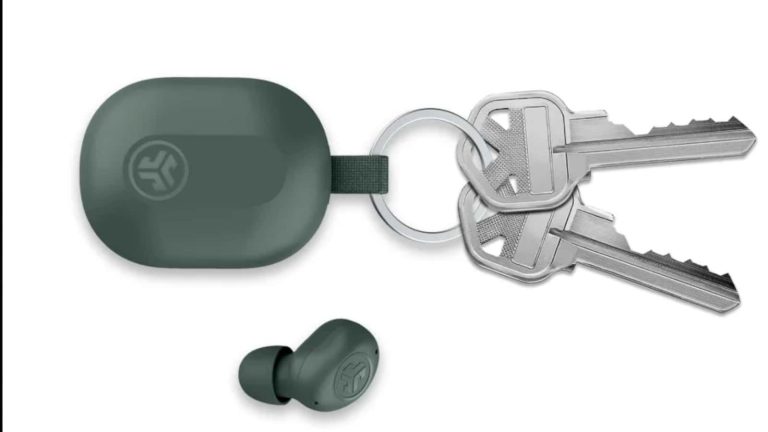
Earbuds are small, and no one was really asking them to be smaller. However, that didn’t stop JLab from further reducing their size. Today, JLab just unveiled the Jbuds Mini, according to Engadget, and they’re so small that the charging case can fit on a keychain.
The company announced the earbuds back in December 2022, so it’s definitely been a long time coming. While these earbuds are small, the company managed to retain a solid experience.
The JLab JBuds Mini are tiny, but they’re big where it counts
With such a small size, you’d expect these earbuds to skimp on the essentials, but that’s not really the case. The only main feature that the company cut was ANC (Active Noise Cancelation). Other than that, these buds can provide a solid experience.
They have a set of 6mm drivers to deliver the sound, so you won’t need to worry about a lack of power. While they don’t have ANC, they still offer transparency mode for when you need to listen to the world. This is done through a set of noise-cancelling microphones on the buds, and this will make calls much better.
This might sound a bit tedious with a pair of earbuds so small, but they do use touch controls. You can do pretty much anything you need using the touch controls such as control your music, summon the assistant of your choice, activate/deactivate transparency mode, etc.
If you’re worried about these earbuds’ endurance when it comes to battery life, you’d be pleasantly surprised with how long they last. While they’re practically microscopic, you’re able to get about 5.5 hours of battery life with about 20 hours with the included charging case. Those aren’t the best numbers, but they’re still pretty solid. They can get you through the day.
Other specs include Google’s Fast Pair technology. This will allow you to connect the earbuds to your Android device without having to dig into the Bluetooth settings. Lastly, these earbuds have IP55 water and dust resistance. This means that you don’t have to worry about your sweat ruining them if you’re working or working out with them on.
The JLab JBuds Mini will officially launch on September 1st and set you back only $40. They’ll come in Mint, Sage, Pink, Aqua, and Black colorways.
Long gone are the days when we had to hunt for music through friends, exchange tapes, or enjoy our favorite songs solely at concerts or parties. Now, we can pick from numerous streaming services vying for our attention by bringing in fresh features. While YouTube Music isn’t exactly famous for having the most cutting-edge features compared to rival apps, it has been moving forward nicely by at last including long-promised live lyrics– and now releasing even more updates.YouTube Music is introducing the newest redesign of the Now Playing interface on both Android and iOS (via 9to5Google). This update includes a comments section, as well as new buttons attached to the carousel. These buttons were previously hidden by default and needed users to tap on the artwork to access them.
The new design makes YouTube Music look even more like the main YouTube app, with the comments section being a copy of what you see on the main YouTube app. The carousel now features buttons to Like, Dislike, view or add Comments, Save, Share, Download the track, or switch to its Radio. Before, only four of these choices appeared when you tapped the album art.
For some time, YouTube Music might be the sole music streaming app with a live comments section until competitors catch up if they ever choose to. By enhancing the competitiveness of the YouTube Music app against its rivals, Google could be aiming to draw in more users.
One of the advantages of YouTube Music is that if you already have a YouTube Premium subscription, you get access to Music Premium as well (which means no ads, offline and with your screen off streaming). Or in other words, you can save money by not subscribing to other music streaming services.
Splunk Enterprise has multiple vulnerabilities that can lead to Cross-site Scripting (XSS), Denial of Service (DoS), Remote code execution, Privilege Escalation, and Path Traversal. The severities of these vulnerabilities range between 6.3 (Medium) to 8.8 (High).
Splunk has addressed these vulnerabilities and has released security advisories for patching them.
An attacker can exploit this vulnerability by sending a crafted web request on the “/app/search/table” endpoint leading to the execution of arbitrary commands on the Splunk Platform. This vulnerability exists due to improper input validation. The CVSS score for this vulnerability is given as 8.4 (High).
A threat actor can exploit this vulnerability by sending a malformed SAML (Security Assertion Markup Language) request to the /saml/acs REST endpoint, which can cause a Denial of Service (DoS).
This vulnerability exists due to the fact that the SAML XML parser does not fail the signature validation for the malformed URI. The CVSS score for this vulnerability is given as 6.3 (Medium).
The printf function has improper expression validation in combination with commands like fieldformat. An attacker can exploit this vulnerability to perform a Denial of Service (DoS). The CVSS score for this vulnerability has been given as 6.5 (Medium).
A threat actor can execute arbitrary code on the Splunk Enterprise platform by sending a specially crafted query that can serialize untrusted data. The CVSS score for this vulnerability is given as 8.8 (High).
CVE-2023-40596: Splunk Enterprise on Windows Privilege Escalation
This vulnerability arises due to an insecure path for the OPENSSLDIR build definition. Splunk Installation creates DLL files and the build system specifies internal build definition. If no build definition is provided, the build system uses the local directory when building the DLL files.
OPENSSLDIR build definition is not provided at build time, resulting in its insecure path getting encoded into the affected DLL files. A threat actor can exploit this to create a directory structure on the Splunk Enterprise instance, thereby installing malicious code that can escalate privileges. The CVSS score for this vulnerability is given as 7.0 (High).
An attacker with write access to the drive on Splunk Enterprise instances can exploit this vulnerability by using the runshellscript.py script. This script has insufficient user validation that lets attackers run a script on the root directory of another disk on the machine.
This can be used to perform absolute path traversal to execute arbitrary code on a separate disk. The CVSS score for this vulnerability has been given as 7.8 (High).
Affected Products and Fixed versions
Vulnerabilities
CVE
Product
Version
Component
Affected Version
Fix Version
Reflected Cross-site Scripting (XSS)
CVE-2023-40592
Splunk Enterprise
8.2
Splunk Web
8.2.0 to 8.2.11
8.2.12
Splunk Enterprise
9
Splunk Web
9.0.0 to 9.0.5
9.0.6
Splunk Enterprise
9.1
Splunk Web
9.1.0
9.1.1
Splunk Cloud
–
Splunk Web
9.0.2305.100 and below
9.0.2305.200
Denial of Service (DoS)
CVE-2023-40593
Splunk Enterprise
8.2
Splunk Web
8.2.0 to 8.2.11
8.2.12
Splunk Enterprise
9
Splunk Web
9.0.0 to 9.0.5
9.0.6
Splunk Cloud
–
Splunk Web
9.0.2305.100 and below
9.0.2305.200
Denial of Service (DoS)
CVE-2023-40594
Splunk Enterprise
8.2
Splunk Web
8.2.0 to 8.2.11
8.2.12
Splunk Enterprise
9
Splunk Web
9.0.0 to 9.0.5
9.0.6
Splunk Enterprise
9.1
Splunk Web
9.1.0
9.1.1
Splunk Cloud
–
Splunk Web
9.0.2305.100 and below
9.0.2305.200
Remote Code Execution
CVE-2023-40595
Splunk Enterprise
8.2
Splunk Web
8.2.0 to 8.2.11
8.2.12
Splunk Enterprise
9
Splunk Web
9.0.0 to 9.0.5
9.0.6
Splunk Enterprise
9.1
Splunk Web
9.1.0
9.1.1
Splunk Cloud
–
Splunk Web
9.0.2305.100 and below
9.0.2305.200
Windows Privilege Escalation
CVE-2023-40596
Splunk Enterprise
8.2
Splunk Web
8.2.0 to 8.2.11
8.2.12
Splunk Enterprise
9
Splunk Web
9.0.0 to 9.0.5
9.0.6
Splunk Enterprise
9.1
Splunk Web
9.1.0
9.1.1
Absolute Path Traversal
CVE-2023-40597
Splunk Enterprise
8.2
Splunk Web
8.2.0 to 8.2.11
8.2.12
Splunk Enterprise
9
Splunk Web
9.0.0 to 9.0.5
9.0.6
Splunk Enterprise
9.1
Splunk Web
9.1.0
9.1.1
Splunk Cloud
–
Splunk Web
9.0.2305.100 and below
9.0.2305.200
As per the Splunk Security Advisories, users of these products are recommended to upgrade to the latest version to fix these vulnerabilities.