Samsung pushed massive new software updates to the Galaxy S23 series and Galaxy S22 series in August. The updates brought new camera features and other improvements. As usual, the company began with a limited rollout in select markets. But the phones are now picking up the big releases widely.
According to SamMobile, the August feature updates for the Galaxy S22, Galaxy S22+, Galaxy S22 Ultra, Galaxy S23, Galaxy S23+, and Galaxy S23 Ultra are now available in Europe. The new firmware build number for the 2022 flagships is S90*BXXU6CWH5. That for the 2023 lineup is S91*BXXU3AWGJ.
The devices remain on the August 2023 Android security patch level following this update. They had separately picked up the latest security update before the big release a couple of weeks back. It brought more than 80 vulnerability fixes. However, since Samsung has yet to roll out the September SMR (Security Maintenance Release), there’s no new security patch available yet.
Nonetheless, there are plenty of other things to talk about here. The latest update for the Galaxy S23 brings an optimized 2x zoom option, optimized high-pixel modes (50MP and 200MP), improved focusing, improved digital zoom, improved Portrait videos (support for 30fps), improved Motion photos, better face shape correction for selfies, and more camera goodies.
The Galaxy S22 lineup also got a bunch of camera-related improvements with the August update, including improved low-light photos and videos. No wonder the OTA (over the air) file size of this update is 1.8GB. The OTA package for the Galaxy S23 series weighs 1.3GB. If you haven’t received these updates yet, you should soon. As usual, you can check for new updates from the Settings app.
The Galaxy S22 series may soon get One UI 6.0 beta
Samsung pushed these camera improvements to its 2022 and 2023 flagship smartphones just as it opened a public beta for One UI 6.0. The new One UI version, which brings Android 14 to the Galaxy family, is currently available to users through a beta program in Germany, South Korea, and the US.
The Korean firm is expected to launch beta programs in India, Poland, China, and the UK soon. It will likely come alongside the second beta build in a few days. Simultaneously, Samsung may open One UI 6.0 beta for the GalaxyS 22 series as well. The stable Android 14 update should start rolling out to eligible Galaxy devices in late October, with the Galaxy S23 series picking it up first. The Galaxy S22 series will also get it before the end of the year.
We’re all anticipating the next Pixel phones that will launch in October, but Google has more up its sleeve than new hardware. As you know, Google is really big on AI, and it just held its Google Next event. During the event, it unveiled some new improvements to Vertex AI and other AI products, according to Venture Beat.
With AI technology exploding nowadays- especially with the advent of generative AI- Google is looking to give AI developers and users useful tools.
Google brings improvements to Vertex AI
If you’re using Google’s Vertex AI platform, then you’ll love these changes coming to the platform. In case you don’t know what this is, Vertex AI is a suite of powerful tools that you use if you’re into ML (machine learning). If you’re an ML developer or if you want to get into it, you can check it out. Follow the link below.
The improvements revolve around the extensions that Google added to Vertex AI. June Yang, VP, cloud AI and industry solutions at Google, stated that “Vertex AI Extensions are a set of fully managed developer tools, which connect models via API to real-world data and enable models to perform real-world actions,”
If you’re looking to build your own generative AI application, these extensions can help make it more useful. When it comes to developing generative AI tools, it can be difficult to get your hands on the proper tools. It’s a daunting task, so these extensions will definitely help.
In other AI news: Major news outlets are blocking ChatGPT
Notable news outlets like Insider, CNN, The New York Times, etc. are at war against ChatGPT. They oppose the chatbot scraping information from them and using their articles to train. This is why these sites and many more are blocking ChatGPT’s crawlers from getting onto their sites.
The research revealed high malspam activity of DarkGate malware distributed via phishing emails to the users either through MSI files or VBs script payloads.
Darkgate malware has been active since 2018 and has the ability to download and execute files to memory, a Hidden Virtual Network Computing (HVNC) module, keylogging, information-stealing capabilities, and privilege escalation.
A user RastaFarEye has been advertising DarkGate Loader on the xss[.]is an exploit[.]in cybercrime forums since June 16, 2023, with different pricing models.
“The current spike in DarkGate malware activity is plausible given the fact that the developer of the malware has recently started to rent out the malware to a limited number of affiliates,” Telekom Security said.
Attack Execution
Initially, phishing emails distributed the payload with either the MSI variant or the VBScript variant.
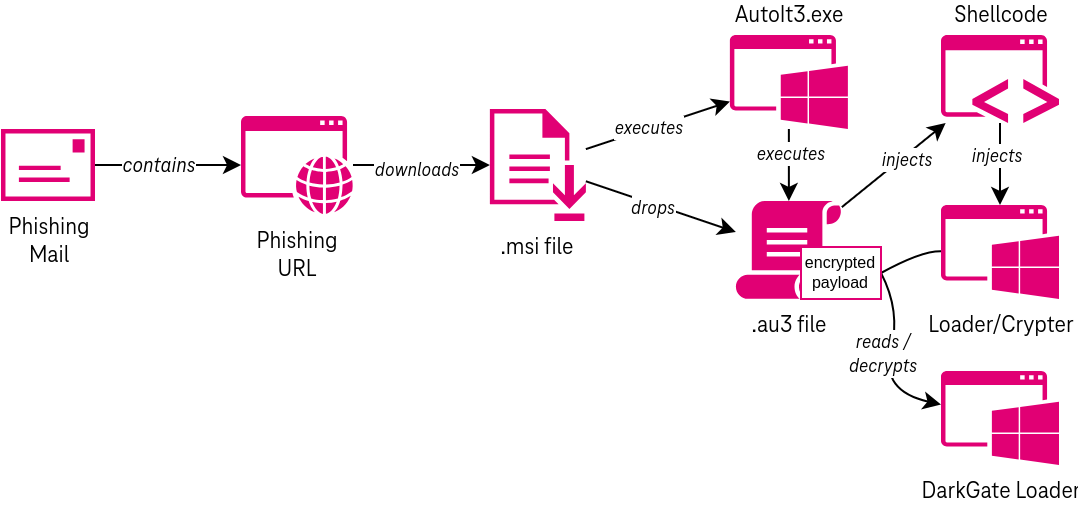
The attack commences from clicking on the phishing URL which redirects the user to the phishing site via a Traffic distribution system(TDS).
Subsequently, the MSI file will be downloaded, which executes the AutoIt script to execute a shellcode that acts as a conduit to decrypt and launch DarkGate via a crypter (or loader).
Whereas Visual Basic Script payload uses cURL to retrieve the AutoIt executable and script file to execute the malware.
Infection Chain
On successful initialization of darkgate malware, the malware will write a copy of itself to disk and create a registry run key to persist execution between reboots.
It also can terminate the process when it gets detected by the AV and alters its behavior according to the well-known AV product.
The malware can query different data sources to obtain information about the operating system, the logged-on user, the currently running programs, and other things.
The malware uses multiple legitimate freeware tools published by Nirsoft to extract confidential data.
The malware periodically polls the C2 server for new instructions, executes the received commands, and finally sends back the results to the C2 server.
AI is really big in the tech industry nowadays, and it’s made its way into social media. According to The Verge, Snapchat just introduced its new AI selfie tool called Dreams. You’ll use this platform to make AI-generated selfies.
Snapchat is no stranger to artificial intelligence. Earlier this year, the company unveiled My AI. This is the ChatGPT-powered chatbot that lets you have a conversation with a fictitious chatter. This feature is available to all users, so you can use it today.
Snapchat Dreams will let you take an AI selfie
Right now, people are enjoying the whole AI selfie craze. People will take a selfie and have an image generator produce copies of that photo in different styles. There are other apps that can do this, but it was only a matter of time before Snapchat jumped on the train.
In order to access Dreams, you’ll need to go to the Memories section. There, you’ll upload a series of photos of yourself. The app wants you to upload pictures of your face from different angles.
When you do that, it will then give you the generated images. This sounds like an interesting to the app, but there’s one catch; using it won’t be entirely free.
Your first pack of Dreams (eight individual photos) will be free. However, if you want additional packs, you’ll need to pay for them. Each pack costs $1 each. That’s not too bad, but it will definitely turn some people away from it.
Right now, this feature is only available in Australia and New Zealand. It’s going to make its way over to other markets as time goes on. If you’re excited about this new feature, then you’ll want to keep your app updated.
Before you sign up for this feature, just know that you’re giving Snapchat permission to collect the images of you.
Lately, there’s been a few conflicting reports about the iPhone 15 Pro Max, or the iPhone 15 Ultra. Saying that the phone would be delayed a few weeks, then we saw that it was back to being on time. Now, according to analyst Ming-Chi Kuo, the iPhone 15 Pro Max is still behind schedule.
In a note to investors, Kuo mentioned that the iPhone 15 Pro Max was the “last project to kick off”. Which means that mass production for it started later than the other iPhone 15 models. Which does echo a report from another analyst last week, and that it could face delays of 3-4 weeks.
Kuo notes that Apple has faced some challenges with the new titanium frame material that they are using on the iPhone 15 PRo. This challenge includes the “high processing difficulty and significant design changes during development”. He points to the cancellation of the solid-state button project as the biggest factor here.
In case you forgot, Apple was rumored to be moving to solid-state buttons for the iPhone 15 Pro this year. But that was seemingly cancelled due to production issues.
That’s not all that caused delays for Apple
Kuo’s report also mentions that the main production issues for the iPhone 15 Pro Max included the stacked CIS, panels and batteries, on top of the titanium frames. The batteries were apparently expanding when exposed to heat. So that needed to be fixed, obviously.
The stacked CIS issue was resolved by increasing the production capacity, however it is still affecting about 10-15% of shipments of the regular iPhone 15 models. Kuo mentions that Apple changed the supplier shipment ratio helped resolve the panel issue. Remember that Apple does typically use multiple suppliers for the same parts. Because they need so many, compared to their competitors.
Finally, Kuo also mentioned that the titanium frame should contribute to a weight reduction on the iPhone 15 Pro and Pro Max. Something that we had heard earlier this week.
The FBI and the US DoJ dismantled the Qakbot botnet, which is one of the largest and most sophisticated botnets in the world.
The botnet was used to carry out financial fraud, ransomware attacks, and other cybercrimes, resulting in losses of hundreds of millions of dollars to businesses and individuals across the US and abroad.
The dismantling of the botnet was a multinational operation involving law enforcement agencies from France, Germany, Romania, the Netherlands, Latvia, the US, and the UK.
The FBI obtained lawful access to the botnet’s infrastructure and redirected its traffic to Bureau-controlled servers. This instructed the compromised computers to download an uninstaller file that removed the malware.
The department also confirmed seizing around $8.6 million in cryptocurrency in illegal profits (extorted funds).
The US Federal Bureau of Investigation (FBI) has confirmed the dismantling of notorious malware and botnet called Qakbot (QBot and Pinkslipbot). The FBI and the US DoJ (Department of Justice) announced in a joint press release on August 29 that the dismantling was possible through a multinational operation in which law enforcement agencies from France, Germany, Romania, the Netherlands, Latvia, the US, and the UK participated.
Per the DoJ’s press release, this is the largest ever botnet infrastructure’s financial and technical disruption facilitated by the USA. Qakbot botnet was developed in 2008 and used to carry out financial fraud, ransomware attacks, and other cybercrime.
The botnet was used in countless ransomware attacks and cybercrimes, resulting in losses of hundreds of millions of dollars to businesses and individuals across the US and abroad. Many ‘prolific ransomware groups’ such as REvil, Conti, Egregor, Black Basta, and MegaCortex used the Qakbot botnet for initial infection.
The malware was distributed through spam emails containing malicious links/attachments. When the victim clicked on the link and downloaded the malware, it fetched additional payload, including ransomware, on the device and made it a part of Qakbot’s ever-expanding botnet army.
This allowed the attackers to control the device remotely while the victim remained unaware of the intrusion and exploitation.
According to FBI director Christopher Wray, the bureau ‘neutralized’ this extensive ‘criminal supply chain,’ the victims of which were extremely diverse, including financial institutions on the East Coast, medical device manufacturers on the West Coast, and a critical government infrastructure contractor based in the Midwest.
“This botnet provided cybercriminals like these with a command-and-control infrastructure consisting of hundreds of thousands of computers used to carry out attacks against individuals and businesses all around the globe.”
Christopher Wray – FBI
During the operation, the FBI obtained lawful access to the botnet’s infrastructure and detected that it comprised more than 700,000 infected computers worldwide. Around 200,000 were located in the US.
The disruption process involved redirecting Qakbot botnet’s traffic to Bureau-controlled servers, which instructed the compromised computers to download the uninstaller file created to remove the malware.
The uninstaller untethered the computers from the botnet and prevented them from accepting additional malware. The department also confirmed seizing around $8.6 million in cryptocurrency in illegal profits (extorted funds).
Wray appreciated the efforts of FBI Los Angeles, the bureau’s Cyber Division, and participating agencies within and outside the USA.
“The cyber threat facing our nation is growing more dangerous and complex every day. But our success proves that our own network and our own capabilities are more powerful,” the FBI director said.
Google has updated the Stable and Extended Stable channels for Mac, Linux, and Windows to version 116.0.5845.140/.141 to address a security issue in Chrome.
One “high-severity” security patch is included in this version. This upgrade will roll out over the next days and weeks.
For the Stable channel, Google stated that it will begin distributing weekly security upgrades. This should also aid in resolving a patch gap in the Chrome release cycle.
Updates to address security and other high-impact vulnerabilities will be scheduled weekly instead of every four weeks to implement security fixes more quickly.
When a security flaw in Chrome is resolved, the updated source code for Chromium is made available to the general public. After testing and evaluation, the patch is released to the Stable Channel.
High- Severity Vulnerability Patched
A high severity flaw tracked as CVE-2023-4572, Use after free in MediaStream has been fixed. The issue was reported by fwnfwn(@_fwnfwn).
When dynamic memory is used improperly while a program is running, it can lead to a vulnerability known as Use After Free (UAF). An attacker might exploit the error to manipulate the program if a program doesn’t delete the pointer to a memory location after freeing it.
Chrome Security Update
Chrome for Linux and macOS: Chrome 116.0.5845.140
Chrome for Windows: Chrome 116.0.5845.140 or Chrome 116.0.5845.141
How to Update Google Chrome
On your computer, open Chrome.
At the top right, click More.
Click Help About Google Chrome.
Click Update Google Chrome. Important: If you can’t find this button, you’re on the latest version.
Click Relaunch.
To guard the system and browser against issues, it is advised that the update be applied as soon as possible.
Crucial is slashing prices on storage and RAM products for the labor day weekend, and you’re not going to want to miss these deals. Whether you’re in need of a storage and/or RAM upgrade or you have just been considering adding more of either because you want to. These prices definitely warrant a look. Especially for Crucial, which makes great storage and RAM and products.
There are a few different deals going on here. But one of the best ones is on Crucial’s 4TB X9 Pro portable SSD storage drive. Normally this costs $290 but you can currently pick it up for $216. That’s a savings of $94 and you now have a whopping 4TB of extra space for anything you need to store. Since this is a portable drive it’s great for keeping your photos, videos, and other files nice and secure and backed up. It plugs into your laptop or desktop easily with the included USB cable. It’s also dust and splash proof.
Additionally, there’s also a really good deal on the Crucial Pro RAM 64GB kit. That’s two sticks of 32GB DDR5 RAM (total 64GB), for almost $100 off. These are usually priced at $241.39 and they’re down to $148.49 right now. They also have a memory speed of 5600Mhz. Another really good deal is the Crucial 2TB P3 Plus NVMe M.2 SSD. This is a PCIe Gen4 SSD and it’s normally $190. But you can pick it up for $110 off with the current sale price being $80. These deals won’t last long so if you’re considering them, you can grab them at the link below.
In case you haven’t noticed, AI (Artificial Intelligence) is kind of a big thing in tech. It’s one of Google’s main focuses, as just about every one of its services employs some next-level AI. One creation benefiting from Google’s big generative AI push is Google Docs with its Help Me Write feature.
What’s this feature, how can it help you, and how do you use it? These are questions that we’re going to answer in this piece. We’ll go through setting it up, using it, and things you should keep in mind before and when you start using it.
What is the Google Docs Help Me Write feature?
As stated before, this is a generative AI tool. Thus, it uses text that’s created completely from artificial intelligence. So, if it types anything down for you, it’s all being developed from Google’s LLM (Large Language Model). Think of it like having Bard helping you with your writing.
So, say you want to write a pitch for an idea. Well, Help Me Write will actually be able to generate a pitch for you. If that sounds familiar, then you’ve used Google Bard, ChatGPT, Bing AI, Snapchat AI, or any of the other AI chatbots saturating the internet. All you have to do is tell the feature what you want it to write, and it will be produced in a matter of seconds.
You can get as granular as you want. The experience shouldn’t be too different from using Bard. However, there’s no telling if Google specialized Help Me Write in any way.
So, this is the type of tool you could use if you need some inspiration for a written project. Also, if you just need to quickly jot something down, you could use this tool to do it for you. As always, it’s always recommended to write it yourself first before turning to AI.
Before you start
Now, Help Me Write sounds like an exciting and useful tool, and you’re probably ready to start using it. But, hold your horses! There are a few things that you’ll want to know before you use this tool.
This is in testing
Right now, the majority of Google’s ambitious AI projects are still in testing. The company is giving its products a proper workout before making them publicly available. This makes sense, as AI is still rather shaky ground.
Since it’s in testing, you’ll need to sign up to be a tester. Google has its Labs program that will grant you access to new AI products that the company pops out. You’re able to try them out and give the company your feedback. You can sign up for the program here.
A few more things: While this is a Google Workspace program, you don’t need a paid plan to use it. Also, this is only available for the desktop version of Docs. You can’t use it in the mobile app just yet.
Don’t give away personal details or company secrets
This is a useful tool that you could use for your work life. However, you’ll want to keep an eye on the stuff that you type down. Don’t include sensitive company secrets, addresses, banking information, or anything you don’t want to leave your grasp. AI is a huge data vacuum, as companies are scooping up a ton of data to train their models. When you sign up for this program, you give Google the right to use the data that you input.
Now, Google isn’t going to use that information to hack your company or poke fun at you because of your medical history. However, you just don’t want that information uploaded to Google’s servers where it could be leaked.
Remember, this is AI, and that comes with hallucinations
Generative AI is scary good at this point, but it’s not perfect. There’s a chance that the results you get back are littered with completely made-up information. Don’t take all of the information you receive to heart.
How to use Help Me Write for Google Docs
Now, with all of the warnings and red flags out of the way, let’s get into how to actually use this tool. When you sign up for the Labs program, go ahead and open a document.
Doing it the first time will bring up a little text bubble telling you about the feature. After you close it, you’ll notice a little icon on the far left of your document. It’s a pencil icon. This is how you’re going to access the tool.
After you click on it, you’ll see a blue text box appear in the text. This is where you’re going to put in your prompt. Now, pretend that there’s another human being on the other side of your screen who’s going to write down everything you say. Type out what you want it to jot down for you.
Just like other chatbots, your answers will depend on how specific you are. If you give a vague prompt, then you will get a more general and generic response. However, if you go into the nitty-gritty with your prompt, then you should expect a much more specialized answer.
If you’re happy with what Docs gave you, then you can click on the insert button. This will paste the text into the doc where the cursor is.
Editing
Say, Docs generated a response that you didn’t want. Well, you can make adjustments before you insert it. After you generate a response, you’ll see the pencil icon on the top of the box with your prompt right next to it. Click on that, and you’ll be able to edit your original prompt.
After you make the edits to your prompt, you can click the Update button on the right of the text field. Help Me Write will then regenerate the response to reflect your changes.
Making refinements
If you don’t want to change your prompt, but you want to make some refinements, then look for the Refine button on the bottom of the box. This will summon a dropdown button with some options that you can adjust.
You can change the Tone to make it either casual or formal. Next, the Summarize button will give you a summary of the text that it just generated. The Bulletize button will add bullet points to your document where necessary.
If you have an issue with the length of the response, then you can adjust it. The Elaborate button will make the response longer with more details. The Shorten option will do the opposite.
The Retry button will have the bot regenerate the response. It will give you the same information, only it will be reworded.
The final option is the Custom option. Here, you’ll be able to make some short suggestions. This is easier than rewriting the prompt. Say, you just want Docs to turn the response into a poem, you can just type “make it a poem”.
Don’t forget to give feedback
An important part of using any AI tool is leaving useful feedback. Above the Refine button, you’ll see a thumbs-up and thumbs-down icon. If you feel particularly positive or negative about the response, don’t be afraid to let the company know. Google is extremely open to feedback regarding its AI products. Use those buttons to let Google know where it’s doing great and where it needs to improve.
Now, you’re ready to get going
With all that said, you’re now ready to go and start writing with Help Me Write. There’s no telling what kind of things you’ll be able to do with Google’s AI by your side.
New Intel Processor Vulnerability “Downfall” Discovered: Threats to Data Security Amplify
‘Downfall’ Attack Unveiled: Google researchers reveal a new side-channel attack called “Downfall” targeting Intel processors, exposing a memory optimization vulnerability (CVE-2022-40982).
Cloud Impact: The attack extends into cloud environments, enabling attackers to extract data from shared cloud computers, intensifying data breach risks.
Memory Optimization Flaw: The vulnerability originates from Intel processors’ memory optimization features, inadvertently revealing internal hardware registers to software.
Attack Techniques: The attack employs Gather Data Sampling (GDS) and Gather Value Injection (GVI) to steal CPU data and manipulate microarchitectural data injections.
Mitigations and Implications: Intel responds with firmware updates to address the vulnerability, but performance overhead concerns remain. ‘Downfall’ underlines the vulnerability of modern microprocessors, resonating with industry-wide concerns.
Google researchers have uncovered a new side-channel attack known as “Downfall” targeting Intel processors. This attack, discovered by Google senior research scientist Daniel Moghimi, exposes a vulnerability tracked as CVE-2022-40982, exploiting a memory optimization feature in Intel processors.
Downfall joins the league of attacks that can be exploited by local attackers or malware to access sensitive information, including passwords and encryption keys, of affected device users.
Moghimi’s findings unveil a disconcerting aspect of Intel processors, revealing that transient execution attacks like Downfall extend their reach even into cloud environments. This enables malicious actors to pilfer data from other users sharing the same cloud computer, significantly raising the stakes of data breaches.
The underlying flaw stems from memory optimization features inherent in Intel processors, inadvertently disclosing internal hardware registers to software. This exposure facilitates unauthorized software access to data that should remain shielded from such access.
The pivotal culprit in this scenario is the “Gather” instruction, intended to expedite the retrieval of scattered memory data. However, Moghimi ingeniously demonstrated how this instruction leaks the contents of the internal vector register file during speculative execution, thereby opening up avenues for cybercriminals.
Two specific attack techniques were developed as part of the Downfall (research paper PDF) exploit – Gather Data Sampling (GDS) and Gather Value Injection (GVI). The former method facilitates the theft of data from CPU components, while the latter manipulates the data leaks for microarchitectural data injections. The practicality of GDS is underscored by Moghimi’s creation of a proof-of-concept (PoC) exploit, capable of pilfering encryption keys from OpenSSL.
This clip shows how attacks can steal 128-bit and 256-bit AES keys from another user:
Notably, the Downfall attack doesn’t discriminate between endpoint devices and cloud infrastructure. While cloud environments provide a broader landscape for potential attacks, Moghimi emphasized the significant threat Downfall poses to personal computers. Theoretically, the exploit could even be executed via a web browser, although this possibility necessitates further research and validation.
To counteract the impending threats posed by Downfall, Intel has swiftly responded by publishing a security advisory and releasing firmware updates. These mitigations come as microcode updates designed to address CVE-2022-40982, which Intel has classified as having “medium severity.”
The updates intend to thwart the data leakage intrinsic to the Gather instruction, although they come with a trade-off of potential performance overhead, which could be as high as 50% in some workloads. Despite this drawback, experts unanimously advocate for the implementation of these fixes to safeguard against potential breaches.
Intel’s recent woes are not exclusive, as the Downfall attack highlights the vulnerability of modern microprocessors. Notably, Google researchers also unveiled “Zenbleed,” a vulnerability afflicting AMD Zen 2 processors, reiterating the broader implications of such vulnerabilities across the industry.
The disclosure of Downfall coincides with the revelation of another processor vulnerability named “Inception” by researchers at ETH Zurich. Inception targets devices powered by AMD Zen processors, allowing attackers to manipulate the CPU’s predictive algorithms to access sensitive data.