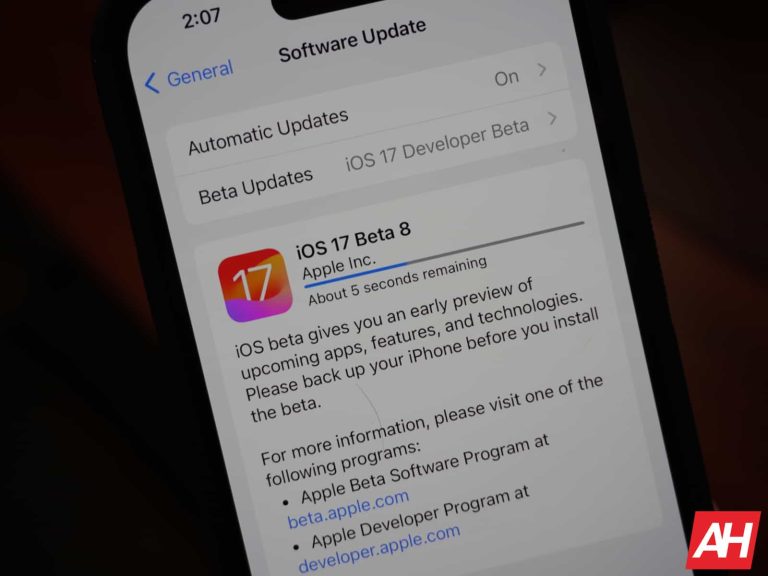
Alongside announcing the date for the next iPhone event today, Apple has also pushed out the eighth betas for iOS 17 and iPad OS 17. This should be near the end of the beta cycle, with perhaps one more update before a release candidate is released on September 12 or 13.
That also means that this beta should be pretty stable, so if you’re looking forward to jumping in on the beta, now is a good time to do so.
So far, it’s just the developer beta that’s available. But the Public beta will likely be released later today. As we’ve seen recently with the betas for iOS 17.
What changes does iOS 17 bring?
Initially, many thought that iOS 17 was going to be a pretty small update, and bring some quality of life improvements and that’s it. But Apple actually announced quite a few new features for the iPhone with iOS 17.
First up is StandBy. This is a simple one. Have your iPhone charging and then turn it into landscape orientation, and it’ll act like a smart display. Showing you things like the time, some notifications, the weather and even some photos. They are basically larger versions of the stock widgets on iOS.
Another change with iOS 17 is the Name Drop feature. It uses AirDrop to then drop your contact information with others. So you can now tap your phone with someone else and exchange phone numbers and other contact info. It’s a really cool feature to add to AirDrop. Apple is also adding custom call screens. So now when you call someone, they’ll see the call screen that you picked out and designed. It’s like an advanced caller ID of sorts.
These are just a few of the updates that are part of iOS 17 right now. And there’s likely some specific changes for the iPhone 15 as well. Just like last year we had a specific feature for the iPhone 14 Pro and its new Dynamic Island.
In addition to launching the eighth beta for iOS 17 and iPad OS 17, Apple has also released the eighth beta of watchOS 10 today. While we are nearing the end of the beta phase here, we should see one more beta next week and then beta 10 would be the release candidate (likely coming shortly after the iPhone event).
So this version of watchOS 10 should be pretty much final. Apple is really focused on squashing bugs with watchOS 10 now, and not adding new features to the update.
This is the developer beta, but we expect to see the public beta launching in a few hours. The last few weeks, we’ve seen the public beta launch a bit later on the same day as the developer beta.
What’s new in watchOS 10?
Out of all of the new platforms that are coming this fall, watchOS 10 is likely the biggest update. It got a pretty big redesign, though many might say it still looks the same. And, fair. The two major changes that Apple made is with the new widgets. And how you access quick settings. So now when you swipe up on your watch, you’re not opening quick settings, but instead opening a widget stack. Currently, it’s all third-party widgets, but we’d expect that to change in the future.
And now, to open quick settings. You need to press the side button. The app drawer has also been redesigned a bit. It still has a honeycomb-like layout, but now it is scrolling up and down, instead of all around. So it’s a bit easier to get around.
Apple has also included a couple of new watchfaces – Palette and Snoopy. Which many are in love with.
This should be a pretty stable build of the beta, so if you’re willing to check it out on your Apple Watch, now is a good time to do so. Just head to Settings > General > Software Update. Switch from iOS 16 to the iOS 17 Developer Beta or Public Beta. And then you can download the update.
For years now, Google Photos has been a game-changer in how we manage our cherished memories. The popular app not only gives us a way to save our photos on the cloud, but also incorporates helpful features and utilities that can both transform our media and manage our device storage at the same time.
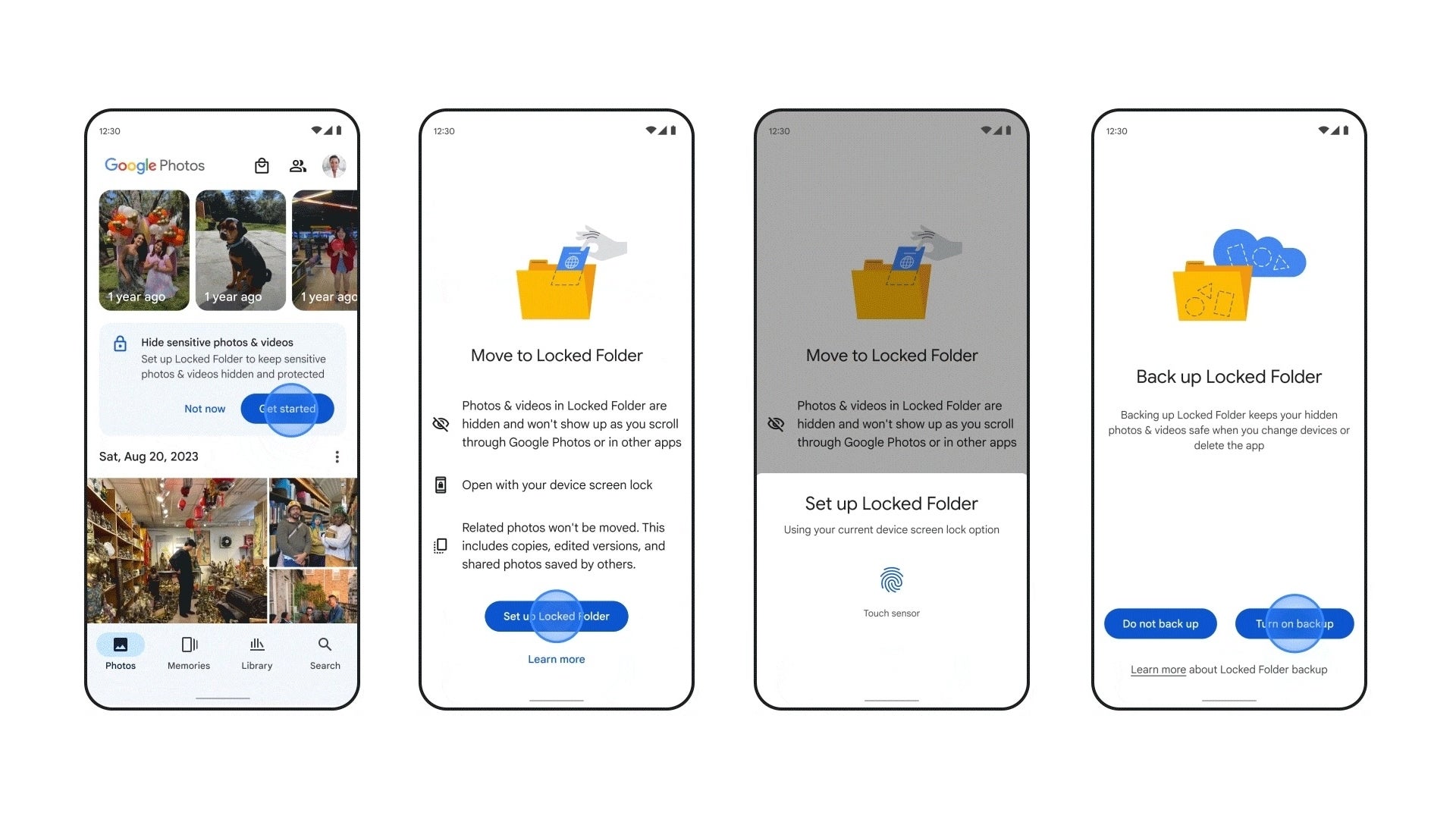
One of these helpful utilities is the Locked Folder, a nifty little container within the Google Photos app, secured by your device’s screen lock, that can tuck away sensitive photos and videos. Although incredibly useful, to date the feature lacked two very important functions: Compatibility with devices running anything other than Android and the ability to backup and sync the media in case of a device switch.
As reported by 9to5Google, one of the biggest pain points of using the Locked Folder was to find out after having switched to a new device that you have lost your sensitive media. Items in this secure folder are not backed up to your Google account or moved to another device during cable or cloud data transfers. Furthermore, if you uninstall or clear your Photos app data, all the items in the Locked Folder get wiped, forever lost in the ether.
This is all about to change, as Google is rolling out an update for the Photos app that addresses both of these issues. Items in the Locked Folder will now be backed up and synced to your Google account and will now be accessible on all your devices, including iOS and the web.
Source – Google
Google states that these changes will begin to roll out today on existing Android devices, however, as it usually goes with these Google staged rollouts, it might be a while before you see the feature pop up in your Google Photos app. However, I would stay on top of it and make sure I’m on the latest version of the app, which as of right now on Android is v6.9. As a feature that started out as a Pixel exclusive, it will be refreshing to see how it has progressed from expanding to other Androids and now to iOS and the web version with the addition of cloud backup.
MMRat is a new Android banking trojan targeting Southeast Asian users.
It is distributed through phishing websites disguised as official app stores.
It uses a customized Protobuf-based C2 protocol to improve its performance.
It captures screenshots, controls devices, collects extensive device, personal data.
Users can protect themselves from MMRat by downloading apps from trusted sources and avoiding suspicious websites.
Cybersecurity researchers at Trend Micro Mobile Application Reputation Service (MARS) have discovered a stealthy new Android trojan targeting Southeast Asian mobile phone users since late June 2023.
This Android banking trojan, dubbed MMRat due to its distinctive package called com.mm.user, features a long list of capabilities as it can capture screenshots, remotely control victims’ devices, monitor user input, and perform many other tasks apart from bank fraud while staying undetected.
MARS researchers wrote in a blog post published on August 29, 2023, that the malware remained undetected on VirusTotal.
How is MMRat Distributed?
Most MMRat samples were downloaded from phishing websites disguised as official app stores in different languages to expand their reach. It is worth noting that researchers couldn’t determine how victims were lured into visiting these fake app stores.
This “potent” malware has been declared a “considerable threat” to mobile phone users. It uses a specially designed, fully customized Protobuf-based C2 protocol, a rare feature in Android banking trojans. This feature improves the malware’s performance while transferring large data volumes.
Attack Sequence
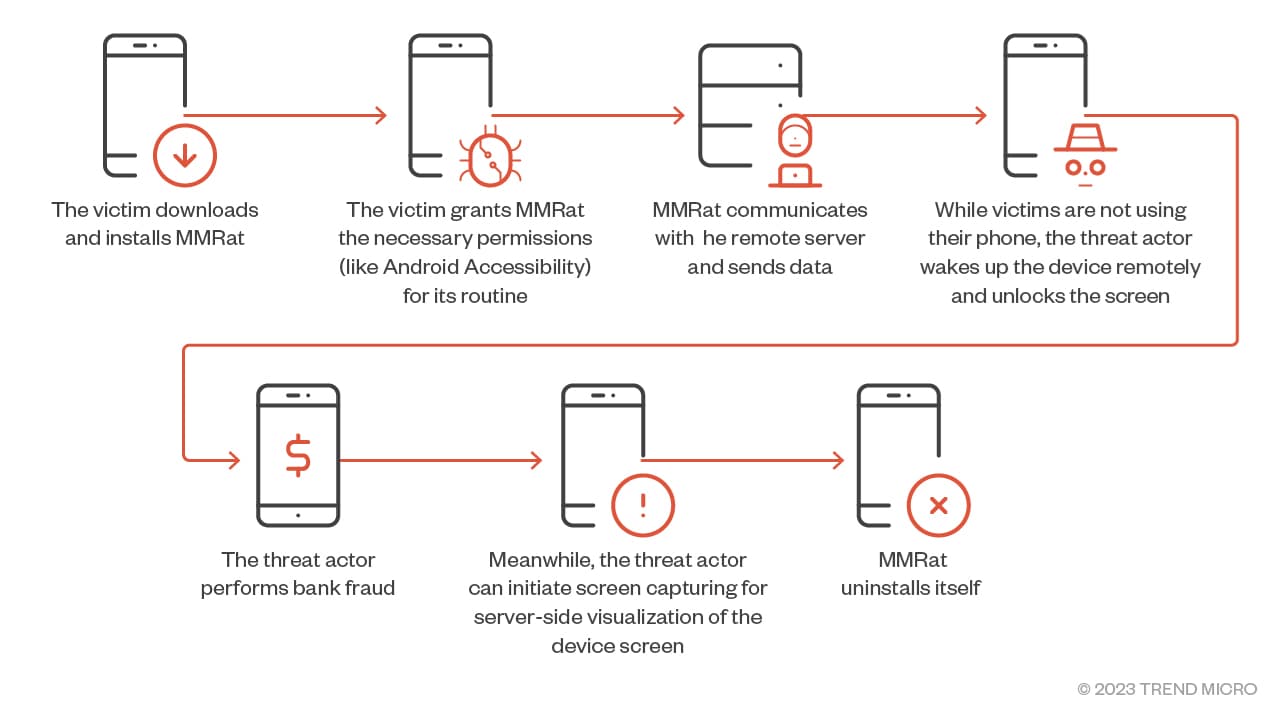
MMRat’s primary focus is on conducting bank fraud. The attack relies on the victim downloading and installing the malware on their device and granting it the required permissions. Once done, the malware quickly establishes communication with its remote server, sending copious amounts of data, including personal and mobile data, keylogging data, device status, etc.
Moreover, the malware operator can remotely turn on the device when not in use, unlock the screen, and carry out bank fraud. They may also capture screens for server-size visualization. After performing its malicious tasks, MMRat can self-uninstall and remove every trace of the manipulation.
Attack Sequence (Trend Micro)
MMRat Capabilities
As mentioned above, MMRat is a highly capable malware that can capture user input/screen content and allow remote control of the device. Relying on the Android Accessibility service and MediaProjection API for its functioning, the malware can easily detect when the device is on or off and reboot it by registering a receiver on the system.
Furthermore, the trojan avoids suspicion by disguising itself as an official government or dating app and enters the victim’s device through a phishing website. It also launches a 1×1-sized pixel activity to stay persistent.
What Data Does it Collect?
According to Trend Micro’s blog post, MMRat can collect extensive device and personal data such as screen and battery data such as whether the screen is locked and current activities, installed apps, contact lists, and network data, e.g., signal strength and network type.
The Android trojan also schedules a time task to collect data at regular intervals. This timer executes every second, and the counter resets every 60 seconds. It looks for victims’ contact lists and installed app info to get maximum personal details.
After obtaining Accessibility permission, it can obtain extended permission and modify device settings by bypassing user intervention. It is also interested in lock screen patterns, which it collects when the victim unlocks the device and sends it to the C2 server so that the malware operator can unlock the device when desired.
What’s worse, it captures real-time screen content and streams it to a remote server via the MediaProjection API. MMRat also uses the “user terminal state” approach for capturing screen data, in which it doesn’t record the screen as a video but dumps the child nodes in Windows every second.
How to Stay Protected?
Users must download apps from trusted platforms like Google Play Store or Apple App Store and avoid suspicious websites posing as app stores. It is equally important to keep updating device software to mitigate security threats like MMRat. Lastly, be very careful when granting Accessibility permissions to an app.
The US government’s ban on Huawei from conducting business with American companies led to the demise of its Kirin chips, which last saw a release in 2020. However, according to a new report from a Weibo leaker, Fixed Focus Digital (via NotebookCheck.net), it looks like Huawei might be gearing up to reenter the market with its Kirin SoCs.
As per the leak, there are two potential configurations for an upcoming Kirin chipset. The first configuration could feature a combination of two Cortex-X3 and two Cortex-A715 CPU cores, accompanied by four Cortex-A510 CPU cores. For graphical performance, the SoC might include an Arm Immortalis-G715 MC16 GPU.
The second configuration differs slightly, with 2 Cortex-X1 CPU cores, 3 Cortex-A78 cores, and 3 Cortex-A55 cores, along with an Arm Mali G710 MC10/6 GPU. However, it remains unclear whether these configurations represent distinct chips or variant iterations of a single model.
Another configuration in the works
While the prospect of new Huawei chips is intriguing enough, another Weibo post suggests the existence of not just one or two but three new SKUs in the pipeline. These SKUs aptly named—Kirin 720, Kirin 830, and Kirin 9100—would imply that Huawei is developing at least a few new smartphones.
Furthermore, if the rumors hold true, the Kirin 720 and Kirin 830 might debut later this year, and the Kirin 9100 could potentially launch the following year, possibly aligned with the release of a Huawei P70 flagship device.
How will Huawei bypass the restrictions?
Given that Huawei is barred from conducting business with American companies, reports propose that China’s leading foundry, SMIC, could provide a solution, as the company might utilize SMIC’s N+2 (7 nm) node technology to manufacture the new chips. Alternatively, there’s speculation that Huawei has potentially devised a method to stack two 14nm chips to achieve performance comparable to 7nm while maintaining low power consumption.
Apple is preparing for its annual September event, where they will likely be announcing the latest iPhone. But the September event is not always just the iPhone (and not always the iPhone). So we’re going to go through and tell you everything we know about the event so far, and what you can expect.
With this event, we’re expecting Apple to introduce the iPhone 15 lineup, along with the Apple Watch Series 9. Though we could also see a new pair of AirPods and a new HomePod. Those two would likely just be an update to USB-C, seeing as they’ve all been updated fairly recently, and Apple doesn’t typically replace audio products each year. It’s closer to every two or more years. Though it is about time we got a new pair of AirPods Max.
When is the Apple event?
Apple’s September event is happening on September 12. This is pretty typical of Apple. With the exception of last year, Apple typically holds their September event on the second week of the month, and typically on a Tuesday. So none of this is really a surprise. But now that we have the invites in hand, it is now official.
The event will be held at Steve Jobs’ Theater on the Apple Campus in Cupertino. Rumors are pointing to this still being a pre-recorded event, like we’ve had since the pandemic started, and Apple has continued to do ever since bringing media back to their events. This is a good thing for Apple, as it does get rid of any issues that could happen during a live demo, and eliminates some stress among those presenting.
How can I watch the Apple September iPhone event?
Apple typically livestreams their events. In the past, they were limited to their website, and you could only watch on their devices and through Safari. But that has since changed, and it is usually available on YouTube. We will add a link to this article once the live stream is available on YouTube, so you can watch along with us.
Unfortunately, getting into the Apple Event is extremely hard. Seeing as Apple does have a fairly small space, compared to other major smartphone makers for their events. But Apple is also pretty picky about who they let in.
What’s coming at this event?
There are two lines of products that we know for sure are coming at this September iPhone Event from Apple. With a few other possibilities available as well. So below, we’ll rank them by the possibility of them launching. And of course, the iPhone is at the top of that list.
iPhone 15 Series
As usual, the headliner for this event is the new iPhone. This year, it’s the iPhone 15 series. Which we are expecting to come in four models: iPhone 15, iPhone 15 Plus, iPhone 15 Pro and iPhone 15 Ultra. The Pro Max model is being rumored to be renamed as the Ultra this year.
The standard iPhones aren’t getting a huge upgrade this year, at least according to rumors. We’re looking at Dynamic Island coming, along with an upgrade to the A16 Bionic chipset, and much larger batteries inside. Which should greatly improve the battery life this year.
Now the iPhone 15 Pro and Ultra is where the bigger upgrades are coming. Both models are expected to come with the A17 Bionic chipset, which is set to be even more powerful than the A16 Bionic (big surprise there). It could also see an upgrade to 8GB of RAM. And it’s rumored to be made of titanium this year, with a new starting storage of 256GB. Instead of 128GB. That also means a price hike is coming. Rumors are pointing to the iPhone 15 Pro costing $1,099, and the Ultra costing $1,299. So a $100 and $200 price hike respectively.
Apple Watch Series 9
Another very likely candidate for the event next month is, the Apple Watch Series 9. Now, according to leaks and rumors, this does appear to be a pretty small update for the Series 9. And it’s likely that Apple is going to bank on the fact that watchOS 10 got a huge redesign, as a reason to upgrade. But the Apple Watch X set to land next year, is likely going to be a huge upgrade.
One of the bigger upgrades that we’re expecting to see is actually in the processor, or the SIP (System in Package) from Apple. The Series 6, 7 and 8 all had basically the same SIP. But this year, the S9 is expected to be more powerful, which means the end user should actually see a nice performance boost.
Apple Watch Ultra 2
This one is a bit more less likely. There haven’t been a ton of rumors about a new Apple Watch Ultra, other than offering new colors. Like a black titanium model. So we could be getting a new model, or Apple might just release the Ultra in new colors, which is also possible.
The Apple Watch Ultra seemed like a product that they wouldn’t update every year, and might be more like every 18 to 24 months, similar to the iPads now. And given the lack of rumors here, that sounds very plausible.
Don’t expect iPads or Macs
Those of you hoping to see the first M3 Macs or a new iPad, don’t expect that at this event. Apple typically does two fall events. With the first one in September being focused on iPhone and Apple Watch. And then an October event being focused on Mac and iPad. So that is likely where we’d see the new M3 Macs as well as some new iPads.
In a surprising move this morning, YouTube published a change to the Community Guidelines that govern what content creators can and cannot do on the platform. Under this new rule, creators that —knowingly or unknowingly— violate any of these guidelines will now get a chance to right their wrong and lift the warning from their channel.
The announcement was made via a video posted to the official YouTube Creators channel and the YouTube Official Blog which included detailed instructions on what to expect and what creators should do in case of a violation warning. Under these revised guidelines, creators who receive a warning for policy violations now have an intriguing option at their disposal — an educational training course.
Here’s the great part: once the creator successfully completes the course, YouTube will remove the warning from their channel, just as long as they don’t violate the same policy for the next 90 days. It’s like a friendly handshake agreement to play by the rules. However, should the creator fail to follow through, the video in question will be removed and a strike will be applied to the channel.
If the creator violates the same policy again, but after the 90 period, the video in question will be removed and the creator will be issued another warning. However – and surprisingly – another chance will be given to take another training course and once again wipe the warning from the channel.
We believe this update will help the vast majority of creators who strive to produce content that complies with our Community Guidelines, and will help keep YouTube a safe and responsible platform for everyone.
This change represents a significant shift in how YouTube deals with policy violations. In the past, YouTube would move to immediately remove the video in question and apply a lifetime warning to the channel. Now, it’s all about education and second chances.
It is clear that monetization is a big motive for the policy change. Previously, policy warnings were more general and affected the entire channel, whereas with the new policy, warnings are more specific on what was breached. Giving creators a chance to fix warnings before they become strikes will allow for more content to stay up on YouTube and avoid the 3-strike rule that has been known to get channels terminated from the platform.
PurFoods, LLC, operating under the trade name Mom’s Meals, has announced the compromise of personal information affecting its clients and employees.
The company acknowledged that its cybersecurity defenses had been compromised, allowing unauthorized access to a treasure trove of consumer data.
The incident occurred between January 16, 2023, and February 22, 2023, with the attack involving the encryption of specific files on the company’s network.
A third-party investigation revealed tools that could facilitate unauthorized data transfer, indicating potential data exfiltration.
The data breach has exposed a trove of sensitive information, including but not limited to:
Date of birth
Driver’s license/state identification number
Financial account information
Payment card information
Medical record number
Medicare and/or Medicaid identification
Health information
Treatment information
Diagnosis code
Meal category and/or cost
Health insurance information
Patient ID number
Less than 1% of the affected population had their Social Security numbers compromised. Total number of persons affected (including residents): 1,237,681
It’s important to emphasize that no evidence suggests misuse or further disclosure of the compromised data in the aftermath of the breach.
“It’s important to note that we have seen no evidence that any personal information was misused or further disclosed as a result of the cyberattack.”
Response and Mitigation
Mom’s Meals has undertaken a series of measures in response to the breach:
Notification to federal law enforcement agencies and collaboration with their investigation
Notification to affected individuals via U.S. Mail commenced on August 25, 2023
Offer of identity theft and fraud protection services, including credit monitoring and identity restoration
Engagement of Kroll to manage a call center for inquiries related to the breach
In light of the breach, PurFoods has prioritized reinforcing its network security and an internal review of existing policies and procedures to enhance data protection measures.
The data breach at PurFoods, LLC is a stark reminder of the persistent threats organizations face, even in sectors focused on home-delivered meals.
You can easily keep yourself informed these days, as there are a ton of news readers apps for Android out there. We’ve compiled a list of our favorite ones to present to you. The vast majority of apps on this list are regular news reader apps that do things a bit differently, in comparison to each other. We’ve also included a couple of apps that are not necessarily regular news reader apps.
If you’ve been looking for a new news reader app, or an RSS reader app, chances are you’ll find it in the list below. Every single one of these apps is great, it all depends on what you prefer, though. We do our best to highlight the strong suits of these apps, and therefore help you in your choice. Each of these apps is free to use, though some of them come with ads. They are not listed in any specific order, by the way, so keep that in mind.
Best News Reader Android apps 2023 downloads
Below is a little more information on each app, and a direct link for easy downloading.
All download links go to the app’s Google Play Store listing. Users are always recommended to download apps from Google Play or an authorized app store.
Feedly
– Price: Free to download – In-app purchases: $7.99-$69.99 – Size: Varies with device – Google Play rating: 3.9 out of 5 stars
Feedly is easily one of the best news reader applications, and has been my go-to app for a while now. In this app, you can find pretty much any news source, and add it to your list. Choose what news sources you trust most, and which share the news that you like to read, combine them all in one place, and there you go. The app also offers integrations with Facebook, Twitter, Evernote, Buffer, OneNote, Pinterest, LinkedIn, IFTTT, and Zapier.
Long story short, it’s extremely versatile and can pull the feed from a ton of places. Yes, this is an RSS reader at the same time as a news reader. The UI is what makes this app stand out as well. It’s extremely smooth, and it’s just a joy to look at and use. There are a number of options for you to change it the way you want. If you prefer a dark theme, that’s not a problem. If you prefer paginated scrolling while using a magazine-style layout, that’s not an issue whatsoever. Feedly offers a lot, and if you decide on a monthly subscription, the possibilities are endless.
– Price: Free to download – In-app purchases: No – Size: Varies with device – Google Play rating: 4.3 out of 5 stars
Google News is probably the app most of you will navigate towards. Why? Well, it’s extremely simple, and it looks nice. It’s probably the best choice for people who don’t want to mess around with adding their sources, or worrying about anything other than simply using the application. Some may even find this app overly simplified, but that’s all a matter of preference.
Google News app will keep breaking news at the tip of your finger, while it will also give you more insight on a specific story, from more than one source. You can discover new sources and topics in The Newsstand tab. The app offers you the possibility to download articles over Wi-Fi, and save them for reading later on. Google News also comes with great optimizations for slower connections.
– Price: Free to download – In-app purchases: No – Size: Varies with device – Google Play rating: 3.9 out of 5 stars
If you prefer a magazine-style news reader application, Flipboard could be your thing. Flipboard tries to keep things as simple as possible as well, though it does offer considerably more in terms of customization than Google News. This app is trying to be your online magazine, essentially. It offers personalized news based on your interests. It will deliver the latest headlines, events, and entertainment stories your way.
Flipboard does allow you to customize your personal newsstand, though, to a degree. You can create and customize your ‘Smart Magazines’. Flipboard allows you to bundle together sources, people, and even hashtags to get proper information in your feed. Flipboard gets news from top publishers around, leaders in their respective areas. The app even has the ‘Flipboard TV’ option, with videos from hundreds of publishers.
– Price: Free to download – In-app purchases: $8.99-$89.99 – Size: Varies with device – Google Play rating: 3.8 out of 5 stars
Inoreader is a highly-customizable news reader app. This app also doubles as an RSS reader as well. It can pull an RSS feed from pretty much anywhere. Inoreader’s UI design improved a lot over the years, and now it looks quite modern. This app allows you to build your own newsfeed, which consists out of trustworthy information, and sources that you’re interested in. Inoreader is all about customization.
You can mess with themes here, if you prefer dark over light, that’s perfectly fine. You can add feeds and organize them into thematic folders. Inoreader has a desktop client as well, and it has both day and night reading modes built-in. It allows you to save articles to third-party tools, like Dropbox, Evernote, OneNote, Pocket, and so on. It even comes with a paid ‘Pro’ plan which enables a ton of additional features, such as article translations, active search, and so on.
– Price: Free to download – In-app purchases: $0.99-$59.99 – Size: Varies with device – Google Play rating: 4.4 out of 5 stars
Drippler is an excellent news reader if you’re into curated content. Do note that this is not your regular news reader app, though. It’s considerably different than other news readers. In this app, you need to decide what you’re interested in. So, for example, if you’re interested in Android, you can access tons of tips and tricks for Android here, via curated articles. Or you can get ahold of some excellent app articles.
This app is not necessarily about the most recent news, as much as it is about curated, quality content that will benefit your interests. Do note that the app is heavily tech-oriented, though. This is definitely not an app for your regular everyday political and sports news, that’s for sure. You won’t find any of that here. If you are, however, interested in technology, like to discover new things, and want to learn… this is a great app for that.
– Price: Free to download – In-app purchases: $0.99-$3.80 – Size: Varies with device – Google Play rating: 3.9 out of 5 stars
News Republic is yet another great app for catching up with trending news. This app does its best to deliver curated local and world news to your smartphone. It will show you viral headlines, breaking news, trending videos, and various interesting articles. It provides the latest news and complete articles from 2,500 authorized local and international sources, including CNN, Elle, Money, Fortune, People, USA Today, Bloomberg, and more.
There are various categories that you can access through this application. If your interests lay in sport and politics, that’s not a problem. If you’re more interested in fashion and technology, that’s fine too. They can be set up really quickly, all you need to do is give it some information on what you’re interested in. This app’s UI is also quite great. It’s easy to navigate between both articles and categories.
– Price: Free to download – In-app purchases: No – Size: Varies with device – Google Play rating: 4.2 out of 5 stars
If you appreciate open source applications, Flym is the news reader app for you. This app is not only open source, but it’s completely free, and it comes without ads. Its UI is modern, and it’s also quite simple at the same time. This app does not synchronize with any other online feed reader, keep that in mind. If you need such synchronization, this is definitely not the app for you.
Flym makes it extremely simple to search for new feeds. It supports RSS and Atom feeds, by the way. It can cache articles offline for reading, along with images. You can also import/export the feed list from OPML, if you want. You can favorite articles, and search for something specific in them. Flym is definitely worth trying out, as it delivers everything a news reader should, it covers all the basics.
– Price: Free to download – In-app purchases: No – Size: Varies with device – Google Play rating: 4.4 out of 5 stars
Microsoft Start is another one of those curated news reading apps. This app delivers breaking news to your smartphone. The company says that its editors curate “the most trusted, important, interesting, and trending news” to send your way. You can choose which topics matter the most for you, of course. The app can also send you notifications with updates on breaking news.
Microsoft Start works in partnership with hundreds of publishers in dozens of countries across the globe. You can select from editions in more than 20 countries, carrying content from 3,000 top brands. The dark mode is included here as well, and the app also comes with a useful homescreen widget. This app is free to use, though ads are included in the package. The UI is also highly functional.
– Price: Free to download – In-app purchases: $0.99-$399.99 – Size: Varies with device – Google Play rating: 4.0 out of 5 stars
X is not exactly a news reading app. This is a social media app, but it can definitely serve as a news reading app as well. All you need to do is be subscribed to the right sources. You should also choose the ‘Latest Tweets’ for your feed preference. There you go, news articles will come in a chronological order, along with all the other stuff that you’re subscribed to, including tweets from other people.
This way, you can have everything in one place, without the need to have a separate news reading app. Some people like to keep things separate, though, and also have some extra features that dedicated news reading apps offer. That’s completely understandable. If you’re not one of those people, though, and you like to combine things, X is a great way of getting the news. You can also comment on the spot, along with plenty of other people.
– Price: Free to download – In-app purchases: $0.99-$44.99 – Size: Varies with device – Google Play rating: 4.6 out of 5 stars
If you like to skim your news feed, and read them later on, Pocket is a great app to have. If you share any link with Pocket, it will automatically save them on your list. You can add tags for specific content. The thing is, Pocket will cache all those articles offline, so that you can read them later, without worrying about your Internet connection. Many popular news reading apps actually come with native Pocket integration, some of which we’ve mentioned earlier.
The layout of this app is really clean, and you can customize some things as well. Pocket even allows you to listen to the articles you’ve saved, if you prefer that to reading. It’s a great way of getting all the necessary news while you’re driving, for example. This app also comes with a ‘Premium’ subscription which offers some advanced features, such as advanced search, unlimited highlights, and automatic article backups.
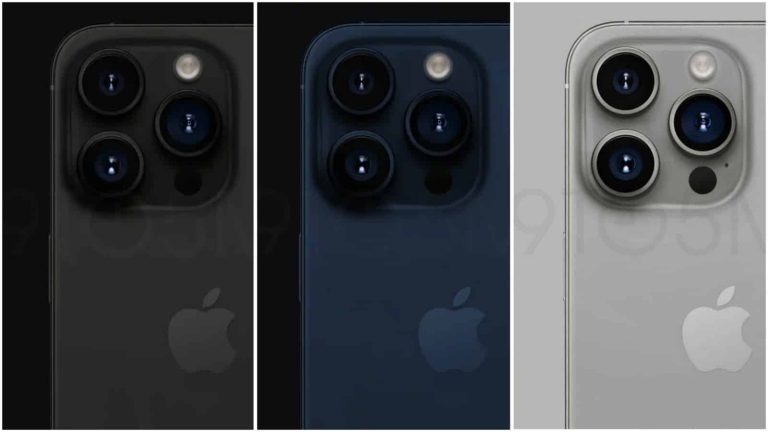
All 9 iPhone 15 and iPhone 15 Pro color options surfaced recently. Well, that just happened again, but this time, each color is represented in its own image. Therefore, this source gives us an even better look at all the iPhone 15 and iPhone 15 Pro series colors.
These renders have been created by 9to5Mac’s Ian Zelbo, and are based on “detailed color codes obtained from a source”. So, these colors are basically what we’ll get next month.
All iPhone 15 & iPhone 15 Pro colors surface yet again
Having said that, let’s check out the iPhone 15 series first, shall we? The iPhone 15 and iPhone 15 Plus will launch in black, blue, green, pink, and yellow color variants. All of them are presented in the gallery below.
Neither one of these models seems to have a matte backplate, and the colors do seem to be watered down. Neither variant seems to be too intense.
As far as the iPhone 15 Pro and iPhone 15 Pro Max aka Ultra are concerned, we’ll get four different colors. Apple will launch the devices in blue, gray, silver, and space black color options. All of those colors are shown below.
Unlike the iPhone 15 and iPhone 15 Plus colors, all of these seem to have a matte black backplate. The Blue and Titan Gray colors seem to have attracted the most attention from consumers, at least based on reactions to their leaks.
All iPhone 15 models will become available next month
The entire iPhone 15 series will launch next month. They’re coming on either September 12 or 13. The devices are said to go on pre-order on September 15, and they’ll become available to purchase on September 22.
All devices will feature a Dynamic Island this time around, and the same goes for a Type-C port. The ‘Pro’ models will, however, offer thinner bezels, titanium frames, and better camera setups.