How ChatGPT can help you write your essay

0
[ad_1]

Artificial intelligence is like a hammer; it has the power to destroy, but it also has the power to create. With the fears of AI taking the wheel for kids’ education rising, it’s important to know how to safely use this technology to your academic advantage. Here’s a guide on how to use ChatGPT to help you write your essay.

In this article, we’re going to go over how to use this tool. However, this isn’t as much a guide telling you how to use ChatGPT to write your essay for you. We’re going to give you some tips and tell you how ChatGPT can help you when crafting your essay. ChatGPT can very easily be your co-pilot to academic success, but YOU still need to be in the pilot’s seat.

A few things before you get started

Before you get into writing your A+ essay, there are some things that you need to keep in mind. For starters, at the time of writing this article, ChatGPT’s knowledge stops at September 2021. So, if you’re doing an essay on a more recent event, then ChatGPT’s usefulness will be diminished. Make sure that there aren’t any relevant details that came about after that time.

Another thing to note is that there’s a chance that the information you get won’t be 100% correct. AI tends to sometimes give people inaccurate information. There are cases when AI would completely make up information. This is called “AI hallucination”, and it’s a very real issue. As you can imagine, you wouldn’t want inaccurate details in your academic paper. This is why you shouldn’t rely completely on the information generated for you.

Getting started

So, let’s start from the beginning. If you’ve never used ChatGPT before, you’re going to need to make an account. Follow this link to get to the front page. You can use an email and password if you want, but there’s also the option to use your Google account, Apple account, or Microsoft account to sign up.

ChatGPT is completely free to use, so you don’t need to worry about that. However, if you want an augmented experience with a more advanced language model, early access to new features, and more, then you can become a ChatGPT+ subscriber. It costs $20/month.

After you make your account, you’ll be greeted with the ChatGPT home page with the text field on the bottom to put in your inquiries. If you want a more in-depth tour of how to use ChatGPT, you can check out the link below.

How to use ChatGPT

How ChatGPT can help you write your essay

So, you made your account and you’re looking at ChatGPT, but where do you go from there? Here’s how you can use ChatGPT to help you with your essay.

Get inspiration

So, you know that you need to write an essay, but you don’t know what to make it about. Well, ChatGPT can help you out in that regard. You can ask the chatbot for something to get the gears turning. It’s as simple as asking a question. Example: Give me inspiration for an essay about late romantic composers.

ChatGPT will give you a pretty detailed response when you type that in. If you’re looking for something more succinct, you can be more direct; you can ask for a list of suggestions. Example: Give me a list of late romantic composers to write an essay about.

Making an outline

When you’re getting your draft together, it can be difficult to know what kind of format you want to use. Longer essays could benefit from proper formatting. If you’re having some trouble finding where to start, you can start with an outline. You can ask ChatGPT to make you an outline for the essay. Example: Write me an outline for an essay about Beethoven’s later years.

You’ll want to be specific when you’re typing them in so that ChatGPT knows what information to serve up. Be sure to provide details like who/what the essay is about, the time period, and other relevant details about it. You can talk to ChatGPT as if you’re talking to a human being. When you get your outline, you’ll be able to start making your draft.

Getting a draft

This part of the process gets pretty hairy. Most people tend to jump right to this point and call it a day. They’ll use ChatGPT to generate the whole essay, print it out, and turn it in. As tempting as it is, you’ll want to avoid doing this.

Rather, you’ll be able to use this feature to give you a draft to look at. You can use this draft to get an idea of what you want to write. You’ll be able to look through the details you’d want to keep and the ones you’d want to leave out. It helps to have something in front of you to study if you’re having a block.

Also, if you’re on the fence about what you want to write about, you can have ChatGPT write up drafts for essays on different subjects and topics. It’s a way of previewing how certain essays would look before you write.

Making a summary

So, you’ve finished your masterpiece of academic writing, and you’ve read it through, proofread it, and recited it to your friends. However, you don’t feel like you’ve scrubbed through it 100%. Well, ChatGPT has a mechanic that can come in handy in this case.

ChatGPT has the ability to summarize text that you feed into it. If you paste your essay into the chatbot and ask it to summarize it, you’ll get a brief summary of the content you pasted. ChatGPT will condense what you wrote into a short overview. It’s easy to miss details when you’re reading through a lengthy essay. A quick summary offers a faster look at what you wrote. If there are any inaccurate details in the summary, then there’s a chance that you got something wrong in the actual essay.

A hammer used correctly

There you have it, different ways that ChatGPT can help you write your essay. There’s been a ton of fear surrounding the advent of generative AI, and it’s justified. Tools like ChatGPT give people an easy way to pop out a “well-written” essay in a matter of minutes. This, obviously, has a ton of people worried about the future of education.

However, this is why it’s recommended that you only use this tool as a tool; just one in an arsenal lining your toolbelt. There’s a ton of constructive potential with ChatGPT, and if used correctly, who knows how far it can take you?


[ad_2]
Source link

Google Chrome may finally be getting a massive upgrade to reading mode

0
[ad_1]

Reading mode is awesome, but it has gotten stagnant. Most of the best phones available right now have Google Chrome pre-installed and while it is awesome that the browser comes with a reading mode for text-heavy pages (like this one), it feels… Stagnant.

Not only that, but if you are on any of the Chrome beta channels, your experience becomes even weirder. Sometimes you can’t turn on reading mode and other times, it cuts off big chunks of the content that you’re there to read in the first place.

So, it is obvious that it is time for an upgrade. And given that Google seems to be running an experiment over on the Canary version of Chrome for desktop, we may actually know what we’re in for. And that’s a reading mode that can also read aloud (finally!). So, Chrome Canary. What is it? Well, it’s a developer-first version of Chrome. It’s plenty experimental, it changes often and if you’d like to join in on the fun: you can run it on your phone and computer. Oh, and its users get to test out features ahead of time.

Now, hold on to that last bit, because — as someone who uses Canary on the daily, just out of preference — not all changes stick. And it is a real bummer, because some of them are totally awesome, but oh well. You can’t win ‘em all!

Anyway: reading mode. The latest update on the desktop version of Canary, as you can see above, comes with a new secret treat: a reading mode that can actually read text aloud to you.

Right now, the voice that executes that role is being described as monotone and robotic, but this is Google we’re talking about. They have the power and prowess to improve that… As long as the feature sticks.

That being said, what are the chances of this actually making its way to the mobile version of Canary and then Chrome stable? Well, pretty big, as long as testing goes well. But, before that happens, let me raise you this:

Did you know that your Android phone can already do this? If not, then know that as long as you’ve got Google Assistant installed and running, you can prompt it — while on the article page in question, such as this one — and ask it to read it aloud for you. It works quite well.

So, while adding such a feature to phones may sound redundant, it also may serve as a sort of shortcut to prompting Assistant to do that. Plus, it may solve another issue: granting phones that aren’t really compatible with Google Assistant such a feature. Will that be the case?

We’ll see if the testing period goes well.


[ad_2]
Source link

Hackers Embed Weaponized Word File into a PDF

0
[ad_1]

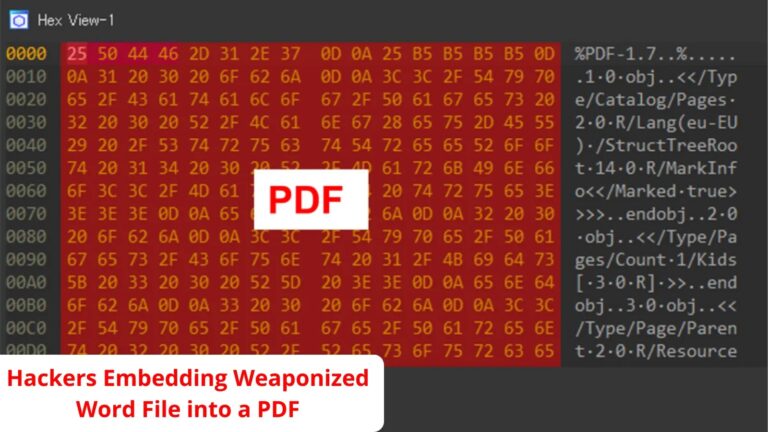
To avoid detection, hackers employed a new method dubbed “MalDoc in PDF” to insert a malicious Word file into a PDF file.

Despite having magic numbers and a PDF-specific file format, a file created with MalDoc in PDF may be opened in Word.

If the file includes a configured macro, running it in Word causes VBS to launch and carry out malicious operations.

The attacks that JPCERT/CC reported used the “.doc” file extension. If Windows has the “.doc” extension associated with Word, the MalDoc in the PDF-created file will open as a Word document.

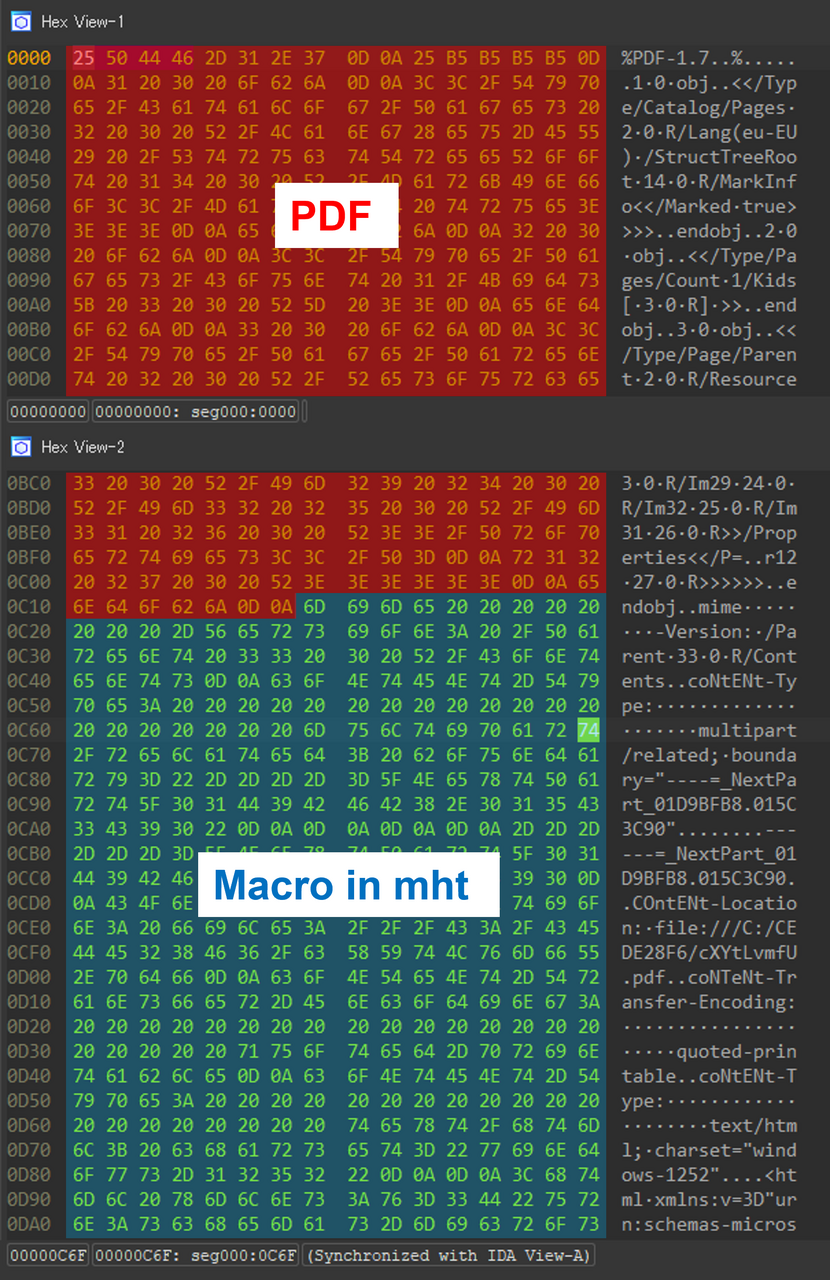
Dump view of MalDoc in PDF

“The attacker adds an mht file created in Word with a macro attached after the PDF file object and saves it. The created file is recognized as a PDF file in the file signature, but it can also be opened in Word”, JPCERT/CC said in its blog.

Analysis of the Attack

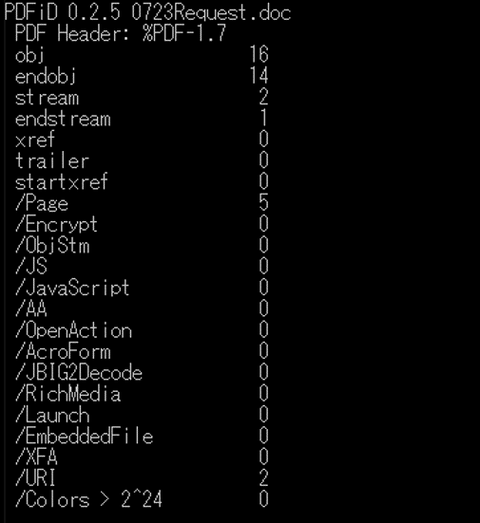
Likely, PDF analysis tools like pdfid won’t be able to detect the malicious components in a file prepared using MalDoc. 

It should also be noted that this file exhibits unintended behaviors when accessed in Word; however, malicious behaviors cannot be verified when it is opened in PDF readers, etc. Since the file is recognized as a PDF file, current antivirus or sandbox tools may not detect it.

pdfid’s analysis results

“This technique does not bypass the setting that disables auto-execution in Word macros,” the JPCERT/CC team noted.

Nevertheless, if you are doing automated malware analysis using specific tools, sandboxes, etc. You should be cautious about the detection findings, as the files are recognized as PDFs.

Keep informed about the latest Cyber Security News by following us on Google News, Linkedin, Twitter, and Facebook.


[ad_2]
Source link

iRobot debuts two new Roombas that double as Mops ahead of IFA

0
[ad_1]

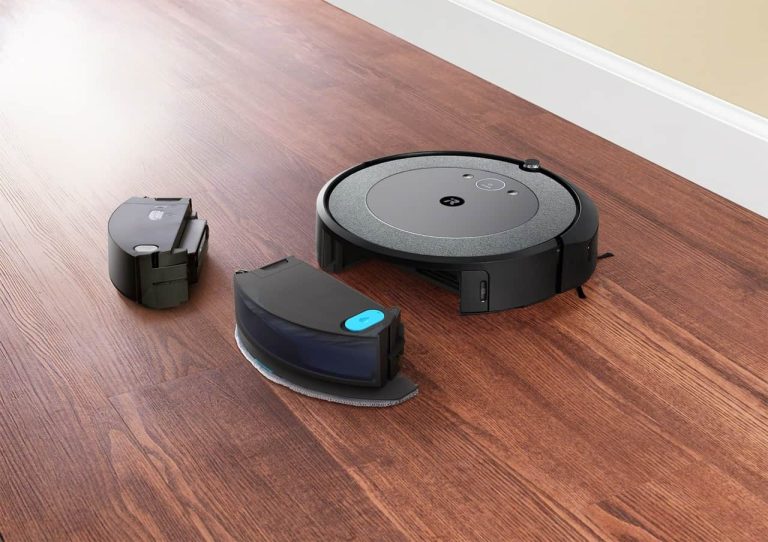
iRobot didn’t wait until IFA to announce the new Roomba Combo j5 Plus and the Roomba Combo i5 Plus. These are both combo machines that do vacuuming and mopping, and it marks the first time that the combo has moved away from the j series.

The Roomba Combo j5 Plus will cost you $799, while the Roomba Combo i5 Plus will be a bit cheaper at $549. They are available for pre-sale now, in North America.

When iRobot announced its first combo, the Roomba Combo j7 Plus a couple of years ago, the mop had an arm that literally brought it up over the vacuum when it goes onto carpet. These new models don’t do that. Instead, iRobot has gone with a cheaper option (which makes sense, since these are well under $1,000). Instead, you’ll need to swap out the dustbin/water tank for a regular dustbin to vacuum other areas of your home.

This sounds like what other robot vacuums do, but it’s a bit simpler. Since you just press one button to swap the dustbins, whereas other competitors force you to remove the mop entirely. Which is more work, as you need to flip the robot vacuum over to do that.

Both models come with the same auto-empty charging dock

Both the Roomba Combo j5 Plus and i5 Plus come with the auto-empty dock, which will automatically empty the vacuum when it docks itself. But, iRobot is still a bit behind the competition here, as the dock does not clean the mop, nor does it refill the water tank. You’ll have to do that on your own.

As you could probably tell, the j5 Plus is part of iRobot’s high-end lineup, while the i5 Plus is more of a mid-range Roomba. Both use the iRobot app, as well as its vSLAM navigation technology. But the j5 Plus does add in AI obstacle detection. Something that is only available on the j series so far.

As mentioned, both models are available for pre-sales starting today. No word yet on when they will start shipping, however.

iRobot Roomba Combo j5 Plus

iRobot Roomba Combo i5 Plus


[ad_2]
Source link

Sundar Pichai revealed how transformative AI will be for humanity

0
[ad_1]

AI wears several hats; it’s the next frontier in human technology, it’s our potential downfall. Whatever you want to call it, AI is here to stay, and we’re still just speculating on its potential impacts on the world as we know it. Sundar Pichai, CEO of Google, just gave his view on how transformative AI will be for humanity.

In case you don’t know, Google is one of the front-runners in the AI industry. Before this whole generative AI craze, the company was able to squeeze powerful AI into its services. So, naturally, the company is a generative AI heavyweight.

Sundar Pichai likened AI to fire and electricity

Pichai recently did an interview with CBS News (via Inc.com) about the progress of AI and its future potential. In the interview, he noted that he believes AI will be more transformative than fire and electricity. That’s a bold statement; fire and electricity are two of the most fundamental human discoveries, and they paved the way for the modern era.

The question is: Is that actually true? Can AI truly chart the course to the next step of human technology? It’s possible. So far, we’ve seen some of AI’s potential. It goes far beyond just generating images and writing college essays. Since generative AI is so broad, it can pretty much do anything. This means that it can be implemented in just about any service. We’re seeing a ton of services across several industries offer some sort of AI service.

If you need to create a video, AI can do it for you; if you need to edit a photo; AI can do it for you; If you need to put your resume together; AI can do it for you. AI is spreading throughout the internet rapidly. This means that it’s becoming more of a mainstay in our modern lives.

With AI automating so many tasks that people used to perform, there’s going to be a massive shift in the workforce. It’s no little-known fact that workers across several industries are fearful of losing their jobs because of AI. Until last year, AI couldn’t really do much. However, it’s progressed to the point where a chatbot can do, in seconds, what it would take a human being minutes or hours to do. Now, Chatbots can start doing jobs that high-paid executives do. This is only going to accelerate.

So, Sundar Pichai wasn’t lying when he likened AI to fire and electricity. The technology is transformative, but we’re still in the dark about whether it’s going to be constructive or destructive.


[ad_2]
Source link

In support of widgets, Spotify added new ones for Android

0
[ad_1]
Alright, let’s hear it. “Widgets suck!”, “they are archaic!” and “nobody uses them!”. Did I get that right? Well, mister-sir, if that was the case, then would one of the biggest streaming platforms — Spotify, which we all got installed on some of the best phones available today — update its widget selection for Android?“Ah, but manufacturers and developers are so outdated with people’s needs” you say? Well, then let me raise you this: what is one of the most used features on Spotify? Discover weekly, which allows you to find new artists and jams to rock out to.

Now, can you guess what these new widgets are adding? That’s right: recommendations based on your listening habits, which is pretty much like an instant-discovery queue. But before I defend the concept of widgets further, let’s explain these new ones from Spotify.

It took two years for Spotify to update its selection, so I don’t know how archaic the concept is, but I can certainly back up the statement that it is stagnant at times. Anyway, the new widgets total out at two types with both seeming really intuitive.

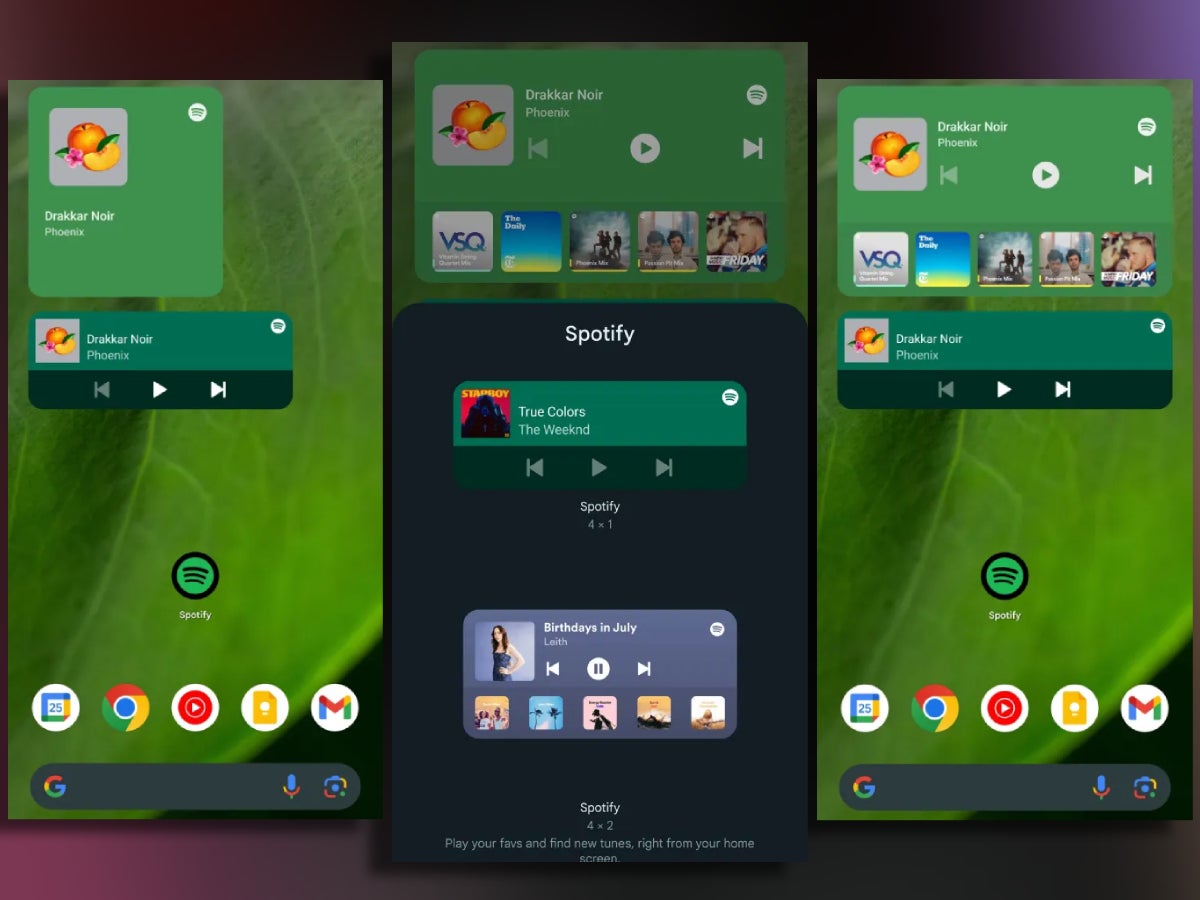
First off we’ve got the new generic widget, which shows you what you are listening to, the song’s cover artwork — and now that’s what you call a complete package! — and, of course, media controls such as play, pause, next, etc.

But then we’ve got the new widget, which incorporates all of the above, but also expands on the concept. It can go from a 3×2 size up to a 5×2, which allows for up to five personalized suggestions to show up beneath what is currently playing.

And, yes, those can be anything from songs and albums to podcasts and audiobooks (where applicable). This new widget was announced last month in July, but it rolled out with version 8.8.50, which means that you may have a Spotify update pending right now.

But beyond that, my last argument regarding widgets is this: imagine that you have a household tablet that you use for smart home and media controls. Now, wouldn’t having all necessary controls in a sleek and clean manner directly on your home screen just make sense?

Hence, widgets can really be cool. Are they cool enough to make the transition from this theoretical tablet to your phone? That, in my opinion, depends on style. But it’s absolutely better that we have them still be a thing in 2023.


[ad_2]
Source link

Leaseweb Hosting Provider Admits Security Breach After Downtime

0
[ad_1]

Cloud hosting firm Leaseweb recently disclosed a security breach after its Customer Portal suffered downtime. The incident surfaced online after the firm started informing its customers about the matter via email, confirming system restoration works.

Leaseweb Discloses Security Breach

According to Bleeping Computer, Leaseweb recently suffered a security breach affecting its cloud environments. While details are yet to arrive, the firm has admitted enduring the attack via emails to its customers.

As reported, Leaseweb officials noticed a breach in “certain areas” of their cloud environment on August 22, 2023. This impact on a specific cloud-based infrastructure triggered downtime.

Investigating the matter confirmed the intrusion, compelling the firm to pull off sensitive critical systems that affected the Customer Portal. While it caused inconvenience for the customers, the firm quickly started remedial procedures to restore the systems, assuring the customers full restoration within a few hours.

Besides rectifying the issue, the service also mentioned hiring a dedicated Digital Forensics and Incident Response (DFIR) security firm to investigate the attack in detail.

Nonetheless, the service confirmed detecting no malicious activities on its systems besides unauthorized access.

According to the updates shared on its website, Leaseweb has restored its Customer Portal, ensuring full operations.

For now, no further details have surfaced online about the incident, including the attackers’ identity and their intentions. While such intrusions may constitute the beginning of a long-term malware attack where the threat actors initially prefer to remain dormant, Leaseweb’s prompt breach detection may have averted such steps. Yet, the firm hasn’t stated anything about sharing more details about this attack (until the time of writing this story).

Leaseweb is a cloud hosting and web services provider based in The Netherlands. The service, operating since 1997, boasts a huge network of 26 data centers in Europe, Asia, North America, and Oceania.

Let us know your thoughts in the comments.


[ad_2]
Source link

This Sony PlayStation 5 Pro concept has the PS5 DNA

0
[ad_1]

A well-known designer in the tech space, Concept Creator, has shared a new design via his YouTube channel. This time around, we’re getting a concept of the Sony PlayStation 5 Pro. This is a step away from the smartphone design that he usually does.

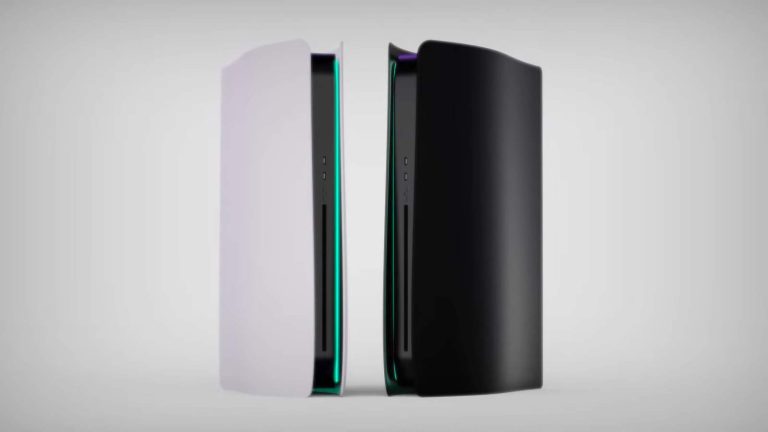
A Sony PlayStation 5 Pro concept surfaced, and it looks similar to the PS5

In any case, he shared this design via a 2-minute YouTube video. That video is embedded below the article, and it shows a device very similar to the PlayStation 5, that’s for sure.

It has the same general design, but it’s slightly tweaked, so that it’s easy to set apart. Its sides are no longer as curved on the front, while the BluRay slot is located between the two halves, it’s not a part of one of the two shells.

The LED lights are still there, while the device can still be used in either a vertical or horizontal layout. That’s basically it. In all honesty, the real PlayStation 5 Pro could resemble this device, who knows.

Sony will want to keep the design very close to the PS5 design, that’s the only move that makes sense. Who knows, perhaps it even stays the exact same. It’s possible Sony won’t tweak it at all, other than the thickness perhaps.

As some of you know, the PlayStation 5 was announced back in 2020, in November. Sony had issues providing enough units for quite some time, though it’s not that difficult to get a unit these days.

Sony recently announced the ‘PlayStation Portal’ handheld

Sony even announced a device called ‘PlayStation Portal’ recently. That’s basically a device that will allow you to play PlayStation games remotely. It will only be a remote play device, so it will mirror what is running on your PlayStation 5 at home. Your console will have to do the heavy lifting.

Because of that, the price tag on this thing is $199, which many PS5 owners will likely find to be affordable enough for something like this. Let’s just hope it will offer a much better experience than remote play has been offering on third-party hardware.


[ad_2]
Source link

Midjourney Introduces AI Tool to Rival Adobe Photoshop

0
[ad_1]

Midjourney introduces a new feature that takes on Adobe Photoshop’s Generative Fill. This is the latest addition to this renowned AI art generator. This innovative addition, dubbed ‘Vary (Region)’, empowers artists and designers by allowing them to handpick an area within an image and employ the text-to-image generator to fill it. The resulting artwork retains its flexibility within the canvas.

The generative AI platform has already achieved status with its ‘Vary (Strong)’ and ‘Vary (Subtle)’ features. It drops hints of potentially becoming an AI-driven substitute for Photoshop. Since its unveiling in May 2023, Generative Fill has garnered recognition for its large impact on photo editing. Now, Midjourney is causing a stir with its latest tool.

Generative Fill pits Midjourney against Photoshop

It was made known on the Midjourney server, that the tool becomes accessible under upscales. A click triggers an editor window, enabling users to modify specific areas of an image. By entering “/settings” and choosing ‘remix mode’, a text box appears within the editor for refining prompts further.

Midjourney offers advice and help on how to maximize the potential of this feature. It excels when applied to larger image regions, spanning from 20% to 50% of the total image size. For subtle adjustments, ‘Vary (Subtle)’ is recommended. Effective prompt alterations are those that harmonize with the existing image content, avoiding jarring disparities.

Experienced users of Generative Fill will identify parallels between Adobe’s flagship feature and Midjourney’s unique take on inpainting. If you’re seeking guidance on utilizing Generative Fill in Adobe Photoshop, a simple research can help you with that.

However, it’s important to note that ‘Vary (Region)’ isn’t without limitations. As of now, users cannot upload their personal content. Despite this restriction, its release marks the next chapter in AI art. It follows Adobe’s introduction of Firefly, their response to competitors like Midjourney and Dall-E.


[ad_2]
Source link

Galaxy S24 Ultra & iPhone 15 Ultra bezels compared

0
[ad_1]

Samsung is rumored to equip the Galaxy S24 Ultra with a flat display, switching from a curved panel it used on “Ultra” flagships in the past. While that isn’t necessarily a bad move, the reported bezels on the 2024 model have been a point of contention. Early renderings of the phone show chunky bezels around the display, much wider than what we see on most competing products. A tipster has now compared the Galaxy S24 Ultra’s front design with the iPhone 15 Ultra and the Xiaomi 14.

As you can see in the image attached below, the Samsung phone has the widest bezels among the three upcoming premium handsets. The iPhone 15 Ultra has a screen bezel of 1.55mm, while its frame has a width of 1.0mm. The Xiaomi 14 has a screen bezel of 1.3mm and a frame width of 0.8mm. The Galaxy S23, on the other hand, has a screen bezel of 1.75mm and a frame width of 1.67mm. The total bezel size of the three phones measures 2.55mm, 2.1mm, and 3.42mm, respectively.

Bezel comparison Galaxy S24 Ultra iPhone 15 Ultra Xiaomi 14

Note that these aren’t the official renders. None of the phones are official yet. The renders are created by noted tipster Ice Universe based on the available data about their dimension, screen size, and screen aspect ratio. However, the tipster claims that their rendering of the Galaxy S24 Ultra has been confirmed by the supply chain. This likely means that would be the final design of the phone. The iPhone 15 Ultra and the Xiaomi 14 should also look more or less the same as seen in these renders.

The entire Galaxy S24 lineup may look the same

While the design of a product is always subjective, the Galaxy S24 Ultra’s wide bezels certainly don’t look the best next to its competitors. The frame, in particular, appears a bit too wide. Meanwhile, Samsung seems to be making this design shift for consistency across the lineup. If early rumors are anything to go by, the entire Galaxy S24 series may look the same.

According to rumors, the Galaxy S24 and Galaxy S24+ will both sport flat frames and flat displays. The Ultra model will seemingly feature the same design as well. Of course, a consistent design with narrower bezels wouldn’t have hurt. But, it is what it is. Time will tell whether the leaked design is accurate or the final product will look different. The next-gen Samsung flagships will launch in early 2024.


[ad_2]
Source link