While many workers see generative AI as a threat to their positions, IBM has a different opinion and believes workers should use AI to their advantage.
IBM has gathered the results of its research in a report, which is now available for everyone to read. The report assessed the impact of generative AI on business models, how companies will use AI for their operations, and the impact that AI has on roles.
According to the IBM study, nearly 40% of the workforce should reskill as a result of implementing AI and automation over the next three years. This means almost 1.4 billion out of the 3.4 billion people in the global workforce need to reskill due to AI and automation.
IBM also added AI won’t replace people. However, employees who know how to use and apply AI to business will replace those workers who don’t. So, if you’re an employee, instead of cursing AI, learn how to use it to develop your skills and apply it to your work operations.
Employees should not be afraid of AI, IBM says
IBM research consists of data from two prior studies, including 3,000 C-level executives across 28 countries and another of 21,000 workers in 22 nations. All evidence suggests that AI will significantly change the workforce, but you should not be afraid. Almost 87% of surveyed executives said they expect AI to augment roles instead of replacing them.
IBM continued that tech adopters who can successfully reskill to accommodate technology-driven job changes “report a revenue growth rate premium of 15% on average compared to other tech adopters.” Additionally, those who emphasize AI could “see a 36% higher rate of revenue growth than their peers.”
The report also sheds light on the essential required skills for the workforce and how AI resulted in a change. For example, proficiency in STEM was a high-priority skill in 2016, but it’s not that much required in 2023. Instead, time management and the ability to prioritize are now essential skills for every employee. Teamwork, communication skills, and flexibility are other high-priority skills.
If you’re into MMA in general, you’re in the right place, as we’ve rounded up our favorite MMA / UFC apps and games for Android. There are quite a few apps and games for MMA in the Play Store, but not all of them are good. In fact, finding really good apps / games for this category hasn’t been easy. Still, we’ve managed to come up with 9 options to present to you, and they’re listed below.
There are several apps listed below, along with quite a few games. Do note that these apps / games are not listed in any specific order. There’s something for everyone here, ranging from regular news apps, to 3D simulation games, and even live score apps, if that’s something that interests you. If you’d like to gain some MMA skills, that’s also something you can do thanks to one of the apps listed below.
Best MMA / UFC Android apps & games 2023 Downloads
Below is a little more information on each app, and a direct link for easy downloading.
All download links go to the app’s Google Play Store listing. Users are always recommended to download apps from Google Play or an authorized app store.
UFC
– Price: Free to download – In-app purchases: $1.00-$334.99 – Size: Varies with device – Google Play rating: 4.6 out of 5 stars
UFC is more or less an app alternative to the game we’ve talked about a minute ago. This is the official UFC application for Android, and it’s excellent. If you’ll download only one UFC app on your device, this should probably be it. Official applications for various competitions are not always the best choice, but that’s not the case here. This app has such a high rating in the Play Store for a good reason.
The app looks really nice. The UI is well thought-out. It’s simple, and yet contains a ton of information. You can easily jump from one side to the next thanks to navigation tabs on the bottom. You can stream live events via this application on a weekly basis, though do know that’ll require a UFC FIGHT PASS subscription. You can also get tons of news from the world of UFC, various stats, information, and more.
– Price: Free to download – In-app purchases: $2.49-$99.99 – Size: Varies with device – Google Play rating: 4.3 out of 5 stars
If manager games are your thing, well, there’s one such game for MMA as well, and it’s excellent. The game is called ‘MMA Manager’, which is easy enough to remember. This game will put you in a hot seat of a manager of your own gym. You’ll be able to hire top rated gym trainer and fight coaches in order to elevate your fighters. You can make them defensive-oriented, more offensive, and so on.
You can actually build your own gym here, and choose the equipment that goes into it. The better you do in fights, the more credit and prestige you’ll earn. You’ll also be able to climb the leaderboard as well. The graphics in this game is really, really nice as well, one of the best in a game of this caliber on Android. The game does have in-game purchases, but you’re not forced to act upon those.
– Price: Free to download – In-app purchases: No – Size: Varies with device – Google Play rating: 4.4 out of 5 stars
If you’re trying to gain some MMA skills, the MMA Trainer app can help you immensely. The best of all, this app is free to use. Ads are a part of the picture, but the same cannot be said for in-app purchases. Watching the official promo video above will give you a great idea as to what this app offers. You’ll be able to learn the exact move as the app will show it to you on a 3D model, as soon as you choose it to do so.
The developer says that this app is designed for both beginners and professionals, as its database of moves is quite vast. It will help you to sharpen your focus, balance, and technique, and on top of that, you’ll get a really nice workout out of everything. This is essentially a how-to app, but a really good one. There is also a slow-motion option to watch for every single detail, which can be helpful.
– Price: Free to download – In-app purchases: $4.99 – Size: Varies with device – Google Play rating: 4.0 out of 5 stars
Weekend Warriors MMA game is excellent, despite the fact its graphics seems to be quite dated. If you’re looking for great graphics, this is definitely not the game for you, but if you don’t care much about it, give it a shot. Weekend Warriors MMA game offers great controls, and it’s a really solid 3D game. This game offers 300 fighters, across 5 promotions, and 5 weight classes.
In the game, you can access a fully playable “Promoter” mode, or simply pursue the career mode. The developer really did do a good job with controls here, so even though you’ll learn them fast, mastering them will take some time. Do note that this game offers a ‘Pro’ subscription which will provide you with a lot of perks, and some additional content. The game itself is free to play, though.
– Price: Free to download – In-app purchases: No – Size: Varies with device – Google Play rating: 4.4 out of 5 stars
Martial Arts Master does deliver really solid graphics, even though it does trail behind EA SPORTS’ UFC title. That’s something you’ll soon forget, as this is a great game. If you like MMA, chances are you’ll enjoy this game. You’ll be able to earn points for each win in the game, and along the way, you’ll level up your fighter. With those points, you’ll be able to unlock new tournaments and characters.
The music in this game is also quite nice, and it follows the action in the ring. Do note that this is an offline-only game. The controls in the game are also quite nice. You’ll see various options on the display at all times, so that you can act fast, depending on what situation you’re in at the moment. If you’re looking for an alternative to what EA SPORTS’ title has to offer, try this one out.
– Price: Free to download – In-app purchases: $1.99-$99.99 – Size: Varies with device – Google Play rating: 4.0 out of 5 stars
Fighting Star is yet another really compelling 3D MMA game. This game delivers really nice graphics, and excellent animations. This game leans towards a simulation, so keep that in mind. The game will put quite a challenge in front of you, as it will require you to create a name for yourself in the ring, after starting as a nobody. Your ultimate goal is to become the world champion.
You’ll be able to customize your fighter with dozens of gloves, hairstyles, tattoos, and gear. Dip, dodge, and weave to avoid your opponent’s attacks, and then strike back to gain the advantage. There are various combos that you can take advantage of in this game, by the way. Fighting Star is definitely a game worth trying out, if you’re into MMA. It has a lot to offer, that’s for sure.
– Price: Free to download – In-app purchases: $0.99-$99.99 – Size: Varies with device – Google Play rating: 4.2 out of 5 stars
EA SPORTS UFC Mobile 2 is the company’s latest UFC game. First and foremost, it’s worth saying that this game offers some of the best graphics, counting in other games from this list. That being said, this is an official UFC game, hence you’ll be able to play with and against real fighters. You’ll even be able to engage in live content in-between actual UFC events, which is kind of unique to this game.
This game does offer an RPG layer as well, while you’ll compete to climb the leaderboards. You’ll also be able to utilize signature fight moves, and improve your fighters as you go along. You’ll be able to level up your fighters, and each of them will possess unique abilities. You can also win exclusive awards, and much more. There’s a lot of different content included in this game.
– Price: Free to download – In-app purchases: $0.99-$49.99 – Size: Varies with device – Google Play rating: 4.2 out of 5 stars
MMA Rivals is another game on this list, and a really interesting one at that. This game won’t try to wow you with its graphics, not at all. In fact, the graphics do look quite old, on purpose. This is a sports simulator, of sorts, but it focuses entirely on MMA. The game focuses on tactics and timing during a match. So, even though you’ll see the match itself, the focus will be on actions you can do during it. You won’t be controlling the fighter in real time, directly.
There are four different martial arts styles to choose from here, Boxing, Karate, Brazilian Jiu Jitsu, and Wrestling. This is a card battler of sorts, and you’ll improve your fighter’s skills along the way. You can also expand your deck, and built the number of variety of moves you can make. Do note that this game is still in development, though, and that the developer promised that more martial arts styles will be added.
– Price: Free to download – In-app purchases: No – Size: Varies with device – Google Play rating: 4.3 out of 5 stars
If you’re on the lookout for a news app for MMA sports, well, this is it. MMA News is exactly what you think it is. This app offers a really simple UI that focuses on the articles themselves. There is a simple menu at the bottom, and the main hamburger-style menu. That’s basically it. This app will pick up stories from a number of websites, such as mmamania, mmanews, mmaweekly, and even from some YouTube channels.
You can choose which sites to follow, of course, and you’ll be able to watch the latest MMA videos via this application. There is also an option to share your favorite article, and to share them with whomever you want, of course. That’s basically everything this app has to offer, try it out if you’re interested in MMA news.
PayPal claims that this was not a result of a breach in its systems, since no evidence suggests that the user credentials were obtained directly from them.
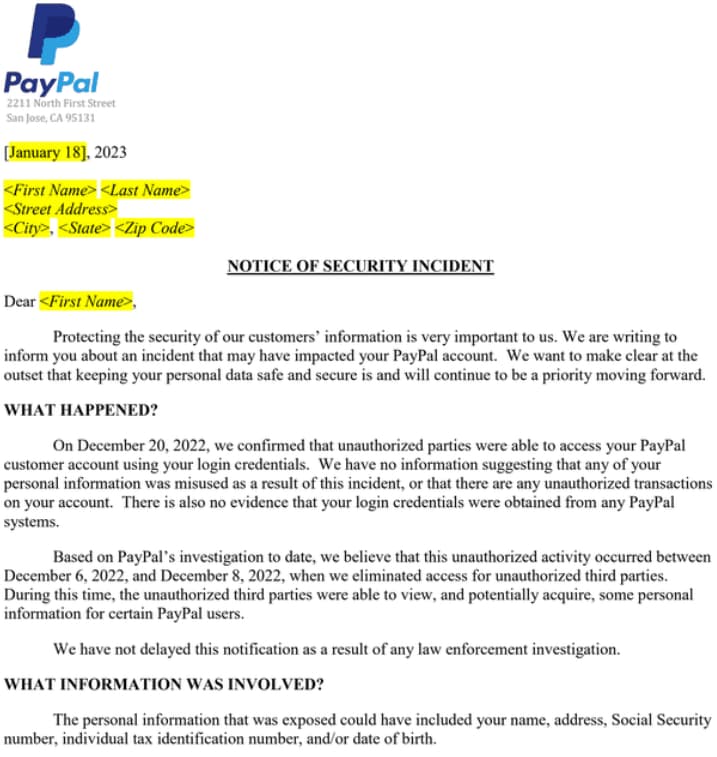
On Thursday, January 19th, 2023, PayPal began contacting nearly 35,000 users with a data breach notification, explaining that their accounts had been hacked between December 6th and 8th, 2022.
The company was able to detect and mitigate the attack as soon as it occurred, but the conclusive investigation was not finished until December 20th, 2022. At this point, they confirmed that the hackers had gained unauthorized access to the accounts using valid credentials.
PayPal claims that this was not a result of a breach in its systems, since no evidence suggests that the user credentials were obtained directly from them.
The hackers were able to access the accounts by using credential stuffing, whereby pairs of usernames and passwords sourced from data leaks are tried on various websites. With the help of bots, lists of credentials are inserted into login portals for various services. Users who employ the same password for multiple online accounts, known as password recycling, are most prone to credential-stuffing attacks.
According to the data breach notification by PayPal, 34,942 users have been affected by the incident. While unauthorized third parties had access to the accounts, they could view the following information about the account holders:
Full names
Dates of birth
Postal addresses
Social security numbers
Individual tax identification
According to Bleeping Computer’s report, transaction histories, connected credit or debit card details, and PayPal invoicing data are all accessible through the accounts, as well.
Screenshot: Bleeping Computer
PayPal claims to have taken quick action to limit the hackers’ access to the platform by resetting the passwords of all the affected accounts. Impacted users will receive a free, two-year identity monitoring service from Equifax.
PayPal further confirmed that the attackers did not attempt or manage to perform any transactions from the breached accounts.
“We have no information suggesting that any of your personal information was misused as a result of this incident, or that there are any unauthorized transactions on your account.”
– PayPal
In a conversation with Hackread.com, Jasson Casey, CTO at Beyond Identity said that “It’s no wonder the Verizon Data Breach Report 2022 found credentials were the most likely form of data to be compromised in both the US (66%) and EMEA (67%).
“If a threat actor can access legitimate credentials – even if they’re dumped in a dark web repository – they are only a few short, and in most cases, automated steps away from a successful intrusion,” Jasson added.
The CTO praised PayPal for its quick response and for mitigating the attack, but questioned whether merely changing passwords is the solution. “In this incident, the company is doing the best it can for its customers – strongly recommending they change their passwords. But passwords – whether unique or complex – are fundamentally flawed. More than 80% of data breaches are the direct result of passwords, with threat actors deploying compromised credentials in the first phase of their attack,” Jasson said.
How to secure your PayPal account
PayPal accounts are a great way to shop online and make payments, but this incident highlights the fact that they can also be vulnerable to hackers. It is important that PayPal users take steps to protect their accounts and personal information from potential theft.
To prevent unauthorized access, it is essential that PayPal users create a strong password with at least 8 characters and include a mix of numbers, symbols, upper-case letters, and lower-case letters.
It’s also recommended that users change the password periodically. Additionally, two-factor authentication (2FA) should be enabled on the account so that any suspicious activity will have an extra layer of security before it can be completed. Finally, users should check their accounts regularly for unusual activity or unauthorized transactions.
Using these tips can help ensure your PayPal account remains secure against potential threats or breaches.
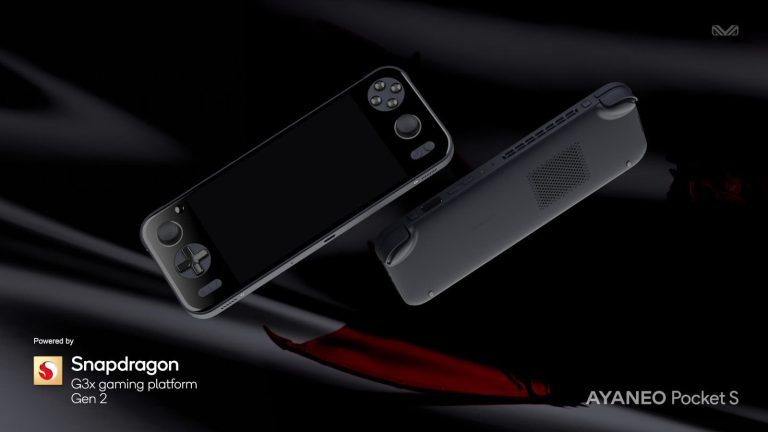
AYANEO today has announced that it partnered up with Qualcomm for the Pocket S, the company’s upcoming Android handheld, which will be powered by Qualcomm’s Snapdragon G3x Gen 2 platform. If that platform sounds familiar, it’s because it’s been used in numerous other handhelds in the past. Though, in earlier versions.
The Razer Edge and Razer Edge 5G for example run on the Snapdragon G3x Gen 1. Announced this morning, Qualcomm’s new G3x Gen 2 has some promising advancements for the future of handhelds. With the potential to boost Android handheld gaming devices to new heights in terms of what they can deliver for a gaming experience. The AYANEO Pocket S will be at the forefront of that as one of the first devices to officially run on the Qualcomm Snapdragon G3x Gen 2 platform.
The AYANEO Pocket S will launch sometime in December of this year
If you take a second to look at your options, there’s a lot to choose from for handheld gaming devices right now. The Steam Deck, naturally, is one of the most well-known. Next to the Nintendo Switch of course. But there’s also things like the Logitech G Cloud and Razer Edge. As well as the ASUS ROG Ally, and quite a few handhelds from AYANEO and other brands GPD. Now AYANEO has another one to add to the list with the Pocket S. And it’s expected to launch sometime in December of this year. AYANEO hasn’t confirmed an exact launch date for the device yet though.
And beyond the announcement of its existence, the company hasn’t said much. Right now there’s no information on specs, price point, availability, or features. That being said, AYANEO did share a lot of images of the device. Which will apparently come in both Black and White colorways.
You can also glean a little bit about it by looking at the design. It’s got a very Switch Lite inspired style to it. Complete with left and right triggers and bumpers, and even the same kind of joysticks you’d find on a Switch. It also looks like it has bottom-firing speakers, as well as vents on the top and back for better airflow and cooling.
It is worth noting that Duolingo has not suffered a data breach; the data leak was a result of web scraping through public API abuse.
KEY FINDINGS
Extensive User Impact: The breach affects a substantial user base, with the personal data of over 2.6 million individuals exposed.
Comprehensive Data Set: The compromised information includes diverse details like usernames, full names, email addresses, countries, language course subscriptions, and account creation dates.
Vulnerable API Exploitation: The breach was executed through the exploitation of a public API, highlighting the potential risks posed by publicly accessible interfaces.
Data Misuse Concerns: The breadth of exposed data raises concerns about potential misuse, including identity theft, phishing, and cybercrime targeting affected users.
Heightened Privacy Risks: Users’ privacy is at stake due to the depth of sensitive data exposed, emphasizing the need for robust cybersecurity measures in safeguarding personal information.
A hacker has recently disclosed the personal information of approximately 2.6 million users of the popular language-learning platform, Duolingo. Contrary to a conventional data breach where hackers infiltrate an organization’s servers, this incident involved the exploitation of a public API.
The hacker, who also serves as a moderator on the Breach Forums, managed to scrape user data in January 2023, leading to the exposure of account-related details for a vast number of Duolingo users.
Duolingo, known for its accessible and engaging language courses, was caught off guard by the incident. The breach, while not originating from a direct assault on Duolingo’s servers or infrastructure, highlights the complex challenges organizations face in safeguarding user information in a hostile and uncertain environment created by threat actors.
Leaked Data
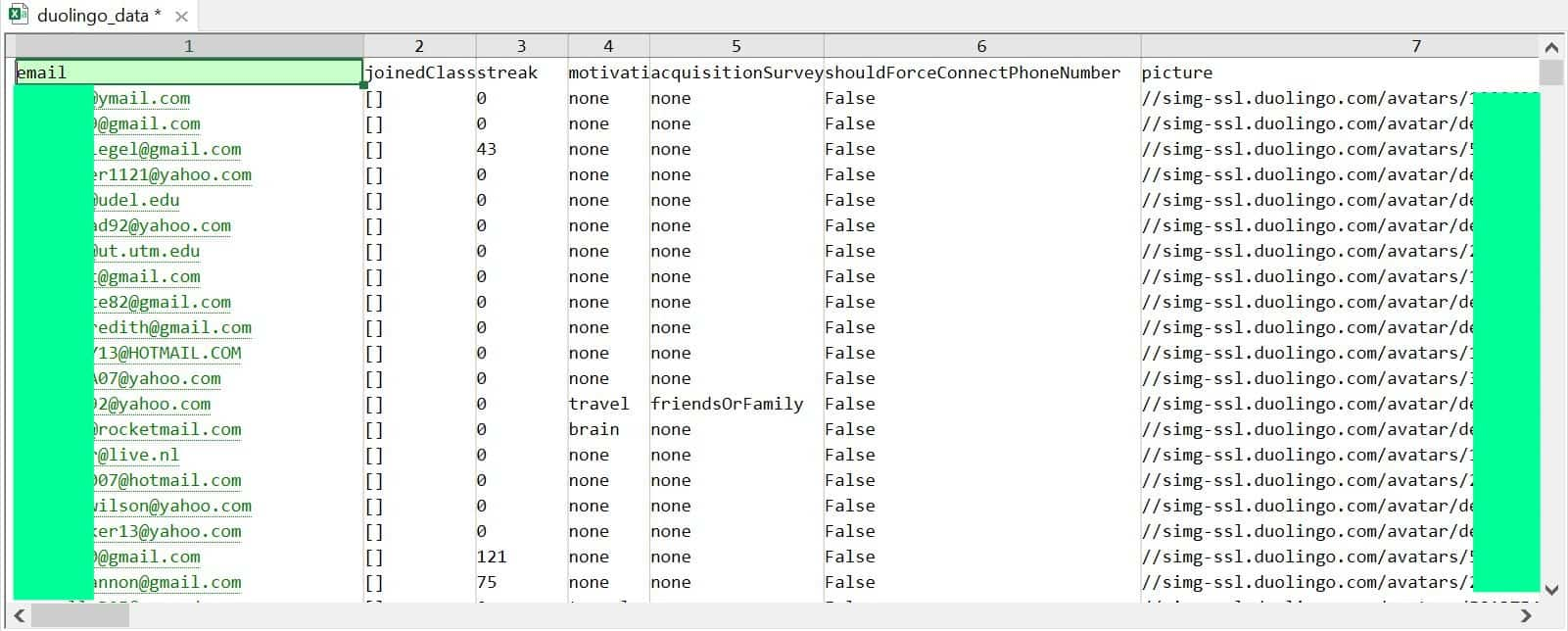
Hackread.com has examined and analyzed the exposed data, shedding light on its contents. The dataset encompasses the personal information of a staggering 2,658,787 users. This encompassing collection includes critical details such as:
Full names
Usernames
Email addresses
Countries of origin
The precise dates of account creation
The language courses to which users have subscribed
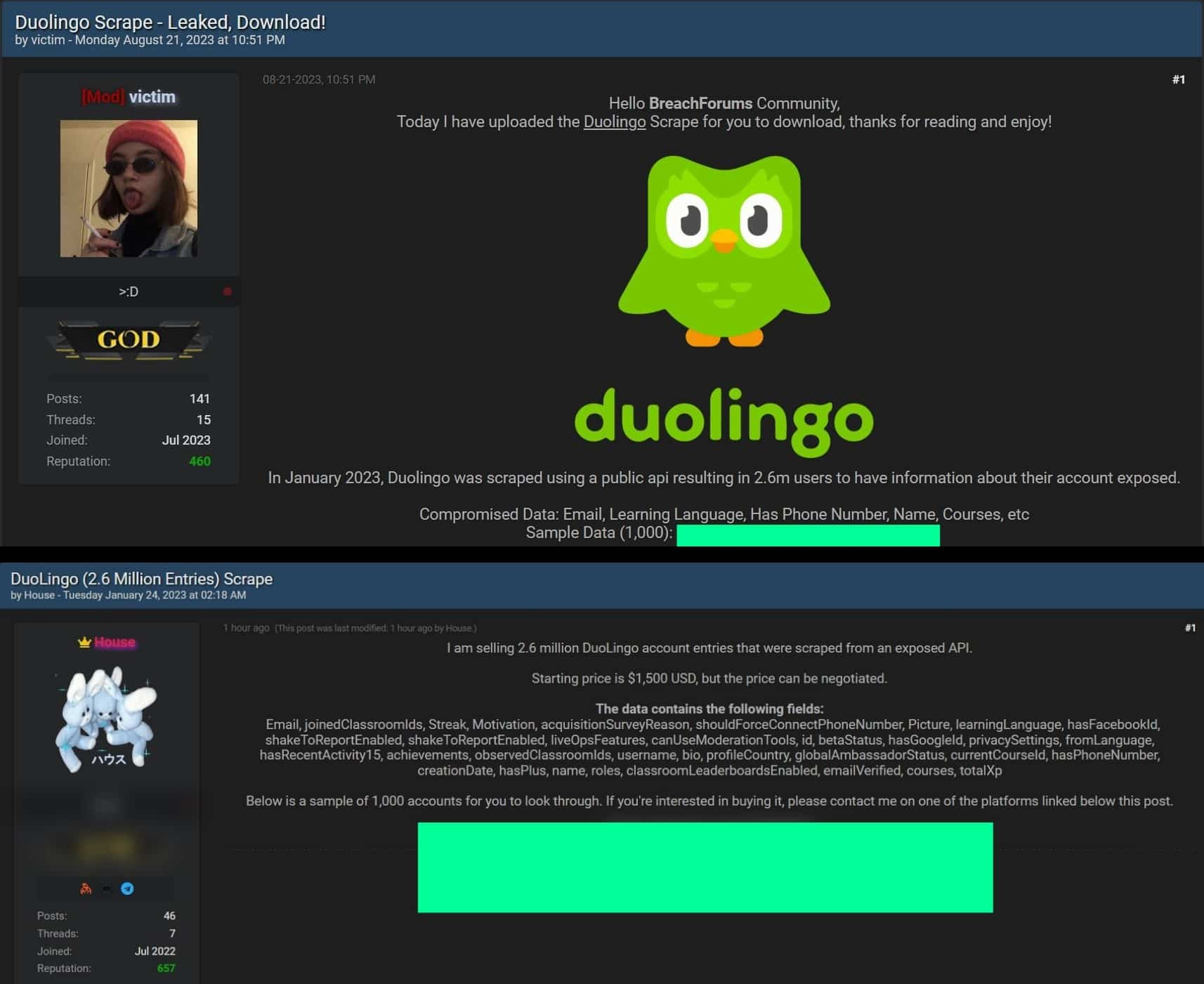
Notably, the gravity of the breach escalated when, prior to the public leak, another threat actor attempted to sell the same dataset for $1500. The revelation of the data on hacker forums and Telegram channels has only exacerbated concerns regarding user privacy and the potential misuse of exposed information.
Screenshot from the leaked Duolingo data (Image credit: Hackread.com)
Duolingo data leaked and sold on Breach Forums (Image credit: Hackread.com)
Duolingo, in response to the breach, is diligently investigating the situation and has intensified its efforts to secure user data. The incident has catalyzed discussions about the protection of user information in an era where APIs, often considered as open doors to data, require heightened vigilance.
In an environment where personal data is an invaluable currency, Duolingo data scraping stands as a testament to the ever-evolving methods of hackers and the pressing need for organizations to remain resilient against cyber threats.
As users await the outcome of Duolingo’s investigation, the incident underscores the collective responsibility to maintain digital security and protect user data from falling into the wrong hands.
Samsung‘s Galaxy S23 FE has been in rumors for a long time, but it continues to elude the market. There have been contrasting reports about its launch, with rumored timelines ranging from September 2023 to early 2024. A tipster has now thrown their weight behind an early debut of the phone. X or Twitter Tipster Yogesh Brar claims that the Galaxy S23 FE will arrive in September. He has also provided a spec round-up for the phone.
Galaxy S23 FE rumored specs
The Galaxy S23 FE has been subject to an extensive amount of leaks over the past few months. Those leaks have revealed pretty much all of its key specs and features. However, if you haven’t been keeping tabs, here’s what you can expect from Samsung’s next-gen Fan Edition (FE) phone.
Samsung will equip the Galaxy S23 FE with a 6.4-inch FHD+ Dynamic AMOLED with a 120Hz refresh rate. Depending on the market, the device will be powered by Qualcomm’s Snapdragon 8 Gen 1 or Samsung’s Exynos 2200 processor. We are expecting up to 8GB of RAM and 256GB of storage if not more.
The handset will feature a 50MP primary rear camera with OIS (optical image stabilization). It will be paired with an 8MP ultrawide lens and a 12MP telephoto zoom camera with 3x optical zoom support. For selfies and video calls, you get a 10MP camera on the front. Both front and rear cameras should support 4K video recording.
The Galaxy S23 FE will be fueled by a 4,500mAh battery with 25W wired charging support. It will also boast wireless charging (likely 15W). Other highlights include stereo speakers, an official IP rating for dust and water resistance (likely IP68), an under-display fingerprint scanner, and Samsung DeX support. The device will arrive with Android 13 onboard and get updates until Android 17. It will also get regular security updates for up to five years from launch.
It’s unclear if Samsung will release the phone globally in September
This isn’t the first time we have heard about a September release of the Galaxy S23 FE. However, previous rumors suggest that the phone will only arrive in a handful of markets in September. Samsung will gradually bring it to more markets over the next few months, with a global release completed in early 2024. It remains to be seen how accurate are those claims. With September just a week away now, we might hear something from Samsung soon.
There are a ton of third-party companies out there that make accessories for today’s gaming consoles, and PDP is one of them. Today, the company just announced its new REALMz line of stylish gaming accessories for the Nintendo Switch and Xbox consoles.
These accessories are some of the prettiest that you’ll see, and they’re themed after several popular franchises. If you’re looking for some amazing-looking accessories, then you might want to be around when the company officially launches them on Friday, August 25.
The REALMz gaming accessories show some of the most popular characters
There are several accessories coming out, and most of them are for the Nintendo Switch. These consist of a wired Switch controller ($39.99), wireless Switch controller ($59.99), wired Switch headset ($39.99), and wired Xbox controller ($49.99).
Now, let’s talk about the designs. The controllers are themed after characters from Sonic The Hedgehog, Pikmin, and Transformers, but the Sonic ones will launch first. The Transformers accessories will hit the shelves on October 13th, and the Pikmin ones will come this Winter.
The controllers are crystal clear with transparent bodies. On the bodies, you’ll see beautiful designs showing the characters. In the images, we see a design with Sonic, one with Tails, one with Knuckles, and one with a red Pikmin. More designs will be available when the products launch.
The buttons are also colored to reflect the characters’ color scheme. You’ll see different colors for the D-Pad/middle buttons, the joysticks/main action buttons, and the shoulder buttons. All of the color combinations represent each character’s individual aesthetics.
Not only are the exteriors of the controllers beautiful, but they also come with little figurines on the inside. That adds another layer of visual flair to the controllers.
To top things off, these controllers also come with embedded RGB lights to push the visuals to the next level. That just means that they’ll look that much more impressive.
These REALMz gaming accessories will be a sight for sore eyes when they launch. Also, if you want to look at more accessories from PDP, you can visit their website here. There are a ton of other amazing accessories that you can look at.
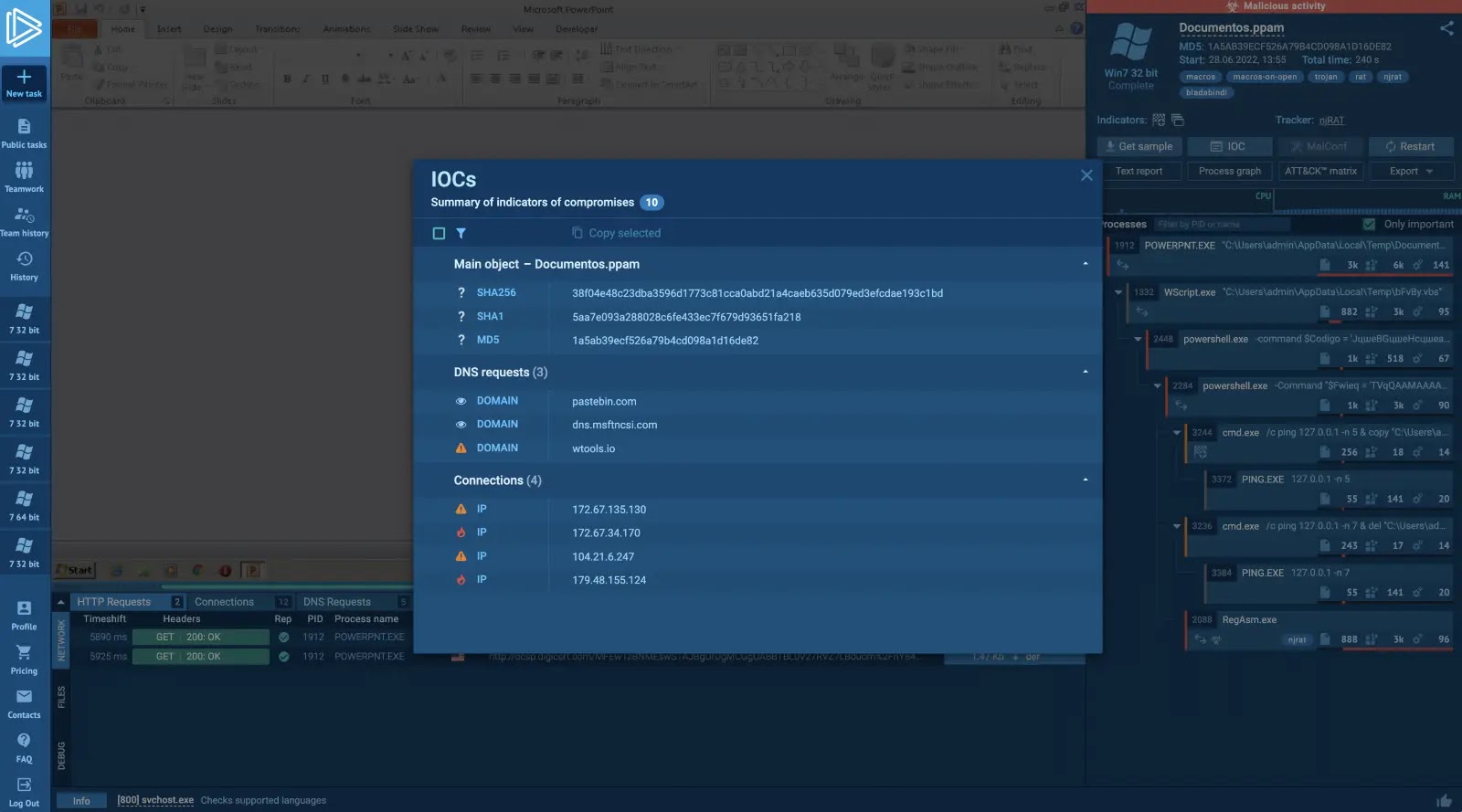
Cyberattacks are becoming increasingly sophisticated, threatening organizations’ critical infrastructure and sensitive data more than ever. Core solutions such as SIEMs are often insufficient to ensure complete protection against malware infections, especially new and unexplored ones.
As a result, security specialists require additional tools to strengthen their proactive approach, streamline their operations, and increase productivity.
Malware sandboxes are the best candidates for this role, as they can be used for fast analysis of suspicious files and links and in-depth investigations into the behavior of the most persistent threats.
What is a Malware Sandbox?
A malware sandbox is a virtual machine that safely analyzes files and URLs to assess their threat level and examine them on a granular scale. It provides up-to-date Indicators of Compromise (IOCs), detailed breakdowns of processes triggered by malicious programs, and malware configurations, which can inform analysts’ decisions and actions against future attacks.
Types of Malware Sandboxes
There are two main types of malware sandboxes: automatic and interactive.
Automatic sandboxes run the malware without any user involvement, while interactive sandboxes provide a few extra features that allow the analyst to control the environment and interact with the malware directly in real-time, which opens new horizons for analysis.
ANY.RUNis an example of an advanced interactive malware sandbox, which is used by DFIR and SOC teams and individual specialists around the world.
Benefits of a Malware Sandbox
Increased visibility into malware behavior
Malware sandboxes provide detailed information about how malware operates, including the files it accesses, the network connections it makes, and the commands it executes. Such details are vital for developing better defenses.
Reduced risk of infection
Organizations can prevent malware from infecting their systems by running any suspicious file in a safe sandbox environment. Obtaining the file’s threat level immediately will help you avoid any damage.
Faster response to threats
Sandboxes reduce the time needed to respond to threats by analyzing and offering information on newly detected malware in seconds. This helps to contain the attack before it gains access to sensitive data.
Extended analysis capabilities
An interactive sandbox features additional options that let professionals conduct more comprehensive research into malware. For instance, analysts can change the local settings to detonate region-specific malware, run programs, reset the system, and perform other interactions to uncover the complete picture of the attack.
DocumentFREE Trial
Investigate all the ANY.RUN functionality with your own settings and files. Try The Full Power Of Interactive Analysis and Detect malware quickly and efficiently.
How Organizations Use Malware Sandboxes
Malware Analysis
Researchers reverse engineer malware to extract its code and configuration and use it to develop better ways to protect organizations against future attacks. This process is manual and lengthy since it involves decrypting various complex obfuscation mechanics employed by malware developers.
Analysts can spend up to 30 minutes searching for crucial information, even with a familiar sample. However, a malware sandbox can largely automate the analysis process and help professionals complete it in seconds.
Automatic extraction of malware configuration in a sandbox
Scanning of Suspicious Email Attachments
Research shows that one out of every 100 emails your team receives could be a phishing attempt, and one out of every 200 emails could contain malicious software.
Organizations incorporate sandbox solutions into their security stack to reduce the risk and protect themselves from potential disasters. Thus, whenever they receive a new suspect file or link over email, they simply submit it to a malware sandbox, which quickly returns a verdict on whether it is safe to open.
Threat Intelligence
Security specialists must collect up-to-date information across numerous sources to be better equipped against emerging and particularly persistent threats targeting their particular organization. Sandboxes can assist specialists in assessing various malicious samples and gathering IOCs and other details needed to make informed decisions.
Automatic extraction of malware configuration in a sandbox
Malware sandboxes also come in handy when addressing successfully executed attacks. By running the malware found in the system through a sandbox, analysts can quickly gain knowledge of the attack.
You can see how fast and detailed a sandbox can be by looking at this Agent Teslaanalysis.
Sandboxes are equally helpful in the case of zero-day attacks. These are a significant concern for organizations because they abuse recently discovered vulnerabilities. Still, by uploading such malware to a sandbox, professionals can safely study how the attack unfolds.
Threat alerts review
Analysts use sandboxes as part of their manual processing of alerts generated by SIEMs. This helps them determine whether a certain file is a threat and closely examine its activities in an isolated environment. On top of that, thanks to Sandboxes’ user-friendly interface, reviewing alerts can be allocated to junior-level staff.
Conclusion
Malware sandboxes are a powerful tool that can aid organizations in maintaining the security of their infrastructure. Using a malware sandbox, you can monitor how malware behaves, minimize the risk of infections, and respond to potential threats instantly.
ANY.RUN is an interactive sandbox that can amplify the ability of any security team to identify threats and gain essential intelligence on any attack.
Start your 14-day free trial of ANY.RUN’s top plan to see how it can improve your security posture.
So far, we’ve seen so many companies emulate the Stories feature that Snapchat unveiled about a decade ago. The next company to do this is actually a bit surprising. Google Search is testing out a Stories feature called Notes.
This seems like such an odd concept, as you use Google search results to find information and not to look for social posts. However, this is more of a way to quickly gather insight on a page before you pull up a result.
This upcoming Google Search feature will remind you of Stories
At this point, we don’t know too much about this functionality. The news comes from two sources, AssembleDebug and 9To5Google. The latter were able to post a video of the function in action. However, at this point, it’s still in testing.
Judging from the place-saver text, it looks like this function is mostly about leaving feedback on web pages. When you go to create a Note, you’ll see the text “What did you think of this link? Keep it friendly and helpful”. So, you’ll be able to post your thoughts on the page.
While you’d be able to do this in text form, making it a Story-like post is a lot more engaging. You’re able to add different styles of text, animated stickers, backgrounds, and images. So, it’s indistinguishable from the sort of Story you’d see on Snapchat or Instagram. You’re also able to “like” another person’s Note.
When you make a post, your profile picture and name will be visible to other people. This could mean that you’ll need to be signed in to Google to leave a Note. Your Google account could act as your profile.
This is an interesting idea, but there are sites that you won’t be able to leave notes on. This goes for sites showing medical information, violence, or pornographic material. We’re pretty sure we know all of the Notes that people would leave on Porn Hub.
Right now, Google is preparing to test this feature, so it won’t hit the public for a while. This is a Google Labs experiment, so you may be able to access it eventually if you join the program.
Samsung’s Odyssey Neo G9 57 now has a price, and it may or may not be as costly as you were expecting. The latest gaming monitor in Samsung’s Odyssey lineup is a 57-inch ultrawide behemoth, delivering what Samsung claims is “the world’s first Dual UHD monitor.” Basically what Samsung is saying here is that this is like having two 32-inch 4K displays right next to each other. Because that’s how wide this monitor is. It’s a whole lot of monitor to have hooked up to your setup.
Samsung officially announced the Odyssey Neo G9 57 at CES 2023 in January, but at the time it didn’t mention a price or a release date. Now it’s lifting the curtain on both of those details. Sort of.
The Samsung Odyssey Neo G9 57 will have a $2,499.99 price tag
It’s certainly not the most expensive monitor Samsung has ever released. In more recent times, that honor still belongs to the Samsung Odyssey Ark. But the Odyssey Neo G9 57 won’t exactly be inexpensive either. It’ll officially launch with a price tag of $2,499.99.
And that’s still quite a pretty penny to drop on a gaming display. Though, you might find the money is worth what you get in return. Aside from the Dual UHD resolution in a 57-inch ultrawide panel, it supports a 240Hz refresh rate. It also has connectivity support for DisplayPort 2.1 and HDMI 2.1. Which means you’ll get the most out of your gaming rigs and consoles that are hooked up to it.
As for the launch date, Samsung is a little murkier on this. The display will be available for purchase in October but Samsung doesn’t mention a specific date. It’ll also launch alongside the 2023 model of the Odyssey Ark. In terms of other features, that money isn’t just buying you the Samsung brand name.
This monitor is packed with specs for heightened entertainment. Including the 1000R curve, picture-in-picture and picture-by-picture modes, AMD FreeSync Premium Pro support, and a peak brightness of 1,000 nits.









.webp)