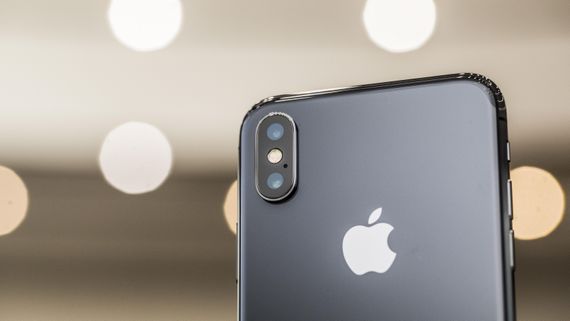
Using a meager $70 setup makes spoofing any Apple device possible. That’s what the researchers demonstrated at the latest Def Con. The simplest way to avoid such threats is to turn off the devices’ Bluetooth when not in use.
Apple Device Spoofing possible Via $70 Equipment
At the latest Def Con 2023, security researchers demonstrated hilariously spoofing any Apple device. While executing the activity as a prank, the researchers emphasized the need to secure devices from potential spoofing threats by adequately turning off the devices’ Bluetooth.
Initially, the attendees at the event started getting weird popups on their devices, asking them to connect to an Apple TV or share a password with a nearby device. Some popups even looked like more of a prank, asking users to update their devices or adjust the color balance.
Yet, it also seemingly bewildered some Def Con attendees, making them share warning alerts via social media.
Ultimately, the researcher Jae Bochs disclosed the matter via Mastodon, explaining that the popups were part of a project demonstrating a security issue with Apple devices.
According to his response on Mastodon, the activity demonstrated an inherent Apple glitch that an adversary could abuse maliciously. However, this activity never aimed to collect data from the attendees but to convince users to disable Bluetooth when not in use via the Settings app.
As reported, Bochs used simple $70 equipment comprising a Raspberry Pi Zero 2 W, two antennas, a Linux-compatible Bluetooth adapter, and a portable battery. Bochs could easily generate popups on nearby Bluetooth-enabled Apple devices using this hardware.
The attack could execute due to Apple’s Bluetooth Low Energy (BLE), which allows communication between nearby devices. Hence, this interaction generated popups on nearby devices.
With Bochs’ attack kit, it became possible to generate fake alerts on the devices. Though Bochs’ project didn’t aim at collecting data, an adversary could do it if the victim devices’ users interacted with the popups.
The researchers have demonstrated the attack in the following video.
Preventing BLE-Related Attacks
While Apple devices allow turning off Bluetooth via the quick-access Control Center, this method doesn’t seemingly work in the demonstrated attack scenario. Even after toggling off Bluetooth, the researcher could still trigger popups on nearby devices due to proximity.
Hence, as explained, the best way to avoid such risks is to always disable Bluetooth via the device’s Settings app when not in use.
Armorblox security researchers have uncovered a new phishing campaign in which attackers are targeting American Express customers.
As per researchers, in this phishing scam, scammers lure American Express cardholders into opening an attachment and try to steal confidential data to access their accounts.
In this financially motivated campaign, attackers first send a spoofed email of the much-recognized card brand and ask the customers to click on the link included in the email attachment.
Using social engineering and brand impersonation, the attackers lure their targets onto fake and malicious landing pages.
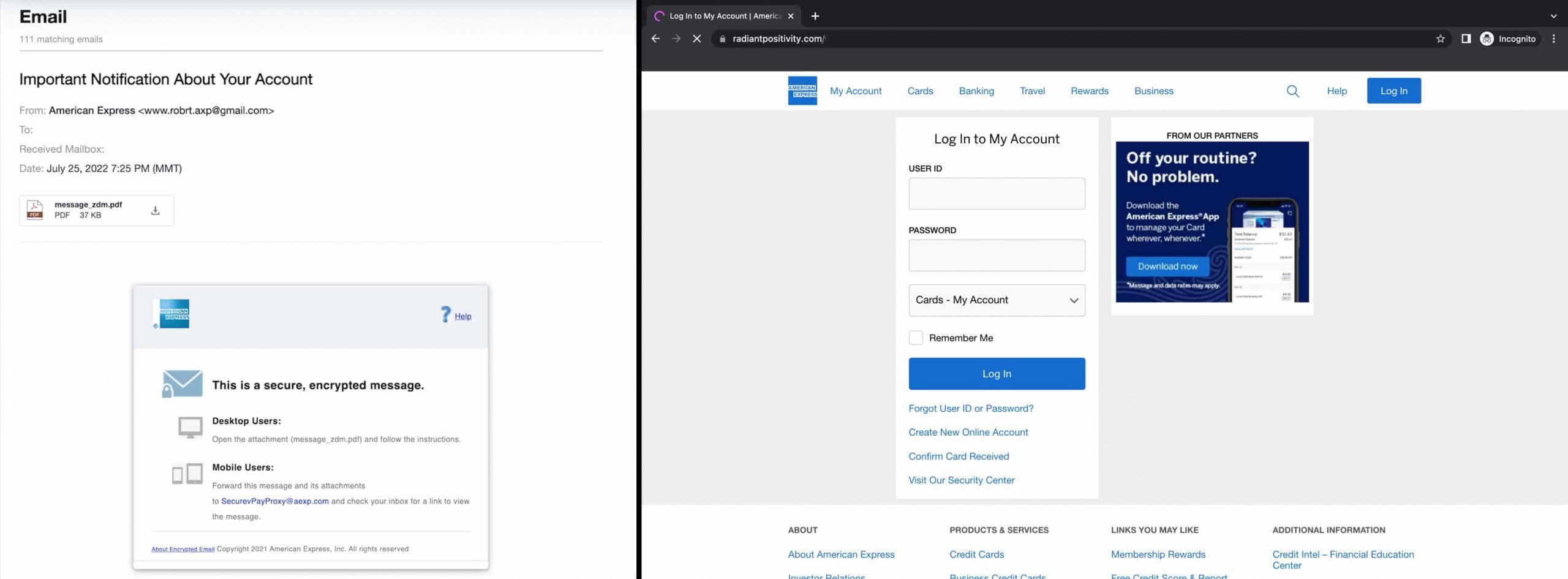
When the victim clicks on this link, they are redirected to a fake American Express landing page. This page is also crafted smartly to resemble the original American Express login page, including the company’s genuine logo, navigational links, and a link to download the American Express app.
In reality, scammers are using a customised domain for this attack. Once there, victims are prompted to sign in to verify their accounts. They enter their user ID and password.
The Legit-looking Phishing Email
In this phishing scam, the email is designed to appear as an authentic American Express notification. The email subject, according to Armorblox’s blog post, reads: “Important Notification About Your Account.”
It informs the recipient to verify their account. Otherwise, the company will suspend it. The phrase “This is your last chance to confirm it before we suspend it” is included to create a sense of urgency. Victims are requested to complete a one-time verification process to update their credentials and prevent suspension of their accounts.
The email content is created wisely so that a sense of trust is evoked in the recipient. For instance, it includes the American Express logo on the top left, and a signature is featured at the end to deceive the users into believing that the company’s customer service team sent the email.
Phishing email and the phishing page (Screenshots via Armorblox)
Prime Targets
Armorblox co-founder and CEO DJ Sampath stated that financial firms are more frequently targeted with credential phishing scams. The main targets of this scam are holders of American Express charge cards.
What’s noteworthy is that the phishing scam has bypassed Google Workspace Security successfully, and so far, the email has been sent to around 16,000 email addresses of American Express employees.
How to Identify a Phishing Scam?
Most people are familiar with the term “phishing” but may not know how to identify a phishing scam. Phishing is a type of online fraud that involves tricking someone into giving personal information such as passwords, credit card numbers, or banking information. Scammers do this by sending fake emails or setting up fake websites that look like the real thing.
Here are some tips to help you spot a phishing scam:
Be suspicious of any email or website that asks for personal information such as your password, Social Security number, or credit card number. Legitimate companies will never ask for this information via email or an online form.
Phishing attempts almost always contain a link, downloadable attachment, or directive telling people to do something ASAP.
There are often a lot of spelling mistakes, but not always.
The email or message can instill a sense of urgency to get people to act quickly without thinking.
It may be a threat or even blackmail, as is the case with sextortion phishing scams.
The email signature will usually look strange or different from normal.
Phishing emails or messages aren’t always from strangers. Sometimes they’re sent from the compromised accounts of friends, coworkers, or other contacts.
Inspect the URL of any website you’re directed to from an email before entering any information on it.
Xiaomi is seemingly planning to launch a special edition variant of the Xiaomi 13 Pro, which will offer a truly premium build. This information comes from Digital Chat Station, a well-known Chinese tipster.
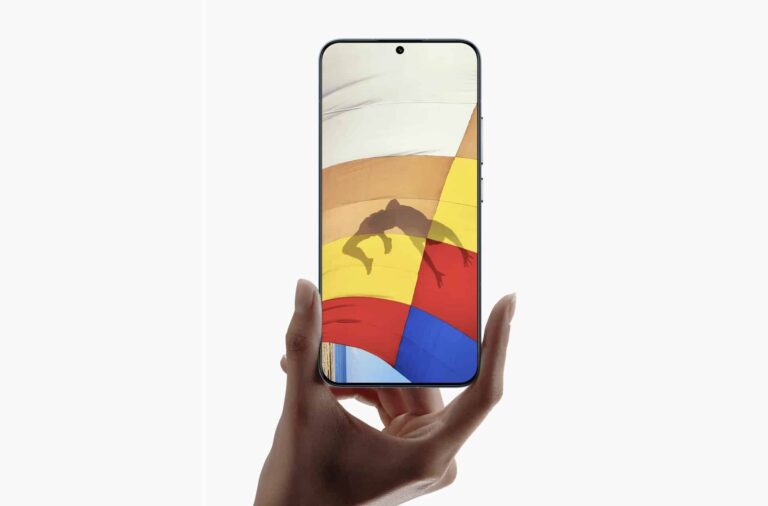
A special Xiaomi 14 Pro model is coming with premium build
That special edition model will seemingly include a titanium frame, and a nano-ceramic glass cover on top of its display. On the back, you’ll be able to find a ceramic backplate.
On top of that, the phone is tipped to offer satellite communication tech, which seems to be rising in popularity on smartphones. The Snapdragon 8 Gen 3 chip is said to fuel this phone, as expected.
Now, based on previous rumors, the Xiaomi 14 Pro will include a 5,000mAh battery. 120W charging is also rumored, and the same goes for 50W wireless charging. And yes, a charger will be included in the box.
This handset could offer up to 24GB of RAM in China, though globally, it’ll likely go up to 12GB or 16GB of RAM. Xiaomi will almost certainly use LPDDR5X RAM and UFS 4.0 flash storage in this smartphone.
The phone will include truly compelling camera hardware
A 50-megapixel main camera is said to be included on the back. That camera will utilize Sony’s IMX989 sensor, which is a 1-inch camera sensor used by quite a few flagship smartphones this year.
A 50-megapixel ultrawide camera is also rumored, along with a 50-megapixel periscope zoom camera. Android 14 is said to come pre-installed on Xiaomi 14 Pro, along with MIUI 15.
The Xiaomi 13 series is expected to arrive towards the end of the year to China. Global models will likely launch next year. Also, the ‘Ultra’ model is expected alongside the vanilla and ‘Pro’ models, but that variant could launch later on. That is actually what happened with this year’s model.
If you’re looking for a new TV, then look no further than the best QLED smart TV deals. That’s because QLED is highly regarded as one of the best technologies currently available for TVs. It’s a better than OLED in a few ways. Mostly the fact that it doesn’t result in burn-in on your TV set. But you still get those true-to-life colors and actual deep blacks instead of gray.
QLED is often times cheaper than OLED as well. Which is one major reason why a lot of companies are gravitating towards it for their high-end TVs right now. However, Samsung still makes the majority of QLED TVs right now. But other TV makers like TCL and VIZIO are also making them these days.
Expect to pay at least a grand for most QLED TVs right now. TCL will sell you one for a bit less, but it is using an older QLED panel. So do keep that in mind.
Best QLED Smart TV Deals
For the most part, QLED TVs are mostly 50-inches or larger. You won’t find to many that are below that size. So if you’re looking for a good TV to add to your bedroom, you may have to get a larger one.
When it comes to QLED TVs though, there are some really cool options around. Like the Frame TV from Samsung. Which can turn into a picture frame on your wall when you’re not watching TV. It’s a really cool concept, and it is also one of the cheaper QLED TVs out there right now.
In this list below, you’ll find the cheapest QLED TVs that are available right now. These are the best QLED Smart TV deals that are currently available. So you can purchase one and rest assured that it is the best price.
The Galaxy Tab A9 doesn’t seem to be the only new A-series tablet Samsung has in the works. The company also appears to be readying the Galaxy Tab A9+. The Plus model recently surfaced on a few certification websites. Meanwhile, we have one more live photo of the former.
The Galaxy Tab A9 gains more certifications
A couple of weeks back, the FCC certified the Galaxy Tab A9 with the model number SM-X115. The FCC documents contained several live photos of the device, along with some of its key specs, including the battery capacity, charging speed, dimensions, and more. A few days later, the device picked up the Wi-Fi Alliance certification.
The same tablet has now received the Safety Korea certification as well. The Korean regulatory body mentioned model numbers SM-X110 and SM-X115N, which should be the Wi-Fi (global) and LTE/4G (Korean) versions of the device. The SM-X115 should be the global LTE version. There’s also an SM-X117 in the works, which is probably the global 5G version.
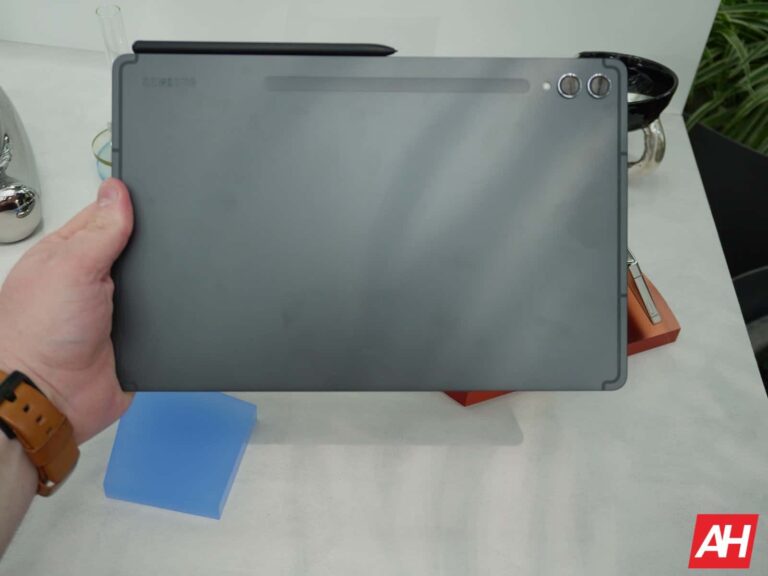
This Safety Korea website contains a live photo of the Galaxy Tab A9 but doesn’t give us any other information. The FCC has already revealed that it will pack a 5,100mAh battery with support for 15W charging via a USB Type-C port. It will feature a MicroSD card slot, a 3.5mm headphone jack, and a single rear camera.
We now have evidence of a Plus model as well
As the Galaxy Tab A9 continues to pick up regulatory approvals, we now have evidence of a Plus model as well. Over the past few days, the Galaxy Tab A9+ has received the Bluetooth SIG certification and the BIS certification (Indian regulatory agency). It has also popped up on the popular benchmarking platform Geekbench.
The BIS and Geekbench listings of the tablet mention the model number SM-X216B, which should be the global 5G version. However, the Bluetooth listing contains five more model numbers: SM-X210, SM-X216N, SM-X216C, SM-X218, and SM-X218B. As usual, the former should be the global Wi-Fi version, while the latter four should be regional variants of the cellular version.
Based on the available evidence, the Galaxy Tab A9+ will be powered by Qualcomm’s Snapdragon 695 chipset paired with the Adreno 619 GPU. The tablet will be available with at least 4GB of RAM, though Samsung could offer more RAM variants. It will run Android 13 out of the box, likely with the Korean firm’s One UI 5.1 custom software on top. The device will feature Bluetooth 5.1.
That’s all we know about the Galaxy Tab A9+ at the moment. Considering all the recent developments, Samsung may not keep the new A-series tablets under wraps for much longer now. It also has the Galaxy Tab S9 FE and Galaxy Tab S9 FE+ in the works, as well as the Galaxy S23 FE. All of these devices may launch shortly.
A new version of WinRAR is available that patches two vulnerabilities attackers could use for remote code execution.
A new version of the file archiving software WinRAR fixes two vulnerabilities that could allow an attacker to execute code on a target system. All the victim has to do is to open a specially crafted archive.
After receiving a report about the vulnerability in June, a new version of the software was published on August 2, 2023. Users should install the latest version (WinRAR 6.23 or later) at their earliest convenience.
The Common Vulnerabilities and Exposures (CVE) database lists publicly disclosed computer security flaws. The CVE patched in this update is CVE-2023-40477 (with a CVSS score of 7.8 out of 10).
The vulnerability lies in how the software processes recovery volumes. The issue is due to the lack of proper validation of user-supplied data, which can result in a memory access past the end of an allocated buffer. An attacker can leverage this vulnerability to execute code in the context of the current process.
“WinRAR could start a wrong file after a user double clicked an item in a specially crafted archive.”
So, until you have installed the new version, it is advisable to be careful when someone sends you an archived file. Opening the archive to scan the content is not a safe option right now.
Given the great many users of WinRAR the impact of these vulnerabilities could be substantial, knowing that similar flaws were abused by hackers in the past to install malware.
Windows 11 users are likely to hold of on installing the latest version, because Microsoft announced their latest operating system (OS) will natively support RAR and some other archive formats.
“We have added native support for additional archive formats, including tar, 7-zip, rar, gz and many others using the libarchive open-source project. You now can get improved performance of archive functionality during compression on Windows.”
Users of a cracked version of the software, which is probably another big group of users, will not be able to install the latest version right off the shelf, so they may remain vulnerable as well.
Prevent intrusions. Stop threats early before they can even infiltrate or infect your endpoints. Use endpoint security software that can prevent exploits and malware used to deliver ransomware.
Detect intrusions. Make it harder for intruders to operate inside your organization by segmenting networks and assigning access rights prudently. Use EDR or MDR to detect unusual activity before an attack occurs.
Stop malicious encryption. Deploy Endpoint Detection and Response software like Malwarebytes EDR that uses multiple different detection techniques to identify ransomware, and ransomware rollback to restore damaged system files.
Create offsite, offline backups. Keep backups offsite and offline, beyond the reach of attackers. Test them regularly to make sure you can restore essential business functions swiftly.
Don’t get attacked twice. Once you’ve isolated the outbreak and stopped the first attack, you must remove every trace of the attackers, their malware, their tools, and their methods of entry, to avoid being attacked again.
We don’t just report on vulnerabilities—we identify them, and prioritize action.
Samsung has come up with an impressive way for iPhone users to fold their devices using the Try Galaxy web app. This app went live back in March just a few months ago and ever since has given iPhone users the ultimate Galaxy experience. This is a crafty plan from Samsung to win some iPhone users over to the Galaxy side.
Now the app is even letting iPhone users try the folding software feature on Galaxy Z series devices. This is in a way a slap to Apple’s face, as they haven’t been able to provide their users with a folding device. You can see Samsung use these mean tactics in a ton of their ads aimed at winning over some iPhone users.
With a recent update to the Try Galaxy web app, iPhone fans can now fold two iPhone devices. The folding ability this web app brings will show off Samsung’s One UI software for foldable devices. Aside from this new upgrade bringing foldable features, the web app is now also more accessible to users around the world.
Samsung wants you to fold your iPhones today with the Try Galaxy app
A recent update to the Try Galaxy app from Samsung brings two extra features to it. First, it brings the ability to fold your iPhones and experience that Galaxy Z Fold series vibe. Second, this update makes the web app more accessible by bringing five more languages.
To benefit from the folding feature, users will need to possess two iPhones mimicking the Galaxy Z Fold series. Of course, this series on the inside has a large folding screen that when it folds looks like two devices. The web app will seamlessly connect the two iPhones and offer iPhone users a One UI experience.
Samsung is offering users of this web app some features and looks of the One UI 5.1.1 software. This isn’t Android, but just a clever representation of what a Galaxy foldable device looks like. By this means, iPhone users will be able to experience a Galaxy device without having to purchase one for themselves.
Samsung hopes that this will be able to win over some iPhone fans to the Galaxy side. However, the Try Galaxy web app might just make iPhone users crave a foldable iPhone, which Apple doesn’t offer. One can easily call this a well-thought-out marketing strategy from Samsung.
To access this web app, iPhone users can go to the Safari browser and access the Try Galaxy website. The website will direct users on how to get a foldable experience on their iPhones. Will you want to try out this web app on your iPhones and experience what it feels like to have a foldable device?
Defeat alert fatigue using specialized threat intelligence.
Sleepless nights, missed threats, a deluge of notifications—the common symptoms of the bane of IT teams everywhere: Alert fatigue.
Out of the litany of problems IT teams face every day, alert fatigue might be among the most pressing—especially considering that 30 percent of EDR alerts are ignored by IT security teams. Simply put, it’s impossible to keep up when your tools aren’t helping you prioritize alerts.
Alert Prioritization and Guided Remediation is a feature of EDR Extra Strength that helps IT teams cut through the noise, using specialized threat intelligence to highlight the threats that truly need their attention.
But why do traditional approaches to EDR alert ranking lead to alert fatigue? And how does Alert Prioritization and Guided Remediation work to combat it?
Why Traditional EDR Is Inherently Exhausting
At its core, EDR has one job—to generate alerts of suspicious activity. The humans operating EDR also broadly have one job: to interpret and act on that suspicious activity.
But here’s the problem: “suspicious” could mean anything.
Let’s say an alert was generated in response to an employee installing a new piece of software attempting to modify system files. Traditional EDR doesn’t know if this is a benign program—it just flags the activity as suspicious. But “suspicious” could mean that the alert is a false positive, it could mean the alert is malicious but can be safely ignored; it could mean “This is a huge deal.”
In other words, IT teams can’t know how “bad” a suspicious alert is until it is investigated—an impossible task for each of the thousands of alerts generated by EDR daily. The end result is, of course, alert fatigue.
Traditional EDR is inherently exhausting. Without additional context, alerts become just too ambiguous to be actionable, meaning IT teams inevitably end up over-prioritizing less urgent threats while also overlooking severe ones.
How Alert Prioritization And Guided Remediation Works
In this scenario, when an EDR product generates an alert, Alert Prioritization and Guided Remediation consults the threat intelligence service’s extensive database for relevant data. This data, which could include information from various antivirus solutions and user submissions, helps Alert Prioritization and Guided Remediation assess the legitimacy of the alert, clarifying whether the alert represents a genuine threat or a false positive.
Let’s illustrate using the same example from our section on the limitations of traditional EDR, when an alert was generated after an employee installed a new piece of software.
If threat intelligence data shows, for example, that 50 out of 60 antivirus solutions flagged the same file as malicious, it’s likely not a false positive.
Alternatively, if threat intelligence data shows that only 2 out of 60 antivirus solutions flagged the same file as malicious, it is likely that the alert is a false positive and can be safely ignored.
After the threat is externally validated to be a known bad, we turn to Phase 2: Guided Remediation.
When a prioritized threat is detected, Guided Remediation sends detailed remediation information directly to customers through text and email.
These communications direct customers to an EDR portal page that further details the identified threat, explaining what was found, why it is deemed a priority, and simple steps on how to remediate it. This ensures that users are not only alerted to potential threats, but also equipped with the information needed to take decisive action.
Business benefits to Alert Prioritization and Guided Remediation
Reduced alert fatigue
Alert Prioritization and Guided Remediation helps IT teams massively reduce the volume of alerts that need to be reviewed, saving them much-needed mental to focus on only the most critical threats.
Improved security posture
Alert Prioritization and Guided Remediation of threats allows for quicker detection and response to threats, minimizing attacker dwell time and reducing the potential damage that attackers can cause once in your systems.
Empowers smaller or less experienced teams
With the right solution, highly specialized staff become a less critical requirement when an organization has to keep up with the volume of EDR alerts. Alert Prioritization and Guided Remediation helps to level the playing field, helping smaller IT teams or those with lower levels of specialized security expertise identify and respond to threats on the fly.
Try EDR Extra Strength today
Automation is the name of the game when it comes to preventing burnout—and with Alert Prioritization and Guided Remediation, IT teams can finally ease their alert fatigue burdens.
Interested in learning more? Alert Prioritization and Guided Remediation is a part of our EDR Extra Strength product, which reimagines EDR to deliver superior protection in a single, easy-to-use package.
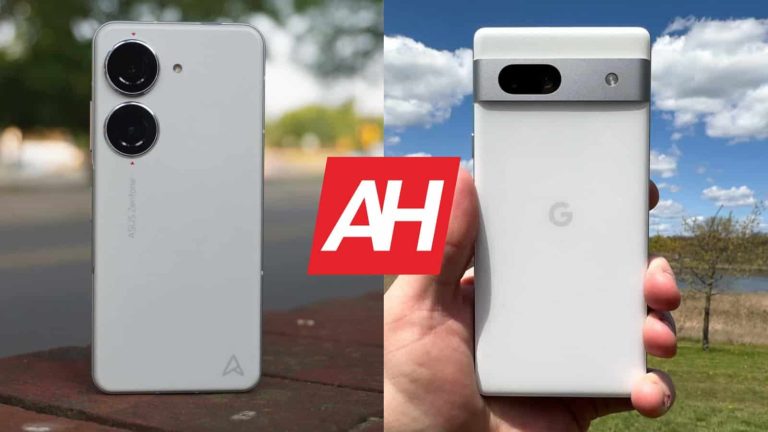
If you’re looking for a compact smartphone these days, that is also quite powerful, things are not as simple. There are some options, but not a lot. Well, we’re here to take a look at two such phones. In this article, we’ll compare the ASUS ZenFone 10 vs Google Pixel 7a. Granted, the former is a flagship-grade phone, while the latter is a mid-ranger. Still, if you’re planning to buy a compact device, considering both is probably not a bad idea.
We’ll first check out the specifications of both smartphones, and will then compare them across a number of other categories. We will check out their designs, displays, performance, battery life, cameras, and audio performance. Having said that, let’s get this show on the road, shall we?
These two devices do look quite different. The ASUS ZenFone 10 has flat sides, and includes a grippy plastic back that does not feel like plastic, it feels like a combination of plastic and eco-leather. The Pixel 7a, on the other hand, doesn’t have flat sides, not at all, and also includes glass on the back. They also have different overall shapes, camera setups, and even their display holes are placed in different spots.
The ZenFone 10 has corners that are more curved than the ones on the Pixel 7a. Its display camera hole sits in the top-left corner, while the Pixel 7a’s is centered. Both smartphones have thin bezels, but their bottom bezel is thicker than the rest. The ZenFone 10 has two separate camera islands on the back, each of which hosts a single camera. The Pixel 7a also has two cameras on the back, but they’re both located inside the phone’s camera visor.
ASUS’ offering does have a smaller display, and is shorter, narrower, and slightly thicker. It is also lighter than the Pixel 7a, it’s lighter for over 20 grams. They both also offer water and dust resistance, but different ratings. The ZenFone 10 comes with IP68 certification, while the Pixel 7a is IP67-certified. So, ASUS’ phone has an advantage in this aspect. The two phones do feel different in the hand, but they’re both comfortable to use. The ZenFone 10 is easier to use with one hand, and also offers more grip.
ASUS ZenFone 10 vs Google Pixel 7a: Display
There is a 5.92-inch fullHD+ (2400 x 1080) display on the ZenFone 10. That is a Super AMOLED panel that is also flat. It offers a 144Hz refresh rate, though you’ll be able to reach it only in some games. HDR10+ support is also included, and the display goes up to 1,100 nits of peak brightness. Corning’s Gorilla Glass Victus is included on top of the display for protection purposes.
ASUS ZenFone 10
The Pixel 7a, on the other hand, features a 6.1-inch fullHD+ (2400 x 1080) display. We’re looking at an OLED panel here, which is flat, and offers a 90Hz refresh rate. This panel goes up to 1,000 nits of brightness at its peak, and supports HDR content. The display offers a 20:9 aspect ratio, and it is protected by the Gorilla Glass 3 from Corning.
The ZenFone 10’s display gets a bit brighter, and it also offers a higher refresh rate. They both do offer good viewing angles, and are vivid, on top of being more than sharp enough. The black shades are also deep on the screen, as they should be on OLED panels. Touch response is good on both displays. It is also worth noting that the ZenFone 10 has much better display protection. The Gorilla Glass 3 is prone to microscratches. So, using a screen protector on the Pixel 7a is definitely a good idea.
ASUS ZenFone 10 vs Google Pixel 7a: Performance
The Snapdragon 8 Gen 2 SoC fuels the ASUS ZenFone 10. That is one of the most powerful processors out in the market now. ASUS also included up to 16GB of LPDDR5X RAM inside of this phone, and also UFS 4.0 flash storage. The Google Pixel 7a, on the flip side, is fueled by the Google Tensor G2 processor. That chip also fuels the Pixel 7 and Pixel 7 Pro flagships, but it’s inferior to the Snapdragon 8 Gen 2. This phone comes with 8GB of LPDDR5 RAM and UFS 3.1 flash storage.
Spec-wise, the ZenFone 10 wins this comparison. Does that reflect on performance? Well, the Pixel 7a is, by no means, a slow phone. It actually runs really fast, but in direct comparison with the ZenFone 10, ASUS’ device is definitely faster. That will reflect on gaming too, the ZenFone 10 will be able to offer better performance when it comes to demanding games. For most games, however, you won’t really notice the difference.
The bottom line is, both smartphones do offer great performance, but the ZenFone 10 is more powerful. That is something you’ll notice only if you directly compare them, though. The Pixel 7a does offer solid performance, no doubt about that. One thing to note is that the ZenFone 10 does heat up less, despite its smaller size.
ASUS ZenFone 10 vs Google Pixel 7a: Battery
There is a 4,300mAh battery included inside the ZenFone 10, and a 4,385mAh battery inside the Pixel 7a. Now, considering that the ZenFone 10 has a smaller display, it’s expected it has a smaller battery too. How do they compare in terms of battery life, though? Well, the ZenFone 10 easily wins that duel. The Snapdragon 8 Gen 2 is a more power efficient SoC, and that has something to do with battery life, that’s for sure.
While the Pixel 7a can get to 7 hours screen-on-time, it can also fall under that mark, at least it did for us. The ZenFone 10, on the other hand, easily crosses the 8-hour mark, and then some. That phone can really go the distance despite the fact it’s a rather compact smartphone. ASUS once again did a great job in that regard, as the battery life is even better than it was on the ZenFone 9, and that phone had really good battery life.
Your mileage may vary, of course. We did not really play games on either phone, outside of specifically testing gameplay. Everything else was thrown into the mix, so… but your usage will be different. Not only your usage, but your installed apps, signal, and so on. So… you could easily get significantly different results.
In terms of charging, well, that’s another area where the ZenFone 10 wins. It supports 30W wired, 15W wireless, and 5W reverse wired charging. The Pixel 7a offers support for 18W wired, and 7.5W wireless charging. No matter what way you slice it, the ZenFone 10 charges faster. Also, ASUS’ smartphone does include a charger in the box, while Google’s does not.
ASUS ZenFone 10 vs Google Pixel 7a: Cameras
A 50-megapixel main camera (f/1.9 aperture, gimbal OIS) sits on the back of the ZenFone 10. That camera is backed by a 13-megapixel ultrawide unit (120-degree FoV). The Pixel 7a also has two cameras on the back, a 64-megapixel main unit (f/1.9 aperture, OIS), and a 13-megapixel ultrawide camera (120-degree FoV).
Google Pixel 7a
The two phones do provide different images, but they’re both really good overall. The Pixel 7a tends to provide a bit more contrasty shots, which we’re used to seeing from Pixels. The ZenFone 10 is a bit closer to real life, but the images from this phone don’t end up looking bland, not at all, they’re also reasonably vivid. It’s a noticeable improvement compared to the ZenFone 9, as oversharpening is no longer an issue.
Their ultrawide cameras do the job, but the quality bump is noticeable for the main sensors. That is to be expected, though. We prefer the Pixel 7a’s output in low light, but the ZenFone 10 is not far behind, to be quite honest. It does a great job. When the video is concerned, the ZenFone 10 easily wins. The Pixel 7a is actually quite shaky in comparison, it cannot trade blows with ASUS’ Gimbal OIS stabilization.
Audio
Both of these phones include stereo speakers, and they’re reasonably good. They provide good sound, with good sharpness, and without noticeable distortion. They’re also loud enough, and very close in that regard.
When it comes to wired audio, do note that the ZenFone 10 does include an audio jack, while the Pixel 7a does not. You can still connect your wired headphones through the Type-C port, though. Bluetooth 5.3 is available on both devices, for wireless connections.
Generative AI has been making the rounds lately, with so many tech brands jumping on the AI bandwagon. Now, OnePlus is the latest one to do so.
Through its research arm, OneLab, the company seems to be developing several AI-powered tools and it’s asking users to share their insight. As noted in a community post from the brand, OnePlus is surveying users across North America, Europe and India to rate the usefulness of the company’s proposed AI features (via Android Authority).
“OneLab has been looking into how to make the most of this technology and has come up with some ideas. They’re excited to hear your thoughts on these ideas and figure out which ones could be really helpful,” the company wrote in the statement.
OnePlus is entering the generative AI technology game and is asking users for feedback
Image Credit: (Android Authority)
Although the company is contemplating a number of AI tools, the survey includes detailed descriptions and screenshots. This suggests that we could see some of OnePlus’ AI-powered assets sooner rather than later.
In the meantime, however, the brand is asking users’ opinions on the features. By asking them to rate the tool’s usefulness on a scale of 1 to 10. The AI tools that are listed in the survey include an AI-based short video creator app. As well as a personalized education app. The company is also asking for user input on several AI browser extensions for fact-checking information. In addition to finding jobs, checking if an image on a webpage was generated by AI, and generating summaries of webpages.
The survey is accessible to all users, regardless of whether or not they own a OnePlus phone. The company also hasn’t made it mandatory for users to disclose certain personal information. Such as age, gender or country of residence in the survey.
While OnePlus’ survey makes it abundantly clear that the company is ready to tackle generative AI technology, what is not clear yet is what large language modal it will use to develop these apps. It will be interesting to see if OnePlus will develop its own LLM or build upon an existing one like OpenAI’s GPT-4, which powers ChatGPT, Microsoft’s Bing AI Chatbot and many others.