Earlier this year, Snapchat launched its own conversational chatbot powered by ChatGBT. At the time, Snapchat warned its subscribers that its My AI chatbot, like all AI chatbots, is prone to giving incorrect answers due to “hallucinations.” Snapchat told users, “While My AI is designed to avoid biased, incorrect, harmful or misleading information, mistakes may occur […] As with all AI-powered chatbots, My AI is prone to hallucination and can be tricked into saying just about anything.”
Snapchat continued, “Please be aware of its many deficiencies, and sorry in advance! All conversations with My AI will be restored and may be reviewed to improve the product experience. Pleases do not share any secrets with My AI and do not rely on it for advice.”
CNN reported earlier this week that Snapchat users were panicking on Tuesday night after My AI started acting strangely. Typically, My AI answers questions and has conversations with Snapchat users. But on Tuesday night, the My AI feature did things out of character which concerned Snapchat users who thought that the chatbot had become sentient. Among these actions, My AI posted a video story of a wall and a ceiling; typically only humans can create a video story.
Did Snapchat Ai just add a picture of my wall/ceiling to their Snapchat story?
On social media, one Snapchat user wrote, “Why does My AI have a video of the wall and ceiling in their house as their story?” Another said, “This is very weird and honestly unsettling.” Snapchat eventually explained that the My AI feature wasn’t being enhanced and that the suspicious and eerie photos it posted as a story on the app were the result of nothing more than a glitch. A Snapchat spokesman said, “My AI experienced a temporary outage that’s now resolved.
Snapchat’s version of ChatGPT allows users to pick a name for the chatbot, design a custom bitmoji for it, and share access to My AI with friends. The result is that chatting with My AI feels more like talking to a friend instead of an AI chatbot. But users have been complaining about privacy fears, “creepy exchanges,” and the inability to remove the chatbot from their feeds unless they pay up for a premium subscription.
After Tuesday night, frightened Snapchat users might be more concerned about My AI and could become more vocal about their fears.
Moving Out 2 and loads of other games are being unleashed onto the cloud for GeForce NOW subscribers this week. In total NVIDIA added 22 games to the library of available titles you can stream.
Of those 22, 10 of them are day and date releases. Meaning they’re completely new games that just released this week. All of them between August 15 and August 18, and they can all be found on Steam. There’s also some Epic Games Store releases and a handful more Steam versions of games that were added, although they aren’t new releases like the others.
Still, some of them might be right up your alley. For starters, The Epic Games Store version of Darkest Dungeon II is now available on GeForce NOW. And if you use the Kovaak’s FPS Trainer on Steam, that’s available on GeForce NOW today too. Speaking of which, NVIDIA has also announced the first wave of winners for the Ultimate Kovaak’s Challenge. This is an ongoing challenge too, with more prizes to be had. If you participate, you’ll have the chance to win a 6-month Ultimate membership and a $100 Steam gift card.
And at the end of the challenge, those with the top three scores will win some truly cool stuff. 1st place will win an ASUS ROG Swift 240Hz monitor. 2nd place gets an ASUS Chromebook Vibe CX34 Flip. And 3rd place gets an ASUS ROG Azoth & ROG Gladius III Keyboard + Mouse Bundle.
Moving Out 2 and 21 other games land on GeForce NOW
Moving Out 2 is but one of many different games now streamable. And one of the 10 new day and date releases. Here’s everything you can now look forward to streaming via GeForce NOW from this week. Starting with the day and date releases, there’s Desynced, Hammerwatch II, The Cosmic Wheel SisterhoodBook of Hours, Gord, Shadow Gambit: The Cursed Crew, Wayfinder, Bomb Rush Cyberfunk, and The Texas Chainsaw Massacre.
Outside of the day and date releases, there’s big hits like Darkest Dungeon II and System Shock. As well as Amnesia: The Bunker, and F1 Manager 2023. Additionally you can now stream Age of Wonders 4, The Great War: Western Front, Inkbound, The Outlast Trials, Project Highrise, Regiments, and Symphony of War: The Nephilim Saga. You can also dive into the new 4.0 update for Genshin Impact.
It might not be long before we have smartphones with zero display bezels all around us. Samsung Display, the world’s biggest maker of OLED panels for mobile devices, showcased a bezel-less smartphone display during a recent presentation. The company suggested this design to be the next step after the industry moved from notched displays to the hole-punch design.
Samsung referred to this futuristic display design as an “All Around Full Screen” panel. The specimen phone shown on the slide seemingly has curved edges with the display wrapping around the edges. The company noted that this design allows for 3D lamination technologies and edge brightness control functions. There are also many other potential use cases, such as volume control and gesture navigation.
It’s unclear when and where this Samsung Display presentation took place. The slide showing a bezel-less smartphone was shared on X (formerly Twitter) by noted tipster @Tech_Reve. We don’t have any information about the company’s plans for the mass production of this OLED panel. It only shows Samsung’s vision for the future of smartphones.
However, this isn’t the first time we have heard about the Korean behemoth exploring OLED displays with zero bezels. A few weeks back, a rumor surfaced that Apple has tasked Samsung and its compatriot LG with developing a bezel-less flat OLED panel for future iPhones. It appears that Samsung plans to launch Galaxy phones with zero display bezels around the same time as similarly designed iPhones.
Don’t expect to see a bezel-less display on the Samsung Galaxy S24
These plans may not materialize in a year or two, though. Rumors about Samsung’s next-gen flagships have already started arriving and there are no hints of a drastic design change when it comes to the display. Instead, we are hearing that the company would make the edges flatter. Perhaps the first step would be to make flat OLED panels with zero bezels. Curved solutions may come next.
An under-display or under-panel camera (UPC) perfectly complements a bezel-less design. Samsung has used UPC solutions on the Galaxy Z Fold 4 and Galaxy Z Fold 5, but the image quality leaves much to be desired. The company is probably working on improving the UPC tech as it pursues a bezel-less smartphone. Time will tell when it realizes these dreams. For now, we’d love to see Samsung cut bezels a little on the Galaxy S24 series. The new Galaxy flagships launch in early 2024.
A recent X post by Mishaal Rahman reveals that Google will soon be disseminating a feature that will allow users to format text on the Android version of the Google Keep app. If you’re not familiar with this app, perhaps you should be. It can create a shopping list or a to-do list with boxes that you can check off. You can type a list of names (there’s a rumor that Santa keeps his naughty and nice lists using Keep), and if an idea or a great song lyric hits you from out of the blue, Keep is the versatile app you can use to remember it!
But as you will learn in real life, some words and lists are more valuable than others. With text formatting on Keep, you can underline or highlight a word or words. Some of the options will include Bold, Italics, Underlined, and Strikethrough. That last choice is really more for the comedic effect that you can generate on a note that you are sharing with others.
Google is adding text formatting to the Android version of its Keep app. Image credit-Mishaal Rahman
Rahman’s X post shows the message that Keep users will receive when they have the text formatting feature available. Google writes “New! Format your text in new notes.” Under that heading, Google continues, “Enhance your new notes on Android with text formatting. In the coming weeks, it’ll also be enabled on existing alerts.” From this, we can deduce a couple of things. The text formatting, at least for now, will only be offered to Android users, and the feature will be available on newly created notes to start.
When text formatting is available on Keep, you’ll see an underlined “A” on the top QWERTY toolbar after the palette icon (which changes the background on a note). Tap on it and you’ll see the toolbar offers H1 and H2 (different headings options) followed by icons for the aforementioned options to format your text with Bold, Italics, Underlined, and Strikethrough.
The news of Google Keep getting text formatting support was spotted almost a year ago but there was no preview/video of the feature except some string and icons.
Text formatting on Keep was spotted on version 5.23.322.05 of the app which is not yet widely available. To see which version you’re running on your Android phone, go to Settings > Apps and call up Keep Notes. Tap on the listing and scroll down to the bottom of the page. There is where you’ll find the current version you are using. My Pixel 6 Pro running Android 14 Beta 5 has version 5.23.302.03.90 which means I do not have this new feature at the moment.
The Cuba ransomware seems to be gaining more pace with each passing year, and this ransomware has been operating and active since 2019.
Until now, the operators of the Cuba ransomware have executed several high-profile attacks to target many industries and sectors. Besides this, it has already completed various prominent cross-industry episodes throughout early 2023.
Cybersecurity analysts at the BlackBerry Threat Research team recently analyzed a June campaign in which they revealed that this ransomware group attacked critical US infrastructure and a Latin American IT integrator.
In a report shared with Cyber Security News, researchers attributed the Cuba ransomware group to being of Russian origin and actively targeting the infrastructure sector.
It’s even been claimed that they have added a new set of tools to their arsenal along with CVE-2023-27532, the Veeam vulnerability.
Technical Analysis
Cuba ransomware (aka COLDDRAW, Fidel) strategically targeted a moderate victim pool, marking encrypted files for the ransomware’s and its decryptor’s identification.
Cuba ransomware leak site (Source – BlackBerry)
Cuba ransomware makes use of a double-extortion approach for ransom from its victims, and it’s been revealed by U.S. law enforcement that till now it has compromised 101 entities from:
65 in the United States
36 outside the United
Within these 4 years, the operators of this ransomware group demanded $145 million in ransom from its victims and managed to accumulate $60 million.
Here below, we have mentioned all the inclusions of Core Tactics:
LOLBins
Exploits
Both off-the-shelf
Custom malware
Cobalt Strike
Metasploit
The initial breach showed that the Administrator-level RDP login failed without failed attempts, hinting at prior credential theft.
Cuba’s toolkit, a mix of custom and off-the-shelf elements, presents similarities with past campaigns and their known tactics.
Tools, Exploits, and Tactics Used
Here below, we have mentioned all the tools, exploits, and tactics that the operators behind the Cuba ransomware group use:-
BUGHATCH
Metasploit DNS Stager
Wedgecut
Defense Evasion
BURNTCIGAR
CVE-2020-1472 — NetLogon
CVE-2023-27532 — Veeam
Cobalt Strike Beacon
Lateral movement
nltest utility
PSexec
Network management utility – net.exe
LOLBins
netpingall.exe
Main execution chain (source: BlackBerry)
Additionally, the strategy the Cuba ransomware group’s operators use suggests that the group has financial motivations.
Recommendations
Below, we have listed all the recommendations offered by the security researchers:
Keep network systems and system programs up-to-date with the latest patches and updates.
Deploy a proper patch management program for the quick prompt.
Make sure to implement a robust email gateway solution.
Ensure adequate segmentation for networks.
Use a robust data backup solution for up-to-date, comprehensive data backup.
Always use a robust endpoint protection platform, AV tools, and other necessary modern firewall solutions.
Xiaomi is one of the companies giving us the most exciting devices of the year. Last year, it released the Xiaomi 13 family of devices, and the company is now giving us its mid-cycle release, the Xiaomi 13T. Thanks to MySmartPrice, we have a new leak of the Xiaomi 13T, this looks like a beast of a phone.
Before we start, Android Headline did a review of the Xiaomi 13 Ultra. If you’re thinking about picking up that phone, you can check out the review below. We dive into every aspect of this phone and what makes it great.
It’s not uncommon for a company to do a mid-cycle release of their flagship phones. OnePlus was one of the main companies doing this with its phones. The Xiaomi 13 family hit the market back in December of last year, and it consisted of some of the most powerful phones of the year.
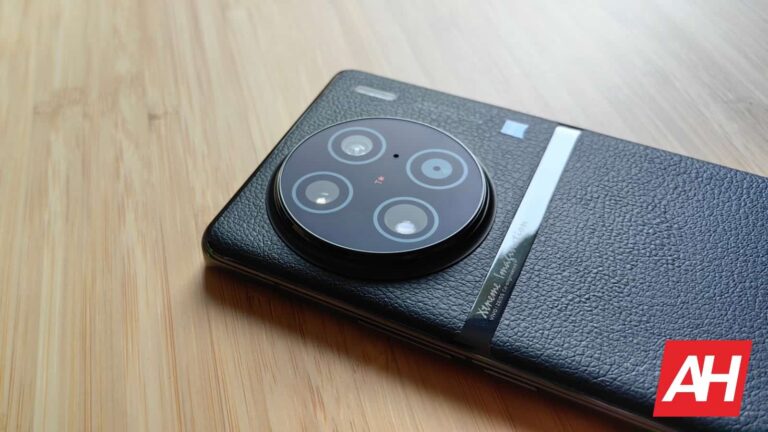
Now, we’re following rumors surrounding the T variant, and we have some pictures showing off two colors that this phone will come out with. There’s a black color and a light blue color. Looking at the pictures, the black color looks to come with a matte glass back. However, the blue one looks like it will come with a leather back. This gives it a bit of an elegant look.
On the back of the phone, we see a large square camera package. Regardless of the colorway, the back looks like it’s black metal. Also, we notice the Leica branding on the back, pointing to the camera being tuned by the German company.
As for the rumored specs of this phone, the Xiaomi 13T Pro could sport a 6.67-inch OLED display with a 144Hz refresh rate. As for the internals, we’re looking at the powerful MediaTek Dimensity 9200+. It could have 16GB of RAM and either 256GB or 512GB of storage.
As for the camera package, it looks like this phone will have a 50MP main camera with a 50MP telephoto camera, and a 13MP ultrawide camera. Up front, there could be a 20MP selfie camera.
Rounding out the specs, this phone could have a 5000mAh battery with blazing 120W charging and IP68 water and dust resistance. Rumor has it that this phone could come out as soon as next month.
Last fiscal quarter, Apple announced a drop in iPhone revenue. Going down to $39.67 billion in the quarter. Which is still pretty good, and I’m sure any other smartphone maker would love to have that kind of revenue for phones alone. But there’s a reason why that number is lower now, then when compared to a year earlier.
According to CIRP, which is a research firm, they found that the average retail price of the iPhone in the US was $948 in the third fiscal quarter compared to $988 in the previous quarter.
How can this be? Well, the iPhone 14 and 14 Plus made up about 36% of sales in the quarter. Whereas the year previous, saw the iPhone 13 and iPhone 13 Pro accounting for only 30% of sales in the US. So people are buying the “cheaper” iPhones. But that’s not the only reason.
iPhone buyers are opting to not upgrade their storage, and stick with the 128GB available at the entry-level price. Before this past quarter, the number of people that would upgrade to 256GB, 512GB or even 1TB was far higher. But starting in June, only about 30% of buyers started to upgrade their storage. Compared to 55% a year ago.
iPhone buyers are trying to save money in this recession
The cost of quite literally everything is going up. And those buying a new iPhone are doing what they can to spend less. And it seems for many, that includes not getting a storage upgrade. For a lot of people, 128GB of storage is going to be enough, so seeing this happen is not a big surprise. But keep in mind that it does cost you $300 to upgrade the iPhone 14 Pro from 128GB to 512GB. So it is quite a pricey upgrade.
So what does Apple need to do here? Well, they need to figure out why buyers are not opting for a higher storage variant. Maybe that rumored 2TB iPhone isn’t really needed. After all, the 1TB model is already $1499 (or $1599 if you get the Pro Max version).
Apple is rumored to be launching a higher starting storage for the Pro models this year. Starting at 256GB, which is to help justify the rumored price increase to $1,099 for the iPhone 15 Pro and $1,299 for the iPhone 15 Pro Max. Which could help fix the problem. But let’s get things straight. Apple is not in trouble, financially. They are also not hurting for money. $39.67 billion in revenue from a single product in just 3 months is not a bad thing.
No matter how many walls we raise and measures we take, hackers always find a way into our phones one way or another. That is exactly why it is important to keep your phone’s software up to date and why it is advised that you have some reputable antivirus software installed on it.
Unfortunately, researches have found a new type of Android malware that can “hide” itself even from the antivirus apps by using a new compression method for the Android Package or APK. Since the method these hackers are using is one that is unknown to the antivirus programs and the cybersecurity researchers, it cannot be read, therefore going completely past security as a regular app.
The folks at BleepingComputer state that this new method was first discovered by Joe Security, a firm that specializes in deep malware analysis for Windows, macOS, Linus, and of course Android. Joe Security shared its discovery on X (formerly Twitter) saying it has already tested various tools, all of which have failed.
There is good news!
The good news is that if you keep one of the basic prevention methods for avoiding Android malware apps you should be safe, at least for now. As it currently stands, none of the apps in which this new unknown APK compression method was discovered are on Google’s Play Store. In other words, if you don’t sideload apps on your Android phone you are very unlikely to have this type of malware.
That being said, following up on Joe Security’s findings, two other cybersecurity companies jumped in to delve deeper into this new danger. One of them called Zimperium, which is a member of the ‘App Defense Alliance,’ discovered that some APKs also use abnormally large filenames going above 256 bytes, causing analysis tools to crash.
The Huawei Watch 4 Prolaunched earlier this year, and we managed to get our hands on a review unit not long ago. After using the watch for about two weeks, I’m ready to share my thoughts on it. There’s actually a lot to talk about here, even though the biggest difference between previous models lies in the software department, not the hardware. That’s not to say the hardware is not great here, because it is, but we’ll get to that soon.
The Watch 4 Pro is Huawei’s most powerful smartwatch to date. It’s the most powerful watch in Huawei’s new Watch 4 series, and it’s trying to cater to both camps, actually. When I say both camps I mean regular smartwatch users who want a watch that looks classy, and sporty users that want a ton of fitness data on their wrist. Does it succeed in that? Well, let’s talk about it, shall we.
The Huawei Watch 4 and Watch 4 Pro do look basically identical, but… there’s a difference, of course. The Watch 4 Pro is slightly larger and thicker, while also being heavier. It does feature more premium materials, though. The Huawei Watch 4 Pro comes with a casing made out of titanium, not stainless steel. Also, on top of the display here lies “Spherical artificial sapphire glass”, which is not included on the regular model. Oh do I have thoughts on that glass, but we’ll talk more about that in the display section.
The watch is 5ATM rated
This watch is 5 ATM rated, so you can rest easy when you go swimming with it. There are two buttons on the right-hand side of the watch. The top one doubles as a rotating crown, and the experience of using it is great. It has great tactile feedback, and it’s well optimized for use on this particular watch. I prefer it over what the Huawei Watch Ultimate delivered, if I’m quite honest. The bottom button has a different shape, and there’s no way you’ll mix the two. They’re also angled differently. That button also has nice feedback.
It comes in three different variants
This watch actually comes in three variants. All three have the same built materials for the watch itself, and the watch is silver in two out of three iterations. The straps are different. The model we got has a titanium strap, like the watch case itself. That is the most expensive model. There are also models with a Blue Composite Strap and Dark Brown Leather Strap. The model with Blue Composite Strap also has a blue tint on the watch casing itself, while the other two models have a metallic silver casing. Do note that the watch weighs 65 grams without the strap. If you add a Titanium strap to it, it becomes quite hefty.
Huawei Watch 4 Pro Review: Display
The Huawei Watch 4 Pro has a 1.5-inch LTPO AMOLED panel on the front. That display has a resolution of 466 x 466, which comes down to 310 ppi. The fact this is an LTPO panel is a good thing, of course, as it allows the watch to tune down the refresh rate to save battery life. The display itself is really good. I’m used to that when it comes to Huawei watches. It’s more than sharp enough, the image is vivid, and the blacks are deep. The viewing angles are reasonably good considering there’s curved sapphire glass applied on top of it. That’s what I don’t like when it comes to this display, actually.
Sapphire glass protection is definitely a plus
The fact it’s sapphire glass is great, far from it. I haven’t had an issue at all, and I bumped it several times. There’s not a single scratch on it. That part is alright, the fact it’s curved, not so much. That glass is truly reflective, too reflective, in my opinion. When you’re outside, it makes the display less visible than on other Huawei watches I’ve tested in the last couple of years. It’s as if you’re looking at the display through a thick layer of glass, which is not the case. I, personally, was not a fan of this, but this glass does provide excellent protection, so… there you go.
Huawei Watch 4 Pro Review: Performance
I’m not sure what SoC Huawei used here, but the Kirin A1 has been the go-to processor for quite some time now. It’s possible it’s included here too, but regardless, the performance in general is great. Do note that I’m referring to general smoothness, opening apps, and so on. I did have a problem with the notifications side of things, which is something we’ll talk more about in the software section. Opening up apps, playing music, scrolling, and so on, everything is very smooth. Even multitasking, which is now a part of the watch, runs smoothly. That’s also something we’ll talk more about in the software section. As per usual when it comes to Huawei devices, lag is pretty much non-existent. Do note that eSIM functionality is also included here.
Huawei Watch 4 Pro Review: Software
The Huawei comes with HarmonyOS pre-installed. The thing is it comes with HarmonyOS 3.1, which is a considerable change compared to HarmonyOS 3.0. It’s the biggest change in quite some time, as far as HarmonyOS for wearables is concerned. Huawei changed up how the UI looks to a considerable degree. The notification cards now look different, and more polished, as they rely more on animations. You can now also use a keyboard to respond to messages. The quick toggles section also looks a bit different, as does the entire menu with shortcuts (screen to the left side of the home screen) aka Assistant TODAY. The company now also allows you to tag three shortcuts to the physical shortcut button on the right. Before, you could tag only one shortcut to it. Those are the most notable changes, though not all of them, of course.
I did experience issues with notifications
Almost every single change that Huawei made here is for the better, basically. It would be awesome if everything worked as intended, but I did have some issues with notifications. Unfortunately, those issues were considerable. First of all, the notifications were often late to sync with the phone, coming an hour later or something like that. On top of that, notifications that I’ve removed end up appearing for a second when I enter the notification section when swiping from the bottom up. I also experienced short-span screen freezing in that menu. Another notification-related problem comes down to the keyboard. 9 out of 10 times the messages were sent without a problem, but that 1 time they did not, and the watch didn’t inform me of that.
The keyboard is a great addition, but it needs polish
That keyboard that Huawei now allows us to use can be immensely useful for quick responses from your wrist. The thing is, it doesn’t work with all apps. It worked perfectly fine with Viber and Facebook Messenger, for example, but not with Google Messages. I don’t even get an option to use it with Google Messages, actually.
New watch faces are far nicer and more useful
Another HarmonyOS 3.1 change I wanted to go over has to do with watch faces. Huawei considerably upgraded the experience. They’re much more useful now, not only do they have hotspots for launching different menus, which is a feature many of you are used to, but we now have access to video watch faces, and those with interactive backgrounds. You can basically tap on the backgrounds of some watch faces to change them, or scroll the rotating crown in order to achieve a similar effect.
The most useful watch face I’ve found even allows me to know when an unread notification is present on the watch. A small icon appears on the watch face itself. I’ve been wanting to have access to that feature for a long time, so I’m glad it’s finally here. It would be great if we could include that on any watch face, though. I do hope Huawei will continue in that direction, and allow us to customize watch faces as we feel like. That would truly make the experience unique and great at the same time.
More changes are present in the UI, of course, but I went over the most important ones. Do note that I was using the latest software available at the time of the review, HarmonyOS 3.1.0.138. A new update is on the horizon, though, and has already been rolled out in China. It should arrive to the global variant in a couple of weeks. That is a rather large update, of around 600MB, and it will hopefully fix the notification situation. I’m not used to seeing such bugs on Huawei watches, so I was a bit surprised, but chances are Huawei will fix things rather fast, at least based on my past experiences with Huawei Watch models.
Huawei Watch 4 Pro Review: Health/Fitness
The Huawei Watch 4 Pro is well-equipped in the fitness/health department. It has a heart rate sensor, as you’d expect. In addition to that, it can also track your sleep, while it has a skin temperature sensor too. It can keep track of your blood oxygen levels, while ECG and arterial stiffness features have also been added here. Do note that you’ll need the Huawei Health app to use all of those features properly, but you can get all the data on your watch too, thanks to the Health Glance widget, which is immensely useful.
There is also an app called Health Glance included on the watch. All the health features mentioned here worked as you’d expect them to, well, most of them did, as we were unable to properly compare them all. The heart rate sensor was quite useful, and accurate, while sleep tracking was hit and miss, as it is on basically every smartwatch I’ve used. Do note that this watch cannot replace medical equipment, that goes for basically every smartwatch.
There are tons of workout modes pre-installed here, as we’re used to when it comes to Huawei smartwatches. Ranging from indoor and outdoor running to swimming, cycling, and more. One thing to note, the GPS worked fine during my run and cycling, but when I went on a hike, it had issues keeping up. Do note that this is not a watch for your ultimate adventures, but it does the job really well overall, in terms of fitness features.
Huawei Watch 4 Pro Review: Battery
There is a 780mAh battery included inside of this watch, and the battery life is really good. Now, don’t expect crazy battery life longevity, as some other Huawei watches offer, though. Compared to most of the competition, however, this is great. If you use most of the tracking features on the watch, but without AOD, you can get 4-6 days’ worth of battery life. In the second cycle, we turned off some health-tracking features we didn’t find useful, and still managed to squeeze out 4 days’ worth of battery life. If you, however, keep them on, along with AOD, and use eSIM, you’ll get closer to two days. That’s considerably less than some other Huawei watches, but still good overall.
Getting a full charge will take you between 90 & 100 minutes
It will take you somewhere between 90 and 100 minutes to fully charge this smartwatch, by using the included magnetic charger. This is not a small battery for a smartwatch, so that is to be expected.
Huawei Watch 4 Pro: Should you buy it?
Should you buy the Huawei Watch 4 Pro? Well, it all depends on what you’re looking for in a watch. Huawei smartwatches have always been my go-to on Android. I’m not looking for many apps for my smartwatches, but I do want great battery life and for the basics to work just right. That’s what Huawei was always able to provide, along with many health and fitness features. This time around, I spotted a series of bugs in the notification system, which was very frustrating, but I’m hoping that a fix is coming. Huawei managed to keep their watches relatively bug-free, so I’m hoping this will be fixed soon. The watch is quite capable in a number of ways, despite some shortcomings. It is quite pricey, though, so… think twice before you go for it.
You should buy the Huawei Watch 4 Pro if you:
– want a sturdy watch built from titanium – appreciate a sharp and vivid display on your watch – want plenty of health and fitness features – need a very good rotating bezel – need wireless magnetic charging – have been waiting for more UI changes on Huawei watches
You shouldn’t buy the Huawei Watch 4 Pro if you:
– want easy access to contactless payments – need plenty of well-known apps on your watch – go hiking often
Cynomi, the leading AI-powered virtual Chief Information Security Officer (vCISO) platform vendor for Managed Service Providers (MSPs), Managed Security Service Providers (MSSPs) and consulting firms, has published the results of its first annual report, “The State of the Virtual CISO 2023”. The report, conducted by Global Surveys on behalf of Cynomi, reveals critical insights into MSPs and MSSPs’ recent shift towards vCISO services.
The report’s key highlight is that the number of vCISO service providers is set to increase by 480% between now and the end of next year, from 19% to 86% of MSPs and MSSPs in North America. Of the current 19% that provide vCISO services, just one quarter offered vCISO services before 2022. This demonstrates the significant adoption trend over the last two years that shows no signs of slowing down.
Source: Cynomi
The frequency of cyberattacks is on the rise, and hackers are continually targeting smaller businesses. Despite this, most small and mid-size companies cannot afford to hire a dedicated security professional to safeguard their IT assets full-time. Instead, they are increasingly turning to vCISO services, offered by rising numbers of MSPs and MSSPs. These services give SMBs access to external cybersecurity experts at a fraction of the cost of hiring an in-house CISO.
Cynomi’s report, based on survey responses from 200 Directors, VPs and C-Suite executives at MSPs/MSSPs in the U.S. and Canada, highlights the growing SMB need for the broad cyber support vCISO services provide and how MSPs and MSSPs are moving quickly to respond to this demand. Of those not currently offering vCISO services, 84% have said they intend to do so by the end of 2024 and most of the others plan to do so at some point.
Indeed, just one percent of the 200 MSPs and MSSPs surveyed said they do not currently plan to offer vCISO services. Before 2022, only 5% of MSPs and MSSPs offered vCISO services.
Since then, the number of providers offering this service has grown consistently, with 8% in 2022, 28% in 2023, and a projected 45% in 2024 – further evidence of the segment’s accelerating momentum.
“Our inaugural report on the State of the Virtual CISO industry clearly shows that vCISO services are building strong momentum as one of the fastest-growing cybersecurity segments on offer,” said David Primor, co-founder and CEO of Cynomi. “More SMBs want this. The vast majority of MSPs and MSSPs will be offering vCISO services by the end of next year, and those that don’t risk being left behind.”
MSPs and MSSPs stated several reasons for their desire to offer vCISO services, with more than 40% of respondents anticipating increased revenue and higher margins and easy upsell of other cybersecurity services. By offering vCISO services, 33% of respondents also expect enhanced client engagement.
Many of these businesses also foresee difficulties along the way: 33% of them are concerned about a lack of skilled cybersecurity personnel, and 40% are concerned about limited internal security or compliance knowledge. However, vCISO platforms negate these concerns.
“Since we started offering vCISO services last year, we have helped many businesses understand and shore up their security posture in a very cost-effective way,” said Cliff Janzen, VP Security, rSolutions Corporation. “As a vCISO provider, we have become more involved with our customers’ strategic planning and reporting to their top management, while improving client engagement and satisfaction.
They’re reassured to know they can turn to us in all matters relating to their cybersecurity needs without breaking the bank. On our end, too, the costs were lower than anticipated; it was great to add these new services through a vCISO platform to be a force multiplier for our existing team.”
Cynomi has created a comprehensive and regularly updated directory of leading vCISO service providers for SMBs to find a trusted security partner. The directory provides thorough details on the specific services each vCISO provider offers and the technology platforms they use to guide and implement their security strategies.
As the leading vCISO platform provider for MSPs and MSSPs, Cynomi intends to conduct a recurring study on the growing momentum of the vCISO role each year. To view the full report:
About Cynomi
Cynomi’s AI-driven platform empowers MSSPs, MSPs, and consultancies to offer vCISO services to SMBs at scale and to provide them with proactive cyber resilience. Combining proprietary AI algorithms with CISO-level knowledge and expertise, Cynomi’s platform streamlines the vCISO’s work while automating manual time-consuming tasks like risk assessment, compliance readiness, cyber posture reporting, the creation of tailored security policies and remediation plans, as well as task management optimization.
Cynomi helps partners overcome the cybersecurity skill gap and scale their businesses, allowing them to offer new services, upsell, and increase revenues while reducing operational costs. Established in 2020 with the vision that every company deserves a CISO and with a channel-only approach, Cynomi now serves more than 50 partners worldwide.
To learn more about Cynomi’s solution for MSPs, MSSPs, and cyber consultancies, visit www.cynomi.com