Exchange Server security updates updated

0
[ad_1]

Microsoft Exchange Server administrators may have to install a re-released security patch

Microsoft has re-released the August 2023 Security Updates (SUs) for Exchange Server. The original release of the SUs, from August 8 2023, had a localization issue with Exchange Server running on a non-English Operating Systems (OSes) that caused Setup to stop unexpectedly, leaving Exchange services in a disabled state.

Exchange Online users are already protected from the vulnerabilities addressed by these Security Updates and do not need to take any action other than updating any Exchange servers or Exchange Management tools workstations in their environment.

This patch comes with a complicated table of recommended actions, in which version 1 is the original August 2023 SU and version 2 is the re-released August 2023 SU. Microsoft says:

  • If you successfully installed version 1 without problems, no further action is needed.
  • If you installed version 1 automatically without any problems or issues, version 2 will be downloaded automatically.
  • If the installation of version 1 failed, leaving Exchange services disabled, and you restarted the Exchange services without installing version 1 again, you should install version 2.
  • If the installation of version 1 failed, leaving Exchange services disabled, you restarted the Exchange services, and you used the workaround to manually create a “Network Service” account and then installed version 1, you should:
    • Uninstall version 1 and reboot.
    • Remove the manually created “Network Service” account (if it still exists).
    • Install version 2.

If version 1 was never installed, you can skip straight to version 2. Although there is no reason to suspect there are active exploits in the wild, we still recommend to do this as soon as possible to protect your environment. Exchange Servers are attractive targets for cybercriminals.

The vulnerability fixed by the security update, listed as CVE-2023-21709, required users to run a script in addition to installing the update. If you took the extra steps needed to address CVE-2023-21709 none of the actions above will undo them, so you do not have to repeat or undo them at any point. But again, if you haven’t done it yet, you should do so as soon as possible.


We don’t just report on vulnerabilities—we identify them, and prioritize action.

Cybersecurity risks should never spread beyond a headline. Keep vulnerabilities in tow by using Malwarebytes Vulnerability and Patch Management.


[ad_2]
Source link

Text Formatting for Google Keep Notes is rolling out

0
[ad_1]

Last year, we got the news that Google was looking to add some text formatting to its notetaking app Keep Notes. Not too long ago, we saw a leak of this functionality showing us that it’s pretty basic but useful. Now, according to Mishaal Rahman, the text formatting for Google Keep Notes is finally rolling out.

Google Keep Notes is a great notetaking platform if you want an integrated experience. You’re able to make text-based notes, but you’re also able to make hand-written notes and audio notes along with uploading pictures.

Since Keep Notes is tied to your Google account, you know that you’ll be able to access your notes from any device logged in with your Google account. If you’re an avid notetaker, then you should give this app a try.

Download Google Keep Notes

Text formatting is rolling you for Google Keep Notes

The text formatting is pretty basic with this app, but that shouldn’t be too much of an issue. Notetaking doesn’t really require complex formatting. You’re able to use two heading sizes if you want to have titles and sub-headings.

As for the paragraph text, you can use the basic formatting that you’d see in any word processor. You have the bold, italics, and underline options. In order to access the formatting, you’ll need to tap on the formatting button on the toolbar right above the keyboard.

All of the options will be laid out on the toolbar so you’ll be able to quickly access them. On the right side of the toolbar, you’ll see the “X” to close it.

So, if you need to take more in-depth notes using the app, you’ll have some formatting to make the experience better. Right now, this feature is still rolling out, so you might not see it right away. Make sure that your app is fully updated.


[ad_2]
Source link

Wi-Fi 6 vs Wi-Fi 6E vs Wi-Fi 7: Detailed comparison

0
[ad_1]

Just as Wi-Fi 6 and Wi-Fi 6E become more prevalent, there’s already a new Wi-Fi standard on the horizon. The final Wi-Fi 7 standard should be official in early 2024. In fact, devices with Wi-Fi 7 have already started hitting the market. You can buy a few routers with the latest Wi-Fi version today, and your options will grow exponentially next year. This puts many in a dilemma: whether to grab a router with Wi-Fi 6/6E or wait for Wi-Fi 7.

It’s a genuine concern for anyone looking to buy a new router over the next few months. Like all previous major upgrades, Wi-Fi 7 also brings faster data rates, lower latency, higher bandwidth for more simultaneous connections, improved security, and more improvements. However, all of this comes at a price. Routers with Wi-Fi 7 will naturally cost more than those with older Wi-Fi standards. Such routers are likely to see a price drop as well.

So is Wi-Fi 7 worth the extra money? How big of a difference does Wi-Fi 7 bring to your home internet experience over Wi-Fi 6 and Wi-Fi 6E? Let’s have a detailed look at the specifications, features, and speeds of the three Wi-Fi standards and find out.

Wi-Fi 6 and Wi-Fi 6E share most of the specifications

You might be aware that Wi-Fi standards have historically had rather confusing and complex technical names. While the industry has now settled on these simpler names, the classic technobabble is still around. Wi-Fi 6 and Wi-Fi 6E share the same name (802.11ax), while Wi-Fi 7 is 802.11be.

If you’re wondering why Wi-Fi 6 and Wi-Fi 6E have the same technical name, that’s because there aren’t many differences between the two. The latter is an extension of the former with support for a third 6GHz frequency band along with the existing 2.4GHz and 5GHz frequencies. It offers all the features of Wi-Fi 6 over this third band as well. The benefit is less congestion in crowded networks.

Everything else remains unchanged. Both Wi-Fi 6 and Wi-Fi 6E offer a 160MHz channel width to give you a maximum speed of 9.6Gbps. The addition of a 6GHz frequency to Wi-Fi 6E improves the speed of short-range connections. The peak theoretical speed is the same, though. They also boast the same 1024-QAM (quadrature amplitude modulation), which determines how data is packed and transmitted over these radio frequencies.

Higher QAM allows a higher amount of data to be transmitted wirelessly. Wi-Fi 5 operates at 256-QAM (6.9Gbps of peak speed). It struggles to stream higher-quality content such as 4K videos, which require quick transmission of a large amount of data. Wi-Fi 6 and Wi-Fi 6E also doubled spatial streams to 8 from 4 on Wi-Fi 5. This means you can simultaneously connect up to eight 8 devices on the same network without losing the speed.

However, you still only get a single access point. In other words, your device can only transmit data over one frequency (2.4/5/6GHz). Some devices offer a smart connection feature that automatically switches transmission to the best available frequency. Last but not least, both Wi-Fi 6 and Wi-Fi 6E offer WPA3 security, which is the latest Wi-Fi security standard.

Wi-Fi 7 upgrades almost everything

While Wi-Fi 6 and Wi-Fi 6E bring a few notable upgrades over Wi-Fi 5, the upcoming Wi-Fi standard changes the game at almost every level. Wi-Fi 7 upgrades almost everything over the current standards. Despite keeping the same three frequencies (higher frequency has a shorter range), the throughput speed increases several times over the previous generation.

The final Wi-Fi 7 standard is not official yet, so we don’t have a precise number. But the word is that we will get a theoretical peak speed to the north of 30Gbps, potentially topping 40Gbps. This is thanks to improvements in QAM, bandwidth, and more. Wi-Fi 7 quadruples amplitude modulation to 4096-QAM, so you can stream the highest-quality video without buffering.

Wi-Fi 7 also doubles the bandwidth to 320MHz for better efficiency. Spatial streams have been doubled as well (16), allowing more devices to enjoy the same Wi-Fi speed simultaneously. As we move to smart homes where everything is connected, this improvement will deliver high-speed connection to all of those devices. And should there be network congestion or latency, Wi-Fi 7 offers MLO (Multi-Link Operation).

In simpler terms, MLO means multiple access points. It enables connected devices to simultaneously send and receive data across different bands and channels, avoiding potential interference with other connections on the network. All of these improvements are enough to elevate your wireless internet experience to a new level. Whatever might be your need, Wi-Fi 7 will do a better job than Wi-Fi 6.

This is essentially why Wi-Fi 7 is also called 802.11be EHT, where EHT stands for Extremely High Throughput. The new Wi-Fi standard is touted to deliver lightning-fast speeds while simultaneously upgrading almost every other aspect of your wireless internet connection. You get reduced latency and lesser network congestion than before. All of this while improving the security of your connection and connected devices. Wi-Fi 7 is expected to bring WPA4 security.

So should you get a Wi-Fi 7 router?

The answer to this question isn’t a simple yes or no. While Wi-Fi 7 is a massive upgrade over Wi-Fi 6 and Wi-Fi 6E, you might be surprised to learn that most electronic devices in use today are limited to Wi-Fi 5. Some of the latest gadgets boast Wi-Fi 6 or Wi-Fi 6E, while there are very few with Wi-Fi 7.

Of course, Wi-Fi 7 is backward compatible, so your Wi-Fi 5 device will still connect to a Wi-Fi 7 router. However, you won’t get the benefits of the new standard. Wi-Fi 6E is already capable of delivering reliable internet connection to an average household with around 40 devices, including smartphones, TVs, watches, smart refrigerators, security cameras, doorbells, and other IoT (Internet of Things) gadgets.

Wi-Fi 7, on the other hand, is best-suitable for commercial spaces. Our never-ending quest for higher-quality content, digitalization, and more smart devices may eventually make Wi-Fi 6E incapable of handling it all, but as things stand, Wi-Fi 7 is a little overkill for an average household. If you need to buy a router right now, you can check out these best Wi-Fi routers.



[ad_2]
Source link

Musk’s brilliant new idea for X could get it kicked out of the App Store by Apple

0
[ad_1]

For some subscribers to X, the social media platform that used to be known as Twitter, there was something satisfying in blocking someone who was radically opposed to your way of thinking from showing up in your feed. For example, you might have felt compelled to block that one X subscriber who kept sending you a clip of the late Steve Jobs saying “Who wants a stylus? You have to get ’em, put ’em away, you lose ’em. Yuck! Nobody wants a stylus.”

Musk wants to prevent X users from blocking users from appearing on their timelines

Jobs made that comment to show the advantages of having a touchscreen display when he unveiled the first iPhone in 2007. And the guy who keeps sending you the clip only does so in response to your positive comments about the Moto G Stylus 5G which is your current daily driver. You’re tired of having this guy show up on your X feed every day so you block him.


Actually, I’m using this completely ridiculous example instead of the obvious political one so this doesn’t become a messy argument. The point I’m trying to make (and maybe I’m just treading water here), is that being able to block certain X users that you don’t want to hear from, while possibly close-minded, is still as American as apple pie. So what are we to make of the tweet that X owner Elon Musk posted today. Elon wrote that “Block is going to be removed as a ‘feature,’ except for DMs. It makes no sense.”

How Musk works is that he throws out a trial balloon on a tweet and checks the users’ pulse rates with their feedback before changing his mind. When he originally floated the idea of a low cap on the number of messages users would be allowed to read every day (unless they became a paid subscriber), Musk received negative feedback from X subscribers and then adjusted the numbers. Musk must love the idea of using crowdsourced data to run X.
But using crowdsourced data to run a company is not a sign of anything positive. If anything, it reveals that a weak and timid executive is running the show. The X News Daily tweeted, “OPINION: Removing Blocking altogether is going too far. While it can be used for purposes such as cutting off people who disagree with you politically, it has an important role to combat harassment, trolls and spam which are a significant problem for many users on the platform.”

App Store Guidelines might prevent Musk from disallowing X users to block others from their timelines

And already, X users are not happy with Musk’s new edict which means that the owner of X could be singing a new tune tomorrow. After all, at times, he has supported blocking other X users from his personal X account.

Interestingly, Apple’s App Store Guidelines might force Musk to stop his new plan to prevent users from blocking accounts. If X doesn’t follow Apple’s guidelines, X could be removed from the App Store. The App Store guidelines say that apps that offer “user-generated content” must have:


  • A method for filtering objectionable material from being posted to the app.
  • A mechanism to report offensive content and timely responses to concerns.
  • The ability to block abusive users from the service.
  • Published contact information so users can easily reach you.

Most likely Musk didn’t bother checking out what the App Store’s position would be on stripping X users of the current power they have to block others from their timelines. He is about to find out.


[ad_2]
Source link

hackers Exploit Google Drive, OneDrive to Hide Malicious Traffic

0
[ad_1]
Cyber Criminals hide malicious traffic

Threat actors are actively modifying their TTPs to counter the advanced security mechanisms and tools to accomplish their illicit goals for several malicious purposes.

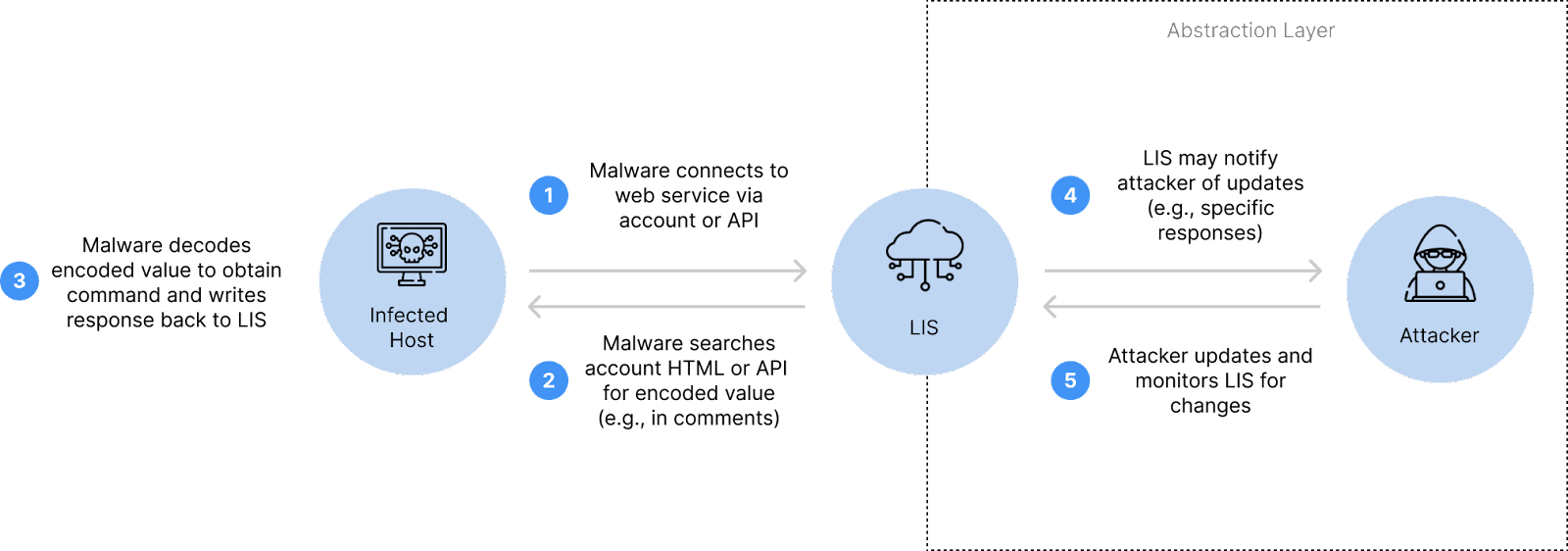
Hiding malicious traffic on cloud storage platforms is not an entirely new concept, and threat actors are shifting toward this concept.

Security researchers at Insikt recently identified that hackers actively exploit popular and trusted cloud platforms to hide malicious traffic.

Hiding Malicious Traffic

This strategy boosts data theft efficiency and weakens the security mechanisms and defense implemented. In the case of exploitation of this approach, the APT groups take the lead, and the less advanced groups take the second lead.

This type of exploitation by hackers shows how robust, adaptable defense strategies and security mechanisms are needed to mitigate such evolving attacks.

C2 infrastructure setup (Source – Insikt)

In the report shared with Cyber Security News, researchers noted that limited reporting delays the exact trend analysis. However, the following key things suggest a rising trend in LIS abuse:-

  • Well-known malware’s LIS (Legitimate Internet Services) abuse
  • New strain adoption
  • APT innovation

Besides this, shifting threat tactics reduce the IOC blocking and efficacy of the basic detections. But, the solution for an effective defense system, the following things have to be performed:-

  • Multi-method approach (network, file, log detection)
  • Proactive Internet service assessment
  • Attack simulations

Security analysts analyzed more than 400 malware families, and they identified the following data:- 

  • Use of LIS (25%)
  • Use of multiple LIS (68.5%)
  • Use of Infostealers (37%)

Most abused cloud platforms:-

Most abused messaging apps:-

For robust defense, properly learning about all the legitimate and malicious service usage is one of the key factors for comprehensive detection and security.

Recommendations

Here below, we have mentioned all the provided recommendations:-

  • Properly understand service contexts for lasting security.
  • Make sure to enhance nuanced detection. 
  • Implement TLS interception for visibility.
  • Make sure to flag the malicious LIS usage.
  • Deploy proactive threat-hunting techniques.

Keep informed about the latest Cyber Security News by following us on Google News, Linkedin, Twitter, and Facebook.


[ad_2]
Source link

Patch now! Citrix Sharefile joins the list of actively exploited file sharing software

0
[ad_1]

Citrix ShareFile can be exploited remotely by unauthenticated attackers.

The Cybersecurity and Infrastructure Security Agency (CISA) has added a vulnerability to its catalog of know exploited vulnerabilities, based on evidence of active exploitation. This means that Federal Civilian Executive Branch (FCEB) agencies need to remediate this vulnerability by September 6, 2023 to protect their networks against this active threat. We urge everyone else to take it seriously too and preferably not to wait untill the last moment.

According to the Citrix security advisory, this vulnerability affects all currently supported versions of customer-managed ShareFile storage zones controller before version 5.11.24. Customers using ShareFile-managed storage zones in the cloud do not need to take any action.

Citrix customers should update to the latest version of ShareFile storage zones controller and read the instructions for upgrading. As an extra precaution Citrix has blocked all customer-managed ShareFile storage zones controllers versions prior to the latest version (5.11.24). Customers will be able to reinstate the storage zones controller once the update to 5.11.24 is applied.

The Common Vulnerabilities and Exposures (CVE) database lists publicly disclosed computer security flaws. The vulnerability at hand is listed as CVE-2023-24489 and has a CVSS score of 9.1 out of 10. It is a cryptographic bug in Citrix ShareFile’s Storage Zones Controller, a .NET web application running under Internet Information Services (IIS). Due to errors in how ShareFile handles cryptographic operations, attackers can generate valid padding which enables unauthenticated attackers to upload arbitrary files, leading to remote code execution (RCE).

Several Proof of Concepts (PoCs) have been made available since the vulnerability was discovered in July.

This year, the Cl0p ransomware gang has made extensive use of vulnerabilities in file transfer software. In March it emerged from dormancy to become the most active gang in the world by exploiting a zero-day vulnerability in GoAnywhere MFT. After going quiet for a few months it repeated the trick in June and July as its widespread exploitation of a MOVEit Transfer zero-day vulnerability became clear.

With Cl0p seemingly looking for exactly this kind of vulnerability, it should be a no-brainer that this needs to be patched as soon as possible.

How to avoid ransomware

  • Block common forms of entry. Create a plan for patching vulnerabilities in internet-facing systems quickly; and disable or harden remote access like RDP and VPNs.
  • Prevent intrusions. Stop threats early before they can even infiltrate or infect your endpoints. Use endpoint security software that can prevent exploits and malware used to deliver ransomware.
  • Detect intrusions. Make it harder for intruders to operate inside your organization by segmenting networks and assigning access rights prudently. Use EDR or MDR to detect unusual activity before an attack occurs.
  • Stop malicious encryption. Deploy Endpoint Detection and Response software like Malwarebytes EDR that uses multiple different detection techniques to identify ransomware, and ransomware rollback to restore damaged system files.
  • Create offsite, offline backups. Keep backups offsite and offline, beyond the reach of attackers. Test them regularly to make sure you can restore essential business functions swiftly.
  • Don’t get attacked twice. Once you’ve isolated the outbreak and stopped the first attack, you must remove every trace of the attackers, their malware, their tools, and their methods of entry, to avoid being attacked again.

We don’t just report on vulnerabilities—we identify them, and prioritize action.

Cybersecurity risks should never spread beyond a headline. Keep vulnerabilities in tow by using Malwarebytes Vulnerability and Patch Management.


[ad_2]
Source link

The original Galaxy Z Fold is not dead yet, gets August update

0
[ad_1]

Four years ago, Samsung shook the world with the first consumer foldable phone, the Galaxy Z Fold. It was a train wreck, but it helped lead the foldable phone to be the flashy tour de force that it is today. If you still own your original Galaxy Z fold (first off, you deserve a gold medal for protecting your phone), you’re getting the August 2023 security patch.

With four generations between now and the first Galaxy Fold, it feels like a lifetime has passed. The brand, and the foldable phone in general, has changed so much since then, but it doesn’t mean that Samsung has washed its hands of the product. People still rock the first-gen Fold, and they’re still enjoying software updates from the company.

The original Galaxy Z Fold is getting the August update

Samsung has been issuing updates really early in the month, but since the original Galaxy Fold is pretty old, it’s getting its update a bit later. The device no longer gets major platform upgrades, but it’s still getting security updates.

Right now, the update has landed in four markets: France (version F900FXXS7HWG1), Hong (version F900FXXS7HWG1) Kong, The UK (version F907BXXS7HWG1), and Korea (version F907NKOU3IWH1). Other markets will follow as time goes on.

So, there’s not much you can expect from this update. Since it’s a routine security patch, the phone got some fixes for system vulnerabilities. These will patch spots in your software that could give bad actors access to your system. The patch fixes several Samsung Galaxy-specific issues along with issues present within Android in general. There aren’t going to be any new features or changes to the system.

If you’re looking forward to this update, then you should go to your settings, find the Software Update section and tap on the Download and install button at the bottom of the screen. If you don’t see the update just yet, you’ll want to wait a few days for the update to make its way to you.


[ad_2]
Source link

Amazon Music raises the price of its Unlimited subscription

0
[ad_1]

Subscription prices for streaming services have been on the rise recently, thanks in part due to the stringent economic conditions. Now, in line with these efforts, Amazon, for the second time this year, is raising the price of its Amazon Music Unlimited plans, affecting both Prime members and those on the family plan.

As first reported by The Hollywood Reporter, the company has quietly changed the familiar $9 monthly price tag for an individual plan to now $10, and for an annual commitment, it translates to about a shift from $89 to $99 per year. When talking about family plans, they will also cost a dollar more and rise from $16 to $17 per month or from $159 to $169 annually.

While new users will immediately be subject to these new rates, the company has granted existing users a grace period until September 19 before the revised prices take full effect. However, it remains uncertain whether Amazon intends to extend the benefits of these price hikes to the music creators who currently earn approximately $5000 per million streams.

The justification behind the price increase

Rebecca Silverstein, a spokesperson for the company, has confirmed these changes to The Verge and clarified that the price adjustment is motivated by a desire to enhance the quantity and quality of “content and features.” Although this explanation may seem underwhelming as the company isn’t introducing any groundbreaking features, it does reflect the ongoing industry trend of major streaming platforms raising their prices.

In a manner similar to Amazon, YouTube has also recently increased the cost of its Premium subscription from $12 to $14, mirroring price adjustments made by significant competitors such as Tidal, Apple Music, and Apple TV+. Furthermore, even Spotify, which has maintained a consistent subscription fee for years, recently elevated its subscription cost from $10 to $11.


[ad_2]
Source link

X is working on an ID verification process to combat impersonators

0
[ad_1]

The transition from Twitter to what is now called X has been a rocky one to say the least. One of the biggest fails that in this mess of a situation was the Twitter Blue verification feature, which resulted in numerous impersonation cases. In an effort to combat that, X has been spotted to be working on a new verification process.
This was first spotted by X user and app researcher Nima Owji, who shared a screenshot of the new verification. The screenshot shows us that Twitter will require users to upload a copy of their government-issued ID alongside a selfie.

Owji had first spotted hints of X working on this feature on none other than Elon Musk’s own X profile, where it said that “this account is ID verified,” with a an additional section having the rather quirky detail stating that it has been “verified since 3000 BCE.” Very much in billionaire’s sense of humor.

The new screenshot also reveals that this process should take around 5 minutes to complete. It is not X that is doing all the work here, though. Instead, as Engadget points out, the social media tech giant has joined forces with Au10tix (yeah, talk about creative naming), which is a company that specializes in identity intelligence.

Once submitted, both X and Au10tix will have access to the user’s information for 30 days. That includes all of your biometric data and the images of your ID. To add to its credibility, Au10tix states that it has also worked with other major companies such as Uber, Google, and PayPal.

ID verification should definitely help with putting a stop to all of the impersonation issues X users are having. The trouble is that the beloved by many platform is showing new fractures every other day, and it still feels like it could break at any minute.


[ad_2]
Source link

Attackers demand ransoms for stolen LinkedIn accounts

0
[ad_1]

LinkedIn support channels are being swamped by users that have been locked out of their accounts.

An ongoing campaign targeting LinkedIn accounts has led to victims losing control of their accounts, or being locked out following repeated login attempts.

Whether the attackers are using brute force methods or credential stuffing isn’t known, but because some victims are being being locked out following a great number of failed attempts, you might suspect brute force methods. It’s also not unthinkable that the attackers are using a combination of attack methods. Credential stuffing is a popular tactic of attempting to access online accounts using username-password combinations acquired from breached data. In a brute force attack attackers typically try a lot of common passwords.

Either way, victims are complaining about slow response times.

The campaign is targeting LinkedIn users all over the world. It pressures the victims that have lost control of their accounts into paying a ransom to avoid having their accounts deleted by the attackers.

victim asking for help: Someone has hacked my account and asking for money and no response from LinkedInelp

The X account of LinkedIn Help is swamped with similar messages

Victims are usually made aware of the take-over by a notification that the email address associated with their account has changed. In many of the examples we saw the new email address was linked to the Russian “rambler.ru” service. This does not necessarily mean the attack is originating from Russia, but it’s not unthinkable that the accounts will be used in disinformation campaigns. According to one victim we spoke to the attackers added fake accounts to their connections.

But the accounts could also be used to distribute malware, phishing campaigns, or other types of fraud. And if that’s the case, the deletion of the account sounds better to me than having your reputation damaged.

From complaints seen by BleepingComputer, LinkedIn support has not been helpful in recovering the breached accounts, with users just getting frustrated by the lack of response.

The LinkedIn Help account has pinned a message to say:

“Hey there! 👋 We’re experiencing an uptick in questions from our members, causing longer reply times. Rest assured, we’re doing our best to assist you! For account-specific inquiries, please DM us the details and your email address. We appreciate your patience. Thanks! 🙌”

The best defence against brute force attacks, credential stuffing, and other password attacks, is to set up two-step verification.

Setting up MFA for LinkedIn with Okta turned out to be painful because LinkedIn does not provide a QR code but a secret key which is so long that it’s hard to get it right the first, or second time. But since it’s safer than using the SMS 2FA, this is how it’s done:

  • Open Settings & Privacy
  • Under Sign in & security
  • Select Two-step verification
  • Set the option to on and you will be presented with two choices
  • Choose the Authenticator app method and follow the instructions from there

You will receive an email confirming the change that tells you: From now on, you can use your authenticator app to get a verification code whenever you want to sign in from a new device or browser.


Malwarebytes EDR and MDR removes all remnants of ransomware and prevents you from getting reinfected. Want to learn more about how we can help protect your business? Get a free trial below.

TRY NOW


[ad_2]
Source link