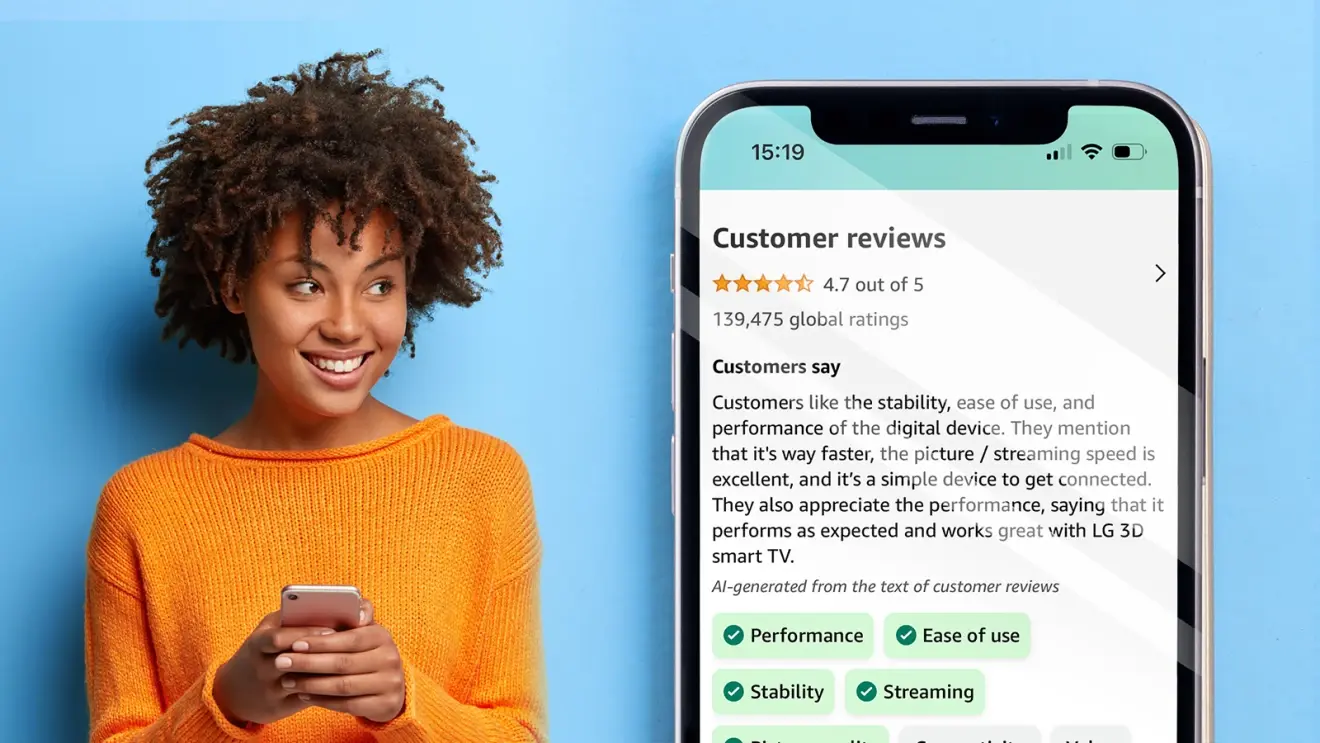
Shopping on Amazon has become a daily habit for some people, a go-to solution for last-minute gift seekers, and in general, a part of people’s lives. The Amazon mobile app has over 197 million monthly active users. If you’re one of them, you’re likely aware that product reviews often play a big role in whether you decide to make a purchase or not.Now, Amazon is rolling out an AI-generated review highlights feature (via Engadget), which, for now, will be available to “a subset of mobile shoppers in the U.S. across a broad selection of products.” The idea behind this new feature is to help customers quickly grasp the main themes from reviews, making it easier to decide if a product suits their needs.
Image Credit–Amazon
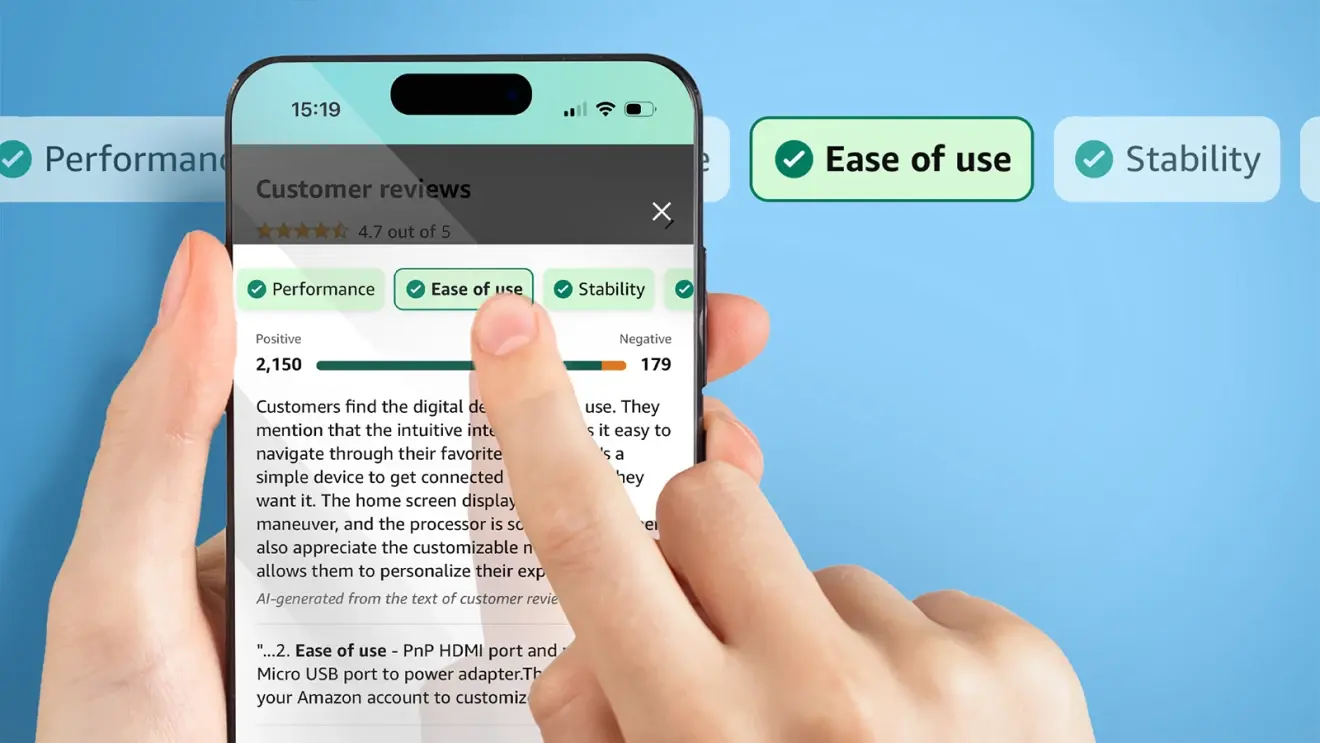
This move makes sense, given that many products rack up hundreds of reviews, and most of us don’t have the time to sift through all of them. These AI-generated review summaries also highlight key insights about the product and make it simpler for customers to find reviews that mention specific attributes. For instance, if you’re wondering how easy a product is to use, you can find reviews mentioning “ease of use” by tapping on that attribute within the review summaries.
Image Credit–Amazon
Amazon plans to expand this review highlights feature to more categories and customers in the next few months. However, one concern is whether AI can accurately distinguish between fake and genuine reviews, a problem that has plagued the platform for years. Amazon assures that it’s committed to investing significant resources to combat fake reviews.
The new AI-generated review highlights feature relies solely on Amazon’s reliable review collection from verified purchases. This ensures that customers can quickly grasp the community’s opinions without having to browse through all the reviews for a desired product.
A malware campaign targeting the Ministries of Foreign Affairs of NATO-aligned countries was recently discovered, which used PDF files masquerading as a German Embassy email. One of the PDF files consists of Duke malware which was previously linked with a Russian-state-sponsored cyber espionage group, APT29.
APT29 was attributed to Russia’s Foreign Intelligence Service (SVR) and uses Zulip, an open-source chat application for command and control. This evades and hides the malicious network traffic behind legitimate traffic.
PDF with HTML Smuggling
Further investigations revealed that these two PDF files that are received through email consist of an invitation lure that targets diplomatic entities. The themes used for these documents have contents related to “Farewell to Ambassador of Germany” and “Day of German Unity”.
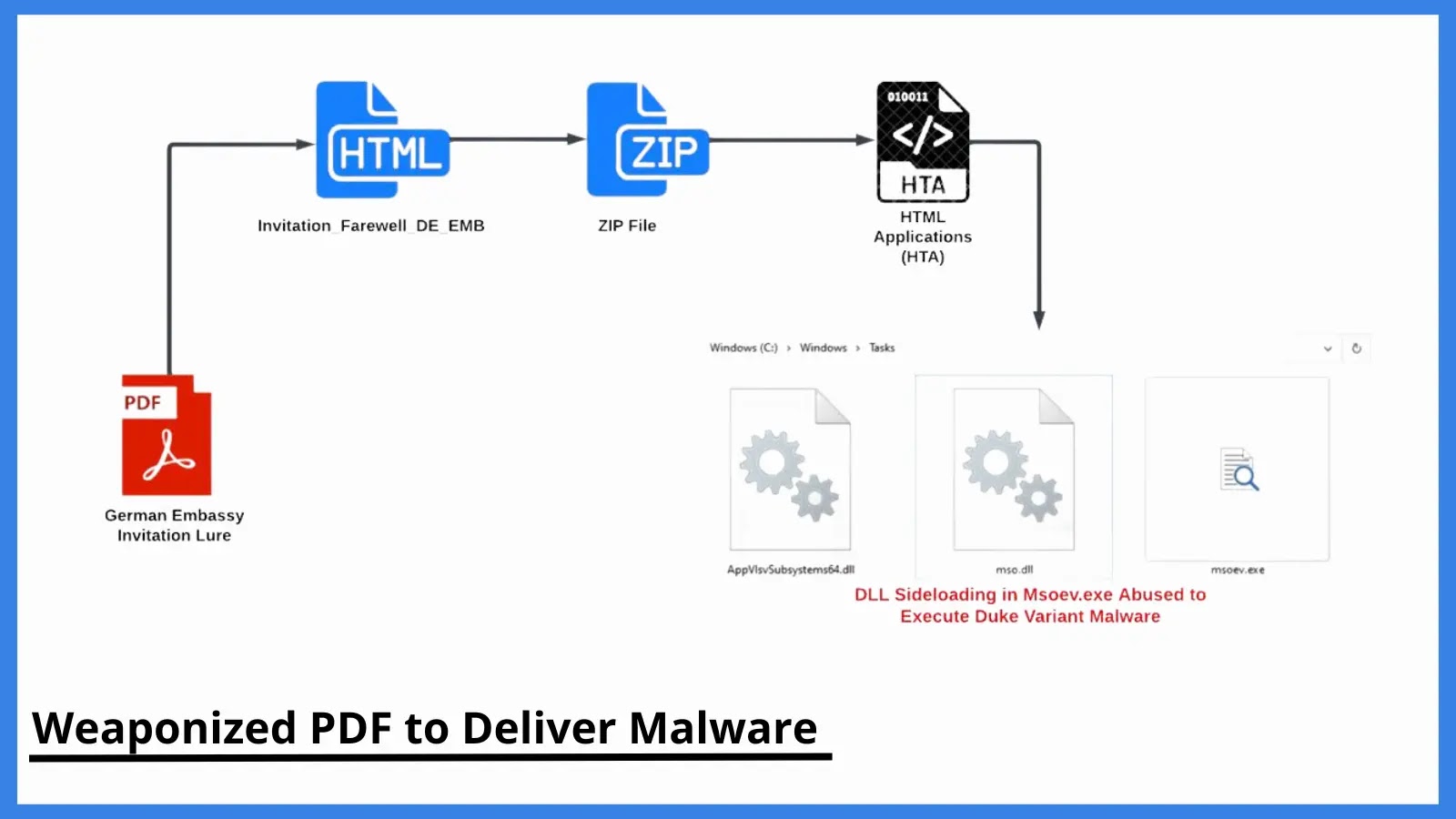
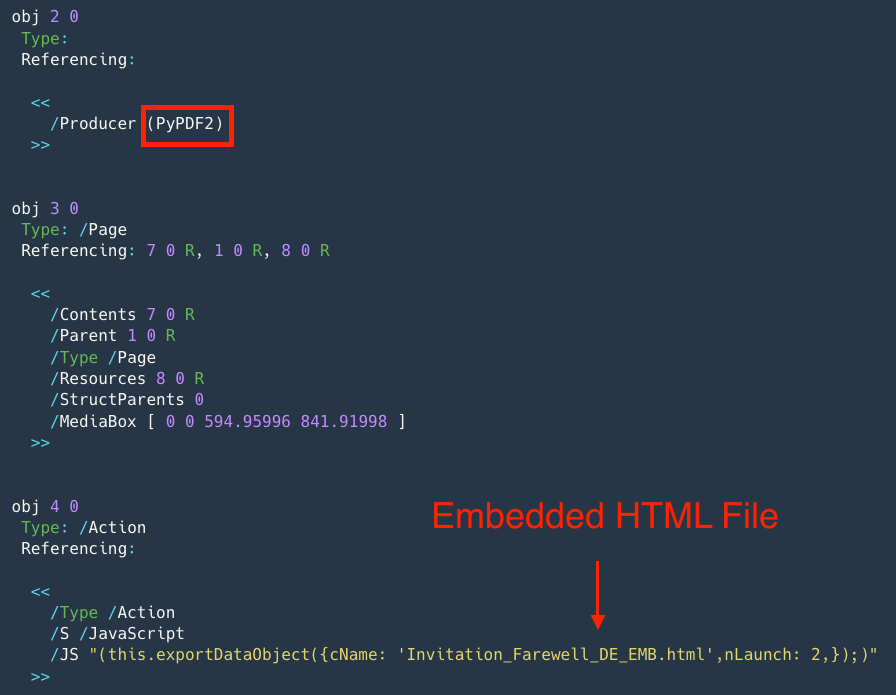
The first PDF document also contains an embedded JavaScript code for delivering the multi-staged payloads in HTML file format. When the victim opens the file after the warning from Adobe Acrobat, the code launches the malicious HTML file called “Invitation_Farewell_DE_EMB”.
Embedded HTML Smuggler (Source: EclecticIQ)
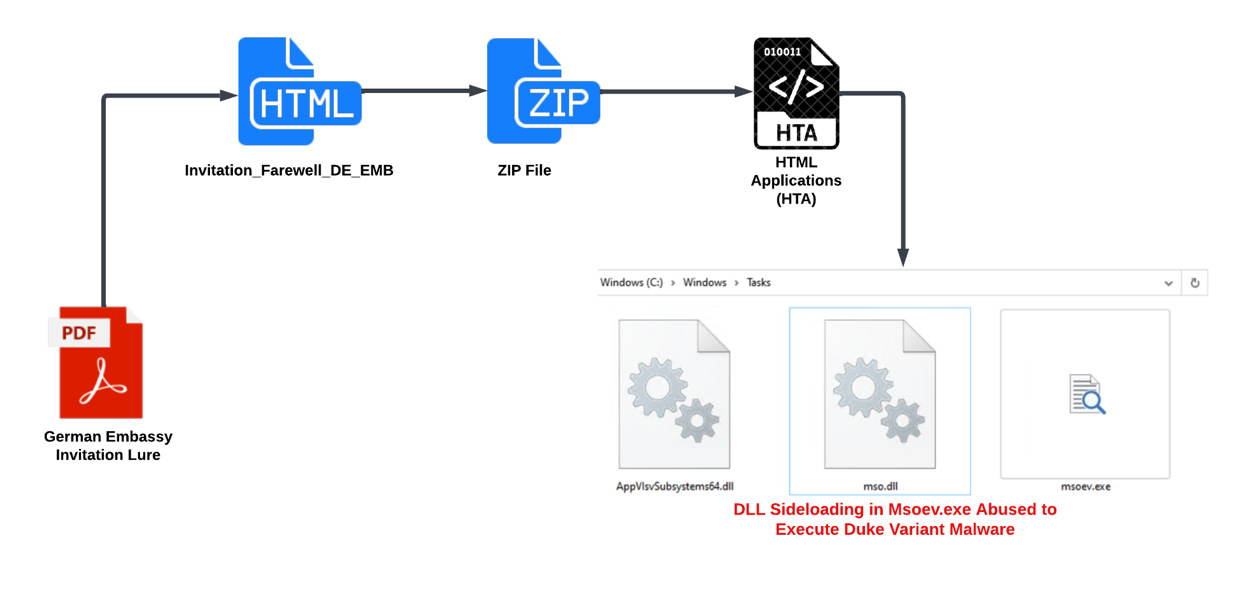
Through HTML Smuggling, a malicious HTML application file (HTA) is received, which is a widely used LOLBIN (Living Off the Land BINary). This HTA file acts as a standalone malware application that gets executed by the Windows HTA engine mshta.exe. This execution delivers the Duke malware variant.
Malware Delivery Stages (Source: EclecticIQ)
The other PDF document does not contain any malicious contents; instead, it sends a notification to the threat actor whether the attachment was opened.
DocumentFREE Webinar
API Attacks Have Increased by 400% – Understand the Fundamentals of Protecting Your APIs with a Positive Security Model – Register Now for a Free Webinar
DLL Sideloading Abused to Execute Duke Variant Malware
The HTA file drops three executables on the directory C:\Windows\Tasks for DLL sideloading. The three files include
AppVIsvSubsystems64.dll – This is a library loaded into msoev.exe for performing the execution without any failure.
Mso.dll – This is the Duke malware variant that is loaded into the msoev.exe through DLL Sideloading.
Msoev.exe – This is a signed Windows binary that automatically loads mso.dll and AppVIsvSubsystems64.dll when executed.
A complete report has been published, which provides detailed information on the malware campaign and the activities carried out.
Malwarebytes EDR and MDR removes all remnants of ransomware and prevents you from getting reinfected. Want to learn more about how we can help protect your business? Get a free trial below.
Google Keep Notes is, as its name suggests, a notetaking app. It’s mostly meant to jot down simple notes and drawings, but the company has been planning on expanding its capabilities. The anticipated text formatting feature for Google Keep Notes was shown off in a short video.
Google Keep Notes is a really good notetaking application as is. You’re able to create both text-based notes and make drawings as well. The application lets you make checklists and upload images as well. Along with the mobile app, you can also use the web app if you want to use it on your computer.
The Google Keep Notes text formatting feature was shown in a video
This feature has been in the works for some time. We first started seeing strings for this feature hidden in the app last year. Now, we’re getting our first glimpse of the feature. @AssembleDebug (via 9To5Google) posted a video to X showing off how this feature’s going to look.
The text formatting tool sits in the toolbar right above the keyboard. It’s right next to the text color button, and when you tap it, it’ll open up its own toolbar with the options. The options won’t be robust, at least, that’s how it seems at the moment.
You’ll be able to create two sizes of sub-heading, and those are H1 and H2. This is for if you want to separate your notes into headings.
The news of Google Keep getting text formatting support was spotted almost a year ago but there was no preview/video of the feature except some string and icons.
Next to those options, you have your basic bold, italics, and underline functions. These are self-explanatory, and you also have the strikethrough option. On the far right side of the toolbar, you’ll see a little “X” that will collapse the toolbar
Other than that, there aren’t any other formatting tools that you’ll be able to use. This is a bummer because you won’t be able to change the font of the text. That’d be a nice feature to have.
Microsoft Teams mobile app users around the world can now look forward to a fix they need. This fix has to do with how users of this mobile app join online meetings directly from their smartphones. Over the past few years, these users have had to endure the pain of joining online meetings in a rather complicated manner.
On mobile devices, users of Microsoft Teams had to endure joining through so many processes before joining a meeting. Unlike the experience on a Windows laptop or desktop, the Teams mobile app is no fun to use during meetings. The entire process on the mobile app is cumbersome and very tiring for most users.
However, Microsoft is working on an update that will fix the flaws users of their Teams mobile app face. Even though the update is still in its development phase, details on the benefits it’ll bring are already available. If you actively use the Microsoft Teams app, this article will inform you of the updates to expect and how they’d improve your experience.
Changes to come with the Microsoft Teams mobile app update aimed at fixing certain flaws
The major issue that this update aims to fix has to do with the joining of online meetings via the mobile app. In Microsoft’s recent 365 roadmap, the company outlines some of the changes that users of the Teams mobile app should expect. All major changes or improvements users will receive can be classified into three areas.
Each improvement will play a vital role in simplifying the meeting joining process via the Teams app. With the improvements, users of the Microsoft Teams mobile app will be able to join online meetings more freely. The update will also simplify the process of joining meetings online via the mobile app.
The first change Microsoft is bringing will help reduce the meeting joining process via the mobile app. This will improve speed while joining an online for users with smartphones and not Windows devices. To streamline this process, Microsoft will cut down on the steps necessary to join Teams meetings.
Microsoft will also give those joining the meetings without signing in to the 365 accounts preset and preview functions. This will enable them to set up their video and audio before entering the meeting room. Lastly, users with multiple accounts will now be able to switch from one account to another effortlessly.
These changes are all aimed at improving the overall user experience for Microsoft Teams mobile app users. The update to effect these changes will roll out for global users in October. Microsoft will provide this update to both Android and iOS users, enabling them to work more freely using their smartphones.
The FBI is warning mobile device users of a new technique used by cybercriminals to promote malicious beta versions of apps on popular app storefronts. When these apps are installed on mobile devices they are then used to steal personal information and more. The bad guys submit the apps to app stores as beta apps. In case you’re not familiar with the term, a beta app is one that is being tested by users who submit feedback about the app to its developers before the app is officially released.
The FBI says Beta apps are not subject to the rigorous testing that stable versions of an app must face
The report says that beta apps do not go through the same rigorous code review and instead, they are “superficially scrutinized” to make sure that they are not compromised. This allows the malicious code to remain hidden that is activated after the app is installed on a phone. This code performs hostile activity such as gaining access to financial accounts, stealing personal data, and completely taking over control of your phone.
The FBI warns mobile device owners about installing fake beta apps
The FBI says that these apps might appear legitimate and could have names and use images that are similar to popular apps. Cybercriminals might use phishing schemes (which are fake emails that look legitimate) or romance schemes to get in touch with the victim. The victim is then led by the criminals to install a fraudulent beta app on their phone by promising the victim a big financial reward.
Getting the victim to install the fake beta app is key to this scam. The FBI says it “is aware of fraud schemes wherein unidentified cyber criminals contact victims on dating and networking apps and direct them to download a fraudulent beta version of a mobile app, such as cryptocurrency exchanges, that enable theft. The victims enter legitimate account details into the app, sending money they believe will be invested in cryptocurrency, but instead, the victim funds are sent to the cybercriminals.”
The FBI says to watch out for these signs that you might have installed an app with malware
The FBI notice includes a list of red flags that can warn you that a malware-laden app is installed on your device. These red flags, some of which we’ve discussed in the past, include:
Mobile battery draining faster than usual.
Mobile device slowing down while processing a request.
Unauthorized apps installed without the user’s knowledge.
Persistent pop-up ads.
A high number of downloads with few or no reviews.
Apps that request access to permissions that have nothing to do with the advertised functionality.
Spelling or grammatical errors, vague or generic information, of a lack of details about the app’s functionality within the app description.
Pop-ups that looks like ads, system warnings, or reminders.
The FBI has some recommendations including one that we remind you of often. Before installing an app from a developer you don’t know, read the customer comments and look for complaints about rapid battery draining, or complaints about the phone getting too hot to the touch. Stay away from such apps. Do not reply to emails by sending personal financial information, and do not tap on any links sent to you via email.
Be aware of messages that are making you respond quickly by giving you a sense of urgency. These emails might threaten to turn off your wireless service or shut down your electric account if you don’t make a payment or respond right now. Check over website URLs for something that might not “smell right.” And make sure that your software is kept up-to-date, especially security updates. Restrict app permissions and uninstall apps you don’t use.
If you’ve been a victim of a malware-laden app, you can report the incident to the FBI by clicking this link and filling out the appropriate form.
Microsoft researchers discovered numerous vulnerabilities affecting Codesys PLC that risked power plants’ security with various attacks, such as shutdowns. Codesys released the patches for the flaws following the vulnerability disclosure.
Microsoft Reports Severe Codesys PLC Vulnerabilities
According to a recent report, Microsoft researcher Vladimir Tokarev identified fifteen security vulnerabilities affecting Codesys programmable logic controllers (PLC).
These vulnerabilities have received CVE numbers CVE-2022-47379 through CVE-2022-47393, all achieving a CVSS score of 8.8, leaving CVE-2022-47391 that appeared relatively less severe (CVSS 7.5). Exploiting these flaws could allow denial-of-service (DoS) attacks on vulnerable systems, which could eventually trigger power plant shutdowns. In addition, an attacker may achieve remote code execution, planting backdoors to steal data or meddle with devices’ operations.
However, Microsoft explained that exploiting these vulnerabilities in real-time required the attacker to have authenticated access and sound knowledge about the CODESYS V3 protocols and the structures using it.
The tech giant has listed and described these vulnerabilities in a separate post, besides sharing technical stuff on GitHub. In addition, they have demonstrated vulnerability exploitation in this video.
Codesys Patched The Flaws
Microsoft discovered the Codesys vulnerabilities while analyzing Schneider Electric Modicon TM251 and WAGO PFC200 PLCs. Following this discovery, Microsoft reported the vulnerabilities to Codesys in September 2022. In response, Codesys patched the vulnerabilities with the latest firmware releases.
Codesys boasts a wide range of users in its customer base looking for industrial automation, including energy automation, factory automation, process automation, and more. Hence, any vulnerabilities affecting Codesys PLC SDK mean a huge security risk to a large number of industries globally.
Now that the flaws have received the patches, users must ensure updating their systems with the latest updates to remain safe. Besides, Microsoft also advises users to disconnect critical devices, such as PLCs, from the internet, limit authorized access, and deploy segmentation with unique credentials for specified and authorized user access.
This week on Lock and Code, we speak with Heather Kelly about why how parents are using AirTags to give their kids “freedom.”
“Freedom” is a big word, and for many parents today, it’s a word that includes location tracking.
Across America, parents are snapping up Apple AirTags, the inexpensive location tracking devices that can help owners find lost luggage, misplaced keys, and—increasingly so—roving toddlers setting out on mini-adventures.
The parental fear right now, according to The Washington Post technology reporter Heather Kelly, is that “anybody who can walk, therefore can walk away.”
Parents wanting to know what their children are up to is nothing new. Before the advent of the Internet—and before the creation of search history—parents read through diaries. Before GPS location tracking, parents called the houses that their children were allegedly staying at. And before nearly every child had a smart phone that they could receive calls on, parents relied on a much simpler set of tools for coordination: Going to the mall, giving them a watch, and saying “Be at the food court at noon.”
But, as so much parental monitoring has moved to the digital sphere, there’s a new problem: Children become physically mobile far faster than they become responsible enough to own a mobile. Enter the AirTag: a small, convenient device for parents to affix to toddlers’ wrists, place into their backpacks, even sew into their clothes, as Kelly reported in her piece for The Washington Post.
In speaking with parents, families, and childcare experts, Kelly also uncovered an interesting dynamic. Parents, she reported, have started relying on Apple AirTags as a means to provide freedom, not restrictions, to their children.
Today, on the Lock and Code podcast with host David Ruiz, we speak with Kelly about why parents are using AirTags, how childcare experts are reacting to the recent trend, and whether the devices can actually provide a balm to increasingly stressed parents who may need a moment to sit back and relax. Or, as Kelly said:
“In the end, parents need to chill—and if this lets them chill, and if it doesn’t impact the kids too much, and it lets them go do silly things like jumping in some puddles with their friends or light, really inconsequential shoplifting, good for them.”
Sometimes, people want to get in early on great games. They can see them grow and change over time. This is why there are a ton of early-access games on the Play Store. These are games that are still in testing, and the developers are looking for players’ feedback. Here’s a list of some of the best early-access games you should be playing.
Since these are early-access games, just know that they might not be 100% compatible with your device. Also, you might not have a complete experience. These games are mostly for people who want to test their games out on a larger audience before making them officially available.
Also, it’s recommended that you take the time and offer some in-depth feedback about your experience. This will help the developers further improve the game before launch.
Little Corner Tea House
Download Cost: Free
In-App Cost: No
Size: 807
If you’ve dreamed of owning your own tea house, then this is the game for you. As the name implies, this is a game where you own and operate your own little corner tea house. You play as Hana, the owner, and she’s made a nice spot to sit, enjoy tea, and talk to friends.
This game is meant to give you the full experience of owning a tea shop. You’ll be serving up tea for people to order. While you’re serving them, you’re able to hear their interesting stories as they conversate.
However, Little Corner Tea House isn’t only about serving the tea; you’re also making it. The game will take you through the whole process of growing your own plants from seeding to harvesting. You’ll make your tea there in the shop. It’s a very relaxing and pleasant game to play.
Who’s looking to be the make-or-break factor in a relationship? Well, Lucid Lenses allows you to take on that role. You’ll see a beautiful story of romance unfold in front of your eyes, and you’ll see the two grow. However, each relationship has some difficult choices, and that’s where you come in.
You’ll make different choices throughout the game that will have an impact on the couple and whether or not they stay together. Both of these individuals also have their own growing careers, and you’ll decide if they stay together for the sake of the relationship or break up for the sake of their careers. No pressure!
In this game, there are several minigames that you’ll play along the way that will challenge your brains. These are a great way to break up any monotony and keep the story progressing.
This is the game for you if you’re looking for a boatload of hack n’ slash action. Evil Slasher will be familiar if you’re a fan of the Survivor games that are extremely popular nowadays. You’ll start each stage with some passive attacks activated, and you’ll need to survive through waves of enemies that are coming at you.
As you play, you’ll add different attacks and abilities to your character. These will help you to rip through more and more enemies. Gather weapons and upgrades, beat the levels, and defeat the bosses at the end of the stages to further upgrade your character.
Time for a game that’s simple and challenging. Pole Tad is a simple puzzle game that has a relaxing aesthetic. It seems like the kind of game that you’d play to shut off your brain, but it’s the opposite.
In Pole Tad, you’ll guide your little tadpole through different challenging levels. When you start the stage, you’ll see a bunch of bubbles, and your tadpole will be in one of them. What you want to do is guide your tadpole from bubble to bubble until you make it to the end. However, there are obstacles blocking the tadpole from getting to the bubbles.
There are spinning rings, other creatures, and other things getting in your way. As you guide your tadpole to the end, you’ll need to fling it toward the bubbles at the right time to avoid obstacles. It’s a simple yet challenging game.
This game mixes the action and the puzzle genres to create an all-around fun experience. In it, you play as a warrior who wakes up in the underworld. While he’s there, you’ll need to fight hordes of zombified warriors. The gameplay will mainly revolve around fighting them off.
The gameplay is similar to other action match-three games. Instead of moving tiles to match tiles, you’ll be dragging your finger and drawing a path between tiles of different colors. When you do that, your character will perform an attack to reflect that. There are six colors, each one is particularly strong against one and weak against another. It’s the same thing for the enemies and weapons.
What’s unique about this game is that you’re able to swipe across different colors. You can start drawing on one color and cross over to another color and start drawing through that one. You’ll attack one enemy with the first color and you’ll attack the next enemies with the other. As you progress, you’ll upgrade your weapons to do more damage.
If you enjoyed playing Where’s Waldo, then you’ll love this game. It’s as simple as they come, and it’s a nice game to pass the time. In this game, you’ll see picture-esque shots of bustling towns. In the town, there will be five little cats hidden among the chaos. When you finally find them, tap on them to collect them. There are a lot of levels to play, so you’ll know that there’s enough content to keep you busy.
This game is for those who want to test out their brains and their patience. Matexo is a puzzle game that incorporates a lot of math into the equation. Each round starts off with an assortment of lines. On one end of each line, you’ll see a circle, and at the other end, you’ll see a square. Both shapes will have a number. Finally, on the bottom of the screen, you’ll see an assortment of blocks with numbers on them. Also, each of these blocks will have a mathematical operation on them (Plus, Minus, Divide, and Multiply).
What you need to do is place the right blocks on the lines to make the number in the circle equal to the number in the square. So, if the circle has 5 and the square has 8, then you’ll want to look for a block that has +3. It seems simple enough, but the game will get trickier as you progress. When you start off, you’ll have only a few lines, and you’ll only need to place one block to solve them. However, later on, you’ll see more lines, and those lines will require more blocks.
Tiny Pixel Knight is a fun idle RPG game with some nice retro graphics and fast-paced gameplay. Since this is an idle game, it’s more passive than other RPGs. Your character will start off in one environment automatically fighting off enemies. As you defeat enemies, you’ll earn coins and EXP. You’ll use these to level up your character.
As you play, you’ll make your way to more locations with harder enemies. The trick is to keep your character leveled up to keep up with the stronger enemies. There’s a massive skill tree that you’ll unlock to help improve your character. Doing this will make way for more abilities and attacks. This is a fun and casual game you can play to pass the time.
This is a straightforward idle hack-and-slash game that has you taking on the role of powerful cat girl warriors. You’ll start off the game in an area where you’re instantly fighting off enemies. Your character will automatically attack the enemies. Once you defeat all of the enemies, you’ll move onto another environment with stronger enemies.
In order to keep from being defeated, you’ll need to upgrade your character, and that’s what most of the gameplay revolves around. Along with upgrading your character’s attributes like attack, defense, etc, you’ll also upgrade your equipment. As you play, you’ll be keeping your character up in several ways. It’s more of a challenge of keeping your character in top shape.
In the long-running race between MediaTek and Qualcomm, the former was always associated with lower performance. That’s not unfounded, as MediaTek’s chips lingered on the lower end of the performance spectrum for years, but it recently kicked things into high gear with its Dimensity chips. According to a new report from WCCFtech, the Dimensity 9300 will be the first mobile chip with LPDDR5T RAM.
MediaTek has made some great strides with its Dimensity line of processors. Right now, the most powerful MT chip on the market is the dimensity 9200. It’s going toe-to-toe with the Snapdragon 8 Gen 2 SoC, and it’s powering devices like the Oppo Find X6, Vivo X90 5G, and the Xiaomi 13T. So, you know that this chip has some serious power. Now, we’re all waiting on the next iteration.
The Dimensity 9300 will support LPDDR5T RAM
When it comes to RAM, a lot of people don’t really pay attention to the numbers (well, besides the number of gigabytes). However, we also need to think about other aspects of the RAM as well. Over the years, as the amount of RAM per device increased, the quality of the RAM itself improved.
Now, MediaTek is bringing the new standard of RAM to its upcoming chip, and this is something that it will have over the Qualcomm Snapdragon 8 Gen 3. The Dimensity 9300 will sport LPDDR5T RAM in its chips. It’s a newer standard than LPDDR5X, and it has a faster throughput speed. Throughput basically refers to how quickly the chip transfers data.
LPDDR5X RAM tops out at about 8.5Gbps, and LPDDR5T tops out at about 9.6Gbps. That’s about a 12% increase which is pretty big in the tech industry. It might not make a huge difference when it comes to day-to-day usage, but it still looks nice on paper.
MediaTek is slowly shedding its old image of being the budget chip maker. Devices like the Lenovo Tab Extreme and the OnePlus Pad use the Dimensity 9000, and those have great performance. Also, phones like the Tecno Camon 20 Premier use the Dimensity 8050, and that phone performs like a dream. Bringing this new standard of RAM is a sign that the company is taking the mobile chip industry seriously.