Alienware has officially announced the new Aurora R16 gaming PC, a desktop that evokes the company’s passion and prowess as a long-time gaming brand, and its commitment to evolving within the space. At the heart of this new PC is Alienware’s Legend 3 design language that debuted on its laptops at the start of this year.
The pillars of this design language are form, function, and quality. The “form” part of that ethos manifests in the ‘Stadium Loop.’ An oval shaped RGB light bar on the side of the chassis that is intended to draw your attention to it as the central aesthetic. It also surrounds the main air intake vent, which Alienware says is larger than it was on the Aurora R15 to allow for better airflow, helping to keep the PC cooler and quieter.
These were two things the company wanted to ensure were part of this latest iteration of the desktop. Because the cooler the PC is, the better it can perform and the longer it can perform at optimal levels. And of course, the quieter it is the less obtrusive it is during gaming. Alienware also designed it to have an optional clear side panel. The intention is that the side of the PC becomes the new focal point, while the rest of the case sort of blends into the background with its more minimal, simplistic look. That isn’t to say it isn’t still undeniably an Alienware PC.
A design overhaul is the cornerstone of the Alienware Aurora R16
Both the striking visual of the stadium loop and the larger air vent are two pieces of a whole. Making up Alienware’s overall vision of creating a PC with a more minimalist design that’s also efficient.
To help achieve that goal, a big change this year is the size. Alienware’s most powerful desktops aren’t exactly known for being small. On the contrary, they’re usually large, hulking machines. Taking up a large surface area of your desk like a miniature UFO. Alienware isn’t doing that this time around. The Aurora R16 sees a 40% decrease in the overall volume of the case compared to the Aurora R15. Giving it a smaller footprint than its predecessor. You’d think this would mean Alienware had to make some compromises on the internal space for hardware components.
However, Alienware says the internal volume is unchanged. So there’s just as much room for everything as before. And with the larger air intake vent, air can continue to flow freely.
An elite plug and play experience
As always, Alienware strives to provide a plug and play gaming experience with elite performance. Speaking of performance, the Aurora R16 promises to be an out of this world machine. Like all of Alienware’s products, the Aurora R16 has a variety of configuration options. Starting with the GPUs, Alienware will offer the Aurora R16 with options for an NVIDIA GeForce RTX 4070 12GB card, as well as the GeForce RTX 4070 Ti 12GB and the GeForce RTX 4080 16GB. There’s also a GeForce RTX 3050 8GB model, although this one and the RTX 4080 config will only be available in Asia and Europe at launch. The other two will be available globally though.
To pair with that you can get the Aurora R16 with a 12th Gen Intel Core i9F 12900F CPU and up to a 13th Gen Intel Core i9F 13900F CPU. As for storage, there’s options for both single drive and dual-drive bays. Starting at 512GB and going all the way up to two 4TB NVMe M.2 PCIe SSDs. RAM meanwhile starts at 16GB and goes up to 64GB.
The Aurora R16 launches today at a starting price of $1,749.99 for the RTX 4070 model with a 13th Gen Intel Core i7F 13700F CPU.
Creators are set to benefit from YouTube Shorts’ new tools that are rolling out for usage. These tools will help simplify how creators on the video-sharing platform work. It’d also help them explore their creative side and discover more ways to continue bringing a smile of satisfaction to the faces of their subscribers and viewers.
With over 50 million views daily, it’s no argument that YouTube Shorts pulls up a ton of views. Ever since its launch, YouTube has kept on adding a ton of features and tools for both viewers and creators. Now they are turning their attention to creators and making their jobs a bit easier for them.
The new tools will help creators engage with their viewers as well as collaborate with other creators. Creators will also be able to stream content live using Shorts and add Q&A stickers to their videos. If you are a creator of YouTube Shorts, here are the details you need to know regarding these new tools.
Details on the new YouTube Shorts new tools to improve creators’ experience
In total, there are four new features that creators can benefit from in YouTube Shorts. Each of these features helps creators to explore their creativity in different ways. Some might argue that these new tools are just rip-offs from TikTok and Instagram Reels, which are Short’s direct competitors.
One of these new features is the ability to share live videos via Shorts feeds. Creators will find this new tool very useful while sharing what they are doing at the moment. This will also mean that creators will get the opportunity to interact with their viewers in real-time.
Next on the list is the ability to collaborate with other creators in creating great content. This means that creators will be able to use the videos of others as the background on theirs. The Remix button is also getting some more tools to enable creators to make videos using the sounds from other videos on the video-sharing platform.
With this Remix tool, creators can also save certain sounds for usage at a later time. Interactive stickers are also part of the YouTube Shorts new tools that are coming to creators. These stickers might be Q&A to help draw out the minds of their viewers and audience.
Creators will be able to step up their game with the use of these new tools. Audiences will also benefit from these new features as they’d get to see more content styles from their best creators. Some of these new features are already rolling out to creators in certain parts of the world.
Ivanti has issued a patch to address a second critical zero-day vulnerability that is under active attack. The vulnerability is said to be used in combination with the first vulnerability we discussed some days ago.
The Cybersecurity and Infrastructure Security Agency (CISA) has added the new vulnerability to its Known Exploited Vulnerabilities Catalog, based on evidence of active exploitation since at least April of 2023. This means all Federal Civilian Executive Branch (FCEB) agencies must remediate this vulnerability by August 21, 2023 to protect their networks against active threats.
Thousands of large organizations, including governments and those providing critical infrastructure, use Ivanti Endpoint Manager Mobile (EPMM). CISA and the Norwegian National Cyber Security Centre (NCSC-NO) have released a joint Cybersecurity Advisory (CSA) about the threat actors that are exploiting the Ivanti EPMM vulnerabilities.
The Common Vulnerabilities and Exposures (CVE) database lists publicly disclosed computer security flaws. The CVE patched in the latest updates is CVE-2023-35081. A remote arbitrary file write vulnerability in Ivanti EPMM (formerly known as MobileIron Core) with a CVSS score of 7.2 out of 10.
Further on, Ivanti explains that CVE-2023-35081 enables an authenticated administrator to perform arbitrary file writes to the EPMM server. Chained with with CVE-2023-35078 to bypass administrator authentication and access-control lists (ACLs) restrictions, it allows an attacker to create, modify, or delete files on a victim’s system remotely.
Successful exploitation can be used to write malicious files to the appliance, ultimately allowing a malicious actor to execute operating system (OS) commands on the appliance as the Tomcat user.
Apache Tomcat is a popular open source web server and servlet container for Java code. By adding files to a running Apache Tomcat instance an external actor is able to run malicious java bytecode on the affected servers.
EPMM users are advised to upgrade supported versions of EPMM with patch releases (11.8.1.2, 11.9.1.2, and 11.10.0.3) from system manager portal. Ivanti is urging users of unsupported versions to upgrade to the latest version of EPMM to ensure they have the latest security and stability fixes. More information about upgrading can be found in the 11.x release notes.
We don’t just report on vulnerabilities—we identify them, and prioritize action.
The Samsung Galaxy Tab S9 Ultra is the most powerful Galaxy tablet on the market today. It’s also the most expensive tablet, and if you’re using it, you’ll want to make sure that it’s completely protected from accidental drops. So, you want to get a case for this tablet. Here’s a list of some of the best cases you can get for the Galaxy Tab S9 Ultra.
This will run down different cases that will fit the device. They will either be very thick and heavy or slim and light. The list covers a variety of cases, so you should hopefully be able to find the perfect case for your tablet.
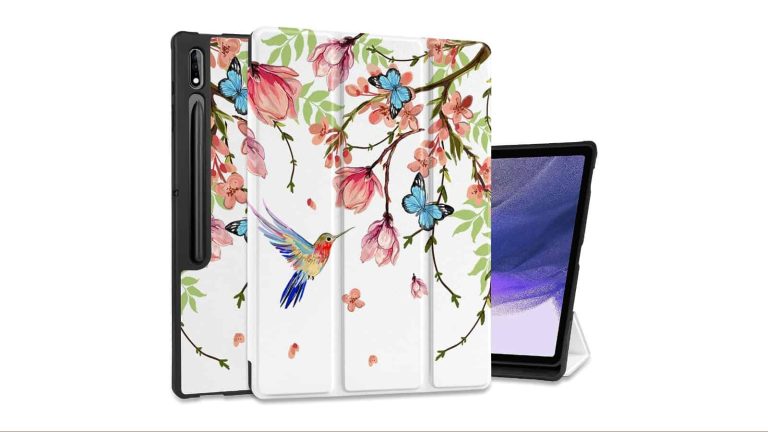
This case is for people who value both fashion and function. The main thing about this case is the large variety of designs that it comes with. This is a folio case that has neat and interesting designs printed on the outside. Currently, there are 20 designs for you to choose from. These include birds, flowers, hedgehogs, and more.
While this is a very adorable case, it also protects your device. The internal frame of this case is made from a sturdy TP plastic material. You will lock your tablet into place, so there’s no chance of it slipping out. It will keep the tablet protected in the case of a fall.
Sometimes, you want a case for your tablet, but you don’t have too much room in your bag to accommodate it. This is where thinner and lighter cases come into play. This case will cling tightly to your tablet, and it will not take up too much room in a bag. This is great for people who like to pack and travel light.
While this case is thinner and lighter, it can still keep your tablet protected from drops. It’s made from a sturdy outer layer of PC plastic. This will absorb the shock in the case of a fall. There’s an inner layer of a resilient PCU material. It’s arranged in a honeycomb pattern, and it clings to your device. These two layers work in tandem to keep your device safe.
If you’re looking for a tablet case with as much functionality as a Swiss army knife, then this one is the one for you. This is a sturdy leather case that will keep your device fully protected. It comes in eight different colors. These colors are Coffee, Black, Dark Brown, Midnight Green, Navy, Purple, Red, and Rose Gold.
This case will not only protect your tablet, but it does much more. For starters, it has multiple pockets on the inside. These Pockets will hold items such as your credit cards and money. There’s also a section that could hold your checkbooks. While there is a cutout to accommodate the magnetic strip holding your S Pen, there’s also a separate pouch to put your S Pen in. This means that you won’t have to worry about your S Pen flying off during a fall.
Last, but not least, you can flip the case closed and carry it as though you’re carrying a purse. There’s an arm strap on the side of the case. This tablet case offers a ton of functionality.
Techcircle Folio Case for Samsung Galaxy Tab S9 Ultra
This is a stylish case that will make your Galaxy Tab look amazing. This case actually comes in five different colors. These are Black, Brown, Pink, Purple, and Red. While the colors change, they also have a beautiful intricate flower design on the front cover.
The front cover is made from a tough and synthetic leather material that will keep your tablet from getting damaged and falling. This is important, as they’re not sacrificing protection for a pretty design. Also, this tablet case has a non-slip design that will keep it from falling off tables.
This case also doubles as a wallet. It has several card-holding slots, along with a pin holder. So, you can use this tablet case as a secondary wallet.
This tablet case comes with several wild and beautiful designs to give your tablet a new look. This folio case has different designs printed on the front. These designs include a galactic design, the ocean, trees, and rainbows. The availability of the designs will vary.
Just like most of the cases on this list, it provides ample protection from falls. The front of this tablet case is made of lightweight yet premium PU leather. It also has a soft interior. This dual-layer protection helps keep the tablet safe from drops. So, this will be a great tablet to use if you don’t have too much space in your bag for a bulky case. You’re able to slip it into just about any case or bag you need to.
This is a simple and straightforward tablet case for the Galaxy Tab S9 Ultra. It comes with a sturdy leather outer layer that will keep the tablet shielded from drops. There’s an inner layer made of a tough plastic material that will protect the edges of the tablet from falls. The thing is, with a tablet this big, it’s much easier to crack the screen.
This tablet case has a very simple and elegant design. It’s almost minimalist. However, there are additional designs that will give your tablet some flare. One design is Starry Night by Vincent van Gogh, another design shows the Eiffel Tower and another one shows flowers on your blue background. These designs are for people who don’t want a more minimalist look.
Since this is a trifold case, you can prop up your tablet at different angles. The 65° angle is perfect if you are looking to draw on it. Also, the 30° angle is good for people who are looking to work with a keyboard.
This is a tablet case that comes straight from Samsung itself. It’s the official case for this device, and it’s made from high-quality materials. This is a premium tablet, so you can expect a premium case to go along with it. It is a thin and lightweight case that hugs the tablet closely.
On the bottom of the case, there is a kickstand that swings out from the back. This will hold the tablet up at the optimal angle to do some writing. Being designed for the Galaxy Tab S9 Ultra, you know that it’s going to fit it perfectly. Also, there are two colors to choose from. There is a black color and a white color.
In addition to introducing some search-related changes to Chrome for Android, Google also redesigned Chrome downloads on the web. This change is coming to Chrome for desktop, regardless of the platform.
Google Chrome Senior Product Manager, Jasika Bawa, says that this needed to be done, as the legacy Chrome download experience “had its problems”, despite the fact it served customers well.
He says that the legacy setup “occupied precious pixels at the bottom of the screen”, and “didn’t go away automatically”. On top of that, he explained that the legacy setup was no longer “modern, interactive, and consistent”.
Google is pushing out a redesigned Chrome downloads experience on the web
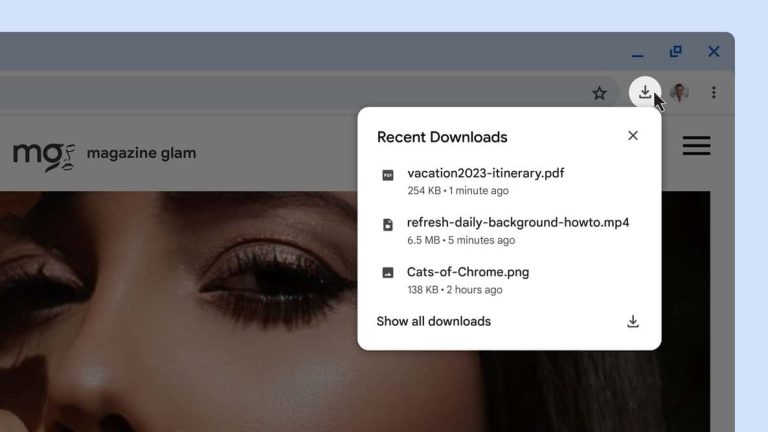
Now, the new download tray is available to the right of the Chrome address bar. This will replace the downloads experience that was available at the bottom too. When a download is in progress, you’ll see an animated ring that’ll help you monitor it. A toast message will open once the download is finished, and it’ll close itself if you don’t interact with it. That way, it won’t bother you for long if you don’t plan on acting on it immediately.
In the new download tray, you can now see a list of all your downloads from the past 24 hours. That goes for any browser window, by the way, not just the one you used to kick off those downloads.
You’ll also see some in-line options in that tray, such as an option to open the folder a download is in, cancel a download, retry a download, and so on.
Chrome will continue to keep you safe while you browse online
Google also highlighted that Chrome will continue to provide “clear warning signs of potential malware or viruses and block harmful downloads”. The company will even provide you with more info if that happens now, more than before.
This seems to be a nice change on Google’s part, as the downloads tray really does stay out of the way, and seems to be more streamlined now. The redesigned UI is rolling out as we speak.
The United States Director of the Cybersecurity and Infrastructure Security Agency (CISA) released a warning on Friday about the active exploitation of Ivanti EPMM (formerly MobileIron Core) Vulnerabilities.
CVE-2023-35078 is a critical vulnerability affecting Ivanti Endpoint Manager Mobile (EPMM). The vulnerability allows threat actors to access personally identifiable information (PII) and gain the ability to make configuration changes on compromised systems.
CVE-2023-35081 enables an authenticated administrator to perform arbitrary file writes to the EPMM server. This vulnerability can be used in conjunction with CVE-2023-35078.
Ivanti’s EPMM solution is a widely used mobile management software engine that enables IT departments to set policies for mobile devices, applications, and content.
It counts government agencies around the world among its users, including a number in the U.S.
In July 2023, the Norwegian National Cyber Security Centre (NCSC-NO) became aware of Advanced persistent threat (APT) actors exploiting a zero-day vulnerability in Ivanti Endpoint Manager (EPMM), to target a Norwegian government network.
Ivanti confirmed that the threat actors exploited CVE-2023-35078 and released a patch on July 23, 2023.
Ivanti later determined actors could use CVE-2023-35078 in conjunction with another vulnerability, CVE-2023-35081, and released a patch for the second vulnerability on July 28, 2023.
EPMM is used widely across multiple governments, including in the U.S. Security platform Shodan showed dozens of agencies in the U.S. and Europe potentially exposed to the issue among thousands of other potential victims.
Exploitation of the Flaw
The APT actors exploited CVE-2023-35078 in public-facing Ivanti EPMM appliances since at least April 2023 in attacks directed against Norwegian entities, including a government network.
Mobile device management (MDM) systems are attractive targets for threat actors as they provide elevated access to thousands of mobile devices, and APT actors have exploited a previous MobileIron vulnerability.
CVE-2023-35078 is a critical authentication bypass [CWE-288] vulnerability affecting Ivanti Endpoint Manager Mobile (EPMM). The vulnerability allows unauthenticated access to specific application programming interface (API) paths.
Threat actors with access to these API paths can access PII such as names, phone numbers, and other mobile device details of users on the vulnerable system; make configuration changes to vulnerable systems; push new packages to mobile endpoints; and access Global Positioning System (GPS) data if enabled.
According to Ivanti, this vulnerability is a path traversal flaw with a CVSS v3 rating of 7.2. It permits an attacker to write any files onto the appliance.
CISA and NCSC-NO are concerned about the potential for widespread exploitation of both vulnerabilities in government and private sector networks because MDM systems provide elevated access to thousands of mobile devices.
Threat actors, including APT actors, have previously exploited a MobileIron vulnerability.
CISA recommends administrators use the CISA-developed nuclei template to determine the Ivanti EPMM vulnerabilities.
CISA and NCSC-NO recommend organizations Upgrade Ivanti EPMM versions to the latest version as soon as possible and to Treat MDM systems as high-value assets (HVAs) with additional restrictions and monitoring.
Also, CISA and NCSC-NO encourage organizations to hunt for malicious activity using the detection guidance in this Cybersecurity Advisory (CSA).
Minecraft players interested in modding are at risk from a remote code execution vulnerability targeting both players and servers.
Minecraft players interested in modding are potentially at risk of compromise. A Remote Code Execution (RCE) vulnerability in certain Minecraft mods allows for malicious commands on both servers and clients. The vulnerability, named BleedingPipe, allows attackers to take over a targeted server.
Minecraft modding is immensely popular, with a potentially huge number of servers in the wild doing their own thing. There’s a custom game type or world state for everybody.
The problem is that so many of them have been set up in a way which allows for this vulnerability to take hold. As Bleeping Computer notes, the compromised servers are only the first link in the chain. With the server taken over, attackers can then turn their attention to the players inhabiting those servers.
They exploit the issues residing in the mods used by the people playing, which permits them to make malicious installations on their PCs. Given that Minecraft has around 140 million monthly active players, this isn’t great news. While a lot of them are playing on console and so not susceptible to Windows malware, a huge modding base exists in PC land.
BleedingPipe is an exploit being used in the wild allowing FULL remote code execution on clients and servers running popular Minecraft mods on 1.7.10/1.12.2 Forge (other versions could also be affected), alongside some other mods.
This is a vulnerability in mods using unsafe deserialization code, not in Forge itself.
The article goes on to list some of the affected mods, and it’s worth noting that this list is by no means exhaustive:
EnderCore (dependency of EnderIO). The GT New Horizons fork has been fixed, and the original has been as well, but EnderIO’s minimum versions has not yet been updated.
LogisticsPipes. This has once again been fixed in GT New Horizons version as of July 25, 2023, and the original is fixed since version 0.10.0.71. MC 1.12 versions are not affected. If you have played on a server with a vulnerable version, assume you are infected.
The 1.7-1.12 versions of BDLib. Once again, GTNH fork has this fixed, but the developer of the original currently does not plan to fix it. Assume you are infected if you have played on a server and are not on the GTNH fork.
Smart Moving 1.12
Brazier
DankNull
Gadomancy
The article also claims a similar issue was first reported back in 2022. After having been addressed, this problem has resurfaced in various forms and impacting several mods along the way. The individuals behind the attack have “scanned all Minecraft servers on the IPv4 address space to mass-exploit vulnerable servers”. At time of writing, nobody knows the payload content being sent to potentially vulnerable servers.
Server admins are advised to check for suspicious files, along with updating or removing vulnerable mods. For players, the news isn’t particularly reassuring:
As a player if you don’t play on servers, you are not affected.
Essentially, don’t play or run various scans after a Minecraft session and hope for the best. There is also the option of installing a mod called PipeBlocker on forge servers and clients, which protects against the BleedingPipe vulnerability.
Abusing game servers is an occasionally used technique to infect as many people as possible. Something similar happened this past week when Call of Duty servers were taken offline due to a similar approach. The smash hit DayZ game was famously attacked back in 2014 in much the same fashion.
Connecting to other devices or servers is always a potential risk, and where modding is thrown into the mix you can never be 100% sure that everything is as it should be. Stay safe, Minecraft fans!
We don’t just report on threats—we remove them
Cybersecurity risks should never spread beyond a headline. Keep threats off your devices by downloading Malwarebytes today.
Samsung announced its new clamshell foldable quite recently. The Galaxy Z Flip 5 arrived, but it has some competition in the market. We’ve already compared the phone to the Motorola Razr+, and now it’s time to compare it to OPPO’s latest clamshell foldable. In this article, we’ll compare the Samsung Galaxy Z Flip 5 vs OPPO Find N2 Flip. These two phones are easy to recognize, and have different approaches to outer displays.
We’ll first list the specs of both smartphones, and will then move to a number of other categories. We’ll go over the designs of the two devices, their displays, performance, battery life, cameras, and audio performance. There’s a lot to talk about here, so, let’s get started.
Specs
– Main display: 6.7-inch fullHD+ foldable Dynamic AMOLED (120Hz) / 6.8-inch fullHD+ LTPO AMOLED (120Hz) – Cover display: 3.4-inch 720 x 748 Super AMOLED (60Hz) / 3.26-inch 382 x 720 AMOLED (60Hz) – SoC: Snapdragon 8 Gen 2 for Galaxy / MediaTek Dimensity 9000+ – RAM: 8GB (LPDDR5X) / 8GB/12GB/16GB (LPDDR5) – Storage: 256GB/512GB (UFS 4.0) / 256GB/512GB (UFS 3.1) – Rear cameras: 12MP (wide, OIS, PDAF, f/1.8 aperture, 1.8um pixel size), 12MP (ultrawide, 123-degree FoV) / 50MP (wide, f/1.8 aperture, 1.0um pixel size, multi-directional PDAF), 8MP (ultrawide, f/2.2 aperture, 112-degree FoV) – Front cameras: 10MP (f/2.2 aperture, 1.22um pixel size) / 32MP (f/2.4 aperture, 0.8um pixel size) – Battery: 3,700mAh (25W wired, 15W wireless, 4.5W reverse wireless), no charger / 4,300mAh (44W wired, reverse wired), charger included – Dimensions (unfolded): 165.1 x 71.9 x 6.9mm / 166.2 x 75.2 x 7.5mm – Dimensions (folded): 85.1 x 71.9 x 15.1mm / 85.5 x 75.2 x 16mm – Weight: 187 grams / 191 grams – Connectivity: 5G, LTE, NFC, Wi-Fi, USB Type-C, Bluetooth 5.3 – Security: Side-facing fingerprint scanner – OS: Android 13 with One UI / Android 13 with ColorOS 13 – Price: $999 / £849 (€961) – Buy: Amazon / Amazon
Samsung Galaxy Z Flip 5 vs OPPO Find N2 Flip: Design
Both of these phones are made out of metal and glass, but they look considerably different. Well, if you unfold them, and look at the main display only, they’re very similar, as they look like regular phones. There is a centered display camera hole on each of the two devices, and also thin bezels. The crease on the OPPO Find N2 Flip is less noticeable, though, and it’ll also bother you less when you’re using the device and running your finger over it.
The cover displays on the two phones are considerably different. The Galaxy Z Flip 5’s is larger, and it’s horizontally-oriented below the main cameras. The OPPO Find N2 Flip’s is vertically-oriented, and it’s located next to the phone’s main cameras. The Galaxy Z Flip 5’s cover display has a folder icon shape, while the Find N2 Flip’s has a rectangular shape with rounded corners.
The Galaxy Z Flip 5’s cameras are horizontally-aligned, while the Find N2 Flip’s are vertically-oriented in the top-left corner. Both smartphones are quite slippery, while they weigh about the same. They are similar in terms of height, but the Galaxy Z Flip 5 is a bit more narrow. Their thickness is not that different either, though the Flip 5 is a bit thinner. Only the Galaxy Z Flip 5 comes with water resistance certification, it offers an IPX8 certification. Both of them feel great in the hand.
Samsung Galaxy Z Flip 5 vs OPPO Find N2 Flip: Display
Samsung’s clamshell foldable has a 6.7-inch fullHD+ (2640 x 1080) main display. That is a foldable Dynamic AMOLED 2X panel with a 120Hz refresh rate. It supports HDR10+ content, and it also gets quite bright at 1,750 nits of peak brightness. The cover display on the phone measures 3.4 inches, and it’s a Super AMOLED panel. It offers a resolution of 720 x 748 pixels, and it’s protected by the Gorilla Glass Victus 2.
OPPO Find N2 Flip
The OPPO Find N2 Flip, on the other hand, has a 6.8-inch fullHD+ (2520 x 1080) main display. That is a foldable LTPO AMOLED panel, with a 120Hz refresh rate. It supports HDR10+ content, and its brightness goes up to 1,600 nits. The display aspect ratio here is 21:9. The cover display on the device measures 3.26 inches, and it offers a resolution of 382 x 720 pixels. This panel goes up to 900 nits of brightness at its peak, and it’s protected by the Gorilla Glass 5.
All four of these displays are really good. The main displays on the two phones do get bright enough, that’s for sure, and they’re very responsive. All displays have good viewing angles, and the colors are also vivid and quite nice. We don’t really have any major complaints here. The Galaxy Z Flip 5 will allow you to run any app on the cover display via the official Good Lock app, soon. You can already do that via a third-party app on both phones, though, an app called CoverScreen OS.
Samsung Galaxy Z Flip 5 vs OPPO Find N2 Flip: Performance
The Snapdragon 8 Gen 2 for Galaxy fuels the Galaxy Z Flip 5. That is basically the Snapdragon 8 Gen 2, but its cores are clocked a bit higher. Samsung also includes 8GB of LPDDR5X RAM here, and UFS 4.0 flash storage. The OPPO Find N2 Flip is fueled by the MediaTek Dimensity 9000+ processor, while it also offers up to 16GB of LPDDR5 and UFS 3.1 flash storage. So, in terms of sheer power, the Galaxy Z Flip 5 flies above OPPO’s offering.
The Snapdragon 8 Gen 2 SoC is not only more powerful, but better with power consumption, while both RAM and storage units are faster and more modern. You won’t really notice that difference in regular, day-to-day usage, though. Both devices are very snappy, and do the job wonderfully. The difference in app launch speeds is also not that noticeable, though the Galaxy Z Flip 5 does have the upper hand. The gaming is great on both phones, as both are capable of running basically anything out there. The Galaxy Z Flip 5 does get slightly less warm, that is something we’ve noticed, but the difference is not that big.
Samsung Galaxy Z Flip 5 vs OPPO Find N2 Flip: Battery
You’ll find a 3,700mAh battery inside the Galaxy Z Flip 5. The OPPO Find N2 Flip, on the other hand, has a considerably larger 4,300mAh unit on the inside. We were using the Galaxy Z Flip 5 since it launched, and the battery life has been quite good. The phone is still flying under the level of the Find N2 Flip. The Find N2 Flip was able to provide us with around 7.5-8 hours of screen-on-time, while the Galaxy Z Flip 5 is closer to around 7 at the moment.
Do note that your mileage may vary, considerably even. It all depends on the apps you have installed, your usage, and the signal strength. On top of that, there are two displays on each phone, so the more you use the internal one, the weaker the battery life will be. Another thing to note is that we don’t really play many games on our phones during regular usage, so if you do, you can count on weaker battery life.
The Galaxy Z Flip 5 supports 25W wired, 15W wireless, and 4.5W reverse wireless charging. The OPPO Find N2 Flip, on the other hand, offers support for 44W wired, and reverse wired charging. It does not support wireless charging at all. One thing to note is that the Galaxy Z Flip 5 does not ship with a charger, while the Find N2 Flip does.
Samsung Galaxy Z Flip 5 vs OPPO Find N2 Flip: Cameras
The Galaxy Z Flip 5 includes a 12-megapixel main camera, and a 12-megapixel ultrawide camera (123-degree FoV) on the back. A 10-megapixel selfie camera is also included, on the main display. The OPPO Find N2 Flip has a 50-megapixel main camera, and an 8-megapixel ultrawide unit (112-degree FoV). A 32-megapixel selfie camera sits on the main display.
Samsung Galaxy Z Flip 5
The images the OPPO Find N2 Flip provides are a bit more contrasty, and that goes for low light too. In certain situations, low light images actually look more moody on the Find N2 Flip. The Galaxy Z Flip 5 tends to lean on the saturated side of things, sometimes it even goes overboard in that direction.
Both smartphones do a great job overall, though. They provide sharp and detailed images, though those pictures tend to look noticeably different. They do a great job in low light too, even though we prefer the Find N2 Flip’s output. In terms of the ultrawide cameras, the Galaxy Z Flip 5 is our preference. Not only does it offer wider FoV, but the images do turn out a bit more detailed than the ones the Find N2 Flip provides. Selfie cameras are good on both phones, but the Find N2 Flip is our preference.
Audio
There is a set of stereo speakers included on both of these devices. The loudness is good on both, though OPPO’s is technically a bit higher. The sound quality is good, as the sound is well-balanced across the spectrum.
There is no 3.5mm headphone jack on either phone. You’ll need to use their Type-C ports for wired audio connections. When it comes to the wireless aspect, do note that both smartphones include Bluetooth 5.3.
Apple has filed a patent for its next-generation AirPods that promises new health-tracking features, including in-ear electrodes for reading brain waves.
Apple explains, “The biosignals measured by the wearable electronic device may include, but are not limited to, an electroencephalography (EEG).” The company further says it might measure other biosignals like electromyography (EMG), electrooculography (EOG), an electrocardiogram (ECG), a galvanic skin response (GSR), and a blood volume pulse (BVP).
Apple might launch next-generation AirPods with in-ear electrodes
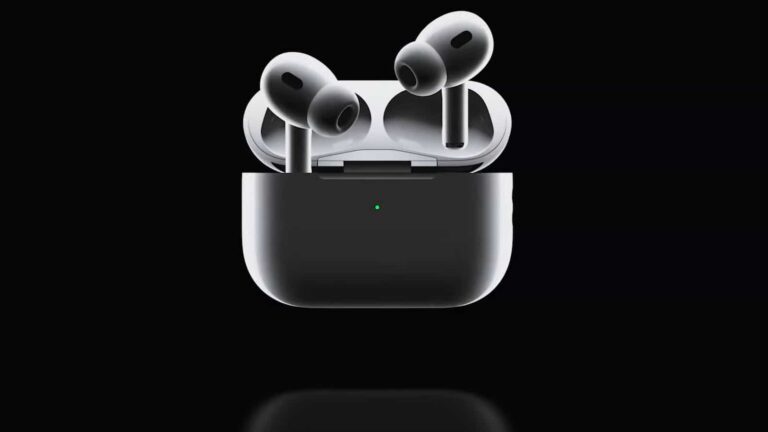
As you can see in the picture, some tiny electrodes are placed around the earbuds that might be used for reading brain waves. Of course, Apple says some users might need to configure both active and reference electrodes according to their ear form. Additionally, a user can tap on the side of the earbud to start electroencephalography or another measurement session.
The patent was granted to the company in July. However, it remains to be seen if its technology will be used in the next generation of AirPods. If it does, it would be a revolutionary addition to Apple AirPods.
Of course, Apple has just filed a patent for its idea, and it takes a lot of effort to turn this idea into an actual product. Reading brain waves through some tiny electrodes placed on the tip of an earbud would be the biggest challenge for the Cupertino-based company. Needless to say, Apple also needs to obtain necessary approvals from the United States Food and Drug Administration (FDA).
Apple products are known for their unique and life-saving health-tracking features. There are multiple reported cases of an Apple health tracking feature in an Apple Watch that saved a user’s life. This time, the company is expanding its health kit to AirPods for reading brain waves. Yet, the functionality is vague, but the technology seems promising for the future. Apple AirPods is currently one of the best earbuds you can buy. Adding health tracking features to it would certainly enhance its value for potential buyers.
The build and shared components on the CPUs are exploited by a method called Collide+Power. This attack vector does not target specific programs but the hardware itself.
Advanced software-based power side channels echoed the discovery of Meltdown and Spectre vulnerability, which leaked actual data values through underlying hardware.
The core causes of this vulnerability are the shared CPU components like internal memory systems.
Combining the data from the attacker and other application data results in combined leakage signals in the power consumption.
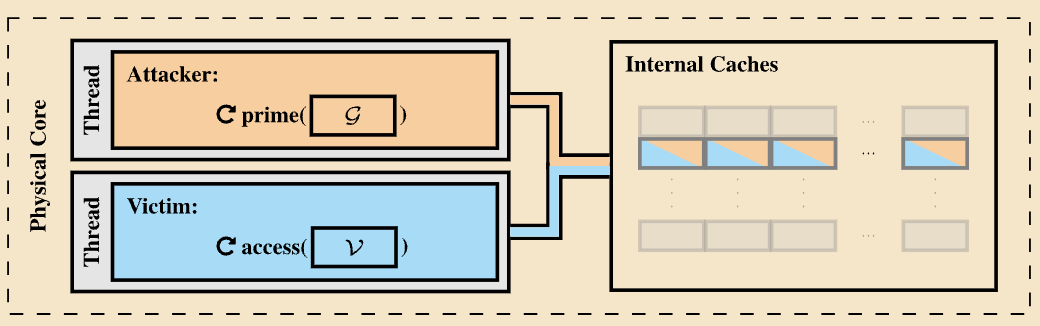
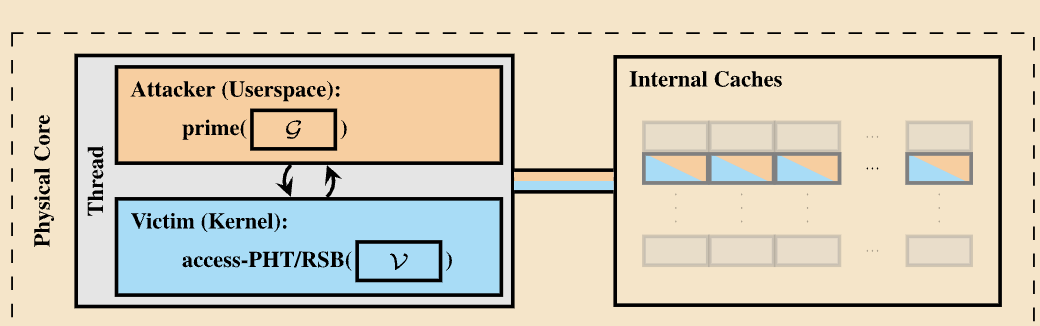
There have been two attack scenarios that belonged to the Collide+Power category.
The first attack breaks the isolation of CPU hyperthreads, and the second attack which breaks the isolation between user programs and the operating system.
In addition, this attack technique can boost any power-related side channel signal like RAPL (PLATYPUS) or frequency throttling (Hertzbleed).
Working of Collide+Power
For instance, the attacker fills the targeted CPU component, like the CPU cache, with attacker-controlled data. Then, the attacker forces the victim’s data to overwrite the attacker-controlled data, which results in the collision of data with the victim’s secret.
Since CPUs are designed to consume power as per the data usage, the collision results in a large number of iterations in the overwriting process. Finally, the attacker can get the exact secret value of the victim.
There were two variants in the Collide+Power variants,
Variant 1: The victim program constantly accesses important secret data like decryption keys to encrypt or decrypt a large chunk of data. This attack variant requires hyperthreading to be enabled.
Variant 2: In this attack variant, the attacker used a prefetch gadget in the operating system to bring arbitrary data into the shared CPU component, which can be extracted using the data collisions. This attack variant has reduced leakage rates but does not require hyperthreading.
CVE-2023-20583: Software-based Power Side Channel on AMD CPUs
An attacker can exploit this vulnerability in AMD processors to monitor CPU power consumption since the data in the cache line changes over time which can result in the leakage of sensitive data. The CVSS score for this vulnerability is yet to be confirmed.
A complete report has been published regarding this new discovery which provides detailed information regarding the threat vectors, mitigations, and others.





-1.webp)