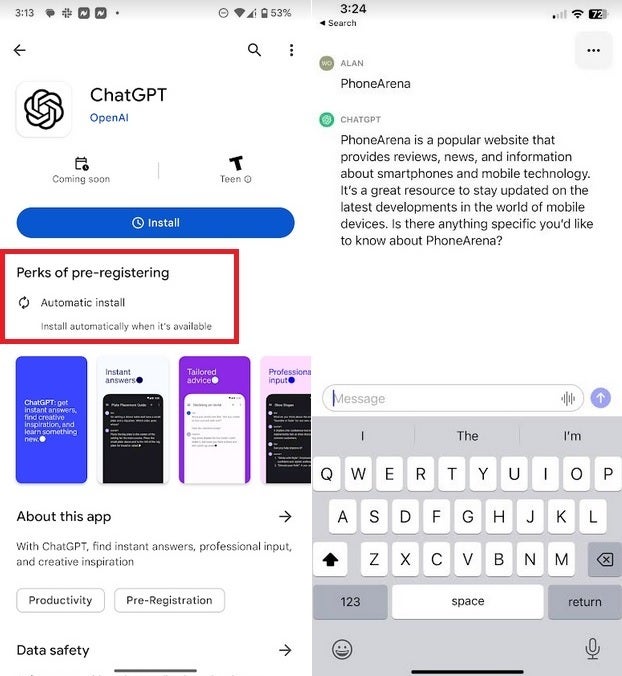
Currently, only iOS users have the ability to use conversational AI chatbot ChatGPT from OpenAI’s own mobile app. But next week will be Android users’ turn to install the app if they so choose, and unlike AI platforms, we are not hallucinating. If you tap on this link, you’ll be taken to the Google Play Store listing for the free ChatGPT app. Tapping on the blue button will allow you to pre-register the app on your Android device. According to the Play Store, the advantage of pre-registering is that the app will be installed on your phone automatically once it is available.
The Play Store listing says, “This official app is free, syncs your history across devices, and brings you the newest model improvements from OpenAI. With ChatGPT in your pocket, you’ll find:
According to TechCrunch, over 500,000 iOS users installed the ChatGPT app from the App Store the first week it was available. Since the Android app says that it syncs user history across devices, if you use one platform at home and the other at the office, your ChatGPT history will be available to you from both locations.
At left, Android users can now pre-register for the ChatGPT app from the Play Store; on the right, the iOS version of the app
Also, we should point out that while Android users won’t have the OpenAI app until sometime this coming week, they have been able to use ChatGPT via the Bing app or by going to the mobile browser on their device and heading to OpenAI.com. But if you prefer the ease of using a mobile app, you should open the Play Store on your Android phone and search for ChatGPT. As you can see from the image we’ve embedded, you’ll be offered the opportunity to pre-register the app which is something you should do.
We don’t have the exact date when OpenAI will start rolling out the Android version of ChatGPT, but sometime next week it should hit your Android device automatically if you agreed to pre-register it on your Android phone or tablet.
APIs are poisoned pills you can’t live without. In today’s world, they are the enemy you must coddle next to every night. That is why API security is so vital in today’s digital landscape.
APIs connect links between different software systems, making them prime targets for attackers. This is where your highwaymen will attack — your bridges. Strengthening API security and shielding them against potential threats is imperative to safeguard digital assets. Here are some tips to protect your APIs effectively — an API security checklist.
Understanding API security
API security protects Application Programming Interfaces – APIs – through policies and procedures to prevent unauthorized access, data breaches, and other security risks.
As APIs play a crucial role in connecting systems and facilitating information exchange, securing them is essential to prevent misuse or exploitation. Companies should regularly test APIs for vulnerabilities and follow security best practices. They should have a protocol that underlines and guides the use of these little digital devils.
The significance of API security — and their challenges
API Security Checklist is vital to preserving sensitive data and preventing unauthorized access to Application Programming Interfaces – APIs.
APIs facilitate data interchange and communication between software applications, and if not adequately secured, they can be vulnerable to various threats. And API by, let’s say, PayPal enables you to bill your clients through this platform — if there’s a glitch in their programming, it might open you up to bad actors and internet malcontents.
Folks can use that glitch to infiltrate your systems. Now, consider all those other APIs you have integrated into your system. From social media accounts to automation tools to even security tools. Hundreds upon hundreds.
Let’s look at some of the common challenges when securing APIs:
Authorization breaches
Only authorized users or apps can access and utilize APIs through proper authentication and authorization. Inadequate authentication procedures can lead to unauthorized access and potential data breaches.
For example, a well-known Pizza delivery service had an API glitch — folks could, from their app, access other users’ private data simply by reloading a screen.
Data integrity
Protecting data integrity during transmission to prevent unauthorized alteration or interference, which can violate data integrity.
Injection attacks
Addressing vulnerabilities where malicious code or SQL queries can be inserted into API requests, making them susceptible to injection attacks. Proper input validation and sanitization techniques can mitigate these risks.
Denial-of-Service – DoS -attacks
Mitigating DoS attacks that overload systems with requests, rendering them inaccessible to legitimate users. Implementing technologies like rate limitation and throttle can minimize the impact of such attacks.
Inadequate logging and monitoring
Ensuring APIs have robust logging and monitoring systems to effectively identify and address security incidents. Sufficient logging and monitoring are crucial for detecting and fixing potential security flaws.
Lack of secure communication
Employing secure communication protocols such as HTTPS to encrypt data transmission and prevent eavesdropping or interception. Insecure communication methods can expose sensitive information to hackers.
Inadequate access controls
Implementing strong access controls, such as role-based access control – RBAC, to ensure only authorized activities are performed. Insufficient access controls can lead to unauthorized data alteration or misuse of API features.
The role of APIs in modern digital applications and services
APIs, or Application Programming Interfaces, are extensively used in contemporary digital programs and services.
They act as supporting structural elements that enable seamless interaction and communication between different software systems and services, eliminating the need to start from scratch.
APIs simplify the integration of various services and platforms, allowing them to work efficiently together in today’s connected digital world. For example, social networking sites often provide APIs to enable third parties to incorporate features like sharing or login capabilities into their applications. ]
This connectivity enhances user experience and allows businesses to reach a broader audience and communicate more effectively.
The API security checklist: Top tips to fortify API security
As gateways to highly guarded data, APIs present a challenge for securing them from hackers. Mainly because they don’t belong to you — their coding is some other company’s IP.
You have no idea what standards the company has regarding its fortification. So, it’s up to you to guard against them — to, at the very least, shore up that digital interface of that conversation.
Here are some easy-to-follow API Security Checklist:
Implement proper authentication and authorization
Ensure that only authenticated and authorized users can access your API. Use robust authentication techniques like OAuth or JWT to verify the reliability of each request.
Regularly conduct security audits.
Perform audits to identify weaknesses in your APIs and address them before they become exploitable by hackers.
Audit your APIs’ architecture, design, and implementation, paying close attention to common issues like injection errors, broken authentication, and unsafe data storage.
Encrypt data in transit and at rest
Secure API endpoints using HTTPS instead of HTTP to encrypt data transmitted between clients and servers, making it difficult for hackers to intercept and alter.
Limit data exposure
Minimize response content, especially in error messages. Restrict email content and subject lines to fixed, non-customizable texts. Monitor IP addresses to avoid revealing sensitive information.
Monitor API activity
Continuous monitoring helps identify API vulnerabilities quickly and enables timely response and remediation.
Regularly update and patch APIs
Oddly enough, one of the most significant issues regarding API security is also the easiest to fix — updating your software. Most companies that give you their API interface and codes are on the up and up. They constantly fix, patch and update their systems.
The problem is that you’ll have to update your API and plugins for those fixes and new updates to hit your system. In many cases, companies seem to drop the ball in this regard. And, like an individual with an iPhone, they tend to wait until the very last second to update their IOS.
Keep your software and APIs up to date to reduce vulnerability. Apply security patches, update libraries, and upgrade to the latest platform version to minimize the risk of security breaches.
Apply rate limiting
Implement rate restrictions on your API to prevent brute force attacks and denial-of-service attempts. Limit the number of queries a client can make within a specific period.
Use secure coding practices.
Implement secure coding techniques such as input sanitization, output encoding, and exception handling to prevent malicious programs from accessing and modifying data.
APIs and hackers — a match made in heaven
Today, most software companies have an API they are more than willing to give you. Hackers are aware of this and are constantly on the prowl for that one company with no regard for security measures.
That company, the one whose coders are too creative to stop and go over their lines and see if they made a mistake, the one who invests in other departments and not in security, is the one they will target. That’s going to be their gateway into your systems.
API security is crucial for any organization processing and storing data. Following simple tips like using authentication tools, implementing access control measures, monitoring API activity, securing data in transit, employing secure coding practices, and regularly updating APIs can fortify API security.
Security teams should stay updated on API Security Checklist risks, trends, and best practices. Regular security assessments and training are essential to ensure vigilance and knowledge among the security team.
Investing in security tools that provide visibility into API activity and detect vulnerabilities is crucial. Securing APIs enables organizations to identify and address potential security issues before they escalate promptly.
A few minutes into Sunday morning Elon Musk took to his Twitter account to post, “And soon we shall bid adieu to the twitter brand and, gradually, all the birds.” Musk posted the image of a flickering letter “X” and answered in the affirmative when asked whether the Twitter logo was going to change. He added that “”it should have been done a long time ago.”
After posting the aforementioned “X,” Musk added, “If a good enough X logo is posted tonight, we’ll make go live worldwide tomorrow.” Twitter’s multi-billionaire owner has a habit of making off-the-cuff comments on Twitter and then revising them via an additional tweet a few hours later so we will have to actually see a new logo introduced before we can say with any certainty what is going on.
The first tweets discussing the logo change were spotted by Reuters. The report noted that Musk changed Twitter’s corporate name to X Corp. after spending $44 billion to buy the social media platform back in October. Musk’s goal is to build a “super app” like China’s WeChat which is not only a social media hang out, but is also used for instant messaging, playing video games, as a mobile payment app and more. WeChat has over 1 billion monthly active users. Twitter has approximately 450 million monthly active users worldwide.
Twitter could have a new logo Sunday morning
Musk’s comments contradict Twitter’s own website which notes that its blue bird trademark is “our most recognizable asset. That’s why we’re so protective of it.” But if nothing changes Musk’s mind over the next few hours, the Twitter bird might fly away to be replaced by a single letter. While Twitter started up in 2006, it wasn’t until 2010 that the blue bird that we all recognize as Twitter’s trademark came into being. It even has a name, seriously. According to logomyway, it is called Larry T Bird after Boston Celtics Hall of Famer Larry Bird.
While it isn’t clear whether Twitter would still call its messages “tweets” if the bird logo is replaced, that term might be too entrenched for any change to be made.
If you’re a long- time iPhone user, you might remember the Camera+ app. Users would install the app and use it instead of the native iOS photo app when taking photos. It featured basic and advanced editing tools, special effects, lighting filters, and the ability to integrate with social media platforms such as Twitter, Facebook, and Flickr. In March 2012, the app received a major update.
Now here we are in 2023 and the same developer behind Camera+, LateNiteSoft, has a new camera app called Photon. The website says that Photon will give you “all the control you need to create powerful professional photos.” Before snapping away with your iPhone’s camera, Photon will allow you to adjust the focus, shutter speeds, ISO settings, and white balance.
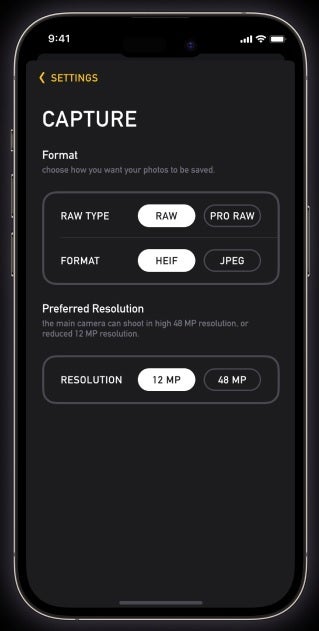
Advanced settings like Focus Peaking show you exactly where the lens is focusing. Different formats are supported including HEIF, JPEG, ProRAW, and RAW. With the iPhone 14 Pro and iPhone 14 Pro Max, Proton will allow users to choose between 12MP and 48MP shots when using the primary Wide lens. With Session Preview, users can get a look at the photos they just took and quickly delete the ones they don’t like and share the images they do all without leaving the app.
The Photon app allows iPhone users to shoot photos in various formats
LateNiteSoft’s Product Manager Noël Rosenthal spoke with TechCrunch and said “Photon is the product of our more than 10 years of experience in the photography business, without all the baggage. We took the time to rethink every aspect of the shooting experience, considering all of the feedback we’ve received and the impacts of all of our choices in the past. What we have produced is, in our eyes, simply the best, most intuitive, accessible, but powerful way to shoot photos on the iPhone.”
Users can employ Photon’s auto mode for free but if they want to use the pro features it will cost them $3.99 per month or $19.99 per year. For a limited time, the developer is offering a lifetime subscription for $39.99. There is a seven-day trial for the app. If you want to install Photon Camera on your iPhone, click on this link to download the app from the App Store.
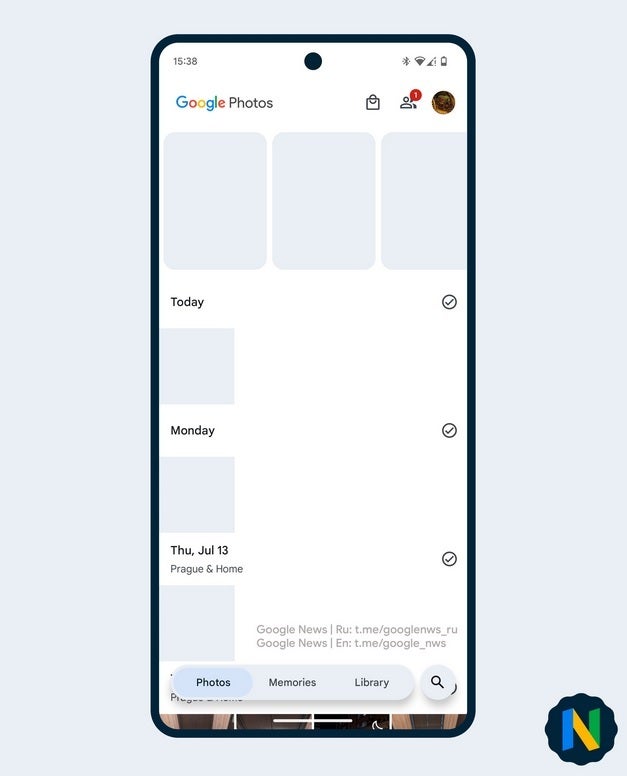
Google Photos is the default photo and video app for Pixel users and is available for Android and iOS users as well. The app features useful editing tools and according to Android Police, Google is making some changes to the app’s user interface and UI elements including the removal of the bottom navigation bar. Nail Sadykov, head of the Google News Telegram channel posted some images showing the new UI which reportedly has been rolled out to just a small number of users.
One change features a new Memories tab on the bottom navigation bar, which is now floating on the bottom of the display. The search tab is now in a circular floating button of its own on the right bottom of the screen and the Sharing tab has moved to the top right corner to the left of the profile picture. The Google Photos logo also has a new position at the upper left corner of the display from the middle of the screen.
New look for the Google Photos app for Android and iOS
Sadykov believes that this UI shakeup is purely a test on Google’s part and since it has shown up on a “narrow range” of Android and iOS devices, Sadykov says that Google isn’t “all in” on the new design which is why the rollout is limited in scope.
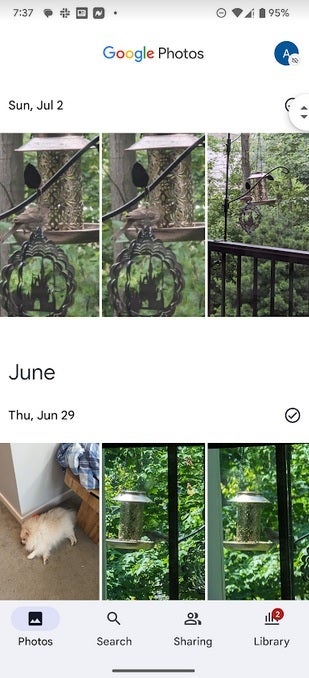
What the Google Photos app looks like on Android before the update
Google might go through the feedback it receives from both Android and iOS users about the UI shakeup it created for Google Photos. No matter how well the changes are received, it doesn’t appear that Google is ready yet to have these changes show up on prime time.
Those Pixel users currently riding the Pixel 14 Beta train will soon be getting off at the last station marked “Stable Android 14.” The estimated time of arrival is sometime next month. But for now, issues are still taking place even though for the most part Android 14 Beta 4 has been the most well-behaved of the releases. One app that started to exhibit problems on Friday is Google’s own YouTube app.
What kicked off the issue was an update to the Android version of the YouTube app to version 18.27.35. Per 9to5Google, once that update was installed on a phone running Android 14 Beta 4 or Beta 3.1, tapping the Library tab on the app would lead it to crash. This is taking place not only on Pixel handsets (including the mid-range “a” series models) but also on the new Pixel Tablet as well.
Note that this is not an issue on Pixel devices running Android 13. Nor is the YouTube app crashing when other tabs, such as Home, Shorts, and Subscriptions are tapped. This means that as long as you don’t go into your YouTube library to continue viewing a video you never finished watching, or to view a certain video again, you should have no problem using the YouTube app on your Pixel.
Version 18.27.35 of YouTube is crashing on Android 14 Beta 4 and 3.1 when the Library tab is tapped
My Pixel 6 Pro running Android 14 Beta 4 is running YouTube version 18.27.33 so it has yet to receive the updated version that is crashing. To check which version of the YouTube app you’re using on your Pixel, open the YouTube app and tap the profile picture in the upper right corner of the screen. Select settings and then scroll to the bottom of the next page which should say “About.” Tap on “About” and you will see the App version which is the next to last listing on the page. Again, if it reads 18.27.35, the app will crash when you tap the Library tab.
The ball is in Google’s court. Google can issue a new update to YouTube perhaps as soon as this weekend. You can look for it by opening the Play Store, tapping on the profile picture in the upper right corner, and clicking on Manage apps & device. Under Updates available, tap on See details. If you see YouTube listed in the update queue, press on “Update.” If not, you can check back in every so often to see if a bug fix was released.
This attack starts with creating a Google document directly sent to the user via email from this spoofed no-reply@google.com address.
Check Point researchers have discovered a new phishing scam campaign that distributes illegitimate URLs by exploiting Google Docs, with the aim of stealing the victim’s cryptocurrency credentials.
According to a research report authored by Jeremy Fuchs, a cybersecurity researcher, and analyst at Check Point Software, and shared with Hackread.com, Google Docs is the latest attack vector phishers are using to redirect users to credential harvesting sites.
Hackers Exploiting Google Docs Services to Distribute Malicious URLs
Check Point researchers observed that legit services of Google Docs are being exploited to send illegitimate messages or URLs, such as the email, pages, and comment features in Google Docs, which indicates the evolving nature of Business Email Compromise (BEC) campaigns.
Dubbing the campaign BEC 3.0, researchers wrote that using legit sites makes it easier for attackers to make their phishing attempts successful because it doesn’t raise any suspicion. In an attack analyzed by Check Point’s team, hackers sent links redirecting to bogus cryptocurrency sites.
How Does The Attack Occur?
This attack starts with creating a Google document directly sent to the user via email from this address: no-reply@google.com. After clicking on the link included in the email, the user is redirected to a legit Google Docs page, supposedly a OneDrive knockoff page, and that’s where the user gets tricked and is made to visit a fake cryptocurrency page. This page was taken down later. Google was notified about these findings on 5th July 2023.
Fake email and the OneDrive link (Image: CPR)
How to Stay Safe?
Exploiting Google Docs services indicates that hackers are continually working to improve their phishing tactics, especially in BEC. BEC 3.0 has removed much of the previously existing uncertainty among hackers as it doesn’t involve downloading malicious files or software. They now only require user response or engagement to harvest cryptocurrency credentials and steal funds.
BEC 3.0 takes away some of that uncertainty. It requires the best standard link or attachment-based phishing with the social engineering that can make BEC successful. It leverages something we all trust–Google— and processes we all trust–getting a shared document from Google Docs,” Fuchs said.
It is worth noting that there’s nothing wrong with Google Docs; it is how scammers exploit email protocols for their gains, considering that Google cannot be blocked. So, the best line of action is to use AI-powered security mechanisms to simultaneously track all phishing indicators, using a full-suite security program and implementing robust URL security so that all documents, files, and webpages are promptly scanned.
Cisco has published a security advisory that states that they have discovered two vulnerabilities, an XSS and an HTML injection vulnerability.
These vulnerabilities existed in the SPA500 series of the Cisco Small Business IP Phones.
This vulnerability exists due to insufficient validation of user-supplied input in the web-based management interface of Cisco Small Business SPA500 Series IP Phones that an attacker can exploit, creating a crafted link resulting in arbitrary script execution on the interface.
The CVSS Score for this vulnerability is given as 6.1 (Medium)
This is an HTML injection vulnerability that exists due to insufficient sanitization of user-supplied inputs in the web-based management interface of the Cisco Small Business SPA500 Series IP Phones that can be exploited by a threat actor by creating a crafted link resulting in potential alteration in the web page and redirect the user to malicious websites.
Furthermore, this can also be used to conduct other client-side attacks. The CVSS Score for this vulnerability is given as 5.8(Medium)
Cisco confirmed that there had been no workarounds for fixing these vulnerabilities. In addition to this, Cisco mentioned that they wouldn’t be releasing security patches for these vulnerabilities as the Cisco Small Business SPA500 Series IP Phones reached the end-of-life process on August 13, 2018.
Users of these products are recommended to switch to other alternative Cisco products to avoid these vulnerabilities.
Amazon has a great deal going on right now on the Roborock Q Revo robot vacuum (and mop). It’s now just $799. That’s going to save you $100 off of its regular price.
To get this price, you’ll need to clip the $100 off coupon on the page. That will reflect the $799 price when you checkout.
The Roborock Q Revo is the perfect robot vacuum and mop for anyone who wants a powerful, reliable, and easy-to-use cleaning solution.
It features a powerful 5500Pa suction that can easily pick up dirt, dust, and debris from any type of floor. The dual spinning mops provide deep and thorough cleaning, and the self-cleaning dock ensures that the mops are always clean and ready to use.
The Q Revo is also incredibly intelligent. It uses a variety of sensors to navigate your home efficiently, avoiding obstacles and keeping track of its cleaning progress. It also has a variety of smart features, such as the ability to create custom cleaning schedules and no-go zones.
And best of all, the Q Revo is incredibly easy to use. Just set it up, press a button, and let it do the rest. The Q Revo will automatically map your home and create a cleaning plan, and it will even return to the dock to recharge when it’s finished.
If you’re looking for a robot vacuum and mop that can do it all, the Roborock Q Revo is the perfect choice for you. It’s powerful, intelligent, and easy to use, making it the perfect solution for anyone who wants a clean and tidy home.
You can pick up the Roborock Q Revo robot vacuum and mop from Amazon today by clicking the link below. It’s unclear how long this sale will last, so you’d better act fast.
Google’s Pixel Watch looks due to get a coral sport band in the near future, and you can see it ever so briefly in Google’s latest #FixedOnPixel video. Now the video itself is mostly focused on the new Pixel 7 phone, and not the watch.
The aim is to highlight Women’s Soccer star Megan Rapinoe and the Pixel 7. “A legendary athlete deserves a legendary phone” the video’s description says. The ad is perfect timing with the beginning Women’s World Cup having started this week. But for all intentions of advertising the Pixel phones, Google saw fit to sneak in a plug for the upcoming coral Pixel Watch band.
It’s only in frame for a couple seconds. But that’s more than enough time to get a decent look at it. And as you’d expect, it’s a coral sport band. Nothing more, nothing less. It follows Google’s theme of colors across much of its product line. And it might just be the color you’ve been waiting for personally. If that’s the case, you’ll need to wait just a bit longer to buy one for your own watch.
The coral Pixel Watch band launches this Fall
Google offers a handful of bands for the Pixel Watch, but the coral band is not one of them. Not yet at least. As 9To5Google points out, the band will become available later this Fall. So expect to see it hit the Google Store sometime near the end of September or later. If we had to guess, it’ll likely release around the time Google holds its Fall Pixel event.
Google doesn’t list a cost in the video but current active bands on offer are $49.99. So there’s a chance this new coral band ends up being the same price as those. It does however also look a little bit different from those. The coral band worn by Rapinoe has holes that you see on a lot of other sports bands for different watches. Whereas the ones Google currently sells have no holes. This means it’s an entirely new band and not just another color of the active ones you can already buy. So it could very well have a different cost too.