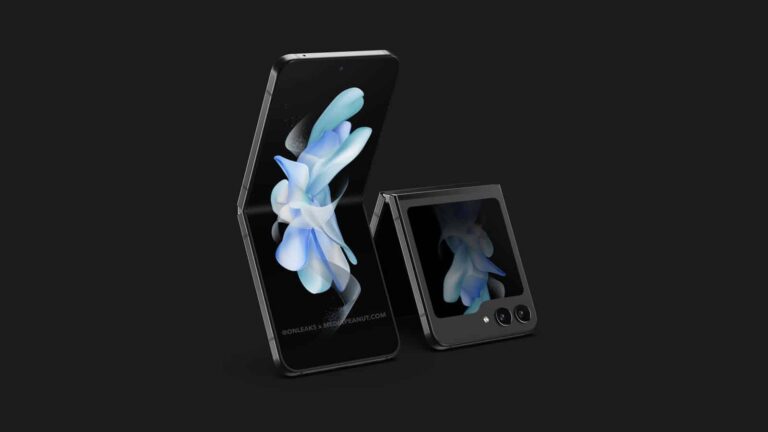
After several leaked renders over the past few weeks, we may have just got our first look at an actual Galaxy Z Flip 5. A photo shared on Twitter by @Tech_Reve shows what appears to be the upcoming Samsung foldable wrapped in a hard protective case. The big folder-shaped cover display gives it away.
It’s unclear when and where this photo was taken or who was using the Galaxy Z Flip 5. But it may have been some Samsung executive testing out the unreleased device ahead of its launch next month. The photo leaked shortly after the company held multiple executive meetings to discuss business strategies last week. Some of the attendees at the meetings may have brought the upcoming foldable to the conference.
The presence of a BMW keyfob next to the device can also be linked to the Korean firm’s recent partnerships with the German carmaker. Moreover, the case doesn’t quite fit the phone perfectly, suggesting that it’s designed to hide the foldable from public eyes ahead of its launch. But the leaked live photo of the Galaxy Z Flip 5 does give away a few things. It confirms two rear-facing cameras above the folder-shaped cover display, with a LED flash unit sitting next to them.
The external screen is in Always-On Display (AOD) mode and shows a circular clock. Elsewhere, the Galaxy Z Flip 5 has a side-mounted fingerprint scanner embedded in the power key on the right side. Volume rockers sit above this multi-function key. The device seemingly has flat edges and a flat hinge. Rumors are that Samsung has switched to a new waterdrop-type hinge this year. It allows the foldable to shut properly when folded without any gap.
The Galaxy Z Fold 5 will also get the redesigned hinge
Samsung is using the same hinge design in the Galaxy Z Fold 5 as well. The change allowed it to cut some weight from the device’s body and make it marginally thinner. The 2023 Galaxy foldables may not bring many other major upgrades, though. If rumors are anything to go by, it’s the same display, cameras, battery capacity, and charging speed as last year. The only notable upgrade is the hinge and the Snapdragon 8 Gen 2 “for Galaxy” processor.
The Galaxy Z Fold 5 and Galaxy Z Flip 5 will debut during Samsung’s next Galaxy Unpacked event on July 27. This year’s big launch event will take place in the company’s homeland South Korea. The new foldables will be accompanied by the Galaxy Tab S9 series flagship tablets and the Galaxy Watch 6 series smartwatches. You can expect to hear more about the upcoming Samsung products over the next few weeks.
They are a lot of areas where ChatGPT is helpful, but the courthouse might not be a great choice. Well, not everybody thinks that way, as some US lawyers have got themselves fine due to their reliance on the AI model. This is a very interesting case, and it highlights the flaws of AI and the need to do proper research before trusting AI search results.
The fine in question is worth $5,000 and will be spread across various parties involved in the case. Steven Schwartz, the attorney in the court case, brought this upon his client and other parties. He did this by letting ChatGPT get important points he was to use in court against the defendant, and yes, there were serious errors.
Unlike the AI model, ChatGPT, the court was able to do their findings and found Steven Schwartz’s AI-generated citing to be false. This finding means that Steven Schwartz came to court to present a case before the court with false citations, hence warranting a fine. But how exactly did the attorney make use of ChatGPT for his case, and what exactly went wrong?
A $5,000 fine for getting facts off ChatGPT for a court case
Steven Schwartz was the attorney on the case involving his client and the Colombian airline, Avianca. For some reason, Steven’s client was suing the airlines and needed a lawyer to support his client. To be better prepared for the case, Steven let ChatGPT do some homework on similar cases.
This was a bad idea that he could have prevented if he had vetted the ChatGPT search results. As we all know, AI models tend to formulate information from thin air when they can’t find a sensible response to give. The New York attorney Steven was not aware of the ‘manipulative’ nature of AI models, and now he is learning the hard way.
ChatGPT gave Steven fake court cases similar to the one he was about to face in court. Unknowing to him that the information was wrong, he took it to court as a precedent. Well, the court did their homework and found out that the “Martinez v. Delta Airlines and Miller v. United Airlines,” cases are non-existent.
The court was quick to figure this out and give a $5000 fine to Steven Schwartz and his associates in the case. Certainly, the court acknowledges the presence of AI in law, but there is a need for confirmation of the information it gives. Yes, AI plays a vital role in many industries, but there is a need to be careful about its usage.
Shortly after releasing a private web browser, Mullvad VPN has now unveiled the Mullvad Leta search engine to prevent online tracking. This search engine is already available to Mullvad Browser users with premium subscriptions.
Mullvad Leta Search Engine Is The New Privacy Alternative
In a recent post, Mullvad VPN providers shared details about their new privacy-focused release. Named “Mullvad Leta,” the new product is basically a search engine that empowers users to browse links without fearing being tracked.
But this tracking prevention doesn’t mean users must bear with irrelevant search results. Instead, the Mullvad Leta relies on Google Search API for caching each search. This caching enables the search engine to share the results with all users.
For searches not previously cached, Mullvad Leta fetches information from Google by sharing the search term only (without user information). This way, the tool strives to provide better and more accurate search results with minimal costs.
Moreover, this caching also helps the search engine to ensure maximum privacy for the users while blocking tracking links. The tool does not collect user data (per Mullvad VPN’s policy) nor sell ads.
Presently, Mullvad Leta is available to Mullvad VPN users only. Users of the Mullvad Browser can access this search engine directly from their browsers. (This is just another search engine option for the users, alongside the default search engine DuckDuckGo.) Whereas other web browsers’ users need to have an active Mullvad VPN connection to connect to the search engine’s URL (https://leta.mullvad.net/).
For now, the tool has some limitations, even for premium users. First, one registered account can perform up to 100 searches per day. And that includes viewing subsequent search results pages. However, this comes with unlimited cached searches.
Another limitation is that not all searches may display recent results since the searches remain cached for 30 days.
While limitations may seem disappointing, the feature still works great for privacy freaks. Moreover, given the tool’s initial development stage, we can expect Mullvad Leta to provide an improved experience in the future.
A new Samsung Galaxy Z Fold 5 and Flip 5 leak has just appeared, showing us renders of both devices, and also providing info on their specifications. There’s quite a bit of info here, so let’s get started.
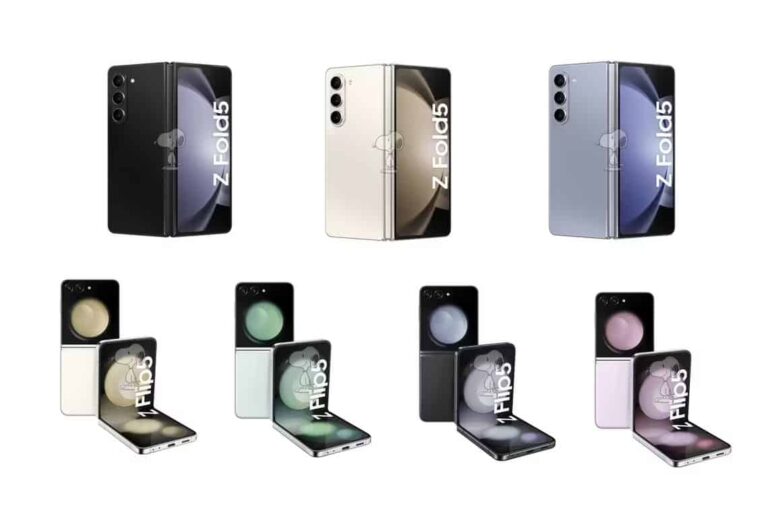
The information you see here has been provided by SnoopyTech, a tipster, and shared by XDA Developers. Both devices are shown here. The featured image shows them, in a number of color variants. You’ll also find two galleries below, if you’d like to take a closer look at the phones.
The Galaxy Z Fold 5 & Flip 5 renders and specs get shared ahead of time
The Galaxy Z Fold 5 is shown in black, blue, and white-ish colors here (Phantom Black, Icy Blue, and Cream color, officially). The Galaxy Z Flip 5, on the other hand, is shown in black, green, pink, and that white-ish color (Graphite, Mint, Lavender, and Cream color, officially), just like the Fold 5.
The Samsung Galaxy Z Fold 5 will look a lot like the Fold 4, actually. The aspect ratio of its outer display will be the same, and overall the phone will look quite similar. It will fold flat, though, allegedly, unlike its predecessor.
Samsung’s upcoming foldable, however, the Flip 5, will be easy to differentiate from its sibling. Why? Well, mainly thanks to its larger cover display. On top of that, the phone will also fold flat, unlike its predecessor.
The Galaxy Z Fold 5 will offer two 120Hz displays, a 4,400mAh battery & more
What about the specs? Well, let’s talk about the Fold 5 first, shall we? The tipster claims the Galaxy Z Fold 5 will include a 7.6-inch Dynamic AMOLED display with a 2176 x 1812 resolution. It will also offer a dynamic refresh rate of up to 120Hz, but it’ll be able to go down to 1Hz too.
A 6.2-inch cover display will also be included. That will be a Dynamic AMOLED display with a resolution of 2316 x 904, and a 120Hz refresh rate.
The Snapdragon 8 Gen 2 will fuel this phone, while the company will include 12GB of RAM here You’ll be able to choose between 256GB and 512GB storage options. A 4,400mAh battery is also mentioned.
Android 13 will come pre-installed on the device, along with Samsung’s One UI 5.1.1 on top of it. The phone will be IPX8 rated for water resistance, in case you were wondering.
A 50-megapixel main camera (f/1.8 aperture) is mentioned by the tipster, as is a 12-megapixel ultrawide unit (f/2.2 aperture). A 12-megapixel telephoto shooter (f/2.2) will also be included on the back.
On the inside, Samsung will utilize a 4-megapixel under-display camera, while a 10-megapixel selfie camera (f/2.2) will be used on the outside. There will be two SIM card slots, here, and the phone will support Bluetooth 5.2 and Wi-Fi 6E it seems. We’d expect Bluetooth 5.3 here, actually, so that could be a mistake.
The Galaxy Z Fold 5 is said to measure 154.9 x 67.1 x 13.4mm, and weigh 253 grams.
The Galaxy Z Flip 5 will have a large cover display, and 8GB of RAM
The Galaxy Z Flip 5, on the other hand, is tipped to include a 6.7-inch fullHD+ (2640 x 1080) Dynamic AMOLED display with a variable refresh rate (1-120Hz). Its outer display will measure 3.4 inches, and it will be a 748 x 720 panel. It will also offer a refresh rate of up to 120Hz, and will be able to go down to 1Hz.
The Snapdragon 8 Gen 2 will fuel this phone too, while you’ll get 8GB of RAM here. 256GB and 512GB storage options will allegedly be available.
A 12-megapixel main camera (f/1.8 aperture) will be on offer, along with a 12-megapixel ultrawide camera (f/2.2 aperture). A 10-megapixel selfie camera (f/2.4 aperture) will sit on the main display (centered hole punch).
A 3,700mAh battery will also be a part of the package, while Android 13 will come pre-installed. The device is said to support Bluetooth 5.2, Wi-Fi 6E, and offer dual SIM connectivity. The Galaxy Z Flip 5 is said to measure 85.1 x 71.9 x 15.1mm when folded. Other measurements are not yet available.
The Galaxy Z Fold 5 and Flip 5 will launch next month in Seoul, Korea. The launch date has not been confirmed just yet, but July 26 is rumored.
Blockchain technology has revolutionized various industries, but its scalability limitations have hindered its widespread adoption. In this article, we explore the impact of Binance USD (BUSD) on addressing blockchain scalability issues, case studies and real-world examples. If you’re interested in the potential of cryptocurrency, consider signing up for a Bitcoin trading account at Immediate Connect
The Impact of Binance USD on Blockchain Scalability
Firstly, the introduction of BUSD has greatly improved transaction throughput. Traditional blockchain networks often suffer from congestion and slower transaction processing times, resulting in delays and increased fees. However, BUSD’s integration provides a scalable solution by facilitating faster and more efficient transactions. The enhanced transaction throughput not only improves the overall user experience but also enables blockchain networks to handle a larger volume of transactions without compromising on speed or security.
Moreover, BUSD plays a crucial role in reducing congestion on blockchain networks. The increasing popularity of cryptocurrencies and decentralized applications (DApps) has put a strain on existing blockchain infrastructures, leading to congestion and network congestion-related issues. By leveraging BUSD as a stablecoin, users can transact with a stable digital asset that is not subject to the same price volatility as other cryptocurrencies.
Additionally, the integration of BUSD enhances the user experience for decentralized applications. DApps are integral to the blockchain ecosystem, providing various services and functionalities. However, the scalability limitations of blockchain networks often hinder the smooth operation of these applications. BUSD addresses this challenge by offering a stablecoin that enables seamless and efficient transactions within DApps. Users can engage with DApps without being concerned about transaction delays or exorbitant fees, ultimately fostering a more user-friendly and accessible decentralized economy.
Furthermore, the adoption of BUSD opens up new possibilities and use cases for blockchain technology. Its stability and scalability make it an ideal medium for various applications, including decentralized finance (DeFi) and non-fungible token (NFT) marketplaces. BUSD enables DeFi platforms to offer stablecoin-based financial services, such as lending, borrowing, and liquidity provision, with improved scalability and efficiency. Similarly, NFT marketplaces can leverage BUSD for seamless and secure transactions, expanding the ecosystem and encouraging broader adoption.
Overall, the integration of Binance USD has had a profound impact on blockchain scalability. By improving transaction throughput, reducing congestion, enhancing user experience, and enabling new use cases, BUSD has become a valuable asset in overcoming the scalability challenges that have plagued blockchain networks. As the decentralized economy continues to evolve, the role of stablecoins like BUSD in driving scalability and innovation becomes increasingly vital.
Case Studies and Real-World Examples
One notable case study is the Binance Smart Chain (BSC), a blockchain platform that has integrated BUSD as its native stablecoin. BSC offers a high-performance and scalable infrastructure, enabling developers to build decentralized applications (DApps) with ease. The integration of BUSD as the primary medium of exchange on BSC has significantly contributed to its scalability and success. BSC’s ability to handle a high transaction throughput and provide low-cost transactions has attracted a wide range of projects and users, cementing its position as a leading blockchain platform.
In the realm of decentralized finance (DeFi), BUSD has played a crucial role in enhancing scalability. DeFi applications often face scalability challenges due to the high volume of transactions and interactions with smart contracts. By utilizing BUSD as a stablecoin, DeFi platforms can offer users the ability to transact with stability, lower fees, and faster transaction confirmations. This scalability advantage has fueled the growth of various DeFi projects, ranging from decentralized exchanges to lending protocols, providing users with a seamless and efficient experience.
Moreover, non-fungible token (NFT) marketplaces have also leveraged BUSD to address scalability issues. NFTs, which represent unique digital assets, have gained significant popularity, leading to increased demand and congestion on blockchain networks. By integrating BUSD as a stablecoin for NFT transactions, marketplaces can ensure smoother and faster transactions, reducing the burden on the underlying blockchain. This integration has enabled artists, collectors, and enthusiasts to trade NFTs with ease while maintaining the stability of value provided by BUSD.
Several successful projects serve as real-world examples of how BUSD has contributed to blockchain scalability. For instance, decentralized lending platforms powered by BUSD have experienced exponential growth, allowing users to access liquidity quickly and efficiently. Additionally, BUSD has been integrated into decentralized payment systems, enabling merchants to accept stablecoin payments and bypass the scalability limitations of traditional payment methods.
Conclusion
In conclusion, Binance USD (BUSD) has made a significant impact on addressing blockchain scalability issues. Through improved transaction throughput, reduced congestion, enhanced user experience, and successful case studies, BUSD has proven to be a valuable solution. As the decentralized economy continues to grow, BUSD’s role in driving scalability and fostering innovation remains crucial.
The mastermind behind the Twitter hack, Graham Ivan Clark, is already serving a three-year sentence.
A New York court has formally sentenced Joseph James O’Connor for his involvement in an extensive SIM-swapping scheme and other crimes. The 24-year-old British hacker has received five years behind bars.
The accused pleaded guilty to four counts of wire fraud, computer hacking, and cyberstalking in May 2023. O’Connor will also return $749,000, which he admitted to stealing from a Manhattan-based cryptocurrency firm.
In 2020, the then-22-year-old O’Connor pulled off a massive hacking spree targeting Twitter accounts, impacting dozens of high-profile personalities. Using SIM swapping, the notorious hacker and his accomplices stole their victims’ cryptocurrencies, including Ethereum, Bitcoin, Bitcoin Cash, and LiteCoin.
It is worth noting that the mastermind behind the Twitter hack, Graham Ivan Clark, is already serving a three-year sentence. Clark was arrested on July 31st, 2020, in Tampa, Florida, when he was 17 years old. Therefore, he has been sentenced as a youthful offender.
Graham Ivan Clark (Left) – Graham Ivan Clark (Right)
On the other hand, O’Connor used his online handle PlugWalkJoe to carry out the breaches. In a SIM swapping attack, hackers obtain control of their victims’ cellphone numbers by linking them to SIM cards.
The prosecutors argued that O’Connor possessed immense technical knowledge and capabilities. However, he used it to hijack around 130 Twitter accounts, many belonging to well-known politicians, companies, entrepreneurs, and celebrities including the following:
Apple
Bill Gates
Joe Biden
Jeff Bezos
Elon Musk
Kanye West
Warren Buffet
Barack Obama
Kim Kardashian and more.
Additionally, he was involved in cyberstalking two individuals, one of whom was a minor. The gang tricked Twitter employees into giving them access to Twitter’s internal tool by claiming to be part of its IT department.
The hackers then used this access to abuse an internal admin tool, which, according to Twitter’s head of security Peiter Mudge Zatko, helped them gain god mode. They could hijack and tweet from any Twitter account they desired. This is how they pulled off the “largest hack of a social media platform in history,” claims Zatko.
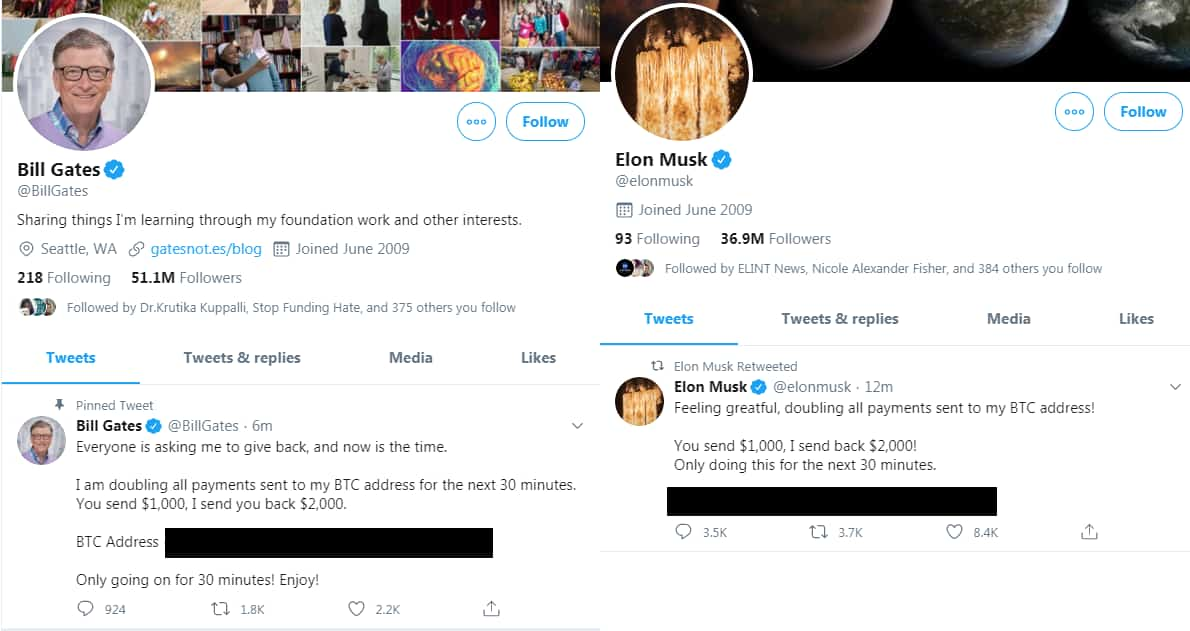
The gang exploited these accounts to post cryptocurrency scams, which impacted millions of users as their Twitter timelines were flooded with the “double your Bitcoin” scams from the hijacked accounts. The hackers made $120,000 from this breach. Twitter had to block access to these accounts to prevent further damage while it fixed the issue.
Bill Gates and Elon Musk had their account compromised in the Twitter hack (Image: Hackread.com)
An investigation by the New York Department of Financial Services declared Twitter responsible for the breach due to weak and inadequate cybersecurity mechanisms. This prompted the microblogging platform to introduce hardware security keys for employees to prevent phishing attacks and improve its cybersecurity mechanisms.
Further, O’Connor acknowledged swatting a teenage girl in June and July of 2020. He contacted the sheriff’s department and sent messages to a high school and restaurant, falsely claiming that the girl was planning a mass shooting and providing her address. A month later, he threatened to kill the girl’s family. During the sentencing hearing, O’Connor acknowledged his crimes were pointless and foolish.
“I am ashamed to be here. I’m sorry to all the victims of my crimes. I’m here because I did stupid and shameful things. I will never break the law again,” O’Connor told Manhattan federal court’s Judge Jed S. Rakoff.
O’Connor has remained in pre-trial custody for a long time. Therefore, the judge said he will only serve half of his term. He was extradited to the US from Spain in April 2023 and faced a maximum penalty of 77 years. However, prosecutors asked for 7 years in prison.
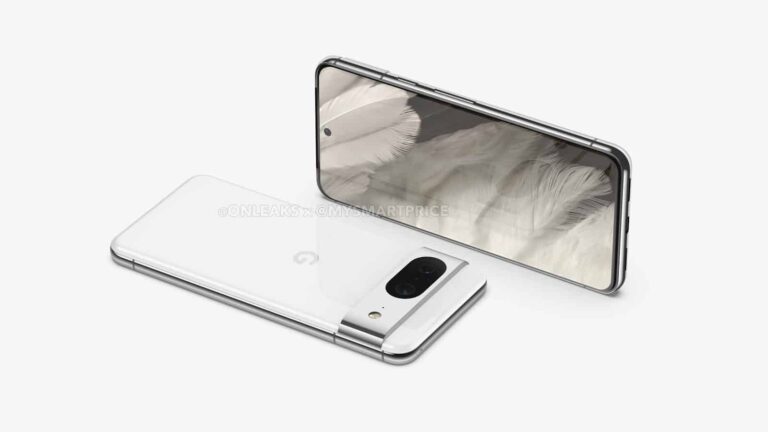
The Google Pixel 8 and Pixel 8 Pro are expected to arrive in October, and their color options have just been revealed. This info comes from the same source that shared their display info, Android Authority, as the site partnered up with a tipster.
The Pixel 8 series color options get revealed early
That being said, the Google Pixel 8 is said to arrive in Haze, Jade, Licorice, and Peony colors. Haze color will have a green hue, while Jade will combine blue and green colors. Licorice will be a black-colored device, while Peony will have a pinkish hue.
On the flip side, the Pixel 8 Pro will launch in Jade, Licorice, Porcelain, and Sky. We’ve already mentioned Jade and Licorice colors in the previous paragraph, the same will appeal here. The Porcelain color will basically be a white model, while Sky will likely be a light blue model.
The Pixel 8 series puzzle is slowly, but surely, coming together. Their designs surfaced in CAD-based renders a while back, and their display info got revealed not long ago.
The Pixel 8 will have a smaller display than its predecessor
Both phones will keep a similar design language as their predecessors. The Pixel 8 will be smaller than the Pixel 7, though, noticeably, as it will include a 6.17-inch display, compared to a 6.3-inch panel on the Pixel 7.
The Pixel 8 Pro, on the other hand, has a 6.7-inch display, just like its predecessor. That display will be flat this time around, though, at least based on the info that we have thus far.
The Google Tensor G3 will fuel the Pixel 8 and Pixel 8 Pro. That chip is tipped to arrive with considerable improvements compared to its predecessor.
Android 14 will, of course, ship pre-installed on these phones. Needless to say, these two phones will be the first in general to ship with the latest version of Android.
It’s worth noting that the wallpapers of both phones also surfaced, so you can get them early if you want.
The ASUS ZenFone 10 is coming in less than a week at this point, and its specs, price, and more images just leaked. All of this has been shared by WinFuture, by the way, and it follows several official images that surfaced not long ago.
The ASUS ZenFone 10 specs appear, along with its price tag & more images
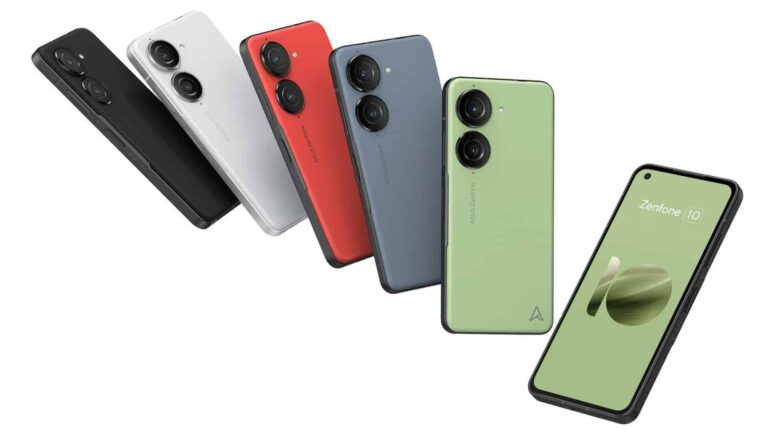
That being said, let’s start with images. A bunch of seemingly-official renders are included in the gallery below. You get to see the phone in all of its upcoming colors, from various angles. Those colors include black, white, red, blue, and green.
The ASUS ZenFone 10 will look a lot like its predecessor. In fact, many people would have a hard time differentiating the two. You’ll once again get a soft-feel backplate, combined with an aluminum frame which has flat sides.
Two camera islands will be included on the back, and each of them is reserved for one camera. A display camera hole will once again sit in the top-left corner, and the phone’s display will be just as compact this time around.
Its display will be quite compact yet again, while a 200-megapixel will sit on the back
Speaking of which, the phone will include a 5.9-inch fullHD+ AMOLED display with a 120Hz refresh rate. The Snapdragon 8 Gen 2 will fuel this handset, while you’ll have two RAM variants to choose from. 8GB and 12GB RAM models will be available. The source also mentions 256GB and 512GB storage options.
There will be a 5,000mAh battery on the inside. A 200-megapixel main camera will be backed by an 8-megapixel ultrawide camera. On the front, ASUS seemingly opted for a 32-megapixel unit.
An audio jack will be included here, as it was on the ZenFone 9. The device will also be IP68 certified for water and dust resistance.
The ASUS ZenFone 10 will launch on June 29, and it’ll cost $749 for the 8GB RAM + 256GB storage model.
Learning to play the piano can be challenging and requires immense dedication and sincerity. Luckily, in this digital era, your Android smartphone can be of great help. Whether you want to learn piano for fun or just want to help your kids with their piano lessons, there are tons of apps for all your needs on the Google Play Store.
Of course, a piano app cannot be an equivalent substitute for taking lessons in person. Technology still can’t beat the one-on-one teachings of a human. However, if you’re dedicated enough, you can always learn something with a good piano app. And if you’re struggling to find the best app for you, we have compiled a list of the best piano apps for Android below.
Go through the article below for detailed information on each app, including a description, Google Play rating and size, cost of in-app purchases, and screenshots or promo videos, as well as a Google Play Store download link.
Best Android apps for Learning Piano 2023
Below is a quick overview of the best Android apps for learning piano for 2023, including any download and in-app purchase costs.
Download Cost
In-app cost (per item)
Piano by Yousician
✕
$14.99 – $194.99
Simply Piano
✕
$0.99 – $179.99
Perfect Piano
✕
$0.99 – $12.99
Flowkey
✕
$19.99 – $119.99
Piano – Music Keyboard & Tiles
✕
$1.49 – $89.99
Skoove
✕
$19.99 – $149.99
Piano
✕
$0.99 – $47.99
Piano Academy
✕
$5.99 – $99.99
Piano Lessons
✕
$2.99
Real Piano Teacher
✕
$4.99
Best Android apps for Learning Piano 2023 downloads
Below is a little more information on each app, including a direct link for easy downloading.
All download links go to the app’s Google Play Store listing. Users are always recommended to download apps from Google Play or an authorized app store.
Piano by Yousician
Price: Free to download
In-app purchases: $14.99 – $194.99
Size: 89MB
Google Play rating: 4.1 out of 5 stars
Yousician is an award-winning interactive and educational music service. It offers apps for learning various musical instruments, including the piano. This app provides piano lessons on hundreds of songs. There are step-by-step video tutorials that guide you through each lesson. You can play on your real instrument and the app will listen along to offer instant feedback on how well you are hitting the pitch and tone. You can also upload and practice your songs.
Piano by Yousician has piano curriculums for everyone, from complete beginners to professionals. Designed by expert piano teachers, these curriculums will help you improve your skills over time. You can learn piano at your own pace with Yousician, whenever and wherever you want.
This app is available on both PC and mobile devices and offers unlimited and uninterrupted playtime across all platforms. A Weekly Challenge feature lets you compete with friends and millions of other piano players worldwide.
If you are a beginner and want to learn the basics of piano before investing in a real instrument, then Simply Piano is the app for you. You can use your touch-enabled Android smartphone to function as a virtual piano. This app offers piano lessons on thousands of popular songs like Imagine, Chandelier, All Of Me, and Counting Stars.
There are piano courses for different musical tastes and playing levels. The app allows you to select the level that you’re at as a piano player. Depending on your current knowledge, you can start from the very basics such as reading sheet music to playing with both hands. Like Yousician, Simply Piano also provides instant feedback on your playing so you can quickly learn and improve your skills.
Perfect Piano is a piano simulator app that serves as a piano teaching tool. It features an 88-key piano keyboard and supports multiple modes: single-row mode, double-row mode, dual players, and chords mode. The app also supports multi-touch and lets you adjust the width of the keyboard.
There are multiple in-built sound effects such as Grand Piano, Bright Piano, Music Box, Pipe Organ, Rhodes, and Synthesiser. There are also multiple play modes, guidance patterns, and speed and difficulty adjustment features.
Perfect Piano supports a USB MIDI (Musical Instrument Digital Interface) keyboard, so when you decide to move to a real instrument, you can do so smoothly. A widget for your home screen lets you play around without even opening the app. You can also play the piano with other players from all over the world, make friends, chat, and participate in weekly challenges.
Flowkey is another popular piano app that supports multiple platforms. It offers piano lessons on over 1500 songs from all genres including classical, pop, rock, and jazz. You can even choose from the latest game and movie soundtracks. Interactive step-by-step courses about notes, chords, and rhythm will help you improve your skills.
This app has several high-quality video tutorials recorded by professional pianists to help you learn the right technique. Flowkey also offers instant feedback on your playing so you know where you need to work more. You can use a microphone or MIDI connection. A split-screen feature lets watch a video of someone playing the song while you practice it. Premium subscription costs $19.99 for a month, $83.99 for six months, and $119.99 for a year.
Piano – Music Keyboard & Tiles is also a keyboard simulator app that features fun and engaging music games to help learn piano keys. You can play famous songs by tapping keys under falling tiles. This not only improves your sense of timing and tempo but also helps you identify the sounds of different keys on the keyboard.
This app has a full 88-key keyboard and features nine piano instruments: Basic keyboard, Grand Piano, Organ, Harpsichord, Accordion, Electric Guitar, Harp, Cello Pizzicato, and Vintage Piano. You can choose between a single or dual scrollable keyboard. You can also record your piano sessions and share them with your friends.
Skoove is fairly new to the online piano lesson space but has quickly made its way up. It currently boasts more than two million users of varying skill levels, from beginners to advanced players. The lessons on this app are designed to get anyone started with ease, whatever might be their skill level. You get a rich, curated catalog of music across genres so you can learn piano your way.
Skoove recognizes the notes when you play piano and guides you if you’re doing something wrong. It uses artificial intelligence to give you personal feedback and help you improve at your pace. You can also get one-on-one support from expert piano instructors on this app.
Simply named Piano, this app is ideal for learning to play the piano to popular songs. It currently offers piano lessons on over 1000 hit songs, with new songs added daily. Hello by Adele, Stitches by Shawn Mendes, Let It Go – Disney’s Frozen, Chandelier by Sia, Despacito by Luis Fonsi, My Heart Will Go On by Celine Dion, and Love Yourself by Justin Bieber are a few to name.
This app is essentially a game where you tap on falling bubbles at the right time to hit the right tone. You can adjust the difficulty level to suit your skills. You can also play with backing vocals and instruments for more fun and enjoyment. The app provides scores and feedback on every song compilation. You can share your score and compete with your friends for the best score.
Piano Academy is another great app to learn piano online, particularly for kids. This app offers piano lessons on tons of songs, starting with popular kids’ rhymes like Twinkle Twinkle Little Star and If You’re Happy and You Know It. Of course, these kinds of songs are easy to play and are ideal for anyone starting from scratch. But kids would find this much more engaging.
Piano Academy also offers tutorial videos to teach you theoretical topics like notes, the staff, chords, and much more, as well as practical lessons. You can play on the on-screen virtual keyboard or connect a real instrument. The app listens to every note you play and gives you instant feedback, so you know where and how to improve. While kids would find Piano Academy engaging, it is also suitable for adults.
The best thing about Piano Lessons is that you can use this app as a piano without learning mode. It features a full 88-key keyboard. So once you learn the basics, you can play around on your own. You can even record the songs you play and share them with your friends or with other users in the Cloud Playlist.
Of course, the app offers piano lessons on a number of songs. You can click on the highlighted keys to play along. The app will analyze your timing and accuracy and rate your performance. Best Piano Lessons lets you customize the number of visible piano keys on the screen and supports multitouch. This ensures an optimal experience for users.
Real Piano Teacher offers piano lessons for both beginners as well as advanced users with full offline audio lessons in various languages and accents. You can connect a real instrument or use the on-screen virtual keyboard to practice the songs. The app supports USB MIDI Keyboard.
Theoretical lessons offered by this app include how to position your fingers on the piano, understanding the elements of the keyboard, groupings and naming of the various keys, and notes for each position, staffs, clefs, and chords. Once you master this, you can play along with the songs and see where you need to improve.
There are also some fun games designed to train your hand coordination, musical hearing, sense of rhythm, and other skills required to master the piano. Real Piano Teacher also lets you record your play and share it with your friends and family.
The OnePlus 12 will seemingly include a new main camera sensor, at least based on a new rumor. Yogesh Brar has shared a bunch of new details regarding the OnePlus 12, so let’s see what he says.
Before we do that, do take this with a grain of salt. This is not one of the most prominent tipsters out there, so just keep that in mind. Having said that, let’s dive in, shall we?
The OnePlus 12 will allegedly utilize new main & telephoto cameras
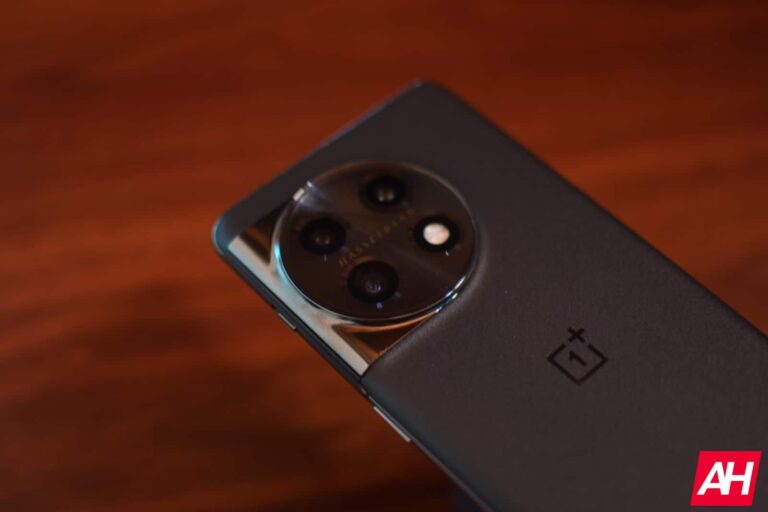
The tipster claims that the OnePlus 12 will not only have a new main camera sensor, but a new telephoto unit as well. As a reminder, the OnePlus 11 includes a 50-megapixel main camera (IMX890), and a 32-megapixel telephoto camera (IMX709) with 2x optical zoom.
We’re not sure what new sensors will be used, as the tipster did not specify anything. It’s good to see OnePlus will move forward, though. The main camera on the OnePlus 11 performed great, actually, but there are better sensors out there.
When it comes to the telephoto unit, many people would agree that a 2x optical camera is not exactly all that useful. So, let’s hope that OnePlus learned its lesson. We’ll likely get 3x optical zoom at least, but we have a feeling OnePlus will go for 5x here. A periscope telephoto camera would be nice to see.
A “new gen display” will be used, and charging will become faster too
The tipster also says that the OnePlus 12 will include an “improved new gen display”. The display on the OnePlus 11 was really, really good, and immensely sharp. If OnePlus plans to upgrade that, however, we won’t mind.
Faster charging is also mentioned here. The OnePlus 11 supports 100W wired charging, 80W in the US. That is plenty fast, but if OnePlus wants to up the ante, sure, why not. Fast wireless charging would be nice to see, though.
The tipster also mentioned “symmetrical design”, and we’re not exactly sure what is he talking about. He could be talking about the device as a whole, so for example, the display camera hole could be moved to the center to offer a more balanced design. Things like that. Or he could be talking about the bezels, in which case he should have used the word “uniform”. We’ll see.
The OnePlus 12 is expected to launch in China in December, and it’ll hit global markets in Q1 next year, most likely.