Samsung is holding multiple company-wide strategy meetings this week to discuss business plans to tackle the ongoing economic uncertainty. These meetings will be attended by hundreds of senior executives from the company’s various global offices. The conference has already begun and will run through at least Thursday.
Samsung executives will discuss business plans during this meeting
This is the first of Samsung’s bi-annual executive meetings this year. The company will hold another at the end of the year, in December. It did the same last year as well. The Korean behemoth also held a separate emergency meeting of its CEOs in December 2022, though. That conference of Samsung’s top-level executives was said to be the first of its kind in six years. It came as the market started slowing down, and it still hasn’t improved. The company is now holding another big leadership meeting.
According to the Korean media, Samsung executives will discuss various pending issues as well as future business plans and strategies during the ongoing meetings. It wants to work out a way to navigate the current economic challenges as early as possible. Sales of most electronic products, including smartphones, have dropped globally as consumers spend cautiously. Several geopolitical tensions have also affected the tech industry supply chains. The chip/semiconductor division, meanwhile, is affected by a price drop.
The latest mega meeting of Samsung executives began today, Yonhap News reports. The Korean publication didn’t reveal the venue of the conference but it appears to be taking place in the company’s homeland South Korea. The report added that Samsung’s chip division will only hold a one-day meeting, so it ends today itself. Perhaps considering the Korean time (GMT+9), it may have already ended. The company posted its first quarterly losses from the chip business in 14 years in the first quarter of 2023.
Samsung’s mobile division is holding multiple meetings this week
Meanwhile, the mobile division (which also includes home appliances) plans to hold multiple meetings until Thursday. Samsung has been the world’s largest smartphone company for the past several years, but its market share has been dropping lately. Arch-rival Apple is closing the gap to it, threatening to take the crown soon. The South Korean firm may be looking to devise ways to fend off the iPhone maker. Samsung is gearing up to launch new foldables, tablets, and smartwatches next month. The upcoming Galaxy Unpacked event may also be on the agenda of these meetings.
Recently, the High Court in Auckland sentenced the Megaupload programmers to jail after they admitted guilt and agreed to provide testimony against Kim Dotcom.
The two men overseeing the site ‘Megaupload’ received individual prison terms exceeding two years.
Here below, we have mentioned the name of two defendants and their exact prison terms:-
Mathias Ortmann: Received 2 years and 7 months in prison.
Bram van der Kolk: Received 2 years and 6 months in prison.
The sentences were reduced significantly, too much less than the original 10-year term, due to considerable discounts due to guilty pleas, the assistance provided to the FBI, and dedicated efforts towards rehabilitation.
The prison sentence was postponed to accommodate Ortmann’s need to be present for the birth of his second child and van der Kolk’s desire to support his critically ill mother, who was present in New Zealand.
After 11 years since their arrest in an FBI operation aimed at bringing down Megaupload, Van der Kolk and Ortmann was finally sentenced.
Due to its effortless accessibility, Megaupload garnered the attention of 4% of internet users worldwide during that time:-
Copyrighted films
Copyrighted music
Copyrighted television shows
Copyrighted video games
Last year, the men entered into a plea agreement with prosecutors from New Zealand and the U.S., confessing their participation in a criminal group and the deceptive actions that caused monetary and financial damages to artists.
While apart from this, the Founder of Megaupload, Kim Dotcom, persists in his battle against the charges brought against him by the U.S. and the imminent possibility of being deported.
Megaupload focused on expanding its content collection by allowing users to freely upload and share copyrighted materials, going as far as providing incentives to encourage such activities.
By offering various attractive content, Megaupload attracted a larger user population, including subscribers who helped generate profits for the platform.
Most Megaupload users, exceeding 90 percent, focused solely on downloading content rather than uploading files.
Megaupload’s payments to individuals who uploaded stolen content have been cited by U.S. authorities and entertainment industry representatives as evidence suggesting the company’s intention to profit from copyright infringement.
Through a tweet, Kim Dotcom expressed his belief that the sentencing is further evidence that copyright law has no jurisdiction over him.
This was discovered by Group-IB’s cybersecurity researchers, who noted that 100,000 devices were infected by Raccoon, Vidar, and Redline malware, which held compromised ChatGPT credentials.
In a recent investigation, cybersecurity researchers at Group-IB have uncovered a concerning trend involving over 100,000 devices infected with stealers, holding compromised ChatGPT credentials.
Through their Threat Intelligence platform, Group-IB found logs of info-stealing malware traded on illicit dark web markets, with a peak of 26,802 compromised ChatGPT accounts recorded in May 2023. The Asia-Pacific region experienced the highest concentration of compromised ChatGPT credentials for sale over the past year, according to the report.
Experts at Group-IB emphasize the growing adoption of ChatGPT by employees across various industries, from software development to business communications. The default settings of ChatGPT store user queries and AI responses, potentially exposing confidential information to unauthorized access and posing a risk of targeted attacks against companies and individuals.
The popularity of ChatGPT accounts within underground communities has surged, as noted in Group-IB’s findings. One example is the eagerness of Russian hackers to abuse ChatGPT’s restrictions in order to create malware and carry out other malicious activities.
Group-IB’s Threat Intelligence platform, which monitors dark web activities in real-time, has become a vital resource for identifying compromised credentials, stolen credit cards, fresh malware samples, and access to corporate networks.
The analysis further revealed that a majority of ChatGPT accounts were breached by the notorious Raccoon info stealer, underscoring the simplicity and effectiveness of info stealers in harvesting personal data. These compromised logs are actively traded on dark web marketplaces, often including additional details such as compromised host IP addresses and associated domain lists.
Analyzing the information collected, Group-IB identified the countries and regions with the highest concentration of devices infected by stealers and holding compromised ChatGPT credentials. The Asia-Pacific region accounted for 40.5% of the ChatGPT accounts stolen by info stealers between June 2022 and May 2023.
In a press release shared with Hackread.com by Group-IB, Dmitry Shestakov, Head of Threat Intelligence, highlighted the need for vigilance and emphasizes the importance of promptly identifying compromised accounts in underground communities.
Group-IB recommends regular password updates and the implementation of two-factor authentication (2FA) to mitigate the risks associated with compromised ChatGPT accounts.
How to Secure a ChatGPT Account
Securing ChatGPT and other accounts is crucial to protect sensitive information and prevent unauthorized access. Here are some measures to enhance the security of ChatGPT accounts:
Strong Passwords: Create strong and unique passwords for ChatGPT accounts. Use a combination of uppercase and lowercase letters, numbers, and special characters. Avoid using easily guessable passwords or reusing passwords from other accounts.
Two-Factor Authentication (2FA): Enable 2FA whenever possible. This adds an extra layer of security by requiring an additional verification step, such as a unique code sent to a mobile device, to access the ChatGPT account.
Regular Password Updates: Periodically change passwords for ChatGPT accounts to minimize the risk of unauthorized access. Avoid using the same password for an extended period and ensure new passwords are strong and unique.
Account Monitoring: Regularly monitor ChatGPT accounts for any suspicious activity or unauthorized access. Keep an eye on login history, account settings, and any unusual behaviour. If any suspicious activity is detected, take immediate action, such as resetting the password and reporting the incident to the service provider.
Be Cautious with Sharing: Avoid sharing ChatGPT account credentials with others unless necessary. Keep the login details confidential and discourage sharing of account information, especially with unknown or untrusted individuals.
Stay Updated: Keep the ChatGPT application and associated software up to date. Software updates often include security patches that address vulnerabilities and enhance overall security.
Be Wary of Phishing Attempts: Stay vigilant against phishing attempts, where attackers try to trick users into revealing their account credentials. Be cautious of emails, messages, or links asking for personal information or login details. Verify the authenticity of communications before providing any sensitive information.
Secure Devices: Ensure that the devices used to access ChatGPT accounts are protected with up-to-date antivirus software, firewalls, and operating system patches. Regularly scan for malware or suspicious activities on devices to maintain their security.
Regular Security Awareness Training: Educate users about best practices for account security, such as the importance of strong passwords, recognizing phishing attempts, and safe browsing habits. Regularly train users to enhance their understanding of potential risks and how to mitigate them.
Limit Data Storage: If possible, configure ChatGPT to minimize or avoid storing chat history or sensitive information. Limiting the amount of data stored can help reduce the impact in case of a data breach.
We hope that by following these security measures, users can significantly reduce the risk of unauthorized access and protect their ChatGPT accounts and the information associated with them.
No good deed goes unpunished; there’s a new scam on YouTube that’s swiping money from people just trying to do the right thing. According to Techradar, the scam takes the form of a YouTube ad, and it was able to make off with hundreds of thousands of dollars.
New YouTube ad scam fools thousands
This scam was discovered by the cybersecurity firm Avast, and it’s been spotted on both YouTube and Instagram. We have no word on the people who are behind this scam, but they claim to be part of an international organization.
The organization is called World Champions EU. This organization claims to be linked to the Israeli organization called Internal Championships. The folks at Avast tried to contact the organizers, but that proved fruitless. That’s a major red flag.
The bank associated with the organization is called Mizrachi-Tefachot, an Israeli bank. The banking details of a person named Alufei Olam were associated with this bank.
As for the scam itself, it shows a video of a young child who’s suffering from cancer and pleading for donations. The original video was in Russian, and it’s since been translated into English, Ukrainian, French, and Spanish. This means that it made its way to countries to swipe money from unwitting do-gooders.
Since sick kids can tug on some serious heartstrings, this “fundraiser” was able to raise an eye-watering $250,000+ over its run. That’s no joke, even though it was shy of its $800,000 goal.
Look out for scams like these
There are a lot of kids out in the world who are in need. However, there are also a lot of scammers out there who will use that to their advantage. If you come across a fundraiser on the internet, you’ll want to do your research. Look up the organization hosting the fundraiser before you send money.
If you notice anything suspicious, then you’ll want to pass it up. While it may be hard to pass on helping a child in need, you’ll want to make sure. The money you’re sending might not fund a kid’s operation, it might fund some scammer’s Tesla.
Since Apple started the transition over to Apple Silicon in 2020, with the MacBook Air and MacBook Pro, the company has put out some really impressive laptops. Gone are the days of “Macs are too expensive”. When you compare them to similarly specced Windows laptops, they are generally cheaper, or about the same price.
Apple has now redesigned its entire lineup of laptops, so there’s plenty of choices available. Whether you want a small 13-inch laptop, or a larger 16-inch laptop. Apple has something for everyone. So in this article, we are going to round up the very best MacBook that you can buy today.
Best Apple MacBooks
These are the latest MacBooks from Apple. Only those on this list are still sold by Apple. Now you can of course get an older model and save some cash, but those will not be on this list. The thinking here is giving you the best of the best, and as many updates as possible.
There are different variants of these laptops, and they can be upgraded through Apple’s website. But for most people, the entry model will be perfectly fine, and Amazon does typically sell these for less than Apple does.
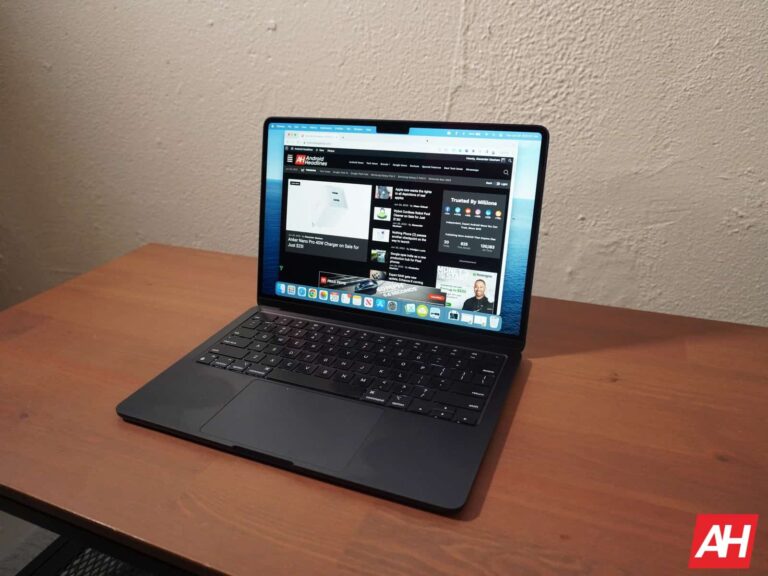
The MacBook Air has been Apple’s best-selling laptop since Steve Jobs pulled it out of that envelope all those years ago. And now we have an M2-powered MacBook Air, which is going to be great for everyone. From college students, to full-time employees and everyone in between. What makes the Air so great is the weight. It comes in at just 2.7lbs. One of the lightest laptops on the market.
With that weight, you might be thinking that battery life is going to suffer. But nope. It still is rated at 18 hours of battery life. I can personally attest to that, as I do use one everyday. It does last a solid 18 hours, if not longer.
This particular model is powered by the 8-core CPU and 10-Core GPU with a 16-core Neural Engine. Now the M2 does use 10-cores, but this one has been binned down to 8-core to hit a lower price point. It’s still plenty powerful, and you likely won’t notice the difference of the two extra cores.
The 15-inch MacBook Air is exactly the same as the 13-inch model, but with a larger screen and a couple more speakers. This is likely going to be Apple’s most popular MacBook Air, because people want that larger screen. It does weigh a bit more, about 3.5lbs. But for a 15-inch laptop, that’s still quite good. This does have a larger battery, but it’s still rated at 18 hours of usage.
Inside, it does still run on the M2 chipset, but it doesn’t have the binned down processor. So the entry-level model does have a 10-core CPU, 10-core GPU and a 16-core Neural Engine. So technically, it does have a bit more performance than the 13-inch model.
Apple does still technically sell this laptop, but probably not for much longer. It’s the original Apple Silicon laptop with the M1 chipset, which is a really powerful chipset. The difference between M1 and M2 is negligible. So if you don’t really care for the new redesign, then this is a good buy.
With the M1 chipset inside, you’re also getting a 8-core CPU, and 10-Core GPU with a 16-core Neural Engine included. It also comes with 8GB of RAM and 256GB of Storage. Remember that none of this is upgradeable after you purchase it. As it is all embedded into the chip.
The MacBook Pro is probably overkill for a lot of people, and the MacBook Air would be better, and a lot cheaper. This model starts at $1,999, and comes with a 10-core CPU and 16-core GPU. There’s also the same 16-core Neural Engine included as is the case with the other MacBooks. That’s a big jump in cores on the GPU side, but all of these cores are more powerful than the regular M2.
Much like the Air, the Pro does also tout 18 hours of battery life. Though this one is quite a bit heavier, at about 3.7lbs. It does also have upgraded speakers and microphones. There’s studio microphones included, so you don’t need a separate mic to do voiceovers.
Finally, the display. It’s a microLED display, which Apple brands as a Liquid Retina XDR display. It’s a really incredible looking display and plays really nicely with HDR content.
The MacBook Pro 16″ is basically the same as the 14″, both are available with the M2 Pro and M2 Max chips. We’ve configured this one with the M2 Max chip, which does jump to a 12-core CPU and 38-core GPU. Of course, the same 16-core Neural Engine is included too. That’s a lot of horsepower in a laptop. It also has 32GB of RAM and 1TB of storage inside.
Thanks to the larger size, this laptop has the best battery life in the lineup, quoted at 22 hours. It does have that same MicroLED display as the 14-inch, which can get up to 1,000 nits of brightness. And it also has the same studio mics and impressive speakers. Which are even more impressive on the 16-inch, due to the larger size for better speakers.
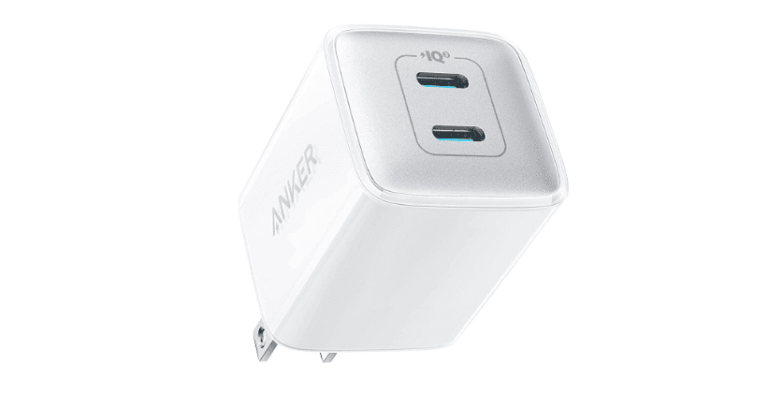
Amazon is having a charging sale for Anker right now, and one of the more impressive discounts is on the Anker Nano Pro charger. This is a 40W, dual-port wall charger. It is now on sale for $25.19, that’s down from $37.67. Making this a really great price.
The Anker Nano Pro 40W charger is a great option for anyone who wants a powerful and compact charger that can charge a wide range of devices.
Here are some of the reasons why you should buy the Anker Nano Pro 40W charger:
It’s small and portable. The Anker Nano Pro 40W charger is only about the size of a credit card, so it’s easy to take with you on the go. It’s also lightweight, so you won’t even notice it in your bag.
It’s fast. The Anker Nano Pro 40W charger can deliver up to 40W of power, which means it can charge your devices quickly. For example, it can charge an iPhone 13 from 0 to 50% in just 30 minutes.
It’s compatible with a wide range of devices. The Anker Nano Pro 40W charger is compatible with a wide range of devices, including iPhones, iPads, Android phones, MacBooks, and more. So, no matter what devices you have, you can be sure that the Anker Nano Pro 40W charger will be able to charge them.
It’s safe. The Anker Nano Pro 40W charger is equipped with Anker’s proprietary safety features, so you can be sure that it’s safe to use. These features include overvoltage protection, overcurrent protection, and short-circuit protection.
If you’re looking for a powerful, compact, and affordable charger that can charge a wide range of devices, then the Anker Nano Pro 40W charger is a great option for you. Order yours today and start enjoying the benefits of fast and convenient charging.
Here are some additional benefits of using the Anker Nano Pro 40W charger:
You can charge two devices at once. The Anker Nano Pro 40W charger has two ports, so you can charge two devices at the same time. This is great for when you’re in a hurry and need to charge your phone and tablet at the same time.
You can save space on your power strip. The Anker Nano Pro 40W charger is so small that you can even plug it into a single power outlet. This saves space on your power strip and makes it easier to keep your desk organized.
You get a lifetime warranty. Anker offers a lifetime warranty on the Anker Nano Pro 40W charger. This means that if anything ever goes wrong with your charger, you can get a replacement for free.
If you’re looking for a great deal on a powerful and compact charger, then the Anker Nano Pro 40W charger is a great option for you. Order yours today and start enjoying the benefits of fast and convenient charging.
It’s no surprise that Apple’s half-bitten logo has become synonymous with the company’s identity. However, in a recent development, Apple Inc. has entered into a trademark dispute with the Fruit Union Suisse, an association that represents Swiss fruit growers as it seeks to not only obtain the intellectual property rights to the iconic Apple logo but also aims to obtain exclusive rights to all depictions of real apples.
Apple wants the rights to all apple-shaped logos
The logo dispute first began in 2017 when Apple applied to the Swiss Institute of Intellectual Property (IPI) for intellectual property rights concerning a realistic black-and-white depiction of the Granny Smith apple—a widely recognized variety. After a prolonged process, the IPI granted partial rights, allowing the use of the logo on certain goods, particularly electronics. However, dissatisfied with this decision, Apple has now filed an appeal to acquire rights for all black-and-white apple depictions.
“We have difficulty comprehending Apple’s stance in this case because they are not solely seeking to protect their bitten apple. Their objective here is to establish ownership of the rights to an actual apple, which, in our view, is an almost universally recognized symbol… and should be free for everyone to use,” said Jimmy Mariethoz, the director of Fruit Union Suisse.
Not the first bizarre legal battle for Apple
While this new revelation might seem weird to some, it is not the first time that the company has engaged in such battles. However, Apple’s quest to control goes beyond just the logo as it has previously sued a meal-prepping app with a pear logo, a singer-songwriter named Frankie Pineapple, a German cycling route, stationery makers, and even a school district.
Despite solely applying for black-and-white apple depictions, intellectual property law expert Cyrill Rigamonti believes that this narrow scope could potentially grant Apple broad protection over the apple shape, enabling them to pursue infringements involving apples depicted in various colors.
Fortinet recently patched a critical pre-authentication RCE flaw in its Fortigate firmware. The vulnerability only affected Fortigate firmware empowering SSL VPN devices. Given the exploitability of the flaw, it’s crucial for the relevant users to update their systems at the earliest.
Severe RCE Flaw Affected Fortinet Fortigate SSL VPN Devices
According to a recent advisory from CERT-NZ, Fortinet has patched a severe security issue in its FortiOS firmware for Fortigate SSL-VPN enabled devices.
As stated, the vulnerability, identified as CVE-2023-27997, allowed an unauthenticated, remote attacker to execute arbitrary codes and commands on the target system.
Although, not much information is yet available about the bug since Fortinet hasn’t released a public advisory about it until the time of writing this story. Nonetheless, the related security bulletins, including CERT-NZ’s advisory, confirm that the firm has patched the vulnerability with FortiOS firmware versions 6.0.17, 6.2.15, 6.4.13, 7.0.12, and 7.2.5.
The vulnerability first caught the attention of two security researchers, Charles Fol of Lexfo Security and Rioru. Following this discovery, the researchers contacted Fortinet, who patched the issue.
Like Fortinet, the researchers have also not shared many details about the matter, allowing (and urging) the users to patch their systems at the earliest. According to Fol, the vulnerability affects every SSL-VPN enabled Fortigate device, though it typically impacts these devices only and won’t presumably apply to other devices. This resonates with Beyond Machines’ report, highlighting that the vulnerability lets an adversary meddle with the VPN even with MFA enabled.
Shodan results indicate that nearly 250,000 Fortigate firewalls are online, hinting at the massive number of vulnerable devices existing globally.
Since the patches are now available, it’s crucial for Fortigate users, especially those with SSL-VPN enabled devices, to update their systems with the relevant firmware releases. Besides, those interested to hear more directly from Fortinet may keep an eye on Fortinet advisories to read the details about this flaw when available.
Over the past few years, Google’s efforts to remove malicious and spyware apps from the Play Store have been commendable, but every once in a while, there are a few apps which go under the radar. Now, according to a new report from Cyfirma, two spyware apps, namely nSure Chat and iKHfaa VPN, have been actively infecting users’ devices to gain unauthorized access.
The iKHfaa VPN, backed by the Indian hacking group known as “DoNot” or APT-C-35 and operating from Pakistan, is particularly deceptive, as it not only copied the code from an app called “Liberty VPN” but also injected additional code to access contact lists and enable real-time tracking of users’ locations.
Telltale signs of malware
Although these apps may initially appear legitimate, their installation process should raise concerns among users. This is because, unlike genuine VPNs, which require minimal permissions, the iKHfaa VPN accesses users’ contact lists and precise location data. And once the app has the necessary permissions, it collects the required data and sends it to the threat actor’s command-and-control (C2) server via an HTTP request.
However, the fact that the developer of these malicious apps, SecurITY Industry, also has a third app that seems non-malicious raises some questions about the group’s intentions. Nonetheless, if you either have the nSure Chat or iKHfaa VPN installed on your device, delete it immediately.
Implementing security measures
While the relatively low number of downloads for these spyware apps suggests that the threat actors are specifically targeting individuals, this incident once again highlights the ever-growing importance for users to implement stringent security measures. These measures include reading the terms and reviews of any app before installing it and carefully reviewing the permissions the app requests. Moreover, if any app on your phone causes excessive heating, sluggish performance, or rapid battery depletion, it could also be malware.
Imagine holding an entire universe in the palm of your hand – where dragons soar, puzzles awaken your mind, and you can be the hero or the strategist. Mobile gaming transcends the realm of pixels and takes you on an odyssey of imagination and skill. This odyssey is fueled by the ever-advancing technologies in smartphones. From processors that make games seem lifelike to social features that connect you to fellow adventurers worldwide, your smartphone is all you need for a thrilling gaming exploration.
Plugging into the Power Grid: Processors and Performance
The heart of your gaming experience lies in the processor that powers it. In recent years, chipsets like the MediaTek MT6580 have been lauded for their affordability and performance, especially in mid-range phones. However, as an enthusiastic gamer, you might want to look for even faster processors to avoid latency.
The processing prowess of a smartphone’s CPU and GPU dictates the game’s performance. Investing in a powerful processor will result in smoother graphics, faster load times, and a lag-free experience. Brands like Samsung, Alcatel, and DOOGEE, for example, have made impressive strides in incorporating chipsets that are optimal for gaming.
Staying Connected: The Age of Low Latency
One cannot emphasize enough the importance of network connectivity in mobile gaming. Whether you’re coordinating with your team in an intense multiplayer match or casually engaging in online slot games, a perfect experience requires strong connectivity.
Knowing a device’s highest cellular generation (e.g., 4G or 5G) can indicate its latency levels. Latency affects the Quality of Experience (QoE), as high latency results in lagging and poor performance. Data shows that 70% of touchscreen mobile phone models manufactured between 2017-2022 have at least 4G connectivity, which is promising for gamers seeking to minimize lag.
The Looking Glass: Revel in Crystal Clear Displays
While performance is king, visual prowess is the queen. Enter the realm of high-resolution screens and pixel density. The evolution of smartphone displays has been remarkable. Average screen resolutions increased from 1109×636 pixels (2012-2016) to 1488×759 pixels (2017-2022).
This leap in screen resolution and pixel density means that games look better than ever.
Moreover, gaming publishers should consider developing responsive games that adapt to various screen resolutions to ensure that the visual experience is optimized regardless of the device.
The Social Fabric: Gaming Communities at Your Fingertips
Smartphones aren’t just solo gaming machines; they are conduits for social interaction. Games that foster communities or involve multiplayer elements are drawing people together.
This aspect is vital for those who find building relationships challenging in the real world. Gaming on smartphones allows players to engage with friends and even make new ones. Whether it’s through collaboration or competition, mobile games act as a social glue, connecting people globally.
Mind and Magic: Cognitive Benefits and Relaxation
It’s not all just fun and games. Mobile gaming can also sharpen your mind. Engaging in challenging games that force you to think, solve puzzles, and strategize can improve memory and cognitive functions. Also, when you need to unwind, indulging in an easy-going mobile game can be just the elixir for relaxation.
The Treasure Chest: Affordability and Accessibility
Gone are the days when gaming was a costly hobby. With mobile gaming, affordability is one of its strongest suits. Many games are free, and even the paid ones are usually more economical than their PC or console counterparts. Coupled with the sheer variety of games available, this makes mobile gaming accessible to a vast demographic.
Infinite Realms Await
Smartphones have undoubtedly revolutionized the gaming experience. Through processing power, stunning visuals, social integration, cognitive benefits, and affordability, they have transformed our pockets into portals to infinite worlds. Accordingly, one can easily say that there has never been a better time to be a mobile gamer.


.png
)