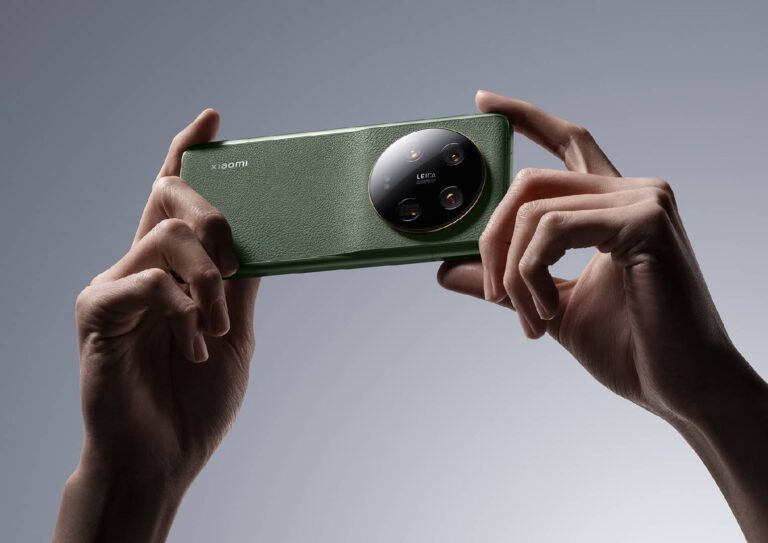
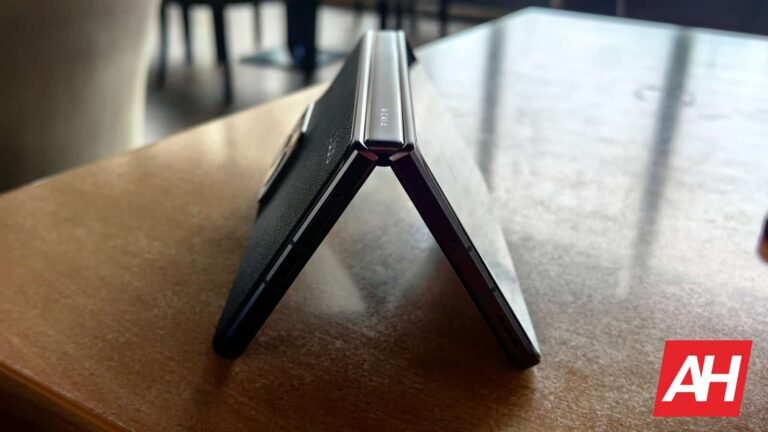
The Xiaomi 13 Ultra launched in China back in April. Back then, Xiaomi confirmed that the phone is coming to more markets, but it did not say when. Xiaomi France (possibly) slipped up recently, announcing that the Xiaomi 13 Ultra global launch date is set for June 12, and the company’s CEO just confirmed the news.
The Xiaomi 13 Ultra global launch date is now officially confirmed by CEO
Lei Jun went to Twitter to say that the Xiaomi 13 Ultra’s global sale will kick off on June 12. He did say, however, that this is a Western Europe launch, but that more markets will join soon after that.
So, the floodgates open on June 12, it would seem. It’s worth noting that the phone launched in Hong Kong recently, two days ago. It is coming to plenty more markets, that’s for sure.
The Xiaomi 13 and 13 Pro launched globally earlier this year. The Xiaomi 13 Ultra is the most powerful smartphone the company ever announced. It comes with an even more powerful camera setup than the Xiaomi 13 Pro.
We reviewed the device not long ago, the Chinese variant. The global model will include the same specs and design, but different software. A global version of MIUI will come pre-installed on it.
The phone includes plenty of RAM, fast wired & wireless charging, four 50MP cameras & more
As a reminder, the Xiaomi 13 Ultra is fueled by the Snapdragon 8 Gen 2 processor. The phone packs in up to 16GB of LPDDR5X RAM in China, and up to 1TB of UFS 4.0 flash storage. We’re not sure what the global model will offer in this regard.
A 5,000mAh battery is also included in the package, and the same goes for 90W wired charging. 50W wireless charging is also supported, while the device does include a charger in the box.
Four 50-megapixel cameras sit on the back, with Leica lenses. The main one utilizes a 1-inch camera sensor from Sony, and a 2-stop variable aperture. The camera hardware overall is immensely powerful.
A 6.7-inch QHD+ display with a 120Hz refresh rate is also a part of the package. The same goes for stereo speakers, and much more.
It comes as no surprise that ever since the success of ChatGPT and its subsequent integration into the Edge browser as the Bing AI chatbot, Microsoft has gone from being the underdog in the search engine market to now seeing themselves fighting for market share with Google. However, the company has always been aggressive in discouraging people from downloading Chrome, and its recent actions have raised some eyebrows as Microsoft shamelessly tampered with its Bing AI chatbot, effectively ignoring searches for Google Chrome and promoting Bing features instead.
As reported by The Verge, Microsoft presented users searching for Chrome or related terms with a Bing AI “widget” that did not provide the expected search results but instead displayed a list of Bing features. This essentially served as a full-scale advertisement for the service, disrupting the user’s search experience and favoring Microsoft’s products over unbiased search results.
Furthermore, to make matters worse, the result that Microsoft displayed to people searching for Chrome-related terms wasn’t even a Bing AI-generated message. It was a calculated move by the company, as the message remained the same for all searches, and the AI is designed to never generate the same message twice.
However, this is not the first time Microsoft has engaged in such practices. Earlier this year, the Edge browser showed an ad for Bing next to the Google Bard URL in the search bar, and although the ad disappeared after a while, it left a Bing icon in place that opened the Bing AI chatbot in split view.
Microsoft’s response
In response to the controversy, Microsoft released a statement acknowledging their experimentation with new features and behaviors to enhance customer experiences. While Microsoft’s efforts in the AI field are commendable, and it is common for companies to conduct tests to improve their products, the situation is quite severe as by disregarding searches for a leading competitor’s product and substituting them with self-promotion, Microsoft not only undermines fair competition but also erodes user trust.
“We often experiment with new features, UX, and behaviors to test, learn, and improve experiences for our customers. These tests are often brief and do not necessarily represent what is ultimately or broadly provided to customers,” said Microsoft.
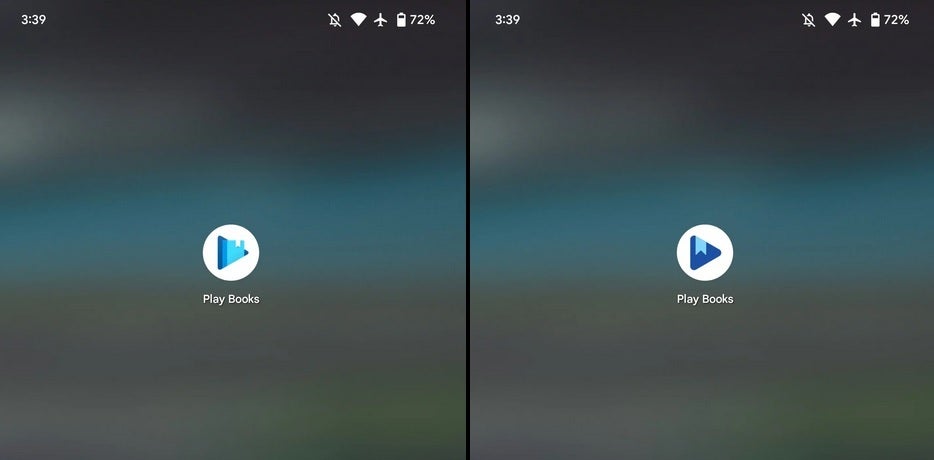
According to 9to5Google, a new icon for the Google Play Books app is rolling out now starting with version 2023.5.30.0.1 of the Android app. The previous version of the icon had a book with a light blue cover sticking out from the triangular background. That book has been removed in the new icon. With that book gone, the purple color of the triangle can now be seen. The bookmark that hangs from inside the book still appears as though it is hanging out of the triangle. And the three corners of the triangle are now more rounded.
You can find the revised icon on the app’s listing in the Google Play Store. And the icon wasn’t the only change that Google made to the Play Books app. On tablets, the bottom bar is replaced with a “navigation rail” on the left side of the screen. The rail includes icons for Home, Library, Wishlist, and Shop. No other changes were made to the tablet version of the Google Play Books app.
If you don’t have the Google Play Books app on your mobile device, you can install it from the Play Store by tapping on this link. If you’re using iOS, the Play Books app can be installed from the App Store via this link.
The old Play Books icon on the left and the new one on the right. Image credit 9to5Google
As we mentioned in the first paragraph, the new Google Play Books icon can be seen starting with version 2023.5.30.0.1. You can check out which version of the app you have on Android by going to Settings > Apps > See all xxx apps and scroll until you see Google Play Books. Tap on the listing and scroll down to the bottom of the page where the version number is listed. Currently, my Pixel 6 Pro is running 2023.5.15.0.0 which means the new icon has yet to hit my phone.
The Android widget for the Google Play Books app
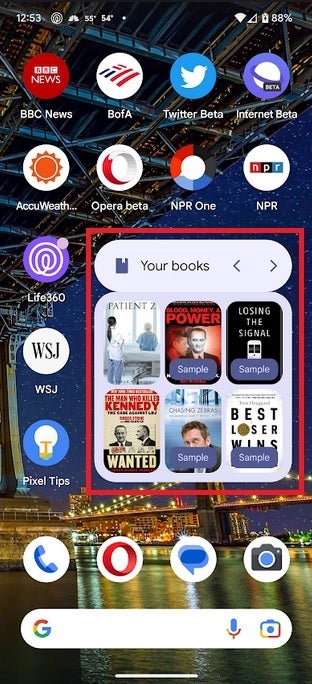
From the Google Play Books app, you can preview ebooks and read the ones that you purchase. Google also includes a cool Android widget for the app that shows as many as the last six titles you’ve sampled or purchased. To add the widget, you must have the Play Books app installed on your Android device. If you do, find an empty piece of home screen real estate and long-press on it. You’ll see a pop-up with three options. Tap on Widgets. Scroll down to Google Play Store, long-press on the 3×2 widget, and slide it to the opening on the page you are taken to.
In addition to the rise in botnet-driven DDoS attacks, the Threat Intelligence Report highlights a doubling in the number of trojans targeting personal banking information on mobile devices, now accounting for 9% of all infections.
A recent report from Nokia’s Threat Intelligence Center sheds light on the alarming rise of IoT botnet DDoS attacks targeting telecom networks worldwide. The study reveals a fivefold increase in such attacks over the past year, with cybercriminals exploiting insecure IoT devices and profit-driven hacking collectives.
This surge in malicious activity initially observed during the Russia-Ukraine conflict, has now spread to various regions globally, jeopardizing critical infrastructure and services beyond telecom networks.
The proliferation of IoT devices among consumers has contributed significantly to the escalation of botnet-driven DDoS attacks. The number of compromised IoT devices used in these attacks has soared from 200,000 to approximately 1 million, currently accounting for more than 40% of all DDoS traffic.
Geographical distribution of active botnet devices, by country (Source: Nokia Deepfield)
The report underscores that this rise in attacks stems from the growing number of profit-driven hacking collectives, taking advantage of the Ukraine crisis.
A prevalent form of malware in telecommunication networks is bot malware, which scans for vulnerable devices—a tactic associated with multiple IoT botnets. With lax security measures prevalent in billions of IoT devices worldwide, encompassing everything from smart refrigerators to medical sensors and smartwatches, cybercriminals have found ample targets to exploit.
In addition to the rise in botnet-driven DDoS attacks, the Threat Intelligence Report highlights a doubling in the number of trojans targeting personal banking information on mobile devices, now accounting for 9% of all infections. This puts millions of users worldwide at heightened risk of having their financial and credit card details compromised. Trojans are malicious software codes that disguise themselves as legitimate applications.
On a positive note, the report reveals a decline in malware infections within home networks. Following a peak of 3% during the Covid-19 pandemic, the infection rate dropped to 1.5%, approaching the pre-pandemic level of 1%. This reduction can be attributed to the decline in malware campaigns targeting remote workers as people transition back to office environments.
The findings presented in the report are based on data collected from over 200 million devices globally, utilizing Nokia’s NetGuard Endpoint Security product to monitor network traffic.
The Threat Intelligence Center in Canada, Nokia Cyber Security Center in France, Nokia Security Operations Center in India, and Nokia Deepfield, specializing in network analytics and DDoS security, contributed their expertise to compile this comprehensive report.
Addressing the report’s findings, Hamdy Farid, Senior Vice President of Business Applications at Nokia, emphasized the urgent need for robust security measures in 5G networks. Farid highlighted the importance of telco-centric threat detection and response, along with the implementation of rigorous security practices and awareness at all levels of organizations, including service providers, vendors, and regulators.
The alarming surge in IoT botnet attacks serves as a wake-up call for the global telecommunications industry to bolster their security measures and collaborate closely to protect network integrity and ensure the safety of millions of users worldwide.
Samsung has released the June 2023 Android security patch for the Galaxy S22 and Galaxy S20 series. The rollout began recently but the new security update is already available fairly widely in Europe and Latin America. The company should soon cover units in the US.
The June SMR (Security Maintenance Release) for the Galaxy S22, Galaxy S22+, and Galaxy S22 Ultra is rolling out to European users with the firmware build number S90*BXXU5CWEA. The same update in Latin America comes with the build number S90*EXXS5CWE7. Samsung isn’t pushing any notable new features or other changes to the device in either region, SamMobile reports. The updates are all about this month’s security fixes, which we will talk about in more detail later in this article.
Meanwhile, these security fixes are now also available for Galaxy S20, Galaxy S20+, and Galaxy S20 Ultra. As of this writing, the June SMR for Samsung’s 2020 flagships is rolling out in a bunch of European countries with the build number G98*BXXUHHWED. The update may contain more than just the latest security patch but we don’t have a changelog to confirm that. Don’t expect any major new features, though. The Korean firm will expand this release to more markets in the coming days.
The June update for Galaxy devices patches more than 60 security issues
Samsung’s June update contains patches for more than 60 vulnerabilities. As usual, that’s the combined total of patches coming from Samsung (Galaxy-specific issues) and Google (Android OS issues). The Korean firm patched 11 security issues specific to its products, including some in the Exynos baseband and Knox security platform. The remaining 50-odd patches are for security flaws in Android OS and other partner components. They affect Android devices from other brands as well.
At least three patches pushed to Galaxy devices as part of the June SMR concern critical Android OS vulnerabilities. Along with the Galaxy S22 and Galaxy S20 series, Samsung is also seeding these security patches to the Galaxy A12 Nacho, a budget phone that saw a limited release in 2021. The new update for the phone bears the build number A127FXXU9DWE4 and is currently available in Russia. Samsung may or may not push the June SMR to this phone in other markets.
Nonetheless, if you’re using any of these Samsung devices, watch out for a new update in the coming days. The Korean firm has also pushed the June SMR to the Galaxy Z Fold 4, Galaxy Z Flip 4, Galaxy Note 20, Galaxy A53, Galaxy A52s 5G, Galaxy A52, Galaxy A23, and Galaxy Tab Active 3 in some markets.
The European Union (EU) is considering a mandatory ban on using Huawei 5G equipment in the continent. The move comes after some EU members continued to use Huawei equipment despite knowing about possible risks.
Huawei and some other Chinese tech companies were blacklisted by the US government and EU over espionage allegations and collaboration with the Chinese government. While US lawmakers completely banned Huawei from operating in the country, only a third of EU countries have removed the Chinese vendor from their 5G communication network, the Financial Times says.
The EU internal market commissioner Thierry Breton said, “This is too few. And it exposes the union’s collective security.” The EU reportedly prepares a toolbox of security measures to guide member states in the process. Huawei claims that no court has neither found them engaged in malicious intellectual property theft nor asked them to pay damage for infringing others’ intellectual property.
Some EU members are still using Huawei 5G equipment, a mandatory ban is on the way
Following pressure from the US government in 2020, the EU members agreed on the toolbox of security measures that included certification requirements and diversification of suppliers. The toolbox is still in the works, and a European Commission spokesperson promised to monitor its implementation.
Among the EU members, Germany is the most notable country that delayed the implementation of the toolbox of security measures. The country said earlier this year that it’s reviewing the use of Chinese equipment in its 5G network. Deutsche Telekom, the largest telecommunications provider in Europe, reportedly has close ties with Huawei.
In response to the news, Huawei argued, “Assessing cyber security risks without sticking to technological standards, or excluding specific suppliers from the system without proper technological evaluation, is a violation of the principles of fairness and non-discrimination, and also against the laws and regulations of the European Union and its member states.”
Experts already noted that removing Huawei from 5G networks could cost over $100 billion. However, the potential risks can’t be ignored. The EU warned members of the “costs of long-term dependencies” on China, saying the case is similar to dependence on Russian energy after the Ukraine war. Portugal is the latest EU country to consider banning some Huawei 5G equipment from its network.
We’re excited to announce Report 2.0, a major upgrade to our report system in Nebula.
We’re excited to announce Report 2.0, a major upgrade to our report system in Nebula. Report 2.0 is not just a cosmetic touch up—it’s a completely revamped security reporting solution designed to cater to your diverse business requirements, allowing for a more dynamic, data-driven approach to IT security.
Key features of Report 2.0
This upgrade comes as part of a three-phase solution to redefine our reporting capabilities. The core features of Report 2.0 include:
More Intuitive User Experience. The upgraded report system offers an intuitive user interface designed to lower barriers and improve visibility into your IT landscape. This feature enables you to make data-driven decisions, effectively enhancing your security approach.
Enhanced Visibility. The new system offers an insightful view of your security posture, demonstrating the value Malwarebytes delivers, at your preferred frequency.
Integrated Functionality. With the aim of lowering reliance on third-party solutions, Report 2.0 is an integrated solution with all functionalities accessible within the console.
Pre-built Report Library. Our new feature includes an expanded library of pre-built report widgets. This comprehensive collection addresses common use cases, complete with interpretations and recommendations, giving you a head start in your reporting tasks.
More formats, better customization
Previously, reports could only be generated in a CSV file format. They displayed various information related to detections of malware, endpoints, logged endpoint events, quarantined items, and detailed information on identified assets.
The new system offers a more comprehensive, engaging reporting experience.
Not just CSV files anymore, you can now generate reports in a PDF format, with charts and graphs included where applicable. Not only that, but an Excel format will be added soon.
Reports can now be sent to multiple recipients, both console and non-console users, with the ability to include or exclude the report creator. An open text field has been also added, allowing for personalized introductions to the reports.
New Report Scheduling Modal
New Email notification
New report types and widgets
Report 2.0 initially introduces the PDF format to the following existing reports as part of a phased rollout:
Endpoint Summary
Software Inventory Summary
Quarantine Summary
Events Summary
Detection summary
Each report now comes with widgets to capture specific data sets, custom date ranges, and formatted charts. These widgets offer a detailed breakdown that allows for close monitoring of potential threats and strategizing accordingly.
For example, in the ‘Detection Summary’ report, widgets are used to display the total detections, endpoints with the most detections, detections by group and threat category, most frequently detected threats, and detections per day.
Detection Summary report
From ‘Endpoint Summary’ to ‘Software Inventory Summary’, ‘Quarantine Summary’ and ‘Events Summary’, each report offers a comprehensive view of your security landscape.
Endpoint Summary report
Software Inventory report
Quarantine summary
Events summary
Onwards and upwards
We’re thrilled to bring this new feature to our customers, making your experience with Nebula’s reporting more effective and insightful. Learn more about Report 2.0 here!
OnePlus is getting ready to launch its very first foldable smartphone. The OnePlus Fold or OnePlus V Fold will be its name, as things stand at the moment. The OnePlus Fold does make more sense, but the OnePlus V Fold name did get trademarked by the company. So, take your guess. We’ll have to wait until the launch in order to find out.
We’ll talk more about the launch date/timeframe below. Quite a few companies already launched their book-style foldables, several iterations of them, so it’s about time OnePlus joins the fold. Read on to find out what you can expect out of this smartphone.
This article will be regularly updated with new information on the OnePlus Fold (this is a preview article) — both official teasers and credible leaks, rumors, and insider claims — as it becomes available in the run-up to the release of the upcoming Android smartphone. The last update was made on June 8 (original publishing date).
When will the OnePlus Fold be released?
OnePlus has officially confirmed that its very first foldable smartphone will launch in Q3 this year. The company did not share the exact date or month just yet. A tipster did say that the device is coming in August, though. That information is still not verified, but it could easily happen. It would put this launch after the Galaxy Z Fold 5 and Flip 5 launch (July), and before IFA in Berlin and Apple’s new iPhone 15 series launch event (September).
What models are coming?
OnePlus trademarked two names for foldable phones, the OnePlus V Fold and OnePlus V Flip. Those two are presumably reserved for the book-style and clamshell-style foldables. The thing is, we haven’t heard anything about the ‘Flip’ thus far. Only the ‘Fold’ is coming, and we presume that it’ll be available in more than one storage option. We’re still not sure how much storage will OnePlus offer, but we do expect it to go up to 256GB or 512GB. The company is expected to offer UFS 4.0 flash storage here.
How much will the OnePlus Fold cost?
The price tag of this handset still didn’t surface. One thing is for sure, though, the OnePlus Fold won’t be cheap. This phone will offer flagship-grade specs, and it’ll be a foldable phone after all. The OnePlus 11, OnePlus’ flagship, actually launch with a great price tag (at least in the US). Don’t expect the OnePlus Fold to be anywhere near that level, though. You can expect it to cost over $1,000, well over $1,000, in fact. If we had to guess, we’d even say over $1,200. In Europe, the price tag will likely be even higher than in the US.
What will the OnePlus Fold look like?
Based on rumors, the OnePlus Fold will basically look like the OPPO Find N3. That handset didn’t launch yet either, it’s expected to arrive in a couple of months. Rumors basically indicate that the OnePlus Fold will be a rebranded version of the OPPO Find N3, which is possible, as both companies are a part of BBK Electronics. They’ve shared designs and tech in the past, and have very similar Android UIs too.
What does that mean, though? Well, the OPPO Find N and Find N2 were different than other book-style foldables. They had very compact outer displays, and a horizontal layout when unfolded. So they were quite short compared to the Galaxy Z Fold phones, for example. We expected the same to happen with the OPPO Find N3, despite the fact OPPO plans to increase its display size. Based on a sketch that surfaced (shown below), though, the Find N3 and OnePlus Fold could be more similar to the Galaxy Z Fold series than the Find N3 predecessors.
Take that info with a grain of salt, though, as we cannot verify that the sketch is legit. Presuming it is, however, you can expect to get very thin bezels, and a centered display camera hole on the outer display. Three cameras are expected on the back, one of which will be a periscope telephoto unit. We presume that the other two will be main (wide-angle) and ultrawide units. The phone will have a squarish shape, and we still don’t know if a display camera hole will sit on the main panel.
It’s also worth noting that the OnePlus Fold is expected to fold flat. The OPPO Find N and Find N2 both folded flat, and had really good crease control. The same is expected here. OnePlus could benefit from OPPO’s expertise.
What specs will the OnePlus Fold have?
The OnePlus Fold is tipped to utilize the allegedly upcoming Snapdragon 8+ Gen 2 SoC. That chip is expected to launch in the near future. If not, then the Snapdragon 8 Gen 2 will be used, we’ll see. Regardless, the OnePlus Fold will have a flagship-grade processor on the inside. The phone is also rumored to include up to 16GB of LPDDR5X RAM and up to 512GB of UFS 4.0 flash storage.
The main display is tipped to measure 8 inches in diagonal. That will be a QHD+ OLED panel with a 120Hz refresh rate. The cover display is rumored to measure 6.5 inches, and that will likely be a fullHD+ OLED panel. That display will also offer a 120Hz refresh rate. A 4,800mAh battery was also mentioned in rumors, as was 80W fast wired charging. It remains to be seen if the device will offer wireless charging, but the Find N and Find N2 did not.
What about the cameras? Well, if rumors are accurate, the OnePlus Fold will include a 50-megapixel main camera, a 48-megapixel ultrawide unit, and a 32-megapixel periscope telephoto camera. Hasselblad will be a part of the picture too. Two 32-megapixel selfie cameras were also mentioned, one for each of the phone’s displays.
Android 13 will likely come pre-installed on the OnePlus Fold, along with OxygenOS 13 adapted for foldable devices. If the device launches in August, it’ll likely get Android 14 in the coming months, before the end of the year.
Should you wait to buy the OnePlus Fold?
Should you wait for the OnePlus Fold, or getting something else right now? Well, that’s the answer only you can provide. However, if you really want a OnePlus foldable, with OxygenOS on it, the launch of this phone is not far away. There are some book-style foldables available in markets outside of China, but not many of them. As far as last-gen products go, the Galaxy Z Fold 4 (and the upcoming Galaxy Z Fold 5), HONOR Magic Vs, and Huawei Mate Vs are available. Each of those phones is compelling in its own way. Who knows, though, perhaps the OnePlus Fold will be more compelling and have a better price tag. Unlike the Galaxy Z Fold 4, it’s expected to fold flat. Also, it’ll likely have a less noticeable crease, so… there you go.
You know how you can tell who someone is by just seeing the back of them, well the Google Photos face recognition feature can do that. Some tests have shown that this photo app pre-installed on Android devices doesn’t need to spot your face before it identifies you. Although this feature is pretty impressive, it might not tell a user’s identity from the back all the time.
Of course, the software might not be able to find certain cues it needs to identify users at all times. But, for the times it identifies users from the back, it does so impressively. This ability to identify users from the back has not been available on the Google Photos app for long.
The feature responsible for this happens to be a recent addition to the Google Photos app. While the Google Photos face recognition feature has been available for a while, identifying users without seeing their faces is new. Let’s now look at this impressive feature that can better organize your pictures into their folders.
The Google Photos face recognition feature can now tell users apart from the back
The Google Photos recognition feature helps users arrange photos into folders based on faces. It identifies and groups pictures containing a particular face into a folder. After the grouping, it then lets users name the folder and tags the name to the faces in each folder.
A recent update points out that this feature can function without spotting the user’s face. Yes, the Google Photos face recognition feature no longer needs to spot a user’s face before it, apart from other faces. The feature seeks cues that can point out a person in photos where their face isn’t visible to the camera.
How Google Photos can identify users in pictures without seeing their faces is a bit confusing. However, it is safe to say that in situations where the feature can’t spot a face, it resorts to seeking visible cues. These cues might include a hairstyle, a piece of clothing, and so on.
So if a person takes pictures (facing and not facing the camera) in the same hairstyle or dress, the Google Photos face recognition feature will identify them in all the pictures. This is a great feature as it can help properly organize photos into folders without leaving out those where the person’s face isn’t visible. Certainly, this new ability to identify people in photos without seeing their faces is a great addition to the Google Photos app.
Of course, this is a new feature and will group old photos where users’ faces didn’t show in their right folders. But, it is good to note that this feature might not function all the time, but when it does, it tends to be accurate. So run over to your Google Photos app and check if it can identify you in pictures where you aren’t facing the camera.
A week ago we told you about some new features that Google is adding to the Android platform. Among these features are new widgets that Android users can use to track stock prices on their home screens, receive recommendations about which television shows and movies to stream on Google TV, and get the latest news from the Google News app. There are actually two Google News widgets coming which will replace the current solitaire Google News widget.
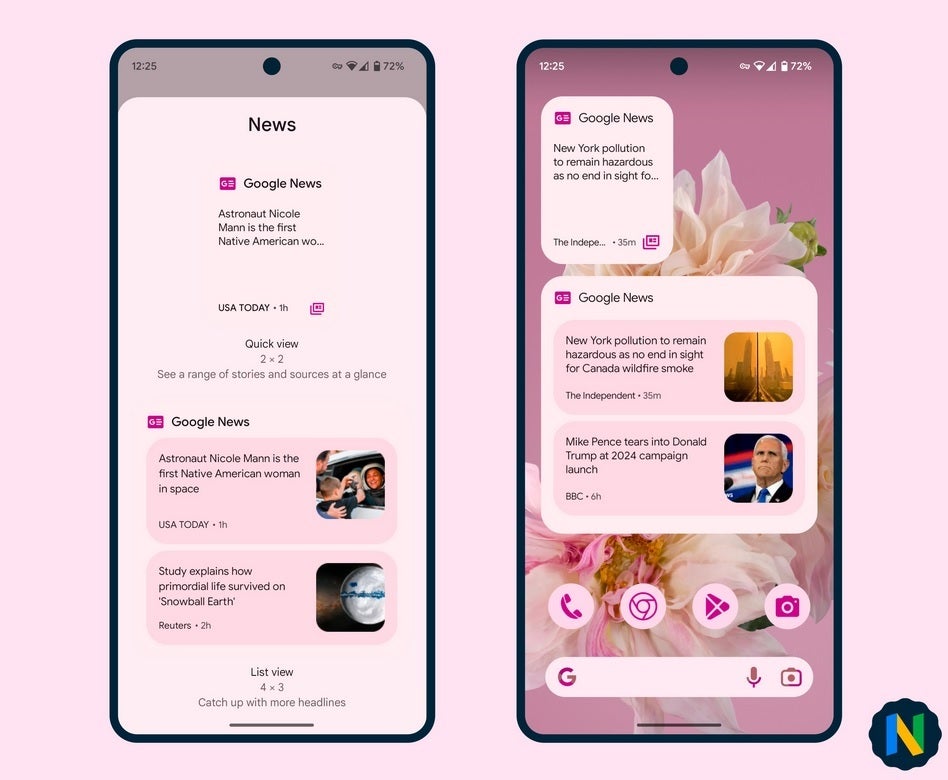
The two new Google News widgets are available with version 5.82 of the app. Considering that version 5.81 is still the build of the app being pushed out of the Play Store, getting the new widgets is a waiting game at this point. Nail Sadykov, editor of the Google News Telegram Channel, tweeted out a couple of images showing the two new widgets in use. One is a Quick View widget 2×2 in size that will give you limited information about one story.
The new Google News widgets are coming soon to an Android phone near you
The second widget weighs in at 4×3 and is called a List View. It shows you two headlines and small images for each story. That compares with the current 4×2 widget that shows limited information and a small picture for one story. So once you receive Google News version 5.82 for your Android phone, you can forget about the latter widget and choose one smaller one or a larger one to place on your home screen.
To see which version of Google News you have installed on your Android phone, go to Settings > Apps > See all xxx apps and scroll down until you see Google News. Tap on it and you’ll be taken to the Google News App info page. Scroll down to the very bottom of the page and you’ll see the version number of the app that you have installed. Unfortunately, the version of Google News running on my Pixel 6 Pro is 5.80.