It seems that Amazon does not want to be left behind in the era of generative AI, so it is working on an Alexa upgrade for which the possible price has been leaked. The company wants to catch up, while others like Google Gemini are quite ahead of it.
According to a Reuters report, Amazon is working on the “Banyan” project which will bring a generative AI-powered Alexa experience to the public. Like other similar services, everything would revolve around a chatbot capable of understanding natural language. However, Amazon’s service is expected to focus on boosting your shopping experience on the platform.
The Alexa generative AI upgrade would cost between $5-$10 per month
The source claims that the dev team refers to this update as “Remarkable Alexa.” However, that will probably not be the final name of the service once it is available. Additionally, Amazon is considering a price of between $5 and $10 per month for the more capable Alexa generative AI upgrade. Even so, they would also offer a free version with fewer features and possibilities. To date, it is not known what the main functional differences between the paid tier and the free tier would be.
Amazon usually includes multiple perks from some of its services when paying for a Prime membership. However, it seems that will not be the case with “Remarkable Alexa.” The report indicates that Prime users will not gain access to the benefits of the alleged Alexa paid plan. Apparently, the company considers Alexa to be an unprofitable project. People do not use the assistant as much as the company would have liked. So, its impact on sales through Amazon has not been what was initially expected.
Alexa has not been profitable since its launch
However, the company wants to change this with Remarkable Alexa. If the project is successful, it will open up at least two new ways of monetization. First, the paid subscription would serve not only to maintain the service but also to make some profit. Then, the potential success of the Alexa generative AI upgrade would have a positive impact on sales through Amazon.
Amazon would announce the generative AI-powered Alexa experience in August of this year (2024). As mentioned before, they are already far behind services like Google Gemini. But, they could be in time to arrive before the Apple Intelligence full rollout. After all, many of the features announced by Apple will be available next year.
Google recently announced the discontinuation of its VPN by Google One service, planning to replace it with a new VPN by Google service designed specifically for Pixel users. However, the transition has hit a snag, leaving some users frustrated and scrambling for alternative solutions.Discontent has been brewing on Reddit as numerous Pixel owners have voiced their concerns about the new VPN service. Some users have reported encountering error messages when trying to activate the VPN, while others have stated that the VPN toggle is simply missing from their device settings altogether. This lack of functionality leaves them without access to a VPN service, potentially exposing their online activity and data to unwanted snooping on public Wi-Fi networks.The issue seems to primarily affect the Pixel 7 series, including the Pixel 7a, as well as the Pixel 8 range. It’s also likely that some Pixel Fold owners may be experiencing similar problems.
According to reporting by Android Authority, some Reddit users have speculated that the lack of access to the VPN by Google service might be tied to the June update not yet being rolled out by their carriers. However, other users have reported receiving the update but still facing issues with the VPN. This inconsistency suggests that the issue may be more widespread than initially thought, and it could potentially be caused by a glitch in the VPN app itself or compatibility issues between the app and certain Pixel devices or software versions.
It’s worth noting that this issue appears to be limited to a subset of Pixel users, and many others have successfully transitioned to the new VPN service without any issues. Google has not yet commented on the reported issues, but it’s likely that they are working on a fix for those affected. In the meantime, Pixel users who are experiencing difficulties with the new VPN service may want to explore alternative VPN options or wait for Google to address the issue, which should hopefully be soon.
It looks like Google is all set to show a new message when the Pixel phones overheat. Currently, the Pixels only show a simple warning message that reads “Phone is getting warm”. However, in the coming updates, the Pixels will show more descriptive overheating warnings.
A new version of Device Health Services will bring more descriptive overheating warnings for Pixels
Folks over at 9to5google have found references to descriptive overheating warning messages for Pixels in version 1.27.0.638152889 of the Device Health Services app. First up, there’s a reference to the “pre_emergency_notification” string, which is titled “Phone needs to cool down”. It further explains how “You may experience slower performance. Try avoiding direct sunlight or close any battery-intensive apps”. Essentially, all the tips to cool down your device will be available on the screen and you won’t have to visit Google’s support page for answers.
In the “pre-emergency” mode, you will have limited access to your Pixel. In addition, during this state, your Pixel will automatically start cooling down by limiting performance, disabling 5G, and more.
The existing overheating notification on the Pixel phones explains how “Some features are limited while the phone cools down”. Tapping on more info gives you a more descriptive message that reads “Your phone will automatically try to cool down. You can still use your phone, but it may run slower. Once your phone has cooled down, it will run normally”.
Pixel phones will soon also implement the “Adaptive Thermal” feature to prevent overheating
In a separate report, Android Authority has found some strings of an “Adaptive Thermal” feature in the code of Device Health Services. This feature will automatically trigger when the battery temperature rises to harmful levels. The report states that the above-mentioned “pre-emergency” alert will trigger when the temperature reaches 49 degrees Celsius (~120 degrees Fahrenheit). It will then show you tips to cool down your device.
The Adaptive Thermal feature will keep checking the battery temperature levels every five minutes. If the phone still hasn’t reached normal levels but instead rises to 52 degrees Celsius (~126 degrees Fahrenheit), then the “emergency” state will be triggered. There’s no word what exactly will happen on your Pixel in this mode.
Furthermore, if the battery temperature reaches a dangerous 55 degrees Celsius (~131 degrees Fahrenheit), then your phone will shut down to cool. In this state, the Thermal Adaptive feature will shut down the device in 30 seconds after reaching critical temperature levels.
Google hasn’t yet rolled out this update to the Device Health Services app globally. It is being rolled out gradually, so it could take some time to reach your device.
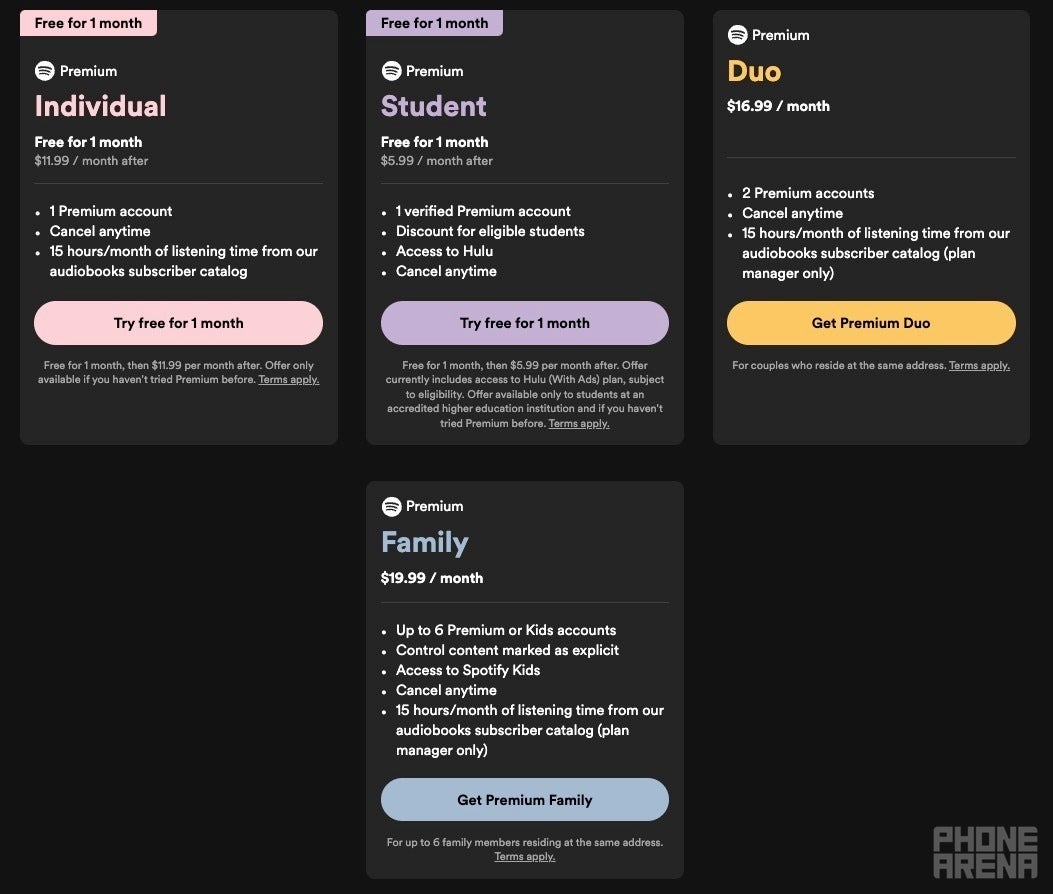
Spotify just announced a new subscription tier in the United States called “Basic,” providing an alternative for users who don’t utilize the platform’s audiobook feature. Priced at $10.99 per month, this plan offers all the core benefits of the standard Spotify Premium plan, such as ad-free listening, offline downloads, and unlimited skips, but without the 15 hours of monthly audiobook listening time included in Premium.This move comes after Spotify increased the price of its Premium plan to $11.99 per month. The price hike was attributed to the recent addition of audiobook support, a feature not all users were interested in. Thus, the new Basic plan caters to those who primarily use Spotify for music and podcasts, offering a more cost-effective option.
In addition to the individual Basic plan, it was spotted that Spotify also quietly introduced a Family version of the Basic plan for $16.99 per month. This gives families the opportunity to enjoy the same ad-free music experience at a lower cost. Existing Premium subscribers can easily downgrade to the Basic plan if they wish to save a dollar per month and don’t need the audiobooks feature.
Downgrading your plan gives you the option to go to the new “Basic” tier | Image credit — 9to5Google
It’s worth noting that while the Premium Duo and Premium Family plans, priced at $15.99 and $19.99 per month respectively, still include audiobook access. Couples or families who do not use this feature might consider switching to the Basic plan for potential savings. Audiobooks are still being offered separately as an add-on at $9.99 per month.
Additionally, these plans don’t appear to be available for new subscribers but only as a downgrade for existing ones. The blog post does not mention this, but it does say that it is being offered only to “eligible U.S. subscribers.” Currently, new subscribers only have the option to sign up for a premium plan on the Spotify website. It is unclear if the basic plan will be offered should you start a free trial, then try to downgrade or cancel while the trial is still active.
Plans currently available on the Spotify site as a new subscriber | Image credit — PhoneArena
With the introduction of the Basic plan, Spotify is now competitive with Apple Music’s individual plan and YouTube Music Premium, which also costs $10.99 per month. This new offering gives users more flexibility and choice when it comes to their music streaming subscriptions.
Apple may have killed wired earbuds on mainstream phones, but the premium IEM (in-ear monitor) market is still alive and kicking. Companies like Campfire Audio deliver some professional-quality IEMs that remind us why we still need wired headphones. The Campfire Audio Fathom is a new set of IEMs that would satisfy any audiophile.
If you’ve seen one pair of earbuds, you’ve seen them all, right? That’s not true. While much of the world has moved onto TWS earbuds, there are still companies out there that still offer wired solutions for their smaller monitors. If you’re an audiophile, then you know that wired is the way to go if you want superior audio quality.
Let’s not mince words; the Campfire Audio Fathom are a premium pair of headphones. As such, you’re going to be paying a premium price for them. Buying them will set you back $1,049. We’re talking about some seriously high-quality hardware, so if you’re going to pick up a pair, you’re getting your money’s worth.
What makes these IEMs worth a downpayment on a car? Well, let’s dive in.
The Campfire Audio Fathom are a pair of incredible IEMs
Sure, the price is punchy, but these IEMS pull through with both power and presentation. Let’s start off with the look of these things. Campfire Audio went for a certain aesthetic with the Fathom. These are gorgeous IEMs with their black casing. That’s juxtaposed to the rainbow PVD fasteners. You’ll see the rainbow metal around where you plug the headphones in and around the microphone holes.
This is a pair of beautiful IEMs, but they also have a premium build. Most headphones (especially your typical store-shelf headphones and earbuds) come with plastic casings. In the case of the Fathom, they have an anodized aluminum casing. This helps give them a more premium feeling in the hand. Along with that, the aluminum is more sturdy, so your IEMs are much more durable.
Internals
So, what precious innards is that aluminum casing protecting? Obviously, with a price tag of more than a grand, you’re dealing with some seriously high-quality tech. The Campfire Audio Fathom use a set of custom-tuned dual armature drivers. Each bud has several drivers, and they’ve all been assigned to a specific section of the frequency spectrum. So, rather than getting one driver that’s in charge of handling everything, you know that you’re getting drivers specially tuned to give each part of the spectrum attention.
While most IEMs use several drivers in each bud, the Fathom use a whopping six drivers in each bud. So, they cover the full frequency spectrum, which creates a much more detailed sound.
There are a pair of tweeters that handle the highs, a pair of mid-range drivers, and a pair of BA low-end woofers to handle the low-end. These, coupled with the overall shape of the casing help create an incredibly-detailed audio experience.
Specs
The Campfire Audio Fathom have a frequency response of 5Hz – 20kHz, which is pretty typical for most headphones on the market. They have an impedance of 1.7 Ohms @ 1 kHz. As for the SPL (Sound pressure level), we’re looking at 94 dB @ 1 kHz: 6.75 mVrms. Campfire Audio states that these IEMs produce less than 1% Total Harmony Distortion.
What comes in the box?
When you buy a pair, you’re getting eight Time Stream Cables, a handmade leather case, a small zipper case, a two-pocket IEM pouch, and an assortment of tips. You’ll get six marshmallow tips (Small, Medium, and Large) and six silicone tips (Small, Medium, and Large).
If you’re an audiophile looking for your next favorite pair of IEMs, then look no further than the new Campfire Audio Fathom.
The cybercriminal acting under the name “Sp1d3r” gave away the first 1 million records that are part of the data set that they claimed to have stolen from Ticketmaster/Live Nation. The files were released without a price, for free.
When Malwarebytes Labs first learned about this data breach, it happened to be the first major event that was shared on the resurrected BreachForums, and someone acting under the handle “ShinyHunters” offered the full details (name, address, email, phone) of 560 million customers for sale.
The same data set was offered for sale in an almost identical post on another forum by someone using the handle “SpidermanData.” This could be the same person or a member of the ShinyHunters group.
Following this event, Malwarebytes Labs advised readers on how to respond and stay safe. Importantly, even when a breach isn’t a “breach”—in that immediate moment when the details have yet to be confirmed and a breach subject is readying its public statements—the very news of the suspected breach can be used by advantageous cybercriminals as a phishing lure.
“Ticketmaster will not respond to request to buy data from us.
They care not for the privacy of 680 million customers, so give you the first 1 million users free.”
The cybercriminals that are active on those forums will jump at the occasion and undoubtedly try to monetize those records. This likely means that innocent users that are included in the first million released records could receive a heavy volume of spam and phishing emails in the coming days.
Protecting yourself after a data breach
There are some actions you can take if you are, or suspect you may have been, the victim of a data breach.
Check the vendor’s advice. Every breach is different, so check with the vendor to find out what’s happened and follow any specific advice they offer.
Change your password. You can make a stolen password useless to thieves by changing it. Choose a strong password that you don’t use for anything else. Better yet, let a password manager choose one for you.
Enable two-factor authentication (2FA). If you can, use a FIDO2-compliant hardware key, laptop or phone as your second factor. Some forms of two-factor authentication (2FA) can be phished just as easily as a password. 2FA that relies on a FIDO2 device can’t be phished.
Watch out for fake vendors. The thieves may contact you posing as the vendor. Check the vendor website to see if they are contacting victims, and verify the identity of anyone who contacts you using a different communication channel.
Take your time. Phishing attacks often impersonate people or brands you know, and use themes that require urgent attention, such as missed deliveries, account suspensions, and security alerts.
Consider not storing your card details. It’s definitely more convenient to get sites to remember your card details for you, but we highly recommend not storing that information on websites.
Set up identity monitoring.Identity monitoring alerts you if your personal information is found being traded illegally online, and helps you recover after.
Check your exposure
While matters are still unclear how much information was involved, it’s likely you’ve had other personal information exposed online in previous data breaches. You can check what personal information of yours has been exposed with our Digital Footprint portal. Just enter your email address (it’s best to submit the one you most frequently use) to our free Digital Footprint scan and we’ll give you a report.
We don’t just report on threats – we help safeguard your entire digital identity
Cybersecurity risks should never spread beyond a headline. Protect your—and your family’s—personal information by using identity protection.
In 2021, UNC3886, a suspected China nexus cyber espionage actor, was found to be targeting strategic organizations on a large scale, utilizing multiple vulnerabilities in FortiOS and VMware to install backdoors on the infected machines.
Fortinet and VMware have released patches to fix the vulnerabilities.
However, further investigations on the threat actor’s attack vector revealed the threat actor’s sophisticated, cautious, and evasive nature as they employed several layers of organized persistence over compromised machines.
This includes maintaining access to network devices, hypervisors, and virtual machines to gain alternative channel access.
Once they gained access to the compromised environment, they used publicly available rootkits for long-term persistence and also deployed malware to establish a connection with the C&C server.
Free Webinar on API vulnerability scanning for OWASP API Top 10 vulnerabilities -> Book Your Spot
Further, they also extracted information from TACACS+ (Terminal Access Controller Access Control Server) authentication using custom malware.
Zero-Day Exploitation
According to the reports shared with Cyber Security News, the UNC3886 threat actor has been exploiting VMware vCenter vulnerability CVE-2023-34048 since 2021, which allows unauthenticated remote command execution on vulnerable vCenter machines.
Adding to this, there were several other vulnerabilities, such as:
CVE-2022-41328 – Path Traversal – used to download and execute backdoors on FortiGate devices
CVE-2022-22948 – Information Disclosure – Used to obtain encrypted credentials in vCenter’s postgresDB
CVE-2023-20867 – Authentication Bypass – Used to execute unauthenticated Guest operations from compromised ESXi host
CVE-2022-42475 – Heap-based Buffer Overflow – Used to execute unauthenticated arbitrary code or commands via specially crafted requests.
Further, several publicly available rootkits were used to establish long-term persistence. The rootkits used by UNC3886 are REPTILE, MEDUSA, and SEAELF.
REPTILE
This is an open-source linux rootkit that provides backdoor access to a system.
Additionally, this rootkit offered several functionalities, including actions like hiding files, processes, and network connections, the option to listen to specialized packets like TCP, UDP, or ICMP for activation, and an LKM launcher, which can be used to decrypt the actual kernel module code from the file and load it into memory.
Though this was an open-source rootkit, the threat actor made several code changes to customize it to their needs.
Most of the code changes were observed to be before version 2.1, introduced on March 1, 2020.
One of the important changes that was identified was inside the LKM launcher, which included a new function to daemonize a process.
MEDUSA And SEAELF
MEDUSA was another open-source rootkit that was implemented with dynamic linker hijacking via LD_PRELOAD.
The loader of MEDUSA was termed SEAELF. Two versions of MEDUSA were identified, both of which used XOR encryption keys to encrypt configuration strings.
Further, several additional changes were seen in the MEDUSA configuration, which can be used to create multiple MEDUSA artifacts.
Malware Usage
In addition to rootkits, the threat actor used several malware, such as MOPSLED and RIFLESPINE. MOPSLED is a shellcode-based modular backdoor that is capable of communicating over HTTP or a custom binary protocol over TCP to the C2.
The main core functionality of this backdoor was its capability to retrieve plugins from the C2 server, and it also uses the ChaCha20 encryption algorithm.
Moreover, UNC3886 was found to be using a Linux variant of this backdoor to deploy on vCenter servers and on some compromised endpoints that already had REPTILE installed.
RIFLESPINE is another cross-platform backdoor that uses Google Drive to transfer files and execute commands.
This backdoor uses CryptoPP library to implement the AES algorithm to encrypt the data transmitted between the compromised machine and the threat actor.
The deployment of this backdoor starts with creating an encrypted file on Google Drive with instructions to RIFLESPINE when getting executed on the compromised endpoint.
Further, the execution outputs will be encrypted, stored in a temporary file, and then uploaded to Google Drive again.
The instructions on the RIFLESPINE include the following:
Download the file with the get command.
Upload file with put command.
Set the next call out time in milliseconds with settime.
Execution of arbitrary commands with /bin/sh
Indicators Of Compromise
Filename
MD5
Family
Role
gl.py
381b7a2a6d581e3482c829bfb542a7de
UTILITY
install-20220615.py
876787f76867ecf654019bd19409c5b8
INSTALLER
lsuv2_nv.v01
827d8ae502e3a4d56e6c3a238ba855a7
ARCHIVE
payload1.v00
9ea86dccd5bbde47f8641b62a1eeff07
ARCHIVE
rdt
fcb742b507e3c074da5524d1a7c80f7f
ARCHIVE
sendPacket.py
129ba90886c5f5eb0c81d901ad10c622
UTILITY
sendPacket.py
0f76936e237bd87dfa2378106099a673
UTILITY
u.py
d18a5f1e8c321472a31c27f4985834a4
UTILITY
vmware_ntp.sh
4ddca39b05103aeb075ebb0e03522064
LAUNCHER
wp
0e43a0f747a60855209b311d727a20bf
GHOSTTOWN
UTILITY
aububbaditd
1d89b48548ea1ddf0337741ebdb89d92
LOOKOVER
SNIFFER
bubba_sniffer
ecb34a068eeb2548c0cbe2de00e53ed2
LOOKOVER
SNIFFER
ksbubba
89339821cdf6e9297000f3e6949f0404
MOPSLED.LINUX
BACKDOOR
ksbubba.service
c870ea6a598c12218e6ac36d791032b5
MOPSLED.LINUX
LAUNCHER
99-bubba.rules
1079d416e093ba40aa9e95a4c2a5b61f
REPTILE
LAUNCHER
admin
ed9be20fea9203f4c4557c66c5b9686c
REPTILE
BACKDOOR
authd
568074d60dd4759e963adc5fe9f15eb1
REPTILE
BACKDOOR
bubba
4d5e4f64a9b56067704a977ed89aa641
REPTILE
LAUNCHER
bubba_icmp
1b7aee68f384e252286559abc32e6dd1
REPTILE
BACKDOOR
bubba_loader
b754237c7b5e9461389a6d960156db1e
REPTILE
BACKDOOR
client
f41ad99b8a8c95e4132e850b3663cb40
REPTILE
BACKDOOR
dash
48f9bbdb670f89fce9c51ad433b4f200
REPTILE
LAUNCHER
listener
4fb72d580241f27945ec187855efd84a
REPTILE
BACKDOOR
packet
e2cdf2a3380d0197aa11ff98a34cc59e
REPTILE
CONTROLLER
authdd
fd3834d566a993c549a13a52d843a4e1
REPTILE.SHELL
BACKDOOR
authdd
4282de95cc54829d7ac275e436e33b78
REPTILE.SHELL
BACKDOOR
bubba_reverse
c9c00c627015bd78fda22fa28fd11cd7
REPTILE.SHELL
BACKDOOR
unknown
047ac6aebe0fe80f9f09c5c548233407
REPTILE.SHELL
BACKDOOR
usbubbaxd
bca2ccff0596a9f102550976750e2a89
RIFLESPINE
BACKDOOR
audit
3a8a60416b7b0e1aa5d17eefb0a45a16
TINYSHELL
CONTROLLER
lang_ext
6e248f5424810ea67212f1f2e4616aa5
TINYSHELL
BACKDOOR
sync
5d232b72378754f7a6433f93e6380737
TINYSHELL
CONTROLLER
x64
3c7316012cba3bbfa8a95d7277cda873
VIRTUALGATE
DROPPER
ndc4961
9c428a35d9fc1fdaf31af186ff6eec08
VIRTUALPEER
UTILITY
lsu_lsi_.v05
2716c60c28cf7f7568f55ac33313468b
VIRTUALPIE
ARCHIVE
vmsyslog.py
61ab3f6401d60ec36cd3ac980a8deb75
VIRTUALPIE
BACKDOOR
vmware_local.sh
bd6e38b6ff85ab02c1a4325e8af29ce4
VIRTUALPIE
LAUNCHER
cleanupStatefulHost.sh
9ef5266a9fdd25474227c3e33b8e6d77
VIRTUALPITA
LAUNCHER
client
a7cd7b61d13256f5478feb28ab34be72
VIRTUALPITA
BACKDOOR
duci
cd3e9e4df7e607f4fe83873b9d1142e3
VIRTUALPITA
BACKDOOR
payload1
62bed88bd426f91ddbbbcfcd8508ed6a
VIRTUALPITA
ARCHIVE
rdt
8e80b40b1298f022c7f3a96599806c43
VIRTUALPITA
BACKDOOR
rhttpproxy
c9f2476bf8db102fea7310abadeb9e01
VIRTUALPITA
BACKDOOR
rhttpproxy-IO
2c28ec2d541f555b2838099ca849f965
VIRTUALPITA
BACKDOOR
rpci
2bade2a5ec166d3a226761f78711ce2f
VIRTUALPITA
BACKDOOR
ssh
969d7f092ed05c72f27eef5f2c8158d6
VIRTUALPITA
BACKDOOR
nds4961l.so
084132b20ed65b2930129b156b99f5b3
VIRTUALSHINE
BACKDOOR
Network-Based Indicators
IPv4
ASN
Netblock
8.222.218.20
45102
Alibaba
8.222.216.144
45102
Alibaba
8.219.131.77
45102
Alibaba
8.219.0.112
45102
Alibaba
8.210.75.218
45102
Alibaba
8.210.103.134
45102
Alibaba
47.252.54.82
45102
Alibaba
47.251.46.35
45102
Alibaba
47.246.68.13
45102
Alibaba
47.243.116.155
45102
Alibaba
47.241.56.157
45102
Alibaba
45.77.106.183
20473
Choopa, LLC
45.32.252.98
20473
Choopa, LLC
207.246.64.38
20473
Choopa, LLC
149.28.122.119
20473
Choopa, LLC
155.138.161.47
20473
Gigabit Hosting Sdn Bhd
154.216.2.149
55720
Gigabit Hosting Sdn Bhd
103.232.86.217
55720
Gigabit Hosting Sdn Bhd
103.232.86.210
55720
Gigabit Hosting Sdn Bhd
103.232.86.209
55720
Gigabit Hosting Sdn Bhd
58.64.204.165
17444
HKBN Enterprise Solutions Limited
58.64.204.142
17444
HKBN Enterprise Solutions Limited
58.64.204.139
17444
HKBN Enterprise Solutions Limited
165.154.7.145
135377
Ucloud Information Technology Hk Limited
165.154.135.108
135377
Ucloud Information Technology Hk Limited
165.154.134.40
135377
Ucloud Information Technology Hk Limited
152.32.231.251
135377
Ucloud Information Technology Hk Limited
152.32.205.208
135377
Ucloud Information Technology Hk Limited
152.32.144.15
135377
Ucloud Information Technology Hk Limited
152.32.129.162
135377
Ucloud Information Technology Hk Limited
123.58.207.86
135377
Ucloud Information Technology Hk Limited
123.58.196.34
135377
Ucloud Information Technology Hk Limited
118.193.63.40
135377
Ucloud Information Technology Hk Limited
118.193.61.71
135377
Ucloud Information Technology Hk Limited
118.193.61.178
135377
Ucloud Information Technology Hk Limited
FreeWebinar! 3 Security Trends to Maximize MSP Growth -> Register For Free
It seems like Elon Musk is convinced this is the future we’re looking at. Brain chips will become the norm based on what he said. The reactions to the first brain chip implant were… colorful, let’s just say that.
People are very skeptical about all this, which is unsurprising
People are very skeptical when it comes to allowing a company plan a chip inside their brain. There’s no need to explain why that is. So it’s hard to imagine that it will become the norm, but Musk certainly believes it will.
That brain chip allowed Noland Arbaugh, Neuralink’s first human test subject, to play chess by using his brain. Chess is something he always loved to do, but was unable to due to his accident that happened 8 years ago.
The potential of brain chips is vast, of course, but it’s a touchy subject for many. People certainly won’t be running to get the same treatment anytime soon. Who knows what will happen down the line, though. The future is uncertain in so many ways and impossible to predict.
Researchers discovered a new malware loader named SquidLoader targeting Chinese organizations, which arrives as an executable disguised as a Word document attached to phishing emails.
It uses evasion techniques to avoid detection and analysis. Then it downloads a malicious payload through an HTTPS request, as the loader is signed with an expired legitimate certificate or a self-signed certificate issued by the C&C server.
WeChat code never executed.
SquidLoader is a malicious loader that executes a decoy file pretending to be a Word document, containing obfuscated code referencing popular software products like WeChat or mingw-gcc, to mislead security researchers.
Despite the decoy code, the real malicious code is delivered through the HTTPS body in the response and XOR-decrypted for execution.
The loader doesn’t have persistence itself, but the second-stage payload (Cobalt Strike) can achieve persistence on the victim machine.
Alert generated by malicious code.
Techniques For The Defense Evasion:
SquidLoader utilizes various obfuscation techniques to hinder analysis and employs pointless instructions like “pause” or “mfence” to bypass emulators potentially.
Encrypted code sections are decrypted with a single-byte XOR and include decoy instructions.
In-stack encrypted strings are decrypted with a multibyte XOR key when needed, where jumps are crafted to land in the middle of instructions, confusing disassemblers.
Overall, these techniques aim to hide malicious code within legitimate functions and make analysis more difficult.
Fixed function parsing by IDA
It employs multiple obfuscation techniques to hinder analysis and manipulates the stack to overwrite the return address with the shellcode address.
Control flow is obfuscated using infinite loops and a complex switch statement that makes execution order unpredictable, while debuggers are detected by checking for specific processes, debugger objects, and kernel debuggers.
The malware also checks for the presence of certain files and performs its own syscalls through wrappers to bypass potential hooks, making it difficult to understand the malware’s functionality and purpose.
Code modifications after a debugger is detected
The analysis report by Level Blue details a Cobalt Strike loader that utilizes a custom communication protocol with the C&C server, where the loader fetches a single payload that leverages a configuration obfuscation technique similar to the loader itself.
The payload communicates with the C&C server using HTTPS requests with custom headers to perform actions like initial connection, system information exfiltration, and receiving tasks, where the exfiltrated data is encrypted with a custom bitwise operation-based algorithm.
C&C request sample.
To evade detection, the malware employs Win32 API obfuscation with dynamic resolution for position-independent execution and builds an in-memory table storing API function addresses.
Instead of raw addresses, it stores a transformed value using a bitwise operation: the bitwise NOT of the lower DWORD ANDed with 0xCAFECAFE, OR’ed with the address itself ANDed with 0xFFFFFFFF35013501.
Before calling the functions, the malware undoes this transformation to retrieve the correct addresses for a successful API call.
FreeWebinar! 3 Security Trends to Maximize MSP Growth -> Register For Free
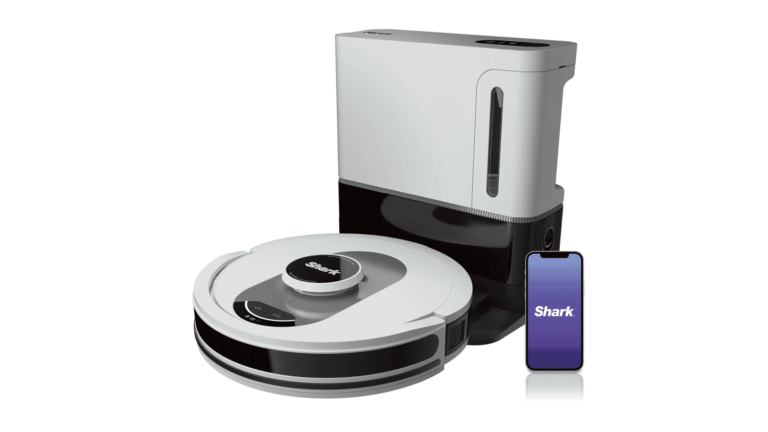
The Shark AI Ultra (AV2511AE) robot vacuum is currently on sale over at Amazon for a whopping 50% off right now. That’s going to bring the price down to just $299. And makes it a really good value now, almost a no-brainer purchase.
This incredible robot vacuum from Shark is able to pick up just about anything that might be on your floors, with Shark claiming 50% better edge cleaning when compared to the RV2502AE model. The incredible suction also makes the Shark AI Ultra a perfect robot vacuum for pets in homes. It’s able to get up all of that pet hair, even the most stubborn of pet hair. The HEPA filtration is also a good feature to have, especially for those with allergies.
Shark uses 360-degree LiDAR vision to quickly and accurately map out your home. This allows the robot vacuum to methodically clean and detect and avoid objects that are in its path. It’s also able to adapt to day or night, so even with not much light, it can clean your home with ease.
Finally, we can’t forget about the docking station. Like most newer robot vacuums, the Shark AI Ultra also has an auto-empty dock. This actually comes in two models – a 45-day capacity and a 60-day capacity – currently, the 60-day capacity is actually much cheaper. So that’s our pick for this one. That means it can vacuum your home every day for 60 days before it needs to be emptied. That’s not too shabby.
All in all, this is a pretty impressive robot vacuum that you can pick up at home for not a lot of money.















.webp)
.webp)
.webp)
.webp)