Google has announced a new update for the Chrome browser, rolling out version 126.0.6478.114/115 for Windows and Mac and 126.0.6478.114 for Linux.
This update, which will be distributed over the coming days and weeks, addresses several security vulnerabilities.
Users are encouraged to update their browsers to protect themselves against potential threats. The official Chrome Log provides a comprehensive list of changes in this build.
The latest update includes six critical security fixes, with contributions from external researchers. Notable among these are:
CVE-2024-6100: Type Confusion in V8 – Reported by Seunghyun Lee (@0x10n) during SSD Secure Disclosure’s TyphoonPWN 2024 on June 4, 2024. This high-severity vulnerability earned a reward of $20,000.
CVE-2024-6101: Inappropriate Implementation in WebAssembly – Reported by @ginggilBesel on May 31, 2024, this high-severity issue was awarded $7,000.
CVE-2024-6102: Out of Bounds Memory Access in Dawn – Reported by wgslfuzz on May 7, 2024. The reward for this high-severity vulnerability is yet to be determined.
CVE-2024-6103: Use After Free in Dawn – Also reported by wgslfuzz on June 4, 2024, the reward remains to be determined.
Google has restricted access to bug details and links until most users have updated their browsers. This precaution ensures that vulnerabilities are not exploited before users are protected.
Ongoing Security Efforts
In addition to the contributions from external researchers, Google’s internal security team has been actively working to identify and fix vulnerabilities.
This includes various fixes from internal audits, fuzzing, and other initiatives. Tools like AddressSanitizer, MemorySanitizer, UndefinedBehaviorSanitizer, Control Flow Integrity, libFuzzer, and AFL are crucial in detecting security bugs.
Google extends its gratitude to all security researchers who collaborated during the development cycle to prevent security bugs from reaching the stable channel.
Users interested in switching release channels or reporting new issues can find more information on the Chrome Security Page and the community help forum.
FreeWebinar! 3 Security Trends to Maximize MSP Growth -> Register For Free
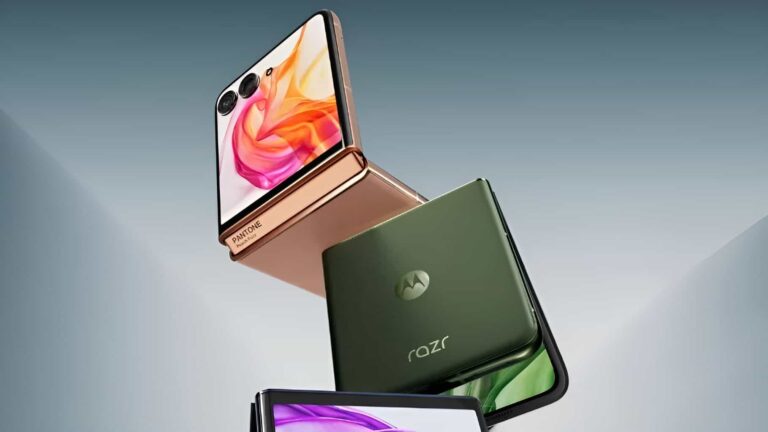
The Motorola Razr 50 series color options get shown via seemingly-official images
Two new images dropped, one for the Razr 50, and the other for the Razr 50 Ultra. As you can see, in the gallery below the article, different colors of each phone are shown here.
As reported earlier, the Motorola Razr 50 is coming in Gray, Orange and Sand colors. The Motorola Razr 50 Ultra, on the flip side, will arrive in Blue, Green, and Peach variants.
We get to see two out of three colors for each phone here. That green Motorola Razr 50 Ultra model looks especially good in our eyes, it’s nice to see a bit of variety when it comes to colors.
The two phones will look very similar, with one glaring difference
You’ll notice that the two phones look very similar. The ‘Ultra’ model has less of a bezel around the cover display, its cover display is larger overall. Other than that, you’d have problems seeing the difference between them.
Both phones will have a foldable display with a centered display camera hole at the top. Main cameras will be placed inside the cover display, basically, and the same goes for an LED flash.
Motorola’s ‘Ultra’ Razr handset will be more powerful, of course
The Motorola Razr 50 Ultra will be the more powerful phone of the two. It will ship with the Snapdragon 8s Gen 3 SoC, Qualcomm’s brand new chip. Two 50-megapixel cameras are also expected, and a 6.9-inch main display. The cover display will measure 4 inches.
The Motorola Razr 50, on the flip side, is said to come with the MediaTek Dimensity 7300X chip. It will have a 50-megapixel main camera and a 13-megapixel ultrawide unit. Its cover display will be a bit smaller at 3.6 inches.
Cybersecurity researchers have uncovered a sophisticated malware campaign orchestrated by a threat actor group, Void Arachne.
This group has targeted Chinese-speaking users by distributing malicious Windows Installer (MSI) files.
The campaign leverages popular software and AI technologies to lure unsuspecting victims, leading to severe security breaches and potential financial losses.
Void Arachne’s campaign primarily targets the Chinese-speaking demographic, utilizing SEO poisoning and widely used messaging applications such as Telegram.
According to the TrendMicro blogs, the hacker group has disseminated malicious MSI files embedded with nudifiers and deepfake pornography-generating software, exploiting the public’s interest in AI technologies.
These compromised files are advertised as legitimate software installers, including language packs, VPNs, and AI-powered applications.
Technical Analysis
The malicious MSI files, such as letvpn.msi, use Dynamic Link Libraries (DLLs) during installation.
These DLLs facilitate various operations, including property management, task scheduling, and firewall configuration.
The MSI file creates scheduled tasks and configures firewall rules to whitelist both inbound and outbound traffic associated with the malware, ensuring uninterrupted operation.
Table 1: Sample of Files Dropped by LetsPro.msi
File Name
Size
MD5 Hash
Parent Directory
1
9996288
D82362C15DDB7206010B8FCEC7F611C5
C:\Users%USERNAME%\
792258.vbs
2405
CD95B5408531DC5342180A1BECE74757
C:\Users%USERNAME%\
LetsPRO.exe
40960
FE7AEDAB70A5A58EFB84E6CB988D67A4
C:\Users%USERNAME%\
Malicious AI Applications
Void Arachne has also promoted AI technologies that can be used for virtual kidnapping and sextortion schemes.
These include voice-altering and face-swapping AI applications advertised on Telegram channels.
The group has shared infected modifier applications that create nonconsensual deepfake pornography, often used in sextortion schemes.
A Screenshot of the Void Arachne Telegram Channel Advertising Face-Swapping Applications
Distribution Methods
Void Arachne employs multiple initial access vectors to distribute malware, including SEO poisoning and spear-phishing links.
These links are hosted on attacker-controlled websites disguised as legitimate sites, ranking high on search engines.
The group also shares malicious MSI files on Chinese-language-themed Telegram channels, increasing the chances of infection.
An attacker-controlled website that hosts a malicious payload
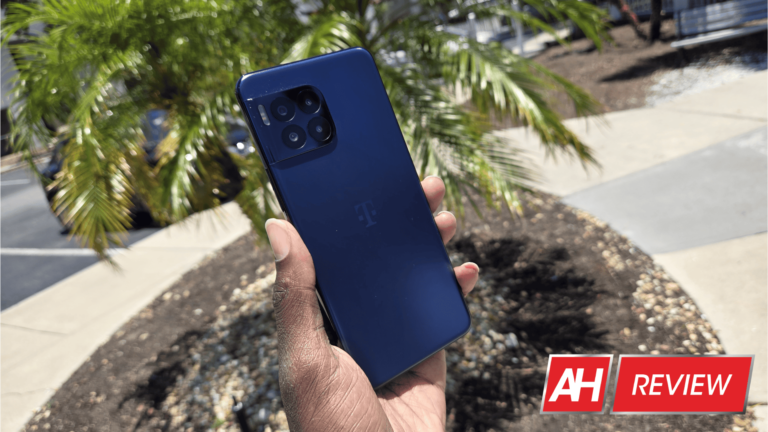
T-Mobile is one of the largest smartphone carriers in the U.S., and its signals keep millions of phones connected to the world. But, the company wanted to play a bigger part in the smartphone experience and bring forth its own T-Mobile-branded line of phones under the REVVL name. I was given the opportunity to review the newest phone in this series called the REVVL 7 Pro 5G. Let’s see if this phone is as good as the other phones its OEM powers.
When dealing with a phone like this, we tend to consider them lower in quality. It makes sense; Samsung is a company that makes high-quality phones, but its smartphone business is a priority for it. A good amount of the company’s income comes from smartphone sales. T-Mobile, on the other hand, is a smartphone carrier first and foremost. It earns its money from the number of people who subscribe to its service.
As such, making a phone to push the smartphone industry forward isn’t a priority for it. There’s no real reason to use the latest and great Snapdragon chip or a QHD+ OLED display. The purpose of this phone is to create another avenue for people to use T-Mobile’s services.
But, the T-Mobile REVVL series has proven to be a relatively popular line of phones. We’re not sure how big of a role T-Mobile played in the production of the phone; who’s to say that the company didn’t partner with a company to manufacture the phone? In any case, the company must be doing something right to be able to make a popular brand. So, the REVVL 7 Pro 5G has some big shoes to fill.
REVVL 7 Pro 5G Review: Design
When it comes to the design, it looks like a 2023 Motorola phone and a OnePlus 10 had a baby. The camera package curves to meet the frame of the phone just like the OnePlus 10, though the effect isn’t as seamless with the REVVL. There’s a clear line that separates the camera package and the frame. So, it doesn’t look like the package is melting into the frame. It’s still pretty nice.
The backplate of the phone looks just like what we got with the Motorola Stylus 2023. The material has this matte texture that plays with the light in a certain way. It gives the backplate the illusion of depth. T-Mobile emulated the phone’s backplate down to the color.
All of this is wrapped in a pretty boxy body. T-Mobile went for the “bigger is better”mentality with the phone, as this is a pretty chunky guy. The fact that the camera package is so small compared to the rest of the body makes the phone look even chunkier. That’s not a bad thing, as many folks like the thought of holding a larger phone.
Looking at the front of the device, things don’t get any prettier. I’m not one to obsess over bezel size; I always say, “When you’re using your phone, you’re not looking at the bezels, you’re looking at the display.” However, I have to admit that the bezels of this phone are rather big. It’s the classic story of the chin bezel being a bit larger than the forehead bezel. There are affordable phones that try to keep the bezels slim like the Tecno Camon 30 Premier (Review). The REVVL 7 Pro, on the other hand, isn’t one of them.
Overall, there’s nothing really spectacular about the design. I’ve reviewed phones designed to look like fashion accessories, but I’ve also reviewed phones that aren’t meant to catch your eye. The REVVL 7 Pro 5G is one of the latter. The backplate does look nice in the light, and I give the company props for trying to bring the OnePlus 10’s camera package. Also, the magenta-colored power button is a nice touch. However, this is not the phone you’ll get for the design.
REVVL 7 Pro 5G Review: Build quality
This being an affordable phone designed for the American market, it was no mystery what material this phone uses the most. I’m not going to mince words, the REVVL 7 Pro 5G isn’t designed to make you feel like you’re holding a flagship. It’s not a phone designed to nip at the heels of a flagship phone.
When I first picked up this phone, it became apparent that it is primarily made of plastic. The frame is plastic as well as the backplate. I was a little surprised about the backplate, as T-Mobile pulled off the frosted glass look perfectly. So, it’s able to fool people into thinking they’re holding glass… until they actually start holding it.
When holding this phone, I got the same feeling I got while holding the Tecno Pova 6. The thing with that phone is that it’s a pretty thick phone, but it’s so light; it’s a marshmallow. I got that disconcerting feeling of hollowness when I picked up that phone, and it’s the same for the REVVL 7 Pro.
When I pick up the phone, it feels like there’s a lot of wasted space inside of the phone. The use of plastic greatly contributes to this feeling. I won’t say that it’s a terrible thing, but it definitely has an impact on the feeling in the hand.
Structure
The feeling in the hand isn’t the most important thing about the build quality. I did a very light bend test to listen for any kinds of sounds coming from the phone. I listened for any creaks or moans from the phone. After bending it, I could hear some slight noises, but nothing significant. It’s a cheaper phone, so these are things that you should come to expect.
I wouldn’t say that the build quality is problematic, but the REVVL 7 Pro 5G isn’t pulling any extra weight in the build quality department.
REVVL 7 Pro 5G Review: Display
Affordable phones, especially ones designed for the American market, typically have underwhelming displays. There are some standouts, but they’re pretty bad most of the time. In the case of the REVVL 7 Pro 5G, I wasn’t really expecting much in the display department. But, being a person who’s reviewed affordable phones with surprisingly good displays, I should know better. The fact of the matter is that does stand out in a few areas.
Brightness
Brightness is one of the most important areas of a display’s quality. It doesn’t matter how many pixels are on the screen if you can’t see it. Smartphone screens have gotten brighter over the years, and this is true for affordable phones as well.
I’ve reviewed a few phones that are perfectly visible in the sunlight, and they’re better than flagship phones from a few years ago. In the case of the REVVL 7 Pro 5G, I can’t say that I’m all that impressed.
The sunlight visibility is pretty decent; I’m able to see the screen pretty while outside. When I turn on Adaptive Brightness, I see the max brightness get a nice boost. It certainly helps me see the screen better. However, even with the boost, it can still be a little tough to see in the sunlight. When I first took the display outside, I was already having a bit of trouble seeing the display, and it was overcast.
So, when it comes to brightness, I’d say that it’s definitely better than a phone of this price a few years ago. However, the brightness isn’t anything to write home about.
Colors
The REVVL 7 Pro 5G uses an OLED panel, which surprised me a bit when I saw it. The T-Mobile REVVL series of phones has been in a blind spot for me, so I don’t know too much of what these phones typically offer. When I was first turned on the phone, I was hit with a good bit of color, and it was just the T-Mobile and Android logos on a gray backdrop.
Once I got into the software and started using the phone, I really enjoyed what I saw. Not all OLED panels are created equal; it all comes down to the calibration. The Poco F6 series of phones have amazing OLED panels, but their colors are calibrated to be more subdued. The opposite goes for the Motorola Edge 2023.
In the case of the REVVL 7 Pro 5G, the screen is jam-packed with color. Everything on the screen just pops with color. It even makes the pastel colors present in Material You look saturated. You get some pretty juicy colors when navigating the interface.
As such, every app I used on the phone was that much more saturated. I’d say that this is the most saturated display that I reviewed on a phone. This is something that can be problematic in some cases.
Issue
It’s nice seeing the colors pop off of the screen; games, movies, and other apps look nice when being used, and the interface is colorful. However, I feel that the company took things a little far. Like I said, it’s about the calibration. Phones with some the best screens I reviewed are from Techno and Infinix. They’re not just mindlessly saturated, the companies took the time to meticulously calibrate the display so that the screens are saturated in all the right places. Sure, calibration is subjective but oversaturated is oversaturated.
The colors are super-saturated, and not everyone likes colors like that. It wouldn’t be so bad if T-Mobile gave the phone an option to tone down the colors that you see on numerous other phones. It’d be nice to at least tone them down a bit. Certain colors on the screen, like T-Mobile’s magenta, singe the eyes when you look at them. It’s very easy for the colors to become too much.
Extras
When it comes to extra features, there are a few. Firstly, this display caps out at 120Hz. I think that 120Hz is the sweet spot when it comes to refresh rate. There’s no need for 144Hz displays.
Lastly, there’s a nifty Extra dim feature. It’s nothing special; it just dims the screen a bit more. It’s handy for those times when you wake up in the middle of the night and you want to check your phone without blinding yourself.
Overall
It’s hard for me to place this display. The brightness is decent and it’s very fluid. The colors are nice, but I think they go just a bit overboard. It almost feels like T-Mobile just cranked the saturation up without really putting too much thought into the actual calibration. Everything’s so packed with color, and the company didn’t show any kind of restraint.
I wish that T-Mobile would have put more thought into calibration or at least given us the option to tone down the colors a bit. The display is nice, but it’s behind many of the other displays that I’ve reviewed.
REVVL 7 Pro 5G Review: Speakers
The display quality goes hand-in-hand to create the overall media experience of a phone. Again, since I haven’t used a REVVL phone before, I didn’t know what to expect in the speaker performance. So, I went in with an open mind.
To test out the speakers, I played six short text pieces that accentuate one aspect of a speaker’s performance: Volume, Bass, Treble, Vocals, Balance, and Immersion. I used the text pieces, but I also just used the speakers in my daily life.
Volume
In terms of overall volume, these speakers are lacking power. At their full volume, the speakers sounded pretty quiet. I’ve reviewed speakers with relatively quiet speakers like the Galaxy S24+, but I think that these are some of the quietest speakers I’ve reviewed. They’ll do just fine when you’re inside, but once you’re outside, you’re going to struggle to hear them.
Bass
When it comes to the bass, the performance isn’t bad. I wouldn’t say that it’s great, but it’s better than most other phones that I reviewed. The test piece that I used is a short orchestral piece with emphasis on lower instruments like Double Bass, Bassoon, Contra Bassoon, and Tubas. I can hear some good definition in the instruments along with a good bit of rumble. So, I’d say that these speakers have some decently good bass.
Treble
When listening to the treble example, I listen for clarity mostly, and there’s some nice clarity. The test piece includes Piano, Celeste, Pizzicato Strings, Violins, and Flutes. Everything sounded pretty crisp and defined. Again, it’s not the best that I’ve reviewed, but it was better than I expected.
Balance
The piece that I used is a mellow chill-hop song with equal emphasis on the treble and bass. In terms of overall balance, I think that the bass is a bit stronger than the treble. When listening to music, you’re most likely going to hear the lower-end frequencies more than the higher-end ones. It’s not bad, but it’s something to keep in mind.
Vocals
It’s important for speakers to project voices clearly in order to enjoy your music. Sometimes, phone makers forget that. In the case of the REVVL, I think that the voices project pretty nicely, but the performance is overall underwhelming. When listening to different songs, I found that the voices were a little bit washed out. They’re not the worst, but I wouldn’t call the vocal performance a high point of these speakers.
Immersion
When it comes to the overall immersion, I think that these speakers are rather nice. I listened to music and watched movies, and they did a good job of putting me in the action. Obviously, they’re not as good as what you’d get with a more expensive flagship phone, but they do a decent job.
Overall
I think that T-Mobile put a lot of work into these speakers. I was pleasantly surprised by the performance. Going in, I wasn’t expecting gold… and I didn’t get gold. However, what I got was a pair of pleasantly nice speakers.
REVVL 7 Pro 5G Review: Camera
When reviewing budget-friendly phones, we don’t tend to expect much, but I’ve been pleasantly surprised by a few. When it comes to the camera in the REVVL 7 Pro 5G, I’d say that it’s pretty par for the course.
Exposure/Contrast
In terms of exposure, the camera did a nice job of exposing the image without blowing out the highlights. Some spots in the direct sunlight were even a bit toned down in terms of exposure. For example, there’s a picture of the rocks. I think that the phone knocked the exposure back a bit. However, the exposure remains overall balanced.
When it comes to the contrast, I think that this camera tends to crush the shadows just a bit. The shot with the leaves and the shot with the trees have a few areas that are completely black. It’s not bad, though. I think the phone did an admirable job.
Colors
In terms of colors, nothing about the pictures really stuck out to me. I think that the camera captured colors that are pretty true to the scene. Colors like greens and reds got a nice little punch to them without going overboard. However, the overall tone remains pretty neutral.
The most pleasant picture I took, color-wise, is the image of the Wedelia. The yellow in the flower is warm and the green of the leaves is rather lush.
When it comes to the colors, I think that it’s meant to produce picture perfect to be seen on the display. Since the phone’s screen is so saturated, the colors in the pictures get a nice boost without being too much. So, if you’re planning on taking images to post to social media or share, then you might want to consider throwing them into a photo editor and boosting the saturation.
Low-light
Every camera has its Achilles heel, and that’s the case for the REVVL 7 Pro’s low-light performance. If there’s a good amount of light in the scene, the Night camera mode can pull a decent shot. However, even its best shots leave much to be desired. Overall, many of the details in the image are very blurry, and it makes for an unappealing image altogether.
Overall
The general performance of this camera is pretty decent. It’s not stellar, but’s far from bad. You’ll get pleasantly mid-range performance from this camera. I’ve definitely reviewed worse.
REVVL 7 Pro 5G Review: Performance
Now, for that almighty section of the review. The performance of this phone is a bit of a funny story. Navigating the software in general is smooth. You’d be surprised by how many devices lag consistently when just navigating through the menus. A good example would be the abomination that is the TCL Tab 8 LE. Going through the interface, I didn’t see any stutters or dropped frames at all. So, does the bare minimum of running the software.
When it comes to opening apps, it’s definitely slower than more expensive phones, but it’s not problematically slow. I did have an issue with how long it takes to open Survivor.io. It takes about 30 seconds to do so. However, the phone will open most other apps completely fine. You won’t notice a difference unless you place the phone right next to a flagship. We’re talking about opening Spotify in 0.4 seconds compared to 0.1 seconds for a more expensive phone.
While the general performance bad, there are some areas where I see the chip panting a bit. A good example is when taking videos. While doing so, I see the camera struggling to keep a consistent frame rate. Also, the rendered video is choppy as well. You’re not likely getting this phone to film your Sundance Film Festival entry, but it’d still be nice to see some better performance.
Another area where this phone was sluggish is in video rendering. I rendered a minute-long video in CapCut at 1080p resolution. Most flagship phones take less than 20 seconds while many mid-range phones take between 20 and 30 seconds. The REVVL 7 Pro 5G took 45 seconds to render the video.
So, while navigating the software and opening apps is rather smooth, you can expect some sluggish performance in some areas. You’ll see the cracks in the shield once you start to put on a relatively heavy load.
Benchmark numbers
For those who are curious, here are a few benchmark numbers. Obviously, they’re not an accurate representation of the phone’s performance, but it’s still good to see some scores.
Starting off with GeekBench 6, this phone got a single-core score of 765, which is pretty low. It’s nearly 200 points lower than the Galaxy S20 FE’s score of 978. Moving onto the multi-core score, the REVVL 7 Pro 5G scored 2445. Again, this chip’s not exactly batting 1000. It’s a bit lower than the Poco X3 Pro, and that phone used 2019’s Snapdragon 860 SoC.
Moving onto 3D Mark, this phone got a Best loop score of 613 and a Lowest loop score of 608. So, when it comes to the benchmarks, the REVVL 7 Pro just doesn’t bring the goods. However, those are just benchmark scores. I said that reviewing this phone’s performance was weird, and it was! Why?
Gaming…
REVVL 7 Pro 5G Review: Gaming
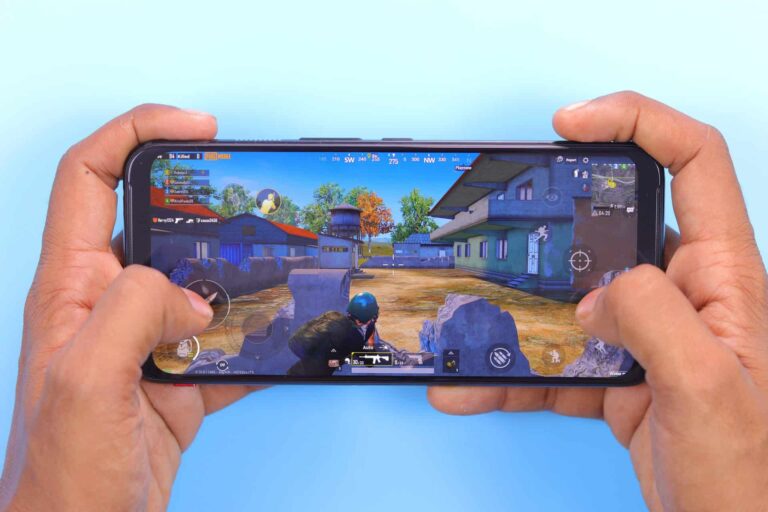
Don’t judge a book by its cover, and don’t judge a phone by its benchmark scores. So, with the laggy video performance, slower app loading speeds, and low benchmark scores, I assumed that this phone would be a mess when it comes to gaming. However, that’s not the case. To be quite honest, this phone surprised me quite a bit.
Starting off with a 2D game, I gravitate toward Survivor.io. This is a game that really packs in the sprites, and it’s definitely caused some dropped frames on powerful phones. I admit that there were some dropped frames when I played this game on the REVVL 7 Pro 5G. Overall, it didn’t become an issue. The stutters were few and far apart.
Moving onto some 3D games, let’s start with Asphalt 9 and Sky: Children of The Light. I had no issue whatsoever with the performance of those games. I opened them, cranked their graphical settings up to their maximum settings, and played them without any stutters or dropped frames. Both of these games are pretty graphically intensive, and they can bog down performance in different ways. We all know how intense Asphalt 9 can get in the heat of the race. As for Sky, it’s not shy about showing wide-open spaces.
Genshin Impact and Honkai Star Rail
Now, let’s crank the dial up a notch or two. I installed Genshin Imapact and Star Rail on this phone to test out the gaming, and I expected the performance to tank. Well, it was a mixed bag. Staring with Star Rail, the performance was nothing to write home about. During battles, there were occasional dropped frames with certain attacks.
Walking around in the frozen wasteland was relatively smooth. As with the other games, I turned the graphical settings up to full. I didn’t get 60fps, but it was still smooth with the sparse dropped frame. However, the performance takes a dive once you enter the town. The lag is pretty consistent. However, that’s with the graphics turned all the way up.
The story for Genshin Impact is different… very different. Again, I expected the game to turn into a slideshow once I turned the graphics all the way up. When I started playing this game, and the performance I got was nothing like I expected. It was perfectly smooth. The frame rate didn’t drop below 30fps, all of the animations were perfectly smooth, and nothing slowed down.
I was pretty stunned, as Genshin Impact is one of the most graphically intensive games on the Play Store. I expected some sort of slowdown, but I just didn’t get it. Don’t get me wrong, I don’t think I was able to get 60fps, but the frame rate certainly didn’t fall below 30fps. Let me remind you, this is with all of the graphic settings turned to their maximum settings. I even left the motion blur on.
It’s clear that Genshin is just better optimized than Star Rail. Regardless, Genshin Impact basically has PS3 graphics; it’s a pretty game. The REVVL was able to conquer that game without breaking a sweat.
REVVL 7 Pro 5G Review: Battery
The battery life is pretty good overall. To test the battery, along with using it as my daily driver, I played a video non-stop until the phone died. The phone lasted 15 hours and 16 minutes before dying. That’s not a bad number, and it means that you should be able to expect all-day battery life.
I was able to get through the day on a single charge during my testing. Most of the time, I was able to make it into the next day without needing to charge it. So, the battery life is definitely pretty good.
REVVL 7 Pro 5G Review: Final Verdict
There are those phones that surpass expectations, and the T-Mobile REVVL 7 Pro 5G is one of them. As I said before, this phone isn’t meant to push the envelope in terms of smartphone tech or the overall smartphone experience. Rather, it’s a device designed to capture more people and keep them locked into T-Mobile.
As such, the technology under the hood isn’t the priority. However, that didn’t stop T-Mobile from bringing a rather nice smartphone experience. It’s not going to dethrone certain mid-range titans like the Techno Camon 30 Premier or the Poco. Still, I enjoyed my time with this phone.
The screen is colorful, the sunlight visibility is pretty good, the speakers are pleasant, the performance is decent, the gaming is great, and the design is pleasing. T-Mobile overachieved in a few areas with this phone that’s sure to keep some users tethered to the carrier’s service.
If you’re a T-Mobile customer, and you’re looking for a good phone for only $250, then the REVVL 7 Pro should be on your list.
Usually, Android users automatically gravitate toward digital marketplaces like Google Play when looking for games and apps. In reality, many alternative platforms offer huge gaming catalogs without overbearing ads. In this brief guide, we will review the highest-rated Android games and tell you where to find them. Read on to find more.
Where Should You Browse for Android Games?
One of the biggest pros of Android devices is that you can install apps and games from any resource. With so many platforms and games on the market, it’s easy to get lost. That’s where user ratings come into play. Platforms like https://www.androidp1.com/en/games/top-100/ help navigate endless gaming catalogs with updated game ratings. Thus, you can transform endless browsing for a perfect game into a fast and seamless experience. Another perk of the platform is that it facilitates access to games that are not accessible in the visitor’s region.
The Best Games for Android: Why Choose ANDROID PLUS 1?
Have you ever been scrolling endlessly, looking for a game and failing to pick one? Unfortunately, it is an ordinary experience for many users, as the abundance of gaming platforms makes the choice harder. That’s why we have prepared a brief compilation of the best features of ANDROID PLUS 1 to help you easily navigate the website and find a new favorite game.
1. A Myriad of Games and Apps
From TikTok and Telegram to Minecraft and Candy Crush, ANDROID PLUS 1 offers a large collection of applications and games. Whether you’re looking for niche applications or fan favorites with millions of downloads worldwide, social media apps, arcades, adventures, or card games, the platform has you covered. ANDROID PLUS 1 offers an intuitive experience: just write the title in the search bar at the top of the page to find the right app or game. After clicking on the chosen app, you’ll see additional parameters and characteristics, such as description, size, or the list of the latest updates and versions.
If you don’t have any particular game in mind, why not browse them by genre? Click on the Games section and choose the type you prefer: simulations, puzzles, action, arcades, RPGs, and much more. If you want to try another version of your favorite game, choose among the best modified games to experience them anew.
2. Users’ Reviews and Ratings
Prior to downloading games, be sure to check other users’ feedback. The platform features hundreds of reviews and ratings, which range from one-star (the lowest denominator indicating that you find the game lacking) to a five-star rating (the highest denominator describing an excellent gaming experience). If you like the game or want to share your opinion, rate it and leave a review in the comment section below the chosen game or app.
3. Constant Updates
Another platform’s great perk is its dedication to updates. With hundreds of games and apps on the site, the team behind ANDROID 1 PLUS runs a well-maintained catalog of recently updated games and apps. If you aren’t browsing for any particular game, check the selection of the website’s best updated games. With a large number of options available, you’re likely to find a new favorite.
4. Malware-Free Content
When looking for Play Market’s alternatives, you’re likely to wonder and worry whether the newly chosen platform is festering with viruses. Luckily, by choosing ANDROID PLUS 1, you’ll guarantee the safety of your devices. After all, the platform operates with a user in mind; that’s why checking the apps and games for performance and ensuring malware protection are features that make ANDROID PLUS 1 one of the best platforms on the market.
5. User-Friendly Interface
Usually, worries about malware-free content or the apps’ costs occupy users searching for a new Android platform. However, the user interface is typically not at the forefront of their minds. It makes sense; after all, ensuring a seamless, virus-free experience should come be a priority, not aesthetic aspects of the chosen platform.
Still, the user interface is important and plays a crucial role in overall user satisfaction level. Just think about it: with numerous categories and great search parameters, you’ll be able to find the preferred game in mere seconds instead of scrolling and browsing page after page of content. ANDROID PLUS 1 understands the importance of a seamless browsing experience. So, a user-friendly interface is a crucial characteristic of the platform.
With the proliferation of Play Market alternatives, finding the right fit may seem challenging and risky; after all, you have to find a well-run website with hundreds of gaming options, also ensuring that after downloading an app or game, your device won’t start making weird noises and crush. By selecting ANDROID PLUS 1, you’re accessing a malware-free, user-friendly platform featuring hundreds of constantly updated games and apps that will entertain you for hours.
Samsung is gearing up for one of its most important launch events of the year. The next Unpacked has already been confirmed for July 10, and we expect the South Korean company to go all in on foldables.
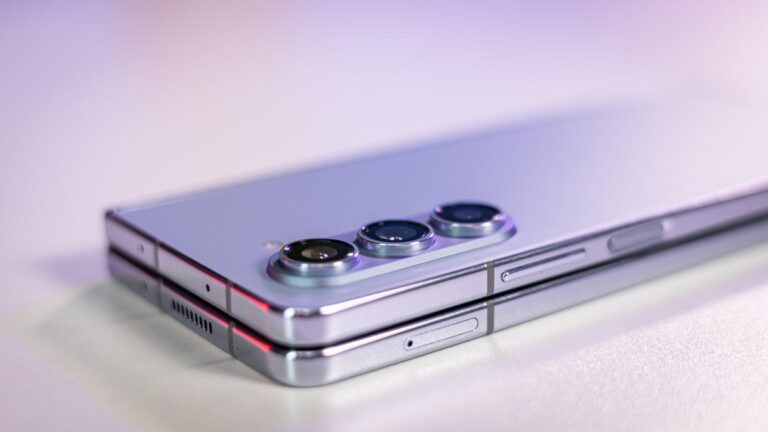
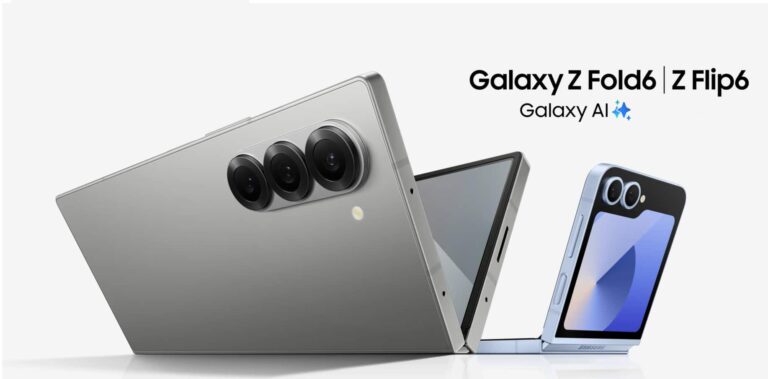
At least two high-end foldables will be revealed next month, the Galaxy Z Fold 6 and Galaxy Z Flip 6, but other Galaxy devices are likely to make appearances too, including the Galaxy Watch Ultra, Galaxy Watch 7, and Galaxy Buds 3/Pro.
If we already know what to expect in terms of hardware, when it comes to software, Samsung is rumored to prepare some surprises. The new One UI 6.1.1 running on Samsung’s new foldables is expected to be one of the event’s non-hardware stars.
The major OS update is expected to be rolled out to other devices too, and Samsung might announce something in that regard during the event. Evidence that the handset maker will eventually push out One UI 6.1.1 to even more Galaxy devices soon after the announcement is the fact that its apps are now being updated with One UI 6.1.1 support.
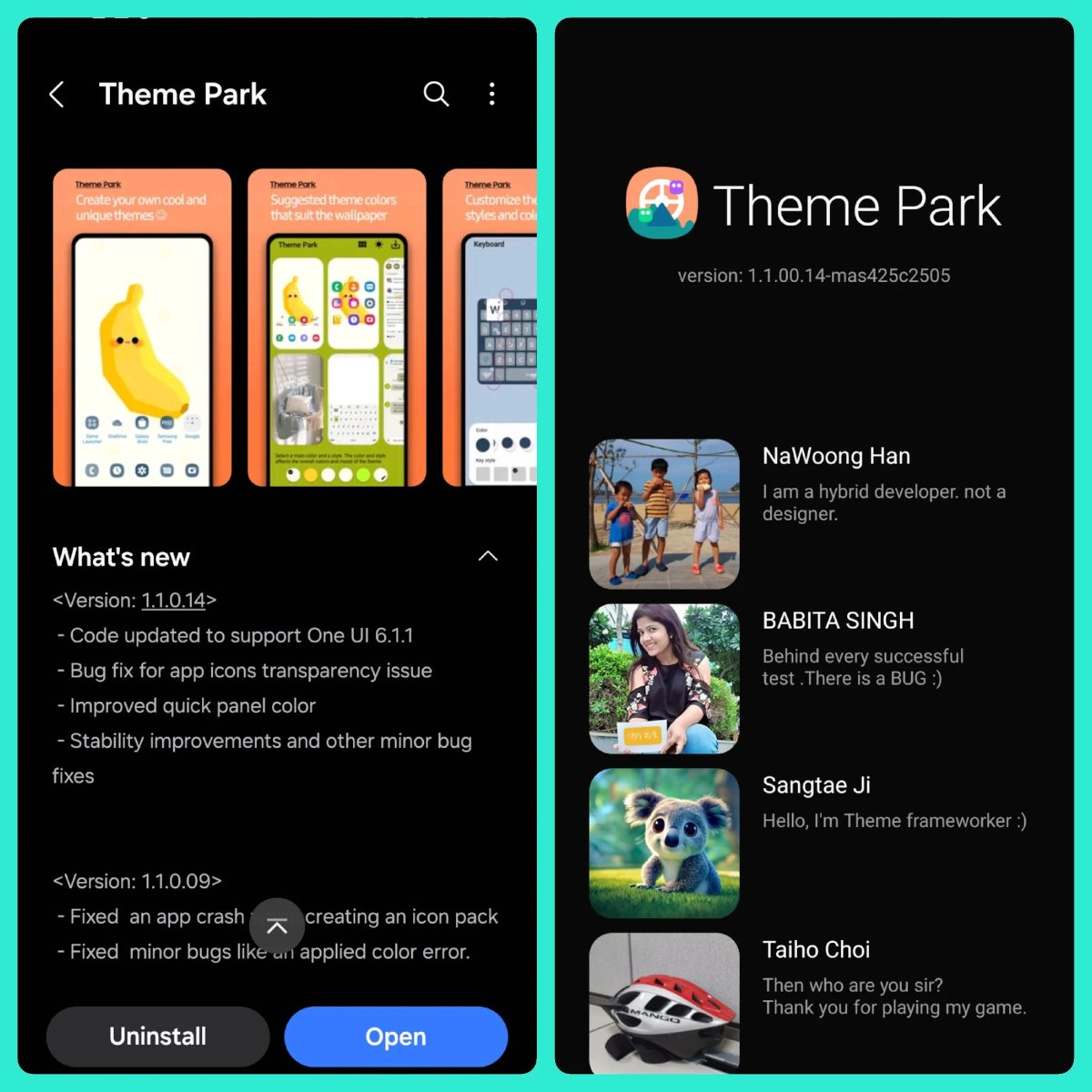
Theme Park update adds One UI 6.1.1 support, Credits – SamMobile
The folks at SamMobile spotted at least one Good Lock app module, Theme Park, which received a new update that adds code to support One UI 6.1.1. Of course, Good Lock is a very important customization app and Samsung may want to offer Galaxy Z Fold 6 and Galaxy Z Flip 6 buyers the chance to use it as soon as these phones are in their hands, but other apps might require a similar treatment.
While the entire One UI 6.1.1 changelog hasn’t been revealed yet, it’s said that the update will bring a bunch of improvements, including a vertical app drawer option for the home screen, as well as even more Galaxy AI features.
Hackers are offering “free” mobile data access on Telegram channels by exploiting loopholes in telecom provider policies, which target users in Africa and Asia and involve sharing configuration files to mimic zero-rated traffic.
The channels function as technical support hubs where users exchange instructions on creating custom payloads, setting up secure tunnels, and manipulating HTTP headers to disguise data usage, which has circulated numerous configuration files for various telecom providers over the past year.
To bypass data metering on telecom networks, attackers leverage various tunneling techniques by manipulating data packets using tools like HTTP Injector to mimic traffic from zero-rated services (exempt from data charges).
Payload generators further enhance this deception. Alternatively, they establish encrypted tunnels using SSH or Stunnel, disguising their traffic as legitimate secure communication, while VPNs with obfuscation techniques and undetectable protocols achieve a similar outcome.
Configuration files
Attackers can manipulate traffic headers with proxies or route all traffic through a remote server using SOCKS proxies, tricking the network into treating their data as unmetered.
To abuse zero-rating policies, attackers manipulate data traffic to appear as originating from exempt services, which involves modifying HTTP headers and payloads (traffic redirection), altering DNS settings to exploit zero-rated domains, or spoofing the Server Name Indication (SNI) in HTTPS requests.
SNI proxies can also be used to forward traffic while disguising it as coming from a zero-rated source. Split tunneling and selective routing techniques channel-specific traffic through zero-rated services while keeping other data encrypted.
For mobile data, attackers can exploit weaknesses in APN configurations, including modifying APN settings to trick the network (APN tweaks) or rapidly switching between APNs to bypass billing (APN switching).
HTTP injectors can be used in conjunction with pre-configured profiles that contain individualized parameters to automate zero-rating exploitation.
CloudSEK identified several tools used to bypass online restrictions and access secure connections, including HTTP Injector, an Android application for manipulating HTTP headers, crafting custom payloads, and establishing secure tunnels.
Your Freedom VPN Client provides various tunneling methods to bypass firewalls, while HA Tunnel Plus is another option for creating secure VPN connections.
All three tools leverage their tunneling capabilities to circumvent restrictions and enable secure internet access.
Telecom providers can deploy a multi-layered defense to curb free data exploitation via VPNs and tunneling, while deep packet inspection (DPI) and traffic analysis pinpoint suspicious traffic patterns.
Limiting bandwidth for well-known tunneling protocols and blocking certain SNI fields that these apps use makes them less useful.
Blacklisting malicious IP addresses and monitoring DNS traffic for tunneling attempts further tighten the net.
Better APN security protects against changes made without permission, and machine learning models find strange behavior that could be a sign of zero-rating abuse by disrupting free data exploitation methods.
FreeWebinar! 3 Security Trends to Maximize MSP Growth -> Register For Free
Samsung is rapidly completing the formalities before launching its new foldables and watches. The company has already put up official support pages for the devices on its website. It has also obtained several regulatory certifications for its upcoming products, including the Galaxy Z Fold 6, Galaxy Z Flip 6, Galaxy Watch 7, and Galaxy Watch Ultra. The devices have just passed a couple more regulatory hurdles on their way to launch next month.
Samsung’s Galaxy Z Fold 6 and Watch 7 pass more regulatory hurdles
The folks over at MySmartPrice recently discovered the Galaxy Z Fold 6 on the official website of the Singaporean regulatory body IMDA (Infocomm Media Development Authority). The agency listed the device with the model number SM-F956B/DS, which is the dual-SIM variant of its global version. The US version has the model numbers SM-F956U and SM-F956U1, with dual-SIM variants adding the “DS” suffix to the model number.
Separately, the publication found a similar certification listing for the Galaxy Watch 7 on an Indonesian telecom authority’s website. It mentioned the model number SM-L300 for the upcoming Samsung smartwatch along with its marketing name (Galaxy Watch 7). It’s the 40mm Bluetooth version version. The 44mm variant has the model number SM-L310, while their LTE models bear the identifiers SM-L305 and SM-L315, respectively.
These listings don’t reveal anything new we don’t already know about the Galaxy Z Fold 6 and Galaxy Watch 7. However, they indicate Samsung is closing in on the launch event. It hasn’t officially announced the date yet but there is enough evidence on the internet suggesting a July 10 unveiling of these products. Along with the new foldables and watches, the company may also launch new wireless earbuds and the Galaxy Ring at the event.
Leaks have already revealed a lot about these devices
Samsung’s next Unpacked may still be three weeks away, but there isn’t much left to know about the devices in the pipeline. Leaks have already revealed a lot about them, particularly the new foldables. The Korean firm is making them thinner and wider. The Galaxy Z Fold 6 also gets a titanium frame, while the Galaxy Z Flip 6 is picking up a new 50MP primary rear camera. There aren’t other major hardware upgrades to look forward to.
For smartwatch enthusiasts, Samsung’s Galaxy Watch Ultra could be of great interest. It’s the company’s first Ultra-branded watch. The wearable has a titanium body, a big battery, a big and bright display, a new chipset (probably Samsung’s first 3nm chip), and a lot more. Unsurprisingly, it will cost big too, with rumors suggesting a launch price of $700 and above. Stay tuned for the official announcement in a few weeks.
In our super-connected world, a slow connection can feel like hitting a brick wall, whether you’re hustling on deadlines, diving into your favorite show, or battling it out online. In this article, let’s take a look at why your internet might be sluggish, and offer a few easy fixes.
Common Causes of Slow Internet
Outdated Equipment
One of the most common reasons for slow internet usage is outdated equipment. Older routers and modems may not support the latest internet speeds or technologies, leading to a bottleneck in your connection. A solution to this is upgrading your modem and router to the latest models that support higher speeds and modern standards like Wi-Fi 6.
Network Congestion
Network congestion occurs when too many devices are connected to the same network, leading to a decrease in available bandwidth for each device. This issue is common in households with multiple users streaming, gaming, or downloading simultaneously.
To reduce network congestion, try disconnecting devices that are not in use. Plus, consider upgrading your internet plan to one that offers higher speeds and greater bandwidth.
Distance from the Router
The farther you roam from your router, the fainter the Wi-Fi signal gets, leading to those frustrating buffering delays. Walls and furniture can also act like signal sponges, soaking up that precious connection strength. To solve this issue, try placing your router in a central spot within your home. If your home seems to swallow Wi-Fi signals whole in certain areas, consider using Wi-Fi extenders or mesh network systems.
Interference from Other Devices
Other electronic devices, such as microwaves, cordless phones, and baby monitors, can interfere with your Wi-Fi signal, causing slow internet speeds. Place your router away from other electronic devices and use the 5 GHz frequency band, which is less susceptible to interference than the 2.4 GHz band.
ISP Throttling
Some internet providers might slow things down a bit during peak times to keep everything running smoothly. Contact your ISP to discuss your problem. You may need to upgrade to a higher-tier plan that offers guaranteed speeds or switch to a different provider that does not throttle your connection.
Outdated Software
Outdated software, including your OS, browser, and network drivers, can lead to slow internet speeds due to compatibility issues or security vulnerabilities. Regularly update all software to the latest versions to ensure optimal performance and security.
Background Applications and Malware
Have you ever noticed your internet seems slower when you have a bunch of programs running in the background? Those programs can be using up bandwidth, leaving less for the things you really need. Use task manager to monitor and close unnecessary background apps. Plus, install and regularly update antivirus software to protect against malware that can compromise your internet speed.
How to Fix Slow Internet
Check Your Internet Plan
First things first, consider your internet plan. If you love streaming movies and battling it out in online games, a basic plan might not cut it. Check your plan’s details and compare it to your internet usage. Upgrading to a plan with more speed and data might be the key to smoother sailing.
Optimize Router Settings
Your router acts like the traffic controller of your home network. Sometimes, a few adjustments in its settings can make a big difference. Here’s how to unlock its hidden potential:
Change the Wi-Fi Channel: Use a less congested channel to reduce interference from neighboring networks.
Enable Quality of Service (QoS): Prioritize bandwidth for critical apps like video conferencing and online gaming.
Update Firmware: Ensure your router’s firmware is up-to-date to benefit from performance improvements and security patches.
Switch ISPs
Not all ISPs are created equal. Some may offer better speeds, reliability, and customer service than others. Research different ISPs available in your area and compare their plans, speeds, and customer reviews. Use tools that provide high speed internet by address to find the best provider for your location. Switching to a more reliable ISP can result in significantly improved internet performance.
Conduct a Speed Test
Conducting a speed test helps you understand your current internet speed and identify any discrepancies between the advertised and actual speeds. Use online tools like Ookla Speedtest or Fast.com to measure your internet speed. If the results are lower than what your ISP promises, contact your provider for assistance.
Use Wired Connections
Wi-Fi is convenient, but for the ultimate speed and stability, a wired connection is the champion. Whenever possible, plug your devices directly into the router using an ethernet cable. This is especially important for bandwidth-hungry activities like streaming HD videos or playing online games.
Monitor Network Usage
High data usage by certain apps or devices can strain your network, leading to slower internet speeds for other users. Use your router’s built-in tools or third-party network monitoring software to track data usage. Identify bandwidth-heavy applications and schedule their usage during off-peak hours to reduce network congestion.
Snap, the company behind Snapchat, has led the way in augmented reality (AR) for enhancing real-world photos and videos with digital effects. While smaller than competitors like Meta, Snap aims to attract new users and advertisers by offering advanced and imaginative special effects known as lenses.
Snap unveils AI tools for enhanced augmented reality
Snap has introduced its latest version of generative AI technology, enabling users to experience more lifelike special effects while filming with their phone cameras. This latest AI model will be coming soon to Snapchat.
We’re previewing Snap’s real-time image model that can instantly bring your imagination to life in AR. This early prototype makes it possible to type in an idea for a transformation and generate vivid AR experiences in real time
– Snap, June 2024
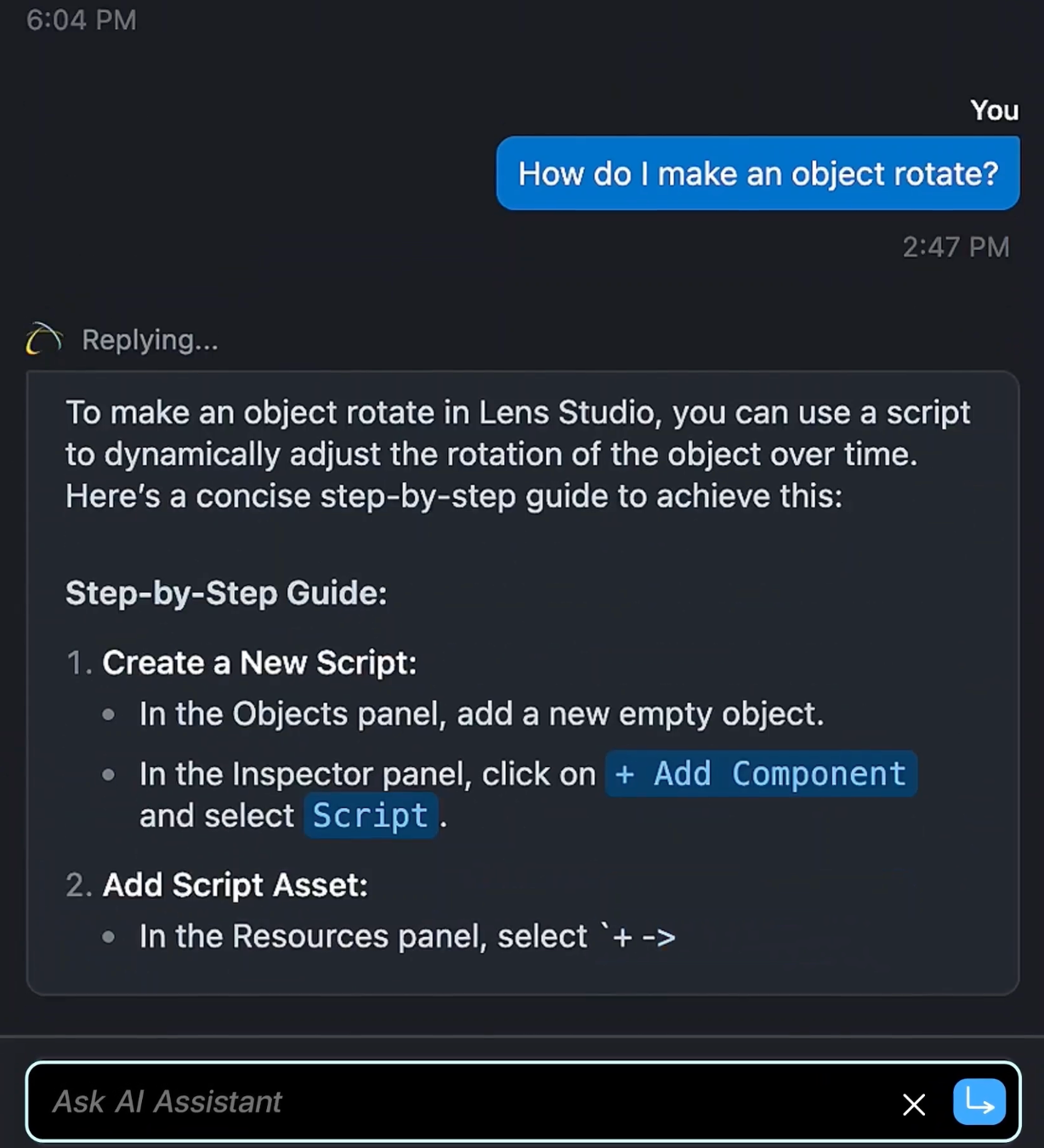
Moreover, Snapchat users can now incorporate AI-powered lenses created by AR developers into their content, thanks to the latest updates from Snap. Also, Lens Studio has been equipped with a new suite of generative AI tools, including an AI assistant designed to assist developers with any questions they may have.
Developers can ask the new AI assistant for help | Image credit – Snap
There is also another handy tool that lets artists enter a prompt and generate a three-dimensional image automatically, sparing them the effort of starting from scratch to develop a 3D model for their AR lens.
Before, Snap’s AR tech could only handle simple effects like placing a hat on someone’s head in a video. Now, thanks to these upgrades, AR developers can craft more realistic lenses. For example, these lenses can make the hat move naturally with the person’s head and adjust to the lighting in the video seamlessly.
Snap has also partnered with London’s National Portrait Gallery to develop Lenses inspired by iconic portrait styles using the GenAI Suite. Snapchat users can select from a range of portrait-style Lenses, snap a photo, and share it on the museum’s “Living Portrait” projection wall.
Snapchat has teamed up with London’s National Portrait Gallery to create Lenses inspired by iconic portrait styles | Image credit – Snap
Launching this new suite of AI tools is a strategic move for Snapchat, enhancing its competitive edge against rivals like Meta’s Instagram and TikTok and possibly attracting more users. Both competitors are actively integrating AI into their platforms: TikTok has recently launched AI-generated digital avatars, while Meta has been heavily investing in AI and AR technologies over the past few years.