The PS VR2 will soon be available at retailers, Sony says. The company announced the news on its official PlayStation Twitter account on April 27. Since its launch, the PS5-compatible headset has been excluded from retailers and was only available through the PlayStation Direct website. But that will change in the near future.
With the headset being available through more retailers than just Sony’s own website, it could help boost sales. As of right now the only place you can officially buy one at its regular price is PlayStation Direct. The headset can be found through third-party sellers at Walmart and Amazon, among others, but for hundreds more.
Opening up official sales through partners means consumers are likely to see them available physically in local stores. Alleviating the wait for shipping times. And that’s bound to help Sony grab more sales to push well beyond the current estimate of 270k to 300k that it reached within the headset’s first month back at the end of March.
Sony hasn’t said which retailers would sell the PS VR2
As of right now Sony has done no more than confirm its second-gen VR headset would be available from retail partners. It hasn’t said where consumers would be able to buy it outside of PlayStation Direct. Nor did the company mention when retailers would actually pick it up.
The company does say “soon” though, so it likely won’t be too far in the future. Engadget notes that UK retailer ShopTo is hinting at availability on May 12. So there is a chance it could show up other retailers globally on or around the same day. Though at this time it’s still unclear if that will be the case.
In addition to PS VR2 headsets making their way to other retailers, the PS5 has also reached nearly 40 million units sold worldwide.
A video created by the Google Design team reveals much bolder color options for the Material You design language in Android 14. Inside Google, this new look is known as “Fidelity.” 9to5Google found that the bolder colors are not yet available in Android 14, but it was able to show how vibrant colors that Android takes from your wallpaper end up in your phone’s themes.
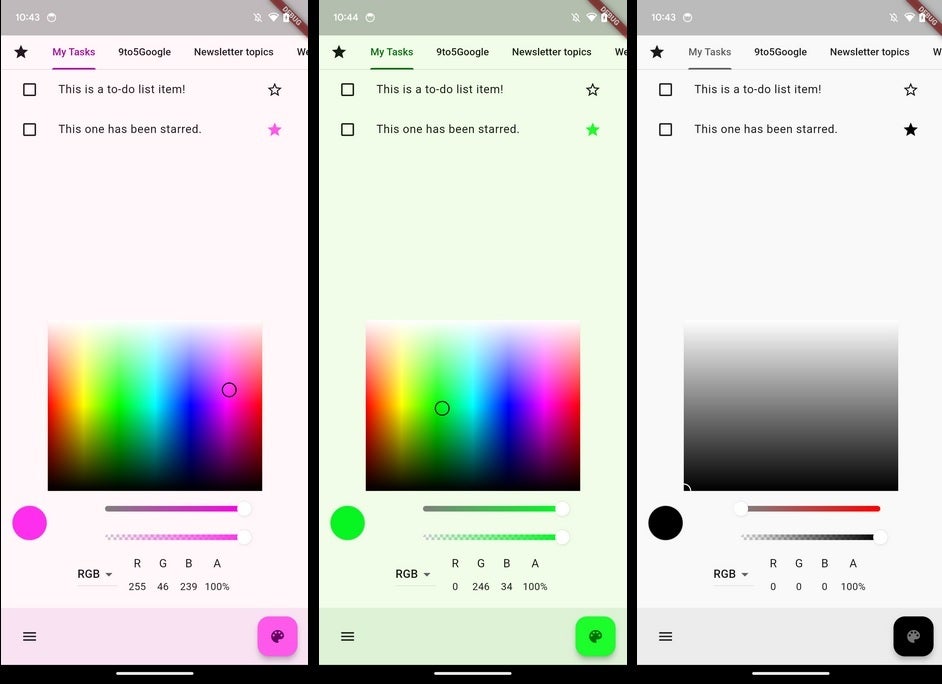
The base color that Android takes from your wallpaper will show up in your apps. Image credit 9to5 Google
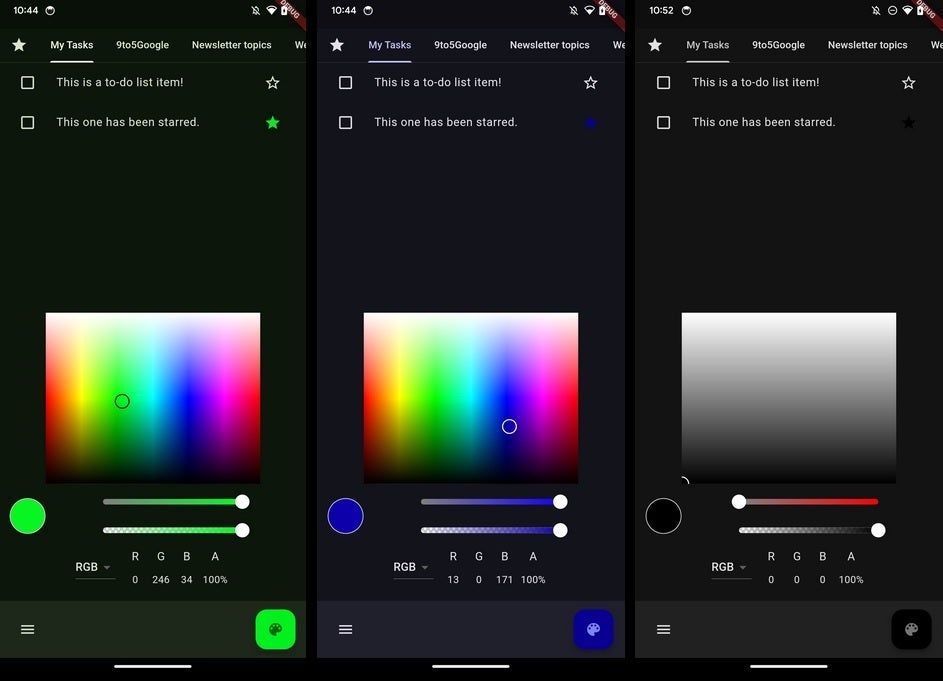
Three examples that were shown by 9to5Google include “hot pink, sports car red, lime green, and jet black.” The color theme of the app clearly changes to reflect the base wallpaper color picked by Android. In dark mode, the same base wallpaper color is used for the app’s color theme but if wallpaper that is too dark is selected, some of the base colors will not stand out against the dark background.
A video that was included in a tweet made by the Google Design team includes the word “Personal” and the tweet that was sent by the Google Design team says, “Color is personal. Why design as if everyone sees color the same way?” We should learn more about “Fidelity” and the new Material You theming in less than two weeks. On May 10th, Google I/O 2023 will be held and Android 14 will be featured prominently.
The new Material You feature will use your wallpaper’s base color even in dark mode. Image credit 9to5Google
At the same time, we should hear more about upcoming devices including the Pixel Fold, the Pixel Tablet, the Pixel 7a, the Pixel 8 series, and perhaps the Pixel Watch 2. You should be able to stream the event from the Made by Google YouTube channel which you can visit by tapping on this link. For more information about Google I/O 2023, visit the official website.
In a class action lawsuit, the American Bar Association (ABA) has been accused of “grossly fail[ing] to comply with security standards” and causing a data breach that affected approximately 1.5 million people.
The data breach, which occurred in March 2023, saw a malicious actor gain access to the ABA’s systems and steal the data of approximately 1.4 million members. The data stolen included personal information such as name, phone number, address and email address. The lawsuit also alleges that financial information was stolen during the breach.
The plaintiff has accused the ABA of causing and enabling the data breach by “knowing[ly] violati[ng] of its obligations to abide by best practices and industry standards in protecting customers’ personal information”. They also claimed the ABA “grossly failed to comply with security standards… all in an effort to save money by cutting corners on security measures” that may have mitigated or prevented the breach.
The lawsuit goes on to accuse the ABA of failing to inform those affected of the breach both of the breach itself and the extent of it. This, it says, prevented those affected by the breach from adequately protecting themselves.
As of the time of writing, the ABA has not formally addressed the class action lawsuit.
Samsung faces class action lawsuit following data breach
In September 2022, Samsung was hit with a class action lawsuit following a data breach in July of that year, which saw the company’s US servers hacked and customer data accessed.
Samsung confirmed on August 4, 2022 that “name, contact and demographic information, date of birth and product registration information” may have been accessed by the hackers.
The lawsuit was filed with the US District Court for Nevada on September 6 by Shelby Harmer “on behalf of Samsung’s customers whose personally identifiable information was stolen by cybercriminals”.
The lawsuit alleges that Samsung violated privacy and contract laws as well as failing to notify affected parties in a timely manner and safeguard customer’s personal and identifying information. The lawsuit also alleges that Harmer and all others who were affected by the breach “are currently at a very high risk of misuse of their private information”.
Harmer is suing Samsung for breach of contract, negligence and invasion of privacy, and is seeking certification of the class action lawsuit, a jury trial and damages, costs and fees.
Google has improved its popular authenticator app – the Google Authenticator – to further assist its users in maintaining accounts’ security. The new update to the app includes Google Account Sync feature that makes Google Authenticator app OTPs readily available across all devices.
Google Authenticator Now Supports Account Sync
Through a recent post, Christiaan Brand, Google’s Group Product Manager announced rolling out the account synchronization feature in the Google Authenticator app.
As explained, despite being a popular and trusted login authentication tool, it received numerous complaints and requests from users to integrate synchronization. That’s because Google Authenticator always served as a device-only facility – storing everything at the specific device level.
Hence, if a user owning multiple devices loses one with the Authenticator app installed on it, it would also lose access to all accounts set up via the app. That’s because all OTPs would remain stored on the lost device only, making sign-ins on another device difficult.
So now, Google has regarded the users’ complaints and has decided to introduce synchronization. Specifically, the Google Authenticator app will now allow users to store all the passcodes in their Google accounts. These passcodes will then be synced across all devices connected to that account. This way, users don’t have to fear losing passcodes or account access in case of the device’s theft or loss.
Alongside announcing this update, Google also emphasizes on the importance of passwordless authentication, which it already supports. The firm also vaguely hinted at some more developments in collaboration with the FIDO Alliance. Specifically, it stated about introducing “passkeys” for enhanced account security.
The new Google Account Sync feature will be available across Google Authenticator apps iOS and Android versions alike. To get this feature, users merely have to update their devices with the latest app versions.
Material You has remained relatively unchanged since it was introduced back in 2021. While we all appreciate the dynamic theming capability, people have been asking for more customization options for it. Well, according to 9To5Google, it seems that Google might bring bolder Material You colors for Android 14.
There have been some improvements to the dynamic theming capabilities in Android. Android 12 gave you four different options for wallpaper color schemes and Android 13 gave you 16 of them. So, Google is thinking about how to better customize your custom theme. The only issue is that no matter what color scheme you choose, you are stuck with the pastel color palette.
Android 14 may bring bolder Material You colors
The Pixel phones all have beautiful OLED displays, so it’d really be nice to have a color palette that utilizes their full capabilities. The pastel colors are definitely nice to look at, but sometimes, we want to see more robust colors.
Google recently posted a video to Twitter showing off this new bolder color palette. However, the company did not outright say that it’s coming to Android 14. It’s easy to assume that, seeing as we are in the beta testing stage for Android 14.
We see different portions of the UI in these new colors, and they’re all a lot bolder than what we see now. According to 9To5Google, these may be part of the upcoming Fidelity colors that we’ve heard about before.
This is all leaked information, so you’ll want to take it with a grain of salt. The code for this new theme is not present in the beta version of Android 14. Rather, the code for this was found in the Android Open-Source Project.
Based on the code, and a test app that 9To5Google was able to construct for this, it seems that the theme will directly mimic the wallpaper’s colors. So, instead of the software deadening the colors to make the pastel aesthetic, it may put them directly in the operating system.
At this point, it’s tough to tell, so we will have to wait and see. Future beta versions for Android 14 will come out. Hopefully, we will see this bolder aesthetic in future versions. In fact, there’s a chance that Google May introduce this during Google I/O which will happen on May 10th.
Wondering what is making its way over to HBO MAX in May 2023? Well, we have you covered here. HBO MAX has quite a few shows and movies arriving on the service this month. Including a handful of originals.
Topping the charts this month is a new series called “White House Plumbers”. This is a new limited series that will premiere on May 1 and star Woody Harrelson and Justin Theroux. The two will star as real-life Watergate burglars and Nixon saboteurs who ended up destroying the very President that they were wanting to serve. You can check out a trailer for it below.
You can sign up for HBO MAX by clicking here. It does offer a free trial.
What’s new on HBO Max in May 2023
This month, there’s a good amount of content coming to HBO MAX, though a lot of it arrives on May 1. So you won’t have to wait long for an influx of new content. And that’s always good to see.
May 1
Absolute Power, 1997 (HBO)
Alpha Dog, 2006 (HBO)
American Honey, 2016 (HBO)
As Tears Go By, 1988
Betrayed, 1988 (HBO)
Black Mass, 2015 (HBO)
Blue Valentine, 2010 (HBO)
Calvary, 2014 (HBO)
Coffee and Cigarettes, 2003
Daddy Day Care, 2003 (HBO)
Dr. Seuss’ Horton Hears A Who!, 2008 (HBO)
Dreamer: Inspired By A True Story, 2005 (HBO)
Eat Pray Love, 2010
The Forbidden Kingdom, 2008 (HBO)
Heartbreakers, 2001 (HBO)
The Hole In The Ground, 2019 (HBO)
Hustle & Flow, 2005 (HBO)
I Now Pronounce You Chuck And Larry, 2007 (HBO)
The Karate Kid, 2010
Kingsman: The Secret Service, 2014 (HBO)
The Last Castle, 2001 (HBO)
Lord Of Illusions, 1995 (HBO) (Director’s Cut)
Lucky You, 2007 (HBO)
Man Of The House, 2005 (HBO)
Mid90s, 2019 (HBO)
Midnight Sun, 2018 (HBO)
Mirror Mirror, 2012 (HBO)
Mirrors, 2008 (Extended Version) (HBO)
My Big Fat Greek Wedding 2, 2016 (HBO)
Paper Moon, 1973 (HBO)
Paranoia, 2013 (HBO)
Parasite, 2019 (HBO)
The Rookie, 2002 (HBO)
Shark Night 3D, 2011 (HBO)
Sky Captain And The World Of Tomorrow, 2004 (HBO)
Soapdish, 1991 (HBO)
Some Like It Hot, 1959 (HBO)
Sorority Row, 2009 (HBO)
Step Brothers, 2008
White House Plumbers, Limited Series Premiere (HBO)
Windtalkers, 2002 (HBO)
May 2
1000% Me: Growing Up Mixed, Documentary Premiere (HBO)
Batwheels, Season 1E
Run All Night, (HBO)
May 3:
Fifty Shades of Grey, 2015 (HBO) (Unrated Version)
May 4
The Other Two, Max Original Season 3 Premiere
May 5
Unicorn: Warriors Eternal, Season 1
May 8
Dr. Seuss’ Horton Hears A Who!, 2008 (HBO)
Legion of Super-Heroes, 2023
Sky Captain and The World Of Tomorrow, 2004 (HBO)
The Conjuring, 2013 (HBO)
Two Sides of the Abyss (Die zwei Seiten des Abgrunds), Max Original Premiere
May 11
May 14
We Baby Bears: Little Falling Star, Season 1G
May 15
I Now Pronounce You Chuck And Larry, 2007 (HBO)
Land of Gold, 2022
Unbreakable, 2000 (HBO)
May 16
Angel City, Three-Part Documentary Series Premiere (HBO)
Men in Black, 1997
Men in Black II, 2002
Men in Black III, 2012
May 19
The LEGO Batman Movie, 2017
Lord Of The Rings: The Fellowship Of The Ring, 2001 (HBO)
Parasite, 2019 (HBO)
Spy/Master, Max Original Premiere
May 20
Love to Love You, Donna Summer, Documentary Premiere (HBO)
Gary James Harmon, a 31-year-old man from Cleveland, Ohio, has been sentenced to four years and three months in prison for stealing more than 712 Bitcoin that were subject to forfeiture in a then-pending criminal case.
According to court documents, Harmon stole the cryptocurrency from his brother Larry Dean Harmon’s operation of Helix, a dark web-based cryptocurrency money laundering service known as a “mixer” or “tumbler.”
Gary James Harmon, with a bathtub of money – Image: US District Court for the District of Columbia/
Larry Dean Harmon was arrested in February 2020, and law enforcement seized various assets, including a cryptocurrency storage device containing illegal proceeds generated through the operation of Helix, which was subject to forfeiture in the criminal case. However, law enforcement could not recover Bitcoin stored on the device due to the device’s security features.
Knowing that the government was seeking to recover the Bitcoin stored on the seized device for forfeiture in Larry Harmon’s criminal case, Gary Harmon used his brother’s credentials to recreate the Bitcoin wallets stored on the device and covertly transferred more than 712 Bitcoin, valued at approximately $4.8 million at the time, to his own wallets, stealing those funds and obstructing the pending criminal forfeiture proceeding.
Gary Harmon further laundered the proceeds through two online Bitcoin mixer services before using the laundered bitcoins to finance large purchases and other expenditures.
In August 2021, Larry Harmon pleaded guilty to a money laundering conspiracy concerning his case. Gary Harmon agreed to the forfeiture of cryptocurrencies and other properties derived from the fraudulently taken proceeds, including more than 647.41 Bitcoin (BTC), 2.14 Ethereum (ETH), and 17,404,400.64 Dogecoin (DOGE). Due to the increase in market prices, the total value of these forfeitable properties exceeds $20 million.
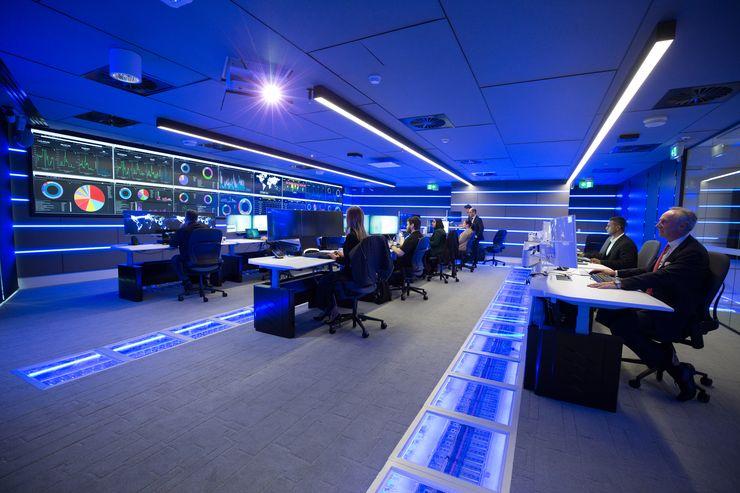
SOC Training is one of the most critical concerns in building a Quality Security Operation Center Team to fight against advanced threats that target the organization’s network.
Sophisticated detection and prevention technologies are mandatory implementations by security experts since cyber attacks are rising daily.
SO implementing a dedicated SOC operation and SOC analyst team who will work in different categories to handle the incidents.
SOC is a team of security analysts organized to detect, analyze, respond to, report on, and prevent cybersecurity incidents.
Proper SOC training for security analysts is the most important concern to build a quality team to perform rapid repose from sophisticated cyber attacks.
In this case, Ethical Hackers Academy provides an in-depth SOC training online course that contains a detailed training session for the Detection, Investigation & Remediation of all kinds of Cyberattacks on Networks, systems, and Applications.
SOC Analyst Training
This Advance SOC Training course covers the following phases, and it makes the SOC analyst learn with clearly explained practical training.
SOC Analyst – Cyber Attack Intrusion Training for Lifetime Access – Online Training
Available for iOS and Android
Detection, Investigation & Remediation of all kinds of Cyberattacks on Networks, systems, and Applications.
Stride towards a career in this fast-growing IT profession
Access 74 Lectures for 24/7
This SOC Training course is a never-ending Course.
Start from Beginner to Advance Level
Let’s Dive Deep into This Incredibly Exciting Journey Today.
What You Learn from This Advance SOC Training Course
SOC Analysts are very in demand for many of organizations since the cyber attack is rapidly rising, assign quality security analysts are the most important concern.
This SOC Training course provides in-depth training which proposes complete operation and an analyst will be able to respond to monitor the company infrastructure 24*7 and respond to all kinds of cyberattacks.
An analyst can able to work on the SIEM tool for monitoring and analysis of the cyber attack.
You will learn about real-world cyber-attacks and investigate attacks with the help of a network packet and device log.
You will learn about working on devices, protocols, ports, cybersecurity, and services.
Also, you will learn about the day to day activities performed by Analysts in their job and learn about various attacks and remediation from very basic.
After this course, you can monitor, detect, analyze (such as trend and pattern analysis), and respond and restore activities.
What EHA Is Offering?
They are providing this SOC training on current Technology (Real-world Cyber Attacks) + Tool (SIEM)
You will learn the SOC tools on which most of cybersecurity professionals are working.
You will learn the technology on which cybersecurity works and the steps followed by professionals to stop and prevent attacks in real-time.
You will face the real challenge faced by professionals in their job responsibilities.
You will be able to answer the complicated interview question from our training.
You will work as same as a professional is working and will increase your confidence in cracking any cybersecurity interview.
Lifetime access to the training on your device (Mobile, Laptop, Tablet, etc.)
You will join your dream companies at your choice of package.
Conclusion
Taking SOC training from a reputed academy such as Ethical Hackers Academy will enormously help you to enhance your skills with real-time attack scenarios and understand the overall operations in the security operation center.
SOC training course syllabus prepared with in-depth practical training with essential SIEM tools such as Splunk, and QRadar to continuously monitoring customer networks and protect it from sophisticated cyber attacks.
SOC training courses can take the following security professionals Information security managers, SOC Managers, Analysts & Engineers, Information security architects, IT managers, and Operations managers.
These SOC training courses will enhance the skills of a SOC analyst to learn about real-world attacks and sophisticated threats to protect company assets.
Learn 100+ Advanced Cybersecurity Courses Online With life Time Access – Diamond Membership
The Xiaomi 13 Ultra is the latest and greatest smartphone Xiaomi ever launched. At the time the Xiaomi 13 Pro launched, we were not sure whether the ‘Ultra’ will become a reality or not. Well, it’s now here, albeit only in China, for now. That phone is coming to global markets, but at the time of writing this review, we’re not sure when. Having said that, everything will be the same, except the software, which will be more in tune with global markets, so keep that in mind. We have opted not to wait for the global model, as this phone is outstanding, and it would be a shame not to take a closer look at it now.
Yes, this phone has a heavy focus on the cameras, but that’s not the whole story, not at all. Even though the cameras are a bit part of the experience, and Xiaomi really did outstanding work here, in collaboration with Leica. I’m getting ahead of myself, though, we’ll talk about the cameras later on. Let’s kick things off with the design and move from there.
Table of contents
Xiaomi 13 Ultra Review: Hardware / Design
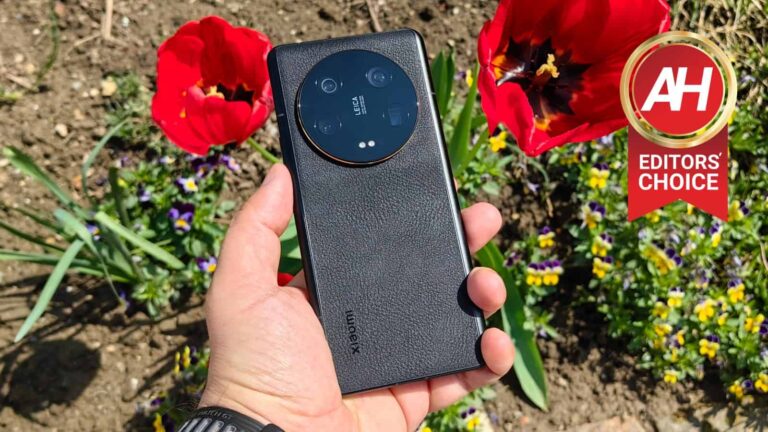
The Xiaomi 13 Ultra is a big smartphone, there’s no way around it. Well, I’d say “big and bold”, to be quite honest. Its design is out of the ordinary, because of its back side. The phone is made out of metal and “second-gen nano-tech material”, as Xiaomi calls it. This material is basically vegan leather, it seems, that is also antibacterial. It feels like slightly rubberized paper, it’s difficult to explain. It sure is a lot more grippy than glass or metal are, which is a good thing considering the size of the device. Xiaomi also says it’s “resistant to wear and dirt”.
The back side of the phone is… different
What’s interesting here is how Xiaomi implemented this. This material doesn’t curve into the frame on the sides, as it does on other phones. The metal frame curves to the back, and at a point where it becomes flat, that’s where vegan leather is implemented. That’s not all, though. This material is thicker in the upper portion of the phone’s back side, where the camera island lies. That’s because Xiaomi wanted to hide the fact that this camera bump is huge. It’s large as it is, and it would be even more pronounced if this method wasn’t implemented. It sounds weird, but it actually works really well. This gradual increase in thickness helps with the grip too. The camera bump does too, you can easily use it to anchor your index finger.
It’s rather comfortable to use, despite its size
The phone feels truly premium in the hand, and even though it’s large, it’s comfortable to use. It has flattish sides, but it doesn’t have sharp edges, so it never cuts into your hand. So, if you like large phones, chances are you’ll like this one. You can even use it without a case if you’re careful enough, as the phone is not that slippery. All the buttons are on the right side, while the speakers are placed at the top and the bottom. There is also an IR blaster included at the very top, if that’s something you’re planning on using. On top of everything, the Xiaomi 13 Ultra is water and dust resistant (IP68 rating). I prefer this design over the Xiaomi 13 Pro, to be quite honest, as the Xiaomi 13 Pro was simply too slippery, and the black ceramic on my model attracted fingerprints like crazy.
Accessories
There is a case included in the Xiaomi 13 Ultra retail box. It’s not your regular gel/silicone case, though. This is a hard-shell plastic case, with a ribbed pattern on the back. It’s actually quite nice for what it is. I did expect something a bit more premium, but hey, a case is a case. It’ll at least offer some protection until you get a different case. The bottom of the phone is opened here, as is the portion where the buttons sit. Everything else is well covered. There is also some protection for the cameras on the back.
Xiaomi 13 Ultra Review: Display
The Xiaomi 13 Ultra includes a gorgeous, big display. It’s not the same as the one in the Xiaomi 13 Pro, though, despite what was expected. Not only are we talking about a different supplier here, but a different display altogether, including different brightness. The Xiaomi 13 Ultra features a 6.73-inch QHD+ (3200 x 1440) AMOLED display. This panel has a 20:9 aspect ratio, and a 522 ppi. It has an adaptive refresh rate from 1-120Hz, and up to 240Hz touch sampling rate. It supports HDR10+ and Dolby Vision, while it also comes with 1,920Hz PWM dimming. An in-display fingerprint scanner is also present, as is in-display heart rate monitoring. This panel is also curved, by the way, and it has a display camera hole up top (centered).
This is technically the brightest display on the market
As you can see, all the bells and whistles are included here, and the display also gets up to 2,600 nits in terms of brightness. This is technically the brightest display out there at the moment, at least on paper. This display has been developed in collaboration between Xiaomi and China Star, it was not provided by Samsung. That’s actually an interesting move by Xiaomi, that’s for sure. I never felt like the display was too dim, not even outdoors. Even when I wore sunglasses in direct sunlight, the display was easily visible. I really have no complaints in that regard.
It’s vivid, sharp, and has great viewing angles
The same can be said for its other aspects, actually. The viewing angles are great, and the panel is more than sharp enough. The colors are vivid, and additional settings are available via the phone’s settings. The touch response is really good too, and the display is well optimized for touch interaction. I never felt like I had to wait for it to respond to my input or anything of the sort. The display is also not curved to extremes, so there’s no considerable glare to speak of, similar to what we’ve seen in the Xiaomi 13 Pro. To cut the long story short, this display is great to use, and I really don’t have any complaints. Chances are you’ll be happy with it.
Xiaomi 13 Ultra Review: Performance
The Xiaomi 13 Ultra is one of the most powerful smartphones in the market, hardware-wise. It is fueled by the Snapdragon 8 Gen 2 SoC, which is Qualcomm’s most powerful processor at the moment. It also comes with up to 16GB of LPDDR5X RAM and UFS 3.2 flash storage. Now, do note that I’ll talk about overall performance and fluidity of usage here, not the software side of things. I’ll heave that for the software section later on, as that’s an entirely different story, for more than one reason.
The performance is excellent
That being said, the phone is extremely fluid, in every way shape and form. You’ll really struggle to get this thing to slow down, in all honesty. It opens apps really fast, and the same goes for multitasking. Every action is very fluid, and that goes from the simpler ones, all the way to truly demanding ones. Yes, that includes gaming. On top of everything mentioned here, the Xiaomi 13 Ultra also comes with the Loop LiquidCool technology, and it never got too warm, not even during game testing.
Gaming is not a problem at all
I didn’t play a lot of games on the phone, I never do during reviews. Well, unless we’re talking about a gaming smartphone in specific. I did run several games on this phone, just to see how it grasps gaming. It ran a chess game and Subway Surfers really great, as expected. I turned up the notch with an Asphalt game, which also ran very smoothly, and ultimately the phone aced the Genshin Impact test. This phone can be used for longer gaming sessions without a problem, and it even has some software features to help with that. So, no worries in that regard. Overall, the performance is very fluid, which was to be expected, as the same was the case with the Xiaomi 13 Pro.
Xiaomi 13 Ultra Review: Battery
There is a 5,000mAh battery included inside of this phone. It’s a bit larger than the one inside the Xiaomi 13 Pro (4,820mAh). The battery life is a bit better overall, but not by much. The two phones are actually comparable in that regard. One thing to note is that I did not have an entirely consistent experience when it comes to battery life. The first couple of days, the battery life was odd, but since then, it has been constantly good. I’ve been getting around 8 hours of screen-on-time on the device. On days I’ve been testing the cameras intensively, however, the battery life was noticeably less strong. That is to be expected, though.
The phone has a special battery trick up it sleeve
Overall, the battery life is quite good, but using the camera a lot, or playing games on the phone, will impact it, of course. If you’re a light user, I see this phone going the distance. Still, this battery life is not on the same level as the Galaxy S23 Ultra and OnePlus 11, which truly managed to pull out outstanding results from this processor. For most people, the Xiaomi 13 Ultra will be more than enough to get to the end of the day. If not, well, the phone does offer truly fast charging. Also, do note that once you reach 1% of battery charge, the phone will enter into a truly low power mode, limit your functionality, and be able to last for a full hour.
90W wired & 50W wireless charging is supported, charger included
The Xiaomi 13 Ultra supports 90W wired, and 50W wireless charging. On top of that, 10W reverse wireless charging is also offered. Oh, and yes, Xiaomi does include a 90W charger in the box, unlike some other OEMs. That charger will be able to fully recharge the phone in about 35 minutes. That’s what Xiaomi markets, and that’s what we’ve experienced. Getting there with 50W wireless charging will take longer, but still faster than what most other OEMs offer.
Xiaomi 13 Ultra Review: Camera
The Xiaomi 13 Ultra is one of the most camera-centric phones on the market at the moment. Xiaomi and Leica managed to create something truly special here. The Xiaomi 13 Pro was an outstanding camera smartphone, but the ‘Ultra’ manages to beat it, without a problem. The device not only brings variable aperture to the table, but it also adds a periscope telephoto camera here. Those are not the only hardware changes, but are the most notable ones. This is also the first phone that includes variable aperture on the 1-inch camera sensor. It’s a two-step aperture, by the way.
I took over 900 photos during my testing, and the results are outstanding
During my testing, I captured over 900 photos with the device in various scenarios. This phone performs admirably in basically all of them. It doesn’t matter if it’s sunny, cloudy, or if you’re shooting in daylight or low light. The Xiaomi 13 Ultra adapt to all of these situations, and you really don’t have to tweak anything manually. It would be a true shame not to use all those cameras on the back, and just stick to the main one, though. It is great, but all the others are too. Let’s start with the main camera, though.
That 1-inch camera sensor gets the benefit of 2-step variable aperture
Xiaomi included a 50-megapixel camera with Sony’s 1-inch sensor (IMX989). That is the same main camera as on the Xiaomi 13 Pro, but this one has a 2-stop variable aperture. That camera allows for a ton of light to enter a scene, and the phone does a wonderful job of processing all that info. The Xiaomi 13 Pro had issues with highlights in some situations, but I didn’t really notice that here. The photos end up looking sharp, well-balanced, and quite detailed. Even in low light, the phone manages to preserve a lot of details, while not making the photos look unnatural. You can truly see the difference when you compare those shots with phones with inferior sensors. And no, you don’t need to use night mode, the phone will activate whatever it needs manually, and you won’t even know considering that it takes photos in an instant. The shutter speed is truly fast.
The depth of field is less of an issue than before
One problem that 1-inch camera sensors brought to the table is… the depth of field. It’s very shallow by default (keeping things out of your limited focus point out of focus), and that’s where this phone does a great job. It utilizes its variable aperture to adjust to the scene. OPPO handles this brilliantly even without variable aperture, but Xiaomi went a step further to tune it. No matter the situation, this phone will adapt. One thing to note is that the vignetting effect is still here, which is not surprising considering Leica is included in the mix. So, if you like it, then the Leica Authentic mode is perfect for you. If not, you should try the Leica Vibrant mode, though that will make the photos a bit more saturated. In most samples you’ll see below, however, I’ve used the Leica Authentic mode, I love how those pictures turned out.
The Xiaomi 13 Ultra does a great job with portraits
Shooting portraits with the Xiaomi 13 Ultra is a joy. Once you switch to portrait mode, you’ll be using the phone’s telephoto camera, and use an equivalent of a 75mm lens. This is supposed to mimic Leica’s portrait mode. I was quite surprised by the results. The phone did a fantastic job, even when the sunset was in effect. I’ve used portrait mode quite a lot, though there are other styles you can try out, courtesy of Leica.
Ultrawide camera is not only great in daylight, but really good in low light too
The ultrawide camera sticks to the main camera’s color science, and it also does a really good job. The details are a bit softer in low light, but not by that much. It is perfectly viable to use even when there’s not a lot of light available, which is great. The periscope telephoto camera does a great job in good lighting, even in low light to a certain degree. In good lighting, photos up to 10x look really good, actually, and those up to 30x are usable. Everything beyond that point is… well, not great. That’s what we’re used to seeing from periscope telephoto cameras, but they’re immensely useful in some situations. I was surprised by how often I’ve utilized 5x and 10x modes.
The video recording is also excellent
The video recording on the phone also managed to surprise me. I did not expect much, but the Xiaomi 13 Ultra delivered outstanding results. The phone does a great job with video recording. It keeps things smooth, even when you’re panning around in low light. That’s where most smartphone cameras fall apart, and you get image tearing and whatnot. That was not the case here.
The Xiaomi 13 Ultra is one of the best smartphones for photography, no doubt about it
Overall, there’s really not much to complain about here. The Xiaomi 13 Ultra has one of the most feature-packed camera systems on the market, and one of the best ones, actually. Those four 50-megapixel cameras on the back are great, every single one of them. Regardless of the situation you find yourself in, you’ll have a camera to handle it. Xiaomi really keeps the quality up across the board with those cameras, and I thoroughly enjoyed using them. This is definitely one of my favorite camera smartphones on the market at the moment, if not the top pick.
Various camera samples:
Leica Authentic vs Leica Vibrant (respectively):
Wide & ultrawide comparison:
Telephoto/periscope camera:
Xiaomi 13 Ultra Review: Software
The Xiaomi 13 Ultra that I’ve reviewed comes with an MIUI build made for China. At the time of this review, this phone did not launch globally, even though it’s coming. This version of MIUI has a ton more China-centric features and apps. The good news is, you can remove a ton of them. You’d be surprised how many can be removed, even some you’d never think you’d be able to ditch, such as a compass app and a voice recorder app. So, if you want a clean slate, you sure can get it. The good news is, MIUI 14 even offers the batch uninstall option, so uninstalling all those apps is immensely simple.
There are a couple of negatives here
Having said that, you still won’t be able to avoid the fact this software is made for the Chinese market. I’ll first focus on the negatives. I stumbled upon an especially annoying prompt. When I go to check out my widgets, I get the ‘App Vault’ prompt. At first, I simply denied the offer, and was thrown to my widgets. The thing is, this prompt keeps popping up every time you try to enter your widgets list. At one point, I got annoyed, and accepted the offer to activate it. That messed everything up. From that point on, I could no longer access my widgets, but ended up with a ton of widget recommendations from some sort of store made for China. Needless to say, everything was in Chinese, so I didn’t even know what some of those widgets were about. I tried to locate widgets from my apps, but without luck.
After tinkering with the settings for about 5 minutes, I managed to find a way to disable ‘App Vault’. The problem is, the thing kept popping up every time I tried to access my widgets… again. There doesn’t seem to be a way to completely remove it from the phone, or at least disable this prompt. I was truly annoyed by this, but granted, you don’t really visit your widgets list all that often, so… yeah, this may not bother you as much. Whatever you do, though, don’t accept the ‘App Vault’ prompt, deny it every single time.
I did experience some app crashes, and a finicky one-hand mode
I did experience a few app crashes too, and the one-hand mode is especially finicky, to the point of being useless. It functions just like it does on a Pixel, in theory. The thing is, activating it by swiping across the line at the bottom of the screen is a chore. It seems like Xiaomi included a really tiny area for activation, as you really do need to get almost to the very bottom for it to activate. Calling upon it took me up to 5-10 tries, most times. On every other phone I’ve used such a one-hand mode, like a Pixel, an ASUS phone, or an iPhone, it worked like a charm. Xiaomi really needs to fix this, as this is a gigantic phone, and a one-hand mode is a necessity. It should be an easy fix, though.
Another annoying negative is the fact that third-party launchers are utterly messed up here. When you try to use a third-party launcher, you’re completely blocked from using navigation gestures, the phone instantly switches you to on-screen buttons. So, you can basically forget using a third-party launcher if you want to use navigation gestures.
You’ll need to lay some groundwork to keep the apps properly running in the background
Keeping apps running in the background takes some work. If you want apps to keep pushing you notifications in a timely fashion, you’ll need to enable ‘Auto start’, and also disable MIUI battery optimization for them. For some of the, you’ll even need to lock them via the overview/multitasking menu. Once I did that for my messaging apps, everything was fine. Until I did, I received notifications only when I actually unlocked the phone and started using it. That is, needless to say, quite annoying. Let’s hope that the global version will be a lot better in some ways.
MIUI 14 has great animations and offers fluid performance
There are also a lot of software positives when it comes to this build of MIUI. Other than a couple of app crashes, everything was smooth and responsive. The animations are truly excellent, and the UI is responsive. There’s a ton of customization you can do in MIUI as well. It’s not to the level of some OEMs who allow you to use third-party icons on the default home screen, and remove specific icons from the status bar, but still. Xiaomi even offers its own theme store that you can utilize to change up your home screen.
Waiting for the global version may be best
Other than a few negatives I’ve listed earlier, my experience with this software has been quite good. Everything you’d expect MIUI to deliver is here, and it works really well. I just can’t wait to try out the global version of the software, to be quite honest, so that I don’t have to jump through as many hoops. You’d probably be better off waiting for the global version too.
Xiaomi 13 Ultra Review: Should you buy it?
So, should you buy the Xiaomi 13 Ultra? Well, first of all, I’d suggest you wait for the global model, if you do plan on buying it. This one can be tweaked to run fine, but the point is, you do have to run through hoops in order to get there. The model with global software will be an entirely different story. That being said, this is one of the most fluid smartphones on the market, and also one that delivers an outstanding camera experience. Xiaomi and Leica truly managed to provide an outstanding setup for both photography and videography here, and if you love taking pictures, this phone won’t let you down. There are other positives we’ve talked about, and if the price ends up being right, the Xiaomi 13 Ultra will surely be worth your money. The Xiaomi 13 Ultra is a true powerhouse smartphone.
You should buy the Xiaomi 13 Ultra if:
You love taking pictures & video
You need a truly versatile camera setup
You love big phones
You want extremely fluid performance
You need great battery life
You appreciate truly fast charging (wired & wireless)
You don’t want to buy a charger separately
You enjoy consuming multimedia
You shouldn’t buy the Xiaomi 13 Ultra if:
You don’t want to deal with software made for China (wait for the global version)
You might be shocked by the phrase ‘free Twitter Blue subscribers’ and question whether such exists. Well, technically they do, and Twitter will soon guide them on deactivating the subscription. These users have the Blue checkmark and enjoy the benefits but don’t pay the set subscription price.
A few months ago, you didn’t need to pay to have a verified checkmark. This mark is given to users with a certain level of recognition within and outside the platform. The likes of celebrities, influencers, media platforms, politicians, sportsmen, and the likes all got the verification checkmark.
This served as an identifying mark to help tell the user’s account away from possible impostors. But with Elon Musk taking over control of Twitter, users can now pay for a verification checkmark. However, some users still got the checkmark without paying for the Blue subscription like other users did.
Support is here for Free Twitter Blue subscribers to guide them through the cancellation process
Sometime last week, Twitter set out to ‘un-verify’ users that haven’t paid the Blue subscription plan. This caused an uproar on the platform, but something funny happened just after that. Certain legacy accounts that haven’t paid for the Blue subscription plan got back their checkmarks.
Among those who got their checkmarks back were some dead celebrities. A few other individuals also noted that they still have their checkmarks despite not being Blue subscribers. The reason behind this is still unclear as there was no official statement from Twitter regarding this.
Some sources claim that this is one of Elon Musk’s jokes as he tries to troll some of these users. Users that fall under the class of those Musk might be trolling are supporters of the “Block The Blue” movement. Well, after giving them back their Blue checkmarks, Elon, and his team are here to guide them on how to get rid of it over again.
According to reliable sources, Twitter is adding a new page to help guide these free Twitter Blue subscribers. The page offers assistance to these as they cancel their “complimentary subscription to Twitter Blue.” By canceling this subscription that they didn’t opt for, they will be letting go of their checkmarks and all the benefits Blue offers Twitter Blue users.
There are a lot of mixed reactions to how the structure of Twitter’s verification process. This has driven a lot of account holders off the platform, with others resolved not to pay for the Blue subscription plan. Despite all the hate this process is getting, Elon and his team seem adamant about shoving it down users’ throats.