NCR, a major player in the US payments industry, admitted it was a target of a ransomware attack for which the BlackCat/Alphv group claimed responsibility.
On April 12, NCR revealed that it was looking into an “issue” with its Aloha restaurant point-of-sale (PoS) system.
The business announced an outage at a single data center had affected just a few of its hospitality customers’ ancillary Aloha applications on April 15.
“On April 13, we confirmed that the outage was the result of a ransomware incident. Immediately upon discovering this development we began contacting customers, engaged third-party cybersecurity experts and launched an investigation. Law enforcement has also been notified,” NCR said.
NCR is a software and technology consulting firm in the United States that offers restaurants, enterprises, and retailers digital banking, POS systems, and payment processing solutions.
Since Wednesday, one of its products, the Aloha POS platform used in the hospitality industry, has been down, making it impossible for customers to use.
Ransomware Attack That Led to the Outages
After going silent for many days, NCR finally revealed today that the Aloha POS platform’s data centers were the target of a ransomware attack that triggered the outage.
“As a valued customer of NCR Corporation, we are reaching out with additional information about a single data center outage that is impacting a limited number of ancillary Aloha applications for a subset of our hospitality customers,” reads an email sent to Aloha POS customers.
According to a statement NCR provided to BleepingComputer, just a subset of their Aloha POS hospitality customers are affected by this outage, along with a “limited number of ancillary Aloha applications.”
However, Aloha POS customers have reported on Reddit that the downtime significantly hindered their ability to conduct business.
“Restaurant manager here, small franchise stuck in the Stone Age with around 100 employees. We’re doing the old pen and paper right now and sending to head office. The whole situation is a huge migraine,” a user wrote on the AlohaPOS Reddit.
Other users are anxious about making payroll on time for their employees, with many customers urging that data be extracted manually from the data files until the outage is resolved.
“We have a clear path to recovery and we are executing against it. We are working around the clock to restore full service for our customers,” NCR informed BleepingComputer.
“In addition, we are providing our customers with dedicated assistance and workarounds to support their operations as we work toward full restoration.”
On the data leak site used by the BlackCat/ALPHV ransomware gang, cybersecurity researcher Dominic Olivieri saw a short-lived post where the threat actors took ownership.
A section of the negotiation dialogue between the ransomware gang and an alleged NCR official was also included in this post.
In his discussion, the ransomware group allegedly informed NCR that they had not stolen any server-stored data during the attack.
Threat actors stated that they had stolen login information for NCR’s customers and threatened to publish it if a ransom was not paid.
“We take a lot of credentials to your clients networks used to connect for Insight, Pulse, etc. We will give you this list after payment,” the threat actors told NCR.
BlackCat has since removed the NCR post from their data breach website, hoping the firm will agree to discuss a ransom.
With a highly advanced encryptor that allowed for extensive attack customization, the BlackCat ransomware gang began operating in November 2021 and had ransom demands ranging from $35,000 to over $10 million.
Internally, the threat actors use ALPHV when discussing their activities in negotiations and hacker forums.
ChatGPT, a machine learning (ML)-powered chatbot, is rapidly growing across all sectors. The app’s developer, OpenAI, reported that it gained one million users in just five days. The app has now been visited over two billion times, according to research by Similarweb. This being said, concerns have been raised about the use of the intelligent chatbot, with Italy’s data privacy agency even going so far as to temporarily ban the use of the app in the country over concerns that it violates GDPR law.
Due to the app’s impact on the sector, Cyber Security Hub’s Advisory Board members discussed ChatGPT’s impact on the industry in its March meeting.
Cyber Security Hub’s Advisory Board is a group of experts in IT security and technology that meets every two months to discuss the most important issues and developments in cyber security.
When discussing whether they use AI in their cyber security strategy, however, one member was quick to point out that common misconceptions about what AI is can muddy the waters when discussing its use.
“AI is a huge buzzword at the moment but what people are talking about is not true AI as such,” they explained, “We use a lot of ML as we need to understand all user behavior analytics from ingress points through to instruction. AI is instruction-based and ML is behavior-based.”
Another member agreed that they do not use as much AI as the technology is still in its infancy, however they do use machine learning as it can use data to make predictions in a fraction of the time it would take a human to. They also noted, however, that true AI may open up more risks to a company’s network. This potential risk has led to the member “follow[ing] trends more on the conservative side, leveraging people and using technology as a blend to get the best results”.
The future of artificial intelligence and machine learning
When considering how and when AI and ML will be integrated into most if not all cyber security solutions, a member said this will happen once those in the cyber security industry realize that they cannot change human behavior.
“You can positively or negatively reinforce behaviors. It is great to automate and great to use AI but it also needs the human, we should not forget that we cannot have a tool for everything,” they shared.
Another member agreed, saying that AI and ML will continue to progress in the workforce as cyber security itself has a lack of people who wish to get involved and gain experience, choosing to rely on technology instead.
“You can positively or negatively reinforce behaviors. It is great to automate and great to use AI but it also needs the human, we should not forget that we cannot have a tool for everything.”
“Innovation is becoming so critical in all areas that we need to keep pushing the needle forward. It is exciting but scary, because you can have the machine do things that usually need multiple people with the click of a mouse. What you can get from ChatGPT used to take hours or days, but people always have to be part of the process as long as there are people to do it. I don’t know if there are enough people coming in [to the cyber security space].”
Based on this, members agreed that behavioral scientists will be involved in the expansion of machine learning especially, as they will be able to drive machine learning algorithms and allow them to anticipate decision trees to quickly make decisions or provide several avenues for the decision.
With this being said, one member clarified that AI and machine learning will never truly overtake humans, even if it does manage to catch up with the speed of human thought: “AI and ML will supersede but as soon as processing power catches up to brain power it will take over. It still needs the human, however. Social media and cyber warfare will drive the AI and ML evolution forward”.
Why cyber security professionals are concerned about ChatGPT
When discussing this concern at the meeting, one Advisory Board member described that they had already noticed ChatGPT being used to make cyber attacks more sophisticated within their company.
They explained that they see about 37,000 phishing campaigns weekly and have recently noticed that malicious actors have gone from using broken or misspelled English to “prim and proper” language. The member suspected that they have started using ChatGPT to craft a style that helps them with their English.
The member also noted that ChatGPT is also helping malicious actors to understand the psychology of the recipient and better put them under duress to increase the effectiveness of their phishing attempts. To combat this, people have been developing anti-GPT solutions, including one that can tell whether content has been typed by a human or systematic programming.
“AI and ML will supersede but as soon as processing power catches up to brain power it will take over. It still needs the human, however. Social media and cyber warfare will drive the AI and ML evolution forward”.
Another member dubbed ChatGPT as “cool but scary” because of its potential to be used by bad actors.
“Phishing is the number one attack surface and [malicious actors] will use it to make scams more realistic. It will be the voice of spear phishing and targeted spear phishing will be enhanced due to ChatGPT. It is just another way to increase their success with their attacks.
“When you talk about malware or ransomware, bad actors [may use] third parties as ransomware, [but] now we may see them using ChatGPT and eliminating the third party. There is lots of good but there is always something bad to do with it,” they explained.
Later on in the discussion, a member noted that ChatGPT may also cause an issue within cyber security teams, as if their development team is using ChatGPT to generate code and then using this within their platform, the code may be unsafe and open their network up to a number of threats. They said that this problem may be exacerbated if companies are constantly hiring new developers, as they may feel reliant on ChatGPT to complete their work quickly.
The member explained that employees may take code from ChatGPT without reviewing it first as it is human nature to trust sources, even if these sources come via the internet. They noted that those in cyber security must move quickly to stay on top of technological changes, like the development of AI, as well as to mitigate the aspects of human behavior and psychology that are a threat to cyber security.
Even though it hasn’t picked up too much steam, Netflix is still investing in its gaming venture. The company is working on its next AAA title, and it brought in a heavy hitter in the video game industry. According to Techradar Netflix brought in Joseph Staten, the head of creative for Halo Infinite, for its next game.
The company has big plans
If the news and rumors hold true, then Netflix has some big projects coming down the road. Last year, we got the news that it entered a partnership with Ubisoft to produce an Assassin’s Creed game that’s planned to launch in the next couple of years.
Aside from that, Netflix could possibly be working on a cloud gaming service. The details on this are quite scarce, as it’s still in the early stages. The company made a job post where it asked for people who were experienced in working on technology that requires low-latency input. You can read more about it here.
Netflix taps Joseph Staten to produce a new game
So, bringing in the head of creative from a game as big as Halo Infinite is no small detail. We can tell that Netflix wants this game to be a big fish. Staten worked on several other games including Halo: Combat Evolved, Halo 2, Halo 3, ReCore, and Crackdown 3. He has a career in video games that go back more than two decades.
As for this game that he and Netflix are brainstorming, we have no idea what it is. This could mean that there’s nothing solid just yet. Maybe this game is still in the planning stage. Maybe the team is gathering concept art for potential characters. This is going to be an original IP, after all. So, it’s not going to be a Netflix Halo game.
So, we don’t know what the game is going to be about or when it’s going to come out. We’ll need to keep an eye out for developments on it.
Over the past few years, smartwatches for kids have become an increasingly popular choice for parents who want to keep an eye on their children’s activities without giving them full access to a smartphone. Now, recent reports suggest Fitbit is working on a dedicated smartwatch for kids that will offer unique features such as a built-in camera and cellular connectivity, enabling parents to stay connected with their children.
While Fitbit has previously made fitness bands for kids, namely the Fitbit Ace 3 and Ace 3 Special Edition, they were always cut-down versions of their adult counterparts. But according to the leaked images, the upcoming watch design resembles the company’s Versa or Sense line, but it is thicker, making it more suitable for younger children to grip and use. Additionally, the watch also features two physical buttons on the side, with each being a different colour to appeal to children. And despite Google acquiring the company, the rumoured watch will run on Fitbit OS rather than Wear OS.
Video calls on a smartwatch
One of the most interesting things about the watch is the front-facing camera embedded in the centre-top portion of the display. Although it’s unclear how Fitbit plans to use the sensor, considering other kids’ smartwatches such as Verizon’s Gizmo Watch 3, the company could potentially use this camera for communication, such as video calls or photos. Moreover, the addition of cellular connectivity would also allow children to stay connected with their parents without needing to rely on public Wi-Fi or mobile hotspots.
However, it is also important to note that these are leaked images, and it remains unclear whether they depict a prototype or a finished product. But, sources suggest that the first Fitbit smartwatch for kids with cellular connectivity and a built-in camera could debut in 2024.
In the last 12 months, Germany was one of the most attacked countries in the world, the most attacked in the EU, and a favourite target of the notorious Black Basta group.
This article is based on research by Marcelo Rivero, Malwarebytes’ ransomware specialist, who monitors information published by ransomware gangs on their Dark Web sites. In this report, “known attacks” are attacks where the victim opted not to pay a ransom. This provides the best overall picture of ransomware activity, but the true number of attacks is far higher.
Between April 2022 and March 2023, Germany was a globally significant target for ransomware gangs. During that period:
It was the fourth most attacked country in the world, and the most attacked in the EU
The construction sector was harder hit than in the USA, UK, or France
LockBit and Black Basta accounted for 54% of known attacks
Black Basta attacked targets in Germany far more often than in the UK or France
In August 2022, German power semiconductor manufacturer Semikron disclosed a ransomware attack that had partially encrypted its network, with the attackers claiming to have stolen 2TB of documents.
In the same month, German automotive parts powerhouse Continental was attacked by LockBit, which claimed to have stolen 40TB of files. The company broke off negotiations in late October, and the ransomware gang offered the data for sale or destruction for $50 million, the biggest known ransom of 2022, and the largest this author had seen until LockBIt’s equally outlandish request for $80 million from Royal Mail in early 2023.
Stolen Continental data available for sale or destruction
A ransomware attack on German newspaper Heilbronner Stimme in October 2022 disrupted its printing systems, forcing the publication of a six-page emergency edition. The attack affected the entire Stimme Mediengruppe, including companies Pressedruck, Echo, and RegioMail, with Echo’s website and e-paper accessibility also compromised. Editor-in-chief Uwe Ralf Heer reported that a well-known cybercriminal group encrypted its systems and left ransom demands, but did not specify further.
In November 2022, the Vice Society ransomware gang claimed responsibility for a cyberattack on the University of Duisburg-Essen (UDE). The attackers leaked files including backup archives, financial documents, research papers, and student spreadsheets. On January 9, 2023, the university announced that due to extensive and complex damage caused by the attack, its entire IT infrastructure would need to be reconstructed.
Germany is a prime target
In the 12 months from April 2022 to March 2023, Germany was a globally significant target for ransomware, ranking as the fourth most attacked country by known attacks. It was the most attacked country in the EU, and the most attacked country where English isn’t the principle language.
Known attacks in the ten most attacked countries between April 2022 – March 2023
Given the disparity between the USA and the rest of the world in terms of number of attacks, it would be easy to conclude that ransomware is, first-and-foremost, a USA problem. It is not. The size and nature of the US economy means that it has many more targets for ransomware gangs than other countries in the top ten.
We can account for the difference in the size of countries’ economies by dividing the number of known ransomware attacks by a country’s nominal GDP, which gives us an approximate rate of attacks per $1T of economic output. On that basis, the difference between the countries in the top ten is far smaller than the total number of known attacks would suggest. The top ten most attacked countries all suffered between 15 and 66 known attacks per $1T of economic output.
The ten most attacked countries between April 2022 – March 2023, ordered by attacks per $1T GDP
The size of the countries in the top ten also vary enormously, and we can try to account for that by dividing known attacks by the size of each country’s population. On that measure, again, the differences between countries are much smaller than a simple count of known attacks suggests.
On a known attacks per capita basis, Germany sits in a cluster of four advanced European economies with nearly identical rates of attack. In all the variations of our top ten, English-speaking countries occupy at least three of the top five positions, and English-speaking countries with smaller populations and economies, like Canada and Australia, seem to suffer disproportionately.
The situation in Germany is far from good, it just isn’t quite as bad as in the very worst countries. By any measure, Germany is one of the most attacked countries in the world, and its organisations are prime targets for ransomware gangs.
The ten most attacked countries between April 2022 – March 2023, ordered by attacks per capita
As in most countries, the German services sector is the most hard hit, accounting for 28% of attacks in the last 12 months, just slightly above the global average of 25%. In most respects, German industry sectors are attacked in roughly the proportions as they are in the UK and France, with some notable exceptions. There were no known attacks on German healthcare in the last 12 months (which, again, does not include unknown attacks), the country suffered fewer attacks on its legal services than either the UK or France, and it does not seem to have suffered the same problems France has had protecting its government sector, or the UK its education sector.
Where Germany suffers more than its neighbours is construction. Its 12% share of known attacks is double the global average, and notably higher than the USA (7%), UK (7%), and France (5%).
Known ransomware attacks by industry sector in Germany, April 2022 – March 2023
Black Basta’s hunting ground
In the UK, no individual ransomware was used in more than two known attacks on construction. In France one gang, LockBit, recorded three. In Germany, two different gangs recorded five known attacks against construction, accounting for a little over two thirds of the total. One of those gangs was LockBit, which is unsurprising given its position as by far the most used ransomware globally. The other was Black Basta, which recorded more attacks against German construction targets in 12 months than it did in the whole of France in the same period.
It seems Black Basta has an appetite for German targets. In the last 12 months it was the second most used ransomware in Germany, with 27 known attacks. In the same period it was busy in the UK with 10 attacks—but overshadowed by LockBit, Vice Society and others—it recorded just three attacks in France, where LockBit absolutely dominated.
Ransomware with two or more known attacks in Germany, April 2022 – March 2023
In the last year, Black Basta and LockBit were the only ransomware that registered more than four known attacks in a month, with both going as high as eight. Between them, the two groups accounted for 54% of known attacks in Germany and largely determined whether the country would have a bad month at the hands of ransomware gangs or a terrible one.
Monthly ransomware attacks in Germany with LockBit and Black Basta highlighted, April 2022 – March 2023
Black Basta does not reinvent the wheel in the way it operates. Similar to other ransomware groups, attacks frequently begin with initial access gained through phishing attacks. A typical attack might start with an email containing a malicious document in a zip file. Upon extraction, the document installs the Qakbot banking trojan to create backdoor access and deploy SystemBC, which sets up an encrypted connection to a command and control server. From there, CobaltStrike is installed for network reconnaissance and to distribute additional tools.
As is the overarching trend for ransomware groups these days, Black Basta’s primary goal is to steal data so that it can hold the threat of leaked data over its victims. The data is generally stolen using Rclone, which filters and copies specific files to a cloud service. After the data is exfiltratrated, the ransomware encrypts files with the “.basta” extension, erases volume shadow copies, and presents a ransom note named readme.txt on affected devices. Attackers using Black Basta may be active on a victim’s network for two to three days before running their ransomware.
Conclusions
In the last 12 months, Germany was a globally significant hunting ground for ransomware gangs, and the country with the fourth highest total of known attacks. Across the various industry sectors, construction was over represented, suffering a higher proportion of known attacks than the construction sectors in the USA, France, and the UK. Much like the education sector in the UK and the government sector in France, it should be alarming that, with an entire world of targets to choose from, it has attracted a disproportionate amount of attention.
In particular, the German construction sector suffered at the hands of LockBit and Black Basta, which displayed a liking for German targets of all kinds and was the second most used ransomware. Black Basta recorded considerably more attacks in Germany in the last year than in either the UK or France. In fact, the only country in the world to suffer more Black Basta attacks in the last twelve months than Germany was the USA.
Detect intrusions. Make it harder for intruders to operate inside your organization by segmenting networks and assigning access rights prudently. Use EDR or MDR to detect unusual activity before an attack occurs.
Stop malicious encryption. Deploy Endpoint Detection and Response software like Malwarebytes EDR that uses multiple different detection techniques to identify ransomware, and ransomware rollback to restore damaged system files.
Create offsite, offline backups. Keep backups offsite and offline, beyond the reach of attackers. Test them regularly to make sure you can restore essential business functions swiftly.
Don’t get attacked twice. Once you’ve isolated the outbreak and stopped the first attack, you must remove every trace of the attackers, their malware, their tools, and their methods of entry, to avoid being attacked again.
Malwarebytes removes all remnants of ransomware and prevents you from getting reinfected. Want to learn more about how we can help protect your business? Get a free trial below.
Apple confirmed earlier this month that it would be opening its first flagship store in India this week, and now the day has finally arrived. CEO Tim Cook officially opened the door to the first-ever Apple retail store in India earlier today.
Located at the Jio World Drive mall in Mumbai’s Bandra Kurla Complex, the store aims to strengthen Apple’s offline presence in the country. The opening was attended by thousands of tech fans, some of whom arrived hours before the doors officially opened.
The store design is similar to other Apple flagship stores worldwide, but it includes unique Indian touches, such as a handcrafted timber ceiling with elements sourced from Delhi and a 14-meter-long stainless steel staircase flanked by grey stone walls and mosaic flooring sourced from Rajasthan.
The store is also carbon neutral and runs on 100% renewable energy, with staff wearing green t-shirts to reflect this theme. There are nearly 100 employees at the store, speaking over 20 languages and providing expert guidance on all Apple products.
Customers can purchase all of Apple’s products currently available in India, including MacBooks, iPhones, iPads, and watches, from the store. The store also showcases Apple Arcade, HomePod, Apple Music, and Apple TV+. The Genius Bar on the first floor offers assistance to visitors.
India has emerged as an increasingly important market for Apple. The company’s manufacturing partners have also ramped up the local assembling of iPhone and other products in the country. The Mumbai store’s opening is a major step in Apple’s commitment to expanding its footprint in India, and a second store is set to open in New Delhi on April 20.
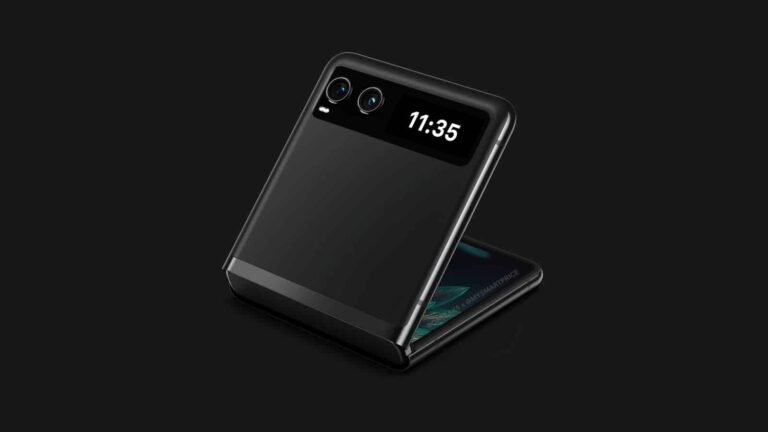
The Motorola Razr Lite has just surfaced in CAD-based renders, allowing us to check out its design. The images we’ll show you below come from @OnLeaks and MySmartPrice.
The Motorola Razr Lite design surfaced in a bunch of renders
The Motorola Razr Lite is one of two foldable smartphones Motorola is planning to announce in the near future. Evan Blass confirmed, way back in October last year, that two Razr devices are on the way.
Well, one of them just surfaced, the ‘Lite’ model. The other device will be the Motorola Razr Plus 2023, or whatever Motorola opts to call it, we’re still not sure. In any case, let’s focus on the ‘Lite’ model, shall we?
If you take a look at the gallery below the article, you’ll be able to see the device itself. The phone has a large main display, with a centered display camera hole. We still don’t have the exact dimensions, though.
This phone will have a truly small cover display
Its cover display is quite small, though. It sits next to the phone’s rear cameras. There are two cameras on the back, as you can see. This cover display is very small, while the one on the other Razr foldable will be a lot bigger.
This tiny display will likely allow you to check your notifications, alarm status, incoming calls, and so on. The functionality is limited due to its size. You will, however, almost certainly be able to keep it always on for that reason. So, you’ll always have a glimpse at what’s going on.
The source did note that the design renders here are based on “low quality, real-life pictures of a testing stage prototype”. So, the final product may differ a bit compared to this, just note that.
We still do not have any specifications for this smartphone, so we cannot really share those. Chances are more info will surface soon, though, so stay tuned.
Over the past few years, iOS has gone from being one of the most stable operating systems to one that experiences regular bugs and crashes. Despite Apple’s efforts to provide its users with a seamless experience, the frequent occurrence of issues has left many iPhone users frustrated. And now, a new bug is causing panic amongst iPhone users by continuously asking for their Apple ID password, even after they enter the correct details.
The issue came to light when many users took to Twitter and Reddit to report being logged out of their Apple ID accounts, with some unable to log back in. Additionally, the bug has also caused issues with users’ Apple TV+ subscriptions, which have disappeared without explanation.
Talking about the issue, the Twitter user “Andreu.” wrote, “So why does my Apple ID randomly ask me to enter my password? I don’t think that’s normal,” and many others echoed this sentiment. Affected users on Reddit reported similar experiences, with one Redditor saying, “Randomly popped up as a notification on my phone, I signed in, and then changed my password. Kinda freaked me out.” While the true extent of this problem is unknown, reports have suggested that it has impacted users in Brazil and Japan, potentially indicating that it is a regional issue.
How to fix the issue?
Although Apple’s System Status webpage has not acknowledged any problems with Apple ID, there are some simple solutions to fix this bug on your own. Firstly, turn off your iPhone and reboot it, as this can help clear any glitches that are causing the constant prompts. If this doesn’t work, try changing your Apple ID password. Apple Support has a helpful video that walks you through this process.
Unfortunately, this is not the only recent issue with Apple’s services. The company’s Weather app was down for multiple days earlier this month, and on April 5, many Apple online services were inaccessible to users for hours. These outages have left Apple users feeling frustrated and unable to carry out daily tasks.
Recently, McAfee’s Mobile Research Team discovered ‘Goldoson,’ a new type of Android malware, has crept into the Google Play store through 60 genuine apps, downloaded by a whopping 100 million users.
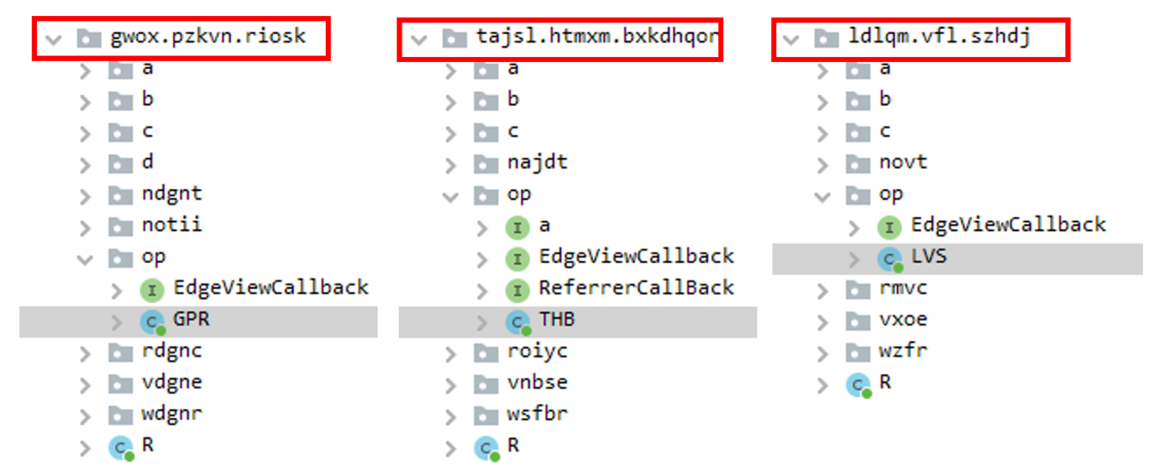
The sneaky malware component found in all 60 apps was not the developers’ fault. It had been slipped into a third-party library, which they unintentionally integrated into their apps.
While apart from this, there is good news for McAfee Mobile Security users, as the antivirus software now identifies the Goldoson menace as Android/Goldoson and shields its users against this threat, along with other threats.
Capabilities of Goldoson
Data or information that can be collected from affected devices by the malware include the following:-
Data on installed apps
WiFi connected devices
Bluetooth connected devices
User’s GPS location
Location History
MAC address of Bluetooth nearby
MAC address of Wi-Fi nearby
Apart from this, Goldson not only infiltrates your device through legitimate apps but can also conduct ad fraud.
The malware can automatically click on ads in the background without your consent, potentially costing you time, money, and device performance.
List of Apps and Current Status
Here in the below table, we have mentioned all the apps and their current Status:-
L.POINT with L.PAY (10M+, Updated*)
Swipe Brick Breaker (10M+, Removed**)
Money Manager Expense & Budget (10M+, Updated*)
TMAP – 대리,주차,전기차 충전,킥보 … (10M+, Updated*)
롯데시네마 (10M+, Updated*)
지니뮤직 – genie (10M+, Updated*)
컬쳐랜드[컬쳐캐쉬] (5M+, Updated*)
GOM Player (5M+, Updated*)
메가박스(Megabox) (5M+, Removed**)
LIVE Score, Real-Time Score (5M+, Updated*)
Pikicast (5M+, Removed**)
Compass 9: Smart Compass (1M+, Removed**)
GOM Audio – Music, Sync lyrics (1M+, Updated*)
곰TV – All About Video (1M+, Updated*)
전역일 계산기 디데이 곰신톡–군인 … (1M+, Updated*)
아이템매니아 – 게임 아이템 거래 … (1M+, Removed**)
LOTTE WORLD Magicpass (1M+, Updated*)
Bounce Brick Breaker (1M+, Removed**)
Infinite Slice (1M+, Removed**)
나홀로 노래방–쉽게 찾아 이용하는 … (1M+, Updated*)
SomNote – Beautiful note app (1M+, Removed**)
Korea Subway Info : Metroid (1M+, Updated*)
GOODTV다번역성경찬송 (1M+, Removed**)
해피스크린 – 해피포인트를 모으 … (1M+, Updated*)
UBhind: Mobile Tracker Manager (1M+, Removed**)
스피드 운전면허 필기시험 … (1M+, Removed**)
이상형 월드컵 (500K+, Updated*)
CU편의점택배 (500K+, Removed**)
스마트 녹음기 : 음성 녹음기 (100K+, Removed**)
캣메라 [순정 무음카메라] (100K+, Removed**)
컬쳐플러스:컬쳐랜드 혜택 더하기 … (100K+, Updated*)
창문닫아요(미세/초미세먼지/WHO … (100K+, Removed**)
롯데월드타워 서울스카이 (100K+, Updated*)
Snake Ball Lover (100K+, Removed**)
게토(geto) – PC방 게이머 필수 앱 (100K+, Removed**)
기억메모 – 심플해서 더 좋은 메모장 (100K+, Removed**)
풀빵 : 광고 없는 유튜브 영상 … (100K+, Removed**)
Money Manager (Remove Ads) (100K+, Updated*)
Inssaticon – Cute Emoticons, K (100K+, Removed**)
클라우드런처 (100K+< Updated*)
작은영화관 (50K+, Updated*)
매표소–뮤지컬문화공연 예매& … (50K+, Updated*)
롯데월드 아쿠아리움 (50K+, Updated*)
롯데 워터파크 (50K+, Updated*)
T map for KT, LGU+ (50K+, Removed**)
숫자 뽑기 (50K+, Updated*)
로더(Loader) – 효과음 다운로드 앱 (10K+, Removed**)
GOM Audio Plus – Music, Sync l (10K+, Updated*)
Swipe Brick Breaker 2 (10K+, Removed**)
안심해 – 안심귀가 프로젝트 (10K+, Removed**)
불러봄내 – 춘천시민을 위한 공공 … (10K+, Removed**)
판타홀릭 – 아이돌 SNS 앱 (5K+, Removed**)
씨네큐브 (5K+, Updated*)
TNT (5K+, Removed**)
베스트케어–위험한 전자기장, … (1K+, Removed**)
InfinitySolitaire (1K+, Removed**)
안심해 : 안심지도 (1K+, Removed**)
노티아이 for 소상공인 (1K+, Removed**)
TDI News – 최초 데이터 뉴스 앱 … (1K+, Removed**)
눈팅 – 여자들의 커뮤니티 (500+, Removed**)
팅서치 TingSearch (50+, Removed**)
츄스틱 : 크리샤츄 Fantastic (50+, Removed**)
연하구곡 (10+, Removed**)
Technical Analysis
Security analysts have observed that the malicious Goldoson library is stealthy and smarter.
As it registers your device and receives remote configurations from a remote server whose domain is obfuscated while the app is active, putting your privacy at risk.
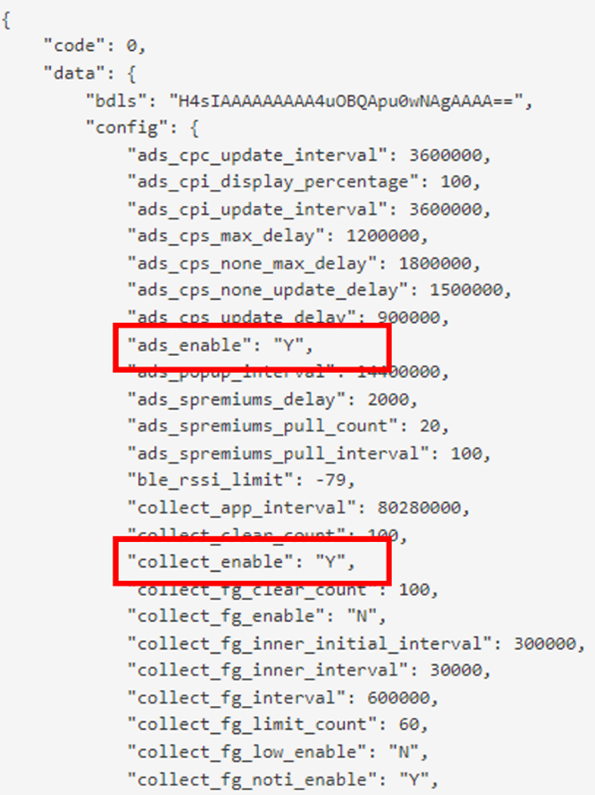
The remote configuration holds the key to the malware’s devastating impact. It determines the frequency of each component’s operation and defines the specific parameters for all the harmful functions.
This library checks periodically, pulls information from the device, and sends it to the remote servers based on its configured parameters.
The tags ‘ads_enable’ and ‘collect_enable’ serve as on/off switches for the malware’s various functions, while the other parameters outline the conditions and requirements for their operation. The malware can choose which functions to activate with these settings and when.
Two factors determine the extent of data collection by the Goldoson malware, and here below we have mentioned them:-
The level of permissions granted to the infected app during installation.
The specific Android version it is operating on.
While Android 11 and later versions are more secure against unapproved data collection.
But, besides all the security measures, McAfee detected that Goldson still managed to accumulate sensitive information from about 10% of the apps on these versions.
The malware’s ad-clicking function is quite sneaky – it loads hidden HTML code into a customized WebView and uses it to visit URLs repeatedly, all while remaining out of sight.
By doing so, the malware generates ad revenue without the user’s knowledge. The stolen data is transmitted every two days, but the remote configuration can alter the frequency.
The malware developers can modify the transmission rate to avoid detection and to keep up with their malicious activities.
Goldoson has infiltrated multiple Android app stores, with over 100 million downloads traced back to Google Play alone. Another app store, Korea’s biggest one, has approximately 8 million installations.
Users must remain vigilant and take precautions while downloading apps from unknown sources.
Regular readers of our monthly ransomware review (read our April edition here) know that Ransomware-as-a-Service (RaaS) gangs have been making headlines globally with their disruptive attacks on organizations.
Sometimes, though, it’s not enough to merely know about of the problem.
In order to truly protect ourselves from RaaS gangs, we have to ‘peel back the onion’, so to speak, and get a closer look at how, exactly, they behave. If we know how RaaS gangs evade detection once in a network, for example, we may be able to kick them out before they can do any damage.
One of the most concerning behaviors we’ve observed from RaaS gangs is their use of Living off the Land (LOTL) attacks, where attackers leverage legitimate tools to evade detection, steal data, and more.
Let’s dive into the dangers of LOTL attacks in RaaS operations and provide guidance for under-resourced IT teams on how to detect and block such threats.
The deceptive nature of LOTL attacks
In an ideal world, IT teams whose organizations are under attack would have clear and direct evidence of the malicious activity.
For example, if unusual network connections are being made to remote IP addresses associated with known malicious actors, then there’s little doubt that you’re under attack—enabling IT to put a halt to the behavior early on.
But now imagine you’re diligently monitoring a network for any signs of suspicious activity. As you scan a seemingly endless stream of logs, searching for any anomalies that could signal trouble, you notice some activity from PowerShell, a versatile and legitimate scripting tool.
Script Block Logging records all blocks of code as they’re executed by PowerShell, which could you point to suspicious activity. Source.
Namely, there are scripts using commands that an attacker could use to steal data from the company’s network, but which also resembled legitimate administrative tasks used by IT professionals for various system administration tasks. Considering it’s regular business hours, you figure it’s part of a routine IT maintenance operation and move on.
But, lo and behold, it was a RaaS gang the whole time!
The attacker had studied the company’s environment and had a deep understanding of the tools and processes typically used by employees, and so they managed to avoid raising suspicion by blending in with typical PowerShell usage. By conducting the attack during normal business hours, the attackers also avoided any of the usual scrutiny that would come from moving across a network late at night.
This is exactly why LOTL attacks are so dangerous: by mimicking normal behavior, LOTL attacks make it extremely difficult for IT teams and security solutions to detect any signs of malicious activities. Experienced analysts, however, might be able to pick up on subtle anomalies or patterns that indicate a LOTL attack, leveraging their expertise and deep understanding of system behaviors.
On the other hand, new or under-resourced teams may struggle to identify such attacks due to a lack of experience or insufficient tools, leaving them vulnerable to these stealthy threats.
5 LOTL tools used by ransomware gangs
While attackers use a seemingly innumerable amount of legitimate tools for LOTL attacks, below are five of the most common ones we’ve seen the most active ransomware gangs using for their attacks.
Tool
Used For
Used To
Used By
PowerShell
Versatile scripting language and shell framework for Windows systems
Execute malicious scripts, maintain persistence, and evade detection
LockBit, Vice Society, Royal, BianLian, ALPHV, Black Basta
PsExec
Lightweight command-line tool for executing processes on remote systems
Execute commands or payloads via a temporary Windows service
LockBit, Royal, ALPHV, Play, BlackByte
WMI
Admin feature for accessing and managing Windows system components
Execute malicious commands and payloads remotely
LockBit, Vice Society, Black Basta, Dark Power, Cl0p, BianLian
Mimikatz
Open source tool for Windows security and credential management
Extract credentials from memory and perform privilege escalation
LockBit, Black Basta, Cuba, ALPHV
Cobalt Strike
Commercial pen test to assess network security and simulate advanced threat actor tactics
Command and control, lateral movement, and exfiltration of sensitive data
LockBit, Black Basta, Royal, ALPHV, Play, Cuba, Vice Society
Again, readers of our monthly ransomware review will recognize that each gang listed here are responsible for the lion’s share of yearly ransomware attacks.
LockBit, for example, topped our 2023 State of Malware Report as being responsible for more than 3 times more attacks than the next most active ransomware, ALPHV. In February 2023 alone, the LockBit group identified 126 victims onto its leak page.
The four tips listed below, combined of cutting-edge technology and unique expertise, can greatly help IT teams uncover LOTL attacks:
1. Regularly monitor network traffic and logs
Regularly analyze your network traffic for any unusual patterns or connections to known malicious IP addresses or domains associated with the use of tools like Chisel, Qakbot, or Cobalt Strike.
Enable logging on critical systems (firewalls, servers, and endpoint devices) and regularly review logs for unusual activities or signs of compromise.
2. Stay informed of the latest threat intelligence
Leverage threat intelligence feeds to stay informed about new attack techniques, indicators of compromise (IOCs), and other relevant threat data.
Use this data to fine-tune your security monitoring, detection, and response capabilities to identify and mitigate LOTL attacks.
3. Leverage behavioral analysis and anomaly detection
Implement advanced monitoring tools that focus on detecting unusual user or system behavior rather than relying solely on known signatures or patterns.
Machine learning and artificial intelligence can be leveraged to identify deviations from normal behavior, which might indicate an ongoing LOTL attack.
Malwarebytes EDR observes the behaviors of processes, registry, file system, and network activity on the endpoint using a heuristic algorithm looking for deviations. Here you can see all detection rules triggered in the suspicious activity and their mapping to MITRE ATT&CK.
4. Restrict the abuse of legitimate tools
Focus on managing and controlling the use of legitimate tools and system features often exploited in LOTL attacks.
Limit access to certain tools only to users who require them, monitoring their usage, and applying specific security policies to restrict potentially harmful actions.
In short, by continuously analyzing network and system data, identifying potential weak points, and anticipating attacker tactics, IT teams can begin to get the upper-hand against RaaS gangs that employ LOTL techniques.
24×7 security monitoring and threat hunting for your organization
Monitoring network traffic, enabling and reviewing logs, checking for anomaly detection, and implementing application control are essential steps for detecting and blocking malicious activity. However, these efforts often require around-the-clock coverage and deep cybersecurity expertise, which can be difficult for small and medium-sized organizations to maintain.
Malwarebytes MDR analysts are experienced in detecting malicious use of legitimate tools and blocking attackers. They use their expertise to identify unusual patterns or connections to malicious IP addresses, domains, or unauthorized application usage related to the LOTL attacks conducted by the RaaS gangs.
By partnering with Malwarebytes MDR, businesses can enhance their security posture and gain peace of mind, knowing that a skilled team of security experts is working 24x7x365 to proactively detect and respond to potential threats. Find more MDR resources below!