The iPhone SE 4 rumors have been floating around for a long time now, and the latest info brought even more confusion to the mix. Let’s start from the top, just to bring some perspective to this.
New iPhone SE 4 info brings more confusion to the table
At the very end of last year, a well-known analyst, MIng-Chi Kuo, said that the iPhone SE 4 is canceled. Then, in February this year, he shared some new info, saying that Apple revived its plans. He added that the device is expected to launch in 2024.
Following that, a different tipster indicated that the phone may not arrive before 2025. He also added that it will include a custom 5G modem that Apple is preparing, as the company wants to use it in future devices.
Is it just an engineering prototype?
Well, now, Ming-Chi Kuo is back, and… well, he’s bringing more conflicting info. He said that the iPhone SE 4 could be just an engineering prototype. Apple may use it just to test its in-house 5G baseband chip tech. The device may not get mass-produced at all, and thus won’t be up for sale.
He added that Apple is planning to mass produce its 5G baseband chip in 2025, but if things go south during testing, the company may push it back to 2026, or even beyond that.
It was originally rumored to use the iPhone 14 design
So, if this info is to be believed, we may not even get the iPhone SE 4. Originally, Ming-Chi Kuo said that the phone will be based on the iPhone 14 design. That would represent a huge change for the series.
All iPhone SE models that Apple released thus far had the same design. They were all using the iPhone 8 design, which is quite dated at this point, and it has been for a while. So, it made sense for Apple to try something new. But… it seems like this device may not get to see the light of day after all.
Charley Snyder, the Head of Security Policy at Google, has posted a new initiative that will eliminate the risk of vulnerabilities and protect security researchers.
In his post, he mentioned, “The security industry has improved in many ways, both in technological advances and collaboration, but many challenges remain, especially within the vulnerability management realm. Today it seems like the community is caught in the same cycle when it comes to security vulnerabilities”.
The post also mentioned that Vulnerability management has become highly challenging as every vulnerability revolves around a cycle of found, patched, and new vulnerabilities.
This is because the patches released by the vendors are not sufficient enough to fix the vulnerability once and for all.
Project Zero is a team inside Google that has been studying software and hardware vulnerabilities and provides a patch and a time for disclosure.
However, this patch cycle has been going around for many years, so Google has devised an idea to stop this loop.
Google posted that the zero-day vulnerabilities will always become flash news, but the risk remains the same even after they are patched.
These risks include the original equipment manufacturer (OEM) adopting the patch, testing the patch and its pain points, and also includes the end-user updating the fixed patch.
The post also said that over one-third of the vulnerabilities found in 2022 were primarily additional variants of earlier vulnerabilities. Due to these, Google has proposed the following initiatives.
Greater Transparency
This includes the manufacturer and government providing transparency on the exploitation of the vulnerabilities and how they are adopting the patches. This helps to understand whether the current method of approach works or needs additional steps.
Attention to Friction Points
During a vulnerability lifecycle, there must be extreme attention to the difficulties every user faces in running a patch and whether they know the vulnerability’s risks.
Root Cause Addressing
This means that the root cause of every vulnerability must be addressed to the developers, and every development cycle must prioritize modern secure software development practices.
This development practice must also have the potential to seal all exploitation methods of a vulnerability.
Security Researcher Protection
Security Researchers face legal threats from vendors for their contributions whenever their research is not expected or misunderstood. This creates a sense of negligence for valuable security research and vulnerability disclosure.
These credible security researchers must be protected since their research prevents threat actors from exploiting a vulnerability.
Patching the Ecosystem together
Google proposed that stakeholders, users, security researchers, vendors, platform or service developers, governments, and any others who are important in patching a vulnerability must come together in support of patching these exploitable bugs.
Hacking Policy Council
In recent years, new laws support private disclosure of vulnerabilities to the Government under certain conditions.
Due to this, the Hacking Policy Council has been formed by Google, which will help support best practices for vulnerability management with new policies and regulations.
Security Research Legal Defense Fund
As mentioned, Individual security researchers have been contributing enormously to Security.
These contributions help vendors patch a vulnerability before they get into a data breach by an attacker’s exploitation.
However, they sometimes face legal issues which will remove them from the security research radar.
To protect these individuals from legal issues, Google has introduced the Security Research Legal Defense Fund, which will aid security researchers in having legal representation and improve cybersecurity posture in the Public.
Exploitation Transparency
Google claims that users must also be notified about exploiting a vulnerability which will help users understand a threat actor’s method of attack, which can also lead to better protection.
“We believe this transparency should become part of the industry’s standard vulnerability disclosure policies. We have always prioritized transparency when our products are exploited, but starting today we will make this an explicit part of our policy, committing to publicly disclose when we have evidence that vulnerabilities in any of our products have been exploited,” reads the post published by Google.
As posted by Google, these efforts must positively impact downgrading the risk of vulnerabilities. However, the results of this initiative will have to wait until implementation.
Headphones are great for games when you want to be more immersed and hear every detail, but sometimes speakers are the best option for gaming. Whether you find headphones uncomfortable or you just don’t want to wear them all the time, a good set of speakers for your gaming setup can make a all the difference. The thing is, there’s a lot of speakers for gaming out there. Some might be considered “gaming speakers” while others are simply speakers that will work great for gaming.
If you’re looking for gaming speakers, this guide is here to help. We’ve scoured the internet and rounded up the best speakers for gaming that you can integrate into your own setup. This list also incorporates speakers of varying price points to meet any budget.
Best speakers for gaming
Logitech G560
One of the best sets of PC speakers for gaming are the G560 Lightsync speakers from Logitech. You get two front speakers that put out 30w of power along with a 60w subwoofer, which combined put out a peak power of 240w of sound. They feature DTS:X Ultra for the surround sound experience, which is a game changer for titles that include directional audio elements like footsteps and gunfire.
Another neat feature is the RGB lighting which will match different color zones on your screen to make the game more immersive. For $199.99, these are an excellent buy and probably the best set of speakers for gaming overall. Although our personal favorite is further down the list.
It’s truly hard to pass up on the value you get for these though. They’re stylish, not too large, and they pack some serious sound and features.
Creative makes excellent quality audio products and the Pebble Plus are our pick from this brand when it comes to speakers for gaming. They’re available at a budget price and offer really good sound for the cost.
The included subwoofer enhances the lows and adds bass to your gaming (or anything else), and the speakers are small enough that they’re perfectly suitable for small desks with less room. A little dial on the right speaker controls the volume and there’s not much else to these bad boys. While not feature-packed, the simplicity means there’s really nothing to have to mess with. You can plug them in via USB and turn them on you’re good to go. All you really have to worry about is adjusting the volume of the speakers and the sub.
If you want a super-premium setup for your gaming speakers, then look no further than the SteelSeries Arena 9 which is one of the best option. This 5-speaker sound system comes complete with two front speakers, two rear speakers, a center channel speaker, and a subwoofer. For a surround sound experience that really makes your games come alive.
The quality of the sound is some of the best we’ve heard from any speaker setup we’ve used for gaming. And overall, it’s our personal favorite. It also has tons of neat features. For starters, it supports the SteelSeries Sonar software. Which gives you layers of audio tuning to tweak things to your liking.
It also comes with this little dial that controls all the settings. And of course one of our favorite parts about it is the RBG lighting. They sync with the colors on your screen (PC only) to add an immersive feel to the gaming experience.
You can use this with both PC and consoles like the PS5 and Xbox Series X. However, there are only two connection types on this speaker system. USB and optical. And since the PS5 doesn’t have optical, you’ll need something like this HDMI adapter from Astro which is what we use so the speakers can be connected to the PC and PS5 at the same time.
We tested this thing for gaming when it first came out and it’s still one of the best options for gaming sound out there. For one it’s fairly compact. So it easily fits into any gaming setup. And for that compact size, it packs such a punch of sound that you’ll be surprised at how good it is.
We really love that it connects not only through HDMI but also optical if you have the port or something like the adapter we mentioned above. It has a Bluetooth connection as well.
Interestingly, Panasonic partnered with Square Enix on this to design an audio profile specifically for Final Fantasy XIV. There are also audio profiles for FPS games and a general game profile. And for convenience, everything can be controlled with a little remote if you don’t want to use the buttons on the side of the soundbar. For $300 it’s a bit pricey but in our opinion, worth it.
Another simple option for gaming speakers that won’t set you back a whole lot of money are the Nommo speakers from Razer. These are along the lines of what you’ll get from the Creative Pebble Plus. Though you won’t have the subwoofer with these to boost up the lows and add bass.
That being said, these do have rear-facing bass ports and a bass knob for adjusting them. So you will get some bass, just not as strong as it would be with a proper subwoofer connected. You also still get full range sound and these won’t take up a lot of space. One thing to note though is that these connect through a 3.5mm audio port. So they won’t work consoles unless you find an adapter.
There’s nothing especially “gamer” about these speakers but that’s part of why they make such a good option. If you like your gaming setup to look a little more minimalist in design without all the RGB, these are excellent. For one, they’re not too expensive at just $149.99.
Price aside though, they put out some pretty impressive sound for a pair of bookshelf speakers. You can connect them multiple ways and one of those is optical out. If your setup supports optical, it’s highly recommended to use this option as the sound will definitely be better with these.
They can also connect through Bluetooth if you’d prefer to keep the connection wireless. A neat little style detail too is that you can remove the speaker grille. Additionally, you can control the speaker features with the on-board controls on the side or with the remote that comes with the speakers.
One of the best soundbars we’ve tested for games is the Studio 3D Mini from Definitive Technology. The soundbar is fairly compact although not as compact as the Soundslayer from Panasonic. But it also puts out significantly better sound and comes with a wireless subwoofer.
Normally this soundbar system retails for $800 and up, but right now Amazon has it on sale for just about $300. If you want a soundbar specifically for your gaming setup, but also something that works insanely well for movies, music, and TV, go with this.
It features 3D surround sound and it’s compatible with 4K with support for HDR10 and Dolby Vision. In addition to being great for games it also has built-in HEOS which lets you stream hi-res music straight from your phone and other devices. It’s an excellent option for consoles in particular if your console is set up with a TV in the living room, because this thing fills the room with sound pretty easily.
One last option for soundbars that’s worth recommending is the UltraGear GP9 from LG. This is another compact soundbar that’s actually a tiny bit smaller than the Soundslayer. It’s designed to be a portable, wireless soundbar system for gaming and it was made with FPS and RTS games in mind. Though you can certainly use it for any type of game.
This soundbar is a wireless device. So there’s nothing you’re required to plug in and it should work as long as your device has Bluetooth. If it doesn’t, you can plug it in using a 3.5mm audio jack or with the included USB cable for PC, and consoles.
It’s quite expensive for a small soundbar but it does put out some really good sound for the size. What we thought was pretty neat is the built-in Quad DAC for high-end Hi-Fi sound and the built-in mic for voice chat. Though we feel headsets are better if you’re looking to communicate with people you’re playing with.
Still, if you can get past the price, this is a decent gaming speaker with a noticeable gamer aesthetic.
Rounding out this list is the Z407 from Logitech. Just like with the Edifier speakers and the soundbar from Definitive Technology, there’s nothing especially “gamer” about these speakers. But that’s totally fine since the main objective should be to find speakers for your gaming setup that sound good. Despite if they have a gamer aesthetic or not.
And these do sound great. You get immersive sound with this 2.1 speaker system thanks to the two front-facing speakers and the included subwoofer. One of the best parts is the dial. Which lets you control all the sound adjustments you can make on these things.
The reason we like the dial so much is because it’s wireless. So you can place it anywhere you have space and not have to worry about the cord being too short. And then of course there’s the price. $119.99 isn’t bad at all for a speaker system that gives you great sound for your games.
You can connect these with 3.5mm audio cables, USB, or Bluetooth. So there’s versatility as well. Which means you can use these with your PC, console, mobile device, laptop etc.
Apple announced that it will use 100% recycled cobalt in batteries by 2025. That goes for all of its products, by the way. In addition to that, the company said that by 2025, magnets in all of its devices will use entirely recycled rare earth elements.
Apple plans to use 100% recycled cobalt in batteries by 2025
On top of that, all Apple-designed printed circuit boards will use 100% recycled tin soldering, and 100% recycled gold plating. All of this with the goal to “achieve carbon neutral products by 2030”.
The company added that it “significantly expanded” the use of 100% certified recycled cobalt in the last three years. So, that makes it possible for Apple to use it in all of its batteries by 2025.
Apple added that in 2022, a quarter of all cobalt found in Apple products came from recycled materials. Cobalt, for those of you who don’t know, enables high energy density in batteries, and it also fits nicely in the longevity and safety equations.
The company also wants to eliminate plastics from its packaging by 2025
Another commitment that Apple mentioned, and we didn’t list earlier, is to eliminate plastics from its packaging by 2025. Apple plans to use fiber alternatives for everything by 2025. At the moment, there’s 4% of plastic remaining in Apple’s packaging footprint.
This is, of course, commendable. It’s always nice to see when a company commits to positive actions, especially when it helps the planet. It would be great to see more companies make such commitments, and stick with them.
Samsung’s goal is to use 100% recycled plastic parts in its phones by 2050
Speaking of which, Samsung did announce something along those lines back in February. The company said that its goal is to use 100% recycled plastic parts in all of its smartphones by 2050.
Let’s hope more companies will follow Apple and Samsung moving forward, and do everything they possibly can to use less plastic, and recycle as much as they can in general.
On Thursday, the European Data Protection Board (EDPB)announced that it had established a task force on ChatGPT, a potentially significant first step towards a uniform policy on setting privacy regulations for artificial intelligence.
“The EDPB decided to launch a dedicated task force to foster cooperation and to exchange information on possible enforcement actions conducted by data protection authorities,” EDPB said.
The General Data Protection Regulation (GDPR) must be applied consistently. The EDPB, an autonomous agency inside the European Union, was created to foster collaboration among the region’s data protection agencies.
ChatGPT, an AI program that drew public attention for its ability to write quick responses to a variety of queries, has grown to be the fastest-growing consumer application in history, with more than 100 million monthly active users, while raising concerns about the risks it may pose to safety, privacy, and jobs.
Italy Blocks ChatGPT
Before March 31, ChatGPT’s operations in Italy were to be suspended due to concerns that the company did not adhere to the (GDPR). Until then, privacy had not been a major worry for the company.
Italian officials reported the parent firm of ChatGPT, OpenAI LP, as processing the personal data of Italian residents on a massive scale without foundation in law, which disturbed them.
The regulator raised concerns that citizens may be put at risk because ChatGPT was trained to use private information about them, like phone numbers and addresses.
The Italian regulator also expressed concerns about “hallucinations” in ChatGPT. The model is prone to making up fake but otherwise realistic-sounding stories about persons whose information was gathered from the internet without an actual answer.
Italy’s decision to lift the ban was conditional on OpenAI agreeing to apply regulations protecting users’ privacy by April 30.
The EDPB said in today’s statement that its members had “discussed the recent enforcement action undertaken by the Italian data protection authority against Open AI about the Chat GPT service” before deciding to launch a dedicated task force to “foster cooperation and to exchange information on possible enforcement actions conducted by data protection authorities.”
According to a source at one national watchdog, member states hoped to unify their policy positions, but it would take time. Member states are said to be pursuing broad regulations that are “transparent” rather than punishing or making laws that will harm ChatGPT.
Scammers are buying ads on for the most common Google searches made by seniors and defrauding them with tech support scams.
Knowing their audience is something scammers excel at, and for very good reason. This is particularly true for tech support scammers whose prime targets are seniors.
By understanding what retirees are searching for and abusing various online platforms, crooks can precisely go after the demographic they are interested in and lure them onto sites that they control.
We have been observing a specific malvertising campaign via Google ads aimed at seniors. The threat actor is creating hundreds of fake websites via the Weebly platform to host decoy content to fool search engines and crawlers while redirecting victims to a fake computer alert.
Based on our analysis, this particular scheme started sometime in the summer of 2022 but has drastically increased in prevalence in the past month. While we have been sharing details with affected parties privately for a few weeks, we are now exposing what we know.
Popular search terms
Malvertising, or the use of ads to deliver malicious content, is not something new. Yet, over the years various threat actors have used it for different purposes.
It is a cost effective and efficient way to reach targets and then monetize those with a certain payload that can be anything from malicious software or plain old scams. But we don’t tend to hear about the latter as much because the impact of scams may be harder to quantify.
In talking to victims, you will often hear them describe that they were just looking up for something and clicked somewhere when all the sudden this or that happened.
As we saw an increase in our telemetry for tech support scam pages, we decided to replicate some of those searches and came up with keywords we thought the senior/retired audience might use often. In order to maximize our chances of identifying the campaign we used a real machine and prepared with a specific profile.
By far, anything related to recipes and cooking is a popular search query. We had previously identified another malvertising campaign using this same theme.
We also tried to look for games such as Solitaire:
And of course, we couldn’t do without checking on the weather:
Decoy sites
While the links for the sponsored sites may look legitimate, they aren’t. The problem is that unless you are the intended victim, you will only see the clean content. It matters because crawlers and other ad quality check tools may validate the advertiser and allow the ad to be reached by a large audience.
Each site is very simple and contains content that was stolen from somewhere else and put together hastily.
The threat actor has been creating hundreds of those websites via the Weebly platform which they are abusing. Some days, we saw an average of 10 new Weebly hostnames used by the scammers.
Cloaking
As mentioned earlier, it is important for the scammers to stay under the radar and make it as though these webpages are legitimate. They can do this easily by using a technique known as cloaking.
Cloaking is simply showing different content based on a target audience and being able to hide the payload from some non desirable visitors (i.e. web crawlers, security researchers).
The scammers did this in various ways, some quite simple (user-agent and IP check) but they also paid for a professional cloaking service.
The cloaker API will return a response that contains two different links:
In this case the money page is a URL belonging to Digital Ocean and hosting a tech support scam page.
Tech support scam
Most scammers will use a template for the tech support scam page which is customized for the operating system and browser the victim is running. This scheme is adapted for both Windows and Mac, supporting the Chrome, Opera, Safari and Firefox browsers.
In this case they are also abusing a browser feature that remaps keystrokes when a page is in fullscreen by targeting the navigator.keyboard.lock API. What this means in practical terms is that the user will not be able to exit from the fullscreen page unless they press and hold the Escape key for several seconds. Many people will panic and call the phone number on the screen, only to fall in the hands of scammers and lose hundreds, sometimes even thousands of dollars.
Protection from malvertising attacks
Malvertising can come in different forms and ad formats, and the same can be said about the payloads that are distributed.
As we saw earlier this year, clicking on the top ad for a software download doesn’t always get you what you wanted, in fact it can infect your computer with malware. Threat actors are very good at impersonating legitimate brands and setting convincing websites.
We have reported and continue to report this malvertising campaign to Google and Block Inc. (Weebly).
We always recommend using a layered approach to security and for malvertising you will need web protection combined with anti-malware protection. Malwarebytes Premium for consumers and Endpoint Protection for businesses provide real-time protection against such threats.
The Google Pixel 8 may be a little smaller than the Pixel 7, but it would look a lot like its predecessor. Leaked renders have already revealed that, and we now have further confirmation via a fresh leak. TechGoing recently shared an image of the phone in a protective case, showing its front and rear design. We also have an image of the Pixel 8 Pro’s rear camera bump in a case.
The latest Pixel 8 leak shows the phone in a transparent case, giving us another look at its design. The upcoming handset bears striking similarities with last year’s Pixel 7. We have a horizontal camera stripe that runs across the phone’s width. The two rear-facing cameras are housed in a pill-shaped dark glass within that protruding stripe. The microphone hole, LED flash unit, and other sensors also sit in similar positions as the 2022 model. The front design doesn’t see any changes either. Google is sticking to a centered punch-hole cutout for the selfie camera.
While we don’t have fresh visuals of the Pixel 8 Pro’s front design today, it shouldn’t look any different from the Pixel 7 Pro either. However, the same isn’t true for its rear design. The horizontal camera stipe is still here but Google has slightly changed the camera housing. Last year, it kept the telephoto lens separate from the other two cameras. The new model has all three rear cameras housed in a long pill-shaped dark glass. The laser AF unit has also been moved to the right side, below the LED flash.
The Pixel 8 could be slightly more compact than Pixel 7
Google‘s next-gen Pixel flagships are still months away but leaks about them have been coming for a while now. Yesterday, we learned that the base Pixel 8 will be a little smaller than the Pixel 7. To be precise, the new device is said to feature a slightly smaller display (6.16-inch vs. 6.32-inch). We hope it isn’t the case of Google thickening the bezels and that the handset’s size will be shrunk a little for a more compact build. It would be so anti-climatic if the Pixel 8 arrives the same size as Pixel 7 but with thicker bezels and a smaller display.
There’s still plenty of time to go for the Pixel 8 launch. Google isn’t expected to unveil the new phones before October of this month. It should launch the Pixel 7a, the Pixel Fold foldable, and the Pixel Tablet before that. Stay tuned and we will keep you posted with the latest information about these upcoming Google products.
It’s no secret that people and experts have always regarded iOS as the safer operating system, thanks in part due to Apple’s stringent control and safety measures. However, a new report from Citizen Labs suggests otherwise, as new spyware called Reign has been infecting iPhones using invisible iCloud calendar invitations and transmitting data without user knowledge.
Developed by an Israeli company called QuaDream, the Reign spyware exploits a vulnerability known as “Endofdays” to attack iPhones running iOS 14.4 and iOS 14.4.2.
Once infected, Reign can access various components of iOS and iPhone functions, similar to the notorious Pegasus spyware. It can record calls and microphone input, take pictures with the camera, extract or remove content from the keychain, generate iCloud 2FA passwords, search files and databases on the device, track the device’s location, and clean software traces to minimize detection possibilities. Therefore, essentially taking over the device and monitoring everything a user does.
How to stay protected?
While Citizen Labs reports that they did not detect any instances of individuals being targeted with the spyware outside the time frame of January 2021 to November 2021, which may suggest that Apple has fixed the vulnerability, users should still take necessary precautions to protect themselves from falling victim.
These include keeping devices updated with the latest security patches, avoiding downloading apps from unknown sources, and being cautious of suspicious emails, messages, or phone calls that may contain phishing links or malicious attachments. Additionally, using anti-virus software can provide an extra layer of protection against spyware attacks.
Moreover, it is also crucial to be aware of the signs of a spyware attack, such as high data usage for an app, slow device performance, and excessive battery drain. If any of the apps installed on your device show these signs, uninstall it immediately and run a malware scan.
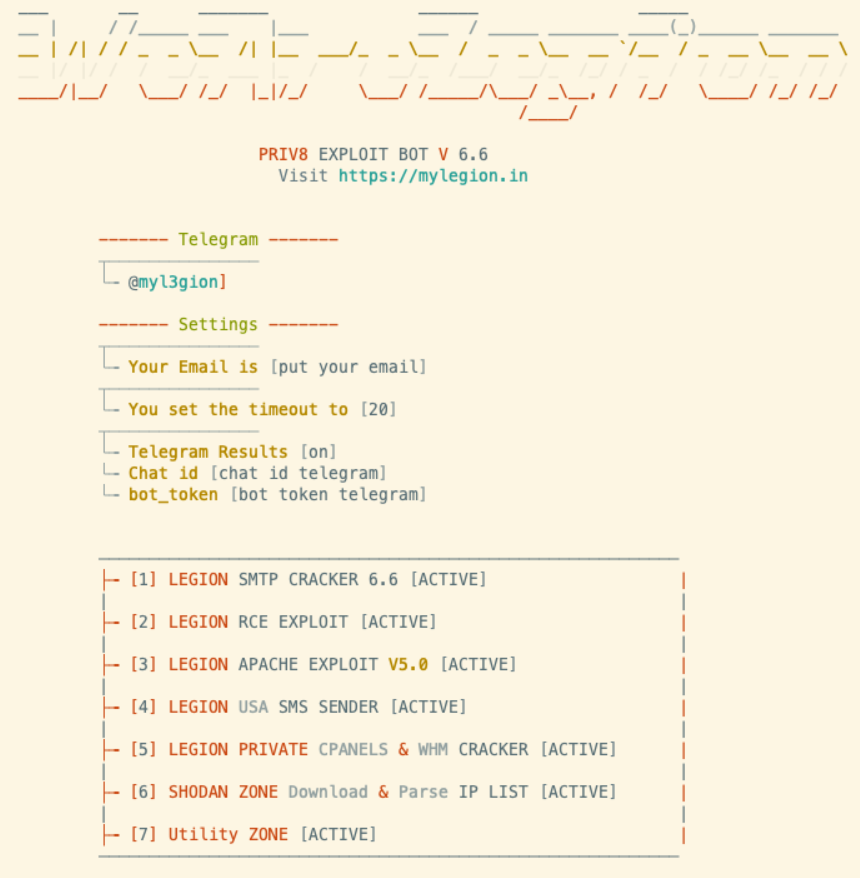
Recently, Cado Security Labs discovered and unveiled details of a new Python-based credential harvester called “Legion.”
Cybersecurity researchers have asserted that this hacking tool, “Legion” has already made its way to Telegram and is being actively marketed on Telegram by its operators.
While this hacking tool has been specifically designed to target and exploit a wide range of email services, Legion is likely linked to the infamous AndroxGh0st malware family, which made headlines for the first time in December 2022.
Legion Offerings
There are several modules included in Legion that are used to enumerate:-
Besides this, AlienFox is a comprehensive toolset, and it has been identified that AndroxGh0st is part of this toolset.
Since this toolset is vast in nature, so, it also provides threat actors with the ability to steal API keys and essential secrets from cloud services.
Legion Tool
The presence of Legion on multiple Telegram channels, coupled with its promotion through YouTube tutorial videos, strongly suggests that this is not a casual or isolated attempt at spreading malware but rather a widespread and coordinated effort.
What’s the Origin?
Although the exact source of the malware remains unverified, there are indications that the developer behind it may be Indonesian or located in Indonesia, based on comments and other linguistic evidence found in Bahasa Indonesia.
Cado Security researchers have issued a precautionary recommendation to all users of web server technologies and frameworks, such as Laravel, to review their security processes and procedures.
To ensure maximum protection of sensitive information such as credentials, experts recommend storing such information in a .env file outside web server directories.
This will help prevent unauthorized access to critical data by limiting the potential attack surface which threat actors could exploit.
Targeted Services
Here below, we have mentioned the complete list of the services that are targeted:-
Twilio
Nexmo
Stripe/Paypal (payment API function)
AWS console credentials
AWS SNS, S3 and SES-specific credentials
Mailgun
Plivo
Clicksend
Mandrill
Mailjet
MessageBird
Vonage
Nexmo
Exotel
Onesignal
Clickatel
Tokbox
SMTP credentials
Database Administration and CMS credentials (CPanel, WHM, PHPmyadmin)
Here below, we have mentioned the list of the carriers that are targeted:-
Alltel
Amp’d Mobile
AT&T
Boost Mobile
Cingular
Cricket
Einstein PCS
Sprint
SunCom
T-Mobile
VoiceStream
US Cellular
Verizon
Virgin
Moreover, a GitHub Gist link appears on the profile of a user named “Galeh Rizky” who resides in Indonesia, according to his profile.
Code
Although the exact relationship between Galeh Rizky and Legion remains unclear at this time, the most shocking thing is the presence of their code in the detected sample.
Galeh Rizky may be the developer behind Legion, or a coincidence that their code has been used without their knowledge or consent.
This malware mainly depends on misconfigurations in web server technologies and frameworks. That’s why it’s strongly advised to recheck all security mechanisms to prevent further exploitation.
We take a look at claims that AI is now being used for a notorious form of kidnapping hoax.
You may have seen a worrying report of Artificial Intelligence (AI) being used in a virtual kidnapping scam. The AI was supposedly used to imitate the voice of an Arizona resident’s daughter, who claimed to have been kidnapped. The daughter was safe and well elsewhere on a school trip. Unfortunately, with the daughter out of sight this just made the scam seem more believable. Was she actually on the trip, or kidnapped? With no way to know right away, all the parent could do was listen to a demand for $1m and the threat of terrible things happening to their daughter.
The scammers dropped the ransom down to $50k after being told that the money simply wasn’t available, and while all of this was going on, a friend of the family, and law enforcement, were able to confirm that the supposedly kidnapped daughter was in fact safe and well.
Virtual kidnapping scams have been around for many years, but this is a new spin on a well-worn technique.
The imitated child’s parent is convinced that some form of AI was used in this instance. To do this, scammers would have had to obtain some samples of the daughter’s voice. The samples would then have been fed into a machine learning algorithm which learned how she speaks, giving the scammers a computer program that can speak like the victim.
This technique certainly works, and can produce strartling results. To hear for yourself, take a listen to podcast.ai, a podcast entirely generated by AI, that features guests like the late Steve Jobs.
The case for AI
Can we be sure that what happened here was down to AI?
The victim claims that the voice was definitely that of her daughter. You would expect someone to recognise a fake or an imitation of their own child. Think how many celebrity impersonators you’ve heard on TV or elsewhere, and how many of them are actually good at it. More often than not, the slightest imperfections really stand out. Now apply this to a mother and her daughter. She’s going to have a very good idea what her offspring does and doesn’t sound like.
Subbarao Kambhampati, a computer science professor at Arizona State University, told the New York Post that it’s possible to spoof a voice in convincing fashion from just three seconds of audio.
According to the victim, her daughter has no social media presence to speak of, but has done a few short public interviews. In theory, this could be enough for the fraudsters to create a working facsimile of her voice.
None of this is proof that AI was used, but none of it rules out AI either.
The case against AI
Creating a replica voice from three seconds of audio sounds scary, but in practice things aren’t quite so cut and dry. We covered a great example of this a little while ago, involving a journalist logging into his telephone banking via use of AI voice replication. It’s definitely not an exact science, and getting the voice right can take many attempts, samples, and requires an AI tool that can stitch everything together to an acceptable standard.
In terms of the mother’s claim she recognised her daughter’s voice, that’s complicated. Understandably, she will have experienced a considerable level of panic when receiving the call, and that might have affected her ability to identify her daughter. CNBC wrote about the phenonmenon of virtual kidnappings in 2018, before the current AI boom. In every case listed in its article, the person stuck on the phone is convinced the voice on the other end of the line is who the fake kidnapper claims them to be. Teenage sons, younger daughters, men in their thirties…the horror of these calls has the victim pretty much ready to stand up in court and state that this was the real deal.
This effect of “Yes, it’s them” has been happening for years, long before AI came onto the scene. Is this what’s happened in the AI kidnap scam above? And why would virtual kidnappers bother to replicate someone’s voice if the victim is going to believe it’s all real anyway?
Protection from virtual kidnap scams
Steering clear of this kind of attack isn’t particularly affected by whether or not the person screaming down the phone is an impersonator or a slice of AI. The basics remain the same, and social engineering is where a lot of these attacks take shape. It’s not a coincidence that most of these stories involve the supposed kidnap victim being on holiday or away from the family home when the bogus call comes through. There are some things you can do to blunt the effect of virtual kidnap scams:
Be vacation smart. Avoid posting travel dates and locations that could add some fake legitimacy to a scammer’s call.
Make your data private. Revisit your online presence, and lock down or delete your data so scammers know less about you.
A plausible alert. Consider a password that family members can use to confirm they actually are in danger.
Malwarebytes removes all remnants of ransomware and prevents you from getting reinfected. Want to learn more about how we can help protect your business? Get a free trial below.