Samsung looking to hire former Qualcomm semiconductor expert

0
[ad_1]

Samsung may be looking to poach another expert from a rival semiconductor firm. The South Korean tech giant is reportedly in talks with Zhao Guo, co-founder of Chinese fabless semiconductor company Biren Technology, to join its GPU team. It recently hired semiconductor experts who have previously worked with two of its biggest rivals in the industry: Qualcomm and TSMC. Guo has previously worked with Qualcomm too.

Zhao Guo is a senior-level semiconductor talent who has been integral to Qualcomm’s Snapdragon team in the past, particularly in the GPU area. He reportedly led the development of the company’s Adreno GPU architecture for five generations.

Most recently, Guo teamed up with a bunch of like-minded people to found Biren Technology. Founded in 2019, the new company expectedly specializes in GPUs.

Like many other Chinese tech companies, including Huawei and ZTE, Biren Technology was also severely affected by the recent US sanctions. It had to modify its products and make them less powerful to ensure continued business with some of its partners, including the manufacturer SMC.

It Looks like some of the co-founders of the company are now considering leaving for other opportunities. And, Zhao Guo may be headed to Samsung.

Samsung may soon add another expert to its semiconductor talent pool

Samsung hasn’t been as successful in the non-memory semiconductor business as in some other areas. Qualcomm’s Snapdragon processors have historically performed better than its Exynos solutions. Its chip fabrication process has also been inferior to TSMC’s.

The company tried developing its own custom Mongoose CPU cores but that didn’t work. It is now using stock ARM CPU cores but has teamed up with AMD to bring Radeon graphics to mobile.

Last year’s Exynos 2200 is the only Samsung processor to feature AMD graphics so far (Xclipse 920 GPU). However, the two companies recently extended their partnership, so they are just getting started. In the meantime, the Korean firm is bolstering its semiconductor talent pool with the strategic hiring of industry experts.

Last month, it roped in a veteran semiconductor engineer who worked for TSMC for almost two decades. It is now looking to hire another semiconductor expert.

All of this is coming at a time when Samsung’s quarterly profits have declined a staggering 96% to hit a 14-year low. The company is on its way to registering its first loss from the semiconductor business since 2008. But, despite these difficulties, it doesn’t plan to scale back investments.

It wants to continue the planned investments in the semiconductor business in the coming years. These hirings are likely part of the plans. Hopefully, Samsung will be able to turn the tide soon.


[ad_2]
Source link
Google says Chrome is now 30% faster on high-end Android devices due to recent improvements

0
[ad_1]
Google Chrome is one of the most popular web browsers in the world, and the team behind it is committed to continually improving its performance. In a recent blog post, they outlined several ways in which they’re making Chrome faster than ever before.
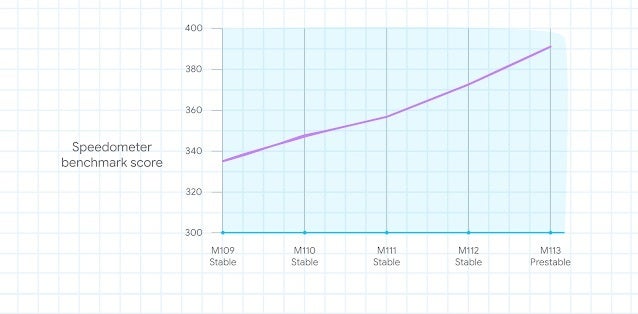
Google states that the improvements to Chrome’s performance have been achieved through a number of optimizations made to the browser’s underlying code. These optimizations include enhancements to the way Chrome handles JavaScript, which is a programming language commonly used on the web. Google claims that these enhancements have made JavaScript run up to 30% faster on Mac and Android devices.In addition to the JavaScript optimizations, Google has also made changes to how Chrome manages its memory usage. According to the company, these changes have resulted in a substantial reduction in memory usage on Mac and Android platforms. This means that Chrome should now run more smoothly on devices with limited RAM, such as older smartphones or low-end computers. This is evidenced by the results of Apple’s Speedometer 2.1 browser benchmark which saw saw a 10% increase over the course of three months, thanks to improved features and efficient pointer compression.

These performance improvements have been made possible by advancements in hardware and software technology, which have allowed the company to optimize Chrome’s code more effectively. The company also claims that it will continue to work on improving Chrome’s performance in the future, with the goal of providing users with the best possible browsing experience.

The improvements to Chrome’s performance on Mac and Android devices are a significant step forward for the popular web browser. By reducing page load times and memory usage, Google has made Chrome a more efficient and effective tool for users who rely on it for their daily browsing needs. With further improvements planned for the future, it is clear that Google is committed to maintaining Chrome’s position as one of the top web browsers available today.


[ad_2]
Source link

Ransomware review: April 2023

0
[ad_1]

Cl0p was the most used ransomware in March 2023, dethroning the usual frontrunner LockBit, after breaching over 104 organizations with a zero-day vulnerability.

This article is based on research by Marcelo Rivero, Malwarebytes’ ransomware specialist, who monitors information published by ransomware gangs on their Dark Web sites. In this report, “known attacks” are those where the victim didn’t pay a ransom. This provides the best overall picture of ransomware activity, but the true number of attacks is far higher.

In a surprising turn of events for the ransomware landscape, Cl0p has emerged as the most used ransomware in March 2023, dethroning the usual frontrunner, LockBit. Indeed, while LockBit was still used in 93 successful attacks last month, it couldn’t quite match the sheer force of Cl0p’s sudden resurgence.

Contributing to Cl0p’s rise to the number one spot was its extensive GoAnywhere campaign. The group successfully breached over 104 organizations by taking advantage of a zero-day vulnerability in the widely-used managed file transfer software, GoAnywhere MFT.

March has also seen some intriguing activity from other ransomware gangs like DarkPower, which appeared to be turning on and off throughout the month, as well as BianLian, which has shifted its focus from encrypting files altogether to pure data-leak extortion.

Known ransomware attacks by gang, March 2023
Known ransomware attacks by country, March 2023
Known ransomware attacks by industry sector, March 2023

Fortra, the company behind GoAnywhere MFT, released an emergency patch (7.1.2) for the vulnerability in early February—but by then, Cl0p had already used it to break into a myriad of networks and deploy ransomware.

Recent research by Malwarebytes highlighted the bias that ransomware gangs have for attacking English-speaking countries, and the Cl0p campaign follows the same trend. Between them, the Anglosphere countries of the USA, Canada, UK, and Australia accounted for 69% of known Cl0p attacks, with Canada and Australia suffering more attacks than countries with bigger populations and economies, like Germany and France.

Known ransomware attacks by Cl0p, March 2023

Cl0p’s ability to exploit a zero-day to such effect is akin only in recent memory to the Kaseya VSA ransomware incident in July 2022. The Kaseya attack involved a malicious auto-update that pushed the REvil ransomware onto victims’ machines, primarily targeting Managed Service Providers (MSPs), causing widespread downtime for over 1,000 companies.

The successful use of zero-day vulnerabilities by ransomware gangs like Cl0p and REvil is, thankfully, relatively rare. However, when it happens it can be devastating. Ransomware gangs are always looking for new tactics to help them maximize the impact of their attacks and, rare or not, we should all be concerned about the example Cl0p has set for weaponizing a newly discovered vulnerability and exploiting it before a patch is released or applied.

Known Cl0p victims include Rubrik, Hatch Bank and Community Health Systems (CHS).

Cl0p wasn’t the only gang we saw last month experiencing an unexpected surge in activity.

BlackBasta and LockBit

In January 2023, we noted a complete absence of activity from BlackBasta, a group which up to that point had usually ranked highly on our monthly charts. That trend continued into February, but in March it returned with a vengeance with over 40 known victims. It’s hard to tell why BlackBasta went underground for two months only to eventually burst back onto the scene, but it’s possible that the group was working on developing new attack techniques or evading detection. Other possibilities are a sudden change in leadership, that the group wanted to lay low to avoid the attention of law enforcement, or it simply wanted a break. This kind of thing isn’t unusual and the group’s sudden re-emergence highlights the unpredictable nature of ransomware gangs and the need for constantly monitoring the latest threat intelligence. Just because a group is gone today doesn’t mean it won’t be back tomorrow.

Meanwhile, LockBit’s activity in March was headlined by a major ransomware attack on Essendant, a US-based distributor of office products. This attack, which is said to have begun on or around March 6, created severe ramifications for the organization, disrupting freight carrier pickups, online orders, and access to customer support.

In other LockBit news, a CISA advisory on LockBit 3.0 ransomware was released on March 16, 2023. LockBit 3.0, also called LockBit Black, was discovered in June 2022. While many of LockBit 3.0’s TTPs remain consistent with previous versions, the advisory sheds light on the updated and enhanced features in LockBit 3.0. These improvements include more advanced detection evasion methods and customization options that enable affiliates to modify the ransomware’s behavior according to their requirements, making the ransomware harder to detect and counter.

Dark Power

March saw the rise of Dark Power, a new ransomware group that tallied 10 victims. Dark Power’s ransomware is interesting in that it is written in the relatively obscure Nim programming language.

Dark Power’s approach to ransomware, despite being relatively basic, manages to create unique encryption keys for each targeted machine, making it difficult to develop a generic decryption tool. The ransomware effectively stops services and terminates processes, ensuring the encryption process is unhindered. It also clears logs, making it harder for analysts to investigate an attack.

The effectiveness of Dark Power ransomware underlines the fact that attackers do not always need advanced, novel techniques to succeed. A basic approach, executed well and combined with an adaptable programming language, can prove to be just as effective.

The Dark Power dark web site

BianLian

BianLian, a ransomware gang that first appeared in July 2022 and has consistently hovered near the top of our monthly charts, has shifted its focus from encrypting files to data-leaks. The group’s shift in focus can be attributed to the release of a decryption tool by Avast, which made encrypting files less effective for BianLian. Consequently, the group now focuses on threatening to leak stolen data to extort payments from victims instead.

BianLian’s shift toward data-leak extortion demonstrates that RaaS gangs can be highly adaptable to changing circumstances, such as the emergence of decryption tools that undermine encryption-based ransomware. This strategic shift allows them to maintain a steady income stream, even as traditional methods lose their effectiveness.

As organizations face the daunting prospect of sensitive data leaks or security breach exposure, they are more likely to pay ransoms to avoid legal, financial, and reputational repercussions. Furthermore, the lingering threat of leaked data, even after recovering encrypted files, makes it harder for victims to resist paying ransoms. 

Our Ransomware Emergency Kit contains the information you need to defend against ransomware-as-a-service (RaaS) gangs.

How to avoid ransomware

  • Block common forms of entry. Create a plan for patching vulnerabilities in internet-facing systems quickly; disable or harden remote access like RDP and VPNs; use endpoint security software that can detect exploits and malware used to deliver ransomware.
  • Detect intrusions. Make it harder for intruders to operate inside your organization by segmenting networks and assigning access rights prudently. Use EDR or MDR to detect unusual activity before an attack occurs.
  • Stop malicious encryption. Deploy Endpoint Detection and Response software like Malwarebytes EDR that uses multiple different detection techniques to identify ransomware, and ransomware rollback to restore damaged system files.
  • Create offsite, offline backups. Keep backups offsite and offline, beyond the reach of attackers. Test them regularly to make sure you can restore essential business functions swiftly.
  • Don’t get attacked twice. Once you’ve isolated the outbreak and stopped the first attack, you must remove every trace of the attackers, their malware, their tools, and their methods of entry, to avoid being attacked again.

Malwarebytes removes all remnants of ransomware and prevents you from getting reinfected. Want to learn more about how we can help protect your business? Get a free trial below.

TRY NOW


[ad_2]
Source link

Samsung Galaxy S23+ vs Samsung Galaxy S22+

0
[ad_1]

The Samsung Galaxy S23+ is one of the company’s flagship smartphones at the moment. It’s the middle-of-the-road model, between the Galaxy S23 and Galaxy S23 Ultra. This handset basically lives in the Galaxy S23 Ultra shadow, even though it’s a great phone, as we were able to find out during our time with the device. That being said, we will compare it to its predecessor here, just to see how they compare, and if it’s worth upgrading. We’ll compare the Samsung Galaxy S23+ vs Samsung Galaxy S22+.

These two phones are very similar, in a lot of ways. There are some differences worth noting, though, and we’ll try to do that here. We’ll first list their specifications, side-by-side, and will then move to compare them across a number of other categories. We’ll talk about their designs, displays, performance, battery life, cameras, and audio performance. So, let’s get started, shall we?

Specs

Samsung Galaxy S23+Samsung Galaxy S22+
Screen size6.6-inch fullHD+ Dynamic AMOLED 2X display (curved, 120Hz adaptive refresh rate, LTPO, 1,750 nits peak brightness)6.6-inch fullHD+ Dynamic AMOLED 2X display (120Hz adaptive refresh rate, LTPO, 1,750 nits peak brightness)
Screen resolution2340 x 10802340 x 1080
SoCQualcomm Snapdragon 8 Gen 2 for GalaxyQualcomm Snapdragon 8 Gen 1 or Samsung Exynos 2200
RAM8GB (LPDDR5X)8GB (LPDDR5)
Storage256GB/512GB, non-expandable (UFS 4.0)128GB/256GB, non-expandable
Rear cameras50MP (f/1.8 aperture, 24mm lens, 1.0um pixel size, OIS, Dual Pixel PDAF)
12MP (ultrawide, f/2.2 aperture, 13mm lens, 120-degree FoV, 1.4um pixel size)
10MP (telephoto, f/2.4 aperture, 70mm lens, 1.0um pixel size, OIS, 3x optical zoom, PDAF)
50MP (f/1.8 aperture, 24mm lens, OIS, Dual Pixel PDAF, 1.0um pixel size)
10MP (f/2.4 aperture, 70mm lens, telephoto, 1.0um pixel size, OIS, PDAF, 3x optical zoom)
12MP (ultrawide, f/2.2 aperture, 13mm lens, 120-degree FoV, 1.4um pixel size)
Front cameras12MP (f/2.2 aperture, 26mm lens, Dual Pixel PDAF)10MP (f/2.2 aperture, 1.22um pixel size, 26mm lens, Dual Pixel PDAF)
Battery4,700mAh, non-removable, 45W wired charging, 15W Qi wireless charging, 4.5W Wireless PowerShare
Charger not included
4,500mAh, non-removable, 45W wired charging, 15W Qi wireless charging, 5W Wireless PowerShare
Charger not included
Dimensions157.8 x 76.2 x 7.6mm157.4 x 75.8 x 7.6mm
Weight196 grams195/196 grams
Connectivity5G, LTE, NFC, Bluetooth 5.3, Wi-Fi, USB Type-C5G, LTE, NFC, Bluetooth 5.2, Wi-Fi, USB Type-C
SecurityIn-display fingerprint scanner (ultrasonic)In-display fingerprint scanner (ultrasonic)
OSAndroid 13
One UI 5.1
Android 12
One UI 4.1
Price$999.99/$1,119.99$664.99
BuySamsungSamsung

Samsung Galaxy S23+ vs Samsung Galaxy S22+: Design

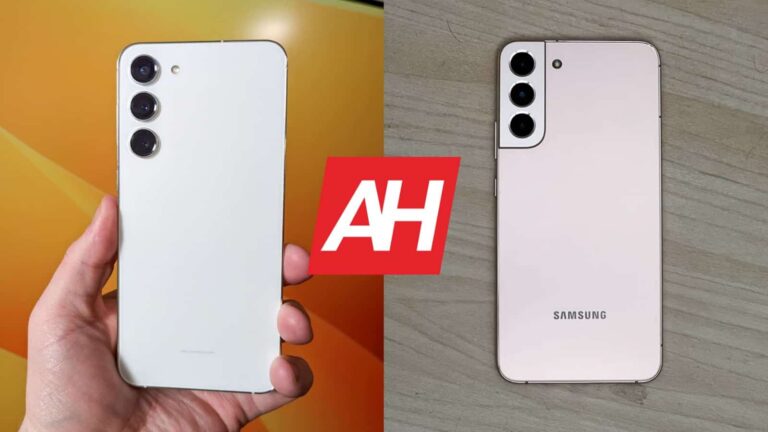
These two phones are quite similar design-wise. In fact, it would be difficult to set them apart if not for the rear camera differences. They both have three cameras, and they’re placed in the same spot, but the setups look different. The Galaxy S23+ has three cameras that protrude directly from the backplate. The Galaxy S22+, on the other hand, has a dedicated camera island, which connects to the phone’s frame.

From the front, the two phones look very similar. They both have curved corners, and rounded display corners. The bezels are very thin all around, on both phones, while a display camera hole sits up top. Even the buttons are on the same side. Both phones have a frame made out of aluminum, though they do come with different glass on the back. The Galaxy S23+ has Gorilla Glass Victus 2 on the back, while the Galaxy S22+ includes Gorilla Glass Victus+.

The two phones are almost identical in terms of height, and the same goes for width. Well, the Galaxy S23+ is technically a bit taller and wider, but the difference is so small, you won’t even notice it. They’re both 7.6mm thick, and weigh the same. They weigh 196 grams. IP68 certification is also included with both phones, while both devices are quite slippery. Using a case may not be a bad idea, at all. They are definitely premium-feeling phones, that’s for sure.

Samsung Galaxy S23+ vs Samsung Galaxy S22+: Display

The displays on these two phones are basically identical, right down to their peak brightness. They both feature a 6.6-inch fullHD+ (2340 x 1080) Dynamic AMOLED 2X display. That is a 120Hz panel that supports HDR10+ content. It gets up to 1,750 nits of peak brightness, though do note you can reach that only via the automatic brightness setting. The manual slider will get you up to 1,200 nits.

Samsung Galaxy S23 Plus Review AM AH 03
Galaxy S23+

This display has a 19.5:9 aspect ratio, and we’re looking at a 393 ppi, in both cases. The Galaxy S23+ does have better display protection, as it includes Gorilla Glass Victus 2. The Galaxy S22+ features Gorilla Glass Victus+. The difference here is really small. Both devices have flat displays, by the way, unlike their ‘Ultra’ siblings.

That display looks the same on both phones, though that’s not a bad thing, as it looks great. It’s more than bright enough, and the viewing angles are great. It is quite vivid, and more than sharp enough, even though we’re looking at “only” fullHD+ resolution here. The blacks are deep, and the touch response is also great. Scrolling is quite smooth, and we don’t really have any major complaints here. You can even fine-tune both displays via the phone settings.

Samsung Galaxy S23+ vs Samsung Galaxy S22+: Performance

The Galaxy S23+ is fueled by the Snapdragon 8 Gen 2 for Galaxy processor. It includes 8GB of LPDDR5X RAM and utilizes UFS 4.0 flash storage. The Galaxy S22+ comes with the Snapdragon 8 Gen 1 SoC, and includes 8GB of LPDDR5 RAM, along with UFS 3.1 flash storage. The Galaxy S23+ definitely has the advantage in this regard, in every way imaginable. Does that mean it’s utterly superior performance-wise? Well, no, not really.

Both phones perform really well. The Galaxy S22+ is immensely powerful too, and you won’t really see a great difference in day-to-day performance. The processor inside the Galaxy S23 is not only more powerful, but better with power consumption, and it also gets less hot during intense tasks. The Galaxy S23+ also has the advantage in the RAM and storage departments, so it’s more future-proof, in case you’re worried about that sort of thing.

We did notice fewer stutters on the Galaxy S23+ during intense gaming sessions, with graphically-intensive games. It also did get slightly less warm during strained usage, but the difference wasn’t that big, to be quite honest. The Galaxy S23+ will stay fluid for longer, though, of course. It may be worth getting over the Galaxy S22+ just for the sake of its upgraded performance-related components.

Samsung Galaxy S23+ vs Samsung Galaxy S22+: Battery

The Samsung Galaxy S23+ features a 4,700mAh battery on the inside. The Galaxy S22+ has a 4,500mAh battery included. So, the Galaxy S23+ not only has a larger battery, but better power consumption in general. That has to mean it offers better battery life, right? Well, yes, it does. We were able to push the Galaxy S23+ over the 8-hour screen-on-time mark, while the Galaxy S23+ always lingered between 6 and 6.5 hours.

Do note that your mileage may vary, however. Another thing to note is that this does not include gaming, we only played games for testing purposes. The Galaxy S23 Ultra does offer a lot more in the battery life department, even though the Galaxy S23+ should be able to match that, based on specs alone. So, that’s a bit weird. Still, the Galaxy S23+ does offer noticeably better battery life than its predecessor.

When it comes to charging, they’re identical. Both phones support 45W wired, 15W wireless, and 4.5W reverse wireless charging. Do note that you won’t get a charger in the box, though. So, if you’d like to take full advantage of what either phone has to offer, charging-wise, you’ll need to get a proper PD3.0 charging brick separately.

Samsung Galaxy S23+ vs Samsung Galaxy S22+: Cameras

Both of these phones feature a 50-megapixel main camera, a 12-megapixel ultrawide unit (120-degree FoV), and a 10-megapixel telephoto camera (3x optical zoom). Are the sensors here the same? Yes. Is the performance identical? No. The Galaxy S23+ does offer better camera performance in a number of ways. We did notice some improvements in the HDR department, and also in low light.

Samsung Galaxy S22 Plus AM AH 04
Galaxy S22+

Low-light images do churn out more details more often than not. They’re also better balanced in general. You’ll hardly be able to see a difference during the day, however, as both phones do a great job. Both devices tend to provide vivid photos, which do look slightly processed, but in a good way. Not many people love bland, close-to-real-life images. So, this is what most users will prefer.

The Galaxy S23+ also offers better selfie camera performance. The video recording didn’t change much, but the footage from the Galaxy S23+ does seem to be slightly more stable during harsher shaking. The difference is so small, though, that it’s not even worth noting. They’re both quite good in that regard, but not to the level of the Galaxy S23 Ultra.

Audio

Both phones feature a set of stereo speakers tuned by AKG. Speakers on both phones are very, very good. They are loud enough, and also detailed enough. There’s even some bass in both cases, and the sound is well-balanced. The difference between them is very small, but the Galaxy S23+ does seem to provide slightly clearer sound with slightly more powerful bass. It could be just a placebo effect, though.

You will not find an audio jack on either phone. There is a Type-C port on each of them, so you can connect your wired headphones that way. If you opt for Bluetooth, however, do note that the Galaxy S23+ supports Bluetooth 5.3, while the Galaxy S22+ has support for Bluetooth 5.2.


[ad_2]
Source link

Biden administration seeks public input on regulating AI

0
[ad_1]

The Biden administration is asking people to share their input on regulating AI and holding AI creators accountable. The National Telecommunications and Information Administration (NTIA) has launched a request for comment (RFC) that allows you to share your input with the government.

Artificial intelligence is becoming a source of concern for governments globally. Goldman Sachs has recently reported that AI can endanger 300 million full-time jobs. Likewise, world tech leaders like Elon Musk warned that the AI race has become out of control and that all related experiments should be halted for six months. They also asked for more strict regulations for keeping AI under control.

The Biden administration is now seeking public input to enact a set of rules to mitigate AI risks. According to NTIA, the goal is to ensure that AI systems work as claimed and do not cause any harm. The agency continues that there are a “growing number of incidents” that AI caused harmful outcomes.

“The insights gathered through this RFC will inform the Biden Administration’s ongoing work to ensure a cohesive and comprehensive federal government approach to AI-related risks and opportunities,” NTIA added.

Biden administration wants public input for regulating AI

The NTIA is open to accepting any input from people until June 10th. Of course, the agency has specific topics that people can comment on, including the safety testing procedures that every AI developer should follow, the data access requirements to conduct audits, and the methods for checking the credibility of an AI system. The NTIA also wants to know whether different approaches might be needed for specific industries like healthcare.

Governments around the world are still evaluating AI and how it can affect their society and economy. However, some governments, like Italy, have taken a harsh approach and completely banned ChatGPT, which led to a 400% increase in downing VPNs in the country.

Despite the numerous benefits of generative AI, its risks should be mitigated to reduce the possible harm. AI modes like ChatGPT are also making the headlines for copyright infringement cases and copying artists’ work. Just recently, we reported that Samsung semiconductor secrets are leaking through ChatGPT.


[ad_2]
Source link
WhatsApp rolls out new security features

0
[ad_1]

Great news for WhatsApp users, as the company has just announced it has kicked off the rollout of some important security features meant to protect accounts. The new features will provide WhatsApp users with extra layers of privacy, as well as more control over their personal messages.

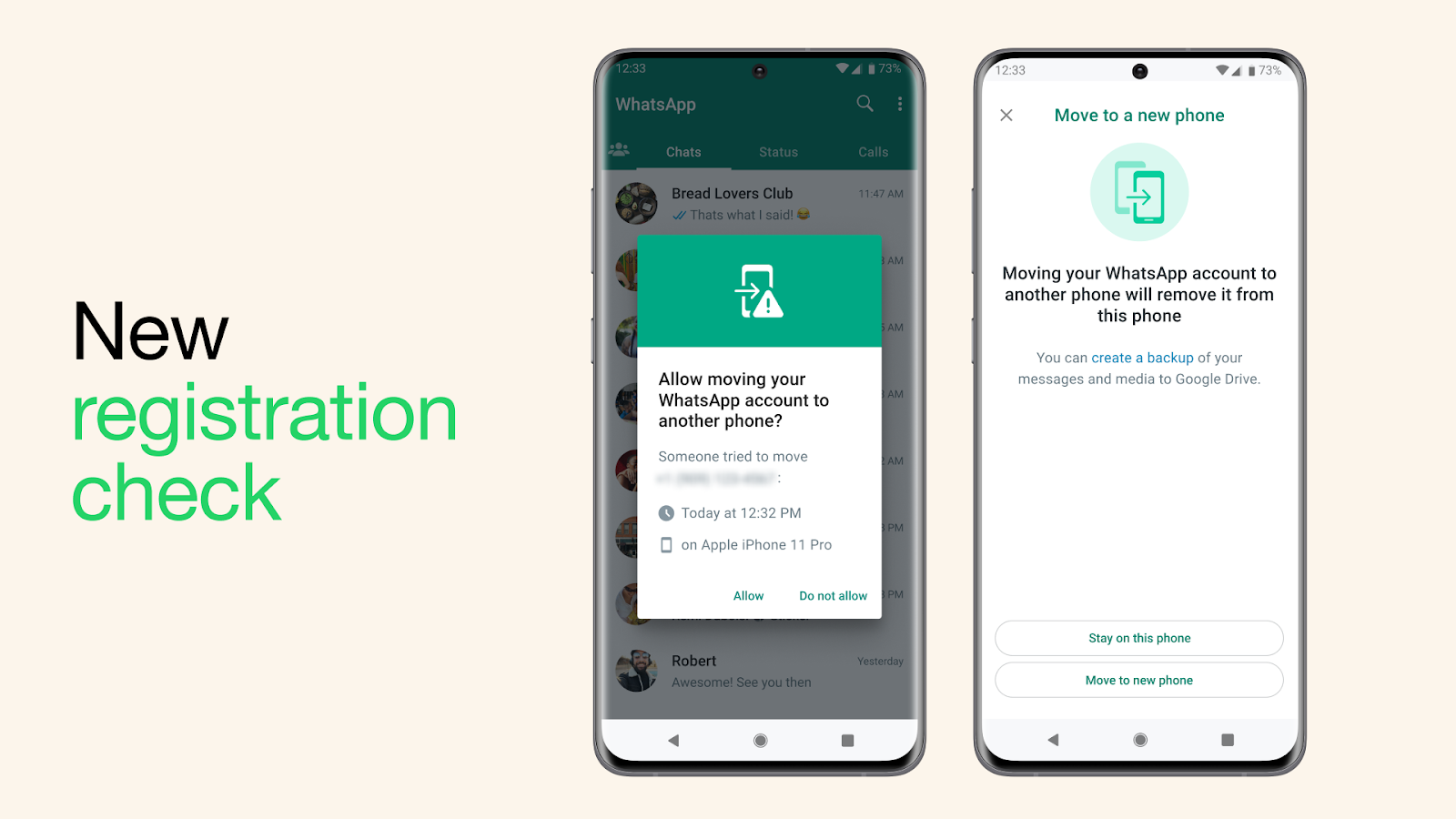
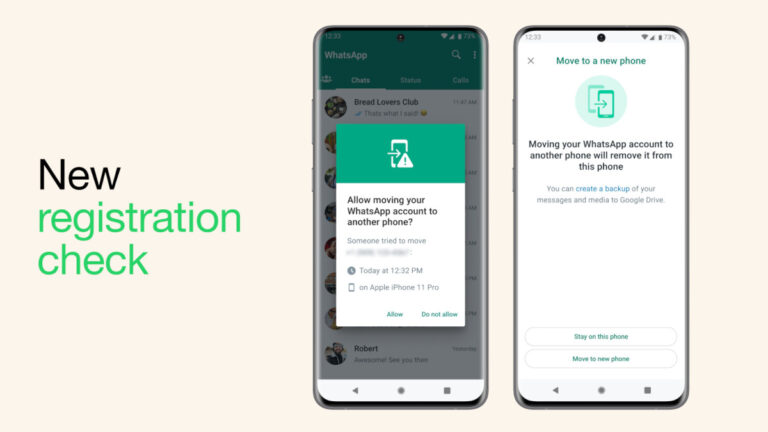
First off, the latest update introduces a new security measure when a WhatsApp user wants to switch their account to a new device. Starting today, WhatsApp may ask users on their old devices to verify that they really want to take this step as an extra security check. It’s an important feature that will help alert users in case of an unauthorized attempt to move their account to another device.

Another important addition to WhatsApp is device verification. In order to prevent mobile device malware from taking advantage of their people’s phones without their permission and use their WhatsApp to send unwanted messages, the app has added special security checks.

These checks will help authenticate an account (with no action needed from the user) and, hopefully, better protect the user if their device has been compromised. For more details on how this actually works under-the-hood, you can check out Meta’s post.

Last but not least, WhatsApp’s automatic security codes feature has just received an upgrade. The upgrade consists of a new security feature based on a process called “Key Transparency,” which should allow WhatsApp users to automatically verify that they have a secure connection.

Starting today, users will be able to tap on the encryption tab to verify immediately that their conversation is secured. More details about the new security feature are available on Meta’s Engineering website.

Although the new security features will automatically be added to each user’s device, there are two features that must actually be turned on: two-step verification and use of end-to-end encrypted backups. Don’t forget to switch these on if you want an extra layer of security.


[ad_2]
Source link
Building a Network Security Strategy: Complete Checklist To Protect Your Network – GBHackers – Latest Cyber Security News

0
[ad_1]

Whether you’re a large or small business, network security is something you can’t ignore.

Threat actors can and will, infiltrate businesses of any size wreaking havoc on computer systems, maliciously encrypting data, and in some cases completely destroying a company’s ability to stay in business. 

While the latter situation isn’t that common, there have been several recent instances where poor network security has led to significant security breaches.

Consider the Uber breach QAwZ from September 2022, where an MFA fatigue attack led to a breach of Uber’s systems.

A similar attack led to a breach of CISCO’s systems, and Activision ended up being hacked after an SMS phishing attack, which reportedly led to a significant data breach of Activision’s IP and employee data.

These breaches signal the need for better network security practices, and they also show how single security measures are not enough.

All of the breaches mentioned above happened because of a weakness in each company’s MFA practices, but they could’ve been mitigated by other security measures including zero trust granular access rules.

Organizations of all sizes need a network security strategy with modern, cloud-based tools and technologies to stay secure:

Single Sign-On (SSO) with Multi-Factor Authentication (MFA)

Before we even get to network security, organizations should deploy a Single Sign-On (SSO) identity provider with Multi-Factor Authentication (MFA) support.

SSO allows users to access multiple applications using one login.

This makes it easier for users to integrate network security practices into their daily routine without much friction, while the IT team has a much easier time keeping everyone organized. 

MFA, meanwhile, adds an extra layer of security by requiring users to provide two or more pieces of evidence to prove their identity.

This is typically a username and password, followed by a one-time code, or biometric authentication such as a fingerprint or facial recognition.

Under an MFA scheme, you can require just a second authentication factor or multiple depending on the level of security you need and your threat model.

SSO with MFA also reduces the risk of password-related security incidents, such as password theft or reuse.

It also makes it harder for hackers to access your network since they have to not only steal the password but somehow obtain the second or even third factor to finally break in.

But as we mentioned at the beginning of this article there are ways to get around MFA security measures, so how do you make sure that doesn’t happen?

It starts with training and clearly defined policies that convey to employees that IT teams and outside security contractors will never ask them for their MFA security codes. 

Second, you can increase the difficulty of MFA for higher privileged accounts such as a number-based challenge that requires the user to see both sets of numbers to correctly answer the MFA challenge.

Biometric measures can also be effective as long as employees understand they should never authorize an MFA request they didn’t initiate. 

Zero Trust Network Access (ZTNA)

One of the biggest and most important strategies in modern network security is the deployment of Zero Trust Network Access. ZTNA assumes that all network traffic is untrusted, even if it originates from inside the network itself. 

ZTNA requires that users prove their identity, and then meet specific security requirements before accessing network resources.

This includes granular access rules that can be user- or group-specific. Then context-based verification allows organizations to limit access to resources based on specific criteria, such as device posture, location of the user requesting access, and time of day.

These contexts are also continually verified to ensure that a user’s security posture doesn’t suddenly change, which can be an indication of malicious activity.

Device posture is an important part of context since it demands that user devices meet certain security requirements before accessing resources.

This can be criteria such as the presence of a specific antivirus suite, a custom security certificate, and a minimum operating system version, among others. 

When you put it all together Zero Trust Network Access reduces the risk of unauthorized access to sensitive data and resources.

This is a far better approach than the legacy-based VPN and firewall. Under the old model, you would log in with a VPN, and then once you had access to company resources that was it.

There were limited access rules about who could see what and no context-based requirements with continuous verification.

That meant that once a hacker gained access to a system they had an easier time achieving lateral movement (moving from one server or resource to another).

After lateral movement, hackers would often obtain higher privileged account credentials ultimately gaining access to employee and customer data, or sensitive trade secrets.

ZTNA provides better control over network access, which enables organizations to detect and respond to security incidents more effectively.

Malware Protection

Malware is one of the biggest and most common threats to network security.

It can infect computers and networks leading to damage to computer systems, malicious data encryption (ransomware), and data exfiltration.

Malware protection solutions are designed to detect and prevent malware from infecting your network via the most common vehicle for infiltration: the Internet.

While you can get infected through malicious USB keys and drives, the most common way is through a malicious website or downloading a malicious file from the Internet.

Malware protection guards against these threats by analyzing web traffic to identify and block malware.

This usually includes a number of techniques such as signature-based detection, behavior-based detection, and virtual code emulation, to identify and block malware.

Putting together a proper malware protection solution can prevent everything from known malware infections to zero-day exploits and advanced persistent threats (APTs).

Web Filtering

Web filtering is a security mechanism that blocks access to malicious websites and content.

This is a list-based solution that blocks known malicious websites, and it can also be used to prevent employees from venturing into problematic areas of the Internet that may violate company policies, break local laws, or simply be time-wasting distractions. 

The focus, however, is to reduce the risk of employees accessing malicious websites and content, which can lead to malware infections, data breaches, and other forms of cyber threats.

Web Filtering can also reduce the workload for IT teams if they no longer have to deal with issues related to web usage.

Compliance

Although not directly part of network security, compliance is a key consideration when looking at tools and technologies to keep your network secure.

Many companies are responsible for maintaining records for their customers including private information such as health data, credit card data, addresses, and more.

Holding onto information like this as a necessary part of your business only increases the need for solid network security as the consequences of a breach are that much greater.

That’s why Zero Trust Network Access and other modern tools are so important.

Under a traditional perimeter-based approach hackers will have an easier time obtaining sensitive information after a successful breach.

Choosing the Right Solution

Now that we understand what tools you need, how do you choose the right network security solution for your organization?

First, you need to anticipate growth and increased demand for your network security needs.

Opt for solutions that can scale with your business, as well as offer the flexibility to adapt to new threats, and regulatory requirements. Quite often cloud-based platforms are the best choice when it comes to flexibility.

Cost is another important issue; network security investment isn’t just about upfront costs.

There can be many ongoing expenses, especially for hardware-based solutions that require regular maintenance, updates, and support.

And don’t forget about potential hidden costs such as additional licensing fees for certain features or upgrades after your initial service contract expires–it pays (literally) to do your due diligence to discover any potential hidden costs.

If your team is too small to allow for a full-time security expert then consider alternatives such as managed service providers (MSPs).

These specialized organizations offer a wide range of fully managed IT services. By outsourcing some or all of your network security functions to an MSP, your organization can benefit from the expertise and resources of a dedicated security team.

MSPs typically offer 24/7 monitoring and support, threat intelligence, and access to the latest security technologies, ensuring that your organization’s network is continuously protected. 

Suppose you have pre-existing systems that cannot be replaced or are crucial for your business. In that case, you should also consider solutions that offer seamless compatibility with those systems.

Some common pre-existing hardware includes a data center firewall or possibly SD-Wan appliances. 

By considering issues such as scalability, compliance, the total cost of ownership, and legacy integration, you can make an informed decision and select the most suitable network security solution for your organization.

Perimeter 81 Checks All the Boxes

Putting together all of these essential network security features and tools is easy with Perimeter 81.

This cloud-based, converged network security solution provides comprehensive network security focusing on ease of use, lightning-fast deployment, and easy scalability.

Most importantly, however, Perimeter 81 allows you to use  ZTNA, Malware Protection, and Web Filtering from a single management console for easier all-around management.

If your ZTNA needs are simpler than most you can also use Perimeter 81’s Firewall as a Service to protect on-prem and cloud-based resources.

While you can permit access to all services to everyone in the company using the firewall, that is not recommended as granular access control is simple to implement with Perimeter 81 even for those with seemingly basic requirements.

A comprehensive network security strategy is critical for all organizations that want to protect their network and data from cyber threats.

This checklist allows organizations to build a robust and effective network security strategy that meets their specific needs and requirements.

Network Security Checklist – Download Free E-Book


[ad_2]
Source link
What We Know About the iPhone SE 4 and the Apple 5G Modem

0
[ad_1]

Apple 5G modem

Reports of the forthcoming iPhone SE and Apple 5G modem have been circulating for a while now. Here’s everything we know about the chip and the phone.

Yesterday, Jeff Pu claimed Apple could release an iPhone SE with a custom-designed 5G modem in 2025. In a research note with Haitong International Securities, the analyst further noted that Apple’s chip supplier, TSMC, would manufacture the modem. 

It turns out that Pu was on to something. Earlier today, analyst Ming-Chi Kuo confirmed that Apple could start mass-producing its in-house modem as soon as 2025. 

While an iPhone SE with a custom-designed 5G modem may be in work, Kuo points out that it’s an internal prototype. In other words, Apple does not intend to mass-produce the device for public release. 

Earlier in the year, Kuo predicted that the iPhone SE 4 would have the same design as the iPhone 14 lineup — a 6.1-inch OLED display with Face ID technology in a notch. But that model may never make it to market this year, based on the analyst’s latest report. 

“I previously predicted that the iPhone SE 4 would be a derivative model of the iPhone 14,” says Kuo. “However, my latest research indicates that this derivative model will likely be an engineering prototype for Apple in-house 5G baseband chip technology and mass production validation, and there are no plans for mass production and sales.”

So when can we expect the Apple modem? 

Possible Release Date of the In-House Apple 5G Modem

According to Kuo, mass production of the Apple in-house 5G baseband chip depends mainly on the engineering prototype’s test result. 

That means mass production of the chip will only commence in 2025 — as Jeff Pu’s report suggested — upon successful testing. However, Kuo says Apple may push the schedule to 2026 or later if the testing falls below expectations. 

“The advanced-node technology to be employed for mass production of Apple’s in-house 5G baseband chip will depend on the mass production schedule,” the analyst concludes. 


[ad_2]
Source link

Samsung’s Galaxy A52 5G gets the April update in the US

0
[ad_1]

Samsung has updated the Galaxy A52s to the April security patch. The company has also released the April security update for the Galaxy A52 5G in the US. The 4G version of the latter has already received the latest SMR (Security Maintenance Release).

This month’s security update for the Galaxy A52s is currently available in Latin America. To be precise, the rollout has begun in Brazil with the firmware build number A528BXXU2EWC5. A global release should follow in the coming days. This phone wasn’t sold in the US but Samsung did make it available widely in Asia, Africa, and Europe.

The firmware version suggests this update brings more than just the latest security patch to the Galaxy A52s. Unfortunately, Samsung hasn’t updated its update tracker to reflect this release, so we don’t have the changelog yet. In fact, the company has kept the update tracker for the 2021 premium mid-range smartphone in Brazil unchanged since the Android 12 update over a year ago. We will have to wait for the new release to reach more markets for the content details.

While the Galaxy A52s didn’t arrive in the US, the Galaxy A52 5G did. And it is now picking up the April update too. The rollout began recently for the factory-unlocked variants. The new firmware version is A526U1UES8EWC2, and it doesn’t bring anything apart from the latest security fixes. Samsung should soon expand the rollout to carrier-locked units too. The April SMR isn’t yet available for the Galaxy A52 5G in other markets. Its 4G model, meanwhile, received the update in Latin America last week but Samsung hasn’t expanded the release elsewhere.

The April update brings dozens of security fixes to these Galaxy smartphones

The April SMR for Galaxy devices contains fixes for more than 70 vulnerabilities, Samsung revealed earlier this month. These include 23 Galaxy-specific issues and 50 Android OS flaws. At least five of these vulnerabilities were critical, the Korean firm confirmed. The vast majority of the remaining issues were labeled “high-severity” by Samsung and Google. Some of the vulnerabilities patched this month could lead to remote code execution.

If you’re using a Galaxy A52s or Galaxy A52 5G, these security fixes should soon be available for your phone with the April update. Samsung will also continue to push the latest SMR to more eligible Galaxy devices in the coming days. To check for new updates on your Galaxy smartphone, go to the Settings app, tap on Software update, and then on Download and install.


[ad_2]
Source link