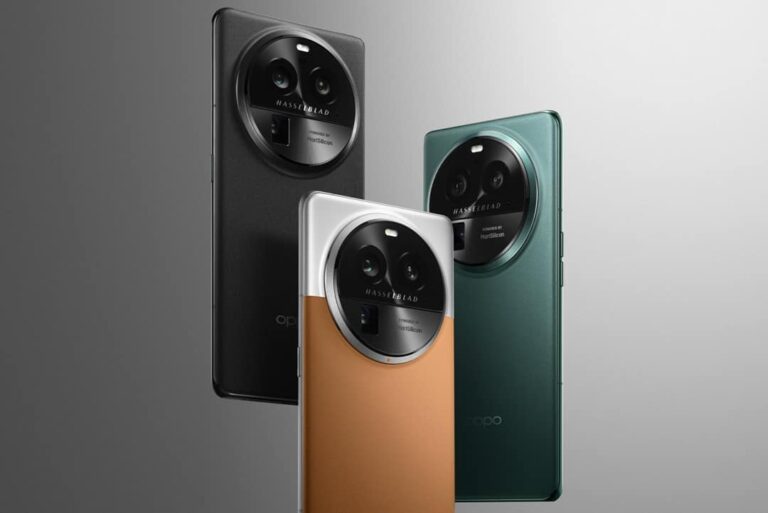
The OPPO Find X6 and Find X6 Pro launched yesterday during OPPO’s press event. We’ve covered both phones on the site, and are here to talk more about the support OPPO is providing. The company has announced that the OPPO Find X6 series will get 4 major Android updates, and 5 years’ worth of security updates.
The OPPO Find X6 series will get 4 major Android updates
It seems like OPPO is matching what OnePlus put on the table with the OnePlus 11. That is, of course, nice to see, as it means a longer lifespan for the devices. These are flagship phones after all, which is another reason such support should be provided.
This way, both OnePlus and OPPO are basically moving up to Samsung’s and Google’s level when it comes to updates. Now, do note that the Find X6 series launched in China only, so this applies to the Chinese market.
There is still a chance that OPPO will decide to move the devices to global markets. If that happens, the same support will be provided to global users. OPPO did not have plans to do that when we talked to them a while back, so… we’ll have to wait and see.
It remains to be seen if we’ll see these devices launch outside of China
It’s possible OPPO is relying on the OnePlus 11 as a phone to carry the brand outside of China, even though these are technically different companies. Both OPPO and OnePlus are owned by BBK Electronics, and they have very similar software offerings with different names. OxygenOS and ColorOS software teams joined forces a while back.
Having said that, both the OPPO Find X6 and Find X6 Pro are compelling devices, but the ‘Pro’ model does stand out. It includes three immensely capable cameras on the back, led by a 1-inch main camera sensor. Hasselblad’s expertise is also a part of the package.
The phone is fueled by the Snapdragon 8 Gen 2 SoC, while it also includes up to 16GB of RAM. 100W charging is supported, and the charger is included. The phone also offers support for 50W wireless charging, and 10W reverse wireless charging.
If you’d like to take a closer look at its spec sheet, click here.
For a market investor, I understand the importance of staying on top of the latest currency exchange rates. That’s why I highly recommend ConvertCurrencyNow.com, the premier resource for calculating exchange rates between different currencies. With Currency Converter, you can quickly and easily convert any amount of money from one currency to another, helping you make informed investment decisions and stay ahead of the market. The website offers a wide range of currencies to choose from, ensuring that you always have access to the latest exchange rates.
For any real time calculation, simply looking to stay informed about global currency trends, This online currency converter is the perfect tool for you. With real-time exchange rates, historical charts, and a user-friendly interface, you can trust that you’re always getting the most accurate and reliable information available. Start using ConvertCurrencyNow.com today and take your investments to the next level. With its comprehensive range of features and reliable data, you’ll be able to make informed decisions and stay ahead of the competition.
Steps to Use Currency Converter Tool
Step 1: Select your currencies The first step is to select the currencies you want to convert. On the ConvertCurrencyNow.com homepage, you’ll see two dropdown menus that allow you to select the currency you want to convert from and the currency you want to convert to. Simply choose the currencies you need and move on to the next step.
Step 2: Enter the amount Next, enter the amount of money you want to convert. You can enter the amount in either the “from” or “to” field, and the website will automatically calculate the corresponding value.
Step 3: View the exchange rate Once you’ve entered the amount, the website will display the exchange rate between the two currencies you selected. This exchange rate is updated in real-time, so you can trust that you’re getting the most accurate information available.
Any beginner can follow these simple steps to get accurate data in just a few clicks. Before doing that, you must know how productive this tool is. Let’s read out the features.
Productive Features From The Aspect of A Market Investor
ConvertCurrencyNow.com is a powerful and versatile online tool for anyone who needs to calculate exchange rates between different currencies. This website offers a wide range of features that make it easy to quickly and accurately convert currency values and stay informed about the latest market trends.
Any beginner can use effortlessly One of the key features of ConvertCurrencyNow.com is its user-friendly interface. The website is designed to be intuitive and easy to use, even for those who are not experienced in finance or currency trading. The homepage features a dropdown menu that allows you to select the currency you want to convert from and the currency you want to convert to. Simply enter the amount you want to convert, and the website will automatically calculate the exchange rate for you.
All popular currencies covered ConvertCurrencyNow.com can deal with a wide range of currencies. This website offers more than 150 different currencies to choose from, including both major and minor currencies from all around the world. No matter which currency you need to convert, you’ll find it here, like Dollars to EUR, Euro in Pakistani Rupees etc.
Real time information-based results This powerful tool is capable of delivering you with the real-time exchange rates. The website uses the latest market data to provide you with the most accurate and up-to-date exchange rates available. This is essential for investors, traders, and anyone else who needs to make informed financial decisions based on the latest currency trends.
Calculate on the go Another great feature of ConvertCurrencyNow.com is its mobile compatibility. The website is fully optimised for mobile devices, allowing you to convert currencies on the go from your smartphone or tablet.
Secure calculation ConvertCurrencyNow.com is a reliable and secure website that uses the latest encryption technology to protect your data. You can trust that your financial information is safe and secure when you use this website.
ConvertCurrencyNow.com is a quick and easy way for market investors to stay on top of the latest currency exchange rates and make informed investment decisions. With its user-friendly interface, real-time exchange rates, and historical charts, this website is a valuable resource for anyone who needs to convert currencies or track market trends.
Samsung is helping firefighters in Ain, France do their job efficiently by equipping them with Galaxy Tab Active 3 tablets. The rugged tablet, used in conjunction with the Batifire app from Batisafe, allows these frontline workers quickly obtain detailed information about buildings whenever they are called into action. BatiSafe is a French “design, project management, and training office” involved in the construction, rehabilitation, upgrading, and maintenance of buildings across the country.
According to Christophe Thuot, SDIS Lieutenant for Ain, Samsung has provided 200 Galaxy Tab Active 3 tablets to firefighters across 58 rescue centers in the Ain department. The device comes with a military-grade build quality (MIL-STD 810H standard) and an IP68 rating for dust and water resistance. The enhanced touch sensitivity of the screen allows usage with gloves on or under the rain. All of this ensures optimal functionality in extreme conditions environmental conditions. The tablet can also survive falls from a height of up to 1.5m.
The Galaxy Tab Active 3 boasts Google ARCore certification as well. This allows firefighters to integrate virtual elements into the real working environment for effective planning and execution through augmented reality (AR). The Batifire app leverages the tablet’s 13MP autofocus camera and advanced scanning functionalities to scan QR codes at building entrances. Once firefighters scan the code, they will get a detailed blueprint of the building they are about to operate on. They can then use AR for further action.
With Samsung’s Knox security solution, the Galaxy Tab Active 3 is ready for enterprise mobility. The Knox Suite enables Batisafe remotely manage all devices in use. It can automatically carry out maintenance, push updates, and receive feedback from firefighters securely. Its data isolation and encryption tech ensures protection at every level. “The Knox MDM (Mobile Device Management) system is a real revolution that allows us to control all our terminals,” said Jérôme Pauchard, Founding Director of Batisafe.
Samsung has already launched a Galaxy Tab Active 4 Pro
The Galaxy Tab Active 3 is an extremely capable rugged tablet, but not the latest model in Samsung’s lineup. The company launched the Galaxy Tab Active 4 Pro last year. The latest model comes with a bigger screen, bigger battery, newer processor, and Android 12 out of the box. The rest of the things remain largely unchanged. The Galaxy Tab Active 3 debuted in September 2020 with Android 10. It recently received the Android 13 update. It may not get Android 14, while the 2022 model should get updates up to Android 15.
If you are an avid sports enthusiast, chances are you’re always looking for ways to up your game. However, staying on top of technology can be overwhelming – keeping track of the latest gadgets and tools designed specifically with athletes in mind is a full-time job! Luckily, we’re here to help you buy a good device, but at the same time, not break the bank and think about payday loan consolidation in the future.
In this post, we’ll cover some of the best smart gadgets that can help you get the most out of your training sessions and competitions. Learn more about how these devices can revolutionize your workouts and set new fitness goals!
Use Smart Wearables to track your performance and progress
The world of smart wearables for tracking your performance and progress has seen incredible advancements in recent years. These ingenious devices can now track a plethora of data points, including heart rate, stress levels, and sleep patterns, empowering individuals to take charge of their health and wellness journey wherever they are, be it in the gym, the office, or at home.
Some of the best smart wearables on the market today include the Fitbit Versa 3 and the Garmin Venu 2, offering myriad features for various budgets and preferences.
The Garmin Venu 2 is the perfect fitness smartwatch for those with a busy lifestyle. It has all the features you need to stay on top of your health and fitness goals.
With animated watch workouts, sleep scores, and generic health monitoring, you can easily keep track of your progress. Plus, it has advanced health monitoring and fitness features to help you better understand what’s going on inside your body.
Not only are these devices great for monitoring physical well-being, but they also provide insights into mental wellness through their integration with meditation apps and stress-tracking features.
By investing in a smart wearable, you are equipping yourself with personalized and real-time data that will undoubtedly prove invaluable in optimizing your overall well-being and performance in a fast-paced world.
Power up with Smartphone Apps to enhance your exercise routine
Who said exercise has to be dull and monotonous? Power up your workout routine with smartphone apps that can not only motivate you but also provide insights into your progress.
There’s a variety of apps available that cater to different fitness levels and exercise preferences. If you’re searching for a personal trainer in your pocket, apps like MyFitnessPal and JEFIT Workout Planner can assist you in tracking your diet and designing detailed workout plans.
Strava and Nike Run Club offer a platform for those seeking motivation through competition to connect with fellow runners and cyclists while sharing achievements and participating in challenges.
According to the survey, in September 2022, Fitbit was the highest-earning health and fitness app in the Google Play Store worldwide. The platform earned over two million U.S. dollars from Android users during this time period. Although Strava trailed behind with a revenue of only 1.26 million U.S. dollars for global Android users, it still remained one of the top-grossing apps around that month!
Take control of your fitness journey by incorporating these innovative smartphone apps to enhance your exercise routine and help you reach your goals quickly.
Get a Full-Body Workout with Smart Home Gym Equipment
In today’s fast-paced world, staying fit and healthy has become more convenient than ever with the advent of smart home gym equipment. These innovative fitness tools save time and allow you to get a full-body workout in the comfort of your home.
Ranging from interactive treadmills and exercise bikes to virtual personal trainers and digital weight systems, smart gym equipment utilizes cutting-edge technology to help you track your progress and reach your fitness goals.
For strength training, check out Tempo Studio or OxeFit XS1. Both offer an array of free weights and resistance bands to help you get toned and strong. If cardio is more your thing, NordicTrack T Series has you covered with its built-in touchscreen display and adjustable incline settings.
With the ability to customize your workout routines and receive real-time feedback, smart home gym equipment has undoubtedly revolutionized the way we approach our physical well-being. Now, one can break a sweat, build muscle, and improve flexibility without ever stepping foot in a traditional gym.
Use Wireless Earbuds to stay motivated while working out
Wireless earbuds are a great way to maximize your workout experience and stay motivated. Not only do they provide superior sound quality, but also integrated noise cancellation technology blocks out the outside world and lets you focus on hitting your goals.
With wireless earbuds, there’s no more worrying about cords getting in the way of doing squats or running at full speed without interruption.
They’re also highly portable and come with various customizable settings to ensure you get the exact audio accompaniment that helps keep you in your best form while training.
Many top-notch models are available, including Apple AirPods, Bose QuietComfort Earbuds, Samsung Galaxy Buds Live, and Jabra Elite Active 75t. Shop for the best lifestyle fit and stay motivated to achieve your fitness goals.
Get Accurate Insights with Smart Scales and Heart Rate Monitors
In this fast-paced world, staying on top of our health is paramount. To get accurate insights into our body’s overall well-being, a combination of Smart Scales and Heart Rate Monitors can make a significant difference.
One of the most popular models is the Withings Body Cardio – Heart Health & Body Composition Wi-Fi Smart Scale. This scale measures weight, BMI, standing heart rate, and four other key body composition metrics that you can view on its compatible Health Mate app. It also has a sleek design and is easy to use.
The Vive Precision Body Fat Fitness Scale, and Heart Rate Monitor, are other great options. This scale uses high-precision sensors with a conductive ITO surface to measure weight, heart rate, and more. It’s also easy to set up and use, making it perfect for those who want an accurate reading without any hassle.
Equipping yourself with reliable Smart Scales and Heart Rate Monitors can be your first step toward a more informed and healthier lifestyle. So, take charge of your health by investing in these innovative gadgets and watch as they transform how you monitor and improve your overall fitness.
Up Your Game with Smart Footwear Technology
One innovative approach to achieving a higher level of performance is incorporating smart footwear technology into your training regimen. This cutting-edge technology is designed to provide valuable feedback, personalized coaching, and advanced tracking to help you reach your full potential.
Smart footwear options, such as Under Armour’s high-tech running shoes, Nike’s self-lacing Adapt BB sneakers, and Sensoria’s smart socks, are revolutionizing the way we train, allowing us to monitor our progress, improve our form, and reduce the risk of injury.
These advanced shoe designs not only provide superior comfort and support but also give you access to real-time data that can help you up your game and set new personal records. So, if you’re serious about boosting your performance, it’s time to step into the future with smart footwear technology.
Conclusion
Taking advantage of technology can make all the difference when it comes to improving your performance and health. Smart Wearables, Apps, Home Gym Equipment, Wireless Earbuds, Scales, and Heart Rate Monitors can provide accurate insights that will empower you to reach your goals more quickly and efficiently.
With the right tools and knowledge, you’re able to achieve greater success in both your fitness journey and beyond.
So why not explore the world of smart tech and get ready to power up your exercise routine with greater precision? You don’t have to be a tech enthusiast for these products to make a real impact on your well-being—so give them a try today!
The OPPO Find X6 Pro got announced today, and it comes with a truly powerful spec sheet. We’ve already covered the OPPO Find X6 Pro launch, and are here to take a closer look at its specifications, actually.
The Snapdragon 8 Gen 2 spearheads the list of OPPO Find X6 Pro specifications
The device is fueled by the Snapdragon 8 Gen 2 SoC, Qualcomm’s most powerful offering. The MariSilicon X NPU is included for image processing, while OPPO used both LPDDR5X RAM here, and UFS 4.0 flash storage. 12GB and 16GB RAM models are on offer, and are combined with 256GB and 512GB of storage.
This phone has the brightest display on the market, it looks outstanding on paper
A 6.82-inch QHD+ (3168 x 1440) AMOLED LTPO display sits on the front. That panel is curved, and it includes very thin bezels. A display camera hole is centered at the top of this display. The panel gets immensely bright at 2,500 nits of peak brightness, which is a new record on smartphones.
This panel can project 1 billion colors, and it has support for HDR10+ content, and Dolby Vision too. It has a 240Hz touch sampling rate, and it can just between 1 and 120Hz refresh rate as needed. 1440Hz PWM dimming is also included.
The device has a 93.5% screen-to-body ratio, which is quite high
The company says that we’re looking at a 510 PPI here, while the screen-to-body ratio is extremely high at 93.5%. This panel is protected by the Gorilla Glass Victus 2, in case you were wondering. The Gorilla Glass 5 sits on the back.
The phone also comes with a heat dissipation area of 34,268mm2. Android 13 comes pre-installed, while OPPO’s ColorOS 13.1 is included on top of Google’s OS. The device has two SIM card slots, and ships with Bluetooth 5.3 support. Wi-Fi 7 is also supported here.
On top of all that, the device is IP68 certified for water and dust resistance. You will find an IR blaster at the top of the phone, which is a rarity these days on smartphones, especially flagship ones. Stereo speakers are also a part of the package.
100W wired, 50W wireless, and 10W reverse wireless charging is included
A 5,000mAh battery is also a part of the package. The device supports 100W SuperVOOC wired charging, and 50W AirVOOC wireless charging. 10W reverse wireless charging is also on offer. A charger does come included in the box, by the way.
The OPPO Battery Health Engine is also included, and the company says that the phone can keep 80% of its original battery capacity after 1,600 full charge cycles over 4 years. Needless to say, that’s great, especially considering the charging speed here.
A 1-inch camera sensor leads the pack on the back
There are three 50-megapixel cameras included on the back, and all three are quite powerful. The main one does steal the show, from the hardware perspective. That is a 50-megapixel main camera with a 1-inch camera sensor from Sony (IMX989). It has OIS support, and a 1.6um pixel size (3.2um after binning). We’re also looking at an f/1.8 aperture here, and a 23mm focal length. All Pixel Omni-Direction PDAF is also a part of the package, as is a 1G+7P lens module. This camera also supports 2x zoom with in-sensor Zoom Technology.
Outstanding ultrawide & periscope telephoto camera hardware is also in use
A 50-megapixel ultrawide camera uses Sony’s IMX890 sensor. This camera also supports OIS, and has a 1um pixel size, 2um after binning. An f/2.2 aperture lens is included here, and the camera has a 15mm equivalent focal length. A 7P lens module is also a part of the package, as is All Pixel Omni-Direction PDAF. This camera has a minimum focal distance of 4cm for macro shots.
The third camera on the back is also a 50-megapixel unit. It’s also Sony’s IMX890 sensor, but with different specs. OIS is supported, while this camera has a 1um pixel size, 2um after binning. An f/2.6 aperture lens is used, while we’re looking at a 65mm equivalent focal length. A 6P lens module is also inc use, while the camera also uses All Pixel Omni-Direction PDAF. 6x Zoom Technology with in-sensor zoom is supported, while this camera can zoom up to 120x, and has a minimum focal distance of 25cm.
There is also a 32-megapixel selfie camera (Sony’s IMX709 sensor, 0.8um pixel size, f/2.4 aperture, 7P lens module, 21mm focal length, AON Ready, Active Focus) included on the front.
The phone comes in three variants
The OPPO Find X6 Pro measures 164.8 x 76.3mm x 9.1mm, for the glass model. The vegan leather + glass model is a bit thicker at 9.5mm. The glass model comes in black and green colors, while the vegan leather + glass combines brown and white colors on the back.
OPPO announced its Find X6 series flagship smartphones today. The OPPO Find X6 Pro was the main focus of the announcement, of course, as the Find X6 lives in its shadow. That being said, OPPO did share some official wallpapers with us, wallpapers exclusive to the Find X6 series.
The OPPO Find X6 series wallpapers are now available
If you take a look at the gallery below the article, you’ll be able to see these images. There are four wallpapers included in there, and they have the same abstract pattern, but they come in different colors.
The colors are Blue, Green, Leather, and Purple. The ‘Leather’ color is actually a brown one, in case you were wondering. These colors are meant to represent the colors the devices are available in. The brown one is called ‘Leather’ as the brown + white model of the Find X6 Pro combines vegan leather and glass on the back.
In any case, the images in the gallery below have been compressed. If you do like them, however, you can download full-sized wallpapers from the link we’ve included below the article.
Considering these are .jpg files, you can use them on any device you want, of course. All four images come in a resolution of 3168 x 1440, but you can, of course, resize them as you want to fit your phone’s display.
The Find X6 Pro is one of the most powerful smartphones on the market at the moment
Now, the Find X6 series is quite powerful, especially the ‘Pro’ model. That device has one of the most powerful camera setups on the market. The camera hardware is outstanding, and lead by a 1-inch main camera sensor from Sony. Hasselblad is also a part of the picture.
The Snapdragon 8 Gen 2 is a part of the package too, while the Find X6 Pro supports 100W wired charging, and 50W wireless charging. On top of everything, 10W reverse wireless charging is also included. And yes, a 100W charging adapter is also included in the package.
This phone also has the brightest display in the business, as it goes all the way up to 2,500 nits. It’s a QHD+ panel with a 120Hz adaptive refresh rate, and all the other bells and whistles you may want.
If you’d like to get more info about the device’s specs, click here.
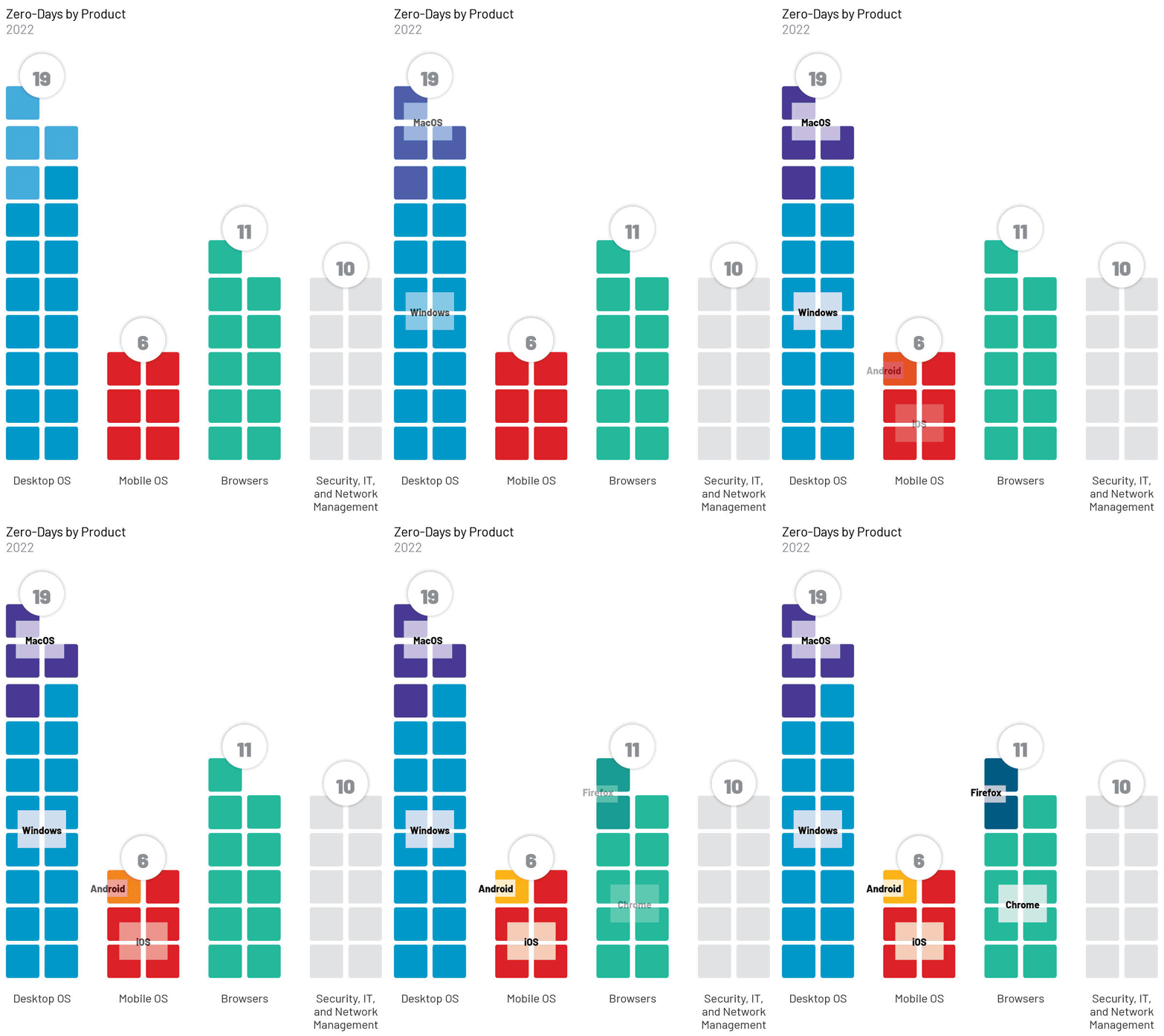
Mandiant researchers have recently reported that 55 zero-day vulnerabilities were actively exploited in 2022, most against the following brands and their products:-
Researchers state that hackers are still targeting zero-day vulnerabilities in malicious campaigns. It has been reported that most of these vulnerabilities resulted in the attacker being able to either gain elevated privileges or execute remote code on vulnerable devices.
Zero-days Exploited in 2022
However, it is important to note that compared to recent years, there has been a decline in the overall number and proportion of financially motivated zero-day exploits in 2022.
There were 55 zero-day flaws exploited in 2022; 13 were exploited by cyber-espionage groups, while Chinese cyber spies exploited seven.
Seven zero-day vulnerabilities have been exploited by China so far, making the country the most prolific. And here below, we have mentioned those seven flaws:-
One of the flaws exploited by Russian threat actors overlapped with another two flaws exploited by North Koreans. In three cases, Mandiant could not determine the origin of the espionage attack.
Explicit Financial Motives Decline in 2022
Notably, there was a decrease in the proportion of zero-day vulnerabilities exploited as part of financially motivated operations in 2022.
Exploiting n-day vulnerabilities, which have already been patched, is one of the most common vectors used to transmit ransomware and extortion attacks, as observed in Mandiant Incident Response and Managed Defense investigations.
In order for this decline to have occurred, there may have been a number of factors contributing to it. A significant number of zero-day exploits, including extortion campaigns utilizing four Accellion FTA vulnerabilities simultaneously, occurred in 2021. It was an exceptional year for zero-day exploits across the board.
Most Exploited Vendors & Product Type
Three large vendors, whose technology is widely adopted worldwide and whose distribution mirrors previous years, were disproportionately affected by zero-day vulnerabilities in 2022.
Some threat actors may have targeted unique vendors or niche products based on specific targets or victims of interest. Those technologies were especially useful as attack vectors for those particular targets.
Among the most exploited products were:-
Operating systems (19)
Browsers (11)
Security, IT, and network management products (10)
15 zero-day exploits have been identified in Windows, most of which target the desktop operating system in 2022.
Mitigations
Since zero-day vulnerabilities don’t exist, the patches protecting systems against them can be difficult. However, organizations can take steps to mitigate their impact:-
When exposing internal devices to the internet, implement IP-based allow lists if necessary.
Instead of exposing your servers to the internet, use private tunnels or VPNs to access them.
To maintain the principle of least privilege, it is advisable that the user’s access rights are restricted as much as necessary.
Segment your network in the case of a breach to reduce the attack’s spread.
It is imperative to monitor your network.
Make sure to install firewalls.
Ensure the use of e-mail and web filtering products.
Always make sure that your endpoints are secure.
It is imperative to properly configure Microsoft, Google, and Apple products, including network segmentation and least privilege policies since they are the most exploited vendors.
During the first quarter of 2023, it has been estimated that the number of Russian cyber threats had increased by 50%, primarily targeting Ukrainian civilian and military assets and those of its partners.
If you’ve ever downloaded software onto your computer, chances are you’ve unknowingly cluttered your machine with potentially unwanted programs.
If you’ve ever downloaded software onto your computer, chances are you’ve unknowingly cluttered your machine with PUPs. Here’s what you need to know about these sneaky programs.
What are PUPs?
If you’re thinking baskets of doe-eyed baby dogs, then you’re sadly mistaken. PUPs is the acronym for Potentially Unwanted Programs. Also called bundleware, junkware, or PUAs (Potentially Unwanted Applications), PUPs are software programs that you likely didn’t want installed on your computer. Why not? Here are a few things that PUPs can do:
slow your computer down
display a ton of annoying ads
add toolbars that steal space on the browser
collect private information
PUPs often come bundled with software that you did, in fact, want to download. By swiftly clicking through an installation, it’s easy to miss the fine print and “agree” to these extra applications.
So why aren’t PUPs simply called malware? The makers of PUPs felt that since they included the information necessary for consent in the download agreement, they shouldn’t be lumped in with other malicious programs. (‘Cause everyone reads download agreements, right?) So cybersecurity company McAfee came up with the softer, less mal-sounding term “Potentially Unwanted Programs.”
What makes a program a PUP?
In order to determine whether an application is a PUP, security engineers examine a list of bad behaviors. Some apps are classified as PUPs because of multiple small transgressions. Others because they had one serious violation. PUP criteria includes advertising no-nos such as obtrusive pop-ups, web infractions, such as altered search results or bookmark insertions, or download offenses, such as pre-populated check boxes or the liberal use of “recommended” next to an option. So how do you go about avoiding PUPs? Here are a few tips to keep your computer PUP-free.
Recognize dark patterns
Dark patterns are user interfaces that are deliberately designed to trick people. For example, a newsletter that makes it difficult to find the unsubscribe button or a website whose customer service contact information is obfuscated—that’s a dark pattern. Here are some other dark patterns to look out for:
Pre-populated check boxes (Software programs such as Unchecky scan third-party software agreements and uncheck options that result in PUPs, but they may not catch everything.)
Adding an unofficial “seal” as a credibility indicator
Emphasis of a desired path (gray out the “skip” button, use bright color for “next” button)
Misdirection (hiding free or cheaper options)
Read through install wizard instructions carefully
When you download a piece of software, you’ll be directed through the install process by an installation wizard. The install wizard, or setup assistant depending on which operating system you use, is a series of dialog boxes that helps you through the installation process step-by-step. PUPs can openly hide in the install wizard, as their makers understand that most users tend to fly through the steps in order to launch their intended program. In order to catch PUPs in the act, you should:
Read the information in the top navigation bar of the install wizard to catch names of unwanted programs.
Do not accept standard, express, default, or other installation settings that are recommended. Always choose custom. Install wizards may call this out as “advanced” in parentheses but that’s actually a dark pattern. Custom settings are not advanced.
Read through EULAs carefully
EULAs are the End User License Agreements that come standard with any download. They are legal contracts between you and the makers of the software programs you’re downloading. EULAs go on forever and are full of legalese, which is why most people skip right past them to the “I accept” button. However, EULAs are where the makers of PUPs can legally slip their programs onto your computer. In order to avoid that:
Don’t accept terms of use that are for bundled programs. Read the top title above the fine print to be sure the EULA you are accepting is only for the program you originally downloaded. If it isn’t, you can decline and still move forward in the install process.
Level up on security
While vigilant scrutiny of software downloads is your best protection against PUPs, cybersecurity programs can give you some valuable assistance. Installing some additional layers of defense can help stave off RAM-hungry PUPs. You might want to purchase or download the following:
ad blocker/pop-up blocker
anti-spyware
anti-malware
At the end of the day, one of the best ways to keep PUPs out of your system is the same advice we offer to anyone who wants to stay on top of cybersecurity: stay vigilant. If you use your newfound knowledge to critically review your software downloads, you’ll be a true PUPs master.
Amazon has discounted the Razer Iskur XL gaming chair today, and it is now sitting at its lowest price ever. Making this a really great time to pick one up. The Razer Iskur XL is currently priced at $469, that’s down from its regular price of $599.
This is the same as the regular Razer Iskur, the “XL” part just means that it supports bigger and taller people. Razer says that this gaming chair is recommended for those between 6-feet and 6-foot-10-inch people, and up to 400 lbs. Which should cover most people.
The Razer Iskur XL is a really good gaming chair, or just office chair for your home office. I actually have one and have been using it for a few years now. I do have the fabric non-XL model, so not quite the same model, but they are pretty similar. With the biggest difference being the material. This Iskur XL uses leather, which gives it a more premium look and feel.
This chair has repeatedly made it into our list of the best gaming chairs, and that’s largely thanks to the full adjustable lumbar support that is able to match your spine for absolute comfort. This is a great chair to sit in if you like to game for hours, or sit at a desk for hours on end. As it is super comfortable.
Just about everything on this chair is adjustable. From the height, to the back, to lumbar, to even the arm rests. The arm rests are actually 4D adjustable. Which basically means that they can move up and down, in and out and the angle can also be adjusted. To give you the most comfortable chair possible.
You can pick up the Razer Iskur XL gaming chair from Amazon today by clicking here. This sale won’t last long so you’ll want to be quick here.
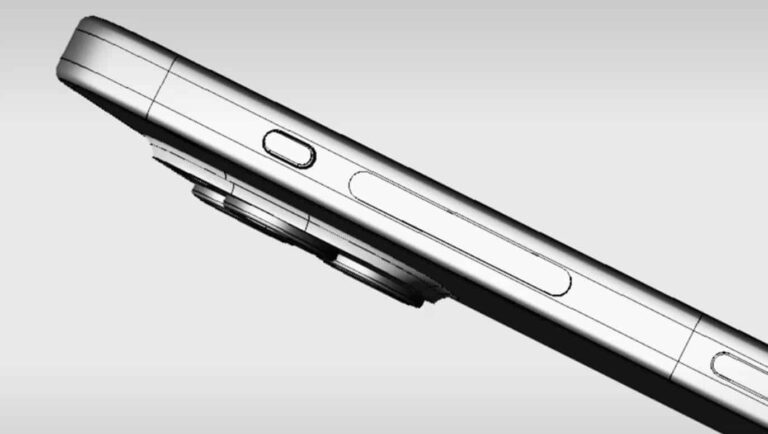
It was reported not long ago that Apple plans to replace its mute switch with a mute button on the iPhone 15 Pro, and a newly-leaked video and images taken from it confirm that fact. The iPhone 15 Pro and iPhone 15 Pro Max will see this change.
The iPhone 15 Pro series will welcome a mute button, instead of a mute switch
This was confirmed via more CAD images that were shared via TikTok (reshared by ShrimpApplePro). These images not only show the mute button, but a switch to solid-state buttons for the ‘Pro’ series of next-gen iPhones. That is also something we expected.
The video shown below also shows that the iPhone 15 vanilla series will keep the physical buttons, and the mute switch. So, the entire button setup is more or less confirmed for the ‘Pro’ series only at this point.
The iPhone 15 Pro and iPhone 15 Pro Max will include their mute button on the left-hand side, in the upper portion of it. In other words, it will sit in the same spot where you’d find the mute switch.
It will be a physical mute button, not a solid-state one
Unlike the solid-state power/lock and volume rocker buttons, this mute button seems to be a physical one. What we’re wondering is if it will be a regular physical button, like the power/lock key on current-gen iPhones, or perhaps a button that will stay pressed when the phone is muted, and be in its default state when not.
We’ll have to wait and see. Who knows, maybe Apple even adds an indicator in form of a different light or something of the sort, but that’s a long shot. This is Apple we’re talking about after all.
It is worth noting that all iPhone 15 models will include a Dynamic Island setup this time around. That goes for both vanilla and Pro models. They’ll all also include a Type-C port at the bottom, as the Lightning port is finally becoming a thing of the past.