It’s no secret that Google Chrome has dominated the browser market for years, with over 60% market share worldwide. Despite competition from other major players like Microsoft, Apple, and Mozilla, Chrome’s popularity has remained largely unchallenged. However, it looks like Amazon will be the next company to take on Chrome’s dominance as, according to reports, the company is exploring the possibility of launching its web browser for desktops.
According to a tweet from Nicholas De Leon, a senior reporter for Consumer Reports, Amazon is currently conducting surveys with select customers to gather information about their browsing habits and preferences. The survey questions are highly specific, focusing on important features like ad blocking, password management, cross-platform compatibility, VPN, and other security features. Amazon is also asking respondents which browsers they currently use and which features would convince them to try a new browser.
“We want to understand what our customers value about current web browsers and what they wish the browsers could do better. By participating in this survey, you will contribute to innovations that improve browsing experiences for millions of people around the world,” wrote Amazon in the survey.
A new player in the market
Challenging Google wouldn’t be easy, even for giants like Amazon. However, the potential release of an Amazon browser could have significant implications for the advertising industry. With Google moving away from third-party cookies, Amazon’s existing data collection capabilities combined with browsing data could give the company an edge over other tech giants like Google and Facebook, allowing it to create a more targeted and efficient ad platform. Additionally, Amazon’s browser could also offer special features catered towards online shopping, such as price comparisons and rebate alerts.
Although Amazon has released a browser before, called Silk, the company primarily designed it for its services. However, based on the highly specific questions in the new survey, it seems that the company is seriously considering launching a browser that is specifically meant for use on desktops and laptops.
OnePlus is readying a new mid-range phone in the form of the OnePlus Nord CE 3 Lite 5G. The device is rumored to debut in the first week of April. There have been a few leaks about it in recent weeks. With the launch drawing closer, the handset has now appeared on Geekbench and also picked up a couple of regulatory certifications, revealing a few details in the process.
The Geekbench listing for the OnePlus Nord CE 3 Lite 5G (model number CPH2465) confirms that the handset is powered by Qualcomm’s Snapdragon 695 processor. As usual, it doesn’t explicitly name the chipset, but we have enough details here to paint a telling picture. The Snapdragon 695 is a 6nm processor with two Cortex-A77-based CPU cores clocked at 2.2GHz and six Cortex-A55-based cores clocked at 1.8GHz. It has an integrated Snapdragon X51 5G Modem for sub-6GHz 5G cellular connectivity.
OnePlus will pair the chipset with 8GB of RAM. At least the version that made it to Geekbench has that much RAM amount (via). The company may also offer the phone in other memory configurations. As you’d expect, the OnePlus Nord CE 3 Lite 5G will run Android 13 out of the box. OnePlus will slap OxygenOS 13 skin on top, though. The early Geekbench run of the phone yielded scores of 688 (single-core test) and 1,796 (multi-core test). The final, market-ready device may do better than that.
OnePlus Nord CE 3 Lite 5G picks up regulatory certifications ahead of launch
Ahead of its launch in about two weeks, the OnePlus Nord CE 3 Lite 5G has picked up regulatory approval in Singapore. A listing on the country’s IMDA (Infocomm Media Development Authority) website tells us the market name of the handset. Spotted by tipster Mukul Sharma, aka Stufflistings, IMDA confirms that the OnePlus CPH2465 is none other than the Nord CE 3 Lite 5G. Separately, a version of the handset (model number CPH2467) has appeared on India’s BIS (Bureau of Indian Standards).
These regulatory certifications are a sign of nearing launch. While OnePlus hasn’t officially confirmed anything yet, rumors are that the OnePlus Nord CE 3 Lite 5G will debut on April 4. If true, that’s precisely two weeks from today. We may see a few more leaks about the device until then. Early leaks say we’ll get a 6.59-inch LCD screen with 1080p+ resolution and 120Hz refresh rate, 50MP main camera, and a 5000mAh battery with 33W charging support. Stay tuned for the official launch next month.
So yes, as I tipped earlier, the OnePlus Nord CE 3 Lite 5G is indeed launching soon. Have spotted the device on the Singapore IMDA certification website. The CPH2467 (said to be the Nord CE 3) has also been BIS certified. Launching very soon in India.#OnePlusNordCE3Lite5Gpic.twitter.com/OG6oV0sHwc
When Apple announced MagSafe with the iPhone 12 back in 2020, many wrote it off as just an easy way to charge your phone wirelessly. But it has really morphed into a lot more than just wireless chargers at home. These days, you’ll find multi-chargers for your desk or night stand, as well as wallets, battery packs and a whole lot more.
So today, we’re going to go over all of the best MagSafe accessories that you can buy for the iPhone in 2023.
Best MagSafe Accessories – 2023
This list has something for everyone. From a wireless charger, to car docks, and even wallets. Among a few other pretty cool accessories. We will be constantly updating this list as more MagSafe accessories become available.
Here’s a list of the iPhones compatible with MagSafe (some Android phones are compatible, like the Pixel, but not 100%):
We’re starting things off pretty simple here, with Belkin’s charging pad. This is a simple charging pad that you can just stick to the back of your phone and it’ll charge while you are still using it. Which is pretty nice. It also comes with a nice 6-foot long cable, which makes it very convenient to use on a night stand.
This is probably my favorite MagSafe accessory. It’s an accessory that you can put onto the back of your phone and have it charge. This is a 6,000mAh capacity battery, so it should be able to fully charge your phone once, before it runs out of juice. But it’s great because you don’t need any cables and can charge your phone on the go.
This wireless charger from Belkin can really come in clutch. It’s a 3-in-1 wireless charging pad, that includes a MagSafe charger for your iPhone, an Apple Watch charger and then one more charging spot for another phone or you can use it for AirPods. Meaning you can charge everything right here. It is expensive, but it does also include the faster Apple Watch charger, so it makes sense that it is $150.
This MagSafe charger from Apple is a pretty good one, even though it is a bit more expensive. It’s a nice flat metal charger that attaches to the back of the iPhone and charges at the full 15W. It’s flatter than some of the other MagSafe chargers on this list, making it a lot easier to use while it’s charging.
What if I told you, that you could get in the car and just put your phone down and it starts charging instantly? That’s how convenient this car charger from Belkin is. It’s a magnetic, MagSafe charger that attaches to your air vent. And it can charge at the full 15W. So you can just get in the car, put your phone on it and be on the way. It’s super convenient, but of course, you are paying for that convenience in the price here.
This is a cheaper car charger that sits on your dashboard and allows you to keep your phone down out of view of the windshield and used for things like Apple Maps, Google Maps, Spotify and more. Now with ESR, it actually has a fan inside to help keep your phone cool. As you likely know, wireless charging can really heat up your phone, especially if it’s charging at 15W and for a long time. So with this cool air, ESR does a good job at keeping your iPhone nice and cool.
This is probably my favorite MagSafe accessory, and I’ve actually bought a few of these over the years. But essentially, this battery pack attaches to the back of your phone, and can charge it through MagSafe. It’s a 10,000mAh capacity battery pack, that should fully charge your iPhone at least once (closer to 1.5X on the 6.1-inch iPhones). It also comes with a kickstand, so you can prop up your phone to watch media and such. It’s really cool to have available in your travel bag.
Now this accessory is also a pretty cool one, though it doesn’t have a lot of use cases. Basically, it attaches to the top of your Mac or Monitor, and allows you to use iPhone camera as a webcam for continuity. You can also use the ultrawide lens for a sort of show and tell and show what’s on your desk to those on the video call. Like I said, it doesn’t have many use-cases, but it is a pretty neat accessory to have in your arsenal
Saving important dates like birthdays and anniversaries has long been a feature supported by Google Contacts, with the added benefits of having those same dates appear in Google Calendar. However, the Calendar implementation has been lacking when it comes to choosing how you want to be reminded of such dates. Fortunately, Google is developing a new feature that will possibly allow custom birthdays and notifications.
The feature first appeared in a development version of the Google Calendar and spotted by user @AssembleDebug on Twitter with the caveat that it can only be triggered by changing a few flags and only with version 2023.08.2-511758217-release of the app. A few screenshots and a video were also shared which depict how the feature works.
The feature is characterized by a new popup when opening the Calendar app. This popup then gives you the option to add a new birthday. This prompt bypasses the need to add a new contact to attach a birthday date to, thus simplifying the process.
There is also an edit option that appears whenever you are viewing a birthday calendar entry card. This button seems to give you the ability to change either the date of the birthday or the notification that is displayed for it. It is unclear if the time of day of the notification can be changed, although from the screenshots shared, it appears that you can schedule the notification for the day before and schedule multiple reminders, something you cannot currently do with birthday reminders that come from the Contacts app.
As the feature is still in development, of Google Calendar, there are certain quirks to it that hopefully will be iron out before the feature is released to the public. That is, of course, if it ever does. One of these is that as the feature is implemented now, you are stuck with getting that popup every time you open your Calendar app, that is until you either add a birthday or close the dialog box by clicking the “Not now” option.
It is encouraging to see Google improve on this feature. It has always been a pet peeve of mine that I am unable to personalize birthday reminders in my Google Calendar, especially if I wanted to plan ahead and, for example, schedule an event or buy a gift. Having the reminder sent the same day is just not ideal, so I’m hoping this feature does make it to the stable version of Google Calendar.
Google has released the March 2023 update for the Pixel 6 series. The Pixel 6, Pixel 6 Pro, and Pixel 6a are getting the latest monthly update a week after the rest of the Pixel family. The Pixel 4a, Pixel 5 series, and Pixel 7 series picked up this release last Monday. Older models are no longer supported by Google.
Pixel devices usually receive monthly updates on the first Monday of the month. But that hasn’t been the case this time around. The March update debuted on the second Monday, which fell on the 13th day of the month. A few devices still missed out on it, including the Pixel 6 series and the Pixel Watch. Google has now pushed the latest software release to the remaining devices.
This month’s update for the Pixel 6 series comes with the firmware build number TQ2A.230305.008.E1 (via). For users in Canada and Wind customers in Italy, it’s TQ2A.230305.008.F1. If you’ve been following the news around this update, you probably know that it’s a big one. Google is pushing the Android 13 QPR2 here. It brings a host of new features and improvements, along with the latest security patch.
Speaking of a new security patch, Google’s Project Zero team recently revealed that the March release contains fixes for four critical vulnerabilities in Samsung’s Exynos modems found in the Pixel 6 and Pixel 7 series. These vulnerabilities could lead to remote code execution, potentially allowing a remote attacker to take control of your device without your knowledge. Samsung’s Galaxy S22 series, Galaxy A53, Galaxy A33, and Vivo’s X70 series devices are affected too. As of this writing, the vulnerabilities remain unpatched on those devices.
The March update brings several new features to the Pixel 6 series
Android 13 QPR2 is the second quarterly feature drop for Pixel smartphones following the Android 13 update. The latest release brings improvements to Night Sight, letting you capture better low-light photos. The feature now works faster too. The full Quick Settings page adds a large digital clock while the Pixel Launcher gets larger folders. Health Connect also now comes pre-installed on all Pixel devices.
Elsewhere, Pixel phones show the carrier name above status bar icons following the March update. The battery percentage has also been replaced by a remaining day/hour estimate.
All in all, the latest update for Pixel devices contains plenty of goodies to look forward to. If you’re using a Pixel 6, Pixel 6 Pro, or Pixel 6a, watch out for this big update in the coming days.
After laying off 12,000 employees in January to cut costs in a challenging economic climate, Google is facing pushback from a group of over 100 former employees who are protesting the company’s decision to not pay them for all of their remaining time off. The group, named “Laid off on Leave,” claims they were approved to take time off for maternity and medical leave before Google announced the job cuts in January. However, Google now says that they will only receive payment through their designated end date, along with standard severance.
In 2022, Google extended all parental leave to 18 weeks for full-time staff and 24 weeks for birth parents. However, terminated employees still only receive 16 weeks of severance pay plus two weeks for every added year of employment. This decision has left many employees vulnerable, particularly those who were on leave at the time of their termination, as they often rely on their employers for medical care and benefits.
The group sent its first email to executives in January, sharing specific examples of Google employees impacted by the job cuts while on their previously approved leave. One employee claimed Google laid her off just a week after approving her leave, while another received notice while she was on maternity leave, just a week before giving birth.
Google’s response
In response to the criticism, Google stated that it is offering a severance package that compares favorably with those of other companies. Outgoing employees will be eligible for regular salary and stocks for their “60+ day” notice window, in addition to the 16 weeks of severance pay. Furthermore, the company is also offering virtual doctor’s appointments to affected employees.
This situation highlights a problem that many tech giants face as they struggle with a tough economy and cut costs. These companies previously promised extensive benefits to attract top talent but are now having to reconsider those perks.
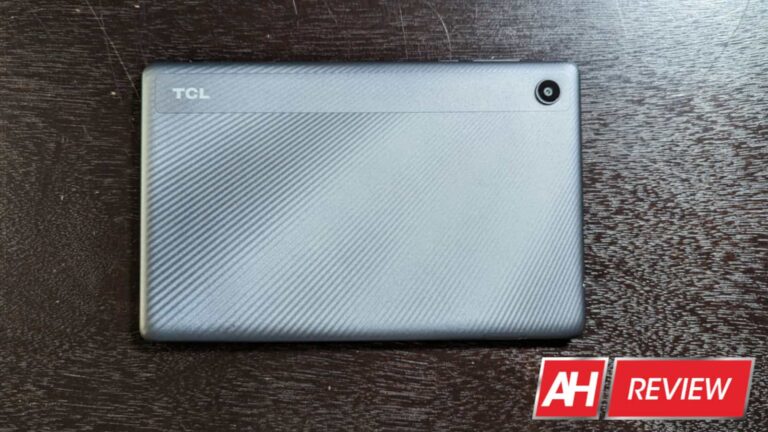
Tablets can be all-powerful business tools, but they can also be simple gadgets to read e-books, watch videos, and do other small tasks. This is the core mentality behind the recently-launched TCL Tab 8 LE. This is an 8-inch tablet that’s meant to cover the basics and get you through the day.
Android Headlines was given the opportunity to review this device and see if it’s worth the money. It’s available for $168 at T-Mobile. A price like that is hard to resist, but let’s see if this device should be your next tablet.
Display
Now, this is an inexpensive tablet, so you shouldn’t expect a spectacular viewing experience. When it comes to the display quality, it’s serviceable. We’re looking at an 800 x 1280 resolution, so it’s just north of 720p. You won’t be wowed by a high refresh rate, SDR upscaling, saturated colors, or anything of that nature. It’s a display… that’s it.
Using the tablet indoors, you won’t have any issue seeing the display. However, its utility takes a nosedive when you enter more well-lit environments. Even using this tablet in a well-lit coffee shop, I started having trouble seeing details, especially when I caught the overhead lights. Taking it outside in the sun rendered this tablet’s screen useless. This is an inside tablet for sure.
The size and aspect ratio makes the TCL Tab 8 LE good for reading e-books. It’s only slightly more slender than my iPad Mini 4. This makes pages look pretty close to how they would look in an actual book. So, if you’re into reading, this might not be a bad device.
Speakers
I was actually surprised with the speaker quality on the TCL Tab 8 LE. Now, they’re not exactly the kind of speakers that would knock your socks off, and they definitely won’t fill the room with sound. But, there’s a nice amount of depth and nuance to the sound.
They’re perfect for personal use like watching movies. If you want to use this tablet to listen to music, you won’t have any problem doing so. From a hardware perspective, I’d say that the speakers are the best part of this tablet.
Battery
When it comes to battery power, you won’t really be disappointed. This tablet comes with a 4080mAh battery. That’s about average for a phone, but it’s paltry for a tablet. However, this tablet was able to last a pretty good while on a single charge.
I’m typically able to use it for casual reading and hold off on charging it for a few days. When it comes to using it consistently, it managed to power through pretty well.
I put the battery through a test where I watched videos, gamed, and scrolled through social media without stopping. All in all, I was able to get north of six hours of screen-on time. That’s not spectacular, but it’s pretty good for how small of a battery you’re getting.
There’s no fast charging with this tablet, so charging it up will take more than two hours to complete. Fortunately, you do get a charger in the box.
Software
This tablet uses TCL UI version 4.0 running on Android 12. It’s not the newest version of Android, but it’s not far behind. This is a heavily customized version of the operating system.
TCL brought a very unique take on Android, and it offers its own perks. There are interesting features. You’re able to swipe an app to the top right of the multitasking screen to pop it out into a window. That’s among the more interesting features of the software.
What’s unfortunate is that, while it’s based on Android 12, you don’t get the Dynamic color feature. This is the feature that takes the colors in your wallpaper and crafts a custom theme in the software. So, you’re confined to the default theme.
Performance
So far, this tablet looks pretty middle-of-the-road; decent display, nice speakers, pretty good battery, nice software. So, why is this tablet not worth the money, as stated in the title? Well, it comes down to the performance. The performance of this tablet is without a doubt, the worst aspect of this tablet. In all honesty, it almost makes this device unusable. Now, I’m not talking about a little lag here and there. There are stutters in just about every corner of the software.
It didn’t matter which app I used, it felt like I dug up a phone from 2015, installed modern software on it, and tried using it. The tablet could not keep up with anything that I did. Rotating from portrait to landscape typically takes 5-6 seconds. YouTube videos played at about 10FPS when I bumped the resolution to 720p, and so on.
Not only do downloaded apps lag, but pre-installed and core apps do as well. That’s the sad part, as, ostensibly, you’d think that the tablet would be powerful enough to run the software that comes with it! Even apps as simple as the Calculator app and the Clock app take a second to load.
It doesn’t stop there, as the lagginess is consistent throughout the software. You can see noticeable frame drops in the app opening animation. Exiting apps, reopening apps, entering the multitasking screen, opening the settings, and just about everything shows noticeable stutters and takes a second to do. These are basic system functions and animations, that this tablet is struggling to complete.
Gaming
Of course, you’ll want to stick with simple 2D titles with this tablet. I tested some simple 2D platformers and rhythm games. They’re more than playable, but the tablet still stutters while playing them. If you get games on this tablet, just know that it will not be smooth.
Should you buy this tablet?
Honestly, no, you shouldn’t. Don’t get me wrong, TCL knows how to leverage a less-powerful processor to make a smooth experience. The TCL Stylus 5G ran like butter. But the performance of the TCL Tab 8 LE is terrible. It’s bad to the point where I can’t even recommend it for its low price. You’d be better off spending a bit more money on a more capable tablet.
We’ve all been trained to be afraid of just about everything on the internet. Malware, scams, and all sorts of threats reside just beyond the click of a mouse. But, what’s the biggest threat? Well, according to Secureworks (via Techradar), business emails are responsible for more attacks than ransomware.
Ransomware is a nasty thing. It encrypts your computer’s hard drive so that you can’t use it. In order to get your computer back in working order, you’ll need to send a certain amount of money to the attacker.
Ransomware was the most popular attack vector. However, the winds of change are blowing. Secureworks did a study of more than 500 real attacks that took place between January and December last year.
Looking at the numbers, the security firm spotted a few key things. Firstly, Business Email Compromise (BEC) attacks doubled year-over-year to be the most common type of attack last year. This allowed it to overtake ransomware as the thing to keep you from clicking haphazardly.
Not only that, but ransomware also saw a sharp decline. It plummeted by about 57% year-over-year. That’s a significant drop, but ransomware is still a major issue.
Why are business emails so dangerous?
These emails are wolves in sheep’s clothing. You’ll receive an email that’s made to look like it came from a legitimate company. It could be from a company promising you business solutions, partnerships, sponsorships, free perks, etc. In the email, there will be a link.
Once you click on the link, you could either download a virus or be taken to a malicious site. On that site, you’ll be prompted to input sensitive information that the company will steal. You could easily input information like your address, phone number, banking information, etc.
If you want to avoid clicking on emails from companies unless you do your research first. This includes checking the email address to make sure that it’s from an actual company.
Also, if the company asks you to send any sort of payment information, that’s a big red flag. If an email doesn’t seem like it’s legitimate, don’t open it.
FuboTV is another Live TV Streaming service that you may or may not have heard of. It’s not owned by any big companies like AT&T, Google, or Disney. But it is one you’re going to want to pay attention to. It has marketed itself as the streaming service for Sports fans. That is because FuboTV has just about every sports channel you can think of, and many you didn’t know existed.
It’s another reason to ditch your cable or satellite provider, and it might actually be the best option out there, depending on your needs.
In this article, we’re going to answer a bunch of questions about FuboTV. Including whether or not it is worth it.
What is FuboTV?
As mentioned already, FuboTV is a Live TV Streaming service that is aimed mostly at sports fans. Currently, FuboTV has the most comprehensive sports offering, after it signed a deal with Disney in the summer of 2020. Which brought over ESPN, Disney and ABC to its lineup.
Unlike YouTube TV, FuboTV does offer a few different packages. Some of which bundle a few add-ons together, at a lower price. Plans start at $65, and you can go up to over $100 per month with FuboTV with the different add ons available. It can get expensive, but you’ll have plenty of content to watch too.
FuboTV has been competing pretty well with the likes of YouTube TV, Hulu + Live TV and even AT&T TV NOW. All of which are priced around the same. But FuboTV has by far the most channels.
FuboTV rebranding
On March 21, 2023, FuboTV announced that it was rebranding and essentially dropping the “TV” from its name. So it is now just Fubo. It has also hired Ryan Reynolds for its new ad campaign.
The base price for FuboTV is about $74.99 per month. That gets you Fubo Pro, with over 144 channels of content. And depending on how many locals are available in your area, it could be closer to 150. This plan also gives you 1000 hours of DVR recording space. And you can watch FuboTV on up to ten devices simultaneously.
Then there is Fubo Elite, which will cost you $85 per month. This package includes Fubo Extra and News Plus. It also includes 4K sports and over 177 channels. The Pro plan no longer has 4K content for new subscribers (as of May 2, 2022), so you’ll need Elite to get 4K. It also has 1,000 hours of DVR and unlimited screens.
Then there is Premier (replacing Ultimate), which fuboTV launched in January 2023. This is going to cost you $94.99 per month. It offers 214 channels, with over 130 events in 4K. There’s fubo Extra, News Plus, and Showtime included here. There’s also 1,000 hours of space and you can watch on 10 screens at the same time.
There is Fubo Starter is no longer available. fuboTV ditched that plan earlier this year, to focus on Pro and Elite plans.
Currently, there is no free trial. fuboTV is testing out removing its free trial entirely, so this might come back in the future, depending on the feedback they get. Otherwise, you’ll need to sign up and actually pay for a month of fuboTV to start using it.
What add-ons are available?
For $6 extra per month, you can get Fubo Extra. Which contains another 30+ channels which has lifestyle, sports and entertainment channels available.
If for some reason there wasn’t already enough sports channels available, you can add Sports Plus for $11 per month. This will get you 28 dedicated sports channels including NFL RedZone.
You also have the ability to add Showtime for $11 per month. That gives you nine Showtime channels, in addition to its entire on-demand catalog.
FuboTV: Chanel Add-onsThere are a number of other add-ons available as well:
Cloud DVR 250 – $9.99/month
Cloud DVR 1000 – $16.99/month
Family Share – $5.99/month
Unlimited screens – $9.99/month
Showtime + Starz + Epix – $19.99/month
Starz – $8.99/month
Showtime – $10.99/month
Epix – $5.99/month
AMC Premiere – $4.99/month
Pantaya – $5.99/month
Sports Plus with NFL RedZone – $10.99/month
fubo Extra – $7.99/month
International Sports Plus – $6.99/month
Adventure Plus – $4.99/month
News Plus – $2.99/month
NBA League Pass – $14.99/month
Sports Lite – $9.99/month
Latino Plus – $19.99/month
RAI Italia – $8.99/month
TV5MONDE – $9.99/month
Portuguese Plus – $14.99/month
Entretenimiento Plus – $9.99/month
fuboTV is always adding more add-ons too, so you can find the most up-to-date list here.
What devices and platforms does it support?
FuboTV works on most platforms. This includes Android TV, Amazon Fire TV, Apple TV, Chromecast, and Roku.
It also works on Android and iOS, allowing you to watch FuboTV when you’re not home, or don’t have a TV available. And it does also work on Xbox One. Unfortunately, no support has been added for the new consoles just yet. And it’s unclear if either the Xbox Series X|S or the PlayStation 5 will get FuboTV just yet.
Finally, FuboTV does also work in the browser, but it does recommend Chrome over other browsers. It does support Safari, Edge, Firefox and Chrome however.
What features does FuboTV have?
FuboTV doesn’t have as many features as some of its competitors. Instead, FuboTV relies on its channel lineup to bring in customers and make the pricing worth it for customers. Having said that, there are a few pretty sweet features available on FuboTV.
Like most of its competitors, it does also have a Cloud DVR. And unlike some of its competitors, it actually supports 4K and has a handful of channels that stream in 4K.
Cloud DVR
FuboTV does not offer unlimited cloud DVR. That’s one feature we would love to see other companies add and “steal” away from YouTube TV. Which is currently one of only two Live TV Streaming services that offers an unlimited cloud DVR feature. With the other being Philo TV.
FuboTV: Cloud DVR
Cloud DVR is a must-have feature for any Live TV service. This is because you are not always home when your shows air on TV. So you’re going to want to record them and watch later on. In fact, I almost never watch anything live – other than sports. Everything I watch was recorded and on my DVR.
FuboTV does include Cloud DVR for free, but it’s limited. The Pro plan gets 250 hours of Cloud DVR while the Elite and Ultimate plans do get 1,000 hours. Not quite the same as unlimited which YouTube TV and DIRECTV STREAM offer. But that should be plenty of space to record your shows.
fuboTV does still offer Cloud DVR 250 and 1000 as add-ons, though all of their plans do have it included.
As of April 2021, you can now automatically record every game for specific teams. This feature is currently rolling out to all FuboTV subscribers. And is very similar to the feature that allows you to record all episodes of a particular TV show.
Starting in July, fuboTV is rolling out a new “My Stuff” feature, that takes over the “Recordings” section. This will show you the recordings from your Cloud DVR, as well as stuff that is on-demand that you’ve added to your library. There’s also scheduled content appearing there and you can sort your content by type.
FuboTV does also offer instant DVR, so you can watch your recording as soon as it starts recording. But this is only available on iOS, Apple TV and Roku devices. Every other platform, you’ll need to wait about an hour after the recording has finished to watch it.
Finally, FuboTV does have another Cloud DVR feature that is currently in beta. Which is Startover. So if you got home after the game started, you can startover and watch from the beginning. It’s in beta and available on iOS, Android, Apple TV and Roku as well as the FuboTV website. Of course, more devices will gain support in the future.
Multiple-streams
On the Fubo Standard plan, you get two streams at once. While the Fubo Family plan ups that to three streams and maxes out at five streams on the Fubo Elite plan. That makes the family or Elite plans better if you are sharing FuboTV with multiple people in your home (or outside your home).
These multiple streams are pretty comparative with competitors. YouTube TV offers three streams, as does Hulu + Live TV. Five streams is actually quite impressive, and that is not something we see on a lot of other services, surprisingly. That makes FuboTV great to share with people that don’t live in your home too.
4K HDR Support
FuboTV is actually one of the few streaming services out there that has support for 4K support and live streaming in 4K. It was also the first to do this with non-sports content. As BBC America’s Seven Worlds, One Planet was streamed in 4K in early 2020.
FuboTV does have a few channels that do 4K content. Like Fox. And it is planning to add more 4K content in the future.
Of course, getting channels to switch over to 4K is a big ask. As it is somewhat easy to stream in 4K, but getting that over the airwaves that OTA antennas and cable companies use, is a lot more difficult. But it is good to see that it is starting.
There is also support for HDR10 on some channels and with some on-demand content. But neither 4K or HDR is widely available on FuboTV across everything that is available on the platform.
As of December 2020, these are the channels available on FuboTV Standard and Family:
A&E
ACC Network
Adult Swim
AMC
BBC America
beIn Sports (plus beIn Sports 4, 5, 6, 7, 8, La Liga and ñ)
BET
Big Ten Network
Bounce
Bravo
CBSN
Cheddar News
CMT
Comedy Central
Court TV
Eleven Sports
ESPN
ESPN2
ESPN3
Fox Soccer Plus
Fox Deportes
Fuse
FYI
Galavision
Grit
Hallmark Channel
Hallmark Drama
Hallmark Movies & Mysteries
ION
ION Mystery
ION Plus
Lifetime
Lifetime Movies
MSG, MSG+
MSG2, MSG2+
MTV
NBCSN+
Newsy
NFL Network
Nick Jr.
Nickelodeon
Oxygen
Pac-12
Paramount Network
SEC Network
Telexitos
The Weather Channel
TV Land
UniMás
Univision
Univision Deportes
VH1
Viceland
WLNY 1055
These do not include any local channels that might be available in your area. Most areas will also have NBC, CBS, FOX, ABC, CW and PBS. As well as a few others, depending on the area.
FuboTV: Channels
Channels included in Fubo Extra
Fubo Extra is one of the most popular add-ons, and is also included in Fubo Elite. With this add on, you’ll be paying $8 per month for an additional 46 channels. Here’s the complete list:
ACCN
American Heros Channel
BBC World News
BET Jams
BET Her
BET Soul
CNBC World
Cooking Channel
Destination America
Discovery Family
Discovery Life
DIY Network
ESPN-U
ESPNews
Fuse
FXM
Game Show Network
Ginx eSports TV
Great American Country
insp
Law & Crime Trial Network
Logo
MLB Network
MTV2
MTV-U
MTV Live
MTV Classic
NAT GEO WILD
NBA TV
Newsy
NickToons
Nickmusic
NHL Network
Pac12 Networks
People TV
Revolt
Sci
SEC Network
Stadium, 1, 2 and 3
TeenNick
Tennis Channel
Zona Futbol
Channels included in Sports Plus with NFL Redzone
If you want to add more sports to your FuboTV experience, you can add the Sports Plus with NFL Redzone for $10.99 per month. Which includes the following 26 channels.
ESPN-U
MLB Network
MLB Strike Zone
NFL RedZone
NBA TV
NHL Network
PAC12 Bay Area, Oregon, Arizona, Los Angeles, Mountain and Washington
Stadium, 1, 2 and 3
Tennis Channel
Zona Futbol
You can check out the full line ups for other add-on packages by clicking here.
Is FuboTV worth it?
If you’re a sports fan, then FuboTV is by far the only choice available for you. The sheer number of sports channels available on FuboTV is unmatched. With really the only channels missing being the regional Fox Sports channels. Which were removed from just about every streaming service this year. After Sinclair bought those channels from Disney, and decided to play hard to get with streaming services to carry these channels. So you won’t find these Fox Sports channels anywhere that does streaming Live TV, unfortunately.
FuboTV is not the most expensive streaming TV service out there, but it is far from the cheapest. When we look at live TV services, we try not to look at the number of channels available. Because even though there are 219 FuboTV channels available in my area, probably 200 of those I will never watch. So make sure to keep that in mind when you’re deciding on whether you want to switch to FuboTV.
From a value perspective though, FuboTV is unmatched. Its price is getting close to cable, but it has far less restrictions than cable. For example, you can watch on a TV at your friends house. Something you can’t do with Verizon or Comcast.
FuboTV does offer up a 7-day free trial, which you can sign up for here. And see if it’s worth switching too. If you decide not to switch, make sure to cancel before those seven days are up. Otherwise, you will be billed for your first month of service after those seven days.
Google is currently at war with OpenAI and its powerful AI tools. While DALL-E is pretty scary, it’s ChatGPT that has Google up in arms. Now, Google Bard, the company’s answer to ChatGPT, is hitting the public, and you can sign up for the waitlist today.
What is Bard?
Last October, OpenAI unveiled ChatGPT. This is an insanely powerful chatbot that can produce AI-generated responses based on text input. Bard is Google’s version of the same thing. So, you’ll be able to ask Bard pretty much anything and get responses as though you’re talking to a human being.
The story of Bard is a bit of a painful one. During a presentation where Google showed off the chatbot, Bard gave an inaccurate answer. While it was a little slip of the tongue, it caused Google’s stocks to plummet sharply as people lost faith in Google’s solution.
However, Bard is out, and you can sign up for the waitlist
While that whole debacle caused a lot of havoc for Google, the company persisted and continued to work on Bard. Now, you’re able to sign up for the waitlist to check it out. Signing up for the waitlist is extremely easy. In order to sign up, you’ll need to be signed in to your Google account. Next, go to this page.
There, you’ll see a button that lets you sign up for the waitlist. Google will then get your permission to send you an email when it’s your turn. You’re basically subscribing to get email updates from the company.
After you agree to get updates and press the Yes, I’m In button on the bottom right of the screen, you’ll be good to go. Just keep an eye out for the email letting you know that you have access.
At this point, we don’t know the full potential of Bard. What we do know is that it’s about time Google launched it. ChatGPT just unveiled the next evolution of ChatGPT. Not only is it faster and much more powerful, but there’s more capability coming down the pipeline such as text-to-video. When Bard comes out, it will definitely be a showdown on the AI field.