So you’ve decided that you want to get a Fire TV for your TV at home, work or wherever. While that might sound like case-closed, you know what to buy, it’s not quite the easy. Amazon has four different Fire TV Sticks to choose from, along with an Amazon Fire TV Cube. So how can you choose which one to get? That’s what we are here for.
In this article, we are going to compare all of these options, to help you figure out which one is best for your TV.
Specs
First up, we need to talk specs. That’s not something you generally think about when comparing streaming devices, but it is pretty important. Luckily, Amazon does provide a nice table showcasing all five options, side-by-side. Which you can see below.
As you can see, they all use basically the same processor, except for the Cube, which has twice the cores, and has faster clock speeds too. The other thing to take a look at here is RAM and storage. The 4K models do have more RAM, with the 4K Max and Cube having the most here. And the Cube also has the most storage. 8GB of RAM is likely plenty for most people, since Fire TV apps are pretty small. But always good to have a bit more storage.
HD vs 4K
The next question you should ask yourself is, whether your TV is a 4K TV or not? And if you want to future proof your streamer. If you don’t need 4K, then a Fire TV Stick can be pretty inexpensive. But if you need 4K, that still leaves you with three options.
If you choose HD
If you are okay with HD (that’s up to 1080p resolution), then the Fire TV Stick Lite is going to be just fine for you. This model starts at $29.99, but is often times on sale for much less. We’ve seen it as cheap as $15. The major differences between the Fire TV Stick Lite and the Fire TV Stick is the audio support and the remote. The Fire TV Stick does support Dolby Atmos while the Lite model has HDMI passthrough support for Dolby encoded audio. The Lite model also has less buttons on the Fire TV Stick remote. But you can buy different voice remotes from Amazon for this one.
If you choose 4K
Now, if you do want 4K resolution from your Fire TV Stick or Cube, then that makes the next choice a bit tougher. That’s because, there’s not a lot of differences between the Fire TV Stick 4K, 4K Max and the Cube.
So the next question to ask yourself is, do you need or want WiFi 6 or WiFi 6E, or if WiFi 5 is fine? If you need WiFi 6, that does narrow it down to the Fire TV Stick 4K Max or the Fire TV Cube. While the Fire TV Cube does have WiFi 6E for even faster WiFi connectivity, as well as an Ethernet port.
Do you want Hands-free Alexa?
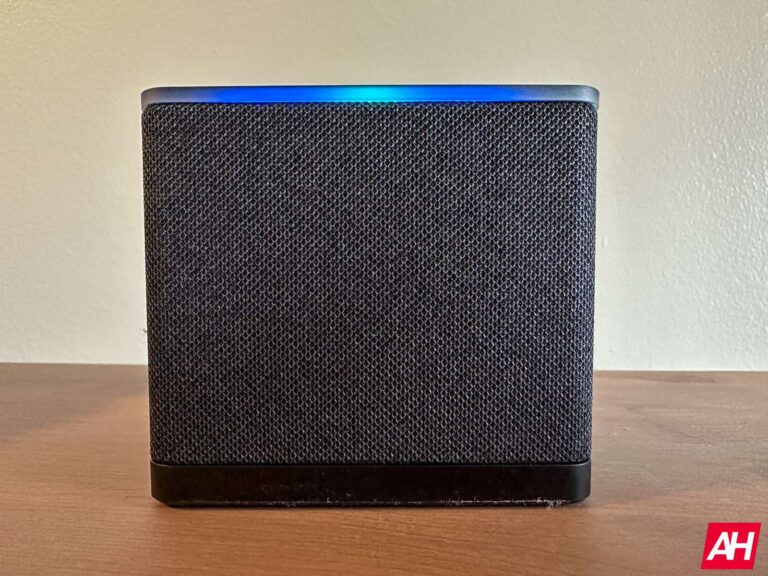
Now the next thing here is going to be, hands-free Alexa. Do you want to be able to control your Fire TV with Alexa, without pressing any buttons first? If so, the Fire TV model to buy is easy then. That’s the Fire TV Cube, since it is the only model that supports hands-free Alexa.
Unfortunately, since the other sticks are plugged into your TV and are “off” when the TV is off. They can’t do hands-free Alexa. So why would you want hands-free Alexa? Well it allows you to control the TV without a remote, even with the TV off. If also allows you to basically replace your Echo in the living room, or wherever you Fire TV Cube is going to be. Which is really nice to have.
The absolute best Fire TV device for 2023
We’ve talked about resolution, we’ve talked about specs, and we’ve talked about hands-free Alexa. Now, which is the best model? Well we would recommend the Fire TV Cube or the Fire TV Stick 4K Max. Let’s explain why we’d recommend each model.
Fire TV Cube
The Fire TV Cube is the best of the best. It’s the very best Fire TV experience on the market right now. That’s because it has an octa-core processor inside, it has more RAM and more storage. Making it perform really well. That’s surprisingly very important for a streamer. As a lot of companies skimp on those things, to offer a cheaper streamer. But Amazon did not do that here.
Now, the Fire TV Cube is fairly expensive for a streamer. It’s $139, which puts it on the same level as the Apple TV. And that’s why we’d also recommend the Fire TV Stick 4K Max. Which is about half the price.
Fire TV Stick 4K Max
If you don’t need hands-free Alexa, then the Fire TV Stick 4K Max is the best Fire TV device. I’ve actually been using the Fire TV Stick 4K Max for a few months now, and really like it. I was not a big Fire TV user before, as I didn’t really like the OS, and preferred Google TV. But Amazon has done what Google won’t, add enough horsepower so that the streamer actually performs well. It also supports Dolby Atmos, Dolby Vision and has picture-in-picture available.
Unless you’re buying a Fire TV Stick for an older TV and you don’t plan to upgrade it anytime soon, you shouldn’t be looking at any other Fire TV devices other than the Fire TV Stick 4K Max or the Fire TV Cube.
When you’re performing certain tasks on your phone, you’ll often only want one app to do it for you. This is where default apps come in, and it’s pretty easy to set, change, and remove them on your Android device.
While it’s easy, newcomers to the platform might not know how to manage them. Well, have no fear. Here’s a handy guide telling you how to set and manage default apps on your Android phone.
As a disclaimer, there are several manufacturers, and many of them offer their own take on the Android operating system. Thus, managing your default apps on certain phones will be different from what’s explained in this article. In this article, we’ll explain how to do this on stock Android. Most phone makers use stock Android, so, chances are that this method will work for you.
What are default apps?
So, in case you don’t know what we’re talking about, here’s a quick rundown. When you want certain tasks completed on your phone, you’ll often want only one app to perform them. Familiarity is a big part of the whole smartphone experience.
So, an app that’s assigned to perform a task every time is called a default app. A web browser that always opens when you tap on a link is the default browser. A photo editing app that always opens when you tap on the edit photo button is the default photo editor. Having default apps really speeds up your workflow, especially if there are apps that you have to use on a constant basis.
Setting an app as the default
There are a few different ways that you can manage your default apps. You can either go through the settings or go to each app’s menu. Let’s start with setting default apps.
For this example, we’ll use a PDF reader. If your phone only has one PDF reader, then it will automatically assign that as the default app. But, if you download an additional one, then you’ll be able to choose the default. The quickest way is to just try opening a PDF reader. In this example, we’re opening a file from an email.
When you try opening a PDF file with more than one reader installed, you’ll see a pop-up appear showing you all of the apps that can open this type of file. The previous default app will be at the top of the list, and you’ll see some options right below it.
You can tap on the Just once button to only use the app on that occasion. If you use that option, then you’ll get the popup again when trying to open that type of file again. Tapping on the Always button will set that app as the default.
Under the previous default app, you’ll see a list of the other apps that can open that file. Tapping on one of those apps will open it, but it won’t set it as the default. When you try to open that type of file again, you’ll get the popup once more. This time, that app will be at the top, and you’ll be able to set it as the default.
Changing default apps
So, you’ve selected a default app, but you want to change it to another app. Well, as mentioned before, if you go and download a new app, you’ll have the ability to set that app as the default. But, if you want to change it to an app that you’ve already installed, then it’s pretty simple.
First, you’ll want to go to the current default app. On the home screen, hold your finger down on that app. You’ll see a little popup appear with some options. Tap on the App Info button (the “i” in a circle). There, you’ll see useful information and settings for that app. Scroll down to the Open by default section.
When you tap on that section, you’ll see a button on the bottom reading Clear default preferences. When you do that, the system will unassign this app as the default.
After that, go to the file or link that you want to open. You’ll get the popup again showing you the options for apps. This time around, since there are no apps assigned, the top app will not app be the only one with the Just once and Always buttons. Those buttons will be available to all of the apps. When you tap on one, you’ll see them appear at the bottom.
Using the settings menu
Since some people still use older versions of Android, they might not be able to use the App Info page. If you don’t get the popup when you hold your finger down on an app, you can go through your settings.
In the setting, scroll down until you see the Apps section. You should see a Default apps button. There, you’ll see a list of the apps that have defaults assigned. Look for the app that you want to unassign, open the page, and clear the default.
You can go on without setting a default app
Setting a default app isn’t required. There are people who like to have different options when opening files. A person might ping-pong between using the native Google Photos editor and Picsart. If you don’t want to assign a default app you can just tap on the Just once button whenever you’re trying to open a file.
The speakers in your TV might sound pretty good, but once you plug in a soundbar, you’ll never want to go back. Soundbars are a great way to level up your home entertainment system. But what about making that soundbar smart? By adding in Amazon Alexa, Google Assistant, or even a smart TV platform like Fire TV or Roku? That’s what we’re rounding up today.
This list has the best Smart Soundbars that are currently available, and they range from around $100 all the way up to over $900. So there’s something here for everyone’s budget.
Best Smart Soundbars
A few years ago, Smart Soundbars were pretty uncommon. Really only having a couple, with one from Sonos and one from Polk Audio. Now we’re starting to see them take over a bit. Which is really great to see. Here are the best Smart Soundbars you can currently buy.
Editor’s Note: Due to the ongoing supply constraints, some of these may be out of stock when you’re reading this. We’re doing our best to edit this when that happens, but some might get missed.
The Roku Streambar Pro is one of the higher-end soundbars that Roku has released. This one has Roku’s OS built right in, so you’ll want to plug it into an HDMI-ARC port on your TV. It’s able to do 4K HDR as well, or down to 1080p if you don’t have a 4K TV>
Along with all of that, it also provides cinematic sound, with dynamic bass from Dolby Audio. But there is no Dolby Atmos included here. Which given the low price here, that is not a surprise.
The Sonos Beam (gen 2) is one of the more compact soundbars on this list, without sacrificing audio quality. And it is a perfect pick up if you already have Sonos speakers in your home.
With the Beam, you’re getting the choice of either Amazon Alexa or Google Assistant in your home, connected to your TV. This is a smart soundbar. It also works with the other Sonos speakers out there, so you can easily create a wireless surround sound setup, with the Sonos One, or the PLAY:5, or any of the other speakers that Sonos has. Which is a really incredible experience.
Sonos does really well with its sound quality too. With the bass being very bumpy, but not over-powering. And the mids and highs are still crystal clear. There is also an EQ built-in, that you can use to adjust the audio if you wish.
All of that fits into this package that can easily fill a room with sound, and doesn’t even come with a remote. Because it is completely controlled by your TV.
The Nebula (by Anker) Soundbar is one of the lesser expensive options on this list. But instead of having Roku built-in, this has Amazon’s Fire TV built-in. So you can kill two birds with one stone here. Using one HDMI port to get a better smart TV operating system and a better sound experience all at once.
This is a 2.1-channel sound bar, so it’s not the best on the market, and there’s no Dolby Atmos, but it will be an upgrade from your TVs built-in speakers.
It also is able to provide 4K HDR support for watching movies and TV shows through Fire TV.
The Roku Streambar is the cheapest soundbar that Roku offers. It does still have Roku built-in, but the audio isn’t quite the strongest here. Still an upgrade over your TV’s built-in speakers. But it’s not Dolby Atmos or theater quality. Of course, this is a $100 soundbar that also doubles as a dongle with Roku included, so you get what you pay for here.
This soundbar is capable of 4K and HDR, however. But there is no Dolby Vision here either.
The Roku Smart Soundbar is exactly that. You can think of it as a soundbar, with a Roku built-in. That means that it does connect to your TV using HDMI ARC. But with this, you won’t need to buy a Roku, as all of that is inside this soundbar.
It comes with a Roku remote, so you can control it and your TV using this remote. It’s also going to provide some really great sound for your TV. This is a small-ish soundbar, but the sound is definitely not small. It can easily fill your room with sound. And it’s super simple to set up as well.
The Roku Smart Soundbar does also include support for up to 4K HDR. So if you have a 4K HDR TV already, then this is a great addition. As you can watch Netflix, Hulu, Amazon Prime Video, YouTube TV and more, via your soundbar. Which sounds kinda crazy when you say it out loud. But it’s true.
If you’re invested in the Sonos ecosystem, then the Arc is a really good choice. But then again, why would you buy this over the Beam, which is half the price?
Two reasons. One, this has Dolby Atmos support – the first Sonos product to offer it. And two, it’s a larger speaker, with more audio. Making it better for larger rooms, and larger TVs.
The Sonos Arc can still work with a surround sound setup – using two Sonos One speakers, PLAY:5’s, etc. Which is one of the more compelling reasons to buy the Arc. It also offers up some really deep bass, with crystal clear mids and highs. Like the Beam, the Arc can also be controlled via the Sonos app. So you can adjust the EQ to your liking, and also group speakers together, much easier.
With Dolby Atmos and 3D sound available on the Sonos Arc, it makes it a really great soundbar to pick up. Even though the price is a bit tough to swallow.
It’s worth noting that the Arc is unavailable almost everywhere. Due to the pandemic, and how popular the Arc is, Sonos has had a hard time keeping it on store shelves. Just a heads up.
Kind of ironically, this is the only soundbar on this list to use “Smart” in its name, yet it’s the least smart. What makes this a “Smart” soundbar is the fact that it has Alexa built-in. Basically, Bose took an Echo Dot and put it inside. So this isn’t a “works with Alexa” soundbar, but an “Alexa-enabled soundbar”. Meaning it can take the place of your Echo in the living room.
It does work over HDMI ARC, so you are able to control it with your TVs remote, which is really nice. This is also one of the few on this list that has Dolby Atmos support.
For quite some time, we’ve been singing the praises of Roborock here at AndroidHeadlines. That’s because they make some of the best robot vacuums on the market. Sure the competitors are pretty good, but Roborock continues to push the envelope on robot vacuums, and they’ve done that again with the S8 Pro Ultra. And for the price, you’d expect that.
The Roborock S8 Pro Ultra is pretty expensive, with a MSRP of $1,600. But that does also include the new RockDock, which is able to empty the dustbin, as well as clean the mopping pad, and refill the water reservoir. So you get a lot for that money. But the question is, is it worth it? Let’s find out in our review of the Roborock S8 Pro Ultra.
Roborock S8 Pro Ultra Review: Design
The design of the Roborock S8 Pro Ultra hasn’t really changed a whole lot here. It’s still mostly the same as previous Roborock robot vacuums. On the front of the vacuum, you’ll find the Stereo AI cameras for the Reactive 3D obstacle-avoidance system. As well as a few other sensors. There’s the LiDAR on the top for navigation and mapping. With the three buttons on the top for home, power and mopping. The backside is where you’ll find the combo dustbin and water reservoir.
Now, on the bottom, Roborock has gone with two rubber brushes, following iRobot’s approach. We’ll talk more about this in the cleaning section. But, the design is really what you’d expect from Roborock.
Let’s talk about the dock though. It’s huge. And it kind has to be. Like the previous version of the RockDock on the S7 MaxV Ultra, this has the three containers at the top. On the left, is the dirty water from cleaning the mopping pad, with clean water in the center and the dust collection on the right. If you do a lot of mopping with the S8, you will want to empty that dirty water bin quite often. As it can start to stink pretty quickly. The other two, should last for quite some time.
The big change with the dock this year is that the front panel is higher now. Sort of hiding the different compartments back there. Some won’t like this, as it’s tougher to see the water levels, but I think it looks clean. Especially in this white and black color combo that Roborock sent over.
Roborock S8 Pro Ultra Review: Cleaning
In my experience, Roborock is the best at cleaning. And that continues to hold true with the S8 Pro Ultra. It has some of the most powerful suction on the market right now. It’s rated at 6,000Pa. While most of the competitors are between 2000 and 3000Pa. The Roborock S7 MaxV was only 5100Pa. So this is a pretty strong one.
With that suction, it does a really good job of cleaning up your home. And now that you have the option to have it vacuum a room twice, and do a criss-cross pattern, it really does a good job of cleaning up. My home has never been so clean. On hardwood, tile and laminate flooring, it does quite well. Though it doesn’t quite need that much suction on those floorings. So the vacuum will boost suction on carpet.
This year, Roborock has moved to a dual-rubber brush option on the bottom of the S8. This is similar to what iRobot has been doing recently, and it does make a big difference. This allows the brushes to get closer to the floor to pick up debris, dirt and dust. It also keeps hair from getting tangled up on the brush. In the first iteration of this rubber brush, on the S6, it didn’t do a great job. It would tear the brush pretty easily. Now, there’s almost no issues with the rubber brushes, which is definitely a good thing. You’ll still want to replace it after a few months though.
When it comes to mopping, it also does a pretty good job here, as it will scrub the floor pretty intensely if you wish. This is good for getting up dried on messes on the floors. It also lifts the mopping pad up off of the floor when it goes onto carpet. So you are able to clean the entire home without removing the mopping module to clean the carpeted areas. That is still something that most other robot vacuums can’t do (besides the iRobot Roomba Combo j7).
All in all, it does a really good job of cleaning up the floors in your home. And the app does give you a lot of options for cleaning, to get the best experience.
Roborock S8 Pro Ultra Review: Software
Roborock’s app has always been very good. It’s pretty easy to use and adjust settings when needed. And that’s still true here on the S8 Pro Ultra. A feature that debuted last year with the S7 MaxV was the 3D mapping, and that is still here on the S8 Pro Ultra. This will allow you to see different furniture in your home. It’s still more of a gimmick, but it does look really cool.
Within the app, and on the floor plan, you can set up specific cleaning settings for each room. For instance, I live in a townhome and on the main floor is the kitchen, dining room and living room. Only the Kitchen and foyer is laminate floor while the rest is carpet. So in the kitchen and foyer, I have it set to mop the floor “intense” and the vacuum suction is down to balanced. Since it doesn’t need the full 6000Pa on laminate flooring. But in the living room, the suction power is set to max and it doesn’t mop. But I do have it set to run through the living room twice. Since that’s where me and my dog spend a lot of time. So it does need the attention. Especially while she’s shedding her winter coat.
This is a feature that no other robot vacuum (in my experience) has, yet. And I absolutely love it. Since not every room needs to be cleaned the same.
Now let’s talk about multiple floor plans. Since I am someone that does live in a multi-level home, it’s actually pretty useful to me. The Roborock S8 Pro Ultra can store up to 3 different floor plans. And it’s pretty good at adjusting to each floor plan on the go. The only downside here is that, you do need to carry the vacuum up and down the stairs to do different levels.
The app is super easy to use on both Android and iOS, however.
Roborock S8 Pro Ultra Review: Wrap Up
The Roborock S8 Pro Ultra has not yet gone on sale, but the MSRP is reported to be $1,600. So this is a pretty expensive robot vacuum, and if Roborock hadn’t sent it over, I’m not sure I would have bought it. That’s a lot of money to spend on a robot vacuum. But if you are one that maybe can’t get around to clean your home, or too busy to vacuum, then the money may not be an issue. The Roborock S8 Pro Ultra is a pretty automated robot vacuum. Especially with the ability to add a schedule in the app.
So if the price isn’t an issue, then the Roborock S8 Pro Ultra is a really good option. I’d even say that it is the best robot vacuum on the market right now.
You should buy the Roborock S8 Pro Ultra if:
You don’t already have a robot vacuum, or a newer robot vacuum.
You have a pet, the increased suction power is great for pet hair.
You have a larger home, where the price makes it really worth it.
You should not buy the Roborock S8 Pro Ultra if:
You think $1,600 is to much for a robot vacuum.
You live in an apartment, it’s not really worth it for such a small space.
You have a newer robot vacuum like the Roborock S7 MaxV (Ultra) or the S6.
The security analysts at Akamai recently identified a new botnet called HinataBot, based on Golang. Apart from this, HinataBot has been observed exploiting the already-known security flaws in routers and servers to gain unauthorized access to launch DDoS attacks.
At the beginning of the year, researchers uncovered this new botnet that had been operating for quite some time. While it has been discovered that HinataBot targets the following routers and servers:-
Realtek SDK devices
Huawei HG532 routers
Hadoop YARN servers
Exploiting Known Flaws
In the malware binaries, a character from the popular anime series, Naruto appears to have been given a name by the malware author.
Akamai’s SIRT found HinataBot within HTTP and SSH honeypots exploiting the old known vulnerabilities, and here below we have mentioned them:-
CVE-2014-8361
CVE-2017-17215
Distribution
As early as mid-January 2023, Mirai binaries were distributed by HinataBot’s operators, which was the first time it appeared.
The HinataBot Botnet underwent active development with the addition of several improvements and new features as recently as March 2023. While this has been confirmed by the cybersecurity researchers at Akamai during the analysis of active campaigns from which they caught multiple samples of the botnet.
Several attacks have taken place as a result of unpatched vulnerabilities and weak credentials, which represent an easy entry point for the threat actors without using any sophisticated tactics.
Since December 2022, the HinataBot botnet has been active. As of January 11, 2023, they began using their own custom malware to conduct the attacks, following the use of a generic Go-based Mirai variant as the initial attack.
The experts have not yet observed a real-life attack since the C2 is currently down. The trackers are not yet connected. However, the process of doing so is currently underway.
The primary goal of the researchers is to be able to observe closely if they become active again in the future.
Massive DDoS Capability
A number of functions that were particularly notable came to light during the analysis. Their attention was immediately caught by three distinct attack functions, and here they are mentioned below:-
Once a device is infected, the malware quietly runs, waiting for command and control server instructions to be executed.
In order to observe HinataBot in action and infer the malware’s attack capabilities, Akamai’s analysts designed their own C2 and interacted with simulated infections.
Here below, we have mentioned the floods that are supported by older versions of HinataBot:-
While in the case of the new version of HinataBot, only HTTP and UDP floods are supported. But, the botnet is capable of performing very powerful DDoS attacks even with just two attack modes.
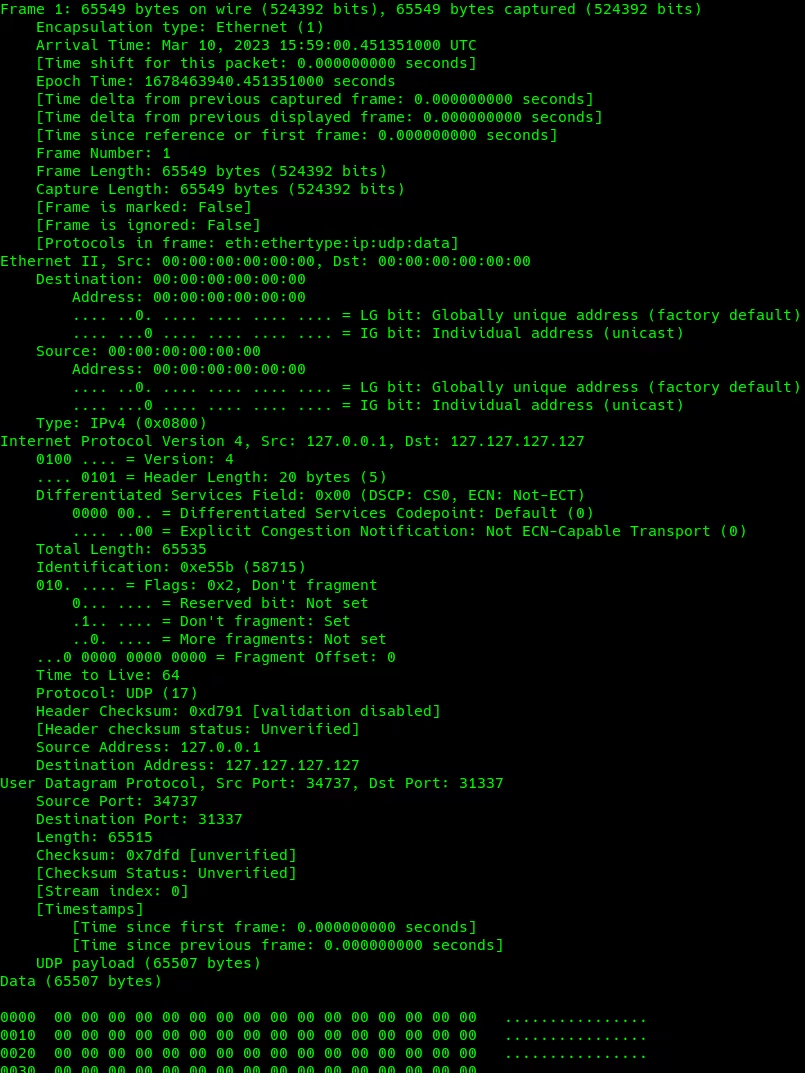
Taking into consideration that there can be 10,000 bots in an attack, a UDP flood may reach a peak of over 3.3 Tbps, making it a powerful attack. There is a difference between the HTTP attack command and the UDP attack command.
In both cases, 512 workers are created for a worker pool and assigned a fixed duration for a defined period to send data packets to all predefined targets.
There is a range of 484 to 589 bytes in the size of an HTTP packet. A large number of null bytes are included in the UDP packets generated by HinataBot, which can overwhelm the target with a significant amount of traffic.
The two methods utilize different approaches to achieve the same result; HTTP floods generate heavy traffic to the website, whereas UDP floods send garbage to the target.
It generated 20,430 requests for a total size of 3.4MB for the HTTP attack, Akamai benchmarked the botnet in 10-second attacks for HTTP and UDP. The UDP flood generated a total of 421 MB of data, about 6,733 packages.
There is still room for improvement in HinataBot Botnet, and it is likely to implement additional exploits and expand its targeting capabilities at any time.
Huawei is no stranger to releasing interesting devices. I have to admit, the first time I’ve seen this smartwatch, I was quite skeptical. Since the moment I laid my hands (and eyes) on it, however, I was very intrigued. The Huawei Watch Buds is actually a really compelling product, as you’ll find out in our full review. This smartwatch has been replacing both my regular smartwatch and my earbuds for a while now. Quite frankly, I have a lot to say about it.
Spoiler alert! The Huawei Watch Buds is actually a better smartwatch than I expected. In fact, it’s a better smartwatch-earbuds combo than I expected. As with every product, there are drawbacks here as well. Many of them became apparent not long after I started using it, actually. In any case, let’s get this party on the road, there’s a lot of ground to cover.
Table of contents
Huawei Watch Buds Review: Hardware / Design
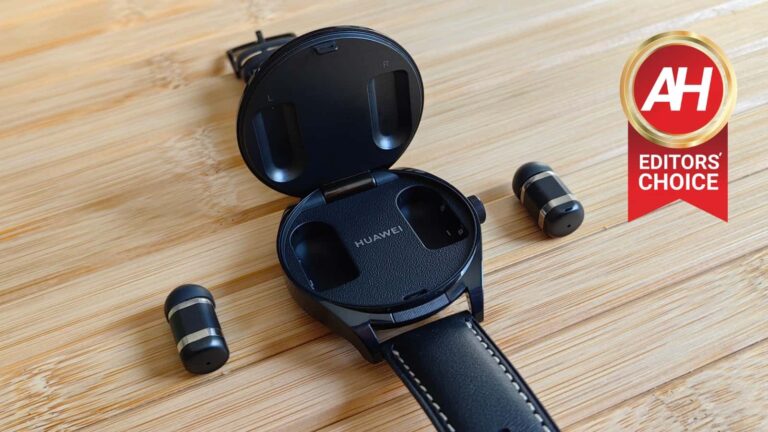
The Huawei Watch Buds smartwatch is made out of stainless steel. The watch feels quite sturdy, and that goes for the door at the top, through which you can access the earbuds. Confused? Well, this smartwatch packs a pair of tiny truly wireless earbuds on the inside, and you can access them at any point. The watch itself acts as a charger for those earbuds too, so they’ll always be ready to go. Accessing them is rather easy. There is a physical button below the display, between the display and the watch band. You need to press it, and the trunk will pop pop open. Once you raise it, you’ll find the earbuds magnetized on the top side of the trunk.
The magnets are strong enough, just the right amount
Getting those earbuds out of the case was easy, and the same goes for placing them back in. Huawei was smart when designing these, as they have flattish sides all around, so they’re easy to grip. The magnets are also quite strong, but not too strong. In other words, they won’t prevent you from easily accessing these earbuds. There is also a pleasant click when you close the lid, which is much appreciated. The whole system feels quite sturdy, and quite frankly, I loved using it. The button is also noticeable, but at the same time a part of the frame, and semi-hidden, so that it doesn’t poke you in the eye at all times.
The side button is clicky, but poorly placed
You’ll notice there is a button on the right side of the watch, a single button. Huawei watches usually have two of them, and one also doubles as a rotating crown. Well, that’s not the case here This is just a button, which is a shame. That button is very clicky, and sturdy, but I had issues with it when working out. That is the case with every smartwatch that has a button at a 90-degree angle. I much prefer them when they’re moved up a bit, so that I don’t press them by accident. I was pressing it all the time while doing my triceps, stretching out, and doing some other exercises. The placement is not ideal. If you’re not one to do those types of workouts, where your hand bends in such a fashion, you’ll be good.
It’s thicker than its siblings, of course
Now, this smartwatch is thicker than other Huawei watches released recently, but it’s not that much thicker. Add this trunk on top of the Huawei Watch GT Runner, for example, and you’ll get the overall thickness. In other words, the watch is 14.99mm thick, while the Watch GT Runner is 11mm thick. That is one of the thinner watches I’ve used in the last year or so, so there you go. One would assume the Watch Buds will be a lot thicker, but it’s not, not really. It doesn’t really feel like it’s out of place on the hand, not at all.
It’s also quite bulky
What I did notice is the weight. This thing weighs 66.5 grams without the strap, while the Watch GT Runner weighs 38.5 grams. I’m comparing the two as I used the Runner right before I started using this one, so it’s a point of reference for me. That is the weight addition you’ll notice, but I got used to it quickly. The Watch GT Runner is unusually light, so… yeah, the weight is not bad at all, actually, especially if you’re used to wearing larger smartwatches. All in all, I’m very impressed with the design and the execution here, you cannot not admire Huawei for this.
The earbuds are tiny, but feel great
What about the earbuds themselves? Well, they have flattish sides, and are very tiny. They measure 21.8 x 10.3 x 10.3mm, and weigh only 4 grams with a default (M) ear tip. Speaking of which, both S and L ear tips are included in the retail box. The earbuds actually fit in my ears really nicely with the medium tip, but changing them is a piece of cake. I actually love the way Huawei designed these. Once you place them in your ear, they don’t exactly stand out in any way, unlike basically every other pair of truly wireless earbuds.
The earbuds are IP54 rated, while the watch is not
Some of you are probably wondering if the Huawei Watch Buds smartwatch is waterproof, or at least water resistant. Considering that it has a lid on top, it would be understandable if Huawei omitted that feature. You’ll be glad to know that the earbuds are IP54 rated, while the watch itself doesn’t have a rating, but Huawei says that the watch is “is splash-, dust-, and water-resistant under normal conditions but isn’t a pro-level water-resistant device”. The company also emphasized that the resistance to water and dust may deteriorate with usage, of course. It would be best if you don’t get the watch wet, basically. Don’t go swimming with it, that’s for sure. I didn’t try getting it wet in any way, shape, or form. I did get stuck in the rain with the earbuds, and everything was fine.
There are two color options to choose from
The Huawei Watch Buds smartwatch comes in two colors, Black and Khaki. The Black model has a black stainless steel frame, and a black leather strap. The Khaki model has a silver stainless steel frame, and a brown leather strap. The quick switch mechanism is included on these straps, by the way, and the watch is quite comfortable to wear, actually.
Huawei Watch Buds Review: Display
Huawei has been doing a great job with displays on its watches for quite some time now. This one is no different. It utilizes a 1.43-inch AMOLED panel which offers a resolution of 466 x 466 (326 ppi). This panel has been used on a number of other Huawei smartwatches, and it’s plain excellent. It’s sharp, vivid, and offers a great touch response. Huawei also did a good job optimizing the software for interaction from a user, so… the experience is pretty much the same as I got on the company’s flagship watches.
If you tend to bump into things, that could be an issue
Thanks to the trunk on top of the watch, on top of which is this display, the display is raised more than on other watches, and that could be a problem for you. Chances are you’ll find it easier to bump this display by accident. Also, there’s virtually no protection around it, as that part is raised above the frame, so… you’ll have to be careful when handling this watch, that’s for sure.
Huawei Watch Buds Review: Smartwatch performance
Huawei listed specs for this watch a long time ago, but it never mentioned the SoC, RAM, or storage. It is, probably using the same Kirin SoC as some of its siblings. The point is, the performance is excellent. The watch was fluid at all times for me, regardless of what I was doing, or how fast I was going through the menus. That part is also identical to Huawei’s flagship smartwatches, the Huawei GT 3 and GT 3 Pro. I don’t have a single complaint when it comes to performance. Well, regarding the fluidity of the performance, as we’ll talk about the software in a different section. The point is, the watch was fluid, with basically no hiccups, while the lag was non-existent.
Huawei Watch Buds Review: Earbuds performance
This was the area I was most skeptical about going into this review. It turns out, I should not have been. Huawei has made something truly impressive here. These earbuds are tiny. Based on their size, I wasn’t really expecting much audio-wise. Still, they delivered. No, the sound is not as good as what you get with the Huawei FreeBuds Pro 2. Those are Huawei’s flagship truly wireless earbuds, and they’re in a class of their own. Huawei had only so much space for the driver and everything needed here, so fitting a 14mm driver was not possible.
These earbuds are much better than you think
That being said, the sound you get here is actually really good. I have recently used the Nothing Ear (1), and these have them beat, plain and simple. Yes, these tiny things offer a punchier output in comparison. The sound is not as crisp as what the FreeBuds Pro 2 have to offer, nor as loud, but if you haven’t used a high-end pair of truly wireless earbuds, you’ll definitely be surprised here. The sound is also well-balanced across the spectrum.
Noise canceling is included, despite their size
These earbuds even offer noise canceling, believe it or not. Considering their shape, and how snuggly they fit inside your ear, they’re actually quite good at isolating sound even without noise canceling, though having that option is quite useful. What I missed here was the awareness mode. I understand Huawei couldn’t offer every single feature here, so I understand the omission, but if you’re used to it, you’ll miss it. They are so good at isolating sound that it’s kind of difficult to talk to people if they’re in your ears, even if you’re not playing anything at the moment.
The touch gestures are different, but they work great
There are touch gestures included here, but not the way you think. These earbuds don’t exactly have touch panels on them. Huawei opted for something different, probably to save space, and it works! Huawei refers to these controls as “wide-area auricle touch controls”. You can basically tap the earbuds themselves, auricles, or the area in front of the ears, it’s up to you. I usually tapped the earbuds, but tried all three, and it works very well actually. There are double tap and triple tap controls, set to play/pause and noise cancelling on/off, respectively. You can customize this via the Huawei Health app, though.
Huawei Watch Buds Review: Battery
The Huawei Watch Buds smartwatch includes a 410mAh battery on the inside. That battery is, of course, supposed to keep the watch charged, and also recharge the earbuds. Is it enough, though? Well, Huawei smartwatches usually have excellent battery life, but considering that the earbuds are included in the package here, it will depend a lot on your usage. To put things into perspective, I was using the earbuds a couple of hours every day, and was able to squeeze out 2-3 days worth of battery life. During more frequent usage, I got like two days. If you don’t use them at all, I bet this watch can go on for a week without a charge. If you disable some health features, such as constant heart rate tracking, and so on, you can probably squeeze out a bit more.
A wireless charging puck is included
This smartwatch comes with a charging puck, which is attached to a USB-A charging cable. It’s basically the same as the chargers on a number of other Huawei watches. It does a good job. The watch magnetizes itself to this charger, and that’s basically it. The charging is not blazing fast, but considering you won’t have to charge it all the time, it’s not bad either. It’ll take you a little bit over an hour to get this thing fully charged.
Huawei Watch Buds Review: Software
This smartwatch comes with HarmonyOS out of the box. I had several updates ready to go when I connected the watch to my smartphone, and ultimately ended up with HarmonyOS 3.0 on the watch. If you’ve used any other modern Huawei smartwatch, you know exactly what to expect here. To me, personally, HarmonyOS is the no.1 smartwatch OS. I’m aware that it’s not exactly a popular choice for many of you, but I really like it. It does everything I need, with great fluidity. Huawei improved this OS a lot over the last couple of years, though there’s still room for improvement.
HarmonyOS is more or less the same as on other Huawei watches
Do note that dismissing notifications on the watch won’t dismiss them on your phone. That’s just how this watch works, and I do appreciate that, actually. My notifications mostly consist out of messages and emails these days, and I never respond to those on my watch. So it’s nice that I can remove them from the watch, and still have them waiting for me in the notification tray on my phone. Not everyone would agree, though. You do have a number of slots for widgets on this watch, and the default media player is one of my favorites. The Huawei Health app has been serving me well for a long time across a number of other watches, and the same is the case here. It’s a bit of a pain you can’t get it from the Play Store (at least not a modern version), but once you get it installed, it does the job.
Some features are missing, but the overall experience is great
I didn’t experience any bugs in the software, as I did years ago on Huawei watches. As I said, HarmonyOS 3.0 is leaps and bounds from earlier versions I’ve used. It works great, and is a great alternative to Wear OS and Apple’s OS for wearables. I would love to see the ability to respond to messages via an actual keyboard though, and interactive layers on the watch faces themselves. Those are just two improvements that come to mind, and I do hope we’ll see them in the future. Also, don’t count on many third-party apps to be available for this OS. So, if that’s something you’re counting on, you should look elsewhere. I, personally, have never seen the need to install apps on my smartwatches, based on my usage. On top of everything, you probably won’t be able to make payments with this watch, as the ‘Wallet’ option is not supported in many countries.
Huawei Watch Buds Review: Health/Fitness
This smartwatch is packed with health features. It can track your steps, your heart rate, and SPO2 bloody oxygen as well. Menstrual cycle tracking is included, while the watch does come with GPS support. It can track a ton of different fitness activities, and some of them it even recognizes on its own. I didn’t encounter any issues with the step counter, though I did spot issues with it on some other watches, so keep that in mind. Other than that, everything worked well.
Workout tracking seems to work fine
I tested several workout options, such as indoor running, indoor walking, jump rope, and a bit of biking. Everything seemed to work fine, though I cannot be sure how accurate it is, of course. I can say that it tracked my distance while running somewhat reliably, at least, as I was able to compare that with what the treadmill showed me. Heart rate tracking also did a good job, as far as I can tell. Never expect smartwatch tracking to be 100% accurate, though, on any watch. As long as you make your peace with that, you’re good to go.
Huawei Watch Buds Review: Should you buy it?
So, should you buy the Huawei Watch Buds? Well, that’s a tough question, to be quite honest, mainly due to its price tag. The Huawei Watch Buds is priced at £449.99 in the UK, so it’ll be close to €500 in Europe. Needless to say, that’s quite steep. Still, this smartwatch is… well, unique. Also, you’re getting two products in one here. That is definitely something you should keep in mind. I’ve talked to some tech reviewers who have decided to be too harsh on this thing because of some of its shortcomings, which are almost impossible to avoid. I understand that side of things, but I did choose to appreciate the novelty behind the product, and the fact Huawei did a great job bringing it to life. Implementing a truly capable pair of earbuds inside a watch, while keeping the watch from being too thick is not an easy task. If you take into consideration that everything feels premium too, well, Huawei did a great job. Yes, there are downsides here, for sure, but this is a hybrid product that essentially gives you two products in one. If you can live with its shortcomings, you’ll be getting something truly unique, and that may be worth it. It all depends on what you want/need. One thing is for sure, this is a unique product, and I’m glad Huawei came up with it.
You should buy the Huawei Watch Buds if:
You appreciate innovation
You don’t want to carry a pair of truly wireless earbuds around
You would like to support Huawei’s design prowess
You don’t mind this smartwatch is a bit thicker than most others
You appreciate bulkier watches
You want a pair of truly tiny earbuds
You appreciate truly nice displays on smartwatches
You shouldn’t buy the Huawei Watch Buds if:
You use a smartwatch while swimming
You’re working out in a specific way (power button placement)
It’s no secret that Ryan Reynolds is one of the most successful actors of all time, starring in blockbuster hits like Deadpool. However, it’s not just his acting prowess that has propelled him to immense wealth and fame as Ryan Reynolds is also a shrewd investor, with stakes in several successful businesses, including Mint mobile, which T-Mobile recently acquired for an astounding $1.35 billion. And based on Ryan’s 25% stake, this deal would potentially earn him a payout of over $300 million.
“I never dreamt I’d own a wireless company, and I certainly never dreamt I’d sell it to T-Mobile. Life is strange, and I’m incredibly proud and grateful,” said Reynolds.
Mint’s success can be attributed to the company’s customer-centric approach, offering flexible and affordable data plans that users could customize according to their needs. The company’s direct-to-consumer model helped to keep overhead costs low, while its transparent pricing helped establish Mint Mobile as a reliable and trustworthy brand.
Ryan’s involvement with Mint Mobile also played a significant role in its success. His creative ads and marketing efforts, infused with his unique wit and humor, helped Mint Mobile stand out in a crowded and highly competitive market.
“Mint wasn’t an obvious next step after Aviation Gin. Low-cost wireless isn’t glamorous. Yet, in the 3+ years, Mint Mobile grew exponentially,” Reynolds tweeted on Wednesday.
Ryan’s investments paying off.
While Ryan Reynolds earned approximately $70 million in 2020 from his film and entertainment ventures, his investments like Mint have proven to be even more profitable. Combined, his stakes in Aviation Gin and Mint Mobile could potentially bring him a payout of almost $1 billion.
Reynolds has also expanded his investment portfolio with the purchase of Wrexham AFC, a Welsh soccer team, for roughly $2.5 million. Additionally, he owns a content company, Maximum Effort, that produces movies, TV shows, content, ads, and even cocktails.
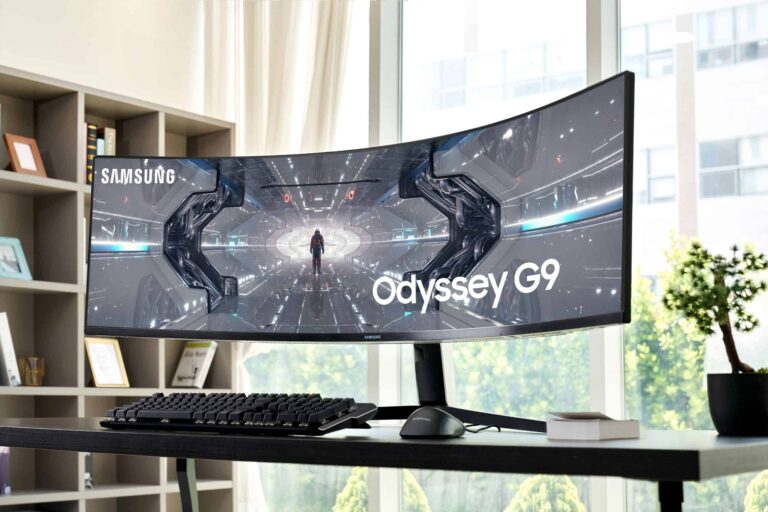
If you ask any PC gamer what monitor they want, but can’t afford, it’s most likely the Samsung Odyssey G9. This monitor is insane, and it’s actually on sale right now.
It’s not often that the Samsung Odyssey G9 goes on sale, so seeing it at $999 is a pretty big deal. That’s going to save you $500 off of its regular price, and nearly $900 off of its original price. That is also the lowest we’ve ever seen this particular model.
So why is this monitor so expensive? Well, for one, it’s a 32:9 ultrawide monitor. That’s basically like having two 27-inch monitors, but without a bezel in the middle, and only needing one port.
It’s also curved, and matches the curve of the human eye. That makes it easier to use, since a 49-inch ultrawide monitor is very long, and would cause quite a bit of eye strain to see the whole thing.
This particular version of the Odyssey G9 is a QLED 240Hz monitor. Which is another big reason why any gamer would love this monitor. There are not many 240Hz monitors out there, and even fewer that are QLED. With QLED, you’re going to see the deepest blacks, and even more vivid colors. This is because a regular LCD needs a backlight behind the display, which results in the blacks being more of a gray. Whereas QLED lights up each pixel individually.
For gaming, there is also support for G-Sync and FreeSync. Meaning that Odyssey G9 will match every single frame from your graphics card, so you’re never behind. So when you lose, you can’t blame your monitor anymore. On top of that, there is also lightning fast 1ms response time here.
You can pick up the Samsung Odyssey G9 49-inch ultrawide monitor from Amazon today by clicking here. This is the advertised Black Friday price, so you likely won’t see this getting any cheaper.
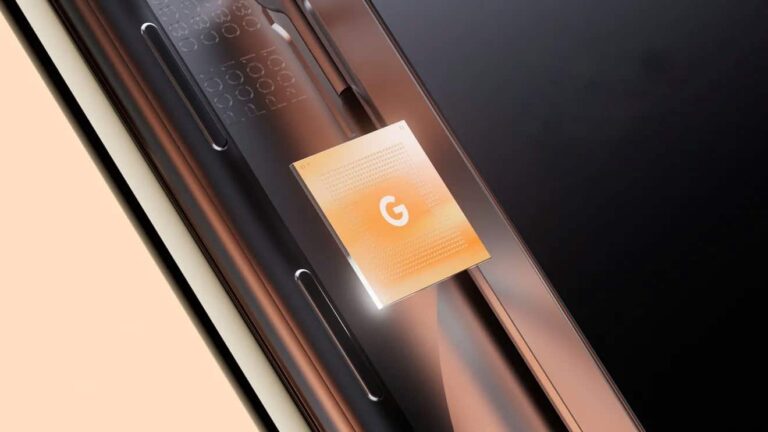
Samsung‘s Exynos 2300 processor may be dead, but its spirit will seemingly live on inside the next-gen Tensor chip for Pixel smartphones. That’s because the company reportedly hasn’t stopped the development of the Exynos 2300. It will likely serve as the base for the Tensor 3 processor powering the Pixel 8 series.
The Pixel 8’s Tensor chip could be a modified Exynos 2300
Google started using custom Tensor chips inside Pixel smartphones in 2021. The first-gen Tensor chip for the Pixel 6 series was based on a modified version of the Exynos 2100, which powered Samsung’s Galaxy S21 series in some markets. Last year’s Tensor 2 for the Pixel 7 was a modified Exynos 2200, which you will find inside the Galaxy S22 as well. Going by this trend, the Tensor 3 for the Pixel 8 should be a modified Exynos 2300.
However, the Exynos 2300 doesn’t exist. Samsung went all-in with Qualcomm processors for the Galaxy S23 series this year. The latest Galaxy flagships ship with an overclocked version of the Snapdragon 8 Gen 2 globally. But, despite that, the company’s semiconductor division was said to be developing a new flagship Exynos processor codenamed Quadra. While the chipset may not ever see the light of day, it appears the Korean firm will mold the Tensor 3 around it.
According to an IT Home report, the Exynos 2300 will feature one Cortex-X3 prime CPU core operating at a maximum frequency of 3.09 GHz. For less-taxing tasks, the chipset will use four Cortex-A715 cores clocked at 2.65 GHz and four Cortex-A510 cores clocked at 2.1 GHz.
For graphics, Samsung will integrate its semi-custom Xclipse 930 GPU based on AMD’s RDNA2 architecture. It could boast an operating frequency of up to 1.4GHz.
That’s all we know about the Exynos 2300 at the moment. Google will work with Samsung to optimize its version of the chipset (Tensor 3) for Pixel smartphones from the development and design stage. The Korean firm’s mobile division, on the other hand, doesn’t plan to use flagship Exynos processors anymore. It is looking to develop its own custom processors in a couple of years from now.
Google has multiple products lined up for launch soon
Google launched the Pixel 7 series in October last year. It will likely introduce the Pixel 8 around the same time this year. Ahead of that, the company is expected to unveil the Pixel 7a, Pixel Fold, and Pixel Tablet.
These devices will likely arrive during the Google I/O 2023 developer conference in May featuring the Tensor 2 from last year. We will keep you updated with the latest information about all of these upcoming Google products.
After rolling out the feature to its subscribers, NordVPN has now announced expanding Meshnet accessibility for all users for free. Anyone can use Meshnet at no cost without necessarily subscribing to the VPN service.
NordVPN Meshnet Available For All Users For Free
The popular VPN and security giant NordVPN has announced releasing the Meshnet feature for all internet users globally.
NordVPN first introduced Meshnet as a dedicated privacy feature for its subscribers allowing them to create their own private network. With Meshnet, users could choose the devices to route the traffic accordingly, regardless of their physical location. This feature ensures secure connections for various user groups, such as remote employees within an organization, a family or friends’ group, a team of gamers, and more, without geographical restrictions.
As elaborated in its post, NordVPN decided to publicly release this feature to help those users who want a VPN but cannot afford to buy a premium one. Also, Meshnet empowers users to create their own private network comprising of trusted devices and IP addresses. That means as they exemplified, someone on a holiday abroad can use their home computer through Meshnet to access geo-restricted services.
As for the free-of-cost availability of Meshnet, NordVPN explained that opening up this feature to all didn’t require them to invest more. Nor does it require extensive maintenance and infrastructure. Besides, releasing this cost-effective privacy feature for all also meets their prime goal of helping users with internet privacy.
Using Meshnet is simple; users merely have to download the NordVPN app on their devices and enable the “Meshnet” feature. Then, whatever devices have Meshnet enabled, users can connect them to use the IPs from those devices, share files securely, execute different activities without interruption, and access geo-restricted services.
Notably, the Meshnet feature is available for all major operating systems: Windows, macOS, Linux, iOS, and Android.