Apple is set to open its flagship retail store in Mumbai, India, next month, following several delays.
The store will be located in the Jio World Drive mall, spanning over 22,000 square feet, and is expected to be a retail landmark similar to Apple’s stores in other major cities around the world, including Los Angeles, New York, Beijing, Milan, and Singapore. This will be the first time customers in India will be able to purchase Apple products directly from the company and not through authorized resellers.
According to sources cited by The Economic Times, the smaller Apple store in New Delhi’s Select CityWalk mall is also expected to open between April and June. According to the report, the Delhi store is ~12,000 square feet and has been completed ahead of the Mumbai store. However, as Mumbai is the flagship Apple Store in India, it will open first, followed shortly after by the Delhi store.
India has become an important market for Apple over the last few years. It has been one of the best-performing markets for the company, achieving record overall sales in the country in the quarter that ended in December. The company has also been investing in the country to boost production capabilities, with AirPods and iPad all expected to be manufactured in India soon.
The opening of the first Apple retail store in India has faced numerous delays over the years. Nonetheless, the store is finally set to open soon. Apple executives, including retail chief Deirdre O’Brien, are expected to attend the store’s opening, with speculation of Tim Cook also making an appearance.
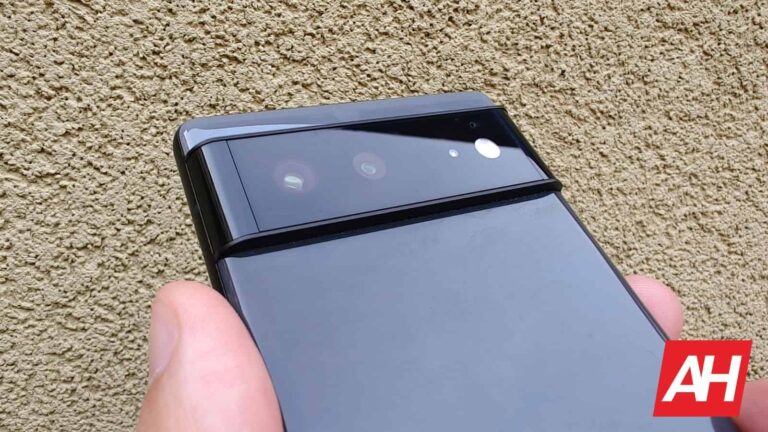
As some of you may recall, a faster Night Sight for the Pixel 6 was announced as part of this month’s Pixel Feature Drop. Well, that has not become a reality for the Pixel 6 and 6 Pro, as the Google Camera 8.8 delivers faster Night Sight performance.
Google Camera 8.8 arrives to deliver faster Night Sight to the Pixel 6 & 6 Pro
This was first introduced for the Pixel 7 and Pixel 7 Pro, when Google said that Night Sight photos will have “less motion blur since exposures can be half as long as before”. Back then, Google said that the “updates to HDR+ with Bracketing and new ML techniques to reduce noise” are to thank for this.
Is there a visible difference in the Google Camera app now, on the Pixel 6 and 6 Pro? Well, yes. When you switch to the Night Sight tab in the Google Camera 8.8, you’ll notice a circle in the b bottom-right corner.
You’ll notice two new options in the camera app
If you tap that circle, you’ll be able to select 2 seconds or Max options. The ‘Max’ option goes up to 6 seconds. So, all in all, depending on how dark it is, it may take between 2 and 6 seconds for the phone to take the photo.
So, what you’re actually getting here is the option to decide whether you want to take the picture faster, or take advantage of a longer exposure time which will, hopefully, improve image quality as a whole.
9to5Google does state that this update still didn’t start rolling out to the Pixel 6 and 6 Pro. Well, by the time you see this, it may have started, but don’t be surprised if it did not. You can still sideload it, if you want.
Needless to say, this is a worthy addition by Google. It’s always nice to see faster camera performance, and the fact you can choose on your own is also a nice touch.
Ever since their launch, text-to-image generative AIs like DALL-E and Stable Diffusion have sparked a debate about the eligibility of AI-generated images for copyright protection. Now, the US Copyright Office (USCO) has issued new guidance on the matter, providing much-needed clarity on the copyrightability of such works.
According to the USCO, AI-generated images will not be eligible for copyright protection. This is because, in these images, the AI determines how it implements the instructions, while the human user only identifies what the prompter wishes to have depicted. In other words, the technology executes the traditional elements of authorship, not the human user.
While some would argue that there is a level of human creativity involved, the USCO argues that users do not exercise ultimate creative control over how such systems interpret prompts and generate material. Copyright can only protect material that is the product of human creativity.
UNCO’s evaluation
The USCO’s evaluation of whether AI-generated works contain elements of human creativity depends on whether the model’s contributions are the result of “mechanical reproduction” or the author’s “own mental conception. Thus, works that lack human authorship will not be eligible for copyright protection. However, the UNCO did also acknowledge that they will consider granting copyright protection to AI-generated elements depending on the circumstances surrounding the artist’s use of the AI in the final work.
The USCO’s decision follows an initiative prompted by Congress to explore copyright law and policy issues related to AI. The USCO plans to host panel discussions on the topics later this year, as it intends to hear public comments on a range of copyright issues relating to the use of AI.
“The Office recognizes that AI-generated works implicate other copyright issues not addressed in this statement. It has launched an agency-wide initiative to delve into a wide range of these issues. Among other things, the Office intends to publish a notice of inquiry later this year seeking public input on additional legal and policy topics, including how the law should apply to the use of copyrighted works in AI training and the resulting treatment of outputs,” says the UNCO.
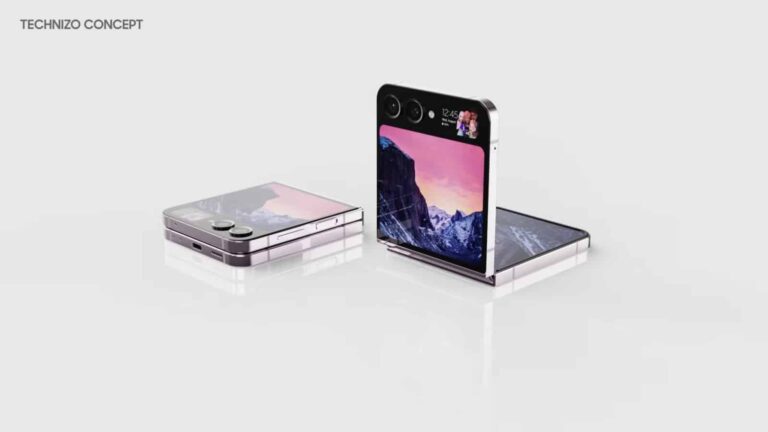
As we’re waiting for more Samsung Galaxy Z Flip 5 info to leak out, a concept design has appeared. This particular design comes from Technizo Concept (in collaboration with SuperRoader), and the phone actually has three displays.
This Galaxy Z Flip 5 concept features three displays
Technizo Concept shared some renders via its Twitter handle, while the video has been published on YouTube as well. You can check both of those out below the article.
You will notice one large, foldable display on the inside, and two on the outside. That main display has a centered display camera hole, and extremely thin bezels. The real phone’s bezels will probably be a bit thicker.
One rather large cover display is included on the back, which takes most of the phone’s top half. Next to the cameras, however, a separate display is included, the second cover display, if you will. That second display is really tiny.
This is an interesting approach, and the first such design we’ve seen thus far. That second display is probably meant to be on at all times. It shows the time, date, and battery level here, plus an image.
The phone has flat sides and gapless design when folded
There are two cameras on the back of the device, and an LED flash right next to them. All the physical buttons sit on the right-hand side of the phone. The power/lock button doubles as a fingerprint scanner. The device does have flat sides with chamfered edges.
This concept phone has a gapless design when folded. The real Galaxy Z Flip 5 is expected to deliver the same, finally. The Galaxy Z Flip 4 did not deliver it, it still has a gap when folded.
The Galaxy Z Flip 5 is expected to arrive in August, alongside the Galaxy Z Fold 5. There’s still plenty of time until August comes around, but the rumors have started a long time ago. We’ll probably see a ton of them as we get closer to launch, the same goes for leaks.
Nowadays, every development surrounding Musk’s takeover of Twitter feels like a brand new installment of a drama series. One of those shows where you don’t really vibe with it, yet you can’t really turn away when it is on.
Given the established track record of Neo-Twitter, it isn’t any wonder? Every announcement is a major change provoked by a decision to remove negativity, which — naturally — breeds negativity and brings controversy. But hey, that’s exactly the formula required for a good show!
In this latest episode, Elon Musk has introduces a brand new way through which replies on Twitter will work. While some may see this change as yet another way to incentivize Twitter Blue, Musk defends the change through describing it as a mechanism to combat bots and scammers.
In the coming weeks, Twitter will prioritize replies by:
1. People you follow 2. Verified accounts 3. Unverified accounts
Verified accounts are 1000X harder to game by bot & troll armies.
There is great wisdom to the old saying: “You get what you pay for.”
In all honesty, that sounds like a reasonable motivator for bringing some changes. Twitter as a platform is notorious for targeted spam from bots or real-life scammers. This not only posed a danger to users, but was also annoying spam that everyone had to deal with. So what’s the plan? As per Musk’s own TL;DR on the topic, users will first see replies from those that they follow, then from those that are verified — as in, paying for Twitter Blue — and then from everyone else.
Musk isn’t straying from the obvious here, as his own Tweet ended with “You get what you pay for”. While being self-aware is a core-reason for him being such a popular figure, it won’t save him or his projects from the imminent backlash, as some users are bound to see this as a form of gatekeeping.
Surprisingly, thus far, it’s been quiet on the front. But, as we’ve established, this is a drama series, so you never know when you are in for a shocking twist. And if any major streaming platform is looking to pick-up on our idea to create a TV show about these events, we expect to be credited.
WhatsApp is preparing a fix for the biggest issue with its polling feature. It will finally limit users to selecting just one option in polls. As things stand, you can select multiple or all available options. The change should arrive with an update for the Meta-owned messaging app in the coming weeks. The existing ability to select multiple options will not go away, though. Poll creators will be able to define whether to restrict respondents to just one option or all.
Polls in WhatsApp will get better soon
WhatsApp added a polling feature to its messaging app last year. Following a few months of beta testing, the feature rolled out widely to everyone in November. It lets you create polls in one-on-one conversations as well as groups, though they are particularly useful in groups. Not everyone may use the feature but many find it helpful in various situations. Brands can even run surveys using polls, with the app allowing up to 12 choices.
However, WhatsApp polls came with a caveat — users can select every option there is to select. Perhaps the company overlooked it or just didn’t bother baking the feature fully before rolling it out to the public. This defeated the purpose in many cases. Instead of selecting one correct option, respondents selected all. Unsurprisingly, WhatsApp was flooded with requests to limit polls to just one option. The company has finally listened.
The folks over at WABetaInfo spotted that the latest beta version of the app adds a toggle to limit polls to only one choice. The toggle appears below the answer options when creating polls. When enabled, respondents will be able to select only one correct option. If you want to keep multiple choices open, you can simply disable the toggle before publishing the poll. It’s a simple but effective feature that makes WhatsApp polls a lot better.
An upcoming update for WhatsApp will bring this change
The ability to restrict WhatsApp polls to just one correct option is currently in development. The feature is available for beta users on Android with version 2.23.6.16 of the app. A public rollout should follow in the coming weeks once the company ensures that the new toggle is stable and ready for prime time. Watch out for an update for WhatsApp on your Android device. You can also click the button below to download the latest version of the app from the Google Play Store.
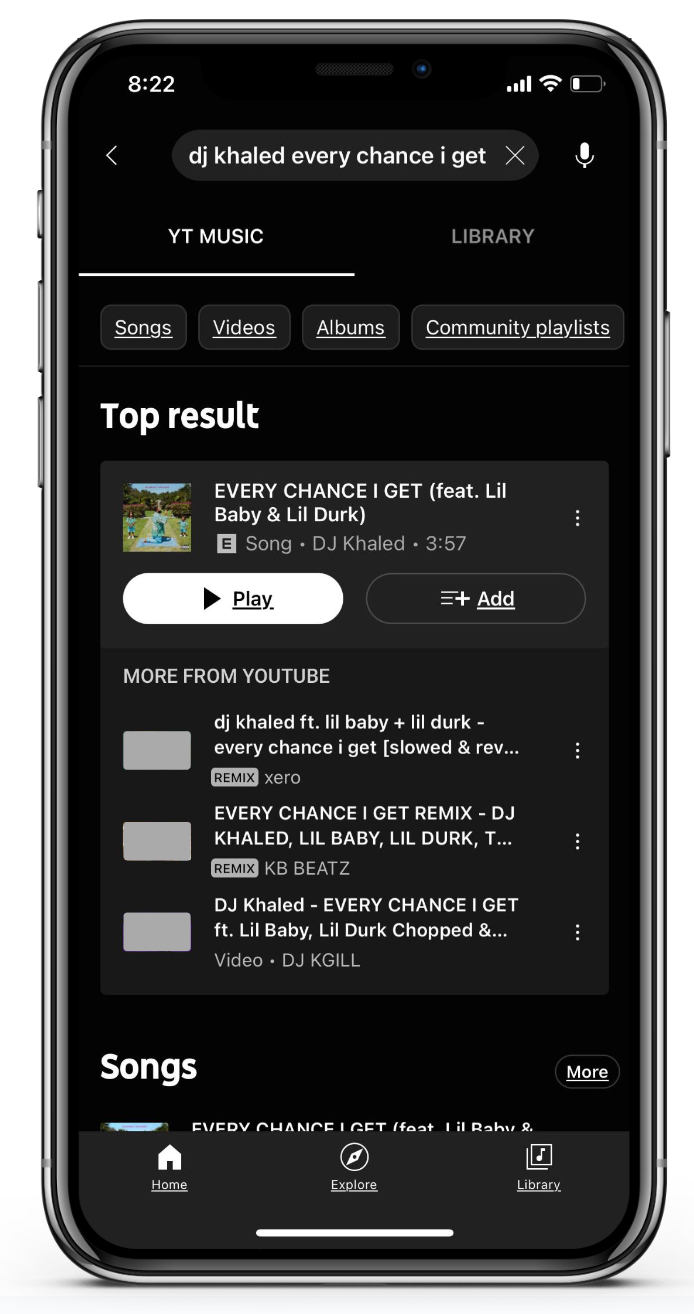
Doesn’t it drive you crazy when you’re out of data or roaming the wilderness with a poor connection and your iPhone suddenly begins to skip your favorite music? With its most recent feature drop, YouTube Music introduces one cool feature that will keep your favorite music playing wherever you go.
The company announced a bunch of new features in a blog post, and Smart Downloads is one of them.
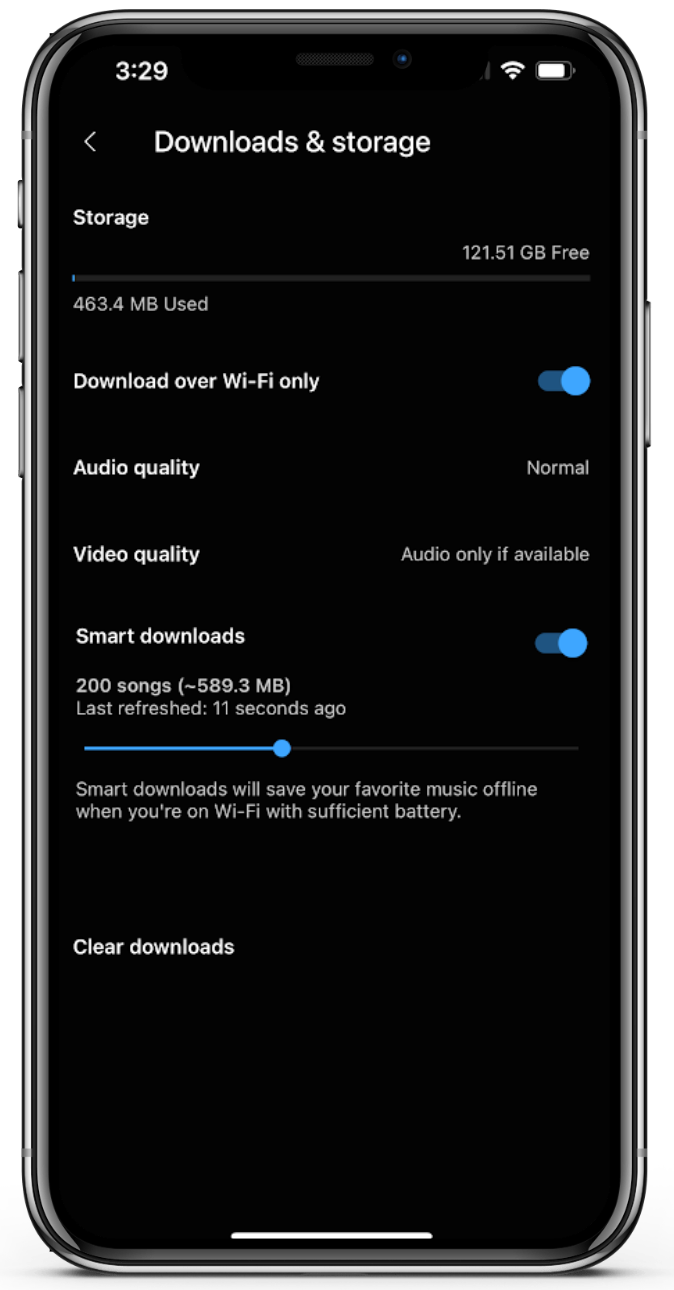
“If you opt-in for smart downloads, the YouTube Music app will automatically download up to 500 songs that you’ll be able to listen to anywhere — whether or not you’ve got a data connection. “
The feature was already available on Android, but this is the first time it has been made available on iOS. To enable “Smart Downloads,” just go to Settings > Downloads > toggle ‘Smart Downloads. Of course, you need to be a YouTube Music Premium subscriber in order to use the new feature.
There are other minor polishing touches here and there, announced in the same post. Music Video Mixes, for example, will now show you more diverse results, and there are also new Live, Cover & Remix labels under Other Performances in the Related Tab.
Another change concerns the radio page: “If you use an iOS device to listen to music, you’ll see a redesigned radio page which changes key social & engagement action buttons. You’ll notice how the download, add to queue, play, share and three dot menu buttons can now be found under the radio cover art, making it easy for you to carry out actions.”
All the above changes were introduced for the first time back in January, but they’re now starting to roll out to the general public.
As a result of a recent data breach, the NBA notified all its fans about the fact that a significant amount of personal information was compromised.
While using the information gathered, phishing attacks can be conducted by the threat actors on the individuals who have been affected. A third-party newsletter service was said to be holding the personal information exposed in the leak.
In addition to managing five professional sports leagues, the NBA also manages a media organization. And here below, we have listed those five sports leagues:-
NBA
WNBA
Basketball Africa League
NBA G League
NBA 2K League
In over 215 countries and territories worldwide, with over 50 languages spoken, NBA programming and games are broadcast worldwide.
NBA Cyber Incident
A number of fans have been notified of the cyber security incident through an email sent out with the tag “Notice of Cybersecurity Incident.”
According to the NBA, neither its systems nor the credentials of the fans affected by the incident were compromised. But, some theft of the personal information belonged to some fans.
Further, the association reported that the names and email addresses were accessed and copied by an unauthorized third party. But, in this instance, sensitive information, such as usernames and passwords, was not exposed.
Apart from this, a third-party provider and an external cybersecurity service are being engaged by the NBA to assist in the investigation of the issue to know the extent of the impact and resolve the issue as soon as possible.
NBA warned fans of phishing attacks
NBA warned that phishing attacks and various scams could be targeted at the affected individuals due to the sensitive nature of the data involved, reported Bleeping Computer.
It was strongly recommended to the affected fans that they remain vigilant when they open any suspicious emails that they receive. In the notification emails, the NBA informs fans that it will never send them an email asking for any of this information:-
Other account information
Usernames
Passwords
It is also recommended for fans who have been impacted verify the authenticity of any emails they receive by ensuring that the sender’s email address ends with “@nba.com.”
Check that the embedded links point to a trustworthy website, and don’t open email attachments that they haven’t been expecting to receive.
The malware can target Windows, macOS and Linux devices.
HYAS Institute researcher and cybersecurity expert, Jeff Sims, has developed a new type of ChatGPT-powered malware named Blackmamba, which can bypass Endpoint Detection and Response (EDR) filters.
This should not come as a surprise, as in January of this year, cybersecurity researchers at CyberArk also reported on how ChatGPT could be used to develop polymorphic malware. During their investigation, the researchers were able to create the polymorphic malware by bypassing the content filters in ChatGPT, using an authoritative tone.
As per the HYAS Institute’s report (PDF), the malware can gather sensitive data such as usernames, debit/credit card numbers, passwords, and other confidential data entered by a user into their device.
The ChatGPT-powered Blackmamba keylogger in action (Screenshot credit: Jeff Sims)
Once it captures the data, Blackmamba employs MS Teams webhook to transfer it to the attacker’s Teams channel, where it is “analyzed, sold on the dark web, or used for other nefarious purposes,” according to the report.
Jeff used MS Teams because it enabled him to gain access to an organization’s internal sources. Since it is connected to many other vital tools like Slack, identifying valuable targets may be more manageable.
Jeff created a polymorphic keylogger, powered by the AI-based ChatGPT, that can modify the malware randomly by examining the user’s input, leveraging the chatbot’s language capabilities.
The researcher was able to produce the keylogger in Python 3 and create a unique Python script by running the python exec() function every time the chatbot was summoned. This means that whenever ChatGPT/text-DaVinci-003 is invoked, it writes a unique Python script for the keylogger.
This made the malware polymorphic and undetectable by EDRs. Attackers can use ChatGPT to modify the code to make it more elusive. They can even develop programs that malware/ransomware developers can use to launch attacks.
Researcher’s discussion with ChatGPT
Jeff made the malware shareable and portable by employing auto-py-to-exe, a free, open-source utility. This can convert Python code into .exe files that can operate on various devices, such as macOS, Windows, and Linux systems. Additionally, the malware can be shared within the targeted environment through social engineering or email.
It is clear that as ChatGPT’s machine learning capabilities advance, such threats will continue to emerge and may become more sophisticated and challenging to detect over time. Automated security controls are not infallible, so organizations must remain proactive in developing and implementing their cybersecurity strategies to protect against such threats.
What is Polymorphic malware?
Polymorphic malware is a type of malicious software that changes its code and appearance every time it replicates or infects a new system. This makes it difficult to detect and analyze by traditional signature-based antivirus software because the malware appears different each time it infects a system, even though it performs the same malicious functions.
Polymorphic malware typically achieves its goal by using various obfuscation techniques such as encryption, code modification, and different compression methods. The malware can also mutate in real time by generating new code and unique signatures to evade detection by security software.
The use of polymorphic malware has become more common in recent years as cybercriminals seek new and innovative ways to bypass traditional security measures. The ability to morph and change its code makes it difficult for security researchers to develop effective security measures to prevent attacks, making it a significant threat to organizations and individuals alike.
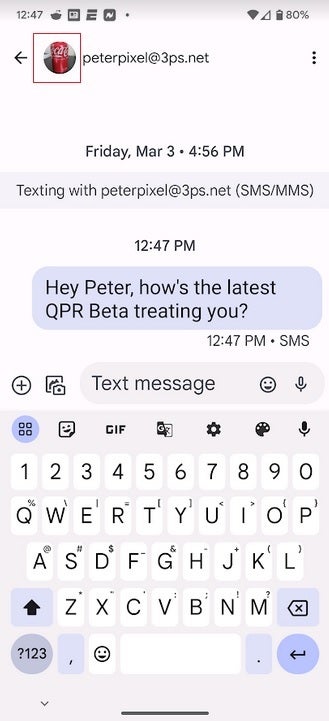
Google loves to add little things to its apps that might not seem like a big deal but end up being useful. The latest update to the Google Messages app adds the profile picture from the Contacts listing of the person you’re messaging to the top of the screen. Tapping on the profile picture will take you to that person’s Contact card. To make room for the avatar, Google removed the search function from the top of the display and deleted the magnifying glass icon. If you need the Search tool, tap on the three-dot overflow menu icon to find it as an option.
To be clear, we are talking about the Google Messages app which includes the Rich Communication Services (RCS) platform. The latter has the exact same features as the highly-touted (by iPhone users) iMessage platform. Both include end-to-end encryption, higher-quality images, read receipts, typing indicators, and more.
Google has tried to get Apple to include RCS as part of a cross-platform messaging app
Now here’s the thing. What do you suppose happens in an RCS group chat when an iPhone user joins it? All of those lovely features go away which is exactly what happens when an Android user joins an iOS group chat. Yet, you never hear about Android users bullying iPhone users to the brink of emotional distress. And Google has been more than willing to allow Apple to add the RCS platform to Apple’s Messages app. However, Apple CEO Tim Cook would probably prefer hearing his sink drip all night rather than allow a cross-platform messaging app to be developed.
Google adds the profile picture of the person you’re messaging on the top of the screen
Also, and this is important for Android users to understand, RCS is available on the Google Messages app. It is NOT available on the messaging apps that your carrier might have pre-installed on your Android phone. For example, if you are using the Verizon Messages app, T-Mobile Messages app, or any other Android messaging app outside of Google Messages, you are not getting the RCS platform.
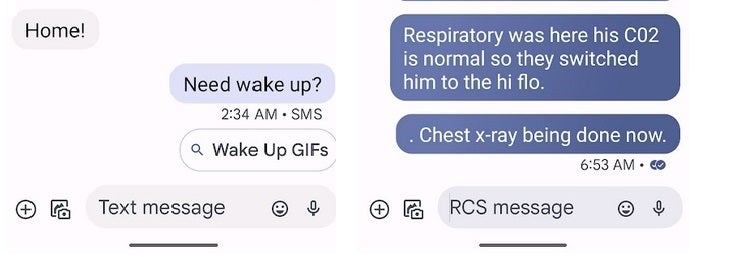
For RCS to work, you and the rest of the chat group must all be using the Google Messages app. You can tell if others you are chatting with are using Google Messages by the color of the text balloon that appears when you send a message. If it is a dark blue, you are engaged in a chat over RCS. Also, look at the text field. If it says Text message, you are about to message an iPhone user or an Android user employing a messaging app that is not Google Messages. Instead of using the RCS platform, such messages use old-school SMS.
RCS to iMessage chat at left, RCS to RCS messaging on the right
If the text field says RCS message, then you are messaging another Android user with the Google Message app and will have all of the RCS features available to you. If you don’t have the Google Messages app on your Android phone, you can install it by tapping on this link.
How to join the Google Messages beta to receive new features before most of the public
The new Google Messages feature that shows the profile picture of the person you are messaging was spotted first by 9to5Google. To see the profile pictures you must be using version version 20230313_01_RC00.phone.openbeta_dynamic of the Google Messages app or later. To see which version you’re running, open the Google Messages app and tap on your profile picture at the right of the search filed at the top of the display. Press on Messages settings and scroll all the way to the bottom.
The very last option reads About, terms & privacy. Tap on it and the Version info will be the first thing listed on the page that you are sent to. If you haven’t seen the profile pictures on your Google Messages app yet, it might be available to Google Messages beta testers at the moment. To join the beta, go tot he Play Store, open it, and type in Google Messages in the search field. Once you see the listing for Google Messages, scroll down and if Google is accepting more beta testers for the app, you will see a button to press to join.
Even if you aren’t a beta tester for the app, you should see the profile pictures appear on an upcoming stable version of Google Messages.