Galaxy S22 & Pixel 7 at risk due to critical Exynos vulnerabilities

0
[ad_1]

Security researchers at Google‘s Project Zero team have discovered multiple serious zero-day vulnerabilities on Samsung’s Exynos modems. The vulnerabilities affect dozens of smartphones and wearables from Samsung, Google, and Vivo. The Galaxy S22 series, Galaxy A53, Galaxy A33, Pixel 6 series, Pixel 7 series, Vivo X70 series, and the Vivo S16 series are among the affected devices.

In a recent blog post, Project Zero revealed that they have discovered 18 zero-day vulnerabilities in Exynos Modems produced by Samsung Semiconductor. Four of those are critical flaws that could lead to Internet-to-baseband remote code execution if exploited in the wild. A remote attacker would only require to know the victim’s phone number to compromise a phone at the baseband level with no user interaction. These vulnerabilities aren’t too difficult to exploit, the researchers concluded.

The remaining 14 vulnerabilities aren’t as severe, though. They require “either a malicious mobile network operator or an attacker with local access to the device”. Project Zero reported these vulnerabilities to Samsung between late 2022 and early 2023. It’s been more than 90 days since the researchers submitted some of the reports but the Korean firm has yet to patch any of the flaws.

Full list of devices affected by these Exynos vulnerabilities

These zero-day vulnerabilities affect over a dozen Samsung smartphones, including the Galaxy S22, Galaxy M33, Galaxy M13, Galaxy M12, Galaxy A71, Galaxy A53, Galaxy A33, Galaxy A21, Galaxy A13, Galaxy A12, and Galaxy A04 series.

Google, which started using Samsung-made Tensor chips in Pixel smartphones in 2021, has also found all recent Pixel models vulnerable, i.e. Pixel 6 and Pixel 7 series. Affected Vivo devices include the Vivo S16, Vivo S15, Vivo S6, Vivo X70, Vivo X60, and the Vivo X30 series.

Additionally, any wearable product featuring the Exynos W920 chipset is also vulnerable to these security flaws. Samsung’s Galaxy Watch 4 and Galaxy Watch 5 series are among them. Finally, these Exynos modem vulnerabilities also affect vehicles using the Exynos Auto T5123 chipset. According to the official release from Project Zero, Google’s March update for Pixel devices patches the issues.

The update is already available for the Pixel 7 series but the Pixel 6 series is still awaiting it. The vulnerabilities seemingly remain unpatched on other affected devices.

As a temporary protection measure, Project Zero’s head Tim Willis advises users to turn off Wi-Fi calling and Voice-over-LTE (VoLTE). This will “remove the exploitation risk of these vulnerabilities” on affected devices. Unfortunately, these features are essential for many people. We hope Samsung will patch these flaws on its Exynos modems sooner than later.


[ad_2]
Source link

Fake Telegram and WhatsApp clones aim at crypto on Android and Windows

0
[ad_1]

ESET cybersecurity researchers have discovered trojanized instant messaging apps that deliver clippers malware. According to their analysis, these Android and Windows-based clippers can abuse instant messages and steal crypto wallet funds via OCR (optical character recognition).

This is the first time clippers have been discovered disguised as instant messaging apps.

Dozens of Fake Messaging Apps Discovered

Based on the findings shared by ESET researchers, dozens of fake Telegram and WhatsApp websites have surfaced. These websites primarily target Windows and Android users and deliver weaponized versions of Telegram and WhatsApp instant messaging apps loaded with a type of malware that modifies clipboard content, called Clippers.

Clippers were first discovered on the Google Play Store in 2019, and now they have been built into messaging apps.

Fake Telegram and WhatsApp clones aim at crypto on Android and Windows
The infection chain (ESET)

What are Clippers?

Clippers refer to malicious codes, also called clipper copies, that can alter a device’s clipboard content, which in the latest campaign leads the attackers to access their victims’ cryptocurrency wallets.

This happens because online cryptocurrency wallets’ addresses comprise long strings of characters, and users often copy/paste these addresses via the clipboard instead of entering them.

Clippers can recognize the text and help attackers steal crypto by intercepting the clipboard data and secretly replacing wallet addresses with those that can be accessed by criminals.

“The main purpose of the clippers is to intercept the victim’s messaging communications and replace any sent and received cryptocurrency wallet addresses with addresses belonging to the attackers,”

ESET

Researchers Lukáš Štefanko and Peter Strýček wrote that Clippers are mainly launched to steal cryptocurrency, and many of them can target cryptocurrency wallets. These apps use OCR to recognize text from screenshots the user has stored on the device. This is also the first time this kind of tactic is used.

How are Users Targeted?

In their latest campaign, clipper operators are targeting Chinese-speaking users. They distribute the malware by creating Google Ads that lure users to fake YouTube channels, from where they are redirected to fake WhatsApp and Telegram websites.

Once a clipper infects a device, it uses OCR to find and steal seed phrases. For this, the apps leverage a legitimate machine learning plugin called ML Kit on Android.

Another clipper cluster tracks Telegram conversations for Chinese cryptocurrency-related keywords, either received from a server or hard-coded. If found, the cluster exfiltrates the complete message with channel name, username, and group name to a remote server.

The fourth cluster of Android clippers can switch the wallet address and steal device data and Telegram data like contacts and messages.

Fake Telegram and WhatsApp clones aim at crypto on Android and Windows
Fake Telegram and WhatsApp sites (ESET)

The names of malicious Android APK packages are as follows:

  • com.whatsapp
  • org.tgplus.messenger
  • org.telegram.messenger
  • io.busniess.va.whatsapp
  • org.telegram.messenger.web2

ESET also discovered two Windows clusters. One could swap wallet addresses, and the other distributed RATs (remote access trojans), most based on GH0st RAT, in place of clippers to hijack infected hosts and steal crypto.”


[ad_2]
Source link
Best Apple iPhone 14 Pro Cases

0
[ad_1]

The iPhone 14 Pro is the latest iPhone from Apple right now. Unless you want a larger phone, then there’s the iPhone 14 Pro Max. But the iPhone 14 Pro is one of the more popular options, since it offers all the pro features in a smaller device. It does have the Ceramic Shield on the display, but it can still scratch and shatter, so it’s a good idea to get a case for your new phone. And here are the best cases for the iPhone 14 Pro.

Best iPhone 14 Pro Cases

These cases are for the iPhone 14 Pro only. Because of the difference in cameras between the iPhone 14 and iPhone 14 Pro, the cases won’t work interchangeably. Not to mention the fact that the buttons are also slightly different. As well as the Pro being thicker due to it being stainless steel instead of just aluminum.

Apple Silicon Case

51G4zRnvECL AC SL1500

  • Price: $49
  • Where to buy: Amazon

The Apple Silicon Case is one of two first-party cases that Apple offers. It comes in a ton of different colors including: PRODUCT(Red0, Lilac, Chalk Pink, Elderberry, Midnight, Storm Blue, Succulent and Sun Glow. So there’s definitely a color there for everyone, no matter which color iPhone 14 Pro you picked up.

This case does have a nice lip over the sides, so it does protect the display. There’s only cut outs for the charging port, microphone and speaker at the bottom. As well as for the mute switch on the side. The buttons here actually work really well.

Apple Silicon Case – Amazon

Nomad Modern Leather Case

image 1

Nomad’s Modern Leather Case is a crowd favorite among iPhone users. It’s a really great leather case that does weather in quite nicely. In the picture above, you can see what it would look like after 100 days.

Nomad does offer this one in a few colors. There’s black, brown, english tan and natural. It’s available for all iPhone 14 Pro models too.

Nomad Modern Leather Case – Nomad Goods

elago Liquid Silicon Case

51S06ETLoL AC SL1500

  • Price: $13
  • Where to buy: Amazon

elago’s Liquid Silicon Case is another good, and inexpensive option. It’s a silicon case, so don’t expect it to be anything special, especially at this price. But it does a good job at protecting your iPhone 14 Pro. And it also comes in about 20 different colors. There’s a soft microfiber lining inside as well.

elago Liquid Silicon Case – Amazon

Pelican Ranger Series

61H8gFCkTgL AC SL1500

  • Price: $29
  • Where to buy: Amazon

This case comes from Pelican. Yes the Pelican that makes those nearly indestructible cases for cameras and such. So this is a good case for those that are hard on their phones. It does also have MagSafe included, so you can still use MagSafe for Wireless Charging, which is always a good thing to see here. On top of that, it has an anti-scratch tech included.

Pelican Ranger Series – Amazon

Apple Leather Case

719d60IksIL AC SL1500

  • Price: $59
  • Where to buy: Amazon

This is the second first-party case the Apple offers for its iPhones. It’s a leather case, which explains its price. It’s available in a number of colors as well. Including Forest Green, Midnight, Ink, Orange and Umber.

The only downside here is that it doesn’t weather as nicely as you might expect. The Nomad leather cases definitely weather a lot better.

Apple Leather Case – Amazon

MOUS Protective Case

61uhYyxwiL AC SL1500

  • Price: $65
  • Where to buy: Amazon

If you don’t care about a good looking case, but rather have one that is protective, then the MOUS Protective Case is a good option. This one does still look pretty nice and comes in a few different styles too.

Like most of the other cases on this list, this one does have MagSafe available. So you can still use your MagSafe chargers and other accessories.

MOUS Protective Case – Amazon

Caseology Nano Pop

61X5IjWSN0L AC SL1080

  • Price: $19
  • Where to buy: Amazon

The Caseology Nano Pop is a MagSafe compatible case, that also gives you a bit of color. It’s a Silicone case, so it’s nothing super fancy. But it does have the magnet inside for MagSafe, which is a really nice feature to have.

It comes in a number of colors, all of which are contrasting two-tone colors. For a pretty cool look.

Caseology Nano Pop – Amazon

Spigen Thin Fit

61esp61HR6L AC SL1200

  • Price: $17
  • Where to buy: Amazon

If you’re someone that despises cases (like myself) because it makes the phone heavier and bulkier, then the Spigen Thin Fit is a good option for you. As the name entails, it’s a pretty thin case for the iPhone 14 Pro, but one that will still protect your phone. It also comes in a slew of colors.

Now there is no magnet inside, but it is MagSafe compatible. That is because the case is so thin that it doesn’t really mess with the magnet inside the phone for MagSafe. Which is definitely a good thing here.

Spigen Thin Fit – Amazon

CASETiFY Impact Case

410Z9h YqIL AC SL1000

  • Price: $58
  • Where to buy: Amazon

CASETiFY has some really nice cases for the iPhone, including plenty of different styles. You can even create your own style with their cases. This is their Impact Case, which can take a drop or two, without destroying your iPhone. That is a really good thing to see, to be quite honest.

It has a raised lip to help protect your iPhone’s display, so that it won’t shatter when it falls. CASETiFY also offers two models for the iPhone 14 Pro. There’s one without a MagSafe magnet inside, and one with it inside. The MagSafe-compatible model is $10 more. So that’s something to think about.

CASETiFY Impact Case – Amazon


[ad_2]
Source link

During Bankrutpcy, Bally Sports still wants MLB Streaming Rights

0
[ad_1]

While Bally Sports’ owner, Diamond Sports Group declared Chapter 11 Bankruptcy earlier this week, there’s been a lot of talk about what will happen to the games their networks are set to broadcast. We’ve reported recently that some MLB teams are looking to get out of their contracts with Bally Sports, including the Texas Rangers. But, Bally Sports wants to keep its streaming rights during Bankruptcy.

Currently, Bally Sports is only able to stream MLB games in five markets. However, they are hoping to get the rights to stream all 14 MLB teams that they have broadcast rights to, through bankruptcy renegotiations. This is all done through the Bally Sports Plus service, which is $19.99 per month. So it’s not cheap, especially considering its just for one team.

Sports leagues have backup plans for Bally Sports

The MLB, NBA and NHL have all said that they have backup plans for streaming games, if Bally Sports is unable to do so.

However, for now, Bally Sports is still streaming the games for most of these teams. Minus the five contracts that they are rejecting.

Diamond Sports Group is looking to renegotiate these deals for rights, with all of the teams, during the bankruptcy process. It’s being reported right now that Diamond Sports Group has about $585 million in cash on hand, however they owe around $2 billion in fees to teams this year. So that’s going to require quite a bit of negotiations.

Of course, a good way to help solve this is to get Bally Sports channels back on streaming services like YouTube TV and Hulu + Live TV. Currently, only FuboTV and DIRECTV Stream have Bally Sports, and DIRECTV’s contract is coming up for renewal later this year. And Bally Sports in bankruptcy likely won’t help them get favorable terms with DIRECTV satellite and streaming products.


[ad_2]
Source link

Material You’s coming to Google Drive for web

0
[ad_1]

Android looks significantly different from how it looked back in 2021. That’s the year that the company introduced Material You. Since then, the company’s been applying this design aesthetic to its apps and services. Now, Google is adding Material You to Google Drive for the web, according to 9To5Google.

Material You isn’t only a design language for Android. It’s turning into a unified Google service aesthetic. The company has been adding Material You to its services for the web and to its iOS apps. It’s really the next evolution in the Google look and feel.

Material You is coming to Google Drive for the web

Google Drive is the cloud-based storage platform in Google’s Workspace. It holds the majority of the files that Google One users store. On the web, it retained the older version of Google’s aesthetic, but it’s about time that the company upgraded it.

That upgrade is now coming to people. When you open the site, you’ll see a lot of notable changes starting with the Add File button. It’s no longer a pill shape. You’ll see a rounded square. As for the folders and files, you’ll see that they’re also more rounded. The files are housed in rounded blue boxes that would comply with Dynamic Color if it was available.

Moving onto the left panel, there are some more changes. You’ll see that the list of items is much more compact. Also, you’ll see pill-shaped highlights on them when you hover your cursor over them.

It makes the interface look more consistent with what Google has established back in 2021. There are some things that didn’t change, however. For starters, the Get more storage button remains the same shape. Also, the dropdown menu you summon when you right-click also remains the same.

If you don’t see these changes, don’t worry. Google is still rolling them out. You’ll just want to wait a few days for it to reach you.


[ad_2]
Source link

How to get the new Multiview feature on YouTube TV to enjoy March Madness

0
[ad_1]

Earlier this week, YouTube TV announced Multiview mode and added it as a beta feature to the platform. This is a feature that users have been waiting for, for quite some time. And on Thursday, users started to get a taste of it. However, this is in beta, so how do you access it? Well, that’s what we’re here to show you today. We’ll show you a trick you can use to get it added to your account right away. And not miss a moment of March Madness.

So here’s how you can get Multiview mode onto your YouTube TV account.

What is Multiview on YouTube TV?

Multiview is the official name for the Mosaic Mode feature that they showed off last year. It was showed off just before they got the NFL Sunday Ticket package that will debut later this year. And now it is available in Beta.

With Multiview, you will be able to watch up to four games at a time on the same screen. This way you can watch all of the action and not miss a minute.

When it first debuted on Thursday, YouTube was only allowing users to watch two games side-by-side. But that later rolled out to watching four. Which was how it was supposed to work in the first place, so it was likely that YouTube was doing a slow rollout here.

This is going to be a big feature for sports fans, even though YouTube TV has lost quite a few sports channels as of late.

How to get Multiview on YouTube TV

Since Multiview is a beta feature right now, not everyone has access to it just yet. But there is a quick way to get it added to your account. Here’s how you can do it.

  1. Click here to visit the YouTube TV support page.
  2. Next, fill out the form with your name.
  3. Under the section that asks “How can we help you?” copy and paste this message “Please add Multiview to my profile”.
    Screenshot 2023 03 17 at 11 41 12 AM
  4. Submit the form.
  5. Now you’ll need to wait for Youtube to contact you to confirm your request.

It could take a while to get this added to your account, as it’s pretty likely that a number of people are requesting this feature, with March Madness just kicking into full gear.

If you have multiple profiles on your YouTube TV account, you will need to have each profile user repeat the steps above to get Multiview.


[ad_2]
Source link
Fake Calls Android Malware Attacking Android Users

0
[ad_1]
Fake Calls Android Malware

An Android Trojan dubbed “FakeCalls” was spotted by the Check Point Research team. This malware can pretend to be one of more than 20 financial applications and imitate phone conversations with the bank or financial service employees. This tactic is known as voice phishing.

The South Korean market was the target of the Swiss-army-knife-like capabilities of the FakeCalls malware, which may accomplish its main objective while also obtaining sensitive information from the victim’s device.

“We discovered more than 2500 samples of the FakeCalls malware that used a variety of combinations of mimicked financial organizations and implemented anti-analysis techniques,” Check Point Research team.

“The malware developers paid special attention to the protection of their malware, using several unique evasions that we had not previously seen in the wild.”

How Voice Phishing Works?

In the South Korean market, voice phishing assaults are not new. In 2020, voice phishing caused financial losses of almost 600 million USD, with 170,000 individuals falling prey to it between 2016 and 2020, according to a report posted on the website of the South Korean government.

Malware may be installed on the victim’s device as the first stage of the attack using phishing, black SEO, or malvertizing.

The FakeCalls malware is disseminated on fake banking apps that pose as significant Korean financial organizations, leading victims to believe they are using a genuine app from a reputable vendor.

The app offers the victim a loan with a low-interest rate to start the attack. After the victim shows interest, the malware places a call and plays a recording of the bank’s real customer service representative giving instructions on how to get the loan request accepted.

The malware can hide the attackers’ calling number, however, and display the actual number of the fake bank instead, making the discussion seem genuine.

The victim is eventually duped into providing their credit card information, which is later taken by the attackers and is purportedly necessary for getting the loan.

Principal scheme of the voice phishing attack

“When victims install the FakeCalls malware, they have no reason to suspect that some hidden catches are present in the “trustworthy” internet-banking application from a solid organization”, explains CheckPoint researchers.

Moreover, a pre-recorded audio clip that pretends to be bank instructions in place of a phone call with a malware operator can be played.

Anti-Analysis Techniques

FakeCalls incorporate three new strategies to assist it in avoiding detection. The first method, referred to as “multi-disk,” is altering the ZIP header data of the APK (Android package) file by putting abnormally high values for the EOCD record to trick automated analysis tools.

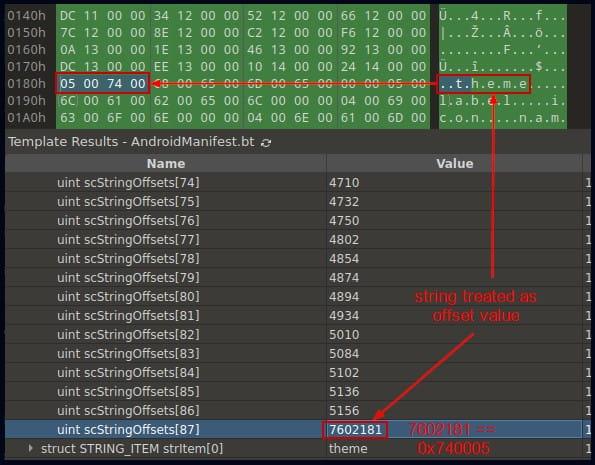
The second evasion method involves changing the AndroidManifest.xml file’s starting marker to be undetectable, altering the structure of the strings and styles, and tampering with the last string’s offset to lead to an inaccurate interpretation.

Wring last string offset in the array
Wrong last string offset in the array

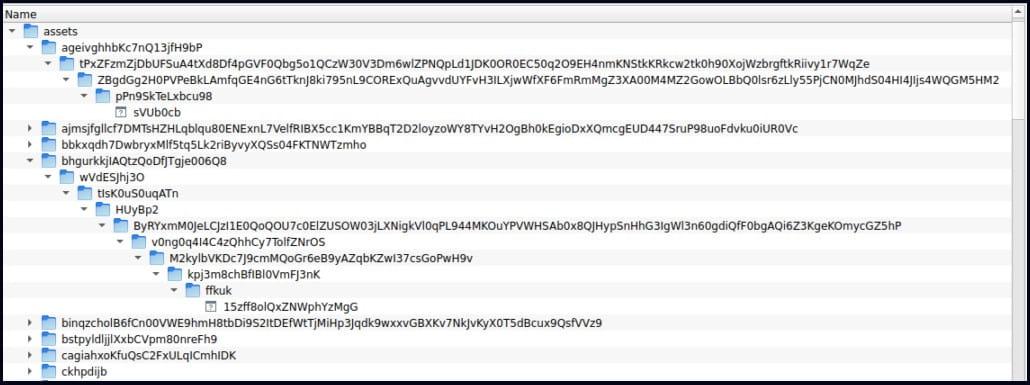
The APK’s asset folder is used to add numerous files inside nested directories as the third evasion technique, resulting in file names and paths that are longer than 300 characters. According to experts, this may cause issues for some security tools, making it difficult for them to find the malware.

File in the APK asset folder
Files in the APK asset folder

Final Thoughts

Voice phishing is an issue that has cost victims in South Korea $600 million in 2020 alone, according to government statistics, and there have been 170,000 documented victims between 2016 and 2020.

Hence, researchers say the techniques and strategies utilized in this specific malware can be applied to various applications that target other global markets.

Network Security Checklist – Download Free E-Book

Related Read:


[ad_2]
Source link
TikTok now lets you reset your For You feed

0
[ad_1]

TikTok is rolling out a new feature that lets users reset their For You feed. If you feel like your recommendations aren’t relevant anymore, you can use this feature to start afresh. It will delete everything the app has learned about your interests and content preferences and will retrain the algorithm based on new interactions. It’d be like you have just installed the app and opened it for the first time.

As you might expect, this reset will not affect your Following feed, profile information, and messages. TikTok will only reset the For You feed. Everything else will remain untouched. But once you reset your TikTok For You feed, you cannot undo the change. You must start afresh with popular videos on your feed, which may not be relevant. You’ll have to wait until the app learns enough about your interests and preferences to show relevant content. The more you interact, the more it will learn about you and improve recommendations.

Of course, you can reset the algorithm you want. The reset button is available in TikTok’s privacy settings. Go to the Content preferences section in the Settings and Privacy menu and tap on the new “Refresh your For You feed” button. Here, the app will tell you what will change after resetting the For You feed (everything we explained above). Tap on “Continue” if you wish to proceed. Confirm your choice by tapping on “Refresh” in the pop-up menu. That’s it. TikTok has reset recommendations for you and you cannot undo the change.

TikTok reset For You feed

TikTok adds a reset button for recommended content

TikTok’s new “Refresh” button is different from the existing pull-down refresh option. The latter only refreshes the feed with new videos based on the current recommendation algorithm. It doesn’t reset the algorithm. Most social media apps offer such refresh buttons to pull up new content. TikTok’s reset feature is somewhat new in this space.

This feature will be of great help to those whose tastes have changed over time. If you loved cooking and eating videos in the past but are now focused on diet and fitness, a reset will help you move on.

Keep in mind that resetting won’t override any other content moderation settings you’ve already chosen on TikTok, like marking creators or audio tracks as “not interested”. The new feature should be available to everyone over the next few days. You can click on the button below to download the latest version of the TikTok app from the Google Play Store.

DOWNLOAD TIKTOK


[ad_2]
Source link
Snapdragon 7+ Gen 2 is official with a 50% faster CPU, improved GPU

0
[ad_1]

Qualcomm has announced its new mid-range processor, the Snapdragon 7+ Gen 2. This is a direct successor to the Snapdragon 7 Gen 1, by the way. We’re not really sure why Qualcomm used the ‘+’ moniker here, as there was no Snapdragon 7 Gen 2, but there you go.

The Snapdragon 7+ Gen 2 is a 4nm processor that brings a 50% performance improvement

This processor has a 1+3+4 architecture, and it’s a 4nm chip. There is 1 Kryo Prime CPU (Cortex X2-based), three Kryo Performance CPUs (Cortex A710-based), and four Kryo Efficiency CPUs (Cortex A510 based).

The company has a Kryo CPU that will seemingly offer a 50% performance improvement. The Adreno GPU, on the other hand, also comes with a performance boost, as it will offer a 2x performance improvement over the Snapdragon 7 Gen 1.

It offers a considerable power efficiency boost

Furthermore, you’ll also be getting a power efficiency boost here. Qualcomm says this chip is 13% more power efficient compared to the Snapdragon 7 Gen 1.

The company also included some gaming features here. Features such as Auto Variable Rate Shading (VRS), Volumetric Rendering and Snapdragon Sound with Qualcomm aptX.

The Qualcomm AI Engine, on the other hand, offers a 2x improved AI performance. You’re also getting a 40% better performance per Watt than its predecessor. The AI Super Resolution can also upscale game scenes and photos quite a bit (from 1080p to 4K).

It comes with an 18-bit Triple ISP

The Snapdragon 7+ Gen 2 comes with an 18-bit Triple ISP, which offers support for up to 200MP photo capture and staggered HDR video capture.

The Snapdragon X62 5G modem is also a part of the package. 4G/5G Dual-SIM Dual Active (DSDA) is supported too. The same goes for Wi-Fi 6E and Bluetooth 5.3.

This processor has support for LPDDR5 RAM up to 3,200MHz. It also supports Qualcomm Quick Charge 5 technology, and displays up to QHD+ resolution with a 120Hz refresh rate.


[ad_2]
Source link

Ransomware attack hits ANOTHER school

0
[ad_1]

Wymondham College is operating as normal, with a few expected distruptions that may be minimal but lasting.

In what is likely Vice Society’s handiwork, the UK’s largest state boarding school Wymondham College has announced it has become the victim of a “sophisticated cyberattack”. The school didn’t provide additional information, but Jonathan Taylor, chief of the school’s parent company Sapientia Education Trust, has revealed the school is yet to receive a ransom note.

In an email to The Record, Taylor said:

“We are not aware of any data breach. A number of the College’s systems have been impacted, including access to some files and resources.” 

Taylor said the school remains open, saying the priority is “to ensure continuity of educational provision”. The Norwich Evening News reports disruption will likely continue until the Easter holidays as the attack targeted the College’s IT system.

Wymondham College is working with the National Cyber Security Centre (NCSC), the UK’s authority for cyber incidents, to ensure an appropriate response. Taylor says the Department of Education has also been notified.

The NCSC has warned the UK education sector about increasing targeted ransomware attacks toward schools, colleges, and universities. However, latest research from the London Grid for Learning (LGfL) reveals that only 53 percent of UK schools feel prepared for a cyberattack. 

How to avoid ransomware

  • Block common forms of entry. Create a plan for patching vulnerabilities in internet-facing systems quickly; disable or harden remote access like RDP and VPNs; use endpoint security software that can detect exploits and malware used to deliver ransomware.
  • Detect intrusions. Make it harder for intruders to operate inside your organization by segmenting networks and assigning access rights prudently. Use EDR or MDR to detect unusual activity before an attack occurs.
  • Stop malicious encryption. Deploy Endpoint Detection and Response software like Malwarebytes EDR that uses multiple different detection techniques to identify ransomware, and ransomware rollback to restore damaged system files.
  • Create offsite, offline backups. Keep backups offsite and offline, beyond the reach of attackers. Test them regularly to make sure you can restore essential business functions swiftly.
  • Don’t get attacked twice. Once you’ve isolated the outbreak and stopped the first attack, you must remove every trace of the attackers, their malware, their tools, and their methods of entry, to avoid being attacked again.

Malwarebytes removes all remnants of ransomware and prevents you from getting reinfected. Want to learn more about how we can help protect your business? Get a free trial below.

TRY NOW


[ad_2]
Source link