Android is a great platform, but every Android user has felt the plight of iOS users often getting better apps- just try finding a suitable Garage Band alternative Android! However, the iOS hit LumaFusion is coming to Android and ChromeOS, according to 9To5Google.
LumaFusion is an insanely popular and powerful video editing program that debuted on iOS. It shows the power of optimization, as users are met with a ton of useful features to edit their videos.
Yes, Android users were left in the dust with it, but the company did say that it plans on making it available on Android and ChromeOS eventually. This was back in October of 2021, and the company later released a beta version on ChromeOS.
Now, the wait is over, as LumaFusion is available on ChromeOS and Android
Programs are usually available on iOS first and trickle down to Android later. That’s just the nature of the beast. There’s a lot less variation with iOS than with Android. So, Lumafusion coming to Android and ChromeOS sounds like a feat.
Obviously, you’ll want to be mindful of your device’s performance and limitations. If you’re running something like a Pixel 7 Pro or a Galaxy S23 Ultra, then you should not have any issues with it. However, if you’re rocking a $200 mid-range phone, you will have a slower time.
Since LumaFusion is a serious video editor for serious content creators, it will cost serious money (well, for an app). Downloading it from the Google Play Store will cost you a cool $29.99. That’s definitely a lot if you’re looking for an app to casually edit videos. However, LumaFusion offers a feature set that makes you feel like you’re using a professional video editor.
Aside from the typical editing features that you can use anywhere, you have the benefit of unlimited keyframes if you want to animate parts of your video. You’re able to have up to six video layers at the same time which is insane for a mobile program. If you’re looking to use a green screen, well this program also has a chroma key tool.
That’s only a handful of the features that you can look forward to if you buy LumaFusion. If you’re using a Chromebook, Google is also offering 25% off, so that’s great if you’re on ChromeOS.
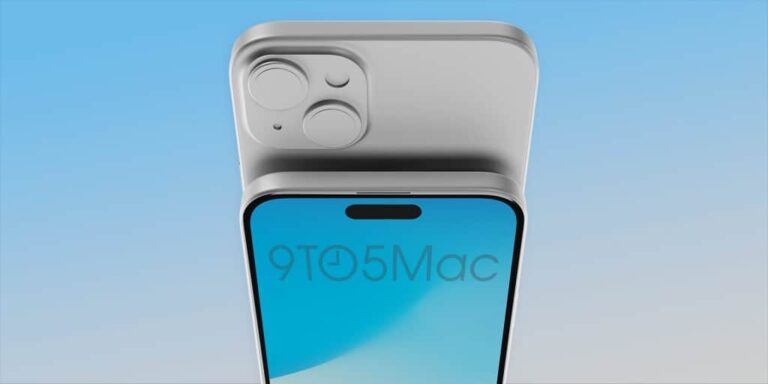
The iPhone 15 Plus CAD-based renders are in, thanks to 9to5Mac. The source already shared iPhone 15 and iPhone 15 Pro CAD-based renders, and it’s now back with the iPhone 15 Plus as well. It’s worth noting that the iPhone 15 Pro Max renders have also been shared in the meantime, by Ice Universe.
The iPhone 15 Plus renders have also surfaced, and point to thinner bezels
These renders have been put together by Ian Zelbo, as was the case with the previous ones. Having said that, as expected, the iPhone 15 Plus will include a Dynamic Island. All phones in the series will feature it, and the same goes for a Type-C USB port.
If you take a look at the two images provided below this paragraph, you’ll see the iPhone 14 Plus and iPhone 15 Plus side-by-side. You will notice slightly thinner bezels, and the addition of the Dynamic Island.
The phone will be almost the same exact size as the iPhone 14 Plus
The source also shared the dimensions of the new model. The iPhone 15 Plus will measure 160.87 x 77.76 x 7.81mm. The iPhone 14 Plus measures 160.84 x 78.07 x 7.79mm. These differences are almost negligible, they will be almost exactly the same in terms of size.
The iPhone 15 Plus will still feature an aluminum frame, just like its predecessor, and a glass back. It will likely keep the exact same display size as its predecessor, which means it will include a 6.7-inch display. There’s a slight chance it may be bumped up to a 6.8-inch panel, as the iPhone 15 is said to include a 6.2-inch display. That panel is 0.1 inches larger than the one on the iPhone 14.
All four iPhone 15 series smartphones are expected to arrive in September this year. That’s when Apple usually releases its next-gen iPhones, so there you have it.
TCL introduced us to its TCL 40 series of phones at CES 2023, and they were able to garner some acclaim. This is the next slew of mid-range phones from the company. Now, the TCL 40 series phones are making an appearance at MWC 2023 along with some interesting tablets.
The TCL 40 series phones are at MWC 2023
Starting off with TCL’s new handsets, these are the next slew of phones that won’t break the bank. We have three new phones called the TCL 40 X 5G, TCL 40 XL 5G, and TCL XE 5G.
TCL 40XL 5G (May 2023 From $149)
First, we have the TCL XL 5G. This is the most affordable model of the set with a 6.75-inch HD+ display with a 60Hz refresh rate. It uses the MediaTek G37 SoC. It comes with 4GB of RAM and 128GB of storage.
This phone has a triple camera setup. There’s a 50MP main camera that’s accompanied by a 2MP depth camera and a 2MP macro camera. Finishing off the specs, we have a large 5000mAh battery.
TCL 40XE 5G (June 2023 From $169)
Next, we have the TCL 40 XE 5G. This is the middle child of the group with a 6.56-inch HD+ display with a 90Hz refresh rate. It uses the MediaTek Dimensity 700 SoC that’s backed up by 4GB of RAM and 64GB of storage.
It has a triple-camera setup with a 13MP main camera, a 2MP depth camera, and a 2MP macro camera. As for the battery, we’re looking at a large 5000mAb battery.
TCL 40X 5G (June 2023 From $199)
Lastly, we have the TCL 40 X, this phone has a 6.56-inch display with an HD+ resolution that runs at 90Hz. It’s powered by the decent MediaTek Dimensity 700 SoC, and it’s backed up by 4GB of RAM and 64GB of expandable storage.
This phone has the same camera package as the TCL 40 XL 5G. Also, all of these phones use TCL’s NXTVISION display technology for better visuals.
TCL’s new tablets
TCL also showed us its new tablets at MWC 2023. First, we gave the TCL Tab 11. This tablet comes with a decent-sized 10.95-inch IPS LCD display with a resolution of 2000 x 1200. It’s just over 1080p resolution, and it produces 16.7 million colors.
It’s powered by the MediaTek Helio P60T SoC which should give you decent power. That’s backed up by 4GB of RAM and 128GB of storage.
As for the other internals, we’re looking at an 8000mAh battery, a quad-speaker setup, and two microphones. As for the cameras, there’s an 8MP rear camera and an 8MP front camera. Lastly, it comes with Android 13 out of the box.
The TCL Tab 11 will launch in May 2023 at $179 ($209 for the LTE version).
The last tablet is the TCL NXTPAPER11. This tablet’s specs are identical to the TCL Tab 11. The main thing about this table is the use of TCL’s NXTPAPER 2.0 display technology. This ensures a great viewing experience from any angle. Also, it’s 150% brighter than NXTPAPER 1.0.
The TCL NXTPAPER 11 will launch in Europe and other regions in May 2023 starting at $249.
The US Department of Justice (DOJ) has accused Google of destroying internal chat records that were required for an antitrust investigation. According to federal laws, the companies should preserve the communications that might help investigators in antitrust cases. Google allegedly violated this law.
The DOJ has brought Big Tech under its radar in recent years. The department is trying to keep these companies accountable for their antitrust violations and abusing competition. Back in 2020, the DOJ filed a lawsuit against Google over “unlawfully maintaining monopolies.” The destroyed chat records were reportedly related to this case.
As per the filing details, Google allegedly “systematically destroyed” written communications every 24 hours. This is while the company was required in mid-2019 to change its chat defaults and keep a record of communications. The DOJ also claims Google destroyed chat records even after the lawsuit was filed, and only a few employees kept their chat histories.
DOJ puts Google in hot water over deleting chat evidence
The Department of Justice is also accusing Google of lying to the government. Google has told the agency that it has “put a legal hold in place” to suspend the auto-deletion of chats. However, the DOJ found this claim to be false as the company stopped deleting chats this week when the agency said it would file a motion for sanctions. After this warning shot, Google was forced to “permanently set to history on.”
In Epic Games’ lawsuit against Google, the video game maker claimed that Google employees prefer to talk about sensitive materials in chats because they feel safer. The search giant, however, continued to withhold its policy from the government even after the Epic Games confrontation.
According to DOJ’s deduction, Google has violated the federal rule of civil procedure by deleting chat records. The agency is now asking for a hearing to discuss sanctioning the company.
In response to allegations, Google is refuting the DOJ claims. The company spokesperson told The Wall Street Journal that they’d produced over 4 million documents for this case. The team have also “conscientiously worked for years to respond to inquiries and litigation.”
Vivaldi is a pretty prominent mobile browser, and it typically gets new updates. A new feature that came with Vivaldi 5.7 is the ability to play videos in the background. This was a pretty sought-after feature, and it’s now available.
Vivaldi is one of the more popular mobile browsers on the market. It’s not as popular as Chrome, but it’s still able to stay relevant as a neat alternative. An important part of the app’s regular feed of updates that the app gets. There are always new features being added to the app.
Vivaldi 5.7 lets users play videos in the background
It gets pretty annoying if you’re watching or listening to a video, but you need to pause it because you’re switching tabs or apps. There are those times when you need a video to play in the background. This is why Vivaldi 5.7 will be really popular among its users.
The company sent out a blog post detailing all of the new features that came with the new update. With the update, the browser will let you play videos even when you minimize the app. You have to enable the feature because if you don’t, the videos will pause when you switch apps.
Now, the blog post did mention that it also works while watching YouTube videos. We all know that YouTube charges for the ability to play videos in the background. Well, even if you’re not a YouTube premium subscriber, you’ll be able to play videos in the background.
You’re not only allowed to play YouTube videos in the background, this feature works on any site that has a video playing. If you’re using the Vivaldi browser, you can keep an eye out for this update.
A lot of services with video host them on their own apps, but Vivaldi 5.7 might cause people to actually log into the services using the browser more. It’d make sense, as background video playing is a really popular feature.
IKEA has launched a brand-new experience for customers called Lilla Äventyret, an AR game that lets you learn about sea life. The experience is meant as a way for IKEA to interact with its customers, and was developed to be a fun experience for the whole family, according to IKEA’s marketing manager Helena Gouiveia.
IKEA partnered with Meta and Warpin to create the experience. Using an Instagram filter that lets you explore parts of the store to discover facts about sea life, and even take selfies with various sea creatures. Though it is a game, it’s also intended to be educational. So anyone from kids to adults can learn about ocean-related concerns.
To access the game, store visitors will need to scan a QR code using their phone’s camera. Afterwards, they can move around the store and use the AR feature at various departments.
The AR game is only available at certain IKEA locations
While the educational game may sound like fun, there is a caveat. It’s not available everywhere. In fact it’s only accessible in a very limited number of stores. Specifically those in Sweden.
Lilla Äventyret is available in 21 different IKEA stores throughout the country. With the limited access though, it unfortunately means anyone outside of Sweden won’t be available to check out the experience. But if you are near one of the select locations in Sweden that has this experience, it can be a neat way to make the shopping trip more fun. Especially for families that want to augment the experience for their kids.
To get started, visitors will need to make sure the Instagram app is installed on their mobile device. Then scan a QR code using their phone’s camera. This will let them download the required Instagram filter, which they can then activate inside the Instagram app.
The Xiaomi 13 Pro launched in China back in December, but that was the Chinese model. The global variant arrived to global markets quite recently, and I received it early, and spent some time with it at this point. This is basically Xiaomi’s new flagship, as the rumored Xiaomi 13 Ultra did not launch. It may launch at some point later this year, but that’s just a wild rumor. As far as we know, at the moment, the Xiaomi 13 Pro is Xiaomi’s heavy-hitter for 2022. That being said, let’s get down to its review, let’s see what the Xiaomi 13 Pro has to offer.
This smartphone comes with truly powerful specs. It has Qualcomm’s latest flagship, the Snapdragon 8 Gen 2, on top of having a top-of-the-line display. The variant we got to review also has a ceramic backplate, while the phone is water and dust resistant. Leica’s lenses are included on the back, and a powerful camera setup. Does that translate into a great, smartphone, though? Well, that’s what we’re here to find out. Let’s get to it!
Table of contents
Xiaomi 13 Pro Review: Hardware / Design
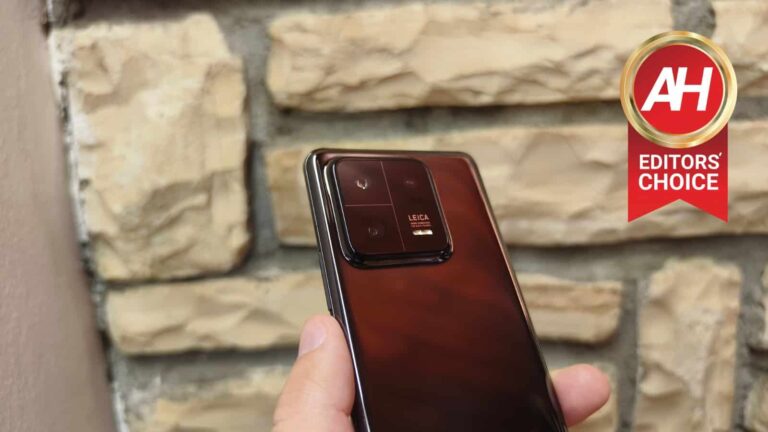
The Xiaomi 13 Pro is made out of metal and ceramic. It has an aluminum frame, and a ceramic backplate, in this case. A variant with a silicon polymer backplate is also available, though, but not globally, only in China. The overall shape is exactly what you’re used to when it comes to modern smartphones. Its front and back sides curve towards the aluminum frame on the sides, proportionally. There is a curved display on the device, with a centered display camera hole. The bezels are quite thin, by the way.
It features three cameras on the back, with Leica lenses
On the back, you’ll notice a squarish camera island in the top-left corner. Leica branding is also included in there, as Leica’s lenses are used here. The Xiaomi 13 Pro includes three cameras on the back. Xiaomi’s branding can be found towards the bottom of the backplate, while all the physical buttons sit on the right-hand side. This handset even has an IR blaster at the top, which is not unusual for Xiaomi phones. So you can use it to control your TV or some other appliances, if you want.
The phone feels really good in the hand
The phone feels great in the hand, actually. It doesn’t cut into your hand, or anything of the sort. The Xiaomi 13 Pro is quite slippery, though, and this black ceramic variant that we got does attract a lot of fingerprints. It does feel undeniably premium, however. The phone does actually feel a bit smaller in the hand than it actually is, even in the silicone case that is included in the box. I’ve used similarly-sized devices lately, plenty of them, so the difference is noticeable. I didn’t feel like the phone is as large as it is, so I was surprised when I check out the dimensions.
When it comes to weight, it stands at 229 grams, at least this ceramic variant does. The polymer back model weighs less, 210 grams. Overall, Xiaomi did a really good job design-wise. The phone feels exactly as it should feel, without any crazy design ideas/implementations. Using a case may be a good idea due to its slippery nature, and the fact it attracts fingerprints like nobody’s business.
A see-through silicone case is included in the box
Xiaomi does include a case in the retail box, with the Xiaomi 13 Pro. Well, at least our variant got it, but we believe that every single model comes with this case. The case itself is nothing fancy, a regular see-through silicone/gel case. That’s somewhat standard when it comes to Chinese flagship smartphones these days, and it’s always nice to see. This case offers a good level of protection, and it’s great to have until you get something else, if you even want to do that. Many people stick with cases like these.
Xiaomi 13 Pro Review: Display
The Xiaomi 13 Pro features a 6.73-inch QHD+ (3200 x 1440) LTPO OLED panel. This display is curved, and it supports HDR10+ content. It also comes with Dolby Vision support, and can get very bright if needed, it goes all the way up to 1,900 nits of peak brightness. It can also show up to 1 billion colors, and has a centered display camera hole. All in all, Xiaomi used an excellent display, and there’s not much more you can ask for.
The display gets immensely bright when needed
This display is plenty bright, even in direct sunlight. Do note that the only way you’ll get remotely close to its top brightness is in auto mode, so don’t try to get there manually. The display is tuned to fullHD+ mode by default, and even in that mode it’s plenty sharp, so there’s really no need to go all the way up. Considering you paid so much for the device, you may want to, and that’s completely understandable.
It’s also well-optimized
This panel feels really good to use. The content is smooth, as the 120Hz refresh rate kicks in, and even the touch response is really good. Its touch sampling rate is not anything crazy, by the way, it’s 240Hz, but that’s not something many of you care about either way. The phone is great for gaming regardless. The viewing angles here are great, and the colors are vivid. You also get granular controls in the settings, so you can tweak it any way you want. It’s an outstanding panel that can stand side-by-side with the best out there. It’s also great for consuming multimedia. And yes, the blacks are very deep, as you’d expect out of a proper AMOLED panel.
Xiaomi 13 Pro Review: Performance
Xiaomi used top-of-the-line hardware here, and that includes the most performance-oriented hardware, the SoC, RAM, and storage. The Snapdragon 8 Gen 2 SoC fuels the phone, Qualcomm’s most powerful processor. Xiaomi also utilizes LPDDR5X RAM in this phone, along with UFS 4.0 flash storage. The Xiaomi 13 Pro comes in a number of different flavors, but it includes up to 12GB of LPDDR5X RAM and up to 512GB of UFS 4.0 flash storage. That is the variant that we got to test, by the way.
Gaming is a piece of cake for the Xiaomi 13 Pro
The Xiaomi 13 Pro is one of the best-performing devices out there, there’s no doubt about that. Its powerful hardware internals are backed by really good software provided by Xiaomi. I never felt like I was waiting on the phone to catch up, regardless of what I was doing. Multitasking was a breeze, as was launching apps, consuming multimedia, taking pictures, and so on. Even if you run graphically-intensive games, that’s not a problem at all. Xiaomi also implemented VC liquid cooling, on a rather large surface, so the phone is really good at dissipating heat as well. It will get warm, as all flagships do under heavy load, but it’ll never get too warm, nor will that affect the performance. At least it did not for us.
There are no performance-related oddities to report. Well, I did stumble upon a few software-related ones, but I’ll leave that for the software section. It’s nothing serious though, some minor things that are barely worth mentioning.
Xiaomi 13 Pro Review: Battery
The Xiaomi 13 Pro includes a 4,820mAh battery on the inside. In addition to that, it supports immensely fast wired and wireless charging. 120W wired charging is supported, in addition to 50W wireless charging, and 10W reverse wireless charging. Oh, and in case you’re wondering, yes, the charger is included in the box, with the phone. You do not need to buy it separately, you do get a 120W charger here.
You can fully charge this phone in 19 minutes
In case you’re wondering how fast its charging is, well, it’s truly blazing fast. You can fully charge the phone via a wire in about 19-20 minutes, while Xiaomi says you can do the same via wireless charging in 36 minutes. I could not test wireless charging via an official wireless charger, so I’m not going to comment on that.
The battery life is excellent
That being said, let’s talk about battery life, shall we? Let’s just say you’ll be happy with its battery life, even if you’re a power user. The Snapdragon 8 Gen 2 handles power consumption like a champ, while Xiaomi also used a decent battery size here, and optimized the phone well. I was regularly getting over 7 hours of screen-on-time with plenty of juice left in the tank. You can really go the distance with this phone, especially if you’re not gaming a lot on it. The point is, the Xiaomi 13 Pro battery life should not worry you, at all.
Xiaomi 13 Pro Review: Camera
Xiaomi spared no expense when it comes to camera hardware on the Xiaomi 13 Pro. The phone comes with three 50-megapixel cameras, including a 1-inch sensor on the main camera. What it doesn’t have is a periscope camera, but we’ll come to that. The Xiaomi is using Sony’s IMX989 sensor, the same on that it used in the Xiaomi 12S Ultra, and the same one Vivo implemented. That That 50.3-megapixel main camera has a 1.6um pixel size, OIS support, and an f/1.9 aperture. There is also a 50-megapixel ultrawide camera (115-degree FoV), and a 50-megapixel telephoto unit (f/2.0 aperture, 75mm telephoto lens, 3.2x optical zoom). Leica lenses are included on all these cameras, by the way.
Great camera hardware, but no periscope camera
As I said, there is no periscope telephoto camera here, which is a shame. The Vivo X90 Pro doesn’t have it either, only the Samsung Galaxy S23 Ultra, as far as newer flagship phones are concerned. What’s interesting is that the Vivo X90 Pro+ has it, but it only launched in China. Now that we cleared that up, let’s talk about the cameras themselves. The hardware itself is not really all that useful without great software, is it. Well, Xiaomi did a good job here, but not the level I expected, to be quite blunt. I reviewed the Vivo X90 Pro just before the Xiaomi 13 Pro, which is ideal, as I already had a great starting point for this review.
When it hits the shot just right, the results are outstanding
Just to be clear, the camera performance of this phone is really, really good, but in some situations, it needs optimizing. When the phone nails a shot, you’ll be amazed. It’ll be crisp, with that creamy bokeh effect that makes it look like it was taken with a DSLR. The shutter if quite fast, even in low light, and overall the images are well-balanced. When you get into more demanding situations, however, it’s obvious further tweaking is needed. You’ll see all that in the camera samples I’ll include below. Before we start, please do note that most shots I took with the phone were with auto HDR (base setting), and with ‘Leica Authentic’ option, as ‘Leica Vibrant’ looked a bit too saturated to be, in some shots. I preferred the look of ‘Leica Authentic’ more of then than not.
Xiaomi needs to optimize HDR performance
Those specific cases include some HDR situations, and some low light situations. The phone struggles, at times, to balance out images in HDR situations, and yes, HDR was on (auto mode), and I tried retaking almost every shot with tap to focus. In any case, what I said here especially goes for indoor shots when the sun is the brightest. If you check out the two examples below, you’ll see what I’m talking about. The Vivo X90 Pro did a much better job at balancing out the two images than the Xiaomi 13 Pro did. That goes for both the bright light on the Android figurine, and the colors on the display of the OPPO Find N2 (plus the figure in the back).
Xiaomi 13 Pro vs Vivo X90 Pro (indoor HDR) sample 1:
Xiaomi 13 Pro vs Vivo X90 Pro (indoor HDR) sample 2:
That doesn’t happen always, though, not at all. The Xiaomi 13 Pro can truly do a great job in most cases, even with HDR. That’s why I mentioned optimization several times thus far. This phone needs a camera update that will work out the kinks in that aspect, and it’ll do a much better job, even in such demanding situations.
Low light performance is great, but high dynamic range can be an issue
Another problematic aspect is low light, but only in certain situations. If you take a look at the gallery below, you’ll see some examples. In one of those, the Xiaomi 13 Pro failed to balanced out the shot of a tree, which sits next to a tree light. The light is way too harsh, and it doesn’t look all that great, the same goes for the chandelier image. The same goes for the image of a car wash, where plenty of light sources are included (it wasn’t nearly as bright). It usually does a good job with noise, while details in low light are hit and miss, it all depends on the scene. Most of the time, however, they’re really good.
Most of the time, the phone did a really good job camera-wise
Up to this point, it seems like things aren’t that great, but I just wanted to highlight some pain points before we get down to the good. I had, generally, a good experience with the camera. If you check out the gallery below, you’ll see camera samples from various situations in which the phone did a great job. Some of those are tricky HDR shots, so, as you can see, the phone can nail a shot. It can actually do an outstanding job. It does great during the day, as it offers plenty of details, and balances shots out nicely. It does great with macro shots too. The same goes for low light, as long as you’re not facing very demanding high dynamic range situations. If Xiaomi manages to improve HDR camera processing… well, the Xiaomi 13 Pro will be a force to be reckoned with.
The ultrawide and telephoto cameras do a good job. The quality does slip a bit in low light, but that’s the case with all cameras out there. The main camera is the one to use in low light situations, and there’s no way around it. The selfie camera is really good, whether you want a realistic shot, or a highly processed one, it’s up to you. The video recording is also quite good, but not to the level of the iPhone 14 Pro (Max) or the Galaxy S23 Ultra. When there’s challenging light in the scene, some distortion is noticeable.
Xiaomi 13 Pro Review: Software
Android 13 comes pre-installed on the Xiaomi 13 Pro, and on top of it you’re getting Xiaomi’s MIUI 14 skin. If you’ve used MIUI 13, you know exactly what to expect here. There’s really not that much different about it in terms of functionality and looks. Xiaomi did issue many optimizations here, cut down on some bloat, and more. As a result, the company promised up to 60% better performance compared to MIUI 13. Is that something we’re getting here? Well, there’s no way to measure it, but the phone is fast, immensely fast.
MIUI 14 is smooth and very responsive
Its overall great performance definitely has much to do with the hardware, but Xiaomi apparently did a good job optimizing the software. MIUI 14 is very functional, and packed with tons of features. Ranging from the company’s themes and wallpapers, various gestures that you can utilize, and floating windows option, to a number of pre-installed apps from the company that you can use. One of those apps is dedicated to security, the other to customization, there’s also one for Xiaomi’s official forums, and so on. Some apps you can uninstall, others not so much. The point is, the OS works really well. I did stumble upon a couple of small bugs during my testing, but it’s really nothing major.
I barely had issues with it
At one point, the OS simply froze up, and I had to wait a couple of seconds before it decided to take my input. I’ve also seen a couple of app crashes, and at one point I had to wait for the fingerprint scanner to appear on the screen (a couple of seconds). Other than that, everything ran really smoothly, and I really don’t have any major complaints here. If stock Android is your thing, you probably don’t really like MIUI to begin with. If you don’t care all that much and want a customizable OS that works really, really well… MIUI is a good choice. It also has a really good image and video editor baked in, and it allows you to duplicate apps via the ‘Dual apps’ feature. It also doesn’t really kill off apps in the background nearly as aggressively as before, though that habit is still there.
Xiaomi 13 Pro Review: Should you buy it?
The Xiaomi 13 Pro is, without a doubt, a true flagship. It’s a great smartphone in many ways, though it’s not perfect. The camera performance still needs tweaking on the software side of things, while MIUI 14 will need another update or two to squash a couple of bugs. Other than that, this phone is outstanding. The display is bright, vivid, and quite responsive. The design is great, the phone not only looks premium, but it feels great in the hand. It offers really good battery life with blazing fast wired and wireless charging, and more. It really doesn’t miss in a lot of ways, and it will certainly be appealing to many people.
You should buy the Xiaomi 13 Pro if:
You appreciate premium build materials
You want the latest and greatest specifications
You want a 1-inch camera sensor in a smartphone
You are a heavy user, and need good battery life
You need some of the fastest wired & wireless charging options on the market
You hate OEMs who don’t include chargers with their phones
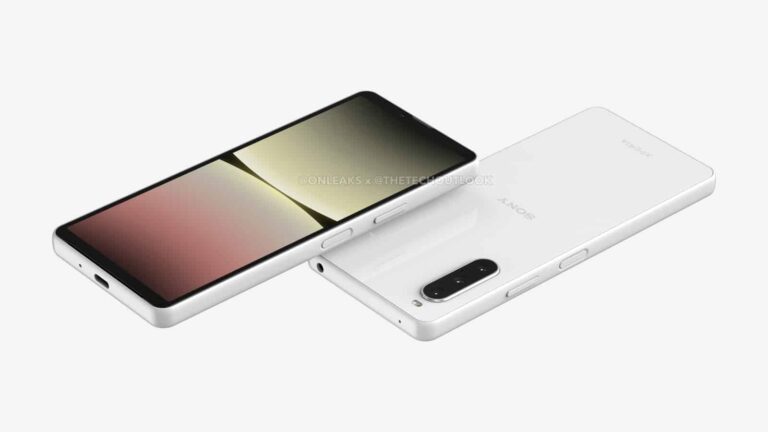
A new leak just showed us what the Sony Xperia 10 V will look like. The design has been revealed by TheTechOutlook outlet, which partnered up with @OnLeaks. As per usual when it comes to @OnLeaks, this design is based on CAD renders.
This is what the Sony Xperia 10 V will look like
If you take a look below the article, you’ll not only see images of the device, but also a video that shows the phone from all angles. These CAD-based renders have been processed to give you a better look at the actual design.
Considering @OnLeaks’ track record, these are probably accurate. The design is actually something we expected, it’s not out of the ordinary for Sony. The phone has rather thin bezels, though its top and bottom bezels are thicker than the side ones. That’s because this phone doesn’t have a notch or a hole punch, its front-facing sensors and selfie camera sit in the top bezel.
The phone has flat sides, and a side-facing fingerprint scanner. That scanner doubles as a power/lock key, while the volume up and down buttons are also placed on the right side.
Its front and back sides are also flat, and so is the phone’s display. There is an oval camera island placed in the top-left corner of the phone’s back. Three cameras sit inside it, and they’re vertically-aligned. Sony’s logo sits in the middle of the backplate.
It will include front-facing stereo speakers
The source claims this handset will include front-firing stereo speakers. That’s not something we see in phones often, let alone mid-range phones. Speaking of which, this will be a mid-range device.
There is an audio jack included at the top of the device, while a SIM card tray is accessible from the left. Its display will measure around 6.1 inches, and the device itself will measure 153.3 x 68.4 x 8.5-9.4mm.
We still don’t have the spec details, but it will be a mid-range phone. Its predecessor, the Xperia 10 IV, arrived in May last year, the Xperia 10 V may follow in May this year, or close to that month.
Ever since Apple introduced emergency satellite connectivity with the iPhone 14, Android chip manufacturers like Qualcomm and Samsung have been racing to develop their own versions. Now, MediaTek has entered the game with its new MT6825 chip, which promises to bring two-way satellite messaging to Android devices using non-terrestrial networks that meet the open R17 NTN standard.
Unlike Apple’s solution, which relies on proprietary technology, the MediaTek 6825 chip can link any device to satellites, leaving the implementation of the service up to the original equipment manufacturers (OEMs). For instance, Bullitt, a British telecommunications brand, has partnered with MediaTek to integrate the MT6825 chip into its Bullitt Satellite Connect platform, enabling satellite communication on smartphones such as the Motorola Defy 2 and the CAT S75.
In terms of specs, the Motorola Defy 2 and CAT S75 are essentially the same phones with different names. Both boast a 6.6-inch 120Hz FHD+ display with Corning’s Gorilla Glass Victus, Mil-Spec 810H certification, IP68 and IP69K ratings, MediaTek Dimensity 930 chipset, a 5,000 mAh battery, 15W charging, a 50MP + 8MP (wide) + 2MP (macro) rear camera setup, and an 8MP selfie shooter.
“Our solution can basically be added to any form of 5G or 4G phone, from entry-level all the way to flagship,” said Finbarr Moynihan, vice president of corporate marketing at MediaTek.
Advantages and limitations of using this technology
One of the major advantages of the MediaTek 6825 chip is that it uses the 3GPP Release 17 mobile broadband standard, which enables low-bitrate connections between ground devices and geostationary satellite networks already in orbit. This allows phones to send texts and short bursts of data through satellites, without the need to point their phones up in the sky. However, since geostationary satellites orbit the Earth at a distance of over 23,000 miles, text messages will take longer to relay back and forth.
Samsung has announced the introduction of Message Guard protection against zero-click exploits for the Samsung Galaxy S23 series.
Samsung has announced the introduction of Message Guard for the Samsung Galaxy S23 series. It will be gradually rolled out to other Galaxy smartphones and tablets later this year.
Message Guard works on images received in messages by the apps “Samsung Messages” and “Messages by Google” and basically acts like a sandbox.
A sandbox in computing is a virtual habitat designed to provide a secluded environment to screen certain files or programs without giving any malware a chance to spread outside of the sandbox across the rest of the “playground”.
Samsung’s Message Guard is a sandbox that aims to protect your device by limiting exposure to invisible threats disguised as image attachments that arrive in messages received by Samsung Messages and Messages by Google. The plan is to release a software update at a later date to let Samsung Message Guard protect you across third party messaging apps as well.
How it works
When an image file arrives as an attachment to a message, the file is put in the sandbox and inspected. The file is processed inside the controlled environment of the sandbox to establish that it will not pose a threat to the device if it is released outside of the sandbox. This prevents malicious code from running amok or accessing your files. It does this silently in the background so the user doesn’t have to do anything and might not even notice it’s there.
Samsung Message Guard covers the following image formats: PNG, JPG/JPEG, GIF, ICO, WEBP, BMP, and WBMP.
Zero-click
Zero-click malware is defined as malware that does not require any user action or input to infect a device or system. Zero-click exploits are files that hide malicious code which do not require user interaction to be executed.
Zero-click exploits typically depend on vulnerabilities in software running on the device, such as the messaging app or the software on the device that renders the image. Such a vulnerability could be used by an attacker to craft a malicious image that automatically executes the malicious code embedded within it.
Samsung Knox already protects against such attachments in audio and video form, behind the scenes. With Message Guard, Samsung says Galaxy users will be protected against exploits in image form too.
Needed?
Samsung states in the announcement that there has been no sign of such attacks on Samsung Galaxy smartphones, but it wants to anticipate potential threats and develop preemptive security measures. This is by no means far-fetched if you look at the methods that Pegasus used against iMessage, although those are highly targeted attacks on people in high-level roles.
Would you like us to list the reasons why we think this is not something we’ve been waiting for? OK then, here goes:
The Android Operating System is already based on sandboxing, so we don’t see how this is adding any extra protection.
There is no indication that this type of protection has been or ever will be needed.
At best it will be providing a false sense of security because it says it offers protection (against a non-existent threat).
At worst it will stop people from installing actual protection against threats that actually exist, because they think they already are under maximum protection.
Have a burning question or want to learn more about our cyberprotection? Get a free business trial below.