After announcing that Bally Sports was returning to FuboTV late last year, it actually launched on the service a few weeks ago. However, when that happened, FuboTV did note that a couple of the RSNs were not yet available. That included Bally Sports Great Lakes and Bally Sports San Diego.
FuboTV did say that those two would launch before the start of the MLB season, and it has indeed done that. Those two RSNs are really only doing baseball, since they are in much smaller markets. So it kind of made sense not to launch them right away. Now whether that was so that FuboTV did not have to pay licensing fees for those two while they were essentially useless, is another thing.
Bally Sports is still facing bankruptcy
When Sinclair bought the Fox Sports RSNs from Disney (after it bought Fox), the company had planned to create its own streaming service in Bally Sports Plus. Which it did. But it has not turned out too well for them. To do this, Bally Sports had to remove its RSNs from streaming services like FuboTV, YouTube TV and Hulu Live TV. For well over a year before launching Bally Sports Plus for $19.99 per month.
That cut a lot of its revenue. And local sports is already quite expensive. So now, the company is facing bankruptcy. So the Bally Sports RSNs being available on FuboTV might not last all that long. But FuboTV subscribers will definitely enjoy them while they are here.
The MLB season is getting ready to start on March 30, however Spring Training games will start next week. So it’s a good time of the year to get Bally Sports available on FuboTV for all of the MLB fans out there. And now they are all on FuboTV, at least for now.
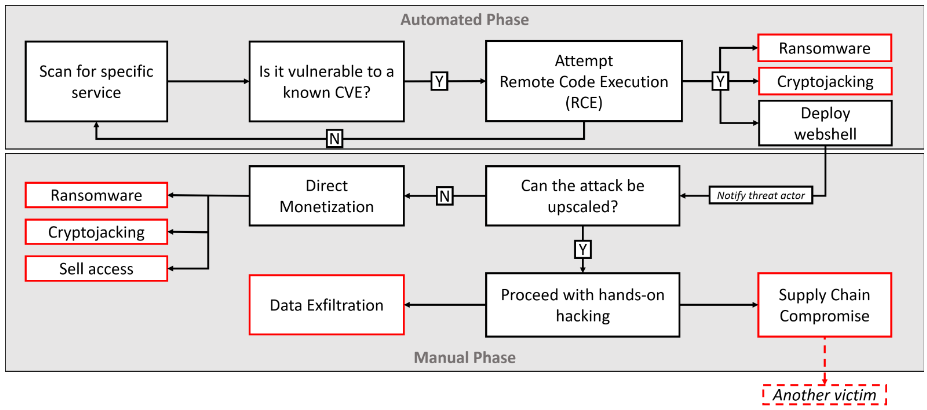
Since January 20, 2023, there have been several instances where malicious entities have been observed exploiting a significant security vulnerability in various Zoho ManageEngine products.
The vulnerability in question has been tracked by the security analysts at Bitdefender as “CVE-2022-47966” with a CVSS score of 9.8 and has been marked as “Critical.”
As a result of this flaw, unauthenticated attackers will be able to completely take control of susceptible systems by executing code remotely, since it’s an RCE flaw.
Affected Products
Currently, there are a total of 24 different Zoho ManageEngine products that are prone to this vulnerability. Here below we have mentioned them along with their patched versions:-
Access Manager Plus (4308)
Active Directory 360 (4310)
ADAudit Plus (7081)
ADManager Plus (7162)
ADSelfService Plus (6211)
Analytics Plus (5150)
Application Control Plus (10.1.2220.18)
Asset Explorer (6983)
Browser Security Plus (11.1.2238.6)
Device Control Plus (10.1.2220.18)
Endpoint Central (10.1.2228.11)
Endpoint Central MSP (10.1.2228.11)
Endpoint DLP (10.1.2137.6)
Key Manager Plus (6401)
OS Deployer (1.1.2243.1
PAM 360 (5713)
Password Manager Pro (12124)
Patch Manager Plus (10.1.2220.18)
Remote Access Plus (10.1.2228.11)
Remote Monitoring and Management (RMM) (10.1.41)
ServiceDesk Plus (14004)
ServiceDesk Plus MSP (13001)
SupportCenter Plus (11026)
Vulnerability Manager Plus (10.1.2220.18)
This vulnerability is attributed to the use of an outdated third-party dependency, Apache Santuario, for XML signature validation, which can be exploited by malicious actors.
While it has been claimed that the exploitation activities began the day following the release of a proof-of-concept (PoC) last month by the penetration testing company Horizon3.ai.
Attack Victims Geolocation
It has been reported that most of the victims of the attacks are from the following countries:-
Australia
Canada
Italy
Mexico
The Netherlands
Nigeria
Ukraine
The U.K.
The U.S.
Based on recent discoveries, it appears that the current wave of attacks is primarily targeting susceptible hosts with the aim of installing specialized tools, such as:-
Netcat
Cobalt Strike Beacon
The initial access used in some of the breaches has been used to install AnyDesk software, which is a program that enables remote access to the network.
While the Windows versions of the notorious Buhti ransomware strain have been exploited in other breaches. Furthermore, the available evidence strongly suggests that malicious actors have exploited the ManageEngine vulnerability as part of a precisely targeted espionage campaign.
The attackers leveraged this weakness as an attack vector to distribute malware capable of executing subsequent stages of the attack.
In total the whole operation involves four clusters of attacks and here we have mentioned them:-
Cluster 1 – Initial Access Brokers
Cluster 2 – Buhti Ransomware
Cluster 3 – Cobalt Strike and RAT-el
Cluster 4 – Cyber espionage
Recommendations
As a result of this vulnerability, the importance of digital security has been highlighted once again. While here below we have mentioned all the security recommendations provided by the security experts:-
Make sure to always keep your system and software up-to-date with the latest available patches and security updates.
Ensure to implement a strong perimeter of defense.
Make sure to have a proper patch management and risk management system.
Implement multi-layered protection on all the endpoints and servers.
The most effective way to defeat automated vulnerability exploits is to establish IP reputation, domain reputation, and URL reputation.
It is highly recommended that organizations, regardless of their size, implement comprehensive detection and response capabilities.
Dutch police have arrested three men who stole data belonging to almost every Dutch and Austrian citizen.
The Dutch police have announced the arrest of three more suspects in one of the biggest data extortion cases to date. The men, all aged between 18 and 21, were allegedly involved in extorting businesses and selling stolen data to other criminals.
During a two-year investigation the police learned that the suspects victimized thousands of businesses, including educational institutions, web shops, online ticket vendors, and institutions connected to critical infrastructure and services.
The three men, and a 25 year-old arrested last year, are accused of entering computer systems illegally, data theft, extortion and blackmail, and money laundering. The suspect arrested last year was allegedly involved in a data theft incident regarding Geburen Info Service GmbH (GIS), which collects television license fees on behalf of the Austrian government. It is likely that the dataset in that breach includes information about almost every Austrian citizen.
Sadly, one of the people arrested was also a member of the Dutch Institute for Vulnerability Disclosure (DIVD), a group of volunteer cybercrime fighters. You may remember hearing about them in the 2021 Lock and Code episode about “The failed race to fix Kaseya VSA, with Victor Gevers”.
Whether the suspect worked there to soothe his conscience or in the hope of gaining access to information he could use for his illegal practices is unknown. Either way, it is clear he alternated between wearing his white and black hats. According to a statement by the DIVD, there is no indication that he has been able to abuse his position, but his access to DIVD systems has been blocked.
As you might expect from crimials willing to extort businesses like this, they were not men of thier word. Some of the data they held to ransom was later sold to other criminals anyway, even if the ransom demad was paid.
One of the members of the group ran a Telegram channel where he offered to sell personal and address information based on a license plate. This enabled organized criminals to find out details of an intended target with the click of a button.
That data would also have been suitable for a variety of other crimes, and useful for phishing attacks, bank card fraud, or any other type of fraud where some knowledge of the victim gives the ciminal an advantage.
The cybercrime unit behind the arrests also warned that criminals are getting better at refining this kind of stolen data and finding innovative uses for it.
It is worth reflecting on the damage caused by a ciminal enterprise like this. It is not limited to those businesses that feel forced to pay the ransom. There are substantial costs associated with restoring compromised systems and forensic investigations. There are also the emotional damages to the owners of the stolen data, and to the people who feel responsible for letting this happen—imagine being the person that clicked on a link that launched an attack.
In an interview, the CEO of the online ticket vendor said he was intimidated by the criminals who let him know they knew “who he was married to”. He also said he is glad to have worked with the police. By engaging in a negotiation about the ransom he was able to win time. And with the help of HaveIbeenPwned’s Troy Hunt he was able to establish the extent of the stolen data and inform the affected customers himself.
Take care
Anyone whose data fell into the hands of these criminals (which could include every Austrian and Dutch citizen), should be on their guard for unsolicited calls from people claiming to be from their bank, for phishing mails, and other scams.
Anyone affected by data theft should take the following precautions:
Check the vendor’s advice. Every breach is different, so check with the vendor to find out what’s happened, and follow any specific advice they offer.
Change your password. You can make a stolen password useless to thieves by changing it. Choose a strong password that you don’t use for anything else. Better yet, let a password manager choose one for you.
Enable two-factor authentication. Where possible, use a FIDO2 2FA device. Some forms of two-factor authentication (2FA) can be phished just as easily as a password. 2FA that relies on a FIDO2 device can’t be phished.
Watch out for fake vendors. The thieves may contact you posing as the vendor. Check the vendor website to see if they are contacting victims, and verify any contacts using a different communication channel.
Take your time. Phishing attacks often impersonate people or brands you know, and use themes that require urgent attention, such as missed deliveries, account suspensions, and security alerts..
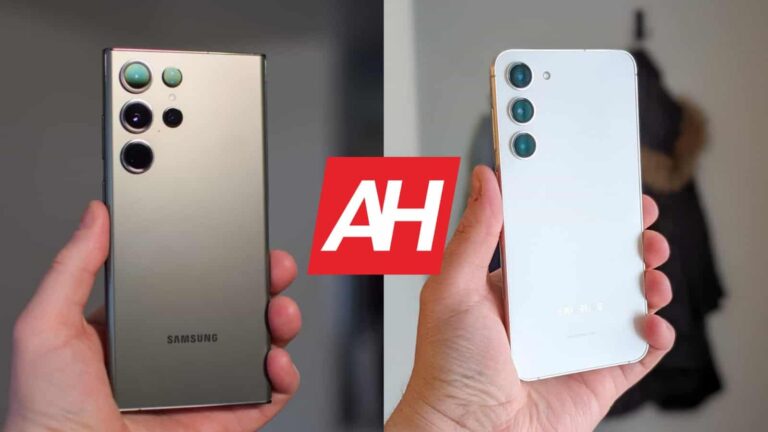
Samsung launched three flagship-series phones earlier this month, and we’re here to compare two of them. We’ll compare the Samsung Galaxy S23 Ultra vs Samsung Galaxy S23+ here. These are the two largest new flagship series phones the company announced. They are quite similar in many ways, but there are also some notable differences worth pointing out. They do differ in terms of design, display, cameras, and more.
As per usual, we’ll first list their specifications, and will then move to compare the two phones across a number of categories. We’ll compare their designs, displays, performance, battery life, cameras, and audio performance. We’ve spent quite a bit of time with both phones at this point, so we have a pretty good idea as to what you can expect. That being said, let’s get this party started, shall we?
Specs
Samsung Galaxy S23 Ultra
Samsung Galaxy S23+
Screen size
6.8-inch QHD+ Dynamic AMOLED 2X display (curved, 120Hz adaptive refresh rate, LTPO, down to 1Hz, 1,750 nits peak brightness)
Samsung Galaxy S23 Ultra vs Samsung Galaxy S23+: Design
The moment you lay your eyes on the two phones you’ll notice they’re different. The Galaxy S23 Ultra is flat on both the top and the bottom, unlike the Galaxy S23+. It also has very sharp corners, which is not the case with its sibling, who has rounded corners. They both do include a centered display camera hole, but different displays. The Galaxy S23 Ultra’s is curved, while the Galaxy S22+’s is not. We’ll talk more about displays themselves in the next section.
If we flip the two phones around, you’ll notice that the camera styles are similar, design-wise, but the Galaxy S23 Ultra has more sensors on the back. On both phones, those cameras protrude directly from the backplates. The Galaxy S23 Ultra has curved front and back sides, which is not something we can say for the Galaxy S23+. The phone has flat front and back sides. It is worth noting that the Galaxy S23 Ultra has an S Pen silo in the bottom-left corner. They are both made out of metal (aluminum), and glass.
The Galaxy S23 Ultra is taller, wider, and thicker than the Galaxy S23+. The difference is not major, but it’s noticeable, very much so. The ‘Ultra’ model is also considerably heavier. It weighs 234 grams compared to 196 grams of the Galaxy S23+. Both phones are IP68 certified for water and dust resistance, and both have Gorilla Glass Victus 2 on the back and the front. Yes, they’re both also slippery, and feel completely different in the hand. They both feel large, but the Galaxy S23 Ultra is noticeably more massive. The premium feeling is present when you’re holding both devices, one doesn’t really feel more premium than the other.
Samsung Galaxy S23 Ultra vs Samsung Galaxy S23+: Display
The Galaxy S23 Ultra features a 6.8-inch QHD+ (3088 x 1440) Dynamic AMOLED 2X display. This panel is slightly curved, and it has a 120Hz refresh rate. That refresh rate is adaptive, by the way, to save power. HDR10+ content is supported, and the panel gets immensely bright at 1,750 nits of peak brightness. The Gorilla Glass Victus 2 is included on top of the display for protection reasons.
The Galaxy S23+, on the other hand, includes a 6.6-inch fullHD+ (2340 x 1080) Dynamic AMOLED 2X display. This is also a 120Hz refresh rate, and yes, it’s also an adaptive panel. It supports HDR10+ content, and it gets just as bright as the Galaxy S23 Ultra’s display, when needed. On both phones that is achievable only through adaptive (auto) brightness, though. The Gorilla Glass Victus 2 protects this display as well.
Yes, the Galaxy S23 Ultra’s display is sharper, but the vast majority of people wouldn’t notice that. FullHD+ displays are more than enough, even for such large displays, especially if they’re as good as the Galaxy S23+’s is. Besides, the Galaxy S23 Ultra’s display comes set to fullHD+ resolution out of the box. You can change that, though. Both displays are vivid, sharp, and have excellent viewing angles. The blacks are very deep, and they’re both quite responsive. The Galaxy S23 Ultra’s may be better on paper, but you really can’t go wrong here. If you prefer flat panels, the Galaxy S23+ has an excellent one.
Samsung Galaxy S23 Ultra vs Samsung Galaxy S23+: Performance
When it comes to performance, there’s not much difference between the two. We’re talking about sheer snappiness, of course. The Snapdragon 8 Gen 2 for Galaxy fuels both phones, while both devices include LPDDR5X RAM and UFS 4.0 flash storage. The Galaxy S23 Ultra does offer more RAM, though. In day-to-day performance, they are identical, which is not surprising considering their specs and software.
We did not really spot any lag or anything of the sort during our usage. Quite the contrary, these two phones were easily the snappiest Samsung smartphones we’ve ever used. They open apps fast, multitask like nobody’s business, and are also great for content consumption, etc. Even if you like gaming on your phone, these two will do the trick. Not only is the Snapdragon 8 Gen 2 for Galaxy an excellent SoC, and great for power consumption, but Samsung actually included a proper vapor chamber this time around.
Both smartphones performed great in gaming, even when the most demanding games are concerned. They do get warm, but do not overheat, nor do the games suffer because of it. Performance-wise, they’re on the same level. The Galaxy S23 Ultra does have the advantage of the S Pen, though, of course, but that’s not what we’re talking about here. It’s worth noting, however, of course.
Samsung Galaxy S23 Ultra vs Samsung Galaxy S23+: Battery
What about the battery life, is that also the same? Well, no, not at all. Let’s get the technical stuff out of the way first. The Galaxy S23 Ultra includes a 5,000mAh battery, while the Galaxy S23+ has a 4,700mAh unit on the inside. Based on these battery capacities, and taking other specs into consideration, the two phones should have fairly similar battery life. The Galaxy S23+ does have a smaller display, while most of their internals are identical, and the same goes for software.
Well, the Galaxy S23+ does have really good battery life, but nowhere near the Galaxy S23 Ultra. It’s not even close. Getting up to 9-10 hours of screen-on-time is doable with the Galaxy S23 Ultra, we even went up to 11-12 a couple of times. We were actually amazed at how great that phone’s battery life is. The Galaxy S23+, on the other hand, well, getting up to 8 hours of screen-on-time is possible, at times. The Galaxy S23+ has considerably worse standby battery consumption than the Galaxy S23 Ultra, for whatever reason.
When charging is concerned, both phones support 45W wired charging, in addition to 15W wireless charging, and 4.5W reverse wireless charging. Do note that a charger is not included in the box with either device. This charging is fairly good, as you can get a full charge in around an hour (65% in about 30 minutes), but it’s nowhere near as fast as some of the competition offers.
Samsung Galaxy S23 Ultra vs Samsung Galaxy S23+: Cameras
The Samsung Galaxy S23 Ultra features a 200-megapixel main camera, along with a 12-megapixel ultrawide camera (120-degree FoV), a 10-megapixel telephoto camera (3x optical zoom), and a 10-megapixel periscope telephoto (10x optical zoom) unit. The Galaxy S23+, on the other hand, has a 50-megapixel main camera, a 12-megapixel ultrawide unit (120-degree FoV), and a 10-megapixel telephoto camera (3x optical zoom).
Now, some of you may think that the Galaxy S23 Ultra simply blows the Galaxy S23+ away, based on the review for the ‘Ultra’. That’s not quite the case. In fact, the Galaxy S23+ holds its own really well, and in many cases, the pictures look very similar. In standard mode, both pixel bin to 12-megapixel shots, though the Galaxy S23 Ultra has more info to work with. The pictures do end up looking similar during the day, very similar in fact. In low light, the Galaxy S23+ usually tuned up the brightness just a little bit higher, while the ‘Ultra’ nails the shot most of the time. Both phones tend to provide true-to-life colors for the most part, but at times, they tend to crank up the saturation a bit. They’re both excellent in HDR situations.
The main differentiating factor between them is the 200MP mode on the Galaxy S23 Ultra, and the insane zoom levels the phone offers. If you really need 200MP shots, so that you can zoom in further into the shot while retaining detail, then the Galaxy S23 Ultra is for you. Do note that 200MP shots are huge, and are not exactly as eye-pleasing as 12MP ones. You’ll usually need to spend some time adjusting them. 3x optical zoom is present on both phones, and both of them do a great job in that regard. However, if you go beyond that, the Galaxy S23 Ultra is the winner, no doubt. In fact, shots up to 30x look excellent, as long as there’s light present. Everything over that does drop in quality, but even at 100x, the Galaxy S23 Ultra is truly impressive. There’s not a phone out there that can compete with its periscope telephoto camera performance at the moment.
Audio
Both of these phones have a set of stereo speakers, but they do not have an audio jack. Those speakers are really good on both phones, and quite frankly we didn’t really notice a difference sound-wise. Both sets of speakers are tuned by AKG, and are louder than their predecessors. The sound is good, and there’s even some bass included.
If you want to connect your headphones via a wire, you’ll have to use a Type-C port. Neither phone includes an audio jack. Both do support Bluetooth 5.3, though, in case you prefer wireless audio connections.
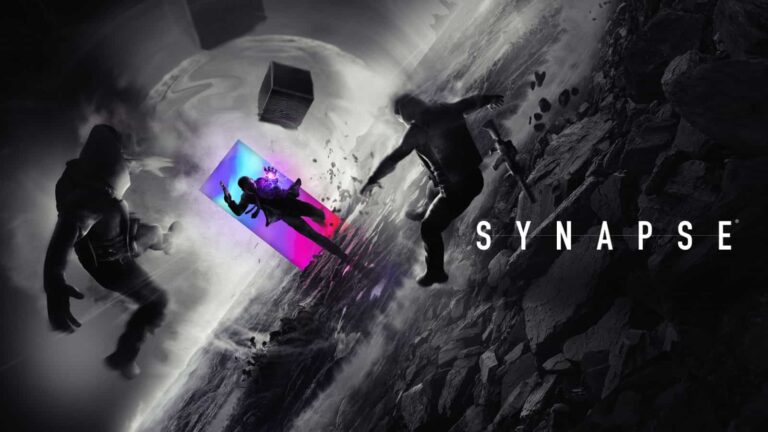
If you snagged a PS VR2 headset, you may want to keep an eye out for Synapse. An upcoming game from nDreams (the creators of Fracked) that was announced at this week’s PlayStation State of Play livestream on February 23. Synapse is the kind of game you play when you want an action-packed thrill ride. And judging by the trailer, that’s exactly what you’ll be getting.
Synapse is a first-person shooter so it’s already off to a great start in terms of putting you right into the action. To make it more exciting though, the developers added a neat twist. Your character also has telekinetic powers. As you progress, you can use this blend of super abilities and firepower to lay waste to your enemies.
To make things even more interesting your telekinesis powers are 1:1 motion controlled. Using the eye tracking to enhance the aiming. Players will be able to “launch, levitate and smash enemies through destructible environments” nDreams says.
PS VR2 Sense controllers will enhance the Synapse gameplay
When Sony finally revealed everything about the new VR headset last year, it confirmed the new controllers would incorporate some of the PS5’s DualSense controller features. Namely the advanced haptic feedback and the adaptive triggers.
Synapse, unsurprisingly, will use these features to enhance the gameplay experience. As nDreams puts it, “so you can feel every moment.” It was also developed with a unique art design to take advantage of the PS VR2’s 4K HDR display. And what really makes this pop is the mix of monochromatic landscapes and enemies, while your powers and certain objects are flush with vibrancy and splashes of color.
Synapse doesn’t have an official release date yet but you can wishlist it on the PlayStation Store. You can also check out the trailer below if you want a sneak peek at the game.
It was exactly one month ago when we told you that Google was broadening its test of new read and delivered icons for RCS messages. RCS, or Rich Communication Services, is the Android equivalent of Apple’s iMessage platform. With RCS there are no character limits, higher quality image, and video files can be shared, messages are sent with end-to-end encryption, users receive a read receipt when a message they sent has been read by the recipient, and a typing indicator appears when a reply is being typed by the recipient.
Google’s RCS is very similar to Apple’s iMessage
Of course, all of these features are only available when two Android users are messaging each other and both are using the Google Messages app. Should an iOS user join the group chat, all of those great features-including end-to-encryption-are disabled. In other words, RCS is very much similar to iMessage although you don’t see Android users insulting iPhone users when they join a group chat comprised solely of RCS users.
Google is making a change to its Delivered and Read indicators on RCS for Android
In the past, if two RCS users were chatting with each other, the one sending a message would see the word “delivered” when his/her message was received by the other party. Once the message was read, the sender would see the word “read” under his message. This obviously allowed a user to know whether his missive was indeed received by the recipient, and more importantly, whether the message was read.
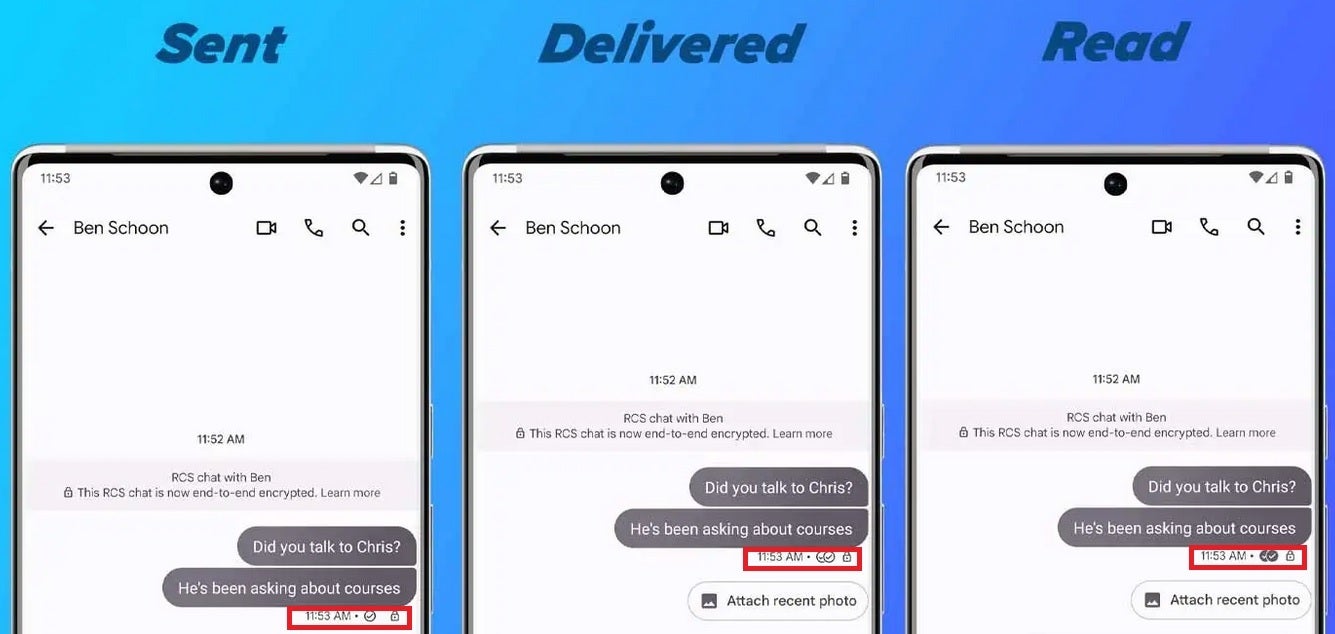
But Google has changed this and as we noted last month, it had been testing the use of a checkmark system similar to what WhatsApp uses. When a message has been sent, underneath it, you’ll now see a small circle with a single checkmark inside it. When the message is delivered to the recipient, you’ll see two circles side-by-side, each with a single checkmark inside. And when the message has been read, the two circles are filled and the checkmarks are now white against a black background.
Per 9to5 Google, the update is rolling out now. For the other RCS user that you’re messaging to receive a read receipt and a typing indicator when you’ve read his message and started typing out a reply, you need to make sure that you have both features toggled on. To do that, open the Google Messages app and tap on the picture profile in the upper right corner of the search field. Tap on Message settings > RCS chats and make sure Send read receipts and Show typing indicators are both toggled on.
Google wants to know why we can’t all just get along
Google has been trying to pressure Apple to support RCS on iOS. This would end the green bubble bullying that takes place when an Android user joins a group chat made up of iOS users and disables all of the special iMessage features including end-to-end encryption, read receipts, typing indicators, and higher-quality images. As we noted at the top of this article, similar RCS features are disabled whenever an iOS user joins a chat made up of RCS users. So why can’t we all just get along?
When a chat is going on between iOS users, all text is seen in a blue text bubble. Once an Android user joins the chat, the text bubble turns green. And that seems to bring out the worst in iOS users. Google created a video last year which we’ve embedded in this story. The video is clever since it throws back Apple’s “think different” ad campaign from pre-iPhone days and also points out that by not supporting RCS, the company is downgrading the mobile experiences of its own customers.
Alas, Google might as well be banging its head against a wall(ed garden). Meanwhile, we’d imagine that not too many consumers know that Google Message’s RCS offers the same features as iMessage. As a result, some Android users use a messaging app provided by their carrier. If you have an Android phone and want a chat experience equal to Apple’s iMessage platform, you need to install the Google Messages app (also known as Messages by Google). You can find it in the Play Store.
DNA Diagnostics Center (DDC), a US-based DNA testing service suffered a data breach in November 2021, in which hackers managed to access highly sensitive and personal data of users, including payment card details.
DNA Diagnostics Center (DDC) has agreed to pay $400,000 to settle the lawsuits filed against it by the attorneys general of Pennsylvania and Ohio after a 2021 data breach affecting 2.1 million.
The breach, which was reported by Hackread.com, initially occurred in May 2021, but the company did not take any further action at the time. It was only when DDC’s managed service provider reached out again to inform the company about evidence of Cobalt Strike malware on its network that it acted to secure its systems.
However, by that time, a hacker had acquired data from more than 2,102,436 customers. This data included the social security numbers of 45,000 customers from Ohio and Pennsylvania.
The stolen data belonged to a legacy database that DDC inherited from another DNA testing company, Orchid Cellmark, after acquiring it in 2012.
DDC claimed that it had no knowledge of the database’s existence in its systems, and despite the company’s inventory assessment and penetration tests, the legacy databases did not show up.
This oversight led to threat actors accessing 28 databases containing personally identifiable information (PII) of people who had undergone genetic testing between 2004 and 2012. After the emergence of news about the data breach, Ohio and Pennsylvania sued the company.
“Negligence is not an excuse for letting consumer data get stolen,” said Ohio Attorney General Dave Yost, of the incident. “We’re proud to partner with Pennsylvania to ensure that citizens’ personal data stays private —which consumers rightly expect.”
“The more personal information these criminals gain access to, the more vulnerable the person whose information was stolen becomes,” said acting Attorney General of Pennsylvania Michelle A. Henry. “That’s why my Office took action with the assistance of Attorney General Yost in Ohio.”
As part of the settlement, DDC agreed to improve its security practices, hire a Chief Information Security Officer (CISO) to oversee its security department, conduct regular security risk assessments, maintain an updated asset inventory and develop a plan to respond to a security threat on the network.
It simply goes to show that users should never download software from a third-party website or marketplace.
The cybersecurity researchers at Jamf discovered that cybercriminals are trojanizing legitimate Mac software apps with malware and uploading them to The Pirate Bay and other pirated software sites, where users download them and unknowingly infect their devices. The attackers use XMRig cryptojacking malware to execute the XMRig utility.
For your information, XMRig is a command-line cryptominer. It isn’t new on Mac, as Trend Micro analyzed a sample in February 2020. This tool is used for legitimate purposes, but its open-source, adaptable design has made it a popular choice among threat actors.
The newly discovered XMRig implementation was disguised as Final Cut Pro, Apple’s video editing software. Attackers used the Invisible Internet Project (I2P) in both iterations of XMRig for outbound communication, raising confusion about whether the infections were connected or part of something larger.
The malicious version of Final Cut Pro is unauthorized by Apple. It executes XMRig in the background. When it wasn’t initially dubbed as malicious by any security mechanism on VirusTotal, from Jan 2023 onwards multiple vendors detected the malware. Still, most of the malicious apps remain undetected.
Researchers from Jamf searched for the malware source on The Pirate Bay and found one with a matching hash to the trojanized version and a series of Apple Mac apps, including Logic Pro and Photoshop.
It is worth noting that all apps were uploaded to The Pirate Bay by the user called “wtfisthat34698409672.” Moreover, they found numerous versions of Final Cut Pro.
All malicious apps for macOS have been uploaded by “wtfisthat34698409672.” (Screenshot credit: Jamf)
“We suspected that the Mach-O sample arrived packaged in a DMG (an Apple image format used to compress installers) for Adobe Photoshop CC 2019 v20.0.6. However, the parent file was not successfully sourced.”
Jamf
Further probing revealed three generations of malware—the first generation started in August 2019 and was a standard malware implementation. The second generation started in April 2021 and wasn’t detected by VirusTotal until February 13, 2023. This version was different as there were additional hidden files, but no persistence mechanism was noted.
Instead, the malware opened with the app and stopped functioning when the app was closed. The third generation had greater stealth features, as there weren’t any hidden executables, but only one large binary with base64-encoded components and LZMA compression.
New versions of these malicious Mac apps started appearing on The Pirate Bay within just 24 hours of Apple’s app update releases and were disguised as legitimate processes.
Researchers state that this isn’t a typical malware campaign and is more like a methodology for delivering malware. Still, users should beware of trojanized apps and avoid downloading software from unknown sources.
Android TV comes in a variety of different devices. From set-top boxes, to HDMI dongles, and even actual TVs. So here we are to bring you the best Android TV devices that are currently available.
For those that are not aware, Android TV is Google’s TV operating system based on Android. This is great because all of your favorite apps from your smartphone are available on your TV. In addition to that, you also get the Google Assistant and Cast, so you can literally put anything on your TV.
Best Android TV Devices
In this list, you’ll find the best Android TV devices from companies like NVIDIA, TiVo, Xiaomi, Sony, TCL and many others. All of which make some really great Android TV devices, that can be had for as little as $50. Making them very inexpensive.
Google unveiled the new Chromecast with Google TV last month, and it quickly became one of our favorite streaming devices. That is because it brings all the familiarity of Android TV, to a smaller dongle, with an actual remote. Which is something the Chromecast was always missing.
Chromecast with Google TV runs Android TV, but it has a new user interface on-top called Google TV. Which works extremely well. It makes it much easier to find something to watch, and the recommendations will get better over time. Additionally, it has a “Live” tab for YouTube TV (other streaming live TV services will be added in the future, apparently), which makes it easy to see what is live on TV right now. Without jumping into the app, which can be a bit slower.
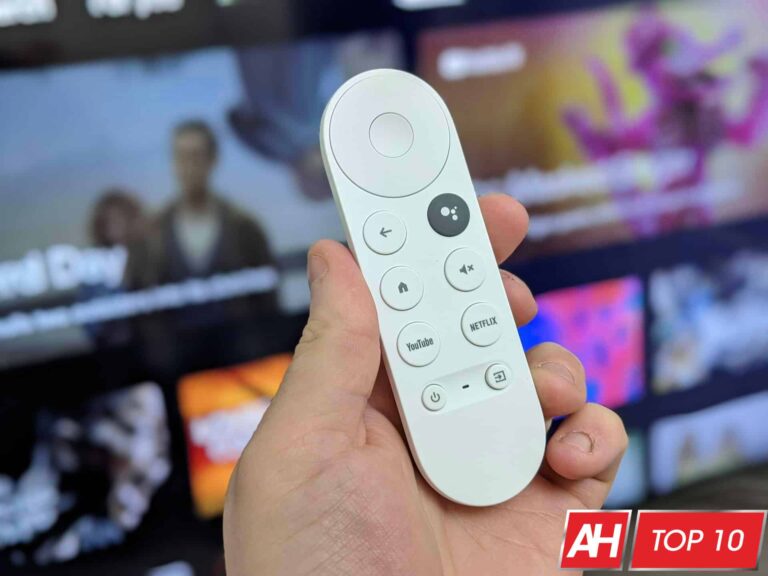
The remote has all the buttons you’d want, including buttons to control your TV. Which makes the Chromecast with Google TV incredible, and worth buying.
Walmart has been working to build out its own electronics brand – onn. – and it now has an Android TV set-top box available. Which is actually pretty cheap, at about $20. It does do 4K but not 4K HDR. Which is great, since most 4K devices are closer to $50.
It is regular Android TV, so you’re going to get access to all of your favorite apps on Android TV. That includes Netflix, Hulu, Amazon Prime Video, YouTube and much more. There’s also support for Google Assistant here.
Google’s entry-level Chromecast is actually the cheapest Chromecast the company has ever put out. At just $29.99, it’s really competing with Roku and Fire TV here. The major difference between this and the original Chromecast with Google TV that is $49, is the resolution. As the name indicates, this one only does up to 1080p resolution, while the older Chromecast with Google TV does 4K.
As the name indicates, this does also run on Google TV. That’s Google’s newer TV platform, which has hundreds of thousands of apps to choose from. Including some of your favorites like Netflix, Freevee, Hulu, YouTube and much more. Google also has some really good recommendations here.
The Xiaomi Mi TV Stick is the best Android TV streaming device on the market right now. Though there aren’t many competitors to choose from. It doesn’t do 4K though, so if you want 4K, check out the NVIDIA SHIELD TV listed below.
This stick from Xiaomi does the absolute bare minimum for Android TV, and that’s not a bad thing. It’s keeping things simple. As mentioned, it does 1080p only, it has a gigabyte of RAM and 8GB of storage as well. Which should keep it decently speedy.
With Android TV running on the Xiaomi Mi TV Stick, you’re going to be able to watch all of your favorite movies and TV shows here. From apps like YouTube, Sling TV, Fubo TV, Disney+, Hulu, Netflix and much more.
The NVIDIA SHIELD TV Pro is the best streaming device for gamers, because it is also a gaming console and works with GeForce Now. So you can play your favorite PC games on the big screen.
This runs on Android TV, as you might have expected, and that allows it to run a bunch of great apps. Like Fubo TV, Netflix, YouTube TV, Hulu, Disney+, HBO MAX and much more. There are hundreds of thousands of games available on the NVIDIA SHIELD TV Pro.
Of course, with it running on Android TV, you also get the Google Assistant here. So you can control your smart home products from your TV, find something to watch and much more.
The Sony A9G is a BRAVIA OLED TV, and it’s the latest model from the company. With this being an OLED TV, you’re going to get a really great picture. With the blacks actually being black, and colors are just going to be more true to life, compared to an LCD or LED TV.
Sony also worked with a number of movie producers to fine-tune the display on the A9G, so that it delivers the best picture quality possible. With X-Reality PRO, you are getting images upscaled to 4K clarity, even if it is being streamed in 1080p or less. Sony has support for Dolby Vision as well as IMAX Enhanced, which is going to give you a total cinematic experience.
There is Android TV built into this TV, so you are going to have access to thousands of great Android apps. This includes Netflix, Google Play Movies & TV, Hulu, YouTube, Sling TV, Amazon Prime Video and much more. The Google Assistant is on-board and there is also support for Amazon Alexa.
What makes this the best Android TV available is the fact that it has the best picture quality available, and Sony also gave Android TV enough power to run smoothly in this TV. Instead of slow and buggy like it is in other TVs on the market, that have Android TV built-in.
The Hisense U8G is a really great Android TV for the gamers out there. That is because it does have an HDMI 2.1 port and supports [email protected] gaming. That’s a big deal for the PlayStation 5 and Xbox Series X consoles.
Additionally, it has the Quantum Dot Wide Color Gamut supported. So you’re going to get over 1 billion true-to-life colors with this TV. It does have HDR, and supports IMAX Enhanced. IMAX Enhanced allows the TV to bring the cinema experience home. As it is able to combine digitally remastered 4K HDR content and DTS audio technologies with the best consumer products and streaming platforms.
The TiVo Stream 4K is currently the cheapest way to get Android TV onto your TV set at home. It comes in at just $35, which is really impressive for what you’re getting here. And best of all, the remote only has one sponsored button, and it’s for Netflix. One that most people likely won’t mind.
TiVo has included it’s own guide of what’s on TV here, and you can also see what’s on Live TV through the TiVo Stream. It’s similar to the Google TV interface that Google introduced in late 2020, but with a touch of TiVo included.
Don’t forget that the TiVo Stream 4K is also capable of running 4K HDR content and it also supports Dolby Vision.
This is a budget Android TV model from TCL. Coming in at less than $150. It’s a 32-inch Full HD TV. So you’re not getting 4K nor HDR here. But for this price, you can’t expect to get that.
Instead, you still get all of your favorite Android apps, as well as Google Assistant and Google Cast included. And soon it’ll get updated to the Google TV interface.
During yesterday’s PlayStation State of Play livestream, Sony showed off a handful of new games coming to PS VR2 this year, including Before Your Eyes. Originally released for PC (you can pick it up on Steam right now for $9.99), Before Your Eyes is a narrative adventure that takes you back through your life through a series of blinks. In the game, you blink, and you jump forward in time to a later part of your life.
One super cool detail here is that you will actually be blinking when playing Before Your Eyes on PS VR2 and the headset will track it. So when you open your eyes again a split second later you’ll progress to a new scene. It’s a small detail but it should make the game feel a lot more immersive. Which, is bound to make it more enjoyable for players.
PS VR2 provides a new way to play Before Your Eyes
Since the game is already available on Steam, it’s obviously not the first time people have been able to play it. It is however the first time you’ll be able to play it without controller inputs. You will of course need the controllers to start the game. But once you begin playing, blinking is essentially your main control. And if you think about it, that’s kind of a neat way to lay out the game’s narrative.
Really, it feels like Before Your Eyes was made for VR. Even if it wasn’t intentionally designed for VR initially. The game’s launch is still a couple of weeks away. But it is available to pre-order right now. And if you’re PlayStation Plus subscriber, you can save some money. Bringing the standard price down from $14.99 to $13.49. You can also check out the game’s PS VR2 launch trailer below.