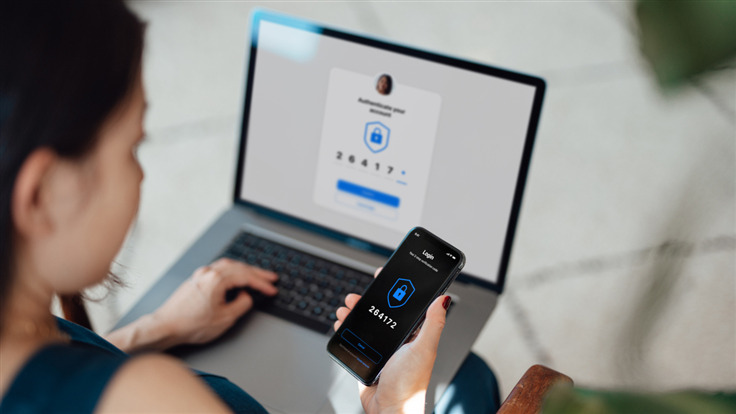
We explain how to secure your Twitter account with app-based two-factor authentication.
If you use text based authentication as an additional level of security for your Twitter account, you may be aware that this option will be reserved for paying Twitter Blue subscribers come mid-March. This post will explain how to enable app based authentication. We found it easier to do on our desktop, with the authenticator code on our phone.
Enabling app based 2 factor authentication
1. While logged in, navigate to Settings and Support > Settings and Privacy > Security and account access > Security > Two-factor authentication.
2. Click Authentication app and then enter your password. Click the Get started button.
2. You’ll now see a QR code on the Link the app to your Twitter account page. Open your authenticator app and click the Scan a QR code option. Point your phone at the screen and the code will be scanned automatically. If it isn’t, your app may require you to do this step manually. Click Next.
3. If the previous step worked, you’ll see a 6 digit code being generated for Twitter in your authenticator app. Enter the code in the popup box on Twitter in order to link your account. If the code changes before you can enter it, don’t worry. Just enter the fresh code. Make a note of the recovery code, which can be used to sign in if you lose your device or access to your authentication methods.
That’s it! Your Twitter account is now more secure than it was.
A word of caution: you can still be phished despite using app based codes, as many phishing sites now ask for this information too. Stay safe out there!
We don’t just report on threats—we remove them
Cybersecurity risks should never spread beyond a headline. Keep threats off your devices by downloading Malwarebytes today.
AT&T is the second largest carrier in the US, behind Verizon. A lot of its growth dates back to the iPhone exclusivity it had until the iPhone 4. And many have just stuck with AT&T since then. AT&T has a lot of Android phones, actually they have more than every other US carrier does right now, which is rather surprising.
That makes choosing the best AT&T phone for you, a bit tougher. So we’re here to help you pick up the best phone for you. If you need help with their plans, we’ve listed their best plans here.
Best AT&T Phones
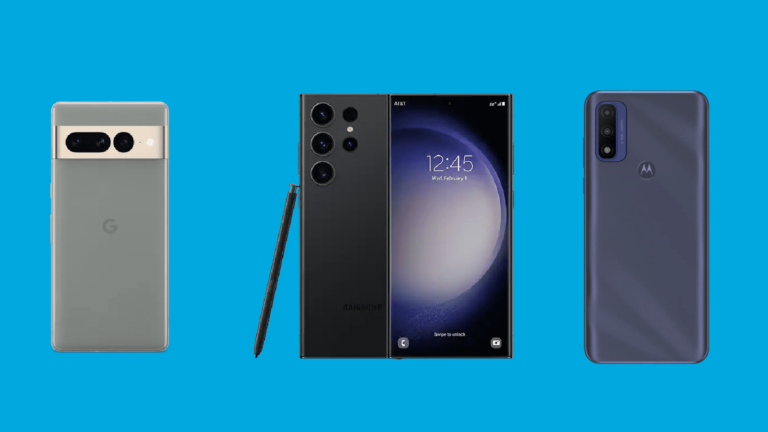
AT&T has phones ranging from just a couple of hundred dollars, to up over a grand. So there’s something for everyone on this list. This list is not ranked in order of which phones we think are the best. They are in a random order, and you really can’t go wrong with any of these.
All of these phone prices are listed as per month for 36 months, unless otherwise noted.
The Google Pixel 6a is the latest from Google, in its A-series of smartphones. Which basically means, you’re getting the flagship specs and features, for a lot less. The Pixel 6a sports a 6.1-inch FHD+ 60Hz display, Google’s Tensor chipset, 6GB of RAM and 128GB of storage.
On the camera-front, Google has also included dual 12-megapixel cameras (wide and ultrawide). There’s also a pretty hefty 4410mAh battery inside.
The Galaxy S23 Ultra is the newest kid on the block for AT&T. It’s got all of the latest specs that you would expect from Samsung. That includes a Snapdragon 8 Gen 2 for Galaxy inside, with 8GB of RAM and 256GB of storage. It also has a 5000mAh capacity battery, with a 6.8-inch QHD+ 120Hz Adaptive AMOLED display.
It also has a brand new 200-megapixel main sensor on the backside. Which offers some pretty impressive detail in your photos. Samsung lets you change from the usual 12.5-megapixel images (which is pixel binned from the full 200MP), or 50-megapixel images. Which is a really nice feature to have.
Samsung will update this phone with new versions of Android for four years, and five years for security updates.
The moto g stylus 5G is one of the cheaper 5G smartphones you can buy, and it even comes with a stylus. Now it’s nowhere near what Samsung offers with the S Pen, but it is a stylus.
This sports a 6.8-inch FHD+ 120Hz display, the Snapdragon 480 5G processor with 6GB of RAM and 256GB of storage. There is also a 5000mAh capacity battery in this one.
Google’s latest flagship smartphone is the Pixel 7 Pro, which we actually called Smartphone of the Year for 2022. It’s a really incredible phone, now AT&T does charge you a bit of a premium over the Google Store, charging you $939 when it’s all said and done. But with a trade-in, you can get it a lot lower.
The Pixel 7 Pro sports a 6.7-inch QHD+ display, the Tensor G2 processor, 12GB of RAM and 128GB of storage on-board. It still has the same camera setup as the Pixel 6 Pro, but it now adds a macro mode, using the ultrawide sensor. Which is really nice to have.
Google has promised three years of software updates here and five years of security updates (through 2025 and 2027 respectively).
The Galaxy S21 FE basically brings all of the greatness of the Galaxy S21, but at a cheaper price. It sports a 6.4-inch FHD+ display, the Snapdragon 888 5G processor inside with 6GB of RAM and 128GB of storage. It also has a pretty nice 4500mAh capacity battery inside.
It’ll get three years of updates instead of the four that the Galaxy S22 series is offering. That’s still pretty good, covering you until 2025, if not longer.
This is the “boring” Pixel 6, but still a really good option. It sports a 6.4-inch FHD+ 90Hz AMOLED display, with the same Google Tensor chipset, 8GB of RAM and 128GB of storage. It does also come in a 256GB variant. This is all powered by a 4614mAh capacity battery as well.
Google has promised three years of software updates, and five years of security updates (until 2024 and 2026 respectively) for the Pixel 6.
The Galaxy A53 5G is a really great smartphone with flagship features without the flagship price. As you can see, this is $10 per month for 36 months (for $360 total). It offers a 6.5-inch FHD+ Super AMOLED 120Hz display – not LTPO though so it doesn’t adapt.
It is powered by the Exynos 1280 processor, 6GB of RAM and 128GB of storage. There’s also a massive 5,000mAh capacity battery inside, the same size as the Galaxy S22 Ultra, for a fraction of the price.
The Galaxy Z Fold 4 5G is the best foldable that you can buy right now, but it is not cheap. Coming in at a full price of $1799, or you can finance it for $50 per month for 36 months at AT&T.
It sports a 6.2-inch outer display, along with a 7.6-inch internal display. It’s powered by the Snapdragon 8+ Gen 1 processor, 12GB of RAM and 256GB of storage as well. There’s also a 4400mAh capacity battery inside, which is the same as the Fold 3, but the battery life is actually a lot better than on its predecessor, thanks to that Snapdragon 8+ Gen 1.
The Galaxy Z Flip 4 5G is the most popular foldable in the US right now. This one is basically a regular phone that can fold in half. Who doesn’t want that? It sports a 6.7-inch inner display which is AMOLED and 120Hz. There is a small 1.9-inch outer display for notifications.
Internally, you’ll find the Snapdragon 8+ Gen 1 processor, with 8GB of RAM and 128GB of storage. There is a 256GB model available. And there is a small 3700mAh capacity battery inside. Though that is a 12% bump from the Flip 3, and paired with that Snapdragon 8+ Gen 1, the battery life is actually pretty good here.
It’s a flashback to clamshell phones from the 2000s and that really appeals to a lot of people.
This last spot on our best phones for AT&T list, we have the iPhone 14. Now it is mostly the same as the iPhone 13, but there are some nice changes here. It does still sport the same 6.1-inch display, with the A15 Bionic processor. RAM has been bumped up to 6GB. And it does still come in 128GB, 256GB and 512GB of storage.
The cameras have been upgraded, and now sports what the 13 Pro models were using last year. Still a 12-megapixel main and a 12-megapixel ultrawide sensor. No telephoto on the iPhone 14. It’s still a pretty good phone, especially if you’re upgrading from a much older phone.
Hats off to OpenAI; it takes quite the force to make Google, the search messiah, afraid. That’s just what happened in late 2022 when OpenAI’s chatbot ChatGPT shocked the world. Now, Google is worried about ChatGPT, and it declared a code red for the company. But why is the company shaking in its boots?
Firstly, what is ChatGPT?
So, if you don’t know what ChatGPT is, it’s quite a piece of artificial intelligence. It’s an AI chatbot that’s meant to be an all-in-one source of information, advice, content, and support. You can ask for information just like you would on Google or Bing. For example, you can ask something like “When should I feed my baby solid food?”. It’ll deliver a direct answer.
ChatGPT doesn’t stop there. This chatbot can deliver written content. You can ask it to write stories, scripts, poems, and even full news articles. All you have to do is type in what you want the chatbot to spit out, and you will get results.
To top it off, ChatGPT can also just be there to chat. You can type in any subject that you want to talk about, and you’ll be able to have a full and developed conversation. Type in something like “I want to chat” or simply type in the subject you want to talk about. You’ll have a back-and-forth conversation about it.
We have a lot more information about ChatGPT. If you want to know just about everything there is to know about it, click here. If you want to know how to use ChatGPT, click here.
Why is Google worried about ChatGPT?
So, ChatGPT does a lot of stuff and more, but what does that have to do with Google? Well, a ton! What is Google known for mostly? Sure, it has its Pixel phones and it owns Nest and Fitbit amongst other companies, but it’s primarily a search company. The mass majority of the internet is powered by Google Search.
Google has an ad business, and Search is a huge part of it. Millions of people and companies around the world buy advertising space on the Google search page. When someone clicks on their ad, Google gets the majority of that money. The more people use Search, the more chance that someone clicks on the ads. Hence, Google gets more money.
This is why people using ChatGPT as a Google alternative is such a bad thing for the company. Google sells a bunch of Nest, Fitbit, and Pixel devices, but those net the company chump change compared to ads.
In 2020, ads made up over 80% of the company’s yearly revenue ($147 billion according to CNBC). About 71% of that came from ads on search pages ($104 million). So, ad revenue from the search engine made up about 57% of the company’s total yearly revenue.
It doesn’t take a math wiz to know that that’s a massive chunk of the company’s money. If enough people start using ChatGPT in lieu of Google search, the company is in for some severe losses.
What makes ChatGPT a threat
There are some factors that make ChatGPT a particularly large thorn in Google’s paw. Firstly, people will turn to it to do things for them. A lot of the time, people will turn to Google to ask how to do something. “Best courses to learn to code”, “Best books to read about becoming an author”, etc.
However, ChatGPT has the ability to do things for people. Why ask how to code when you can have it made for you? Why try to learn how to become an author if you can just have ChatGPT generate a book for you? Google will see a dip in traffic from people who want to learn the tools of the trade. They’ll flock to ChatGPT to have things made for them.
Also, there’s the lack of noise
What might be the largest reason that Google is worried is the lack of noise. Question: if you’re looking for advice on how to swaddle a baby, would you rather ask a single person for a concise answer or talk to a group of people who’ll have varying answers and conflicting arguments? Most people will opt for the first option.
The thing is that when you’re Googling topics, you run the risk of being overloaded with a ton of conflicting results. You can search how to swaddle a baby and get results like “Best ways to swaddle your baby” and you could also get something like “DO NOT Swaddle your baby!” right under it. Then, you could see “Best alternatives to swaddling your baby” right under “Does swaddling your baby cause brain tumors?”.
That’s something that people on Google have to deal with. If you ask ChatGPT this question, it will just give you a short, sweet, and to-the-point list of how to do it. You don’t have to bother with wading through results. Now, we can’t ignore the risk of ChatGPT giving wrong information. However, this won’t stop people from flocking over to the chatbot for their queries.
What is Google doing?
So, that’s why Google is worried about ChatGPT, but what is the company doing? Google has come up with a way to counter its competition. The company unveiled its own AI chatbot called Bard. You can read more about it here. As you can imagine, it’s expected to do pretty much the same things that ChatGPT does. Instead of getting a slew of search results, you’ll get straightforward answers.
This will be auspicious for the company, as people will be able to get answers backed up by the chatbot while still being fed search results. This will ensure that people are still using Google and are still able to click on ads from the company.
At the moment, we’re still waiting for the competition between ChatGPT and Bard to heat up. We’re sure that, within a year’s time, the AI landscape will be completely different from what it is now.
After introducing its new Bing and Microsoft Edge apps powered by AI, Microsoft announced the launch of the new Bing preview and Edge on mobile. The Redmond-based company figured out that most of the searches occur on mobile phones these days and decided to bring the new AI capabilities to smaller screens around the same time as PC.The new Bing and Edge mobile apps are now available for those who wish to try them out. Along with a new experience, Bing mobile offers a fresh design as well. Tapping the Bing icon allows users to engage in a chat session asking simple or complex questions.
Another important change added, which is also one of the preview community’s most requested features, is voice. Voice search is now available not just on desktop, but also on mobile too. For those who have access to the preview, the new Bing experience will be available from the homepage of the Microsoft Edge mobile app.
Additionally, Microsoft announced the launch of the AI-powered Bing for Skype. Starting today, the new Bing in Skype is available worldwide in preview. While Microsoft is fine-tuning the app, Skype users who use Bing will still get real-time answers to their questions.
The new AI-powered Bing for Skype experience includes personalization options that allow users to choose how they want answers to be displayed such as bullet points, text or simplified response. According to Microsoft, Bing can translate text from more than 100 languages, so that’s another plus. Although Skype user interface will vary during initial rollout, these features will remain available to everyone who has access to the preview.
Those who wish to try these out must sign up for the Bing preview. Keep in mind though that you may occasionally find connectivity issues when your network signal is low. Microsoft is aware of these problems are will probably fix them sooner rather than later.
Trellix researchers discovered a new class of privilege escalation bugs based on the ForcedEntry attack, which exploited a feature of macOS and iOS to deploy the NSO Group’s mobile Pegasus malware.
The new class of bugs allows arbitrary code to be executed in the context of several platform applications, resulting in privilege escalation and sandbox escape on both macOS and iOS.
The vulnerabilities range in severity from medium to high, with CVSS scores ranging from 5.1 to 7.1. Malicious applications and exploits could take advantage of these flaws to gain access to sensitive information such as a user’s messages, location data, call history, and photos.
The Citizen Lab, an interdisciplinary laboratory based at the University of Toronto’s Munk School of Global Affairs and Public Policy in Canada, revealed the existence of ForcedEntry – CVE-2021-30860 – in September 2021, after being the first to expose NSO’s malfeasance earlier.
However, Trellix claims that its Advanced Research Centre vulnerability team has noticed a group of bugs in iOS and macOS that circumvent Apple’s strengthened code-signing mitigations designed to prevent the exploitation of ForcedEntry.
According to vulnerability researcher Austin Emmitt, the new bugs involve the NSPredicate tool, which developers use to filter code, and around which, Apple tightened restrictions following the ForcedEntry on the side by introducing a protocol called ‘NSPredicateVisitor’.
NSPredicate, is an innocent-looking class that allows developers to filter lists of arbitrary objects. Reports say classes that implement this protocol can be used to check every expression to make sure they were safe to evaluate.
“These mitigations used large denylist to prevent the use of certain classes and methods that could clearly jeopardize security. However, we discovered that these new mitigations could be bypassed”, says Austin Emmitt.
“By using methods that had not been restricted it was possible to empty these lists, enabling all the same methods that had been available before”.
Apple assigned CVE-2023-23530 to this bypass. More importantly, it is discovered that almost every implementation of NSPredicateVisitor could be avoided.
While there is no single implementation because nearly every process has its own version, the majority of implementations use the “expressionType” property to filter out function expressions.
The problems that stem from the fact that this property can be set during the sending process and is trusted to be accurate by the receiver, rendering the checks ineffective. CVE-2023-23531 was assigned to this bypass.
New Bug ‘Class’ In Apple Devices
“The first vulnerability we found within this new class of bugs is in coreduetd, a process that collects data about behavior on the device”, researchers
“An attacker with code execution in a process with the proper entitlements, such as Messages or Safari, can send a malicious NSPredicate and execute code with the privileges of this process”.
The user’s calendar, address book, and images are accessible to the attacker due to a process that runs as root on macOS. Contextstored, a process associated with CoreDuet, is likewise impacted by a very similar problem that has the same effect.
This outcome is comparable to FORCEDENTRY, where the attacker uses a poor XPC service to run code from a process with more device access.
Moreover, the appstored daemons have weak XPC Services. These flaws could be used by an attacker in order to acquire access to a process that can connect with these daemons and enable the installation of any application, possibly even system software.
Also, researchers found XPC service OSLogService, which may be exploited to access potentially sensitive data from the Syslog. Most importantly, an attacker can make use of an iPad’s UIKitCore NSPredicate vulnerability.
“By setting malicious scene activation rules an app can achieve code execution inside of SpringBoard, a highly privileged app that can access location data, the camera and microphone, call history, photos, and other sensitive data, as well as wipe the device”, researchers
Final Thoughts
Researchers mention that the aforementioned flaws indicate a “significant breach of the security model of macOS and iOS”, which depends on each application having precise access to only the resources they require and contacting more privileged services to obtain any additional resources. Hence, both iOS 16.3 and macOS 13.2 fix these problems.
We take a look at a ransomware infection which uses a novel approach to payments: asking for the victim’s insurance details.
Ransomware authors are wading into the cybersecurity insurance debate in a somewhat peculiar way. Specifically: urging victims to disclose details of their insurance contract, in order to tailor a ransom which will be beneficial to the company under attack.
HardBit 2.0: dismantling a device piece by piece
The ransomware, called HardBit 2.0, has been in circulation since sometime around November last year. Although there is no specific information as to how it arrives on a network, once it gets there is performs typical ransomware operations:
Encrypts files, branding them with the file’s custom logo
Gathers system/network data
Reduces overall security of affected systems
Disables recovery options and tamper protection, turns off multiple Windows Defender features, and interferes with several other security features including real time monitoring and Windows services related to backups like the Volume Shadow Copy Service.
What does the encryption warning message say?
HardBit 2.0 encrypts files and presents the following infection message on compromised desktops:
All your important files are stolen and encrypted! All your files have been encrypted due to a security problem with your PC. If you want to restore them, please send your ID for us.
Our contact information is written in the file “How to restore your files”.
You have 48 hours to contact or pay us. After that, you will have to pay double.
Please do not touch the key written under the help file in any way.
Just like Mortal Kombat ransomware, the attackers ask those who are hijacked to use Tox Messenger to communicate. The authors claim to steal data as well as encrypt it, although there’s no dedicated leak site to exploit this particular angle. In this case, it may be that most organisations targeted by the group would be too distracted by their “unique” approach to ransom demands to care.
A helping hand?
We’ve seen ransomware authors claim to care about their victims in the past. Some ransomware groups will remove themselves from impacted entities such as hospitals or critical services once those stories go public. Your mileage may vary with regard to whether this is a face saving PR move, or if they genuinely care about having going a little bit too far.
Here, they’re going out of their way to “help” by quizzing victims about the specifics of their cyber insurance policy. According to Varonis, there’s no outright demand for Bitcoin or another form of cryptocurrency. In its place is a long, rambling ransom note.
The note explains at length that their final ransom demand will be adjusted to ensure it falls inside of the insurance claim requirements. It paints the insurer as some sort of bad actor wanting to withhold money from the victim. If the scammers are told in private what the insurance total is, they’ll be able to ensure their demand for money is
A) at the top end limit of the ransom payout scale provided and
B) does not go past this limit, so the affected company receives every cent they’ve paid out. This is designed to be a mutually beneficial deal for both parties, as victim and attacker will receive as much as they possibly can.
There is, of course, no guarantee that the ransomware authors won’t use the reveal of potentially confidential insurance information against the victim at a later date. Anyone presented with this choice is really the living breathing definition of crossing some fingers and hoping for the best.
Malwarebytes detects this threat as Trojan.Crypt.Generic.
Detect intrusions. Make it harder for intruders to operate inside your organization by segmenting networks and assigning access rights prudently. Use EDR or MDR to detect unusual activity before an attack occurs.
Stop malicious encryption. Deploy Endpoint Detection and Response software like Malwarebytes EDR that uses multiple different detection techniques to identify ransomware.
Create offsite, offline backups. Keep backups offsite and offline, beyond the reach of attackers. Test them regularly to make sure you can restore essential business functions swiftly.
Write an incident response plan. The period after a ransomware attack can be chaotic. Make a plan that outlines how you’ll isolate an outbreak, communicate with stakeholders, and restore your systems.
We don’t just report on threats—we remove them
Cybersecurity risks should never spread beyond a headline. Keep threats off your devices by downloading Malwarebytes today.
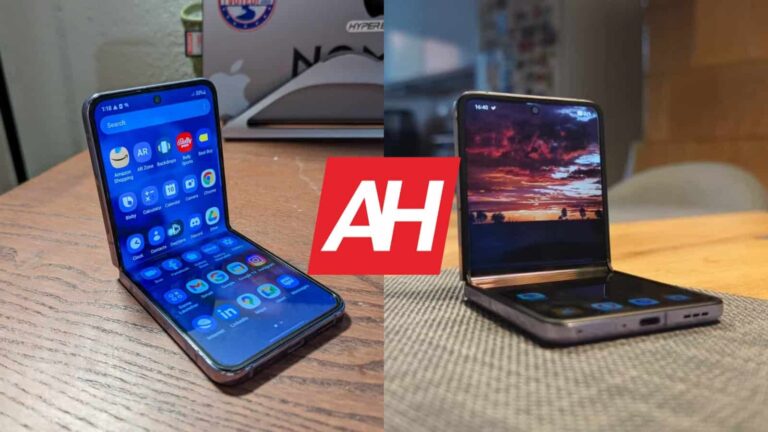
The OPPO Find N2 Flip launched globally quite recently. It arrived as a direct competitor to Samsung’s clamshell foldable. That’s why we’ll compare the two phones here, the Samsung Galaxy Z Flip 4 vs OPPO Find N2 Flip. Both of these phones are quite compelling in their own right, but are also different in a number of ways. We’re here to show you those differences, and hopefully help you make a purchasing decision.
We’ll first list the spec sheets of both phones, and will then move to compare them across a number of different categories. We’ll compare their designs, displays, performance, battery life, cameras, and audio performance. There’s plenty to talk about here, so, let’s get this show on the road, shall we?
Samsung Galaxy Z Flip 4 vs OPPO Find N2 Flip: Design
Both of these phones are clamshell foldables, and both fold right down the middle. In my OPPO Find N2 Flip review, I emphasized the build OPPO delivered, for a good reason. The phone feels very premium, and it folds flat, without a gap, unlike the Galaxy Z Flip 4. Its crease is also quite minimal, and barely noticeable, which is not something I can say for the Galaxy Z Flip 4. On top of that, the OPPO Find N2 Flip has a more prominent cover display.
All that makes the phone look and feel more premium than the Galaxy Z Flip 4. Don’t get me wrong, though, the Galaxy Z Flip 4 still feels great to use, and like a quality product. I just hope Samsung will figure out a way to make the next model gapless, and to also get that crease under control. Both phones feature flat sides, and two cameras on the back. Both feature a frame made out of metal, and actually have a similar feeling in the hand when unfolded. The Galaxy Z Flip 4 has Gorilla Glass Victus+ on the back, while we’re not sure about the Find N2 Flip.
They’re about the same height, but the Galaxy Z Flip 4 is considerably more narrow. It’s also a bit thicker in both folded and unfolded states. Well, at its thinnest point (when folded), it’s about the same thickness as the Find N2 Flip, but at its thickest, it’s noticeably thicker. They also have a similar weight. The Galaxy Z Flip 4 weighs 187 grams, compared to 191 grams of the OPPO Find N2 Flip.
The Galaxy Z Flip 4 offers IPX8 water resistance, while the OPPO Find N2 Flip includes an IPX4 rating. Neither device is particularly grippy, so you may consider using a case.
Samsung Galaxy Z Flip 4 vs OPPO Find N2 Flip: Display
The Galaxy Z Flip 4 features a 6.7-inch fullHD+ (2640 x 1080) main foldable display. That’s a Dynamic AMOLED 2X panel with a 120Hz refresh rate. It supports HDR10+ content, and gets up to 1,200 nits of brightness at its peak. The phone’s cover display measures 1.9 inches, and Samsung used a Super AMOLED panel here. It has a resolution of 260 x 512, and it’s protected by the Gorilla Glass Victus+.
The OPPO Find N2 Flip, on the other hand, features a 6.8-inch fullHD+ (2520 x 1080) Foldable LTPO AMOLED main panel. It also has a 120Hz display, and it supports HDR10+ content. It can reach a peak brightness of 1,600 nits. This phone’s cover display measures 3.26 inches, it’s a lot larger than the Galaxy Z Flip 4’s cover panel. It is an AMOLED panel protected by the Gorilla Glass 5. It has a resolution of 720 x 382 pixels, and gets up to 900 nits at peak brightness.
The main displays on both phones are great. They’re vivid, have good viewing angles, and don’t feel plasticky, as they do on some other foldable phones. They’re more than sharp enough, and the high refresh rate helps them feel premium too. The blacks are deep, and chances are you’ll be happy with either display. Do note that the Find N2 Flip does get a bit brighter, though. The touch response is also good on both. The cover displays are also good on both phones, though they feel entirely different to use. Both displays are quite limited in terms of functionality, though, at least at the moment. They are sharp enough, and quite vivid too.
Samsung Galaxy Z Flip 4 vs OPPO Find N2 Flip: Performance
The Samsung Galaxy Z Flip 4 is fueled by the Snapdragon 8+ Gen 1 SoC. Samsung also included 8GB of RAM here, along with UFS 3.1 flash storage. The OPPO Find N2 Flip, on the other hand, is fueled by the MediaTek Dimensity 9000+ SoC. The device comes in variants with up to 16GB of RAM, and also includes UFS 3.1 flash storage. Neither phone offers storage expansion, by the way.
The performance is great on both devices. They do have different chips, but both are 4nm processors, and both offer excellent performance, despite the fact they’re not the latest offerings from their respective companies. Even during heavy load, while you’re running a graphically intensive game, these two phones don’t slow down. They do great in regular, everyday tasks too, so there’s nothing to worry about in that department. In fact, it was difficult to get them to stutter at all, which only shows how good those chips are, and the same goes for software optimization. You should not worry about the performance on either phone.
Samsung Galaxy Z Flip 4 vs OPPO Find N2 Flip: Battery
Samsung packed in a 3,700mAh battery inside the Galaxy Z Flip 4. OPPO uses a 4,300mAh battery pack inside the Find N2 Flip. The Galaxy Z Flip 4 does have a smaller outer display, and the Snapdragon 8+ Gen 1 is excellent when it comes to power consumption. The two phones were quite similar in terms of battery life during our testing. We were able to push both phones to 7 hours of screen-on-time, and even a bit over that point at times. That’s not bad, but it’s not outstanding either.
Do note that we didn’t really play a lot of games, other than when we tested the performance of both phones. So, if you’re a gamer, count on worse battery life, in both cases. Also, your mileage may vary in general, of course. We use our phones in different ways, with different apps, and with different signal strengths. The good news is, neither phone offer bad battery life, generally speaking.
When it comes to charging, the OPPO Find N2 Flip is faster, but the Galaxy Z Flip 4 is more versatile. The Galaxy Z Flip 4 supports 25W wired, 15W wireless, and 4.5W reverse wireless charging. The OPPO Find N2 Flip comes with support for 44W wired charging, and also reverse wired charging. Do note that the Galaxy Z Flip 4 does not include a charger in the box, though, unlike the OPPO Find N2 Flip.
Samsung Galaxy Z Flip 4 vs OPPO Find N2 Flip: Cameras
Both of these phones have two cameras on the back. The Galaxy Z Flip 4 includes a 12-megapixel wide, and a 12-megapixel ultrawide camera. The OPPO Find N2 Flip has a 50-megapixel main camera, and an 8-megapixel ultrawide camera. The Galaxy Z Flip 4 tends to provide more saturated images in general, while the OPPO Find N2 Flip emphasizes specific colors quite a bit.
Hasselblad’s color tuning comes into play with the OPPO Find N2 Flip, and that is especially nice to see in low light shots. They look quite dramatic, which is a nice look. The Galaxy Z Flip 4 also does really well in low light, though it tends to brighten up shots a bit more. Both phones do a good job overall, and handle HDR situations well. Images from both phones do look a bit processed, which is something many people will prefer.
Their ultrawide cameras are not as impressive as the main units. If we had to choose one of the two, though, we’d go with the Galaxy Z Flip 4’s. The OPPO Find N2 Flip’s ultrawide camera tends to fall apart in low light, as the images end up looking soft, and often lack detail. Overall, both phones do a good job in the camera department, though.
Audio
There is a set of stereo speakers on both phones. Those speakers do sound good in both cases. The Galaxy Z Flip 4 does provide a slightly higher audio loudness, while it’s also supposed to be a bit sharper, though the difference is not that noticeable. The bass is a bit more noticeable, though.
What you will not find on either phone is an audio jack. Both phones do include a Type-C port, which you can use for wired audio connections. If you prefer to go wireless, the Galaxy Z Flip 4 offers Bluetooth 5.2, while the OPPO Find N2 Flip has Bluetooth 5.3 support.
A recent report from WABetaInfo reveals that a WhatsApp private newsletter feature is in the works. According to the report, this feature is currently available via a WhatsApp beta update. At the moment, this beta update is only available to Android beta testers.
The feature might also make its way to iOS beta testers in the coming weeks. For now, there are few details as to the function of this feature that has made an appearance for WhatsApp beta testers. Other sources have reached out to Meta for details on this new beta testing feature.
While netizens wait for the actual details on this coming feature, WABetaInfo has tried to explain the use of this feature. More information about this feature will become available once it passes its early development stage. But in the meantime, here is what you can expect from this coming WhatsApp private newsletter feature.
Available information regarding the WhatsApp private newsletter feature
WABetaInfo says that this feature will help to improve the WhatsApp user experience. The newsletter feature will be a channel for broadcasting information. Users might be able to subscribe to and create various WhatsApp private newsletters.
Unlike the new Community feature, the coming private newsletter will be able to reach more people. In a way, this feature might be similar to a Status update, as broadcasters will be able to pick who to share information with. Others will also be able to subscribe to newsletters and get access to information the broadcaster shares.
Whenever a user is tired of getting updates from a particular newsletter, they can easily unsubscribe from the newsletter. WABetaInfo also says that this feature will have its section within the WhatsApp interface. This section is said to be located with the Status tab and will display all newsletters a user has subscribed to. It is important to take this information with a pinch of salt, as the conclusion was drawn from clues in the beta codes. Changes to the codes might be made before the newsletter feature rollout to users globally.
This new communication feature making its way to WhatsApp aims to improve the sharing of information. WhatsApp will also pack a ton of privacy settings into the coming private newsletter feature. More information about this beta testing feature will become available in the coming weeks.
Samsung recently announced a new security feature to protect its users from cyber threats. Named “Message Guard,” the feature prevents zero-click attacks from targeting Samsung Galaxy smartphone users.
Samsung Message Guard Rolls Out To Galaxy Handsets
Sharing the details via a post, Samsung explained its latest strategy to protect users from zero-click attacks via “Message Guard.”
Zero-click attacks take over a target device without the victim user’s interaction. On smartphones, conducting zero-click attacks is trivial for the threat actors by sending simple messages, such as image files. Although conducting a successful zero-click attack requires the adversary to exploit an unpatched vulnerability, they often succeed in doing so. (NSO’s Pegasus malware is a classic example of such exploitation against iPhones.)
As elaborated in Samsung’s post, its Galaxy devices have largely remained safe from such severe attacks. Nonetheless, to ensure its users remain safe in the future, Samsung has launched Message Guard – an advanced “sandbox” that isolates an incoming file, preventing the embedded malicious code from execution. It then scans and processes the image to ensure it doesn’t harm the device.
The Message Guard feature won’t require user input to scan a file. Instead, it’ll run in the background to check incoming images in real-time.
The tech giant has further elaborated that the Message Guard feature isn’t the first security step from the firm. Instead, it already protects its Samsung Galaxy devices with Samsung Knox – its proprietary mobile security solution pre-installed in its flagship devices. This security solution prevents cyber threats via malicious audio and video files.
However, with Message Guard, the firm strives to elevate this protection by including image checks.
The new feature is available with the Galaxy S23 series and will gradually roll out to other devices. While it currently works on Samsung Messages and Messages by Google, the provider pledges to expand the support for other third-party apps soon.
Which of the myriad, extant cyberthreats should your business be paying the most attention to in 2023?
Which of the myriad, extant cyberthreats should your business be paying the most attention to in 2023?
That’s the question we set out to answer in this year’s annual State of Malware report, and the answers might surprise you. To understand why, you need to know what makes this year’s report so different from previous ones.
Unquestionably, over the last five years, the most serious cybersecurity task facing businesses has changed from defending against waves of malicious, email-borne malware to stopping seasoned criminals armed with Ransomware-as-a-Service (RaaS).
RaaS attacks can be extraordinarily severe. They can bring entire organizations to a halt, come with ruinous ransoms, and may take months of dedicated effort to recover from. They represent an existential threat to businesses.
The worst-of-the-worst is LockBit, the first on our list of the most dangerous threats you face. LockBit’s largest known ransom demand in 2022 was $50 million, although multiple sources report even higher demands were made. Its victims included businesses of all sizes, from local law firms with a handful of employees to multi-national enterprises.
LockBit was the most widely used RaaS in 2022, by far. It accounted for almost a third of all known RaaS attacks, and more than three times as many as its closest competitor, ALPHV.
Known attacks by the top 5 RaaS groups in 2022
And yet, if you were to create a list of the most detected malware from last year, you wouldn’t see LockBit on it. In fact, you wouldn’t see any RaaS on it. In cybersecurity, what’s common and what’s serious have diverged markedly.
For that reason, lists of the most detected malware are gone from this year’s report. In their place, we asked our experts—our threat intelligence analysts, and the threat hunters in our Managed Detection and Response (MDR) team: What essential information do resource-constrained organizations need to know?
They came up with a list of the five worst-in-class malware threats spanning Windows, Android and macOS. The report explains what these threats do and why, what it takes to detect them, and what it takes to recover from an attack. Each of our five is an archetype, so if you prepare to stop them, you’re well prepared for anything, on any of your devices.
Compiling our report like this also led us to an important insight: The most dangerous attacks you will face are not from the strangest new malware, the most sophisticated, the most eye-catching, or the most prevalent.
Instead, the most dangerous threats come from a set of known, mature tools and tactics that an entire ecosystem of cybercriminals rely upon to take in billions of dollars a year. Criminals have come to rely upon these attack types and their vectors because they work, and they work because they are hard to defend against and difficult to remove.
The 2023 State of Malware report explains what they are, how they find their victims, and how to avoid becoming one of them.
To learn more about LockBit and how to defend against it, and to discover the four other threats you should prepare for this year, download the 2023 State of Malware report. In it you will also learn:
What it takes to stop what Europol called the “world’s most dangerous malware.”
Why there was a 300% increase in some new malware delivery methods.
How to catch the emerging, hard-to-detect attacks that don’t rely on malware.
Why security people are as important as security software.