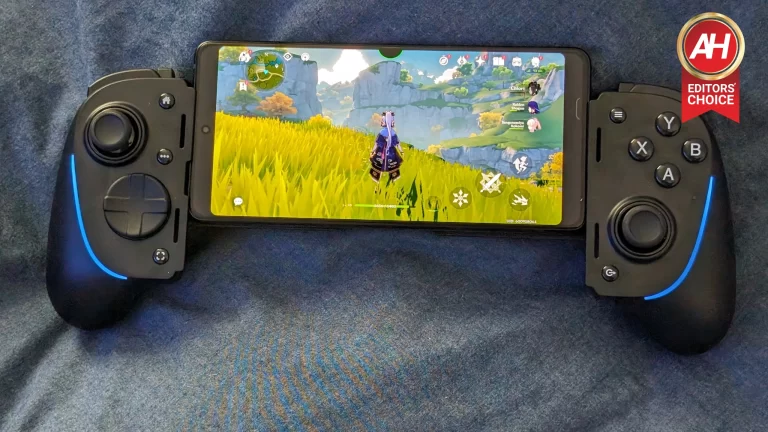
Back at the end of May OneXPlayer unveiled the X1-Mini, its latest upcoming handheld gaming PC, and today is the official launch. If you’re not familiar with OneXPlayer, it makes handheld gaming PCs in various forms. The OneXPlayer units have been around for at least a few years and they were even around before Valve released the original Steam Deck or Steam Deck OLED. While many have taken form like the Steam Deck, ROG Ally, ROG Ally X, and others (basically one solid unit with an integrated display), the X1-Mini is quite different.
It’s a computer baked into the display that you attach controllers to much like the Nintendo Switch. Only these controllers are more like full-sized controllers when the whole thing is put together. It’s a neat little spin on the handheld gaming PC and today is the first day you’re able to order one. With that said, there are some things to note. Right now the OneXPlayer X1-Mini launch is happening on Indiegogo. That means at the moment, you can place your order but the unit isn’t ready to ship. In fact, it won’t be ready to ship until July 2024. The good news is that July is next month.
The OneXPlayer X1-Mini launch starts at $799 for early-bird orders
Now in terms of pricing, the X1-Mini is starting at $799, but this is early-bird pricing and there’s only so much time to secure one at that less expensive price. Specifically, early-bird pricing ends in just under three days. After that, the X1-Mini goes up in price and will cost $1,099. At this cost, the X1-Mini comes with 16GB of RAM and 1TB of internal storage. However, you can easily slip more storage into the unit at any time. In fact, one of the X1-Mini’s unique features is the SSD Swap feature.
“But you can swap out the SSD on lots of PCs” I hear you say. You’re right about that. But on the X1-Mini, the SSD slot is user-accessible without taking apart the entire unit. On the back of the display there’s a kickstand with two little screws, you remove that, then there’s a little hatch you can pop off to remove the SSD and put in a new one. No having to take apart the shell to get at the drive.
You do have to power down the X1-Mini before swapping the drive and OneXPlayer says you should avoid the unit being plugged in. As delivering power to the motherboard, even through the charger while the X1-Mini is off, could lead to component damage. Other than that, this is as simple as it gets for adding a larger capacity SSD. There are also models with more internal storage out of the box.
You can get the X1-Mini with up to 2TB of storage
If you’d rather not mess with SSD swapping for a while, OneXPlayer does offer a model of the X1-Mini that comes with 2TB of storage right out of the box. This model also comes with 32GB of RAM so it’s a pretty beefy unit. That being said, the pricing is just as beefy. The regular price for this unit is $1,359, or $1,059 if you get it during the early-bird pricing sale. There are also only so many of each unit at the early-bird price. So if this is a device you want and you want to save money, you should jump on it as soon as possible. There’s also a model that comes with up to 64GB of RAM.
In terms of the CPU and GPU, the X1-Mini is running with the AMD Ryzen 7 8840U CPU and the AMD Radeon 780M GPU.
There are loads of accessories that come with it
To make the purchase a little sweeter, OneXPlayer is packaging in a handful of accessories to improve the experience. The most notable is the magnetic keyboard. This is a PC after all and it runs Windows 11. So naturally, you can use this like a PC if you want. To make this more convenient, the X1-Mini comes with a magnetic keyboard attachment. You simply detach the controllers, attach the keyboard, and then hook up a wireless mouse. You can now use it like you would a regular tablet PC.
It also comes with a mouse, a hub, a protective bag, a bumper defender, and a pre-applied film over the screen. These are likely perks that come with the Indiegogo orders. When OneXPlayer starts selling this in its own shop, all of these will probably be optional accessories you have to pay for.
AI is all the rage these days, popping up everywhere you look. In 2024, those two letters are getting a serious workout on our keyboards, and for good reason. The world of AI, especially in mobile tech, is evolving at lightning speed. And now, Samsung has news about its Galaxy AI.
Galaxy AI on the Galaxy S24 series was only the beginning
Introduced with the Galaxy S24 series, Galaxy AI is Samsung’s suite of AI features. Now, the tech giant is taking it up a notch by expanding Live Translate to third-party messaging apps, allowing support for voice calls. This means you can stay connected with friends or colleagues on your favorite apps, chatting in multiple languages.
In other words, soon you might be able to use the Live Translate feature on apps like WhatsApp or Telegram, assuming those apps are included in Samsung’s plans. The Korean tech giant hasn’t shared details about compatibility yet.
Plus, since this feature is built into the company’s on-device AI language translation model, users can enjoy seamless communication without worrying about privacy issues or personal data being shared outside their phones when using Live Translate.
As pointed out by Won-joon Choi, EVP and Head of R&D Office at Samsung, the company understands the significance of privacy. That is why it claims that it ensures users have complete control over what they share and what they keep private.
We made the ‘Live Translate’ feature on-device AI based, because voice calls are the most basic feature of a smartphone, yet also an intimate and private means of communication. Samsung has committed to empowering users to communicate without language barriers, while at the same time ensuring every communication is safe and private.
– Won-joon Choi, EVP & Head of R&D Office at Samsung, June 2024
Samsung predicts that as the powerful computing capabilities of the latest chips, especially NPUs (Neural Processing Units), continue to advance rapidly, along with other technologies, more and more mobile AI features will be integrated into smartphones.
Considering all of this, the tech giant reveals that the upcoming foldable phones, the Galaxy Z Fold 6 and Galaxy Z Flip 6, will not only feature Galaxy AI but will also offer a brand new and unique AI experience tailored specifically for them.
Our foldables are the most versatile and flexible form factor in Samsung Galaxy and when combined with Galaxy AI, these two complementary technologies will together unlock all new possibilities.
– Won-joon Choi, EVP & Head of R&D Office at Samsung, June 2024
Samsung is also determined to bring more Galaxy AI experiences to the entire Galaxy ecosystem. As the era of mobile AI advances rapidly, the Korean tech giant promises to keep investing in the area.
And it is not just Samsung, you know. As you have probably already noticed, all the major players in the mobile industry are diving headfirst into AI with their devices. Apple is gearing up to jump on the AI bandwagon next week at its WWDC, starting June 10. Google has been fully committed to AI ever since the Pixel 8. So, get ready to keep hearing about the latest breakthroughs in the field regularly.
When Razer showed me the Kishi Ultra, my first thought was, finally a larger controller for mobile gaming. I have loved the Kishi V2 Pro. And the Kishi V2. And the original model. They’ve all been great controllers for me and they have certainly made gaming on mobile better depending on the game. The one thing they have all lacked, however, is that same level of comfort you get from a larger full-size controller.
The Razer Kishi Ultra fixes this pain point and delivers longer-lasting comfort thanks to improvements like larger hand grips, larger joysticks, and just a better overall feel than its predecessors. Razer even threw in some nice extras like the Chroma RGB light bars and my personal favorite, the Sensa HD Haptics. You of course still get the passthrough charging via USB-C and there’s a headphone jack too. So if you want to plug in some wired headphones or earbuds, you can. It even has the same d-pad as the Wolverine V2 Pro, Razer’s Pro PS5 controller. I can’t stress enough how good this 8-way d-pad is. It’s just nice and tactile and although I don’t use it as much for most games, it’s really nice when it comes into play.
So there are lots of upgrades. Meaningful improvements that easily put the Kishi Ultra among the best mobile controllers out there. But is it worth your $150? Let’s take a deeper dive into this review and find out.
Razer Kishi Ultra Review: Hardware and Design
There are so many good things about the design of this controller, that I almost don’t know where to start. That being said, Razer has done something really special with the design of the Kishi Ultra. So there’s plenty to talk about with the hardware and design.
I think for me, most notably, Razer’s decision to give this controller large hand grips was the single best improvement it could make. As I’ve said, the Kishi V2 Pro has been great. It’s comfortable to hold and it’s a wonderful design, even if it isn’t collapsible like the original model which made for excellent portability. However, the lack of any defined or contoured hand grips like what you get on a full-size controller just made the Kishi V2 Pro and older models less comfortable to hold over time. Not by a ton, but enough that you’d want to put the controller down for a bit every so often.
With the Kishi Ultra, this really hasn’t felt like an issue at all. There’s more for your hands to hold onto around the back. The grips have very defined curves like you’ll find on something like the DualSense or Xbox Wireless controller. I can play games using these controllers all day and never really get hand cramps. And so far, the Kishi Ultra has offered this same level of comfort. The hardware improvements don’t stop there though.
Better joysticks
If you weren’t a fan of the smaller joysticks on the older Kishi controllers, you’ll love what Razer’s done with the Kishi Ultra. They’re finally full-size joysticks so they’re again, more comfortable to use just like the hand grips. They also have a nicer coating with textured rubber tops so your thumbs don’t feel sore after prolonged use. They’re not Hall Effect-sensing joysticks, which is a shame. But Razer does have a workaround for if the sticks ever end up having any drift. The Nexus app allows you to redefine the dead zones so they feel accurate again.
I haven’t had to use this which is a good thing. Given that the controller is only a week old. So here’s hoping this holds up over time and I won’t ever really need to use it. But the fact that you have this option already makes it better than some other regular controllers. The joysticks also feel like they have good travel and tactile responses if clicking them inward for the L3 and R3 buttons. Honestly, I don’t know how Razer could have made them any better other than making them Hall Effect sticks. The anti-friction rings are also a nice touch, and Razer uses medical-grade rubber for that nice grippy feeling.
The triggers are also a big upgrade
One downside of the older Kishi controllers is how small the triggers were. They weren’t tiny by any means, but they were small enough that if you had to hold the trigger down for an extended period of time, it was easier for your fingers to slip off them. That is no longer a problem with the Kishi Ultra. These full-size triggers feel a lot more comfortable and not too unlike what I have on the DualSense and DualSense Edge. In fact, they’re actually a bit larger than the DualSense triggers, which I appreciate. They have a nice subtle curved upward as well so your finger naturally sits right on top of them. These are Hall Effect triggers as well
Build quality
Razer’s mobile controllers have always felt well-built, and that hasn’t changed with the Kishi Ultra. It’s actually the most solid-feeling controller Razer has built for mobile. It still uses the same matte black plastic material that you’ll get with the Kishi V2 and Kishi V2 Pro. But the hand grips now have a notched plastic which can help prevent slippage. It’s not rubberized or anything like that, but the cross-hatch diamond pattern does make it feel like you have a better grip than if it were just smooth plastic.
Overall, the ergonomics in this controller compared to the other Kishi models is a major step up. So you can game longer. A big win in my book.
More device compatibility
As much as I’ve loved the original Kishi controller, one design drawback it had was device compatibility. This was simply due to the design of the two ends of the controller. Instead of the flat open sides where you slot your device, it had these contoured or curved sides, and that made it impossible to fit any devices over a specific size. Razer changed this up with the Kishi V2 line which made it possible to fit phones like the ROG Phone 7 Ultimate and other big devices. With the Kishi Ultra, Razer took it a step further and has made it so you can fit devices up to 8 inches. Including the iPad Mini and 8-inch Android tablets.
This is a big, big improvement because it means more people can use this controller. If you play games on an iPad Mini for instance, it’s really something to slot it into the Kishi Ultra and have this big display right in front of you for gaming.
I mentioned this in my announcement post for the controller, but this also makes it way easier to slot in larger devices in another way. With the Kishi V2 Pro, the bridge would only extend so far, so to get the ROG Phone 8 Pro into it, I had to connect the phone to the controller’s direct USB-C plug first, then close the other side down onto the top of the phone. This felt a little cumbersome at times. The Kishi Ultra’s bridge naturally extends out further to support tablets. So with bigger phones like the ROG Phone 8 Pro, I can slide the top end of the phone in first, then close the side with the USB-C plug into place.
This is a much smoother interaction and although not a major pain point, it’s still a better experience. And I have to wonder if this was something that bothered anyone else. I was always afraid my hand might slip and bend the USB-C plug by accident. But no longer.
Razer says it now works with more cases
The Kishi V2 and Kishi V2 Pro might work with your phone if you had a case on it, but this was hit or miss. I could never get it to fit any of the phones I was using as they were all bigger. The Kishi Ultra, Razer says, includes a wider range of case support so you don’t have to take it off before using the controller with your device. Part of how this works is the wider selection of rubber inserts you can slot in to hold your device in place more securely. You can also take these out completely which, I think is probably going to be a better fit if you have a case on.
In fact, with the ROG Phone 8 Pro, this was the only way I could really get the phone into the controller when I had the case on it. Even then, it wouldn’t fully slot into place. As the gap between the bridge and the lip of the left and right controller sides isn’t quite tall enough to allow the phone to fit under that lip. I can still get the phone in there with the case on it, but the top of the phone brushes up against that lip rather than sit under it like it’s supposed to. I would deal with this if I were using the controller outside of the home, but in most situations, I’m using it at home, so I just ended up taking the case off and use the rubber inserts instead.
Your mileage may vary though, depending on how big your phone is and how thick the case is. Just temper your expectations.
Razer Kishi Ultra Review: The Nexus App
The Nexus app is your ticket to making this controller a powerhouse for mobile gaming. There are still tons of games that don’t have native controller support, such as Genshin Impact. Call of Duty: Warzone Mobile is another unless you’re using a DualSense, DualSense Edge, DualShock 4, or Xbox Wireless controller. There may even be some third-party Bluetooth controllers that work with it that I haven’t tested. The Kishi Ultra, however, is not one of those controllers, unfortunately.
This is where the Nexus app comes in. With games that don’t have native controller support on Android, you can tick this little toggle for a virtual controller before launching a game. Once you’re in the game, there’s a little half-circle button at the top edge of the screen you can tap, and this brings up the menu for virtual control mapping. You simply need to take a few minutes to map which controls in the game you want for which buttons on the Kishi Ultra, and you’re off and running. This doesn’t work for everything.
Like menus and such in Genshin Impact. But all of the main action and movement controls will work. Including the right joystick for moving the camera of your character. Sure, it would be nice if you didn’t have to go through this setup and the developers just baked in native controller support. But that often isn’t the case. And that’s what makes Razer’s solution so powerful. It expands the amount of games you can use the controller with, which is simply amazing.
The Nexus app also lets you adjust a handful of different settings for both the controller and the app UI. For instance, there’s a menu for re-mapping the controls of the controller to different buttons on the controller. I used this specifically for the two multi-function buttons that sit next to the triggers, but you have more options if that’s your thing.
Additionally, you’ll find a few other options like switching up the Chroma RGB effects between static, spectrum cycling, and wave, and you can change the main UI background too. This in particular is kind of nice as there’s a default option where it uses the game art for the background. But you can swap it out for a dynamic option, as well as standard black and gray backgrounds.
Razer Kishi Ultra Review: Sensa HD Haptics
One of the major upgrades with the Kishi Ultra is the Sensa HD Haptics. These aren’t as advanced as the haptics in the DualSense, but they’re definitely more advanced than traditional controller vibrations. Razer says they’re stronger and more detailed and I wasn’t sure how true that would be. There really is a noticeable difference though. In certain games, you’ll have a toggle you can enable for audio haptics, and the Sensa HD Haptics will kick in for various in-game actions.
For example, Diablo Immortal has an audio haptics toggle in the Nexus app where the haptics will kick in based on in-game actions and certain moments. It gives the game a more immersive feel. Again the haptics aren’t quite as advanced as they are in the DualSense controllers. But this is a feature I’ve not seen on any other mobile controllers.
Unfortunately, this doesn’t seem to be available in all games. And that’s a shame because there are lots of games that would benefit from this feature. The good thing is, if you launch your games from the Nexus app instead of the app drawer, games that support the Sensa HD Haptics should be labeled.
I expect Razer will expand the support for this feature as time goes on, too. It’ll just be a matter of time. Worth noting is that this only works with Android. You also need at least Android 12. But that shouldn’t be a problem since most Android devices are running on Android 12 or later these days. It is a shame that iOS doesn’t support it, but maybe that will change down the line.
Razer Kishi Ultra Review: Using the controller with Windows
One of the strong benefits of the Kishi Ultra is that it has native support for PCs. Unlike the other Kishi controllers, you can plug the Kishi Ultra directly into your PC using a USB-C cable and it works just like an Xbox controller. You can do this without the phone in the middle, obviously, and this sort of versatility gives it some more value. As I said earlier $150 is not a cheap controller. There are certainly more expensive options out there. Such as custom controllers or pro options from brands like SCUF. Razer itself even sells more expensive controllers.
However, $150 for a mobile controller is what really highlights the price. So the fact that you can use this with PC too, makes it more worth the money. In my time with the controller so far I tried the Kishi Ultra out on PC while playing a few different games. I don’t play with a controller for all PC games but there are some where a controller just feels better. I tested out the Kishi Ultra in games like The Ascent (a twin-stick shooter), Starfield, and Ruined King: A League of Legends Story. And it felt perfectly fine for all of these games.
It does feel a little lightweight which just took a little getting used to. But other than that, it’s a great controller for PC use. And honestly, this might make it a better option for a controller if you’re playing on a laptop away from home. While longer than a standard controller, it is lighter and that should help with travel storage.
Razer Kishi Ultra Review: Controls
For a controller, the controls are the most important part. Comparing this to other controllers I have used in the past from Razer, the buttons on the Kishi Ultra all feel really good. For a mobile controller, they’re exceptional. As I don’t think I have ever used another mobile controller where the buttons feel this good. I mentioned this briefly earlier in the review, but I really, really like the d-pad. It’s an 8-way d-pad and the same one on Razer’s Wolverine V2 Pro for the PS5, although I don’t use the d-pad as much since most games support the joysticks. But when I do play a game that primarily works with the d-pad, it’s a pleasure to use.
Speaking of the joysticks, the medical-grade rubber and textured border make these feel super grippy and easy to handle. All without feeling like my thumbs are going to slip off of them. There’s also great feedback when you press the sticks inward. It’s not hard to push these in either so you don’t have to use too much force. Though it isn’t too easy to push them either. It feels like just the right amount.
The mecha-tactile action buttons also feel great. They’re super clicky just like a mouse click. So they’re incredibly fast at actuation. The triggers feel nice as well and they’re infinitely more comfortable to rest your fingers on than older Kishi options. Thanks to the larger size. The one thing I am not incredibly fond of is the L4 and R4 multi-function buttons up top. These sit on the inside of the triggers and can feel a little less convenient than back paddles. I’ll use the DualSense Edge as an example here. The back paddles on that controller are what I would consider peak for buttons you can remap.
They sit just under where your middle fingers are, and hitting these just feels more natural than what Razer uses with the Kishi Ultra. That isn’t to say that the Kishi Ultra’s L4 and R4 buttons aren’t good. They are. They feel good when you press them in and they have just as good of a tactile mouse click-style feel as the action buttons. The issue for me personally, is that it’s just not as easy to hit these. Because I have to move my fingers beyond the triggers to press them.
This made it more difficult to use for games like Call of Duty: Warzone Mobile. As I typically use these kinds of re-mappable keys for my slide and jump actions, and with the multi-function buttons next to the triggers, sometimes I accidentally hit the triggers. I’ve gotten so used to playing Call of Duty on the PS5, the paddles on the DualSense Edge just feel better. And if there was one thing I would change about the Kishi Ultra, it would be the placement of these buttons. But that’s just my preference. Overall, the controls are top-notch.
Should you buy the Razer Kishi Ultra?
Razer’s Kishi Ultra is a prime example of a mobile controller that’s at the top of its game. While I would change a thing or two, it’s the best mobile controller I have ever used. And I firmly believe it’s the best mobile controller on the market. Nothing even comes close. Yes, Razer’s own alternatives are pretty good. The Backbone One is good. But the Kishi Ultra is exceptional. And that’s all made possible by being a full-size controller with full-size buttons. That paired with the ability to use mobile devices with up to 8-inch displays makes this a slam dunk. In short, I think anyone who plays games on mobile often should buy one.
Buy the Razer Kishi Ultra if:
You want a full-size mobile controller option
You want the best mobile controller available
You’re looking for something that also works with PC
Don’t buy the Razer Kishi Ultra if:
You’re looking for something less expensive
You want something that’s a little smaller for easier packing
ShinyHunters’ claims surfaced two weeks after Santander Bank acknowledged a data breach linked to a third-party contractor involving data of customers in Spain, Chile, and Uruguay.
The notorious hacking group ShinyHunters is claiming responsibility for a breach at Santander Bank, a global financial giant. As a result, the personal data of over 30 million customers has been stolen and is currently being sold for a one-time sale price of $2 million.
Santander Bank, a prominent player in the global financial market, operates a network of 8,518 branches worldwide. The alleged breach impacts customers in Spain, Chile, and Uruguay.
Notably, ShinyHunters’ claims surfaced two weeks after Santander Bank acknowledged a data breach linked to a third-party contractor. In a statement (PDF), the bank confirmed that the breach predominantly affected customers in Chile, Spain, and Uruguay, along with several former employees.
ShinyHunters is the same hacker group that claimed responsibility for the recent Ticketmaster-Livenation data breach, where the group allegedly stole 560 million user records, including partial payment card details, just a few days ago.
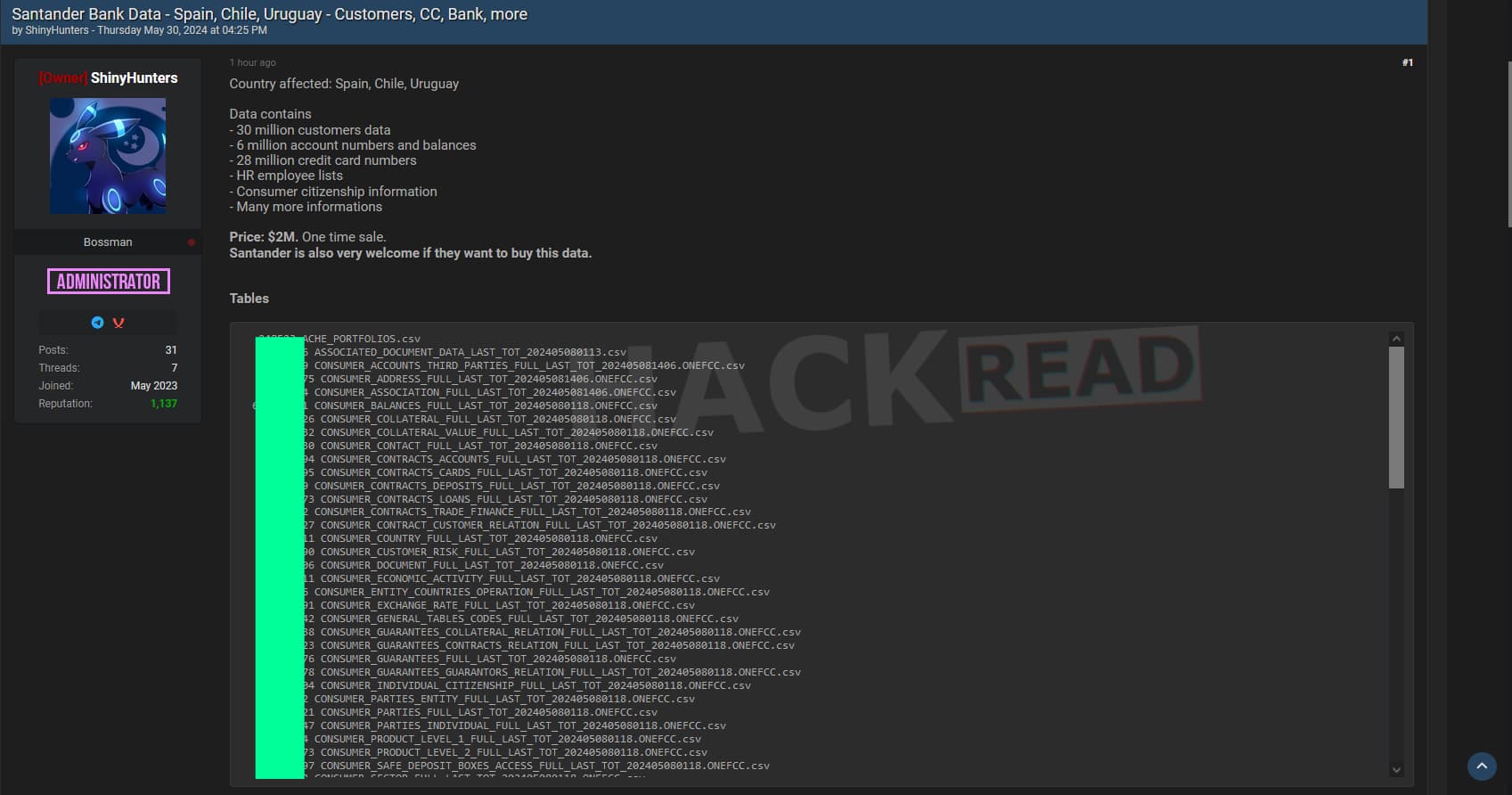
As seen by hackread.com, the data trove being offered for sale by ShinyHunters contains a wealth of sensitive information, including:
30 million customer records
6 million account numbers and balances
HR employee lists
Consumer citizenship information
28 million full credit card numbers, complete with verification details (AVS), and expiration dates (CVV not included)
And various other sensitive data points
ShinyHunters on Breach Forums
ShinyHunters’ Sophistication and Recent Activities
ShinyHunters is no stranger to the hacking and cybercrime world. The group is known for its high-profile data breaches and is also the owner and administrator of Breach Forums, a notorious platform for cybercrime activities.
Despite the FBI’s recent efforts to shut down the forum, ShinyHunters managed to reclaim the seized domain, showcasing their technical prowess and resilience against law enforcement actions. This, as reported by Hackread.com, not only resulted in the return of Breach Forums to the dark web but also saw its revival on the clearnet, using the original domain.
Will Lin, co-founder and CEO, AKA Identity and Author, The VC Field Guide and former Venture Partner, ForgePoint Capital commented on the breach stating, “This breach is so complicated and simple at the same time. Simple that the attack vector was stolen privileged credentials. ‘Bad actors don’t hack in, they log in.’ Complicated because it involves multiple parties who can only do so much to prevent this from happening.”
“The predicament that the world has today is that credentials have been the number one cause of data breaches since the DBIR started tracking them. The modern world has been set up to fail without good data and visibility into their most important trust boundary: identities and access management,” Lin added.
Advice for Santander Bank Customers
The availability of such a vast amount of sensitive financial information raises serious concerns about the potential for identity theft, fraud, and other illicit activities. This breach highlights the ongoing threats posed by hackers to financial institutions and their customers.
Since Santander Bank has already addressed the issue regarding the breach, customers are urged to monitor their accounts closely for any suspicious activity. Additionally, it is recommended to implement security measures such as two-factor authentication and regularly updating passwords to mitigate the risk of further exploitation by cybercriminals.
Live Nation Entertainment has confirmed what everyone has been speculating on for the last week: Ticketmaster has suffered a data breach.
In a filing with the SEC, Live Nation said on May 20th it identified “unauthorized activity within a third-party cloud database environment containing Company data (primarily from its Ticketmaster L.L.C. subsidiary)” and launched an investigation.
The third party it refers to is likely Snowflake, a cloud company used by thousands of companies to store, manage, and analyze large volumes of data. Yesterday, May 31st, Snowflake said it had “recently observed and are investigating an increase in cyber threat activity” targeting some of its customers’ accounts. It didn’t mention which customers.
In the SEC filing, Live Nation also said:
On May 27, 2024, a criminal threat actor offered what it alleged to be Company user data for sale via the dark web. We are working to mitigate risk to our users and the Company, and have notified and are cooperating with law enforcement. As appropriate, we are also notifying regulatory authorities and users with respect to unauthorized access to personal information.
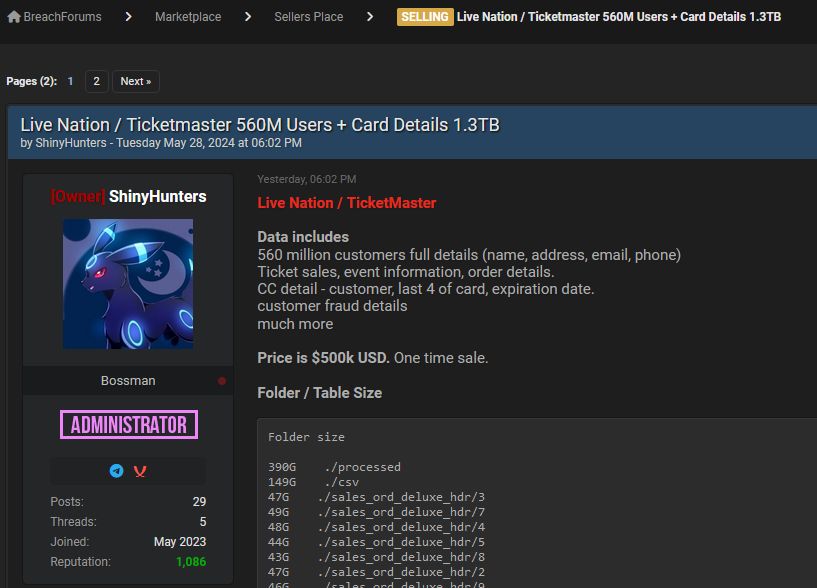
The user data likely refers to the sales ad for 560 million customers’ data that was posted online earlier this week by a group calling themselves ShinyHunters. The data was advertised for $500,000 and says it includes customer names, addresses, emails, credit card details, order information, and more.
Post on BreachForums by ShinyHunters
Bleeping Computer says it spoke to ShinyHunters who said they already had interested buyers, and believed one of the buyers that approached them was Ticketmaster itself.
Ticketmaster says it has begun notifying its users of the breach. We are likely to hear more in the coming days, and will update you as we do.
For now, Ticketmaster users should keep an eye on their credit and bank accounts for an unauthorized transactions and follow our general data breach tips below.
Protecting yourself after a data breach
There are some actions you can take if you are, or suspect you may have been, the victim of a data breach.
Check the vendor’s advice. Every breach is different, so check with the vendor to find out what’s happened, and follow any specific advice they offer.
Change your password. You can make a stolen password useless to thieves by changing it. Choose a strong password that you don’t use for anything else. Better yet, let a password manager choose one for you.
Enable two-factor authentication (2FA). If you can, use a FIDO2-compliant hardware key, laptop or phone as your second factor. Some forms of two-factor authentication (2FA) can be phished just as easily as a password. 2FA that relies on a FIDO2 device can’t be phished.
Watch out for fake vendors. The thieves may contact you posing as the vendor. Check the vendor website to see if they are contacting victims, and verify the identity of anyone who contacts you using a different communication channel.
Take your time. Phishing attacks often impersonate people or brands you know, and use themes that require urgent attention, such as missed deliveries, account suspensions, and security alerts.
Consider not storing your card details. It’s definitely more convenient to get sites to remember your card details for you, but we highly recommend not storing that information on websites.
Set up identity monitoring.Identity monitoring alerts you if your personal information is found being traded illegally online, and helps you recover after.
Scan for your exposed personal data
While the Ticketmaster data is yet to be published in full, it’s likely you’ve had other personal information exposed online in previous data breaches. You can check what personal information of yours has been exposed with our Digital Footprint portal. Just enter your email address (it’s best to submit the one you most frequently use) to our free Digital Footprint scan and we’ll give you a report.
These are turbulent days in the smartphone repair segment. In a recent development, Google has updated its Pixel repair policy regarding devices with unauthorized parts. The previous version of the policy said that the company could keep your smartphone if they detected unofficial parts.
Negative news has recently emerged regarding device repairability. These have mainly affected Samsung, with the termination of its partnership with iFixit. Also with the shutdown of its ASP program on Best Buy service centers. Now, it is Google who is the protagonist, since it has been forced to clarify a thorny clause in its repair policies.
Pixel repair policy no longer suggests that Google could steal your phone
Recently, some noticed that Pixel devices’ repair policies indicated that the company would not return your phone if they found unauthorized parts. More specifically, it said this: “Unauthorized Parts: You will not send in a Device containing non-Google-authorized parts — if You do, Your Device will not be returned to you.”
Interpreting the clause literally, you can conclude that the company reserves the right to steal your smartphone if it finds non-OEM parts. Of course, this created quite a stir among users of Pixel products. That said, a Google spokesperson contacted Android Authority to give a statement to calm the waters. The company spokesperson clarified that Google will not keep your smartphone in any way. He also stated that they would soon update the repair policy to make things clearer.
That update finally took place. Now, the repair policy section says that “If You send a Device containing non-Google-authorized parts for repair, in certain situations (e.g., safety), Service Provider may not be able to repair Your Device. Service Provider will return Your Device except when health or safety requirements prevent us from doing so. If Service Provider can’t return Your Device, Google will work with You on next steps.”
Google may (or may not) repair your phone if it detects non-OEM parts
So, instead of keeping your phone, Google reserves the right not to repair it. Even so, it leaves the possibility open to fix it and send it to you. Google adds that the only way it could retain your device is for health or safety requirements. However, in those specific cases, the company will contact you to try to find a solution.
The way in which the Pixel repair policy regarding unauthorized parts was written in the previous version is still striking. It would be interesting to know if there is any case where the company has ever made it effective to the letter. Hopefully, there is no one out there who has been left without their phone after sending it for repair to an official service center.
Lately, Samsung users have been missing out on repair options for their devices. Now it is Best Buy that is ending repairs for Samsung devices through the ASP program. Previously, iFixit had parted ways with Samsung due to the cost of parts and difficulty in obtaining them.
Samsung’s ASP (authorized service provider) program turned some Best Buy stores into a kind of official repair center. The devices were repaired by so-called “Geek Squad” agents. Geek Squad is the name that Best Buy gives to its device repair and technical service team. However, the ASP program allowed them to access original parts and training from Samsung.
Best Buy ends repairs benefits of the Samsung ASP program
That said, it seems like all this has ended abruptly. Initially, The Verge spotted some posts on Reddit about the possible shutdown of Best Buy’s Samsung repair program. The source later confirmed the news through a Geek Squad employee who sent a screenshot of an email saying that “Samsung ASP is ending in all SASP locations.”
As mentioned at the beginning, Samsung device users have already lost the option to access official parts through iFixit, and now it is Best Buy that ends the ASP program. Currently, owners of the brand’s products can still go to UBREakiFix locations. However, it is not good news to have lost two other options in a short period of time.
According to the report, the Best Buy page dedicated to locating ASP centers is unavailable. Also, Samsung’s authorized service center locator has already delisted Best Buy locations.
Source: The Verge
Consequences for users
Best Buy shutting down Samsung’s ASP program has some consequences for users. Before, you could set up a Samsung device repair at Best Buy ASP locations no matter where you purchased it. Now, they will only repair phones purchased at Best Buy for those who paid for the Geek Squad Protection plan. In addition, replacing the device may now involve a cost. The price ranges from $199 to $249, depending on the model.
Official statements from Best Buy and Samsung
The Verge contacted both Samsung and Best Buy for a statement on the situation. None of the responses obtained denied the ASP program shutdown in Best Buy locations. However, they mention being “in discussions” or “working together” on how to handle Samsung customer service from now on.
Mario Renato de Castro, Samsung’s head of mobile customer care, said: “We’re in discussions with Best Buy to determine how Samsung can best support our customers moving forward.” He also added that the company has “more than 9,000 Samsung Mobile-certified technicians in the U.S. providing walk-in, mail-in and We Come to You van services.”
On the other hand, Katie Klister was the spokesperson for Best Buy. She said: “We know how important it is to our customers that we’re there for them with the right services and expertise for their technology, and we’re currently working together with Samsung to evaluate the best way to support our mobile customers with authorized services and repairs.”
Google has been quietly working on a significant improvement for its Messages app. According to a recent report, a new feature is in the works that will transform how photos are sent and received within RCS (Rich Communication Services) messages.
Currently, when users send multiple photos in a single RCS message, each photo is sent individually, cluttering the chat and making it difficult to follow the conversation. However, a recent APK teardown revealed that Google is finally addressing this issue.
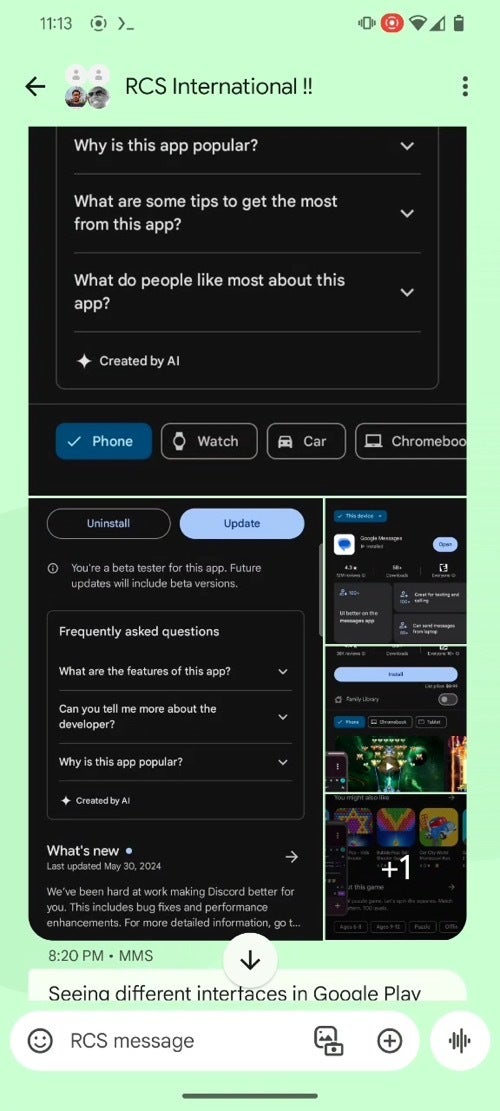
In the upcoming version of Messages (v.20240603), photos sent in a single message will be grouped together in a grid format. This new layout not only provides a cleaner and more organized chat experience but also ensures that text and photos remain connected, making it easier to find the context of each image.
Grouped images in Google Messages RCS chat | Credit: Android Authority
This improvement will apply to messages with two or more photos, so even sending just a couple of pictures will trigger the grid view instead of the current one-by-one delivery. While this feature is not yet available to the public, the code is already present in the app, suggesting that it could be rolled out in the coming weeks.This is just the latest in a series of updates Google has been making to its Messages app. Recently, the company added the ability to edit messages up to 15 minutes after sending, and it continues to work on expanding RCS availability and features to more users and regions. With this latest photo fix, Google is further enhancing the messaging experience for Android users, making it easier to share and enjoy multimedia content with friends and family.
While it’s difficult to pinpoint the exact release date for this feature, it’s clear that Google is committed to improving the Messages app and making it a more competitive and user-friendly alternative to other messaging platforms. Users can look forward to a more streamlined and enjoyable photo-sharing experience in the near future.
For years I’ve sat in your run-of-the-mill gaming chairs with that racing seat design that you see in so many photos and stream setups, but after sitting in a Herman Miller chair, I never want to go back to anything else. I have to admit, some of the racing-style chairs have a cool aesthetic. But here’s the thing, most if not all of them have terrible spinal and lumbar support. I say this as someone who sat on the same racing-style gaming chair for four years. Not just while gaming, but while working the entire day for this site, then gaming afterward.
This was often most of the week for years. Which ended up wrecking my back and neck. After I finally got rid of that chair, I went through a few different options, mostly through reviews here on AH. I’d always heard great things about Herman Miller and was told I needed to try one. I was finally lucky enough to review the Vantum back in 2023. Which so far, had been the best gaming chair I had ever sat in. A gaming chair that didn’t look like your traditional gaming chair, backed by Herman Miller’s expertise in the areas of back health and comfort.
The Vantum is a great chair, but it wasn’t the Embody gaming chair. The chair I had been chasing since Herman Miller announced it was partnering with Logitech to release the gaming edition a few years ago. Now that I’m sitting in one, I’m convinced there is no better option for many gamers out there. Now, that said, the Embody gaming chair isn’t going to be perfect for everyone. So let’s dive into this review and take a closer look at how well the Embody stacks up and if it’s worth your money.
Herman Miller Embody Gaming Chair Review: Hardware and Design
There’s a lot that goes into the design of the Embody and the materials used are just as important as the design of the chair itself. Herman Miller prides itself on the Embody’s design, which was originally a collaboration between Herman Miller and 30 physicians and PhDs in biomechanics, vision, physical therapy, and ergonomics. After the success of the original Embody, it partnered up with Logitech to come out with the Embody gaming edition. There are a few changes here from the original, but for the most part, everything is the same.
Down to the PostureFit spinal support and Backfit adjustment. Herman Miller says it researched how gamers sit to provide them with an enhanced option that caters to their needs. This comes through in more functional changes like the seat materials, but also in the design of the back and other small aesthetic details.
Materials
The back and seat feature Herman Miller’s Sync fabric and upholstery which is made from 100% polyester. It’s very smooth to the touch and is honestly the most comfortable fabric I’ve had on a gaming chair. Leather and synthetic leathers can feel nice at times, but they can get uncomfortable if you get too warm. Other chairs like Herman Miller’s own Vantum use 100% post-consumer recycled polyester fabric, which was nice, but could get a tiny bit uncomfortable after very long hours. I often sit with one foot under my leg, sometimes for hours at a time. And once in a while, this would make my foot or ankles feel a little itchy.
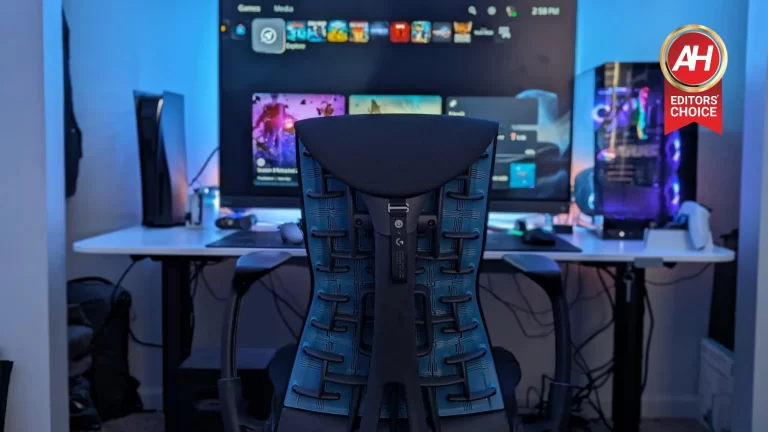
The fabric on the Embody gaming chair isn’t like that at all. It feels very soft against the skin so I can pop up my foot up like usual and not feel any discomfort even many hours later. The sync fabric also just looks really nice, especially with the design of these inset lines that travel width-wise across the back and seat. The chair also uses a die-cast aluminum frame and base, with high-quality plastic for things like the arms and seat depth handles. The tops of the armrests also feel nice and cushy yet still firm. Whereas other chairs I’ve tried have varied from too firm to downright uncomfortable.
On the backside of the chair, the real magic is in the translucent flexible polymer material that’s attached to the back structure. This moves with you as you move in the chair and it sets the stage for giving you proper support.
No headrest means no neck support if you lean back
There’s a reason Herman Miller didn’t include a headrest with the Embody gaming edition or the original for that matter. The chair was designed to help ensure you’re sitting correctly, whether you’re using an active posture or sitting upright, or leaning back and relaxing. Having a headrest may not be as ergonomic and could impact the overall ergonomic health the chair is intended to provide. That being said, I think this is mostly dependent on how often a headrest would be used.
After using the Embody for weeks now, I find I don’t really like using a headrest while I’m working or even when I’m gaming most of the time. Something which I did initially enjoy with the Vantum, which comes with a headrest. But longer hours using it over time started to cause a little soreness in my neck. However, sometimes I want a headrest for when I’m lean-back gaming or simply relaxing to watch a movie. And I’ve found myself wanting this neck support for those situations. Even if it’s not for long.
I’m no stranger to leaning back and plowing through a few hours of TV. But without a headrest on the Embody, I haven’t been leaning back in the chair as often or for as long. This is the one downside of the chair that I wish was different (other than the cost). However, I do appreciate that not having one on this chair has helped me to sit correctly the rest of the time.
Herman Miller Embody Gaming Chair Review: Features
A thicker seat for active posture support
I’ve never sat in the original Embody, so I can’t say how padded or comfortable the seat was on that model. But I can say the seat on the Embody gaming edition is superb. Herman Miller added an additional layer of foam to the seat on the gaming edition which is supposed to support a more active posture. A majority of gamers are going to sit with a more active posture while gaming. To put it another way, you’re likely to be in a more upright position when gaming than you are when you’re working.
This added layer of foam was designed to give you that extra support. I’ve spent the last few weeks sitting in this chair for close to 13 hours a day. About 9 hours of work and then 4 hours of gaming. This isn’t every single day, but it is most days. Normally I’d want a break for a couple of hours before signing off of work and logging into whatever I’m playing for the night. But so far, I haven’t felt the need for that with the Embody. I still get up and move around throughout the day. But even after a long shift at the desk, I can still feel supported by the seat following a few hours of gaming.
This is even more apparent on days off where I sometimes play games for most of the day. More importantly, I don’t feel like my butt or the underside of my legs get numb or sore from sitting for so long. This plays right into the next improvement Herman Miller made in the Embody.
The copper-fused cooling foam is subtle, but it’s noticeable
Another big change with the seat on the gaming edition of the Embody is the copper-fused cooling foam. This is designed to prevent heat from building up under you while you’re gaming. When you sit in it, you aren’t going to notice an immediate rush of a cooling sensation or anything like that. It’s a subtle addition to the seat that works to keep you cool, but not by putting out a cooling effect.
The copper-fused foam actually draws heat away from the body to keep your body temperature down. So it kind of works more in the background and is something you don’t really think about too much. And I think this is a top-notch execution of such a feature. It isn’t trying to be front and center. It’s doing the job it’s supposed to do without you having to think about it. So you can focus on gaming. Herman Miller has also added this copper-fused foam to the back so any part of your body that’s touching either the seat or the back is having heat drawn away from it.
Again this isn’t like feeling a cooling effect. However, I have noticed that my body has stayed at a more comfortable temperature after long gaming sessions. It’s not overly warm here yet, so I suspect I’ll get to really see how well this works once the Summer hits. But so far, it’s done an outstanding job at preventing me from feeling too warm or working up a sweat. It’s a different approach to the way Mavix went about trying to keep you cool with the M9 chair, which used cooling gel in the seat for a similar purpose. But I think Herman Miller’s approach is a substantial improvement.
The PostureFit spinal support has done wonders for my back
There are lots of ergonomic and gaming chairs out there each with their own interpretation of back and lumbar support. I truly feel though that Herman Miller’s PostureFit system tops them all. At least from the chairs I’ve tried. When you sit in your chair for as long as I do every day, you want your spine to be supported. Your health is extremely important. And it’s easy to forget that sitting incorrectly or not having enough spinal support can impact this heavily.
This is why I really love the PostureFit system. It was designed to mimic the strong posture you have when standing. So sitting for long hours gaming won’t result in back soreness because of worse posture. For me, this has just resulted in no back pain after a long day. This is something that I experienced with the Vantum too. Although the support wasn’t as good as it is with the Embody. The mesh chair back also didn’t really move with you all that much. The Embody’s translucent polymer material is different. It moves and flexes with you if you move around.
For example, there are times during the day when I will readjust my back just by moving around in the chair. And the polymer material flexes just enough to allow for this readjustment while keeping my back and lumbar pretty well-supported. The Top part of the back also flexes quite a bit and this feels great when I lean back a bit.
Backfit adjustment
The Backfit adjustment is a feature you’re going to want to spend some time with right when you get this chair. Its purpose is to ensure you have a neutral, balanced posture at all times. It’s important that you get this right from the start. So that if it ever needs to be adjusted again later on, you know what you’re working with.
What I did was I sat down in the chair and then made sure I was seated all the way back in the seat. I then sat up straight and adjusted the Backfit knob until the back of the chair was just barely touching my back. I found this to be the most effective way to find a good balance. Everyone’s spinal curve is different so you’ll use this knob to adjust the fit of the chair back to your spine. Depending on what kind of game I’m playing, I’ll adjust this knob to account for how I’m sitting. Sometimes I lean back just a little when I play with a controller. But I’ll adjust it again when I’m sitting with a more active posture and playing games with mouse and keyboard.
I can’t stress this enough either. Take the time to find where the Backfit adjustment should be for your back specifically. At first, my back would feel a little sore after sitting in the Embody all day. But this was simply because I was spending so much time sitting incorrectly in cheaper chairs. It’s extremely important you figure out these settings from the start. Then just ride out any discomfort or soreness, as it won’t stick around. Eventually, your spine will adjust and correct and you’ll be glad you have the kind of support this chair offers.
Adjustable height, width, and depth of the seat and arms
Like most ergonomic chairs, you can adjust the height and width of the seat and arms on the Embody gaming chair. You can also adjust the seat depth, which isn’t something you’ll see in every chair. For me, the height of the seat was already where it needed to be at its lowest point. As I’m not too tall and didn’t need it to go any higher. The seat does go higher if needed, however, and it’ll support people that are up to about 6 feet two inches. So there’s a pretty wide range. It also supports up to around 300 pounds.
If you’re bigger than that this might not be the best option. But as someone right around 200 pounds, it feels great. As for adjusting the seat depth, you want your legs at a 90-degree angle. So you’ll want to make sure there’s a little bit of room between the front of the seat and your calves. At least this is the recommendation. For me, I found this to be spot on. You can easily adjust the seat depth by pulling up and either forward or back on the two front handles. For me, this took a little getting used to. But once you get the hang of adjusting the depth it’s a pretty fluid motion. I was also able to easily adjust the depth without getting up off the chair.
Herman Miller Embody Gaming Chair Review: The arms are well-suited to any type of gaming
The arms are one of my favorite parts of the Embody gaming chair. The arm height adjustment is perfectly fine and I do like it, but there’s nothing much to say about it as it’s not that special. The arms go up and down without issue. What makes the arms so good is the width adjustment. One big problem I have always had with every chair, including the Vantum, is the width of the arms. There’s always some form of discomfort for a certain type of gaming. For me, this was most commonly coming through whenever I would try to play games with a controller or when playing mobile games.
The problem is that the arms were never really close enough to where my arms and elbows felt entirely supported. This is especially noticeable when I try to play mobile games because my arms need to be closer to my body. And every other chair I have ever used just didn’t support my whole arm.
The embody doesn’t have these issues. The arms come in very close to the body so I can move them inward almost all the way, and my arms are completely supported when holding my phone. The same thing goes for when using a controller. I can have my arms fully supported so I don’t have to partially hold them up for hours on end. If I switch back to playing on PC, I can adjust the width outward all the way so my arms are fully supported when holding the mouse and keyboard. This is extremely important, and I’ve not found another chair that implements this feature so well.
Arm width adjustment is a little stiff, but this is a good thing
I can’t tell you how many times I’ve accidentally pushed the arm width outward on past chairs because the adjustment was too loose or easy to move. You most certainly will not have this issue with the Embody gaming chair. The arm width adjustment can feel a little stuff at first, but this isn’t really a bad thing in my opinion. It does make it a little harder to adjust the width with one hand, but only until you get used to how much pressure needs to be applied.
The benefit of this stiffer adjustment is that you aren’t going to accidentally push the arms outward. This happened to me so much with other chairs when I was playing PS5 or when using a controller with PC. Any sort of movement had the potential to accidentally push the arms out a bit, then I would have to stop and readjust them inward. This was incredibly annoying to deal with. So I’m glad it’s not a problem with the Embody. Some may not like this but I absolutely feel like this is a benefit. And trust me once you use it, I think you’ll feel the same.
Herman Miller Embody Gaming Chair Review: This chair is built to last
Another big problem with most gaming chairs is durability. Not only does the Embody feel like it was extremely well-made thanks to the materials, but it was built to last and that shows with the included 12-year warranty.
If anything goes wrong with the chair that wasn’t caused by user damage in any way, Herman Miller will cover repairs. The company wants this to be the last chair you ever buy. And while I can’t say for certain that I will never need to buy a new chair, I strongly feel like I won’t have to for a long, long time. As long as I take care of it, the Embody should last me for well over a decade. And then some. Which is something I have never had before. In short, yes the Embody gaming chair costs a lot. But it’s designed to be something you won’t have to ever replace. At the very least, something you won’t have to replace for a long time.
That should give you an unparalleled level of peace of mind. Because if you’re spending a few hundred on one chair and then you have to replace it every few years, you end up spending close to or more than the amount of the Embody anyway. Plus you potentially end up with pain in your back, neck, arms, and joints from incorrect posture or improper support. I believe it’s worth investing in a chair that’s going to last for a long time, especially if you’re going to be sitting in it for long periods every day.
Should you buy the Herman Miller Embody gaming chair?
Like I said at the beginning of this review, I don’t think the Embody gaming chair is perfect for everyone. But I do believe that it’s perfect for a wide range of gamers. This is a chair that’s an investment in your health, and I think that warrants spending a little more to ensure you stay healthy.
If you sit in a chair a lot, working from home and/or gaming for very long hours, then this is a chair worth buying. That being said, you might not like that there’s no headrest. You might not like the way this chair leans back or that it doesn’t have a locking reclined position. While it is nice to have those things, I don’t think they’re needed. The benefits of the Embody gaming chair outweigh the lack of those features and the cost.
Buy the Herman Miller Embody gaming chair if:
You play games for long hours and want something comfortable that also provides incredible support
You’ve been dealing with back and neck pain from sitting in your current chair
You want something with a lot of adjustments
Don’t buy the Herman Miller Embody gaming chair if:
Hacktivist groups are increasingly targeting critical infrastructure’s Operational Technology (OT) systems, motivated by geopolitical issues that, unlike traditional website defacements, can disrupt essential services and endanger public safety.
The success of high-profile attacks on Industrial control systems (ICS) by groups with minimal technical expertise highlights a worrying evolution in hacktivism, which necessitates reevaluating hacktivist tactics and their growing role in the cyber threat landscape.
They are increasingly targeting OT systems, critical infrastructure that controls physical processes, and their goal is to disrupt operations and gain media attention for their cause.
These groups may be state-backed and can launch denial-of-service attacks or exploit vulnerabilities.
While some boast more than they achieve, successful OT attacks pose serious threats like water utility disruption, while social media amplifies the impact of these incidents, creating a cycle that encourages further attacks.
With ANYRUN You can Analyze any URL, Files & Email for Malicious Activity : Start your Analysis
CyberAv3ngers, an anti-Israel hacktivist group, targeted industrial control systems manufactured by Unitronics as they compromised programmable logic controllers (PLCs) using brute-force attacks and exploited default credentials, which resulted in manipulation of human-machine interfaces (HMI) in critical infrastructure like water treatment facilities.
The attacks disrupted operations in multiple locations globally, including the Municipal Water Authority of Aliquippa and the Drum/Binghamstown Water Scheme, highlighting the ability of hacktivists to leverage basic techniques for significant impact and potentially inspiring future large-scale attacks.
CyberArmyofRussia_Reborn, a pro-Russian hacktivist group likely affiliated with APT28 and Sandworm, has been targeting critical infrastructure since 2023.
In January 2024, they compromised water treatment plants in Texas by exploiting vulnerabilities in VNC technology to manipulate water tank controls.
Subsequent attacks on US, Polish, and French OT environments suggest broader disruption efforts, as this hacktivist group demonstrates a concerning evolution, employing sophisticated tactics against critical infrastructure for potential political gains.
Pro-Ukraine hacktivist group Blackjack launched a cyberattack on Moskollektor, a Russian infrastructure management organization. Using custom Fuxnet malware to target Moskollektor’s OT monitoring network, Blackjack potentially countered the ongoing geopolitical conflict.
According to Dragos, Fuxnet specifically exploited vulnerabilities in Moskollektor’s system and likely requires modification for broader attacks.
Blackjack claimed to have disrupted sensors, infiltrated emergency services, and compromised access credentials, though the extent of the damage is uncertain, which highlights the increasing sophistication of hacktivist operations and the influence of media coverage in amplifying their impact.
Hacktivist groups are showing increasing sophistication in their attacks on Operational Technology (OT) systems, as early groups like CyberAv3ngers exploited weaknesses in OT systems to cause disruptions, and later groups, possibly inspired by these tactics, used similar methods with more sophistication and potentially state backing to launch broader attacks.
Now, groups like Blackjack are developing and deploying custom malware, potentially targeting physical systems, which suggests that hacktivists are more capable of causing real-world damage through cyber attacks.
Looking for Full Data Breach Protection? Try Cynet's All-in-One Cybersecurity Platform for MSPs: Try Free Demo