June 7, 2024 – Google has announced it will delete Location History (Timeline) data and store new data locally, starting December 2024.
June 6, 2024 – Car parts provider Advance Auto Parts seems to be the next victim of a major data breach related to cloud provider Snowflake.
June 6, 2024 – A husband, now indicted, allegedly used seven Apple AirTags to stalk his ex-wife over a period of several weeks. His trial begins this month.
June 6, 2024 – A worried researcher has created a tool to demonstrate exactly how much of a security backdoor Microsoft is creating with Recall.
June 5, 2024 – Financially motivated sextortion of teenage boys is the fastest-growing global cybercrime, according to the FBI and Homeland Security.
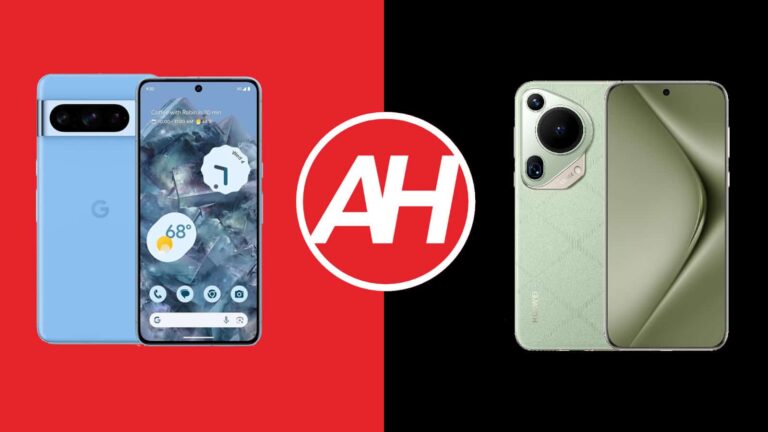
Here, we’ll be comparing the very best of Google and Huawei… at the moment. We’ll compare the Google Pixel 8 Pro vs Huawei Pura 70 Ultra. These are the two flagship smartphones from these two companies. Two extremely compelling phones, which are also entirely different at the same time. They’re both running Android, but considerably different versions, not to mention that they look and feel entirely different too.
All that should make for a rather interesting comparison, of course. We’ll first list the specs of both phones, as per usual, and will then move to compare their designs, displays, performance, battery life, camera performance, and audio output.
Specs
Google Pixel 8 Pro vs Huawei Pura 70 Ultra, respectively
Google Pixel 8 Pro vs Huawei Pura 70 Ultra: Design
You’ll see a ton of differences in the design department the moment you lay your eyes on these two phones. Both of them are made out of aluminum, but their backplates are different. The Pixel 8 Pro has glass on the back, while the Huawei Pura 70 Ultra includes vegan leather aka eco-leather on the back. Both phones do have flat displays, with a centered display camera hole at the top, but those panels are quite different in terms of how they’re implemented.
The Huawei Pura 70 Ultra has quad-curved glass on top of its display, which makes it look entirely different than the Pixel 8 Pro’s panel. There’s more of a curve on the sides. The bezels are also thinner on the Huawei Pura 70 Ultra, compared to the Pixel 8 Pro. Both phones do offer uniform bezels, though. Huawei’s flagship also has a more aggressive curve on the corners, though not by much.
Now, when we flip the two phones around, you’ll spot even more differences. The Pixel 8 Pro has a camera visor on the back, which is covered by metal, and which connects to the phone’s frame on the sides. The Huawei Pura 70 Ultra, on the other hand, also has a rather unique-looking camera setup, but it’s a lot different. It is a camera island in the top-left corner, which has several layers, and a different design to anything else on the market.
The Huawei Pura 70 Ultra’s backplate is curved proportionally to the front, so it is curved on the edges from all sides. That makes the phone extremely comfortable to use, and eco-leather helps with grip. It’s a lot less slippery than the Pixel 8 Pro, and it also a lot more comfortable to use. The two phones are identical in terms of height, and yet the Huawei Pura 70 Ultra does seem smaller in the hand, despite the fact it’s a bit heavier. The Pixel 8 Pro is wider, while they’re almost identical in terms of thickness. Both phones also offer an IP68 certification for water and dust resistance.
Google Pixel 8 Pro vs Huawei Pura 70 Ultra: Display
The Google Pixel 8 Pro features a 6.7-inch 2992 x 1344 LTPO OLED display. This panel is flat, and it has an adaptive refresh rate of up to 120Hz. HDR10+ content is supported, while the panel’s brightness goes up to 2,400 nits. The screen-to-body ratio here is around 87%, while the display aspect ratio is 20:9. The Gorilla Glass Victus 2 from Corning is here to protect the Pixel 8 Pro’s display.
Google Pixel 8 Pro
The Huawei Pura 70 Ultra, on the flip side, has a 6.8-inch 2844 x 1260 LTPO OLED display. That display is also flat, and it can project up to 1 billion colors. It has an adaptive refresh rate of up to 120Hz, while HDR content is supported. The peak brightness of this display is set at 2,500 nits. The screen-to-body ratio here is around 89%, This panel is protected by the Kunlun Glass, which has proven to be very, very tough.
Both of these displays are great, to be quite honest. You’d have to be really nitpicky to say that one is better than the other. Both are immensely bright, very sharp and have great viewing angles. The colors are very vivid, while the blacks are deep. Both displays also offer good touch response, not to mention that they have good display protection as well. There’s really not much to complain about here, if anything.
Google Pixel 8 Pro vs Huawei Pura 70 Ultra: Performance
The Google Pixel 8 Pro is fueled by the Google Tensor G3, the company’s very own silicon. That is a 4nm chip. The phone also includes 12GB of LPDDR5X RAM, and UFS 3.1 flash storage. Huawei’s Pura 70 Ultra handset is fueled by the Kirin 9010 SoC, a 7nm processor. The phone also comes with 16GB of LPDDR5X RAM, and it also utilizes UFS 4.0 flash storage. Neither of these two chips is the best one out there, but the one in Huawei’s handset is quite dated at this point.
Having said that, does that mean the Huawei Pura 70 Ultra offers inferior performance? Well, it all depends on how you look at it. I’d say no, and here’s why. While you will see a difference in benchmarks, that’s not something you’ll notice in day-to-day use. The Huawei Pura 70 Ultra flew threw everything I threw at it, and then some. Both phones did a great job in jumping between apps, while the same can be said for browsing, multimedia consumption, image editing, and pretty much everything you can think of.
There was some difference on the gaming side of things, but truth be said, neither phone is really made for gaming. Also, do note that the AppGallery is somewhat limited in terms of games, but you can always reach for third-party stores or sideload them. Both phones did a good job, but differences were noticeable when it comes to the most demanding games. The Pixel 8 Pro handled them better, though not perfect. For the vast majority of people, however, both phones will do a fantastic job. Just note that the Huawei Pura 70 Ultra comes without Google services, so without the Google Play Store. It does include Huawei’s own services, though.
Google Pixel 8 Pro vs Huawei Pura 70 Ultra: Battery
Google’s flagship includes a 5,050mAh battery on the inside. The Huawei Pura 70 Ultra, on the flip side, has a 5,200mAh battery pack. Out of the two, the Huawei Pura 70 Ultra not only has a larger battery pack, but it can also hold a charge for longer, at least in our experience. The Pixel 8 Pro usually flies under 7 hours of screen-on-time, at times even under 6.5 hours of SoT, even without gaming.
The Huawei Pura 70 Ultra, on the other hand, can usually comfortably go over the 7-hour screen-on-time mark. The thing is, the Pixel 8 Pro’s battery life changed since its launch, and it keeps changing. Google is probably constantly tweaking something on the software side of things. It was better before, to be quite honest. Either way, if you end up running a lot of demanding tasks on both phones, those numbers quickly go down. Gaming in particular does have a considerable effect on battery life.
When it comes to charging, it’s not even a competition. The Huawei Pura 70 Ultra wins… easily. It supports 100W wired, 80W wireless, 20W reverse wireless, and 18W reverse wired charging. On top of that, it does include a charger in the box. The Pixel 8 Pro supports 30W wired, 23W wireless, and 5W reverse wireless charging. It does not have a charger in the box. The Huawei Pura 70 Ultra can charge itself a lot faster, both via a wire and wirelessly. It can also charge other devices faster too.
Google Pixel 8 Pro vs Huawei Pura 70 Ultra: Cameras
Both of these phones have three cameras on the back. Granted, those cameras are fairly different. The Pixel 8 Pro features a 50-megapixel main camera, a 48-megapixel ultrawide unit (126-degree FoV), and a 48-megapixel periscope telephoto camera (5x optical zoom). The Huawei Pura 70 Ultra includes a 50-megapixel main camera (variable aperture, sensor-shift OIS), a 40-megapixel ultrawide unit, and a 50-megapixel periscope telephoto camera (3.5x optical zoom).
Huawei Pura 70 Ultra
These two phones provide considerably different photos. The Google Pixel 8 Pro shots look contrasty and processed, though not in a bad way. If you like the general image style that Pixel phones provide, you’ll love what the Pixel 8 Pro has to offer. The Huawei Pura 70 Ultra likes to keep things closer to real life, but the photos still end up looking lively and nice. It pulls slightly towards warmer colors. Both smartphones provide sharp images, with plenty of details. They’re also great in low light, though the Pixel 8 Pro tends to brighten up low-light scenes a bit too much at times. Both main cameras do a fantastic job overall, though.
Ultrawide cameras do a great job of keeping up with the main shooters in terms of colors. The lower quality is noticeable in low light, however. Both telephoto cameras do a fantastic job up to 10x, but from that point on the quality dip is quite noticeable. The Huawei Pura 70 Ultra is the phone to get if you like taking macro photos, however. Its telemacro camera is great for such photography.
Audio
You will find a set of stereo speakers on both of these smartphones. There are two on each phone, and both sets are well-balanced. The thing is, the Pixel 8 Pro speakers are louder than the ones on the Huawei Pura 70 Ultra. Both sets are loud enough, but there’s a difference.
Neither phone has an audio jack, unfortunately. You can use their Type-C ports for wired audio connections, or you can opt for a wireless setup thanks to Bluetooth. The Pixel 8 Pro offers Bluetooth 5.3, while the Huawei Pura 70 Ultra supports Bluetooth 5.2.
Narwal makes one heck of a robot vacuum, but today the company has announced the launch of something a little different with the S10 Pro. It’s an upright vacuum and mop combo that you manually use to clean your floors. Don’t be fooled by the fact that it’s an upright vacuum though. There’s still plenty of neat features baked in that make this better than your average upright. Most of this comes from Narwal’s expertise with robotic vacuums and mops, like the Narwal Freo X Ultra we reviewed earlier this year.
With the launch of the S10 Pro, Narwal promises an effortless clean that’s “perfect for busy parents, pet owners, or those who love a pristine home.” The Narwal S10 Pro is a cordless vacuum and mop solution so it’s convenient to use and easy to move around the whole house. Not having to plug it in also means not having to spend that extra time unwrapping the cord or wrapping it back up when you’re done. Let alone moving the plug to multiple outlets. Instead, you simply place the vacuum back on the charging station to recharge the internal battery.
Narwal says it can last for about 50 minutes on a single charge, which is enough to clean a 3,200 sqft home. This also makes it perfect for apartments since most apartments aren’t anywhere near that size. And at under $450, the price is pretty reasonable.
The Narwal S10 Pro launch starts today
With the launch of this new vacuum Narwal is entering into the more mainstream vacuum market. The S10 Pro launches officially today and is already available from Amazon as well as Narlwa’s online store. It retails for $429.99 which is well under the price of its flagship product, the Narwal Freo X Ultra. And although it doesn’t clean your floors for you, it’s very capable of getting them spotless. So long as you’re willing to put in the effort to push it around.
The nice thing is that the S10 Pro is self-propelled. So you won’t have to push that hard, or barely at all. “It practically glides across floors,” Narwal says. That will definitely help with making the task of vacuuming effortless. But it’s not the only feature that will do so. The S10 Pro features a pretty powerful 14,000 PA. For comparison, the Freo X Ultra has an 8,200 PA and we found that to be very thorough in getting just about everything off the floors. Save for a little bit of pet hair that was stuck onto the kitchen rug.
The mopping system also has a downward mopping pressure of 17N. That’s enough to remove even the most stubborn stains according to the company. It even uses intelligent water-spraying algorithms to make sure the brush is moist until you’re done cleaning.
It’s not a robot vacuum, but it’s still smart
Since this is an upright vacuum you wouldn’t expect it to be packed with smart tech. On the contrary. Narwal has shoved quite a few smart features into this vacuum and mop combo. This includes the intelligent water-spraying algorithms mentioned above. But the S10 Pro also features the AI Dirt Sense technology that made the Freo X Ultra so good. This tech uses sensors to scan and analyze the floors to see how dirty they are.
Once it knows, it’ll use that information to adjust the suction power and how much water is dispensed. Ensuring your floors are spotless by the time you’re done. It also toggles through its five different cleaning modes as needed during the entire process. Additionally, you can see the dirt level on the LCD screen that’s on the top of the handle.
To top everything off, the S10 Pro has a self-cleaning system that you can engage once it’s docked at the charging base. This system automatically scrubs, cleans, disinfects, and dries not only the roller brushes but also the pipes and filters using electrolyzed water. It’s not a robotic clean, but it is a smart and efficient clean.
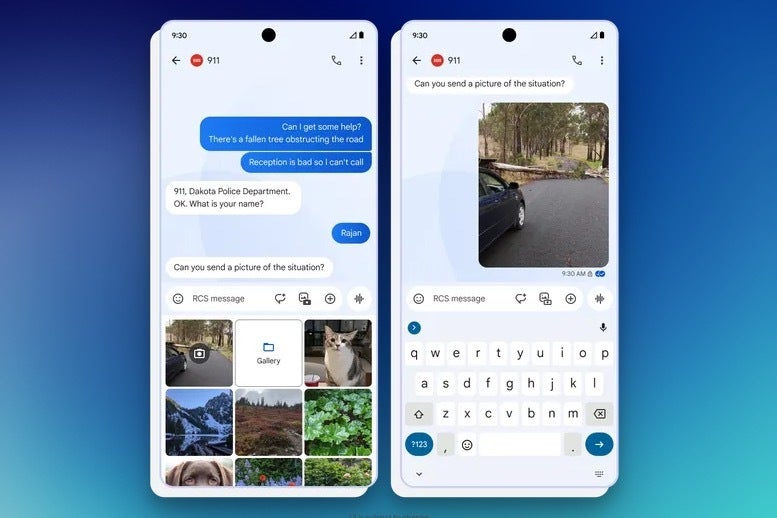
Google is taking a significant step toward modernizing emergency communication by upgrading the humble 911 text message. Through a partnership with emergency technology company RapidSOS, Google Messages will soon support Rich Communication Services (RCS) for 911 texts, bringing a host of new features and benefits to those in need.This rollout, beginning this winter, will initially focus on areas where texting 911 isn’t currently possible, effectively closing gaps in coverage and offering a new lifeline to those who may not have access to traditional voice calls. While calling 911 remains the most reliable way to get help in an emergency, texting can be crucial when voice communication is impossible or unsafe.
The existing SMS-based 911 text service has significant limitations, reaching only about half of U.S. emergency centers and lacking support for multimedia. RCS changes that, allowing users to send high-resolution images and videos that can provide critical information to first responders. This visual context can be extremely useful for figuring out the situation and dispatching the appropriate resources.
Texting 911 via RCS will allow you to send high quality photos of your current situation | Image credit: GoogleIn addition to multimedia support, RCS will also provide delivery confirmation for emergency texts, easing the uncertainty of whether a message has been received. Furthermore, Android Emergency Location Service will automatically share the user’s precise location and other relevant details, such as language settings and opt-in medical information, further aiding emergency responders.
Google’s commitment to user safety is evident in this initiative, and their collaboration with RapidSOS highlights the importance of industry-wide cooperation in improving emergency services. By making RCS the standard for emergency texting, Google aims to ensure that everyone has access to reliable and effective communication channels in times of crisis.
While the rollout is gradual, the impact of this technology could be far-reaching. It’s a reminder that even the most basic communication tools can be enhanced to provide critical assistance when it matters most. Whether it’s a car accident in a remote area or a medical emergency where speaking is difficult, the ability to text 911 with the added capabilities of RCS could be the difference between getting the help you need or not.
The HONOR Magic6 RSR is essentially the Magic6 Pro, turned up to 11. It’s mostly the same; however, it does sport more RAM and storage and has a slightly different design. If you’ve not read our Magic6 Pro review, I’d invite you to do so, as a lot of what we mention in this review will be similar. Of course, the Magic6 Pro is also going to be cheaper.
HONOR (and Huawei when it owned HONOR) had a good partnership with Porsche Design. It’s creating some pretty cool editions of its flagship phones. But now, with the Magic V2 RSR and the Magic6 RSR, HONOR seems to be taking it up a notch. Adding in some features specific to the RSR model, as well as some unique design aspects. Like the hexagonal camera setup on the backside of the Magic6 RSR.
But of course, the real question is whether you should spend the extra money on the RSR model versus going with the Magic6 Pro, which is close to half the price in China. Currently, we do not have the pricing for Europe, but we’d expect it to fall in line with what we have seen in China already.
HONOR Magic6 RSR Review: Hardware and Design
With the HONOR Magic6 RSR, HONOR and Porsche Design are bringing iconic Porsche hues and hexagonal structural design. It pays homage to the decades-long significance of Porsche cars and incorporates structural elements that are reminiscent of Porsche’s design excellence. This includes the hexagonal camera module on the back, which really makes it stand out.
To be perfectly honest, I’m not a car guy. So, a lot of this means very little to me. However, I will say that the Porsche Design phones HONOR has been putting out do look very unique compared to the competition. This is even compared to the Magic6 Pro that HONOR launched very recently. And that’s something that is actually pretty hard to do these days. A lot of phones just look so similar.
HONOR has also included a symmetrical peakline, which adds to the unique appearance of the Magic6 RSR, and honestly, I really like having it. It’s not as pronounced as a flyline, which the Magic V2 RSR does have, though I wish it was. Keeping up with the Porsche styling, HONOR is offering the Magic6 RSR in two Porsche colors, including Agate Grey which is a hue worn by revered Porsche models such as the iconic 911 sportscar. It’s also available in Frozen Berry, which is a reflective, bold shade of pink originally designed for Porsche models like the Taycan EV.
With the Agate Grey color, it is a matte feel, but it is still quite slippery. For the majority of the time that I’ve been using the Magic6 RSR, I’ve been using the included case. Which is a vegan leather Porsche Design case, and it looks great. However, the cutout for the USB-C port is kind of small, so some USB-C cables I use daily don’t fit in the port without taking the case off. A somewhat of a minor annoyance, but still an annoyance.
The front of the phone features a stunning 6.8-inch OLED display, which is slightly curved. Much like the Magic6 Pro, it also sports a version of Apple’s Dynamic Island, which works okay but is kind of weird on an Android phone since it is unnecessary.
Holding the Magic6 RSR in the hand is quite nice. Despite it being larger and heavier than a lot of other phones that I frequent, it doesn’t feel all that large. It does, however, feel thicker. But in reality, it’s still 8.9mm thick. It’s actually quite surprising how much heavier this phone feels compared to other 6.7-, 6.8- and 6.9-inch devices. The iPhone 15 Pro Max, for instance, is only 221g. While the Galaxy S24 Ultra is 232g, but still feels much lighter than the Magic6 RSR at 239g. But like with every phone, you get used to the size and weight.
HONOR Magic6 RSR Review: Display
As mentioned already, the display on the Magic6 RSR is a 6.8-inch OLED Tandem Display, with 1.07 billion colors and 100% of the DCI-P3 color gamut, making it an absolutely stunning display. Color reproduction is top-notch here, and with it being slightly curved on the sides, it makes it incredible for watching content. I’ve watched countless YouTube videos and TikToks here (before it gets banned in the US). Of course, a big part of that is Dolby Vision certification. Watch a Dolby Vision title from Hulu or Amazon Prime Video, and you’ll fall in love with this display.
HONOR claims that the screen can get up to 5,000 nits of peak HDR brightness. What that means is that while it can get that bright, you won’t see that happen very often. That’s going to happen in the most extreme circumstances. It’s actually rated for 1800 nits in HBM or high-brightness mode. Now in our testing, we were able to get it close to that, but not quite the full 1800 nits. That is pretty normal since we aren’t testing this in a lab but instead using a white background and shining a flashlight on the light sensor to get it as bright as possible.
In day-to-day usage, you won’t have any issues seeing this display. I’ve used it outdoors in direct sunlight plenty and had very few issues with the display. Even in dark mode, you can still see it pretty easily in direct sunlight.
HONOR Magic6 RSR Review: Performance
The internals of the Magic6 RSR are simply beastly. We’re looking at the Snapdragon 8 Gen 3 processor, which is going to be in most phones released in 2024. On top of that, HONOR has included 24GB of RAM and 1TB of storage, which is something Samsung is not doing right now. While we don’t know the US or even European price yet, we do know the Chinese price, which is CNY 9,999 which converts to around $1,389 USD. That’s less than $100 more than the Galaxy S24 Ultra, with twice the RAM and four times the storage. That’s pretty crazy.
As I mentioned at the beginning of this review, I’ve been using the Magic6 RSR for a month now and have done basically everything with it so far. And the phone has yet to overheat or even really get hot. Nor has it slowed down. Of course with that much RAM, you’d kinda expect that it would perform quite well.
This phone does have 24GB of RAM, however, if you need a bit more memory, there is a RAM boost of another 8GB. That brings you to 32GB of total RAM here, which is incredible for a smartphone. My laptop has 36GB of RAM. If you’re worried about performance here on the Magic6 RSR, don’t be. In fact, you’ll likely never really see it slow down for a few years since the specs are so monstrous on this one.
Before we jump into the benchmarks, let’s talk about audio for a minute. While using it to watch content and listen to Spotify, the on-board speakers sound great. However, we do have our own tests to test out the audio. Each of these tracks specifies a different aspect of audio, including the bass, the highs, the mids, and even the vocals. To be honest, they all sounded really good to my ears. The vocals for say a podcast, sounded really good and clear, even at higher volumes. However, the bass can get distorted when you turn the volume all the way up.
The Benchmarks
As we do with every phone, we’ve put the HONOR Magic6 RSR through a number of benchmark tests to see how it stacks up with other phones that have come across our desks. You can read more about our testing for reviews here.
The first test is Geekbench 6. In the graph below, you can see the Single- and Multi-Core scores from Geekbench 6, as well as the GPU score. Here, we are comparing it to the Magic6 Pro, which should have very similar scores, as well as the HONOR Magic V2 RSR, which uses the Snapdragon 8 Gen 2, and the Galaxy S24 Ultra, which is the Snapdragon 8 Gen 3 for Galaxy. As you can see, the single-core scores were all pretty similar, between 1870 and 2206. Multi-core scores were also very similar, but a slightly larger difference. GPU scores is where things really start to take a turn. The Magic6 Pro and RSR are virtually the same, but both scored over 2,000 points more than the Galaxy S24 Ultra with the same processor. And was close to doubling the Magic V2 RSR.
The next test we run is the 3D Mark Wildlife Extreme Stress Test. This benchmark runs the same loop of about 60 seconds long, 20 times. The purpose of this test is to push the device to its limit and then see how well it stays at that level. So this test does heat the phone up quite a bit, which is why we also use this for a thermal test, but more on that later. It also spits out a Best Loop Score, Lowest Loop Score, and a stability percentage. The Magic6 RSR scored a little better than the Magic6 Pro but had a slightly lower stability percentage at 66.8% versus the Magic6 Pro having 69.1%.
The last benchmark we run is one that we actually designed, which means that OEMs can’t “cheat” on it. Basically, we open Capcut. Load in a 60-second long video – it’s the same video for every phone – and then export it at 1080p 60fps. We time how long it takes to export, which is generally under 10 seconds. Perhaps a little surprising, the Galaxy S24 Ultra beat them all but around a second, at a time of 7.75 seconds. The Magic V2 RSR had the slowest time of the four at 12.87 seconds.
For the most part, the Magic6 RSR performed as we had expected. And was very similar to the Magic6 Pro, as it should be. Seeing as the only major difference is RAM, which jumps from 16GB on the Pro to 24GB on the RSR.
Thermals
Now let’s talk about how cool, the phone actually stayed. These temps were actually very close to the Magic6 Pro, which again, they should be. They were within a degree in each test. The first test is measuring the temperature after running the 3D Mark Wildlife Extreme Stress Test. Generally, this one provides the highest temperature as it pushes the phone to the absolute edge. Here, we achieved a temperature of 111.2 degrees Fahrenheit.
Next up, we play Genshin Impact for an hour, on max settings and max brightness, then measure the temperature. The Magic6 Pro had a temperature of 98.3 degrees Fahrenheit. Finally, we recorded the video at 4K60 for 10 minutes, measuring the temperature at 5 minutes and again at 10 minutes. The Magic6 RSR had temps of 94.9 and 97.4 Fahrenheit on those.
Overall, pretty respectable temperatures from the Magic6 RSR. The OnePlus 12 did have lower numbers in our testing, however that phone does have a massive heatsink and a ton of cooling inside to keep it that cool.
HONOR Magic6 RSR Review: Battery
The HONOR Magic6 RSR has, I believe, the largest battery I’ve ever used in a smartphone. It’s rated at 5,600mAh, finally pushing past that 5,000mAh threshold that everyone seemed to be stuck at for years. OnePlus pushed past it this year with a 5,400mAh battery in the OnePlus 12, and it offered some incredible battery life too. But the Magic6 RSR tops it.
This is how battery life should be
To put it in perspective, I use every review device in the same way. I unplug at around 7 am when I wake up and call it a day around 11pm or so. That’s about 16 hours of usage per day. With the OnePlus 12, which I mentioned in the review, I would get 57% by the end of the day. But with the HONOR Magic6 RSR, I’m typically above 65%, and a few times have been above 70% after a 16-hour day. That’s just incredible. And I’ve been able to get through two full days from a single charge, and still have some juice leftover. That’s two full days and nights before charging, using the phone as I normally would.
Now, how does it stack up in our battery rundown test? Well, pretty favorably. Let’s talk about this test first. Basically, we charge it to 100% and let it sit for a good hour charging past 100% to make sure it’s actually full. Then we load up a video on YouTube – the same video on every phone – and let it run at full brightness. It’s a 24-hour video, and the Magic6 RSR and Magic6 Pro are the only phones that have lasted longer than the video. Both of these phones were over 26 hours, with the Magic6 RSR having bested the Pro by about 28 minutes. That’s honestly truly incredible.
With this, it really makes me want to use the Magic6 RSR at a trade show to see how well it performs under all of the stress of using the phone a lot more often than normal.
However, I do wish that the battery stats in MagicOS 8.0 weren’t just a rolling 24 hours. But giving me the data since the last time the phone was fully charged. This makes it pretty tough to get a good gauge of how good (or not) the battery life really is. Since I can’t kill the phone in a single day, Google and Samsung used to do this, but they have since updated their battery life screens, so hopefully, HONOR will follow suit with MagicOS 9.0 next year.
HONOR Magic6 RSR Review: Software
The HONOR Magic6 RSR comes with MagicOS 8.0 which is based on Android 14. This is the same software that is found on the other Magic6 smartphones, with the biggest changes being some additional wallpapers and icons that make it feel more like a “Porsche Design” phone. MagicOS 8.0 feels pretty solid. However, it does also feel like a mixture of iOS and Android.
Now, we have seen phones, particularly from the East, leaning into the iOS aesthetic a lot over the years, but with MagicOS 8.0 it feels like a good mix of iOS and Android. As my colleague, Kristijan noted in his review of the Magic6 Pro back in February, it feels like you’re using both operating systems on the same phone. Now, what I will say here is that there are not as many typos or carbon copies of elements from iOS. But ther are still quite a few things that look like they were straight up lifted from iOS, like the camera app. Which I don’t have a problem with. It’s still easy to use, with all of the features you might want or need in a camera app right where you can reach it easily.
Where the Magic6 RSR really excels, however, is in the integration of different apps. For instance, you got an address on WhatsApp. You might want to copy and paste that into Google Maps. Well, now you don’t have to. Just Drag the address over to the right side of the screen, and a few apps will pop up. Just “drop” the address on Google Maps, and it’ll open up Google Maps in a pop-up window, with directions to that address. This is just one of many features that HONOR has included in MagicOS 8.0 with Magic Portal.
The Dynamic Island was lifted from the iPhone, but I somehow like it better on the Magic6 RSR versus my iPhone 15 Pro Max. It’s thinner, so there’s that, but it does also have more functionality. HONOR has added some UI elements around the pill-shaped cutout for the front-facing cameras. Like playback controls for media that you might be listening to, among other things.
The HONOR Magic6 RSR will most likely get Android 15 when it launches later this year. However, if MagicOS8 and Android 14 are anything to go by, it might not be available until early next year. This is perfectly fine, in my opinion, since new versions of Android aren’t really all that much different from the previous version. More of the changes come from the skins that companies like HONOR is putting on top of Android. HONOR is promising five years of security updates and OS updates for the Magic6 Pro and Magic6 RSR. So this should get to Android 19, which isn’t too shabby.
For someone from the West who is used to using software like Samsung’s One UI, Google’s Pixel Experience, and OnePlus’ OxygenOS, it definitely takes some getting used to MagicOS 8.0, but I quite like this software. And perhaps, most importantly, it does also absolutely fly on this hardware.
HONOR Magic6 RSR Review: Camera
Much like the Magic6 Pro, the Magic6 RSR is absolutely stacked with its camera setup. This includes a 50-megapixel primary camera, a 50-megapixel ultrawide and a 180-megapixel telephoto camera that is able to do 2.5x optical zoom and up to 100x digital zoom. Not to mention the 50-megapixel front-facing camera, plus the 3D ToF sensor, which is used for better portrait photography. A bit weird seeing that in 2024, as it’s a feature that LG added on the LG G8 back in 2019.
Let’s first start with the primary camera. This 50-megapixel camera takes some really good pictures, as you might expect. It has a f/1.4 aperture, that is adjustable to f/2.0. Variable aperture is another feature that Samsung debuted on the Galaxy S9 back in 2018. So HONOR is here using tech that was introduced a few years ago and kind of forgotten about, making it even better. Every picture I’ve taken with this sensor, however, has come out incredible. I truly have no complaints about the quality of images out of this primary camera.
Next, the ultrawide. Now to be honest, I don’t take a whole lot of photos with the ultrawide camera on any smartphone. But, that sensor is used for “Super Macro”, which can be used at 0.5x, 1x or 2x zoom. The Super Macro shots I’ve taken have come out really good. If it has enough light, you can get some breathtaking macro shots out of this camera. However, I do wish it was easier to switch over to the “Super Macro” mode. You need to swipe over to “More” and then select it, which isn’t as quick as having a toggle on the screen. Which the Xiaomi 14 Ultra does have.
Now, the mother of them all is that 180-megapixel telephoto lens. I will say that when I first took the phone out of the box and tested the camera, I was a bit saddened to learn that this 180-megapixel telephoto lens only does 2.5x optical zoom. There is an option to do 5x zoom, which still looks quite good, but I think that HONOR could have cropped into that lens and given us a good 5x or 10x optical zoom option. Now this does go up to 100x digital zoom, but similar to other 100x phones on the market, it’s not that great. However, the telephoto zoom is pretty good by itself. Below, I’m sharing a number of pictures I’ve taken with the HONOR Magic6 RSR with this 180-megapixel sensor. You can use a macro mode on the telephoto sensor here, which does look incredible. In fact, I’ve been using it more for macro than the ultrawide lens (Basically, don’t use the super macro mode if you want to use the telephoto lens).
The only real issue with the telephoto is in low-light mode. It’s not always as sharp, which you kinda expect from a zoom lens. Typically the more you zoom in, the more light you’re going to need for a good picture. But all around, the camera setup on the Magic6 RSR is really impressive. One of my favorite camera setups on a phone so far this year.
Should you buy the HONOR Magic6 RSR?
I really like the HONOR Magic6 RSR. There are only two real complaints here for me. One is the price, and the other is the fact it won’t be available in the US. Otherwise, the Magic6 RSR excels at just about everything you throw at it, as it should. It also comes with 24GB of RAM and 1TB of storage, which does help to justify the price, of course. And if you are planning to keep it for a few years, it’ll definitely be worth the price. The Falcon Camera system on the Magic6 RSR is simply incredible and likely will continue to improve too.
It really is a shame that the government is trying so hard to keep phones like the HONOR Magic6 RSR out of the US because it’s nearly perfect. It does so many things so well, from the camera, to the battery life, to the stunning display with HDR support. If it weren’t for the lack of bands support in the US, the HONOR Magic6 RSR would definitely be my second phone, primarily for the battery and camera experiences.
You should buy the HONOR Magic6 RSR if:
You want a big phone with big battery life
You want a big phone that’s not a Galaxy S24 Ultra
You want an incredible zoom camera setup
You are a big Porsche fan
You want a phone with 1TB of storage
You should not buy the HONOR Magic6 RSR if:
You live in the US (while you can import it, it won’t work on all of the bands on all US carriers)
Heads up WordPress admins. If you’ve been running Dessky Snippets plugin on your WordPress e-stores, scan your sites for possible malicious codes. The criminal hackers have exploited the Dessky snippets plugin lately to deploy web skimmers and steal payment information.
Dessky Snippets Plugin Exploited To Deploy Card Skimming Malware
According to a recent post from Sucuri, they found a serious security issue with the WordPress plugin Dessky Snippets. While the issue doesn’t typically impact the plugin’s structure, it allows the threat actors to abuse it maliciously.
As observed, hackers have exploited the Dessky Snippets plugin to deploy card-skimming malware on target websites and steal payment information.
Dessky Snippets is a lightweight WordPress plugin that helps admins add custom PHP codes without editing the functions.php file. According to its WordPress.org page, the plugin is relatively new in the WP plugins realm, with over 200 installations only.
With such fewer installations, the plugin doesn’t seem lucrative for conducting large-scale attacks on WordPress sites. However, it seems the threat actors abusing this plugin weren’t really concerned about spreading their radius. Instead, they seemed more interested to stay under the radar for long.
Elaborating on the plugin abuse, Sucuri researchers noticed the plugin abuse on May 11, 2024, with a simultaneous rise in its downloads. Analyzing the plugin code made them unveil an obscured web skimming malware. As stated,
This malicious code was saved in the dnsp_settings option in the WordPress wp_options table and was designed to modify the checkout process in WooCommerce by manipulating the billing form and injecting its own code.
Dissecting further, the researchers noticed the two chunks in the malware – one with a generic name and bogus function twentytwenty_get_post_logos(), and the other culprit that actually steals the data. This seemingly bogus function serves as a hook for woocommerce_after_checkout_billing_form, and adds more fields on the checkout forms to add payment card details (which would otherwise appear on the following page). After obtaining the desired data, the code then exports it all to a third-party URL.
To evade detection, the fake checkout overlay doesn’t have the autocomplete feature enabled, so as to prevent the browsers from generating warnings about entering sensitive information.
Keep Your Sites Safe With Precautions
While WordPress plugins’ exploitation, such as the case with the Dessky Snippets plugin, seems unavoidable, users can still prevent the threats to a large extent by implementing security best practices.
Sucuri advises users to keep their sites updated with the latest plugin releases, integrate third-party scripts from trusted sources only, set up strong passwords for all accounts, deploy web app firewalls (WAF), and conduct regular site scans for malicious codes.
Likewise, users visiting e-stores should also ensure the site’s authenticity and look for any subtle changes in site layouts that relate to their payment information. Moreover, keeping an eye on bank statements and credit reports can also help detect any malicious activities in time and prevent possible damages.
This weekend a scammer tried his luck by reaching out to me on WhatsApp. It’s not that I don’t appreciate it, but trust me, it’s bad for your business.
I received one message from a number hailing from the Togolese Republic.
WhatsApp message from an unknow sender
“Jay, your financial account has been added. Account Csy926. Password [********] USDT Balance 1,660,086.50 EUR: 592,030.92 [domain] Keep it in a safe place.”
I asked them to send the message in English, pretending not to understand Dutch, but received no reply.
But since it was a rainy day and I’d never seen this type of WhatApp scam before, I decided to investigate.
Sometimes it takes some effort, especially when the domain is blocked for fraud by your favorite security software, but nothing was going to stop me now from looking for my new-found wealth.
Malwarebytes blocked the domain for fraud
To fully understand the message, it’s good to know that USTD stands for Tether, a cryptocurrency referred to as a stablecoin because its value is pegged to a fiat currency. In the case of USTD the fiat currency is the US dollar. The link makes a stablecoin’s value less volatile than that of other cryptocurrencies, which is attractive for traders that like to switch quickly between cryptocurrencies and fiat currencies.
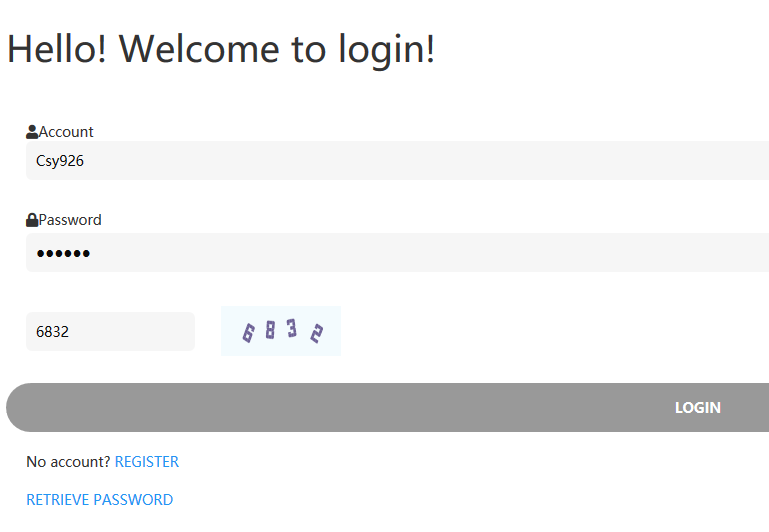
So, I visited the domain which, no surprise there, turned out to be a fake trading platform. I tried the login credentials which were so kindly provided to me.
Welcome to login
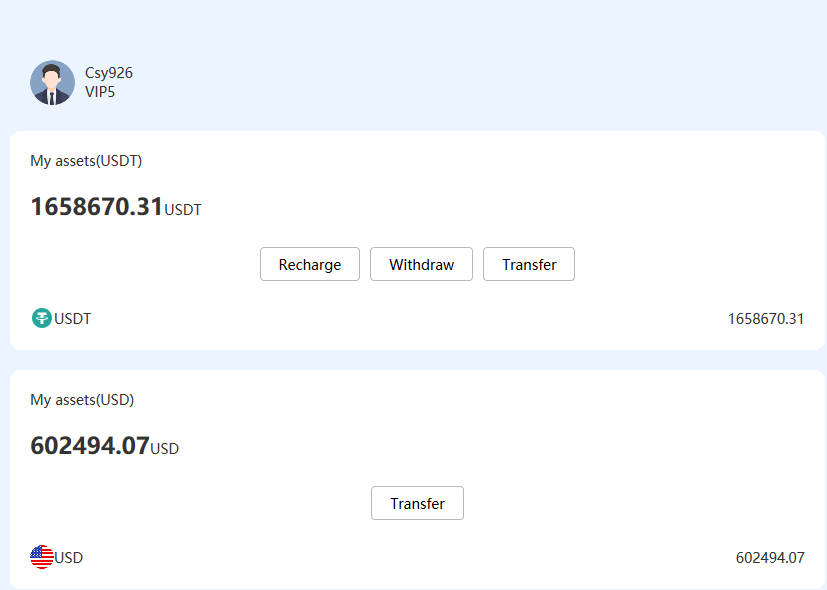
Once logged in I checked my wallet and lo and behold, I’m rich! (Or “Jay” is.)
Nice wallet
The wallet belongs to Csy926 who has VIP5 access and contains 1658670.31 USDT or $602,494.07.
I can either recharge, withdraw, or transfer my USDT tokens or transfer the cold hard cash in dollars. Knowing that in this type of scam the victim always has to invest a—relatively–small amount to get the bait, I knew what to expect.
The easiest way would have been if I could transfer the dollars to a bank account, so I tried that first.
Transfer form
Sadly, there were obstacles:
Transfers can only be done to other accounts on the platform and the recipient needs to be at least a VIP1 level.
Only VIP members can transfer without a key. Assuming Jay is the one with the key, it’s a good thing that the account has a VIP5 status.
So, to be a recipient of a US$ amount, I’ll need a VIP1 level account on the same platform.
Sadly, that’s not me. So I decided to see what I can do with the USDT tokens.
Withdraw form
The form shows a security tip warning users to fill in their withdrawal account accurately, as assets can’t be returned after transferring them out. That sucks for Jay.
But all in all, that looks promising, but again there are some problems.
I’ll need a TRC20 wallet. A TRC20 wallet app is an application, accessible on mobile/web or desktop devices, designed specifically for storing, managing, and engaging with TRC20 tokens.
Once I filled out the form and clicked on Withdraw, it turned out I needed a key.
Please enter KEY
Looks like it’s time to read the FAQs. Fortunately, this has the answers to all the “right” questions.
What should I do if I forget my KEY?
Long story short. You set the key when you open the account, and it cannot be retrieved. But…..if you have two VIP accounts you can transfer funds from the old account to your new account. And there is no need for a KEY if you have a VIP account. Considering Jay has a VIP5 account there lies an opportunity.
How to activate VIP?
And here comes the catch all of our regular readers saw coming by now, VIP accounts that are able to receive funds cost money. The cheapest—VIP1—requires a deposit of 50 USDT (roughly $50) which is not refundable and can’t be canceled. But with a VIP1 account I can only receive $30 per month and it’s only valid for 2 months. So, that’s not a big help when you are as rich as I am, sorry, Jay is.
VIP1 account is the lowest level and the cheapest
It would take me until the next ice age—4600 years—to transfer the entire amount at that rate, with the off chance that the rightful owner would drain the account or change the password as soon as they noticed the leak.
Any unsuspecting victim that has come this far and is willing to steal from the treasure dropped in their lap, now realizes that before they can enjoy all that money, they first:
Need to open a new account.
Make a deposit to turn it into a VIP account. The amount depends on their greed and impatience because the higher the VIP level, the larger the amount you can transfer in one day and per month.
Transfer the funds from Jay’s account to their own account.
Set up a TRC20 account.
Withdraw the money from the new account to their TRC20 wallet.
We decided not to sponsor the scammers, so this is as far as we were willing to go, but we have a distinct feeling that along the steps we outlined there might be other fees and deposits needed.
Don’t fall for scammers
Any unsolicited WhatsApp message from an unknown person is suspect. No matter how harmless or friendly it may seem. Most pig butchering scams start with what seems a misdirected message.
Don’t follow links that reach you in any unexpected way, and certainly not from an untrusted source.
If it’s too good to be true, then it’s very likely not true.
Scammers bank on the fact that the more time and money you have invested, the more determined you will become to get to the desired end result.
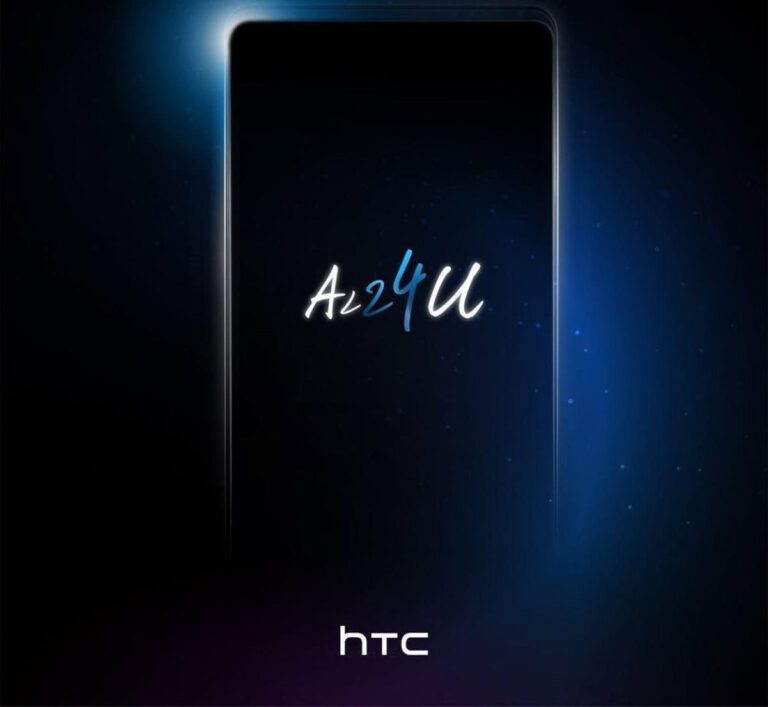
HTC will launch its new ‘U’ phone on June 12, it has been confirmed
If you check out the image below, you’ll see what the company shared. In addition to that, HTC used the ‘ALLFORU’ hashtag, note the ‘U’ part in it. This will almost certainly be the HTC U24 Pro.
The company did share an image of the device, which hides almost everything relevant
HTC did share an image of the device via its event announcement. The thing is, it shows the device from the side, and it hides the design on purpose. What we can see is that its camera island will protrude on the back. It’s also obvious that its physical buttons will sit on the right-hand side.
Despite what some of you may think, this won’t be a high-end phone. It will be fueled by the Snapdragon 7 Gen 3 processor. Needless to say, that is Qualcomm’s mid-range chip, not a high-end model.
This will be a mid-range phone
In addition to that, the phone will be equipped with 12GB of RAM, and it will ship with Android 14. All that was revealed by Geekbench. The Google Play Console confirmed that a fullHD+ (2436 x 1080) display will be in use. It also confirmed that a display camera hole will be used.
As many of you know, HTC doesn’t exactly launch phones all that often. The HTC U23 Pro arrived back in May 2023, and it successor will now follow. The HTC A101 Plus tablet did launch recently, though, back in May.
Samsung just announced that Live Translate, part of its Galaxy AI suite, will be compatible with third-party apps. So, you will be able to enjoy this useful AI-powered feature directly from some of your favorite messaging apps. It will even support the voice translation function.
Released with the Galaxy S24 series, Galaxy AI includes multiple AI features, but not all of them are compatible with third-party apps. For example, the Summary function is compatible with Samsung’s voice recorder app. The Live Translate function for voice calls is compatible with Samsung’s Dialer app. However, the company has expanded Live Translate compatibility, including real-time voice translation.
“Live Translate” Galaxy AI feature will be compatible with third-party apps
Being able to use Live Translate in third-party messaging apps will make the communication experience much more practical. It is a big deal not only for normal users, but for the professional segment as well. It will make it easier for you to stay in touch with either foreign friends or business partners, removing language barriers. All thanks to the power of AI.
For now, Samsung has not shared more specific details about supported apps. It would be good news if messaging apps as popular as WhatsApp or Telegram were on the list. According to the company, user privacy is a key aspect for them. Live Translate is proof of this, since all processing will be on-device, without resorting to the cloud. Samsung wants people to always be in control of the data they share.
Samsung also generated hype around Galaxy AI in its upcoming foldable flagships. According to the company, the Galaxy Z Fold 6 and Galaxy Z Flip 6 will get a specially adapted version of the suite. So, it is possible that the company includes some new features not available on current compatible Galaxy devices.
Lastly, Samsung wants its Galaxy AI suite to get bigger and more functional. The company promises to continue investing to bring advanced features powered by artificial intelligence to more and more Galaxy products.
Genshin Impact’s 4.7 update is now live, being released on June 5, 2024. What does this mean for the ultra popular game and its fans?
There are several new changes, with the most notable being the increased Resin cap system and the new permanent mode called the Imaginarium Theater.
The latter – the Imaginarium Theater challenge domain – will be introduced in a secret chamber within Mondstadt Library. In the Imaginarium Theater, players will face combat challenges with varying difficulty levels, using characters of specified elements, with a limited number of participations. Clearing these challenges can earn players 620 Primogems each month, new photo poses for characters, and Fantastical Blessings that apply to the six featured characters of the month in the open world.
The other notable change has to do with the increased Resin cap system, which impacts how players engage with the game. Resin, a resource essential for claiming rewards from certain activities, has been a point of contention for many players due to its limited availability and the time required for it to regenerate.
Previously capped at 160, the new limit will be 240 Resin. This change allows players to store more Resin, reducing the need to log in frequently just to use up their Resin and avoid wasting it due to overflow.
Until now, Resin regenerates at a rate of one unit every eight minutes. The 4.7 update will maintain this regeneration rate.
The raised Resin cap is particularly beneficial for players who are unable to log in multiple times a day. With a higher Resin cap, players can engage in more activities in a single session without worrying about hitting the cap too soon. This means less stress about managing Resin and more freedom to enjoy the game at their own pace.
For strategic players, the new Resin cap opens up opportunities to plan their activities more effectively. With more Resin available, players can tackle more bosses, domains, and other Resin-consuming activities in one go. This change also benefits players during special events or updates when there’s a surge in new content and activities that require Resin.