Due to the growing popularity of Apple devices, cybercriminals are increasingly targeting iOS and macOS with malware.
The App Store is no longer secure, and iCloud is a new target, as Apple’s allowance of third-party app stores in Europe is expected to be exploited.
Existing Android malware is being modified to target iOS, as seen with GoldPickaxe, a Trojan that steals facial recognition data.
As hackers find new ways to exploit Apple devices, it is crucial to understand iOS malware analysis.
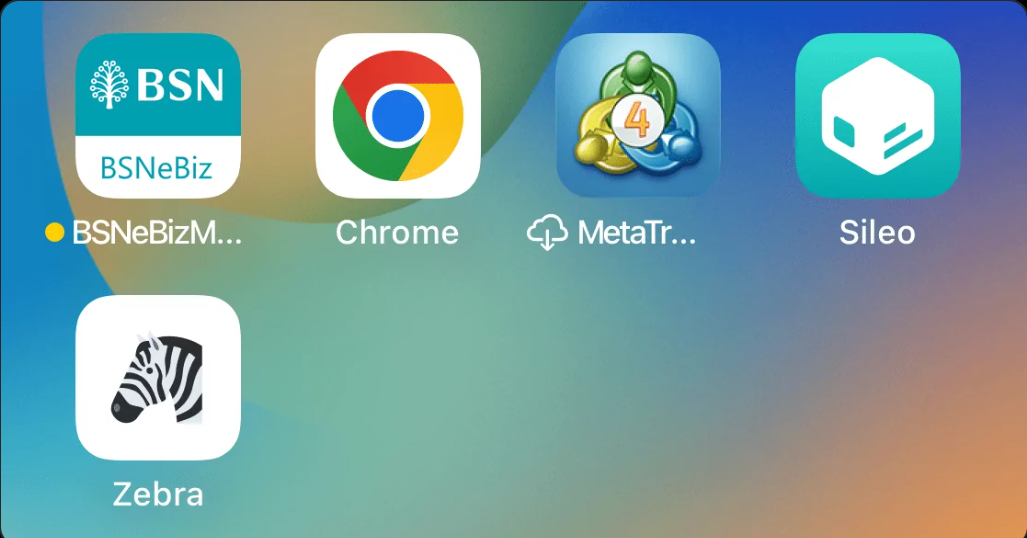
App managers Sileo and Zebra
Checkm8, a bootrom vulnerability found in 2019, is a hardware flaw that cannot be patched with software updates and allows attackers to bypass iOS security measures and compromise devices.
Analyze any MaliciousURL, Files & Emails & Configuration With ANY RUN : Start your Analysis
While Apple has implemented mitigation strategies for newer chips, older devices remain susceptible.
Malicious actors are exploiting checkm8 to brute-force passcodes.
Since Apple devices share an ID, a compromised device can put other devices linked to the same ID at risk, which highlights the importance of updating to secure devices and using strong security practices across all Apple products.
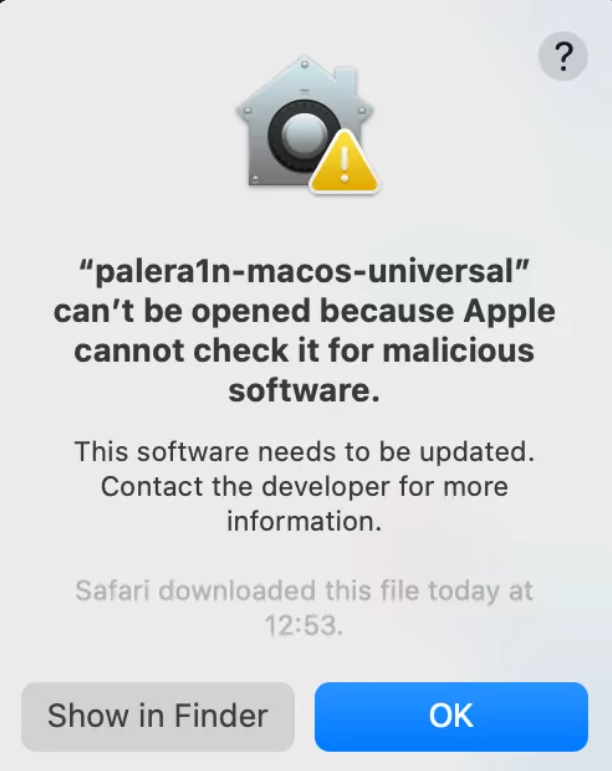
Request for permission to execute an application for jailbreaking
Jailbreaking an iPhone for forensic analysis allows access to app data beyond what standard backups provide, which leverages vulnerabilities in the device’s bootrom to achieve a “jailbroken” state.
The Checkm8 vulnerability is usable on iPhone X models running iOS 16 for full app analysis, where a tool called Palera1n can be used on MacOS to jailbreak the device, but for forensics, a more specialized agent is recommended to minimize modifications made to the device.
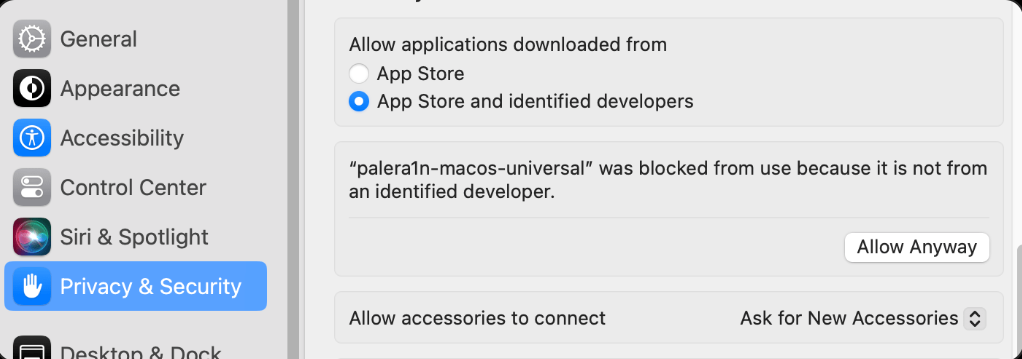
Settings menu to permit to running of the application
The research by Group-IB instructs on jailbreaking an iOS device with an A11 processor running iOS 16 using a rootless method with a palera1n-macos-universal tool, where the device must be completely reset and not have a passcode set before proceeding.
After establishing a trusted connection between the device and a computer, the tool is used to jailbreak the device, and upon successful jailbreak, a package manager like Sileo is installed.
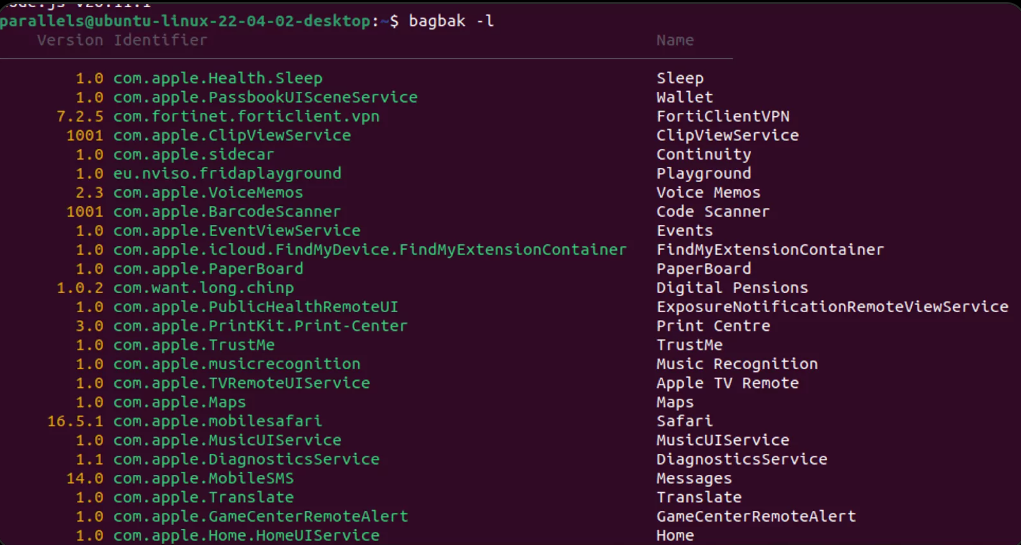
Output of the command bagbak -l
Frida is then installed on a separate Linux-based machine and used to connect to the jailbroken device.
Finally, the tool bagbak is used to decrypt and extract a desired iOS application (.ipa file) from the device for further analysis.
Hardware vulnerabilities like Checkm8 exploit the boot ROM, making them persistent and difficult to patch, while new exploits emerge to target these vulnerabilities, leaving older devices at risk.
Looking for Full Data Breach Protection? Try Cynet's All-in-One Cybersecurity Platform for MSPs: Try Free Demo
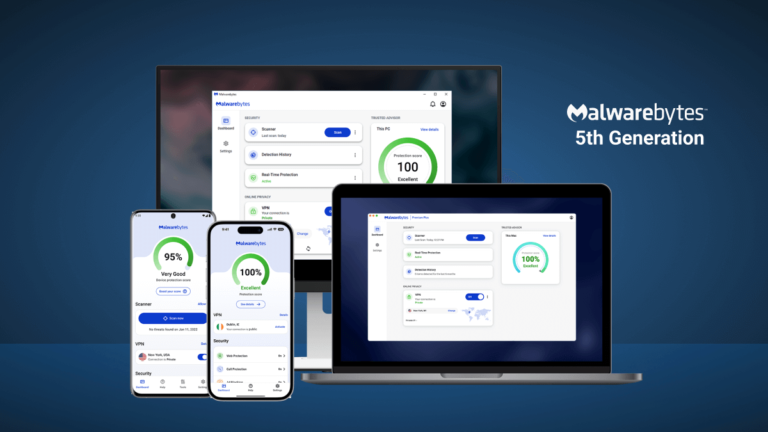
Announcing the latest version of Malwarebytes, which brings a faster, responsive, and consistent user interface, integrated security and privacy, and expert guidance to keep you secure.
Here’s what you can expect:
1. Unified user experience across platforms
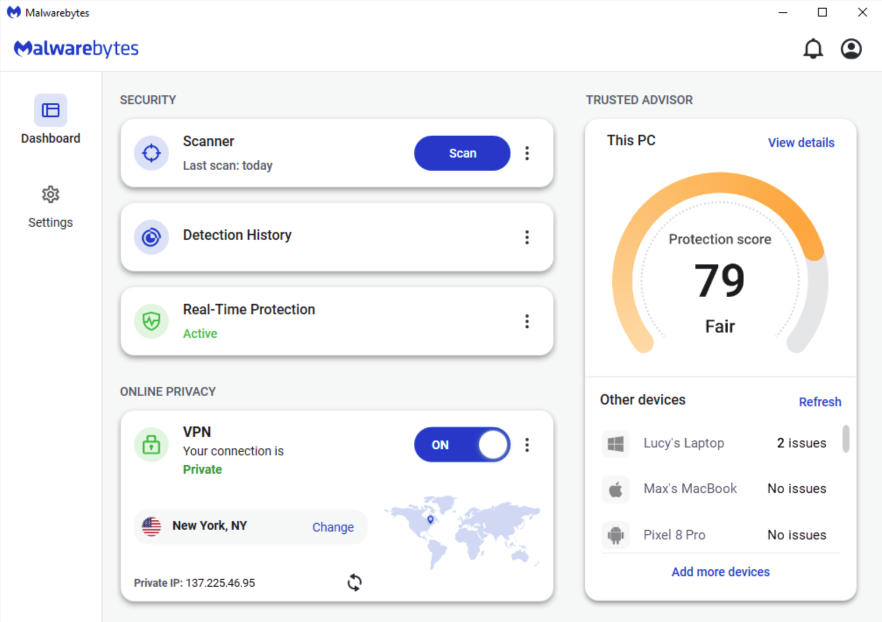
The new generation of Malwarebytes now delivers a consistent user experience across all our desktop and mobile platforms. The reimagined user interface is faster, more responsive, and managed through an intuitive dashboard, giving you a streamlined experience wherever you use Malwarebytes.
Why? Sophisticated hacking tactics and various entry points mean you can’t afford to have blind spots in your protection. A seamless experience across all platforms and devices means you don’t have to figure out more than once about what to do next. We’ve also made it easier to find everything, encouraging you to keep your guard up on all your devices.
2. Premium Security and Privacy VPN integration
We’ve merged our award-winning Premium Security and ultra fast no-log Privacy VPN into a single dashboard, making it much easier for you to take control of your privacy. With just one click, you can now protect your Wi-Fi or hotspot connections and change your location to visit the site you want at the speed you need. Don’t forget to also use Browser Guard on your desktop to block ad trackers and scam sites from your browser.
Why? We know that the distinction between security and privacy is not clear-cut, and you need both products to work together to minimize your exposure (risk of threats and lack of privacy). Integrating the two makes it much easier to protect both your devices and data (at home and on the go), with an easy set-and-forget experience that doesn’t require adding another program. You shouldn’t have to guess whether the next attack will compromise your Wi-Fi connection, browser, or files through phishing emails, spyware, or malware. Let the technology do this for you.
3. Trusted Advisor, your security coach
On the Malwarebytes dashboard, Trusted Advisor provides unbiased expert guidance at your fingertips. Your easy-to-understand individual Protection Score enables you to act on any potential security gaps, unlocking the full power of technology.
Why? In our recent report, “Everyone’s afraid of the internet, and no one’s sure what to do about it,” we found that only half of the people surveyed felt confident they knew how to stay safe online, and even fewer said they were taking the right measures to protect themselves. Trusted Advisor empowers you with real-time insights, an easy-to-read protection score, and expert guidance that puts you in control of your security and privacy. We’re by your side guiding you through what to do next to fill your security gaps for each device and platform (Windows, Mac, Android, and iOS).
The OPPO Find X8 Ultra is coming to global markets with an improve periscope camera
The company said that the next Find X flagship will go global. That clearly points to the most powerful OPPO Find X smartphone, and that will most likely be the OPPO Find X8 Ultra.
The OPPO Find X7 Ultra is an outstanding phone, and it’s a shame it didn’t get a chance to shine in markets outside OPPO’s homeland. OPPO is looking to set things straight with the OPPO Find X8 Ultra, though.
That being said, a tipster has just informed us that the phone will come with an improved periscope telephoto camera. The OPPO Find X7 Ultra already arguably has the most complete camera setup on the back. OPPO went all out.
The exact camera details were not shared, but the tipster did hype up its performance
Well, its successor is looking to improve things even further. He did not share the exact sensor that OPPO will use, nor the details around it. He did say that the performance will humble even the Vivo X100 Ultra’s periscope telephoto performance.
The OPPO Find X7 Ultra utilizes the Sony IMX858 sensor, which is a 50-megapixel camera. That camera is able to provide users with 6x optical zoom, which is also backed by a second IMX858 sensor for the regular telephoto camera (3x optical zoom). It remains to be seen what will OPPO do next.
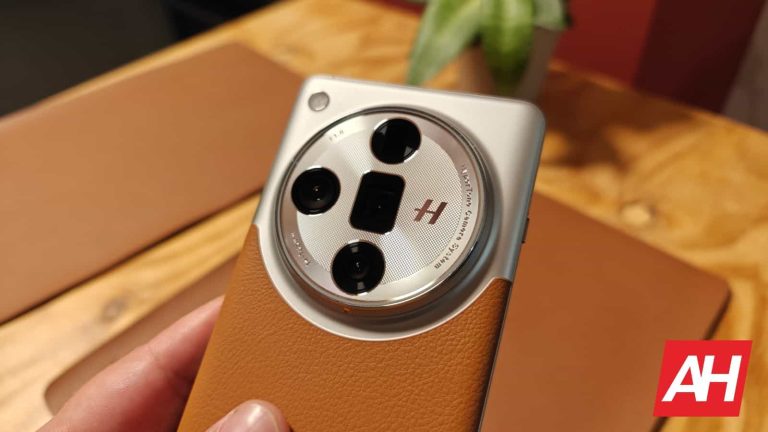
The Find X7 Ultra has a quad-camera setup on the back, four 50MP cameras
The OPPO Find X7 Ultra has a quad-camera setup on the back, led by the Sony LYT-900 sensor for the main camera. That is arguably the best mobile camera sensor out there at the moment.
The OPPO Find X7 Ultra’s camera prowess is also backed by Hasselblad. The company had input in a number of ways, and it definitely did a great job of tuning the colors of the end product (photos).
That phone launched in January this year, but its successor could come even sooner, in December. We’ll have to wait and see.
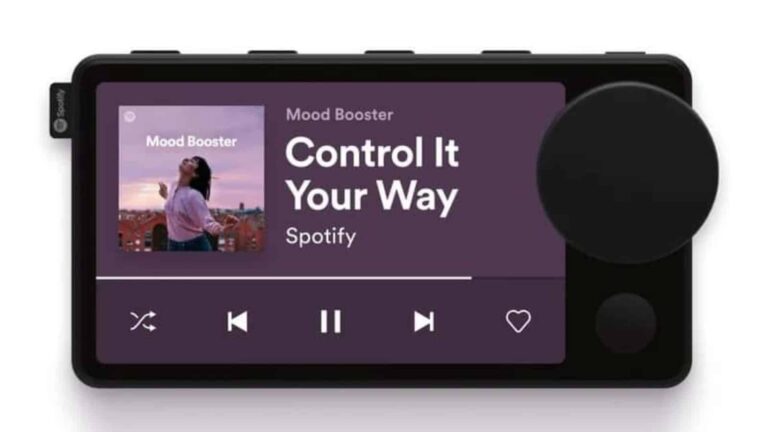
Remember back when Spotify ventured into the hardware market? Sorry to make you relive that trauma, but the Spotify Car Thing was an interesting device. Well, as you may know, Spotify is discontinuing it. According to a new report, the Car Thing is actually open-source, but it’s ultimately a pretty useless device.
Spotify discontinued this device a while back after very few people bought it. Those who used it thought that they would be able to keep using it for a while. However, they got the news that the company is actually deactivating these devices, making them Spotify-branded paperweights. That’s a bummer, as it’s only a few years old at this point.
The Spotify Car Thing is open-source
Devices are like eggs, you GOTTA crack into them! There are tinkerers that unlock all of the secrets hidden within the devices we use. How else did we find out that the Rabbit R1 is basically an Android app? In this case, the tinkerer is Josh Henderickson.
He was able to look under the Car Thing’s hood and discover some interesting information about it. For starters, the device’s software is actually running on an open-source Linux kernel. The source code for its U-boot is freely available on GitHub. The device isn’t running on the most complicated software, but that should have been expected. The Car Thing didn’t need to be more than a bloated web browser that navigates to spotify.com.
Along with that information, Henderickson was able to see the chip powering the whole show. It’s an Amlogic chip. Amlogic is a fabless chipmaker based in Santa Clara, California. He found out that the chip can run custom code.
With that information, you should expect to see Twitter posts of someone running Windows 11 on it, right? Wrong. It turns out that, while this device’s software points to it being able to run different systems, the Amlogic chip is extremely underpowered. Spotify didn’t exactly shell out for a high-powered Qualcomm chip for this device because of the Car Thing’s limited purpose.
So, it looks like there’s no afterlife for this device. It’s unfortunate because it was a promising gadget. It was a nice way to stream audio while driving safely.
Apple’s next WWDC (Worldwide Developers Conference) is just around the corner, and we are gearing up for a slew of announcements about iOS 18, Siri, and the integration of AI across the company’s ecosystem. Now, it looks like there is a new app on the horizon, too.
iOS 18 to debut Apple Password app
According to the well-known Apple insider Mark Gurman at Bloomberg, the tech giant is gearing up to unveil a new in-house app next week called Passwords. The latter is designed to simplify the login process for customers on websites and software.The tech giant is reportedly integrating the new app into iOS 18, iPadOS 18, and macOS 15. Sources familiar with the matter, who preferred to remain anonymous because the project hasn’t been officially announced, revealed that the software will debut on June 10 at WWDC. The app is designed to generate passwords and securely manage them.
The upcoming app will leverage the iCloud Keychain, an established Apple service known for syncing passwords and account details across various devices. For now, this functionality is tucked away within the settings app or surfaces when users log into websites.
At the moment, to see your saved passwords and passkeys, you have to:
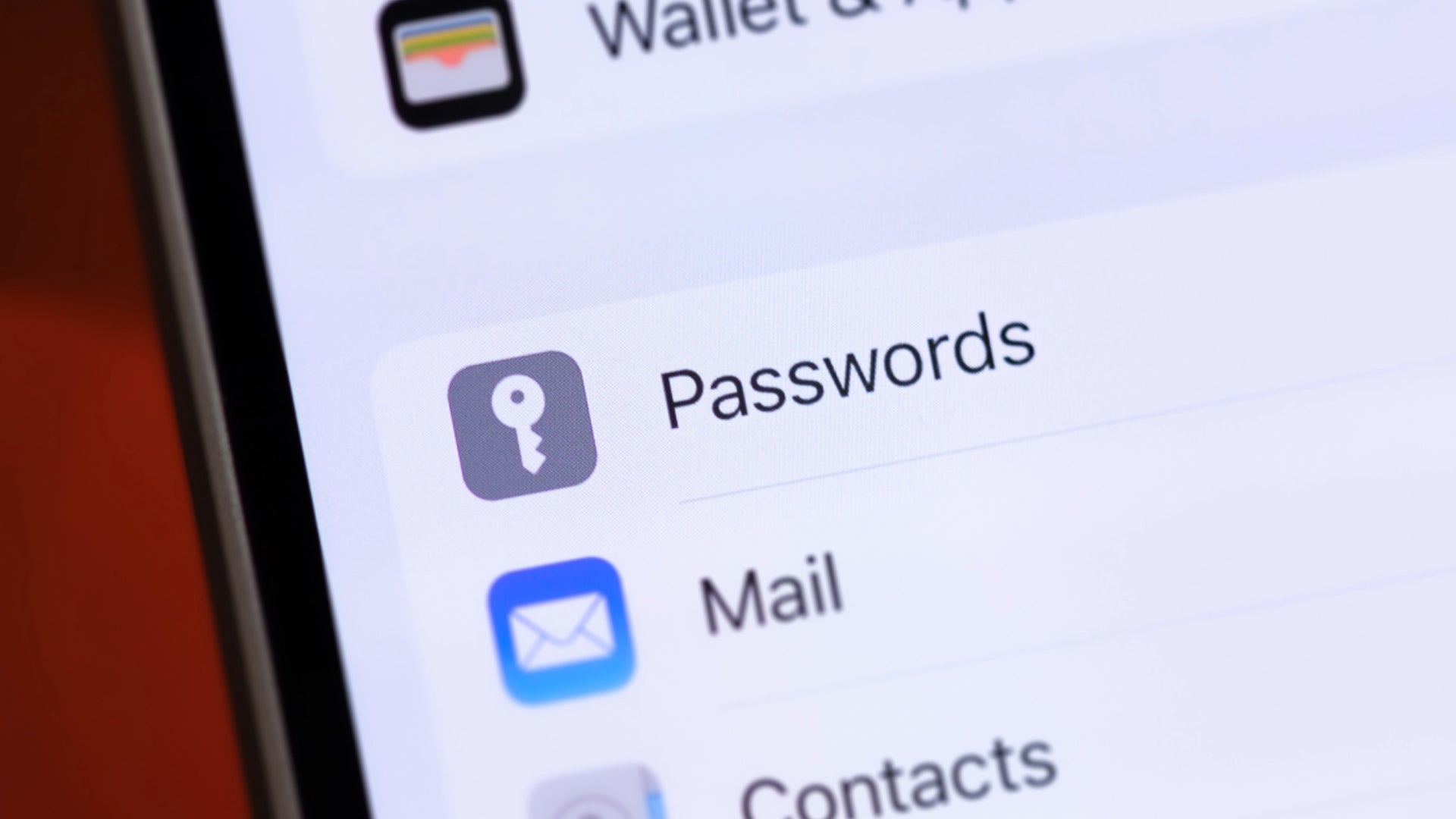
Head to Settings and scroll down to tap on Passwords
Use Face ID or Touch ID when asked, or enter your passcode
Pick the website or app to view the password or passkey
With the transition of this feature into a standalone app, Apple aims to encourage more users to adopt secure passwords, thus enhancing the privacy and security of its devices.
The app will reportedly present a list of user logins categorized into different sections, including accounts, Wi-Fi networks, and Passkeys – a password replacement promoted by Apple that uses Face ID and Touch ID. Similar to most password managers, this data can be automatically filled in when users log in to websites and apps.
Plus, the software is said to be usable with the Vision Pro headset and Windows computers. It should also handle verification codes and act as an authentication app, much like Google Authenticator.
With this new standalone app in iOS 18, iPadOS 18, and macOS 15, passwords won’t be tucked away in the Settings menu anymore. This means users will have quicker and easier access to their saved passwords, which is a definite improvement. Plus, if it’s indeed available for Windows as well, cross-platform users will find it much simpler to manage all their accounts.
Trellix research exposes the dangers of fake antivirus websites disguised as legitimate security software but harbouring malware. Learn how to identify these scams and protect yourself from threats like identity theft and ransomware attacks.
Imagine searching online for an antivirus program to protect your computer, only to stumble upon a website that infects your device with information stealers. This is the deceptive tactic employed by fake antivirus (AV) sites, a growing threat detailed in Trellix’s research titled “A Catalog of Hazardous AV Sites – A Tale of Malware Hosting.”
Deception Disguised as Security
In April 2024, Trellix Advanced Research Center team members discovered several fake antivirus sites hosting sophisticated malicious files like APK, EXE, and Inno setup installers. These sites are used to distribute SpyNote trojan, Lumma malware, and StealC malware. The malware hosts include avast-securedownload.com, bitdefender-app.com, and malwarebytes.pro.
Avast-securedownload.com:
It hosts a sophisticated APK called Avast.apk that delivers SpyNote Trojan, which can install and delete packages, read call logs, SMS, contacts, storage data, phone state, and more. It also has a recorder, touch activity tracker, and update capabilities.
Bitdefender-app.com:
This website delivers a zip file with an EXE named “setup-win-x86-x64.exe.zip” with a discreet TLS callback function. It delivers Lumma malware, targeting sensitive information like PC name, username, HWID, screen resolution, CPU, installed memory, running process, login data, history, cookies, tokens, and user profile information.
Malwarebytes.pro:
The website delivers RAR files containing legitimate DLLs, Inno Setup, and StealC infostealing malware. The contents are compressed in gzip and transferred to the attacker’s C2 server. The stolen information includes account tokens, Steam tokens, saved card details, system profiles, Telegram logins, running process names, installed browser lists, and common system information.
Malicious Binaries
According to Trellix’s blog post, researchers also discovered a binary called AMCoreDat.exe, which facilitates the deployment of stealer malware. The attacker uses a sophisticated method to obfuscate the payload, stealing victim information, including PC name, username, browsing history, cookies, tokens, etc., and sends it to a C2 server.
Fake Avast, Malwarebytes and Bitdefender sites reported by Trellix
Possible Dangers
Unaware users, seeking to safeguard their devices, get easily tricked into downloading malicious software disguised as antivirus programs because these sites appear professional, complete with logos, fake testimonials, and urgency-inducing language about potential threats.
The consequences of falling victim to these scams can be severe, including identity theft, financial loss, sensitive data breaches, ransomware attacks and potentially hefty ransom demands.
Researchers suspect these website addresses are distributed by malicious advertising and SEO poisoning strategies. To mitigate risks, it is recommended to follow security measures like using strong cybersecurity solutions, avoiding pirated software, and verifying software legitimacy with your end-point provider.
Huawei decided to rebrand its ‘P’ series smartphones this year. The Huawei P series became the Huawei Pura series. So instead of the Huawei P70 series, Huawei launched the Huawei Pura 70 series. Having said that, the Huawei Pura 70 Ultra is the most powerful smartphone in that series, and this is our review of that device. The Huawei Pura 70 Ultra is also Huawei’s new flagship smartphone. That phone did arrive in a global variant too, and that’s the model that we’re reviewing, just to be perfectly clear.
This is a phone that I’ve been looking forward to since it launched, mainly due to its camera and in-hand feel. Those are the two areas Huawei basically always exceeds on, and truth be said, this time is not different. The phone offers absolutely outstanding cameras and camera performance, and despite its size, it’s a joy to use. Let me stop getting ahead of myself, though. Let’s move forward one step at a time, starting with the phone’s design.
Table of contents
Huawei Pura 70 Ultra Review: Hardware / Design
As I spoiled in the intro, this phone offers a great in-hand feel. It’s made out of metal (aluminum), and vegan leather aka eco-leather. I always welcome eco leather on smartphones, especially large ones. Why? Because they add much-needed grip to phones. Smartphones with glass backs are too slippery, and you basically have no option but to use some sort of a case. This handset, however, doesn’t need a case… even though one is included in the box, more on that later, though.
The in-hand feel is outstanding. It’s very comfortable to use, and it actually doesn’t seem as large due to the way it’s built. One thing to note is that it’s quite top-heavy, which is not surprising considering its camera setup. The front and back sides are proportional and nicely curved. The display also has that curved feel on all sides, even though it seems to be like only the glass on top of the display is curved.
The bezels are proportional
The bezels on the front are very thin and proportional, which is always nice to see. A display camera hole is placed at the top. All the physical buttons sit on the right-hand side of the phone, and while the power/lock button has a red line on top of it, it feels the same as the volume up and down buttons, so it’s not as easy to differentiate just be feeling it. That’s a missed opportunity on Huawei’s part, I’d say. I didn’t really miss the power/lock key all that much, though, for what it’s worth. It’s well-placed. The buttons are also very tactile, as expected. A Type-C port sits at the bottom of the phone, while an IR blaster is located at the top. There is no audio jack here.
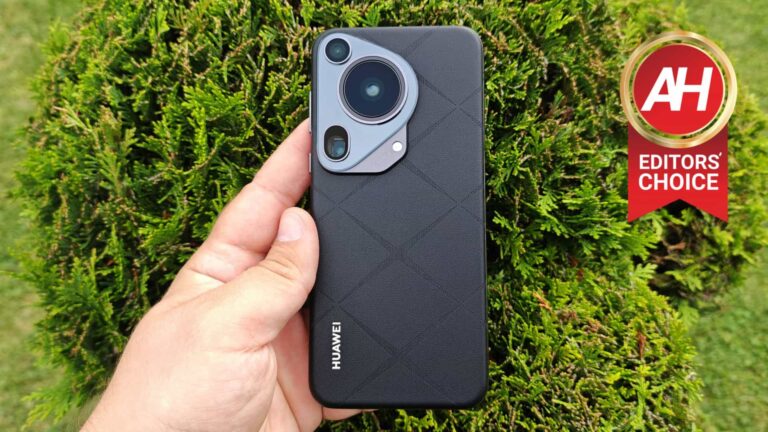
The camera setup on the back is quite large, which is unsurprising considering today’s standards. It also has a unique design, and the main camera is retractable. We’ll talk more about that in the camera section, though. All that is a part of the same camera island, which is located in the top-left corner of the phone’s back. The company’s logo also sits on the back of the phone, by the way, as per usual.
It is a bit top-heavy, though, but that’s to be expected
Other than the missed opportunity to place a different finish on the power/lock key, and the fact it’s top-heavy, I don’t really have any complaints on this design. Those are very minor things when you consider everything, of course. Everything else is basically spot on, and the phone also screams quality when you use it. So Huawei really nailed the design here, as is usually the case with the company’s flagships.
Accessories
The Huawei Pura 70 Ultra comes with both a charger and a case. Many other OEMs ship their flagships without both of those, so this is definitely nice to see. You’re getting a 100W charger in the box, to enable max charging on the phone. On top of that, Huawei includes a nice case. That case has a similar feel to the back of the phone itself, on the outside. It feels like a thin layer of eco-leather is applied on top of it. The case is very thin, and it does protect the display, but not the rear camera setup, unfortunately (the camera setup protrudes even with the case on). The sides are exposed, which may not be everyone’s cup of tea.
Huawei Pura 70 Ultra Review: Display
The Huawei Pura 70 Ultra has a very, very nice display. It includes a 6.8-inch 2844 x 1260 LTPO OLED panel. That display has an adaptive refresh rate, it can move from 1 to 120Hz in order to save battery. A 300Hz touch sampling rate is a part of the package too. This panel also supports HDR content, and the peak brightness is technically at around 2,500 nits. Huawei calls this panel the ‘Huawei X True’ display. A 1,440Hz PWM dimming is also a part of the package, in case you were wondering. The screen-to-body ratio is at around 89 percent, in case you were wondering. The display is protected by Kunlun Glass (Basalt-tempered). This is a new version of an already extremely durable Kunlun Glass which has proven its worth on previous Huawei phones.
The display itself is flat, but the glass on top of it is curved on all sides. That makes for a very smooth usage of the display itself. I did remove the pre-applied screen protector (a plastic one) before I started using the phone, to be quite honest. I do that for a couple of reasons. First, I hate how greasy plastic screen protectors get. The second reason is the fact that my finger gets caught on the edge of screen protectors on curved displays or displays that have curved glass on top. The third reason is to test out the display protection through everyday wear and tear.
The display is great, vivid & protects your eyes
So, when it comes to actual usage, is this display any good? Yes, actually, it’s outstanding. The vast majority of mainstream flagships have great displays, and so does the Huawei Pura 70 Ultra. The display is not only vivid and sharp, but it also has great viewing angles, and it’s more than bright enough in all situations, basically. Its adaptive refresh rate works really well, and the touch responsiveness is also really good. High-frequency PWM dimming is always a welcomed addition, and those of you who get headaches from using your phones with OLED displays will certainly appreciate that. It will also help keep your eyes safe over time.
I had a great time using this display and also appreciated that the glass on top of it is curved on all sides. I also didn’t notice a single scratch on the Kunlun display, even though I removed the screen protector on day one. Do note that I didn’t drop it a single time, so I can’t really attest to that. The day-to-day wear and tear, however, Kunlun did a fantastic job.
Huawei Pura 70 Ultra Review: Performance
The Huawei Pura 70 Ultra is fueled by Huawei’s very own chip, made by SMIC. The chip in question is the Kirin 9010, a 7nm processor. That is Huawei’s best chip at the moment, as the company didn’t really kickstart its chip-making business until last year. The US ban managed to mess up their plans years ago. In any case, this chip enables 5G connectivity in China, but not outside of it. Despite the fact the global variant contains that chip, due to restraints, only 4G connectivity is available. That was not a problem for me at all, as 4G is great where I live, but keep that in mind if you’re planning to get the device. Huawei can technically enable 5G is something changes down the road.
What about the performance? Well, this is technically a mid-range chip, based on its performance. It’s in the same ballpark as really good mid-range chips from Qualcomm and MediaTek. That’s not necessarily a bad thing, as it performs really well, but just keep in mind it’s not on the same level as the Snapdragon 8 Gen 3 or anything like that. Huawei is prevented from making 3nm and 4nm chips at the moment. A 5nm chip, however, is expected to arrive later this year.
It doesn’t have a top-tier chip, but that shouldn’t bother most of you
The fact that this is not a top-of-the-line chip didn’t really bother me during usage. Why? Because I didn’t notice it. During day-to-day use, the phone’s performance was immensely smooth. I didn’t really notice any lag or anything like that. You’ll realize that this is a mid-range tier chip if you run benchmarks, or if you end up playing a truly demanding game. Basically everything that you’ll find in Huawei’s AppGallery app store runs really well on this chip. I even tried sideloading some games to see how they’ll fare, and it did a good job. Chances are you’re not considering this device if you’re in the market for a gaming machine either way.
I’m not sure if this chip will stand the test of time, in terms of performance, but it performed admirably here. Huawei is really good when it comes to optimization, and this is also the company’s very own processor, so… that surely helps in that regard. The bottom line is, the performance was great.
Temperature Genshin Impact
Geekbench 6
3D Mark Wildlife Extreme Stress Test
Best loop: 1,390 Lowest loop: 1,379 Stability: 99.2%
Video export test (CapCut)
Huawei Pura 70 Ultra Review: Battery
The Huawei Pura 70 Ultra has a 5,200mAh battery on the inside. If you’re worried about battery life, there’s really no need to be. The device provides great battery life. Not once were I forced to charge it during the day or anything like that. With my regular usage, boosted by testing the device, I was comfortable getting over 6 hours of scree-on-time with plenty left in the tank. When I pushed it a bit more, it crossed the 7-hour screen-on-time mark and still had almost 20% left in the tank. That happened several times. I had no problems with battery life whatsoever. The only thing that I didn’t do on those days was play games, but with plenty of camera use and everything, it did an admirable job.
Even in our battery drain test the phone did great. I also did not notice that 4G connectivity is draining the battery more than usual. The difference between being connected to WiFi and 4G was not noticeable, which is always good to see. Another thing to note is that the battery life was constant, basically. There were no usage cycles when the battery dropped off too fast or anything like that, which is something we’ve seen happen, mostly with Google’s Pixel phones at times.
Charging
Even if you run out of battery before it’s time, there’s no need to fret. Why? Because this phone charges immensely fast. That goes for both wired and wireless charging. A full charge takes less than 50 minutes. It took us 46 minutes to fully recharge the device with the bundled 100W charger. Do note that the charging slows down after you cross the 80% mark, though. A Type-C to Type-C cable comes included too, by the way. The phone gets to a 30% charge in only 5 minutes, while a 60% charge takes around 15 minutes. So you can technically get up to 80% immensely fast.
In addition to offering 100W wired charging, the phone also supports 80W wireless charging. We did not have a compatible charger for that, so we really couldn’t test it, but that’ll also get the phone charged up really fast. On top of that, 20W reverse wireless, and 18W reverse wired charging is supported. That makes this phone the most complete charging package in the market, basically. You can technically charge phones faster with this phone, wirelessly, than Apple’s most expensive phones can charge themselves with the original charger. Let that sink in for a bit. You have a ton of options here.
Huawei Pura 70 Ultra Review: Camera
On paper, the Huawei Pura 70 Ultra has a great camera setup, as expected. That, combined with the company’s camera software, makes for a truly compelling camera offering here. This is easily one of the best-performing camera smartphones to date. Let’s take it one step at a time, though, starting with the hardware.
The Huawei Pura 70 Ultra includes a triple camera setup on the back. A 50-megapixel main camera is the phone’s main camera. Huawei utilizes the Sony IMX989 1-inch sensor from Sony here. On top of that, it offers an f/1.4-f/4.0 variable aperture and a recractable lens. There is also sensor-shift stabilization included in the package. We’re looking at a 22.5mm focal length here, and Huawei also threw its XD Motion engine on top of everything, for handling fast-moving objects. It actually works really well, more on that later.
Its ultrawide camera is very capable, but the periscope telephoto unit truly impresses
A 40-megapixel ultrawide camera is also included here. It has a 13mm equivalent focal length, and it supports autofocus too. This camera is also supposed to be used for macro photography, though I used the telephoto unit more for that purpose, as it’s actually meant to be used for macro shots You can do it with the ultrawide shooter too, though. It all depends on what you’re trying to capture.
Speaking of which, the third camera on the back is a 50-megapixel periscope telephoto unit. The sensor itself is placed behind a periscope 90mm f/2.1 telephoto lens. OIS is supported here, and this camera offers 3.5x optical zoom. Huawei claims you’re getting ‘lossless’ zoom up to 10x thanks to software. Much like the ultrawide camera, this one is also meant to be used for macro shots, it all depends on what you’re taking a picture of. You can get up to 5cm to the subject of the shot thanks to the 35x super macro mode on this camera. On top of these three cameras, Huawei also included a 13-megapixel selfie unit. That one is coupled with an 18mm f/2.4 aperture lens. It supports autofocus.
Variable aperture does play a role here… an important one
The performance you can get here is… outstanding. The variable aperture aspect does come into play in the end results, as this camera adapts to different lighting conditions with ease. This is a 9-stop variable aperture, well, at least when it comes to fixed steps. You can take manual control if you want. You get immense control of depth of field too, thanks to variable aperture. If you want, you can really tune down your shots to absolute details, or allow Huawei to do it for you. The phone does a great job in auto mode, and all the camera samples that you’ll see at the very end of this entire section are taken via auto mode.
By default, the main camera takes 12-megapixel photos. The details you can get during both day and night are excellent. During the day, the sharpening is spot on, it’s not overboard, and there’s no noise to speak of. The dynamic range is very good, but also not too strong, which makes the photos look more realistic. The white balance is very good, though that’s one area that could use a tiny bit more optimization in some (rare) situations. The colors are vibrant, but not too much. There’s a Vivid mode that you can switch to if you want, though, which will boost the colors, and contrast of the shots too. There are several shooting modes, actually, Original, Vivid, Bright, and Mono.
2x photos look outstanding
The 2x shots are also great, taken with the main camera. They look almost the same as the ones you take with the main camera, which is great to hear. There are very rare occasions that you’ll spot a difference if you really zoom in and look for it, some artifacts, but that’s extremely rare.
What I was most interested in when it comes to this camera is its ability to shoot fast-moving objects. Its fast shutter and Huawei’s XD Motion engine are supposed to make that happen. Is that the case? Yes, indeed it is. My dog is hyperactive, to say the least, and this camera did a fantastic job of capturing her while she was playing around. I tried to take pictures of some birds in the park, and so on. It did a fantastic job. I was having a hard time getting a blurred photo, to be quite honest. The same thing also works in low light. The reliability is a bit lower, but still, it was immensely impressive, as not a single phone I’ve used was able to do the same… not even close.
Fast shutter camera samples:
What about low light? As you’d expect, it’s excellent. This phone not only has the largest camera sensor on the market (a phone sensor), but it also offers sensor-shift stabilization and f/1.6 aperture lens (variable aperture). That allows it to adapt to various lighting scenarios, including low light. Boosted by Huawei’s image processing, this phone delivers some great low light shots. You don’t even have to switch to a dedicated night mode, not at all. The phone will do that for you, automatically.
The result is that you’ll get plenty of details, basically no noise, and very nice-looking saturated colors. The exposure is also spot on, and yes… the dynamic range too. There’s really nothing to complain about when it comes to low-light shots here. If we really, really had to nitpick, then we would highlight the fact that noise reduction can be a bit aggressive at times, but for a reason. What about the dedicated night mode? Well, if you fire it up, the photos will look even brighter, but unnaturally so. If you really need more detail from a photo for some reason, you can fire this up, but the auto mode does a far better job overall.
Main camera samples:
The ultrawide camera offers good, balanced photos
When it comes to the ultrawide camera, it’s very useful. You’re getting a very wide field of view here. The phone managed to provide ultrawide photos with a bevy of details. The dynamic range is good, and the sharpness is also spot on. There is a little bit more noise than in photos from the main camera, but it’s still very minimal. As I mentioned earlier, this camera can be used for macro photography, but you’d be better of sticking to the telemacro camera (the phone’s telephoto shooter).
Low light photos with the ultrawide camera end up looking good, but the quality does drop off compared to the main camera, of course. There’s enough detail in the pictures, though, low levels of noise, and excellent dynamic range. You’ll also be getting nice colors as a result. They’re great, all in all.
Ultrawide camera samples:
When it comes to telephoto camera, it’s outstanding across the board, basically. The 2x lossless zoom photos we already mentioned, as they look basically the same as the ones taken at 1x. You can see the difference if you’re pixel-peeping, but… yeah. What about 3.5x? Well, those also look great during the day. The colors are in line with the main camera, and you’re getting plenty of detail, great white balance, outstanding colors, and no noise. Up to 10x, this phone provides great photos. Up to 7x they’re simply great, and from 7-10x very good. Everything over that is… well, what you’d expect.
Macro shots from the telephoto camera are some of the best around
Macro photos from this camera look outstanding. You can get as close as 5cm to your subjects/objects, and the photos do look great. There’s plenty of detail in them, and they’re well-balanced.
When it comes to low-light telephoto photos, well…the 3.5x photos provide more than enough detail and manage to keep noise in check. The colors end up looking great, and the dynamic range too. 10x photos don’t look bad either, considering that we’re talking about hybrid zoom here. The details are not as great, but they’re well-balanced with good colors, and dynamic range. Just stick to auto mode, don’t use night mode for telephoto night mode pictures in general.
Telephoto camera samples:
When it comes to video recording, it’s good, but not the best around. For stills, you can argue that the Huawei Pura 70 Ultra is the best camera around, but not for videos. The phone can capture videos up to 4K at 60 FPS, and they do look good. During the day, there’s enough detail, though that area could be better. They do tend to look a bit overexposed, however, and the dynamic range is very wide. There’s no noise to speak of, and the colors are as great as you’d expect them to be.
Videos in low light are good. In fact, I preferred low-light videos to daytime ones. The colors are outstanding, and the noise is kept in check. The dynamic range is excellent, and you’re getting plenty of details.
Colors sample controlled environment:
TEXT
Huawei Pura 70 Ultra Review: Software
As many of you already know, the story with Huawei’s Android software is a rather complicated one. The US ban managed to complicate things a lot for the company, as Google Play Services are not an option since then. Huawei has its own services rolling on top of its Android OS implementation. HarmonyOS 14 comes pre-installed on this phone, on top of Android 12. It’s Huawei’s very own implementation, and… well, you have to prepare for what you’re getting. It works really well, but just keep in mind it’s not as simple as firing up the phone and downloading all the apps you had on your previous phone.
Let’s get into that app situation first, before we get to the UI design and everything else. Huawei has its own app store running here, AppGallery. There are plenty of apps on there, but chances are you’ll be missing quite a few you’re used to using. So, for example, TikTok is available, Facebook is not. Viber is available, WhatsApp is not, etc. Huawei does pull up recommendations from app repositories as well, though, so you can easily install the app if it’s missing from the AppGallery. There are also third-party Android app stores, like Aurora Store, that will even pull up your purchases from the Google Play Store if you log in with your credentials.
I managed to get Google apps working without a problem… if that’s what you need
With that being said, the vast majority of apps that I installed from third-party sources worked really well. Some, though, unfortunately, require specifically Google Play Services. Such apps are very few and far between, but it’s worth noting. If you’re wondering what about Google apps? Well, you won’t find those on the AppGallery either. Even if you download them, the vast majority of them won’t work due to the lack of Google Services… well, unless you use a tool like GBox. GBox is an emulator of sorts, and it allows you to access Google apps. That app worked great for me, and I was able to run whatever I wanted, pretty much. I had the same experience with GSpace back in the day until it started being a problem battery-wise, and also some apps stopped working. GBox works great thus far, though.
In regards to the UI, it’s different than stock Android, but if you’ve used an Android phone thus far, it’ll also be very familiar. The notification shade and quick toggles are split, though. If you swipe down from the top-left side, you’ll get access to the notifications, if you do the same from the top-right, you’ll get quick toggles.
EMUI 14 is different… but good
EMUI 14 does come with some nice features, like the fact that you can swipe from the right side and pause to access quick apps. One-handed mode is handled differently too. You need to swipe along the bottom of the phone to either the left or right side to make the screen smaller and thus easier to reach. Big folders are also a part of the offering, making it easy to launch apps directly from an unopened folder. Another feature worth noting is widget stacking, which not many Android phones offer, and it can be really useful.
I’ve only scratched the surface when it comes to features, though, of course. EMUI 14 works great on this phone, and it’s very smooth. Huawei handles animations with grace, and they didn’t bother me at all. Most animations do annoy me as they’re too slow, this is a really nice balance, and they work really well. The notifications are not as well-handled as on stock Android, as you’re missing some shortcuts and the sheer look of notification cards is not my cup of tea, but all in all, everything works well enough. The app issue is still here, though, and you need to prepare yourself for that if you intend on getting this phone.
Huawei Pura 70 Ultra Review: Audio
The Huawei Pura 70 Ultra is equipped with a stereo speaker system. There is a bottom-facing speaker backed by the earpiece. Do note that the earpiece does have two sound outlets (front and top-facing), though. The bottom speaker is louder than the top one, but the sound balance is really good. It’s worth noting that the Huawei Pura 70 Ultra doesn’t have the loudest speakers around, not at all. In fact, it’s not as loud as any of the recent flagships, even though it’s not far from that point. Don’t let that worry you, as the speakers are plenty loud as they are, and not many people will have a problem with that.
We’ve used our own audio tracks in order to test out this setup. The audio output is very good and well-balanced. The vocals are nicely highlighted, and there’s enough bass included here too. Higher and lower ends up fo the spectrum are well-balanced here, and we did not notice a single major issue with the audio output. There is no audio jack here, though, so keep that in mind. You can use either the Type-C port at the bottom or if you prefer wireless audio, there’s always Bluetooth 5.2 which is offered here.
Huawei Pura 70 Ultra: Should you buy it?
Should you buy the Huawei Pura 70 Ultra? Well… there are a lot of factors that you should consider here. This is a great phone, there’s no doubt about that. It has an excellent camera performance, some of the best. It’s immensely comfortable to hold and use, and it has a great display too. The software is very optimized, plus it’s the most versatile phone on the planet when it comes to charging.
There are a lot of benefits here. You need to consider the elephant in the room, though, apps. AppGallery grew so much, but chances are you’ll still have to rely on app repositories, GBox, and Aurora Store. If that’s not a problem for you, you can get pretty much any app running on the phone. Still, the experience is not as streamlined as it would be if Google Services came pre-installed. This is not a phone for everyone, but if you’re willing to make a couple of sacrifices along the way, it is a very compelling device.
You should buy the Huawei Pura 70 Ultra if you:
…want to step away from Google. …don’t play a lot of games on your phones. …want one of the best camera smartphones in the market. …need a large smartphone that is truly comfortable to hold and use. …would love to have the most versatile smartphone in terms of charging. …love thin bezels on phones. …don’t want to buy a charger separately.
You shouldn’t buy the Huawei Pura 70 Ultra if you:
…use Google applications. …if you use a lot of apps and you’re not willing to use app repositories/third-party app markets. …play a lot of games on your phones.
What it calls the “largest ever operation against botnets,” Europol announced successful execution of ‘Operation Endgame’. This activity put an end to IcedID, Trickbot, and other major botnets as the officials seized over 100 servers and arrested four criminals.
Operation Endgame Let Europol End Up Major Botnet Operations
According to a recent press release, the European Union Agency for Law Enforcement Cooperation, commonly known as simply ‘Europol,’ conducted a successful operation against some nasty malware droppers running botnet operations.
Named “Operation Endgame, ”Europol terms it the “largest operation against botnets” as they disrupted some major malware operations, including IcedID, Trickbot, Bumblebee, SmokeLoader, Pikabot, and SystemBC. These malware droppers have been extensively used for various malicious campaigns, from email phishing attacks to large-scale viruses and ransomware attacks.
Europol explained that these malware often constituted the first stage of a malware attack and facilitated ransomware deployments. Consequently, disrupting these malware droppers ideally limits the extent of such threats in the wild.
Regarding the Operation, Europol described it as a 3-day activity, coordinated from Europol headquarters. Law enforcement officials from France, Germany, and the Netherlands led the operation, gaining further support from Denmark, the UK, the US, Armenia, Bulgaria, Lithuania, Portugal, Romania, Switzerland and Ukraine. Besides, the officials also gained assistance from numerous private partners, including cybersecurity giants like Bitdefender, Proofpoint, Zscaler, Sekoia, Shadowserver, and more.
As a result of this operation, Europol arrested four criminals, seized or disrupted over 100 servers in Bulgaria, Canada, Germany, Lithuania, the Netherlands, Romania, Switzerland, the United Kingdom, the United States and Ukraine, and took control of over 2000 domains.
‘Endgame’ Has Not Ended – Says Europol
While this operation seems huge, Europol pledged that this isn’t the end of Operation Endgame. Instead, they will add new actions for further security activities as part of this operation, which they will share on the relevant website. They also pledge to hold accountable other suspects who escaped the recent activity against botnets.
“Hey there!” messaged Savannah, someone 16-year-old Charlie had never met before, but looked cute in her profile picture. She had long blonde hair, blue eyes, and an adorable smile, so he decided to DM with her on Instagram. Soon their flirty exchanges grew heated, and Savannah was sending Charlie explicit photos. When she asked him for some in return, he thought nothing of taking a quick snap of himself naked and sending it her way.
Within seconds, “Savannah” morphed from vixen to vice, threatening Charlie with posting his nude picture all over social media—unless he sent $500. Then she gave Charlie three days to get her the money, otherwise she’d share the compromising photos with his friends and family.
While the above scene is fictional, it’s indicative of what the FBI and Department of Homeland Security agree is the fastest-growing cybercrime of the last three years. It’s called financially motivated sextortion, or financial sextortion, and its victims are mainly teenage boys between the ages of 14 and 17.
Financial sextortion happens when adult criminals create fake accounts posing as young women on social media, gaming platforms, or messaging apps, and coerce victims into sending explicit photos. Scammers then threaten victims into sending payment, usually in the form of cryptocurrency, wire transfer, or gift cards, otherwise they’ll post the images online for all to see.
In an emerging trend, some sextortion scammers are now using artificial intelligence to manipulate photos from victims’ social media accounts into sexually graphic content. The predators then threaten to share the content on public forums and pornographic websites, as well as report victims to the police, claiming they’re in possession of child pornography. Demands for money immediately follow.
In 2023 alone, the National Center for Missing and Exploited Children (NCMEC) received 26,718 reports of financial sextortion of minors, more than double the 10,731 incidents reported in 2022. Sadly, these figures are likely far understated, since they rely on kids or their parents calling in the crime. A January 2024 threat intelligence report from Network Contagion Research Institute (NCRI) found children in the United States, Canada, and Australia are being targeted at an alarming rate, with a massive 1,000 percent surge in financial sextortion incidents in the last 18 months.
To illustrate how quickly the digital landscape has changed, a 2018 national survey found just 5 percent of US teens reported being victims of sextortion. Fast forward to June 2023, and 51 percent of Generation Z respondents said they or their friends were catfished in sextortion scams—47 percent in the last three months.
The Yahoo Boys
Financial sextortion has been linked to scammers in West Africa, particularly Nigeria and the Ivory Coast, as well as the Philippines. However, NCRI notes virtually all sextortion scams targeting minors can be directly linked to a distributed West African gang known as the Yahoo Boys. The Yahoo Boys mainly go after English-speaking minors and young adults on Instagram, Snapchat, and Wizz, an online dating platform for teens. They’re the original Nigerian Princes, but have changed tactics in recent years to elder fraud, romance scams, fake job scams—and now the sexual extortion of children for profit.
NCRI credits the tenfold increase in financial sextortion cases directly to the Yahoo Boys’ distribution of instructional videos and scripts on TikTok, YouTube, and Scribd, which are encouraging and enabling other threat actors to engage in financial sextortion as well. The videos have been viewed more than half a million times, and comments are filled with cybercriminals eager to download the scripts and get started.
The sextortion guides provide step-by-step instructions on how to create convincing fake social media profiles and “bomb” high schools, universities, and youth sports teams. The Yahoo Boys use this term to describe friending/following as many kids in a school or other location as possible to convince victims they could be an unknown classmate or peer from a nearby town.
While the payment amounts requested by the Yahoo Boys vary, they can range from as little as a couple hundred dollars to a few thousand. But predators employ ruthless tactics to intimidate their victims into paying, which can inflict lasting trauma and immense distress on children. Offenders often continue demanding more money after receiving the initial sum and may release victims’ sexually explicit images regardless of whether or not they were paid.
Indeed, the financial fallout may not be as daunting as the millions demanded by ransomware actors, but the emotional cost to teenage boys can be devastating. Anxiety. Humiliation. Shame. Despair. Feeling completely alone and afraid to ask for help. According to the FBI, financial sextortion has even been linked to fatalities. To their knowledge, at least 20 teens between January 2021 and July 2023 committed suicide when faced with the threat of nude photos that could ruin their lives.
What to do if you or your child is financially sextorted
Parents of teenage boys—or all teens for that matter—should have a conversation with their child about the pitfalls of financial sextortion. Remind them to be selective about what they share online and who they connect with, and if a stranger reaches out to them demanding payment or sexually explicit images, they should speak to a trusted adult before sending anything, be it money, photos, or more messages. In fact, open lines of communication can be the difference between life or death, so if your child doesn’t feel comfortable going to you, ask that they bookmark this article or one of the references listed below.
If you or your child are a victim of financially motivated sextortion, the most important advice to remember is this: You are not alone. You are not in trouble. Your child should not be in trouble. There is a way forward after this.
There are several resources you or your child can access to report the crime to law enforcement, speak to a caring counselor or peer, and request that harmful images be taken down. Here’s what we suggest:
Block the scammer from contacting you again, but save all chats and profile information because that will help law enforcement identify them.
Report the scammer’s account on the platform where the crime took place. Facebook and Instagram parent company Meta unveiled new tools last month to combat financial sextortion, and Snapchat has a reporting feature for nudity or sexual content, which now includes the option: “They leaked/are threatening to leak my nudes.”
Seek emotional support, whether from a trusted adult, friend, or through professional services. NCMEC offers assistance for sextortion victims and their families, such as crisis intervention and referrals to local counseling professionals, and their Team Hope volunteer program connects victims to other who’ve experienced financial sextortion.
If you prefer a more anonymous support experience, the moderated Reddit forum r/Sextortion is a safe haven for victims to share their experiences and get advice from those who’ve already been through it.
Victims looking to remove sexually explicit images from the internet can go to Take It Down for help or Project Arachnid, which uses automated detection methods along with a team of analysts to quickly send removal notices to electronic service providers.
Ask for help. Problems from financial sextortion can be complex and require assistance from adults and professionals. If you don’t feel you have adults who can help, reach out to NCMEC at gethelp@ncmec.org or call 1-800-THE-LOST.
The first quarter of 2024 wasn’t good for the US smartphone market. Contrary to the global trend, smartphone sales in the US declined. Europe, meanwhile, returned to growth this past quarter. The region saw a first YoY (year-on-year) growth in quarterly sales after 12 consecutive quarters of decline. The last YoY growth was recorded in Q1 2021. As expected, Samsung was the largest smartphone vendor in Europe in the first three months of the year.
Europe saw its first smartphone sales growth in three years in Q1 2024
According to market research firm Canalys, 33.1 million smartphones were shipped across Europe in Q1 2024 (excluding Russia). The figure marks a 2% YoY shipment growth from 32.4 million units in the same period last year. The growth rate is slower than the global average of 10%—the global industry was driven by emerging markets. However, it’s still a good sign for vendors playing in Europe. It’s the first quarterly sales growth in three years.
Canalys observed that the European region recorded its highest share of premium models (priced at $800 and above) for a Q1 ever. Driven by Samsung’s Galaxy S24 series, premium models accounted for 32% of all shipments. Sales of the Korean firm’s flagship lineup (including previous-gen Galaxy S devices) grew by 58% YoY to 4.3 million units in Q1 2024. The Galaxy AI-loaded phones have been selling well globally since their launch in mid-January.
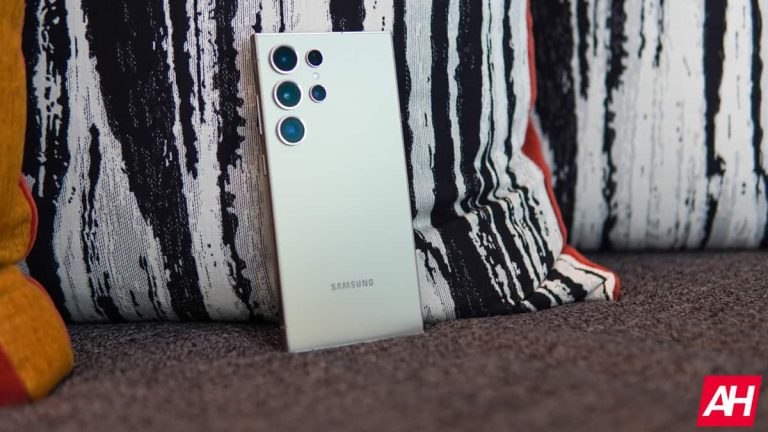
The Galaxy S24 Ultra, the pick of the lot, was the third most shipped phone in Europe during the first three months of 2024. Samsung sold 1.6 million units of the phone in the region. The iPhone 15 Pro Max and iPhone 15 Pro were the best-selling models, shipping 2.6 million and 1.6 million units, respectively. Samsung’s budget phone Galaxy A15 (4G) and the iPhone 15 made up the top five smartphones sold in Europe in Q1 2024.
The next five best-selling devices are Xiaomi’s Redmi 13C, Samsung’s Galaxy A15 5G and Galaxy S24, Xiaomi’s Redmi Note 13 4G, and Samsung’s Galaxy A25 5G. The top 10 models accounted for over 43% of all sales. Canalys says, “Improved low-end demand will be vital for the market to return to growth in 2024,” so Android OEMs would be looking to bolster their budget and mid-range offerings with new models in the coming months.
Samsung was the largest vendor by a huge margin
Samsung has historically been the largest smartphone vendor in Europe. It was no different this time. The Korean firm sold 12.1 million Galaxy phones in the region in Q1 2024, capturing 37% of the market. While its market share remained flat over Q1 2023, the company increased shipments by 2%. Apple followed distantly with a 22% share. It shipped 7.3 million iPhones, 5.6 million of which were the three iPhone 15 models mentioned above.
Xiaomi, Motorola, and HONOR made up Europe’s top five smartphone vendors in Q1 2024. Canalys forecasts sales to remain almost flat for the rest of the year. The EU’s eco-design directive will force companies to restructure their business strategies in the coming years. “Finding a balance between sustainability, compliance, AI, brand strengthening, and hardware innovations will be vital for vendors to succeed in Europe in the years leading up to 2030,” Canalys said.