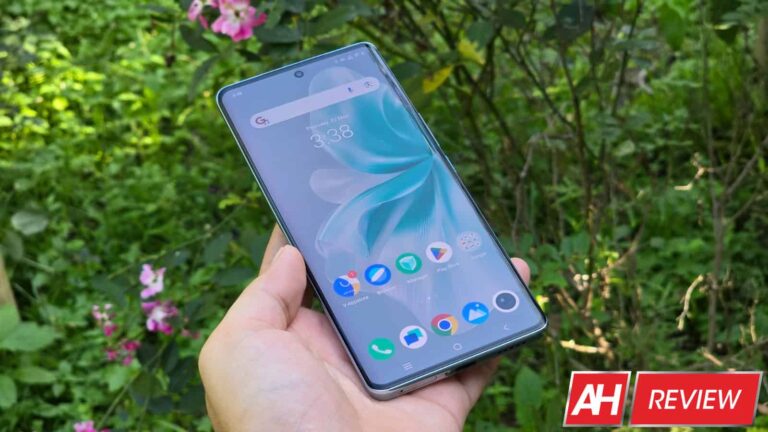
The Vivo V30 is a premium mid-range smartphone and a watered-down version of the Vivo V30 Pro we reviewed in March. The vanilla model has the same design language as the Pro, meaning you get an incredibly slim phone with curved edges that offer no grip. The device still feels fairly premium thanks to a well-built body and a glass back. However, it is significantly different from the Pro internally. Most notably, the Vivo V30 comes with only two 50MP rear cameras in some regions. Vivo offers a third 2MP camera in select markets but our review unit lacks it.
This device also lacks a ZEISS partnership for enhanced image quality. Additionally, it features a less powerful processor and an older storage standard (UFS 2.2 instead of UFS 3.1). On the brighter side, it retains a 1.5K display, up to 12GB of RAM and 512GB storage, and a 5,000mAh battery with 80W charging. The overall package looks solid for the money you pay. But it is ultimately the everyday performance that matters the most. In this review, we evaluate how the Vivo V30 holds up during moderate and heavy usage.

Table of contents
Vivo V30 Pro Review: Hardware & Design
The Vivo V30 is an incredibly slim phone, measuring just 7.45mm in thickness. It is Vivo’s slimmest phone with a 5,000mAh battery, alongside the Pro. The vanilla model is 2 grams lighter too, weighing in at 186 grams. The device is 164.4mm tall and 75.1mm wide, making it comfortable to hold and use with one hand. Its dual-curved design with glass on the front and back makes it a bit slippery but the bundles transparent cover adds the required grip without concealing its design much.
The phone has a plastic frame with a glossy finish that perfectly complements the shiny rear glass. Vivo says the frame has reinforced corners with a cushioning structure for better shock absorption. The Vivo V30 has its frame slightly recessed on the top and bottom. Like the Pro, it has “PROFESSIONAL PORTRAIT” inscribed on the top. This is despite the phone lacking a dedicated portrait camera. There are no stereo speakers here, so you get a single bottom-firing speaker alongside the SIM tray, USB Type-C port, and a microphone.
Brilliant colors, clicky buttons
Vivo offers the V30 in four colors, each with a unique finish that adds to its aesthetics. We have the Waving Aqua variant with a Rippling Magnetic Particle effect. The Bloom White version has a 3D Petal Pattern, the Lush Green has a color-changing rear panel, and the Noble Black has Fluorite AG Glass. The company gets full marks for the color scheme. The vertical rectangular camera bump is also designed nicely. It is divided into two rounded squares. The top one houses the two 50MP cameras, while the bottom has the Aura Light ring and an LED flash.
Like other Vivo phones, the V30 has power and volume buttons on the right side. Both buttons are at a comfortable height and fairly clicky. The curved nature of the phone, which doesn’t leave much space for a wide frame, makes the buttons a little sharp, but nothing uncomfortable. Going back to the front, the earpiece is hidden nicely under the frame, while the punch-hole cutout for the selfie camera is also small. I would have preferred the under-display fingerprint scanner at a slightly higher position, but it doesn’t take long to get used to it.
Vivo V30 Pro Review: Display
The Vivo V30 has a 6.78-inch AMOLED display of 1,260 x 2,800 pixels (1.5K resolution) or 453ppi pixel density. The company has slapped a curved Schott Alpha glass protective panel on the screen. It is a high-end display with a 120Hz refresh rate, 300Hz touch sampling rate, 10-bit color depth, and an 8,000,000:1 contrast ratio. Vivo says the screen can reach a local peak brightness of a whopping 2,800 nits. That is the maximum it can go when viewing certain HDR content.
In everyday usage, the Vivo V30 Pro can achieve a peak brightness of 1,200 nits. That is more than enough for a comfortable viewing even in the brightest environment. In our testing, we reached a maximum brightness of 870 nits by manually sliding the controller. In automatic mode, the brightness went up to 1,191 nits when a bright beam of light was directed onto the sensor. Overall, the Vivo V30’s display gets adequately bright depending on the surroundings, with the screen getting even brighter when displaying HDR content.
At night, when you need the display to dim, the phone benefits from 2160Hz PWM (pulse-width modulation) dimming. We recorded a minimum brightness of just 2 nits. The screen colors appear decent even at low brightness. The Vivo V30 also boasts hardware-level low blue light certification and anti-fatigue technology to make for a comfortable viewing experience at night. The screen is one of the strengths of this phone, and there are more reasons for it.
Highly-customizable screen colors
The screen colors on the Vivo V30 are amazing. You get vibrant colors with excellent color depth, saturation, and contrast ratio. And if you do not like the default color scheme, you can customize it to your liking. Vivo offers three color presets—Standard, Professional, and Bright. You can select between those and manually adjust the color temperature to get the desired colors on the screen.
Excellent colors coupled with Widevine L1 DRM support make the Vivo V30 a great phone for media consumption. You can stream content in Full HD across all popular platforms, including Netflix and Amazon Prime Video. The phone also has HDR10 support for an enhanced viewing experience. If you aren’t using earphones, you might rue the lack of stereo speakers as a single speaker doesn’t quite give you an immersive experience. That said, it is fairly loud (more on the speaker quality later).
Vivo V30 Pro Review: Performance
The Vivo V30 is powered by Qualcomm’s Snapdragon 7 Gen 3 chipset. It is a 4nm SoC manufactured by TSMC and released in early 2024. It boasts an octa-core CPU with one Cortex-A715 prime core clocked at 2.63GHz, three more at 2.4GHz, and four Cortex-A510 efficiency cores at 1.8GHz. The setup includes an Adreno 720 GPU and supports LPDDR5 RAM. Vivo has paired the setup with 8GB/12GB RAM and 128GB/256GB/512GB UFS 2.2 storage.
The company sent us the 12GB+512GB variant, the beefiest of the lot. In everyday usage, the phone delivered reliable performance with no noticeable hiccups. It handled background apps efficiently, and switching between apps was fairly smooth. The Vivo V30 also did well in graphic intense games at moderate graphics settings. Pushing it to the highest graphics caused some stutters that we expected from it, though the phone didn’t get too warm. You can find more about its performance and thermals below.
Benchmarks
We run several benchmark apps on smartphones we review. We treated the Vivo V30 similarly. The run began with a Geekbench test. Since the Snapdragon 7 Gen 3 is a mid-range chipset, we didn’t expect miracles and we were right. The phone scored 1,137 in the single-core CPU test on Geekbench v6 and 3,184 in the multi-core test. It achieved a score of 3,557 in the GPU test. Here’s how these scores compare against some other phones.

Next up, we ran the 3D Mark Wildlife Extreme Stress Test on the Vivo V30. It is an intense, 20-minute test designed to simulate prolonged heavy use. It pushes the device to its limits to determine how it holds up. The scores we got were within the expected range. Its best loop score was 1,489, while the lowest loop score was 1,236. The phone delivered a decent performance stability of 83%.
We also run a Capcut test on devices that arrive on our desks. This is a test we have put together here at Android Headlines and is aimed at determining its performance speed. We use Capcut to export a 1-minute video (the same video on every phone) and note the time a device takes to complete the job. The Vivo V30 took about 26 seconds to complete the export. You can compare its performance with other phones in the graph below.

The phone is surprisingly good at handling thermals
Thermal performance is critical to determining how good a phone is. It is not ideal if the phone delivers excellent performance but heats up too much. Hence we run thermal tests on devices we review to give you an insight into its cooling system. Firstly, we checked the device’s body temperature immediately after the 20-minute-long 3D Mark Wildlife Extreme Stress Test, which we ran with the screen brightness at maximum.
On the screen side, the Vivo V30 reached a maximum temperature of 113.9 degrees Fahrenheit/ 45.5 degrees Celcius. Our heat gun recorded the highest temperature of 111.1 degrees Fahrenheit/ 43.9 degrees Celcius on its back side. These figures are notably less than the Pro model, which reached a temperature of 123.6 degrees Fahrenheit after the 3D Mark Wildlife Extreme Stress Test. Its non-Pro sibling is surprisingly good at handling thermals.
Interestingly, Vivo says both phones have the same cooling system. It claims a total cooling area of 35,141 mm², an ultra-large vapor chamber measuring 3,002 mm², and 11 temperature sensors to keep the system temperature in check. That doesn’t seem to be helping the Pro model much. Perhaps its aging processor is the main culprit. The Vivo V30 has a newer chip and it is good at thermals. The phone also cooled down fairly quickly.
The Vivo V30 also did a better job at handling thermals during camera usage. After 5 minutes of 4K video recording at 30fps (the device doesn’t support 4K videos at 60fps), its body temperature measured a maximum of 104.1 degrees Fahrenheit/ 40.05 degrees Celcius. It reached 106.7 degrees Fahrenheit/41.5 degrees Celcius after 10 minutes. The device’s maximum temperature after playing Genshin Impact in high graphics settings for 30 minutes was 104.5 degrees Fahrenheit/ 40.3 degrees Celcius.
Vivo V30 Pro Review: Audio
The Vivo V30 has a single speaker at the bottom. Many competing phones offer dual-stereo speakers, so this is one of its weaknesses. However, the single bottom-firing speaker is quite loud, particularly when you enter Audio Booster mode. It’s automatically enabled when you press the volume up button after reaching 100% volume level. Pushing the volume to the highest level doesn’t affect the audio quality, which is great.
Like on other phones, we tested the Vivo V30’s speaker output quality across five different parameters. We used the same five audio tracks to test the phone’s loudness and distortion, bass, treble, vocals, and overall balance. It did well overall, though we found it a bit lacking in bass. Of course, everyone has their preference when it comes to audio settings, but this phone shouldn’t disappoint with its audio quality. If anything, the lack of stereo speakers makes content consumption not as immersive as you’d like.
Vivo V30 Pro Review: Battery life & Charging
Like its Pro sibling, the Vivo V30 packs a 5,000mAh battery. More importantly, it turned out to be more efficient than we expected. The device could comfortably run us through the day even with relatively heavy usage involving some gaming sessions, photography, video streaming, and video calling. In our three weeks of using the phone as a daily driver, we never had to charge it twice a day. We charged it in the morning, used it throughout the day, and were still left with a decent amount of battery every single day.
To give you a better insight into the Vivo V30’s battery endurance, we ran a YouTube test on it. We charged the device to 100% and played a YouTube video in 1080p resolution with 100% sound and maximum manual brightness till it ran out of battery. The device lasted 19 hours and 45 minutes before the battery dropped to 0. That’s the best we have achieved on any mid-range phone. To recall, the Vivo V30 Pro lasted for 18 hours and 5 minutes.

Impressive charging speed
The Vivo V30 not only lasts long on a single charge but replenishes itself fairly quickly when you run out of battery. The phone supports 80W wired charging with the company including a charger in the box. Starting at 0, it reached 13% charge in just five minutes. By 10 minutes, we had a 26% charge, which reached 38% in 15 minutes. A 50% charge took about 20 minutes, while we achieved a 73% charge in 30 minutes. It took another 13 minutes (43 minutes in total) to reach 100%, though a “Fully Charged” notification only showed up after 47 minutes of charging.

Vivo V30 Pro Review: Camera
Vivo has always focused its V series on camera and photography. The V30 Pro featured four excellent 50MP cameras. Its non-pro sibling lacks the dedicated portrait shooter (2x optical zoom lens) and the ZEISS partnership but it is no slouch when it comes to the camera performance. The main camera has a 1/1.55-inch optical format size with an f/1.9 aperture, 23mm focal length, and 1.0µm pixels. It boasts PDAF (phase-detection autofocus) and OIS (Optical Image Stabilization).

In daylight conditions, it gives you brilliant photos with a great amount of detail, dynamic range, and vibrancy. We occasionally ran into exposure issues, particularly in scenes with shadows. However, the Vivo V30 captures satisfactory photos if there is enough light. In indoor conditions with less light, some images may contain noise in darker areas. The colors are still fine though. The stock camera app lets you switch between three preset color modes—Vibrant, Natural, and Textured.
Zoomed-in photos aren’t as amazing as expected
The Vivo V30 is a mid-range smartphone and expectedly lacks a dedicated zoom camera. However, we have seen companies use powerful software algorithms to produce almost lossless 2x zoom photos using the main camera. Sadly, we can’t say the same for this phone. While 2x photos are nice overall, they lack fine details. They get worse in darker environments. Vivo seems to be softening the images the make them look good on the small screen.
2x zoom samples:
Beyond 2x, the quality of zoom photos deteriorates fast. The amount of noise is too high in dark patches. Some photos up to 4x or 5x zoom come out decent enough for uploading to social media but nothing special. Considering how Vivo has focused the V30 on photography, it should have worked on improving its zoom algorithm. Maybe software updates can improve the quality of zoomed-in photos.
5x zoom samples:
A better ultrawide camera than the competition
The Vivo V30’s 50MP ultrawide camera has a 15mm focal length, an f/2.0 aperture, and 0.64µm pixels. It boasts autofocus but no PDAF or OIS. However, the images we get from the ultrawide camera are commendable. They contain plenty of detail, sharpness, and vibrancy, all with excellent color accuracy and dynamic range. Since most competing phones have a lower-resolution ultrawide camera, this Vivo phone impresses with its ultrawide image quality.
An excellent selfie camera
The Vivo V30 also impressed us with its selfie camera. The phone has a 50MP unit with an f/2.0 aperture, 20mm focal length, and 0.64µm pixels. The image quality is comparable to the main rear camera. Selfies capture skin tones well while giving you excellent details and sharpness. Of course, you can always soften the skin tone using various built-in camera tools. But if you like the natural look of your face, this phone doesn’t disappoint.
Vivo V30 Pro Review: Software
Vivo ships this phone with Android 14-based Funtouch OS 14. Funtouch OS has always been one of the most heavily customized, and highly customizable, Android skins. It lets you customize almost every aspect of the UI, from wallpapers and lock screen to AOD (Always-on Display), fonts, animations, and more. You get several built-in styles and customization options for various UI elements.
As far as software features are concerned, Vivo offers a sidebar where you can keep your most frequent apps for quick access from anywhere. The sidebar can be pulled on top of any app, letting you enter a new app without going back or entering the Recents menu. Speaking of which, the Recents screen can be customized at the tap of a button. You can quickly switch between a single and a two-row tile layout with live preview.
For gamers, the built-in Ultra Game Mode lets you enhance your gaming experience with extra controls over calls, notifications, and more. The Quick Settings panel has a standard experience with two large pills followed by smaller circular buttons. It can be customized fairly easily. We would have liked it better if Vivo moved the Settings shortcut above the Quick Panel. You have to pull down the full panel to get the shortcut, which is a little inconvenient.
The overall software experience on the Vivo V30 is smooth. Funtouch OS is known for its customizability and the latest version doesn’t disappoint. You can even customize system sounds, which can be helpful for people with hearing problems or older people with impaired hearing. If anything, Vivo’s poor update support is a big disappointment.
Poor software update support from Vivo
Vivo’s software update support for its V series phones has always been poor. Despite many competing brands improving their support, Vivo stays adamant. The V30 series, including the Pro model, is only eligible for two major Android OS updates, i.e., you will get updates up to Android 16. Security patches are promised for three years, so those will come until sometime in 2027. We expected better from Vivo— at least three Android OS updates and four years of security patches—but it disappointed us again.
Vivo V30 Pro Review: Should you buy it?
Vivo made the V30 for people who want excellent cameras without breaking the bank. We found its zoom algorithm somewhat lacking but the main cameras produce amazing regular photos. The Vivo V30 doesn’t disappoint much in everyday usage, thanks to a large curved display, a big battery with fast charging, and highly customizable software. But if cameras aren’t your primary need, you might find some great alternatives. After all, the mid-range Android market is full of amazing phones.

You should buy the Vivo V30 if you:
…want amazing cameras
…like a dual-curved design
…want an excellent display
…want great battery life
You should not buy the Vivo V30 if you:
…want stereo speakers
…prefer strong protection against dust and water
…want an excellent gaming mid-range phone
[ad_2]
Source link


.webp)
.webp)
.webp)
.webp)