Signal, the widely used messaging app, recently rolled out support for usernames, giving users the option to hide their phone numbers. Now, it’s upping its game with new features like nicknames and notes to help users stay organized.
Signal shared on X (via Android Police) that it is trying out a feature where users can save custom nicknames and notes for their chat buddies, even if they are not saved as contacts on the phone.
Now in beta on Android & Desktop, coming soon to iOS:
Save custom nicknames & notes for anyone you’re chatting with on Signal, even if they aren’t in your phone’s contacts. Useful for adding missing letters in a lazy friend’s profile name or a reminder about where you met. pic.twitter.com/RwILtX3Y2a
Right now, this new feature is only accessible in the app’s beta version on Android. However, it is anticipated to also roll out to iOS, although again in beta. When exactly it will become available to all users is still up in the air. While it may not be the most exciting update, it’s definitely practical. Signal’s recent addition of usernames was handy for creating unique identifiers, but managing all your friends with just usernames can get a bit tricky. That’s where these new nicknames and notes come in handy. They make it easier to organize your contacts and keep track of who’s who.
Signal is popular, mostly because of its focus on privacy. It uses a robust end-to-end encryption protocol that scrambles messages between you and the recipient. This means only you and the intended person can read the messages, not even Signal itself or anyone else who might intercept them. This is a major advantage compared to many other messaging apps.
What is more, Signal’s code is open-source, meaning it’s available for anyone to inspect. This allows security experts to scrutinize the code for vulnerabilities, which helps ensure its overall strength.
Fitbit has recently unveiled a major redesign of its sleep stats page, offering users an improved experience in tracking their sleep patterns and enhancing overall well-being. This update comes on the heels of Fitbit’s Material You revamp of the app last year, which did not include some health stats in its modernization efforts. However, the brand has listened to user feedback and is now introducing a revamped sleep page, along with other enhancements, to provide a more comprehensive sleep-tracking experience.
Streamlined design
The new sleep page on the Fitbit app boasts a streamlined design with four tabs at the top: Day, Week, Month, and Year. This layout allows for easy navigation and provides users with a comprehensive insight into their sleep data. The redesigned sleep experience aims to give users all the information they need about their sleep at a glance, making it easier to monitor their sleep patterns and make adjustments as needed.
Detailed sleep insights
Users can now view their sleep duration and score in both numerical and circular/speed dial formats with the new sleep page. This allows for a quick overview of the previous night’s sleep quality. By presenting this information in a more accessible way, Fitbit has made it easier for users to track their sleep performance and make informed decisions to improve their overall sleep health.
Interactive sleep timeline
One of the standout features of the updated sleep page is an interactive sleep timeline. This feature lets users pinpoint the exact time they woke up during the night by pressing and holding on the chart. By providing this level of detail, users can gain valuable insights into their sleep patterns and disturbances, helping them identify potential areas for improvement.
Comprehensive sleep metrics
In addition to basic sleep metrics like duration and score, users can now explore additional insights such as Estimated oxygen variation, sleep heart rate, Snoring, Restlessness, and a Monthly sleep profile. This comprehensive view of sleep data offers users a deeper understanding of their sleep patterns and behaviors, empowering them to make informed decisions to optimize their sleep quality and overall well-being.
Track changes over time
With the Day, Week, Month, and Year tabs, users can easily track changes in their sleep patterns over time. This functionality allows users to monitor their progress towards better sleep quality and gain a deeper understanding of their sleep habits. By analyzing trends and patterns, users can make adjustments to their sleep routine to achieve optimal rest and recovery.
Google says that the sleep experience with a redesign is starting to roll out in the Fitbit app on Android and iOS. Eventually, the update is not yet widely available, it will be fully accessible in the coming days. This commitment to providing users with valuable insights and tools to optimize their sleep and overall health underscores Fitbit’s dedication to improving the user experience and promoting better sleep habits.
Samsung‘s aggressive marketing push for Galaxy AI seems to be paying off. Its Galaxy S24 series is selling well globally and Galaxy AI appears to be a key factor. According to a survey, one out of every four Galaxy S24 users purchased the device because of AI features.
Galaxy AI is driving Galaxy S24 sales, survey shows
Samsung has been marketing the Galaxy S24 series as AI phones. “Galaxy AI” prominently features in its promotional materials for the new flagships across online and offline channels. The Korean firm has put up massive hoardings saying “Galaxy AI is here” globally, with the same promo also appearing on its social media handles and websites.
Seeing Samsung’s bet on Galaxy AI, Worldpanel ComTech decided to track whether AI features can drive smartphone sales. It launched a study in February and collected data across five European markets—France, Germany, Great Britain, Italy, and Spain—Australia, and the US. The study revealed that Galaxy AI was a key driver of sales for the Galaxy S24, Galaxy S24+, and Galaxy S24 Ultra.
According to the report, 27% of surveyed Australian Galaxy S24 buyers picked the new Samsung flagship for AI features. That is more than one-fourth of all sales. When all smartphone sales are considered, only 6% of buyers chose their phones for AI features. This means the Galaxy S24 is the preferred phone when it comes to AI. This is a big win for Samsung’s marketing strategy.
The report adds that the real-time translation tool, aka Interpreter, is the most wanted AI feature of the Galaxy S24 series. 28% of buyers want to use this tool. AI-powered camera enhancements were selected as the key feature by 24%, while 17% wanted Circle to Search. Despite Samsung marketing it, the latter is a Google feature that allows you to search for anything on the screen by drawing a circle around it.
These AI features are coming to more Samsung devices
Samsung’s Galaxy AI is coming to more Galaxy phones. The Korean firm has already updated the Galaxy S23 series, Galaxy Z Fold 5, Galaxy Z Flip 5, and Galaxy Tab S9 series to One UI 6.1, which contains the new AI features. Other recent flagships and mid-range models will get the update in the coming weeks. The availability of features will vary depending on the device model. Galaxy AI should come built-in on all future Samsung flagships, including the sixth-gen foldables coming later this year.
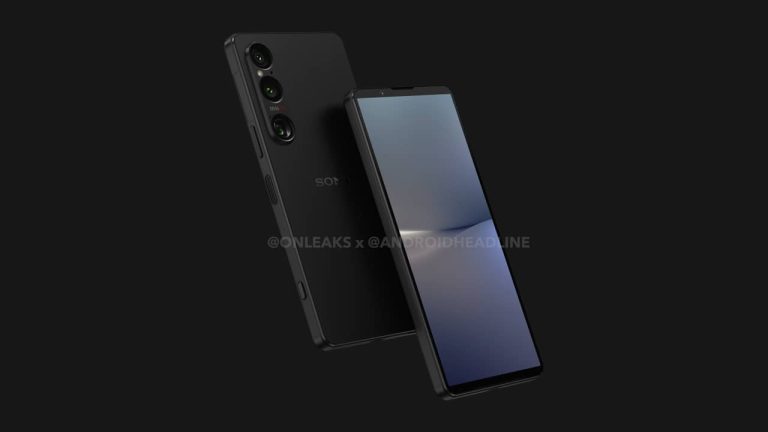
With Summer quickly approaching, that can only mean one thing. Sony’s Xperia 1 VI is on its way. We expect that it will be announced in the coming months; for reference, the Xperia 1 V launched in May 2023. However, today, we are able to share with you the design of the Sony Xperia 1 IV in its entirety.
We have obtained 5K renders of the Xperia 1 VI from Onleaks, as well as a 360-degree video. Showing you every part of the new phone. The Xperia 1 VI will sport a 6.5-inch display similar to the Xperia 1 V from last year. It also features a triple-rear camera, and it’ll retain that headphone jack. Sony is also keeping the dedicated camera shutter button on the side, as you can see in these renders.
This time around, Sony is making the Xperia 1 VI a bit shorter and wider, and a tad thicker. The dimensions are 161.9 x 74.5 x 8.4mm, which is similar to what was leaked a couple of weeks ago. It’s not a huge difference from its predecessor, but it might be enough of a difference to change the aspect ratio from 21:9 to around 19.5:9, as has been rumored. That would make it about the same aspect ratio as the Galaxy S24 Ultra.
Sony might ditch the 4K display on Xperia 1 VI
Recently, we saw a set of leaks that pointed to Sony ditching the 4K display for a 2K display on the Xperia 1 VI. That leak also pointed to a wider aspect ratio. That would be the first time in five years that Sony has changed its aspect ratio.
When the Xperia 1 first debuted back in 2019, it was one of the few smartphones to utilize a 21:9 aspect ratio. The reason for Sony’s decision was to make it easier for people to watch movies on their phones. Movies are originally shot in the 21:9 aspect ratio, and that’s what theaters use. It later gets adjusted to 16:9 for home usage. At the time, phones were not that skinny and tall, so 21:9 seemed very odd. Today, most phones are 19.5:9, like the Galaxy S24 Ultra, and some are even 20:9. So Sony is not that far off anymore.
However, an oddball was always the 4K display. Not because it was a 4K display but because it was not always a 4K display. Basically, it was only a true 4K display when viewing pictures and video. The rest of the time, it was a much lower resolution. Obviously, this was due to the battery life issues that would come up with running a 4K display all the time. So it’s a good idea to scale it back to a 2K display, similar to most other flagships.
We don’t yet have a launch date nor a price for the Xperia 1 VI, but considering the amount of leaks we’ve seen recently and it popping up in accessory listings, it can’t be too far away. It’ll likely be announced within the next month or so.
Two changes are about to hit the Google Play Store. You’ll know when the update has arrived on your phone since there is a “Meet the Search tab” prompt that will first appear. The prompt says in smaller print, “Discover incredible apps and games with new personalized suggestions.” The new Search tab is one of the two changes coming to the Android app storefront. The other is a bottom bar that doesn’t disappear when you look up an app or search for something else.
Search tab prompt on left, new look for Apps tab on the right
The new Search tab will appear in between the Apps and Offers tabs and if you select this tab, the magnifying glass icon on the bottom bar will rotate. Once you’ve tapped the Search tab, tap it again and the search UI will appear. The Games, Apps, and Offers tabs include a new look with the Play Store logo appearing on the upper left of the display. A pill-shaped counter can be found on the right-middle of the screen tallying up your Play Points. Next to that is the notification bell followed by the profile icon. On those three tabs, the search bar remains at the top of the screen.
The new Search tab UI for the Google Play Store
The Search tab is divided into four sections. “Discover” uses past searches to give you recommendations and the other three are titled “You might like,” “Explore Games,” and ‘Explore apps.” All four sections have grids of search suggestions that can be searched with a single tap. When you use the Search tab on the updated Play Store, you’ll see that the bottom bar remains on the screen which isn’t the case pre-update when you use the search bar at the top of the Play Store tabs. Having the bar stay on the screen makes navigating the app quicker and easier.
Note how the bottom bar stays in place when the Search tab is open
Google has a habit, and it’s not a bad one mind you, of always looking to play around with its core apps looking to improve them. This is something that we should be applauding, not complaining about. Even with Android 15 beta 1 running my Pixel 6 Pro, these changes have yet to appear on my phone but they should appear for all Android users soon.
After waiting and waiting, Google has finally released the beta version of Android 15 to the masses. Until now, our only view of Android 15 was through the several developer previews that launched over the past couple of weeks. Now, people on eligible devices can download the Android 15 beta. Here’s everything that comes with this new beta.
Before we get started
If you’re excited about trying out the beta, there are a few things you’ll need to know (if you’re experienced with using Android betas, you can jump right to what’s new). Firstly, the beta is only available for the 10 eligible Pixel products that are still supported. This includes the Pixel 6, Pixel 6 Pro, Pixel 6a, Pixel 7, Pixel 7 Pro, Pixel 7a, Pixel Tablet, Pixel Fold, Pixel 8, and Pixel 8 Pro.
If you own one of those devices, then go to the Android beta page. Make sure that you’re logged in to your Google account using your current browser. On this page, it will show you which eligible devices you have that can receive the beta. On the page, select the device that you want to update to the beta, and choose the software you want to be installed.
Be careful
Before you sign up for the beta Google will give you a warning. Basically, when you download the beta, you are agreeing to be signed up for the beta program. As such, you will receive the latest updates with new and experimental features. What you need to know is that the features and the software as a whole could be very unstable.
It’s still beta software, so the company is still working on it. So, you should expect instability like apps crashing, janky animations, and functions not performing properly. It’s recommended that you don’t use beta software on your main or work device. It may not be as reliable.
Also, when you are a part of the beta program, the only way you can leave it is if you reinstall the stable software from scratch. However, this will wipe all of the data from your phone. There are distinct windows of time when you can leave the beta program without losing your data. However, these are limited windows, so if you need to uninstall the software in a hurry, you’ll be out of luck when not within a window. Without further ado let’s get into what’s new.
What’s new with the Android 15 beta?
Since this is the first beta, you shouldn’t really expect a ton of new changes. However, there’s a nice handful of new stuff to help get things started off.
Cellular network security page
On this page, you’ll see two toggles. The first toggle will send you a notification if the cellular network is insecure due to a lack of encryption. Also, if your cellular network records your unique device or SIM identifiers, you will receive a notification. This is something to help you stay up to date with any sort of security vulnerabilities.
The second toggle will require your cellular provider to use encryption if you want to use the service. If you turn this one on, there may be some services that you won’t have access to.
Edge-to-edge apps
Android 15 will make the top bar and bottom bar transparent so that the app you’re using will stretch throughout the entire display. It’s important to know that this is only for apps targeted at Android 15. This feature will be turned on by default. We will have to see if that positively affects the experience.
Better app archiving
This is a feature we’ve known about for a while. While Android did have an app archiving system through the Google Play Store, this new iteration will be on the OS level. This means that you will be able to archive apps regardless of what app store you downloaded them from.
Archiving an app is when the software uploads an app’s data to the cloud. Then that data is deleted from your device. You are then left with a very stripped-down version of the app which includes the app icon. When you restore an app, you will download the app data and pick up where you left off.
Picking the default wallet app
With Android 15, you have the ability to choose which wallet app you can use by default. Intrinsically, Android devices have Google Wallet as the default wallet app. However, there are several third-party wallet apps that people may be using. So, you will be able to choose which wallet app is activated by default when you tap to pay.
Better webcam quality
You are able to use your Android phone as a webcam. However, people doing so have been frustrated with the poor quality. This is ironic because your phone’s camera is more than likely much better than a webcam. So, having poor camera quality compared to a webcam is a bit counterintuitive. With Android 15, you will have a new HD mode when using your phone as a webcam.
Encrypted contact information
If you have several contacts on your phone, and you fear their information being stolen, then this will be the feature for you. Android 15 will put your contacts behind a wall of encryption. This OS-level feature will keep your contact information much safer.
Apps registering fingerprints
According to Google, “apps can now register a fingerprint on supported devices so they can be notified of polling loop activity, which allows for smooth operation with multiple NFC-aware applications.”
Additional protection against malicious apps
Android 15 is now much better at blocking malicious apps from bringing other apps to the foreground, abusing user interactions, or elevating their privileges. These are the sorts of things that malicious apps do to gain access to sensitive data on your phone. So, Android 15 will put a stopper in their endeavors.
Lock screen widgets for tablets
One thing that people have been pining for was the return of lock screen widgets to Android. Well, an Android 15, if you have a tablet, you will be able to add widgets to your lock screen. This is only available for tablets at the moment. However, we expected to make it to phones.
This is just a snapshot of the new features coming to Android 15. As subsequent beta versions come out, we will see new features, so stay tuned.
Google has been on a multi-year journey to kill fragmentation in the Android ecosystem. When I’m talking about Android fragmentation, I’m referring to how there are many, many different implementations of the Android operating system out there. That’s not a problem in and of itself given that Google intentionally lets device makers customize Android to their liking. However, it does make distributing OS updates a bit harder. One solution to this problem that Google came up with back in 2019 is called Project Mainline.
Under Project Mainline, certain operating system components are packaged as modules. Then they’re distributed directly by Google rather than your device’s OEM. This makes them much easier to update across devices. Instead of waiting for your device’s particular OEM or carrier to merge, test, and distribute a security or feature update to a core OS component, you can instead leave things in the hands of Google.
When an update to a Project Mainline module is available, Google will push an update out to everybody through the Google Play Store using a mechanism called Google Play System Updates. Since Project Mainline modules are signed by Google, they can push out updates to Mainline modules even on devices from other manufacturers.
Checking for Google Play System Updates in Android
Android 15 to turn the NFC stack into an updateable Project Mainline module
When Project Mainline debuted in Android 10, there were only 12 modules. Over the years, Google has modularized more parts of Android. In Android 14, there are now 37 updatable modules. In the upcoming Android 15 update, the number of Project Mainline modules could rise to a total of 40. While digging through the first Android 15 beta released earlier today, I discovered the existence of three new APEX packages: com.android.nfcservices, com.google.android.crashrecovery, and com.google.android.profiling.
APEX is the package format used by Project Mainline, which means that these three packages are potentially new Mainline modules. I say “potentially” because there are some APEX packages that aren’t part of Project Mainline. Since their updates aren’t handled through Google Play System Updates. We won’t know for sure if that’s the case for these three modules until Android 15 gets closer to release, though.
Anyways, the first APEX package I mentioned, com.android.nfcservices, is the most interesting of the three, because it contains a copy of Android’s NFC stack. NFC, which stands for near-field communication, is the ultra short-range wireless communication technology that’s popularly used for contactless payments. By putting Android’s NFC stack into an APEX module, Google is preparing to turn it into an updatable Project Mainline module. Indeed, I first heard that was the plan all the way back in May of 2023.
In Android 15 Beta 1, the NFC stack is now part of an APEX package.
Paving the way for pushing out security fixes and new features more quickly
Making the NFC stack more easily updatable means that Google can push out security fixes and new features more quickly to users. Android 15, for example, brings a number of new features to the NFC stack. One such new feature is a new observe mode to make tap to pay “more seamless and reliable.” Once devices start to ship with Android’s new updatable NFC stack, we’ll see Google push out more updates bringing new features like this.
In fact, with the release of Android 15 Beta 1 today, Google quietly enabled Android’s new updatable NFC stack on Pixel phones. However, it appears the company made a mistake in the migration process. Resulting in NFC being completely broken for Pixels users running the first beta. Hopefully, Google will push out an update quickly to fix these NFC issues in the Android 15 beta. Because NFC is critical to the operation of the default wallet app.
Here we have some of the best camera smartphones in the market at the moment. This is a comparison between the OPPO Find X7 Ultra vs Xiaomi 14 Ultra. Both of these smartphones have launched in the first quarter of this year, and both of them are regarded to be outstanding camera flagships and flagship smartphones in general. We’ve reviewed both, and it’s very easy to agree with that assessment.
The two phones do feel different in the hand and are generally quite different. Both companies included outstanding camera hardware on these phones, partnered up with well-known camera companies, and provided great software to go along with all that. We’ll first list the specs of both phones, and will then compare them over a number a categories. With that being said, let’s get to it!
Specs
OPPO Find X7 Ultra vs Xiaomi 14 Ultra, respectively
The OPPO Find X7 Ultra comes in both vegan leather + glass and vegan leather only backplate versions. The Xiaomi 14 Ultra is available in vegan leather or glass back versions. The thing is, the OPPO Find X7 Ultra has only launched in China, while the Xiaomi 14 Ultra launched globally too. Its global models only include vegan leather backplates. That being said, both phones have frames made out of aluminum. The Xiaomi 14 Ultra does come in a special titanium version too, but only in China.
You’ll notice that both smartphones include curved displays, with a centered display camera hole. The bezels around those displays are very thin. The Xiaomi 14 Ultra has flat sides all around, with slight curves on the edges. The OPPO Find X7 Ultra does not, its frame is thinner on the sides, mainly because both its front and back sides curve into the frame, proportionally. Its top and bottom portions are flat, though, with curved edges.
You’ll also notice that both smartphones have large camera oreos on the back. They’re centered on both phones, and both devices offer four cameras inside those modules. The OPPO Find X7 Ultra is slightly taller and wider than the Xiaomi 14 Ultra, while it’s also 0.3mm thicker. It does have a slightly larger display, so that is to be expected. The OPPO Find X7 Ultra weighs 221 grams, compared to 219.8 grams of the global Xiaomi 14 Ultra model. So they’re on par in the weight department too.
Both smartphones feel very sturdy in the hand, and thanks to that vegan leather on the back, they also offer quite a bit of grip… at least compared to glass back phones. They’re both IP68 certified for water and dust resistance.
OPPO Find X7 Ultra vs Xiaomi 14 Ultra: Display
The OPPO Find X7 Ultra features a 6.82-inch QHD+ (3168 x 1440) LTPO AMOLED display. That panel is curved, and it offers an adaptive refresh rate of up to 120Hz. Dolby Vision is supported as well, and the same goes for HDR10+ content. This panel can project up to 1 billion colors, and it has a theoretical peak brightness of 4,500 nits. The screen-to-body ratio is around 90%, while the display is protected by the Gorilla Glass Victus 2.
Xiaomi 14 Ultra
On the flip side, the Xiaomi 14 Ultra, has a 6.73-inch QHD+ (3200 x 1440) LTPO AMOLED display. That panel is also curved, and it supports an adaptive refresh rate of up to 120Hz. Dolby Vision is also supported, and the same goes for HDR10+ content. This display goes up to 3,000 nits of brightness at its peak, in theory. The screen-to-body ratio is at around 89%, while the display aspect ratio is 20:9. The Xiaomi Shield Glass protects the Xiaomi 14 Ultra’s display.
Both of these displays are outstanding. They are on par and excel in basically every way. They’re extremely sharp, offer great viewing angles, and are also very vivid. Those inky blacks are also present, and the touch response is great too. Both displays do get extremely bright too, in basically all conditions, so you don’t have to worry about that either. There’s really not much to complain about here. They even offer high PWM dimming to protect your eyes. You’ll be good to go regardless of which display you end up using.
OPPO Find X7 Ultra vs Xiaomi 14 Ultra: Performance
Both devices are fueled by the same processor, Qualcomm’s Snapdragon 8 Gen 3 chip. That is currently the most powerful processor Qualcomm has to offer. The OPPO Find X7 Ultra comes in 12GB and 16GB LPDDR5X RAM variants. The Xiaomi 14 Ultra is available with 16GB of LPDDR5X RAM only, at least globally. There is a 12GB RAM model in China. Both devices also utilize UFS 4.0 flash storage.
Those powerful performance-related specs are combined with truly powerful software, which results in great performance on both smartphones. The software on the OPPO Find X7 Ultra could be a bit challenging for global users, as it’s made for the Chinese market, but the Google services work great once you get the Play Store installed. Both phones handle regular, everyday tasks great. They can jump between apps without a hitch, process images, video, browsing is also great, the same goes for multimedia consumption, and so on.
Even when we played some truly demanding games on both smartphones, they handled it like champs. Genshin Impact is usually our benchmark when we’re testing games on phones, and both smartphones ran it without a hitch. Both of them got quite warm after about an hour, but the performance never suffered, and neither phone ended up being too hot or anything like that.
OPPO Find X7 Ultra vs Xiaomi 14 Ultra: Battery
You will find a 5,000mAh battery inside the OPPO Find X7 Ultra. The Xiaomi 14 Ultra has that same battery size globally, but it ups that to 5,300mAh in China. Both smartphones do offer really good battery life, though. Both of them did great in our battery drain test, and they offered great performance during usage too. We were able to get over that 8-hour screen-on-time mark on both smartphones, a number of times. Do note that we were using them rather intensively during such days, but games were not a part of the picture. They can really handle proper usage.
Do note that your mileage may vary, though. You will use different apps, have different signal strengths, and so on. Also, if you end up playing games, chances are you’ll get worse results. We were connected to Wi-Fi most of the day, which is also something worth noting. We did not notice any intense battery drain during our 5G usage, though, not at all. The Snapdragon 8 Gen 3’s modem is quite good in that regard.
The OPPO Find X7 Ultra supports 100W wired, 50W wireless, and 10W reverse wireless charging. The Xiaomi 14 Ultra supports 90W wired, 50W wireless, and 10W reverse wireless charging. Both smartphones charge up really fast, and that goes for both their wired and wireless charging. It’s also worth noting that both of them include chargers in the box, so you’re good in that regard too.
OPPO Find X7 Ultra vs Xiaomi 14 Ultra: Cameras
You’ll find immensely powerful camera setups on both of these handsets. Both of them actually include four 50-megapixel cameras on the back. The OPPO Find X7 Ultra has a 50-megapixel main camera, a 50-megapixel ultrawide unit (123-degree FoV), a 50-megapixel periscope telephoto camera (2.8x optical zoom), and a second 50-megapixel periscope telephoto camera (6x optical zoom). The Xiaomi 14 Ultra, on the other hand, comes with a 50-megapixel main camera (variable aperture), a 50-megapixel ultrawide camera (122-degree FoV), a 50-megapixel telephoto unit (3.2x optical zoom), and a 50-megapixel periscope telephoto camera (5x optical zoom).
OPPO Find X7 Ultra
It is also worth noting that both smartphones are backed by great camera companies too. The OPPO Find X7 Ultra benefits from Hasselblad’s expertise, while Leica is in partnership with Xiaomi, and this phone has Leica’s optics. Both smartphones offer fantastic camera performance. In fact, these are some of our favorite camera smartphones now, in general, perhaps even the top two at the time of writing this article. They do a great job in all conditions, albeit offer somewhat different results.
The OPPO Find X7 Ultra tends to offer more contrasty photos, and that is especially noticeable in low light. Both of them do end up providing rather true-to-life photos with some software magic on top of that to make them look great. They handle intense HDR conditions with ease, and do a fantastic job in low light too. Even when there are plenty of light sources in the shot, these two phones are on a very, very high level. They’re also great for portraits, and high-zoom photos look great too. Their secondary cameras do a great job of keeping a similar color profile to the main shooters. There’s really not much to complain about here. These are outstanding camera smartphones.
Audio
Both smartphones do include a set of stereo speakers. Those speakers are quite loud and generally very good. They’re on par in terms of loudness and are well-balanced too. The distortion is almost not there when you turn up the volume all the way up. You’ll be happy regardless of which set of speakers you end up using.
Do note that there is no audio jack on either phone, though. You can always hook up your wired headphones to their Type-C ports, however. If not, both smartphones do offer Bluetooth 5.4, so you can opt to go wireless.
Microsoft Windows 11 performance has noticeably degraded, and it was pointed out by an ex-Microsoft senior software engineer. Some prominent User Interface (UI) elements are “comically bad”, while others take almost an entire second to load, he observed.
Key UI elements failing to load for unexplained reasons
Needless to say, it will be expensive to stick to Windows 10. However, a former and longtime Microsoft engineer has publicly called out the slow and lackluster nature of Windows 11. This might put a dampener on the upgrade plans of several Windows 10 loyalists.
Andy Young reportedly put up a couple of Tweets on X (formerly Twitter) demonstrating just how painfully slow Windows 11 felt in certain key areas of the OS. He singled out the seemingly abysmal performance of the Start Menu in Windows 11, calling it “comically bad”.
The Windows 11 Start Menu is comically bad.
This machine has a $1600 Core i9 CPU and 128 GB of RAM and this is the performance I often get.
Young’s second tweet mentioned he does not hate Windows as an Operating System (OS). He added that he had helped build parts of it during his time at the company. However, he lamented that Windows 11, in its current state, seems unfinished. He may have implied that the OS felt like an unpolished product that was presumably launched before it was ready.
To be clear, I love Windows. I helped build parts of it. I want it to be as good as it once was. If data suggests the software you build frustrates a significant percentage of users, it means there’s work left to be done.
Why would Windows 11 lag and struggle with the simplest of tasks?
As Young’s first tweet indicates, Windows 11 struggled and lagged while opening up the Start Menu. This is absurd as these elements are pre-loaded during the initial boot process, and should operate instantaneously.
As Young categorically mentions, he has a PC with a $1600 Intel Core i9 CPU and 128 GB system memory (RAM). In other words, no hardware limitations were bottlenecking Windows 11.
Inspired by Young’s tweets, other users uploaded videos highlighting how Windows 11 abruptly decided to slow crawl while executing the simplest of tasks.
Another issue with weirdly high latency happens when closing message boxes, sometimes the frame sticks around for too long pic.twitter.com/fOFOaGwXdE
However, Windows 11 might not be suffering from a lack of dedicated and skilled engineers. Some users have claimed that Microsoft’s obsession with inserting advertisements and promotions could be pulling down Windows 11.
Since Windows 10, Microsoft has been inserting ads inside mundane UI elements. Windows 11 has an overenthusiastic “Recommended” section. Hence, several backend processes could be pulling promotional messages from remote servers. Perhaps scaling back these tactics might improve Windows 11 performance, claimed many social media users.
At the end of this month, the Showtime standalone streaming service will come to an end. According to Variety, notices have already been sent to subscribers. The move to shutter Showtime’s standalone streaming service comes less than a year after its parent company, Paramount Global, decided to integrate Showtime’s streaming inventory with the top-tier Paramount+ plan.
Those interested in keeping the Showtime library to stream on their devices will have to sign up for Paramount+ With Showtime. The ad-free tier will cost you $11.99 per month. Originally, the game plan called for Paramount Global to shut Showtime at the end of 2023. On the Showtime Help Center page, Showtime subscribers are told “Now that subscribers can access their favorite SHOWTIME programs on Paramount+ by subscribing to the Paramount+ with SHOWTIME plan, the SHOWTIME streaming service will shut down on April 30, 2024.”
The Showtime streaming app closes on April 30th
The notice goes on to say, “Current SHOWTIME streaming subscribers will continue to have access to the SHOWTIME streaming service until it is shut down on April 30, 2024. Beginning May 1, 2024, the only way to stream SHOWTIME programming is with a subscription to the Paramount+ with SHOWTIME plan on Paramount+.”
The Showtime streaming service made its debut in July 2015. If you install the Showtime app today, you’ll get a notice telling you that the app will shut down on April 30th. The message also lets you know that Paramount+ is the new streaming home for Showtime. If you are not a current Showtime subscriber, you can’t even get into the app to create an account so you can use it for the final 19 days until it closes. Once you install the Showtime app and tap the Try It Free bar, you’re sent automatically sent to Paramount+.
Some of the Showtime titles now on Paramount+ include the original Dexter series, Ray Donovan, Yellow Jackets, and Billions.