Armis, a leading cybersecurity company, has acquired Silk Security, an AI-powered vulnerability detection firm.
The acquisition comes when organizations grapple with a surge of security findings, with no scalable and automated way to prioritize and operationalize remediation.
Ineffective processes and inconsistent risk prioritization have resulted in costly and suboptimal remediation efforts, leaving security teams struggling to address the most critical vulnerabilities.
Armis to Address Full Exposure Management Lifecycle
Silk Security’s capabilities are set to be integrated into the Armis Centrix™ platform, marking a paradigm shift in how organizations approach risk resolution.
Free Live Webinar for DIFR/SOC Teams: Securing the Top 3 SME Cyber Attack Vectors - Register Here.
The combined solution will offer a comprehensive approach to risk prioritization and resolution lifecycle management across code, infrastructure, cloud, and application findings.
Leveraging advanced AI technologies, Armis Centrix™ will enable advanced security and collaborative exposure management by identifying and consolidating security issues, communicating and ranking priorities, finding and assigning the right owners, and collaborating with developers and operations stakeholders to remediate and reduce risk effectively.
Outcomes and Proof Points
The impact of the Armis and Silk Security integration is already felt by organizations that have leveraged these capabilities.
Organizations have reported significantly reduced time spent identifying owners and assigning access, leading to more efficient risk assessment and remediation processes.
Through machine learning-powered deduplication, organizations have experienced a severe reduction in the volume of security findings, resulting in improved Mean Time to Remediation (MTTR).
The integrated solution has enabled organizations to close many findings, reducing overall threat debt and enhancing their security posture.
Armis’ acquisition of Silk Security marks a significant leap forward in exposure management.
By integrating Silk Security into the Armis Centrix™ platform, Armis continues to push the boundaries of security excellence, empowering organizations to stay ahead of emerging threats and confidently safeguard their digital footprint.
Looking to Safeguard Your Company from Advanced Cyber Threats? Deploy TrustNet to Your Radar ASAP
Phones are a major reason why travelling is more accepted and comfortable than ever before. First of all, you have your device on you, which means that you have all your apps and accounts there. In the past, to stay in touch with things back home, you would have to go to the internet cafe, and these weren’t that available in many locations.
Second, there are so many apps that make travel safer, ranging from interactive maps, Yelp, and even translation apps (which are better than ever before, thanks to the developments in NLP).
Still, handling your phone while abroad can be a tad more complex than you expect it to be. This is why you need to understand some basic principles of phone management when travelling abroad. Here are a few such tips.
1. Install VPN
The first thing you want to do is install a VPN on your device. There are so many sites, tools, and creators that restrict their content to people in certain regions. If you’re already using them, prefer using time, or rely on them for work (or daily routine), it would be a waste to abandon them just because you’re travelling abroad.
There are so many great VPNs to choose from, some of which you’ll keep using even when you get back home. After all, there are so many geo-restricted shows on streaming services nowadays, and some YouTube creators are even locking their content.
As Aleksandar Stevanovic writes in his blog post about best VPNs, the best three criteria for picking the right VPN for you are features, performance, and pricing. (Source: https://www.techopedia.com/vpn/best-vpn)
The best part is that VPNs also help you in research: they help you see what kind of content you’re being fed just because you’re from a certain region. Moreover, when abroad and visiting a country known for censorship, it can help you check the news back home.
2. Check charger adapters and bring a power bank
The next thing you need to consider is the life of your battery. Normally, people charge their phones in their homes or their cars. Now, however, it’s not as easy.
First of all, your itinerary is more chaotic and unpredictable. Spontaneity has its price.
Not only that, but different countries have different power sockets. This means that the charger you brought no longer applies. Sure, your phone socket is the same, seeing as how this is up to the phone manufacturer, and most phones nowadays (even iPhone) are standardized, but where do you plug this charger?
For all the wise-asses saying that you can just plug a USB cable into your laptop, how are you going to charge your laptop, to begin with? The simplest solution would be to get yourself some local adapters as soon as you get there (or order some online).
Moreover, you should get yourself a power bank. This will make it easier to charge the device on those days when you don’t get back to your lodging for hours.
3. Buy a local SIM card
The best thing you can do when travelling abroad is buy a local SIM card. This is the best way to save money on calls and mobile data. The cost of this card is usually quite low, and the majority of modern phones have a dual SIM option. This means that you can still keep your old card and number without having to switch between them constantly.
Domestic mobile networks, even when they are worse than what you have back at home, can give you access to a network with better local coverage.
Roaming charges can be incredibly expensive, and one of the best things you can do to avoid them is just to buy a SIM card at a local store. You can even top them up quite inexpensively at the same place. Buying extra credit is quite cheap, even on its own, but when you compare it to the cost of roaming, the comparison is just ridiculous.
4. Be careful with public WiFi
This is a general tip that you should apply even at home; however, when networks are in a foreign language, it can sometimes be harder to figure out which ones are more suspicious.
Chances are that, since you have no bandwidth at home, you’ll rely more on these public networks. Sometimes, you’ll look for them at a coffee place. At other times, you’ll use it at airports and public beaches.
A lot of people these days are digital nomads, which further increases their reliance on the internet. People opting for digital nomadism hope that they’ll be able to work somewhere from a tropical beach, and the only way to get there is to find a reliable source of public WiFi.
Moreover, the VPN we mentioned in the first segment offers an extra layer of encryption that could keep you a bit safer while doing this. Still, public networks are best avoided (whenever you can).
5. Watch out for your device
The truth is that thieves look out for tourists. Why? They’re usually more careless, have no clue which parts of town to avoid, and focus so much on orientation that they don’t pay close attention to their surroundings.
So, always be mindful of where you’re going, and while you’re likely relying on your phone for navigation, make sure to clutch it tightly. There are countless videos of thieves just grabbing it from your hand on the street.
First, you want to keep your device close. Second, don’t let anyone touch your phone. A malicious party could install a keylogger or even use something as simple as a charger to hack your device.
Also, it’s not just the loss of a device that’s a problem. You also need to check your data. Losing a device means losing all the data from your phone. Make sure to back it up by storing it on the cloud.
6. Download crucial apps beforehand
You don’t want to download files while abroad.
One reason is that you don’t want to risk spending your mobile data roaming (a loss of WiFi sometimes happens before you even notice).
Other than this, you’ll likely lose connection when you least expect it, which you just have to get accustomed to. So, finding and downloading apps that work offline is one of the best ways to be prepared for the journey that lies ahead.
Ultimately, you also want to familiarize yourself with these apps. You don’t want to try them out when you’re already there, figure out that you don’t like them (or that they’re not as functional), and then have to look for an alternative on the spot.
It’s also a great way to enjoy the safety of the network that you know while downloading. This way, the risk of phishing and downloading malicious files will not be as bad as it could have been.
Take care of your phone, and it will take care of you
Even at home, you rely so much on your phone. If you don’t trust us, try to leave it for a day. If this is even an option (that you don’t use it for work), it will be quite difficult to handle. While travelling, you rely on your phone even more. So, make sure to pick up all the tips and tricks before you ship out.
Xiaomi has attracted a lot of attention with the high sales figures of the Redmi 12 series and has started working on the Redmi 13 series. Aiming to increase its product portfolio, the Chinese brand is expanding its affordable phone options accordingly. Now, Android Headlines is spotting the Redmi 13 5G. First, we should mention the sad news. This smartphone will not come to the global market. The previous generation 12 5G was officially sold in the global market, but Xiaomi has decided not to introduce the Redmi 13 5G.
Redmi 13 5G & POCO M7 Pro 5G specs
Redmi 13 5G will be one of Xiaomi’s affordable smartphones and millions of users will want to buy it. Unfortunately, this device does not offer any significant improvements compared to the previous series. We expect this affordable model, which will be similar to the Redmi 12 5G, to be powered by Snapdragon 4 Gen 2 (SM4450). The Snapdragon 4 Gen 2 was also used in the Redmi 12 5G. Now the Redmi 13 5G comes with the same SOC.
Other details we know about the Redmi 13 5G model are as follows. The codename of the device will be “breeze“. The internal model number is “N19“. The internal model number of the previous Redmi 12 5G was “M19“. What we have to say for Redmi 13 5G is not limited to this. The smartphone will not be available for sale in the Global and Japanese market like the previous Redmi 12 5G. It is expected to be released only in the Indian and Chinese markets. We found a lot of information in the database.
Redmi 13 5G has model numbers 2406ERN9CI, 2406ERN9CC, and 24066PC95I. A look at the model numbers also reveals which markets this smartphone will be sold in. “RN” in the model numbers refers to the Redmi brand and “PC” refers to the POCO brand. The model number “2406ERN9CI” refers to the Indian version of the product, while the model number “2406ERN9CC” refers to the Chinese version.
The Redmi 13 5G will get rebranded in some markets
The model number “24066PC95I” also indicates that the Redmi 13 5G will be sold under the POCO brand in the Indian market. The product will probably be called POCO M7 Pro 5G. Because such a naming was also used in the previous model. However, the name under the POCO brand is not an official name. It may also have a different name.
We expect the device to be first introduced in the Chinese market. Because HyperOS software is now ready for Redmi 13 5G. The last internal HyperOS build is OS1.0.1.0.UNWCNXM. This version is based on Android 14 and confirms which version the smartphone will come with out of the box. We are curious to see what the Android 14-based HyperOS will offer on the interface side. Redmi 13 5G will be similar to Redmi 12 5G and will be a more affordable smartphone with minor changes. The Android Headlines team has uncovered all the unknown details. Stay tuned!
The concept of the metaverse, a virtual universe where customers can engage, socialize, and interact in numerous activities, has captured the imagination of many in recent years. With advancements in virtual reality (VR) technology and the rise of cryptocurrencies, investing within the metaverse has emerged as an increasingly appealing opportunity for traders looking to capitalize on the destiny of digital experiences. In this newsletter, we will discover the potential of making an investment in the metaverse, the role of cryptocurrencies in this emerging space, and the opportunities it presents for investors. No matter where you are investing, the role of investment education remains intact! Consider quantum-ai.trading for premium and game changing investment education right at your fingertips.
Understanding the Metaverse
The metaverse refers to a collective digital area that encompasses virtual worlds, augmented reality (AR) environments, and immersive stories. In the metaverse, users can create avatars, discover virtual landscapes, interact with other customers, and take part in a wide range of activities, from enjoyment to commerce and training. The metaverse represents a convergence of digital fact, synthetic intelligence, blockchain generation, and social networking, developing new opportunities for digital interaction and innovation.
Virtual Reality Opportunities
Virtual Real Estate: Virtual real estate has emerged as a precious asset within the metaverse, with users shopping and buying and selling digital land parcels in decentralized virtual worlds. Platforms like Decentraland and Crypto Voxels permit customers to own, expand, and monetize virtual homes through the blockchain era. Investing in virtual real estate tokens can offer opportunities for capital appreciation and passive income via rental earnings, advertising and marketing, and events hosted on virtual houses.
Digital Art and NFTs: Non-fungible tokens (NFTs) have received a reputation as a way to tokenize and alternate virtual art, collectibles, and other specific property on blockchain systems. NFT marketplaces like OpenSea and Rarible allow artists, creators, and creditors to shop for, promote, and change NFTs the usage of cryptocurrencies. Investing in NFTs allows investors to participate inside the growing marketplace for virtual art and collectibles within the metaverse, with potential for appreciation and secondary marketplace buying and selling.
Virtual Commerce and Social Platforms: Virtual commerce structures and social networks are redefining how human beings interact and transact in the digital realm. Platforms like Decentraland and Somnium Space permit users to shop for, promote, and exchange virtual items, services, and stories through the use of cryptocurrencies. Investing in tokens and initiatives that facilitate virtual trade and social interaction can provide exposure to the evolving panorama of digital trade and social networking in the metaverse.
The Role of Cryptocurrencies
Cryptocurrencies play a fundamental role in powering transactions and interactions inside the metaverse, providing a decentralized and stable way of price exchange. Many virtual worlds and structures inside the metaverse utilize cryptocurrencies and blockchain generation to facilitate peer-to-peer transactions, virtual ownership, and decentralized governance. Cryptocurrencies serve as the native currencies of digital economies, allowing customers to buy, promote, and trade virtual assets, participate in digital events, and earn rewards for their contributions to digital groups.
Investment Strategies: Diversification: Like any investment, diversification is key to coping with hazards and maximizing returns within the metaverse. Consider diversifying your investments throughout different virtual worlds, digital property, and cryptocurrencies to spread risk and seize opportunities across the metaverse environment.
Research and Due Diligence: Conduct thorough research and due diligence earlier than making an investment in digital property and initiatives in the metaverse. Evaluate factors inclusive of the crew behind the mission, the technology stack, network engagement, marketplace call for, and lengthy-term boom possibilities to assess the viability and capability of going back on funding.
Long-Term Vision: Take a protracted-time period angle whilst investing in the metaverse, as the entire capacity of digital reality and blockchain generation continues to unfold. Focus on tasks and structures with strong fundamentals, modern technology, and a clean vision for the future of the metaverse.
Stay Informed and Adapt: Stay knowledgeable approximately traits within the metaverse space, including technological improvements, regulatory adjustments, and marketplace trends. Be organized to evolve your investment method as the metaverse evolves and new possibilities emerge.
Conclusion
Investing in the metaverse gives investors interesting possibilities to participate in the future of virtual truth, digital commerce, and social interplay. With improvements in the virtual reality era, the upward push of cryptocurrencies, and the growing recognition of decentralized platforms, the metaverse is poised for exponential growth and innovation in the coming years. By diversifying your portfolio, engaging in thorough research, taking an extended-time perspective, and staying informed, you could position yourself to capitalize on the transformative capacity of the metaverse and potentially generate appealing returns within the digital economic system of the future.
In an effort to get users to take a bus or train to get to their destinations instead of driving or better yet, use their own two feet, Google Maps is going to have a new feature. Next to the app’s driving routes, Google Maps will show users public transit and walking alternatives that will get the user to his destination without having to grip a steering wheel. These alternatives will appear “if travel times are comparable and practical.” Google announced this today in a blog post.
The alternative public transit and walking suggestions will appear on the bottom of the screen in a card that says, “Also consider” which will include a preview of the alternative actions recommended. The card will also let the user know if any of these alternatives are faster than driving. The goal is to find alternatives that use lower amounts of carbon. The feature will be available in 15 cities around the world over the next few weeks including Amsterdam, Barcelona, London, Montreal, Paris, Rome, and Sydney.
Red box shows alternative public transit suggestions on Google Maps
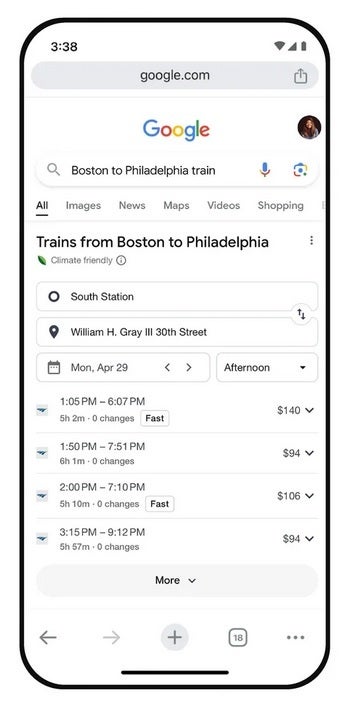
Google Maps is also getting a feature that will, in Search, help users find more information about long distance train and bus routes. For example, if you search for “Boston to Philadelphia train,” schedules and ticket prices will appear on the results page along with links that you can tap on to book your trip. This feature can be accessed for trains in 38 countries and for bus routes in 15 countries.
Looking up trains and buses on Google Search will show you schedules and pricin
Last year, Google added train route suggestions when you look for flights on Search. In the upcoming months, you’ll see train route suggestions when you search for a flight using Google Flights. With the latter, you’ll also see the estimated emissions for almost every flight and you can filter the results to show you the flights with the lowest emissions first.
Google is trying to give people the information they need to choose the low-carbon alternative when traveling.
Remember those rumors that were swirling about a TikTok photo-sharing app? It seems those were rooted in reality after all. The formerly unnamed app now goes by the name TikTok Notes, and it appears poised to take a direct shot at Instagram’s dominance as a photo-focused platform.
The battle between social platforms for users’ attention continues to heat up. Instagram, in a successful bid to counter TikTok’s meteoric rise, cloned TikTok’s video-centric feed and dubbed it Reels. Now, it seems TikTok is ready to strike back with TikTok Notes, a photo-focused experience.
While the unreleased (in the U.S.) app has a fresh name, the overall goal seems unchanged. Recently, the app’s updated icon and a linked website (notes.tiktok.com) was spotted, putting TikTok Notes squarely in the spotlight (via 9to5Mac). Shortly after, TikTok itself apparently had no choice but to confirm the app’s development, taking to its social media and confirming on X: “We’re in the early stages of experimenting with a dedicated space for photo and text content with TikTok Notes.”
/2 We hope that the TikTok community will use TikTok Notes to continue sharing their moments through photo posts. Whether documenting adventures, expressing creativity, or simply sharing snapshots of one’s day, the TikTok Notes experience is designed for those who would like to… pic.twitter.com/KPXJqbaOdG
So, there you have it. The company has begun limited testing and made TikTok Notes available for download in Canada and Australia. In an apparent nod to what it hopes are its future users, as well as its competition, TikTok shared: “TikTok Notes experience is designed for those who would like to share and engage through photo content.”
The launch of TikTok Notes signals a new phase of this competition, and users are the likely winners. Whether TikTok Notes can carve out a substantial niche where Instagram reigns supreme remains to be seen, but the fight is sure to be captivating.
Plex has become the world’s largest free advertising-supported streaming television (FAST) and advertising-based video-on-demand (AVOD) service, rivaled perhaps, only by YouTube. The platform announced it now cumulatively offers more than 1,100 live channels for free.
Plex offers 1,112 live-streaming channels for free
“Our aim for Live TV on Plex is to have something for ALL of our users’ television tastes all over the world. While this ever-growing library of free-to-stream entertainment drives Plex toward this goal of offering any entertainment a consumer may want, we are also diligently focused on providing advertisers with unparalleled reach and the transparency that should come with it.”
.@plex says it now offers more than 1,000 free streaming TV channels across its global footprint, with over 800 available in the United States alone. https://t.co/jZRmBpbTM6
Not all of the 1,100+ channels are available in the United States. The Plex app currently offers 847 free streaming channels in the USA.
The Plex app works on most hardware, including iOS and Android smartphones and tablets, smart TVs, gaming consoles, and a large number of smart devices attached to a display.
Plex claims it now has the largest global selection of free ad-supported TV channels. Its free service is currently available in the United States, Canada, the United Kingdom, Australia, Mexico, Brazil, Spain, and Germany.
Needless to say, not all of the 1,100+ channels are available in all of the regions where Plex is available. Still, the sheer number of streaming channels on the platform puts it ahead of its competitors, especially on a global scale.
Stream for free with ads, or pay for an ad-free experience?
No doubt streaming services are trying to wow subscribers. However, there’s an ever-growing list of platforms. Moreover, desired or popular content is now spread out across several platforms. This forces subscribers to either pay a hefty subscription price every month or pick and choose services.
This is where Plex shines with its vast content library from some of the biggest content producers. Plex has Fox, NBC, Scripps, Hallmark, AMC, A+E, BBC, Euronews, Lionsgate, Banijay, Fremantle, and PBS. The platform reportedly welcomed CBC News (Canada), BBC News, MLB Channel, CBS Sports HQ, Golazo Network, CBS News, and 15 CBS channels in the U.S.
With over 1000 channels of free streaming content, Plex is angling to be the choice of video connoisseurs and advertisers in the crowded FAST/AVOD space. https://t.co/kdinQipMVXpic.twitter.com/f4rTjO8iZK
Currently, Plex offers a wide variety of live TV channels and even movies. It is, however, important to note that Plex is an ad-supported platform. Todd Hay, VP of Revenue & Engagement at Plex, has stated,
“Our platform optimizes each ad break for impactful reach for advertisers and for the best possible user experience – from real-time loudness leveling of creatives to de-duping and competitive separation within ad breaks. We aim to put advertisers’ messages in front of the right viewers in the best possible light. This makes it a win for all, as it should be.”
What this essentially means is that Plex will insert ads in between the content users stream. Its competition. on the other hand, offers ad-free subscriptions.
Amazon has insisted that its “Just Walk Out” platform isn’t powered by human workers. The company hasn’t claimed that its contactless payment and cashier-less technology was entirely devoid of human technicians or manual review.
Amazon “Just Walk Out” didn’t have backend remote workers?
Amazon has been gradually deploying stores that didn’t have attendants and cashiers. The company had installed multiple cameras and sensors that could read customers’ shopping carts and charge them automatically. Artificial Intelligence or AI was supposed to be powering the Just Walk Out technology.
However, earlier this month, several reports suggested Amazon’s “Just Walk Out” technology wasn’t truly AI-powered. They suggested Amazon had been employing around 1000 workers in India to do the heavy lifting.
This backend staff essentially watched people shop inside Amazon’s Just Walk Out stores, these reports claimed. These remote workers allegedly reviewed the purchases manually. Some of the reports added Amazon’s workers had to review about 70% or 700 of every 1,000 transactions in 2022.
Amazon says on its website that Just Walk Out uses “computer vision, sensor fusion, and deep learning” but doesn’t mention contractors. The company told Gizmodo that the workers were annotating videos to help improve them and that they validated a “small minority” of shopping…
Amazon has claimed that human workers helped with annotating AI-generated and real shopping data. The manual labor helped improve the Just Walk Out system, not run it entirely.
Dilip Kumar, the vice president of AWS Applications has stated that human labor helped improve and train the AI that powered the Just Walk Out technology.
Amazon Dash Cart is the future?
Amazon Dash Cart is the company’s smart shopping cart, which has cameras, sensors, and scanners. This bundle of technology allows shoppers to quickly ring up their purchases and save time.
Amazon insists the Just Walk Out tech is merely an advanced version of the Amazon Dash Cart. “It uses the same advanced, computer vision technology as Just Walk Out,” claimed Dilip.
“Just Walk Out technology detects when a shopper’s hand interacts with a product on the shelf. When that happens, Machine Learning (ML) algorithms make sure the correct item is added to the shopper’s virtual cart—all without any specific knowledge about the person.”
While dropping its “Just Walk Out” cashierless tech from its own stores, Amazon says it is expanding the list of other retailers that use it https://t.co/UZ8r2N3Zoj
The human element, which Amazon has admitted is part of the Just Walk Out technology, helps with labeling and annotation steps. These remote workers, “don’t watch live video of shoppers to generate receipts,” Amazon has stated.
🛍️Exciting news for shoppers! Amazon’s not giving up on its Just Walk Out technology, planning to sell it to over 120 third-party businesses by the end of the year! 💳
👉Just Walk Out uses cameras, AI, and sensor trackers to let customers grab what they want and leave if they… pic.twitter.com/eY3uUzpAia
Amazon claims customers prefer Amazon Dash Cart, and it will start embedding the technology in third-party retailers and all Amazon Fresh stores. The company had recently indicated it would ditch the technology, at least in the US. However, it had stated that “data concerns” were holding the technology back.
Everyone is excited about June 10th when Apple will introduce iOS 18 during the WWDC 2024 Keynote. We expect to see the company discuss its new AI initiatives which are expected to help users with everyday tasks and take digital assistant Siri to a new level. The iOS 18 update is being tipped as the largest ever made in the history of iOS. Per AppleInsider, iOS 18 will also include a more powerful Notes app.
The report says that the new Notes app will have more capabilities with support for audio recording. The feature will be similar to the Voice Memos app but will be integrated into Notes. Users will be able to record, play, and save voice recordings from the Notes app and this should be available right away with the release of the first iOS 18 public beta. Users will be able to include descriptions to help add context to a note.
The UI of the Voice Memos app will be used for integrated voice recording in the new Notes app
With this feature, students will be able to record classes or lectures and add screenshots of the blackboard or add comments and have it appear in one note in the app. The audio of business meetings could also be captured along with a photo of the whiteboard. And again, this would all appear in a single note. Those traveling could make an audio recording of a guided tour and add images of the areas being mentioned. The new UI for the audio recording feature in Notes will look very much like the UI used on the Voice Recorder app
A pre-release version of the software refers to a new feature called “Math Notes” that will allow the new Notes app to access the native iOS calculator app. Information from the calculator can be integrated into the new Notes app and support mathematical notation. It is used in math, science, and engineering to represent “complex concepts.” And the inclusion of the new Notes app with “Math Notes” might be important enough to Apple to finally lead the tech giant to include (are you sitting down?) a native calculator app for the iPad!
The Notes app dates back to the Stone Age. Well, at least back to the original iPhone in 2007. Improvements have been made over the years and Apple is hoping that with the latest new additions, it can compete with the iOS version of Microsoft’s OneNote which already features in-app recording and the ability to solve mathematical equations.
Google plans to bring tab group syncing to Chrome for Android. The feature, already available on the desktop, lets you access your saved tab groups on other devices. The sync function for the mobile browser is currently in development and may take a while to roll out to the public.
Google Chrome will support tab group syncing on Android
Introduced last year, tab group syncing on the desktop version of Google Chrome is a manual process where you have to first save a tab group for it to show up on other desktop devices signed in with the same Google account. Right-clicking on a tab group gives you the option to save it. Once saved, it is marked with a circular sync icon and added to the left of your bookmark bar.
You can access a saved tab group from this bar on other devices. Chrome automatically syncs any new tabs you add to a saved group or when you remove existing tabs. While tab groups are also available on Chrome for Android, the save and sync option is missing. Google is now working on this support, making the Chrome experience consistent across all types of devices.
A recent change in the Chromium Gerrit page reveals this upcoming feature. Spotted by X user @Leopeva64, the new entry confirms that a flag to enable tab group syncing is coming soon to Chrome Canary on Android. Canary is an early build of Google’s browser app. It is mainly for developers to test new features, APIs, and changes. While the app is mostly stable, new features may not always work properly.
The same applies to tab group syncing. Since Google is currently developing this feature, there may be some inconsistencies. You can still install Chrome Canary on your device to try new features, including this one, early. You don’t have to remove the stable version to use the Canary version. We will let you know when this feature arrives on the stable version of Chrome for Android.
Tab group customization is also on the way
Google is also readying new tools to customize tab groups on Chrome for Android like on the desktop. When creating a group, you get a dialog box to customize its name and choose a color for it. The company may bring both of these tools to the stable version in a few weeks. Make sure to keep the app updated so you don’t miss out on new features. You can check for updates on the Google Play Store.