The Ulefone Armor 23 Ultra is a rugged smartphone that offers blazing-fast charging. We’ve reviewed this handset recently, and Ulefone just published a new video in which it demonstrates the phone’s charging capabilities.
The Ulefone Armor 23 Ultra supports blazing fast chargin
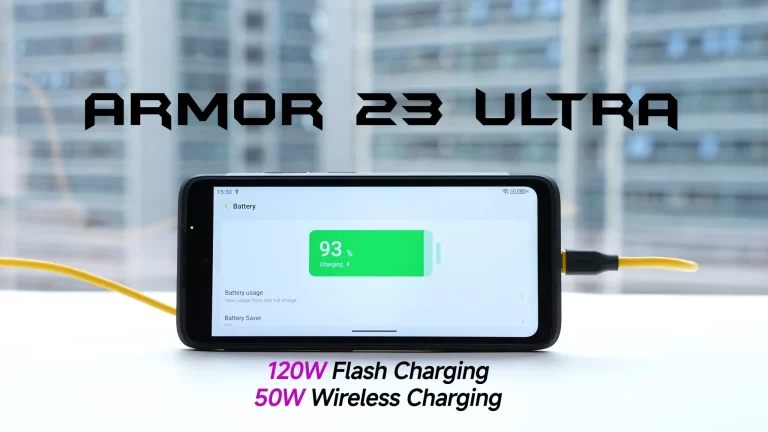
The Armor 23 Ultra not only supports 120W wired charging, but 50W wireless charging too. Do note that a 120W charger is included in the box too, so you don’t have to buy it separately.
In addition to such fast charging, the phone also includes a 5,280mAh battery on the inside. Now, you can get from 0 to 100% in around 30 minutes with that 120W charger. So even if you forget to charge the phone, you can quickly top it off.
Getting to a 100% takes the phone a bit over 30 minutes
In order to reach a 30% charge, it’ll take you around 10 minutes, while reaching 61% takes 20 minutes. Getting to 93% is possible in 30 minutes, so a full charge takes just a little bit more than that.
That’s not all, though. The phone also supports 50W wireless charging. You will need a compatible charger in order to take full advantage of it. This charging tech will take 130 minutes to reach a full charge, Ulefone noted.
It is also water and dust resistant, and it can take a hit too
The Ulefone Armor 23 Ultra is also MIL-STD-810H and IP68/IP69K certified. Not only can it take a hit, but it’s also water and dust-resistant. The MediaTek Dimensity 8020 fuels the device, while you’re getting 12GB of RAM here. You can expand that up to 24GB via virtual RAM. Ulefone also offers 512GB of UFS 3.1 flash storage too.
There is a 6.78-inch fullHD+ display used here, and it offers a 120Hz refresh rate. This is an IPS panel, by the way. A 50-megapixel main camera is backed by a 50-megapixel ultrawide camera on the back. A 64-megapixel ‘Night Vision’ camera is also in use.
If you’d like to check out Ulefone’s promo video, or get more information about the device, check out the content below.
Fitbit has lost just about every ounce of independence the company had even after being acquired by Google. While the brand still exists, it’s unclear how long it will take Google to completely erase it from existence.
Until that time comes, if you’re still using a Fitbit product, we have some good news. The Fitbit app has just received some important updates that completely redesign the Sleep experience.
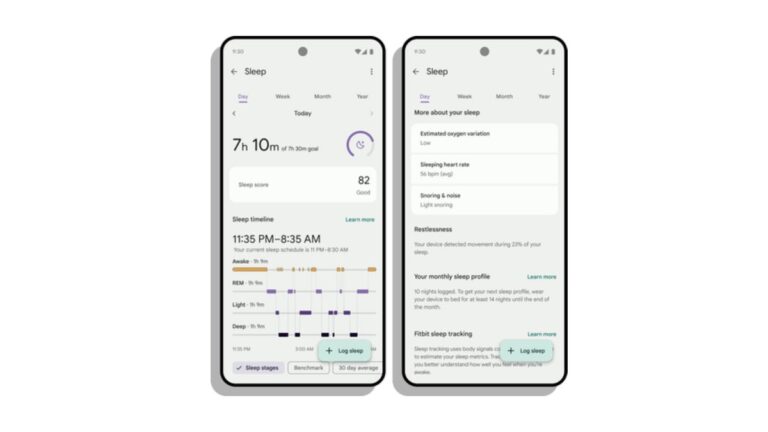
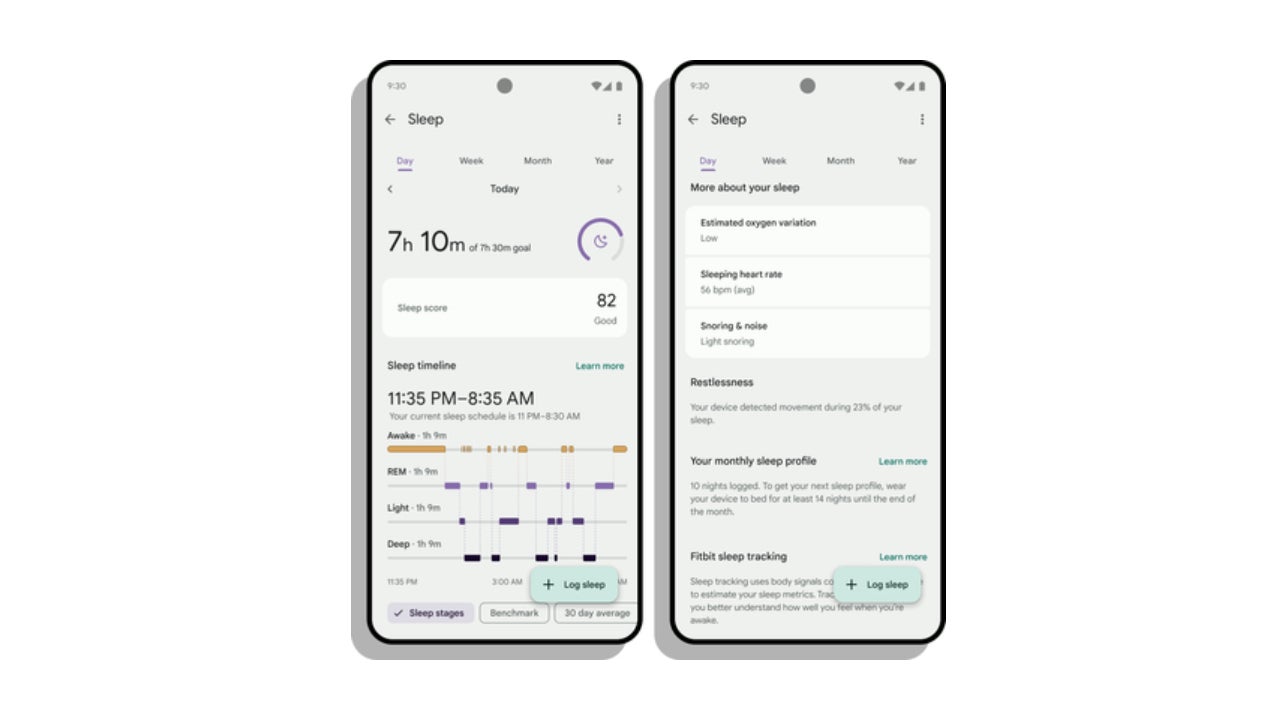
Fitbit announced today that the new look of the Sleep experience in the mobile app should offer simpler navigation. This means that you’ll have an easier time seeing all the info needed. Details like sleep duration, sleep score and sleep timeline are all shown on one page now.
Additionally, you can now press and hold on the sleep timeline chart to find out what time you woke up last night or when your deep sleep ended.
Another interesting change to the app involves sleep patterns. You can now use the week, month and year views to see how your sleep patterns have changed over time.
The update that adds the new sleep UI is rolling out starting today, so make sure to check for a newer version of the Fitbit app in the Google Play Store.
The Nubia Flip 5G went on pre-order in a number of countries, including the US. It comes in 8GB RAM and 12GB RAM models. Those two variants include 256GB and 512GB of storage, respectively.
The cheapest foldable smartphone is now available in the US, starting at $499
The two aforementioned variants of the phone will set you back $499 and $699, respectively. The Nubia Flip 5G is available in Cosmic Black, Sunshine Gold, and Flowing Lilac color variants.
If you’re wondering about the phone’s availability in Europe, well, you may be disappointed. It’s no longer available to pre-order, and Nubia didn’t mention the EU or UK countries at this point in time. That’s odd considering that’s what was expected to happen.
The phone has been made available in a number of countries, but not in Europe
The initial countries where the phone is available in (to pre-order) are: Australia, Chile, Egypt, Hong Kong SAR, Indonesia, Israel, Kuwait, Laos, Malaysia, New Zealand, Pakistan, Philippines, Qatar, Saudi Arabia, Singapore, Thailand, United Arab Emirates, the United States, and Vietnam.
Another thing to note is that the Nubia Flip 5G will go on sale on April 23. So the pre-orders are valid until then. To be more accurate, you can pre-order the Nubia Flip 5G until April 23 at 8 AM EDT. You can do that via the link provided below the article.
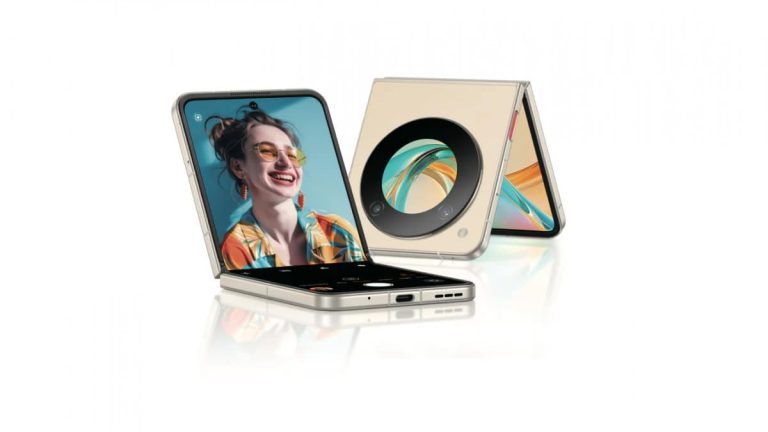
The Nubia Flip 5G has a circular cover display on the back, and other than that, it’s pretty much what you’d expect out of a clamshell foldable in terms of the design. It folds right down the middle, and the main display has a display camera hole at the top.
The phone has been tested for over 200,000 folds, and it’s fueled by the Snapdragon 7 Gen 1 SoC. This is a budget smartphone, kind of, which is why its specifications are not high-end.
It has a 120Hz display, round cover display, and more
The main display measures 6.9 inches, and it offers a 2790 x 1188 resolution. That panel also offers a 120Hz refresh rate, and it’s an AMOLED display. It also has high PWM dimming to protect your eyes. The cover display, on the other hand, measures 1.43 inches, and it’s an OLED panel too.
A 4,310mAh battery sits inside the phone, while the device supports 33W wired charging. Stereo speakers are included, and Android 13 comes pre-installed on the device, with MyOS 13.
A 50-megapixel main camera is backed by a 2-megapixel depth sensor. On the front, you’ll find a 16-megapixel selfie camera, that snapper is placed on the main display.
Samsung offers one of the best software update support in the Android space. Its latest flagship phones will get OS updates for seven years, while enterprise models are eligible for up to eight years of support. Testament to its commitment, the company has extended support for the Galaxy S20 series. Originally slated to receive updates for four years, the 2020 flagships are enjoying an additional year of updates.
The Galaxy S20 series is getting a fifth year of update support
Samsung launched the Galaxy S20 series in early 2020 with Android 10 onboard. Later that year, the company announced that its flagship devices would get three major OS updates and four years of security patches. As promised, it delivered Android 11, Android 12, and Android 13 to the phones. The Korean firm also pushed monthly security patches to the devices for four years, all the way up to early 2024.
As per its support policy, Samsung should have ended update support for the Galaxy S20, Galaxy S20+, and Galaxy S20 Ultra this month. However, it didn’t. Instead, the company only dropped the phones from monthly to quarterly security patches. The 2020 flagships are now in their fifth year and still getting updates. While it is unclear whether the extended support will last a full year, these are bonus updates for the phones.
Interestingly, the original Galaxy Z Flip also arrived around the same time as the Galaxy S20 series but it didn’t get extended support. Samsung has ended updates for the first-gen clamshell foldable. That said, as promised by the company, it received three major Android OS updates and four years of security patches, so we can’t complain. The Galaxy Z Flip 5G arrived in mid-2020, so it still has some life left in it.
The last Note phones are currently getting monthly updates
Earlier this month, Samsung dropped the Galaxy Note 20, Galaxy Note 20 Ultra, and Galaxy S20 FE to quarterly updates. It came as a surprise because these phones arrived between August and September 2020 and are yet to turn four. It turned out to be an error from the company. The tech biggie has since restored the phones to monthly updates.
Time will tell whether Samsung will offer updates to the Galaxy Note 20 series and the Galaxy S20 FE beyond four years. Flagship Galaxy smartphones and tablets launched in 2021 and beyond, meanwhile, are eligible for four major OS updates and five years of security patches. Some mid-range models will also enjoy the same support. Seven years of support only applies to the Galaxy S24 series.
Cybersecurity experts have uncovered a failed attempt by the notorious Russia-based Turla Advanced Persistent Threat (APT) group to infiltrate an Albanian organization.
This incident is part of a broader cyber espionage campaign targeting European countries, with Poland also falling victim to these sophisticated attacks.
The discovery aligns with the ongoing geopolitical tensions and highlights state-aligned actors’ escalating cyber warfare tactics.
Are you from the SOC and DFIR Teams? – Analyse linux Malware Incidents & get live Access with ANY.RUN -> Start Now for Free.
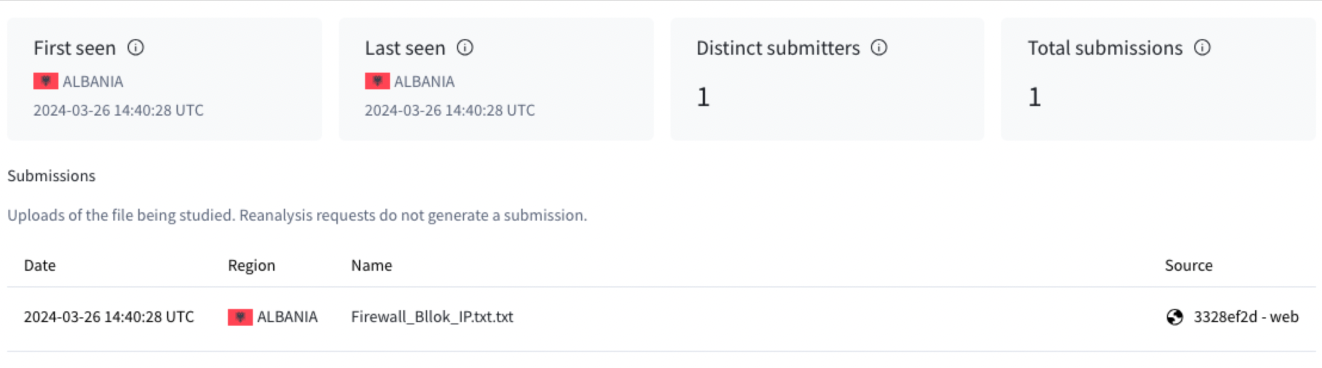
On March 26, a user located in Albania uploaded a file to the VirusTotal web interface, which revealed the attempted breach in Albania.
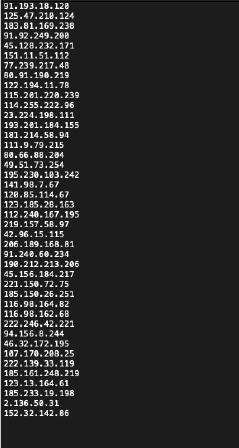
The file, named “Firewall_Bllok_IP.txt.txt,” contained a list of IP addresses, including the address 91[.]193[.]18[.]120.
Cisco Talos has flagged this particular IP as a command and control server associated with the “TinyTurla-NG” (TTNG) backdoor, marking it as a key indicator of compromise.
Unique file uploaded manually from Albania-based IP address on March 26 to the VirusTotal user web interface with ”bllok”(block) written in Albanian.
Analysis of the file confirmed its authenticity. Multiple antivirus vendors recognized all listed IP addresses as malicious.
The plaintext file only lists IP addresses
Turla APT’s Expanding Campaign
The Turla APT group, known for its sophisticated cyber espionage operations, has historically targeted organizations with links to government sectors across Baltic and Eastern European countries.
The recent activities in Albania and Poland underscore the group’s ongoing efforts to gather intelligence and exert influence amidst the broader context of the war in Ukraine.
These incidents provide crucial insights into the possible scope of Russia-based APT operations, which continue to pose a significant threat to European security.
Implications for European Security
The targeting of Albania by the Turla APT group is a stark reminder of the persistent cyber threats facing European organizations.
These entities often possess valuable information and maintain critical infrastructure, so they are high-value targets for espionage activities.
The incident underscores the need for heightened cybersecurity measures and international cooperation to counteract the sophisticated tactics employed by state-aligned APT groups.
Looking Ahead
The cybersecurity community remains vigilant as the Turla APT group continues to refine its tactics and target European organizations.
The failed attempt in Albania is a critical reminder of the ongoing cyber warfare landscape, where information is a valuable commodity, and security is perpetually at risk.
With the geopolitical tensions showing no signs of abating, European organizations must remain on high alert and prioritize cybersecurity to thwart future espionage attempts by state-aligned actors.
Secure your emails in a heartbeat! To find your ideal email security vendor, Take a Free 30-Second Assessment.
People were not a fan of the change that Google made. Before the update, if there was nothing in the text field, you would see a singular line of icons. These would include the emoji, images, audio message, and “+” icon. When you started typing, these icons would remain visible. So, no matter what, you would have access to them.
However, the company made a change. When you tap on the text field, you will see it open into a two-row interface. The top row will show the empty text field. If you’ve yet to enter text, the row below it will show the Emoji icon on the left with the images and “+” icon on the right. Flanking the text field would be the audio message icon.
Once you start typing, the images icon will disappear and be replaced by the Magic Compose icon.
Google Messages will bring back the single-line text field
It appears that no one likes this approach, as many users have complained. So, the company is backtracking. According to a new report, Google will bring back the single-line text field in Google Messages. Looking at the screenshot below, we see that, when you tap on the text field, the app will not display a second row. Rather, everything will stay where it is. The emoji icon will remain on the left side of the text field while the picture, “+”, and audio message icons will remain on the right.
When you start typing, the same thing will happen as with the two-line text field. The images icon will be replaced with the Magic Compose icon while the plus icon will sit to the right of that. To the right of the text field, you will see the send message button.
Right now, we are uncertain when Google is going to push this change to the public. However, people who are using the latest beta version of the app (version 20240404_01_RC00) should start seeing it soon
Intel Lunar Lake processor meets the requirement for “AI PCs”
Intel’s Lunar Lake is a flagship SOC for next-gen AI PCs. It will have more than 100 TOPS of the total package to handle AI tasks, with a dedicated 45 TOPS NPU performance. It meets the 45 TOPS NPU performance requirement for AI PCs set by Microsoft. That means that laptops powered by this SoC will be able to run Microsoft’s AI assistant Copilot locally.
As Tom’s Hardware reports, running Copilot locally on a PC requires at least 40 TOPS of NPU performance. So with a peak 45 TOPS AI performance, the Intel Lunar Lake platform clearly meets the demand. So far, it has only been achieved by Qualcomm’s upcoming Snapdragon X Elite chip with its 45 TOPS performance. However, when it comes to the combined performance, the Snapdragon platform lags behind Lunar Lake with its 75 TOPS performance.
The Lunar Lake platform offers 3x the AI performance than the Meteor Lake chips
The Intel Lunar Lake platform boasts around three times more AI power than the existing Meteor Lake processors. The Meteor Lake chips only offer 10 TOPS of performance from the NPU or Neural Processing Unit. It is far lower than the bar for next-gen AI PCs. The Meteor Lake platform tops out at 34 TOPS total performance package, which comes combined from CPU, GPU, and NPU.
AMD is also quite far behind the Lunar Lake chips as its Ryzen 8040-series mobile platform only offers 16 TOPS from NPU. Overall, you get up to 39 TOPS from the whole package. However, the company is working towards boosting the AI performance of its mobile chips to meet the AI PC bar. AMD’s next-gen Strix Point mobile CPUs are said to flaunt 3x AI performance as the new XDNA 2 NPU.
Intel is planning to ship 40 million AI PCs this year
At the Vision 2024 event, Intel revealed that it has already shipped five million AI PCs to date. The company is planning to ship 40 million AI PCs by the end of this year. The brand’s big goal is to ship 100 million AI PC chips by the end of next year. That said, the AI PC race will be tight between all three Intel, Qualcomm, and AMD this year.
The Motorola Moto G Power – 2024 is one of the latest mid-range smartphones from the American brand, and it’s a fantastic device. It was able to score five out of five stars on our Moto G Power – 2024 Review. One of the high points of the review was the phone’s really good battery life. Well, as good as the battery life is, there are ways to further stretch it. So, here’s how to conserve battery life on your Moto G Power – 2024.
Before hopping into the guide, we have other useful how-to guides for this phone. Firstly, if you’re curious about all of the fun gestures that come with this phone, you can check out our guide on all of the Moto G Power – 2024 gestures. Lastly, if you’re looking to deeply customize this phone’s aesthetic to match your own particular style, you can read our guide on how to customize the theme of your Moto G Power – 2024.
And, on a final note, if you’re curious about the smaller sibling, the Moto G 5G – 2024, we have information on that phone too. Check out our Moto G 5g – 2024 review to get an in-depth look at what makes this phone a compelling handset.
How to conserve battery with your Moto G Power – 2024
In this guide, we’re going to talk about a few common sense things you can do to further stretch the battery power of this phone. While this guide does focus on this Motorola handset, some of these tactics can also be employed with other phones. So, if you happen to get a new device, you can use these methods to stretch the battery life of that one as well.
Use Adaptive brightness
The screen of your phone is one of the biggest culprits when it comes to battery drain. That is only exacerbated when you have the screen brightness set to full. It’s pretty easy to accidentally have your screen brighter than it should be compared to the lighting conditions. So, being able to keep an eye on how bright your display is is very important.
This is where adaptive brightness comes in. To enable adaptive brightness, go to your settings and scroll down to the display section. On that page, the top toggle will be the Adaptive brightness toggle. When you tap on it, you’ll see your screen automatically adjust its brightness to the lighting conditions.
This will help because most of the time, we have our screen brightness cranked too high for the scenario. That uses more battery life over time. So, with adaptive brightness on, your phone’s screen brightness will be adjusted according to how bright or dark the environment is.
Lower the screen refresh rate
The Moto G Power – 2024 has a beautiful display, and one of the reasons for that is because of the fluid 120Hz refresh rate. However, having a screen with a higher refresh rate eats up more battery power. The screen has to refresh at double the speed of most other phones, and that leads to higher energy draw.
So, you would want to lower the refresh rate. Go back to the Display settings page, and look for the Display refresh rate button. When you tap on that button, you will see a page open up with the available options. The best thing to do is to tap on the 60Hz mode. This will lower the refresh rate to a more standard refresh rate.
Turn on Dark mode
People prefer to use the devices in Dark mode mostly because of the aesthetic benefits. This turns the entire aesthetic a darker shade of color, and it makes everything look that much sleeker. However, there’s a major benefit to using Dark mode, as it lowers the amount of power your screen draws. Since the display is darker, it uses up less energy.
To enable Dark mode, go back to your Display settings and look for the second toggle named Dark theme. You can either tap on the toggle to switch it on or tap on the actual text of the button. This will bring it to another page that will give you the option to have Dark mode turn on at sunset.
It’s important to know that Dark mode will apply throughout your entire system. So, all of the menus, app icons (if you use themed icons), and other UI elements will be darker. This also applies to the apps that you use. If an app you are using supports Dark mode, then it will also have a darker theme to it.
Reduce app activity
This step can be a little tedious, but it’s very important if you want to conserve battery life. Whenever you download an app, there’s always the chance that that app could run in the background, even if you’re not currently using it. Many apps need to run in the background to perform all the functions that they intend to. For example, voice assistant apps need to run in the background so that they can hear whenever you summon them.
However, if you have a bunch of apps running in the background, that can also drain your battery. This is one of the main culprits of battery drain, but many people don’t realize it. So, as they load up on apps, the battery drain increases over time.
To reduce the activity of the apps you’re using, go to the app in question on your home screen, and hold your finger down on the button to access the pop-up menu. Then, tap on the App Info button. On the App Info screen, go to the App battery usage section. When you look at it, you will see how much battery power that app has used since the phone was last fully charged.
Options
When you tap on it, you will enter a new page. On that page, you will see three options. The Unrestricted option will freely let the app run in the background. This option is the worst for your battery, and not many apps should be given unrestricted access.
The second option, which is called Optimized, will have the system restrict the app’s activity based on how often you use it. This is what each app is set to when it’s downloaded.
If you’re looking to save the most battery power, then you will want to go for the Restricted option. This will restrict all background activity for the app. It will not be able to perform any actions when not in the foreground.
It’s important to note that there are some apps that cannot function without background usage permissions. So, just be careful which apps you restrict.
Use Battery saver mode
So, using all these different methods gives you control over which aspects of your experience you want to affect. However, if you want a one-and-done solution, then you should use the Battery saver mode. Battery saver mode will do a combination of reducing the screen brightness, knocking down the refresh rate, restricting apps, and setting your phone into Dark mode. It’s a simple solution that doesn’t require much know-how.
There are two ways to activate Battery saver mode. The first method is to go to your settings and scroll down to the Battery button. When you tap on this button, you will be taken to the Battery page. Here, you’ll see several options like the Improve battery while inactive option (select this option to have the system automatically turn your battery usage patterns and optimize accordingly).
Tap on the Battery saver button. There, you will see a page that will let you toggle this feature on and off. You can also set a schedule and set it to deactivate when your phone is at 90%.
The other way is through the Quick setting. Swipe down on the home screen to bring down your notification shade. Swipe down again to expand your Quick Settings. Scroll through your Quick Settings to find the Battery saver quick setting.
Now that you know how to conserve battery on your Moto G Power – 2024, you will be better equipped to use this phone to its highest potential.
Microsoft Build is the yearly conference for developers at Microsoft, and this time it will demonstrate amazing innovations from the tech company with a special focus on Windows on Arm and revolutionary Windows AI. The event will entail a number of exciting developments that will move mobile computing forward.
Next-Gen Windows on Arm and Exciting AI Features will take center stage at Microsoft Build event
The next generation of Windows on Arm and one brand-new Windows AI feature is among the most awaited sessions at Microsoft Build. One of the presentations at the event will offer tips about app performance progression and emulation, thus placing Microsoft in direct competition with Apple’s M3-powered MacBook Air. Snapdragon’s latest X Elite chipset will be key in pushing Windows on Arm (Surface laptops) beyond its limits.
Windows on Arm also focuses on new experiences designed specifically for Arm-based devices, such as smart Windows apps that can take advantage of Neural Processing Units (NPUs). This demonstrates the company’s commitment to providing top-notch AI features for better user interaction and productivity.
Another feature rumored to be part of Windows 11 is the AI Explorer. This new add-on refers to a timeline that makes it easy for users to access past activities on their devices and promises to change the way users browse and find information on their PCs. But that’s not all; there’s some more.
Copilot plugins are also coming to help developers integrate AI into their apps
In addition, Microsoft Build apart from AI developments will discuss building Copilots as well as plugins for AI-powered assistants, thus widening the scope for developers who wish to integrate AI into their applications. Furthermore, there will be insights into development experience improvements among others (after success in tools such as Windows Terminal, Dev Home, PowerToys, and the Windows Subsystem for Linux).
There are just a few days remaining before Microsoft Build commences; there are signs of excitement among developers and tech enthusiasts. While the technology landscape continues to evolve, Microsoft’s focus on Windows on Arm and Artificial Intelligence is a daring move toward shaping future computing. Watch out for updates and reflections from this year’s Microsoft Build where innovation has no limits
Besides working on the Galaxy S23’s fingerprint issue, and rolling out Galaxy AI to previous models, Samsung is also continuing to enrich its AI with new additions. The latest of them is the addition of three more languages to Live Translate – Arabic, Indonesian, and Russian. But there’s more that will arrive in the coming days.
Samsung will add more languages in the coming days
Live Translate is a part of the Galaxy S24 series’ AI features that provides you with two-way real-time language translations of phone calls. It makes it easier to engage in conversations with people from different regions and languages.
The company is also working on three new dialects – Australian English, Cantonese, and Canadian French. These will be added to the AI-powered translation feature “over this Spring”. In addition to these new languages and dialects, the company plans to add some more languages later this year – Romanian, Turkish, Dutch, and Swedish. The list also includes the traditional Chinese and European Portuguese.
Samsung noted that they want to empower even more Galaxy users around the world to harness the power of mobile AI. “Committed to democratizing mobile AI for all, Galaxy AI’s language expansion this year will allow even more Galaxy users to communicate beyond language barriers on a scale that is completely unique to Samsung,” said TM Roh, the President and head of Samsung MX.
Other Galaxy AI features
Aside from the Live Translate, another similar feature of Galaxy AI is the Interpreter. Instead of phone calls, it translates live conversations in real-time to help you communicate in newer places. It works in a split-screen view and allows both of the people to read the translation of the conversation. You can also hear the translation from the phone’s speaker or from your compatible Galaxy Buds, thanks to the addition of the Interpreter mode in Galaxy Buds 2 Pro, Galaxy Buds 2, and Galaxy Buds FE.
Some other titles include Chat Assist, Note Assist, Circle to Search, Transcript Assist, Browsing Assist, and more. Compatible devices for these AI features and the newly added languages are the Galaxy S24 series, Galaxy S23 series, Galaxy S23 FE, Galaxy Z Flip5, and Galaxy Tab S9 series. The language additions to Live Translate will be downloadable as language packs from the settings app.