AI technology has already proven to be useful in several fields. One field is the medical field. According to a new report, Google partnered with German company Bayer to provide AI tools for radiologists.
Right now, we’re still learning just how far AI technology can go in the future. Recently, in an interview with the Guardian, billionaire Elon Musk predicted that superhuman AI will exist next year. With how rapidly AI technology has been developing, that may not be a far-off prediction.
Google partnered with Bayer to provide AI tools for radiologists
Google is not shy about sharing its AI tools with the world. We recently got the news that Gemini will power Apple’s AI technology. Well, according to a new report, the search giant has partnered with Bayer to provide accessible AI tools that will aid radiologists. More specifically, Google Cloud is going to help develop an AI platform that will help radiologists diagnose conditions and research patients’ medical history.
Since this is Google’s AI technology we’re talking about, we expect it to be very powerful. When it comes to the field of radiology, scanning and diagnosing patients is a long and tedious process. Also, looking up patients’ medical histories can take upwards of 20 minutes.
This AI platform will be able to help radiologists in those respects. We don’t know exactly what this platform will be called or what it will do. So, there’s not much to say about its capabilities. In any case, this could be great for radiologists who have been overworked.
Many radiologists complain of burnout, and there are tons of jobs in the field that remain vacant. According to job postings on the Association of American Medical College’s job site, there are nearly 2,000 vacant jobs. That’s just on the association’s Radiology website. That’s nearly 10 times as many vacant positions than there were 10 years ago. So, the existing radiologists have a major workload to work through.
It’s just a tool
As always, Google does not plan to make the AI tool a replacement for human radiologists. At the end of the day, AI is still not perfect. Also, when we’re talking about medical stuff, accuracy is extremely important. So, the companies are going to take care to make this platform a tool and not a replacement for human radiologists.
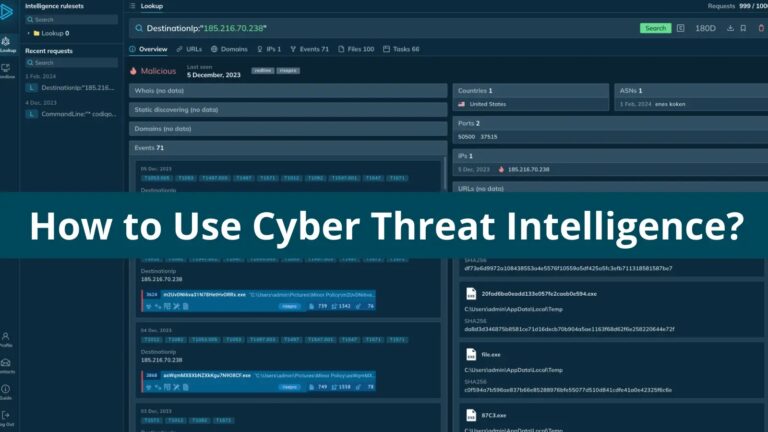
Cyber Threat Intelligence (CTI) is a process that actively gathers and analyzes information on potential cyber threats, including Indicators of Compromise (IOCs) and Tactics, Techniques, and Procedures (TTPs) used by attackers, along with their goals and capabilities.
The ultimate goal of CTI is to proactively understand an organization’s attack surface and identify vulnerabilities that need patching while collecting data is just the first step; effective CTI requires processing and analyzing the data to make informed security decisions.
Link isolated IOCs to known threats with ANY.RUN TI Lookup
Threat intelligence Lookupcan be categorized into four categories to provide a comprehensive picture of cyber threats. Strategic intelligence focuses on the big picture, analyzing threat actors’ trends, motivations, and capabilities.
It helps answer questions like “who can attack us and why?”. Operational intelligence dives deeper, examining the Tactics, Techniques, and Procedures (TTPs) used in attacks.
Equips security teams to actively detect and respond to threats with tools like Threat Intelligence Platforms and sandboxes.
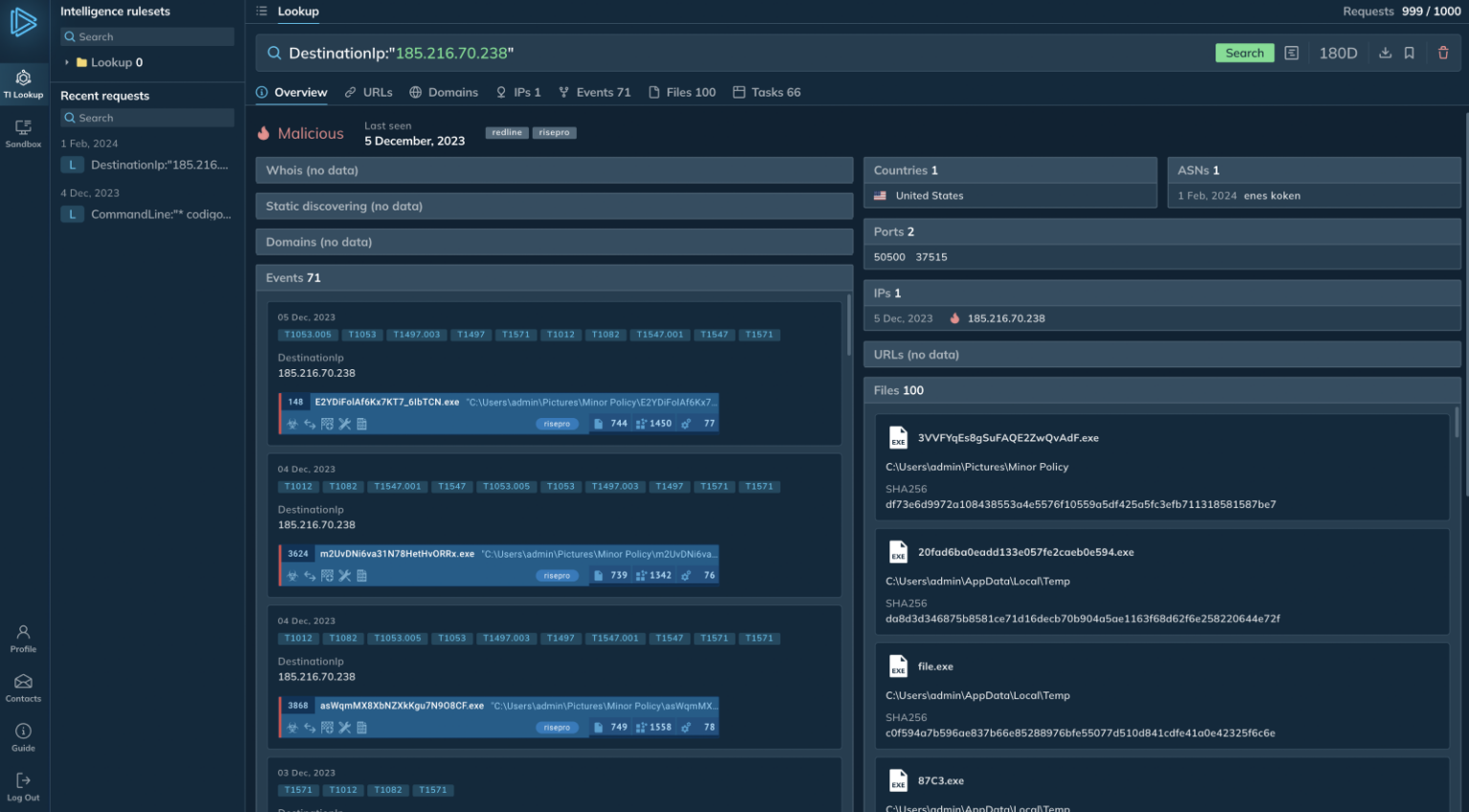
To proactively defend against cyberattacks, security teams use technical threat intelligence (TTI) that identifies specific indicators of compromise (IOCs) like IP addresses, file hashes, and malicious domains.
Intel informs the configuration of security and monitoring systems to block or detect ongoing attacks. Tactical threat intelligence, on the other hand, provides immediate, actionable information for ongoing incidents.
It includes details on exploited vulnerabilities within the infrastructure or specific malware families involved in the attack, allowing security teams to respond swiftly with tools like incident response playbooks and vulnerability remediation guides.
Document
Integrate ANY.RUN in Your Company for Effective Malware Analysis
Are you from SOC, Threat Research, or DFIR departments? If so, you can join an online community of 400,000 independent security researchers:
Real-time Detection
Interactive Malware Analysis
Easy to Learn by New Security Team members
Get detailed reports with maximum data
Set Up Virtual Machine in Linux & all Windows OS Versions
Interact with Malware Safely
If you want to test all these features now with completely free access to the sandbox:
Threat Intelligence Lifecycle:
The Threat Intelligence Lifecycle is a continuous, 6-step process for proactive cybersecurity that begins with planning to identify critical assets and define intelligence needs where diverse data from open sources, human intelligence, and internal logs is collected.
The data is then processed for analysis, which involves techniques like data mining to identify patterns and potential threats. Derived insights are disseminated to security teams, executives, and partners as reports and alerts.
DocumentAre you from SOC and DFIR Teams?
Sign up and start using the interactive malware sandbox for free.
.
Stakeholder feedback is used to refine intelligence requirements and improve overall security posture, ensuring organizations stay ahead of evolving threats.
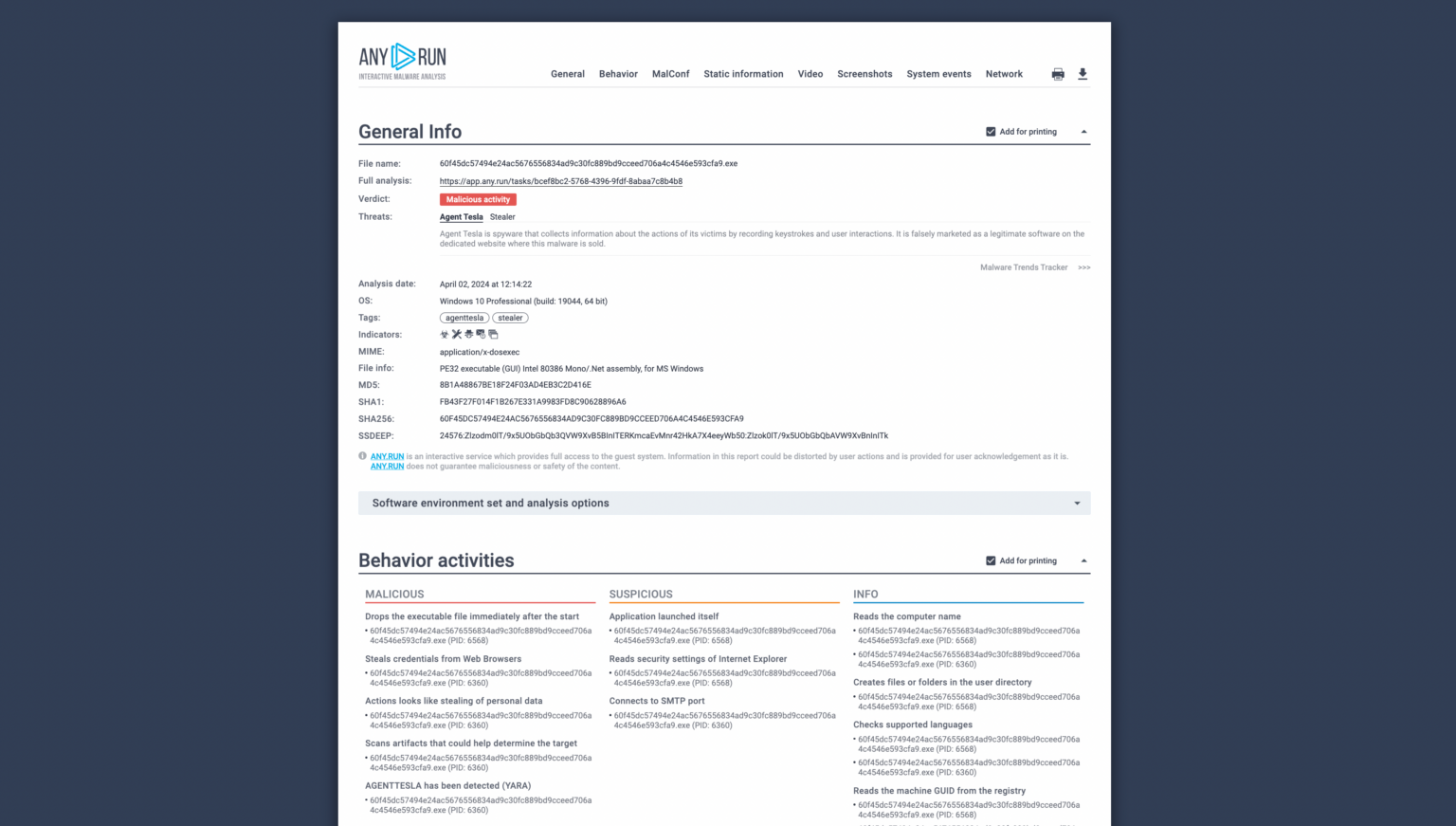
Text report example in ANY.RUN
To maintain relevant threat intelligence, run a full lifecycle analysis every 1-3 months, review intelligence needs quarterly and prioritize distributing critical threats immediately.
Using automated systems like threat intelligence feeds for continuous data collection and processing ensures analysts have access to the latest information for early incident detection, which keeps threat intelligence sharp.
ANY.RUN malware sandbox gives immediate access to valuable threat data
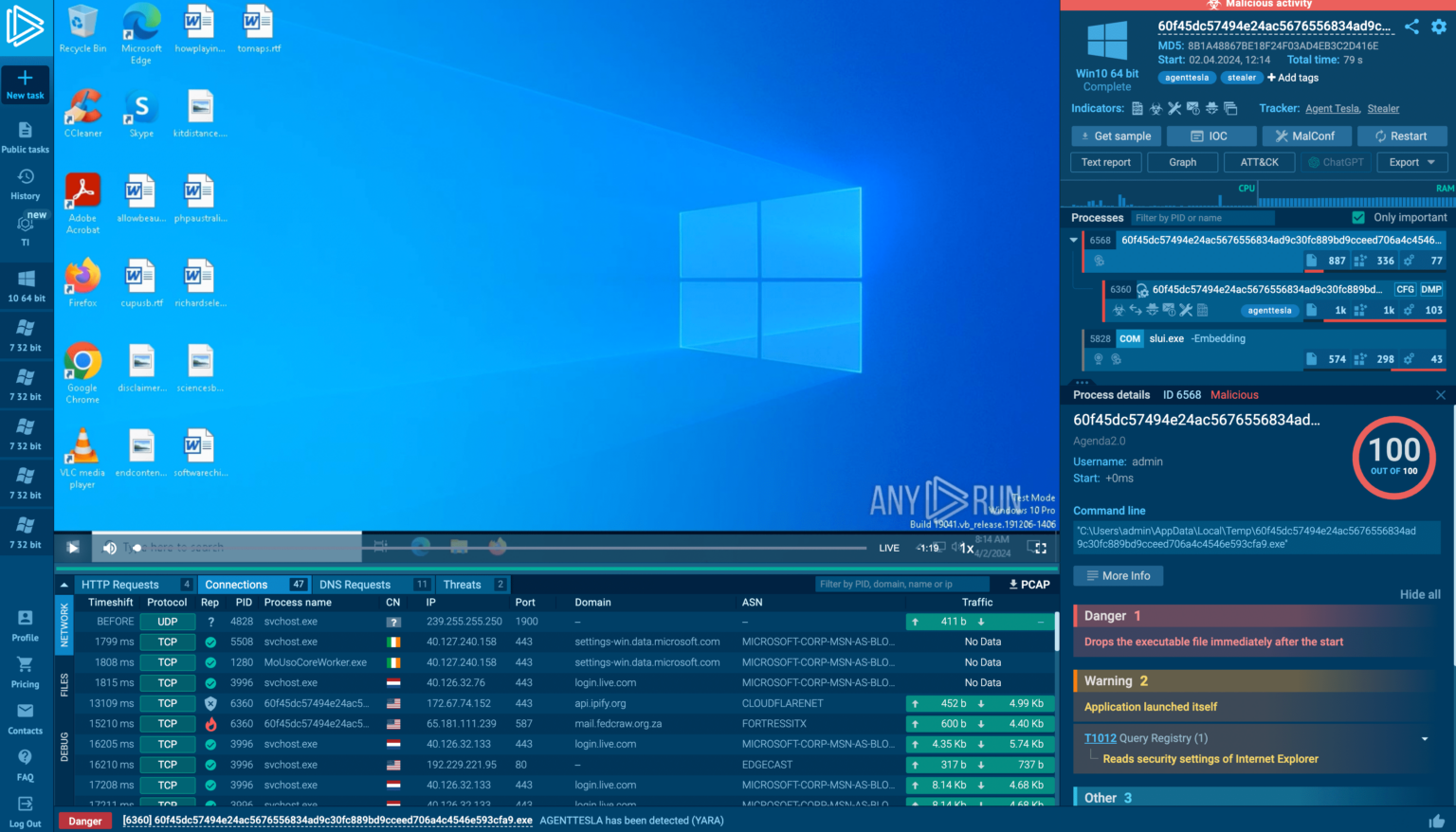
Analysts can use interactive sandboxes to analyze the threat in a controlled environment when encountering an unidentified malicious executable with suspicious network activity. Platforms like ANY.RUN mimic real systems and allow researchers to upload the sample for execution.
The sandbox monitors the malware’s interactions with the network, hard drive, and memory, providing real-time data on its behavior and potential impact, which facilitates rapid threat identification and informed response strategies.
MITRE ATT&CK reports in ANY.RUN
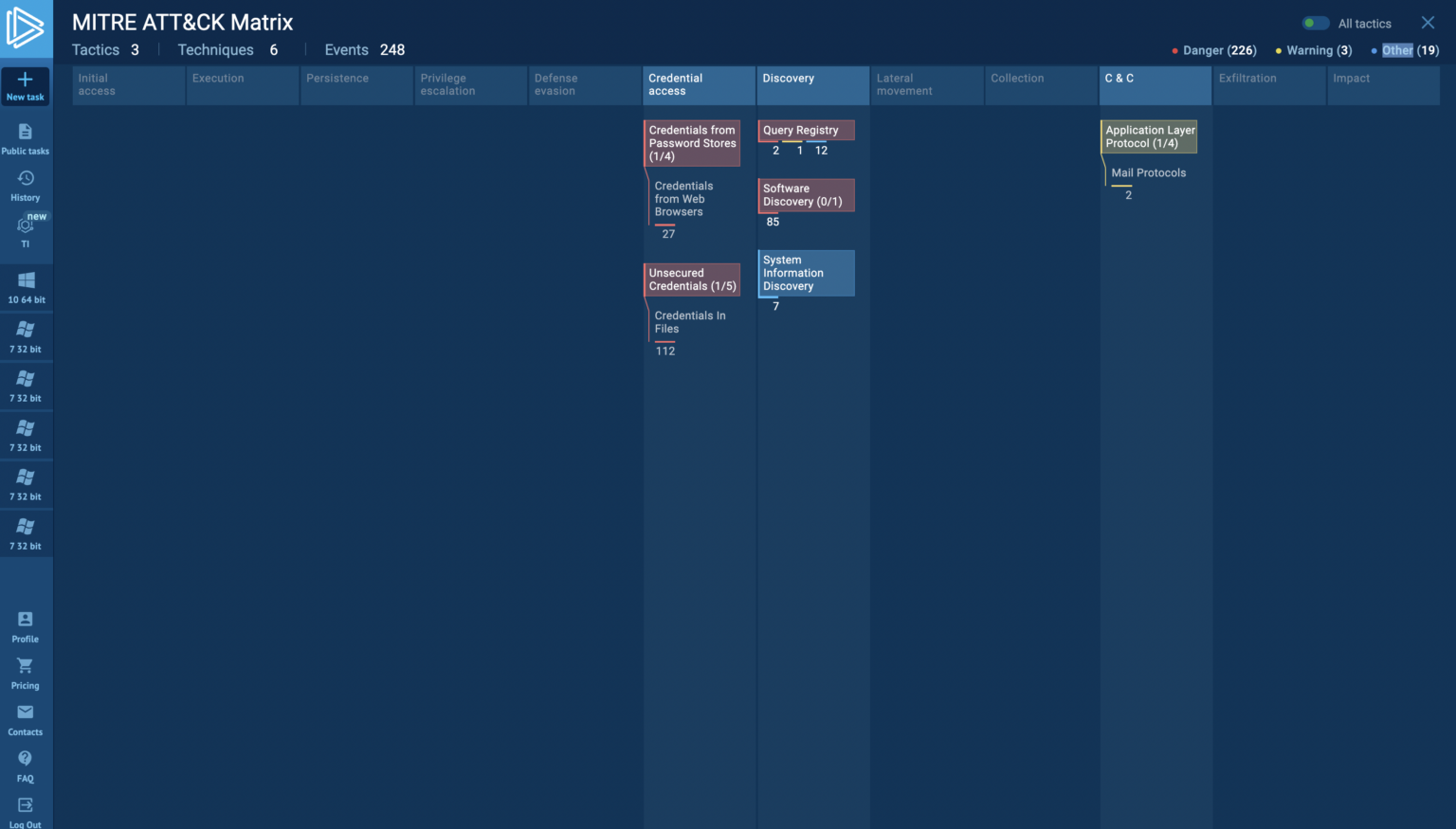
Security products often offer built-in reporting features to expedite threat intelligence distribution. For instance, ANY.RUN allows for generating MITRE ATT&CK reports that map malicious actions to techniques and link to mitigation details.
Customizable text reports with selective information can be created and shared securely via links, streamlining threat intelligence dissemination amongst stakeholders.
Exploring the Four Types of Threat Intelligence
Threat intelligence can be divided into four distinct types, each offering unique insights and analysis scopes:
Strategic
Operational
Technical
Tactical
Here’s a closer look at each category:
Strategic Threat Intelligence provides a broad overview of the cyber threat landscape, focusing on threat actors’ trends, motivations, and capabilities. It aims to answer questions such as “Who might target us and for what reasons?”
Tools for Strategic Threat Intelligence:
Threat landscape reports
Geopolitical threat analysis
Profiles of Advanced Persistent Threats (APTs)
Operational Threat Intelligence delves into the Tactics, Techniques, and Procedures (TTPs) employed by adversaries. This intelligence is crucial for security teams to effectively detect and counteract threats.
Technical Threat Intelligence zeroes in on specific Indicators of Compromise (IoCs) such as IP addresses, domain names, and file hashes. This information is vital for configuring security measures and monitoring systems to thwart or identify and halt attacks.
Tools for Technical Threat Intelligence:
Threat intelligence feeds (e.g., ANY.RUN Feeds)
Tools for analyzing network traffic
Solutions for deobfuscation and reverse engineering
Tactical Threat Intelligence provides immediate, actionable information needed to respond to current threats. It covers details like exploited vulnerabilities within your infrastructure or specific malware families implicated in active attacks.
Tools for Tactical Threat Intelligence:
Incident response playbooks
Malware analysis reports
Guides for patching vulnerabilities
Each type of threat intelligence plays a critical role in a comprehensive cybersecurity strategy, offering different layers of insight to protect against and respond to cyber threats effectively.
What is ANY.RUN?
ANY.RUNis a cloud-based malware lab that does most of the work for security teams. 400,000 professionals use ANY.RUN platform every day to look into events and speed up threat research on Linux and Windows cloud VMs.
Advantages of ANY.RUN
Real-time Detection: ANY.RUN can find malware and instantly identify many malware families using YARA and Suricata rules within about 40 seconds of posting a file.
Interactive Malware Analysis: ANY.RUN differs from many automated options because it lets you connect with the virtual machine from your browser. This live feature helps stop zero-day vulnerabilities and advanced malware that can get past signature-based protection.
Value for money: ANY.RUN’s cloud-based nature makes it a cost-effective option for businesses since your DevOps team doesn’t have to do any setup or support work.
Best for onboarding new security team members: ANY. RUN’s easy-to-use interface allows even new SOC researchers to quickly learn to examine malware and identify signs of compromise (IOCs).
IfAre you from SOC and DFIR Teams, Analyse Malware Incidents & get live Access with ANY.RUN -> Start Now for Free.
0G Labs is pleased to unveil the launch of the testnet for 0G, the modular ultra-high data throughput blockchain optimized for on-chain AI. The network is now available for node operators, developers and the community to join and provide feedback for an upcoming mainnet launch in Q3 2024.
0G, or ZeroGravity, is a modular blockchain that aims to alleviate the major pain points of using blockchain for AI, where data and execution requirements outweigh the current market offering by several orders of magnitude. The modular architecture enables 0G to offer a lean and performant network, unencumbered by legacy consensus algorithms, unrelated use cases sharing the same block space, as well as on-demand scaling.
Demand for on-chain AI is growing due to its promise of offering reliable and credibly neutral training and execution of neural networks. According to a report by KPMG, the vast majority of global corporate executives see AI as one of the fundamental technology breakthroughs that will impact their business shortly. However, adoption risks abound — including potential intellectual property issues, personal data sharing, lack of regulatory frameworks and biases in generative AI models.
Via immutable and verifiable storage and execution environments, blockchains offer a promising solution to address the many challenges of AI. By making AI workflow decentralized, it democratizes the technology and makes it accessible to more people and organizations.
By distributing data across multiple nodes rather than centralizing it in a single location, decentralized AI can help protect sensitive information from hacks and breaches. It also enables fair distribution of rewards to the contributors in the entire workflow, e.g., to data, model, and computation power providers, respectively.
The distributed ledger and cryptographic technologies can further give more transparent ways to track the AI-generated data to help people distinguish between the authentic original data and deepfakes. In addition, blockchains can help achieve a balanced approach to manual interventions in the models’ results, which sometimes can miss the mark.
Existing infrastructure solutions are still insufficient for massive on-chain AI adoption, which is why 0G is building the next-generation blockchain infrastructure for AI. With benchmarks of over 50 Gbps data throughput, compared to existing rates of 1.5 Mbps on Ethereum-based scaling solutions, 0G offers an incredible improvement in its baseline form, while the modular architecture promises potentially infinite scalability down the line.
“The public launch of our testnet marks the first stage of bringing AI on-chain, which will combine two of the most exciting technologies that emerged in the past decade,” said Michael Heinrich, CEO of 0G Labs. “Our team has worked diligently over the past months to deliver our vision of the ultra-scalable modular blockchain, and we’re excited to see the feedback from the community of users and developers.”
The 0G testnet launch comes shortly after 0G Labs closed its $35M pre-seed round, which was originally intended to collect $5M to bring an MVP of the idea to market. The round, led by Hack VC, saw participation from many influential investors primarily in the Web3 space, including Bankless, Polygon, Delphi Digital, TRGC, Dao5, Symbolic, BlockChain Builders Fund, Dispersion, Daedalus, Gumi Cryptos and many more venture funds and angel investors.
About 0G
0G, or ZeroGravity, is a leading Web3 infrastructure provider that is building the leading modular AI blockchain creating solutions to implement on-chain AI applications in the Web3 ecosystem. The platform achieves high data availability through its unique architecture separating data storage and data publishing.
By ensuring throughputs of 50 GB/second, a full 50,000x faster than competitors, and a cost that is 100x lower, 0G has positioned itself as a leader in bringing high data use cases, such as scalable L2s and modular AI, into the Web3 ecosystem.
Qualcomm continues to develop new chipsets. The company recently introduced the Snapdragon 8S Gen 3, which attracted a lot of attention. Now, according to the information we have, it is preparing to launch new chipsets codenamed “Volcano” and “Pitti” for use in smartphones.
The company seems to be aiming to expand its user base with these new chipsets. What will it offer compared to previous-generation SOCs? We will cover everything in detail in this article. If you’re ready, let’s get started!
Qualcomm’s new processors
Qualcomm is working on 3 different SOCs with model numbers SM4635, SM6650 and SM7635. Among these SOCs, SM4635 has the codename “pitti” and we already learned 3 months ago that it is a Snapdragon 4 Gen 3. We reveal through our internal sources that the successor to the Snapdragon 7S Gen 2, the SM7635 SOC, is under development. This SOC has the codename “volcano“. Unfortunately, there is no information about its technical specifications. It is expected to offer significant performance improvements compared to the 7S Gen 2.
We expect the SM7635 processor to offer lower performance compared to the Snapdragon 7+ Gen 3. The reason behind this prediction is to enable Qualcomm to increase competition in affordable mid-range devices. Qualcomm may be aiming to attract a wider user base by reaching a more competitive price point with this new processor. However, we are not in a position to comment on processor performance with the information we have now. Therefore, we need to wait for Qualcomm’s official announcement to evaluate the performance of the processor.
Qualcomm is also developing SM6650, the next version of the Snapdragon 6 Gen 1. The SM6650 will be similar to the SM7635. Both SOCs are identified by the codename “volcano”. This confirms that it will have the same similarity as Snapdragon 6 Gen 1 and Snapdragon 7S Gen 2. The 6 Gen 1 and 7S Gen 2 had the codename “parrot“. We will check what improvements the company’s new SOCs will bring compared to their predecessors in the smartphones that will be released.
Brands like Xiaomi, Oppo, Vivo, and Realme are probably already testing the new SOCs. Xiaomi’s Redmi Note 14 series could use one of these SOCs. Redmi Note 13 Pro 5G used the 7S Gen 2. Maybe the Redmi Note 14 Pro 5G could have the SM7635. This is an estimation and not official information, you have to remember that.
Snapdragon 7S Gen 2 is a Samsung-manufactured SOC. That’s why many users don’t like the 7S Gen 2. We hope the SM7635 will be a processor manufactured by TSMC. When there is more information, we will keep you informed. Stay tuned.
Google has announced “Axion”, its first-ever custom Arm-based CPU designed and optimized for data centers. Designed using Arm’s Neoverse V2 CPU, it will compete with Amazon Web Services and Microsoft Azure.
Google Axion Arm chips claim high specs but are they production-ready?
Google published a detailed blog post about the new Axion, an Arm CPU. The search giant has made some tall claims about these chips.
Google claims Axion Arm CPUs perform 30% better than its fastest general-purpose Arm-based tools in the cloud. The company boasted these chips are 50% better than the most recent, comparable x86-based VMs (Virtual Machines). If that’s not impressive enough, Google added their new chips have 60% better energy efficiency than comparable X86-based instances (VMs).
Although Google hasn’t specifically named the competition, the company may be referring to Amazon and Microsoft products. Amazon launched its first-ever Arm-based Graviton chips back in 2018.
Microsoft was a little late to the party. The Windows OS maker’s Microsoft Azure cloud platform has VMs based on Ampere’s Arm servers since 2022.
Google introduces Axion, a new AI chip for data centers, based on Arm architecture. It promises better performance than x86 and other Arm chips in the cloud and will be integrated into Google Cloud services, including YouTube ads. 💻🚀 pic.twitter.com/2eESOyHGhc
It is important to note that Google hasn’t offered any documentation about the Axion chips. When probed about the technicalities, Google spokesperson Amanda Lam reportedly said,
“Technical documentation, including benchmarking and architecture details, will be available later this year.”
This strongly suggests Google’s Axion chips might not be production-ready yet. Google could be trying to create hype about the first-ever chips it has custom-built specifically for data centers. After all, processors and other hardware for data centers are acquired through long-term contracts, unlike consumer products, which are often bought in shops.
Google promises zero-modification workload transition
Google insists Axion CPUs are built on an open foundation. The company assures Google Cloud customers can migrate their existing workloads (that rely on Arm CPUs) with near-zero transition delay or modifications. Mark Lohmeyer, Google Cloud’s VP for computing and AI/ML infrastructure, explained,
“We recently contributed to the SystemReady Virtual Environment, which is Arm’s hardware and firmware interoperability standard that ensures common operating systems and software packages can run seamlessly in ARM-based systems. Through this collaboration, we’re accessing a broad ecosystem of cloud customers who have already deployed ARM-based workloads across hundreds of ISVs and open-source projects.”
Arm-based CPUs are often more affordable and energy-efficient than their X86-based counterparts. This makes Google’s timing about announcing its Axion chips interesting. The Wall Street Journalrecently quoted Arms CEO Rene Haas, who had warned about the excessive energy usage of AI models. With these CPUs, Google Cloud might be trying to edge past Microsoft Azure’s x86-based VMs. Google recently launched a version of its Chrome web browser that natively supports Arm-based CPUs. Simply put, the search giant seems to be betting big on Arm architecture.
Greylock McKinnon Associates, a prominent consulting firm, has reported a cyber attack that exposed personal data belonging to 341,000 individuals, including sensitive information from the Department of Justice (DOJ).
Greylock McKinnon Associates, located at 75 Park Plaza, Boston, MA, discovered the breach on February 7, 2024, although the attack occurred months earlier, on May 30, 2023.
The firm’s outside legal counsel, Linn Freedman of Robinson & Cole LLP, submitted the breach notification.
Extent of the Data Compromise
The breach has affected 341,650 individuals, with 2,067 of those being residents of Maine.
DocumentRun Free ThreatScan on Your Mailbox
Trustifi’s Advanced threat protection prevents the widest spectrum of sophisticated attacks before they reach a user’s mailbox. Try Trustifi Free Threat Scan with Sophisticated AI-Powered Email Protection .
Due to the exceeding 1,000 affected residents, consumer reporting agencies have been notified in compliance with legal requirements.
The incident was classified as an external system breach, specifically a hacking event.
The attackers managed to acquire names and social security numbers, which can lead to serious identity theft and fraud issues for the victims.
The Maine Attorney General’s Office has made a worldwide announcement regarding a cyber attack on a consulting firm, which exposed Department of Justice (DOJ) data belonging to 341,000 individuals.
Upon discovery, Greylock McKinnon Associates took immediate steps to secure their systems and mitigate further unauthorized access.
The firm has been working closely with cybersecurity experts to understand the scope and method of the attack.
The data in the breach included information from the DOJ, raising concerns about the potential misuse of government employee data.
The DOJ is investigating the breach and the implications for national security and privacy.
Given the scale of the breach, Greylock McKinnon Associates is likely to face scrutiny under various data protection laws.
The firm has been cooperating with legal entities and has begun notifying affected individuals.
Measures for Affected Individuals
Greylock McKinnon Associates offers credit monitoring services to all affected individuals and has established a dedicated helpline to address concerns and questions.
The firm also advises individuals to remain vigilant for signs of identity theft and report any suspicious activity to the authorities.
In the wake of the breach, Greylock McKinnon Associates is reviewing and enhancing its cybersecurity measures to prevent future incidents.
The firm is also working to raise awareness about the importance of robust security practices in the consulting industry.
The cyber attack on Greylock McKinnon Associates is a stark reminder of the vulnerabilities within corporate and government data systems.
As the investigation continues, the firm is committed to transparency and taking the necessary steps to protect personal information and restore trust among its clients and the public.
Secure your emails in a heartbeat! Take Trustifi's free 30-second assessment and get matched with your ideal email security vendor - Try Here
The messaging app Beeper has been hitting the headlines a lot recently. We are all still reeling from the drama it went through while trying to provide iMessage services to Android users. While Apple has squashed its plans to do so, Beeper is still a very popular messaging service. In fact, Beeper has actually removed its waitlist, so the service is now available to hundreds of thousands of more users.
Today marks a turning point for Beeper, as the company announced that it was just bought out. The app was acquired by Automattic. This is the company that owns Tumblr, Pocket Casts, WordPress, and other companies. We’re not sure how much money the company bought Beeper for. However, we’re pretty sure that it was a good amount.
Beeper, like Bluesky, was not available to everyone initially. When you signed up, you were put on a waitlist. This is the kind of thing we see with a lot of smaller and newer platforms. There were a ton of people who wanted to use the service, and many of them were probably eager to try out the Ill-fated iMessage integration. So, it was a bit of a bother having to wait.
However, with the news of the acquisition, Beeper stated that it has removed its waitlist. While this has not been confirmed yet, it seems likely that, due to the acquisition, Beeper now has more money for more server space to facilitate more users. Beeper mentioned that there were more than 400,000 people waiting for an invite to use the service.
How much does it cost to use Beeper?
When companies get acquired, they sometimes go through sweeping and unfavorable changes. These changes often negatively affect the end user. However, the changes affecting Beeper will not manifest in predatory monetization. People will retain all of the features that are available today on the app.
The company’s CEO, Eric Migicovsky, said that there will always be a free tier. This implies that the company is going to launch a paid subscription service for the app. Having a paid subscription should come as no surprise. Right now, we don’t know what sort of features to expect from this payment tier. However, we expect it to be like Telegram Premium in that you will have access to more advanced features.
Changes the user will have to make
There are a few things you will need to keep in mind. When setting up your new Beeper account, you will be given a recovery code. The company encouraged you to save your recovery code to Google Password Manager.
Also, Beeper will no longer bridge itself with other messaging platforms through the cloud. In case you don’t know, you are able to message people using other platforms on Beeper. This includes platforms like WhatsApp and Google Chat. Well, after the change, you will still be able to message other people through different services. However, this will be handled on device as opposed to in the cloud. This is a much more secure way of Bridging the services.
Besides powering the top-of-the-line flagship Android phones, Qualcomm recently has also begun to focus on the mid-range segment. A result of it is a near-flagship performance in the mid-range segment. The Snapdragon 8s Gen 3 is a perfect example of this.
Now it turns out that the Snapdragon 8s Gen 3 not only replicates a flagship-level performance, but it also boasts the same cores (building blocks of a CPU) as the current and most powerful flagship chip from Qualcomm, the Snapdragon 8 Gen 3.
Snapdragon 8s Gen 3 is nearly 35% smaller than its flagship counterpart
Chinese media outlet ITHome has compared the dimensions of the Snapdragon 8s Gen and the flagship Snapdragon 8 Gen 3. Those are 8.40×10.66mm and 10.71×12.81mm for the two respectively. It means that the ‘s’ branded new mid-range chip is approximately 34.73% smaller than the flagship silicon.
Notably, the smaller size also indicates some sacrifices in the components of the chip. The sacrifices for the Snapdragon 8s Gen 3 as compared to its more expensive version include a smaller 1MB L2 Cache for the prime Cortex-X4 core, as opposed to the 2MB one on the more expensive chip. The Cortex-A720 performance core is also reduced from 512KB to 256 KB. The L3 cache and SLC cache have also undergone similar reductions.
The primary function of the cache memory is to temporarily store frequently accessed data and instructions, helping to reduce the time it takes for the CPU to access them from the slower main memory (RAM). This results in faster data retrieval and improved overall system performance. A smaller L3 and SLC cache means technically slower execution of tasks in certain scenarios.
Both the chips equip the same cores with different frequencies
Both the chips are fabricated on TSMC’s 4nm process node. The CPU of the Snapdragon 8 Gen 3 consists of 1 x 3.3GHz Cortex-X4 (prime core), 3 x 3.15 GHz Cortex-A720 and 2 x 2.96GHz Cortex-A720 (performance core), and 2 x 2.26GHz Cortex-A520 (efficiency core).
In comparison, the smaller sibling equips the same cores with reduced peak frequencies – 1 x 3GHz Cortex-X4 (prime core), 4 x 2.8 GHz Cortex-A720 (performance core), and 4 x 2GHz Cortex-A520 (efficiency core).
The Snapdragon 8s Gen3 supports up to 4200MHz LPDDR5X memory, and the Snapdragon 8 Gen3 supports 4800MHz LPDDR5X memory. While the ISP of the new mid-range chip supports up to 4K HDR video recording, its bigger sibling can go up to 8K on the same.
In terms of communication, the smaller chip equips the X70 baseband and supports 5000Mbps downlink and 3500Mbps uplink. In comparison, the Snapdragon 8 Gen 3 boasts the X75 baseband, which enables double the downlink capability of the ‘s’ branded chip.
Nonetheless, the ‘s’ branded chip is a lot less expensive and offers these capabilities to a mid-range device instead of a flagship, which justifies all the sacrifices.
Video creation is not easy work and to do it properly, companies have to usually hire a video production expert or team. However, there are times when a quick video is needed for a training session, or for new employee orientation, etc. There are numerous instances when having a tool to create a quick presentation-like video would be helpful, and there are tons of options out there right now, but surprisingly none have been from Google — until now.
As part of all the Workspace improvements coming out of Google Cloud Next ’24, Google has announced their new AI-powered app, Google Vids. It joins the Workspace collection alongside Docs, Sheets, and Slides with the promise of making quick and engaging videos a painless reality.
The idea is to streamline the video production process. Vids uses AI to turn your idea into something tangible and polished. It generates a basic storyboard you can tweak and then automatically pulls together suggested scenes from stock footage, images, and background music. You can even use preset voiceovers or opt to record your own voice to finish things off.The interface is meant to be intuitive, negating the need for advanced video creation knowledge or experience. Also, like other Workspace staples, Vids lets you share and collaborate with your team. Google Vids isn’t a direct replacement for fancy video editing software, but it aims to fill the niche where simplicity and quick turnaround for internal purposes are more important.
For now, Google Vids will be a browser-only product. However, according to The Verge‘s reporting, Kristina Behr, Google’s VP of product management for the Workspace collaboration apps said that mobile support would come over time.
Google Vids is currently slated for a limited Workspace Labs release in June, but there are beta testers utilizing the app right now. We’ll have to wait and see how well it performs once it’s widely rolled out, and whether it will deliver on its promise of making corporate video creation a breeze.
Ahoy, which is often associated with communicating to ships, has now been playfully adopted in pirate language.
We coin ‘Ahoi,’ an anagram of ‘Iago,’ to pay tribute to research on interface attacks with TEEs.
Confidential computing, also referred to as trusted execution, protects sensitive computations on public cloud platforms.
Hardware vendors provide trusted hardware that guarantees user code and data security from malicious actors.
Ahoi Attacks
Cloud providers now offer confidential computing via technologies like Intel SGX for process-level isolation and AMD SEV, Intel TDX, and ARM CCA for VM-level isolation as Confidential VMs (CVMs).
SGX enclaves isolate single processes from other processes/OS, while CVMs allow deploying entire isolated VMs inaccessible to other tenants, provider’s hardware/software like hypervisors.
DocumentStop Advanced Phishing Attack With AI
Trustifi’s Advanced threat protection prevents the widest spectrum of sophisticated attacks before they reach a user’s mailbox. Stopping 99% of phishing attacks missed by
other email security solutions. .
Interrupt management is done almost entirely by the hypervisor in CVMs. CVM security can be breached by Ahoi attacks using notifications.
The hypervisor virtualizes the delivery of interrupts necessary for the operation of CVMs.
This hooks physical interrupts, redirects them to corresponding virtual machines, and raises virtual interrupts.
As a result, the guest OS within this CVM handles these interrupts via their handlers and ultimately acknowledges them.
The hardware exception is mapped in “x86” to the interrupts 0 through 31.
An example of this is when a divide-by-zero occurs and raises interrupt 0, which the OS converts to SIGFPE for user-space delivery.
Applying for a custom handler is like calculating the non-weighted average of SIGFPE.
Ahoi attacks have virtual CPUs that are attacked using a hypervisor to inject malicious interrupts into them, which helps invoke interrupt handlers globally.
Execution flow leading to successful authentication (Source – Github)
Ahoi attacks can take advantage of the interrupts and signals, which were made for trusted hypervisor environments.
Projects like Heckler can demonstrate this, as they have demonstrated how to breach AMD SEV-SNP and Intel TDX to gain unauthorized access to CVMs.
Moreover, such vulnerabilities extend even up to specialized interrupt interfaces such as AMD SEV’s VMM Communication Exception (#VC) meant for safe hypervisor-CVM communication.
However, this interface can be used by hypervisors to perform malicious tasks that are executed without being caught by CVMs.
WeSee exploits AMD SEV-SNP’s flaws to do forbidden things on CVMs.
Secure your emails in a heartbeat! To find your ideal email security vendor, Take a Free 30-Second Assessment.











.webp)