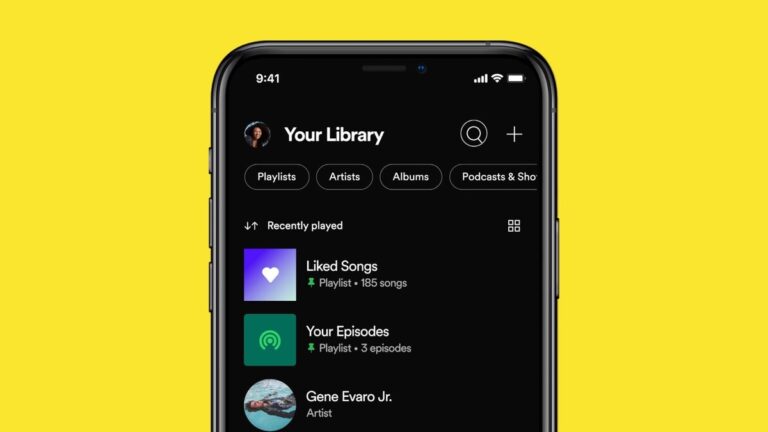
Generative AI is the trend these days, and for around a year and a half, the tech has been making its way into apps, phones, and what-have-you. Now, AI is also getting added to Spotify, and the tech will be helping you make playlists with a prompt, reports Android Authority.
Spotify testing generative AI to help you with playlist
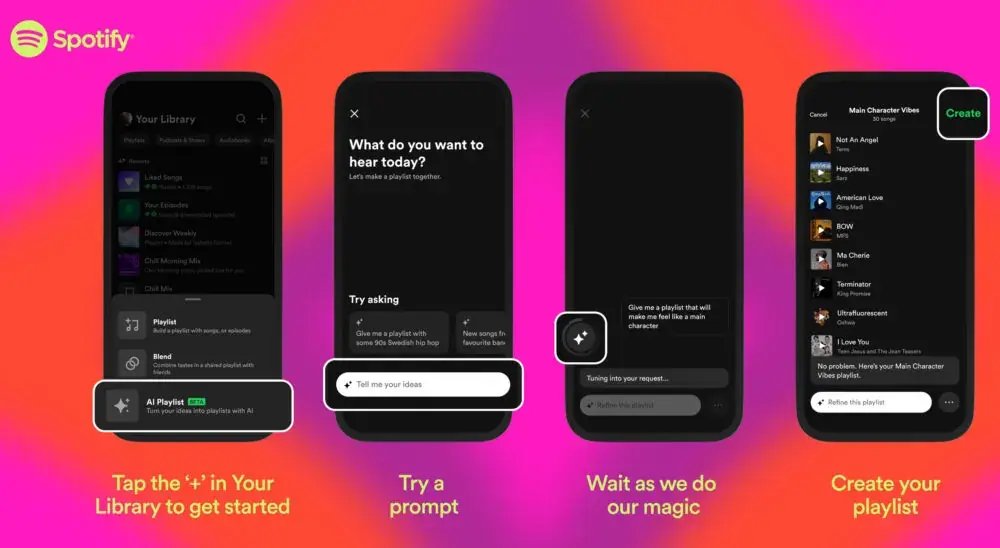
The new feature is in its beta testing period and is currently available only to Premium users in Australia and the UK. Spotify announced the feature for Premium users on April 7. The new capability will allow you to create playlists with a prompt.
Examples of prompts include “relaxing music to tide me over during allergy season” and “a playlist that makes me feel like the main character”. As you can see, those are far from simple commands, and it would be very interesting what AI can include in such playlists.
Prompts for the AI can consist of places, animals, activities, colors, emojis, and even movie characters. The best prompts combine moods, artists, genres, and decades. The playlists can be further refined with follow-up prompts. Of course, Spotify has measures to prevent offensive prompts, but at this point, it is not clear what those are.
For now, the launch is in beta, so don’t get too hyped that it will come to you soon. We do hope more markets will be getting this fun and useful feature soon though, but Spotify has not disclosed a timeline for its release just yet.
Izzy, a tech enthusiast and a key part of the PhoneArena team, specializes in delivering the latest mobile tech news and finding the best tech deals. Her interests extend to cybersecurity, phone design innovations, and camera capabilities. Outside her professional life, Izzy, a literature master’s degree holder, enjoys reading, painting, and learning languages. She’s also a personal growth advocate, believing in the power of experience and gratitude. Whether it’s walking her Chihuahua or singing her heart out, Izzy embraces life with passion and curiosity.
The professional and personal online spheres are merging as social media platforms like Facebook, LinkedIn, and WhatsApp are now commonly used for work communication. Their integration creates cybersecurity vulnerabilities.
Threat actors can target employees on social media using their accounts accessed from work devices.
These accounts act as attack vectors, allowing unauthorized access to the organization’s systems.
– Advertisement –
A new LinkedIn threat combines breached users’ accounts and an evasive 2-step phishing attack.
A recent Python-based infostealer called Snake targets Facebook users with malicious messages.
By tricking users into downloading malware, Snake steals sensitive browsing data to hijack accounts.
It highlights how social media is a potential attack vector for stealing credentials and compromising corporate systems.
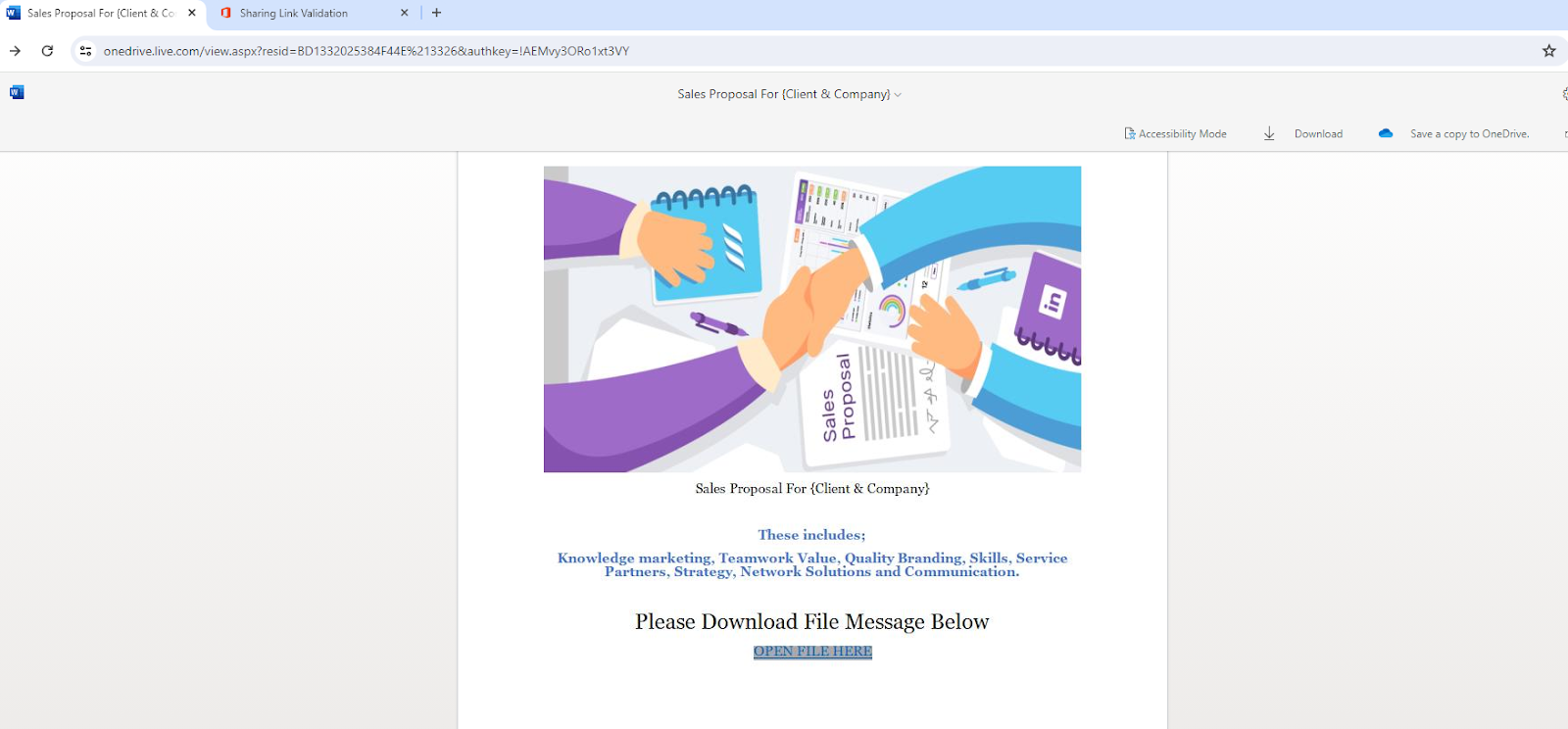
“Sales Proposal” Office Word document hosted on onedrive.live.com
LinkedIn is a social media platform for professional networking that is vulnerable to attacks due to the abundance of publicly available user data.
Attackers can harvest email addresses for surveys and use fake profiles to deliver malware through phishing attacks. Perception Point recently discovered a new attack that combines compromised user accounts with a 2-step phishing scheme to bypass detection.
DocumentRun Free Threat Scan on Your Mailbox to Stop Phishing
Trustifi’s Advanced threat protection prevents the widest spectrum of sophisticated attacks before they reach a user’s mailbox. Try Trustifi Free Threat Scan with Sophisticated AI-Powered Email Protection .
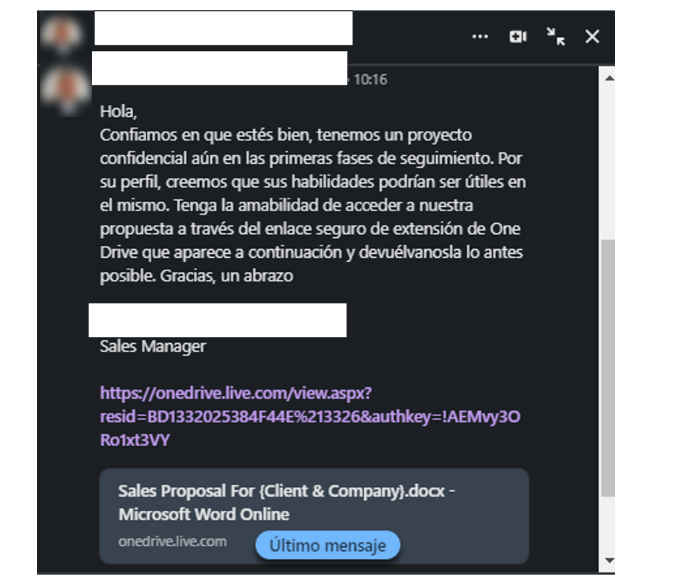
Compromised LinkedIn accounts had been exploited to launch social engineering attacks. The attackers sent messages to the victim’s network, pretending to be a trusted connection (1st degree).
An example of a deceptive message from a compromised account
The messages contain a malicious link disguised as a legitimate OneDrive document link, often using the lure of a confidential project to trick the victim into clicking it, leading to an account takeover.
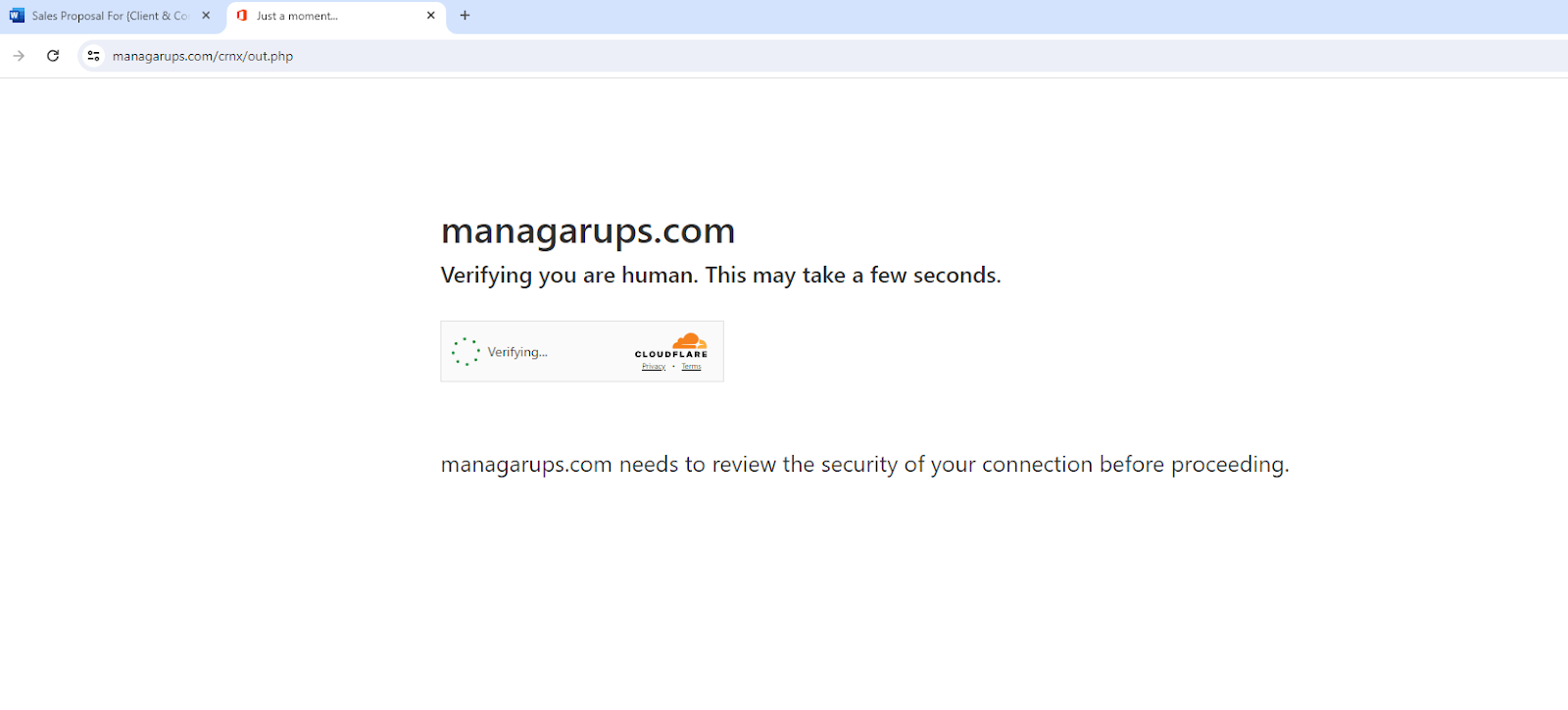
Attackers use a hidden JavaScript payload that shows fake protection DDoS display screen
Phishing actors utilize a two-step attack. First, they trick victims into clicking a URL that leads to a legitimate OneDrive page hosting a malicious Word document.
Free Webinarfor DIFR/SOC Teams: Securing the Top 3 SME Cyber Attack Vectors - Register for Free
Second, the document embeds a URL redirecting victims through a fake Cloudflare verification prompt before landing on a phishing webpage designed to steal Microsoft 365 credentials.
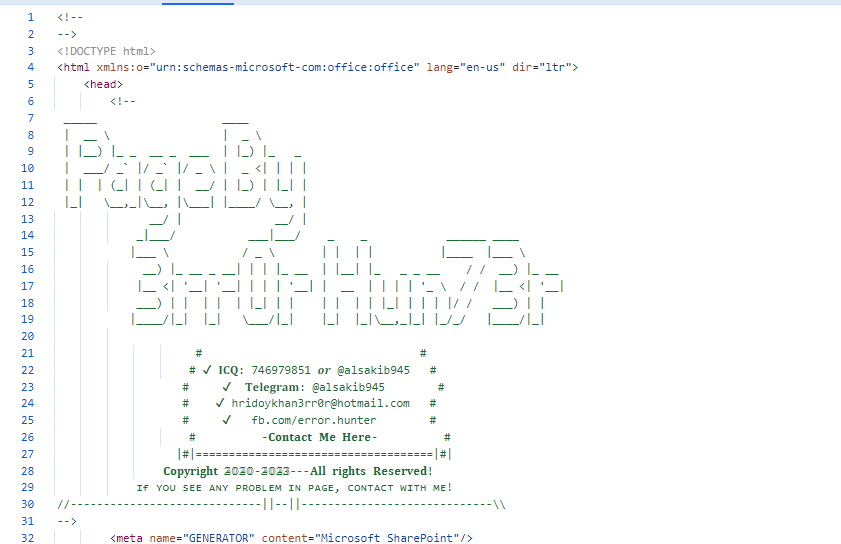
3rr0r Hun73r – the threat actor behind the phishing website
The phishing page’s HTML code reveals it originates from a group called “3rr0r Hun73r” that creates and sells phishing kits.
Social media’s popularity creates a vulnerability for enterprises where hackers exploit employees’ social media use within work browsers to steal personal and corporate data.
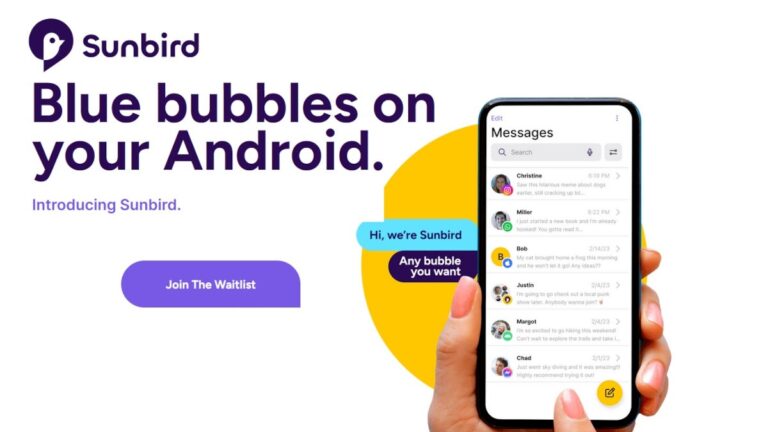
Back in November, the Sunbird messaging app, which powered the Nothing Chats messaging app, shut down due to security concerns. The Sunbird app allowed Android users to use iMessage for messaging even down to having blue bubbles, high-quality images, read receipts, typing indicators, and more. While Sunbird promised users that they would have end-to-end encryption for user messages and files, users’ Apple login info was not encrypted obviously creating a huge security concern.
With 630,000 files vulnerable to this exploit, Sunbird decided to halt all of its services including its Play Store app. But Sunbird is re-launching its iMessage for Android app. In a press release, Sunbird announced that its messaging app has been relaunched and 165,000 Android users are on the waitlist. A small number of invitations have been disseminated.
Sunbird has updated its AV1 Message system which is now AV2 and it is designed to keep messages safe. As Sunbird notes, “Unencrypted messages are never stored anywhere on disk or in a database. When messages are decrypted to be passed to the iMessage and RCS/Google Messages network, they exist in that state only within memory for a limited period of time. In the front-end app, messages are only stored in an encrypted state within the in-app database.”
The bottom line as far as Sunbird is concerned is that “Since November, the Sunbird team has worked to migrate the iMessage implementation off of AV1 to the AV2 architecture. With the adoption of AV2, we believe that we’ve not only resolved the security vulnerabilities previously identified but also provided a secure and privacy-oriented foundation for Sunbird’s iMessage integration moving forward.”
You can join the Waitlist for Sunbird by tapping on this link and pressing on “Join the Waitlist.” You might wonder why this is necessary if Apple will support RCS later this year. The answer is simple; despite Apple adding support for RCS, those using the latter will still have green text bubbles. For those Android users concerned about getting teased for being green, outside of buying an iPhone, using Sunbird might be the next best solution.
The developers admitted that they could have used the downtime since November to release a quick fix to patch the vulnerabilities. But Sunbird said, “We recognized that such an approach would not align with our core values or our unwavering commitment to the privacy and security of our users.”Sunbird added, “We decided to take the opportunity to thoroughly reevaluate both our technical implementations and our organizational processes from the foundation up. This decision was driven by our belief in the paramount importance of trust and safety in our platform. It reflects our dedication to not just resolving the immediate issues at hand but also to ensuring that we uphold the highest standards of security and privacy for our community in the long term.”
A new threat actor dubbed “CoralRaider” targets victims’ financial information, login credentials, and social media profiles—including accounts for businesses and advertisements.
The group, which is of Vietnamese origin, has been active since at least 2023 and targets victims in several Asian and Southeast Asian countries.
In the recent campaign, the attackers used XClient stealer and RotBot, a customized version of QuasarRAT, as payloads.
The IP address, ASN, and active processes on the victim’s computer are among several tests that RotBot, a remote access tool (RAT), runs on it to avoid detection.
The XClient stealer offers significant information-stealing capabilities due to its plugin module and a variety of modules for conducting remote administration operations.
DocumentRun Free ThreatScan on Your Mailbox
Trustifi’s Advanced threat protection prevents the widest spectrum of sophisticated attacks before they reach a user’s mailbox. Try Trustifi Free Threat Scan with Sophisticated AI-Powered Email Protection .
Notable Tactics, Techniques, And Procedures (TTPs) Employed
According to Cisco Talos reports, the attacker utilized two Telegram bots: a “debug” bot for debugging and an “online” bot for receiving victim data.
On the other hand, the “debug” bot’s desktop image and Telegram looked identical to those of the “online” bot.
This demonstrated that, while testing the bot, the actor may have compromised their surroundings.
Telegram bots Used by attackers
Researchers’ investigation turned up two more pictures that showed several OneDrive folders.
An Excel file that most likely contained the victims’ data was examined in another picture. The spreadsheet contains multiple tabs in Vietnamese.
“CoralRaider had hardcoded Vietnamese words in several stealer functions of their payload XClient stealer”, Talos researchers shared with Cyber Security News.
“The stealer function maps the stolen victim’s information to hardcoded Vietnamese words and writes them to a text file on the victim machine’s temporary folder before exfiltration”.
This malicious campaign is aimed at victims in South Korea, Bangladesh, Pakistan, Indonesia, Vietnam, India, China, and other countries in Asia and Southeast Asia.
The Windows shortcut file serves as the campaign’s original vector. The actor’s method of giving the victims the LNKs is unknown at the moment.
Attack Flow
A malicious Windows shortcut file that downloads and launches an HTML application file (HTA) from a download site under the attacker’s control is the first step in the attack.
An embedded, obfuscated Visual Basic script runs when the HTA file is opened.
The PowerShell script that is embedded in the memory by the malicious Visual Basic script decrypts and sequentially runs three other PowerShell scripts that download and launch the RotBot, disable Windows and application notifications, bypass User Access Controls, and perform anti-VM and anti-analysis checks.
On the victim’s computer, RotBot is downloaded and launched under the guise of the Printer Subsystem program “spoolsv.exe.” The threat actor has assembled and customized a RotBot specifically for this campaign.
The XClient Stealer takes use of victims’ browser data, credit card numbers, and social network login passwords.
It targets the data files for Chrome, Microsoft Edge, Opera, Brave, CocCoc, and Firefox browsers through the absolute paths of the corresponding browser installation paths.
Lastly, the XClient stealer generates a ZIP package and saves the victim’s social media information, which is gathered into a text file in the local user profile temporary folder.
Use secure passwords and change them frequently to protect yourself from these dangerous attacks.
Is Your Network Under Attack? - Read CISO’s Guide to Avoiding the Next Breach - Download Free Guide
The U.S. Environmental Protection Agency (EPA) is suffering a major data breach allegedly by a hacker known as USDoD. The breach, affecting over 8.5 million users, raises concerns about identity theft, cyber espionage, and the chilling effect on environmental reporting.
The U.S. Environmental Protection Agency (EPA) is facing a significant security breach, carried out by a hacker operating under the alias USDoD. This alleged breach has resulted in the exposure of personal and sensitive information belonging to more than 8.5 million users, containing both customers and contractors.
The data breach brought to light on the morning of Sunday, April 7, 2024. Notably, USDoD has a history of engaging in high-profile data breaches, with previous incidents including the exposure of data from 87,000 members of InfraGard, a sensitive security program funded by the FBI and dedicated to safeguarding critical infrastructure in the United States.
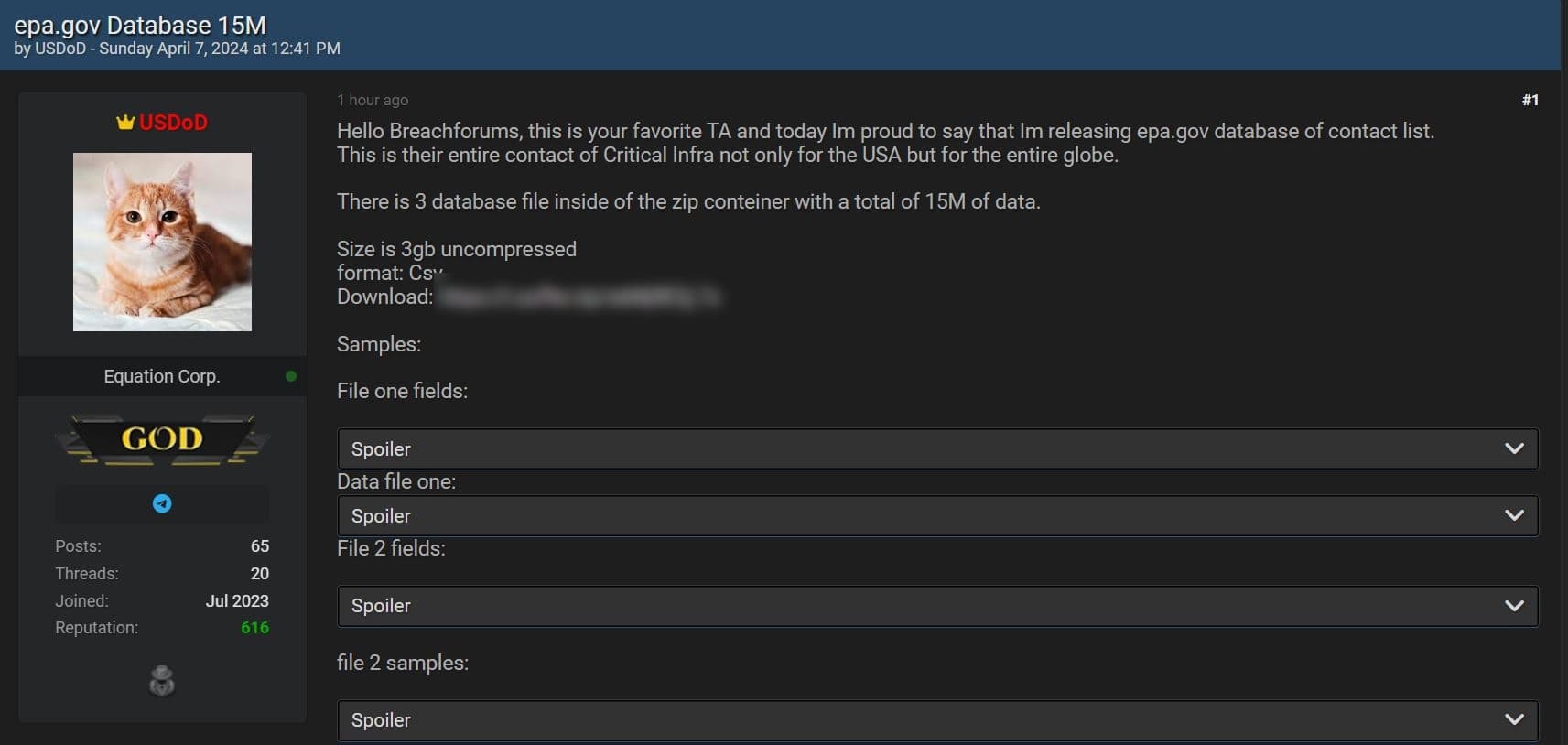
“Hello Breachforums, this is your favorite TA and today Im proud to say that Im releasing epa.gov database of contact list. This is their entire contact of Critical Infra not only for the USA but for the entire globe.”
USDoD
Regarding the alleged data breach at the EPA, the hacker claims that they have successfully compromised and leaked the entire database of the agency. Analysis conducted by Hackread.com indicates that the data provided by USDoD appears to be legitimate; however, conclusive verification can only be provided by the U.S. Environmental Protection Agency.
USDoD on Breach Forums (Screenshot credit: Hackread.com)
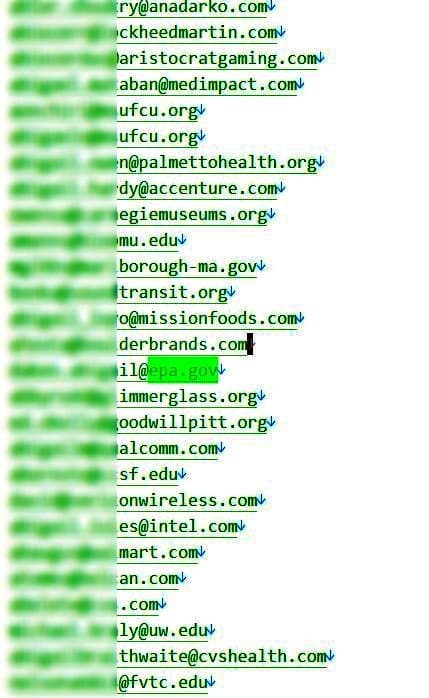
Meanwhile, review of the leaked file reveals a 500MB Zip archive containing three CSV files labeled as “Contact,” “Inter_Contact,” and “Staff.” An assessment of these files reveals the presence of the following information:
Contact File (3,726,130 Records)
Zipcodes
Full names
Fax numbers
Phone numbers
Email addresses
Mailing addresses
Country, city, States
Inter_Contact File (9,952,374 Records)
Zipcodes
Full names
Phone numbers
Email addresses
Email domains
Country, City, State
Company name and address
Staff File (3,325,973 Records)
Zipcodes
Fill names
Job titles
Company names
Email addresses
Business Addresses
Phone numbers
Related industries
Country, city and States
Following the removal of duplicate records, the total number of accounts involved in the breach stands at nearly 8.5 million, specifically 8,460,182. Hackread.com has notified the U.S. Environmental Protection Agency (EPA) and CISA regarding the data breach. Any response received from either of the agencies will lead to an update to this article.
Screenshot from the leaked data (Credit: Hackread.com)
The Good and Bad news
The good news amidst this breach is the absence of passwords. However, the seriousness of the situation can be understood by the fact that the leaked data is now circulating within Russian hacker and cybercrime forums. This development not only open doors for state-sponsored cyber espionage but also poses a serious risks of identity theft, phishing scams, and targeted marketing campaigns.
Furthermore, the exposure of information regarding facilities or individuals reporting environmental violations raises serious concerns. Such disclosures could potentially deter future reporting and impede the EPA’s effectiveness in enforcing regulatory measures.
DevastatingFirst Quarter of 2024 for US So Far
The first quarter of 2024 has proven to be quite challenging for the United States, a nation that holds influential global power and consequently becomes an attractive target for cybercriminals. Despite ongoing efforts to strengthen its critical infrastructure, the country has faced a surge in successful cyber attacks, resulting in widespread disruption and compromise.
In January, EquiLend, a prominent financial technology firm, fell victim to a large-scale ransomware attack. As a result, it was confirmed that the incident also led to a data breach, exposing sensitive employee information.
March witnessed the cyber attack from IntelBroker hacker against Acuity Inc., a federal contractor, resulting in the exposure of critical records belonging to U.S. Citizenship and Immigration Services (USCIS) and U.S. Immigration and Customs Enforcement (ICE). Although initially denied, Acuity Inc. eventually acknowledged the hack.
In February, the same hacker targeted the security of Los Angeles International Airport, compromising the personal data of 2.5 million private plane owners. Shortly thereafter, in March, American Express disclosed a significant data breach involving third-party contractors, impacting its cardholders.
The latest alleged data breach occurred on April 4, 2024, when the IntelBroker hacker leaked personal data belonging to over 22,000 Home Depot employees on BreachForums.
According to a recent poll by the US Chamber of Commerce, 60% of small businesses are concerned about cybersecurity threats, and 58% are concerned about a supply chain breakdown.
Not surprisingly, small businesses in the professional services sector feel significantly more concerned about cybersecurity threats than those in manufacturing or services, but the poll explains that they also feel more prepared to handle them.
“The small businesses most concerned about cybersecurity threats include businesses with 20-500 employees (74%) and businesses in the professional services industry (71%). On the other hand, small businesses that are least likely to say they are prepared for cyber threats include businesses in the manufacturing sector (61%), female-owned businesses (68%), and businesses in average health (64%).”
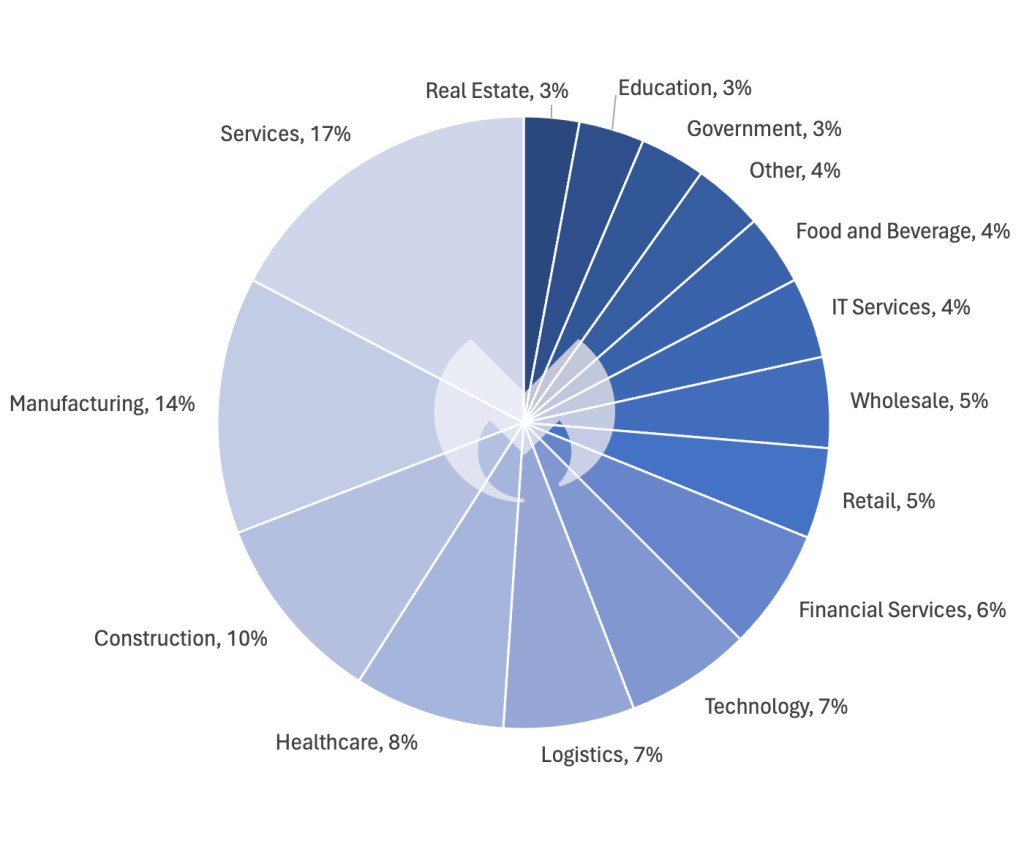
Services businesses are right to be concerned. The most serious cyberthreat faced by organizations is ransomware, and on any given month, in almost any country, the services sector is the one hardest hit by ransomware.
However, while the services sector suffers more attacks than manufacturing, the difference has been steadily narrowing, so that it is almost insignificant
Known ransomware attacks by industry sector, February 2024
Small businesses are not sitting on their hands though. 49% say they have trained staff on cybersecurity measures in the past year, 23% think they are “very prepared” to handle cyberthreats, and 50% feel “somewhat prepared.”
It’s no surprise that small businesses are concerned—they have limited resources, and yet they need to be ready to fight off the same sophisticated criminal gangs as the biggest enterprises.
And, as you can read in our 2024 State of Malware report, cybercriminals continue to evolve their tactics. They like to use social engineering, and vulnerabilities in internet-connected devices and services, rather than old-fashioned malware to infiltrate systems and networks. And once they’ve broken in to a company network, they are increasingly turning to legitimate tools instead of malware to carry out their attacks, a tactic known as living-off-the-land (LOTL)
This requires a different approach and security solutions capable of dealing with these threats.
We don’t just report on threats—we block and remove them.
ThreatDown can help small business to be secure. Choose the ThreatDown bundle that’s right for your organization.
Google allows game emulators to be listed on its Play Store, but Apple didn’t until recently. Apple’s iOS ecosystem is extremely restrictive, especially to third-party apps, so the existence of game emulators in the App Store was something unthinkable until the European Union decided to shake things up a bit.Over the weekend, Apple revealed that game emulators can be listed on its App Store not only in the EU, but also in all other parts of the world. First spotted by The Verge, the change also extends to the downloadable games offered by these emulators, which must comply with “all applicable laws.”
Software offered in apps under this rule must: follow all privacy guidelines, including but not limited to the rules set forth in Guideline 5.1 concerning collection, use, and sharing of data, and sensitive data (such as health and personal data from kids); include a method for filtering objectionable material, a mechanism to report content and timely responses to concerns, and the ability to block abusive users; and use in-app purchase in order to offer digital goods or services to end users.
But that’s not everything that Apple decided to change about its apps store. The Cupertino-based company now says that mini-games and mini-apps within big apps like WeChat must use HTML5, so they can’t be native apps and games.
And finally, in a response to the European Commission, Apple promised to allow music streaming apps in the EU to include in-app links that redirect to outside purchases and pricing information.
Google has a ton of first-party apps, and we’re constantly getting reports of the company switching and changing their UIs. Well, this is continuing with the Google app. According to a new report, Google may be testing a bottom bar in the Google app.
The Google app is the company’s gateway to Google Search on Android phones. It’s more than a bloated search bar. Right now, the company is actually testing a Gemini toggle in the Google app. When you open the app and switch to Gemini mode, you’ll have access to Gemini’s assistant capabilities. You will be able to summon it with a voice command and ask it to perform different tasks within your phone. At this point, Google is looking to make it a proper alternative to Google Assistant.
Google is testing a bottom bar for the Google app
When opening the Google app, we’re used to seeing the search bar up top with our recent searches below. When tapping on the Google icon, we open the Discover page, and it still shows the search bar rather close to the top.
However, according to a new report, the company may be working on bringing the search bar even lower. Looking at the screenshot below, it appears that Google wants to make the search bar a part of the bottom bar. We see the search bar within the same UI element as the tabs on the bottom. It will hover just above the Discover, Search, and Saved tabs.
As smartphones get bigger and taller, we start to appreciate companies doing this more. We can’t deny that it’s pretty tough reaching the top of our nearly 7-inch phones. At this point, phones have the ability to summon the notification shade with simple gestures, shrink the entire display, and bring half of the screen down to accommodate larger displays.
So, it’s clear that companies acknowledge that larger phones can be a bit of a hassle. If you’re a person who uses the Google Search app a lot, and you don’t want to constantly stretch your finger to the top of your phone, then you will love this change.
There’s another change
This change has pretty much been confirmed by Google, as it shows up and screenshots on the Play Store listing for the Google app. In the screenshot above, we see the pill-shaped element surrounding the selected tabs. So, the magnifying glass for the Search tab is inside of a pill-shaped enclosure. This will bring the Google app even more in line with the Material You design language.
It’s a nice little addition to the app. Also, it will help create a more consistent look throughout all of Google’s apps. Even though Material You was introduced back in 2021, the company is still working and tweaking the design of all of its apps to make a fully consistent design language.
At this point, it’s clear that Google is only testing these changes. So, there’s no telling if both of them are going to come to the Google app. We will have to wait for Google to officially confirm this to be sure.
There’s no shortage of AI image generators on the market, and the number seems to be going up every day. However, there exists a core group of the best and most versatile image generators on the web like DALL-E, Stable Diffusion, Copilot Image Creator, and more. MidJourney is one of them. This image generator has been on the market for quite some time. If you’re curious about what MidJourney is and why you should use it, here’s a guide to explain all of the ins and outs.
We’ll go over any questions that you may have about this image generator. For all you know, this could be your new favorite image generator. One thing to note is that this article will be updated with new information as it comes out, so you’ll want to check back every now and then for any updates. So, without further ado, let’s dive right in.
What is MidJourney?
MidJourney, just like other AI image generators, can create images based on text prompts. So, all you have to do is type a description of what image you want to be created. It can be brief like “cat in space”. However, you could also be long-winded like “cat with gray fur floating in space with planets, comets, and stars in the background, blue aesthetic”. MidJourney will do its best to create an image matching the exact description you gave.
Do I need an account?
Yes. In order to create an account with MidJourney, you will need a Discord account. You will use your Discord account to sign into your MidJourney account. For the time being, there doesn’t seem to be any other way to log in to the platform.
So, there’s no traditional method of signing up such as using an email and password or through another account (Google, Apple, Microsoft, etc.).
Does MidJourney cost money?
Yes, it does. When you make your account, you will have 25 free prompts. These prompts do not replenish after a period of time. If you want access to more prompts, then you will need a subscription.
In order to get a subscription, you will need to go to the bottom left of the homepage of the MidJourney website and click on your profile button. It will show your email address. In the pop-up menu, you will see the Manage Subscription option. There, you’ll see the option for subscription tiers to try out. Right now, there are four subscription tiers for you to choose from.
The first option is the Basic plan, and it costs $10/month ($96/year). It will give you 200 prompts every month. You’ll also gain general commercial rights to use the images you create, access to the member gallery, optional credit top-ups, and three concurrent fast jobs (Fast jobs will be explained later in the article).
Next, the Standard plan costs $30/month ($288/year). This plan gives you unlimited image generations in Relax mode. However, you also get access to 15 hours of Fast Mode generations (Relax Mode and Fast Mode will be explained later in the article). You will get these perks along with all of the perks in the basic plan.
The next plan is the Pro plan. This one costs $60/month ($576/year). Along with all of the aforementioned perks, you get 30 hours of Fast Mode generations and 12 concurrent fast jobs. Also, you get Stealth Mode (explained later in the article).
Last but not least, we have the Mega plan. This plan costs $96/month ($1,152/year). Alongside the aforementioned perks, you get 60 hours of Fast Mode generations.
Concurrent fast jobs, Fast Mode, Relax Mode, Turbo Mode, and Stealth Mode
Some of the perks mentioned above require a little bit of explanation.
Fast Mode
MidJourney doesn’t generate one image at a time, but it generates four. Each time you generate a group of four images, it’s referred to as a “Job”.
MidJourney, just like most other AI companies, uses an army of powerful GPUs to generate the jobs. It takes time for these GPUs to generate them. Typically, it takes the GPUs about one minute to fully generate a job. Since MidJourney has a ton of users, there is usually a long queue of people waiting to have them generated.
In Fast Mode, your prompt is pushed past the queue of waiting users and generated as soon as possible. Depending on the subscription tier you have, you will get a certain number of hours each month that you can use in Fast Mode. Each time you generate a job, it eats away at that monthly allowance.
For example, if you have the Standard plan, you have 15 hours of fast generation time each month. So, each job you do in Fast Mode will eat away from that 15-hour allowance. Since each job takes about one minute, that equates to approximately 900 jobs each month. However, your results will vary.
Once you sign up for your subscription tier, you will automatically be put into Fast Mode. So, all of your jobs will be generated as soon as possible.
Relax Mode
People on the free trial and people on the Standard, Pro, and Mega subscription tiers will have access to Relax Mode. Fast Mode gives you priority access to GPUs so that your prompt will start generating right away. However, Relax Mode will put you in a queue waiting to have your prompt generated. You’re basically put on a waitlist until GPUs become available to generate your prompt. According to the company, if you’re in Relax Mode, your job could take up to 10 minutes to generate.
If you have a basic plan, you will only have access to Fast Mode. Once you have used all of your Fast-Mode jobs, you will not be able to generate any more images until the next month. However, with the other subscription tiers, after you’ve used all of your Fast Mode generations, you will be knocked back to Relax Mode. That may be a bummer, but you will be able to generate unlimited images in this mode.
Your place in the queue will depend on how often you use Relax Mode. If you’ve only generated a few jobs in Relax Mode, you will be further ahead in the queue compared to a person who’s generated hundreds of images. It’s a way of giving newcomers better access to the service.
Concurrent fast jobs
Certain subscription tiers will give you access to a certain number of concurrent fast jobs. Depending on your subscription tier, you’ll only be able to generate a certain number of fast jobs at the same time. Going back to the Standard plan, you can only have up to three fast jobs generating at the same time.
Turbo Mode
Turbo Mode is an even faster version of Fast Mode. Using Turbo Mode, your job will be using an experimental GPU pool. This will create the generations about four times faster than the generations created in Fast Mode. However, this will double how fast you use your Fast Mode time allowance. So, every minute that passes will eat away two minutes of your monthly allowance.
Stealth Mode
If you want to generate images, but you don’t want other people to see them, you can use Stealth Mode. However, there is a big caveat. When using stealth mode, this will only prevent people from seeing your artwork on MidJourney.com. However, people will still be able to see your work when you generate images on public channels.
Also, images that you generate in stealth mode will still be subject to MidJourney’s terms of service. This means MidJourney could still block prompts that could generate inappropriate or illegal content.
Commands
When you are generating images, you will input certain commands. Three of the commands you can use will dictate the speed of the generation. One of the commands is the “Fast” command. Putting in the fast command will put you into Fast Mode. The same goes for Relax Mode and Turbo Mode.
Can I buy more hours of Fast Mode?
Yes. If you want to purchase additional Fast Mode time, you can do so from your account page. It costs $4/hour.
How do I access MidJourney?
There are two ways to access MidJourney. Firstly, there is the MidJourney website. Using the website, you can access your account. You will mostly go to the website to see all of the images you generated and manage your account. Also, on the homepage, you will see a grid of hundreds of examples of creations that other people have made.
However, for the time being, you cannot generate images using the website. You will see a text box at the top of the website where you will be able to type prompts. But, that functionality is unavailable for now.
How do you generate images? Well, this is where the second method comes in. You can access MidJourney through the MidJourney Discord. When you join the Discord, you’ll be able to join one of the many channels dedicated to generating images.
How do I use MidJourney?
Using this image generator is pretty simple. Firstly, go to any of the newbie channels or the general Image Gen channel on the MidJourney Discord. This is where your images will be generated. When you enter one of the channels, you will most likely see a long feed of images from other people that have been generated. Also, you are likely to see images being generated in real-time.
In order to start generating images, go to a channel and click on the text field. Then, you’re going to input your command. First, type “/” into the text box. When you do that, you will see a list of the commands that you can input appear. Either type the word “imagine” into the text field or click on the option in the drop-down menu.
After that, all you have to do is describe the images you want to be created. Once you do that, you will either be put to the back of the queue (if you’re in Relax Mode) or moved to the front of the queue (if you are in Fast Mode). Upon getting a subscription, you’ll automatically be put into Fast Mode.
If you want to manually enter Relax Mode or Turbo Mode, it’s easy to do so. After you type the “/” into the text field, type which mode you want to be in. For Relax Mode, type “relax”, for Turbo Mode, type “turbo”, and for Fast Mode, type “fast”. After that, you can go ahead and type “/imagine” and start generating your image
Image generation
When you start generating a job, you will see a 2×2 grid of blurry images appear in the chat feed. This is your job being generated. Over the course of about a minute, you will see it slowly clarify.
When the job is completely generated, you will see a new chat appear at the bottom of the chat feed. This chat will hold the four versions of the prompt you generated along with the text of the prompt that you used.
If you want to view your generated images in better detail, you can simply click on them. Since this is Discord, it’s extremely easy to download your images.
Managing images after they’ve been generated
Your first time seeing the images will probably be a bit confusing. Under your images, you will see nine blocks. Four of them will have the letter “U” followed by a number. Four of them will have the letter “V” followed by a number. Lastly, the ninth one has a circular arrow icon. These are buttons that you can push to further affect your generated images.
Each one of the buttons corresponds to one of the pictures. So, the first button you see has “U1”, and this one refers to the first image generated. The same thing goes for “V1”.
The “U” stands for Upscale, the “V” stands for Variations, and the circular arrow icon stands for Regenerate. The regenerate button will completely regenerate the prompt and give you four new images. If you tap on one of the upscale buttons, MidJourney will then make a 4K upscaled version of the image you selected.
The variations button will take the image and create four new variations on that one. So, if you really like the first image generated, you can either upscale it to download a higher-quality version of it or create different variations of that image.
Upscaled image
After you’ve upscaled an image, you will see additional buttons appear below it. This may be a bit overwhelming because there are 14 buttons.
The first two buttons are the upscale buttons called Upscale (Subtle) and Upscale (Creative).
Upscale (Subtle) will double the resolution of the image that you generated. This version of the image is much better for sharing. The upscaled image will be almost an exact copy of the original. Any differences would be negligible.
Upscale (Creative) will also double the resolution of your image. However, the outcome will be subtly different. MidJourney will make slight changes to the image.
Vary images
The next two buttons are the Vary buttons. These will make variations of the image.
The first one is called Vary (Subtle). This one will create four different variations of the image with only subtle differences from the original. There will be minute changes to the image while retaining the overall structure.
Next, the Vary (Strong) button will create four variations of the original image. However, using this option will change up the images even more.
Suppose you want a variation of the image, but you only want one section of it to be edited. Well, this is where the Vary (Regional) option comes in. Using this function, you’ll be able to select a section of the image that you want to be varied. Then, it will regenerate the image leaving everything the same except for what’s inside of the region.
Zoom/move images
Under those buttons, you have the Zoom-out buttons. These are pretty self-explanatory. These options will zoom out from your image at the specified magnification and generate the content around the original image.
Under the zoom buttons, you will see a row of arrow buttons. These buttons will nudge the image in the specified Direction. Just like with the zoom-out buttons, MidJourney will generate anything outside of the border of the original image.
Finally, under the arrow buttons, you will see two more buttons. These won’t affect your image. The heart button will signal to MidJourney that you like the generation. That will help the company improve the model. The final button will open that image on the MidJourney website.
How can I use the images I generate?
This is a pretty nuanced topic. If you have an active subscription, then your images are subject to Commercial Use. This means that you own your work, and you can use it however. If you want to use it as the banner for your business or sell it, you can. You own the rights to your work.
However, this is only if you have a subscription. If you are on the free trial, then your work does not fall under Commercial Use. Also, if you are a company that makes more than $1 million/year in revenue, you will need either a Pro or Mega plan to own your work.
Can I edit other people’s work?
Yes. you’ve probably noticed that the same buttons show up for other people’s work along with yours. Well, if you want, you can click on those buttons and manipulate other people’s work. You can upscale, vary, zoom, nudge, and download other people’s generated images.
So, if someone generates an image that you like, and you want to generate your own take on it, you have the right to do so. Just use the same commands that you would use for your own image.
However
While you can edit and download other people’s work, the original work still belongs to the original generator. So, you don’t technically have the right to use or post the image without their consent.
Adversaries use stolen credentials or exploit software vulnerabilities to gain access for ransomware attacks, which impacts the initial infection method.
The study surveyed IT professionals in small and mid-sized businesses hit by ransomware within the last year.
They found that exploited vulnerabilities often lead to more severe attacks with higher costs, while compromised credentials might result in less damaging infections. They also identified the industries most impacted by these different entry points.
Attacks using ransomware that take advantage of unpatched vulnerabilities are more damaging than attacks that use stolen credentials.
Organizations hit by these attacks experienced higher rates of compromised backups, encrypted data, and ransom payments, which incurred significantly higher recovery costs and longer recovery times.
While the reasons are not fully understood, it suggests attackers exploiting vulnerabilities may be more skilled, leading to a more comprehensive compromise by highlighting the importance of patching software to mitigate ransomware risks.
Ransomware Attacks Via Unpatched Vulnerabilities
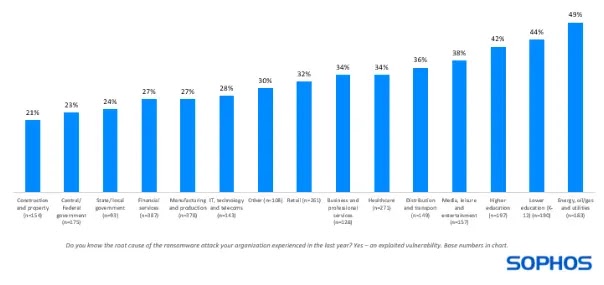
Nearly a third of ransomware attacks exploit unpatched vulnerabilities, with the percentage varying by industry, while energy, oil, and gas are hit hardest (49% of attacks), likely due to reliance on older, more vulnerable technologies with limited patching options.
Percentage of ransomware attacks that started with exploited vulnerability
Even when patches exist, over half (55%) of recent attacks involved known vulnerabilities like ProxyShell and Log4Shell, in which the risk of attacks also increases with organizational size as complex IT environments with a larger attack surface become harder to manage and patch effectively.
An analysis by Sophos shows that ransomware attacks exploiting vulnerabilities are more damaging than those using stolen credentials.
The vulnerability exploit method resulted in worse outcomes in all three aspects – compromising backups, encrypting data, and receiving ransom payments.
Attackers are just as likely to target backups in both methods but succeed more often (75% vs. 54%) when exploiting vulnerabilities, suggesting either higher attacker skill or weaker backup protection.
Data encryption also rises significantly (67% vs. 43%) with vulnerability exploits, possibly due to attacker skill or overall weaker defenses, where organizations with encrypted data are more likely to pay the ransom (71% vs. 45%) when backups are compromised, highlighting the pressure to recover critical data.
It has been found that ransomware attacks exploiting unpatched vulnerabilities are significantly more expensive and disruptive than those using stolen credentials.
While ransom amounts were similar, organizations were much less likely to have to pay the full ransom themselves when compromised credentials were the entry point.
Full recovery took significantly longer (over a month for 45% of victims) and cost four times more ($3 million vs. $750K) when vulnerabilities were exploited, likely because patching vulnerabilities and restoring damaged systems is more complex than resetting compromised credentials.